Case Study - How a Leading Medical device Company Effectively Tracked Utilization of Field Equipment and Measured Sales Performance Using BusinessObjects Xcelsius Dashboards Kumar Bhargava Sista Intelligroup, Inc.
Agenda About Customer Business Case About Xcelsius System Landscape & Data Flow Solution Final Output / Demo Best Practices Lessons Learned Business Benefits Future Steps Q&A
About Customer Multi-billion dollar leading Medical Device manufacturer Global operations span all the continents Has over 1000 Sales Representatives in USA alone Has over 20000 products and components with 40-50 new devices / components every year.
Business Scenario Average of 40-50 new product launches in a year # of Sales Reps increase each year to cater better to the customers One Device shipped to each Sales Rep to introduce new products Millions of dollars worth of Assets are in the field at any given time Assets are located: Directly with Sales Representatives Held at Branches to be shared by associated Sales Reps Customer site on consignment Limited or no visibility to Device location or its utilization by the sales force
Business Objective Develop an interactive dashboard to know / decide: Visibility to the location of Assets What is the utilization of Assets? Which Assets are to be moved to where/whom? How is the Sales Force performing? Track the Assets / Sales by Direct recipients, Branches and Others. How many assets need to be deployed? Expected Result:  Save Millions of dollars by reducing the number of Devices in the field with NO compromise in Sales.
User Profile Division Heads Head divisional sales operations Area Heads Lead areawise sales operations Regional Heads Lead regional sales operations Sales Admin Support sales force Product Department Product Marketing
About Xcelsius Allows rapid development of dashboard visualizations, based on drag and drop interface Interactive BI Dashboards through a flexible and easy to use point and click interface Extensible library of visualization components Many Data connectivity options XML, Web Service, etc with SAP & Non-SAP databases Can deploy easily to many environments, Microsoft Office tools, Adobe, Web Pages and Portals Transform Excel spreadsheets into interactive data visualizations Ability to perform Planning & Analysis
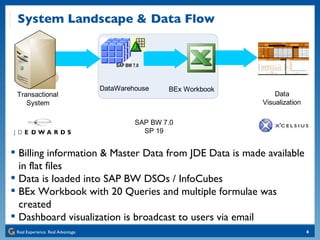
System Landscape & Data Flow Billing information & Master Data from JDE Data is made available in flat files Data is loaded into SAP BW DSOs / InfoCubes BEx Workbook with 20 Queries and multiple formulae was created Dashboard visualization is broadcast to users via email
Solution
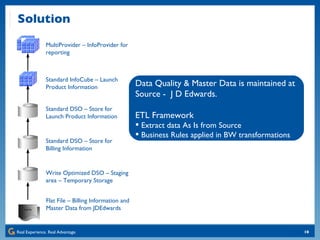
Solution Flat File – Billing Information and Master Data from JDEdwards Write Optimized DSO – Staging area – Temporary Storage Standard DSO – Store for Billing Information Standard DSO – Store for Launch Product Information Standard InfoCube – Launch Product Information MultiProvider – InfoProvider for reporting Data Quality & Master Data is maintained at Source -  J D Edwards. ETL Framework Extract data As Is from Source Business Rules applied in BW transformations
Key Performance Indicators KPI Definition Asset Dist. Plan # of Assets that are planned for distribution directly to Reps and Branches.  Current Onhand # of Assets currently held by Reps and Branches. Normalized YTD Normalized quantity of Assets held as of report date.  (Asset Qty)*(# of Days on Hand) / (# of days in Current year) Grants Rep. Value of the Assets accumulated as of Report date with the Rep  Cust. Value of the Assets accumulated as of Report date with the cust. Sales/Asset Normalized YTD "Sales – YTD” divided by “Asset – Normalized YTD”. Sales YTD “ Sales” from the Launch Date to the Report Date. LY “ Sales” for prior year.  YTD Units “ Sales” in units from Launch Date to the Report Date. # of Proc./Asset Estimated # of procedures conducted per field Asset.  {[Sales] / [Asset Val./Proc.]} / {Asset Current Onhand} Unutilized Assets Onhand # of Assets Onhand with no Sales since 4 weeks of Launch. % Assets Onhand to Total %age of Asset Unutilized to the Assets Onhand.  Unutilized Assets Sal. Val. Sales value of the Unutilized Assets Onhand.  # of Asset Transfers # of transfers of Assets between Reps, Branches and Reps & Branch.
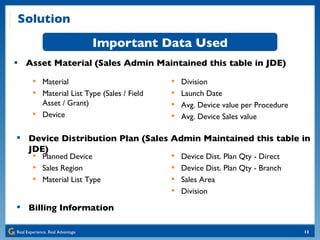
Solution Asset Material (Sales Admin Maintained this table in JDE) Important Data Used Device Distribution Plan (Sales Admin Maintained this table in JDE) Material Material List Type (Sales / Field Asset / Grant) Device Division Launch Date Avg. Device value per Procedure Avg. Device Sales value Planned Device Sales Region Material List Type Device Dist. Plan Qty - Direct Device Dist. Plan Qty - Branch Sales Area Division Billing Information
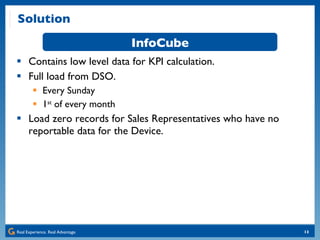
Solution Contains low level data for KPI calculation. Full load from DSO. Every Sunday 1 st  of every month Load zero records for Sales Representatives who have no reportable data for the Device. InfoCube
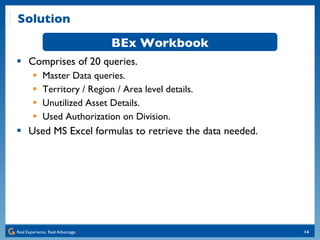
Solution Comprises of 20 queries. Master Data queries. Territory / Region / Area level details. Unutilized Asset Details. Used Authorization on Division. Used MS Excel formulas to retrieve the data needed. BEx Workbook
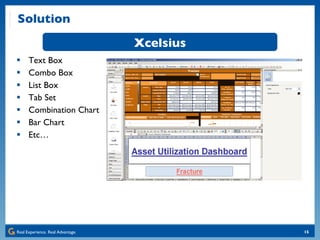
Solution Text Box Combo Box List Box Tab Set Combination Chart Bar Chart Etc… Xcelsius
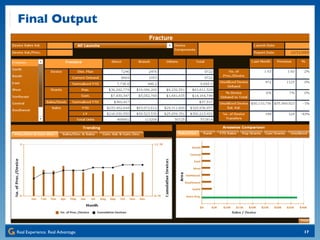
Final Output and Demo
Final Output
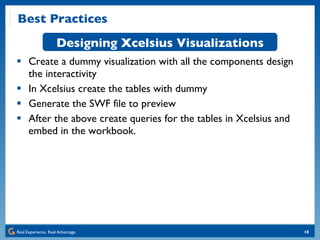
Best Practices Create a dummy visualization with all the components design the interactivity In Xcelsius create the tables with dummy Generate the SWF file to preview After the above create queries for the tables in Xcelsius and embed in the workbook. Designing Xcelsius Visualizations
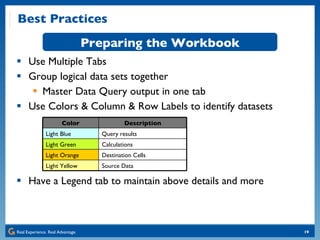
Best Practices Use Multiple Tabs Group logical data sets together Master Data Query output in one tab Use Colors & Column & Row Labels to identify datasets Have a Legend tab to maintain above details and more Preparing the Workbook Color Description Light Blue Query results Light Green Calculations Light Orange Destination Cells Light Yellow Source Data
Lessons Learned Use dashboard mock-ups to talk to the users – they may not be able to visualize the final output or the interactivity Think twice before you say it is a “quick change”. It always took more time to fix the issue than it seemed. Although Xcelsius is based on MS Excel, all the Excel formulae are not supported.
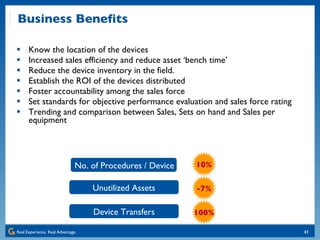
Business Benefits Know the location of the devices Increased sales efficiency and reduce asset ‘bench time’ Reduce the device inventory in the field. Establish the ROI of the devices distributed Foster accountability among the sales force Set standards for objective performance evaluation and sales force rating Trending and comparison between Sales, Sets on hand and Sales per equipment No. of Procedures / Device 10% -7% 100% Unutilized Assets Device Transfers
Future Steps… The company is now implementing SAP BO Enterprise XI Composite Xcelsius Dashboards that allow detailed data analysis and drilldowns Dashboards which give insight into customer sales. Marketing & Manufacturing departments are looking into the tool with increased awareness.
Q&A
Appendix Xcelsius 2008 General Best Practices:  http://www.sdn.sap.com/irj/boc/go/portal/prtroot/docs/library/uuid/a084a11c-6564-2b10-79ac-cc1eb3f017ac?QuickLink=index&overridelayout=true Using Master Data to Create Xcelsius Dashboards:  http://www.sdn.sap.com/irj/scn/go/portal/prtroot/docs/library/uuid/700a9b37-26e7-2c10-1ebd-d9742af7fcf0?QuickLink=index&overridelayout=true Xcelsius Gurus - Top 10 Excel Tips for Success:  http://www.sdn.sap.com/irj/boc/index?rid=/webcontent/uuid/907e07f3-b09c-2b10-a1bd-bdc869e133f4 A Six-Step Approach to Design an Xcelsius Dashboard:  http://www.sdn.sap.com/irj/scn/weblogs?blog=/pub/wlg/13282 Creating Dashboards with Xcelsius 2008:  http://www.sdn.sap.com/irj/scn/weblogs?blog=/pub/wlg/9893
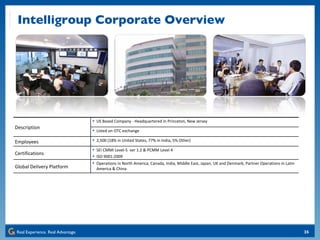
Intelligroup Corporate Overview Description US Based Company - Headquartered in Princeton, New Jersey Listed on OTC exchange Employees 2,500 (18% in United States, 77% in India, 5% Other) Certifications SEI CMMI Level-5  ver 1.2 & PCMM Level 4 ISO 9001:2009 Global Delivery Platform Operations in North America, Canada, India, Middle East, Japan, UK and Denmark; Partner Operations in Latin America & China
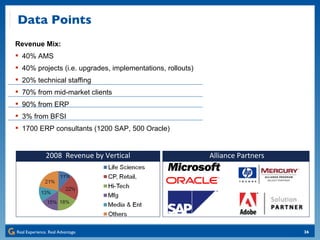
Alliance Partners 2008  Revenue by Vertical Revenue Mix: 40% AMS 40% projects (i.e. upgrades, implementations, rollouts)  20% technical staffing 70% from mid-market clients 90% from ERP 3% from BFSI 1700 ERP consultants (1200 SAP, 500 Oracle)  Data Points
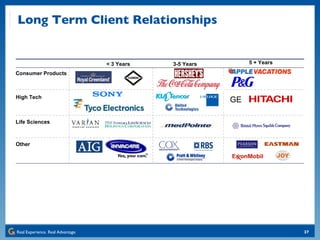
Consumer Products High Tech Life Sciences Other GE Long Term Client Relationships < 3 Years 3-5 Years 5 + Years
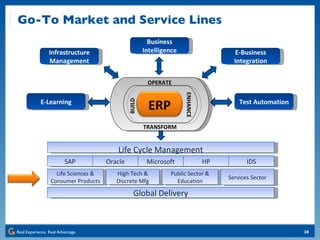
Infrastructure Management Business Intelligence E-Business Integration Test Automation E-Learning Go-To Market and Service Lines SAP Oracle Microsoft HP IDS Life Sciences & Consumer Products High Tech & Discrete Mfg Public Sector & Education Services Sector Global Delivery Life Cycle Management ERP OPERATE TRANSFORM BUILD ENHANCE
] Thank you for participating.   Kumar Bhagava Sista Principal Consultant [email_address] 609-558-1848

SAP BO Xcelsius Dashboard Case Study

  • 1.
    Case Study -How a Leading Medical device Company Effectively Tracked Utilization of Field Equipment and Measured Sales Performance Using BusinessObjects Xcelsius Dashboards Kumar Bhargava Sista Intelligroup, Inc.
  • 2.
    Agenda About CustomerBusiness Case About Xcelsius System Landscape & Data Flow Solution Final Output / Demo Best Practices Lessons Learned Business Benefits Future Steps Q&A
  • 3.
    About Customer Multi-billiondollar leading Medical Device manufacturer Global operations span all the continents Has over 1000 Sales Representatives in USA alone Has over 20000 products and components with 40-50 new devices / components every year.
  • 4.
    Business Scenario Averageof 40-50 new product launches in a year # of Sales Reps increase each year to cater better to the customers One Device shipped to each Sales Rep to introduce new products Millions of dollars worth of Assets are in the field at any given time Assets are located: Directly with Sales Representatives Held at Branches to be shared by associated Sales Reps Customer site on consignment Limited or no visibility to Device location or its utilization by the sales force
  • 5.
    Business Objective Developan interactive dashboard to know / decide: Visibility to the location of Assets What is the utilization of Assets? Which Assets are to be moved to where/whom? How is the Sales Force performing? Track the Assets / Sales by Direct recipients, Branches and Others. How many assets need to be deployed? Expected Result: Save Millions of dollars by reducing the number of Devices in the field with NO compromise in Sales.
  • 6.
    User Profile DivisionHeads Head divisional sales operations Area Heads Lead areawise sales operations Regional Heads Lead regional sales operations Sales Admin Support sales force Product Department Product Marketing
  • 7.
    About Xcelsius Allowsrapid development of dashboard visualizations, based on drag and drop interface Interactive BI Dashboards through a flexible and easy to use point and click interface Extensible library of visualization components Many Data connectivity options XML, Web Service, etc with SAP & Non-SAP databases Can deploy easily to many environments, Microsoft Office tools, Adobe, Web Pages and Portals Transform Excel spreadsheets into interactive data visualizations Ability to perform Planning & Analysis
  • 8.
    System Landscape &Data Flow Billing information & Master Data from JDE Data is made available in flat files Data is loaded into SAP BW DSOs / InfoCubes BEx Workbook with 20 Queries and multiple formulae was created Dashboard visualization is broadcast to users via email
  • 9.
  • 10.
    Solution Flat File– Billing Information and Master Data from JDEdwards Write Optimized DSO – Staging area – Temporary Storage Standard DSO – Store for Billing Information Standard DSO – Store for Launch Product Information Standard InfoCube – Launch Product Information MultiProvider – InfoProvider for reporting Data Quality & Master Data is maintained at Source - J D Edwards. ETL Framework Extract data As Is from Source Business Rules applied in BW transformations
  • 11.
    Key Performance IndicatorsKPI Definition Asset Dist. Plan # of Assets that are planned for distribution directly to Reps and Branches. Current Onhand # of Assets currently held by Reps and Branches. Normalized YTD Normalized quantity of Assets held as of report date. (Asset Qty)*(# of Days on Hand) / (# of days in Current year) Grants Rep. Value of the Assets accumulated as of Report date with the Rep Cust. Value of the Assets accumulated as of Report date with the cust. Sales/Asset Normalized YTD &quot;Sales – YTD” divided by “Asset – Normalized YTD”. Sales YTD “ Sales” from the Launch Date to the Report Date. LY “ Sales” for prior year. YTD Units “ Sales” in units from Launch Date to the Report Date. # of Proc./Asset Estimated # of procedures conducted per field Asset. {[Sales] / [Asset Val./Proc.]} / {Asset Current Onhand} Unutilized Assets Onhand # of Assets Onhand with no Sales since 4 weeks of Launch. % Assets Onhand to Total %age of Asset Unutilized to the Assets Onhand. Unutilized Assets Sal. Val. Sales value of the Unutilized Assets Onhand. # of Asset Transfers # of transfers of Assets between Reps, Branches and Reps & Branch.
  • 12.
    Solution Asset Material(Sales Admin Maintained this table in JDE) Important Data Used Device Distribution Plan (Sales Admin Maintained this table in JDE) Material Material List Type (Sales / Field Asset / Grant) Device Division Launch Date Avg. Device value per Procedure Avg. Device Sales value Planned Device Sales Region Material List Type Device Dist. Plan Qty - Direct Device Dist. Plan Qty - Branch Sales Area Division Billing Information
  • 13.
    Solution Contains lowlevel data for KPI calculation. Full load from DSO. Every Sunday 1 st of every month Load zero records for Sales Representatives who have no reportable data for the Device. InfoCube
  • 14.
    Solution Comprises of20 queries. Master Data queries. Territory / Region / Area level details. Unutilized Asset Details. Used Authorization on Division. Used MS Excel formulas to retrieve the data needed. BEx Workbook
  • 15.
    Solution Text BoxCombo Box List Box Tab Set Combination Chart Bar Chart Etc… Xcelsius
  • 16.
  • 17.
  • 18.
    Best Practices Createa dummy visualization with all the components design the interactivity In Xcelsius create the tables with dummy Generate the SWF file to preview After the above create queries for the tables in Xcelsius and embed in the workbook. Designing Xcelsius Visualizations
  • 19.
    Best Practices UseMultiple Tabs Group logical data sets together Master Data Query output in one tab Use Colors & Column & Row Labels to identify datasets Have a Legend tab to maintain above details and more Preparing the Workbook Color Description Light Blue Query results Light Green Calculations Light Orange Destination Cells Light Yellow Source Data
  • 20.
    Lessons Learned Usedashboard mock-ups to talk to the users – they may not be able to visualize the final output or the interactivity Think twice before you say it is a “quick change”. It always took more time to fix the issue than it seemed. Although Xcelsius is based on MS Excel, all the Excel formulae are not supported.
  • 21.
    Business Benefits Knowthe location of the devices Increased sales efficiency and reduce asset ‘bench time’ Reduce the device inventory in the field. Establish the ROI of the devices distributed Foster accountability among the sales force Set standards for objective performance evaluation and sales force rating Trending and comparison between Sales, Sets on hand and Sales per equipment No. of Procedures / Device 10% -7% 100% Unutilized Assets Device Transfers
  • 22.
    Future Steps… Thecompany is now implementing SAP BO Enterprise XI Composite Xcelsius Dashboards that allow detailed data analysis and drilldowns Dashboards which give insight into customer sales. Marketing & Manufacturing departments are looking into the tool with increased awareness.
  • 23.
  • 24.
    Appendix Xcelsius 2008General Best Practices: http://www.sdn.sap.com/irj/boc/go/portal/prtroot/docs/library/uuid/a084a11c-6564-2b10-79ac-cc1eb3f017ac?QuickLink=index&overridelayout=true Using Master Data to Create Xcelsius Dashboards: http://www.sdn.sap.com/irj/scn/go/portal/prtroot/docs/library/uuid/700a9b37-26e7-2c10-1ebd-d9742af7fcf0?QuickLink=index&overridelayout=true Xcelsius Gurus - Top 10 Excel Tips for Success: http://www.sdn.sap.com/irj/boc/index?rid=/webcontent/uuid/907e07f3-b09c-2b10-a1bd-bdc869e133f4 A Six-Step Approach to Design an Xcelsius Dashboard: http://www.sdn.sap.com/irj/scn/weblogs?blog=/pub/wlg/13282 Creating Dashboards with Xcelsius 2008: http://www.sdn.sap.com/irj/scn/weblogs?blog=/pub/wlg/9893
  • 25.
    Intelligroup Corporate OverviewDescription US Based Company - Headquartered in Princeton, New Jersey Listed on OTC exchange Employees 2,500 (18% in United States, 77% in India, 5% Other) Certifications SEI CMMI Level-5 ver 1.2 & PCMM Level 4 ISO 9001:2009 Global Delivery Platform Operations in North America, Canada, India, Middle East, Japan, UK and Denmark; Partner Operations in Latin America & China
  • 26.
    Alliance Partners 2008 Revenue by Vertical Revenue Mix: 40% AMS 40% projects (i.e. upgrades, implementations, rollouts) 20% technical staffing 70% from mid-market clients 90% from ERP 3% from BFSI 1700 ERP consultants (1200 SAP, 500 Oracle) Data Points
  • 27.
    Consumer Products HighTech Life Sciences Other GE Long Term Client Relationships < 3 Years 3-5 Years 5 + Years
  • 28.
    Infrastructure Management BusinessIntelligence E-Business Integration Test Automation E-Learning Go-To Market and Service Lines SAP Oracle Microsoft HP IDS Life Sciences & Consumer Products High Tech & Discrete Mfg Public Sector & Education Services Sector Global Delivery Life Cycle Management ERP OPERATE TRANSFORM BUILD ENHANCE
  • 29.
    ] Thank youfor participating. Kumar Bhagava Sista Principal Consultant [email_address] 609-558-1848