Demystify BI tools for your organization

Presented By: Bharti Meisuria
Agenda
When

What

Who

 Introduction
 Your BI questions demystified
 BAASS BI
10:00 – 11:30 am

Bharti Meisuria

 Sage BI

Debbie Hill

 Info Explorer

Rob Lavery

 BI Metrix

Ram Hasson
What is BI?

Technology that transforms
raw data into
meaningful and useful information for
business purposes
Why BI?
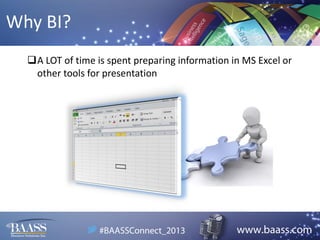
A LOT of time is spent preparing information in MS Excel or
other tools for presentation
Why BI?
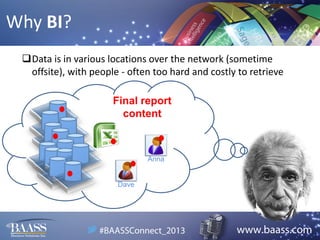
Data is in various locations over the network (sometime
offsite), with people - often too hard and costly to retrieve
Final report
content

Anna

Dave
Why BI?
We spend more time pulling the data together than focusing
on analysis and interpretation of it
Why BI?
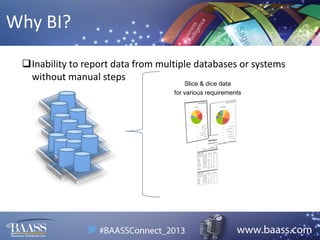
Inability to report data from multiple databases or systems
without manual steps
Slice & dice data
for various requirements
Why BI?
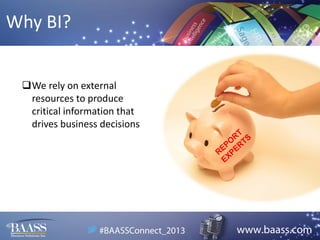
We rely on external
resources to produce
critical information that
drives business decisions
Selecting a BI Tool

OR
Selecting BI Tool
We offer customized engagement (BI Demystified) to work with
you through the selection process

(See: http://www.baass.com/services/business-intelligence)

o Your needs
o Resources & skill-set
o Budget considerations – short & long term
o Current applications & IS environment
o Future vision & goals
o Much more…
Solutions Overview
 What are the different types of reports that can be generated – financial and
operational? Management, analytical, trend, drill down etc.
 What is involved in configuring the tool to extract reports for various needs?
 What are the different sources of data – applications, third party, modules etc.
 Typical installation / configuration / roll-out timelines
 How the solution will scale
BAASS BI

One of the recent additions to the
BAASS add-ons family…(demo)
Sage BI

Presented By: Debbie Hill
Sage BI
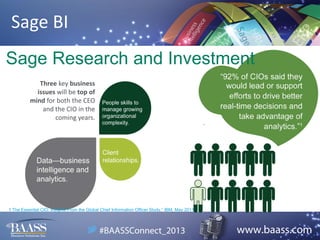
Sage Research and Investment
Three key business
issues will be top of
mind for both the CEO
and the CIO in the
coming years.

1 The Essential CIO: Insights From the Global Chief Information Officer Study,” IBM, May 2011.
Sage BI
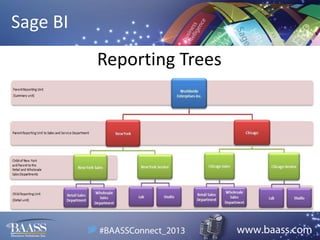
Reporting Trees
• Typical company hierarchical reporting
structure
• “Reporting Units” are either Parent/Child or
Summary/Detail
• Lower units “roll up” to higher units
Sage BI
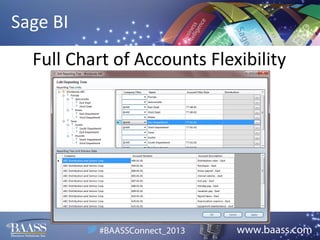
Full Chart of Accounts Flexibility
Sage BI
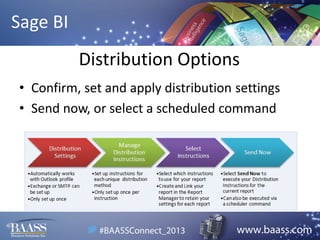
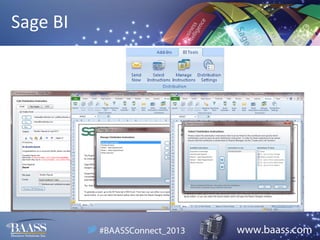
Distribution Options
• Confirm, set and apply distribution settings
• Send now, or select a scheduled command
Sage BI
Sage BI
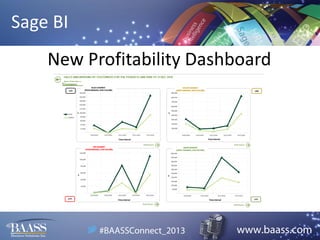
New Profitability Dashboard
Sage BI
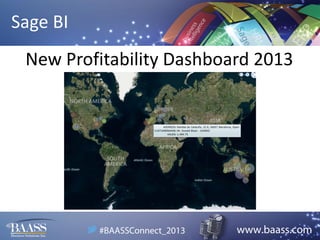
New Profitability Dashboard 2013
Info Explorer

Presented By: Rob Lavery
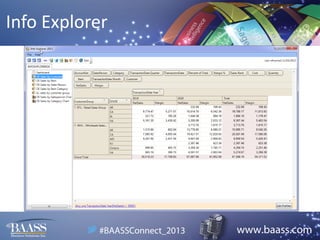
Info Explorer

Info Explorer Slides
Info Explorer
• Info- Explorer is great for Operational Analytics
• Represents a tool that can play a key role in the
strategic planning process of an organization.
• Can drill down into underlying Sage 300 ERP
screens
• More cost effective than creating multiple Crystal
Reports
• Can easily access other databases
• Does not require advanced Excel knowledge
Info Explorer
• User-defined formatting, filtering & formulas helps
you focus on what is most important to measure.
• Summarize, drill down, drill into and “slice and dice”
your Sage 300 ERP data in real time.
• Avoid creating multiple custom report templates
Info Explorer
The Problem with Custom Crystal Reports:
•
•
•
•
•
•

Hard/costly to implement
Hard to modify (static)
Not scalable
No process for upgrading
Out of an accountant’s comfort zone
Managers have to ask for them
Info Explorer
• Intuitive, multi-dimensional data cubes & graphical
reporting combined in customizable Dashboards.
• Cater for your individual reporting needs by saving
your own “views” on the desktop.
• Clear insight into business operations to help you
make the right decision, every time.
Info Explorer
Key Benefits of Utilizing Orchid’s Info Explorer
• Creates a process for consistent, high quality
delivery of value-added data.
• Effectively communicates an understanding of
trends / value in your organization.
• Decision Makers love it!!
Info Explorer
Info Explorer Addresses Pain Points Like:
• Lack of accurate and timely reporting resulting in
guesswork and poor decision making
• Key operational data not available for reporting
• Time consuming & inefficient report preparation
• Over reliance on spreadsheets for reporting
• Business and productivity monitored using intuition
and not operational metrics
Info Explorer
Orchid’s Info Explorer Lite – How To Get Started
FREE tool can be downloaded and installed in less
than 15 minutes. Runs for 30 Days.
Sample Cubes can be connected to your live Sage
300 ERP database for analysis purposes.
After 30 Days, request an Activation Code to run the
software indefinitely at no charge.
Limitations of Info Explorer Lite:
1) Can’t create new cubes or modify existing cubes
2) Can’t export to Excel
Info Explorer
1) Info Explorer handles financial, operational,
management, analytical, budget, forecast and ad hoc
reports.
2) Write a SQL Query to extract data out of the Sage
300 ERP database to create 1 cube file (versus multiple
report templates/files) which allows a user to format
and filter data into multiple views/reports & graphs =
dashboard
3) Info Explorer can access 1 or multiple Sage 300 ERP
company databases (any table) and any other ODBC
compliant data source in 1 cube file.
Info Explorer
4) Info Explorer installs and connects to a Sage
300 ERP company database in 15 minutes. Custom
Cubes can typically be developed in 2 or 3 Hours
based on requirements. Training is usually 30
minutes or less. Most implementations are 20
Hours including budget and analytics cubes.
5) InfoExplorer has been based on “in memory”
technology as it enables users to have immediate
access to accurate information which results in
more informed decisions.
Info Explorer
5) Con’t Info Explorer handles up to 1 to 2 million
rows of summarized data – depending on number
of fields etc) which translates into many multiples
of individual rows of data in the data base. This is
typically what most Sage 300 ERP customers need
and can afford versus a full blown traditional BI
data warehouse and implementation.
BI Metrix

Presented By: Ram Hasson
BI Metrix
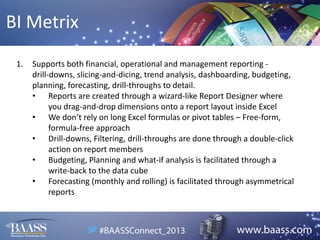
1.

Supports both financial, operational and management reporting drill-downs, slicing-and-dicing, trend analysis, dashboarding, budgeting,
planning, forecasting, drill-throughs to detail.
• Reports are created through a wizard-like Report Designer where
you drag-and-drop dimensions onto a report layout inside Excel
• We don’t rely on long Excel formulas or pivot tables – Free-form,
formula-free approach
• Drill-downs, Filtering, drill-throughs are done through a double-click
action on report members
• Budgeting, Planning and what-if analysis is facilitated through a
write-back to the data cube
• Forecasting (monthly and rolling) is facilitated through asymmetrical
reports
BI Metrix
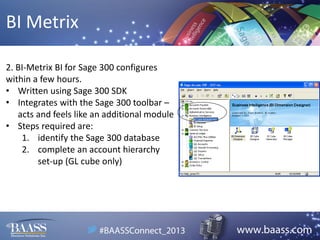
2. BI-Metrix BI for Sage 300 configures
within a few hours.
• Written using Sage 300 SDK
• Integrates with the Sage 300 toolbar –
acts and feels like an additional module
• Steps required are:
1. identify the Sage 300 database
2. complete an account hierarchy
set-up (GL cube only)
BI Metrix
3. BI-Metrix BI for Sage 300 out-of-the-box supports the following
Sage 300 modules: GL, AR, AP, OE, IC
• Additional modules and other data sources are covered
through custom integration
4. Typical installation is to budget 1.5 - 2 days for both configuration
and training
• We offer both remote or onsite training
BI Metrix
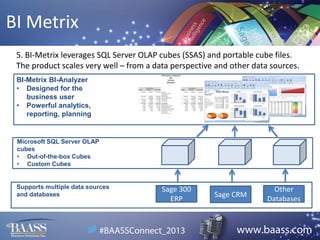
5. BI-Metrix leverages SQL Server OLAP cubes (SSAS) and portable cube files.
The product scales very well – from a data perspective and other data sources.
BI-Metrix BI-Analyzer
• Designed for the
business user
• Powerful analytics,
reporting, planning

Microsoft SQL Server OLAP
cubes
• Out-of-the-box Cubes
• Custom Cubes

Supports multiple data sources
and databases

Sage 300
ERP

Sage CRM

Other
Databases
Thank you!

Talk to your Account Manager,
email or visit our booth for more
information

BAASS Connect 2013 Why Business Intelligence is Important to SMB's

  • 1.
    Demystify BI toolsfor your organization Presented By: Bharti Meisuria
  • 2.
    Agenda When What Who  Introduction  YourBI questions demystified  BAASS BI 10:00 – 11:30 am Bharti Meisuria  Sage BI Debbie Hill  Info Explorer Rob Lavery  BI Metrix Ram Hasson
  • 3.
    What is BI? Technologythat transforms raw data into meaningful and useful information for business purposes
  • 4.
    Why BI? A LOTof time is spent preparing information in MS Excel or other tools for presentation
  • 5.
    Why BI? Data isin various locations over the network (sometime offsite), with people - often too hard and costly to retrieve Final report content Anna Dave
  • 6.
    Why BI? We spendmore time pulling the data together than focusing on analysis and interpretation of it
  • 7.
    Why BI? Inability toreport data from multiple databases or systems without manual steps Slice & dice data for various requirements
  • 8.
    Why BI? We relyon external resources to produce critical information that drives business decisions
  • 9.
  • 10.
    Selecting BI Tool Weoffer customized engagement (BI Demystified) to work with you through the selection process (See: http://www.baass.com/services/business-intelligence) o Your needs o Resources & skill-set o Budget considerations – short & long term o Current applications & IS environment o Future vision & goals o Much more…
  • 11.
    Solutions Overview  Whatare the different types of reports that can be generated – financial and operational? Management, analytical, trend, drill down etc.  What is involved in configuring the tool to extract reports for various needs?  What are the different sources of data – applications, third party, modules etc.  Typical installation / configuration / roll-out timelines  How the solution will scale
  • 12.
    BAASS BI One ofthe recent additions to the BAASS add-ons family…(demo)
  • 13.
  • 14.
    Sage BI Sage Researchand Investment Three key business issues will be top of mind for both the CEO and the CIO in the coming years. 1 The Essential CIO: Insights From the Global Chief Information Officer Study,” IBM, May 2011.
  • 15.
    Sage BI Reporting Trees •Typical company hierarchical reporting structure • “Reporting Units” are either Parent/Child or Summary/Detail • Lower units “roll up” to higher units
  • 16.
    Sage BI Full Chartof Accounts Flexibility
  • 17.
    Sage BI Distribution Options •Confirm, set and apply distribution settings • Send now, or select a scheduled command
  • 18.
  • 19.
  • 20.
  • 21.
  • 22.
  • 23.
    Info Explorer • Info-Explorer is great for Operational Analytics • Represents a tool that can play a key role in the strategic planning process of an organization. • Can drill down into underlying Sage 300 ERP screens • More cost effective than creating multiple Crystal Reports • Can easily access other databases • Does not require advanced Excel knowledge
  • 24.
    Info Explorer • User-definedformatting, filtering & formulas helps you focus on what is most important to measure. • Summarize, drill down, drill into and “slice and dice” your Sage 300 ERP data in real time. • Avoid creating multiple custom report templates
  • 25.
    Info Explorer The Problemwith Custom Crystal Reports: • • • • • • Hard/costly to implement Hard to modify (static) Not scalable No process for upgrading Out of an accountant’s comfort zone Managers have to ask for them
  • 26.
    Info Explorer • Intuitive,multi-dimensional data cubes & graphical reporting combined in customizable Dashboards. • Cater for your individual reporting needs by saving your own “views” on the desktop. • Clear insight into business operations to help you make the right decision, every time.
  • 27.
    Info Explorer Key Benefitsof Utilizing Orchid’s Info Explorer • Creates a process for consistent, high quality delivery of value-added data. • Effectively communicates an understanding of trends / value in your organization. • Decision Makers love it!!
  • 28.
    Info Explorer Info ExplorerAddresses Pain Points Like: • Lack of accurate and timely reporting resulting in guesswork and poor decision making • Key operational data not available for reporting • Time consuming & inefficient report preparation • Over reliance on spreadsheets for reporting • Business and productivity monitored using intuition and not operational metrics
  • 29.
    Info Explorer Orchid’s InfoExplorer Lite – How To Get Started FREE tool can be downloaded and installed in less than 15 minutes. Runs for 30 Days. Sample Cubes can be connected to your live Sage 300 ERP database for analysis purposes. After 30 Days, request an Activation Code to run the software indefinitely at no charge. Limitations of Info Explorer Lite: 1) Can’t create new cubes or modify existing cubes 2) Can’t export to Excel
  • 30.
    Info Explorer 1) InfoExplorer handles financial, operational, management, analytical, budget, forecast and ad hoc reports. 2) Write a SQL Query to extract data out of the Sage 300 ERP database to create 1 cube file (versus multiple report templates/files) which allows a user to format and filter data into multiple views/reports & graphs = dashboard 3) Info Explorer can access 1 or multiple Sage 300 ERP company databases (any table) and any other ODBC compliant data source in 1 cube file.
  • 31.
    Info Explorer 4) InfoExplorer installs and connects to a Sage 300 ERP company database in 15 minutes. Custom Cubes can typically be developed in 2 or 3 Hours based on requirements. Training is usually 30 minutes or less. Most implementations are 20 Hours including budget and analytics cubes. 5) InfoExplorer has been based on “in memory” technology as it enables users to have immediate access to accurate information which results in more informed decisions.
  • 32.
    Info Explorer 5) Con’tInfo Explorer handles up to 1 to 2 million rows of summarized data – depending on number of fields etc) which translates into many multiples of individual rows of data in the data base. This is typically what most Sage 300 ERP customers need and can afford versus a full blown traditional BI data warehouse and implementation.
  • 33.
  • 34.
    BI Metrix 1. Supports bothfinancial, operational and management reporting drill-downs, slicing-and-dicing, trend analysis, dashboarding, budgeting, planning, forecasting, drill-throughs to detail. • Reports are created through a wizard-like Report Designer where you drag-and-drop dimensions onto a report layout inside Excel • We don’t rely on long Excel formulas or pivot tables – Free-form, formula-free approach • Drill-downs, Filtering, drill-throughs are done through a double-click action on report members • Budgeting, Planning and what-if analysis is facilitated through a write-back to the data cube • Forecasting (monthly and rolling) is facilitated through asymmetrical reports
  • 35.
    BI Metrix 2. BI-MetrixBI for Sage 300 configures within a few hours. • Written using Sage 300 SDK • Integrates with the Sage 300 toolbar – acts and feels like an additional module • Steps required are: 1. identify the Sage 300 database 2. complete an account hierarchy set-up (GL cube only)
  • 36.
    BI Metrix 3. BI-MetrixBI for Sage 300 out-of-the-box supports the following Sage 300 modules: GL, AR, AP, OE, IC • Additional modules and other data sources are covered through custom integration 4. Typical installation is to budget 1.5 - 2 days for both configuration and training • We offer both remote or onsite training
  • 37.
    BI Metrix 5. BI-Metrixleverages SQL Server OLAP cubes (SSAS) and portable cube files. The product scales very well – from a data perspective and other data sources. BI-Metrix BI-Analyzer • Designed for the business user • Powerful analytics, reporting, planning Microsoft SQL Server OLAP cubes • Out-of-the-box Cubes • Custom Cubes Supports multiple data sources and databases Sage 300 ERP Sage CRM Other Databases
  • 38.
    Thank you! Talk toyour Account Manager, email or visit our booth for more information