Microsoft Cloud Database SolutionsMark KromerMicrosoft Certified Technology Specialistmkromer@microsoft.comhttp://www.sqlmag.com/blogs/sql-server-bi.aspxhttp://mssqldude.wordpress.comhttp://twitter.com/mssqldude
Microsoft Cloud Database ProductsSQL AzurePart of Windows Azure platformSQL Server in the cloudUse same SQL Server toolsCloud BIMostly hybrid solutions todayVery near to reaching full cloud enablementAzure Reporting Services, Crescent, mobile, PowerPivot, DM in the CloudWindows AzurePlatform to build Cloud & mobile solutionsAzure Marketplace
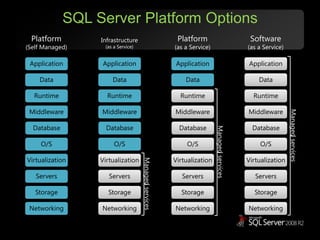
SQL Server Platform OptionsPlatform(as a Service)Infrastructure(as a Service)Software(as a Service)Platform(Self Managed)ApplicationsApplicationsApplicationsApplicationsDataDataDataDataRuntimeRuntimeRuntimeRuntimeMiddlewareMiddlewareMiddlewareMiddlewareManaged servicesManaged servicesDatabaseDatabaseDatabaseDatabaseO/SO/SO/SO/SManaged servicesVirtualizationVirtualizationVirtualizationVirtualizationServersServersServersServersStorageStorageStorageStorageNetworkingNetworkingNetworkingNetworking
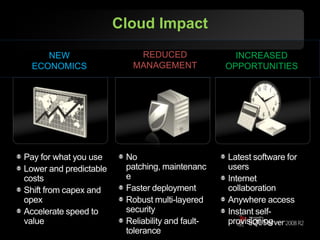
Cloud ImpactREDUCED MANAGEMENTNEW ECONOMICSINCREASED OPPORTUNITIESPay for what you useLower and predictable costsShift from capex and opexAccelerate speed to valueNo patching, maintenanceFaster deploymentRobust multi-layered securityReliability and fault-toleranceLatest software for usersInternet collaboration  Anywhere accessInstant self-provisioning
“By 2012, 80% of Fortune 1000 enterprises will be using some cloud computing services, 20% of businesses will own no IT assets.”“The bottom line: Early adopters are finding serious benefits, meaning that cloud computing is real and warrants your scrutiny as a new set of platforms for business applications.”
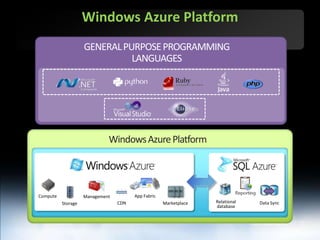
Windows Azure PlatformGENERAL PURPOSE PROGRAMMING LANGUAGESWindows Azure PlatformApp FabricComputeManagementRelational databaseCDNStorageData SyncMarketplace
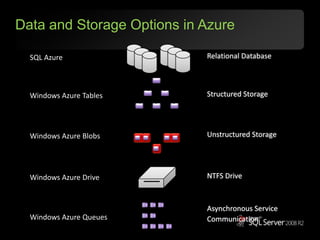
Data and Storage Options in AzureRelational DatabaseSQL AzureStructured StorageWindows Azure TablesUnstructured StorageWindows Azure BlobsNTFS DriveWindows Azure DriveAsynchronous Service CommunicationWindows Azure Queues
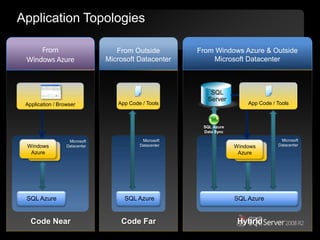
Application TopologiesFrom Windows AzureFrom Outside Microsoft Datacenter  From Windows Azure & Outside Microsoft Datacenter SQL ServerApp Code / ToolsApp Code / ToolsApplication / BrowserSQL Azure Data SyncMicrosoft DatacenterMicrosoftDatacenterMicrosoft DatacenterWindows AzureWindows AzureSQL Azure SQL Azure SQL Azure Code NearCode FarHybrid
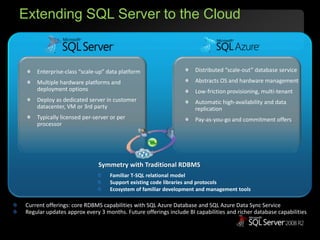
Extending SQL Server to the CloudDistributed “scale-out” database serviceAbstracts OS and hardware managementLow-friction provisioning, multi-tenantAutomatic high-availability and data replicationPay-as-you-go and commitment offersEnterprise-class “scale-up” data platformMultiple hardware platforms and deployment optionsDeploy as dedicated server in customer datacenter, VM or 3rd partyTypically licensed per-server or per processorSymmetry with Traditional RDBMSFamiliar T-SQL relational modelSupport existing code libraries and protocolsEcosystem of familiar development and management toolsCurrent offerings: core RDBMS capabilities with SQL Azure Database and SQL Azure Data Sync ServiceRegular updates approx every 3 months. Future offerings include BI capabilities and richer database capabilities
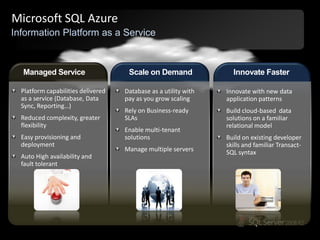
Microsoft SQL AzureInformation Platform as a ServiceScale on DemandInnovate FasterManaged ServicePlatform capabilities delivered as a service (Database, Data Sync, Reporting…)Reduced complexity, greater flexibilityEasy provisioning and deploymentAuto High availability and fault tolerantDatabase as a utility with pay as you grow scalingRely on Business-ready SLAsEnable multi-tenant solutionsManage multiple serversInnovate with new data application patternsBuild cloud-based  data solutions on a familiar relational modelBuild on existing developer skills and familiar Transact-SQL syntax
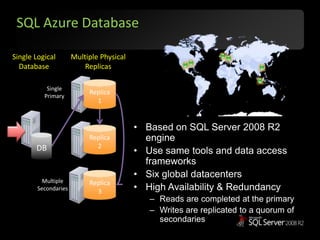
SQL Azure DatabaseSingle LogicalDatabaseMultiple PhysicalReplicasReplica 1Single PrimaryBased on SQL Server 2008 R2 engineUse same tools and data access frameworksSix global datacentersHigh Availability & RedundancyReads are completed at the primaryWrites are replicated to a quorum of secondariesReplica 2DBReplica 3MultipleSecondaries
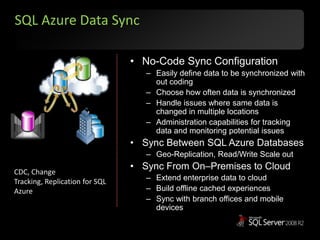
SQL Azure Data SyncNo-Code Sync ConfigurationEasily define data to be synchronized with out codingChoose how often data is synchronizedHandle issues where same data is changed in multiple locationsAdministration capabilities for tracking data and monitoring potential issuesSync Between SQL Azure DatabasesGeo-Replication, Read/Write Scale outSync From On–Premises to CloudExtend enterprise data to cloudBuild offline cached experiencesSync with branch offices and mobile devicesCDC, Change Tracking, Replication for SQL Azure
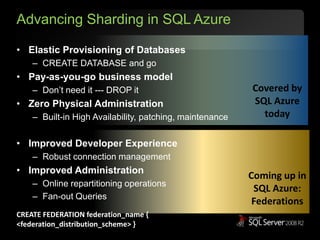
Advancing Sharding in SQL AzureElastic Provisioning of DatabasesCREATE DATABASE and goPay-as-you-go business modelDon’t need it --- DROP itZero Physical AdministrationBuilt-in High Availability, patching, maintenanceImproved Developer ExperienceRobust connection managementImproved AdministrationOnline repartitioning operationsFan-out QueriesCovered bySQL Azure today Coming up in SQL Azure:FederationsCREATE FEDERATION federation_name { <federation_distribution_scheme> }
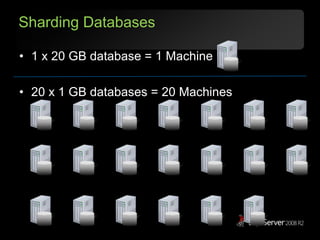
Sharding Databases1 x 20 GB database = 1 Machine20 x 1 GB databases = 20 Machines
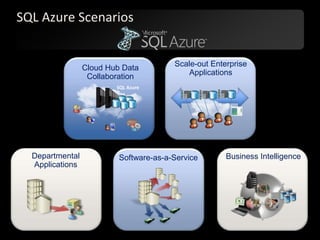
SQL Azure ScenariosScale-out Enterprise ApplicationsCloud Hub Data CollaborationSQL AzureDepartmental ApplicationsBusiness IntelligenceSoftware-as-a-Service
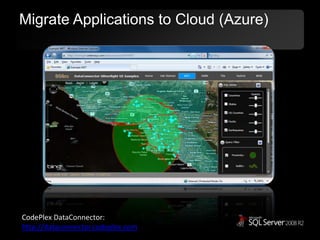
Migrate Applications to Cloud (Azure)CodePlexDataConnector: http://dataconnector.codeplex.com
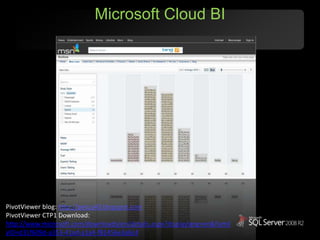
Microsoft Cloud BIPivotViewer blog: http://petcu40.blogspot.comPivotViewerCTP1 Download: http://www.microsoft.com/downloads/en/details.aspx?displaylang=en&FamilyID=d31f609d-a353-41ad-a1a4-f81456e3a6c4
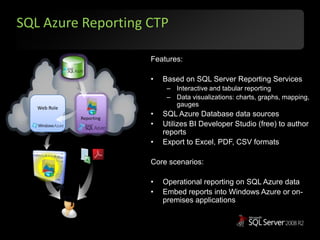
SQL Azure Reporting CTPFeatures:Based on SQL Server Reporting ServicesInteractive and tabular reportingData visualizations: charts, graphs, mapping, gaugesSQL Azure Database data sourcesUtilizes BI Developer Studio (free) to author reportsExport to Excel, PDF, CSV formatsCore scenarios:Operational reporting on SQL Azure dataEmbed reports into Windows Azure or on-premises applicationsWeb RoleReporting
Current State of the BI market placeSaaSGood data, Pivotlink, LogiXML, PentahoPaaSBusiness Objects, SAS, Microsoft Azure, Vertica, Greenplum, Google apps
Current State of the BI market placeIaaSInfrastructureAWS, Rackspace, GoGridCloud ManagementElastra, RightscaleDB/DWMySQL, Oracle, SQL server,BI JasperReports, Pentaho
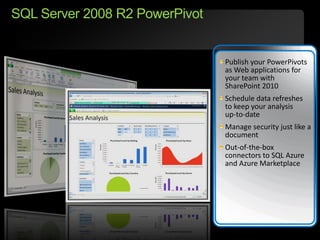
SQL Server 2008 R2 PowerPivotPublish your PowerPivots as Web applications for your team with SharePoint 2010Schedule data refreshes to keep your analysis up-to-dateManage security just like a documentOut-of-the-box connectors to SQL Azure and Azure Marketplace
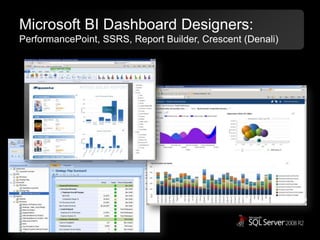
Microsoft BI Dashboard Designers:PerformancePoint, SSRS, Report Builder, Crescent (Denali)
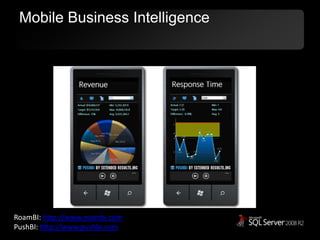
Mobile Business IntelligenceRoamBI: http://www.roambi.comPushBI: http://www.pushbi.com
ResourcesIntro to SQL Azure
http://windows.azure.com
http://sql.azure.com

Microsoft Cloud Database & Cloud BI

  • 1.
    Microsoft Cloud DatabaseSolutionsMark KromerMicrosoft Certified Technology Specialistmkromer@microsoft.comhttp://www.sqlmag.com/blogs/sql-server-bi.aspxhttp://mssqldude.wordpress.comhttp://twitter.com/mssqldude
  • 2.
    Microsoft Cloud DatabaseProductsSQL AzurePart of Windows Azure platformSQL Server in the cloudUse same SQL Server toolsCloud BIMostly hybrid solutions todayVery near to reaching full cloud enablementAzure Reporting Services, Crescent, mobile, PowerPivot, DM in the CloudWindows AzurePlatform to build Cloud & mobile solutionsAzure Marketplace
  • 3.
    SQL Server PlatformOptionsPlatform(as a Service)Infrastructure(as a Service)Software(as a Service)Platform(Self Managed)ApplicationsApplicationsApplicationsApplicationsDataDataDataDataRuntimeRuntimeRuntimeRuntimeMiddlewareMiddlewareMiddlewareMiddlewareManaged servicesManaged servicesDatabaseDatabaseDatabaseDatabaseO/SO/SO/SO/SManaged servicesVirtualizationVirtualizationVirtualizationVirtualizationServersServersServersServersStorageStorageStorageStorageNetworkingNetworkingNetworkingNetworking
  • 4.
    Cloud ImpactREDUCED MANAGEMENTNEWECONOMICSINCREASED OPPORTUNITIESPay for what you useLower and predictable costsShift from capex and opexAccelerate speed to valueNo patching, maintenanceFaster deploymentRobust multi-layered securityReliability and fault-toleranceLatest software for usersInternet collaboration Anywhere accessInstant self-provisioning
  • 5.
    “By 2012, 80%of Fortune 1000 enterprises will be using some cloud computing services, 20% of businesses will own no IT assets.”“The bottom line: Early adopters are finding serious benefits, meaning that cloud computing is real and warrants your scrutiny as a new set of platforms for business applications.”
  • 6.
    Windows Azure PlatformGENERALPURPOSE PROGRAMMING LANGUAGESWindows Azure PlatformApp FabricComputeManagementRelational databaseCDNStorageData SyncMarketplace
  • 7.
    Data and StorageOptions in AzureRelational DatabaseSQL AzureStructured StorageWindows Azure TablesUnstructured StorageWindows Azure BlobsNTFS DriveWindows Azure DriveAsynchronous Service CommunicationWindows Azure Queues
  • 8.
    Application TopologiesFrom WindowsAzureFrom Outside Microsoft Datacenter From Windows Azure & Outside Microsoft Datacenter SQL ServerApp Code / ToolsApp Code / ToolsApplication / BrowserSQL Azure Data SyncMicrosoft DatacenterMicrosoftDatacenterMicrosoft DatacenterWindows AzureWindows AzureSQL Azure SQL Azure SQL Azure Code NearCode FarHybrid
  • 9.
    Extending SQL Serverto the CloudDistributed “scale-out” database serviceAbstracts OS and hardware managementLow-friction provisioning, multi-tenantAutomatic high-availability and data replicationPay-as-you-go and commitment offersEnterprise-class “scale-up” data platformMultiple hardware platforms and deployment optionsDeploy as dedicated server in customer datacenter, VM or 3rd partyTypically licensed per-server or per processorSymmetry with Traditional RDBMSFamiliar T-SQL relational modelSupport existing code libraries and protocolsEcosystem of familiar development and management toolsCurrent offerings: core RDBMS capabilities with SQL Azure Database and SQL Azure Data Sync ServiceRegular updates approx every 3 months. Future offerings include BI capabilities and richer database capabilities
  • 10.
    Microsoft SQL AzureInformationPlatform as a ServiceScale on DemandInnovate FasterManaged ServicePlatform capabilities delivered as a service (Database, Data Sync, Reporting…)Reduced complexity, greater flexibilityEasy provisioning and deploymentAuto High availability and fault tolerantDatabase as a utility with pay as you grow scalingRely on Business-ready SLAsEnable multi-tenant solutionsManage multiple serversInnovate with new data application patternsBuild cloud-based data solutions on a familiar relational modelBuild on existing developer skills and familiar Transact-SQL syntax
  • 11.
    SQL Azure DatabaseSingleLogicalDatabaseMultiple PhysicalReplicasReplica 1Single PrimaryBased on SQL Server 2008 R2 engineUse same tools and data access frameworksSix global datacentersHigh Availability & RedundancyReads are completed at the primaryWrites are replicated to a quorum of secondariesReplica 2DBReplica 3MultipleSecondaries
  • 12.
    SQL Azure DataSyncNo-Code Sync ConfigurationEasily define data to be synchronized with out codingChoose how often data is synchronizedHandle issues where same data is changed in multiple locationsAdministration capabilities for tracking data and monitoring potential issuesSync Between SQL Azure DatabasesGeo-Replication, Read/Write Scale outSync From On–Premises to CloudExtend enterprise data to cloudBuild offline cached experiencesSync with branch offices and mobile devicesCDC, Change Tracking, Replication for SQL Azure
  • 13.
    Advancing Sharding inSQL AzureElastic Provisioning of DatabasesCREATE DATABASE and goPay-as-you-go business modelDon’t need it --- DROP itZero Physical AdministrationBuilt-in High Availability, patching, maintenanceImproved Developer ExperienceRobust connection managementImproved AdministrationOnline repartitioning operationsFan-out QueriesCovered bySQL Azure today Coming up in SQL Azure:FederationsCREATE FEDERATION federation_name { <federation_distribution_scheme> }
  • 14.
    Sharding Databases1 x20 GB database = 1 Machine20 x 1 GB databases = 20 Machines
  • 15.
    SQL Azure ScenariosScale-outEnterprise ApplicationsCloud Hub Data CollaborationSQL AzureDepartmental ApplicationsBusiness IntelligenceSoftware-as-a-Service
  • 16.
    Migrate Applications toCloud (Azure)CodePlexDataConnector: http://dataconnector.codeplex.com
  • 17.
    Microsoft Cloud BIPivotViewerblog: http://petcu40.blogspot.comPivotViewerCTP1 Download: http://www.microsoft.com/downloads/en/details.aspx?displaylang=en&FamilyID=d31f609d-a353-41ad-a1a4-f81456e3a6c4
  • 18.
    SQL Azure ReportingCTPFeatures:Based on SQL Server Reporting ServicesInteractive and tabular reportingData visualizations: charts, graphs, mapping, gaugesSQL Azure Database data sourcesUtilizes BI Developer Studio (free) to author reportsExport to Excel, PDF, CSV formatsCore scenarios:Operational reporting on SQL Azure dataEmbed reports into Windows Azure or on-premises applicationsWeb RoleReporting
  • 19.
    Current State ofthe BI market placeSaaSGood data, Pivotlink, LogiXML, PentahoPaaSBusiness Objects, SAS, Microsoft Azure, Vertica, Greenplum, Google apps
  • 20.
    Current State ofthe BI market placeIaaSInfrastructureAWS, Rackspace, GoGridCloud ManagementElastra, RightscaleDB/DWMySQL, Oracle, SQL server,BI JasperReports, Pentaho
  • 21.
    SQL Server 2008R2 PowerPivotPublish your PowerPivots as Web applications for your team with SharePoint 2010Schedule data refreshes to keep your analysis up-to-dateManage security just like a documentOut-of-the-box connectors to SQL Azure and Azure Marketplace
  • 22.
    Microsoft BI DashboardDesigners:PerformancePoint, SSRS, Report Builder, Crescent (Denali)
  • 23.
    Mobile Business IntelligenceRoamBI:http://www.roambi.comPushBI: http://www.pushbi.com
  • 24.
  • 25.
  • 26.

Editor's Notes

  • #4 Slide Objectives:Explain the differences and relationship between IaaS, PaaS, and SaaS in more detail.Speaking Points:Here’s another way to look at the cloud services taxonomy and how this taxonomy maps to the components in an IT infrastructure. Packaged SoftwareWith packaged software a customer would be responsible for managing the entire stack – ranging from the network connectivity to the applications. IaaSWith Infrastructure as a Service, the lower levels of the stack are managed by a vendor. Some of these components can be provided by traditional hosters – in fact most of them have moved to having a virtualized offering. Very few actually provide an OSThe customer is still responsible for managing the OS through the Applications. For the developer, an obvious benefit with IaaS is that it frees the developer from many concerns when provisioning physical or virtual machines. This was one of the earliest and primary use cases for Amazon Web Services Elastic Cloud Compute (EC2). Developers were able to readily provision virtual machines (AMIs) on EC2, develop and test solutions and, often, run the results ‘in production’. The only requirement was a credit card to pay for the services.PaaSWith Platform as a Service, everything from the network connectivity through the runtime is provided and managed by the platform vendor. The Windows Azure Platform best fits in this category today. In fact because we don’t provide access to the underlying virtualization or operating system today, we’re often referred to as not providing IaaS.PaaS offerings further reduce the developer burden by additionally supporting the platform runtime and related application services. With PaaS, the developer can, almost immediately, begin creating the business logic for an application. Potentially, the increases in productivity are considerable and, because the hardware and operational aspects of the cloud platform are also managed by the cloud platform provider, applications can quickly be taken from an idea to reality very quickly.SaaSFinally, with SaaS, a vendor provides the application and abstracts you from all of the underlying components.
  • #5 Key Points:The cloud can help save money, increase productivity and reduce management complexitiesThis can create new business opportunitiesScript:This ability to move things to the cloud, use the cloud for extra compute or storage or expose or share your services with others leads to some benefits:First, it offers a new set of economic opportunities. Gain better control over your money (New economics)from saving money by not having to run and maintain large datacenters yourselfin some cases moving to IT as a subscription so that you only pay for what you use, when you use itby giving you the opportunity to shift from capital expenses to operational expensesReduced management:No patching and maintenanceFaster deploymentRobust multi-layered securityReliability and fault-toleranceRedefining Productivity: by increasing access to information and applicationsby increasing collaboration because many of the tools they use are now connected togetherby helping your IT staff focus more on business and less on plumbing and hardware (no patching and maintenance, faster deployment, etc) quickly adapt to changing business needs New EconomicsReduced ManagementRedefining Productivity
  • #6 Key Points:Script:Businesses are moving to the cloud. Analysts predict that the vast majority of large businesses will be using some type of cloud services in the next few years and that many will drastically be cutting the IT assets that they run and maintain in favor of pushing it to others to run for them. If you’re looking at a new IT project or you’re facing some new business challenges, it’s worth taking a look to see if the cloud can help you.This all probably sounds good from a theoretical standpoint but whose actually doing this today?
  • #7 Introduce SQL Azure as part of Microsoft’s Cloud PlatformWhen SQL Azure section expands, talk to the key platform capabilities provided by SQL Azure (Database, Reporting and DataSync)These capabilities and why and how we developed them will be covered in subsequent slides.
  • #9 Slide ObjectiveDiscusses various SQL Azure data access topologiesSpeaking notesAccess from within Microsoft Datacenter (Code near scenario)Connect a Windows Azure Compute application to SQL AzureExecuting Asp.NET code, PHP, other managed code, native codeSimple familiar programming modelAccess from on premise applications (Code far)Solve the DB under the desk issue.NET, native or other platform supportMicrosoft access as a front end offers interesting scenarioNeed to be conscious of query frequency and/or payloadAccess from both Cloud and On PremiseE.g. application with browser front and AND a need to sync to mobile devicesCloud provides an always up rendezvous point for data consumersWindows Azure runs the browser based applicationOther applications connect remotely- TDS, Odata, SncNotesMSDN on topology optionshttp://msdn.microsoft.com/en-us/library/ee336239.aspxSQL Azure + MS Accesshttp://blogs.msdn.com/b/access/archive/2010/06/07/access-2010-and-sql-azure.aspx
  • #10 Initial services – core RDBMS capabilities as a service SQL Azure Database(SADB), Data SyncFuture OfferingsAdditional data platform capabilities as a service: BI/DSS, DWNew services: Reference Data, Secure Data HubSQL Azure is an umbrella brand that covers all the services we intend to offer over time. Post v1 services are in grey. Data sync will be in CTP.Key takeaway: Start with core RDBMS features and expand from there. Integrate with on-premise SQL.High-Value Database ServicesRich data platform capabilities as a service: Reporting, Analytics, Integration, DW, … New services: Data Hub, DataPlex, Association Hub (Data-&gt;Information), …Extending our Data Platform to the cloud, generating a network effect:Benefit cloud business with Enterprise connectionsBenefit Enterprise business with cloud connectionsEnable new uses of data to drive additional business value – e.g. “Federated data”
  • #11 Self-ManagedCore data capabilities as a ServiceReduce complexity and innovate faster by quickly consuming data capabilities as ServiceBuilt for the cloud – not porting on-premises VMs More than a DB - Relational Database as a Service, Reporting, Data SyncNo physical AdministrationEasy Provisioning and DeploymentWizard-based provisioningSimple database deploymentNo hardware, physical DB or file management requiredSelf-healing platformAuto High AvailabilityBuilt-in fault-tolerantAutomated maintenanceElastic ScaleDatabase as a service Easy to Scale –out across multiple database. Pay-as-you-grow databasesMulti-tenant data hostingLogical schema per tenant with isolated physical storageProvision new tenants quickly and easily Business-Ready SLAsReliability Security management across multiple databasesDeveloper Agility – Symmetry with on-premisesLeverage familiar T-SQL based relational database model Transact-SQL ADO.NET OLE DB, ODBC, and JDBC LINQ Entity Framework ADO.NET Data ServicesIntegration with existing tools to ensure rapid development and symmetry with on-premises DBVisual StudioSQL Server Management Studio Innovate with new data application patternsBuild for new scenarios that extend the reach of your data to a large audience – customers, partners, branch offices and devices.Try new cloud scenarios with SQL Azure Reporting, Data Sync and the Dallas Marketplace
  • #12 Slide ObjectiveUse this slide to transition into an explanation of SQL Azure Database (Reporting and Data Sync will be covered later)Explain at a high level how SQL Azure worksSpeaker NotesDesign Principle of SQL Azure: Focus on combining the best features of SQL Server running at scale with low frictionSQL Azure is a high availability databaseAlways three transaction consistent replicas of the databaseOne primary replica; two slave replicasFailure of a replica will result in another replica being spun up immediately by the fabricFailure of the primary replica means a slave replica will become the primary and a new slave will spin upMinimal down timeTypically just a few dropped connectionsEasy to code for the failover scenario- if you are ding god connection management and error handling will be fineClustered index required on all tables to allow replicationNotesUseful article from SQL Azure teamhttp://msdn.microsoft.com/en-us/magazine/ee321567.aspx
  • #13 Elastic ScaleService scales as resources requirements growNo-Code Sync ConfigurationEasily define data to be synchronizedSchedule SyncChoose how often data is synchronizedConflict HandlingHandle issues where same data is changed in multiple locationsLogging and MonitoringAdministration capabilities for tracking data and monitoring potential issues
  • #14 Sharded Databases ProvidesUnlimited Scalability Throughput not possible with a single scale-up nodeBest price/performanceSQL Azure Provides the FoundationHighly available on top of commodity hardwareZero admin of cluster, HW, &amp; SWElastic pool of resources with Pay-as-you-go Model
  • #16 Cloud Hub – Data CollaborationCustomer ChallengesExtending data trapped within firewalls to partners and branch officesExtending reach of data to new devices and applicationsOrganizational silos resulting in multiple copies of data Consolidating and streamlining data for multiple parties collaborationSQL Azure BenefitsSecure and easy extension or consolidation of data into cloudAbility to expose data from SQL Azure with existing frameworksData Sync keeps on-premises and cloud database synchronizedScenario CasesB2B Supply/Value chain collaboration using information hubEasy data sharing to public and partnersMobile applications and remote workers accessing data that is extended to the cloud Scale-out Enterprise ApplicationsCustomer ChallengesEfficiently utilizing resources for predictable business patternsDifficult to roll out extra capacity quicklyEnable new solutions at scale without additional investmentSQL Azure BenefitsFully managed, highly scalable, cloud-based relational database as a service with pay as you go modelBuilt-in high availability, fault tolerance and automated management (no VMs)Ability to handle spikes in demand and scale up or scale down on demandScenariosEnterprise building scalable web application in cloud to benefit from greater flexibility.Enterprise uses cloud database to handle unpredictable variations in demand Departmental ApplicationsCustomer ChallengesData loss or compliance concerns due to data scattered across organizationLack of agility in provisioning databases for departmental needsSQL Azure BenefitsSelf –managing, highly scalable relational database as a service built on SQL Server technologyEasy web-based provisioning and fully automated relational database as a serviceAbility to connect from existing Access front-end applications to data stored in SQL AzureFamiliar programming model and tools to build, migrate and manage databases.Scenario CasesMigration/consolidation of data into a more managed cloud environment.Allowing central IT to “upsize” data into more managed scalable cloud databases.Departmental applications created to be quickly and efficiently provisioned. Software-as-a-Service (SaaS applications)Customer ChallengesGeo-expansion and reaching new markets fasterMonetizing IP more effectively and expanding reachReliably and efficiently scaling to meet customer and business needsFlexibility to pay as you grow without large upfront hardware investmentsSQL Azure BenefitsCreate multi-tenant service with easy scale up and scale downSelf-managed, highly available and fault tolerant service with a pay-as-you-go modelFamiliar programming model and toolsScenario CasesEnhancing traditional on-premises deployments.Building multi-tenant offering to scale and compete with more options to customers.Enabling solutions to provide more options to customers and partners for different needs and deployment. Business IntelligenceCustomer ChallengesQuickly building solutions that enable analysis of internal and external information.Integrate 3rd party data to provider deeper and richer analysis in a seamless manner.SQL Azure BenefitsNative data connectivity from SQL Azure to Office.Ability to combine data in SQL Azure with third partyScenario CasesAn enterprise using data in SQL Azure and integrating with on-premises tools.Multi-party solution provides opportunity for end-to-end visibility and analysis.Enterprise leveraging SQL Azure BI to create reports and perform analysis over their data
  • #22 Purpose of the slideHighlight the benefits of SharePoint Server 2010 to facilitate seamless and secure sharing and collaboration on user-generated BI solutions. Key Points: SharePoint 2010 makes it safe and easy for users to work together and boosts the productivity of project teams and business unitsStandard SharePoint permissions and workflows enable IT departments to coordinate how users share their solutionsAutomatic data refresh even for source systems over the Internet ensures accurate analysis and decision-makingReuse of workbooks and reports accelerates solution delivery, cuts development costs, and facilitates timely decisionsConclusion: To exploit all the BI capabilities available with PowerPivot for Excel 2010, deploy SQL Server 2008 R2 in a SharePoint 2010 environment.
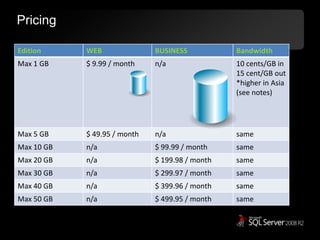
  • #26 This is current as of March 7, 2011Pricing table - http://www.microsoft.com/windowsazure/pricing/#sqlWeb Edition: Up to 1 GB relational database = $9.99 / month Up to 5 GB relational database = $49.95 / month** Business Edition: Up to 10 GB relational database = $99.99 / month Up to 20 GB relational database = $199.98 / month** Up to 30 GB relational database = $299.97 / month** Up to 40 GB relational database = $399.96 / month** Up to 50 GB relational database = $499.95 / month** Data transfers = $0.10 in / $0.15 out / GB - ($0.30 in / $0.45 out / GB in Asia)* * No charge for inbound data transfers during off-peak times through October 31, 2010** SQL Azure 50 GB Business Edition Database and 5 GB Web Edition Database will be available starting on June 28, 2010.