


With Responsive Web Design
Eric Overfield
SharePoint Advocate and Enthusiast
PixelMill
Enhance SharePoint
Introduction – Eric Overfield
 Founder and SharePoint Branding/UI Lead, PixelMill
 Speaker, Teacher, Advocate
 Author, SharePoint Community Organizer
 Located in Davis, CA
ericoverfield.com
@EricOverfield
Order Your Copy
http://pxml.ly/zsqykd
Co-author: “Pro SharePoint 2013 Branding and Responsive
Web Development” (Apress – June 12th, 2013)
Co-author: “Black Magic Solutions for
White Hat SharePoint” (August, 2013)
What You Will Learn
 The What and Why of Responsive Web Design (RWD)
 Planning for Responsive Design
 Join Response Web Design and SharePoint
 SharePoint 2013 Considerations
@EricOverfield - pixelmill.com
Responsive Web Design
 A “new-ish” web design methodology
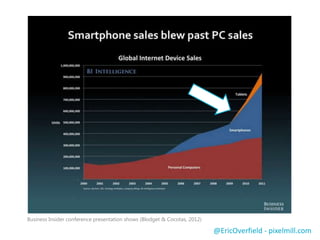
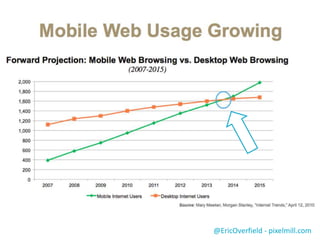
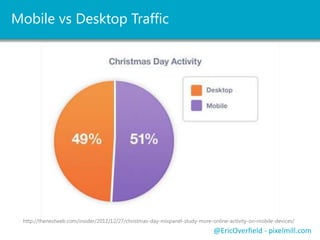
 Addresses growing number of Internet devices
 Tailored experience for any device
 Limit resizing, panning and scrolling
@EricOverfield - pixelmill.com
 The Key: All devices load the same page
@EricOverfield - pixelmill.com
Progressive
Enhancement
Graceful
Degradation
Adaptive WebDesign
Responsive WebDesign Desktop FirstMobile First
Related Terms
Why We Need It
@EricOverfield - pixelmill.com
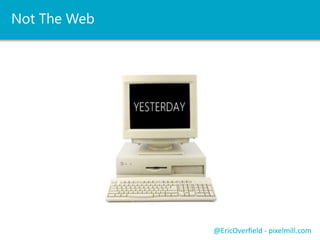
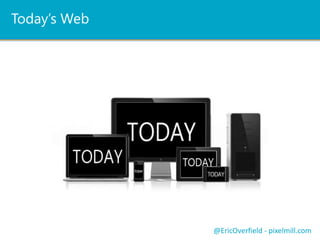
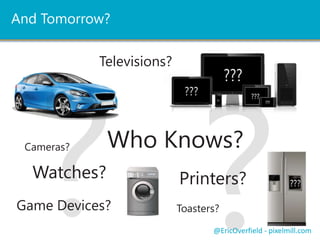
So Many Different Devices
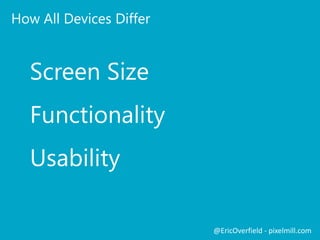
 Screen size (viewport, proportions, resolution)
 Functionality (clicks, hover, touch, swipe…)
 Usability (can your site be used on any device?)
@EricOverfield - pixelmill.com
"There’s a plethora of devices
out there with widely differing
abilities – it’s never been more
confusing or challenging to
create brilliant interfaces that
work across them all.” ~ Jeffery
Zeldman
@EricOverfield - pixelmill.com
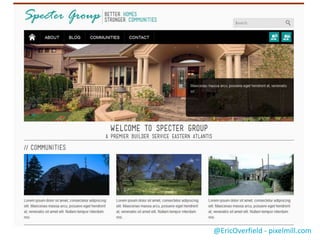
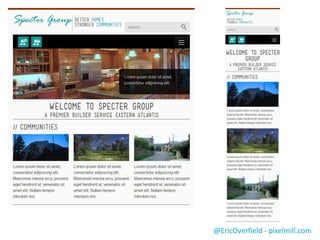
Responsive Design
In Action
@EricOverfield - pixelmill.com
Fundamentals of RWD
@EricOverfield - pixelmill.com
The 3 Pillars of Responsive Web Design
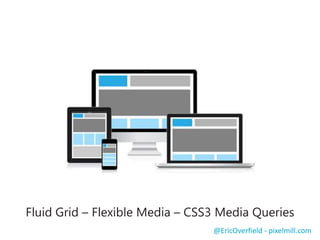
Fluid Grid – Flexible Media – CSS3 Media Queries
@EricOverfield - pixelmill.com
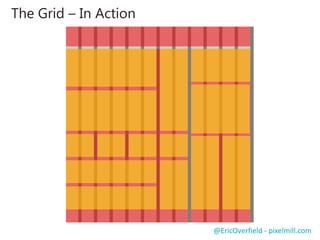
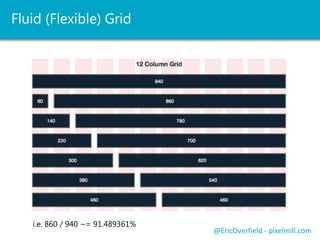
Fluid Grid
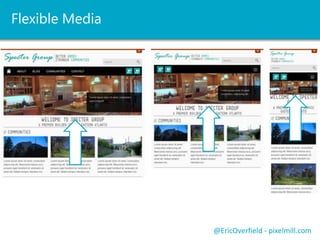
Push NotificationsLet’s See a ComparisonFlexible Media
@EricOverfield - pixelmill.com
 Flexible Images
 Flexible Video
 Proportional Text
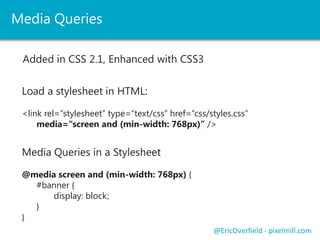
Push NotificationsLet’s See a ComparisonMedia Queries
@EricOverfield - pixelmill.com
In-Line Media Query:
<link rel="stylesheet" media="screen and (min-width: 768px)" href=“tablet.css" />
<link rel="stylesheet" media="screen and (max-width: 599px)" href=“small.css" />
Media Query in a Stylesheet
@media screen and (min-width: 768px) {
#banner {
display: block;
}
}
Added in CSS 2.1, Enhanced with CSS3
Device ability to handle orientation
Beyond the Pillars
@EricOverfield - pixelmill.com
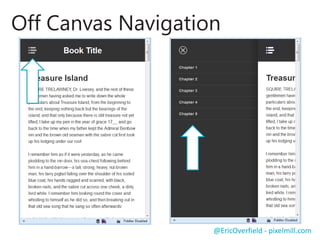
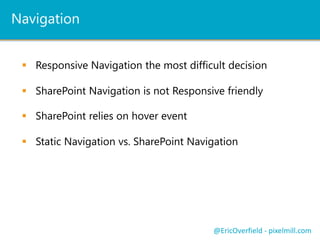
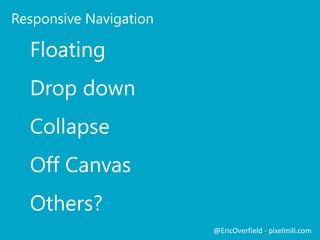
Navigation
 How will your navigation adapt to different viewports
 Responsive navigation may require thought
 Only basic SharePoint OOTB navigation is RWD friendly
 Multi-level SP OOTB navigation relies on hover
@EricOverfield - pixelmill.com
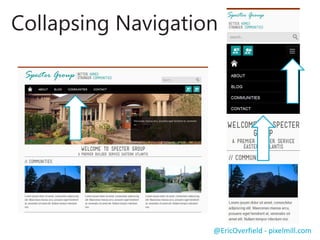
Example RWD
Navigation - Collapsing
@EricOverfield - pixelmill.com
Mobile First
 Build and code mobile interface first
 Mobile friendly – progressively enhance
 Forces us to concentrate on content
 *Caveats for IE8
@EricOverfield - pixelmill.com
Mobile First
In Action
@EricOverfield - pixelmill.com
Planning For
Responsive Design
@EricOverfield - pixelmill.com
Begin With Site Planning
 This should be familiar...
 Start with content / site purpose
 Sitemap
 Information Architecture
 What’s different…
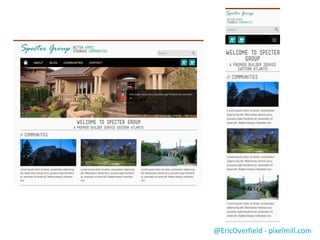
 Wireframing – including for mobile devices
 High fidelity mockups – including for mobile devices
Design to the extremes, then fill in the gaps
@EricOverfield - pixelmill.com
Always Remember SharePoint
 What will be a part of the Master Page
 How will Page Layout content be defined
 How will you handle navigation
 Will you include the quick launch on all pages
@EricOverfield - pixelmill.com
Responsive Friendly
Wireframes and Mockups
@EricOverfield - pixelmill.com
Time to Code it Up
A HTML Prototype
@EricOverfield - pixelmill.com
Your Own Grid Vs Existing Framework
 Pre-built responsive and fluid grids
 Saves time and resources
 Many includes extras
 i.e. collapsing navigation
@EricOverfield - pixelmill.com
Frameworks Pluses and Minuses
 May take time to learn framework
 Not always SharePoint ready OOTB
 Can save you a bunch of time!
@EricOverfield - pixelmill.com
Twitter Bootstrap
Zurb Foundation
Skeleton
Less Framework
and so many more
@EricOverfield - pixelmill.com
A Responsive
HTML Prototype
@EricOverfield - pixelmill.com
Joining RWD
And SharePoint
@EricOverfield - pixelmill.com
Convert Key Components to SharePoint
 Distill page into Master Page and Page Layout(s)
 Fix framework to work with SharePoint
 Or use pre-converted RWD framework for SharePoint
 Add SharePoint controls, snippets (2013) and navigation
@EricOverfield - pixelmill.com
Convert a Responsive
Prototype to SharePoint
@EricOverfield - pixelmill.com
https://sprwd-public.sharepoint.com/
A Quick Review
 The What and Why of Responsive Web Design (RWD)
 Planning for Responsive Design
 Join Response Web Design and SharePoint
@EricOverfield - pixelmill.com
Coding Responsive Design
 Responsive SharePoint at CodePlex
 Free, Open Source Responsive SharePoint Frameworks
 SharePoint 2010/2013 Ready
 http://responsivesharepoint.codeplex.com
 SP Blueprint (SharePoint 2013)
 SharePoint 2013 responsive framework
 A lean, custom grid
 http://spblueprint.codeplex.com/
SharePoint and Responsive DesignPush NotificationsLet’s See a ComparisonResponsive Frameworks and SharePoint
@EricOverfield - pixelmill.com
Mobile First and IE8 / IE7
 Will only load mobile view
@EricOverfield - pixelmill.com
 Fix with CSS Media Queries
 JS Library: http://pxml.ly/zcw2jb2 (Among others)
 So we need to use JS?
<!--[if lt IE 9]>
<script src="http://css3-mediaqueries-js.googlecode.com/files/css3-mediaqueries.js"></script>
<![endif]-->
 Or an IE8- stylesheet
<!--[if lt IE 9]>
<link rel="stylesheet" type="text/css“ href=“/styles/styles-ie8.css” />
<![endif]-->
And SharePoint 2013?
@EricOverfield - pixelmill.com
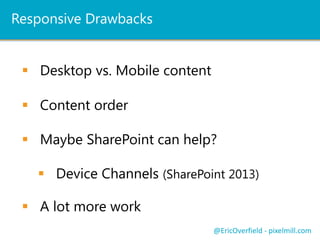
Device Channels
 New to SharePoint 2013
 Interfaces tailored and maps to specific device(s)
 Custom Master Pages per Channel
 Custom DeviceChannelPanels
 Change the order of content!
@EricOverfield - pixelmill.com
Device Channels – An Example
@EricOverfield - pixelmill.com
Eric’s Practical Tips to #SPRWD
 Use a prebuilt framework (SharePoint ready)
 Set project budget, deliverables and expectations accordingly
 Develop for the real world (will mobile users need to edit pages?)
 Don’t break SharePoint!*
 Mobile first (with caveats)
 Be sure you are very comfortable with CSS/HTML
 Test, and test, and test some more
 Train content authors! RWD relies on groomed content.
@EricOverfield - pixelmill.com
Resources
"Responsive Web Design" by Ethan Marcotte
http://pxml.ly/23fkmjd
Responsive Frameworks for SharePoint 2010 and 2013
http://responsivesharepoint.codeplex.com
SharePoint 2010 Responsive Web design Template by Luis Kerr
http://pxml.ly/xvr2ny
v5, the Responsive HTML5 Master Page for SharePoint 2010 by Kyle Schaeffer
http://pxml.ly/i3dbxre
Ethan Marcotte’s 20 Favorite Responsive Designs
http://pxml.ly/yqiyor
Configure SharePoint Server 2010 for Mobile Device Access
http://pxml.ly/vh3hhca
html5shiv
http://pxml.ly/uzcz32
Modernizr
http://modernizr.com
css3-mediaqueries-js
http://pxml.ly/zcw2jb2 @EricOverfield - pixelmill.com
Resources
Twitter Bootstrap
http://pxml.ly/d3qbekq
Implementing Off Canvas Navigation
http://pxml.ly/26ajefj
Less Framework
http://pxml.ly/y4wq8w
Skeleton Framework
http://pxml.ly/t2gkrft
Zurb Foundation
http://pxml.ly/wcxkqv
@EricOverfield - pixelmill.com
Order Your Copy
http://pxml.ly/zsqykd
“Pro SharePoint 2013 Branding and Responsive Web Development”
(Apress – June 12th, 2013)
With Responsive Web Design
Enhance SharePoint
Thank You
Eric Overfield
@EricOverfield
ericoverfield.com
eoverfield@pixelmill.com

Enhancing SharePoint with Responsive Web Design

  • 1.
    With Responsive WebDesign Eric Overfield SharePoint Advocate and Enthusiast PixelMill Enhance SharePoint
  • 2.
    Introduction – EricOverfield  Founder and SharePoint Branding/UI Lead, PixelMill  Speaker, Teacher, Advocate  Author, SharePoint Community Organizer  Located in Davis, CA ericoverfield.com @EricOverfield Order Your Copy http://pxml.ly/zsqykd Co-author: “Pro SharePoint 2013 Branding and Responsive Web Development” (Apress – June 12th, 2013) Co-author: “Black Magic Solutions for White Hat SharePoint” (August, 2013)
  • 3.
    What You WillLearn  The What and Why of Responsive Web Design (RWD)  Planning for Responsive Design  Join Response Web Design and SharePoint  SharePoint 2013 Considerations @EricOverfield - pixelmill.com
  • 4.
    Responsive Web Design A “new-ish” web design methodology  Addresses growing number of Internet devices  Tailored experience for any device  Limit resizing, panning and scrolling @EricOverfield - pixelmill.com  The Key: All devices load the same page
  • 5.
    @EricOverfield - pixelmill.com Progressive Enhancement Graceful Degradation AdaptiveWebDesign Responsive WebDesign Desktop FirstMobile First Related Terms
  • 6.
    Why We NeedIt @EricOverfield - pixelmill.com
  • 7.
    So Many DifferentDevices  Screen size (viewport, proportions, resolution)  Functionality (clicks, hover, touch, swipe…)  Usability (can your site be used on any device?) @EricOverfield - pixelmill.com
  • 8.
    "There’s a plethoraof devices out there with widely differing abilities – it’s never been more confusing or challenging to create brilliant interfaces that work across them all.” ~ Jeffery Zeldman @EricOverfield - pixelmill.com
  • 9.
  • 10.
  • 11.
    @EricOverfield - pixelmill.com The3 Pillars of Responsive Web Design Fluid Grid – Flexible Media – CSS3 Media Queries
  • 12.
  • 13.
    Push NotificationsLet’s Seea ComparisonFlexible Media @EricOverfield - pixelmill.com  Flexible Images  Flexible Video  Proportional Text
  • 14.
    Push NotificationsLet’s Seea ComparisonMedia Queries @EricOverfield - pixelmill.com In-Line Media Query: <link rel="stylesheet" media="screen and (min-width: 768px)" href=“tablet.css" /> <link rel="stylesheet" media="screen and (max-width: 599px)" href=“small.css" /> Media Query in a Stylesheet @media screen and (min-width: 768px) { #banner { display: block; } } Added in CSS 2.1, Enhanced with CSS3 Device ability to handle orientation
  • 15.
  • 16.
    Navigation  How willyour navigation adapt to different viewports  Responsive navigation may require thought  Only basic SharePoint OOTB navigation is RWD friendly  Multi-level SP OOTB navigation relies on hover @EricOverfield - pixelmill.com
  • 17.
    Example RWD Navigation -Collapsing @EricOverfield - pixelmill.com
  • 18.
    Mobile First  Buildand code mobile interface first  Mobile friendly – progressively enhance  Forces us to concentrate on content  *Caveats for IE8 @EricOverfield - pixelmill.com
  • 19.
  • 20.
  • 21.
    Begin With SitePlanning  This should be familiar...  Start with content / site purpose  Sitemap  Information Architecture  What’s different…  Wireframing – including for mobile devices  High fidelity mockups – including for mobile devices Design to the extremes, then fill in the gaps @EricOverfield - pixelmill.com
  • 22.
    Always Remember SharePoint What will be a part of the Master Page  How will Page Layout content be defined  How will you handle navigation  Will you include the quick launch on all pages @EricOverfield - pixelmill.com
  • 23.
    Responsive Friendly Wireframes andMockups @EricOverfield - pixelmill.com
  • 24.
    Time to Codeit Up A HTML Prototype @EricOverfield - pixelmill.com
  • 25.
    Your Own GridVs Existing Framework  Pre-built responsive and fluid grids  Saves time and resources  Many includes extras  i.e. collapsing navigation @EricOverfield - pixelmill.com
  • 26.
    Frameworks Pluses andMinuses  May take time to learn framework  Not always SharePoint ready OOTB  Can save you a bunch of time! @EricOverfield - pixelmill.com
  • 27.
    Twitter Bootstrap Zurb Foundation Skeleton LessFramework and so many more @EricOverfield - pixelmill.com
  • 28.
  • 29.
  • 30.
    Convert Key Componentsto SharePoint  Distill page into Master Page and Page Layout(s)  Fix framework to work with SharePoint  Or use pre-converted RWD framework for SharePoint  Add SharePoint controls, snippets (2013) and navigation @EricOverfield - pixelmill.com
  • 31.
    Convert a Responsive Prototypeto SharePoint @EricOverfield - pixelmill.com https://sprwd-public.sharepoint.com/
  • 32.
    A Quick Review The What and Why of Responsive Web Design (RWD)  Planning for Responsive Design  Join Response Web Design and SharePoint @EricOverfield - pixelmill.com
  • 33.
    Coding Responsive Design Responsive SharePoint at CodePlex  Free, Open Source Responsive SharePoint Frameworks  SharePoint 2010/2013 Ready  http://responsivesharepoint.codeplex.com  SP Blueprint (SharePoint 2013)  SharePoint 2013 responsive framework  A lean, custom grid  http://spblueprint.codeplex.com/ SharePoint and Responsive DesignPush NotificationsLet’s See a ComparisonResponsive Frameworks and SharePoint @EricOverfield - pixelmill.com
  • 34.
    Mobile First andIE8 / IE7  Will only load mobile view @EricOverfield - pixelmill.com  Fix with CSS Media Queries  JS Library: http://pxml.ly/zcw2jb2 (Among others)  So we need to use JS? <!--[if lt IE 9]> <script src="http://css3-mediaqueries-js.googlecode.com/files/css3-mediaqueries.js"></script> <![endif]-->  Or an IE8- stylesheet <!--[if lt IE 9]> <link rel="stylesheet" type="text/css“ href=“/styles/styles-ie8.css” /> <![endif]-->
  • 35.
  • 36.
    Device Channels  Newto SharePoint 2013  Interfaces tailored and maps to specific device(s)  Custom Master Pages per Channel  Custom DeviceChannelPanels  Change the order of content! @EricOverfield - pixelmill.com
  • 37.
    Device Channels –An Example @EricOverfield - pixelmill.com
  • 38.
    Eric’s Practical Tipsto #SPRWD  Use a prebuilt framework (SharePoint ready)  Set project budget, deliverables and expectations accordingly  Develop for the real world (will mobile users need to edit pages?)  Don’t break SharePoint!*  Mobile first (with caveats)  Be sure you are very comfortable with CSS/HTML  Test, and test, and test some more  Train content authors! RWD relies on groomed content. @EricOverfield - pixelmill.com
  • 39.
    Resources "Responsive Web Design"by Ethan Marcotte http://pxml.ly/23fkmjd Responsive Frameworks for SharePoint 2010 and 2013 http://responsivesharepoint.codeplex.com SharePoint 2010 Responsive Web design Template by Luis Kerr http://pxml.ly/xvr2ny v5, the Responsive HTML5 Master Page for SharePoint 2010 by Kyle Schaeffer http://pxml.ly/i3dbxre Ethan Marcotte’s 20 Favorite Responsive Designs http://pxml.ly/yqiyor Configure SharePoint Server 2010 for Mobile Device Access http://pxml.ly/vh3hhca html5shiv http://pxml.ly/uzcz32 Modernizr http://modernizr.com css3-mediaqueries-js http://pxml.ly/zcw2jb2 @EricOverfield - pixelmill.com
  • 40.
    Resources Twitter Bootstrap http://pxml.ly/d3qbekq Implementing OffCanvas Navigation http://pxml.ly/26ajefj Less Framework http://pxml.ly/y4wq8w Skeleton Framework http://pxml.ly/t2gkrft Zurb Foundation http://pxml.ly/wcxkqv @EricOverfield - pixelmill.com Order Your Copy http://pxml.ly/zsqykd “Pro SharePoint 2013 Branding and Responsive Web Development” (Apress – June 12th, 2013)
  • 41.
    With Responsive WebDesign Enhance SharePoint Thank You Eric Overfield @EricOverfield ericoverfield.com eoverfield@pixelmill.com

Editor's Notes

  • #2 { "1": "Slides will be available from blog and twitter\r\rIn-depth look at SharePoint and we can apply RWD to SharePoint.\rDevs should be happy, we will walk through the process. Business users, you will see what is possible.\rMeat will be in the demos\r\rWho has already worked with RWD and SP? Thoughts? Scratch, framework, how did you do it?", "2": "Will make available on blog and twitter (slideshare.net), so if you remember one of those then you can always review everything we discuss", "4": "fluid proportion-based grids (which use percentages pixels) to adapt the layout to the viewing environment\r\rAll clients effectively load the entire page but using css, hides or replaces elements to tailor the experience to the screen.\r\rDOES NOT USE USERAGENT, browser detection, rather works of screen width.\r\rEarly adopter AIDS.gov\r", "7": "fluid proportion-based grids (which use percentages pixels) to adapt the layout to the viewing environment\r\rAll clients effectively load the entire page but using css, hides or replaces elements to tailor the experience to the screen.\r\rDOES NOT USE USERAGENT, browser detection, rather works of screen width.\r\rEarly adopter AIDS.gov\r", "8": "Mr. Zeldman founded A List Apart, best practices and innovations in web design.\r\rsure, you can zoom in on many smart phones or tablets, but what if you can make tailored experience for each device?\r\rModern devices share basic ability with css, js though which is a plus\r", "16": "fluid proportion-based grids (which use percentages pixels) to adapt the layout to the viewing environment\r\rAll clients effectively load the entire page but using css, hides or replaces elements to tailor the experience to the screen.\r\rDOES NOT USE USERAGENT, browser detection, rather works of screen width.\r\rEarly adopter AIDS.gov\r", "18": "fluid proportion-based grids (which use percentages pixels) to adapt the layout to the viewing environment\r\rAll clients effectively load the entire page but using css, hides or replaces elements to tailor the experience to the screen.\r\rDOES NOT USE USERAGENT, browser detection, rather works of screen width.\r\rEarly adopter AIDS.gov\r", "36": "Device Channels work only with Publishing Sites \u000b\rAllow for one interface for all desktops and another for most tablets let's say.\r\rOnly 10 device channels per site collection, but do you really want to maintain 10 MP’s?\r", "37": "Device Channels work only with Publishing Sites \u000b\rAllow for one interface for all desktops and another for most tablets let's say.\r\rOnly 10 device channels per site collection, but do you really want to maintain 10 MP’s?\r", "41": "Thank You!\r\rDon’t forget to check out my blog where you can download this presentation or the recording.\r\rEasiest way to get to the material I referenced" }