
Navigating the Future of Work
with M365 & Power Platform
Christoforos Vlachos – Senior Solutions Manager, UniSystems
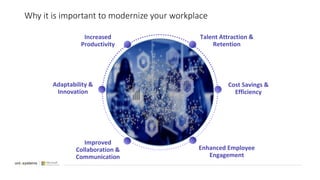
Why it is important to modernize your workplace
Adaptability &
Innovation
Improved
Collaboration &
Communication
Cost Savings &
Efficiency
Enhanced Employee
Engagement
Increased
Productivity
Talent Attraction &
Retention
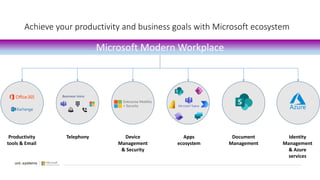
Achieve your productivity and business goals with Microsoft ecosystem
Microsoft Modern Workplace
Productivity
tools & Email
Telephony Device
Management
& Security
Apps
ecosystem
Document
Management
Identity
Management
& Azure
services
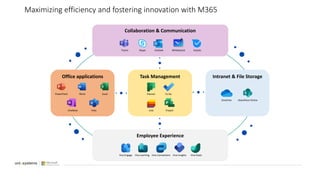
Office applications Task Management Intranet & File Storage
Collaboration & Communication
PowerPoint Word Excel
OneNote Visio
Planner To Do
Lists Project
OneDrive SharePoint Online
Teams Skype Outlook Whiteboard Kaizala
Employee Experience
Viva Connections
Viva Learning
Viva Engage Viva Insights Viva Goals
Maximizing efficiency and fostering innovation with M365
Connect your people, your processes, your data & disrupt your digital estate
with Power Platform
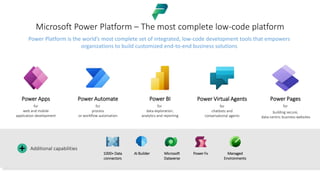
Microsoft Power Platform – The most complete low-code platform
Power Apps
for
web and mobile
application development
Power Automate
for
process
or workflow automation
Power BI
for
data exploration,
analytics and reporting
Power Virtual Agents
for
chatbots and
conversational agents
Power Pages
for
building secure,
data-centric business websites
1000+ Data
connectors
AI Builder Microsoft
Dataverse
Power Fx Managed
Environments
Additional capabilities
+
Power Platform is the world’s most complete set of integrated, low-code development tools that empowers
organizations to build customized end-to-end business solutions
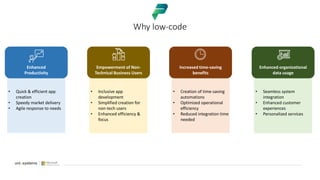
Why low-code
Enhanced
Productivity
• Quick & efficient app
creation
• Speedy market delivery
• Agile response to needs
Empowerment of Non-
Technical Business Users
• Inclusive app
development
• Simplified creation for
non-tech users
• Enhanced efficiency &
focus
Increased time-saving
benefits
• Creation of time-saving
automations
• Optimized operational
efficiency
• Reduced integration time
needed
Enhanced organizational
data usage
• Seamless system
integration
• Enhanced customer
experiences
• Personalized services
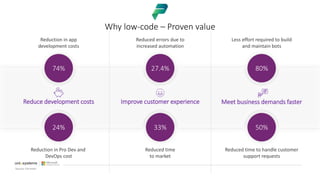
Why low-code – Proven value
Source: Forrester
Reduce development costs Improve customer experience Meet business demands faster
Reduction in Pro Dev and
DevOps cost
24%
Reduced time
to market
33%
Reduced time to handle customer
support requests
50%
Reduction in app
development costs
74%
Reduced errors due to
increased automation
27.4%
Less effort required to build
and maintain bots
80%
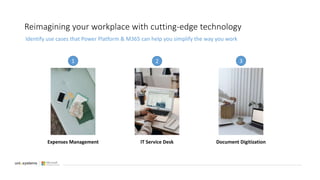
Reimagining your workplace with cutting-edge technology
Expenses Management IT Service Desk Document Digitization
Identify use cases that Power Platform & M365 can help you simplify the way you work
1 2 3
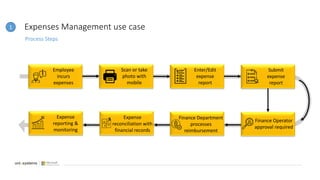
Expenses Management use case
Process Steps
Employee
incurs
expenses
Enter/Edit
expense
report
Scan or take
photo with
mobile
Submit
expense
report
Finance Operator
approval required
Finance Department
processes
reimbursement
Expense
reconciliation with
financial records
Expense
reporting &
monitoring
1
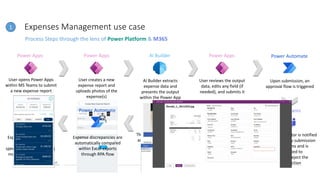
Expenses Management use case
Process Steps through the lens of Power Platform & M365
User opens Power Apps
within MS Teams to submit
a new expense report
User creates a new
expense report and
uploads photos of the
expense(s)
AI Builder extracts
expense data and
presents the output
within the Power App
User reviews the output
data, edits any field (if
needed), and submits it
Power Apps AI Builder
Power Apps
Upon submission, an
approval flow is triggered
Power Apps
Finance Operator is notified
about the new submission
in MS Teams and is
requested to
approve/reject the
transaction
Once the expense is
approved, another
automated flow processes
the reimbursement
/payment
Power Automate
The reimbursed expenses
are then reconciled with
the company’s
financial/accounting
system via APIs
Power Automate
Expense-related reports
are updated, and
spending trends are being
monitored via Power BI
Power BI
Power Automate
MS Teams
Expense discrepancies are
automatically compared
within Excel exports
through RPA flow
Power Automate
1
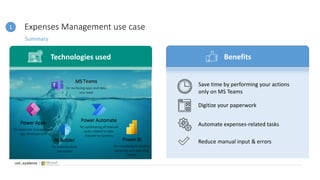
Expenses Management use case
Summary
1
Technologies used Benefits
Power Apps
for expenses management
app development
AI Builder
for expense data
extraction
Power Automate
for automating all manual
tasks related to data
transfer to systems
Power BI
for visualizing & tracking
expenses and spending
trends
MS Teams
for surfacing apps and data
you need
Save time by performing your actions
only on MS Teams
Digitize your paperwork
Automate expenses-related tasks
Reduce manual input & errors
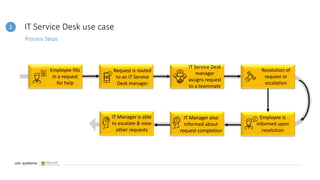
IT Service Desk use case
Process Steps
Employee fills
in a request
for help
IT Service Desk
manager
assigns request
to a teammate
Request is routed
to an IT Service
Desk manager
Resolution of
request or
escalation
Employee is
informed upon
resolution
IT Manager also
informed about
request completion
IT Manager is able
to escalate & view
other requests
2
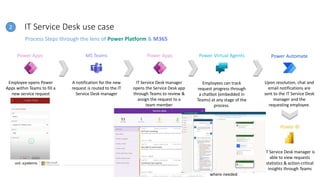
IT Service Desk use case
Process Steps through the lens of Power Platform & M365
Employee opens Power
Apps within Teams to fill a
new service request
A notification for the new
request is routed to the IT
Service Desk manager
IT Service Desk manager
opens the Service Desk app
through Teams to review &
assign the request to a
team member
Employees can track
request progress through
a chatbot (embedded in
Teams) at any stage of the
process.
Power Apps Power Apps
MS Teams
Upon resolution, chat and
email notifications are
sent to the IT Service Desk
manager and the
requesting employee.
Power Virtual Agents Power Automate
Power BI
IT Service Desk manager is
able to view requests
statistics & action-critical
insights through Teams
Power Apps for IT Service
Desk manager is
embedded within Power BI
report for direct escalation,
where needed
Power Apps
2
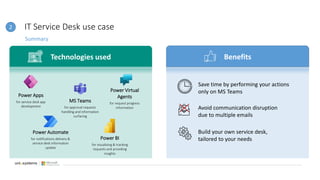
IT Service Desk use case
Summary
2
Technologies used Benefits
Power Apps
for service desk app
development
Power Automate
for notifications delivery &
service desk information
update
Power BI
for visualizing & tracking
requests and providing
insights
MS Teams
for approval requests
handling and information
surfacing
Power Virtual
Agents
for request progress
information
Save time by performing your actions
only on MS Teams
Avoid communication disruption
due to multiple emails
Build your own service desk,
tailored to your needs
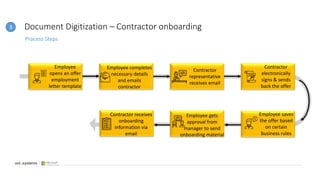
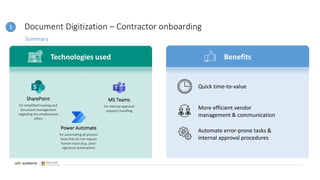
Document Digitization – Contractor onboarding
Process Steps
Employee
opens an offer
employment
letter template
Contractor
representative
receives email
Employee completes
necessary details
and emails
contractor
Contractor
electronically
signs & sends
back the offer
Employee saves
the offer based
on certain
business rules
Contractor receives
onboarding
information via
email
3
Employee gets
approval from
manager to send
onboarding material
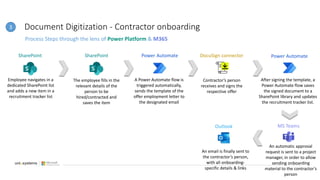
Document Digitization - Contractor onboarding
Process Steps through the lens of Power Platform & M365
Employee navigates in a
dedicated SharePoint list
and adds a new item in a
recruitment tracker list
The employee fills in the
relevant details of the
person to be
hired/contracted and
saves the item
A Power Automate flow is
triggered automatically,
sends the template of the
offer employment letter to
the designated email
Contractor’s person
receives and signs the
respective offer
SharePoint Power Automate
SharePoint
After signing the template, a
Power Automate flow saves
the signed document to a
SharePoint library and updates
the recruitment tracker list.
DocuSign connector Power Automate
An automatic approval
request is sent to a project
manager, in order to allow
sending onboarding
material to the contractor’s
person
An email is finally sent to
the contractor’s person,
with all onboarding-
specific details & links
Outlook
3
MS Teams
Document Digitization – Contractor onboarding
Summary
3
Technologies used Benefits
SharePoint
for simplified tracking and
document management
regarding the employment
offers
Power Automate
for automating all process
tasks that do not require
human input (e.g., post-
signature automation)
MS Teams
for internal approval
requests handling
Quick time-to-value
More efficient vendor
management & communication
Automate error-prone tasks &
internal approval procedures
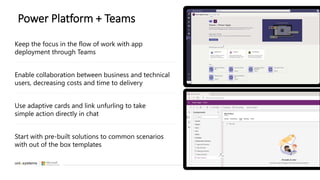
Power Platform + Teams
Use adaptive cards and link unfurling to take
simple action directly in chat
Keep the focus in the flow of work with app
deployment through Teams
Enable collaboration between business and technical
users, decreasing costs and time to delivery
Start with pre-built solutions to common scenarios
with out of the box templates
20
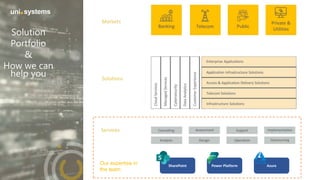
Solution
Portfolio
&
How we can
help you
Power Platform
SharePoint Azure
Our expertise in
the team
Looking forward to co-innovating together.
Thank you!

Uni Systems for Power Platform.pptx

  • 1.
    Navigating the Futureof Work with M365 & Power Platform Christoforos Vlachos – Senior Solutions Manager, UniSystems
  • 2.
    Why it isimportant to modernize your workplace Adaptability & Innovation Improved Collaboration & Communication Cost Savings & Efficiency Enhanced Employee Engagement Increased Productivity Talent Attraction & Retention
  • 3.
    Achieve your productivityand business goals with Microsoft ecosystem Microsoft Modern Workplace Productivity tools & Email Telephony Device Management & Security Apps ecosystem Document Management Identity Management & Azure services
  • 4.
    Office applications TaskManagement Intranet & File Storage Collaboration & Communication PowerPoint Word Excel OneNote Visio Planner To Do Lists Project OneDrive SharePoint Online Teams Skype Outlook Whiteboard Kaizala Employee Experience Viva Connections Viva Learning Viva Engage Viva Insights Viva Goals Maximizing efficiency and fostering innovation with M365
  • 5.
    Connect your people,your processes, your data & disrupt your digital estate with Power Platform
  • 6.
    Microsoft Power Platform– The most complete low-code platform Power Apps for web and mobile application development Power Automate for process or workflow automation Power BI for data exploration, analytics and reporting Power Virtual Agents for chatbots and conversational agents Power Pages for building secure, data-centric business websites 1000+ Data connectors AI Builder Microsoft Dataverse Power Fx Managed Environments Additional capabilities + Power Platform is the world’s most complete set of integrated, low-code development tools that empowers organizations to build customized end-to-end business solutions
  • 7.
    Why low-code Enhanced Productivity • Quick& efficient app creation • Speedy market delivery • Agile response to needs Empowerment of Non- Technical Business Users • Inclusive app development • Simplified creation for non-tech users • Enhanced efficiency & focus Increased time-saving benefits • Creation of time-saving automations • Optimized operational efficiency • Reduced integration time needed Enhanced organizational data usage • Seamless system integration • Enhanced customer experiences • Personalized services
  • 8.
    Why low-code –Proven value Source: Forrester Reduce development costs Improve customer experience Meet business demands faster Reduction in Pro Dev and DevOps cost 24% Reduced time to market 33% Reduced time to handle customer support requests 50% Reduction in app development costs 74% Reduced errors due to increased automation 27.4% Less effort required to build and maintain bots 80%
  • 9.
    Reimagining your workplacewith cutting-edge technology Expenses Management IT Service Desk Document Digitization Identify use cases that Power Platform & M365 can help you simplify the way you work 1 2 3
  • 10.
    Expenses Management usecase Process Steps Employee incurs expenses Enter/Edit expense report Scan or take photo with mobile Submit expense report Finance Operator approval required Finance Department processes reimbursement Expense reconciliation with financial records Expense reporting & monitoring 1
  • 11.
    Expenses Management usecase Process Steps through the lens of Power Platform & M365 User opens Power Apps within MS Teams to submit a new expense report User creates a new expense report and uploads photos of the expense(s) AI Builder extracts expense data and presents the output within the Power App User reviews the output data, edits any field (if needed), and submits it Power Apps AI Builder Power Apps Upon submission, an approval flow is triggered Power Apps Finance Operator is notified about the new submission in MS Teams and is requested to approve/reject the transaction Once the expense is approved, another automated flow processes the reimbursement /payment Power Automate The reimbursed expenses are then reconciled with the company’s financial/accounting system via APIs Power Automate Expense-related reports are updated, and spending trends are being monitored via Power BI Power BI Power Automate MS Teams Expense discrepancies are automatically compared within Excel exports through RPA flow Power Automate 1
  • 12.
    Expenses Management usecase Summary 1 Technologies used Benefits Power Apps for expenses management app development AI Builder for expense data extraction Power Automate for automating all manual tasks related to data transfer to systems Power BI for visualizing & tracking expenses and spending trends MS Teams for surfacing apps and data you need Save time by performing your actions only on MS Teams Digitize your paperwork Automate expenses-related tasks Reduce manual input & errors
  • 13.
    IT Service Deskuse case Process Steps Employee fills in a request for help IT Service Desk manager assigns request to a teammate Request is routed to an IT Service Desk manager Resolution of request or escalation Employee is informed upon resolution IT Manager also informed about request completion IT Manager is able to escalate & view other requests 2
  • 14.
    IT Service Deskuse case Process Steps through the lens of Power Platform & M365 Employee opens Power Apps within Teams to fill a new service request A notification for the new request is routed to the IT Service Desk manager IT Service Desk manager opens the Service Desk app through Teams to review & assign the request to a team member Employees can track request progress through a chatbot (embedded in Teams) at any stage of the process. Power Apps Power Apps MS Teams Upon resolution, chat and email notifications are sent to the IT Service Desk manager and the requesting employee. Power Virtual Agents Power Automate Power BI IT Service Desk manager is able to view requests statistics & action-critical insights through Teams Power Apps for IT Service Desk manager is embedded within Power BI report for direct escalation, where needed Power Apps 2
  • 15.
    IT Service Deskuse case Summary 2 Technologies used Benefits Power Apps for service desk app development Power Automate for notifications delivery & service desk information update Power BI for visualizing & tracking requests and providing insights MS Teams for approval requests handling and information surfacing Power Virtual Agents for request progress information Save time by performing your actions only on MS Teams Avoid communication disruption due to multiple emails Build your own service desk, tailored to your needs
  • 16.
    Document Digitization –Contractor onboarding Process Steps Employee opens an offer employment letter template Contractor representative receives email Employee completes necessary details and emails contractor Contractor electronically signs & sends back the offer Employee saves the offer based on certain business rules Contractor receives onboarding information via email 3 Employee gets approval from manager to send onboarding material
  • 17.
    Document Digitization -Contractor onboarding Process Steps through the lens of Power Platform & M365 Employee navigates in a dedicated SharePoint list and adds a new item in a recruitment tracker list The employee fills in the relevant details of the person to be hired/contracted and saves the item A Power Automate flow is triggered automatically, sends the template of the offer employment letter to the designated email Contractor’s person receives and signs the respective offer SharePoint Power Automate SharePoint After signing the template, a Power Automate flow saves the signed document to a SharePoint library and updates the recruitment tracker list. DocuSign connector Power Automate An automatic approval request is sent to a project manager, in order to allow sending onboarding material to the contractor’s person An email is finally sent to the contractor’s person, with all onboarding- specific details & links Outlook 3 MS Teams
  • 18.
    Document Digitization –Contractor onboarding Summary 3 Technologies used Benefits SharePoint for simplified tracking and document management regarding the employment offers Power Automate for automating all process tasks that do not require human input (e.g., post- signature automation) MS Teams for internal approval requests handling Quick time-to-value More efficient vendor management & communication Automate error-prone tasks & internal approval procedures
  • 19.
    Power Platform +Teams Use adaptive cards and link unfurling to take simple action directly in chat Keep the focus in the flow of work with app deployment through Teams Enable collaboration between business and technical users, decreasing costs and time to delivery Start with pre-built solutions to common scenarios with out of the box templates
  • 20.
    20 Solution Portfolio & How we can helpyou Power Platform SharePoint Azure Our expertise in the team
  • 21.
    Looking forward toco-innovating together. Thank you!