Optimizing Your Visual COBOL
Applications
Darren Self & Chris Glazier
Micro Focus
2
Performance matters because…
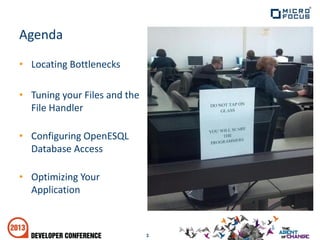
• Locating Bottlenecks
• Tuning your Files and the
File Handler
• Configuring OpenESQL
Database Access
• Optimizing Your
Application
3
Agenda
Out of the Box Performance
Finely TunedBadly
The choice is yours…
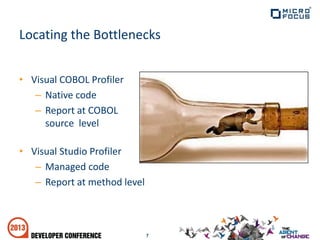
• Visual COBOL Profiler
– Native code
– Report at COBOL
source level
• Visual Studio Profiler
– Managed code
– Report at method level
7
Locating the Bottlenecks
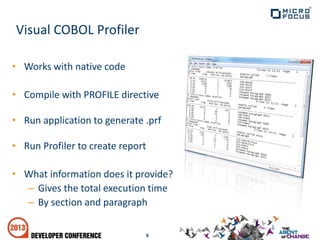
• Works with native code
• Compile with PROFILE directive
• Run application to generate .prf
• Run Profiler to create report
• What information does it provide?
– Gives the total execution time
– By section and paragraph
8
Visual COBOL Profiler
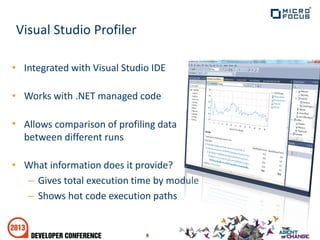
• Integrated with Visual Studio IDE
• Works with .NET managed code
• Allows comparison of profiling data
between different runs
• What information does it provide?
– Gives total execution time by module
– Shows hot code execution paths
9
Visual Studio Profiler
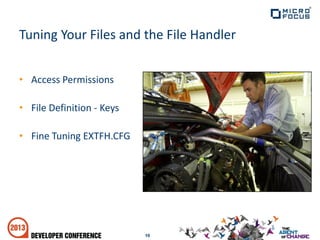
• Access Permissions
• File Definition - Keys
• Fine Tuning EXTFH.CFG
10
Tuning Your Files and the File Handler
Access Permissions
• Examine your data files on a per-file basis.
– How are they being used?
• When opening files:
– Don’t just use open I-O for everything
– Use exclusive access where possible
– Otherwise, allow only readers
– Only where absolutely necessary, give
all others complete access to the file
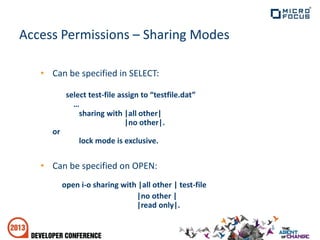
Access Permissions – Sharing Modes
• Can be specified in SELECT:
select test-file assign to “testfile.dat”
…
sharing with |all other|
|no other|.
or
lock mode is exclusive.
• Can be specified on OPEN:
open i-o sharing with |all other | test-file
|no other |
|read only|.
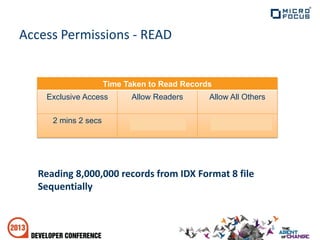
Access Permissions - READ
Reading 8,000,000 records from IDX Format 8 file
Sequentially
Time Taken to Read Records
Exclusive Access Allow Readers Allow All Others
2 mins 2 secs 4 mins 23 secs 8 mins 40 secs
File Definition - Keys
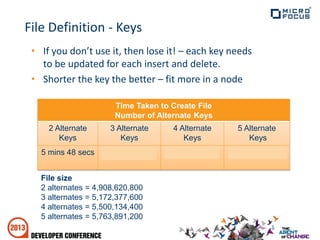
• If you don’t use it, then lose it! – each key needs
to be updated for each insert and delete.
• Shorter the key the better – fit more in a node
Time Taken to Create File
Number of Alternate Keys
2 Alternate
Keys
3 Alternate
Keys
4 Alternate
Keys
5 Alternate
Keys
5 mins 48 secs 6 mins 19 secs 6 mins 29 secs 30 mins 06 secs
File size
2 alternates = 4,908,620,800
3 alternates = 5,172,377,600
4 alternates = 5,500,134,400
5 alternates = 5,763,891,200
File Definition - Compression
• Data compression
– Minimal performance hit
• Index compression
– Always a performance hit, sometimes severe.
– File Handler must sequentially search entire
node when looking for a key
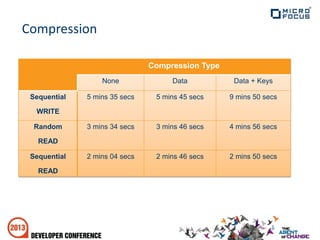
Compression
Compression Type
None Data Data + Keys
Sequential
WRITE
5 mins 35 secs 5 mins 45 secs 9 mins 50 secs
Random
READ
3 mins 34 secs 3 mins 46 secs 4 mins 56 secs
Sequential
READ
2 mins 04 secs 2 mins 46 secs 2 mins 50 secs
It doesn’t help…
Neither does this…
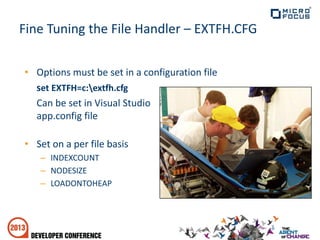
Fine Tuning the File Handler – EXTFH.CFG
• Options must be set in a configuration file
set EXTFH=c:extfh.cfg
Can be set in Visual Studio
app.config file
• Set on a per file basis
– INDEXCOUNT
– NODESIZE
– LOADONTOHEAP
INDEXCOUNT
• Specifies the number of index nodes to be cached for an
index file. - Default cache size used is now 32 nodes.
• Use when writing files where there are multiple keys
• Use when reading files randomly
• Reading files – sequentially may degrade performance
• Ideal INDEXCOUNT = (Max Tree Depth * No. keys) + No. keys
– Use rebuild /f - to find max tree depth
[XFH-DEFAULT]
[file1.dat]
INDEXCOUNT=42
INDEXCOUNT
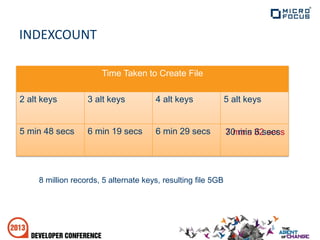
8 million records, 5 alternate keys, resulting file 5GB
Time Taken to Create File
2 alt keys 3 alt keys 4 alt keys 5 alt keys
5 min 48 secs 6 min 19 secs 6 min 29 secs 7 mins 32 secs30 min 6 secs
NODESIZE
• The NODESIZE option specifies the size of the
index nodes to use for an indexed file when it is
created.
• NODESIZE={512|1024|4096|16384}
• Use when reading records sequentially
• Avoid using with INDEXCOUNT set high
[XFH-DEFAULT]
[file1.dat]
NODESIZE=4096
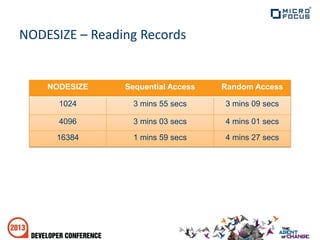
NODESIZE – Reading Records
NODESIZE Sequential Access Random Access
1024 3 mins 55 secs 3 mins 09 secs
4096 3 mins 03 secs 4 mins 01 secs
16384 1 mins 59 secs 4 mins 27 secs
LOADONTOHEAP
• Forces the File Handler to load an entire file
onto a memory heap
• All file operations execute in memory, only
writing back to disk when it is closed
• Use only in exclusive mode
• Use only on small files
• Use with caution- Speed vs Data Integrity!
[XFH-DEFAULT]
[file1.dat]
LOADONTOHEAP=ON
File Handling Summary
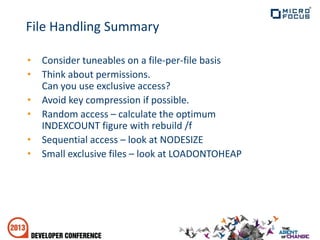
• Consider tuneables on a file-per-file basis
• Think about permissions.
Can you use exclusive access?
• Avoid key compression if possible.
• Random access – calculate the optimum
INDEXCOUNT figure with rebuild /f
• Sequential access – look at NODESIZE
• Small exclusive files – look at LOADONTOHEAP
• Database Drivers
• OpenESQL Behavior Directive
26
Configuring OpenESQL Database Access
• Drivers to use
– ODBC = Native Code
– ADO = Managed .NET
– JDBC = Managed JVM
• SQL Server - ODBC vs Native Client
– Do NOT use old SQL Server ODBC drivers
– Use SQL Server Native Client 10.0 or higher
• Oracle – ADO
– Use Oracle Data Provider ODP.NET
– Do not use Microsoft’s Oracle Client driver
27
Database Drivers
• SQL(BEHAVIOR=MAINFRAME) – Fastest
– data access for cursors is read only for all by default
– SQL Server uses firehose cursors, Oracle and DB2 use block fetches
• SQL(BEHAVIOR=ANSI) – Medium Fast
– data access for cursors is updateable for all by default
– SQL Server uses firehose cursors, Oracle and DB2 use block fetches
• SQL(BEHAVIOR=UNOPTIMIZED) – Slowest
– data access for cursors is updateable for all by default
– no block fetching done
– compatible with older MF products
• esqlconfigw utility - Set default BEHAVIOR directive for system
28
OpenESQL Behavior Directive
Optimization Demo
• Application Structure
• Program Structure
• Data
• Code
30
Optimizing Your Application
• It’s important!
• Execution formats
• Modularity
31
Application Structure
• INT code
– Slow, portable, dynamically loaded, not shared
• GNT code
– Fast, dynamically loaded, not shared
• Object code
– OS defined format, not directly executable
– Basis for native executable formats (exe, dll etc)
– More efficient than .gnt
• Managed code (IL, JVM)
– Third party managed environment
– Portable and interoperable on that framework
32
Execution Formats
• PERFORM - very fast
– Acts locally, potentially on all data
– Does not take parameters
• CALL - slower
– Called code is external
– Takes parameters
– Only those parameters are affected
33
Communicating
Demo - Execution Formats
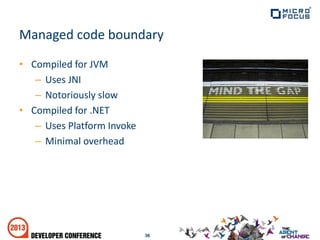
• Compiled for JVM
– Uses JNI
– Notoriously slow
• Compiled for .NET
– Uses Platform Invoke
– Minimal overhead
36
Managed code boundary
• Independent procedures
• Logical separation of functionality
• Use sections/paragraphs consistently
37
Program Structure
• Do...
– Use SECTIONs
– PERFORM these sections
– Use GOBACK rather than EXIT PROGRAM
• Don’t...
– Use PERFORM THRU or PERFORM paragraphs
– Use inter-section GOTOs
– Use alter, segments, OSVS or RM PERFORM-STYLE
38
In Micro Focus, the guidelines are...
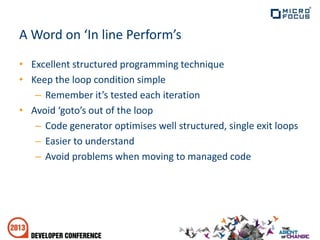
A Word on ‘In line Perform’s
• Excellent structured programming technique
• Keep the loop condition simple
– Remember it’s tested each iteration
• Avoid ‘goto’s out of the loop
– Code generator optimises well structured, single exit loops
– Easier to understand
– Avoid problems when moving to managed code
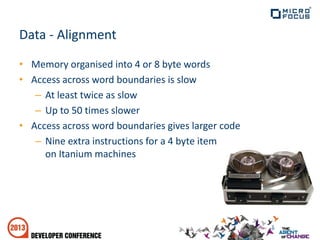
Data - Alignment
• Memory organised into 4 or 8 byte words
• Access across word boundaries is slow
– At least twice as slow
– Up to 50 times slower
• Access across word boundaries gives larger code
– Nine extra instructions for a 4 byte item
on Itanium machines
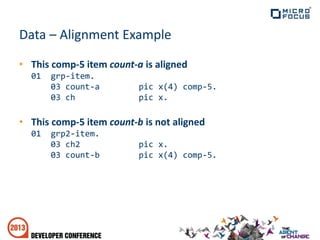
Data – Alignment Example
• This comp-5 item count-a is aligned
01 grp-item.
03 count-a pic x(4) comp-5.
03 ch pic x.
• This comp-5 item count-b is not aligned
01 grp2-item.
03 ch2 pic x.
03 count-b pic x(4) comp-5.
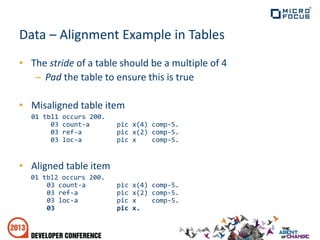
Data – Alignment Example in Tables
• The stride of a table should be a multiple of 4
– Pad the table to ensure this is true
• Misaligned table item
01 tbl1 occurs 200.
03 count-a pic x(4) comp-5.
03 ref-a pic x(2) comp-5.
03 loc-a pic x comp-5.
• Aligned table item
01 tbl2 occurs 200.
03 count-a pic x(4) comp-5.
03 ref-a pic x(2) comp-5.
03 loc-a pic x comp-5.
03 pic x.
Demo - Alignment Issues
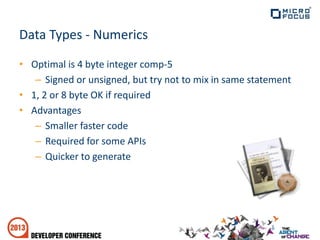
Data Types - Numerics
• Optimal is 4 byte integer comp-5
– Signed or unsigned, but try not to mix in same statement
• 1, 2 or 8 byte OK if required
• Advantages
– Smaller faster code
– Required for some APIs
– Quicker to generate
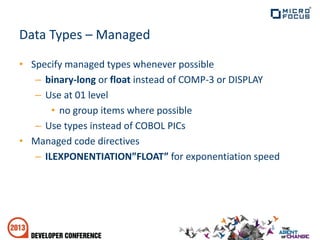
Data Types – Managed
• Specify managed types whenever possible
– binary-long or float instead of COMP-3 or DISPLAY
– Use at 01 level
• no group items where possible
– Use types instead of COBOL PICs
• Managed code directives
– ILEXPONENTIATION”FLOAT” for exponentiation speed
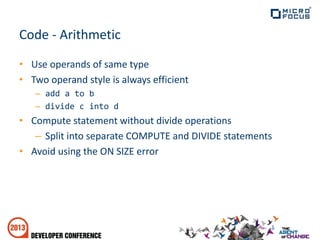
Code - Arithmetic
• Use operands of same type
• Two operand style is always efficient
– add a to b
– divide c into d
• Compute statement without divide operations
– Split into separate COMPUTE and DIVIDE statements
• Avoid using the ON SIZE error
Demo – Arithmetic Issues
Your Mission...
• Identification
• Awareness
• Resolution
• Communication
– http://community.microfocus.com
Performance may feel like this...
When it should be like this...
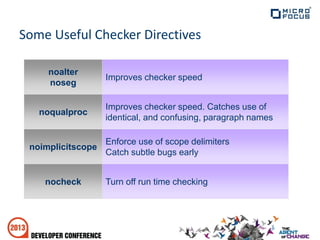
Some Useful Checker Directives
Enforce use of scope delimiters
Catch subtle bugs early
noimplicitscope
Turn off run time checkingnocheck
Improves checker speed. Catches use of
identical, and confusing, paragraph names
noqualproc
Improves checker speed
noalter
noseg
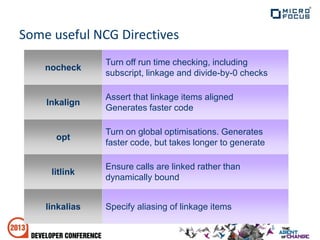
Some useful NCG Directives
Specify aliasing of linkage itemslinkalias
Ensure calls are linked rather than
dynamically bound
litlink
Turn on global optimisations. Generates
faster code, but takes longer to generate
opt
Assert that linkage items aligned
Generates faster code
lnkalign
Turn off run time checking, including
subscript, linkage and divide-by-0 checks
nocheck
@microfocus or hashtag #devcon2013
Follow us on LinkedIn or join the group
Connect with your peers on the Community
2.4   Optimizing your Visual COBOL Applications

2.4 Optimizing your Visual COBOL Applications

  • 1.
    Optimizing Your VisualCOBOL Applications Darren Self & Chris Glazier Micro Focus
  • 2.
  • 3.
    • Locating Bottlenecks •Tuning your Files and the File Handler • Configuring OpenESQL Database Access • Optimizing Your Application 3 Agenda
  • 4.
    Out of theBox Performance
  • 5.
  • 6.
    The choice isyours…
  • 7.
    • Visual COBOLProfiler – Native code – Report at COBOL source level • Visual Studio Profiler – Managed code – Report at method level 7 Locating the Bottlenecks
  • 8.
    • Works withnative code • Compile with PROFILE directive • Run application to generate .prf • Run Profiler to create report • What information does it provide? – Gives the total execution time – By section and paragraph 8 Visual COBOL Profiler
  • 9.
    • Integrated withVisual Studio IDE • Works with .NET managed code • Allows comparison of profiling data between different runs • What information does it provide? – Gives total execution time by module – Shows hot code execution paths 9 Visual Studio Profiler
  • 10.
    • Access Permissions •File Definition - Keys • Fine Tuning EXTFH.CFG 10 Tuning Your Files and the File Handler
  • 11.
    Access Permissions • Examineyour data files on a per-file basis. – How are they being used? • When opening files: – Don’t just use open I-O for everything – Use exclusive access where possible – Otherwise, allow only readers – Only where absolutely necessary, give all others complete access to the file
  • 12.
    Access Permissions –Sharing Modes • Can be specified in SELECT: select test-file assign to “testfile.dat” … sharing with |all other| |no other|. or lock mode is exclusive. • Can be specified on OPEN: open i-o sharing with |all other | test-file |no other | |read only|.
  • 13.
    Access Permissions -READ Reading 8,000,000 records from IDX Format 8 file Sequentially Time Taken to Read Records Exclusive Access Allow Readers Allow All Others 2 mins 2 secs 4 mins 23 secs 8 mins 40 secs
  • 14.
    File Definition -Keys • If you don’t use it, then lose it! – each key needs to be updated for each insert and delete. • Shorter the key the better – fit more in a node Time Taken to Create File Number of Alternate Keys 2 Alternate Keys 3 Alternate Keys 4 Alternate Keys 5 Alternate Keys 5 mins 48 secs 6 mins 19 secs 6 mins 29 secs 30 mins 06 secs File size 2 alternates = 4,908,620,800 3 alternates = 5,172,377,600 4 alternates = 5,500,134,400 5 alternates = 5,763,891,200
  • 15.
    File Definition -Compression • Data compression – Minimal performance hit • Index compression – Always a performance hit, sometimes severe. – File Handler must sequentially search entire node when looking for a key
  • 16.
    Compression Compression Type None DataData + Keys Sequential WRITE 5 mins 35 secs 5 mins 45 secs 9 mins 50 secs Random READ 3 mins 34 secs 3 mins 46 secs 4 mins 56 secs Sequential READ 2 mins 04 secs 2 mins 46 secs 2 mins 50 secs
  • 17.
  • 18.
  • 19.
    Fine Tuning theFile Handler – EXTFH.CFG • Options must be set in a configuration file set EXTFH=c:extfh.cfg Can be set in Visual Studio app.config file • Set on a per file basis – INDEXCOUNT – NODESIZE – LOADONTOHEAP
  • 20.
    INDEXCOUNT • Specifies thenumber of index nodes to be cached for an index file. - Default cache size used is now 32 nodes. • Use when writing files where there are multiple keys • Use when reading files randomly • Reading files – sequentially may degrade performance • Ideal INDEXCOUNT = (Max Tree Depth * No. keys) + No. keys – Use rebuild /f - to find max tree depth [XFH-DEFAULT] [file1.dat] INDEXCOUNT=42
  • 21.
    INDEXCOUNT 8 million records,5 alternate keys, resulting file 5GB Time Taken to Create File 2 alt keys 3 alt keys 4 alt keys 5 alt keys 5 min 48 secs 6 min 19 secs 6 min 29 secs 7 mins 32 secs30 min 6 secs
  • 22.
    NODESIZE • The NODESIZEoption specifies the size of the index nodes to use for an indexed file when it is created. • NODESIZE={512|1024|4096|16384} • Use when reading records sequentially • Avoid using with INDEXCOUNT set high [XFH-DEFAULT] [file1.dat] NODESIZE=4096
  • 23.
    NODESIZE – ReadingRecords NODESIZE Sequential Access Random Access 1024 3 mins 55 secs 3 mins 09 secs 4096 3 mins 03 secs 4 mins 01 secs 16384 1 mins 59 secs 4 mins 27 secs
  • 24.
    LOADONTOHEAP • Forces theFile Handler to load an entire file onto a memory heap • All file operations execute in memory, only writing back to disk when it is closed • Use only in exclusive mode • Use only on small files • Use with caution- Speed vs Data Integrity! [XFH-DEFAULT] [file1.dat] LOADONTOHEAP=ON
  • 25.
    File Handling Summary •Consider tuneables on a file-per-file basis • Think about permissions. Can you use exclusive access? • Avoid key compression if possible. • Random access – calculate the optimum INDEXCOUNT figure with rebuild /f • Sequential access – look at NODESIZE • Small exclusive files – look at LOADONTOHEAP
  • 26.
    • Database Drivers •OpenESQL Behavior Directive 26 Configuring OpenESQL Database Access
  • 27.
    • Drivers touse – ODBC = Native Code – ADO = Managed .NET – JDBC = Managed JVM • SQL Server - ODBC vs Native Client – Do NOT use old SQL Server ODBC drivers – Use SQL Server Native Client 10.0 or higher • Oracle – ADO – Use Oracle Data Provider ODP.NET – Do not use Microsoft’s Oracle Client driver 27 Database Drivers
  • 28.
    • SQL(BEHAVIOR=MAINFRAME) –Fastest – data access for cursors is read only for all by default – SQL Server uses firehose cursors, Oracle and DB2 use block fetches • SQL(BEHAVIOR=ANSI) – Medium Fast – data access for cursors is updateable for all by default – SQL Server uses firehose cursors, Oracle and DB2 use block fetches • SQL(BEHAVIOR=UNOPTIMIZED) – Slowest – data access for cursors is updateable for all by default – no block fetching done – compatible with older MF products • esqlconfigw utility - Set default BEHAVIOR directive for system 28 OpenESQL Behavior Directive
  • 29.
  • 30.
    • Application Structure •Program Structure • Data • Code 30 Optimizing Your Application
  • 31.
    • It’s important! •Execution formats • Modularity 31 Application Structure
  • 32.
    • INT code –Slow, portable, dynamically loaded, not shared • GNT code – Fast, dynamically loaded, not shared • Object code – OS defined format, not directly executable – Basis for native executable formats (exe, dll etc) – More efficient than .gnt • Managed code (IL, JVM) – Third party managed environment – Portable and interoperable on that framework 32 Execution Formats
  • 33.
    • PERFORM -very fast – Acts locally, potentially on all data – Does not take parameters • CALL - slower – Called code is external – Takes parameters – Only those parameters are affected 33 Communicating
  • 34.
  • 35.
    • Compiled forJVM – Uses JNI – Notoriously slow • Compiled for .NET – Uses Platform Invoke – Minimal overhead 36 Managed code boundary
  • 36.
    • Independent procedures •Logical separation of functionality • Use sections/paragraphs consistently 37 Program Structure
  • 37.
    • Do... – UseSECTIONs – PERFORM these sections – Use GOBACK rather than EXIT PROGRAM • Don’t... – Use PERFORM THRU or PERFORM paragraphs – Use inter-section GOTOs – Use alter, segments, OSVS or RM PERFORM-STYLE 38 In Micro Focus, the guidelines are...
  • 38.
    A Word on‘In line Perform’s • Excellent structured programming technique • Keep the loop condition simple – Remember it’s tested each iteration • Avoid ‘goto’s out of the loop – Code generator optimises well structured, single exit loops – Easier to understand – Avoid problems when moving to managed code
  • 39.
    Data - Alignment •Memory organised into 4 or 8 byte words • Access across word boundaries is slow – At least twice as slow – Up to 50 times slower • Access across word boundaries gives larger code – Nine extra instructions for a 4 byte item on Itanium machines
  • 40.
    Data – AlignmentExample • This comp-5 item count-a is aligned 01 grp-item. 03 count-a pic x(4) comp-5. 03 ch pic x. • This comp-5 item count-b is not aligned 01 grp2-item. 03 ch2 pic x. 03 count-b pic x(4) comp-5.
  • 41.
    Data – AlignmentExample in Tables • The stride of a table should be a multiple of 4 – Pad the table to ensure this is true • Misaligned table item 01 tbl1 occurs 200. 03 count-a pic x(4) comp-5. 03 ref-a pic x(2) comp-5. 03 loc-a pic x comp-5. • Aligned table item 01 tbl2 occurs 200. 03 count-a pic x(4) comp-5. 03 ref-a pic x(2) comp-5. 03 loc-a pic x comp-5. 03 pic x.
  • 42.
  • 43.
    Data Types -Numerics • Optimal is 4 byte integer comp-5 – Signed or unsigned, but try not to mix in same statement • 1, 2 or 8 byte OK if required • Advantages – Smaller faster code – Required for some APIs – Quicker to generate
  • 44.
    Data Types –Managed • Specify managed types whenever possible – binary-long or float instead of COMP-3 or DISPLAY – Use at 01 level • no group items where possible – Use types instead of COBOL PICs • Managed code directives – ILEXPONENTIATION”FLOAT” for exponentiation speed
  • 45.
    Code - Arithmetic •Use operands of same type • Two operand style is always efficient – add a to b – divide c into d • Compute statement without divide operations – Split into separate COMPUTE and DIVIDE statements • Avoid using the ON SIZE error
  • 46.
  • 47.
    Your Mission... • Identification •Awareness • Resolution • Communication – http://community.microfocus.com
  • 48.
  • 49.
    When it shouldbe like this...
  • 51.
    Some Useful CheckerDirectives Enforce use of scope delimiters Catch subtle bugs early noimplicitscope Turn off run time checkingnocheck Improves checker speed. Catches use of identical, and confusing, paragraph names noqualproc Improves checker speed noalter noseg
  • 52.
    Some useful NCGDirectives Specify aliasing of linkage itemslinkalias Ensure calls are linked rather than dynamically bound litlink Turn on global optimisations. Generates faster code, but takes longer to generate opt Assert that linkage items aligned Generates faster code lnkalign Turn off run time checking, including subscript, linkage and divide-by-0 checks nocheck
  • 53.
    @microfocus or hashtag#devcon2013 Follow us on LinkedIn or join the group Connect with your peers on the Community