Practical Project On
Employee Leave Management System
For
Newgen Technology Limited
(Babylon Garments Limited)
Supervisor:
Ms. Nayeema Rahman
Lecturer
Daffodil Institute of IT
Submitted by:
Md. Mahbub Alam
ID: 000788896
B.Sc (Hons) in BIT
University of Greenwich
Executive Summary
Thisdocumentationisprovidessome informationaboutEmployee Leave management System. The
Employee Leave managementSystemapplication is responsible for applies leave, calculation of leave, and
leave approval. This application components related to an employee’s “Leave Life cycle” while at an
organization. These activities include the Enterprise Structure, Cross-Application Components and
Organizational Management. This module is The University of Greenwich project will be implementing in
whole or in part at this time.
Acknowledgement
I would like to mention our sincere gratitude towards University of Greenwich, for giving us the
opportunity to carry out our project.
I would like to express our heart full gratitude towards our guide, Ms. Nayeema Rahman for her
invaluable advice for the successful completion of this dissertation.
I also like to extend our sincere thanks to the staff of DIIT for their invaluable help and support.
Finally, Itake this opportunity to mention our sincere thanks to one and all those who helped us
directly or indirectly for the completion of our project.
Table of Contents
Executive Summary ..................................................................................................................................2
Acknowledgement.................................................................................................................................... 3
Chapter 1 - Introduction............................................................................................................................ 6
Chapter 2 - Initial Study............................................................................................................................. 7
2.1 Background of the project................................................................................................................ 7
2.2 Problem Area..................................................................................................................................7
2.3 Possible Solution............................................................................................................................. 8
Chapter 3 - Literature Review.................................................................................................................... 9
3.1 - Fact and Finding............................................................................................................................ 9
Chapter 4 - Methodology........................................................................................................................ 11
4.1 What to use .................................................................................................................................. 11
4.2 Why to use.................................................................................................................................... 12
4.3 Section of methodology................................................................................................................. 12
4.4 Implementation plans.................................................................................................................... 12
Chapter 5 - Planning............................................................................................................................... 13
5.1 Project Plan................................................................................................................................... 13
5.1.1 Management Plan................................................................................................................... 13
5.1.2 Resource Allocation (H/W, S/W, Models, Documentation)......................................................... 13
5.1.3 ActivityNetwork Diagram........................................................................................................ 14
5.1.4 Gantt chart ............................................................................................................................. 15
5.2 Risk Management.......................................................................................................................... 15
5.2.1 Risk identification.................................................................................................................... 15
5.2.2 Risk assessment...................................................................................................................... 15
5.2.3 Risk precaution/Action plan.................................................................................................... 15
5.2.4 Steps taken for possible risks................................................................................................... 16
5.3 Quality Management..................................................................................................................... 17
5.3.1 Rules applied to maintain quality............................................................................................. 17
5.3.2 Quality plan and measuring meter........................................................................................... 17
Chapter 6 - Feasibility Plan...................................................................................................................... 19
6.1 All possibility type of feasibility ...................................................................................................... 19
6.2 Cost Benefit Analysis ..................................................................................................................... 19
Chapter 7 - Foundation Plan.................................................................................................................... 21
7.1 Problem Area Identification........................................................................................................... 21
7.1.1 Interview................................................................................................................................ 21
7.1.2 Observation............................................................................................................................ 23
7.2 Possibility Solution ........................................................................................................................ 23
7.3 What Technology to be implemented (Client/ Web/ Standalone)..................................................... 24
7.4 Recommendations and Justification ............................................................................................... 24
Chapter 8 - Exploration........................................................................................................................... 25
8.1 Prototype of new System............................................................................................................... 26
Chapter 9 - Engineering........................................................................................................................... 27
9.1 New System Modules.................................................................................................................... 27
9.2 Peters Chen ERD Diagram.............................................................................................................. 27
9.3 Sequence Diagram......................................................................................................................... 28
9.4 Component Diagram ..................................................................................................................... 28
9.5 Deployment Diagram..................................................................................................................... 29
9.6 System Interface Design/ Prototype ............................................................................................... 30
Chapter 10 - Deployment/ Development.................................................................................................. 31
10.1 Core Module Coding Samples....................................................................................................... 31
Chapter 11 - Testing................................................................................................................................ 49
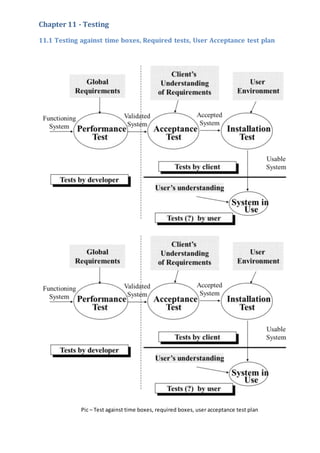
11.1 Testing against time boxes, Required tests, User Acceptance test plan........................................... 49
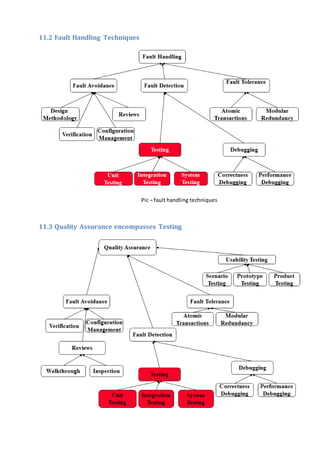
11.2 Fault Handling Techniques........................................................................................................... 50
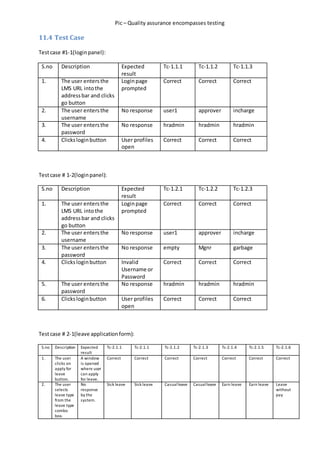
11.3 Quality Assurance encompasses Testing ....................................................................................... 50
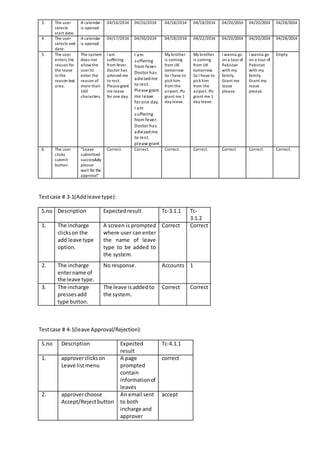
11.4 Test Case .................................................................................................................................... 51
Chapter 12 - Implementation .................................................................................................................. 54
12.1 Training...................................................................................................................................... 54
Chapter 13 - Lessons Learned.................................................................................................................. 55
13.1 What have I learned .................................................................................................................... 55
13.2 What problem I have faced.......................................................................................................... 55
Chapter 15 – Conclusion ......................................................................................................................... 56
Chapter 1 - Introduction
Before any new system starts to work a decision is required on the basis of the initial study. An initial
study is used to determine what information systems are needed to support the needs of the business of
what Information Technology would be most appropriate. At the end of this stage minimum outputs are:
 A brief discussion of the proposed system.
 An estimation of the project cost.
 A possible completion date for the work.
Dhaka cityis the busiestcityhere inBangladesh.There are plenty of organization, shops etc. Among all
these “BabylonGarmentsLimited”isthe name of the organization whichhashuge numberof employee.The
employeeleavemanagementsystem of BabylonGarmentsLimited is currently being maintained manually.
Therefore according to other hi-fi garments etc. Babylon Garments Limited wants to implement a new
system, which will be computerized.
Chapter 2 - Initial Study
2.1 Background of the project
In the existingLeave RecordManagementSystem, every organization follows manual procedure in
whichemployeeenters information in a record book. At the end of each year, Administration Department
calculates leave/s of every member which is a time taking process and there are chances of losing data or
errors in the records.
This module is a single Employee Leave Management System that is critical for HR tasks and keeps
the record of vital information regarding working leaves. It intelligently adapts to HR policy of the
management and allows employees and their line managers to manage leaves and replacements (if
required). In this module, Head of Department (HOD) will have permissions to look after data of every
employee of their department. HOD can approve leave through this application and can view leave
information of every individual.
Thisapplicationcanbe used in a garmentto reduce processingworkload.Thisproject’smain idea is
to developanonline centralized application connected to database which will maintain employee leaves.
Leave managementapplicationwill reducepaperworkandmaintainrecord in a more efficient & systematic
way. This module will also help to calculate the number of leaves taken yearly.
2.2 Problem Area
Babylon Garments Limited has about seven thousands staff. Nowadays, although others company
have Employee Leave ManagementSystem. Some leave management data are store in Microsoft Excel and
Information isrecordinmanual filingsystem.The problemsinthisprevious
Systemsare:
i.The manyprocessesof leave applicationrequire time andenergy.
The staffs have to fill the details on the leave application form. After that, there have to get the
annual leave balance fromthe clerk. The clerk will record the leave application form. The clerk will get the
permission from the branch manager.
ii.The staffshave to refertothe clerkto know theiryearly leave amountsandbalance.
The staffshave to get the yearly leave balance fromthe clerktofill inapplicationform.There will
have the problemif the clerkstake a leave ornot in office.
iii.The clerkhasto record all kindof leavesinone recordbook.
There are manykindof leave beside yearly leave.Becauseof that,the clerkhas torecord the other
leavesinarecord book.
iv.Leave reportfor each staff are designonpaper.
For managementpurpose,the managerneedsaleave reportforeachstaff.However,the clerkonly
record onpaperand the record will be checkevery year.
2.3 Possible Solution
Above are certainobjectivesthatshouldbe gaininthisproject:
 To applyleave online(staffs)
 To receive leave applicationfromstaff online byautogeneratedemail (Approver)
 To approve or rejectstaff leave applicationbyautogeneratedemail (Approver)
 To calculate leave balance fromafix amountof annual leave
 To record all leave informationindatabase
 To generate reportbasedonstaffsleave
Chapter 3 - Literature Review
The literature reviewandprojectmethodology is a chapter that describes the analysis and findings
on passed research, case study or research that relates with this project, Employee Leave Management
SystemforBabylonGarmentsLimited anditalsoreview the selected approach or methodology used in this
system detail.
3.1 - Fact and Finding
Leave Management System is the important system in administration department in all company.
However, the management is different for each company. Some company still comfort with the manual
systemandthe othermake change the systemfrommanual to computerize tomake the management more
effective.
Leave time is a comprehensive and flexible leave management system enabling us to enter and
manage leave requestsaccordingtocompanyrules. Thistime of the year,manyemployersface aformidable
task of jugglingandapprovingleavesapplications.Employerneedtoensure theyare keepingstaff happybut
retainingthe rightworkforce todothe job forthemselvesandcustomersover Eid-New Year- , traditionally a
time with high priorities on maintenance and preparations for the year ahead. This company develop an
automated payroll and leave management systems which offers an on-line leave management system
designedtoradicallysimplifyfor employees and employers alike the process of planning, applying for and
approvingleave.Thissystemeliminatespaperworkand cutsdelaybyenablingemployeesandsupervisors to
actiontime-off applicationssimplybyenteringthe datesandtype of leave being sought after the employee
has viewed his or her entitlements online. Employees used a personal ID code to get immediate access to
theirentitlements,while managerscanat a glance see all employees'leavehistory,leave balances, pending
leave applications and approved. The benefit of the system is saves time by eliminating paperwork,
enhances employee satisfaction by speeding up the process and helps managers by ensuring compliance
with company policies. Their system is a web-based, there is no software to install or support and no
additional hardware required to operate the system.
The purpose system did not include in the payroll management because it is not include in project
scopes.
RefertoWorkteach intheirwebsite,leavetime isacomprehensive and flexible leave management
systemenablingustoenterandmanage leave requestsaccordingtocompany rules. Mantract Pty Ltd is one
of Software CompanythatdevelopsLeave Management System. Base on their experience, this time of the
year,manyemployersface aformidable taskof juggling and approving leaves applications. Employer need
to ensure they are keeping staff happy but retaining the right workforce to do the job for themselves and
customers over Christmas-New Year - , traditionally a time with high priorities on maintenance and
preparations for the year ahead. This company develop outsourced automated payroll and leave
managementsystemswhichoffersan on-line leave management system designed to radically simplify for
employees and employers alike the process of planning, applying for and approving leave. This system
eliminatespaperworkandcutsdelaybyenablingemployeesandsupervisors to action time-off applications
simply by entering the dates and type of leave being sought after the employee has voiced his or her
entitlementsonline.Managerscaninturn view the applicationsona graphical leave plannerwhere they can
see the overall pattern of leave applications and personnel availability, helping them to make prompt
informeddecisions on approvals and staffing levels. Employees used a personal ID code to get immediate
access to theirentitlements,while managerscanata glance see all employees'leave history,leave balances,
pendingleave applications,authorizations,authorizationsawaitedandstatutoryholidays.The benefit of the
systemissavestime byeliminatingpaperwork,enhancesemployeesatisfaction by speeding up the process
and helpsmanagersbyensuringcompliance withcompanypolicies.Theirsystemisaweb-based, there is no
software to install or support and no additional hardware required to operate the system.
From the research that have been done, Employee Leave Management System for Babylon
Garments Limited have a little different than Mantract system. The purpose system did not include in the
payroll management because it is not include in project scopes.
Chapter 4 - Methodology
4.1 What to use
In this system development, OOAD (Object-oriented System Analysis and Design) is the best
approach than traditional structured approach. This methodology is using UML (Unified Modeling
Language).Itisbecause base onJohnW.Satzinger,the objectoriented approach has the potential to reduce
errors, reduce costs, and increase flexibility because of its inherent features.
The developmentof the projectconsistsof five SDLC(Software DevelopmentLife Cycle)phases.The
phasesare:
I. PlanningPhase
In this phase, the first step is making a research in finding the best project to propose. After get
information about the project, proposal is submitted. The proposal consists of the project background,
problemarea,objectivesandprojectrequirements.Thisisthe mostimportantthingtodoin phase planning.
Besides that,the facultyhasaccommodatedaflow that need to be follow by the student. From the
schedule, the student can plan the best way in managing time to develop the project. Gantt chart are
develop base on schedule and time that given by the lecturer to submit those entire thing needed.
II.AnalysisPhase
Firstof all,the analysishas todone to know the view of whole systemtodevelop.The contentof the
proposal is the result from the analysis.
In this chapter, the important thing need is make more research to captured key functionality,
system process and tolls needed. This finding and research can be done via internet, journal, books and
article.The findingshould be describedandelaborate indiagram, chartandtable to make the system easier
to understand in process of develop later.
Many analysesmustbe done to know the businessprocessof the as-issystemandto-be system.
Analysisaboutrequirementandfunctionalityof the systemisveryimportantinprocesstodevelopthe
system.
III.DesignPhases
Basedon the analysisphase,the designwill be done.The designphase isconsistingof 3activities.
The activitiesare:
a. Logical design
Thisactivityinvolvesclassdiagramandinteractiondiagram
b. Interface design
The activityincludesnavigationdesign,outputdesignandinputdesign.
c. Database design
Thisactivitydefineslogical datamodel,detail explanationforeach entity,descriptionof the
association,cardinalityandrelationship.
iv.TestingPhase
In thisphase,the all functionalitysystem are testing and confirm that there are no error and record
the entire not function requirement and correct it.
v. Implement Phase
After all phase have been perfectly done, the system will be implemented to the server and the
system can be used.
4.2 Why to use
Project management ensures that available resources are used in the most effective and efficient
manner. It is a combination of steps and techniques to keep a project's schedule and budget in line.
4.3 Section of methodology
ProjectManagementMethodologyconsistsof five stages:
 Initiating
 Planning
 Executing
 Controlling
 Closing
4.4 Implementation plans
The implementation phase is starting at process installing hardware and software requirements.
Installation hardware is setting up the server hardware requirements specification. Then, the operating
system installation, which is, Ubuntu 12.04, Ant compiler, Java JDK (1.6) and Oracle 10g are installing
following the steps that required.
Thiswill be testinganddebugging,until itisreadytobe delivered.The actual iscreatedand
customizesthe tables.
The testing process is to be doing to test the system application operation. After testing is
concluded,the final documentationisreviewedandprinted,andendusers are trained. The system is in full
operation at the end of the phase but will be continuously evaluated and fine-tuned.
Chapter 5 - Planning
5.1 Project Plan
5.1.1 ManagementPlan
In-chargesandapproverare encouragedtowork withall employeeswho have added extra leave to
develop an excess Employee Leave Management Plan (ELMP) to reduce the liability. An ELMP is an
agreementbetweenthe employeeandemployer thatdesignatesactionsforreducingexcessleaveaccrual in
a timely manner. This may involve setting leave dates, arranging for a cash payment of leave, or formally
deferring leave (all subject to Industrial Agreement/Award conditions). An ELMP must also take into
consideration the additional leave that will fall due during the ELMP timeframe.
Employee:
• Applicant can apply for leave to the system
• System will send a mail to Approver and applicant
• See numberof day when apply for leave after all deduction of public holiday and official holiday
• Able to see total, applied/ pending, Approved and balanced leaves for each leave type
• Have to inputfromdate,to date,leave type,reason,descriptionandhis/herapprover
Approver:
• Approvercansee a leave requestsasalist
• Afterhisapproval he will gotamail alsothe applicantof the leave request
• Addleave type
• AddLeave Reason
• Addpublicholiday
DepartmentIn-charge:
• He will approve afterapproval of approver
• Afterhisapproval he will gotamail alsothe applicantof the leave request
5.1.2 ResourceAllocation(H/W,S/W,Models,Documentation)
Hardware:
OperatingSystem: Ubuntu12.04
Processor:1.7 GHz or better
RAM: 1 GB or better
Hard Drive:20 GB or better
Software:
Java SDK (1.6), Antcompiler, Oracle Database
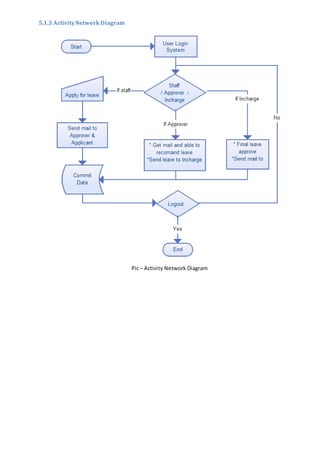
5.1.3 ActivityNetwork Diagram
Pic – Activity Network Diagram
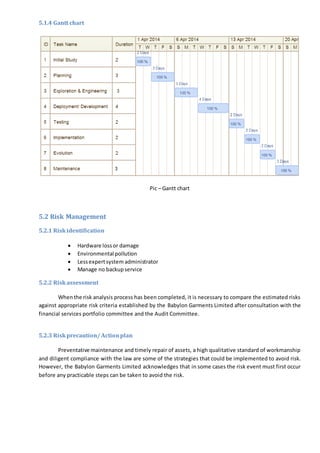
5.1.4 Gantt chart
Pic – Gantt chart
5.2 Risk Management
5.2.1 Riskidentification
 Hardware lossor damage
 Environmental pollution
 Lessexpertsystem administrator
 Manage no backupservice
5.2.2 Riskassessment
Whenthe risk analysis process has been completed, it is necessary to compare the estimated risks
against appropriate risk criteria established by the Babylon Garments Limited after consultation with the
financial services portfolio committee and the Audit Committee.
5.2.3 Riskprecaution/ Actionplan
Preventative maintenance and timely repair of assets, a high qualitative standard of workmanship
and diligent compliance with the law are some of the strategies that could be implemented to avoid risk.
However, the Babylon Garments Limited acknowledges that in some cases the risk event must first occur
before any practicable steps can be taken to avoid the risk.
5.2.4 Steps takenforpossiblerisks
When risk cannot be avoided, the effect of loss can often be minimized in terms of frequency and
severity, e.g. restricting access to Babylon Garments Limited offices after hours and the use of security
devicesonall computers,toreduce the risk of theft. In the most severe cases the only effective manner of
preventingexposuretoriskmay,where the possibilityof acatastrophicriskeventhappening with certainty,
is to cease undertaking the specific activity.
In some cases risk can be transferred to others, usually by contract. The most common method of
risktransferisto purchase of insurance since the policyactuallyshiftsthe financial riskof loss,contractually,
from the BGL to the insurance company.
Insurance:
(a) The Chief Financial Officermust,inrespectof all those instancesthatthe BGL Manager identified
risktransferby meansof insurance asthe most effectiveandefficientrisktreatmentstrategy, subject to the
supplychainmanagementpolicy,take out adequate insurance cover and must manage the BGL's insurance
reserve fund to cover such risks, as the BGL Manager may determine.
(b) A departmental headmust,atthe requestof the Chief FinancialOfficerbywrittennotice declare
the assetsheld,allocatedtoorused by her/his department, the risks against which they should be insured
and such other information as may be considered necessary.
(c) A departmental head must at the request of the Chief Financial Officer notify her/him without
delay of all property acquired, leased or rented and which must be insured against fire, accident or loss of
any nature and of any changes in structure, heating or occupation of any buildings or items which are
insured.
(d) A departmental headmustnotifythe Chief Financial Officer of the amounts in respect of which
new insurance cover must be taken out, or of any changes in existing insurance, having regard for the
replacement costs of assets.
(e) A departmental headmustnotifythe ChiefFinancial Officerimmediately after any occurrence of
fire or damage to, or loss of, any asset of the BGL. A departmental head must thereafter complete the
appropriate claim form and supply an estimate of the costs to repair such damage or loss.
(f) A departmental headmustinthe same manner inform the Chief Financial Officer of any injuries
to or damage sustained by any employee or a third party that could lead to a claim against the BGL.
(g) A departmental headmustnotifythe Chief Financial Officerof anyassets that, in her/his opinion
shouldbe insured against political insurgence and malicious damage or any other risk and the amounts for
which such assets should be insured. The Chief Financial Officer must report such requests to the BGL
Manager.
(h) The Chief Financial Officer must-
(i) Keep a record of all insurance policies of the BGL
(ii) Ensure payment of all premiums with regard to such insurance
(iii) Ensure that all claims arising from such policies are completed and submitted
5.3 Quality Management
5.3.1 Rulesappliedto maintainquality
Total quality management can be summarized as a management system for a customer-focused
organization that involves all employees in continual improvement. It uses strategy, data, and effective
communications to integrate the quality discipline into the culture and activities of the organization.
 Customer-focused:The customerultimatelydeterminesthe level of quality.No matter what
an organizationdoestofosterqualityimprovement—trainingemployees,integratingquality
intothe designprocess,upgrading computersorsoftware,orbuyingnew measuring tools—
the customer determines whether the efforts were worthwhile.
 Total employee involvement: All employees participate in working toward common goals.
Total employee commitment can only be obtained after fear has been driven from the
workplace, when empowerment has occurred, and management has provided the proper
environment. High-performance work systems integrate continuous improvement efforts
withnormal businessoperations.Self-managedworkteamsare one formof empowerment.
 Process-centered: A fundamental part of QM is a focus on process thinking. A process is a
series of steps that take inputs from suppliers (internal or external) and transforms them
into outputs that are delivered to customers (again, either internal or external). The steps
requiredtocarry out the processare defined, and performance measures are continuously
monitored in order to detect unexpected variation.
 Integrated system: Although an organization may consist of many different functional
specialties often organized into vertically structured departments, it is the horizontal
processes interconnecting these functions that are the focus of QM.
 Strategic and systematic approach: A critical part of the management of quality is the
strategicand systematicapproachtoachieving an organization’s vision, mission, and goals.
Thisprocess,calledstrategicplanningorstrategicmanagement,includes the formulation of
a strategic plan that integrates quality as a core component.
 Continual improvement:A majorthrustof QM is continual processimprovement. Continual
improvement drives an organization to be both analytical and creative in finding ways to
become more competitive and more effective at meeting stakeholder expectations.
 Fact-baseddecisionmaking: In order to know how well an organization is performing, data
on performance measures are necessary. QM requires that an organization continually
collect and analyse data in order to improve decision making accuracy, achieve consensus,
and allow prediction based on past history.
 Communications: During times of organizational change, as well as part of day-to-day
operation, effective communications plays a large part in maintaining morale and in
motivating employees at all levels. Communications involve strategies, method, and
timeliness.
These elements are considered so essential to QMthat many organizations define them, in some
format, as a set of core values and principles on which the organization is to operate.
5.3.2 Qualityplan andmeasuringmeter
 Top management learns about and decides to commit to QM. QM is identified as one of the
organization’s strategies.
 The organizationassessescurrentculture,customersatisfaction,andqualitymanagementsystems.
 Top managementidentifiescore valuesandprinciplestobe used,andcommunicatesthem.
 A TQM masterplanisdevelopedonthe basisof steps1, 2, and 3.
 The organizationidentifiesandprioritizes theirdemandsandalignsproductsandservicestomeet
those demands.
 Managementmapsthe critical processesthroughwhichthe organizationneeds.
 Managementoverseesthe formationof teamsforprocessimprovementefforts.
 The momentumof the QM effortismanagedbythe steeringcommittee.
 Managers contribute individuallytothe effortthrough hostingplanning,training,coaching,orother
methods.
 Dailyprocessmanagementandstandardizationtake place.
 Progressisevaluatedandthe planisrevisedasneeded.
 Constantemployeeawarenessandfeedbackonstatusare providedanda reward/recognition
processisestablished.
Chapter 6 - Feasibility Plan
6.1 All possibility type of feasibility
 The proposedsystemwill be developedinwebbasedcompletelyanditisrequiredtouse web
technologiesappropriately.Technologytobuild the overall systemisavailable
 Currentlyavailablewebtechnology- Java,html,xml etc.
 Server:Apache tomcat,apache,IIS
 RDBMS: Oracle,MySql,MS sql server
 The systemisdevelopedusingjavaasthe maindevelopmentlanguage due tosecurityneedand
Apache tomcat hasto the webserverdue tohighreliabilityandflexibilityinbetweenplatform.
derbydatabase isuse for developmentandoracle will be usedforproductionserverforthe system,
due to flexibilityandsecurity
 Availabilityof the chosentechnologies:all the chosentechnology iswidelyusedinthe worldand is
available forfree.Oracle will be licence versionandwithout oracle all are opensource software.
 Maturity of the technologyapache over50% of the serverinthe worldare apache thereforthe
technologyisconsideredtobe mature enoughtobe used
 Source availability:theseopensource softwaresourcesare availablewidelyandknowledge isfreely
available throughthe internet
6.2 Cost Benefit Analysis
We can divide the costinto the few categories.
 Developmentandpurchasingcosts
o Hardware (Currentlythe gotenoughhardware facilities)
o Software
 OperatingSystem(Ubuntu - free)
 Main software needtobuildthe system(ofBizFramework –Opensource)
 Otherssoftware (All are free)
 Installationanddataentrycosts
o Install the system
o Trainingthe staff
o Enter previousdataintosystem
 Operational Costs
o Maintenance of the system
o Updatingthe software
 Personal costs
o Maintenance staff cost
o Operational staff cost
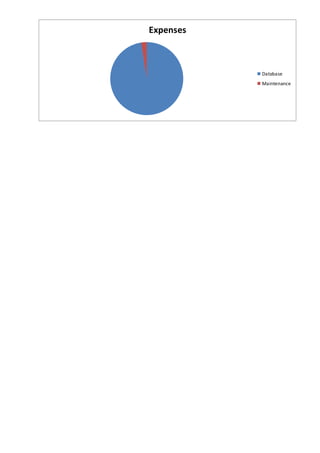
Expenses
Price
Database/year 1,20,000
Maintenance 30,000
Total 1,50,000
Expenses
Database
Maintenance
Chapter 7 - Foundation Plan
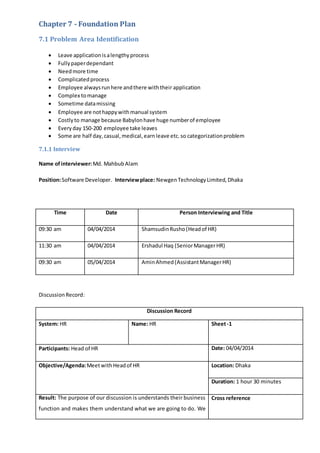
7.1 Problem Area Identification
 Leave applicationisalengthyprocess
 Fullypaperdependant
 Needmore time
 Complicatedprocess
 Employee alwaysrunhere andthere withtheir application
 Complex tomanage
 Sometime datamissing
 Employee are nothappywithmanual system
 Costlyto manage because Babylonhave huge numberof employee
 Everyday 150-200 employee take leaves
 Some are half day,casual,medical,earnleave etc.so categorizationproblem
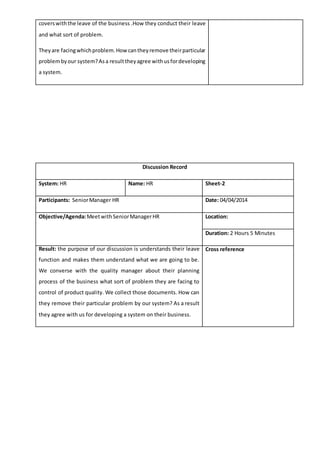
7.1.1 Interview
Name ofinterviewer:Md. MahbubAlam
Position:Software Developer. Interviewplace: NewgenTechnologyLimited, Dhaka
Time Date Person Interviewing and Title
09:30 am 04/04/2014 ShamsudinRusho(Headof HR)
11:30 am 04/04/2014 Ershadul Haq (SeniorManagerHR)
09:30 am 05/04/2014 AminAhmed(AssistantManagerHR)
DiscussionRecord:
Discussion Record
System: HR Name: HR Sheet-1
Participants: Head of HR Date: 04/04/2014
Objective/Agenda:MeetwithHeadof HR Location: Dhaka
Duration: 1 hour 30 minutes
Result: The purpose of our discussion is understands their business
function and makes them understand what we are going to do. We
Cross reference
coverswiththe leave of the business .How they conduct their leave
and what sort of problem.
Theyare facingwhichproblem.Howcantheyremove theirparticular
problembyour system?Asa resulttheyagree withusfordeveloping
a system.
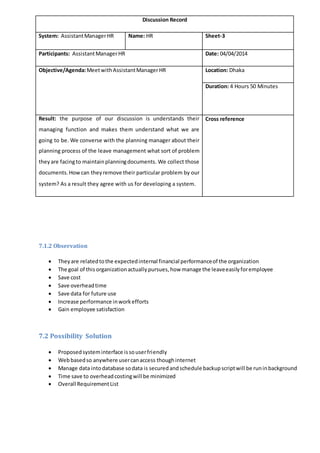
Discussion Record
System: HR Name: HR Sheet-2
Participants: SeniorManager HR Date: 04/04/2014
Objective/Agenda:MeetwithSeniorManagerHR Location:
Duration: 2 Hours 5 Minutes
Result: the purpose of our discussion is understands their leave
function and makes them understand what we are going to be.
We converse with the quality manager about their planning
process of the business what sort of problem they are facing to
control of product quality. We collect those documents. How can
they remove their particular problem by our system? As a result
they agree with us for developing a system on their business.
Cross reference
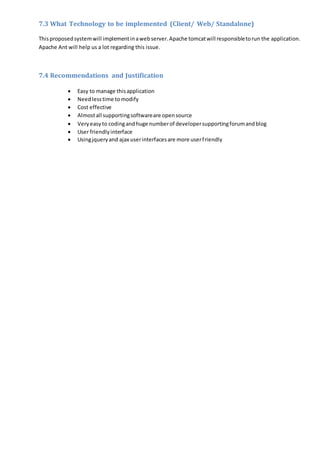
7.1.2 Observation
 Theyare relatedtothe expectedinternal financial performanceof the organization
 The goal of this organizationactuallypursues,how manage the leaveeasilyforemployee
 Save cost
 Save overheadtime
 Save data for future use
 Increase performance inworkefforts
 Gain employee satisfaction
7.2 Possibility Solution
 Proposedsysteminterface issouserfriendly
 Webbasedso anywhere usercanaccess thoughinternet
 Manage data intodatabase sodata is securedandschedule backupscriptwill be runinbackground
 Time save to overheadcostingwill be minimized
 Overall RequirementList
Discussion Record
System: AssistantManagerHR Name: HR Sheet-3
Participants: AssistantManagerHR Date: 04/04/2014
Objective/Agenda:MeetwithAssistantManagerHR Location: Dhaka
Duration: 4 Hours 50 Minutes
Result: the purpose of our discussion is understands their
managing function and makes them understand what we are
going to be. We converse with the planning manager about their
planning process of the leave management what sort of problem
theyare facingto maintainplanningdocuments. We collect those
documents.Howcan theyremove their particular problem by our
system? As a result they agree with us for developing a system.
Cross reference
7.3 What Technology to be implemented (Client/ Web/ Standalone)
Thisproposedsystemwill implementinawebserver.Apache tomcatwill responsibletorun the application.
Apache Ant will help us a lot regarding this issue.
7.4 Recommendations and Justification
 Easy to manage thisapplication
 Needlesstime tomodify
 Cost effective
 Almostall supportingsoftwareare opensource
 Veryeasyto codingandhuge numberof developersupportingforumandblog
 User friendlyinterface
 Usingjqueryand ajax userinterfacesare more userfriendly
Chapter 8 - Exploration
The existing Leave Management System of Babylon garments limited is manual. It is a lengthy
processand these processes are not optimized. The Human Resource Department and/or the Manager are
the competent authorities for the approval or refusal of leave depending on the type of leave. The Leave
Management System is initiated with the submission of an application by an employee for leave. This
application must be submitted to the Controlling Officer at least two weeks ahead (with the exception of
casual leave and the quarantine leave) from the date of commencement of the leave applied for. The
controllingofficerisresponsible forcheckingoutthe eligibilities of the employee for the type of leave s/he
has applied for. If the applicant is eligible then the controlling officer submits the application to the
Manager. The workof the Manager is the mostcomplicatedass/he isresponsibleforthe synchronization of
the leave. Moreover, he is also accountable for the smooth functionality of the branch. In case of Earned
Leave withfull pay, Medical Leave, Quarantine Leave and Casual Leave the Manager has the sole authority
to grant or refuse the leave. If the Manager allows an employee for leave, s/he should inform the HRD by
submitting a report, which will contain the details about the approved leave. For these types of leave the
HRD do not allow any alternative employee. For the other four types of leave the Manager sends the
applicationtothe HumanResource Departmentforapproval. Then the HRD takes their decision and let the
Manager know the result by an official letter. Then the Manager informs the applicant. So, an employee
cannot butwaitfor a longtime to knowthe decisionof the competentauthority.Sometime the HRD sends a
backup officer to the branch if they approve the leave of an employee for a long period of time.
Furthermore,the Branch Manager is supposed to send an annual report informing the leave status
of a calendar year to the HRD. Each branch maintains a register for the leave associated affairs. The
Controlling Officer use to maintain this log. The Branch Manager uses this register to prepare the annual
report.Asthe annual leave reportisnothingbutthe summaryof the leave register for a particular year, it is
not that muchhelpful fortakinganymanagerial decision. There is no opportunity to analyze the report and
find out the scopes for improvements as the HRD is not getting any instant data from the report. They are
gettingpresentyear’sleavestatusinthe followingyear.Asa resultthe topmanagementisnot being able to
utilize the reportinapropermanner.So,the existingLeave ManagementSystemisatime consumingone. It
needs to be more optimized and more synchronized which will lead the management to have a more
proficient system to support the total employee management scheme.
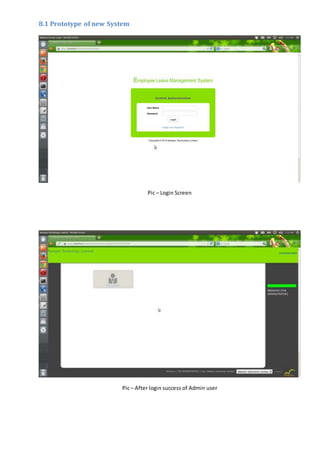
8.1 Prototype of new System
Pic – Login Screen
Pic – After login success of Admin user
Chapter 9 - Engineering
Explicitlyidentifythe requirementstobe satisfiedbythe proposedsystem.
9.1 New System Modules
Discuss functional improvements, including new capabilities. Discuss improvements of degree.
These are upgrades to existing capabilities.
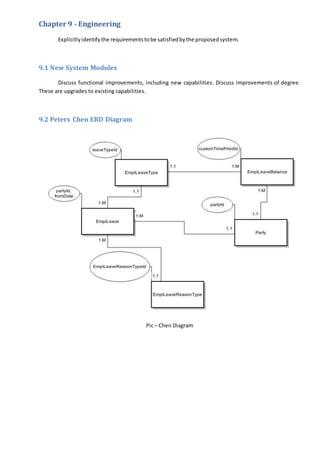
9.2 Peters Chen ERD Diagram
Pic – Chen Diagram
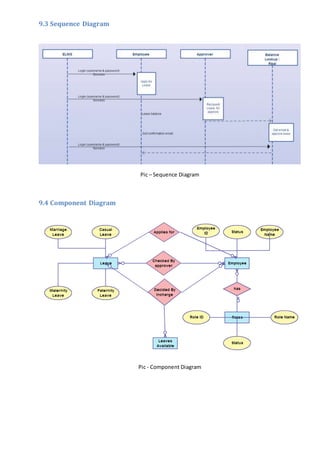
9.3 Sequence Diagram
Pic – Sequence Diagram
9.4 Component Diagram
Pic - Component Diagram
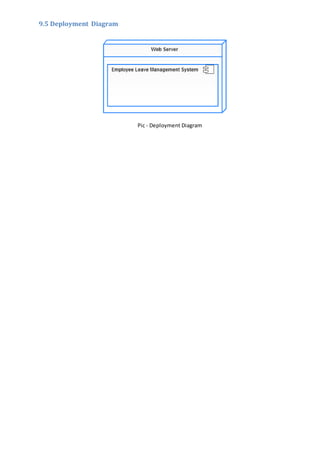
9.5 Deployment Diagram
Pic - Deployment Diagram
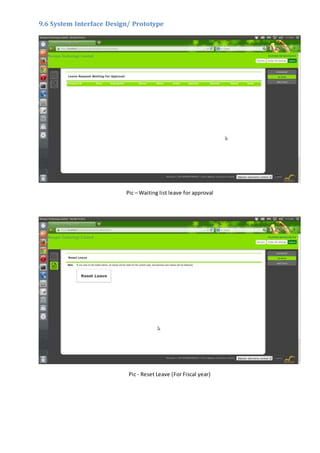
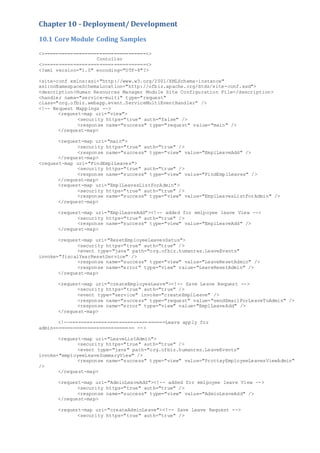
9.6 System Interface Design/ Prototype
Pic – Waiting list leave for approval
Pic - Reset Leave (For Fiscal year)
Chapter 10 - Deployment/ Development
10.1 Core Module Coding Samples
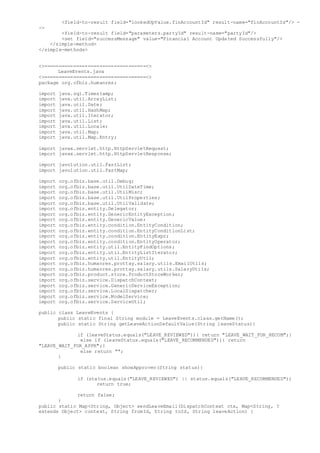
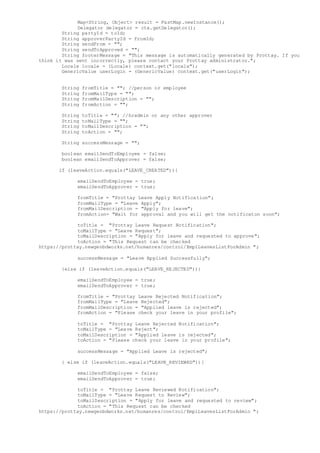
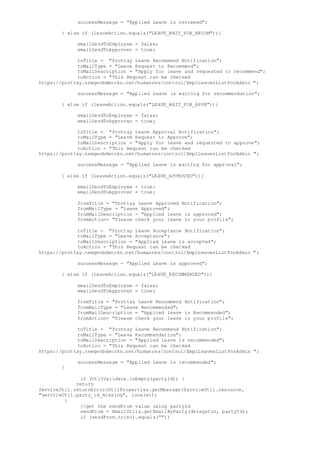
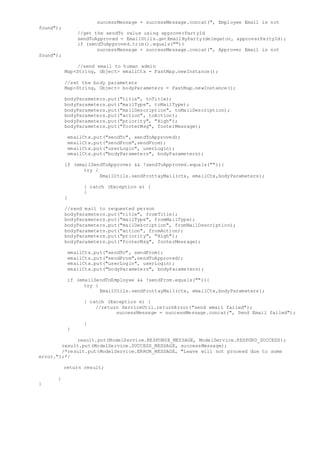
<>===================================<>
Contoller
<>===================================<>
<?xml version="1.0" encoding="UTF-8"?>
<site-conf xmlns:xsi="http://www.w3.org/2001/XMLSchema-instance"
xsi:noNamespaceSchemaLocation="http://ofbiz.apache.org/dtds/site-conf.xsd">
<description>Human Resources Manager Module Site Configuration File</description>
<handler name="service-multi" type="request"
class="org.ofbiz.webapp.event.ServiceMultiEventHandler" />
<!-- Request Mappings -->
<request-map uri="view">
<security https="true" auth="false" />
<response name="success" type="request" value="main" />
</request-map>
<request-map uri="main">
<security https="true" auth="true" />
<response name="success" type="view" value="EmplLeaveAdd" />
</request-map>
<request-map uri="FindEmplLeaves">
<security https="true" auth="true" />
<response name="success" type="view" value="FindEmplLeaves" />
</request-map>
<request-map uri="EmplLeavesListForAdmin">
<security https="true" auth="true" />
<response name="success" type="view" value="EmplLeavesListForAdmin" />
</request-map>
<request-map uri="EmplLeaveAdd"><!-- added for emlpoyee leave View -->
<security https="true" auth="true" />
<response name="success" type="view" value="EmplLeaveAdd" />
</request-map>
<request-map uri="ResetEmployeeLeavesSatus">
<security https="true" auth="true" />
<event type="java" path="org.ofbiz.humanres.LeaveEvents"
invoke="fiscalYearResetService" />
<response name="success" type="view" value="LeaveResetAdmin" />
<response name="error" type="view" value="LeaveResetAdmin" />
</request-map>
<request-map uri="createEmployeeLeave"><!-- Save Leave Request -->
<security https="true" auth="true" />
<event type="service" invoke="createEmplLeave" />
<response name="success" type="request" value="sendEmailForLeaveToAdmin" />
<response name="error" type="view" value="EmplLeaveAdd" />
</request-map>
<!--=================================Leave apply for
admin============================ -->
<request-map uri="LeaveListAdmin">
<security https="true" auth="true" />
<event type="java" path="org.ofbiz.humanres.LeaveEvents"
invoke="employeeLeaveSummaryView" />
<response name="success" type="view" value="ProttayEmployeeLeavesViewAdmin"
/>
</request-map>
<request-map uri="AdminLeaveAdd"><!-- added for emlpoyee leave View -->
<security https="true" auth="true" />
<response name="success" type="view" value="AdminLeaveAdd" />
</request-map>
<request-map uri="createAdminLeave"><!-- Save Leave Request -->
<security https="true" auth="true" />
<event type="service" invoke="createEmplLeave" />
<response name="success" type="request" value="sendEmailToLeaveFromAdmin" />
<response name="error" type="view" value="AdminLeaveAdd" />
</request-map>
<request-map uri="sendEmailToLeaveFromAdmin"><!-- Send mail to Admin after Save
Leave Request -->
<security https="true" auth="true" />
<event type="service" invoke="sendEmailForLeave"
path="component://humanres/servicedef/services.xml" />
<response name="success" type="request"
value="ProttayEmployeeLeavesViewAdmin" />
<response name="error" type="view" value="ProttayEmployeeLeavesViewAdmin" />
</request-map>
<!--=====================End================ -->
<request-map uri="sendEmailForLeaveToAdmin"><!-- Send mail to Admin after Save
Leave Request -->
<security https="true" auth="true" />
<event type="service" invoke="sendEmailForLeave"
path="component://humanres/servicedef/services.xml" />
<response name="success" type="request" value="ProttayEmployeeLeavesView" />
<response name="error" type="view" value="ProttayEmployeeLeavesView" />
</request-map>
<request-map uri="sendEmailForLeaveToEmployee"><!-- Send mail to Employee after
send Email to Admin -->
<security https="true" auth="true" />
<event type="service" invoke="sendEmailForLeaveReverse"
path="component://humanres/servicedef/services.xml" />
<response name="success" type="view" value="EmplLeaveAdd" />
<response name="error" type="view" value="EmplLeaveAdd" />
</request-map>
<!-- end -->
<request-map uri="SearchEmplLeaves">
<security https="true" auth="true" />
<response name="success" type="view" value="SearchEmplLeaves" />
</request-map>
<request-map uri="EditEmplLeave">
<security https="true" auth="true" />
<response name="success" type="view" value="EditEmplLeave" />
</request-map>
<request-map uri="deleteEmplLeave">
<security https="true" auth="true" />
<event type="service" invoke="deleteEmplLeave" />
<response name="success" type="view" value="FindEmplLeaves" />
<response name="error" type="view" value="FindEmplLeaves" />
</request-map>
<request-map uri="EditEmplLeaveTypes">
<security https="true" auth="true" />
<response name="success" type="view" value="EditEmplLeaveTypes" />
</request-map>
<!-- added for employye leave types -->
<request-map uri="AddEmplLeaveTypes">
<security https="true" auth="true" />
<response name="success" type="view" value="AddEmplLeaveTypes" />
</request-map>
<request-map uri="ListEmplLeaveTypes">
<security https="true" auth="true" />
<response name="success" type="view" value="ListEmplLeaveTypes" />
</request-map>
<request-map uri="NewEditEmplLeaveTypes">
<security https="true" auth="true" />
<response name="success" type="view" value="NewEditEmplLeaveTypes" />
</request-map>
<!-- end -->
<request-map uri="createEmplLeaveType">
<security https="true" auth="true" />
<event type="service" invoke="createEmplLeaveType" />
<response name="success" type="view" value="EditEmplLeaveTypes" />
<response name="error" type="view" value="EditEmplLeaveTypes" />
</request-map>
<request-map uri="updateEmplLeaveType">
<security https="true" auth="true" />
<event type="service" invoke="updateEmplLeaveType" />
<response name="success" type="view" value="EditEmplLeaveTypes" />
<response name="error" type="view" value="EditEmplLeaveTypes" />
</request-map>
<request-map uri="deleteEmplLeaveType">
<security https="true" auth="true" />
<event type="service" invoke="deleteEmplLeaveType" />
<response name="success" type="view" value="EditEmplLeaveTypes" />
<response name="error" type="view" value="EditEmplLeaveTypes" />
</request-map>
<request-map uri="calculateLeaveWithoutHoliday">
<security https="true" auth="true" />
<event type="service" invoke="calculateLeaveWithoutHoliday" />
<response name="success" type="request" value="json" />
<response name="error" type="request" value="json" />
</request-map>
<view-map name="EmplLeaveAdd" type="screen"
page="component://humanres/widget/EmplLeaveScreens.xml#EmplLeaveAdd" />
<!--Leave apply for admin -->
<view-map name="AdminLeaveAdd" type="screen"
page="component://humanres/widget/EmplLeaveScreens.xml#AdminLeaveAdd" />
<view-map name="EditEmplLeaveStatusDetail" type="screen"
page="component://humanres/widget/EmplLeaveScreens.xml#EditEmplLeaveStatusDetail" />
<view-map name="EditEmployeeLeaves" type="screen"
page="component://humanres/widget/EmployeeScreens.xml#EditEmployeeLeaves" />
<view-map name="ProttayEmployeeLeavesView" type="screen"
page="component://humanres/widget/EmployeeScreens.xml#EmployeeLeavesView" />
<view-map name="LeaveResetAdmin" type="screen"
page="component://humanres/widget/EmplLeaveScreens.xml#LeaveResetAdmin" />
<view-map name="ProttayEmployeeLeavesViewAdmin" type="screen"
page="component://humanres/widget/EmployeeScreens.xml#ProttayEmployeeLeavesViewAdmin" />
<view-map name="SearchEmplLeaves" type="screen"
page="component://humanres/widget/EmplLeaveScreens.xml#SearchEmplLeaves" />
<!-- end -->
<view-map name="EditEmplLeave" type="screen"
page="component://humanres/widget/EmplLeaveScreens.xml#EditEmplLeave" />
<view-map name="EditEmplLeaveTypes" type="screen"
page="component://humanres/widget/GlobalHRSettingScreens.xml#EditEmplLeaveTypes" />
<view-map name="NewEditEmplLeaveTypes" type="screen"
page="component://humanres/widget/GlobalHRSettingScreens.xml#NewEditEmplLeaveTypes" />
<view-map name="AddEmplLeaveTypes" type="screen"
page="component://humanres/widget/GlobalHRSettingScreens.xml#AddEmplLeaveTypes" />
<view-map name="ListEmplLeaveTypes" type="screen"
page="component://humanres/widget/GlobalHRSettingScreens.xml#ListEmplLeaveTypes" />
<!-- end -->
<view-map name="EditEmplLeaveReasonTypes" type="screen"
page="component://humanres/widget/GlobalHRSettingScreens.xml#EditEmplLeaveReasonTypes" />
<!-- added for employee leave reason type -->
<view-map name="AddEmplLeaveReasonTypes" type="screen"
page="component://humanres/widget/GlobalHRSettingScreens.xml#AddEmplLeaveReasonTypes" />
<view-map name="ListEmplLeaveReasonTypes" type="screen"
page="component://humanres/widget/GlobalHRSettingScreens.xml#ListEmplLeaveReasonTypes" />
<!-- end -->
<view-map name="FindLeaveApprovals" type="screen"
page="component://humanres/widget/EmplLeaveScreens.xml#FindLeaveApprovals" />
<view-map name="EditEmplLeaveStatus" type="screen"
page="component://humanres/widget/EmplLeaveScreens.xml#EditEmplLeaveStatus" />
<view-map name="EditInternalOrgFtl" type="screen"
page="component://humanres/widget/EmplPositionScreens.xml#EditInternalOrgFtl" />
<view-map name="RemoveInternalOrgFtl" type="screen"
page="component://humanres/widget/EmplPositionScreens.xml#RemoveInternalOrgFtl" />
<view-map name="ProttayPositionResponsibilities" type="screen"
page="component://humanres/widget/EmplPositionScreens.xml#ProttayPositionResponsibilities"
/>
<!-- ==================Employee Finacial Accounts===================== -->
<view-map name="EditFinAccounts" type="screen"
page="component://humanres/widget/EmployeeScreens.xml#EditFinAccounts" />
<view-map name="viewUpdateFinacialAccounts" type="screen"
page="component://humanres/widget/EmployeeScreens.xml#updateFinAccounts" />
</site-conf>
<>===================================<>
EmplLeaveScreen.xml
<>===================================<>
<?xml version="1.0" encoding="UTF-8"?>
<screens xmlns:xsi="http://www.w3.org/2001/XMLSchema-instance"
xsi:noNamespaceSchemaLocation="http://ofbiz.apache.org/dtds/widget-screen.xsd">
<screen name="FindEmplLeaves">
<section>
<actions>
<set field="titleProperty" value="HumanResFindEmplLeave" />
<set field="headerItem" value="Leave" />
<set field="tabButtonItem" value="EmployeeLeave" />
<set field="partyId" from-field="parameters.partyId" />
<set field="leaveTypeId" from-field="parameters.leaveTypeId" />
<set field="fromDate" from-field="parameters.fromDate" />
<set field="emplLeaveCtx" from-field="parameters" />
<service service-name="humanResManagerPermission" result-
map="permResult">
<field-map field-name="mainAction" value="ADMIN" />
</service>
<set field="hasAdminPermission" from-
field="permResult.hasPermission" />
</actions>
<widgets>
<decorator-screen name="main-decorator"
location="${parameters.mainDecoratorLocation}">
<decorator-section name="pre-body">
<include-menu name="EmplLeaveTabBar"
location="component://humanres/widget/HumanresMenus.xml" />
</decorator-section>
<decorator-section name="body">
<section>
<condition>
<if-has-permission
permission="HUMANRES" action="_VIEW" />
</condition>
<widgets>
<decorator-screen
name="FindScreenDecorator" location="component://common/widget/CommonScreens.xml">
<!--<decorator-section
name="menu-bar"> <section> <widgets> <container style="button-bar"> <link
target="EditEmplLeave" text="${uiLabelMap.HumanResNewLeave}" style="buttontext create"/>
</container> </widgets> </section> </decorator-section> -->
<decorator-section
name="search-options">
<include-form
name="FindEmplLeaves" location="component://humanres/widget/forms/EmplLeaveForms.xml" />
<include-menu
location="component://humanres/widget/HumanresMenus.xml" name="EmplLeavesActionMenu" />
</decorator-section>
<decorator-section
name="search-results">
<include-form
name="ListEmplLeaves" location="component://humanres/widget/forms/EmplLeaveForms.xml" />
</decorator-section>
</decorator-screen>
</widgets>
</section>
</decorator-section>
</decorator-screen>
</widgets>
</section>
</screen>
<!-- Added for Employee leave Approval -->
<screen name="EmplLeavesListForAdmin">
<section>
<actions>
<set field="titleProperty"
value="PageTitleViewPartyEmplLeavesListForAdmin" />
<set field="tabButtonItem" value="EmplLeavesListForAdmin" />
<set field="headerItem" value="Leave" />
<set field="actionButtonItem" value="profile" />
<set field="parameters.partyId" value="${parameters.partyId}"
default-value="${userLogin.partyId}" />
<entity-condition list="approvers" entity-
name="UserLoginSecurityGroup" filter-by-date="true">
<condition-list>
<condition-expr field-name="groupId"
operator="equals" value="HUMANRES_ADMIN" />
<condition-expr field-name="userLoginId"
operator="not-equals" value="admin" />
</condition-list>
</entity-condition>
<set field="approverPartyId" value="${userLogin.partyId}" />
<service service-name="findEmplLeave" auto-field-map="true"
result-map="emplLeaveResult" />
<set field="result"
value="${emplLeaveResult.employeeLeaveList}" />
<entity-and list="leaveInfo" entity-name="PartyContactMech">
<field-map field-name="partyId"
value="${result[0].partyId}" />
</entity-and>
<entity-and list="listContactMech" entity-name="ContactMech">
<field-map field-name="contactMechId"
value="${leaveInfo[0].contactMechId}" />
</entity-and>
<entity-and list="leaveInfo1" entity-name="PartyContactMech">
<field-map field-name="partyId"
value="${userLogin.partyId}" />
</entity-and>
<entity-and list="listContactMech1" entity-name="ContactMech">
<field-map field-name="contactMechId"
value="${leaveInfo1[0].contactMechId}" />
</entity-and>
<entity-and entity-name="UserLogin" list="userLoginList">
<field-map field-name="partyId"
value="${result[0].partyId}" />
</entity-and>
<set field="emplId" from-field="userLoginList[0].userLoginId"
/>
<!-- <set field="sendFrom"
value="${listContactMech[0].infoString}"/> <set field="sendTo"
value="${listContactMech1[0].infoString}"/> -->
<set field="subject" value="Leave Status Changed" />
<set field="bodyText" value="Leave status changed successfuly."
/>
</actions>
<widgets>
<decorator-screen name="main-decorator"
location="${parameters.mainDecoratorLocation}">
<decorator-section name="body">
<include-menu
location="component://humanres/widget/HumanresMenus.xml" name="LeaveSubmissionActionMenu"
/>
<!-- <include-menu
location="component://humanres/widget/HumanresMenus.xml" name="ContactNavigationMenu"/> --
>
<screenlet title="Leave Request Waiting For
Approval">
<section>
<widgets>
<include-form
name="ListEmplLeavesForAdmin"
location="component://humanres/widget/forms/EmplLeaveForms.xml" />
</widgets>
</section>
</screenlet>
</decorator-section>
</decorator-screen>
</widgets>
</section>
</screen>
<!-- This screen is designed for resetting the leave -->
<screen name="LeaveResetAdmin">
<section>
<actions>
<set field="titleProperty" value="HumanResLeaveReset" />
<set field="headerItem" value="Leave" />
<set field="actionButtonItem" value="ResetEmployeeLeave" />
</actions>
<widgets>
<decorator-screen name="main-decorator"
location="${parameters.mainDecoratorLocation}">
<decorator-section name="body">
<include-menu
location="component://humanres/widget/HumanresMenus.xml" name="LeaveSubmissionActionMenu"
/>
<screenlet title="Reset Leave">
<include-form name="LeaveResetAdmin"
location="component://humanres/widget/forms/EmplLeaveForms.xml" />
</screenlet>
</decorator-section>
</decorator-screen>
</widgets>
</section>
</screen>
<screen name="LeaveListAdmin">
<section>
<actions>
<set field="titleProperty" value="HumanResListLeaveStatistics"
/>
<set field="headerItem" value="Leave" />
<set field="tabButtonItem" value="ProttayEmployeeLeavesView" />
<set field="actionButtonItem" value="Leave" />
<set field="parameters.partyId" value="${parameters.partyId}"
default-value="${userLogin.partyId}" />
<set field="result" from-field="parameters.result" />
</actions>
<widgets>
<decorator-screen name="main-decorator"
location="${parameters.mainDecoratorLocation}">
<decorator-section name="body">
<include-menu
location="component://humanres/widget/HumanresMenus.xml" name="LeaveSubmissionActionMenu"
/>
<!-- <include-form name="EmplLeavesList"
location="component://humanres/widget/forms/EmployeeForms.xml" /> -->
<screenlet collapsible="true"
title="${uiLabelMap.HumanResListEmplLeaveStatistics}" id="employee_leave">
<include-form name="EmplLeavesList"
location="component://humanres/widget/forms/EmployeeForms.xml" />
</screenlet>
</decorator-section>
</decorator-screen>
</widgets>
</section>
</screen>
<screen name="ProttayEmployeeLeavesView">
<section>
<actions>
<set field="titleProperty" value="PageTitleEditApprovalStatus"
/>
<set field="tabButtonItem" value="Leave" />
<set field="partyId" from-field="parameters.partyId" />
<set field="leaveTypeId" from-field="parameters.leaveTypeId" />
<set field="fromDate" from-field="parameters.fromDate" />
<set field="headerItem" value="Leave" />
</actions>
<widgets>
<decorator-screen name="main-decorator"
location="${parameters.mainDecoratorLocation}">
<decorator-section name="body">
<screenlet id="AddEmplLeavePanel" title="Apply For
Leave" collapsible="true">
</screenlet>
<include-menu
location="component://humanres/widget/HumanresMenus.xml"
name="ApplyForLeaveNavigationMenu" />
</decorator-section>
</decorator-screen>
</widgets>
</section>
</screen>
<!-- <screen name="LeaveApplyAdmin"> <section> <actions> <set field="titleProperty"
value="PageTitleViewPartyEmplLeavesListForAdmin" /> <set field="tabButtonItem"
value="EmplLeavesListForAdmin" /> <set field="headerItem" value="Leave"/> <set
field="actionButtonItem" value="LeaveApplyAdmin" /> <set field="titleProperty"
value="HumanResEditEmplLeave" /> <set field="partyId" from-field="parameters.partyId"
default-value="${userLogin.partyId}" /> <entity-one entity-name="EmplLeave" value-
field="leaveApp" /> <entity-and list="approvers" entity-name="UserLoginSecurityGroup">
<field-map field-name="groupId" value="HUMANRES_ADMIN" /> </entity-and> <entity-condition
list="approvers" entity-name="UserLoginSecurityGroup" filter-by-date="true"> <condition-
list> <condition-expr field-name="groupId" operator="equals"
value="HUMANRES_ADMIN" /> <condition-expr field-name="userLoginId"
operator="not-equals" value="admin" /> </condition-list> </entity-condition> <entity-and
list="leaveInfo" entity-name="PartyContactMech"> <field-map field-name="partyId" from-
field="userLogin.partyId"/> </entity-and> <entity-and list="listContactMech" entity-
name="ContactMech"> <field-map field-name="contactMechId"
value="${leaveInfo[0].contactMechId}"/> <field-map field-name="contactMechTypeId"
value="EMAIL_ADDRESS"/> </entity-and> <entity-and list="leaveInfo1" entity-
name="PartyContactMech"> <field-map field-name="partyId" value="hradmin"/> </entity-and>
<entity-and list="listContactMech1" entity-name="ContactMech"> <field-map field-
name="contactMechId" value="${leaveInfo1[0].contactMechId}"/> <field-map field-
name="contactMechTypeId"
value="EMAIL_ADDRESS"/> </entity-and> <set field="subject" value="New Leave
Application"/> <set field="bodyText" value="A new applicationn for leave created
successfully"/> </actions> <widgets> <decorator-screen name="main-decorator"
location="${parameters.mainDecoratorLocation}"> <decorator-section name="body"> <include-
menu location="component://humanres/widget/HumanresMenus.xml"
name="LeaveSubmissionActionMenu" /> <screenlet id="AddEmplLeavePanel" title="Apply For
Leave" collapsible="true"> <include-form name="EditEmplLeave"
location="component://humanres/widget/forms/EmplLeaveForms.xml" /> </screenlet>
</decorator-section> </decorator-screen> </widgets> </section> </screen> -->
<!-- added for employee leave -->
<screen name="SearchEmplLeaves">
<section>
<actions>
<set field="titleProperty" value="HumanResFindEmplLeave" />
<set field="headerItem" value="LeaveEmployee" />
<set field="tabButtonItem" value="EmployeeLeave" />
<set field="partyId" from-field="parameters.partyId" />
<set field="leaveTypeId" from-field="parameters.leaveTypeId" />
<set field="fromDate" from-field="parameters.fromDate" />
<set field="emplLeaveCtx" from-field="parameters" />
<service service-name="humanResManagerPermission" result-
map="permResult">
<field-map field-name="mainAction" value="ADMIN" />
</service>
<set field="hasAdminPermission" from-
field="permResult.hasPermission" />
</actions>
<widgets>
<decorator-screen name="main-decorator"
location="${parameters.mainDecoratorLocation}">
<decorator-section name="pre-body">
<include-menu name="EmplLeaveTabBar"
location="component://humanres/widget/HumanresMenus.xml" />
</decorator-section>
<decorator-section name="body">
<section>
<condition>
<if-has-permission
permission="HUMANRES" action="_VIEW" />
</condition>
<widgets>
<decorator-screen
name="FindScreenDecorator" location="component://common/widget/CommonScreens.xml">
<!--<decorator-section
name="menu-bar"> <section> <widgets> <container style="button-bar"> <link
target="EditEmplLeave" text="${uiLabelMap.HumanResNewLeave}" style="buttontext create"/>
</container> </widgets> </section> </decorator-section> -->
<decorator-section
name="search-options">
<include-menu
location="component://humanres/widget/HumanresMenus.xml" name="EmplLeavesActionMenu" />
<include-form
name="FindEmplLeaves" location="component://humanres/widget/forms/EmplLeaveForms.xml" />
</decorator-section>
<decorator-section
name="search-results">
<include-form
name="ListEmplLeaves" location="component://humanres/widget/forms/EmplLeaveForms.xml" />
</decorator-section>
</decorator-screen>
</widgets>
</section>
</decorator-section>
</decorator-screen>
</widgets>
</section>
</screen>
<!-- end -->
<screen name="FindLeaveApprovals">
<section>
<actions>
<set field="titleProperty" value="PageTitleFindApprovals" />
<set field="tabButtonItem" value="Approval" />
<set field="headerItem" value="Leave" />
<service service-name="humanResManagerPermission" result-
map="permResult">
<field-map field-name="mainAction" value="ADMIN" />
</service>
<set field="hasAdminPermission" from-
field="permResult.hasPermission" />
<set field="approverPartyId" from-
field="parameters.userLogin.partyId" />
</actions>
<widgets>
<decorator-screen name="main-decorator"
location="${parameters.mainDecoratorLocation}">
<decorator-section name="pre-body">
<include-menu name="EmplLeaveTabBar"
location="component://humanres/widget/HumanresMenus.xml" />
</decorator-section>
<decorator-section name="body">
<section>
<condition>
<if-has-permission
permission="HUMANRES" action="_VIEW" />
</condition>
<widgets>
<decorator-screen
name="FindScreenDecorator" location="component://common/widget/CommonScreens.xml">
<decorator-section
name="search-options">
<include-menu
name="LeaveApprovalActionMenu" location="component://humanres/widget/HumanresMenus.xml" />
<include-form
name="FindLeaveApprovals" location="component://humanres/widget/forms/EmplLeaveForms.xml"
/>
</decorator-section>
<decorator-section
name="search-results">
<include-form
name="ListLeaveApprovals" location="component://humanres/widget/forms/EmplLeaveForms.xml"
/>
</decorator-section>
</decorator-screen>
</widgets>
<fail-widgets>
<label
style="h3">${uiLabelMap.HumanResViewPermissionError}
</label>
</fail-widgets>
</section>
</decorator-section>
</decorator-screen>
</widgets>
</section>
</screen>
</screens>
<>===================================<>
HumanresMenus.xml
<>===================================<>
<?xml version="1.0" encoding="UTF-8"?>
<menus xmlns:xsi="http://www.w3.org/2001/XMLSchema-instance"
xsi:noNamespaceSchemaLocation="http://ofbiz.apache.org/dtds/widget-menu.xsd">
<menu name="HumanResAppBar" title="${uiLabelMap.HumanResManager}" default-menu-
item-name="profile" id="app-navigation" type="simple" default-selected-style="selected"
menu-container-style="button-bar tab-bar" selected-menuitem-context-field-
name="headerItem">
<menu-item name="Leave" title="${uiLabelMap.HumanResEmplLeave}">
<condition>
<if-has-permission permission="HUMANRES" action="_ADMIN" />
</condition>
<link target="EmplLeavesListForAdmin" />
</menu-item>
<!-- THis is for Normal User -->
<menu-item name="LeaveEmployee" title="${uiLabelMap.HumanResEmplLeave}">
<condition>
<not>
<if-has-permission permission="HUMANRES" action="_ADMIN"
/>
</not>
</condition>
<link target="ProttayEmployeeLeavesView?partyId=${userLogin.partyId}"
/>
</menu-item>
<!-- <menu-item name="PaySlip" title="Payslip"> <condition> <not> <if-has-
permission permission="HUMANRES" action="_ADMIN"/> </not> </condition> <link
target="PaySlipIndividual?partyId=${userLogin.partyId}" /> </menu-item> <menu-item
name="SalaryProcess" title="${uiLabelMap.salary}"> <condition> <if-has-permission
permission="HUMANRES" action="_EXEC" /> </condition> <link target="SalaryProcess" />
</menu-item> <menu-item name="PayrollConfig" title="${uiLabelMap.HumanResSalaryConfig}">
<condition><if-has-permission permission="HUMANRES" action="_ADMIN" /></condition> <link
target="PayrollConfig" /> </menu-item> -->
<menu-item name="GlobalHRSettings"
title="${uiLabelMap.HumanResGlobalHRSettings}">
<condition>
<if-has-permission permission="HUMANRES" action="_ADMIN" />
</condition>
<link target="ListEmplLeaveTypes" />
</menu-item>
<!-- <menu-item name="ChangeRequestForApprover"
title="${uiLabelMap.HumanResChangeRequest}"> <condition> <if-has-permission
permission="HUMANRES" action="_ADMIN" /> </condition> <link
target="ChangeRequestForApprover" /> </menu-item> <menu-item name="profile"
title="Profile" > <link target="EmployeeProfile?partyId=${userLogin.partyId}" /> </menu-
item> -->
<!-- Organization Menu for HR -->
<!-- <menu-item name="organization" title="Organization"> <condition> <if-
has-permission permission="HUMANRES" action="_ADMIN" /> </condition> <link
target="OrganizationMain" /> </menu-item> -->
<menu-item name="security" title="Security">
<condition>
<if-has-permission permission="HUMANRES" action="_ADMIN" />
</condition>
<link target="FindSecurityGroup" />
</menu-item>
</menu>
<menu name="EmplLeavesCreateMenu" default-menu-item-name="AddEmplLeaves" default-
selected-style="selected" type="simple" menu-container-style="button-bar tab-bar"
selected-menuitem-context-field-name="tabButtonItem">
<menu-item name="AddEmplLeaves" selected-style="selected" title="Apply for
Leave">
<link target="EmplLeaveAdd" />
</menu-item>
</menu>
<!--Leave apply for admin -->
<menu name="AdminLeaveCreateMenu" default-menu-item-name="AddEmplLeaves" default-
selected-style="selected" type="simple" menu-container-style="button-bar tab-bar"
selected-menuitem-context-field-name="tabButtonItem">
<menu-item name="AddEmplLeaves" selected-style="selected" title="Apply for
Leave">
<link target="AdminLeaveAdd" />
</menu-item>
</menu>
<menu name="LeaveEmployees" default-menu-item-name="LeaveEmployees" default-
selected-style="selected" type="simple" menu-container-style="button-bar tab-bar"
selected-menuitem-context-field-name="tabButtonItem">
<menu-item name="LeaveEmployees" selected-style="selected" title="Back to
Leave">
<link target="ProttayEmployeeLeavesView?partyId=${userLogin.partyId}"
/>
</menu-item>
</menu>
<menu name="LeaveEmployeesForAdmins" default-menu-item-name="LeaveEmployees"
default-selected-style="selected" type="simple" menu-container-style="button-bar tab-bar"
selected-menuitem-context-field-name="tabButtonItem">
<menu-item name="LeaveEmployeesForAdmins" selected-style="selected"
title="Back to Leave request approval">
<link target="EmplLeavesListForAdmin" />
</menu-item>
</menu>
<!-- added for employee leave -->
<menu name="EmplLeavesActionMenu" default-menu-item-name="SearchEmplLeaves"
default-selected-style="selected" type="simple" menu-container-style="left-hr-action-menu"
selected-menuitem-context-field-name="actionButtonItem">
<menu-item name="AddEmplLeaves" selected-style="selected">
<link target="EditEmplLeave" style="hr-add-icon" />
</menu-item>
<menu-item name="SearchEmplLeaves" selected-style="selected">
<link target="SearchEmplLeaves" style="hr-search-icon" />
</menu-item>
</menu>
<!-- end -->
<!-- added for leave approval -->
<menu name="LeaveApprovalActionMenu" default-menu-item-name="SearchLeaveApprovals"
default-selected-style="selected" type="simple" menu-container-style="left-hr-action-menu"
selected-menuitem-context-field-name="actionButtonItem">
<menu-item name="SearchLeaveApprovals" selected-style="selected">
<link target="FindLeaveApprovals" style="hr-search-icon" />
</menu-item>
</menu>
<!-- end -->
</menus>
<>===================================<>
EmplLeaveForms.xml
<>===================================<>
<?xml version="1.0" encoding="UTF-8"?>
<forms xmlns:xsi="http://www.w3.org/2001/XMLSchema-instance"
xsi:noNamespaceSchemaLocation="http://ofbiz.apache.org/dtds/widget-form.xsd">
<form name="FindEmplLeaves" type="single" target="FindEmplLeaves"
odd-row-style="header-row" default-table-style="basic-table">
<auto-fields-entity entity-name="EmplLeave" default-field-type="find"/>
<field name="partyId" title="${uiLabelMap.PartyPartyId}"><lookup target-form-
name="LookupPartyName"/></field>
<field name="leaveTypeId">
<drop-down allow-empty="true">
<entity-options description="${description}" key-field-name="leaveTypeId"
entity-name="EmplLeaveType"/>
</drop-down>
</field>
<field name="emplLeaveReasonTypeId">
<drop-down allow-empty="true">
<entity-options description="${description}" key-field-
name="emplLeaveReasonTypeId" entity-name="EmplLeaveReasonType"/>
</drop-down>
</field>
<field name="leaveStatus">
<drop-down allow-empty="true">
<entity-options description="${description}" key-field-name="statusId"
entity-name="StatusItem">
<entity-constraint name="statusTypeId" operator="equals"
value="LEAVE_STATUS"/>
<entity-order-by field-name="description"/>
</entity-options>
</drop-down>
</field>
<field name="approverPartyId"><lookup target-form-name="LookupPartyName"/></field>
<field name="description"><hidden/></field>
<field name="noConditionFind"><hidden value="Y"/><!-- if this isn't there then
with all fields empty no query will be done --></field>
<field name="searchButton" title="${uiLabelMap.CommonFind}" widget-
style="smallSubmit"><submit button-type="button"/></field>
</form>
<form name="EditEmplLeaveStatus" type="single" target="updateEmplLeaveStatus" default-
map-name="leaveApp">
<auto-fields-service service-name="updateEmplLeaveStatus" map-name="leaveApp"/>
<field name="partyId"><display/></field>
<field name="approverPartyId"><display/></field>
<field name="leaveTypeId"><display/></field>
<field name="emplLeaveReasonTypeId"><display/></field>
<field name="fromDate"><display/></field>
<field name="thruDate"><display/></field>
<field name="description"><display/></field>
<field name="leaveStatus" title="${uiLabelMap.HumanResLeaveStatus}">
<drop-down allow-empty="false">
<entity-options description="${description}" key-field-name="statusId"
entity-name="StatusItem">
<entity-constraint name="statusTypeId" operator="equals"
value="LEAVE_STATUS"/>
<entity-order-by field-name="description"/>
</entity-options>
</drop-down>
</field>
<field name="leaveStatus" use-
when="leaveApp!=null&amp;&amp;leaveApp.getString(&quot;leaveStatus&quot;).equals(&quot;LEA
VE_REJECTED&quot;)"><display></display></field>
<field name="submitButton" title="${uiLabelMap.CommonUpdate}" widget-
style="smallSubmit"><submit button-type="button"/></field>
</form>
</forms>
<>===================================<>
services.xml
<>===================================<>
<?xml version="1.0" encoding="UTF-8"?>
<services xmlns:xsi="http://www.w3.org/2001/XMLSchema-instance"
xsi:noNamespaceSchemaLocation="http://ofbiz.apache.org/dtds/services.xsd">
<description>Human Resources Services</description>
<vendor>OFBiz</vendor>
<version>1.0</version>
<service name="updateEmplLeaveStatus" engine="java" default-entity-name="EmplLeave"
location="org.ofbiz.humanres.LeaveEvents" invoke="updateEmplLeaveStatus" auth="true">
<description>Update Leave Approval Status</description>
<permission-service service-name="humanResManagerPermission" main-
action="UPDATE" />
<attribute name="approverPartyId" type="String" mode="IN" optional="true" />
<attribute name="partyId" type="String" mode="IN" optional="true" />
<attribute name="fromDate" type="Timestamp" mode="IN" optional="true" />
<attribute name="thruDate" type="Timestamp" mode="IN" optional="true" />
<attribute name="leaveTypeId" type="String" mode="IN" optional="true" />
<attribute name="leaveAction" type="String" mode="IN" optional="true" />
<attribute name="emplLeaveReasonTypeId" type="String" mode="IN"
optional="true" />
<attribute name="leaveStatus" type="String" mode="IN" optional="true" />
<attribute name="description" type="String" mode="IN" optional="true" />
<attribute name="remarks" type="String" mode="IN" optional="true" />
<attribute name="customTimePeriodId" type="String" mode="IN"
optional="false" />
<attribute name="isSuccess" type="String" mode="OUT" optional="true" />
</service>
<service name="sendEmailForLeave" engine="java"
location="org.ofbiz.humanres.LeaveEvents" invoke="sendEmailForLeaveToAdmin" auth="true">
<description>Send an email for leave</description>
<implements service="createCommunicationEventWithoutPermission" />
<auto-attributes mode="IN" include="pk" optional="false" />
<auto-attributes mode="IN" include="nonpk" optional="true" />
<attribute name="partyId" type="String" mode="IN" optional="true" />
<attribute name="approverPartyId" type="String" mode="IN" optional="true" />
<!-- <attribute name="sendFrom" type="String" mode="IN" optional="false"/>
<attribute name="sendTo" type="String" mode="IN" optional="false"/> -->
<attribute name="subject" type="String" mode="IN" optional="true" />
<attribute name="bodyText" type="String" mode="IN" optional="true" allow-
html="safe" />
</service>
<service name="sendEmailForLeaveAccepted" engine="java"
location="org.ofbiz.humanres.LeaveEvents" invoke="sendEmailForLeaveAccepted" auth="true">
<description>Send an email for leave</description>
<implements service="createCommunicationEventWithoutPermission" />
<auto-attributes mode="IN" include="pk" optional="false" />
<auto-attributes mode="IN" include="nonpk" optional="true" />
<attribute name="partyId" type="String" mode="IN" optional="true" />
<attribute name="approverPartyId" type="String" mode="IN" optional="true" />
<!-- <attribute name="sendFrom" type="String" mode="IN" optional="false"/>
<attribute name="sendTo" type="String" mode="IN" optional="false"/> -->
<attribute name="subject" type="String" mode="IN" optional="true" />
<attribute name="bodyText" type="String" mode="IN" optional="true" allow-
html="safe" />
</service>
<service name="sendEmailForLeaveRejected" engine="java"
location="org.ofbiz.humanres.LeaveEvents" invoke="sendEmailForLeaveRejected" auth="true">
<description>Send an email for leave</description>
<implements service="createCommunicationEventWithoutPermission" />
<auto-attributes mode="IN" include="pk" optional="false" />
<auto-attributes mode="IN" include="nonpk" optional="true" />
<attribute name="partyId" type="String" mode="IN" optional="true" />
<attribute name="approverPartyId" type="String" mode="IN" optional="true" />
<!-- <attribute name="sendFrom" type="String" mode="IN" optional="false"/>
<attribute name="sendTo" type="String" mode="IN" optional="false"/> -->
<attribute name="subject" type="String" mode="IN" optional="true" />
<attribute name="bodyText" type="String" mode="IN" optional="true" allow-
html="safe" />
</service>
<service name="sendEmailForLeaveReverse" engine="simple"
location="component://humanres/script/org/ofbiz/humanres/HumanResServices.xml"
invoke="sendEmailForLeaveReverse">
<description>Send an email for leave</description>
<implements service="createCommunicationEventWithoutPermission" />
<attribute name="partyId" type="String" mode="IN" optional="true" />
<attribute name="approverPartyId" type="String" mode="IN" optional="false"
/>
<attribute name="sendFrom" type="String" mode="IN" optional="false" />
<attribute name="sendTo" type="String" mode="IN" optional="false" />
<attribute name="subject" type="String" mode="IN" optional="true" />
<attribute name="bodyText" type="String" mode="IN" optional="true" allow-
html="safe" />
</service>
</services>
<>===================================<>
HumenResService.xml
<>===================================<>
<?xml version="1.0" encoding="UTF-8"?>
<simple-methods xmlns:xsi="http://www.w3.org/2001/XMLSchema-instance"
xsi:noNamespaceSchemaLocation="http://ofbiz.apache.org/dtds/simple-methods-v2.xsd">
<simple-method method-name="getArithmeticSettingsInline" short-
description="getArithmeticSettingsInline">
<property-to-field resource="arithmetic" property="finaccount.decimals"
field="roundingDecimals" default="2"/>
<property-to-field resource="arithmetic"
property="finaccount.roundingSimpleMethod" field="roundingMode" default="HalfUp"/>
<log level="verbose" message="Got settings from arithmetic.properties:
roundingDecimals=${roundingDecimals}, roundingMode=${roundingMode}"/>
</simple-method>
<!-- update PartyContent and PartyContentDetail by HR admin for photo approval -->
<simple-method method-name="updateContentByHradminForEmployee" short-
description="Update partyContentTypeId of PartyContent and PartyContentDetail">
<entity-one entity-name="PartyContent" value-field="lookedUpValue"/>
<set-pk-fields value-field="lookedUpValue" map="parameters"/>
<set-nonpk-fields value-field="lookedUpValue" map="parameters"/>
<remove-value value-field="lookedUpValue"/>
<set field="lookedUpValue.partyContentTypeId" value="INTERNAL" />
<create-value value-field="lookedUpValue"/>
<set field="successMessage" value="Photo Approved Successfully"/>
</simple-method>
<simple-method method-name="updateFinAccount" short-description="Update a Financial
Account">
<call-simple-method method-name="getArithmeticSettingsInline"/>
<entity-one entity-name="FinAccount" value-field="lookedUpValue"/>
<!-- <field-to-result field="lookedUpValue.replenishPaymentId" result-
name="oldReplenishPaymentId"/>
<field-to-result field="lookedUpValue.replenishLevel" result-
name="oldReplenishLevel"/> -->
<!-- handle statusId change stuff; first put the current statusId in the
oldStatusId result -->
<!-- <field-to-result field="lookedUpValue.statusId" result-name="oldStatusId"/> -
->
<if>
<condition>
<and>
<not><if-empty field="parameters.statusId"></if-empty></not>
<if-compare-field operator="not-equals" field="lookedUpValue.statusId"
to-field="parameters.statusId"></if-compare-field>
</and>
</condition>
<then>
<!-- if the record exists there should be a statusId, but just in case
make it so it won't blow up -->
<if-not-empty field="lookedUpValue.statusId">
<!-- if statusId change is not in the StatusValidChange list,
complain... -->
<entity-one entity-name="StatusValidChange" value-
field="statusValidChange" auto-field-map="false">
<field-map field-name="statusId" from-
field="lookedUpValue.statusId"/>
<field-map field-name="statusIdTo" from-
field="parameters.statusId"/>
</entity-one>
<if-empty field="statusValidChange">
<!-- no valid change record found? return an error... -->
<add-error>
<fail-property resource="CommonUiLabels"
property="CommonErrorNoStatusValidChange"/>
</add-error>
<check-errors/>
</if-empty>
</if-not-empty>
<!-- before we set the nonpk fields, if the statusId is different save a
status history record -->
<set-service-fields service-name="createFinAccountStatus" map="parameters"
to-map="createFinAccountStatusMap"/>
<call-service service-name="createFinAccountStatus" in-map-
name="createFinAccountStatusMap"/>
</then>
<else>
<if-compare field="lookedUpValue.statusId" operator="equals"
value="FNACT_MANFROZEN">
<add-error>
<fail-property resource="AccountingErrorUiLabels"
property="AccountingFinAccountInactiveStatusError"/>
</add-error>
</if-compare>
<if-compare field="lookedUpValue.statusId" operator="equals"
value="FNACT_CANCELLED">
<add-error>
<fail-property resource="AccountingErrorUiLabels"
property="AccountingFinAccountStatusNotValidError"/>
</add-error>
</if-compare>
<check-errors/>
</else>
</if>
<set-nonpk-fields map="parameters" value-field="lookedUpValue"/>
<!-- make sure the replenishLevel is a sane number -->
<calculate field="lookedUpValue.replenishLevel" decimal-
scale="${roundingDecimals}" rounding-mode="${roundingMode}">
<calcop operator="get" field="lookedUpValue.replenishLevel"/>
</calculate>
<store-value value-field="lookedUpValue"/>
<!-- <field-to-result field="lookedUpValue.replenishPaymentId" result-
name="replenishPaymentId"/>
<field-to-result field="lookedUpValue.replenishLevel" result-
name="replenishLevel"/>
<field-to-result field="lookedUpValue.finAccountId" result-name="finAccountId"/> -
->
<field-to-result field="parameters.partyId" result-name="partyId"/>
<set field="successMessage" value="Financial Account Updated Successfully"/>
</simple-method>
</simple-methods>
<>===================================<>
LeaveEvents.java
<>===================================<>
package org.ofbiz.humanres;
import java.sql.Timestamp;
import java.util.ArrayList;
import java.util.Date;
import java.util.HashMap;
import java.util.Iterator;
import java.util.List;
import java.util.Locale;
import java.util.Map;
import java.util.Map.Entry;
import javax.servlet.http.HttpServletRequest;
import javax.servlet.http.HttpServletResponse;
import javolution.util.FastList;
import javolution.util.FastMap;
import org.ofbiz.base.util.Debug;
import org.ofbiz.base.util.UtilDateTime;
import org.ofbiz.base.util.UtilMisc;
import org.ofbiz.base.util.UtilProperties;
import org.ofbiz.base.util.UtilValidate;
import org.ofbiz.entity.Delegator;
import org.ofbiz.entity.GenericEntityException;
import org.ofbiz.entity.GenericValue;
import org.ofbiz.entity.condition.EntityCondition;
import org.ofbiz.entity.condition.EntityConditionList;
import org.ofbiz.entity.condition.EntityExpr;
import org.ofbiz.entity.condition.EntityOperator;
import org.ofbiz.entity.util.EntityFindOptions;
import org.ofbiz.entity.util.EntityListIterator;
import org.ofbiz.entity.util.EntityUtil;
import org.ofbiz.humanres.prottay.salary.utils.EmailUtils;
import org.ofbiz.humanres.prottay.salary.utils.SalaryUtils;
import org.ofbiz.product.store.ProductStoreWorker;
import org.ofbiz.service.DispatchContext;
import org.ofbiz.service.GenericServiceException;
import org.ofbiz.service.LocalDispatcher;
import org.ofbiz.service.ModelService;
import org.ofbiz.service.ServiceUtil;
public class LeaveEvents {
public static final String module = LeaveEvents.class.getName();
public static String getLeaveActionDefaultValue(String leaveStatus){
if (leaveStatus.equals("LEAVE_REVIEWED")){ return "LEAVE_WAIT_FOR_RECOM";}
else if (leaveStatus.equals("LEAVE_RECOMMENDED")){ return
"LEAVE_WAIT_FOR_APPR";}
else return "";
}
public static boolean showApprover(String status){
if (status.equals("LEAVE_REVIEWED") || status.equals("LEAVE_RECOMMENDED"))
return true;
return false;
}
public static Map<String, Object> sendLeaveEmail(DispatchContext ctx, Map<String, ?
extends Object> context, String fromId, String toId, String leaveAction) {
Map<String, Object> result = FastMap.newInstance();
Delegator delegator = ctx.getDelegator();
String partyId = toId;
String approverPartyId = fromId;
String sendFrom = "";
String sendToApproved = "";
String footerMessage = "This message is automatically generated by Prottay. If you
think it was sent incorrectly, please contact your Prottay administrator.";
Locale locale = (Locale) context.get("locale");
GenericValue userLogin = (GenericValue) context.get("userLogin");
String fromTitle = ""; //person or employee
String fromMailType = "";
String fromMailDescription = "";
String fromAction = "";
String toTitle = ""; //hradmin or any other approver
String toMailType = "";
String toMailDescription = "";
String toAction = "";
String successMessage = "";
boolean emailSendToEmployee = false;
boolean emailSendToApprover = false;
if (leaveAction.equals("LEAVE_CREATED")){
emailSendToEmployee = true;
emailSendToApprover = true;
fromTitle = "Prottay Leave Apply Notification";
fromMailType = "Leave Apply";
fromMailDescription = "Apply for leave";
fromAction= "Wait for approval and you will get the notificaton soon";
toTitle = "Prottay Leave Request Notification";
toMailType = "Leave Request";
toMailDescription = "Apply for leave and requested to approve";
toAction = "This Request can be checked
https://prottay.newgenbdworks.net/humanres/control/EmplLeavesListForAdmin ";
successMessage = "Leave Applied Successfully";
}else if (leaveAction.equals("LEAVE_REJECTED")){
emailSendToEmployee = true;
emailSendToApprover = true;
fromTitle = "Prottay Leave Rejected Notification";
fromMailType = "Leave Rejected";
fromMailDescription = "Applied leave is rejected";
fromAction = "Please check your leave in your profile";
toTitle = "Prottay Leave Rejected Notification";
toMailType = "Leave Reject";
toMailDescription = "Applied leave is rejected";
toAction = "Please check your leave in your profile";
successMessage = "Applied Leave is rejected";
} else if (leaveAction.equals("LEAVE_REVIEWED")){
emailSendToEmployee = false;
emailSendToApprover = true;
toTitle = "Prottay Leave Reviewed Notification";
toMailType = "Leave Request to Review";
toMailDescription = "Apply for leave and requested to review";
toAction = "This Request can be checked
https://prottay.newgenbdworks.net/humanres/control/EmplLeavesListForAdmin ";
successMessage = "Applied Leave is reviewed";
} else if (leaveAction.equals("LEAVE_WAIT_FOR_RECOM")){
emailSendToEmployee = false;
emailSendToApprover = true;
toTitle = "Prottay Leave Recommend Notification";
toMailType = "Leave Request to Recommend";
toMailDescription = "Apply for leave and requested to recommend";
toAction = "This Request can be checked
https://prottay.newgenbdworks.net/humanres/control/EmplLeavesListForAdmin ";
successMessage = "Applied Leave is waiting for recommendation";
} else if (leaveAction.equals("LEAVE_WAIT_FOR_APPR")){
emailSendToEmployee = false;
emailSendToApprover = true;
toTitle = "Prottay Leave Approval Notification";
toMailType = "Leave Request to Approve";
toMailDescription = "Apply for leave and requested to approve";
toAction = "This Request can be checked
https://prottay.newgenbdworks.net/humanres/control/EmplLeavesListForAdmin ";
successMessage = "Applied Leave is waiting for approval";
} else if (leaveAction.equals("LEAVE_APPROVED")){
emailSendToEmployee = true;
emailSendToApprover = true;
fromTitle = "Prottay Leave Approved Notification";
fromMailType = "Leave Approved";
fromMailDescription = "Applied leave is approved";
fromAction= "Please check your leave in your profile";
toTitle = "Prottay Leave Acceptance Notification";
toMailType = "Leave Acceptance";
toMailDescription = "Applied leave is accepted";
toAction = "This Request can be checked
https://prottay.newgenbdworks.net/humanres/control/EmplLeavesListForAdmin " ;
successMessage = "Applied Leave is approved";
} else if (leaveAction.equals("LEAVE_RECOMMENDED")){
emailSendToEmployee = false;
emailSendToApprover = true;
fromTitle = "Prottay Leave Recommend Notification";
fromMailType = "Leave Recommended";
fromMailDescription = "Applied leave is Recommended";
fromAction= "Please check your leave in your profile";
toTitle = "Prottay Leave Recommend Notification";
toMailType = "Leave Recommendation";
toMailDescription = "Applied leave is recommended";
toAction = "This Request can be checked
https://prottay.newgenbdworks.net/humanres/control/EmplLeavesListForAdmin ";
successMessage = "Applied Leave is recommended";
}
if (UtilValidate.isEmpty(partyId)) {
return
ServiceUtil.returnError(UtilProperties.getMessage(ServiceUtil.resource,
"serviceUtil.party_id_missing", locale));
}
//get the sendFrom value using partyId
sendFrom = EmailUtils.getEmailByParty(delegator, partyId);
if (sendFrom.trim().equals(""))
successMessage = successMessage.concat(", Employee Email is not
found");
//get the sendTo value using approverPartyId
sendToApproved = EmailUtils.getEmailByParty(delegator, approverPartyId);
if (sendToApproved.trim().equals(""))
successMessage = successMessage.concat(", Approver Email is not
found");
//send email to human admin
Map<String, Object> emailCtx = FastMap.newInstance();
//set the body parameters
Map<String, Object> bodyParameters = FastMap.newInstance();
bodyParameters.put("title", toTitle);
bodyParameters.put("mailType", toMailType);
bodyParameters.put("mailDescription", toMailDescription);
bodyParameters.put("action", toAction);
bodyParameters.put("priority", "High");
bodyParameters.put("footerMsg", footerMessage);
emailCtx.put("sendTo", sendToApproved);
emailCtx.put("sendFrom",sendFrom);
emailCtx.put("userLogin", userLogin);
emailCtx.put("bodyParameters", bodyParameters);
if (emailSendToApprover && !sendToApproved.equals("")){
try {
EmailUtils.sendProttayMail(ctx, emailCtx,bodyParameters);
} catch (Exception e) {
}
}
//send mail to requested person
bodyParameters.put("title", fromTitle);
bodyParameters.put("mailType", fromMailType);
bodyParameters.put("mailDescription", fromMailDescription);
bodyParameters.put("action", fromAction);
bodyParameters.put("priority", "High");
bodyParameters.put("footerMsg", footerMessage);
emailCtx.put("sendTo", sendFrom);
emailCtx.put("sendFrom",sendToApproved);
emailCtx.put("userLogin", userLogin);
emailCtx.put("bodyParameters", bodyParameters);
if (emailSendToEmployee && !sendFrom.equals("")){
try {
EmailUtils.sendProttayMail(ctx, emailCtx,bodyParameters);
} catch (Exception e) {
//return ServiceUtil.returnError("send email failed");
successMessage = successMessage.concat(", Send Email failed");
}
}
result.put(ModelService.RESPONSE_MESSAGE, ModelService.RESPOND_SUCCESS);
result.put(ModelService.SUCCESS_MESSAGE, successMessage);
/*result.put(ModelService.ERROR_MESSAGE, "Leave will not proceed due to some
error.");*/
return result;
}
}
Chapter 11 - Testing
11.1 Testing against time boxes, Required tests, User Acceptance test plan
Pic – Test against time boxes, required boxes, user acceptance test plan
11.2 Fault Handling Techniques
Pic – fault handling techniques
11.3 Quality Assurance encompasses Testing
Pic – Quality assurance encompasses testing
11.4 Test Case
Testcase #1-1(loginpanel):
S.no Description Expected
result
Tc-1.1.1 Tc-1.1.2 Tc-1.1.3
1. The user entersthe
LMS URL intothe
addressbar and clicks
go button
Loginpage
prompted
Correct Correct Correct
2. The user entersthe
username
No response user1 approver incharge
3. The user entersthe
password
No response hradmin hradmin hradmin
4. Clicksloginbutton User profiles
open
Correct Correct Correct
Testcase # 1-2(loginpanel):
S.no Description Expected
result
Tc-1.2.1 Tc-1.2.2 Tc-1.2.3
1. The user entersthe
LMS URL intothe
addressbar and clicks
go button
Loginpage
prompted
Correct Correct Correct
2. The user entersthe
username
No response user1 approver incharge
3. The user entersthe
password
No response empty Mgnr garbage
4. Clicksloginbutton Invalid
Username or
Password
Correct Correct Correct
5. The user entersthe
password
No response hradmin hradmin hradmin
6. Clicksloginbutton User profiles
open
Correct Correct Correct
Testcase # 2-1(leave applicationform):
S.no Description Expected
result
Tc-2.1.1 Tc-2.1.1 Tc-2.1.2 Tc-2.1.3 Tc-2.1.4 Tc-2.1.5 Tc-2.1.6
1. The user
clicks on
apply for
leave
button.
A window
is opened
where user
can apply
for leave.
Correct Correct Correct Correct Correct Correct Correct
2. The user
selects
leave type
from the
leave type
combo
box.
No
response
by the
system.
Sick leave Sick leave Casualleave Casualleave Earn leave Earn leave Leave
without
pay
3. The user
selects
start date.
A calendar
is opened.
04/16/2014 04/16/2014 04/18/2014 04/18/2014 04/20/2014 04/20/2014 04/28/2014
4. The user
selects end
date.
A calendar
is opened.
04/17/2014 04/30/2014 04/18/2014 04/22/2014 04/20/2014 04/20/2014 04/28/2014
5. The user
enters the
reason for
the leave
in the
reason text
area.
The system
does not
allow the
user to
enter the
reason of
more than
160
characters.
I am
suffering
from fever.
Doctor has
advised me
to rest.
Pleasegrant
me leave
for one day.
I am
suffering
from fever.
Doctor has
advisedme
to rest.
Please grant
me leave
for one day.
I am
suffering
from fever.
Doctor has
advisedme
to rest.
please grant
My brother
is coming
from UK
tomorrow.
So I have to
pick him
from the
airport. Plz
grant me 1
day leave.
My brother
is coming
from UK
tomorrow.
So I have to
pick him
from the
airport. Plz
grant me 1
day leave.
I wanna go
on a tour of
Pakistan
with my
family.
Grant me
leave
please.
I wanna go
on a tour of
Pakistan
with my
family.
Grant me
leave
please.
Empty
6. The user
clicks
submit
button.
“Leave
submitted
successfully
please
wait for the
approval”
Correct. Correct. Correct. Correct. Correct. Correct. Correct.
Testcase # 3-1(Addleave type):
S.no Description Expectedresult Tc-3.1.1 Tc-
3.1.2
1. The incharge
clickson the
add leave type
option.
A screen is prompted
where user can enter
the name of leave
type to be added to
the system.
Correct Correct
2. The incharge
entername of
the leave type.
No response. Accounts 1
3. The incharge
pressesadd
type button.
The leave isaddedto
the system.
Correct Correct
Testcase # 4-1(leave Approval/Rejection):
S.no Description Expected
result
Tc-4.1.1
1. approverclickson
Leave listmenu
A page
prompted
contain
informationof
leaves
correct
2. approverchoose
Accept/Rejectbutton
An email sent
to both
incharge and
approver
accept
3. incharge choose view
deatil button
employee
detail is
opened
View detail.
4. incharge choose
Accept/Rejectbutton
An email sent
to both
incharge and
employee
accept
Chapter 12 - Implementation
After all phase have been perfectly done, the system will be implemented to the server and the
system can be used.
12.1 Training
Employer:Providingtrainingwithdocumentation&explainwhat’sgoingon.
Employee:Employeewithinadepartmentformfield groupsof ideally20to 30 members.
Chapter 13 - Lessons Learned
13.1 What have I learned
Here I have learnedaboutHR specially leave of a company. How they manage employee leave and
hat type of calculation occurred in every month. Especially Every year leave calculation is much more
complex but I have learned how to manage it.
13.2 What problem I have faced
Here I also phase some problem in multilevel leave approval. I am so happy about that to learn it. I
personally solve this problem and Babylon Garments Limited head of HR also amazed about this issue.
Chapter 15 – Conclusion
The proposedLeave ManagementSystemwill make the wholeleavemanagementprocessefficient.
Users will be able toknowtheirleave status. The employees may be applying for leave from their home as
well.Thissupportingsoftware will helpthe managementindecision making in case of leave related affairs.
Moreover, it will ensure less paper works and as a result the whole process will be swift and reliable.

Employee Leave Management System

  • 1.
    Practical Project On EmployeeLeave Management System For Newgen Technology Limited (Babylon Garments Limited) Supervisor: Ms. Nayeema Rahman Lecturer Daffodil Institute of IT Submitted by: Md. Mahbub Alam ID: 000788896 B.Sc (Hons) in BIT University of Greenwich
  • 2.
    Executive Summary Thisdocumentationisprovidessome informationaboutEmployeeLeave management System. The Employee Leave managementSystemapplication is responsible for applies leave, calculation of leave, and leave approval. This application components related to an employee’s “Leave Life cycle” while at an organization. These activities include the Enterprise Structure, Cross-Application Components and Organizational Management. This module is The University of Greenwich project will be implementing in whole or in part at this time.
  • 3.
    Acknowledgement I would liketo mention our sincere gratitude towards University of Greenwich, for giving us the opportunity to carry out our project. I would like to express our heart full gratitude towards our guide, Ms. Nayeema Rahman for her invaluable advice for the successful completion of this dissertation. I also like to extend our sincere thanks to the staff of DIIT for their invaluable help and support. Finally, Itake this opportunity to mention our sincere thanks to one and all those who helped us directly or indirectly for the completion of our project.
  • 4.
    Table of Contents ExecutiveSummary ..................................................................................................................................2 Acknowledgement.................................................................................................................................... 3 Chapter 1 - Introduction............................................................................................................................ 6 Chapter 2 - Initial Study............................................................................................................................. 7 2.1 Background of the project................................................................................................................ 7 2.2 Problem Area..................................................................................................................................7 2.3 Possible Solution............................................................................................................................. 8 Chapter 3 - Literature Review.................................................................................................................... 9 3.1 - Fact and Finding............................................................................................................................ 9 Chapter 4 - Methodology........................................................................................................................ 11 4.1 What to use .................................................................................................................................. 11 4.2 Why to use.................................................................................................................................... 12 4.3 Section of methodology................................................................................................................. 12 4.4 Implementation plans.................................................................................................................... 12 Chapter 5 - Planning............................................................................................................................... 13 5.1 Project Plan................................................................................................................................... 13 5.1.1 Management Plan................................................................................................................... 13 5.1.2 Resource Allocation (H/W, S/W, Models, Documentation)......................................................... 13 5.1.3 ActivityNetwork Diagram........................................................................................................ 14 5.1.4 Gantt chart ............................................................................................................................. 15 5.2 Risk Management.......................................................................................................................... 15 5.2.1 Risk identification.................................................................................................................... 15 5.2.2 Risk assessment...................................................................................................................... 15 5.2.3 Risk precaution/Action plan.................................................................................................... 15 5.2.4 Steps taken for possible risks................................................................................................... 16 5.3 Quality Management..................................................................................................................... 17 5.3.1 Rules applied to maintain quality............................................................................................. 17 5.3.2 Quality plan and measuring meter........................................................................................... 17 Chapter 6 - Feasibility Plan...................................................................................................................... 19 6.1 All possibility type of feasibility ...................................................................................................... 19 6.2 Cost Benefit Analysis ..................................................................................................................... 19 Chapter 7 - Foundation Plan.................................................................................................................... 21 7.1 Problem Area Identification........................................................................................................... 21 7.1.1 Interview................................................................................................................................ 21 7.1.2 Observation............................................................................................................................ 23
  • 5.
    7.2 Possibility Solution........................................................................................................................ 23 7.3 What Technology to be implemented (Client/ Web/ Standalone)..................................................... 24 7.4 Recommendations and Justification ............................................................................................... 24 Chapter 8 - Exploration........................................................................................................................... 25 8.1 Prototype of new System............................................................................................................... 26 Chapter 9 - Engineering........................................................................................................................... 27 9.1 New System Modules.................................................................................................................... 27 9.2 Peters Chen ERD Diagram.............................................................................................................. 27 9.3 Sequence Diagram......................................................................................................................... 28 9.4 Component Diagram ..................................................................................................................... 28 9.5 Deployment Diagram..................................................................................................................... 29 9.6 System Interface Design/ Prototype ............................................................................................... 30 Chapter 10 - Deployment/ Development.................................................................................................. 31 10.1 Core Module Coding Samples....................................................................................................... 31 Chapter 11 - Testing................................................................................................................................ 49 11.1 Testing against time boxes, Required tests, User Acceptance test plan........................................... 49 11.2 Fault Handling Techniques........................................................................................................... 50 11.3 Quality Assurance encompasses Testing ....................................................................................... 50 11.4 Test Case .................................................................................................................................... 51 Chapter 12 - Implementation .................................................................................................................. 54 12.1 Training...................................................................................................................................... 54 Chapter 13 - Lessons Learned.................................................................................................................. 55 13.1 What have I learned .................................................................................................................... 55 13.2 What problem I have faced.......................................................................................................... 55 Chapter 15 – Conclusion ......................................................................................................................... 56
  • 6.
    Chapter 1 -Introduction Before any new system starts to work a decision is required on the basis of the initial study. An initial study is used to determine what information systems are needed to support the needs of the business of what Information Technology would be most appropriate. At the end of this stage minimum outputs are:  A brief discussion of the proposed system.  An estimation of the project cost.  A possible completion date for the work. Dhaka cityis the busiestcityhere inBangladesh.There are plenty of organization, shops etc. Among all these “BabylonGarmentsLimited”isthe name of the organization whichhashuge numberof employee.The employeeleavemanagementsystem of BabylonGarmentsLimited is currently being maintained manually. Therefore according to other hi-fi garments etc. Babylon Garments Limited wants to implement a new system, which will be computerized.
  • 7.
    Chapter 2 -Initial Study 2.1 Background of the project In the existingLeave RecordManagementSystem, every organization follows manual procedure in whichemployeeenters information in a record book. At the end of each year, Administration Department calculates leave/s of every member which is a time taking process and there are chances of losing data or errors in the records. This module is a single Employee Leave Management System that is critical for HR tasks and keeps the record of vital information regarding working leaves. It intelligently adapts to HR policy of the management and allows employees and their line managers to manage leaves and replacements (if required). In this module, Head of Department (HOD) will have permissions to look after data of every employee of their department. HOD can approve leave through this application and can view leave information of every individual. Thisapplicationcanbe used in a garmentto reduce processingworkload.Thisproject’smain idea is to developanonline centralized application connected to database which will maintain employee leaves. Leave managementapplicationwill reducepaperworkandmaintainrecord in a more efficient & systematic way. This module will also help to calculate the number of leaves taken yearly. 2.2 Problem Area Babylon Garments Limited has about seven thousands staff. Nowadays, although others company have Employee Leave ManagementSystem. Some leave management data are store in Microsoft Excel and Information isrecordinmanual filingsystem.The problemsinthisprevious Systemsare: i.The manyprocessesof leave applicationrequire time andenergy. The staffs have to fill the details on the leave application form. After that, there have to get the annual leave balance fromthe clerk. The clerk will record the leave application form. The clerk will get the permission from the branch manager. ii.The staffshave to refertothe clerkto know theiryearly leave amountsandbalance. The staffshave to get the yearly leave balance fromthe clerktofill inapplicationform.There will have the problemif the clerkstake a leave ornot in office. iii.The clerkhasto record all kindof leavesinone recordbook. There are manykindof leave beside yearly leave.Becauseof that,the clerkhas torecord the other leavesinarecord book. iv.Leave reportfor each staff are designonpaper. For managementpurpose,the managerneedsaleave reportforeachstaff.However,the clerkonly record onpaperand the record will be checkevery year.
  • 8.
    2.3 Possible Solution Aboveare certainobjectivesthatshouldbe gaininthisproject:  To applyleave online(staffs)  To receive leave applicationfromstaff online byautogeneratedemail (Approver)  To approve or rejectstaff leave applicationbyautogeneratedemail (Approver)  To calculate leave balance fromafix amountof annual leave  To record all leave informationindatabase  To generate reportbasedonstaffsleave
  • 9.
    Chapter 3 -Literature Review The literature reviewandprojectmethodology is a chapter that describes the analysis and findings on passed research, case study or research that relates with this project, Employee Leave Management SystemforBabylonGarmentsLimited anditalsoreview the selected approach or methodology used in this system detail. 3.1 - Fact and Finding Leave Management System is the important system in administration department in all company. However, the management is different for each company. Some company still comfort with the manual systemandthe othermake change the systemfrommanual to computerize tomake the management more effective. Leave time is a comprehensive and flexible leave management system enabling us to enter and manage leave requestsaccordingtocompanyrules. Thistime of the year,manyemployersface aformidable task of jugglingandapprovingleavesapplications.Employerneedtoensure theyare keepingstaff happybut retainingthe rightworkforce todothe job forthemselvesandcustomersover Eid-New Year- , traditionally a time with high priorities on maintenance and preparations for the year ahead. This company develop an automated payroll and leave management systems which offers an on-line leave management system designedtoradicallysimplifyfor employees and employers alike the process of planning, applying for and approvingleave.Thissystemeliminatespaperworkand cutsdelaybyenablingemployeesandsupervisors to actiontime-off applicationssimplybyenteringthe datesandtype of leave being sought after the employee has viewed his or her entitlements online. Employees used a personal ID code to get immediate access to theirentitlements,while managerscanat a glance see all employees'leavehistory,leave balances, pending leave applications and approved. The benefit of the system is saves time by eliminating paperwork, enhances employee satisfaction by speeding up the process and helps managers by ensuring compliance with company policies. Their system is a web-based, there is no software to install or support and no additional hardware required to operate the system. The purpose system did not include in the payroll management because it is not include in project scopes. RefertoWorkteach intheirwebsite,leavetime isacomprehensive and flexible leave management systemenablingustoenterandmanage leave requestsaccordingtocompany rules. Mantract Pty Ltd is one of Software CompanythatdevelopsLeave Management System. Base on their experience, this time of the year,manyemployersface aformidable taskof juggling and approving leaves applications. Employer need to ensure they are keeping staff happy but retaining the right workforce to do the job for themselves and customers over Christmas-New Year - , traditionally a time with high priorities on maintenance and preparations for the year ahead. This company develop outsourced automated payroll and leave managementsystemswhichoffersan on-line leave management system designed to radically simplify for employees and employers alike the process of planning, applying for and approving leave. This system eliminatespaperworkandcutsdelaybyenablingemployeesandsupervisors to action time-off applications simply by entering the dates and type of leave being sought after the employee has voiced his or her entitlementsonline.Managerscaninturn view the applicationsona graphical leave plannerwhere they can see the overall pattern of leave applications and personnel availability, helping them to make prompt informeddecisions on approvals and staffing levels. Employees used a personal ID code to get immediate access to theirentitlements,while managerscanata glance see all employees'leave history,leave balances,
  • 10.
    pendingleave applications,authorizations,authorizationsawaitedandstatutoryholidays.The benefitof the systemissavestime byeliminatingpaperwork,enhancesemployeesatisfaction by speeding up the process and helpsmanagersbyensuringcompliance withcompanypolicies.Theirsystemisaweb-based, there is no software to install or support and no additional hardware required to operate the system. From the research that have been done, Employee Leave Management System for Babylon Garments Limited have a little different than Mantract system. The purpose system did not include in the payroll management because it is not include in project scopes.
  • 11.
    Chapter 4 -Methodology 4.1 What to use In this system development, OOAD (Object-oriented System Analysis and Design) is the best approach than traditional structured approach. This methodology is using UML (Unified Modeling Language).Itisbecause base onJohnW.Satzinger,the objectoriented approach has the potential to reduce errors, reduce costs, and increase flexibility because of its inherent features. The developmentof the projectconsistsof five SDLC(Software DevelopmentLife Cycle)phases.The phasesare: I. PlanningPhase In this phase, the first step is making a research in finding the best project to propose. After get information about the project, proposal is submitted. The proposal consists of the project background, problemarea,objectivesandprojectrequirements.Thisisthe mostimportantthingtodoin phase planning. Besides that,the facultyhasaccommodatedaflow that need to be follow by the student. From the schedule, the student can plan the best way in managing time to develop the project. Gantt chart are develop base on schedule and time that given by the lecturer to submit those entire thing needed. II.AnalysisPhase Firstof all,the analysishas todone to know the view of whole systemtodevelop.The contentof the proposal is the result from the analysis. In this chapter, the important thing need is make more research to captured key functionality, system process and tolls needed. This finding and research can be done via internet, journal, books and article.The findingshould be describedandelaborate indiagram, chartandtable to make the system easier to understand in process of develop later. Many analysesmustbe done to know the businessprocessof the as-issystemandto-be system. Analysisaboutrequirementandfunctionalityof the systemisveryimportantinprocesstodevelopthe system. III.DesignPhases Basedon the analysisphase,the designwill be done.The designphase isconsistingof 3activities. The activitiesare: a. Logical design Thisactivityinvolvesclassdiagramandinteractiondiagram b. Interface design The activityincludesnavigationdesign,outputdesignandinputdesign. c. Database design Thisactivitydefineslogical datamodel,detail explanationforeach entity,descriptionof the association,cardinalityandrelationship.
  • 12.
    iv.TestingPhase In thisphase,the allfunctionalitysystem are testing and confirm that there are no error and record the entire not function requirement and correct it. v. Implement Phase After all phase have been perfectly done, the system will be implemented to the server and the system can be used. 4.2 Why to use Project management ensures that available resources are used in the most effective and efficient manner. It is a combination of steps and techniques to keep a project's schedule and budget in line. 4.3 Section of methodology ProjectManagementMethodologyconsistsof five stages:  Initiating  Planning  Executing  Controlling  Closing 4.4 Implementation plans The implementation phase is starting at process installing hardware and software requirements. Installation hardware is setting up the server hardware requirements specification. Then, the operating system installation, which is, Ubuntu 12.04, Ant compiler, Java JDK (1.6) and Oracle 10g are installing following the steps that required. Thiswill be testinganddebugging,until itisreadytobe delivered.The actual iscreatedand customizesthe tables. The testing process is to be doing to test the system application operation. After testing is concluded,the final documentationisreviewedandprinted,andendusers are trained. The system is in full operation at the end of the phase but will be continuously evaluated and fine-tuned.
  • 13.
    Chapter 5 -Planning 5.1 Project Plan 5.1.1 ManagementPlan In-chargesandapproverare encouragedtowork withall employeeswho have added extra leave to develop an excess Employee Leave Management Plan (ELMP) to reduce the liability. An ELMP is an agreementbetweenthe employeeandemployer thatdesignatesactionsforreducingexcessleaveaccrual in a timely manner. This may involve setting leave dates, arranging for a cash payment of leave, or formally deferring leave (all subject to Industrial Agreement/Award conditions). An ELMP must also take into consideration the additional leave that will fall due during the ELMP timeframe. Employee: • Applicant can apply for leave to the system • System will send a mail to Approver and applicant • See numberof day when apply for leave after all deduction of public holiday and official holiday • Able to see total, applied/ pending, Approved and balanced leaves for each leave type • Have to inputfromdate,to date,leave type,reason,descriptionandhis/herapprover Approver: • Approvercansee a leave requestsasalist • Afterhisapproval he will gotamail alsothe applicantof the leave request • Addleave type • AddLeave Reason • Addpublicholiday DepartmentIn-charge: • He will approve afterapproval of approver • Afterhisapproval he will gotamail alsothe applicantof the leave request 5.1.2 ResourceAllocation(H/W,S/W,Models,Documentation) Hardware: OperatingSystem: Ubuntu12.04 Processor:1.7 GHz or better RAM: 1 GB or better Hard Drive:20 GB or better Software: Java SDK (1.6), Antcompiler, Oracle Database
  • 14.
    5.1.3 ActivityNetwork Diagram Pic– Activity Network Diagram
  • 15.
    5.1.4 Gantt chart Pic– Gantt chart 5.2 Risk Management 5.2.1 Riskidentification  Hardware lossor damage  Environmental pollution  Lessexpertsystem administrator  Manage no backupservice 5.2.2 Riskassessment Whenthe risk analysis process has been completed, it is necessary to compare the estimated risks against appropriate risk criteria established by the Babylon Garments Limited after consultation with the financial services portfolio committee and the Audit Committee. 5.2.3 Riskprecaution/ Actionplan Preventative maintenance and timely repair of assets, a high qualitative standard of workmanship and diligent compliance with the law are some of the strategies that could be implemented to avoid risk. However, the Babylon Garments Limited acknowledges that in some cases the risk event must first occur before any practicable steps can be taken to avoid the risk.
  • 16.
    5.2.4 Steps takenforpossiblerisks Whenrisk cannot be avoided, the effect of loss can often be minimized in terms of frequency and severity, e.g. restricting access to Babylon Garments Limited offices after hours and the use of security devicesonall computers,toreduce the risk of theft. In the most severe cases the only effective manner of preventingexposuretoriskmay,where the possibilityof acatastrophicriskeventhappening with certainty, is to cease undertaking the specific activity. In some cases risk can be transferred to others, usually by contract. The most common method of risktransferisto purchase of insurance since the policyactuallyshiftsthe financial riskof loss,contractually, from the BGL to the insurance company. Insurance: (a) The Chief Financial Officermust,inrespectof all those instancesthatthe BGL Manager identified risktransferby meansof insurance asthe most effectiveandefficientrisktreatmentstrategy, subject to the supplychainmanagementpolicy,take out adequate insurance cover and must manage the BGL's insurance reserve fund to cover such risks, as the BGL Manager may determine. (b) A departmental headmust,atthe requestof the Chief FinancialOfficerbywrittennotice declare the assetsheld,allocatedtoorused by her/his department, the risks against which they should be insured and such other information as may be considered necessary. (c) A departmental head must at the request of the Chief Financial Officer notify her/him without delay of all property acquired, leased or rented and which must be insured against fire, accident or loss of any nature and of any changes in structure, heating or occupation of any buildings or items which are insured. (d) A departmental headmustnotifythe Chief Financial Officer of the amounts in respect of which new insurance cover must be taken out, or of any changes in existing insurance, having regard for the replacement costs of assets. (e) A departmental headmustnotifythe ChiefFinancial Officerimmediately after any occurrence of fire or damage to, or loss of, any asset of the BGL. A departmental head must thereafter complete the appropriate claim form and supply an estimate of the costs to repair such damage or loss. (f) A departmental headmustinthe same manner inform the Chief Financial Officer of any injuries to or damage sustained by any employee or a third party that could lead to a claim against the BGL. (g) A departmental headmustnotifythe Chief Financial Officerof anyassets that, in her/his opinion shouldbe insured against political insurgence and malicious damage or any other risk and the amounts for which such assets should be insured. The Chief Financial Officer must report such requests to the BGL Manager. (h) The Chief Financial Officer must- (i) Keep a record of all insurance policies of the BGL (ii) Ensure payment of all premiums with regard to such insurance (iii) Ensure that all claims arising from such policies are completed and submitted
  • 17.
    5.3 Quality Management 5.3.1Rulesappliedto maintainquality Total quality management can be summarized as a management system for a customer-focused organization that involves all employees in continual improvement. It uses strategy, data, and effective communications to integrate the quality discipline into the culture and activities of the organization.  Customer-focused:The customerultimatelydeterminesthe level of quality.No matter what an organizationdoestofosterqualityimprovement—trainingemployees,integratingquality intothe designprocess,upgrading computersorsoftware,orbuyingnew measuring tools— the customer determines whether the efforts were worthwhile.  Total employee involvement: All employees participate in working toward common goals. Total employee commitment can only be obtained after fear has been driven from the workplace, when empowerment has occurred, and management has provided the proper environment. High-performance work systems integrate continuous improvement efforts withnormal businessoperations.Self-managedworkteamsare one formof empowerment.  Process-centered: A fundamental part of QM is a focus on process thinking. A process is a series of steps that take inputs from suppliers (internal or external) and transforms them into outputs that are delivered to customers (again, either internal or external). The steps requiredtocarry out the processare defined, and performance measures are continuously monitored in order to detect unexpected variation.  Integrated system: Although an organization may consist of many different functional specialties often organized into vertically structured departments, it is the horizontal processes interconnecting these functions that are the focus of QM.  Strategic and systematic approach: A critical part of the management of quality is the strategicand systematicapproachtoachieving an organization’s vision, mission, and goals. Thisprocess,calledstrategicplanningorstrategicmanagement,includes the formulation of a strategic plan that integrates quality as a core component.  Continual improvement:A majorthrustof QM is continual processimprovement. Continual improvement drives an organization to be both analytical and creative in finding ways to become more competitive and more effective at meeting stakeholder expectations.  Fact-baseddecisionmaking: In order to know how well an organization is performing, data on performance measures are necessary. QM requires that an organization continually collect and analyse data in order to improve decision making accuracy, achieve consensus, and allow prediction based on past history.  Communications: During times of organizational change, as well as part of day-to-day operation, effective communications plays a large part in maintaining morale and in motivating employees at all levels. Communications involve strategies, method, and timeliness. These elements are considered so essential to QMthat many organizations define them, in some format, as a set of core values and principles on which the organization is to operate. 5.3.2 Qualityplan andmeasuringmeter  Top management learns about and decides to commit to QM. QM is identified as one of the organization’s strategies.  The organizationassessescurrentculture,customersatisfaction,andqualitymanagementsystems.  Top managementidentifiescore valuesandprinciplestobe used,andcommunicatesthem.
  • 18.
     A TQMmasterplanisdevelopedonthe basisof steps1, 2, and 3.  The organizationidentifiesandprioritizes theirdemandsandalignsproductsandservicestomeet those demands.  Managementmapsthe critical processesthroughwhichthe organizationneeds.  Managementoverseesthe formationof teamsforprocessimprovementefforts.  The momentumof the QM effortismanagedbythe steeringcommittee.  Managers contribute individuallytothe effortthrough hostingplanning,training,coaching,orother methods.  Dailyprocessmanagementandstandardizationtake place.  Progressisevaluatedandthe planisrevisedasneeded.  Constantemployeeawarenessandfeedbackonstatusare providedanda reward/recognition processisestablished.
  • 19.
    Chapter 6 -Feasibility Plan 6.1 All possibility type of feasibility  The proposedsystemwill be developedinwebbasedcompletelyanditisrequiredtouse web technologiesappropriately.Technologytobuild the overall systemisavailable  Currentlyavailablewebtechnology- Java,html,xml etc.  Server:Apache tomcat,apache,IIS  RDBMS: Oracle,MySql,MS sql server  The systemisdevelopedusingjavaasthe maindevelopmentlanguage due tosecurityneedand Apache tomcat hasto the webserverdue tohighreliabilityandflexibilityinbetweenplatform. derbydatabase isuse for developmentandoracle will be usedforproductionserverforthe system, due to flexibilityandsecurity  Availabilityof the chosentechnologies:all the chosentechnology iswidelyusedinthe worldand is available forfree.Oracle will be licence versionandwithout oracle all are opensource software.  Maturity of the technologyapache over50% of the serverinthe worldare apache thereforthe technologyisconsideredtobe mature enoughtobe used  Source availability:theseopensource softwaresourcesare availablewidelyandknowledge isfreely available throughthe internet 6.2 Cost Benefit Analysis We can divide the costinto the few categories.  Developmentandpurchasingcosts o Hardware (Currentlythe gotenoughhardware facilities) o Software  OperatingSystem(Ubuntu - free)  Main software needtobuildthe system(ofBizFramework –Opensource)  Otherssoftware (All are free)  Installationanddataentrycosts o Install the system o Trainingthe staff o Enter previousdataintosystem  Operational Costs o Maintenance of the system o Updatingthe software  Personal costs o Maintenance staff cost o Operational staff cost Expenses Price Database/year 1,20,000 Maintenance 30,000 Total 1,50,000
  • 20.
  • 21.
    Chapter 7 -Foundation Plan 7.1 Problem Area Identification  Leave applicationisalengthyprocess  Fullypaperdependant  Needmore time  Complicatedprocess  Employee alwaysrunhere andthere withtheir application  Complex tomanage  Sometime datamissing  Employee are nothappywithmanual system  Costlyto manage because Babylonhave huge numberof employee  Everyday 150-200 employee take leaves  Some are half day,casual,medical,earnleave etc.so categorizationproblem 7.1.1 Interview Name ofinterviewer:Md. MahbubAlam Position:Software Developer. Interviewplace: NewgenTechnologyLimited, Dhaka Time Date Person Interviewing and Title 09:30 am 04/04/2014 ShamsudinRusho(Headof HR) 11:30 am 04/04/2014 Ershadul Haq (SeniorManagerHR) 09:30 am 05/04/2014 AminAhmed(AssistantManagerHR) DiscussionRecord: Discussion Record System: HR Name: HR Sheet-1 Participants: Head of HR Date: 04/04/2014 Objective/Agenda:MeetwithHeadof HR Location: Dhaka Duration: 1 hour 30 minutes Result: The purpose of our discussion is understands their business function and makes them understand what we are going to do. We Cross reference
  • 22.
    coverswiththe leave ofthe business .How they conduct their leave and what sort of problem. Theyare facingwhichproblem.Howcantheyremove theirparticular problembyour system?Asa resulttheyagree withusfordeveloping a system. Discussion Record System: HR Name: HR Sheet-2 Participants: SeniorManager HR Date: 04/04/2014 Objective/Agenda:MeetwithSeniorManagerHR Location: Duration: 2 Hours 5 Minutes Result: the purpose of our discussion is understands their leave function and makes them understand what we are going to be. We converse with the quality manager about their planning process of the business what sort of problem they are facing to control of product quality. We collect those documents. How can they remove their particular problem by our system? As a result they agree with us for developing a system on their business. Cross reference
  • 23.
    7.1.2 Observation  Theyarerelatedtothe expectedinternal financial performanceof the organization  The goal of this organizationactuallypursues,how manage the leaveeasilyforemployee  Save cost  Save overheadtime  Save data for future use  Increase performance inworkefforts  Gain employee satisfaction 7.2 Possibility Solution  Proposedsysteminterface issouserfriendly  Webbasedso anywhere usercanaccess thoughinternet  Manage data intodatabase sodata is securedandschedule backupscriptwill be runinbackground  Time save to overheadcostingwill be minimized  Overall RequirementList Discussion Record System: AssistantManagerHR Name: HR Sheet-3 Participants: AssistantManagerHR Date: 04/04/2014 Objective/Agenda:MeetwithAssistantManagerHR Location: Dhaka Duration: 4 Hours 50 Minutes Result: the purpose of our discussion is understands their managing function and makes them understand what we are going to be. We converse with the planning manager about their planning process of the leave management what sort of problem theyare facingto maintainplanningdocuments. We collect those documents.Howcan theyremove their particular problem by our system? As a result they agree with us for developing a system. Cross reference
  • 24.
    7.3 What Technologyto be implemented (Client/ Web/ Standalone) Thisproposedsystemwill implementinawebserver.Apache tomcatwill responsibletorun the application. Apache Ant will help us a lot regarding this issue. 7.4 Recommendations and Justification  Easy to manage thisapplication  Needlesstime tomodify  Cost effective  Almostall supportingsoftwareare opensource  Veryeasyto codingandhuge numberof developersupportingforumandblog  User friendlyinterface  Usingjqueryand ajax userinterfacesare more userfriendly
  • 25.
    Chapter 8 -Exploration The existing Leave Management System of Babylon garments limited is manual. It is a lengthy processand these processes are not optimized. The Human Resource Department and/or the Manager are the competent authorities for the approval or refusal of leave depending on the type of leave. The Leave Management System is initiated with the submission of an application by an employee for leave. This application must be submitted to the Controlling Officer at least two weeks ahead (with the exception of casual leave and the quarantine leave) from the date of commencement of the leave applied for. The controllingofficerisresponsible forcheckingoutthe eligibilities of the employee for the type of leave s/he has applied for. If the applicant is eligible then the controlling officer submits the application to the Manager. The workof the Manager is the mostcomplicatedass/he isresponsibleforthe synchronization of the leave. Moreover, he is also accountable for the smooth functionality of the branch. In case of Earned Leave withfull pay, Medical Leave, Quarantine Leave and Casual Leave the Manager has the sole authority to grant or refuse the leave. If the Manager allows an employee for leave, s/he should inform the HRD by submitting a report, which will contain the details about the approved leave. For these types of leave the HRD do not allow any alternative employee. For the other four types of leave the Manager sends the applicationtothe HumanResource Departmentforapproval. Then the HRD takes their decision and let the Manager know the result by an official letter. Then the Manager informs the applicant. So, an employee cannot butwaitfor a longtime to knowthe decisionof the competentauthority.Sometime the HRD sends a backup officer to the branch if they approve the leave of an employee for a long period of time. Furthermore,the Branch Manager is supposed to send an annual report informing the leave status of a calendar year to the HRD. Each branch maintains a register for the leave associated affairs. The Controlling Officer use to maintain this log. The Branch Manager uses this register to prepare the annual report.Asthe annual leave reportisnothingbutthe summaryof the leave register for a particular year, it is not that muchhelpful fortakinganymanagerial decision. There is no opportunity to analyze the report and find out the scopes for improvements as the HRD is not getting any instant data from the report. They are gettingpresentyear’sleavestatusinthe followingyear.Asa resultthe topmanagementisnot being able to utilize the reportinapropermanner.So,the existingLeave ManagementSystemisatime consumingone. It needs to be more optimized and more synchronized which will lead the management to have a more proficient system to support the total employee management scheme.
  • 26.
    8.1 Prototype ofnew System Pic – Login Screen Pic – After login success of Admin user
  • 27.
    Chapter 9 -Engineering Explicitlyidentifythe requirementstobe satisfiedbythe proposedsystem. 9.1 New System Modules Discuss functional improvements, including new capabilities. Discuss improvements of degree. These are upgrades to existing capabilities. 9.2 Peters Chen ERD Diagram Pic – Chen Diagram
  • 28.
    9.3 Sequence Diagram Pic– Sequence Diagram 9.4 Component Diagram Pic - Component Diagram
  • 29.
    9.5 Deployment Diagram Pic- Deployment Diagram
  • 30.
    9.6 System InterfaceDesign/ Prototype Pic – Waiting list leave for approval Pic - Reset Leave (For Fiscal year)
  • 31.
    Chapter 10 -Deployment/ Development 10.1 Core Module Coding Samples <>===================================<> Contoller <>===================================<> <?xml version="1.0" encoding="UTF-8"?> <site-conf xmlns:xsi="http://www.w3.org/2001/XMLSchema-instance" xsi:noNamespaceSchemaLocation="http://ofbiz.apache.org/dtds/site-conf.xsd"> <description>Human Resources Manager Module Site Configuration File</description> <handler name="service-multi" type="request" class="org.ofbiz.webapp.event.ServiceMultiEventHandler" /> <!-- Request Mappings --> <request-map uri="view"> <security https="true" auth="false" /> <response name="success" type="request" value="main" /> </request-map> <request-map uri="main"> <security https="true" auth="true" /> <response name="success" type="view" value="EmplLeaveAdd" /> </request-map> <request-map uri="FindEmplLeaves"> <security https="true" auth="true" /> <response name="success" type="view" value="FindEmplLeaves" /> </request-map> <request-map uri="EmplLeavesListForAdmin"> <security https="true" auth="true" /> <response name="success" type="view" value="EmplLeavesListForAdmin" /> </request-map> <request-map uri="EmplLeaveAdd"><!-- added for emlpoyee leave View --> <security https="true" auth="true" /> <response name="success" type="view" value="EmplLeaveAdd" /> </request-map> <request-map uri="ResetEmployeeLeavesSatus"> <security https="true" auth="true" /> <event type="java" path="org.ofbiz.humanres.LeaveEvents" invoke="fiscalYearResetService" /> <response name="success" type="view" value="LeaveResetAdmin" /> <response name="error" type="view" value="LeaveResetAdmin" /> </request-map> <request-map uri="createEmployeeLeave"><!-- Save Leave Request --> <security https="true" auth="true" /> <event type="service" invoke="createEmplLeave" /> <response name="success" type="request" value="sendEmailForLeaveToAdmin" /> <response name="error" type="view" value="EmplLeaveAdd" /> </request-map> <!--=================================Leave apply for admin============================ --> <request-map uri="LeaveListAdmin"> <security https="true" auth="true" /> <event type="java" path="org.ofbiz.humanres.LeaveEvents" invoke="employeeLeaveSummaryView" /> <response name="success" type="view" value="ProttayEmployeeLeavesViewAdmin" /> </request-map> <request-map uri="AdminLeaveAdd"><!-- added for emlpoyee leave View --> <security https="true" auth="true" /> <response name="success" type="view" value="AdminLeaveAdd" /> </request-map> <request-map uri="createAdminLeave"><!-- Save Leave Request --> <security https="true" auth="true" />
  • 32.
    <event type="service" invoke="createEmplLeave"/> <response name="success" type="request" value="sendEmailToLeaveFromAdmin" /> <response name="error" type="view" value="AdminLeaveAdd" /> </request-map> <request-map uri="sendEmailToLeaveFromAdmin"><!-- Send mail to Admin after Save Leave Request --> <security https="true" auth="true" /> <event type="service" invoke="sendEmailForLeave" path="component://humanres/servicedef/services.xml" /> <response name="success" type="request" value="ProttayEmployeeLeavesViewAdmin" /> <response name="error" type="view" value="ProttayEmployeeLeavesViewAdmin" /> </request-map> <!--=====================End================ --> <request-map uri="sendEmailForLeaveToAdmin"><!-- Send mail to Admin after Save Leave Request --> <security https="true" auth="true" /> <event type="service" invoke="sendEmailForLeave" path="component://humanres/servicedef/services.xml" /> <response name="success" type="request" value="ProttayEmployeeLeavesView" /> <response name="error" type="view" value="ProttayEmployeeLeavesView" /> </request-map> <request-map uri="sendEmailForLeaveToEmployee"><!-- Send mail to Employee after send Email to Admin --> <security https="true" auth="true" /> <event type="service" invoke="sendEmailForLeaveReverse" path="component://humanres/servicedef/services.xml" /> <response name="success" type="view" value="EmplLeaveAdd" /> <response name="error" type="view" value="EmplLeaveAdd" /> </request-map> <!-- end --> <request-map uri="SearchEmplLeaves"> <security https="true" auth="true" /> <response name="success" type="view" value="SearchEmplLeaves" /> </request-map> <request-map uri="EditEmplLeave"> <security https="true" auth="true" /> <response name="success" type="view" value="EditEmplLeave" /> </request-map> <request-map uri="deleteEmplLeave"> <security https="true" auth="true" /> <event type="service" invoke="deleteEmplLeave" /> <response name="success" type="view" value="FindEmplLeaves" /> <response name="error" type="view" value="FindEmplLeaves" /> </request-map> <request-map uri="EditEmplLeaveTypes"> <security https="true" auth="true" /> <response name="success" type="view" value="EditEmplLeaveTypes" /> </request-map> <!-- added for employye leave types --> <request-map uri="AddEmplLeaveTypes"> <security https="true" auth="true" /> <response name="success" type="view" value="AddEmplLeaveTypes" /> </request-map> <request-map uri="ListEmplLeaveTypes"> <security https="true" auth="true" /> <response name="success" type="view" value="ListEmplLeaveTypes" /> </request-map> <request-map uri="NewEditEmplLeaveTypes"> <security https="true" auth="true" /> <response name="success" type="view" value="NewEditEmplLeaveTypes" /> </request-map> <!-- end --> <request-map uri="createEmplLeaveType"> <security https="true" auth="true" /> <event type="service" invoke="createEmplLeaveType" /> <response name="success" type="view" value="EditEmplLeaveTypes" /> <response name="error" type="view" value="EditEmplLeaveTypes" /> </request-map> <request-map uri="updateEmplLeaveType">
  • 33.
    <security https="true" auth="true"/> <event type="service" invoke="updateEmplLeaveType" /> <response name="success" type="view" value="EditEmplLeaveTypes" /> <response name="error" type="view" value="EditEmplLeaveTypes" /> </request-map> <request-map uri="deleteEmplLeaveType"> <security https="true" auth="true" /> <event type="service" invoke="deleteEmplLeaveType" /> <response name="success" type="view" value="EditEmplLeaveTypes" /> <response name="error" type="view" value="EditEmplLeaveTypes" /> </request-map> <request-map uri="calculateLeaveWithoutHoliday"> <security https="true" auth="true" /> <event type="service" invoke="calculateLeaveWithoutHoliday" /> <response name="success" type="request" value="json" /> <response name="error" type="request" value="json" /> </request-map> <view-map name="EmplLeaveAdd" type="screen" page="component://humanres/widget/EmplLeaveScreens.xml#EmplLeaveAdd" /> <!--Leave apply for admin --> <view-map name="AdminLeaveAdd" type="screen" page="component://humanres/widget/EmplLeaveScreens.xml#AdminLeaveAdd" /> <view-map name="EditEmplLeaveStatusDetail" type="screen" page="component://humanres/widget/EmplLeaveScreens.xml#EditEmplLeaveStatusDetail" /> <view-map name="EditEmployeeLeaves" type="screen" page="component://humanres/widget/EmployeeScreens.xml#EditEmployeeLeaves" /> <view-map name="ProttayEmployeeLeavesView" type="screen" page="component://humanres/widget/EmployeeScreens.xml#EmployeeLeavesView" /> <view-map name="LeaveResetAdmin" type="screen" page="component://humanres/widget/EmplLeaveScreens.xml#LeaveResetAdmin" /> <view-map name="ProttayEmployeeLeavesViewAdmin" type="screen" page="component://humanres/widget/EmployeeScreens.xml#ProttayEmployeeLeavesViewAdmin" /> <view-map name="SearchEmplLeaves" type="screen" page="component://humanres/widget/EmplLeaveScreens.xml#SearchEmplLeaves" /> <!-- end --> <view-map name="EditEmplLeave" type="screen" page="component://humanres/widget/EmplLeaveScreens.xml#EditEmplLeave" /> <view-map name="EditEmplLeaveTypes" type="screen" page="component://humanres/widget/GlobalHRSettingScreens.xml#EditEmplLeaveTypes" /> <view-map name="NewEditEmplLeaveTypes" type="screen" page="component://humanres/widget/GlobalHRSettingScreens.xml#NewEditEmplLeaveTypes" /> <view-map name="AddEmplLeaveTypes" type="screen" page="component://humanres/widget/GlobalHRSettingScreens.xml#AddEmplLeaveTypes" /> <view-map name="ListEmplLeaveTypes" type="screen" page="component://humanres/widget/GlobalHRSettingScreens.xml#ListEmplLeaveTypes" /> <!-- end --> <view-map name="EditEmplLeaveReasonTypes" type="screen" page="component://humanres/widget/GlobalHRSettingScreens.xml#EditEmplLeaveReasonTypes" /> <!-- added for employee leave reason type --> <view-map name="AddEmplLeaveReasonTypes" type="screen" page="component://humanres/widget/GlobalHRSettingScreens.xml#AddEmplLeaveReasonTypes" /> <view-map name="ListEmplLeaveReasonTypes" type="screen" page="component://humanres/widget/GlobalHRSettingScreens.xml#ListEmplLeaveReasonTypes" /> <!-- end --> <view-map name="FindLeaveApprovals" type="screen" page="component://humanres/widget/EmplLeaveScreens.xml#FindLeaveApprovals" /> <view-map name="EditEmplLeaveStatus" type="screen" page="component://humanres/widget/EmplLeaveScreens.xml#EditEmplLeaveStatus" /> <view-map name="EditInternalOrgFtl" type="screen" page="component://humanres/widget/EmplPositionScreens.xml#EditInternalOrgFtl" /> <view-map name="RemoveInternalOrgFtl" type="screen" page="component://humanres/widget/EmplPositionScreens.xml#RemoveInternalOrgFtl" /> <view-map name="ProttayPositionResponsibilities" type="screen" page="component://humanres/widget/EmplPositionScreens.xml#ProttayPositionResponsibilities" /> <!-- ==================Employee Finacial Accounts===================== --> <view-map name="EditFinAccounts" type="screen" page="component://humanres/widget/EmployeeScreens.xml#EditFinAccounts" />
  • 34.
    <view-map name="viewUpdateFinacialAccounts" type="screen" page="component://humanres/widget/EmployeeScreens.xml#updateFinAccounts"/> </site-conf> <>===================================<> EmplLeaveScreen.xml <>===================================<> <?xml version="1.0" encoding="UTF-8"?> <screens xmlns:xsi="http://www.w3.org/2001/XMLSchema-instance" xsi:noNamespaceSchemaLocation="http://ofbiz.apache.org/dtds/widget-screen.xsd"> <screen name="FindEmplLeaves"> <section> <actions> <set field="titleProperty" value="HumanResFindEmplLeave" /> <set field="headerItem" value="Leave" /> <set field="tabButtonItem" value="EmployeeLeave" /> <set field="partyId" from-field="parameters.partyId" /> <set field="leaveTypeId" from-field="parameters.leaveTypeId" /> <set field="fromDate" from-field="parameters.fromDate" /> <set field="emplLeaveCtx" from-field="parameters" /> <service service-name="humanResManagerPermission" result- map="permResult"> <field-map field-name="mainAction" value="ADMIN" /> </service> <set field="hasAdminPermission" from- field="permResult.hasPermission" /> </actions> <widgets> <decorator-screen name="main-decorator" location="${parameters.mainDecoratorLocation}"> <decorator-section name="pre-body"> <include-menu name="EmplLeaveTabBar" location="component://humanres/widget/HumanresMenus.xml" /> </decorator-section> <decorator-section name="body"> <section> <condition> <if-has-permission permission="HUMANRES" action="_VIEW" /> </condition> <widgets> <decorator-screen name="FindScreenDecorator" location="component://common/widget/CommonScreens.xml"> <!--<decorator-section name="menu-bar"> <section> <widgets> <container style="button-bar"> <link target="EditEmplLeave" text="${uiLabelMap.HumanResNewLeave}" style="buttontext create"/> </container> </widgets> </section> </decorator-section> --> <decorator-section name="search-options"> <include-form name="FindEmplLeaves" location="component://humanres/widget/forms/EmplLeaveForms.xml" /> <include-menu location="component://humanres/widget/HumanresMenus.xml" name="EmplLeavesActionMenu" /> </decorator-section> <decorator-section name="search-results"> <include-form name="ListEmplLeaves" location="component://humanres/widget/forms/EmplLeaveForms.xml" /> </decorator-section> </decorator-screen> </widgets> </section> </decorator-section> </decorator-screen> </widgets> </section> </screen>
  • 35.
    <!-- Added forEmployee leave Approval --> <screen name="EmplLeavesListForAdmin"> <section> <actions> <set field="titleProperty" value="PageTitleViewPartyEmplLeavesListForAdmin" /> <set field="tabButtonItem" value="EmplLeavesListForAdmin" /> <set field="headerItem" value="Leave" /> <set field="actionButtonItem" value="profile" /> <set field="parameters.partyId" value="${parameters.partyId}" default-value="${userLogin.partyId}" /> <entity-condition list="approvers" entity- name="UserLoginSecurityGroup" filter-by-date="true"> <condition-list> <condition-expr field-name="groupId" operator="equals" value="HUMANRES_ADMIN" /> <condition-expr field-name="userLoginId" operator="not-equals" value="admin" /> </condition-list> </entity-condition> <set field="approverPartyId" value="${userLogin.partyId}" /> <service service-name="findEmplLeave" auto-field-map="true" result-map="emplLeaveResult" /> <set field="result" value="${emplLeaveResult.employeeLeaveList}" /> <entity-and list="leaveInfo" entity-name="PartyContactMech"> <field-map field-name="partyId" value="${result[0].partyId}" /> </entity-and> <entity-and list="listContactMech" entity-name="ContactMech"> <field-map field-name="contactMechId" value="${leaveInfo[0].contactMechId}" /> </entity-and> <entity-and list="leaveInfo1" entity-name="PartyContactMech"> <field-map field-name="partyId" value="${userLogin.partyId}" /> </entity-and> <entity-and list="listContactMech1" entity-name="ContactMech"> <field-map field-name="contactMechId" value="${leaveInfo1[0].contactMechId}" /> </entity-and> <entity-and entity-name="UserLogin" list="userLoginList"> <field-map field-name="partyId" value="${result[0].partyId}" /> </entity-and> <set field="emplId" from-field="userLoginList[0].userLoginId" /> <!-- <set field="sendFrom" value="${listContactMech[0].infoString}"/> <set field="sendTo" value="${listContactMech1[0].infoString}"/> --> <set field="subject" value="Leave Status Changed" /> <set field="bodyText" value="Leave status changed successfuly." /> </actions> <widgets> <decorator-screen name="main-decorator" location="${parameters.mainDecoratorLocation}"> <decorator-section name="body"> <include-menu location="component://humanres/widget/HumanresMenus.xml" name="LeaveSubmissionActionMenu" /> <!-- <include-menu location="component://humanres/widget/HumanresMenus.xml" name="ContactNavigationMenu"/> -- > <screenlet title="Leave Request Waiting For Approval">
  • 36.
    <section> <widgets> <include-form name="ListEmplLeavesForAdmin" location="component://humanres/widget/forms/EmplLeaveForms.xml" /> </widgets> </section> </screenlet> </decorator-section> </decorator-screen> </widgets> </section> </screen> <!-- Thisscreen is designed for resetting the leave --> <screen name="LeaveResetAdmin"> <section> <actions> <set field="titleProperty" value="HumanResLeaveReset" /> <set field="headerItem" value="Leave" /> <set field="actionButtonItem" value="ResetEmployeeLeave" /> </actions> <widgets> <decorator-screen name="main-decorator" location="${parameters.mainDecoratorLocation}"> <decorator-section name="body"> <include-menu location="component://humanres/widget/HumanresMenus.xml" name="LeaveSubmissionActionMenu" /> <screenlet title="Reset Leave"> <include-form name="LeaveResetAdmin" location="component://humanres/widget/forms/EmplLeaveForms.xml" /> </screenlet> </decorator-section> </decorator-screen> </widgets> </section> </screen> <screen name="LeaveListAdmin"> <section> <actions> <set field="titleProperty" value="HumanResListLeaveStatistics" /> <set field="headerItem" value="Leave" /> <set field="tabButtonItem" value="ProttayEmployeeLeavesView" /> <set field="actionButtonItem" value="Leave" /> <set field="parameters.partyId" value="${parameters.partyId}" default-value="${userLogin.partyId}" /> <set field="result" from-field="parameters.result" /> </actions> <widgets> <decorator-screen name="main-decorator" location="${parameters.mainDecoratorLocation}"> <decorator-section name="body"> <include-menu location="component://humanres/widget/HumanresMenus.xml" name="LeaveSubmissionActionMenu" /> <!-- <include-form name="EmplLeavesList" location="component://humanres/widget/forms/EmployeeForms.xml" /> --> <screenlet collapsible="true" title="${uiLabelMap.HumanResListEmplLeaveStatistics}" id="employee_leave"> <include-form name="EmplLeavesList" location="component://humanres/widget/forms/EmployeeForms.xml" /> </screenlet> </decorator-section> </decorator-screen> </widgets>
  • 37.
    </section> </screen> <screen name="ProttayEmployeeLeavesView"> <section> <actions> <set field="titleProperty"value="PageTitleEditApprovalStatus" /> <set field="tabButtonItem" value="Leave" /> <set field="partyId" from-field="parameters.partyId" /> <set field="leaveTypeId" from-field="parameters.leaveTypeId" /> <set field="fromDate" from-field="parameters.fromDate" /> <set field="headerItem" value="Leave" /> </actions> <widgets> <decorator-screen name="main-decorator" location="${parameters.mainDecoratorLocation}"> <decorator-section name="body"> <screenlet id="AddEmplLeavePanel" title="Apply For Leave" collapsible="true"> </screenlet> <include-menu location="component://humanres/widget/HumanresMenus.xml" name="ApplyForLeaveNavigationMenu" /> </decorator-section> </decorator-screen> </widgets> </section> </screen> <!-- <screen name="LeaveApplyAdmin"> <section> <actions> <set field="titleProperty" value="PageTitleViewPartyEmplLeavesListForAdmin" /> <set field="tabButtonItem" value="EmplLeavesListForAdmin" /> <set field="headerItem" value="Leave"/> <set field="actionButtonItem" value="LeaveApplyAdmin" /> <set field="titleProperty" value="HumanResEditEmplLeave" /> <set field="partyId" from-field="parameters.partyId" default-value="${userLogin.partyId}" /> <entity-one entity-name="EmplLeave" value- field="leaveApp" /> <entity-and list="approvers" entity-name="UserLoginSecurityGroup"> <field-map field-name="groupId" value="HUMANRES_ADMIN" /> </entity-and> <entity-condition list="approvers" entity-name="UserLoginSecurityGroup" filter-by-date="true"> <condition- list> <condition-expr field-name="groupId" operator="equals" value="HUMANRES_ADMIN" /> <condition-expr field-name="userLoginId" operator="not-equals" value="admin" /> </condition-list> </entity-condition> <entity-and list="leaveInfo" entity-name="PartyContactMech"> <field-map field-name="partyId" from- field="userLogin.partyId"/> </entity-and> <entity-and list="listContactMech" entity- name="ContactMech"> <field-map field-name="contactMechId" value="${leaveInfo[0].contactMechId}"/> <field-map field-name="contactMechTypeId" value="EMAIL_ADDRESS"/> </entity-and> <entity-and list="leaveInfo1" entity- name="PartyContactMech"> <field-map field-name="partyId" value="hradmin"/> </entity-and> <entity-and list="listContactMech1" entity-name="ContactMech"> <field-map field- name="contactMechId" value="${leaveInfo1[0].contactMechId}"/> <field-map field- name="contactMechTypeId" value="EMAIL_ADDRESS"/> </entity-and> <set field="subject" value="New Leave Application"/> <set field="bodyText" value="A new applicationn for leave created successfully"/> </actions> <widgets> <decorator-screen name="main-decorator" location="${parameters.mainDecoratorLocation}"> <decorator-section name="body"> <include- menu location="component://humanres/widget/HumanresMenus.xml" name="LeaveSubmissionActionMenu" /> <screenlet id="AddEmplLeavePanel" title="Apply For Leave" collapsible="true"> <include-form name="EditEmplLeave" location="component://humanres/widget/forms/EmplLeaveForms.xml" /> </screenlet> </decorator-section> </decorator-screen> </widgets> </section> </screen> --> <!-- added for employee leave --> <screen name="SearchEmplLeaves"> <section> <actions> <set field="titleProperty" value="HumanResFindEmplLeave" /> <set field="headerItem" value="LeaveEmployee" /> <set field="tabButtonItem" value="EmployeeLeave" /> <set field="partyId" from-field="parameters.partyId" /> <set field="leaveTypeId" from-field="parameters.leaveTypeId" />
  • 38.
    <set field="fromDate" from-field="parameters.fromDate"/> <set field="emplLeaveCtx" from-field="parameters" /> <service service-name="humanResManagerPermission" result- map="permResult"> <field-map field-name="mainAction" value="ADMIN" /> </service> <set field="hasAdminPermission" from- field="permResult.hasPermission" /> </actions> <widgets> <decorator-screen name="main-decorator" location="${parameters.mainDecoratorLocation}"> <decorator-section name="pre-body"> <include-menu name="EmplLeaveTabBar" location="component://humanres/widget/HumanresMenus.xml" /> </decorator-section> <decorator-section name="body"> <section> <condition> <if-has-permission permission="HUMANRES" action="_VIEW" /> </condition> <widgets> <decorator-screen name="FindScreenDecorator" location="component://common/widget/CommonScreens.xml"> <!--<decorator-section name="menu-bar"> <section> <widgets> <container style="button-bar"> <link target="EditEmplLeave" text="${uiLabelMap.HumanResNewLeave}" style="buttontext create"/> </container> </widgets> </section> </decorator-section> --> <decorator-section name="search-options"> <include-menu location="component://humanres/widget/HumanresMenus.xml" name="EmplLeavesActionMenu" /> <include-form name="FindEmplLeaves" location="component://humanres/widget/forms/EmplLeaveForms.xml" /> </decorator-section> <decorator-section name="search-results"> <include-form name="ListEmplLeaves" location="component://humanres/widget/forms/EmplLeaveForms.xml" /> </decorator-section> </decorator-screen> </widgets> </section> </decorator-section> </decorator-screen> </widgets> </section> </screen> <!-- end --> <screen name="FindLeaveApprovals"> <section> <actions> <set field="titleProperty" value="PageTitleFindApprovals" /> <set field="tabButtonItem" value="Approval" /> <set field="headerItem" value="Leave" /> <service service-name="humanResManagerPermission" result- map="permResult"> <field-map field-name="mainAction" value="ADMIN" /> </service> <set field="hasAdminPermission" from- field="permResult.hasPermission" /> <set field="approverPartyId" from- field="parameters.userLogin.partyId" /> </actions> <widgets> <decorator-screen name="main-decorator" location="${parameters.mainDecoratorLocation}"> <decorator-section name="pre-body"> <include-menu name="EmplLeaveTabBar" location="component://humanres/widget/HumanresMenus.xml" /> </decorator-section> <decorator-section name="body">
  • 39.
    <section> <condition> <if-has-permission permission="HUMANRES" action="_VIEW" /> </condition> <widgets> <decorator-screen name="FindScreenDecorator"location="component://common/widget/CommonScreens.xml"> <decorator-section name="search-options"> <include-menu name="LeaveApprovalActionMenu" location="component://humanres/widget/HumanresMenus.xml" /> <include-form name="FindLeaveApprovals" location="component://humanres/widget/forms/EmplLeaveForms.xml" /> </decorator-section> <decorator-section name="search-results"> <include-form name="ListLeaveApprovals" location="component://humanres/widget/forms/EmplLeaveForms.xml" /> </decorator-section> </decorator-screen> </widgets> <fail-widgets> <label style="h3">${uiLabelMap.HumanResViewPermissionError} </label> </fail-widgets> </section> </decorator-section> </decorator-screen> </widgets> </section> </screen> </screens> <>===================================<> HumanresMenus.xml <>===================================<> <?xml version="1.0" encoding="UTF-8"?> <menus xmlns:xsi="http://www.w3.org/2001/XMLSchema-instance" xsi:noNamespaceSchemaLocation="http://ofbiz.apache.org/dtds/widget-menu.xsd"> <menu name="HumanResAppBar" title="${uiLabelMap.HumanResManager}" default-menu- item-name="profile" id="app-navigation" type="simple" default-selected-style="selected" menu-container-style="button-bar tab-bar" selected-menuitem-context-field- name="headerItem"> <menu-item name="Leave" title="${uiLabelMap.HumanResEmplLeave}"> <condition> <if-has-permission permission="HUMANRES" action="_ADMIN" /> </condition> <link target="EmplLeavesListForAdmin" /> </menu-item> <!-- THis is for Normal User --> <menu-item name="LeaveEmployee" title="${uiLabelMap.HumanResEmplLeave}"> <condition> <not> <if-has-permission permission="HUMANRES" action="_ADMIN" /> </not> </condition> <link target="ProttayEmployeeLeavesView?partyId=${userLogin.partyId}" /> </menu-item> <!-- <menu-item name="PaySlip" title="Payslip"> <condition> <not> <if-has- permission permission="HUMANRES" action="_ADMIN"/> </not> </condition> <link target="PaySlipIndividual?partyId=${userLogin.partyId}" /> </menu-item> <menu-item name="SalaryProcess" title="${uiLabelMap.salary}"> <condition> <if-has-permission permission="HUMANRES" action="_EXEC" /> </condition> <link target="SalaryProcess" />
  • 40.
    </menu-item> <menu-item name="PayrollConfig"title="${uiLabelMap.HumanResSalaryConfig}"> <condition><if-has-permission permission="HUMANRES" action="_ADMIN" /></condition> <link target="PayrollConfig" /> </menu-item> --> <menu-item name="GlobalHRSettings" title="${uiLabelMap.HumanResGlobalHRSettings}"> <condition> <if-has-permission permission="HUMANRES" action="_ADMIN" /> </condition> <link target="ListEmplLeaveTypes" /> </menu-item> <!-- <menu-item name="ChangeRequestForApprover" title="${uiLabelMap.HumanResChangeRequest}"> <condition> <if-has-permission permission="HUMANRES" action="_ADMIN" /> </condition> <link target="ChangeRequestForApprover" /> </menu-item> <menu-item name="profile" title="Profile" > <link target="EmployeeProfile?partyId=${userLogin.partyId}" /> </menu- item> --> <!-- Organization Menu for HR --> <!-- <menu-item name="organization" title="Organization"> <condition> <if- has-permission permission="HUMANRES" action="_ADMIN" /> </condition> <link target="OrganizationMain" /> </menu-item> --> <menu-item name="security" title="Security"> <condition> <if-has-permission permission="HUMANRES" action="_ADMIN" /> </condition> <link target="FindSecurityGroup" /> </menu-item> </menu> <menu name="EmplLeavesCreateMenu" default-menu-item-name="AddEmplLeaves" default- selected-style="selected" type="simple" menu-container-style="button-bar tab-bar" selected-menuitem-context-field-name="tabButtonItem"> <menu-item name="AddEmplLeaves" selected-style="selected" title="Apply for Leave"> <link target="EmplLeaveAdd" /> </menu-item> </menu> <!--Leave apply for admin --> <menu name="AdminLeaveCreateMenu" default-menu-item-name="AddEmplLeaves" default- selected-style="selected" type="simple" menu-container-style="button-bar tab-bar" selected-menuitem-context-field-name="tabButtonItem"> <menu-item name="AddEmplLeaves" selected-style="selected" title="Apply for Leave"> <link target="AdminLeaveAdd" /> </menu-item> </menu> <menu name="LeaveEmployees" default-menu-item-name="LeaveEmployees" default- selected-style="selected" type="simple" menu-container-style="button-bar tab-bar" selected-menuitem-context-field-name="tabButtonItem"> <menu-item name="LeaveEmployees" selected-style="selected" title="Back to Leave"> <link target="ProttayEmployeeLeavesView?partyId=${userLogin.partyId}" /> </menu-item> </menu> <menu name="LeaveEmployeesForAdmins" default-menu-item-name="LeaveEmployees" default-selected-style="selected" type="simple" menu-container-style="button-bar tab-bar" selected-menuitem-context-field-name="tabButtonItem"> <menu-item name="LeaveEmployeesForAdmins" selected-style="selected" title="Back to Leave request approval"> <link target="EmplLeavesListForAdmin" /> </menu-item> </menu> <!-- added for employee leave --> <menu name="EmplLeavesActionMenu" default-menu-item-name="SearchEmplLeaves" default-selected-style="selected" type="simple" menu-container-style="left-hr-action-menu" selected-menuitem-context-field-name="actionButtonItem"> <menu-item name="AddEmplLeaves" selected-style="selected"> <link target="EditEmplLeave" style="hr-add-icon" /> </menu-item> <menu-item name="SearchEmplLeaves" selected-style="selected"> <link target="SearchEmplLeaves" style="hr-search-icon" /> </menu-item> </menu>
  • 41.
    <!-- end --> <!--added for leave approval --> <menu name="LeaveApprovalActionMenu" default-menu-item-name="SearchLeaveApprovals" default-selected-style="selected" type="simple" menu-container-style="left-hr-action-menu" selected-menuitem-context-field-name="actionButtonItem"> <menu-item name="SearchLeaveApprovals" selected-style="selected"> <link target="FindLeaveApprovals" style="hr-search-icon" /> </menu-item> </menu> <!-- end --> </menus> <>===================================<> EmplLeaveForms.xml <>===================================<> <?xml version="1.0" encoding="UTF-8"?> <forms xmlns:xsi="http://www.w3.org/2001/XMLSchema-instance" xsi:noNamespaceSchemaLocation="http://ofbiz.apache.org/dtds/widget-form.xsd"> <form name="FindEmplLeaves" type="single" target="FindEmplLeaves" odd-row-style="header-row" default-table-style="basic-table"> <auto-fields-entity entity-name="EmplLeave" default-field-type="find"/> <field name="partyId" title="${uiLabelMap.PartyPartyId}"><lookup target-form- name="LookupPartyName"/></field> <field name="leaveTypeId"> <drop-down allow-empty="true"> <entity-options description="${description}" key-field-name="leaveTypeId" entity-name="EmplLeaveType"/> </drop-down> </field> <field name="emplLeaveReasonTypeId"> <drop-down allow-empty="true"> <entity-options description="${description}" key-field- name="emplLeaveReasonTypeId" entity-name="EmplLeaveReasonType"/> </drop-down> </field> <field name="leaveStatus"> <drop-down allow-empty="true"> <entity-options description="${description}" key-field-name="statusId" entity-name="StatusItem"> <entity-constraint name="statusTypeId" operator="equals" value="LEAVE_STATUS"/> <entity-order-by field-name="description"/> </entity-options> </drop-down> </field> <field name="approverPartyId"><lookup target-form-name="LookupPartyName"/></field> <field name="description"><hidden/></field> <field name="noConditionFind"><hidden value="Y"/><!-- if this isn't there then with all fields empty no query will be done --></field> <field name="searchButton" title="${uiLabelMap.CommonFind}" widget- style="smallSubmit"><submit button-type="button"/></field> </form> <form name="EditEmplLeaveStatus" type="single" target="updateEmplLeaveStatus" default- map-name="leaveApp"> <auto-fields-service service-name="updateEmplLeaveStatus" map-name="leaveApp"/> <field name="partyId"><display/></field> <field name="approverPartyId"><display/></field> <field name="leaveTypeId"><display/></field> <field name="emplLeaveReasonTypeId"><display/></field> <field name="fromDate"><display/></field> <field name="thruDate"><display/></field> <field name="description"><display/></field> <field name="leaveStatus" title="${uiLabelMap.HumanResLeaveStatus}"> <drop-down allow-empty="false"> <entity-options description="${description}" key-field-name="statusId" entity-name="StatusItem"> <entity-constraint name="statusTypeId" operator="equals" value="LEAVE_STATUS"/> <entity-order-by field-name="description"/> </entity-options>
  • 42.
    </drop-down> </field> <field name="leaveStatus" use- when="leaveApp!=null&amp;&amp;leaveApp.getString(&quot;leaveStatus&quot;).equals(&quot;LEA VE_REJECTED&quot;)"><display></display></field> <fieldname="submitButton" title="${uiLabelMap.CommonUpdate}" widget- style="smallSubmit"><submit button-type="button"/></field> </form> </forms> <>===================================<> services.xml <>===================================<> <?xml version="1.0" encoding="UTF-8"?> <services xmlns:xsi="http://www.w3.org/2001/XMLSchema-instance" xsi:noNamespaceSchemaLocation="http://ofbiz.apache.org/dtds/services.xsd"> <description>Human Resources Services</description> <vendor>OFBiz</vendor> <version>1.0</version> <service name="updateEmplLeaveStatus" engine="java" default-entity-name="EmplLeave" location="org.ofbiz.humanres.LeaveEvents" invoke="updateEmplLeaveStatus" auth="true"> <description>Update Leave Approval Status</description> <permission-service service-name="humanResManagerPermission" main- action="UPDATE" /> <attribute name="approverPartyId" type="String" mode="IN" optional="true" /> <attribute name="partyId" type="String" mode="IN" optional="true" /> <attribute name="fromDate" type="Timestamp" mode="IN" optional="true" /> <attribute name="thruDate" type="Timestamp" mode="IN" optional="true" /> <attribute name="leaveTypeId" type="String" mode="IN" optional="true" /> <attribute name="leaveAction" type="String" mode="IN" optional="true" /> <attribute name="emplLeaveReasonTypeId" type="String" mode="IN" optional="true" /> <attribute name="leaveStatus" type="String" mode="IN" optional="true" /> <attribute name="description" type="String" mode="IN" optional="true" /> <attribute name="remarks" type="String" mode="IN" optional="true" /> <attribute name="customTimePeriodId" type="String" mode="IN" optional="false" /> <attribute name="isSuccess" type="String" mode="OUT" optional="true" /> </service> <service name="sendEmailForLeave" engine="java" location="org.ofbiz.humanres.LeaveEvents" invoke="sendEmailForLeaveToAdmin" auth="true"> <description>Send an email for leave</description> <implements service="createCommunicationEventWithoutPermission" /> <auto-attributes mode="IN" include="pk" optional="false" /> <auto-attributes mode="IN" include="nonpk" optional="true" /> <attribute name="partyId" type="String" mode="IN" optional="true" /> <attribute name="approverPartyId" type="String" mode="IN" optional="true" /> <!-- <attribute name="sendFrom" type="String" mode="IN" optional="false"/> <attribute name="sendTo" type="String" mode="IN" optional="false"/> --> <attribute name="subject" type="String" mode="IN" optional="true" /> <attribute name="bodyText" type="String" mode="IN" optional="true" allow- html="safe" /> </service> <service name="sendEmailForLeaveAccepted" engine="java" location="org.ofbiz.humanres.LeaveEvents" invoke="sendEmailForLeaveAccepted" auth="true"> <description>Send an email for leave</description> <implements service="createCommunicationEventWithoutPermission" /> <auto-attributes mode="IN" include="pk" optional="false" /> <auto-attributes mode="IN" include="nonpk" optional="true" /> <attribute name="partyId" type="String" mode="IN" optional="true" /> <attribute name="approverPartyId" type="String" mode="IN" optional="true" /> <!-- <attribute name="sendFrom" type="String" mode="IN" optional="false"/> <attribute name="sendTo" type="String" mode="IN" optional="false"/> --> <attribute name="subject" type="String" mode="IN" optional="true" /> <attribute name="bodyText" type="String" mode="IN" optional="true" allow- html="safe" /> </service>
  • 43.
    <service name="sendEmailForLeaveRejected" engine="java" location="org.ofbiz.humanres.LeaveEvents"invoke="sendEmailForLeaveRejected" auth="true"> <description>Send an email for leave</description> <implements service="createCommunicationEventWithoutPermission" /> <auto-attributes mode="IN" include="pk" optional="false" /> <auto-attributes mode="IN" include="nonpk" optional="true" /> <attribute name="partyId" type="String" mode="IN" optional="true" /> <attribute name="approverPartyId" type="String" mode="IN" optional="true" /> <!-- <attribute name="sendFrom" type="String" mode="IN" optional="false"/> <attribute name="sendTo" type="String" mode="IN" optional="false"/> --> <attribute name="subject" type="String" mode="IN" optional="true" /> <attribute name="bodyText" type="String" mode="IN" optional="true" allow- html="safe" /> </service> <service name="sendEmailForLeaveReverse" engine="simple" location="component://humanres/script/org/ofbiz/humanres/HumanResServices.xml" invoke="sendEmailForLeaveReverse"> <description>Send an email for leave</description> <implements service="createCommunicationEventWithoutPermission" /> <attribute name="partyId" type="String" mode="IN" optional="true" /> <attribute name="approverPartyId" type="String" mode="IN" optional="false" /> <attribute name="sendFrom" type="String" mode="IN" optional="false" /> <attribute name="sendTo" type="String" mode="IN" optional="false" /> <attribute name="subject" type="String" mode="IN" optional="true" /> <attribute name="bodyText" type="String" mode="IN" optional="true" allow- html="safe" /> </service> </services> <>===================================<> HumenResService.xml <>===================================<> <?xml version="1.0" encoding="UTF-8"?> <simple-methods xmlns:xsi="http://www.w3.org/2001/XMLSchema-instance" xsi:noNamespaceSchemaLocation="http://ofbiz.apache.org/dtds/simple-methods-v2.xsd"> <simple-method method-name="getArithmeticSettingsInline" short- description="getArithmeticSettingsInline"> <property-to-field resource="arithmetic" property="finaccount.decimals" field="roundingDecimals" default="2"/> <property-to-field resource="arithmetic" property="finaccount.roundingSimpleMethod" field="roundingMode" default="HalfUp"/> <log level="verbose" message="Got settings from arithmetic.properties: roundingDecimals=${roundingDecimals}, roundingMode=${roundingMode}"/> </simple-method> <!-- update PartyContent and PartyContentDetail by HR admin for photo approval --> <simple-method method-name="updateContentByHradminForEmployee" short- description="Update partyContentTypeId of PartyContent and PartyContentDetail"> <entity-one entity-name="PartyContent" value-field="lookedUpValue"/> <set-pk-fields value-field="lookedUpValue" map="parameters"/> <set-nonpk-fields value-field="lookedUpValue" map="parameters"/> <remove-value value-field="lookedUpValue"/> <set field="lookedUpValue.partyContentTypeId" value="INTERNAL" /> <create-value value-field="lookedUpValue"/> <set field="successMessage" value="Photo Approved Successfully"/> </simple-method> <simple-method method-name="updateFinAccount" short-description="Update a Financial Account"> <call-simple-method method-name="getArithmeticSettingsInline"/> <entity-one entity-name="FinAccount" value-field="lookedUpValue"/> <!-- <field-to-result field="lookedUpValue.replenishPaymentId" result- name="oldReplenishPaymentId"/> <field-to-result field="lookedUpValue.replenishLevel" result- name="oldReplenishLevel"/> --> <!-- handle statusId change stuff; first put the current statusId in the oldStatusId result -->
  • 44.
    <!-- <field-to-result field="lookedUpValue.statusId"result-name="oldStatusId"/> - -> <if> <condition> <and> <not><if-empty field="parameters.statusId"></if-empty></not> <if-compare-field operator="not-equals" field="lookedUpValue.statusId" to-field="parameters.statusId"></if-compare-field> </and> </condition> <then> <!-- if the record exists there should be a statusId, but just in case make it so it won't blow up --> <if-not-empty field="lookedUpValue.statusId"> <!-- if statusId change is not in the StatusValidChange list, complain... --> <entity-one entity-name="StatusValidChange" value- field="statusValidChange" auto-field-map="false"> <field-map field-name="statusId" from- field="lookedUpValue.statusId"/> <field-map field-name="statusIdTo" from- field="parameters.statusId"/> </entity-one> <if-empty field="statusValidChange"> <!-- no valid change record found? return an error... --> <add-error> <fail-property resource="CommonUiLabels" property="CommonErrorNoStatusValidChange"/> </add-error> <check-errors/> </if-empty> </if-not-empty> <!-- before we set the nonpk fields, if the statusId is different save a status history record --> <set-service-fields service-name="createFinAccountStatus" map="parameters" to-map="createFinAccountStatusMap"/> <call-service service-name="createFinAccountStatus" in-map- name="createFinAccountStatusMap"/> </then> <else> <if-compare field="lookedUpValue.statusId" operator="equals" value="FNACT_MANFROZEN"> <add-error> <fail-property resource="AccountingErrorUiLabels" property="AccountingFinAccountInactiveStatusError"/> </add-error> </if-compare> <if-compare field="lookedUpValue.statusId" operator="equals" value="FNACT_CANCELLED"> <add-error> <fail-property resource="AccountingErrorUiLabels" property="AccountingFinAccountStatusNotValidError"/> </add-error> </if-compare> <check-errors/> </else> </if> <set-nonpk-fields map="parameters" value-field="lookedUpValue"/> <!-- make sure the replenishLevel is a sane number --> <calculate field="lookedUpValue.replenishLevel" decimal- scale="${roundingDecimals}" rounding-mode="${roundingMode}"> <calcop operator="get" field="lookedUpValue.replenishLevel"/> </calculate> <store-value value-field="lookedUpValue"/> <!-- <field-to-result field="lookedUpValue.replenishPaymentId" result- name="replenishPaymentId"/> <field-to-result field="lookedUpValue.replenishLevel" result- name="replenishLevel"/>
  • 45.
    <field-to-result field="lookedUpValue.finAccountId" result-name="finAccountId"/>- -> <field-to-result field="parameters.partyId" result-name="partyId"/> <set field="successMessage" value="Financial Account Updated Successfully"/> </simple-method> </simple-methods> <>===================================<> LeaveEvents.java <>===================================<> package org.ofbiz.humanres; import java.sql.Timestamp; import java.util.ArrayList; import java.util.Date; import java.util.HashMap; import java.util.Iterator; import java.util.List; import java.util.Locale; import java.util.Map; import java.util.Map.Entry; import javax.servlet.http.HttpServletRequest; import javax.servlet.http.HttpServletResponse; import javolution.util.FastList; import javolution.util.FastMap; import org.ofbiz.base.util.Debug; import org.ofbiz.base.util.UtilDateTime; import org.ofbiz.base.util.UtilMisc; import org.ofbiz.base.util.UtilProperties; import org.ofbiz.base.util.UtilValidate; import org.ofbiz.entity.Delegator; import org.ofbiz.entity.GenericEntityException; import org.ofbiz.entity.GenericValue; import org.ofbiz.entity.condition.EntityCondition; import org.ofbiz.entity.condition.EntityConditionList; import org.ofbiz.entity.condition.EntityExpr; import org.ofbiz.entity.condition.EntityOperator; import org.ofbiz.entity.util.EntityFindOptions; import org.ofbiz.entity.util.EntityListIterator; import org.ofbiz.entity.util.EntityUtil; import org.ofbiz.humanres.prottay.salary.utils.EmailUtils; import org.ofbiz.humanres.prottay.salary.utils.SalaryUtils; import org.ofbiz.product.store.ProductStoreWorker; import org.ofbiz.service.DispatchContext; import org.ofbiz.service.GenericServiceException; import org.ofbiz.service.LocalDispatcher; import org.ofbiz.service.ModelService; import org.ofbiz.service.ServiceUtil; public class LeaveEvents { public static final String module = LeaveEvents.class.getName(); public static String getLeaveActionDefaultValue(String leaveStatus){ if (leaveStatus.equals("LEAVE_REVIEWED")){ return "LEAVE_WAIT_FOR_RECOM";} else if (leaveStatus.equals("LEAVE_RECOMMENDED")){ return "LEAVE_WAIT_FOR_APPR";} else return ""; } public static boolean showApprover(String status){ if (status.equals("LEAVE_REVIEWED") || status.equals("LEAVE_RECOMMENDED")) return true; return false; } public static Map<String, Object> sendLeaveEmail(DispatchContext ctx, Map<String, ? extends Object> context, String fromId, String toId, String leaveAction) {
  • 46.
    Map<String, Object> result= FastMap.newInstance(); Delegator delegator = ctx.getDelegator(); String partyId = toId; String approverPartyId = fromId; String sendFrom = ""; String sendToApproved = ""; String footerMessage = "This message is automatically generated by Prottay. If you think it was sent incorrectly, please contact your Prottay administrator."; Locale locale = (Locale) context.get("locale"); GenericValue userLogin = (GenericValue) context.get("userLogin"); String fromTitle = ""; //person or employee String fromMailType = ""; String fromMailDescription = ""; String fromAction = ""; String toTitle = ""; //hradmin or any other approver String toMailType = ""; String toMailDescription = ""; String toAction = ""; String successMessage = ""; boolean emailSendToEmployee = false; boolean emailSendToApprover = false; if (leaveAction.equals("LEAVE_CREATED")){ emailSendToEmployee = true; emailSendToApprover = true; fromTitle = "Prottay Leave Apply Notification"; fromMailType = "Leave Apply"; fromMailDescription = "Apply for leave"; fromAction= "Wait for approval and you will get the notificaton soon"; toTitle = "Prottay Leave Request Notification"; toMailType = "Leave Request"; toMailDescription = "Apply for leave and requested to approve"; toAction = "This Request can be checked https://prottay.newgenbdworks.net/humanres/control/EmplLeavesListForAdmin "; successMessage = "Leave Applied Successfully"; }else if (leaveAction.equals("LEAVE_REJECTED")){ emailSendToEmployee = true; emailSendToApprover = true; fromTitle = "Prottay Leave Rejected Notification"; fromMailType = "Leave Rejected"; fromMailDescription = "Applied leave is rejected"; fromAction = "Please check your leave in your profile"; toTitle = "Prottay Leave Rejected Notification"; toMailType = "Leave Reject"; toMailDescription = "Applied leave is rejected"; toAction = "Please check your leave in your profile"; successMessage = "Applied Leave is rejected"; } else if (leaveAction.equals("LEAVE_REVIEWED")){ emailSendToEmployee = false; emailSendToApprover = true; toTitle = "Prottay Leave Reviewed Notification"; toMailType = "Leave Request to Review"; toMailDescription = "Apply for leave and requested to review"; toAction = "This Request can be checked https://prottay.newgenbdworks.net/humanres/control/EmplLeavesListForAdmin ";
  • 47.
    successMessage = "AppliedLeave is reviewed"; } else if (leaveAction.equals("LEAVE_WAIT_FOR_RECOM")){ emailSendToEmployee = false; emailSendToApprover = true; toTitle = "Prottay Leave Recommend Notification"; toMailType = "Leave Request to Recommend"; toMailDescription = "Apply for leave and requested to recommend"; toAction = "This Request can be checked https://prottay.newgenbdworks.net/humanres/control/EmplLeavesListForAdmin "; successMessage = "Applied Leave is waiting for recommendation"; } else if (leaveAction.equals("LEAVE_WAIT_FOR_APPR")){ emailSendToEmployee = false; emailSendToApprover = true; toTitle = "Prottay Leave Approval Notification"; toMailType = "Leave Request to Approve"; toMailDescription = "Apply for leave and requested to approve"; toAction = "This Request can be checked https://prottay.newgenbdworks.net/humanres/control/EmplLeavesListForAdmin "; successMessage = "Applied Leave is waiting for approval"; } else if (leaveAction.equals("LEAVE_APPROVED")){ emailSendToEmployee = true; emailSendToApprover = true; fromTitle = "Prottay Leave Approved Notification"; fromMailType = "Leave Approved"; fromMailDescription = "Applied leave is approved"; fromAction= "Please check your leave in your profile"; toTitle = "Prottay Leave Acceptance Notification"; toMailType = "Leave Acceptance"; toMailDescription = "Applied leave is accepted"; toAction = "This Request can be checked https://prottay.newgenbdworks.net/humanres/control/EmplLeavesListForAdmin " ; successMessage = "Applied Leave is approved"; } else if (leaveAction.equals("LEAVE_RECOMMENDED")){ emailSendToEmployee = false; emailSendToApprover = true; fromTitle = "Prottay Leave Recommend Notification"; fromMailType = "Leave Recommended"; fromMailDescription = "Applied leave is Recommended"; fromAction= "Please check your leave in your profile"; toTitle = "Prottay Leave Recommend Notification"; toMailType = "Leave Recommendation"; toMailDescription = "Applied leave is recommended"; toAction = "This Request can be checked https://prottay.newgenbdworks.net/humanres/control/EmplLeavesListForAdmin "; successMessage = "Applied Leave is recommended"; } if (UtilValidate.isEmpty(partyId)) { return ServiceUtil.returnError(UtilProperties.getMessage(ServiceUtil.resource, "serviceUtil.party_id_missing", locale)); } //get the sendFrom value using partyId sendFrom = EmailUtils.getEmailByParty(delegator, partyId); if (sendFrom.trim().equals(""))
  • 48.
    successMessage = successMessage.concat(",Employee Email is not found"); //get the sendTo value using approverPartyId sendToApproved = EmailUtils.getEmailByParty(delegator, approverPartyId); if (sendToApproved.trim().equals("")) successMessage = successMessage.concat(", Approver Email is not found"); //send email to human admin Map<String, Object> emailCtx = FastMap.newInstance(); //set the body parameters Map<String, Object> bodyParameters = FastMap.newInstance(); bodyParameters.put("title", toTitle); bodyParameters.put("mailType", toMailType); bodyParameters.put("mailDescription", toMailDescription); bodyParameters.put("action", toAction); bodyParameters.put("priority", "High"); bodyParameters.put("footerMsg", footerMessage); emailCtx.put("sendTo", sendToApproved); emailCtx.put("sendFrom",sendFrom); emailCtx.put("userLogin", userLogin); emailCtx.put("bodyParameters", bodyParameters); if (emailSendToApprover && !sendToApproved.equals("")){ try { EmailUtils.sendProttayMail(ctx, emailCtx,bodyParameters); } catch (Exception e) { } } //send mail to requested person bodyParameters.put("title", fromTitle); bodyParameters.put("mailType", fromMailType); bodyParameters.put("mailDescription", fromMailDescription); bodyParameters.put("action", fromAction); bodyParameters.put("priority", "High"); bodyParameters.put("footerMsg", footerMessage); emailCtx.put("sendTo", sendFrom); emailCtx.put("sendFrom",sendToApproved); emailCtx.put("userLogin", userLogin); emailCtx.put("bodyParameters", bodyParameters); if (emailSendToEmployee && !sendFrom.equals("")){ try { EmailUtils.sendProttayMail(ctx, emailCtx,bodyParameters); } catch (Exception e) { //return ServiceUtil.returnError("send email failed"); successMessage = successMessage.concat(", Send Email failed"); } } result.put(ModelService.RESPONSE_MESSAGE, ModelService.RESPOND_SUCCESS); result.put(ModelService.SUCCESS_MESSAGE, successMessage); /*result.put(ModelService.ERROR_MESSAGE, "Leave will not proceed due to some error.");*/ return result; } }
  • 49.
    Chapter 11 -Testing 11.1 Testing against time boxes, Required tests, User Acceptance test plan Pic – Test against time boxes, required boxes, user acceptance test plan
  • 50.
    11.2 Fault HandlingTechniques Pic – fault handling techniques 11.3 Quality Assurance encompasses Testing
  • 51.
    Pic – Qualityassurance encompasses testing 11.4 Test Case Testcase #1-1(loginpanel): S.no Description Expected result Tc-1.1.1 Tc-1.1.2 Tc-1.1.3 1. The user entersthe LMS URL intothe addressbar and clicks go button Loginpage prompted Correct Correct Correct 2. The user entersthe username No response user1 approver incharge 3. The user entersthe password No response hradmin hradmin hradmin 4. Clicksloginbutton User profiles open Correct Correct Correct Testcase # 1-2(loginpanel): S.no Description Expected result Tc-1.2.1 Tc-1.2.2 Tc-1.2.3 1. The user entersthe LMS URL intothe addressbar and clicks go button Loginpage prompted Correct Correct Correct 2. The user entersthe username No response user1 approver incharge 3. The user entersthe password No response empty Mgnr garbage 4. Clicksloginbutton Invalid Username or Password Correct Correct Correct 5. The user entersthe password No response hradmin hradmin hradmin 6. Clicksloginbutton User profiles open Correct Correct Correct Testcase # 2-1(leave applicationform): S.no Description Expected result Tc-2.1.1 Tc-2.1.1 Tc-2.1.2 Tc-2.1.3 Tc-2.1.4 Tc-2.1.5 Tc-2.1.6 1. The user clicks on apply for leave button. A window is opened where user can apply for leave. Correct Correct Correct Correct Correct Correct Correct 2. The user selects leave type from the leave type combo box. No response by the system. Sick leave Sick leave Casualleave Casualleave Earn leave Earn leave Leave without pay
  • 52.
    3. The user selects startdate. A calendar is opened. 04/16/2014 04/16/2014 04/18/2014 04/18/2014 04/20/2014 04/20/2014 04/28/2014 4. The user selects end date. A calendar is opened. 04/17/2014 04/30/2014 04/18/2014 04/22/2014 04/20/2014 04/20/2014 04/28/2014 5. The user enters the reason for the leave in the reason text area. The system does not allow the user to enter the reason of more than 160 characters. I am suffering from fever. Doctor has advised me to rest. Pleasegrant me leave for one day. I am suffering from fever. Doctor has advisedme to rest. Please grant me leave for one day. I am suffering from fever. Doctor has advisedme to rest. please grant My brother is coming from UK tomorrow. So I have to pick him from the airport. Plz grant me 1 day leave. My brother is coming from UK tomorrow. So I have to pick him from the airport. Plz grant me 1 day leave. I wanna go on a tour of Pakistan with my family. Grant me leave please. I wanna go on a tour of Pakistan with my family. Grant me leave please. Empty 6. The user clicks submit button. “Leave submitted successfully please wait for the approval” Correct. Correct. Correct. Correct. Correct. Correct. Correct. Testcase # 3-1(Addleave type): S.no Description Expectedresult Tc-3.1.1 Tc- 3.1.2 1. The incharge clickson the add leave type option. A screen is prompted where user can enter the name of leave type to be added to the system. Correct Correct 2. The incharge entername of the leave type. No response. Accounts 1 3. The incharge pressesadd type button. The leave isaddedto the system. Correct Correct Testcase # 4-1(leave Approval/Rejection): S.no Description Expected result Tc-4.1.1 1. approverclickson Leave listmenu A page prompted contain informationof leaves correct 2. approverchoose Accept/Rejectbutton An email sent to both incharge and approver accept
  • 53.
    3. incharge chooseview deatil button employee detail is opened View detail. 4. incharge choose Accept/Rejectbutton An email sent to both incharge and employee accept
  • 54.
    Chapter 12 -Implementation After all phase have been perfectly done, the system will be implemented to the server and the system can be used. 12.1 Training Employer:Providingtrainingwithdocumentation&explainwhat’sgoingon. Employee:Employeewithinadepartmentformfield groupsof ideally20to 30 members.
  • 55.
    Chapter 13 -Lessons Learned 13.1 What have I learned Here I have learnedaboutHR specially leave of a company. How they manage employee leave and hat type of calculation occurred in every month. Especially Every year leave calculation is much more complex but I have learned how to manage it. 13.2 What problem I have faced Here I also phase some problem in multilevel leave approval. I am so happy about that to learn it. I personally solve this problem and Babylon Garments Limited head of HR also amazed about this issue.
  • 56.
    Chapter 15 –Conclusion The proposedLeave ManagementSystemwill make the wholeleavemanagementprocessefficient. Users will be able toknowtheirleave status. The employees may be applying for leave from their home as well.Thissupportingsoftware will helpthe managementindecision making in case of leave related affairs. Moreover, it will ensure less paper works and as a result the whole process will be swift and reliable.