EMC® NetWorker®
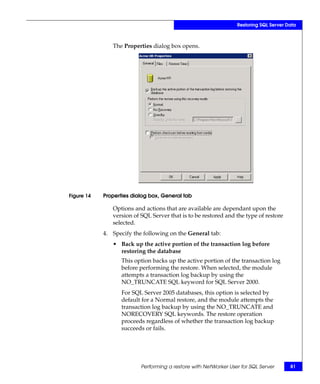
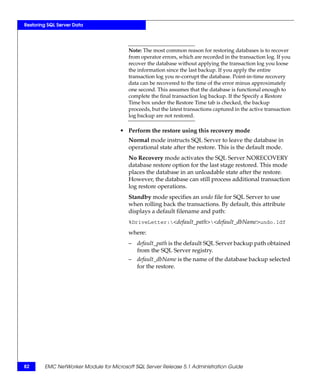
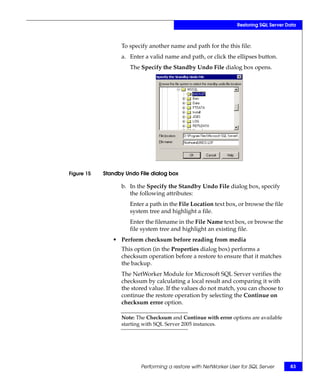
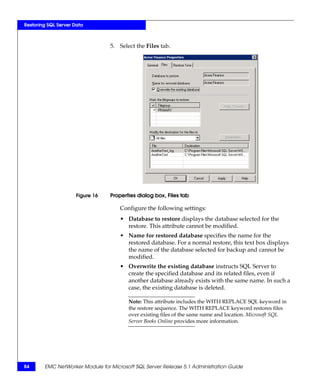
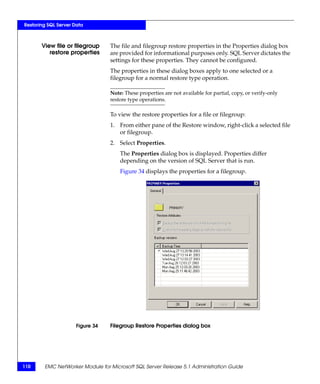
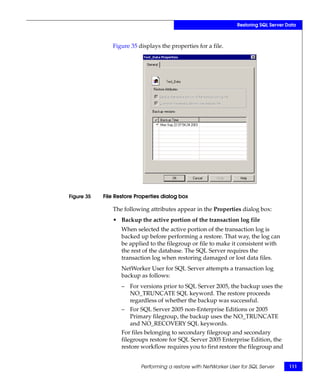
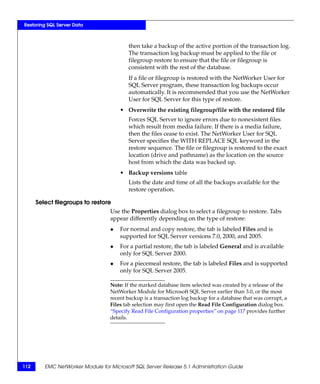
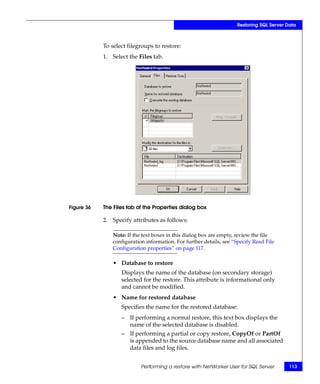
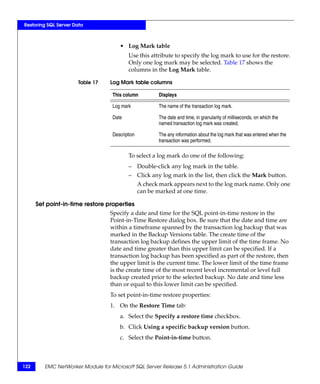
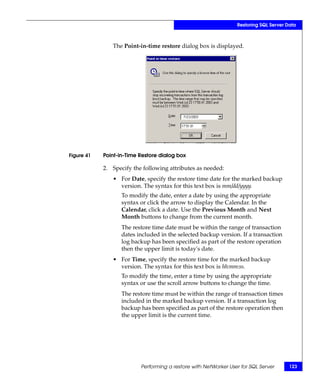
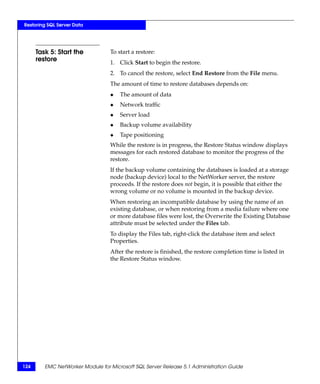
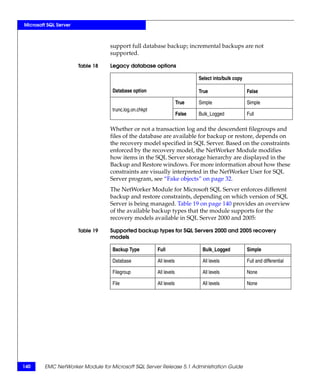
Module for Microsoft SQL Server
                          Release 5.1


            Administration Guide
                     P/N 300-004-752
                             REV A01


                        EMC Corporation
                 Corporate Headquarters:
                Hopkinton, MA 01748-9103
                          1-508-435-1000
                          www.EMC.com
Copyright © 1996 - 2007 EMC Corporation. All rights reserved.

    Published August, 2007

    EMC believes the information in this publication is accurate as of its publication date. The information is
    subject to change without notice.

    THE INFORMATION IN THIS PUBLICATION IS PROVIDED “AS IS.” EMC CORPORATION MAKES NO
    REPRESENTATIONS OR WARRANTIES OF ANY KIND WITH RESPECT TO THE INFORMATION IN THIS
    PUBLICATION, AND SPECIFICALLY DISCLAIMS IMPLIED WARRANTIES OF MERCHANTABILITY OR
    FITNESS FOR A PARTICULAR PURPOSE.

    Use, copying, and distribution of any EMC software described in this publication requires an applicable
    software license.

    For the most up-to-date listing of EMC product names, see EMC Corporation Trademarks on EMC.com.

    All other trademarks used herein are the property of their respective owners.


2       EMC NetWorker Module for Microsoft SQL Server Release 5.1 Administration Guide
Contents


Preface ..................................................................................................... 9

Chapter 1              Overview
                       About the NetWorker Module for Microsoft SQL Server ........... 14
                           Security requirements ................................................................14
                           Authentication mode .................................................................15
                           NetWorker PowerSnap modules..............................................15
                       Backup operations ............................................................................ 17
                           Traditional backup..................................................................... 17
                           Snapshot backups .......................................................................19
                           Backup levels...............................................................................22
                       Recovery operations ......................................................................... 24
                           Traditional recovery ...................................................................24
                           Snapshot recovery ..................................................................... 25
                           Restore types .............................................................................. 27
                           Restore modes ............................................................................ 30
                           Restore time ................................................................................ 31
                       NetWorker User for SQL Server program overview ................... 32
                           Fake objects................................................................................. 32
                           Display conventions .................................................................. 33
                           Marking items ............................................................................ 34
                           Marking semantics and restrictions ........................................ 34
                           Restore window restrictions..................................................... 35
                       Error logs for backup and recovery................................................ 37


Chapter 2              Manual Backups
                       About manual backups .................................................................... 40
                       Performing a backup with NetWorker User for SQL Server...... 42


   EMC NetWorker Module for Microsoft SQL Server Release 5.1 Administration Guide                                             3
Contents


                                       Task 1: Start the NetWorker User for SQL
                                       Server program ........................................................................... 43
                                       Task 2: Select the SQL Server data ........................................... 44
                                       Task 3: Set the backup options................................................. 45
                                       Task 4: Set the backup properties for each marked
                                       database ....................................................................................... 48
                                       Task 5: Start and monitor the backup...................................... 49
                                       Task 6: Back up the client indexes and bootstrap file ........... 50


               Chapter 3         Scheduled Backups
                                 About scheduled backups ............................................................... 52
                                 Setting backup levels........................................................................ 53
                                     Differences between backup levels ......................................... 54
                                 Configuring scheduled backups..................................................... 58
                                     Task 1: Assign a Snapshot policy (optional)........................... 59
                                     Task 2: Configure one or more group resources.................... 60
                                     Task 3: Configure one or more Client resources.................... 61
                                     Task 4: Configure a schedule and set backup levels ............. 63
                                     Task 5: Configure the NetWorker volume pools ................... 65
                                 Unavailable databases and group backup failure........................ 67


               Chapter 4         Restoring SQL Server Data
                                 Before the restore .............................................................................. 70
                                     Rollback restore requirements ................................................. 71
                                     Piecemeal restore requirements ............................................... 72
                                 Backing up the active portion of the transaction log................... 73
                                     Back up the transaction log ....................................................... 74
                                     Backing up the transaction log for SQL Server 7.0 ................ 75
                                     Backing up the transaction log for SQL Server Express ....... 75
                                 NetWorker Module database restore process............................... 76
                                 Performing a restore with NetWorker User for SQL Server....... 78
                                     Task 1: Set up the restore........................................................... 79
                                     Task 2: Specify the browse time (optional) ........................... 103
                                     Task 3: View the required volumes (optional) ..................... 105
                                     Task 4: Set the restore properties (optional) ......................... 105
                                     Task 5: Start the restore ........................................................... 124


               Chapter 5         Backup and Recovery for Microsoft Cluster Servers
                                 The NetWorker client in a Microsoft
                                 Cluster .............................................................................................. 126
                                 The NetWorker Module in a Microsoft Cluster.......................... 127

4          EMC NetWorker Module for Microsoft SQL Server Release 5.1 Administration Guide
Contents


                   How the module detects SQL Server instances....................127
                   Named instances in failover cluster configurations ............128
                   Active/Passive cluster configurations...................................128
                How to run a scheduled backup ................................................... 129
                   Requirements for scheduled backups....................................129
                   Configure scheduled backups.................................................131
                Manual backups and restores for a cluster.................................. 135
                   From the NetWorker User for SQL Server program ........... 135
                   From the command prompt ................................................... 135


Chapter 6       Microsoft SQL Server
                Microsoft SQL Server recovery models ....................................... 138
                   Full recovery model ................................................................. 138
                   Bulk_Logged recovery model ................................................ 138
                   Simple recovery model............................................................ 139
                   Specifying database recovery models ................................... 139
                   Changing the recovery model for a database ...................... 141
                Microsoft SQL Server 2000 and 2005 named log marks ............ 143
                   Transaction log maintenance.................................................. 143
                   How to prevent log overflow ................................................. 144
                SQL Server master database maintenance .................................. 147
                   Database consistency check.................................................... 147
                   Perform a database consistency check .................................. 148
                Multiple nonclustered instances of SQL Server.......................... 149
                How a restore interacts with SQL Server..................................... 151
                   Restoring the SQL Server master database ...........................151
                   Restoring the SQL Server master database in a cluster.......152
                   Restoring the SQL Server msdb database .............................152
                   Restoring both the SQL Server master and msdb
                   databases ....................................................................................153


Chapter 7       Disaster Recovery
                Disaster recovery features.............................................................. 156
                    System database restore automation..................................... 156
                    Database restore order............................................................. 156
                    SQL Server startup complete detection ................................ 157
                    Overwriting capability ............................................................ 157
                Procedures for disaster recovery................................................... 158
                    When not to reinstall SQL Server .......................................... 158
                    Recovery of a damaged primary disk................................... 159
                    Recovery of a damaged binary disk...................................... 160


  EMC NetWorker Module for Microsoft SQL Server Release 5.1 Administration Guide                                       5
Contents


                                            Recovery of SQL Server and NetWorker server ................. 161
                                            Recovery of SQL Server without reinstalling...................... 162
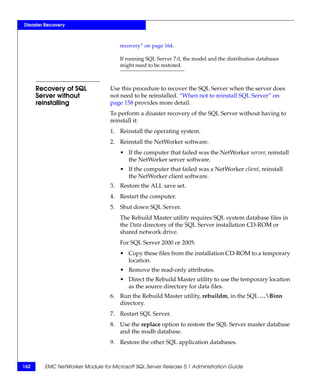
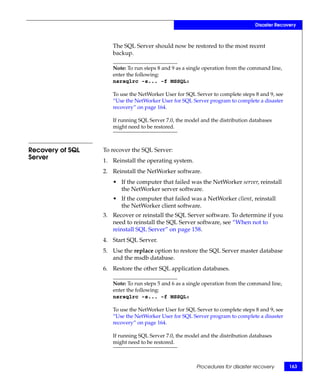
                                            Recovery of SQL Server.......................................................... 163
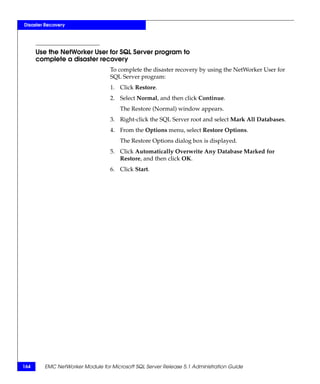
                                            Use the NetWorker User for SQL Server program to
                                            complete a disaster recovery................................................... 164

               Appendix A             NetWorker Module Commands
                                      Overview of the module commands ...........................................                          166
                                      Using the nsrsqlsv command........................................................                   168
                                          Using NetWorker 7.2 and earlier...........................................                       168
                                          Using NetWorker 7.3 and later ..............................................                     169
                                          Command syntax for nsrsqlsv...............................................                       169
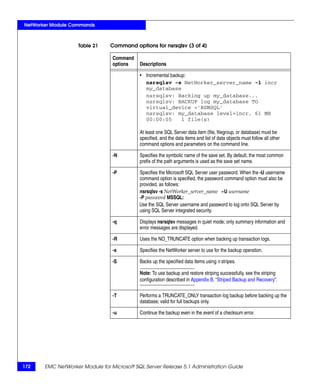
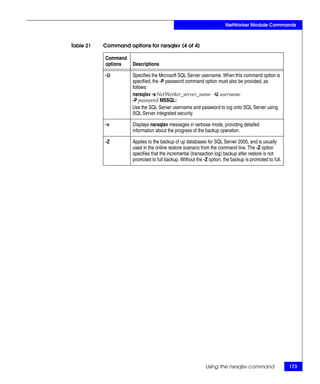
                                          Command options for nsrsqlsv .............................................                       170
                                      Using the nsrsqlrc command ........................................................                  174
                                          Command syntax for nsrsqlrc ...............................................                      174
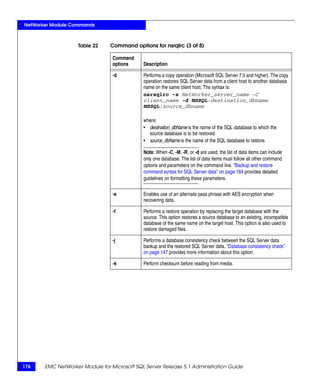
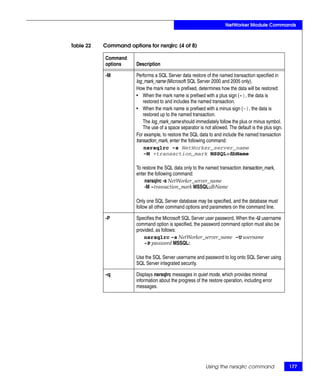
                                          Command options for nsrsqlrc..............................................                       174
                                          Sample restore command lines..............................................                       182
                                      Using the nwmssql command ......................................................                     183
                                          Command options for nwmssql............................................                          183
                                      Backup and restore command syntax for SQL Server data......                                          184
                                          Syntax for a named instance configuration for
                                          SQL 2000 and 2005 ..................................................................             185
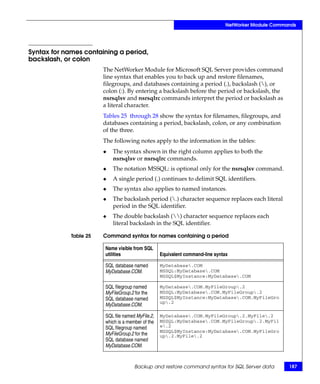
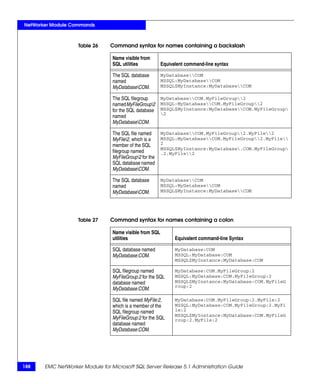
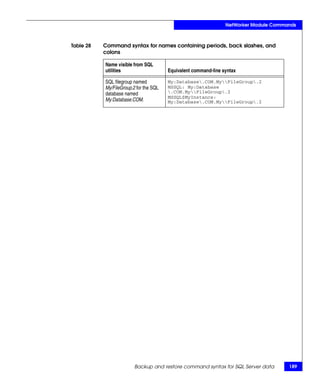
                                          Syntax for names containing a period, backslash,
                                          or colon......................................................................................   187

               Appendix B             Striped Backup and Recovery
                                      Striping with NetWorker Module for Microsoft SQL Server ...                                          192
                                          Interleaving ..............................................................................      192
                                          Striped backups .......................................................................          193
                                          Performance considerations for striping..............................                            193
                                          Perform a striped backup.......................................................                  194
                                      Striped recoveries ...........................................................................       195
                                          Optimal striped recovery versus fail-safe striped
                                          recovery.....................................................................................    195
                                          Performing an optimal striped recovery..............................                             196
                                          Performing a fail-safe striped recovery................................                          196
                                          Windows registry entry for striped backup ........................                               200


               Glossary ............................................................................................... 201

               Index .................................................................................................... 213

6          EMC NetWorker Module for Microsoft SQL Server Release 5.1 Administration Guide
Preface


             As part of an effort to improve and enhance the performance and capabilities
             of its product lines, EMC periodically releases revisions of its hardware and
             software. Therefore, some functions described in this document may not be
             supported by all versions of the software or hardware currently in use. For
             the most up-to-date information on product features, refer to your product
             release notes.
             If a product does not function properly or does not function as described in
             this document, please contact your EMC representative.


Audience     This document is part of the EMC NetWorker Module for Microsoft
             SQL Server documentation set, and is intended for use by system
             administrators and operators who monitor daily backups of SQL
             Server data. This guide may also be helpful during the installation
             and configuration of this product.
             Readers of this document are expected to be familiar with the
             following topics:
             ◆   EMC NetWorker products
             ◆   Microsoft SQL Server versions: 7.0, 2000, and 2005 Express


   EMC NetWorker Module for Microsoft SQL Server Release 5.1 Administration Guide            9
Preface


                   Related         The following EMC sources provide additional information relevant
              documentation        to the configuration and use of this NetWorker Module. Related
                                   documents include:
                                   ◆   EMC NetWorker Module for Microsoft SQL Server Installation Guide,
                                       Release 5.1
                                   ◆   EMC NetWorker Module for Microsoft SQL Server Release Notes,
                                       Release 5.1
                                   ◆   EMC NetWorker Module for Microsoft SQL Server online help
                                   ◆   EMC NetWorker PowerSnap Module Guides
                                   These sources, specific to the NetWorker server version, are also
                                   available:
                                   ◆   EMC NetWorker Administration Guide
                                   ◆   EMC NetWorker Installation Guide
                                   ◆   EMC NetWorker Release Notes
                                   ◆   EMC NetWorker Disaster Recovery Guide
                                   Refer to the SQL Server documentation from Microsoft for
                                   procedures and administrative information.

          Conventions used in      EMC uses the following conventions for special notices.
              this document
                                   Note: A note presents information that is important, but not hazard-related.


                            !      CAUTION
                                   A caution contains information essential to avoid data loss or
                                   damage to the system or equipment.


10        EMC NetWorker Module for Microsoft SQL Server Release 5.1 Administration Guide
Preface


          Typographical conventions
          EMC uses the following type style conventions in this document:
          Normal                Used in running (nonprocedural) text for:
                                • Names of interface elements (such as names of windows,
                                  dialog boxes, buttons, fields, and menus)
                                • Names of resources, attributes, pools, Boolean expressions,
                                  buttons, DQL statements, keywords, clauses, environment
                                  variables, filenames, functions, utilities
                                • URLs, pathnames, filenames, directory names, computer
                                  names, links, groups, service keys, file systems, notifications
          Bold:                 Used in running (nonprocedural) text for:
                                • Names of commands, daemons, options, programs,
                                  processes, services, applications, utilities, kernels,
                                  notifications, system call, man pages
                                Used in procedures for:
                                • Names of interface elements (such as names of windows,
                                  dialog boxes, buttons, fields, and menus)
                                • What user specifically selects, clicks, presses, or types
          Italic:               Used in all text (including procedures) for:
                                • Full titles of publications referenced in text
                                • Emphasis (for example a new term)
                                • Variables
          Courier:              Used for:
                                • System output, such as an error message or script
                                • URLs, complete paths, filenames, prompts, and syntax when
                                  shown outside of running text
          Courier bold:         Used for:
                                • Specific user input (such as commands)
          Courier italic:       Used in procedures for:
                                • Variables on command line
                                • User input variables
          <>                    Angle brackets enclose parameter or variable values supplied by
                                the user
          []                    Square brackets enclose optional values
          |                     Vertical bar indicates alternate selections - the bar means “or”
          {}                    Braces indicate content that you must specify (that is, x or y or z)
          ...                   Ellipses indicate nonessential information omitted from the
                                example


EMC NetWorker Module for Microsoft SQL Server Release 5.1 Administration Guide                         11
Preface


           Where to get help       EMC support, product, and licensing information can be obtained as
                                   follows.
                                   Product information — For documentation, release notes, software
                                   updates, or for information about EMC products, licensing, and
                                   service, go to the EMC Powerlink website (registration required) at:
                                   http://Powerlink.EMC.com

                                   Technical support — For technical support, go to EMC Customer
                                   Service on Powerlink. To open a service request through Powerlink,
                                   you must have a valid support agreement. Please contact your EMC
                                   sales representative for details about obtaining a valid support
                                   agreement or to answer any questions about your account.

              Your comments        Comments and suggestions about our product documentation are
                                   always welcome.
                                   To provide feedback:
                                   1. Go to:
                                       http://Powerlink.EMC.com

                                   2. Click the Feedback link.


12        EMC NetWorker Module for Microsoft SQL Server Release 5.1 Administration Guide
1

                                                                                 Overview


This chapter provides information about how the EMC®
NetWorker® Module for Microsoft SQL Server software backs up
and restores Microsoft SQL Server data.
This chapter includes the following sections:
◆   About the NetWorker Module for Microsoft SQL Server ............                                  14
◆   Backup operations .............................................................................   17
◆   Recovery operations ..........................................................................    24
◆   NetWorker User for SQL Server program overview ....................                               32
◆   Error logs for backup and recovery.................................................               37


                                                                                    Overview               13
Overview


     About the NetWorker Module for Microsoft SQL Server
                                The NetWorker Module for Microsoft SQL Server is a NetWorker
                                add-on module that provides backup and restore of the following
                                database and transaction logs:
                                ◆   Microsoft SQL Server 2005
                                ◆   Microsoft SQL Server 2005 Express
                                ◆   Microsoft SQL Server 2000
                                ◆   Microsoft SQL Server 7.0
                                The NetWorker software provides backup and restore capabilities for
                                file system data only. A file system backup, however, does not save
                                SQL Server data in a recoverable form. The NetWorker Module for
                                Microsoft SQL Server enables the NetWorker software to back up and
                                restore Microsoft SQL Server data. The EMC NetWorker Module for
                                Microsoft SQL Server Installation Guide provides details about
                                NetWorker software and module configuration.


     Security requirements
                                Use of this module requires that the proper privileges be granted to
                                the module processes. Microsoft SQL Server imposes the following
                                requirements on third-party backup products:
                                ◆   The logon account that the third-party backup process uses to
                                    connect to SQL Server must be granted the SQL Server system
                                    administrator (sysadmin) role in order to issue the T-SQL
                                    BACKUP query.
                                ◆   The Windows logon account under which the third-party backup
                                    process is running must be granted the SQL Server sysadmin role
                                    in order to open a shared memory handle when initializing the
                                    Microsoft Virtual Device Interface (VDI).
                                This module imposes the following requirements:
                                ◆   When using the nsrsqlsv and nsrsqlrc commands, the Windows
                                    logon account must be granted the SQL Server sysadmin role.
                                ◆   NetWorker User for SQL Server must be a member of the local
                                    Backup Operators group.
                                ◆   NetWorker User for SQL Server must be a member of the local
                                    Administrators group.


14     EMC NetWorker Module for Microsoft SQL Server Release 5.1 Administration Guide
Overview


Authentication mode
                       NetWorker Module for Microsoft SQL Server works with SQL
                       Server’s two authentication modes:
                       ◆   Windows authentication mode.
                           When running in Windows Authentication Mode, the Windows
                           logon account that this module uses must be granted the SQL
                           Server sysadmin role. The administrator and
                           BUILTINadministrator accounts are automatically members of
                           the sysadmin role.
                       ◆   Mixed mode (Windows authentication and SQL Server
                           authentication).
                           When running in mixed mode and using a SQL Server logon
                           account to connect to Microsoft SQL Server, the logon account
                           must be granted the sysadmin role. Microsoft documentation
                           provides more information on how to add members to a SQL
                           Server role.


NetWorker PowerSnap modules
                       This module supports NetWorker PowerSnap™ Modules, which are
                       interfaces between a snapshot-capable storage subsystem and the
                       NetWorker software.
                       By using the PowerSnap Module appropriate for the SQL Server
                       storage subsystem, you can create and manage point-in-time (PIT)
                       copies (snapshots) of Microsoft SQL Server 2000 and 2005 data.
                       The EMC NetWorker PowerSnap Module guides provide specific
                       storage subsystem requirements for PowerSnap Modules.
                       The Compatibility Guides at http://Powerlink.EMC.com provide a
                       current list of supported storage subsystems.

Homogenous storage platform environment
                       The NetWorker Module for Microsoft SQL Server supports snapshot
                       backup operations in homogenous storage platform environments
                       only. All SQL components (databases and log files) must be located
                       on a snapshot-capable storage subsystem.


                                      About the NetWorker Module for Microsoft SQL Server        15
Overview


                                Note: If the module detects that any SQL objects included in the request are
                                located on storage hardware that is not snapshot capable, the backup
                                operation terminates and an error message is displayed. These objects can be
                                backed up and restored with traditional operations.


     LAN and LAN-free environments
                                In LAN and LAN-free environments, this module supports the
                                following:
                                ◆   Snapshot operations
                                ◆   Serverless backup method
                                The EMC NetWorker PowerSnap Module guides provide specific
                                storage subsystem information for LAN and LAN-free environments.


16     EMC NetWorker Module for Microsoft SQL Server Release 5.1 Administration Guide
Overview


Backup operations
                     The following sections provide an overview of the NetWorker
                     Module for Microsoft SQL Server traditional and snapshot backup
                     operations.


Traditional backup   Traditional backups are often referred to as manual backups . A traditional
                     backup of SQL data can be performed at any time and is independent
                     of any scheduled backups. Chapter 2, ”Manual Backups” provides
                     information on manual backups.
                     For traditional backups, Microsoft SQL Server supports database, file,
                     filegroup, and transaction log backups. The NetWorker Module for
                     Microsoft SQL Server provides the mechanism that integrates the
                     SQL database backup technology with the NetWorker software.
                     Microsoft SQL Server 2000 and 2005 provide support for backing up
                     and restoring filegroups and files. In addition to creating a level full
                     file or filegroup backup, SQL Server 2000 and 2005 support the
                     creation of filegroup differential and file differential backups.
                     A filegroup differential backup may actually reduce both media
                     requirements and restore time. The data can be stored across more
                     than one disk or disk partition, and restore time may be reduced. A
                     differential can substitute for any log backups performed between
                     the full and differential backups. A full backup must be performed
                     first.

                     Note: If a backup was created by using the NetWorker Module for Microsoft
                     SQL Server release 3.0 or later, a SQL Server 7.0, 2000, or 2005 file or filegroup
                     can also be restored from a full database backup.

                     To configure a scheduled backup, an administrator must set the
                     NetWorker server resource attributes by using the NetWorker
                     Management Console or the NetWorker Configuration Wizard.
                     “Configuring scheduled backups” on page 58 provides more
                     information on scheduled backups.


                                                                             Backup operations            17
Overview


     Traditional backup process
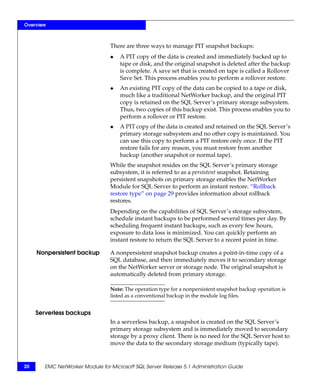
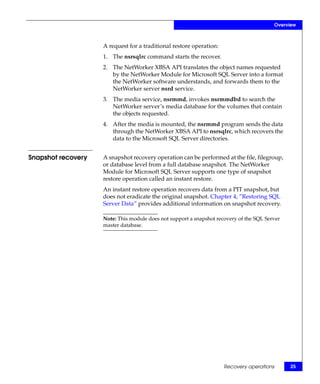
                                  Figure 1 on page 18 shows an overview of the process interactions
                                  among the NetWorker client and server, NetWorker Module for
                                  Microsoft SQL Server, and SQL server software during a traditional
                                  backup.


                                  NetWorker Client                NetWorker Server          Storage
                                                                                            Media
                                 Microsoft SQL Server               File        Media
                                 Databases and Logs                Index       Database


                         SQL                                    nsrindexd
                                                NetWorker
                        Backup       nsrsqlsv     XBSA
                         API                                                   nsrmmdbd

                                                                 data
                        inter-process                                             nsrmmd
                       communication


                                    nsrexecd                      savegrp          nsrd


                    Figure 1      Traditional backup command and data flow

                                  The following occurs in a traditional backup:
                                  1. The nsrd program starts the backup on the NetWorker server.
                                  2. The savegrp program executes the NetWorker Module for
                                     Microsoft SQL Server backup command (nsrsqlsv) on the client
                                     instead of performing a standard NetWorker save.
                                  3. The nsrsqlsv program passes the backup data from SQL Server to
                                     the NetWorker server through an X-Open Backup Services
                                     application programming interface (XBSA).
                                  The NetWorker server software performs all scheduling and storage
                                  management tasks. The EMC NetWorker Administration Guide
                                  provides information about the NetWorker services and operations
                                  described in this chapter.


18      EMC NetWorker Module for Microsoft SQL Server Release 5.1 Administration Guide
Overview


Snapshot backups
                   Snapshot backups are configured as scheduled backups on the
                   NetWorker server. This module does not support manual snapshot
                   backups from either the NetWorker User for SQL Server program or
                   the command prompt.
                   The NetWorker Module for SQL Server supports:
                   ◆   Full snapshot backups of SQL Server databases.
                   ◆   Backups of only one database per scheduled backup.
                   ◆   Instant, nonpersistent, and serverless snapshot backup types.

                   Note: A snapshot backup fails if more than one database is specified for the
                   Save Set attribute.

                   The NetWorker Module for SQL Server does not support:
                   ◆   Differential or incremental (transaction log) backups for
                       databases under a snapshot schedule.
                   ◆   Snapshot backups for individual filegroups or files.
                   ◆   Snapshot backups of the SQL Server master database.

                   Note: Store snapshots on a separate volume. Databases intended for snapshot
                   operations should be isolated on their own volumes. Databases may span
                   one or more volumes for data and log files. It is not necessary to install SQL
                   Server on a volume capable of storing snapshots, unless file system snapshots
                   are intended to maintain SQL Server files (not databases). Other
                   (non-database) files located on database snapshot volumes will be
                   overwritten during rollback operations.


Instant backup
                   An instant backup creates a PIT (point in time), or snapshot, of a SQL
                   Server database and retains the snapshot on the SQL Server’s
                   primary storage subsystem. Depending on how backups are
                   configured, a snapshot created during an instant backup may or may
                   not be moved to secondary storage on the NetWorker server or
                   storage node. Whether the snapshot should be retained is dependent
                   on the snapshot policy.


                                                                         Backup operations          19
Overview


                                 There are three ways to manage PIT snapshot backups:
                                 ◆   A PIT copy of the data is created and immediately backed up to
                                     tape or disk, and the original snapshot is deleted after the backup
                                     is complete. A save set that is created on tape is called a Rollover
                                     Save Set. This process enables you to perform a rollover restore.
                                 ◆   An existing PIT copy of the data can be copied to a tape or disk,
                                     much like a traditional NetWorker backup, and the original PIT
                                     copy is retained on the SQL Server’s primary storage subsystem.
                                     Thus, two copies of this backup exist. This process enables you to
                                     perform a rollover or PIT restore.
                                 ◆   A PIT copy of the data is created and retained on the SQL Server’s
                                     primary storage subsystem and no other copy is maintained. You
                                     can use this copy to perform a PIT restore only once. If the PIT
                                     restore fails for any reason, you must restore from another
                                     backup (another snapshot or normal tape).
                                 While the snapshot resides on the SQL Server’s primary storage
                                 subsystem, it is referred to as a persistent snapshot. Retaining
                                 persistent snapshots on primary storage enables the NetWorker
                                 Module for SQL Server to perform an instant restore. “Rollback
                                 restore type” on page 29 provides information about rollback
                                 restores.
                                 Depending on the capabilities of SQL Server’s storage subsystem,
                                 schedule instant backups to be performed several times per day. By
                                 scheduling frequent instant backups, such as every few hours,
                                 exposure to data loss is minimized. You can quickly perform an
                                 instant restore to return the SQL Server to a recent point in time.

     Nonpersistent backup        A nonpersistent snapshot backup creates a point-in-time copy of a
                                 SQL database, and then immediately moves it to secondary storage
                                 on the NetWorker server or storage node. The original snapshot is
                                 automatically deleted from primary storage.

                                 Note: The operation type for a nonpersistent snapshot backup operation is
                                 listed as a conventional backup in the module log files.


     Serverless backups
                                 In a serverless backup, a snapshot is created on the SQL Server’s
                                 primary storage subsystem and is immediately moved to secondary
                                 storage by a proxy client. There is no need for the SQL Server host to
                                 move the data to the secondary storage medium (typically tape).


20      EMC NetWorker Module for Microsoft SQL Server Release 5.1 Administration Guide
Overview


Snapshot backup process
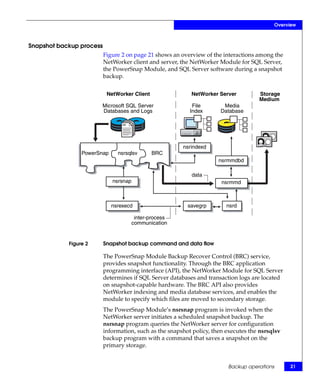
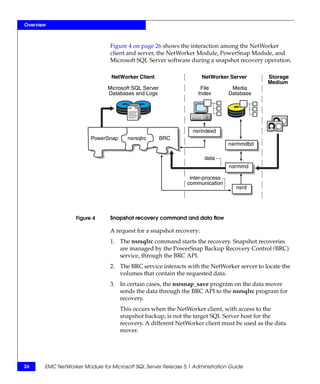
                          Figure 2 on page 21 shows an overview of the interactions among the
                          NetWorker client and server, the NetWorker Module for SQL Server,
                          the PowerSnap Module, and SQL Server software during a snapshot
                          backup.


                           NetWorker Client                NetWorker Server          Storage
                                                                                     Medium
                       Microsoft SQL Server                 File        Media
                       Databases and Logs                  Index       Database


                                                        nsrindexd
                 PowerSnap     nsrsqlsv       BRC
                                                                      nsrmmdbd

                                                           data
                             nsrsnap                                   nsrmmd


                             nsrexecd                     savegrp        nsrd

                                        inter-process
                                       communication


            Figure 2      Snapshot backup command and data flow

                          The PowerSnap Module Backup Recover Control (BRC) service,
                          provides snapshot functionality. Through the BRC application
                          programming interface (API), the NetWorker Module for SQL Server
                          determines if SQL Server databases and transaction logs are located
                          on snapshot-capable hardware. The BRC API also provides
                          NetWorker indexing and media database services, and enables the
                          module to specify which files are moved to secondary storage.
                          The PowerSnap Module’s nsrsnap program is invoked when the
                          NetWorker server initiates a scheduled snapshot backup. The
                          nsrsnap program queries the NetWorker server for configuration
                          information, such as the snapshot policy, then executes the nsrsqlsv
                          backup program with a command that saves a snapshot on the
                          primary storage.


                                                                          Backup operations        21
Overview


     Snapshot data mover
                                The snapshot data mover (also called proxy client) is the computer
                                that actually moves the data during a snapshot operation. By default,
                                the SQL Server host is the data mover. However, you can use the
                                NSR_DATA_MOVER attribute to specify a different computer to act
                                as data mover. In this case, the PowerSnap nsrsnap_save program on
                                the data mover computer performs the backup.


     Backup levels
                                The NetWorker software provides three main levels of backup: full,
                                incremental, and differential, where differential is specified as any
                                level from 1 to 9. The NetWorker Module for Microsoft SQL Server
                                also provides full, incremental, and differential backups.
                                ◆    An incremental backup, done from the command line,
                                     corresponds to a Microsoft SQL Server transaction log backup. A
                                     log file backup by itself cannot be used to restore a database. A
                                     log file backup is used after a database restore to recover the
                                     database to the point of the original failure.
                                ◆    A differential backup, specified as any level from 1 to 9, is done
                                     from the command line, and makes a copy of all the pages in a
                                     database modified after the last full database backup.
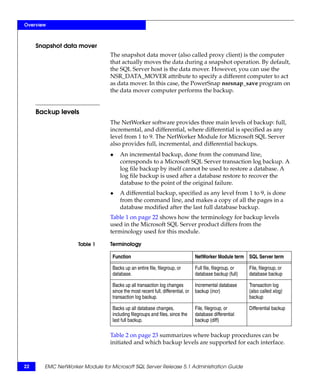
                                Table 1 on page 22 shows how the terminology for backup levels
                                used in the Microsoft SQL Server product differs from the
                                terminology used for this module.

                    Table 1     Terminology

                                 Function                                       NetWorker Module term SQL Server term

                                 Backs up an entire file, filegroup, or         Full file, filegroup, or   File, filegroup, or
                                 database.                                      database backup (full)     database backup

                                 Backs up all transaction log changes           Incremental database       Transaction log
                                 since the most recent full, differential, or   backup (incr)              (also called xlog)
                                 transaction log backup.                                                   backup

                                 Backs up all database changes,                 File, filegroup, or        Differential backup
                                 including filegroups and files, since the      database differential
                                 last full backup.                              backup (diff)
                                Table 2 on page 23 summarizes where backup procedures can be
                                initiated and which backup levels are supported for each interface.


22     EMC NetWorker Module for Microsoft SQL Server Release 5.1 Administration Guide
Overview


Table 2   Where to initiate backup operations

                                                             Backup levels available

          Backup type   Backup initiated from                full       incr           diff

          Scheduled     NetWorker Administrator program on   Yes        Yes            Yes
                        the server

          Manual        Command line on the NetWorker        Yes        Yes            Yes
                        server that is a client host

                        NetWorker User for SQL Server        Yes        No             No
                        program on the client


                                                                    Backup operations              23
Overview


     Recovery operations
                                  Data recovery from a traditional or snapshot backup can be
                                  performed at any time by using the NetWorker User for SQL Server
                                  program. Data recovery from a traditional backup can be performed
                                  by running the NetWorker Module for Microsoft SQL Server recover
                                  command (nsrsqlrc) from the command prompt. Snapshot recoveries
                                  cannot be performed from the command prompt.


     Traditional recovery
                                  NetWorker Module for Microsoft SQL Server traditional recovery
                                  operations restore files, filegroups, databases, and transaction log
                                  backups. Chapter 4, ”Restoring SQL Server Data”provides additional
                                  information about traditional recovery operations.
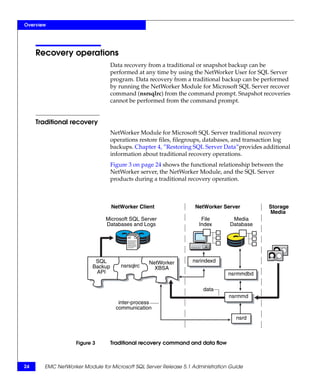
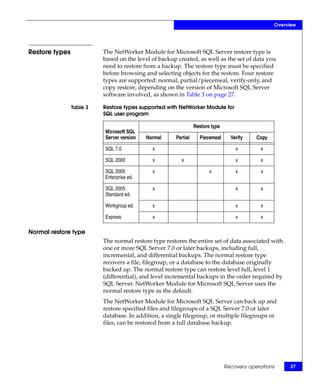
                                  Figure 3 on page 24 shows the functional relationship between the
                                  NetWorker server, the NetWorker Module, and the SQL Server
                                  products during a traditional recovery operation.


                                  NetWorker Client                NetWorker Server           Storage
                                                                                             Media
                               Microsoft SQL Server                 File        Media
                               Databases and Logs                  Index       Database


                          SQL                    NetWorker       nsrindexd
                         Backup       nsrsqlrc     XBSA
                          API                                                  nsrmmdbd

                                                                     data
                                                                               nsrmmd
                                     inter-process
                                    communication
                                                                                  nsrd


                   Figure 3       Traditional recovery command and data flow


24     EMC NetWorker Module for Microsoft SQL Server Release 5.1 Administration Guide
Overview


                    A request for a traditional restore operation:
                    1. The nsrsqlrc command starts the recover.
                    2. The NetWorker XBSA API translates the object names requested
                       by the NetWorker Module for Microsoft SQL Server into a format
                       the NetWorker software understands, and forwards them to the
                       NetWorker server nsrd service.
                    3. The media service, nsrmmd, invokes nsrmmdbd to search the
                       NetWorker server’s media database for the volumes that contain
                       the objects requested.
                    4. After the media is mounted, the nsrmmd program sends the data
                       through the NetWorker XBSA API to nsrsqlrc, which recovers the
                       data to the Microsoft SQL Server directories.


Snapshot recovery   A snapshot recovery operation can be performed at the file, filegroup,
                    or database level from a full database snapshot. The NetWorker
                    Module for Microsoft SQL Server supports one type of snapshot
                    restore operation called an instant restore.
                    An instant restore operation recovers data from a PIT snapshot, but
                    does not eradicate the original snapshot. Chapter 4, ”Restoring SQL
                    Server Data” provides additional information on snapshot recovery.

                    Note: This module does not support a snapshot recovery of the SQL Server
                    master database.


                                                                     Recovery operations        25
Overview


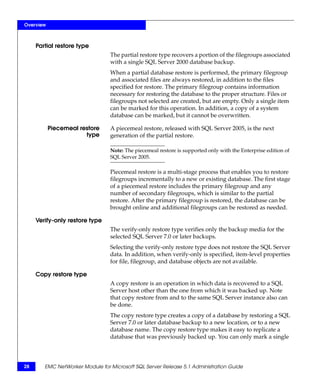
                                Figure 4 on page 26 shows the interaction among the NetWorker
                                client and server, the NetWorker Module, PowerSnap Module, and
                                Microsoft SQL Server software during a snapshot recovery operation.

                                 NetWorker Client                    NetWorker Server        Storage
                                                                                             Medium
                               Microsoft SQL Server                 File         Media
                               Databases and Logs                  Index        Database


                                                                 nsrindexd
                         PowerSnap     nsrsqlrc       BRC
                                                                                nsrmmdbd

                                                                     data
                                                                                nsrmmd

                                                                inter-process
                                                               communication
                                                                                  nsrd


                   Figure 4     Snapshot recovery command and data flow

                                A request for a snapshot recovery:
                                1. The nsrsqlrc command starts the recovery. Snapshot recoveries
                                   are managed by the PowerSnap Backup Recovery Control (BRC)
                                   service, through the BRC API.
                                2. The BRC service interacts with the NetWorker server to locate the
                                   volumes that contain the requested data.
                                3. In certain cases, the nsrsnap_save program on the data mover
                                   sends the data through the BRC API to the nsrsqlrc program for
                                   recovery.
                                     This occurs when the NetWorker client, with access to the
                                     snapshot backup, is not the target SQL Server host for the
                                     recovery. A different NetWorker client must be used as the data
                                     mover.


26     EMC NetWorker Module for Microsoft SQL Server Release 5.1 Administration Guide
Overview


Restore types             The NetWorker Module for Microsoft SQL Server restore type is
                          based on the level of backup created, as well as the set of data you
                          need to restore from a backup. The restore type must be specified
                          before browsing and selecting objects for the restore. Four restore
                          types are supported: normal, partial/piecemeal, verify-only, and
                          copy restore, depending on the version of Microsoft SQL Server
                          software involved, as shown in Table 3 on page 27.

                Table 3   Restore types supported with NetWorker Module for
                          SQL user program

                                                                Restore type
                          Microsoft SQL
                          Server version   Normal     Partial     Piecemeal      Verify    Copy

                          SQL 7.0            x                                     x         x

                          SQL 2000           x           x                         x         x

                          SQL 2005           x                         x           x         x
                          Enterprise ed.

                          SQL 2005           x                                     x         x
                          Standard ed.

                          Workgroup ed.      x                                     x         x

                          Express            x                                     x         x

Normal restore type
                          The normal restore type restores the entire set of data associated with
                          one or more SQL Server 7.0 or later backups, including full,
                          incremental, and differential backups. The normal restore type
                          recovers a file, filegroup, or a database to the database originally
                          backed up. The normal restore type can restore level full, level 1
                          (differential), and level incremental backups in the order required by
                          SQL Server. NetWorker Module for Microsoft SQL Server uses the
                          normal restore type as the default.
                          The NetWorker Module for Microsoft SQL Server can back up and
                          restore specified files and filegroups of a SQL Server 7.0 or later
                          database. In addition, a single filegroup, or multiple filegroups or
                          files, can be restored from a full database backup.


                                                                               Recovery operations        27
Overview


     Partial restore type
                                 The partial restore type recovers a portion of the filegroups associated
                                 with a single SQL Server 2000 database backup.
                                 When a partial database restore is performed, the primary filegroup
                                 and associated files are always restored, in addition to the files
                                 specified for restore. The primary filegroup contains information
                                 necessary for restoring the database to the proper structure. Files or
                                 filegroups not selected are created, but are empty. Only a single item
                                 can be marked for this operation. In addition, a copy of a system
                                 database can be marked, but it cannot be overwritten.

           Piecemeal restore     A piecemeal restore, released with SQL Server 2005, is the next
                       type      generation of the partial restore.

                                 Note: The piecemeal restore is supported only with the Enterprise edition of
                                 SQL Server 2005.

                                 Piecemeal restore is a multi-stage process that enables you to restore
                                 filegroups incrementally to a new or existing database. The first stage
                                 of a piecemeal restore includes the primary filegroup and any
                                 number of secondary filegroups, which is similar to the partial
                                 restore. After the primary filegroup is restored, the database can be
                                 brought online and additional filegroups can be restored as needed.

     Verify-only restore type
                                 The verify-only restore type verifies only the backup media for the
                                 selected SQL Server 7.0 or later backups.
                                 Selecting the verify-only restore type does not restore the SQL Server
                                 data. In addition, when verify-only is specified, item-level properties
                                 for file, filegroup, and database objects are not available.

     Copy restore type
                                 A copy restore is an operation in which data is recovered to a SQL
                                 Server host other than the one from which it was backed up. Note
                                 that copy restore from and to the same SQL Server instance also can
                                 be done.
                                 The copy restore type creates a copy of a database by restoring a SQL
                                 Server 7.0 or later database backup to a new location, or to a new
                                 database name. The copy restore type makes it easy to replicate a
                                 database that was previously backed up. You can only mark a single


28      EMC NetWorker Module for Microsoft SQL Server Release 5.1 Administration Guide
Overview


                         item for this operation. In addition, you can copy a system database,
                         but you cannot overwrite it.
                         The NetWorker Module for Microsoft SQL Server enables you to
                         restore snapshot backups to a SQL Server host that does not have a
                         snapshot-capable storage subsystem.

Copy restore of snapshot backups
                         A copy restore of a snapshot backup supports the creation of a new
                         database for the following scenarios:
                         ◆   Copy restore of an instant backup to a new location.
                         ◆   Copy restore of an instant backup to another database on the
                             same host within the same storage array.
                         ◆   Copy restore of an instant backup to a new database on the same
                             host within a different storage array.
                         ◆   Copy restore from a rollover.
                         ◆   Copy restore to another database on the same host.
                         ◆   Copy restore to another database on a different host.

 FLIR and FLIR using a   The NetWorker Module for Microsoft SQL Server with PowerSnap
   mirror restore type   Module, version 2.3 and later, supports file-logical image recovery
                         (FLIR) and FLIR using a mirror restore types. Both of these restore
                         types recover data from a Symmetrix backup. Data that was backed
                         up by using an image backup (SymmConnect) is recovered to a
                         standard volume. FLIR recovers to a production volume and FLIR
                         using a mirror recovers to a SAN-based backup or virtual volume.
                         Only one of these options can be selected for a single restore
                         operation.

 Rollback restore type   The NetWorker Module for Microsoft SQL Server backups can use
                         the PowerSnap Module functionality to create a PIT copy, or instant
                         backup, of a file system. Many instant backups can be performed in a
                         single day, thus reducing the exposure to data loss.
                         When a PIT copy is created, a unique save set ID is assigned. In
                         addition, when the data from that PIT copy is backed up to a tape or
                         disk, a different save set ID is assigned to that data. By having two
                         unique save set IDs, the snapshots (PIT copies) can be handled
                         separately from the backed-up data. Both are stored until either the
                         PIT or rollover expiration policy setting. The copies of the data are
                         removed only when all snapshots and backups of the data have been
                         deleted.


                                                                       Recovery operations        29
Overview


                                A rollback recovers a specific PIT copy to one or more volumes. You
                                can request a rollback without having to retrieve data from a
                                secondary storage system. Rollback of a managed or non-managed
                                volume prevents the snapshot from being maintained and causes the
                                snap set to become invalid. To minimize risk to data, first perform a
                                tape backup of the snapshot before performing a rollback operation.
                                Rollbacks are destructive by nature, which means that the entire
                                contents of the file system are overwritten. As a default safety check,
                                a rollback can only restore the original volume. Chapter 4, ”Restoring
                                SQL Server Data” provides more information.

                                Note: The Microsoft SQL Server module has the ability to detect volume
                                overlap. A warning is displayed if a database is being restored to volumes
                                that have files from other databases.


     Restore modes              To restore a database, the module requires that a restore mode be
                                specified. A restore mode instructs the SQL Server how to interact
                                with the database after the restore operation completes. For instance,
                                restore modes can leave the database in an intermediate state, so that
                                additional transaction logs can be applied. Restore modes correspond
                                to SQL Server database restore options.

     Normal restore mode        The normal restore mode instructs SQL Server to leave the database
                                in an operational state after the restore completes. This then enables
                                database reads and writes. The normal restore mode is the default
                                mode the module uses when restoring a database.

      No-recovery restore       The no-recovery restore mode activates the SQL Server
                   mode         NORECOVERY database restore option for the last stage restored.
                                The no-recovery restore mode places the database in an unloadable
                                state after the restore, but is still able to process additional transaction
                                log restore operations.

     Standby restore mode       The standby restore mode activates the SQL Server STANDBY
                                database restore option for the last stage restored, which forces the
                                database to be in a read-only state between transaction log restore
                                operations. The standby restore mode provides an undo file for SQL
                                Server to use when rolling back the transactions.

      Online restore mode       SQL Server 2005 provides the ability to perform a restore operation
                                while a SQL Server database is active. The database is completely
                                offline only while the primary filegroup is being restored. Once the


30     EMC NetWorker Module for Microsoft SQL Server Release 5.1 Administration Guide
Overview


               primary filegroup is restored, the database can be brought online
               while the rest of the filegroups are being restored, and then only the
               data that is being restored is unavailable. The rest of the database
               remains available during this type of restore. Earlier versions of SQL
               Server require that you bring a database offline before you restore the
               database.


Restore time   Backups can be restored to a specific time. The restore time controls
               which backup data should be reinstated when a database is restored.
               The restore time may also control which portions of a level
               incremental backup are to be restored when the NetWorker Module
               for Microsoft SQL Server is instructed to discard transactions
               performed after a given time.
               The default or current restore time for each database comes from the
               create time of the marked item. By default, the most recent backup is
               restored. If the most recent backup is level incremental or 1,
               dependent backups are restored first. User-specified restore times can
               restore older backup versions or perform point-in-time restore
               operations. For instance, a point-in-time restore may be specified by
               using a restore time that is earlier than the create time of the
               transaction log backup, but later than the create time of the previous
               backup.
               The NetWorker Module for Microsoft SQL Server provides three
               methods for restoring to a specific time: database backup versions,
               point-in-time restore of a transaction log (level incremental) backup,
               and restoring to a named log mark.


                                                              Recovery operations        31
Overview


     NetWorker User for SQL Server program overview
                                The NetWorker program displays the data items in the SQL Server
                                storage hierarchy for the selected SQL Server instance in the Backup
                                and Restore windows.
                                The Backup and Restore windows are split into two panes. The left
                                pane consists of expandable trees that display the SQL Server storage
                                hierarchy found on the current NetWorker Module for Microsoft SQL
                                Server host.
                                The NetWorker User for SQL Server program enables the browsing of
                                filegroups and files contained in a database. However, the program
                                can display data items that are not available for backup or restore
                                operations. These are referred to as fake objects.


     Fake objects               When a file or filegroup exists in the SQL Server storage hierarchy,
                                but cannot be backed up because of SQL Server settings on the
                                database, the item is displayed in the Backup window by using the
                                fake filegroup or fake file convention. In addition, if you try to mark a
                                fake object, an error dialog box is displayed as in Figure 5, “Marking
                                a fake object.”


                    Figure 5    Marking a fake object

                                “Microsoft SQL Server recovery models” on page 138 provides more
                                information about the constraints Microsoft SQL Servers 2000 and


32     EMC NetWorker Module for Microsoft SQL Server Release 5.1 Administration Guide
Overview


                      2005 enforce that determine whether an item is available for backup
                      or restore.


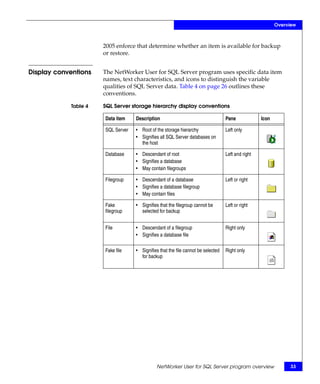
Display conventions   The NetWorker User for SQL Server program uses specific data item
                      names, text characteristics, and icons to distinguish the variable
                      qualities of SQL Server data. Table 4 on page 26 outlines these
                      conventions.

            Table 4   SQL Server storage hierarchy display conventions

                      Data item    Description                                    Pane             Icon

                      SQL Server   • Root of the storage hierarchy                Left only
                                   • Signifies all SQL Server databases on
                                     the host

                      Database     • Descendant of root                           Left and right
                                   • Signifies a database
                                   • May contain filegroups

                      Filegroup    • Descendant of a database                     Left or right
                                   • Signifies a database filegroup
                                   • May contain files

                      Fake         • Signifies that the filegroup cannot be       Left or right
                      filegroup      selected for backup


                      File         • Descendant of a filegroup                    Right only
                                   • Signifies a database file

                      Fake file    • Signifies that the file cannot be selected   Right only
                                     for backup


                                             NetWorker User for SQL Server program overview                    33
Overview


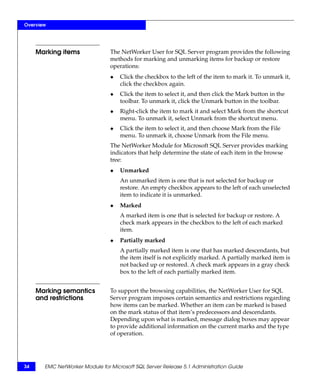
     Marking items              The NetWorker User for SQL Server program provides the following
                                methods for marking and unmarking items for backup or restore
                                operations:
                                ◆   Click the checkbox to the left of the item to mark it. To unmark it,
                                    click the checkbox again.
                                ◆   Click the item to select it, and then click the Mark button in the
                                    toolbar. To unmark it, click the Unmark button in the toolbar.
                                ◆   Right-click the item to mark it and select Mark from the shortcut
                                    menu. To unmark it, select Unmark from the shortcut menu.
                                ◆   Click the item to select it, and then choose Mark from the File
                                    menu. To unmark it, choose Unmark from the File menu.
                                The NetWorker Module for Microsoft SQL Server provides marking
                                indicators that help determine the state of each item in the browse
                                tree:
                                ◆   Unmarked
                                    An unmarked item is one that is not selected for backup or
                                    restore. An empty checkbox appears to the left of each unselected
                                    item to indicate it is unmarked.
                                ◆   Marked
                                    A marked item is one that is selected for backup or restore. A
                                    check mark appears in the checkbox to the left of each marked
                                    item.
                                ◆   Partially marked
                                    A partially marked item is one that has marked descendants, but
                                    the item itself is not explicitly marked. A partially marked item is
                                    not backed up or restored. A check mark appears in a gray check
                                    box to the left of each partially marked item.


     Marking semantics          To support the browsing capabilities, the NetWorker User for SQL
     and restrictions           Server program imposes certain semantics and restrictions regarding
                                how items can be marked. Whether an item can be marked is based
                                on the mark status of that item’s predecessors and descendants.
                                Depending upon what is marked, message dialog boxes may appear
                                to provide additional information on the current marks and the type
                                of operation.


34     EMC NetWorker Module for Microsoft SQL Server Release 5.1 Administration Guide
Overview


                 The NetWorker User for SQL Server program enables the following:
                 ◆   Mark a single file, filegroup, or database.
                 ◆   Mark multiple, heterogeneous items.
                 ◆   Mark an item when any of that item’s surrounding items are
                     already marked.
                 ◆   Mark or unmark all SQL Server data by right-clicking the root
                     item and selecting Mark All Databases or Unmark All Databases
                     from the shortcut menu.
                 ◆   Unmark all databases from the SQL Server root.
                 The NetWorker User for SQL Server program imposes the following
                 restrictions:
                 ◆   You cannot mark an item if any of the predecessors of
                     descendants are already marked except in the SQL Server root.
                 ◆   When a database is marked, all of the item’s descendants are not
                     automatically marked.
                 ◆   When a filegroup is marked, all of the files are not automatically
                     marked.


Restore window   In the Restore window, the rules for marking an item are based on the
restrictions     selected restore type. The normal and verify restore types do not
                 restrict marking in any way. All restorable objects (file, filegroup,
                 database) are markable. When the partial, piecemeal, or copy restore
                 type is chosen, only one database object can be marked. Marking the
                 root SQL Server item is not permitted.
                 ◆   When the partial or piecemeal restore type is chosen, the subset of
                     filegroups and files of the selected database must be marked by
                     using the Properties dialog box. “Task 4: Set the restore properties
                     (optional)” on page 105 provides more information.
                 ◆   For piecemeal restore, several of the selections you may make in
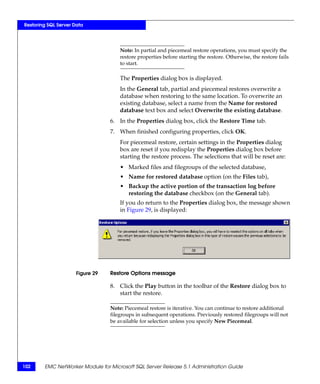
                     the Properties dialog box will be reset if you revisit the Properties
                     dialog box again before starting the restore process.
                     The selections that will be reset include:
                     • Marked files and filenames of the selected database.
                     • Name for restored database option (Files tab).
                     • Back up the active portion of the transaction log before
                       restoring the database checkbox (General tab).


                                      NetWorker User for SQL Server program overview         35
Overview


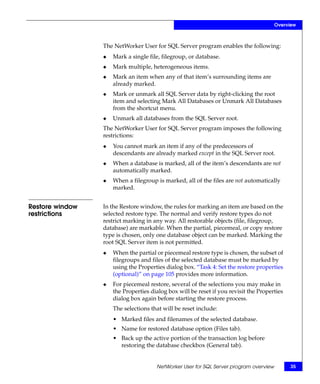
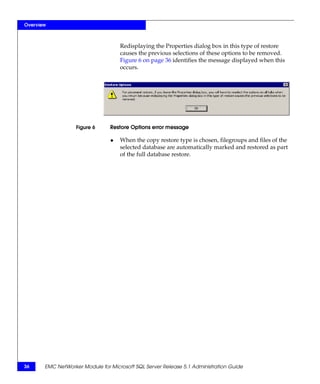
                                    Redisplaying the Properties dialog box in this type of restore
                                    causes the previous selections of these options to be removed.
                                    Figure 6 on page 36 identifies the message displayed when this
                                    occurs.


                   Figure 6     Restore Options error message

                                ◆   When the copy restore type is chosen, filegroups and files of the
                                    selected database are automatically marked and restored as part
                                    of the full database restore.


36     EMC NetWorker Module for Microsoft SQL Server Release 5.1 Administration Guide
Overview


Error logs for backup and recovery
                    To help you diagnose problems, the following types of information
                    are written to an application-specific log file during backup and
                    restore operations:
                    ◆   Software configuration information
                    ◆   Operation parameters
                    ◆   Operation status and error messages
                    The log files are written into the nsrapplogs folder on the SQL
                    Server host. The log files are cumulative and are appended each time
                    the nsrsqlsv or nsrsqlrc program runs. Log space management is
                    crucial because the log file is truncated when disk space is exhausted.
                    Table 5 on page 37 cross-references the program and log file names.


          Table 5   Program and log file names

                     Program                          Log file

                     nsrsqlsv                         nsrsqlsv.log

                     nsrsqlrc                         nsrsqlrc.log

                     XBSA library code                xbsa.messages

                    The logging capabilities of nsrsqlsv and nsrsqlrc are not
                    cluster-aware. For both clustered and nonclustered configurations,
                    the logs are stored on a local disk. The xbsa.messages file collects
                    messages from the X-Open Backup Services application
                    programming interface.

                    Note: With localization support, nsrsqlsv.raw and nsrsqlrc.raw are
                    generated by nsrsqlsv.exe and nsrsqlrc.exe. The nsr_render_log.exe
                    program is needed to render the .raw files to language-specific .log files.


                                                          Error logs for backup and recovery           37
Overview


38     EMC NetWorker Module for Microsoft SQL Server Release 5.1 Administration Guide
2

                                                            Manual Backups


This chapter explains how to use the NetWorker User for SQL Server
program to manually back up Microsoft SQL Server databases. It
includes the following sections:
◆   About manual backups ..................................................................... 40
◆   Performing a backup with NetWorker User for SQL Server ....... 42


Read this chapter and Chapter 4, ”Restoring SQL Server Data” before
performing a backup or restore operation. The type and level of
backup impacts the type of restore that can be performed. For
example, regularly scheduled, full-level backups are required to
enable recovery from a disaster situation.


                                                                     Manual Backups                 39
Manual Backups


     About manual backups
                                You can initiate a manual backup of Microsoft SQL data at any time.
                                A manual (unscheduled) backup can be started immediately. When a
                                manual backup is run from a NetWorker server that is a client host,
                                only data stored on that SQL Server host can be backed up.

                                Note: Manual backups are performed using the traditional method of
                                backing up. You cannot start a snapshot backup manually.

                                The following combinations of data objects can be backed up by
                                using the NetWorker Module for Microsoft SQL Server:
                                ◆   The entire SQL Server storage hierarchy
                                ◆   One or more entire databases
                                ◆   One or more filegroups in a SQL Server 7.0 or later database
                                ◆   One or more files in a SQL Server 7.0 or later filegroup
                                ◆   A heterogeneous collection of files, filegroups, and databases
                                ◆   Transaction log backups
                                The storage hierarchy is defined as the database storage components
                                exposed to third-party backup vendors by the SQL Server Storage
                                Engine. The storage components include files, filegroups, databases,
                                and transaction logs.
                                Perform a manual backup by using either of the following interfaces
                                on the SQL Server:
                                ◆   The NetWorker User for SQL Server program. “Performing a
                                    backup with NetWorker User for SQL Server” on page 42
                                    provides instructions.

                                    Note: A manual backup started from the NetWorker User for SQL Server
                                    program can only be performed at level full.

                                ◆   The nsrsqlsv command from the command prompt. “Using the
                                    nsrsqlsv command” on page 168 provides command syntax.
                                    To run the nsrsqlsv command, you must log into an account on
                                    the NetWorker client host that has SQL Server administrative
                                    privileges.


40     EMC NetWorker Module for Microsoft SQL Server Release 5.1 Administration Guide
Manual Backups


   When performing a manual level-full backup of a file or
   filegroup, also perform a database incremental-level backup to
   maintain the validity of the transaction log.

Note: For maximum data protection, perform regular, scheduled NetWorker
backups of SQL Server databases. Chapter 3, ”Scheduled Backups” provides
details on running scheduled backups.

The best way to protect Microsoft SQL data is to schedule regular
backups. Manual backups are generally performed under special
circumstances, such as during set up of the NetWorker Module for
Microsoft SQL Server. Due to the complexity of configuring
scheduled backups, you should first either perform a traditional
manual backup, or use the NetWorker Configuration Wizard to
configure a basic scheduled backup.


                                             About manual backups          41
Manual Backups


     Performing a backup with NetWorker User for SQL Server
                                The NetWorker User for SQL Server program is a graphical user
                                interface that is used to perform manual backups and restores
                                initiated by the client. The Backup window of the NetWorker User
                                for SQL Server program displays data that is available for backup
                                based on the SQL Server database settings. SQL database items that
                                cannot be backed up are not displayed in the Backup window.
                                This includes, but is not limited to, databases in the following states:
                                ◆   Standby
                                ◆   Offline
                                ◆   Not recovered
                                ◆   Loading
                                ◆   Prerecovery
                                ◆   Single user with active user connections

                                Note: This module does not support manual snapshot backup from either
                                NetWorker User for SQL Server program or command prompt.

                                To perform a manual backup, complete the following tasks:
                                ◆   “Task 1: Start the NetWorker User for SQL Server program” on
                                    page 43
                                ◆   “Task 2: Select the SQL Server data” on page 44
                                ◆   “Task 3: Set the backup options” on page 45
                                ◆   “Task 4: Set the backup properties for each marked database” on
                                    page 48
                                ◆   “Task 5: Start and monitor the backup” on page 49
                                ◆   “Task 6: Back up the client indexes and bootstrap file” on page 50


42     EMC NetWorker Module for Microsoft SQL Server Release 5.1 Administration Guide
Manual Backups


Task 1: Start the NetWorker User for SQL
Server program
                        To start the NetWorker User for SQL Server program:
                        1. From the Start menu, select Programs > EMC NetWorker >
                           NetWorker User for SQL Server.
                           If multiple instances of SQL Server are active on the computer,
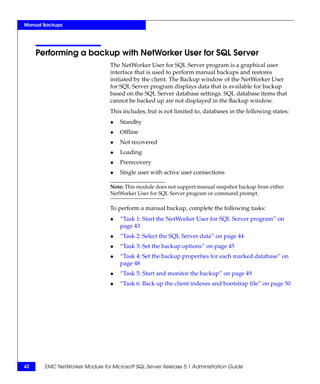
                           the Select SQL Instance dialog box is displayed.


             Figure 7   Select SQL Instance dialog box

                        2. Select the SQL Server instance that the NetWorker Module will
                           back up, and click OK.
                           NetWorker User for SQL Server connects to the selected
                           instance. The main window is displayed.
                        3. (Optional) Perform the following to select a NetWorker server
                           other than the server that was specified during the NetWorker
                           Module for Microsoft SQL Server installation.
                           a. Click the Select NetWorker Server button on the toolbar.


                                     Performing a backup with NetWorker User for SQL Server    43
Manual Backups


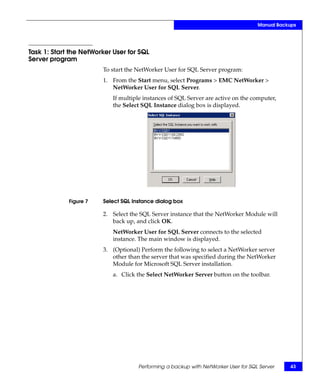
                                       The Change Server dialog box is displayed.


                   Figure 8     Change Server dialog box

                                    b. Select a NetWorker server from the list, and click OK.


     Task 2: Select the SQL Server data
                                When performing a backup by using the NetWorker User for SQL
                                Server program, the NetWorker server always performs a full backup
                                of the SQL Server data.
                                To select the SQL Server data to back up:
                                1. Select Backup from the Operation menu.


44     EMC NetWorker Module for Microsoft SQL Server Release 5.1 Administration Guide
Manual Backups


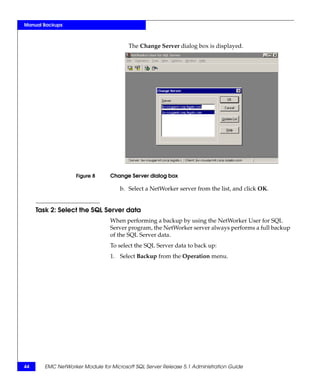
                          The Backup window opens and displays a hierarchical list of SQL
                          Server data objects available for backup.


            Figure 9   Backup window

                       2. To expand an object, click the plus sign (+) beside the object name
                          in the left pane.
                          The descendants of the object are listed in the right pane.
                       3. Mark one or more objects for backup. “Marking items” on
                          page 34 provides complete details on marking or unmarking
                          items.
                       Some SQL Server data items are visible in the Backup window, but
                       cannot be marked. If certain database options are set, SQL Server
                       prohibits a file or filegroup backup. These unavailable objects appear
                       dimmed to distinguish them from those that are available to back up.
                       “Display conventions” on page 33 provides more information on
                       these icons.


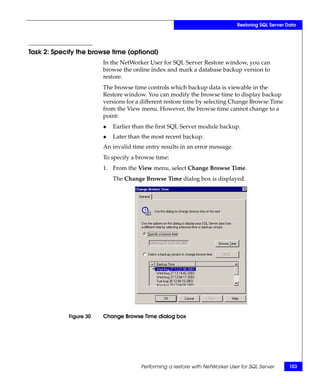
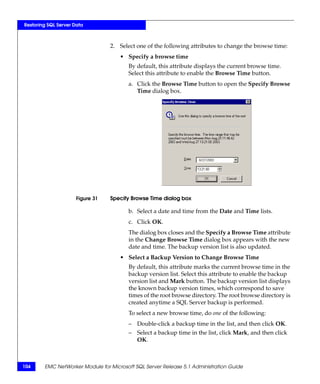
Task 3: Set the        To set backup options:
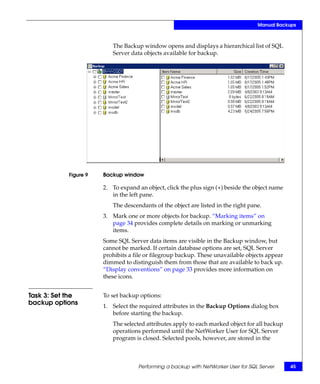
backup options         1. Select the required attributes in the Backup Options dialog box
                          before starting the backup.
                          The selected attributes apply to each marked object for all backup
                          operations performed until the NetWorker User for SQL Server
                          program is closed. Selected pools, however, are stored in the


                                    Performing a backup with NetWorker User for SQL Server      45
Manual Backups


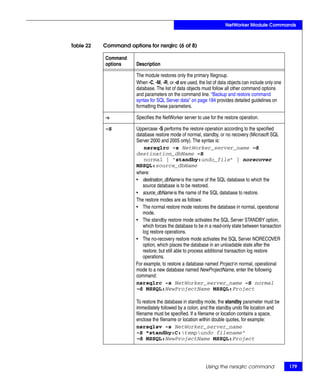
                                    registry and persist from one session to another. If an attribute is
                                    not selected, then the NetWorker User for SQL Server default is
                                    used.


                   Figure 10    Backup Options dialog box

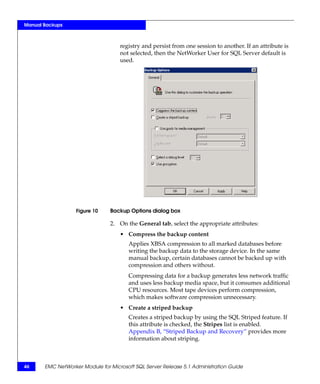
                                2. On the General tab, select the appropriate attributes:
                                    • Compress the backup content
                                       Applies XBSA compression to all marked databases before
                                       writing the backup data to the storage device. In the same
                                       manual backup, certain databases cannot be backed up with
                                       compression and others without.
                                       Compressing data for a backup generates less network traffic
                                       and uses less backup media space, but it consumes additional
                                       CPU resources. Most tape devices perform compression,
                                       which makes software compression unnecessary.
                                    • Create a striped backup
                                       Creates a striped backup by using the SQL Striped feature. If
                                       this attribute is checked, the Stripes list is enabled.
                                       Appendix B, “Striped Backup and Recovery” provides more
                                       information about striping.


46     EMC NetWorker Module for Microsoft SQL Server Release 5.1 Administration Guide
Manual Backups


      To select the number of striped for backup, select a number
      from the list box.
      The maximum number of stripes the NetWorker Module
      software supports is 32. However, the maximum number of
      stripes cannot be more than the value set for NetWorker
      parallelism.
   • Use pools for media management
      Lists media volume pools for storing the backup contents.
      This attribute applies only to manual backup operations
      performed from the NetWorker User for SQL Server program
      or from a command prompt. If this attribute is checked, the
      Full Backup Pool and the Log File Pool lists are enabled.
      To select volume pools:
      a. Check the Use Pools for Media Management attribute.
      b. Select a pool from the Full Backup Pool list to store full
         SQL Server backups, including databases and filegroups.
      c. Select a pool from the Log File Pool list to store transaction
         log or differential (level 1) SQL Server backups.

      Note: The pool names in the Full Backup Pool or Log File Pool lists
      are initially created by using the NetWorker Management Console,
      and are stored in the operating system registry.

   • Select debug level
      Defines the level of debug information to be sent to the backup
      status window during the backup operation. Levels range
      from 1-9, with 1 representing the least amount of information.
   • Use encryption
      Specifies that data is backed up with AES encryption. Data is
      encrypted with the default or current pass phrase provided by
      the NetWorker Server. If the NetWorker Server has a different
      pass phrase at recovery time, you must specify the pass phrase
      used at the time of backup. The EMC NetWorker Administration
      Guide provides complete information about AES encryption,
      and setting the pass phrase.

3. Click OK to close the Backup Options window.


             Performing a backup with NetWorker User for SQL Server         47
Manual Backups


     Task 4: Set the backup properties for each marked database
                                Set backup properties for each marked database before starting the
                                backup operation. If a property is not specified, the default is used.
                                After the backup operation is complete, and the Backup window is
                                closed, the property values revert back to the NetWorker User for
                                SQL Server defaults.
                                To set the backup properties for each marked database:
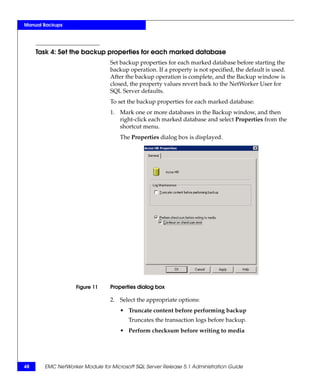
                                1. Mark one or more databases in the Backup window, and then
                                   right-click each marked database and select Properties from the
                                   shortcut menu.
                                    The Properties dialog box is displayed.


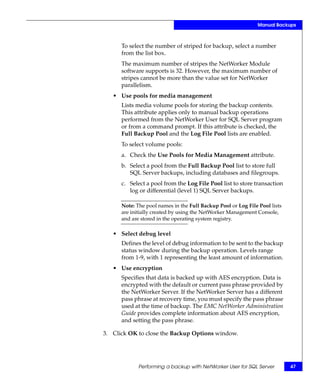
                   Figure 11    Properties dialog box

                                2. Select the appropriate options:
                                    • Truncate content before performing backup
                                       Truncates the transaction logs before backup.
                                    • Perform checksum before writing to media


48     EMC NetWorker Module for Microsoft SQL Server Release 5.1 Administration Guide
Manual Backups


                              Performs a checksum operation with the backup and saves the
                              information to the backup media. Another checksum is
                              performed before a restore to ensure that it matches the
                              backup.
                              A checksum is used to detect a partial backup or restore state.
                              The NetWorker Module for Microsoft SQL Server verifies the
                              checksum by calculating a local result and comparing it with
                              the stored value. If the values do not match, you can choose to
                              continue the backup or restore operation.
                          • Select the Continue on checksum error option to back up and
                            restore if errors are detected.

                              Note: This option is available with SQL Server 2005 instances.

                       3. Click OK.


Task 5: Start and monitor the backup
                       A backup cannot run if there is no media volume mounted in the
                       backup device. Before starting a backup, ensure that a labeled media
                       volume is mounted in the backup device. The volume should be
                       labeled for the volume pool where the backup is to be directed. If
                       there is no volume in the backup device when a backup is started, no
                       messages appear in the Backup Status window and the backup waits
                       for operator intervention.
                       To start the backup:
                       1. Select Start Backup from the File menu.
                       2. Monitor the backup messages in the Backup Status window.
                          After the backup is finished, a Backup Completed message is
                          displayed.

                          Note: The amount of time to back up a database depends on database
                          size, network traffic, server load, and tape positioning.

                       3. Close the Backup Status window.
                       To cancel a backup, select End Backup from the File menu.


                                     Performing a backup with NetWorker User for SQL Server        49
Manual Backups


     Task 6: Back up the client indexes and bootstrap file
                                 Performing a manual backup of SQL Server data does not
                                 automatically back up the client indexes and bootstrap file.
                                 To back up client indexes and a bootstrap file:
                                 1. Log in as one of the following:
                                     • As root on a UNIX NetWorker server.
                                     • As administrator on a Windows NetWorker server.
                                 2. Enter the following command from the command line:
                                     savegrp -O -l full -P printer_name -c NetWorker_client
                                     where:
                                     • printer_name is the name of the printer where the bootstrap
                                       information is printed at the end of the bootstrap backup.
                                     • NetWorker_client is the hostname of the SQL Server.


50      EMC NetWorker Module for Microsoft SQL Server Release 5.1 Administration Guide
3

                                                         Scheduled Backups


This chapter explains how to configure scheduled backups of SQL
Server data.
This chapter includes the following sections:
◆   About scheduled backups ................................................................          52
◆   Setting backup levels .........................................................................   53
◆   Configuring scheduled backups ......................................................              58
◆   Unavailable databases and group backup failure.........................                           67


                                                                      Scheduled Backups                    51
Scheduled Backups


     About scheduled backups
                                The most reliable way to protect Microsoft SQL data is to schedule
                                backups of the SQL Server to run at regular intervals. Scheduled
                                backups ensure that all SQL Server data is automatically saved,
                                including the NetWorker server’s client indexes and bootstrap file.
                                The client indexes and bootstrap file are vital for restoring data to the
                                SQL Server in the event of a disaster.
                                Scheduling backups for NetWorker Module for Microsoft SQL Server
                                is similar to scheduling NetWorker file system backups. On the
                                NetWorker server, appropriate attribute values must be set for
                                various resources, such as Policy, Group, and Client resources. This is
                                done by an administrator with a working knowledge of the
                                NetWorker software through the NetWorker Management Console.
                                Scheduled backups can be configured to run at any time and use
                                backup levels full, incremental, and differential (level 1-9).
                                Backups can also be scheduled with the NetWorker Configuration
                                Wizard, available with NetWorker release 7.3 or later. For NetWorker
                                release 7.2, the wizard is available as an add-on tool. The
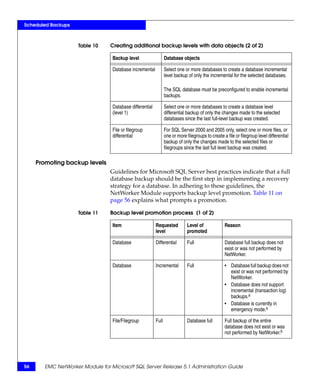
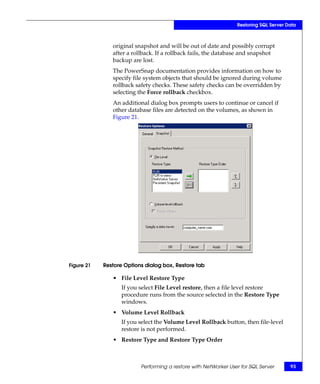
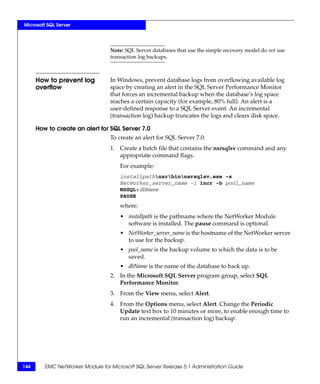
                                configuration wizard enables you to create one or more client or
                                device resources for basic scheduled backups of NetWorker release
                                7.2 and later client computers and Microsoft SQL Server data.
                                The wizard integrates with the NetWorker Module for Microsoft SQL
                                Server by prompting users for information, such as:
                                ◆   Backup type
                                ◆   Objects to back up
                                ◆   Recovery level
                                ◆   Schedule preferences
                                ◆   Microsoft SQL administrator account information
                                Once the wizard creates a resource, that resource can then be edited
                                by using the NetWorker Management Console.
                                The EMC NetWorker Installation Guide provides instructions on how to
                                install and use the NetWorker Configuration Wizard.
                                Once NetWorker and the configuration wizard are installed, you can
                                choose to install the NetWorker Module for Microsoft SQL Server
                                component from the wizard. The EMC NetWorker Module for Microsoft
                                SQL Server Installation Guide provides installation instructions.


52     EMC NetWorker Module for Microsoft SQL Server Release 5.1 Administration Guide
Scheduled Backups


Setting backup levels
                         The NetWorker Module for Microsoft SQL Server enables you to
                         specify backup levels in addition to database full, database
                         differential, and database incremental. The availability of a backup
                         level depends on the type of data selected for backup and any SQL
                         Server settings on those objects, as listed in Table 6.

              Table 6    Backup levels for SQL Server data

                                                                     SQL Server 7.0                        SQL Server 2000, 2005

                         SQL Server data objects                     full          diff        incr        full        diff            incr

                         All databases, including                    yes           yes         yesc,       yes         yesc            yesc
                         MSSQL:

                         Specified databases                         yes           yesc        yesa,c      yes         yesc            yesa,c

                         All filegroups in specified                 yesa,c        noa,b,c     n/a         yesa,c      yesa,c          n/a
                         databases

                         Specified filegroups in                     yesa,c        noa,b,c     n/a         yesa,c      yesa,c          n/a
                         specified database

                         Specified files in filegroups in            yesa,c        noa,b,c     n/a         yesa,c      yesa,c          n/a
                         specified databases
                                a. An incremental file, filegroup, or database backup can only be created when the SQL Server
                                   database options are properly configured. For more information, refer to the Microsoft SQL Server
                                   7.0, 2000, or 2005 documentation.
                                a. SQL Server 7.0 does not allow differential (level 1) backups of filegroups or files. If a differential file
                                   or filegroup backup is specified, the module performs a full backup.
                                b. Individual items are subject to promotion. “Promoting backup levels” on page 56 provides more
                                   information.


Strategies for backing   If the SQL Server manages a significant amount of data, schedule a
   up SQL Server data    backup of the databases every one to two weeks, as shown in Table 7.

              Table 7    Full backup every one to two weeks

                         Fri                Sat             Sun             Mon              Tues            Wed                Thurs

                         full               incr            incr            incr             incr            diff               incr

                         incr               incr            incr            diff             incr            incr               incr

                         full               Repeat


                                                                                                        Setting backup levels                    53
Scheduled Backups


                                Another backup strategy is to schedule incremental backups on
                                several successive days immediately following the previous full
                                backup, as shown in Table 8. This schedule backs up all data that has
                                changed since the previous incremental backup.

                    Table 8     Incremental backup after a full backup

                                 Fri         Sat       Sun       Mon       Tues      Wed        Thurs

                                 full        incr      incr      incr      diff      incr       incr

                                 Repeat

                                A level 1 differential backup can also be scheduled after several days
                                of incremental backups. This schedule backs up all data since the
                                previous full backup.

                                Note: If a database has been made read-only, a full backup of the database
                                should be made. A read-only database cannot be restored from a transaction
                                log backup that may already exist.

                                EMC NetWorker Administration Guide provides further details and
                                examples of planning backup strategies and creating schedules.


     Differences                Because it may not be practical or efficient to run full backups every
     between backup             day, other backup levels can be specified for automatic, scheduled
     levels                     backups. Limiting the frequency of full backups can decrease server
                                load while ensuring data is protected.
                                Consider the following when selecting backup levels:
                                ◆       Full backups take more time than differential backups, while
                                        differential backups take more time than incremental backups.
                                        However, restoring data immediately following a differential
                                        backup is generally faster than restoring data following a number
                                        of successive incremental backups.
                                ◆       If you have only a stand-alone storage device and a full backup
                                        does not fit on a single media volume, an operator must monitor
                                        the backup. This way, the volume can be changed at the
                                        appropriate time.
                                        An incremental backup saves only transactions that have
                                        occurred since the most recent full or transaction log backup. For
                                        this reason, using incremental backups can simplify and expedite
                                        database recovery.


54     EMC NetWorker Module for Microsoft SQL Server Release 5.1 Administration Guide
Scheduled Backups


                         Table 9 on page 55 outlines the differences between the backup levels:

              Table 9    Backup level advantages and disadvantages

                         Backup level             Advantages                          Disadvantages

                         Full                     • Fastest restore time.             • Slow backup.
                                                                                      • Increases load on client,
                                                                                        server, and network.
                                                                                      • Uses the most volume space.

                         Incremental              • Faster than a full backup.        • Slow restore.
                         (transaction log)        • Decreases the load on             • Data can spread across
                                                    server and Uses the least           multiple volumes.
                                                    volume space.                     • Multiple transaction logs can
                                                  • Enables point-in-time               spread across multiple
                                                    restore.                            volumes.

                         Differential             • Faster than a full backup.        • Generally more
                                                  • Captures all changes since          time-consuming than a
                                                    last full.                          incremental backup
                                                                                        (depending on the backup
                                                                                        schedule strategy).

Combining data objects to create backup levels
                         The NetWorker Module for Microsoft SQL Server enables the
                         selection of SQL Server data objects in various combinations to create
                         scheduled backups of different levels, as shown in Table 10 on
                         page 55.

              Table 10   Creating additional backup levels with data objects (1 of 2)

                         Backup level              Database objects

                         Full database             Select one or more databases to create a level full database
                                                   backup of the selected databases and their transaction log files.

                         Full file or filegroup    Select one or more files or one or more filegroups to create a
                                                   level full file or filegroup backup of the selected files or filegroup,
                                                   but not their transaction logs.


                                                                                        Setting backup levels                55
Scheduled Backups


                     Table 10    Creating additional backup levels with data objects (2 of 2)

                                  Backup level                   Database objects

                                  Database incremental           Select one or more databases to create a database incremental
                                                                 level backup of only the incremental for the selected databases.

                                                                 The SQL database must be preconfigured to enable incremental
                                                                 backups.

                                  Database differential          Select one or more databases to create a database level
                                  (level 1)                      differential backup of only the changes made to the selected
                                                                 databases since the last full-level backup was created.

                                  File or filegroup              For SQL Server 2000 and 2005 only, select one or more files, or
                                  differential                   one or more filegroups to create a file or filegroup level differential
                                                                 backup of only the changes made to the selected files or
                                                                 filegroups since the last full level backup was created.

     Promoting backup levels
                                 Guidelines for Microsoft SQL Server best practices indicate that a full
                                 database backup should be the first step in implementing a recovery
                                 strategy for a database. In adhering to these guidelines, the
                                 NetWorker Module supports backup level promotion. Table 11 on
                                 page 56 explains what prompts a promotion.

                     Table 11    Backup level promotion process (1 of 2)

                                  Item                    Requested           Level of             Reason
                                                          level               promoted

                                  Database                Differential        Full                 Database full backup does not
                                                                                                   exist or was not performed by
                                                                                                   NetWorker.

                                  Database                Incremental         Full                 • Database full backup does not
                                                                                                     exist or was not performed by
                                                                                                     NetWorker.
                                                                                                   • Database does not support
                                                                                                     incremental (transaction log)
                                                                                                     backups.a
                                                                                                   • Database is currently in
                                                                                                     emergency mode.a

                                  File/Filegroup          Full                Database full        Full backup of the entire
                                                                                                   database does not exist or was
                                                                                                   not performed by NetWorker.b


56      EMC NetWorker Module for Microsoft SQL Server Release 5.1 Administration Guide
Scheduled Backups


Table 11   Backup level promotion process (2 of 2)

           Item                     Requested          Level of               Reason
                                    level              promoted

           File/Filegroup           Differential       Database full          Full backup of the entire
                                                                              database does not exist or was
                                                                              not performed by NetWorker.

           File/Filegroup when      Differential       Full                   SQL Server 7.0 does not support
           connected to SQL                                                   file/filegroup differential backups.
           Server 7.0

           File/Filegroup           Incremental        Full                   File/filegroup incremental
                                                                              backups are not supported.
              a. Refer to the Microsoft SQL Server Books Online for more information.
              b. Databases consist of files and groups that contain files. The default configuration is a primary
                 filegroup with the main data file. Elaborate database configurations can contain more filegroups;
                 each with more files. If a filegroup or file level backup is specified, and a full database backup is
                 not on record, the filegroup or file backup is promoted to a database full backup.


                                                                                 Setting backup levels                   57
Scheduled Backups


     Configuring scheduled backups
                                Configure scheduled backups by using either the NetWorker
                                Configuration Wizard or the NetWorker Management Console. For
                                instructions on using the wizard to configure a basic scheduled
                                backup, refer to the EMC NetWorker Release Notes.
                                To configure scheduled backups by using the NetWorker
                                Management Console, complete the following tasks:
                                ◆   “Task 1: Assign a Snapshot policy (optional)” on page 59
                                ◆   “Task 2: Configure one or more group resources” on page 60
                                ◆   “Task 3: Configure one or more Client resources” on page 61
                                ◆   “Task 4: Configure a schedule and set backup levels” on page 63
                                ◆   “Task 5: Configure the NetWorker volume pools” on page 65
                                Before beginning these tasks, make sure the NetWorker interface is
                                configured to display hidden attributes.
                                To display hidden attributes:
                                ◆   For NetWorker 7.2 and earlier servers on Windows platforms:
                                    • Select Customize from the Options menu.
                                    • On the Window Configurations tab of the Customize dialog
                                      box, select Display Hidden Attributes.
                                ◆   For NetWorker 7.2 and earlier servers on UNIX or Linux
                                    platforms, select Details from the View menu.
                                ◆   For NetWorker 7.3 and later servers, hidden attributes are called
                                    diagnostic attributes. To display diagnostic attributes in the
                                    Administration window, select Diagnostic Mode from the View
                                    menu.
                                The NetWorker Module for Microsoft SQL Server can back up to a
                                NetWorker server that is running on any supported operating
                                system. The appropriate version of EMC NetWorker Administration
                                Guide provides instructions on using the NetWorker Management
                                Console program to configure NetWorker server resources.


58     EMC NetWorker Module for Microsoft SQL Server Release 5.1 Administration Guide
Scheduled Backups


Task 1: Assign a Snapshot policy (optional)
                        If the NetWorker PowerSnap Module is installed, assign a
                        preconfigured or custom snapshot policy on the NetWorker server.
                        This guide provides only the snapshot configuration information that
                        is relevant to the NetWorker Module for Microsoft SQL Server.
                        ◆   The EMC NetWorker Administration Guide provides information
                            about creating a custom snapshot policy.
                        ◆   The NetWorker PowerSnap Module Guides appropriate for the
                            storage subsystem provide instructions on setting the required
                            NetWorker server resources for snapshot operations.
                        Table 12 on page 59 shows a sample snapshot policy that creates four
                        snapshots per day. Only the first snapshot is moved to secondary
                        storage. All snapshots are deleted from primary storage after 24
                        hours.

             Table 12   Sample snapshot policy

                        Name                         Four Snaps Daily

                        Comment                      Snapshot policy for SQL Server backups

                        Number of Snapshots          4

                        Snapshot Expiration Policy   4

                        Retain Snapshots             Day

                        Backup Snapshots             First


                        Note: NetWorker PowerSnap Module documentation provides information
                        about how to complete the attributes for a snapshot policy.


                                                                Configuring scheduled backups           59
Scheduled Backups


     Task 2: Configure one or more group resources
                                A NetWorker backup group is a set of NetWorker Client resources, all
                                of which start backing up data at a specified time once the Autostart
                                feature is enabled and the backup start time is specified in the Group
                                resource. You can assign one or more SQL Server hosts to a
                                NetWorker backup group.
                                NetWorker software provides a preconfigured group named Default.
                                The Default group’s attributes can be modified, but the Default group
                                cannot be deleted from the list of NetWorker groups. The Default
                                group has the following attributes:
                                ◆   Autostart = Disabled
                                ◆   Start time = 3:33
                                ◆   Client retries = 1
                                ◆   Clones = No
                                ◆   Clone pool = Default Clone
                                ◆   Interval = 24:00
                                ◆   Snapshot = False
                                ◆   Snapshot Policy = Daily
                                ◆   Snapshot Pool = Default
                                To assign the SQL Server host to another group with different
                                attributes, create a group in the NetWorker Management Console
                                before creating a NetWorker Client resource for the SQL Server host.
                                The EMC NetWorker Administration Guide provides complete
                                instructions on creating backup groups.
                                To back up several large SQL Server databases, consider creating a
                                separate backup group with a different start time for each database.
                                Any number of backup groups can be created to help reduce network
                                traffic or load on the NetWorker server.
                                When selecting a start time for each group, schedule the groups far
                                enough apart for one group to complete its backup before the next
                                group starts. Choose times when there is little network activity, for
                                example, nights and weekends.


60     EMC NetWorker Module for Microsoft SQL Server Release 5.1 Administration Guide
Scheduled Backups


Task 3: Configure one or more Client resources
                       A NetWorker Client is a resource configured on the NetWorker
                       server. This resource defines the following information:
                       ◆   Client data to back up
                       ◆   Backup schedule for the client
                       ◆   Browse policy for the backup data
                       ◆   Retention policy for the backup data
                       Each SQL Server host to be backed up must be configured as a
                       NetWorker client in the NetWorker Management Console. In
                       addition, multiple SQL Server databases that exist on the same SQL
                       Server host can be configured as separate NetWorker clients.
                       For each Client resource, the NetWorker server does the following:
                       ◆   Maintains the Client resource information, including entries in
                           the online client file index and media database.
                       ◆   Contacts the clients listed in a backup group configured on the
                           server.
                       ◆   Performs the scheduled backups when a client request is
                           received.
                       ◆   Restores the data upon request from the client.


                                                            Configuring scheduled backups     61
Scheduled Backups


                                Table 13 on page 62 describes the settings used when creating a
                                NetWorker client for a SQL Server host.

                    Table 13    Client resource attribute settings (1 of 2)

                                 Attribute          NetWorker Module Requirements

                                 Name               Enter the SQL Server’s hostname. If you create multiple Client resources
                                                    for the same SQL Server, use the same name for each.

                                 Comment            If using multiple Client resources for the same SQL Server host, enter a
                                                    comment to identify the purpose of each.

                                 Save Set           Specify any valid save set names, for example:
                                                    MSSQL:
                                                    or
                                                    MSSQL:dbName1 [MSSQL:dbName2 MSSQL:dbName3 ...]
                                                    For example, entering only MSSQL: always yields a backup of all
                                                    databases on the SQL Server host.
                                                    A snapshot backup fails if more than one database, or MSSQL: is
                                                    specified for the Save Set attribute. For snapshot backups, list only one
                                                    database for the Save Set attribute.

                                 Group              Select a backup group. “Task 2: Configure one or more group resources”
                                                    on page 60 provides more information.

                                 Schedule           Select a backup schedule. “Task 4: Configure a schedule and set backup
                                                    levels” on page 63 provides more information.

                                 Browse Policy      Select a browse policy to specify how long the NetWorker server retains
                                                    client file index entries.

                                 Retention Policy   Select a retention policy to specify how long the NetWorker server
                                                    retains media entries for the client’s backups.

                                 Storage Node       If the NetWorker server has one or more remote storage nodes that are
                                                    to be used for backing up the SQL Server’s data, enter the name of each
                                                    storage node in the order they are to be used. The default storage node,
                                                    nsrserverhost, represents the NetWorker server.

                                 Backup             Enter the nsrsqlsv command and any necessary command options.
                                 Command            “Using the nsrsqlsv command” on page 168 provides information about
                                                    nsrsqlsv options.
                                                    For virtual server backups, the -a virtual_server_name command option
                                                    is required.


62     EMC NetWorker Module for Microsoft SQL Server Release 5.1 Administration Guide
Scheduled Backups


             Table 13   Client resource attribute settings (2 of 2)

                        Attribute       NetWorker Module Requirements

                        Remote Access   Enter the user ID or hostnames of other clients for the Remote Access
                                        attribute. This grants to those hosts copy restore type permission, which
                                        enables the named hosts to access the NetWorker server and receive
                                        directed recover data. If this attribute is left empty, only administrators
                                        and users logged on to the SQL Server host have access.
                                        For a serverless backup, this attribute must include the proxy client
                                        hostname.

                        Remote User     To enable the NetWorker Module for Microsoft SQL Server to back up
                                        the SQL Server virtual server and/or a mirrored server, enter the
                                        username for a Windows user account that has SQL Server
                                        administrator privileges.
                                        For mirroring, this should be the same user account and password that
                                        were used to set up the mirroring relationship. If multiple accounts have
                                        been set up, only one needs to be specified. Per Microsoft SQL
                                        documentation, a domain account must be used to set up the mirroring
                                        relationship.

                        Password        Enter the password for the Remote User account.

                        Aliases         Enter all known aliases for the SQL Server host in the Aliases attribute
                                        on the Preference tab, as in the following example:
                                        mars
                                        mars.legato.com
                                        Include both the DNS short name and long name for the SQL Server
                                        host.


Task 4: Configure a schedule and set backup levels
                        As a NetWorker client, a SQL Server’s backup schedule is controlled
                        by a Schedule resource on the NetWorker server. The schedule
                        determines what level of backup (for example, full or incremental) is
                        performed on a given day. “Setting backup levels” on page 53
                        provides implementation details and examples.
                        The NetWorker server provides several preconfigured schedules,
                        such as the Default schedule. Custom schedules can be created or
                        preconfigured schedules can be modified them to meet your needs.
                        To create a backup schedule:
                        1. From the NetWorker Management Console open the
                           Administration window and click Configuration.
                        2. In the expanded left pane, select Schedules.


                                                                    Configuring scheduled backups                     63
Scheduled Backups


                                3. From the File menu, select New.
                                4. In the Name attribute, enter a name for the schedule.
                                5. From the Period attribute, select Week or Month.
                                    • Select Week to create a weekly backup schedule. For example,
                                      if a full backup for a Friday is selected, every Friday will have
                                      a full backup.
                                    • Select Month to create a monthly schedule. For example, if a
                                      full backup for the first of the month is selected, every month
                                      will have a full backup on the first of the month.
                                6. Select a backup level for each day in the weekly or monthly
                                   period.
                                    a. Select a day.
                                    b. Right-click and from the Set Level menu, select a backup
                                       level.
                                7. If required, select an override backup level for any day. An
                                   override occurs once only for the selected day.
                                    a. Select a day.
                                    b. Right-click and from the Override Level menu, select a
                                       backup level.
                                8. Click OK.
                                To assign a schedule to a group:
                                1. In the expanded left pane, right-click the group name under
                                   Groups, and select Properties.
                                2. In the Advanced tab of the Properties dialog box, select a
                                   schedule.
                                To assign a schedule to a client:
                                1. In the expanded left pane, select Clients.
                                2. In the right side pane, right-click a client name and select
                                   Properties.
                                3. In the General tab of the Properties dialog box, select a schedule.


64     EMC NetWorker Module for Microsoft SQL Server Release 5.1 Administration Guide
Scheduled Backups


Task 5: Configure the NetWorker volume pools
                           With the NetWorker server software, backups can be directed to
                           groups of media or backup volumes called pools. A pool is a specific
                           collection of volumes to which the NetWorker server writes data. The
                           NetWorker server uses pools of volumes to sort and store data. The
                           configuration settings for each pool act as filters that tell the server
                           which volumes should receive specific data. The NetWorker server
                           uses pools in conjunction with label templates to keep track of what
                           data is on each specific volume.
                           For scheduled backups, the NetWorker Module for Microsoft SQL
                           Server uses the criteria defined in the NetWorker Management
                           Console. Pool settings specified in the Backup Options dialog box of
                           the NetWorker User for SQL Server program apply only to manual
                           backups. “Task 3: Set the backup options” on page 45 provides more
                           information on pools used by the NetWorker User for SQL Server
                           program.
                           To create, modify, or remove a Pool resource for scheduled backups,
                           use the NetWorker Management Console. The EMC NetWorker
                           Administration Guide provides more information on volume pools and
                           how to configure NetWorker Pool and Label Template resources.

Task 6: Test the Configuration
                           You can test the backup configuration by starting a backup group
                           manually from the NetWorker Management Console. The NetWorker
                           server immediately backs up the clients in the group, overriding the
                           scheduled backup start time. Each client in the group is backed up at
                           the level defined by the schedule that is selected in the client’s
                           Schedule attribute.
                           To write the results of a scheduled backup to a log file, enter the
                           following in the Action attribute of the NetWorker Notification
                           resource:
                           ◆     For UNIX, enter:
                                 /usr/ucb/logger
                           ◆     For Windows, enter:
                                 nsrlog -f filename
                                 where filename is the name of a file to which the backup results are
                                 written.


                                                                  Configuring scheduled backups         65
Scheduled Backups


                                The EMC NetWorker Administration Guide provides instructions on
                                configuring Notification resources.
                                You can override the scheduled backup start time and start the group
                                manually. This is equivalent to selecting Start Now in the Autostart
                                attribute of the Group resource.

                                Note: When a group backup is started manually, the NetWorker server runs
                                the backup at the level of the next scheduled backup, such as full, level [1 – 9],
                                incremental, or consolidated.

                                To manually start a group backup:
                                1. Open the NetWorker Management Console. From the
                                   Administration window, click Monitoring.
                                2. Click the Groups tab.
                                3. Right-click the group to start, then select Start.
                                4. Click Yes to confirm the start.
                                The NetWorker server immediately backs up the clients in the group,
                                overriding the scheduled backup start time. The group icon changes
                                to the clock icon until the backup has completed or is interrupted.
                                The EMC NetWorker Administration Guide provides more details.


66     EMC NetWorker Module for Microsoft SQL Server Release 5.1 Administration Guide
Scheduled Backups


Unavailable databases and group backup failure
                 The group containing a scheduled backup of a NetWorker SQL
                 Server by using the MSSQL: saveset to back up all databases fails if
                 any database is unavailable. This does not mean complete failure, but
                 rather that one or more databases were not backed up successfully. A
                 database that is in any of the following states will cause a scheduled
                 backup to fail:
                 ◆   Standby
                 ◆   Offline
                 ◆   Not recovered
                 ◆   Loading
                 ◆   Prerecovery
                 ◆   Single user with active user connections

                 Note: For nonscheduled manual backups that are initiated from the SQL
                 Module on the client computer, unavailable databases are silently skipped.

                 Limitations of the savegrp program reporting and savegrp log file
                 may make failure identification and the specific unavailable
                 databases difficult to isolate. The savegrp information is displayed
                 alphabetically, leaving some early information suppressed, and the
                 success or failure information combined.
                 Definitive results are available in the daemon.log file, located on the
                 NetWorker server and in the nsrsqlsv.log file on the client computer.
                 After the completion of a backup, the following types of error
                 messages are listed in the daemon.log file:
                 ◆   Database 'Acme' cannot be opened because it is
                     offline.
                 ◆   Processing Acme failed, the item will be skipped.
                 ◆   Database 'Acme' is in warm-standby state (set by
                     executing RESTORE WITH STANDBY) and cannot be backed
                     up until the entire load sequence is completed.
                 ◆   Processing Acme failed, the item will be skipped.


                                      Unavailable databases and group backup failure          67
Scheduled Backups


68     EMC NetWorker Module for Microsoft SQL Server Release 5.1 Administration Guide
4
                                                          Restoring SQL Server
                                                                         Data


This chapter describes the steps required to restore Microsoft SQL
Server data by using the NetWorker User for SQL Server program.
For guidelines on using the NetWorker Module for Microsoft SQL
nsrsqlrc command and command-line options to perform a restore
from a command prompt, see “Using the nsrsqlrc command” on
page 174.
This chapter includes the following sections:
◆   Before the restore................................................................................   70
◆   Backing up the active portion of the transaction log ....................                            73
◆   NetWorker Module database restore process ................................                           76
◆   Performing a restore with NetWorker User for SQL Server ........                                     78


                                                               Restoring SQL Server Data                      69
Restoring SQL Server Data


     Before the restore
                                 The Restore window contains database objects available for restoring.
                                 Based on the restore type selected, restore windows restrict the
                                 marking of database objects. The normal and verify-only restore
                                 types do not restrict the marking of database objects in the browse
                                 window. However, the partial/piecemeal and copy restore types
                                 allow only database objects to be marked for restore. “Restore
                                 window restrictions” on page 35 provides more information on
                                 restore restrictions.

                                 Note: To restore SQL Server data, use the NetWorker User for SQL Server
                                 program or the nsrsqlrc command. You cannot restore SQL Server data by
                                 using the NetWorker Management Console, nor can you restore data that
                                 was backed up by third-party vendors.


                                 Note: Read the Microsoft SQL Server documentation to understand the
                                 limitations associated with recover types on the various SQL Server versions.

                                 Before starting a restore, complete the following preparations:
                                 ◆   Ensure that the NetWorker server software is running on the
                                     appropriate host and the NetWorker Remote Exec Service is
                                     started on the SQL Server host.
                                 ◆   If a backup of another database is in progress, wait for it to finish.
                                     Microsoft SQL Server will not restore a database while another
                                     database backup is in progress.
                                 ◆   If a SQL Server startup is in progress, wait for it to finish before
                                     starting a restore operation.
                                 ◆   Review the ERRORLOG file to determine if a database is
                                     currently being recovered or search the ERRORLOG file for the
                                     “Recovery complete” string.
                                     If the nsrsqlrc program is started while the SQL Server is
                                     recovering databases, the following error message appears:
                                     Could not find database ID. Database may not be
                                     activated yet or may be in transition.


70      EMC NetWorker Module for Microsoft SQL Server Release 5.1 Administration Guide
Restoring SQL Server Data


                   ◆   Ensure that all database users are logged off the database. A
                       restore fails if other users try to use the database during the
                       restore operation.

                       Note: In SQL Server 2005, if the primary filegroup is not under restore,
                       then the online (piecemeal) restore functionality allows user access to a
                       database while backup or restore is in progress.

                   ◆   If performing an instant restore from a snapshot-capable storage
                       subsystem that implements copy-on-write (COW) technology,
                       ensure that adequate space exists in the repository or cache.
                       If the repository or cache becomes full during an instant restore,
                       the restore fails, which causes the source SQL database to be left
                       in an unknown state and the snapshot is deleted from the storage
                       subsystem.
                       The EMC NetWorker PowerSnap Module guides provide
                       information about how to ensure that the repository or cache has
                       enough space for an instant restore operation.


Rollback restore   The following should be considered before a rollback recovery can be
requirements       performed:
                   ◆   The database files that are being recovered are the only file
                       system objects on the volume. Additionally there should not be
                       any other database files belonging to other databases on the
                       volume.
                   ◆   If there are other file system objects in the volume before the
                       rollback, but they were not backed up by using PowerSnap, they
                       will be damaged by the recover operation. The rollback operation
                       checks for additional file system objects and does not start the
                       rollback unless the force option (-F) is used, or the file system
                       object is specified in the /nsr/res/psrollback.res file.

                       Note: The EMC NetWorker PowerSnap Module guides provide
                       information about the psrollback.res file and force option.


                                                                          Before the restore       71
Restoring SQL Server Data


                                 When performing a rollback recovery, consider how this affects
                                 future snapshots. Delete the original snapshot, and all subsequent
                                 snapshots that existed prior to when the rollback was performed.
                                 This information is maintained in the client file index on the
                                 NetWorker server. If this information is not deleted the following
                                 occurs:
                                 ◆   Future snapshots accumulate on invalid data.
                                 ◆   SQL Module restore operations fail if based on old client file
                                     index information.
                                 The EMC NetWorker PowerSnap Module guides provide more
                                 information about rollback recovery.


     Piecemeal restore requirements
                                 Microsoft SQL Server 2005 Enterprise Edition databases consisting of
                                 multiple filegroups can be restored in stages with piecemeal restore.
                                 The NetWorker Module for Microsoft SQL Server supports piecemeal
                                 restore only with SQL Server 2005 Enterprise Edition.
                                 Partial restore in SQL Server 2000 is a one-stage process that restores
                                 part of a database to a different location. With Partial restore, the
                                 primary filegroup must be part of each partial restore. The database
                                 remains offline during the restore process. NetWorker Module for
                                 Microsoft SQL Server supports partial restore for SQL Server 2000.
                                 Piecemeal restore is a multistage process that restores a database to
                                 itself or to another location. The initial stage must include the
                                 primary filegroup and optionally other filegroups. Once the primary
                                 filegroup is restored, you can bring the database online and continue
                                 restoring the remaining filegroups in subsequent stages.


72      EMC NetWorker Module for Microsoft SQL Server Release 5.1 Administration Guide
Restoring SQL Server Data


Backing up the active portion of the transaction log
                  SQL Server 2005 requires users to perform a backup of the active
                  portion of the transaction log prior to restore. If you are restoring a
                  SQL Server 2005 database, first backup the active portion of the log
                  without the recovery option. The NetWorker User for SQL Server
                  program will automatically back up the active portion of the
                  transaction log prior to restoring an SQL Server 2005 database.
                  If you are restoring a file or filegroup of a database which resides on
                  either SQL Server 2000 instance or on SQL Server 2005
                  non-Enterprise Edition instance, first back up the active portion of the
                  transaction log. The transaction log back up must be applied to the
                  file or filegroup restore to ensure the file or filegroup is consistent
                  with the rest of the database. If a file or filegroup is restored by using
                  the NetWorker User for SQL Server program, this transaction log
                  backup occurs automatically.
                  If you are restoring a secondary filegroup (or a file belonging to a
                  secondary filegroup) of a database residing on SQL Server 2005
                  Enterprise Edition, you do not need to back up the active portion of
                  the transaction log before restoring the file or filegroup. Instead, a
                  backup of the active portion of transaction log should be taken after
                  restoring the file or filegroup. The transaction log backup taken
                  should then be applied to ensure that the file or filegroup is
                  consistent with the rest of the database. If the secondary filegroup (or
                  file belonging to the secondary filegroup) is restored by using
                  NetWorker User for SQL Server program, the transaction log backup
                  occurs automatically.

                  Note: If you are performing a normal or piecemeal restore of a SQL Server
                  2005 instance, the active portion of the transaction log backup (referred to as
                  a transaction log backup) happens automatically through the NetWorker
                  User for SQL Server program as part of the restore process. If you are
                  performing a restore operation from the command line, first back up the
                  active portion of the transaction log then restore data.


                                     Backing up the active portion of the transaction log           73
Restoring SQL Server Data


     Back up the transaction log
                                 To use the command line to restore the file or filegroup, the
                                 transaction log backup must be explicitly performed by using the
                                 nsrsqlsv command as follows:
                                 nsrsqlsv [-s NetWorker_server_name] -l incr -R -H dbName

                                 where:
                                 ◆   NetWorker_server_name is the hostname of the NetWorker
                                     server.
                                 ◆   dbName is the name of the database that receives the transaction
                                     log backup.
                                 ◆   The -R flag is required so the transaction log is not truncated after
                                     the backup completes.
                                 ◆   The -H option uses the NORECOVERY option when backing up
                                     transaction logs. It leaves the database in Restoring state.
                                     • Do not use the -H option with versions previous to SQL Server
                                       2005.
                                     • Use the -H option:
                                          – To back up the transaction log prior to database restore or
                                            primary filegroup restore on SQL Server 2005 Enterprise
                                            Edition.
                                          – To back up the transaction log prior to database restore or
                                            filegroup or file restore on non-Enterprise editions of SQL
                                            Server 2005.

                                 Note: If you use third-party vendor software to back up SQL Server data,
                                 after completing the backup, you must perform a full database backup with
                                 the NetWorker Module for Microsoft SQL Server. This prevents a broken
                                 transaction log chain, which can cause the restore operation to fail.


74      EMC NetWorker Module for Microsoft SQL Server Release 5.1 Administration Guide
Restoring SQL Server Data


Backing up the transaction log for SQL Server 7.0
                        Restoring a file or filegroup for a Microsoft SQL Server 7.0 database
                        might require an additional transaction log backup. Performing the
                        first transaction log backup for Microsoft SQL Server 7.0 could result
                        in additional transactions on the database.
                        If, after performing the first transaction log backup, the nsrsqlrc
                        command fails, use the following procedure to restore the file or
                        filegroup:
                        1. Put the database into single-user mode.
                        2. Immediately perform another transaction log backup.
                        3. Restore the file or filegroup.
                        4. Take the database out of single-user mode.
                        The Microsoft SQL Server 7.0 documentation provides more
                        information about file or filegroup backup and restore.


Backing up the transaction log for SQL Server Express
                        For SQL Server Express Edition, the recovery model of the database
                        is set to "SIMPLE" by default, and the transaction log backup is not
                        applied when the recovery model of database is "SIMPLE." In order
                        to have the transaction log backed up, the recovery model of the
                        database must be reset to "FULL" or "Bulk-logged."


                                         Backing up the active portion of the transaction log      75
Restoring SQL Server Data


     NetWorker Module database restore process
                                 A restore uses the following process:
                                 1. The NetWorker Module for Microsoft SQL Server restores the
                                    most recent full backup, and then restores the most recent
                                    differential (level 1) backup (if any).
                                     If a full database backup is removed from the NetWorker server,
                                     and an incremental backup is attempted, the restore fails. The
                                     NetWorker Module for Microsoft SQL Server software checks the
                                     SQL Server instance to determine if a full database backup has
                                     been performed, but does not verify that a full backup still exists
                                     on the NetWorker server.
                                 2. The NetWorker Module for Microsoft SQL Server restores all
                                    transaction log back ups that ran after the most recent differential
                                    backup (or that ran after the last full backup, if there was no
                                    differential backup). To correctly restore uncommitted
                                    transactions, the SQL Server NORECOVERY mode is specified
                                    for all intermediate transaction logs.
                                     The restore of the final transaction log specifies the restore mode
                                     if a mode of STANDBY or NORECOVERY was selected. The
                                     default selection is Normal.
                                     For example, if you selected a restore mode of NORECOVERY,
                                     that specification appears in the output for a database restore as
                                     follows:
                                     C:> nsrsqlrc -s NetWorker_server_name my_database
                                        nsrsqlrc: Restoring database my_database...
                                        nsrsqlrc: RESTORE database my_database FROM
                                        virtual_device='BSMSQL' WITH norecovery, stats
                                        nsrsqlrc: RESTORE database my_database from
                                        virtual_device='BSMSQL' WITH norecovery
                                        (differential)
                                        nsrsqlrc: RESTORE transaction my_database FROM
                                        virtual_device='BSMSQL' WITH norecovery
                                        nsrsqlrc: RESTORE transaction my_database FROM
                                        virtual_device='BSMSQL' WITH norecovery
                                        Received 1.0 MB 4 files from NSR server.


76      EMC NetWorker Module for Microsoft SQL Server Release 5.1 Administration Guide
Restoring SQL Server Data


This module imposes the following restrictions on database file
relocation:
◆   Only database backups can be relocated. Individual file and
    filegroup backups cannot be relocated without relocating the
    database that contains those files.
◆   If the configuration of a database has changed since the most
    recent, level full database back up was created, you cannot
    relocate the database. Configuration changes include the deletion
    or addition of files, filegroups, or transaction log files.
◆   A system database might not be the destination database of a
    relocation.
◆   The relocation fails if the destination does not have sufficient
    space to create a new database.


                        NetWorker Module database restore process           77
Restoring SQL Server Data


     Performing a restore with NetWorker User for SQL Server
                                 To recover SQL Server data from a backup, perform the following
                                 tasks:
                                 ◆   “Task 1: Set up the restore” on page 79
                                 ◆   “Task 2: Specify the browse time (optional)” on page 103
                                 ◆   “Task 3: View the required volumes (optional)” on page 105
                                 ◆   “Task 4: Set the restore properties (optional)” on page 105
                                 ◆   “Task 5: Start the restore” on page 124

                                 Note: The SQL Server databases must be restored in the correct order.

                                 The amount of time that it takes to restore a database depends on the
                                 following variables:
                                 ◆   The amount of data
                                 ◆   Network traffic
                                 ◆   Server load
                                 ◆   Backup volume availability
                                 ◆   Tape positioning
                                 If the backup volume with the databases is loaded at a storage node
                                 (backup device) local to the NetWorker server, the restore proceeds.
                                 If the restore does not begin, it is possible that either the wrong
                                 volume or no volume is mounted in the backup device.
                                 When restoring an incompatible database by using the name of an
                                 existing database, or when restoring from a media failure where one
                                 or more database files were lost, the Overwrite the Existing Database
                                 attribute must be selected under the Files tab. Figure 16, “Properties
                                 dialog box, Files tab,” provides details.
                                 After the restore is finished, the restore completion time appears in
                                 the Restore Status window.


78      EMC NetWorker Module for Microsoft SQL Server Release 5.1 Administration Guide
Restoring SQL Server Data


Task 1: Set up the restore
                         To set up the restore:
                         1. Start the NetWorker User for SQL Server program.
                             If multiple SQL Servers are active on the computer, the Select
                             SQL Instance dialog box opens before the main window, as
                             shown in Figure 7 on page 43.
                         2. Select the SQL Server host that the module should use to perform
                            the restore operation, then click OK.
                         3. To select a NetWorker server other than the default server:
                             a. Click the Select NetWorker Server button on the toolbar. The
                                Change Server dialog box opens.
                             b. Select a NetWorker server from the list, then click OK.
                         4. In the main window of the NetWorker User for SQL Server
                            interface, click the Restore button on the toolbar.
                             The Restore Operation dialog box opens as in Figure 12.


             Figure 12   Restore Operation dialog box


                         Note: You can also select Restore from the Operation menu, and then select
                         Normal, Copy, Verify Only, Partial, or Piecemeal (if running SQL Server 2005
                         Enterprise Edition).


                                        Performing a restore with NetWorker User for SQL Server         79
Restoring SQL Server Data


     Configuring a normal restore
                                  To configure a normal restore:
                                  1. Select the Normal restore type from the Restore Operation dialog
                                     box and click Continue.
                                     The Restore window lists the databases that can be restored.


                      Figure 13   Normal Restore window

                                  2. Select one or more databases to restore.
                                  3. Right-click each marked database and select Properties to
                                     configure additional settings.


80      EMC NetWorker Module for Microsoft SQL Server Release 5.1 Administration Guide
Restoring SQL Server Data


               The Properties dialog box opens.


Figure 14   Properties dialog box, General tab

               Options and actions that are available are dependant upon the
               version of SQL Server that is to be restored and the type of restore
               selected.
            4. Specify the following on the General tab:
               • Back up the active portion of the transaction log before
                 restoring the database
                   This option backs up the active portion of the transaction log
                   before performing the restore. When selected, the module
                   attempts a transaction log backup by using the
                   NO_TRUNCATE SQL keyword for SQL Server 2000.
                   For SQL Server 2005 databases, this option is selected by
                   default for a Normal restore, and the module attempts the
                   transaction log backup by using the NO_TRUNCATE and
                   NORECOVERY SQL keywords. The restore operation
                   proceeds regardless of whether the transaction log backup
                   succeeds or fails.


                          Performing a restore with NetWorker User for SQL Server      81
Restoring SQL Server Data


                                        Note: The most common reason for restoring databases is to recover
                                        from operator errors, which are recorded in the transaction log. If you
                                        recover the database without applying the transaction log you loose
                                        the information since the last backup. If you apply the entire
                                        transaction log you re-corrupt the database. Point-in-time recovery
                                        data can be recovered to the time of the error minus approximately
                                        one second. This assumes that the database is functional enough to
                                        complete the final transaction log backup. If the Specify a Restore
                                        Time box under the Restore Time tab is checked, the backup
                                        proceeds, but the latest transactions captured in the active transaction
                                        log backup are not restored.

                                     • Perform the restore using this recovery mode
                                        Normal mode instructs SQL Server to leave the database in
                                        operational state after the restore. This is the default mode.
                                        No Recovery mode activates the SQL Server NORECOVERY
                                        database restore option for the last stage restored. This mode
                                        places the database in an unloadable state after the restore.
                                        However, the database can still process additional transaction
                                        log restore operations.
                                        Standby mode specifies an undo file for SQL Server to use
                                        when rolling back the transactions. By default, this attribute
                                        displays a default filename and path:
                                        %DriveLetter:<default_path><default_dbName>undo.ldf

                                        where:
                                        – default_path is the default SQL Server backup path obtained
                                          from the SQL Server registry.
                                        – default_dbName is the name of the database backup selected
                                          for the restore.


82      EMC NetWorker Module for Microsoft SQL Server Release 5.1 Administration Guide
Restoring SQL Server Data


                  To specify another name and path for the this file:
                  a. Enter a valid name and path, or click the ellipses button.
                     The Specify the Standby Undo File dialog box opens.


Figure 15   Standby Undo File dialog box

                  b. In the Specify the Standby Undo File dialog box, specify
                     the following attributes:
                     Enter a path in the File Location text box, or browse the file
                     system tree and highlight a file.
                     Enter the filename in the File Name text box, or browse the
                     file system tree and highlight an existing file.
               • Perform checksum before reading from media
                  This option (in the Properties dialog box) performs a
                  checksum operation before a restore to ensure that it matches
                  the backup.
                  The NetWorker Module for Microsoft SQL Server verifies the
                  checksum by calculating a local result and comparing it with
                  the stored value. If the values do not match, you can choose to
                  continue the restore operation by selecting the Continue on
                  checksum error option.

                  Note: The Checksum and Continue with error options are available
                  starting with SQL Server 2005 instances.


                          Performing a restore with NetWorker User for SQL Server      83
Restoring SQL Server Data


                                  5. Select the Files tab.


                      Figure 16   Properties dialog box, Files tab

                                     Configure the following settings:
                                     • Database to restore displays the database selected for the
                                       restore. This attribute cannot be modified.
                                     • Name for restored database specifies the name for the
                                       restored database. For a normal restore, this text box displays
                                       the name of the database selected for backup and cannot be
                                       modified.
                                     • Overwrite the existing database instructs SQL Server to
                                       create the specified database and its related files, even if
                                       another database already exists with the same name. In such a
                                       case, the existing database is deleted.

                                         Note: This attribute includes the WITH REPLACE SQL keyword in
                                         the restore sequence. The WITH REPLACE keyword restores files
                                         over existing files of the same name and location. Microsoft SQL
                                         Server Books Online provides more information.


84      EMC NetWorker Module for Microsoft SQL Server Release 5.1 Administration Guide
Restoring SQL Server Data


               • Mark the filegroups to restore defines the files and filegroups
                 to restore. If performing a normal or copy restore, the
                 filegroups of the database selected cannot be changed.

                       Note: The set of filegroups marked in this attribute is copied into the
                       list of the Modify the destination for the files in attribute.

               • Modify the destination for the files in displays a set of views
                 for the database files to be restored, and enables filtering of
                 files that are visible in the File and destination table. Table 14
                 on page 85 identifies the supported views:

Table 14   Views displayed by the Modify the destination for the files in attribute

           This view                Displays

           All files                All of the files for the database, including transaction log files.

           All log files            Only the transaction log files.

           All data files           Only data files.

           Filegroup name           Only data files for a specific filegroup.

           Drive letter             All files located on a given drive at the time the backup occurred,
                                    even if those files have since been relocated to a different drive.

               • File and destination table lists the SQL Server logical
                 filenames and locations. The files listed in this table are
                 associated to the marked database to be restored. When
                 performing a normal restore, this table displays the current
                 name and destination based on the SQL Server physical
                 filename and logical location for the restored file.


                               Performing a restore with NetWorker User for SQL Server                    85
Restoring SQL Server Data


                                         To modify the destination, perform one of the following:
                                         – Double-click a file in the list to display the Specify the file
                                           destination dialog box.
                                         – Click a file in the list, and then click Destination to display
                                           the Specify the file destination dialog box, as shown in
                                           Figure 17.


                      Figure 17   Specify the File Destination dialog box

                                     Configure the attributes listed in Table 15.

                      Table 15    Configurable attributes (1 of 2)

                                  This view          Displays

                                  Source file name   The file currently selected in the File and Destination lists. This
                                                     text cannot be modified. When multiple files are selected, this text
                                                     box is empty.

                                  Source location    The location and the file selected in the File and destination list.
                                                     This information cannot be modified. When multiple files are
                                                     selected, the location of the first selected file in the list is displayed.


86      EMC NetWorker Module for Microsoft SQL Server Release 5.1 Administration Guide
Restoring SQL Server Data


Table 15    Configurable attributes (2 of 2)

            This view               Displays

            Destination location    The file system location for the restored file. When multiple files are
                                    selected, the default SQL data path is opened, but not selected.
                                    Enter a pathname, or browse the file system tree and highlight a
                                    directory or file to change the location.

            Destination file name   The name of the file currently selected in the File and Destination
                                    table. When multiple files are selected, the attribute is empty.
                                    Enter a new name or browse the file system tree and highlight a file
                                    to change the name.

            6. Click OK to return to the Files tab.
            7. Click the Restore Time tab to configure a restore schedule.


Figure 18   Properties dialog box, Restore Time tab

               This tab enables you to select a backup version and modify the
               restore date and time. The default selection for the restore is listed
               in the Backup Version table. When a point-in-time restore is
               performed, the restore procedure reinstates only transactions
               from the backup version that occurred before the specified restore
               date and time.


                              Performing a restore with NetWorker User for SQL Server                         87
Restoring SQL Server Data


                                     You can change the backup version or transaction time. The
                                     ability to restore to a named log mark is also supported for SQL
                                     Server 2000 and 2005 databases.
                                 8. To perform a point-in-time restore, specify the following in the
                                    Restore Time tab:
                                     Select the Specify a Restore Time checkbox to schedule the
                                     restore.
                                     If the Backup the active portion of the transaction log before
                                     restoring the database checkbox on the General tab is selected,
                                     and you choose this option but do not specify the point-in-time in
                                     the transaction log, the latest transactions captured in the active
                                     transaction log backup are not restored.
                                     The latest transactions captured in the active transaction log
                                     backup will be restored to the specified point-in-time only if it
                                     was specified in the transaction log.
                                     • Specify a Time to Perform a Point-in-time Restore
                                        The restore time indicates what data from the marked backup
                                        version is reinstated during the restore, and when to stop
                                        restoring transactions. This text box can be modified by
                                        clicking the Point-in-Time button.
                                     • Point-in-time button
                                        When the incremental backup, or the latest backup (regardless
                                        of whether it is full, level incremental or level differential) is
                                        marked in the Backup Versions table, the Point-in-time
                                        button is enabled for setting the time for a point-in-time
                                        backup. “Set point-in-time restore properties” on page 122
                                        provides more details. If a full or differential backup is marked
                                        but is not the latest backup, this button displays an error
                                        message.
                                     • Backup Versions table
                                        Select and mark the backup version to use for the restore. The
                                        Specify a Time text box displays the date and time for the
                                        backup that is currently marked. Only one backup version can
                                        be selected and marked.
                                        To select a backup version, double-click a backup or select a
                                        backup and click the Mark button.


88      EMC NetWorker Module for Microsoft SQL Server Release 5.1 Administration Guide
Restoring SQL Server Data


   • Using a Named Log Mark
      Perform the restore by using a named log mark. This attribute:
      – Is only available for SQL Server 2000 and 2005.
      – Is only enabled when log marks exist for the selected
        database backup. When this attribute is selected, the
        Restore to the End of the Log Mark and the Restore to the
        Beginning of the Log Mark buttons are enabled.
      Specify which type of named log mark restore to perform by
      selecting one of the following:
      – To restore the backup and stop immediately after the
        named log mark, select Restore to the End of the Log
        Mark. This type of restore includes the named transaction
        in the restore.
      – To restore the backup and stop immediately before the
        named log mark, select Restore to the Beginning of the
        Log Mark. This type of restore excludes the named
        transaction.
   • Log Mark table — Use this attribute to specify a log mark to
     use for the restore.
      Double-click a log mark or select a log mark in the list and
      click the Mark button.
9. When finished, click OK.
   There are additional restore options that you can define.
10. Select Restore Options from the Options menu.


             Performing a restore with NetWorker User for SQL Server      89
Restoring SQL Server Data


                                     The Restore Options dialog box is displayed, as in Figure 19.


                      Figure 19   Restore Options dialog box, General tab

                                  11. From the General tab, configure the following attributes:
                                     • Automatically overwrite any database marked for restore
                                         Select this attribute to overwrite the marked databases. This
                                         restores the database by using the WITH_OVERWRITE SQL
                                         keyword.
                                     • Detect available tape sessions prior to restoring a striped
                                       backup
                                         Select this attribute to restore SQL data that was originally
                                         backed up as a striped backup. If this attribute is selected, the
                                         module determines the number of tape sessions needed to
                                         restore a striped backup.

                                         Note: This attribute is selected by default. It is controlled by the
                                         Windows registry entry NSR_DETECT_TAPES, which can be
                                         modified. Regardless of whether this attribute is selected, it retains its
                                         setting from one session to the next.


90      EMC NetWorker Module for Microsoft SQL Server Release 5.1 Administration Guide
Restoring SQL Server Data


  If you do not have adequate permissions, this checkbox is
  disabled. “Security requirements” on page 14 provides
  information about how to determine the permissions
  necessary for Windows 2000 servers. Appendix B, “Striped
  Backup and Recovery,” provides information about how to
  determine the permissions necessary for Windows 2003
  servers.
• Select a Debug Level
  Selecting a debug level issues the command line –D n option,
  where n is an integer value between 1 and 9. When the debug
  level is selected, the debug information appears in the Backup
  or Restore status window, and also in the log files. This
  information can be useful in diagnosing problems.
  If you specify debug level logging, watch the size of the
  module log files. The files are located at:
  installpathnsrapplogs
  where installpath is typically C:Program FilesLegato and
  can grow very large. Log files with debug output can be
  deleted (or archived).
• Disable Log Mark Display
  This attribute disables the potentially time-consuming
  retrieval of log mark information. Select in situations where
  log marks will not be used for most restore operations,
  particularly if the client file index is large. This setting persists
  across multiple invocations of the user interface. When log
  mark display is disabled, the log mark in the backup will not
  be displayed in the Restore Time tab.
  When this option is selected, the log mark information is not
  displayed in the Restore Time tab of the Restore Properties
  dialog box. When it is not selected, the information is
  displayed.
• Transaction Log backup before restoring Microsoft SQL
  Server 2005 databases (SQL Server 2005 only)
  With SQL Server 2005, transaction log backups are required
  prior to restoring databases. This ensures that the database
  can be restored to the most recent point-in-time possible. This
  option is selected by default for SQL Server 2005.


          Performing a restore with NetWorker User for SQL Server         91
Restoring SQL Server Data


                                        When this option is not selected, the Back Up the Active
                                        Portion of the Transaction Log Before Restoring the
                                        Database option (selected by default for SQL Server 2005
                                        databases) is enabled. Choosing not to back up the active
                                        portion of the transaction log and not overwriting the existing
                                        database displays the following shown in Figure 20 on
                                        page 92.


                      Figure 20   Review Options message

                                        You can choose not to back up the transaction log by selecting
                                        No for Restore with overwrite in the precautionary message
                                        box. This will replace the existing database by using the T-SQL
                                        option WITHREPLACE. This will improve performance in
                                        cases where the database is too damaged to perform the
                                        transaction log backup or it is known that the transaction log
                                        is not of interest.
                                     • Alternate Decryption Pass Phrase
                                        Specifies a pass phrase for AES encryption other than the
                                        default or current phrase used by the NetWorker Server. If
                                        data was backed up using AES encryption and an alternate
                                        pass phrase, that phrase must be specified to decrypt data
                                        during the restore. If multiple pass phrases are required, they
                                        must be specified at the command line. The EMC NetWorker
                                        Administration Guide provides complete information about
                                        AES encryption, and setting the pass phrase.
                                  12. (Optional) If the PowerSnap Module is installed, select the
                                      Snapshot tab to configure snapshot restore options. Choose from
                                      either File Level or Volume Level rollback operations.
                                     Other file system objects on the affected volumes will be reverted
                                     to their state at the time of the original snapshot (out of date or
                                     nonexistent). Other databases that reside partially, or in total, on
                                     the affected volumes are not synchronized at the time of the


92      EMC NetWorker Module for Microsoft SQL Server Release 5.1 Administration Guide
Restoring SQL Server Data


               original snapshot and will be out of date and possibly corrupt
               after a rollback. If a rollback fails, the database and snapshot
               backup are lost.
               The PowerSnap documentation provides information on how to
               specify file system objects that should be ignored during volume
               rollback safety checks. These safety checks can be overridden by
               selecting the Force rollback checkbox.
               An additional dialog box prompts users to continue or cancel if
               other database files are detected on the volumes, as shown in
               Figure 21.


Figure 21   Restore Options dialog box, Restore tab

               • File Level Restore Type
                   If you select File Level restore, then a file level restore
                   procedure runs from the source selected in the Restore Type
                   windows.
               • Volume Level Rollback
                   If you select the Volume Level Rollback button, then file-level
                   restore is not performed.
               • Restore Type and Restore Type Order


                          Performing a restore with NetWorker User for SQL Server      93
Restoring SQL Server Data


                                        Use the right and left arrows to select one or both of the
                                        snapshot restore methods, and use the up and down arrows to
                                        establish the order of procedure:
                                        – FLIR and FLIR to mirror
                                            Restores a Symmetrix backup. Data that was backed up by
                                            using an image backup (SymmConnect) is recovered to a
                                            standard volume. FLIR recovers to a production volume
                                            and FLIR using a mirror recovers to a SAN-based backup
                                            or virtual volume. Only one of these options can be
                                            selected for a single restore operation.
                                        – Persistent Snapshot
                                            If only the persistent snapshot option is selected, a
                                            snapshot is restored from the SQL Server storage
                                            subsystem. If a recoverable snapshot is not found on the
                                            SQL Server storage subsystem, no recovery is performed.
                                        – NetWorker Server
                                            If only the NetWorker Server option is selected, a snapshot
                                            is restored from secondary storage on the NetWorker
                                            server or storage node. If a recoverable snapshot is not
                                            found on secondary storage, no recovery is performed.
                                        – Persistent Snapshot, NetWorker Server
                                            If both options are selected, with Persistent Snapshot first,
                                            a snapshot is restored from the SQL Server storage
                                            subsystem. If a recoverable snapshot does not exist on the
                                            SQL Server storage subsystem, a secondary storage search
                                            is performed on the NetWorker server or storage node.
                                        – NetWorker Server, Persistent Snapshot
                                            If both options are selected, with NetWorker Server first, a
                                            snapshot is restored from secondary storage on the
                                            NetWorker server or storage node. If a recoverable
                                            snapshot is not found on the NetWorker Server or storage
                                            node, the SQL Server storage subsystem is searched for a
                                            recoverable snapshot.
                                        – Specify a Data Mover
                                            This attribute identifies the hostname of the computer that
                                            restores the snapshot. By default, this value is set to the
                                            SQL Server host.


94      EMC NetWorker Module for Microsoft SQL Server Release 5.1 Administration Guide
Restoring SQL Server Data


                         • The data mover information is ignored for volume-level
                           rollback. For file level restore, enter the data mover in the
                           Specify a Data Mover text box.

                             Note: If a data mover other than the target SQL Server was specified
                             for the snapshot backup, the same data mover must be specified for
                             snapshot recovery. The EMC NetWorker PowerSnap Module guides
                             provide more information about configuring a data mover.

                      13. Click OK.
                      14. Click the play button in the toolbar of the restore dialog box to
                          start the restore. Monitor the status of the restore in the Restore
                          Status window.

Configuring a copy    To configure a copy restore:
            restore
                      1. Select the Copy restore type from the Restore Operation dialog
                         box and click Continue.
                         The Select the SQL Server dialog box is displayed.


          Figure 22   Select the SQL Server dialog box

                      2. Specify the NetWorker client from which SQL Server backups are
                         imported for restore to the local SQL Server by selecting one of
                         the following attributes:
                         • The current SQL Server Instance
                             Displays the name of the current NetWorker client host. Select
                             this attribute to use a database backup from the SQL Server
                             currently connected to the NetWorker module.


                                      Performing a restore with NetWorker User for SQL Server       95
Restoring SQL Server Data


                                     • A [different] NetWorker SQL Server client
                                        By default, this attribute is disabled and the text box displays
                                        the name of a NetWorker client host. Select this attribute to
                                        select a different SQL Server host from which to obtain the
                                        existing database backup.

                                        Note: In order to select other client machines as the source of a copy
                                        restore, the destination machine and an appropriate user account or
                                        group must be specified in the list of NetWorker administrators on
                                        the NetWorker server. The release notes provide information about
                                        setting up a mid-level user account that does not grant full
                                        administrator privileges.

                                        A new dialog box is displayed if the following applies to the
                                        selected NetWorker client:
                                        – A backup exists.
                                        – A named instance directory in the index.
                                        This dialog box enables the selection of the source from
                                        default and named instances.
                                  3. Select either the SQL Server default instance or an SQL Server
                                     named instance, and click Continue. After choosing a SQL
                                     instance, all database backups are listed.

                                     Note: A CopyOf prefix is prepended to database (and database file)
                                     names only if a database by the same name already exists on the target
                                     system. This may not be the case for copy restore between systems or
                                     between instances of SQL Server (or if the original database has been
                                     removed). In these cases the default database and filenames will be the
                                     same as the original names.

                                     If backups for the SQL default or other named instance were not
                                     performed, or are no longer available, the message shown in
                                     Figure 23 is displayed.


                      Figure 23   NetWorker User for SQL Server message


96      EMC NetWorker Module for Microsoft SQL Server Release 5.1 Administration Guide
Restoring SQL Server Data


            4. After you select a SQL instance, the Restore window, shown in
               Figure 24, lists the databases that can be restored.


Figure 24   Restore (Copy) window

            5. Select one database to restore.

               Note: If the partial, piecemeal, or copy restore type is selected, only one
               database object can be marked. Files and filegroups of the selected
               database are not visible in the browse window since they require a
               database backup. The files and filegroups can be viewed and configured
               in the Files tab of the Properties dialog box.

            6. Right-click the marked database and select Properties.

               Note: If you select partial, piecemeal, or copy restore type, you must
               specify the restore properties before starting the restore. Otherwise, the
               restore fails to start.

               The Properties dialog box appears and the General tab is
               displayed.


Figure 25   Sample Properties dialog box


                           Performing a restore with NetWorker User for SQL Server           97
Restoring SQL Server Data


                                 7. In the Properties dialog box, click the Files tab.
                                     When restoring a copy of a database, you can overwrite an
                                     existing database or create a new one.
                                     • To create a new database, enter a name in the Name for
                                       restored database text box. The default is CopyOfSelectedDB.
                                     • If you want to overwrite an existing database, select a name
                                       from the Name for restored database text box and select
                                       Overwrite the existing database.

                                        Note: Check the generated filenames. If you change the name of the
                                        database from CopyOfAcme Sales back to Acme Sales, by using
                                        overwrite, then you may remove the CopyOf prefix from the
                                        associated filenames as well. Default names are generated when the
                                        dialog box is first displayed. Any database name edits are not
                                        propagated to the database filenames. These changes must be made
                                        manually.

                                 8. In the Properties dialog box, click the Restore Time tab.
                                 9. When properties are configured, click OK.
                                     These settings are maintained until the restore is started.
                                 10. Click the play button in the toolbar of the Restore dialog box to
                                     start the restore.

                                     Note: You can monitor the status of the restore in the Restore Status
                                     window.

                                 To perform a copy restore of a snapshot backup, these requirements
                                 must be met:
                                 ◆   The NetWorker servers file on the data mover node (proxy client)
                                     must contain an entry for the destination client.
                                 ◆   The NetWorker Administrators Users group must include
                                     system@destination_client_hostname (using a fully qualified domain
                                     name) in the Users attribute.
                                 ◆   The snapshot backup must have been rolled over to tape (or other
                                     file device). Copy restore does not work with volume rollback.


98      EMC NetWorker Module for Microsoft SQL Server Release 5.1 Administration Guide
Restoring SQL Server Data


Performing a named     For a recovery, a default instance and a named instance A and B are
  instance recovery    available on a client computer. Once a backup is performed by using
                       NetWorker User for SQL Server, a copy restore is available for all
                       three instances.
                       If instance A is uninstalled for some reason, a copy restore from
                       instance A is still available, because the instance is still listed in the
                       client file index for the most recently named instance directory.
                       Should a more recent backup be performed for any of the instances,
                       after instance A is uninstalled, a recovery will not be possible. A new
                       named instance directory is created with instance A excluded.
                       The remedy for this is to reinstall the removed named instance and
                       run another backup. This restores the directory information for
                       instance A and complete functionality.


           Figure 26   Restore window

                       Perform the following to view and select restore items:
                       1. To view a list of data items available for restoring, expand any
                          item in the left pane of the Restore window.
                           The descendants of the item are displayed in the right pane.
                       2. In the Restore window, select the item to restore by clicking the
                          checkbox.


                                      Performing a restore with NetWorker User for SQL Server       99
Restoring SQL Server Data


                                      Note: If the partial, piecemeal, or copy restore type is selected, only one
                                      database object can be marked. Files and filegroups of the selected
                                      database are not visible in the browse window, and require a database
                                      backup. The files and filegroups are available in the Properties dialog
                                      box.

                                  3. Once the restore is set up, start the operation. “Task 5: Start the
                                     restore” on page 124 provides more information.

               Configuring a      The verify-only option enables you to verify that data for a database
          verify-only restore     can be restored.

                                  Note: Verify-only restore will not work with PowerSnap PIT backups. For
                                  verify-only restore to work, the backup must have been rolled over to tape or
                                  some other device.

                                  To configure a verify only restore:
                                  1. Select the Verify Only restore type from the Restore Operation
                                     dialog box and click Continue.
                                      The Restore window lists the databases that can be restored.


                      Figure 27   Verify Only Restore window

                                  2. Select one or more databases from the list.
                                  3. (Optional) Right-click the parent server to open the Restore
                                     Options dialog box.


100     EMC NetWorker Module for Microsoft SQL Server Release 5.1 Administration Guide
Restoring SQL Server Data


                          4. Click OK.
                          5. Click the play button in the toolbar of the Restore dialog box to
                             start the restore.
                             You can monitor the status of the restore in the Restore Status
                             window.

Configuring a partial or piecemeal restore
                          Partial restore is enabled for SQL Server 2000 releases. If you are
                          restoring SQL Server 2005 databases (Enterprise Edition only), the
                          option becomes piecemeal restore. “Restore types” on page 27
                          provides detailed descriptions.
                          To configure a partial or piecemeal restore:
                          1. Select the Partial (or Piecemeal) restore type from the Restore
                             Operation dialog box and click Continue.
                             The Restore window is displayed.


              Figure 28   Partial Restore (or Piecemeal) window

                          2. Select a database from the list.

                             Note: In partial and piecemeal restore, only one database object can be
                             marked. Files and filegroups of the selected database are not visible in
                             the browse window. These operations require a database backup. The
                             files and filegroups can be viewed and configured in the Files tab of the
                             Properties dialog box.

                          3. (Optional) Right-click the parent server to open the Restore
                             Options dialog box.
                          4. Click OK.
                          5. Right-click the database and select Properties.


                                         Performing a restore with NetWorker User for SQL Server         101
Restoring SQL Server Data


                                      Note: In partial and piecemeal restore operations, you must specify the
                                      restore properties before starting the restore. Otherwise, the restore fails
                                      to start.

                                      The Properties dialog box is displayed.
                                      In the General tab, partial and piecemeal restores overwrite a
                                      database when restoring to the same location. To overwrite an
                                      existing database, select a name from the Name for restored
                                      database text box and select Overwrite the existing database.
                                  6. In the Properties dialog box, click the Restore Time tab.
                                  7. When finished configuring properties, click OK.
                                      For piecemeal restore, certain settings in the Properties dialog
                                      box are reset if you redisplay the Properties dialog box before
                                      starting the restore process. The selections that will be reset are:
                                      • Marked files and filegroups of the selected database,
                                      • Name for restored database option (on the Files tab),
                                      • Backup the active portion of the transaction log before
                                        restoring the database checkbox (on the General tab).
                                      If you do return to the Properties dialog box, the message shown
                                      in Figure 29, is displayed:


                      Figure 29   Restore Options message

                                  8. Click the Play button in the toolbar of the Restore dialog box to
                                     start the restore.

                                  Note: Piecemeal restore is iterative. You can continue to restore additional
                                  filegroups in subsequent operations. Previously restored filegroups will not
                                  be available for selection unless you specify New Piecemeal.


102     EMC NetWorker Module for Microsoft SQL Server Release 5.1 Administration Guide
Restoring SQL Server Data


Task 2: Specify the browse time (optional)
                         In the NetWorker User for SQL Server Restore window, you can
                         browse the online index and mark a database backup version to
                         restore.
                         The browse time controls which backup data is viewable in the
                         Restore window. You can modify the browse time to display backup
                         versions for a different restore time by selecting Change Browse Time
                         from the View menu. However, the browse time cannot change to a
                         point:
                         ◆   Earlier than the first SQL Server module backup.
                         ◆   Later than the most recent backup.
                         An invalid time entry results in an error message.
                         To specify a browse time:
                         1. From the View menu, select Change Browse Time.
                             The Change Browse Time dialog box is displayed.


             Figure 30   Change Browse Time dialog box


                                       Performing a restore with NetWorker User for SQL Server      103
Restoring SQL Server Data


                                  2. Select one of the following attributes to change the browse time:
                                     • Specify a browse time
                                         By default, this attribute displays the current browse time.
                                         Select this attribute to enable the Browse Time button.
                                         a. Click the Browse Time button to open the Specify Browse
                                            Time dialog box.


                      Figure 31   Specify Browse Time dialog box

                                         b. Select a date and time from the Date and Time lists.
                                         c. Click OK.
                                         The dialog box closes and the Specify a Browse Time attribute
                                         in the Change Browse Time dialog box appears with the new
                                         date and time. The backup version list is also updated.
                                     • Select a Backup Version to Change Browse Time
                                         By default, this attribute marks the current browse time in the
                                         backup version list. Select this attribute to enable the backup
                                         version list and Mark button. The backup version list displays
                                         the known backup version times, which correspond to save
                                         times of the root browse directory. The root browse directory is
                                         created anytime a SQL Server backup is performed.
                                         To select a new browse time, do one of the following:
                                         – Double-click a backup time in the list, and then click OK.
                                         – Select a backup time in the list, click Mark, and then click
                                           OK.


104     EMC NetWorker Module for Microsoft SQL Server Release 5.1 Administration Guide
Restoring SQL Server Data


                                 The Specify a Browse Time attribute is updated to reflect the
                                 new setting.

                         Note: When you change the browse time, previous selections in the Restore
                         window are discarded. Any file, filegroup, or database property settings are
                         lost.


Task 3: View the required volumes (optional)
                         After you select the databases to restore, you can check which backup
                         volumes contain the databases you need by doing one of the
                         following:
                         ◆   Selecting Required Volumes from the View menu.
                         ◆   Selecting the Required Volumes button from the toolbar.
                         Checking the required volumes helps to ensure that the necessary
                         backup volumes are mounted in the NetWorker server's storage
                         device.

                         Note: Required volumes information is not available for snapshots.

                         If a required backup volume is not mounted, do one of the following:
                         ◆   Contact the NetWorker administrator and request that the
                             volume be mounted.
                         ◆   Wait for the NetWorker software to prompt the administrator to
                             mount the volume.


Task 4: Set the restore properties (optional)
                         To set the restore properties for a select file, filegroup, or database:
                         1. Right-click the database item, and select Properties.
                         2. Complete the Properties dialog box.
                         3. Click OK.

                         Note: Restore properties are not available for the verify-only restore type.


                                         Performing a restore with NetWorker User for SQL Server          105
Restoring SQL Server Data


                                 See these sections for additional information:
                                 ◆   “Set database restore properties” on page 106 provides
                                     information about setting restore properties for a database.
                                 ◆   “Select filegroups to restore” on page 112 provides information
                                     about setting restore properties for a file or filegroup.
                                 All of the properties are context-sensitive, based on the version of
                                 SQL Server that is running (7.0, 2000, or 2005) and the restore type
                                 that was chosen.
                                 Preferences specified for these properties are used for the current
                                 restore operation. When a preference is not set, the default is used.
                                 After the restore is complete, and the Restore window is closed, the
                                 property settings revert back to the NetWorker User for SQL Server
                                 defaults.

                                 Note: If you select partial, piecemeal, or copy restore type, you must specify
                                 the restore properties before starting the restore. Otherwise, the restore fails
                                 to start.


      Set database restore       The information in this section applies to normal, copy, and
                properties       piecemeal restore types.
                                 To set database restore properties:
                                 1. In the Restore window, select a database
                                 2. Right-click the database and select Properties.


106     EMC NetWorker Module for Microsoft SQL Server Release 5.1 Administration Guide
Restoring SQL Server Data


               The Properties dialog box is displayed as shown in Figure 32.


Figure 32   Properties dialog box

            3. On the General tab, indicate whether to back up the active
               portion of the transaction.
               When selected, a transaction log backup starts by using the
               NO_TRUNCATE SQL keyword (for SQL Server 2000) and also
               the NORECOVERY keyword (for SQL Server 2005). The restore
               operation proceeds regardless of whether the transaction log
               backup succeeds or fails.
               Specify a point-in-time restore to any time within the transaction
               log backup. This option applies to both SQL Server 2000 and SQL
               Server 5000 restores, and addresses database failure if that occurs
               after the last scheduled incremental backup.
               By backing up the active portion the active portion of the log
               prior to the restore, users can specify a restore for time of failure.
            4. To specify a point-in-time restore, select the Restore Time tab,
               and make entries as appropriate.
               Point-in-time restore can use either a full, level incremental, or
               level deferential backup, as long as the selected backup is an
               incremental and/or the latest backup.


                          Performing a restore with NetWorker User for SQL Server        107
Restoring SQL Server Data


                                 5. Specify a recovery mode to use for the restore:
                                     • Normal mode instructs SQL Server to leave the database in
                                       operational state after the restore. This is the default mode.
                                     • No Recovery mode activates the SQL Server NORECOVERY
                                       database restore option for the last stage restored. This mode
                                       places the database in an unloadable state after the restore.
                                       However, the database can still process additional transaction
                                       log restore operations.
                                     • Standby mode enables the Standby Undo File Name which
                                       specifies an undo file for SQL Server to use when rolling back
                                       the transactions. (See “Specifying an undo filename” on
                                       page 108 for instructions.) By default, this attribute displays a
                                       default filename and path as follows:
                                        %DriveLetter:<default_path><default_dbName>undo.ldf
                                        where:
                                        – default_path is the default SQL Server backup path obtained
                                          from the SQL Server registry.
                                        – default_dbName is the name of the database backup selected
                                          for the restore.
                                 6. Select Checksum and Continue with error.
                                     If checksums are not calculated for the backup specifying them
                                     for the restore causes the restore operation to fail.

        Specifying an undo       To specify the undo filename, do one of the following:
                  filename
                                 1. Enter a valid name and path in the text box.
                                     Click the ellipses button to display a dialog box similar to that
                                     shown in Figure 33 on page 109.
                                 2. Select a file from the file system tree.


108     EMC NetWorker Module for Microsoft SQL Server Release 5.1 Administration Guide
Restoring SQL Server Data


                The file location and name are listed in the text boxes.


Figure 33   Specify the Standby Undo File dialog box

            3. Select a file from the file system tree.
                The file location and name appear in the text boxes.
            4. Specify these attributes:
                • File Location
                   Displays the path for the standby undo file. Enter a path in the
                   File Location text box, or browse the file system tree and
                   highlight a file. When a file in the browse tree is highlighted,
                   the file’s path is listed in the File Location text box.
                • File Name
                   Specifies the standby undo filename. Enter the filename in the
                   File Name text box, or browse the file system tree and
                   highlight an existing file. When a file is highlighted, the
                   filename is listed in the File Name text box.
            5. Click OK.


                           Performing a restore with NetWorker User for SQL Server      109
Restoring SQL Server Data


       View file or filegroup     The file and filegroup restore properties in the Properties dialog box
          restore properties      are provided for informational purposes only. SQL Server dictates the
                                  settings for these properties. They cannot be configured.
                                  The properties in these dialog boxes apply to one selected or a
                                  filegroup for a normal restore type operation.

                                  Note: These properties are not available for partial, copy, or verify-only
                                  restore type operations.

                                  To view the restore properties for a file or filegroup:
                                  1. From either pane of the Restore window, right-click a selected file
                                     or filegroup.
                                  2. Select Properties.
                                      The Properties dialog box is displayed. Properties differ
                                      depending on the version of SQL Server that is run.
                                      Figure 34 displays the properties for a filegroup.


                      Figure 34   Filegroup Restore Properties dialog box


110     EMC NetWorker Module for Microsoft SQL Server Release 5.1 Administration Guide
Restoring SQL Server Data


               Figure 35 displays the properties for a file.


Figure 35   File Restore Properties dialog box

               The following attributes appear in the Properties dialog box:
               • Backup the active portion of the transaction log file
                   When selected the active portion of the transaction log is
                   backed up before performing a restore. That way, the log can
                   be applied to the filegroup or file to make it consistent with
                   the rest of the database. The SQL Server requires the
                   transaction log when restoring damaged or lost data files.
                   NetWorker User for SQL Server attempts a transaction log
                   backup as follows:
                   – For versions prior to SQL Server 2005, the backup uses the
                     NO_TRUNCATE SQL keyword. The restore proceeds
                     regardless of whether the backup was successful.
                   – For SQL Server 2005 non-Enterprise Editions or 2005
                     Primary filegroup, the backup uses the NO_TRUNCATE
                     and NO_RECOVERY SQL keywords.
                   For files belonging to secondary filegroup and secondary
                   filegroups restore for SQL Server 2005 Enterprise Edition, the
                   restore workflow requires you to first restore the filegroup and


                           Performing a restore with NetWorker User for SQL Server      111
Restoring SQL Server Data


                                         then take a backup of the active portion of the transaction log.
                                         The transaction log backup must be applied to the file or
                                         filegroup restore to ensure that the file or filegroup is
                                         consistent with the rest of the database.
                                         If a file or filegroup is restored with the NetWorker User for
                                         SQL Server program, these transaction log backups occur
                                         automatically. It is recommended that you use the NetWorker
                                         User for SQL Server for this type of restore.
                                      • Overwrite the existing filegroup/file with the restored file
                                         Forces SQL Server to ignore errors due to nonexistent files
                                         which result from media failure. If there is a media failure,
                                         then the files cease to exist. The NetWorker User for SQL
                                         Server specifies the WITH REPLACE SQL keyword in the
                                         restore sequence. The file or filegroup is restored to the exact
                                         location (drive and pathname) as the location on the source
                                         host from which the data was backed up.
                                      • Backup versions table
                                         Lists the date and time of all the backups available for the
                                         restore operation.

      Select filegroups to restore
                                  Use the Properties dialog box to select a filegroup to restore. Tabs
                                  appear differently depending on the type of restore:
                                  ◆   For normal and copy restore, the tab is labeled Files and is
                                      supported for SQL Server versions 7.0, 2000, and 2005.
                                  ◆   For a partial restore, the tab is labeled General and is available
                                      only for SQL Server 2000.
                                  ◆   For a piecemeal restore, the tab is labeled Files and is supported
                                      only for SQL Server 2005.

                                  Note: If the marked database item selected was created by a release of the
                                  NetWorker Module for Microsoft SQL Server earlier than 3.0, or the most
                                  recent backup is a transaction log backup for a database that was corrupt, a
                                  Files tab selection may first open the Read File Configuration dialog box.
                                  “Specify Read File Configuration properties” on page 117 provides further
                                  details.


112      EMC NetWorker Module for Microsoft SQL Server Release 5.1 Administration Guide
Restoring SQL Server Data


            To select filegroups to restore:
            1. Select the Files tab.


Figure 36   The Files tab of the Properties dialog box

            2. Specify attributes as follows:

                Note: If the text boxes in this dialog box are empty, review the file
                configuration information. For further details, see “Specify Read File
                Configuration properties” on page 117.

                • Database to restore
                   Displays the name of the database (on secondary storage)
                   selected for the restore. This attribute is informational only
                   and cannot be modified.
                • Name for restored database
                   Specifies the name for the restored database:
                   – If performing a normal restore, this text box displays the
                     name of the selected database is disabled.
                   – If performing a partial or copy restore, CopyOf or PartOf
                     is appended to the source database name and all associated
                     data files and log files.


                            Performing a restore with NetWorker User for SQL Server        113
Restoring SQL Server Data


                                            To specify a different name, enter a new name in the text
                                            box or select a name from the list. The name must comply
                                            with SQL Server naming conventions.

                                        Note: If you specify a different name, the data and log files retain the
                                        default name, as shown in the File and Destination table. For
                                        example, if copy restore is selected when restoring a database named
                                        Project to a database named Test, and the data and log filenames
                                        retain the values of CopyOfProject_Data.MDF or
                                        CopyOfProject_Log.LDF. The data and log filenames must be changed.
                                        “Specify the restored file’s destination and filename” on page 116
                                        provides information to change data and log filenames.

                                        When the Name for restored database attribute is set to the
                                        name of an existing database, the Overwrite the existing
                                        database attribute is enabled when you click Apply or OK.
                                        These two attributes can then be used together. The name of
                                        the existing database is then used for the restored database
                                        when the two databases are incompatible.
                                     • Overwrite the existing database
                                        Instructs the SQL Server to create the specified database and
                                        its related files, even if another database already exists with
                                        the same name. In such a case, the existing database is deleted.

                                        Note: This attribute causes the WITH REPLACE SQL keyword to be
                                        included in the restore sequence. The WITH REPLACE keyword
                                        restores files over existing files of the same name and location. The
                                        Microsoft SQL Server Books Online provides more information on the
                                        WITH REPLACE SQL keyword.

                                     • Mark the filegroups to restore
                                        Select or clear the filegroups to restore when the following
                                        applies:
                                        – If performing a normal or copy restore this attribute
                                          displays the filegroups of the database selected.
                                        – If performing a partial or piecemeal restore, by default, this
                                          attribute displays the filegroups of the database marked for
                                          the restore.
                                        To select or deselect a filegroup:
                                        a. Highlight the filegroup in the list.
                                        b. Click the Mark/Unmark button.

114     EMC NetWorker Module for Microsoft SQL Server Release 5.1 Administration Guide
Restoring SQL Server Data


      You can select multiple filegroups.
   – In SQL Server 2000, the primary filegroup is always
     marked and cannot be unmarked. SQL Server requires that
     the primary filegroup be included in a partial restore.
      In SQL Server 2005, the primary filegroup is always
      marked in the initial stage of a piecemeal restore, and
      cannot be unmarked. Note that the piecemeal restore is
      iterative. You can continue to restore additional filegroups
      in subsequent operations. Previously restored filegroups
      will not be available for selection unless you specify New
      Piecemeal.

   Note: The set of filegroups marked in this attribute is copied into the
   Modify the Destination for the files in attribute list.

• Modify the destination for the files in
   This list contains a set of different views for the database files
   to be restored, and enables filtering of files that are visible in
   the File and Destination table. The views listed in Table 14 on
   page 85 are supported.
• File and Destination table
   The tables’s File column lists SQL Server logical filenames.
   The Destination column lists physical filename and locations.
   The files listed in this table are associated to the marked
   database to be restored.
   – If performing a normal restore, this table displays the
     current name and destination based on the SQL Server
     physical filename and logical location for the restored file.
   – If performing a partial or copy restore, this table displays a
     default name and destination based on the SQL Server
     physical filename and logical location for the restored file.

   Note: The default location for the data files and log files is in the data
   path of the default SQL Server installation directory. If this directory
   is on the system drive, provide enough disk space for the database
   files, or specify another location that does.

   You cannot edit the File and Destination table. You can,
   however, modify the destination location.


           Performing a restore with NetWorker User for SQL Server              115
Restoring SQL Server Data


                                         To modify the destination, do one of the following:
                                         – Double-click a file to display the Specify the file
                                           destination dialog box, as shown in Figure 37 on page 116.
                                           Then follow the instructions in the next section.
                                         – Click a file, and then click the Destination button to
                                           display the Specify the file destination dialog box. Then
                                           follow the instructions in the next section.

        Specify the restored      Specify the destination locations for the restored files in the Specify
       file’s destination and     the File Destination dialog box.
                     filename


                      Figure 37   Specify the File Destination dialog box

                                  Specify attributes as follows:
                                  ◆   Source file name displays the file currently selected in the File
                                      and Destination lists. The Source File Name text box is
                                      informational only and cannot be modified.When multiple files
                                      are selected, this text box is empty.
                                  ◆   Source location displays the file system location and the file
                                      currently selected in the File and Destination lists. The Source
                                      Location text box is informational only and cannot be modified.
                                      When multiple files are selected, this text box contains the file
                                      system location of the first selected file in the File and
                                      Destination lists.


116     EMC NetWorker Module for Microsoft SQL Server Release 5.1 Administration Guide
Restoring SQL Server Data


                    ◆   Destination location displays the file system location for the
                        restored file. When multiple files are selected, the default SQL
                        data path is opened, but not selected.
                        To modify this attribute enter a pathname, or browse the file
                        system tree and highlight a directory or file. When a directory is
                        highlighted, that path appears in the Destination Location text
                        box. If a file is highlighted, the directory for the highlighted file is
                        displayed.
                    ◆   Destination file name, by default, lists the name of the file
                        currently selected in the File and Destination table. When
                        multiple files are selected, the attribute is empty.
                        To modify this attribute, enter a new name in the Destination File
                        Name text box or browse the file system tree and highlight a file.
                        When a file is highlighted, the filename is displayed in the
                        Destination File Name text box.

                        Note: Default filenames are generated when the dialog box is first
                        displayed. Verify that the filenames are correct. This is particularly
                        important after changes to the database name.


Specify Read File   Some of the data used to populate the attributes on the Files tab of
   Configuration    the Properties dialog box is obtained from new file-configuration
       properties   metadata objects created in the client file index. For backups created
                    with a release earlier than 3.1, the file-configuration metadata is not
                    present in the client file index, but is available in the save set media.

                    Note: NetWorker Module for Microsoft SQL Server release 3.0 transaction log
                    backups may not create metadata.


                                    Performing a restore with NetWorker User for SQL Server          117
Restoring SQL Server Data


                                  To specify Read File Configuration properties:
                                  1. Open the Properties dialog box for a marked database item that
                                     has no file-configuration metadata in the client file index. You
                                     may load this information from the save set media.
                                     The Read File Configuration dialog box is displayed.


                      Figure 38   Read File Configuration dialog box

                                  2. Specify attributes as follows:
                                     • Read the file configuration from save set media
                                         If you read from tape, a message appears as shown in
                                         Figure 39. The save set media is read in the background. When
                                         this process finishes, the Properties dialog box appears, and
                                         the Filegroup and Destination table display valid data.


                      Figure 39   Reading dialog box

                                         To cancel the reading process, select the Cancel button. If you
                                         cancel from the Reading dialog box, the Properties dialog box
                                         appears, but the File and Destination table is empty.
                                     • Skip reading the file configuration
                                         If you select this attribute, the Properties dialog box appears,
                                         but the File and Destination table is empty.


118     EMC NetWorker Module for Microsoft SQL Server Release 5.1 Administration Guide
Restoring SQL Server Data


Set Restore Time properties
                          The Restore Time properties support selection of a backup version
                          and modification of the restore date and time. When a point-in-time
                          restore is performed, the restore procedure reinstates transactions
                          only from the backup version that occurred before the specified restore
                          date and time.
                          The ability to restore to a named log mark is also supported for SQL
                          Server 2000 and SQL Server 2005.
                          To set restore time properties:
                          1. In the Properties dialog box, select the Restore Time tab.


              Figure 40   The Restore Time tab in the Properties dialog box


                              Note: If the back up the active portion of the transaction log checkbox
                              on the General tab is selected, and you select the Specify a Restore Time
                              attribute, not all of the transactions in the transaction log backup will be
                              present in the restored database. Only data up to the point-in-time
                              restored appear. You can specify a point-in-time restore between the last
                              scheduled full, incremental, or differential backup and the current time.
                              The transaction log will be backed up as the initial portion of the restore
                              operation and, if the transaction log backup is successful, the log is also
                              restored.


                                          Performing a restore with NetWorker User for SQL Server            119
Restoring SQL Server Data


                                 2. Select Specify a Restore Time to enable these restore time
                                    controls:
                                     • Using a specific backup version
                                           When this attribute is selected, the following are enabled.
                                           – Specify a time to perform a point-in-time restore
                                              Indicates what data from the marked backup version is
                                              reinstated during the restore, and the time to stop restoring
                                              transactions. This text box can be modified for a backups
                                              selected in the Backup Versions table if a backup is the
                                              latest or an incremental backup.
                                           – Point-in-time button
                                              If an incremental backup is selected in the Backup
                                              Versions table, that text box (Figure 40 on page 119) can be
                                              modified by clicking the Point-in-Time button. The
                                              Point-in-Time button is also enabled for any latest backup
                                              (full, incremental, or differential) for which the Backup the
                                              active portion of the transaction log before restoring the
                                              database checkbox is checked on the General tab. For
                                              details, see “Set point-in-time restore properties” on
                                              page 122. If the backup that is marked is not the latest
                                              backup, this button displays an error message.
                                     • Backup versions table
                                     • Select and mark the backup version to use for the restore. The
                                       Specify a Time text box displays the date and time for the
                                       backup that is currently marked. Only one backup version can
                                       be selected and marked. The Backup Versions table contains
                                       the four columns identified in Table 16.

                      Table 16   Backup Versions table columns

                                  This column         Displays

                                  Size                The size of the backup.

                                  Type                The backup type, including “full” for level full backups, “incr” for
                                                      level incremental backups, and “1” for level differential backups.

                                  Method              The method, either Traditional Recover or Snapshot Recover, used
                                                      to originally create the backup that is to be restored. The Snapshot
                                                      Recover method is only available if you select the normal restore
                                                      type.

                                  Backup Time         The date and time, in seconds, when the backup was created.


120     EMC NetWorker Module for Microsoft SQL Server Release 5.1 Administration Guide
Restoring SQL Server Data


  To select a backup version, do one of the following:
  – Double-click any backup in the table.
  – Click any backup in the table, then click the
    Mark/Unmark button. When a backup version is marked,
    a check mark appears next to the backup size. If another
    backup version is already marked, the newly selected
    backup version is marked and the other version becomes
    unmarked.
• Using a named log mark
  Perform the restore by using a named log mark. If log marks
  are not used, then display of this information can be disabled.
  This attribute has these characteristics:
  – Can use a maximum of 1024 log marks.
  – Is visible only in SQL Server 2000 and 2005.
  – Is enabled only when log marks exist for the selected
    database backup. When this attribute is selected, the
    Restore to the End of the Log Mark and the Restore to the
    Beginning of the Log Mark buttons are enabled.
     Specify which type of named log mark restore to perform
     by selecting one of the following:
     To restore the backup and stop it immediately after the
     named log mark, select Restore to the End of the Log
     Mark. This type of restore includes the named transaction
     in the restore.
     To restore the backup and stop it immediately before the
     named log mark, select Restore to the Beginning of the
     Log Mark. This type of restore excludes the named
     transaction.


         Performing a restore with NetWorker User for SQL Server      121
Restoring SQL Server Data


                                      • Log Mark table
                                           Use this attribute to specify the log mark to use for the restore.
                                           Only one log mark may be selected. Table 17 shows the
                                           columns in the Log Mark table.

                      Table 17    Log Mark table columns

                                   This column          Displays

                                   Log mark             The name of the transaction log mark.

                                   Date                 The date and time, in granularity of milliseconds, on which the
                                                        named transaction log mark was created.

                                   Description          The any information about the log mark that was entered when the
                                                        transaction was performed.

                                           To select a log mark do one of the following:
                                           – Double-click any log mark in the table.
                                           – Click any log mark in the list, then click the Mark button.
                                                 A check mark appears next to the log mark name. Only one
                                                 can be marked at one time.

      Set point-in-time restore properties
                                  Specify a date and time for the SQL point-in-time restore in the
                                  Point-in-Time Restore dialog box. Be sure that the date and time are
                                  within a timeframe spanned by the transaction log backup that was
                                  marked in the Backup Versions table. The create time of the
                                  transaction log backup defines the upper limit of the time frame. No
                                  date and time greater than this upper limit can be specified. If a
                                  transaction log backup has been specified as part of the restore, then
                                  the upper limit is the current time. The lower limit of the time frame
                                  is the create time of the most recent level incremental or level full
                                  backup created prior to the selected backup. No date and time less
                                  than or equal to this lower limit can be specified.
                                  To set point-in-time restore properties:
                                  1. On the Restore Time tab:
                                      a. Select the Specify a restore time checkbox.
                                      b. Click Using a specific backup version button.
                                      c. Select the Point-in-time button.


122      EMC NetWorker Module for Microsoft SQL Server Release 5.1 Administration Guide
Restoring SQL Server Data


               The Point-in-time restore dialog box is displayed.


Figure 41   Point-in-Time Restore dialog box

            2. Specify the following attributes as needed:
               • For Date, specify the restore time date for the marked backup
                 version. The syntax for this text box is mm/dd/yyyy.
                   To modify the date, enter a date by using the appropriate
                   syntax or click the arrow to display the Calendar. In the
                   Calendar, click a date. Use the Previous Month and Next
                   Month buttons to change from the current month.
                   The restore time date must be within the range of transaction
                   dates included in the selected backup version. If a transaction
                   log backup has been specified as part of the restore operation
                   then the upper limit is today's date.
               • For Time, specify the restore time for the marked backup
                 version. The syntax for this text box is hh:mm:ss.
                   To modify the time, enter a time by using the appropriate
                   syntax or use the scroll arrow buttons to change the time.
                   The restore time must be within the range of transaction times
                   included in the marked backup version. If a transaction log
                   backup has been specified as part of the restore operation then
                   the upper limit is the current time.


                          Performing a restore with NetWorker User for SQL Server      123
Restoring SQL Server Data


      Task 5: Start the           To start a restore:
      restore                     1. Click Start to begin the restore.
                                  2. To cancel the restore, select End Restore from the File menu.
                                  The amount of time to restore databases depends on:
                                  ◆   The amount of data
                                  ◆   Network traffic
                                  ◆   Server load
                                  ◆   Backup volume availability
                                  ◆   Tape positioning
                                  While the restore is in progress, the Restore Status window displays
                                  messages for each restored database to monitor the progress of the
                                  restore.
                                  If the backup volume containing the databases is loaded at a storage
                                  node (backup device) local to the NetWorker server, the restore
                                  proceeds. If the restore does not begin, it is possible that either the
                                  wrong volume or no volume is mounted in the backup device.
                                  When restoring an incompatible database by using the name of an
                                  existing database, or when restoring from a media failure where one
                                  or more database files were lost, the Overwrite the Existing Database
                                  attribute must be selected under the Files tab.
                                  To display the Files tab, right-click the database item and select
                                  Properties.
                                  After the restore is finished, the restore completion time is listed in
                                  the Restore Status window.


124      EMC NetWorker Module for Microsoft SQL Server Release 5.1 Administration Guide
5
                                             Backup and Recovery
                                               for Microsoft Cluster
                                                            Servers


This chapter explains the NetWorker Module for Microsoft SQL
Server backup and restore procedure for a Microsoft Cluster Server
(MSCS) environment, and how this procedure relates to MSCS
cluster support provided for NetWorker file system clients.
This chapter includes the following sections:
◆   The NetWorker client in a Microsoft Cluster ...............................         126
◆   The NetWorker Module in a Microsoft Cluster...........................              127
◆   How to run a scheduled backup....................................................   129
◆   Manual backups and restores for a cluster...................................        135


                        Backup and Recovery for Microsoft Cluster Servers                     125
Backup and Recovery for Microsoft Cluster Servers


      The NetWorker client in a Microsoft
      Cluster
                                    An MSCS cluster is a set of nodes and virtual servers.
                                    ◆   On Windows 2000 Advanced Server, MSCS supports two-node
                                        clusters.
                                    ◆   On Windows 2000 Data Center, MSCS supports up to four-node
                                        clusters.
                                    ◆   On Windows Server 2003 (Enterprise or Datacenter Edition),
                                        MSCS supports up to eight-node clusters.
                                    Microsoft Knowledge Base article: 288778, “Maximum Number of
                                    Supported Nodes in a Cluster” provides more information on the
                                    number of nodes supported by MSCS.
                                    Each node is a physical computer with its own IP address and
                                    network name. A cluster may be configured to contain any number of
                                    virtual servers.
                                    Each virtual server :
                                    ◆   Has its own IP address and network name.
                                    ◆   Owns a subset of shared cluster disks
                                    ◆   Is responsible for starting cluster applications that can fail over
                                        from one cluster node to another.
                                    The NetWorker client software regards each physical node and each
                                    virtual server in a cluster as a separate NetWorker client. Each
                                    NetWorker client has its own client file index on a NetWorker server,
                                    and each client is responsible for backing up its own files.
                                    ◆   A client associated with a physical node in the cluster backs up files
                                        on private disks attached to that node.
                                    ◆   A client associated with a virtual server backs up only files on
                                        disks in the cluster resource group belonging to that virtual
                                        server.

                                    Note: To back up all of the cluster's data, both the module and the
                                    NetWorker client software must be installed on a private disk on each
                                    physical node in the cluster. The EMC NetWorker Module for Microsoft SQL
                                    Server Installation Guide provides information about installing in a cluster
                                    environment.


126     EMC NetWorker Module for Microsoft SQL Server Release 5.1 Administration Guide
Backup and Recovery for Microsoft Cluster Servers


The NetWorker Module in a Microsoft Cluster
                      The NetWorker Module for Microsoft SQL Server can back up or
                      restore data exported by SQL Server that is running as a virtual
                      server in an MSCS cluster.
                      The NetWorker Module uses the virtual server name to do the
                      following:
                      ◆   Connect to the appropriate SQL Server.
                      ◆   Initialize the SQL Server VDI to accept data from, or deliver data
                          to, the appropriate SQL Server in the cluster.
                      ◆   Create entries in the NetWorker client file index.
                      The NetWorker media database or client file index is indexed
                      according to the client that performs a particular backup. The
                      NetWorker Module for Microsoft SQL Server creates entries under
                      the virtual server name in the NetWorker client file index.
                      Information about the SQL Server save sets of a virtual server is
                      stored in the NetWorker client file index associated to that virtual
                      server name.

                      Note: Using the module to back up and restore SQL Server data on a node in
                      a cluster requires Cluster Client Connection licenses on the NetWorker server
                      host (one for each node in the cluster).

                      NetWorker Power Edition includes two cluster client licenses of the same
                      platform type. For more than two cluster nodes, additional Cluster Client
                      Connection licenses are required. NetWorker Workgroup Edition and
                      NetWorker NetWork Edition can back up cluster nodes only if Cluster Client
                      Connection licenses have been added to the NetWorker server.


How the module detects SQL Server instances
                      When running in an MSCS cluster, the module automatically detects
                      all active SQL Servers in the cluster, including virtual servers. This
                      automatic detection occurs whenever:
                      ◆   The NetWorker User for SQL Server program is started.
                      ◆   The Select SQL Instance menu item or button is selected.
                      ◆   A backup or restore is started.


                                                 The NetWorker Module in a Microsoft Cluster          127
Backup and Recovery for Microsoft Cluster Servers


      Named instances in failover cluster configurations
                                    The NetWorker Module for Microsoft SQL Server provides failover
                                    cluster support by using the multiple instance features provided in
                                    SQL Server 2000 and 2005. In a failover configuration, virtual servers
                                    run as either the default instance or as named instances. One default
                                    instance of a virtual server may be installed. Additional virtual
                                    servers may be installed as named instances, where each instance
                                    name must be unique within the cluster.
                                    Multiple named instances are supported as virtual servers in a cluster
                                    configuration. The number of instances supported depends on the
                                    version of SQL Server being used. The EMC NetWorker Module for
                                    SQL Server Installation Guide and Microsoft SQL Server
                                    documentation provides more information. Each named instance
                                    virtual server has the following qualities:
                                    ◆   A unique IP address, network name, and instance name.
                                    ◆   Data files installed on a clustered drive that belong to the same
                                        cluster group as the virtual server.


      Active/Passive cluster configurations
                                    When the NetWorker User for SQL Server program starts on the
                                    primary node, the module automatically uses the cluster virtual
                                    server as the client name for reading or writing to the NetWorker
                                    media database and client file index. If the SQL Server fails over to
                                    the secondary cluster node, opening the NetWorker User for SQL
                                    Server program on the secondary node also automatically uses the
                                    virtual server name.
                                    If there is one virtual server running on each physical node in the
                                    cluster, an active/active cluster configuration exists, and the
                                    following occurs:
                                    ◆   The module automatically communicates with the virtual server
                                        running on the same physical node if no failover has occurred
                                        and each virtual server is running on a different physical node.
                                    ◆   The Select SQL Instance option from the Operation menu is
                                        disabled.
                                    However, if one of the physical cluster nodes goes offline (for
                                    example, if a failover occurs) and both SQL Server virtual servers are
                                    then running on the same physical cluster node when the NetWorker


128     EMC NetWorker Module for Microsoft SQL Server Release 5.1 Administration Guide
Backup and Recovery for Microsoft Cluster Servers


                     User for SQL Server program starts, the Select SQL Instance dialog
                     box appears. It lists the SQL Server instances. After selecting an
                     instance from this dialog box, the module attempts to validate the
                     instance as a NetWorker client.


How to run a scheduled backup
                     To schedule a backup of SQL Server data within a Microsoft cluster,
                     use either the NetWorker Configuration Wizard or the NetWorker
                     Administrator program. Refer to the appropriate release notes, for
                     instructions on using the NetWorker Configuration Wizard, to
                     configure a scheduled backup.

                     Note: When using the NetWorker Configuration Wizard to configure a
                     scheduled backup, do not use a short name alias for virtual server nodes that
                     are not already registered on the NetWorker server with a fully qualified
                     domain client name.


Requirements for scheduled backups
                     There are several requirements for performing scheduled database
                     backups with a SQL virtual server in a cluster environment:
                     ◆   A NetWorker client, configured for file system backups, must be
                         created for each physical node of the cluster. The client must be
                         configured by using the fully qualified domain name.
                         Configuration of the physical nodes for file system backup is
                         required to back up nondatabase files on the cluster nodes. In the
                         event of a disaster or a less significant system error, recovery of
                         all or parts of the file system may be necessary.
                         Configure the required physical node clients to the predefined
                         save set of all. This setup must be duplicated for each physical
                         node to insure operations continue successfully after a failover to
                         another node.
                     ◆   A NetWorker client, configured for database backups, must be
                         created for each SQL virtual server to be protected.
                     ◆   Configure the NetWorker client to either:
                         • Back up all databases by using MSSQL:
                         • Back up specific databases by using MSSQL: User Database.


                                                            How to run a scheduled backup            129
Backup and Recovery for Microsoft Cluster Servers


                                            Additional databases may be added to an existing NetWorker
                                            client or a new database client may be created.
                                    ◆   The client must be configured by using the short name for the
                                        SQL virtual server, and omitting the domain specification.
                                    ◆   If the NetWorker Configuration Wizard is used to schedule a
                                        backup of SQL Server data within a Microsoft cluster, the client
                                        running the wizard must have Modify NetWorker administrator
                                        rights. This must be set before the wizard is run. The Edit
                                        Usergroup Administrators dialog box includes these settings.
                                        Figure 42 shows an example of the NetWorker release 7.2, Edit
                                        Usergroup Administrators dialog box.


                      Figure 42     Edit Usergroup Administrators dialog box


130     EMC NetWorker Module for Microsoft SQL Server Release 5.1 Administration Guide
Backup and Recovery for Microsoft Cluster Servers


                       Figure 43 on page 131 shows the NetWorker release 7.3, Properties
                       dialog box for administrators.


           Figure 43   Properties dialog box for Administrators


Configure scheduled backups
                       To configure scheduled backups by using the NetWorker
                       Administrator program, complete the following tasks:
                       ◆   “Task 1: Create group resources for the cluster” on page 132
                       ◆   “Task 2: Create Client resources for each cluster node” on
                           page 132
                       ◆   “Task 3: Create Client resources for a virtual server” on page 133
                       ◆   “Task 4: Configure resources for snapshot backups (optional)” on
                           page 134
                       ◆   “Task 5: Start the Backup” on page 134
                       For detailed instructions on configuring NetWorker server resources,
                       refer to the appropriate administrator’s guide.


                                                           How to run a scheduled backup           131
Backup and Recovery for Microsoft Cluster Servers


       Task 1: Create group         For instructions on creating a Group resource, see “Task 2: Configure
           resources for the        one or more group resources” on page 60.
                     cluster
                                    Modify groups so that all clients that run the NetWorker
                                    Configuration Wizard have Modify NetWorker administrator rights.
                                    This must be done before the wizard is run. Figure 42 on page 130
                                    and Figure 43 on page 131 show examples of the NetWorker release
                                    7.2 and 7.3 Edit Administrator List dialog boxes with Modify
                                    NetWorker administrator rights.
                                    To edit a user group:
                                    1. Start the NetWorker Management Console.
                                    2. Under Enterprise, select the computer to update.
                                    3. Double-click NetWorker.
                                    4. Select User Groups in the left pane, and double-click
                                       Administrators in the right-pane.
                                    5. Edit the attributes for the group.
                                        • For the Administrators group, change the Comment or the
                                          Users attribute. The Privileges attribute cannot be changed.
                                        • For the Users group, all attributes can be changed.
                                    6. Click OK.

       Task 2: Create Client        For information about Client resource settings, see “Task 3: Configure
         resources for each         one or more Client resources” on page 61.
                cluster node
                                    To create Client resources, edit the Client resource for each physical
                                    node of the cluster. In NetWorker release 7.3 Administration
                                    program, you can select Clients in the left pane, and the right-click in
                                    the right pane to create a new resource.
                                    Provide values for these attributes (on the General tab):
                                    ◆   In the Name attribute of the Client resource, list the fully
                                        qualified domain name for the SQL virtual server. For example:
                                        wash-2k.belred.legato.com

                                    ◆   In the Save set attribute, enter all.


132     EMC NetWorker Module for Microsoft SQL Server Release 5.1 Administration Guide
Backup and Recovery for Microsoft Cluster Servers


 Task 3: Create Client    To create Client resources:
resources for a virtual
                server    1. Create the Client resource for each virtual server in the cluster.
                             Provide values for the following attributes:
                             a. In the Name attribute of the Client resource, list the short
                                name for the SQL virtual server, and omit the domain
                                specification. This should be the name of the virtual server,
                                and not a node name.
                             b. In the Backup command attribute on the Apps & Modules
                                tab (for NetWorker release 7.3), enter the nsrsqlsv command
                                with the necessary options. “Using the nsrsqlsv command” on
                                page 168 provides more information on the nsrsqlsv
                                command syntax.
                                 For virtual server backups, the -a virtual_server_name
                                 command option is required.
                             c. On the Globals (2 of 2) tab (for NetWorker release 7.3), grant
                                access to all physical nodes in the cluster by adding entries
                                similar to the following in the Remote Access attribute:
                                 Remote access: RemoteUser@physicalnode_hostname
                                 Remote user: RemoteUser (Apps & Modules tab if NetWorker
                                 release 7.3)
                                 Password: ********
                                 where:
                                 – RemoteUser is the account under which the backup will be
                                   run, as shown in Figure 42 on page 130.
                                 – physicalnode_hostname is the fully qualified domain name.
                                 The Remote Access attribute enables the NetWorker Module
                                 for Microsoft SQL Server server to access the cluster node to
                                 authenticate the computer (on which the virtual server is
                                 running) as a NetWorker Module for Microsoft SQL Server
                                 client before any backup or restore operation begins. Follow
                                 this step for each virtual server Client resource in the cluster.
                             d. On the Apps & Modules tab, for the User Name and
                                Password attributes, add the username and password,
                                respectively, for a Windows user account that has both SQL
                                Server administrator privileges and Windows administrator


                                                               How to run a scheduled backup           133
Backup and Recovery for Microsoft Cluster Servers


                                            privileges. The User Name and Password attributes enable the
                                            module to back up the SQL Server virtual server. Follow these
                                            steps for each virtual server Client resource in the cluster.

           Task 4: Configure        To perform snapshot backups in a Microsoft cluster, NetWorker
      resources for snapshot        release 7.0 (and later) requires that you configure the following:
         backups (optional)
                                    1. Add the following to the NetWorker Administrators Users Group
                                       for each physical node:
                                        LocalSystem@physicalnode_hostname

                                        where physicalnode_hostname is the fully qualified domain name.
                                    2. For any physical node that is configured to use a Backup account
                                       (in the User Name and Password attributes on the Remote tab of
                                       the Client resource), add the following to the NetWorker
                                       Administrator Users Group:
                                        User_Name@physicalnode_hostname

                                        where:
                                        • User_Name is the name of the user who has permission to back
                                          up the SQL Server clustered environment.
                                        • physicalnode_hostname is the fully qualified domain name.

             Task 5: Start the      Use the NetWorker Management Console to start the backup group
                     Backup         manually, or wait for the next scheduled backup to occur.


134      EMC NetWorker Module for Microsoft SQL Server Release 5.1 Administration Guide
Backup and Recovery for Microsoft Cluster Servers


Manual backups and restores for a cluster
                     A manual backup or restore operation can be run from any computer
                     in the cluster by using one of the following:
                     ◆   NetWorker User for SQL Server program
                     ◆   The nsrsqlsv and nsrsqlrc commands

                     Note: Manual backups and restores can be done from any computer in the
                     cluster, regardless of whether a failover has occurred.


From the NetWorker   To start a manual backup or restore operation in a Microsoft cluster:
User for             1. Start the NetWorker User for SQL Server program.
SQL Server program
                         The Select SQL Instance dialog box appears.
                     2. Select the SQL Server instance for a backup or restore operation.
                     3. Configure and run the backup or restore just as you would on a
                        stand-alone server. For instructions, see the following:
                         • “Performing a backup with NetWorker User for SQL Server”
                           on page 42
                         • “Performing a restore with NetWorker User for SQL Server”
                           on page 78


From the             To back up or restore a SQL Server virtual server, the Windows
command prompt       account that is used to execute the nsrsqlsv or nsrsqlrc commands
                     must be an MSCS administrator. To determine which accounts have
                     MSCS administrator privileges, refer to the MSCS online help. If the
                     Windows account does not have MSCS administrator privileges, the
                     SQL Server modules cannot communicate with MSCS and the
                     various MSCS cluster resources, including the SQL Server virtual
                     servers.


                                                Manual backups and restores for a cluster         135
Backup and Recovery for Microsoft Cluster Servers


                                    To start a manual backup or restore:
                                    ◆   Enter one of the following at the prompt:
                                        • To back up data, enter the nsrsqlsv command.
                                        • To restore data, enter the nsrsqlrc command.
                                        For example, to back up a SQL Server database, enter the
                                        following:
                                        nsrsqlsv -a virtual_server_name -s NetWorker_server_name
                                           MSSQL:dbName

                                        where:
                                        • virtual_server_name is virtual server name when SQL Server is
                                          configured to run in an MSCS cluster.
                                        • NetWorker_server_name is hostname of the NetWorker server
                                          to use for the backup.
                                        • dbName is name of the SQL Server database to be backed up.
                                        Specifying -a virtual_server_name initiates the following:
                                        • Contact the SQL Server virtual server.
                                        • Create save set entries under virtual_server_name in the
                                          NetWorker client index.
                                            “Overview of the module commands” on page 166 provides
                                            more information on the nsrsqlsv and nsrsqlrc commands.


136     EMC NetWorker Module for Microsoft SQL Server Release 5.1 Administration Guide
6

                                               Microsoft SQL Server


This chapter addresses the following Microsoft SQL Server topics:
◆   Microsoft SQL Server recovery models ........................................   138
◆   Microsoft SQL Server 2000 and 2005 named log marks .............                143
◆   SQL Server master database maintenance ...................................      147
◆   Multiple nonclustered instances of SQL Server ..........................        149
◆   How a restore interacts with SQL Server .....................................   151
Note: Also, consult the most recent information from Microsoft on their SQL
Server products.


                                                          Microsoft SQL Server            137
Microsoft SQL Server


      Microsoft SQL Server recovery models
                                 Microsoft SQL Servers 2000 and 2005 support three recovery models:
                                 full, bulk_logged, and simple. For SQL Server version 7.0 and earlier,
                                 similar functionality was provided by combining settings for the
                                 trunc.log.on.chkpt and select into/bulk copy database options. For
                                 further information on SQL Server version 7.0 database options, refer
                                 to Microsoft SQL Server Books Online.


      Full recovery model        The full recovery model imposes the fewest constraints on the
                                 backup and restore process, but it requires the most log space of all
                                 recovery models. The NetWorker Module for Microsoft SQL Server
                                 enforces the following constraints based on the version of SQL
                                 Server:
                                 ◆   All levels of file, filegroup, and database backup are supported.
                                     SQL Server 7.0 has different constraints for filegroup and file
                                     backups at other levels.
                                 ◆   All backup data is restorable up to the most recent transaction
                                     log.
                                 ◆   Point-in-time and named log mark restores are supported for
                                     SQL Servers 2000 and 2005 only.


      Bulk_Logged                The bulk_logged recovery model also imposes a few backup
      recovery model             constraints and supports reduced log space requirements for bulk
                                 operations. The NetWorker Module for Microsoft SQL Server
                                 enforces the following constraints differently, depending on which
                                 version of SQL Servers is managing the storage hierarchy.
                                 ◆   The following backup levels are supported:
                                     • For SQL Servers 2000 and 2005, all levels of file, filegroup, and
                                       database backups.
                                     • For SQL Server 7.0, only level full and differential database
                                       backup types.
                                 ◆   The following levels for backup data can be restored:
                                     • All SQL Servers 2000 and 2005 backup data is restorable up to
                                       the most recent transaction log.
                                     • Only SQL Server 7.0 backup data up to the last level full or
                                       differential database backup.


138     EMC NetWorker Module for Microsoft SQL Server Release 5.1 Administration Guide
Microsoft SQL Server


                    ◆   Point-in-time and named log mark restores are not supported for
                        SQL Server 7.0.
                    ◆   A point-in-time restore is not supported for SQL Servers 2000 and
                        2005 if the following conditions apply:
                        • If a bulk log change has occurred for the transaction log
                          backup that corresponds to the current browse time.
                        • If bulk changes in the transaction log that contains the time or
                          day marker.
                        The NetWorker Module rolls forward all transactions to the end
                        of the transaction log and leaves the database in an operational
                        state.


Simple recovery     The simple recovery model provides the fastest performance by
model               minimally logging operations, thereby reducing log space. However,
                    the simple recovery model does not support transaction log backups.
                    The simple recovery model implements the most constraints on the
                    backup and restore process. It provides significant control over how
                    storage management operations impact system resources. The
                    NetWorker Module for Microsoft SQL Server enforces the following
                    constraints depending on the version of SQL Server:
                    ◆   Only level full and differential database backup types are
                        supported.
                    ◆   Backup data is restorable up to the last level full or differential
                        database backup.
                    ◆   Point-in-time and named log mark restores are not supported


Specifying          SQL Servers 2000 and 2005 allow a different recovery model to be
database recovery   specified for each database and for the legacy database options
models              trunc.log.on.chkpt and select into/bulk copy. Depending on how the
                    legacy options are set in SQL Server, they map to the new recovery
                    models shown in Table 18 on page 140. This table describes the SQL
                    database recovery models and how older database properties map to
                    new properties. The transaction log operations are available only for
                    databases with the full recovery model. All other databases only


                                                    Microsoft SQL Server recovery models         139
Microsoft SQL Server


                                  support full database backup; incremental backups are not
                                  supported.

                       Table 18   Legacy database options

                                                                            Select into/bulk copy

                                  Database option                           True                    False

                                                                    True    Simple                  Simple
                                  trunc.log.on.chkpt
                                                                    False   Bulk_Logged             Full

                                  Whether or not a transaction log and the descendent filegroups and
                                  files of the database are available for backup or restore, depends on
                                  the recovery model specified in SQL Server. Based on the constraints
                                  enforced by the recovery model, the NetWorker Module modifies
                                  how items in the SQL Server storage hierarchy are displayed in the
                                  Backup and Restore windows. For more information about how these
                                  constraints are visually interpreted in the NetWorker User for SQL
                                  Server program, see “Fake objects” on page 32.
                                  The NetWorker Module for Microsoft SQL Server enforces different
                                  backup and restore constraints, depending on which version of SQL
                                  Server is being managed. Table 19 on page 140 provides an overview
                                  of the available backup types that the module supports for the
                                  recovery models available in SQL Server 2000 and 2005:

                       Table 19   Supported backup types for SQL Servers 2000 and 2005 recovery
                                  models

                                  Backup Type          Full                  Bulk_Logged            Simple

                                  Database             All levels            All levels             Full and differential

                                  Filegroup            All levels            All levels             None

                                  File                 All levels            All levels             None


140     EMC NetWorker Module for Microsoft SQL Server Release 5.1 Administration Guide
Microsoft SQL Server


                         Table 20 on page 141 provides an overview of the various backup and
                         restore functions that this module supports for the recovery models
                         available in each version of SQL Server.

              Table 20   Supported backup and restore functions for SQL Server recovery
                         models

                          Function                         Full                 Bulk_Logged                   Simple

                          Transaction Log Backup           Yes                  Yes                           No

                          Point-in-time Restore            Yes                  Maybea                        No

                          Named Log Mark Restore           Yes                  Maybe                         No
                             a. Point-in-time restore is not supported if bulk changes are present in the transaction log that
                                contain the time or day marker.


                         Microsoft SQL Server documentation provides more information
                         about setting recovery models for SQL Server data.


Changing the             SQL Server allows the recovery model for a database to be changed.
recovery model for       However, the NetWorker Module for Microsoft SQL Server does not
a database               enforce the constraints of the new recovery model after a change.
                         Therefore, changing the recovery model might impact the current
                         backup and restore strategies for a database. The following sections
                         provide instructions to prepare for the recovery model change, as
                         well as backup strategies for maintaining the consistency of the SQL
                         Server storage hierarchy after the change.

Change from full or bulk_logged to simple
                         To change to the simple recovery model from full or bulk_logged:
                         1. Before changing the recovery model, perform an incremental
                            database backup to maintain the transaction log files.
                         2. In SQL Server 2000 or SQL Server 2005, change the recovery
                            model to simple.
                         3. After changing the recovery model, modify the backup strategy
                            to halt execution of level incremental database backups.
                         If the change to simple is only temporary, it is not necessary to
                         modify the backup schedule, because the backup level is
                         automatically promoted to full if the recovery model (or legacy
                         database status bit) does not support the specified level.


                                                                       Microsoft SQL Server recovery models                      141
Microsoft SQL Server


      Change from bulk_logged to full
                                  Follow these steps when changing from bulk_logged to the full
                                  recovery model:
                                  1. In SQL Server 2000 or 2005, change the recovery model to full.
                                  2. If performing a point-in-time restore is anticipated, perform a
                                     level incremental database backup to maintain the transaction log
                                     files.
                                  It is not necessary to modify the backup strategy.

      Change from simple to full or bulk_logged
                                  Because the simple recovery model has many more constraints than
                                  the full and bulk_logged models, the NetWorker Module for
                                  Microsoft SQL Server might allow certain scenarios to occur.
                                  However, under normal conditions these situations would be flagged
                                  as warnings or failures by the SQL Server.
                                  The following scenarios highlight the importance of modifying the
                                  backup strategy after changing from simple to a full or bulk_logged
                                  recovery model:
                                  ◆   Incremental backups can be created if the most recent level full or
                                      differential database backup was created when the database
                                      recovery model was simple. SQL Server enables the transaction
                                      log backup to occur, but displays a warning.
                                  ◆   Restore of a level incremental database backup cannot be
                                      performed if the level full or differential database backup that is
                                      being restored was created when the database recovery model
                                      was simple. This is consistent with SQL Server no recover
                                      behavior.

                                      Note: The restore must be reinitiated by using the most recent level full
                                      database backup. All database transactions performed after the backup is
                                      created will be lost.

                                  To change from simple to a full or bulk_logged recovery model:
                                  1. In SQL Server 2000 or 2005, change the recovery model to full or
                                     bulk_logged.
                                  2. Perform a level full or differential database backup.
                                  3. Modify the backup strategy to include level incremental database
                                     backups.


142      EMC NetWorker Module for Microsoft SQL Server Release 5.1 Administration Guide
Microsoft SQL Server


Microsoft SQL Server 2000 and 2005 named log marks
                  Microsoft SQL Server 2000 and 2005 enable enhanced point-in-time
                  restore operations by allowing named log marks to be specified
                  during transaction creation. Database applications create named log
                  marks when transactions are performed. The marks enable access to
                  specific transaction points in a database transaction log backup. The
                  NetWorker Module for Microsoft SQL Server restores to the
                  beginning or end of a named log mark during a database restore.
                  Restoring data by using named log marks is an improvement over
                  point-in-time restore. The time associated with restoring to a specific
                  transaction can be more accurately determined.
                  When a named log mark is created in the SQL Server msdb, the log
                  mark time is saved to the millisecond. However, the NetWorker
                  software’s time format, which is used to specify point-in-time restore,
                  only supports granularity to the second. If named log marks with
                  duplicate names are created within a second of each other, the
                  module restores to the most recently named log mark.


Transaction log   The NetWorker Module for Microsoft SQL Server provides implicit
maintenance       and explicit methods for managing SQL Server database transaction
                  logs:
                  ◆   Implicit management uses log backups to manage log space. This
                      management can occur when:
                      • A backup schedule is implemented that includes incr
                        (transaction log level) backups.
                      • You run the nsrsqlsv command with the -l incr option.
                  ◆   Explicit management specifies the nsrsqlsv command on the
                      command line, with or without the -T option (Truncate Only) or
                      the -G option (No Log). Both command options result in the log
                      being truncated before the backup, and both options are
                      compatible with level full and level 1 (differential) backups.
                      After the backup completes, the SQL Server truncates the
                      transaction log if the following applies:
                      • The NetWorker Module for Microsoft SQL Server determines
                        that the database does not support transaction log backups.
                      • No -T or -G option is specified.


                                  Microsoft SQL Server 2000 and 2005 named log marks         143
Microsoft SQL Server


                                  Note: SQL Server databases that use the simple recovery model do not use
                                  transaction log backups.


      How to prevent log          In Windows, prevent database logs from overflowing available log
      overflow                    space by creating an alert in the SQL Server Performance Monitor
                                  that forces an incremental backup when the database’s log space
                                  reaches a certain capacity (for example, 80% full). An alert is a
                                  user-defined response to a SQL Server event. An incremental
                                  (transaction log) backup truncates the logs and clears disk space.

      How to create an alert for SQL Server 7.0
                                  To create an alert for SQL Server 7.0:
                                  1. Create a batch file that contains the nsrsqlsv command and any
                                     appropriate command flags.
                                      For example:
                                      installpathnsrbinnsrsqlsv.exe -s
                                      NetWorker_server_name -l incr -b pool_name
                                      MSSQL:dbName
                                      PAUSE
                                      where:
                                      • installpath is the pathname where the NetWorker Module
                                        software is installed. The pause command is optional.
                                      • NetWorker_server_name is the hostname of the NetWorker server
                                        to use for the backup.
                                      • pool_name is the backup volume to which the data is to be
                                        saved.
                                      • dbName is the name of the database to back up.
                                  2. In the Microsoft SQL Server program group, select SQL
                                     Performance Monitor.
                                  3. From the View menu, select Alert.
                                  4. From the Options menu, select Alert. Change the Periodic
                                     Update text box to 10 minutes or more, to enable enough time to
                                     run an incremental (transaction log) backup.


144      EMC NetWorker Module for Microsoft SQL Server Release 5.1 Administration Guide
Microsoft SQL Server


                          5. From the Edit menu, select Add to Alert.
                          6. In the Add to Alert dialog box:
                             a. From the Objects menu, select SQL Server: Databases.
                             b. From the Counter menu, select Percent Log Used (%).
                             c. In the Alert If group box, click the Over button and enter 80.
                             d. In the Run Program on Alert text box, enter the name and full
                                path of the batch file, for example:
                                 C:win32appnsrbinsqlalert.bat
                             e. In the Instance text box, select the database to monitor.
                             f. In the Run Program on Alert group box, select Every Time.
                             g. Click Add, then click Done.

How to create an alert for SQL Server 2000 or 2005
                          To create an alert for SQL Server 2000 or 2005:
                          1. Create a batch file (for example, sqlalert.bat) that contains the
                             nsrsqlsv command and any appropriate command flags.
                             For example:
                             installpathnsrbinnsrsqlsv.exe -s
                             NetWorker_server_name -l incr -b pool_name
                             MSSQL:db_Name
                             PAUSE
                             where:
                             • installpath is the pathname where the NetWorker Module
                               software is installed. The pause command is optional.
                             • NetWorker_server_name is the hostname of the NetWorker server
                               to use for the backup.
                             • pool_name is the backup volume to which the data is to be
                               saved.
                             • dbName is the name of the database to backup.

                             Note: Appendix A, “NetWorker Module Commands” provides the
                             complete syntax of the NetWorker Module nsrsqlsv and nsrsqlrc
                             commands, and an explanation of the command options.


                                          Microsoft SQL Server 2000 and 2005 named log marks         145
Microsoft SQL Server


                                 2. Perform one of the following:
                                     • For SQL Server 2000, select Profiler in the Microsoft SQL
                                       Server program.
                                     • For SQL Server 2005, select SQL Server Profiler in the
                                       Microsoft SQL Server 2005/Performance Tools program.
                                 3. From the Tools menu, select Performance Monitor.
                                 4. In the left pane, double-click Performance Logs and Alerts.
                                 5. Click Alerts.
                                     Any current alerts appear in the right pane.
                                 6. Right-click Alerts and select New Alert Settings from the
                                    shortcut menu.
                                 7. In New Alert Settings dialog box, enter the name of the new alert
                                    in the Name text box, and then click OK.
                                 8. Under the General tab, click Add.
                                 9. Set the options in the Select Counters dialog box as follows:
                                     a. From the Performance Object list, select SQL Server:
                                        Databases.
                                     b. Under the Select Counter From List option, select Percent Log
                                        Used.
                                     c. Under the Select Instances From List option, select the
                                        relevant database.
                                     d. Click Add, and then click Close.
                                 10. From the Alert When the Value Is list, select Over.
                                 11. In the Limit text box, enter 80.
                                 12. In the Interval text box, enter 10 (or more) to enable enough time
                                     in minutes to run an incremental (transaction log) backup.
                                 13. From the Units list, select Minutes.
                                 14. Under the Action tab, click Run This Program, then enter the full
                                     path of the batch file. For example:
                                     C:Program Filesnsrbinsqlalert.bat
                                 15. Click OK.


146     EMC NetWorker Module for Microsoft SQL Server Release 5.1 Administration Guide
Microsoft SQL Server


SQL Server master database maintenance
                    The master database contains information about all SQL Server
                    databases on the SQL Server host. The master database can be
                    restored in one of the following ways:
                    ◆   For SQL Server 2000, by using the SQL Server Enterprise
                        Manager to rebuild the master database. For SQL Server 2005, by
                        using the Microsoft SQL Server Management Studio to rebuild
                        the master database. The Microsoft SQL Server documentation
                        provides detailed instructions on rebuilding the master database.
                    ◆   By restoring the data for the master database and other SQL
                        Server databases from the NetWorker server. “Recovery of SQL
                        Server” on page 163 provides more information on restoring the
                        master database.


Database            When running Microsoft SQL Server 7.0, use the -j option with the
consistency check   nsrsqlsv and nsrsqlrc commands to request that SQL Server run a
                    comprehensive database consistency check (DBCC) before a backup
                    or after a restore. The DBCC includes the following automatic checks:
                    ◆   DBCC CHECKDB database_name
                    ◆   DBCC CHECKALLOC database_name
                    ◆   DBCC TEXTALL database_name
                    ◆   DBCC CHECKCATALOG database_name
                    For the entire DBCC to complete successfully, each of these tests must
                    succeed.

                    Note: By default, the option to run a DBCC is disabled. “Perform a database
                    consistency check” on page 148 provides information about how to trigger a
                    DBCC before a scheduled save is initiated.

                    If this option is enabled and the DBCC is completed successfully, the
                    NetWorker Module for Microsoft SQL Server proceeds with a backup
                    of the specified databases.


                                                SQL Server master database maintenance            147
Microsoft SQL Server


                                 If the DBCC does not complete successfully, the backup is terminated
                                 and the NetWorker Module for Microsoft SQL Server displays a
                                 message to indicate the DBCC success or failure.
                                 Database consistency on a restored database can also be checked by
                                 initiating a restore from the command line on the restore host by
                                 using the -j command line option with the nsrsqlrc command. This
                                 command invokes the DBCC on the database after the restore
                                 operation finishes.
                                 You cannot check database consistency from the NetWorker User for
                                 SQL Server program.
                                 Appendix A, “NetWorker Module Commands” provides more
                                 information about nsrsqlsv and nsrsqlrc command options.


      Perform a database         To perform a DBCC from the NetWorker Management Console
      consistency check          before a scheduled backup:
                                 1. From the Administration window, click Configuration.
                                 2. In the expanded left pane, click Clients.
                                 3. In the right-side pane, right-click the client you want, and select
                                    Properties.
                                 4. In the Apps & Modules tab of the Properties dialog box, in the
                                    Backup Command attribute, enter nsrsqlsv -j.
                                 5. Click OK.
                                 To perform a DBCC from the Windows command prompt before a
                                 manual backup:
                                 1. Log in to the client host with administrator privilege.
                                 2. Enter nsrsqlsv -j at a Windows command prompt.
                                 For large databases, the running of a database consistency check can
                                 take several hours. For production systems, the -j option should be
                                 used with discretion.


148     EMC NetWorker Module for Microsoft SQL Server Release 5.1 Administration Guide
Microsoft SQL Server


Multiple nonclustered instances of SQL Server
                  Microsoft SQL Server 2000 and 2005 enable you to run multiple
                  copies of SQL Server on a single computer. This feature is called
                  multiple instance.
                  The first installation of SQL Server on a computer is called the default
                  instance. The name of the default instance is the network name for the
                  local computer. The NetWorker Module for Microsoft SQL Server
                  supports backup and recovery of SQL Server 7.0, and SQL Server
                  2000 or 2005 default instances.
                  Additional installations of SQL Server on a computer are called
                  named instances. The NetWorker Module for Microsoft SQL Server
                  supports recovery from the default instance or named instances of
                  SQL Server 2000 and 2005, using a copy restore, to any instance of
                  SQL Server. This includes recovery operations when the destination
                  server is different from the source.

                  Note: SQL Server 7.0 has no named instance support. Therefore, copy restore
                  for SQL Server 7.0 applies only to/from the default instance.

                  Each named instance has a unique instance name in the form:
                  computerNameinstanceName

                  where:
                  ◆   computerName is the network name of the computer.
                  ◆   instanceName is the logical name of the named instance.

                  Note: When naming a SQL database or an instance, select names that are
                  unique. Poor database name choices, for example, include the name SQL
                  Server uses to identify itself (MSSQL:) and names of installed SQL instances
                  you have installed.

                  The syntax for specifying a nonclustered instance of SQL Server at a
                  command prompt is as follows:
                  MSSQL$instanceName:[dbName ...][.fgName ...][.fileName ...]

                  An entry of MSSQL: for the Save Set attribute in the Client resource
                  yields a backup of all databases on the SQL Server host. For detailed
                  guidelines on specifying the save sets for an instance, see “Backup
                  and restore command syntax for SQL Server data” on page 184.


                                           Multiple nonclustered instances of SQL Server         149
Microsoft SQL Server


                                 The following restrictions apply when running multiple instances:
                                 ◆   For SQL Server 2000, Microsoft supports up to 16 named SQL
                                     Server instances to run simultaneously. For SQL Server 2005, up
                                     to 50 named instances can be run.
                                 ◆   The nsrsqlsv and nsrsqlrc commands only support specification
                                     of one instance at a time. If save sets for more than one instance
                                     are specified, the backup or restore operation fails.
                                 Index entries for nonclustered named instances are created by using
                                 the local host on which the instance is running. To differentiate
                                 backups for the default instance and named instances, the index
                                 name has been extended to logically partition the index for a client.
                                 All running named instances are maintained in the client file index
                                 directory, excluding clustered instances and the default instance. This
                                 named instance directory is created at the end of each traditional or
                                 PowerSnap Module backup. Running nsrinfo after backups verifies
                                 the existence of this directory, for example:
                                 %SystemDrive% nsrinfo -V -L -n mssql current SQL server
                                    instance

                                 The sample output from the command provides information about
                                 the named instance directories TWO and THREE:
                                 MSSQL: $/, size=252, off=400, app=mssql (14),
                                    date=1100712016 Wed Nov 17 09:20:16 2006
                                 da_dir1-> current SQL server instanceTWO
                                    da_dir1-> current SQL server instanceTHREE


150     EMC NetWorker Module for Microsoft SQL Server Release 5.1 Administration Guide
Microsoft SQL Server


How a restore interacts with SQL Server
                      The NetWorker Module starts and stops the SQL Server and
                      dependent services when a restore takes place. The following sections
                      provide details on how a NetWorker Module restore interacts with
                      the SQL Server and dependent services:
                      ◆   “Restoring the SQL Server master database” on page 151
                      ◆   “Restoring the SQL Server master database in a cluster” on
                          page 152
                      ◆   “Restoring the SQL Server msdb database” on page 152
                      ◆   “Restoring both the SQL Server master and msdb databases” on
                          page 153


Restoring the SQL Server master database
                      When restoring the SQL Server master database, the nsrsqlrc
                      program automatically stops and restarts the SQL Server services
                      appropriately, as follows:
                      1. Before the restore begins, the module stops the SQL Server and
                         other dependent services.
                      2. The module starts the SQL Server in single-user mode.
                      3. The module performs the restore.
                      4. After the restore finishes, the module waits for the SQL Server to
                         shut down.
                      5. The module restarts the SQL Server in production mode.

                      Note: When restoring the master database, there can be timing issues related
                      to stopping and starting of services. Manually stop all SQL Server services,
                      except for SQL Server itself, before initiating the restore.


                                                      How a restore interacts with SQL Server        151
Microsoft SQL Server


      Restoring the SQL Server master database in a cluster
                                 When restoring the SQL Server master database running in a cluster
                                 configuration, the nsrsqlrc program controls the SQL cluster
                                 resources, as follows:
                                 1. Before the restore begins, the module stops the SQL Server and all
                                    dependent cluster resources, including the SQL Server Agent.
                                 2. The module starts the SQL Server in single-user mode.
                                 3. The module performs the restore.
                                 4. After the restore finishes, the module waits for the SQL Server to
                                    shut down.
                                 5. The module restarts the SQL Server and dependent cluster
                                    resources.

                                 Note: When restoring the master database, there can be timing issues related
                                 to stopping and starting of services. Manually stop all SQL Server services,
                                 except for SQL Server itself, before initiating the restore.


      Restoring the SQL Server msdb database
                                 When restoring the SQL Server msdb database, the nsrsqlrc program
                                 automatically stops and restarts the SQL Server services
                                 appropriately, as follows:
                                 1. Before the restore begins, the NetWorker Module stops the SQL
                                    Server Agent.
                                 2. The NetWorker Module performs the restore.
                                 3. After the restore finishes, the NetWorker Module restarts the SQL
                                    Server Agent.


152     EMC NetWorker Module for Microsoft SQL Server Release 5.1 Administration Guide
Microsoft SQL Server


Restoring both the SQL Server master and msdb
databases
                      When restoring the SQL Server master database along with the msdb
                      database, the nsrsqlrc program automatically stops and restarts the
                      SQL Server appropriately, as follows:
                      1. Before the restore begins, the NetWorker Module stops the SQL
                         Server and other dependent services, including the SQL Server
                         Agent.
                      2. The module starts the SQL Server in single-user mode.
                      3. The module restores the master database.
                      4. After the restore finishes, the module waits for the SQL Server to
                         shut down.
                      5. The NetWorker Module restarts the SQL Server in production
                         mode.
                      6. The module restores the msdb database.
                      7. The module restarts the dependent services, including the SQL
                         Server Agent.

                      Note: When restoring the master database, there can be timing issues related
                      to stopping and starting of services. Manually stop all SQL Server services,
                      except for SQL Server itself, before initiating the restore.


                                                      How a restore interacts with SQL Server        153
Microsoft SQL Server


154     EMC NetWorker Module for Microsoft SQL Server Release 5.1 Administration Guide
7

                                                          Disaster Recovery


This chapter provides procedures for recovering SQL Server data in
the event of a disaster.
This chapter includes the following sections:
◆   Disaster recovery features............................................................... 156
◆   Procedures for disaster recovery ................................................... 158
Note: The SQL Server databases must be restored in the correct order. Follow
the database restore steps in Chapter 4, ”Restoring SQL Server Data”.

Because of the many variations of system configurations, providing
recovery instructions for all possible disasters is not practical. The
examples that follow provide general principles and procedures for
restoring data. Before beginning a SQL Server disaster recovery,
review the following:
◆   EMC NetWorker Disaster Recovery Guide
◆   Microsoft SQL Server Books Online
◆   EMC NetWorker Release Notes


                                                                    Disaster Recovery               155
Disaster Recovery


      Disaster recovery features
                                 The NetWorker Module for Microsoft SQL Server provides the
                                 following features for disaster recovery.


      System database            Certain system databases require SQL Server service control,
      restore automation         including the master and the msdb databases. NetWorker Module for
                                 Microsoft SQL Server automates the control of these services as
                                 follows:
                                 ◆   For the master database, the SQL Server restarts in single-user
                                     mode as required by SQL Server.
                                 ◆   For the msdb database, the SQL Agent shuts down to close
                                     connections to the msdb database.
                                     “How a restore interacts with SQL Server” on page 151 provides
                                     more information on how the NetWorker Module controls SQL
                                     Server services.

                                 Note: NetWorker Module for Microsoft SQL Server does not support
                                 snapshot backups or recoveries of the SQL Server master database. Use a
                                 traditional backup to restore the master system database during a disaster
                                 recovery.


      Database restore           When restoring a complete backup of all databases, or when
      order                      restoring certain system databases, the restore must occur in a
                                 specific order. When system databases are present in the restore list,
                                 the NetWorker Module for Microsoft SQL Server ensures that the
                                 restore order follows SQL Server procedures as follows:
                                 1. The master database is always restored first. This ensures that
                                    metadata present in the master database is correct for all
                                    subsequent restored databases.
                                 2. The msdb database is always restored after the master database
                                    and before all other databases. This ensures that scheduling and
                                    other system data present in the msdb database are correct for all
                                    subsequent restored databases.
                                 3. The model database is always restored after master and msdb
                                    databases, and before all other databases. This ensures that the
                                    database configuration is correct for all subsequent databases.


156     EMC NetWorker Module for Microsoft SQL Server Release 5.1 Administration Guide
Disaster Recovery


SQL Server startup   When the SQL Server starts, it launches a database startup process.
complete detection   SQL Server enables user connections while the startup process is
                     running. However, if the startup process is interrupted by a database
                     RESTORE query, any database that has not yet started is marked as
                     suspect. When the interruption occurs, subsequent restores of the
                     msdb database fails. Subsequent restores of any user database might
                     also fail unless the Overwrite the Existing Database attribute is
                     specified in the Properties dialog box.
                     NetWorker Module for Microsoft SQL Server waits for SQL Server to
                     complete the database startup process for all databases before
                     starting a restore. The NetWorker Module for Microsoft SQL Server
                     waits for the restore of the master database to complete. This wait
                     process enables a proper restore of the msdb database and user
                     databases following a SQL Server startup.

                     Note: Always use the -f option with the nsrsqlrc command for restore
                     operations that follow a SQL Server startup.


Overwriting          Use the Files tab in the Properties dialog box of the NetWorker User
capability           for SQL Server program to specify overwriting all databases during a
                     restore. For further details, see the Properties dialog box in Figure 32
                     on page 107.

                     Note: The NetWorker Module does not handle all dependent services. When
                     restoring application services, such Metadata or Replication services, as well
                     as the databases on which these services depend, they must be manually shut
                     down.

                     NetWorker Module for Microsoft SQL Server does not ensure that all
                     connections to a database are closed prior to restoring a database as
                     required by SQL Server. Such open connections must be manually
                     terminated. The Microsoft SQL Server Books Online provides more
                     information.


                                                                   Disaster recovery features         157
Disaster Recovery


      Procedures for disaster recovery
                                  Use the following instructions for disaster recovery if NetWorker
                                  Module binary files or SQL Server binary files are damaged or lost:
                                  ◆   “When not to reinstall SQL Server” on page 158
                                  ◆   “Recovery of a damaged primary disk” on page 159
                                  ◆   “Recovery of a damaged binary disk” on page 160
                                  ◆   “Recovery of SQL Server and NetWorker server” on page 161
                                  ◆   “Recovery of SQL Server without reinstalling” on page 162
                                  ◆   “Recovery of SQL Server” on page 163
                                  The instructions explain how to recover from a disaster on a
                                  NetWorker Module for Microsoft SQL Server host for the following
                                  configurations:
                                  ◆   Windows 2000 with SQL Server 7.0
                                  ◆   Windows 2000 or Windows Server 2003 with SQL Server 2000 or
                                      2005
                                  For more information about using NetWorker software for disaster
                                  recovery, refer to the EMC NetWorker Disaster Recovery Guide.


      When not to reinstall       During a disaster recovery of SQL Server, do not reinstall SQL Server
      SQL Server                  if the following applies:
                                  ◆   A recent NetWorker backup of the ALL save set exists.
                                  ◆   SQL Server was installed prior to the creation of the ALL backup
                                      version.
                                  ◆   SQL backups for all of the SQL Server databases exist.


158      EMC NetWorker Module for Microsoft SQL Server Release 5.1 Administration Guide
Disaster Recovery


                  If SQL Server is already installed when the ALL backup is performed,
                  critical state information for SQL Server is backed up as part of the
                  ALL save set. When the ALL save set contains this information, and
                  backups for all of the SQL Server databases exist, the SQL Server can
                  be reinstated by only restoring the ALL save set and the SQL
                  databases.


Recovery of a     If the primary disk with critical SQL Server data is damaged, do the
damaged primary   following:
disk              1. Shut down SQL Server.
                  2. Run the Rebuild Master utility, rebuildm, located in the SQL
                     …Binn directory.
                     The Rebuild Master utility requires SQL system database files in
                     the Data directory of the SQL Server installation CD-ROM or
                     shared network drive.
                     For SQL Server 2000 or 2005:
                     • Copy these files from the installation CD-ROM to a temporary
                       location.
                     • Remove the read-only attributes.
                     • Direct the Rebuild Master utility to use the temporary location
                       as the source directory for data files.
                  3. Restart SQL Server.
                  4. Use the replace option to restore the SQL Server master database
                     and the msdb database.
                  5. Restore the other SQL application databases.

                     Note: To run steps 4 and 5 as a single operation from the command line,
                     enter the following:
                     nsrsqlrc -s... -f MSSQL:

                     To use the NetWorker User for SQL Server to complete steps 4 and 5, see
                     “Use the NetWorker User for SQL Server program to complete a disaster
                     recovery” on page 164.

                     If running SQL Server 7.0, the model and the distribution databases
                     might need to be restored.


                                                        Procedures for disaster recovery       159
Disaster Recovery


      Recovery of a              If the disk with the SQL Server binaries is damaged, do the following:
      damaged binary             1. Shut down SQL Server.
      disk
                                 2. Restore the ALL save set. For more information about the ALL
                                    save set, see “When not to reinstall SQL Server” on page 158.
                                 3. Restart the computer.
                                 4. Shut down SQL Server.
                                 5. Run the Rebuild Master utility, rebuildm, located in the SQL
                                    …Binn directory.
                                     The Rebuild Master utility requires SQL system database files in
                                     the Data directory of the SQL Server installation CD-ROM or
                                     shared network drive.
                                     For SQL Server 2000 or 2005:
                                     • Copy these files from the installation CD-ROM to a temporary
                                       location
                                     • Remove the read-only attributes.
                                     • Direct the Rebuild Master utility to use the temporary location
                                       as the source directory for data files.
                                 6. Restart SQL Server.
                                 7. Use the replace option to restore the SQL Server master database
                                    and the msdb database.
                                 8. Restore the other SQL application databases.

                                     Note: To run steps 7 and 8 as a single operation from the command line,
                                     enter the following:
                                     nsrsqlrc -s... -f MSSQL:

                                     To use the NetWorker User for SQL Server to complete steps 7 and 8, see
                                     “Use the NetWorker User for SQL Server program to complete a disaster
                                     recovery” on page 164.

                                     If running SQL Server 7.0, the model and the distribution databases
                                     might need to be restored.


160     EMC NetWorker Module for Microsoft SQL Server Release 5.1 Administration Guide
Disaster Recovery


Recovery of SQL    If the disks with the SQL Server binaries and the NetWorker online
Server and         indexes (the nsr file system) or the SQL Server data are damaged,
NetWorker server   then perform the following steps:
                   1. Restore the NetWorker binaries and online indexes. The EMC
                      NetWorker Disaster Recovery Guide provides details.
                   2. Reinstall the NetWorker software.
                      • If the computer that failed was the NetWorker server, reinstall
                        the NetWorker server software.
                      • If the computer that failed was a NetWorker client, reinstall
                        the NetWorker client software.
                   3. Restore the ALL save set. “When not to reinstall SQL Server” on
                      page 158 provides more information about the ALL save set.
                   4. Restart the computer.
                   5. Shut down SQL Server services if they are running.
                      The Rebuild Master utility requires SQL system database files in
                      the Data directory of the SQL Server installation CD-ROM or
                      shared network drive.
                      For SQL Server 2000 or 2005:
                      • Copy these files from the installation CD-ROM to a temporary
                        location.
                      • Remove the read-only attributes.
                      • Direct the Rebuild Master utility to use the temporary location
                        as the source directory for data files.
                   6. Run the Rebuild Master utility, rebuildm, in the SQL …Binn
                      directory.
                   7. Restart SQL Server.
                   8. Use the replace option to restore the SQL Server master database
                      and the msdb database.
                   9. Restore the other SQL application databases.

                      Note: To run steps 8 and 9 as a single operation from the command line,
                      enter the following:
                      nsrsqlrc -s... -f MSSQL:

                      To use the NetWorker User for SQL Server to complete steps 8 and 9, see
                      “Use the NetWorker User for SQL Server program to complete a disaster


                                                         Procedures for disaster recovery       161
Disaster Recovery


                                     recovery” on page 164.

                                     If running SQL Server 7.0, the model and the distribution databases
                                     might need to be restored.


      Recovery of SQL            Use this procedure to recover the SQL Server when the server does
      Server without             not need to be reinstalled. “When not to reinstall SQL Server” on
      reinstalling               page 158 provides more detail.
                                 To perform a disaster recovery of the SQL Server without having to
                                 reinstall it:
                                 1. Reinstall the operating system.
                                 2. Reinstall the NetWorker software.
                                     • If the computer that failed was the NetWorker server, reinstall
                                       the NetWorker server software.
                                     • If the computer that failed was a NetWorker client, reinstall
                                       the NetWorker client software.
                                 3. Restore the ALL save set.
                                 4. Restart the computer.
                                 5. Shut down SQL Server.
                                     The Rebuild Master utility requires SQL system database files in
                                     the Data directory of the SQL Server installation CD-ROM or
                                     shared network drive.
                                     For SQL Server 2000 or 2005:
                                     • Copy these files from the installation CD-ROM to a temporary
                                       location.
                                     • Remove the read-only attributes.
                                     • Direct the Rebuild Master utility to use the temporary location
                                       as the source directory for data files.
                                 6. Run the Rebuild Master utility, rebuildm, in the SQL …Binn
                                    directory.
                                 7. Restart SQL Server.
                                 8. Use the replace option to restore the SQL Server master database
                                    and the msdb database.
                                 9. Restore the other SQL application databases.


162     EMC NetWorker Module for Microsoft SQL Server Release 5.1 Administration Guide
Disaster Recovery


                     The SQL Server should now be restored to the most recent
                     backup.

                     Note: To run steps 8 and 9 as a single operation from the command line,
                     enter the following:
                     nsrsqlrc -s... -f MSSQL:

                     To use the NetWorker User for SQL Server to complete steps 8 and 9, see
                     “Use the NetWorker User for SQL Server program to complete a disaster
                     recovery” on page 164.

                     If running SQL Server 7.0, the model and the distribution databases
                     might need to be restored.


Recovery of SQL   To recover the SQL Server:
Server            1. Reinstall the operating system.
                  2. Reinstall the NetWorker software.
                     • If the computer that failed was the NetWorker server, reinstall
                       the NetWorker server software.
                     • If the computer that failed was a NetWorker client, reinstall
                       the NetWorker client software.
                  3. Recover or reinstall the SQL Server software. To determine if you
                     need to reinstall the SQL Server software, see “When not to
                     reinstall SQL Server” on page 158.
                  4. Start SQL Server.
                  5. Use the replace option to restore the SQL Server master database
                     and the msdb database.
                  6. Restore the other SQL application databases.

                     Note: To run steps 5 and 6 as a single operation from the command line,
                     enter the following:
                     nsrsqlrc -s... -f MSSQL:

                     To use the NetWorker User for SQL Server to complete steps 8 and 9, see
                     “Use the NetWorker User for SQL Server program to complete a disaster
                     recovery” on page 164.

                     If running SQL Server 7.0, the model and the distribution databases
                     might need to be restored.


                                                        Procedures for disaster recovery       163
Disaster Recovery


      Use the NetWorker User for SQL Server program to
      complete a disaster recovery
                                 To complete the disaster recovery by using the NetWorker User for
                                 SQL Server program:
                                 1. Click Restore.
                                 2. Select Normal, and then click Continue.
                                     The Restore (Normal) window appears.
                                 3. Right-click the SQL Server root and select Mark All Databases.
                                 4. From the Options menu, select Restore Options.
                                     The Restore Options dialog box is displayed.
                                 5. Click Automatically Overwrite Any Database Marked for
                                    Restore, and then click OK.
                                 6. Click Start.


164     EMC NetWorker Module for Microsoft SQL Server Release 5.1 Administration Guide
A
                                                       NetWorker Module
                                                            Commands


This appendix provides syntax, notation, and related information for
NetWorker Module for Microsoft SQL Server commands and
command options. Command-line examples are provided.

Note: The command-line syntax examples provided in the following sections
are shown in a multiple-line format in order to improve the readability.
When actually entering a command at the command prompt, the command,
command options, and specified data must all be entered on a single line.

This appendix includes the following main sections:
◆   Overview of the module commands.............................................           166
◆   Using the nsrsqlsv command .........................................................   168
◆   Using the nsrsqlrc command..........................................................   174
◆   Using the nwmssql command........................................................      183
◆   Backup and restore command syntax for SQL Server data .......                          184


                                                 NetWorker Module Commands                       165
NetWorker Module Commands


      Overview of the module commands
                                NetWorker Module for Microsoft SQL Server commands perform the
                                following functions:
                                ◆   nsrsqlsv backs up the specified SQL Server data objects.“Using
                                    the nsrsqlsv command” on page 168 provides more information.
                                ◆   nsrsqlrc restores the specified SQL Server data objects. “Using the
                                    nsrsqlrc command” on page 174 provides more information.
                                ◆   nwmssql invokes the client graphical user interface. “Using the
                                    nwmssql command” on page 183 provides more information.
                                Descriptions, command options, and usage scenarios for each
                                command are defined in the following sections. However, when
                                initiating the commands, keep in mind these notes regarding syntax:
                                ◆   Case is very important when specifying command-line flags.
                                    Each command option is either lowercase or uppercase and,
                                    frequently, both the cases of a letter are included in the set of
                                    command options. For example, -c specifies the NetWorker client
                                    name, while -C specifies compression of the backup data.
                                ◆   Depending on the command option, the space separator between
                                    an option and its corresponding argument can be optional,
                                    required, or not allowed. For example, the following expressions
                                    are both valid:
                                    -l backup_level
                                    -lbackup_level

                                    While the following expression is invalid because a space is not
                                    allowed between the + argument and log_mark_name:
                                    -M + log_mark_name


166    EMC NetWorker Module for Microsoft SQL Server Release 5.1 Administration Guide
NetWorker Module Commands


◆   Brackets ([ ]) are used to denote the optional portions of a
    command (for example, command options and corresponding
    arguments, if any). When initiating an actual backup or restore
    operation, do not include brackets.
◆   Data items must follow:
    • All other command options.
    • Parameters on the command line.
An application log is generated for both nsrsqlsv.exe and
nsrsqlrc.exe programs. The logs are written into the nsrapplogs
folder on the SQL Server host. The logs are cumulative and are
appended each time the nsrsqlsv.exe or nsrsqlrc.exe program runs.
The log space management is rudimentary. The log is truncated
when disk space is exhausted. “Error logs for backup and recovery”
on page 37 provides more information about application logs.


                               Overview of the module commands        167
NetWorker Module Commands


      Using the nsrsqlsv command
                                 The nsrsqlsv command is used to back up SQL Server data objects,
                                 which consist of files, filegroups, and databases.
                                 To initiate a backup operation, specify nsrsqlsv and its command
                                 options for the Backup Command attribute in the Client resource or
                                 from a Windows command prompt.


      Using NetWorker 7.2 and earlier
                                 To modify the Backup Command attribute:
                                 ◆   On Windows:
                                     1. In the NetWorker Administrator program, go to the
                                        Configure tab and click Manage Clients.
                                     2. Right-click the client you want and select Edit.
                                        The Edit Client dialog box appears.
                                     3. In the Backup Command attribute on the Remote tab, enter
                                        nsrsqlsv and appropriate options.
                                     4. Click OK.
                                 ◆   On UNIX:
                                     1. In the NetWorker Administrator program, select Client Setup
                                        from the Clients menu.
                                     2. Select the client you want from the Clients list.
                                     3. In the Backup Command attribute on the Remote tab, enter
                                        nsrsqlsv and appropriate options.
                                     4. Click Apply.

                                 Note: The -b and -l command options are valid only for manual backups
                                 initiated from a Windows command prompt on a client host. Do not use
                                 either of these options when initiating a scheduled save in the NetWorker
                                 Administrator program.


168     EMC NetWorker Module for Microsoft SQL Server Release 5.1 Administration Guide
NetWorker Module Commands


Using NetWorker 7.3 and later
                       To modify the Backup Command attribute:
                       1. From the Administration window, click Configuration.
                       2. In the expanded left pane, click Clients.
                       3. In the right-side pane, right-click the client you want, and select
                          Properties.
                       4. In the Apps & Modules tab of the Properties dialog box, enter
                          nsrsqlsv and any needed command options in the Backup
                          Command field.
                       5. Click OK.

                       Note: The -b and -l command options are valid only for manual backups
                       initiated from a Windows command prompt on a client host. Do not use
                       either of these options when initiating a scheduled save in the NetWorker
                       Administrator program.


Command syntax         The nsrsqlsv command syntax is:
for nsrsqlsv               nsrsqlsv [-CGjqRTvkuHZ] [-a virtual_server_name]
                           [-b pool_name][-c client_name] [-f aes][-g group ]
                           [-h dbName] [-I input_file] [-l backup_level]
                           [-N name] [-s NetWorker_server_name]
                           [-S stripes_count][[-U username] [-P password]
                           [MSSQL:dbName dbName.fgName dbName.fgName.filename
                           ...]


                                                                  Using the nsrsqlsv command       169
NetWorker Module Commands


      Command options            Command options are as follows:
      for nsrsqlsv
                     Table 21    Command options for nsrsqlsv (1 of 4)

                                  Command
                                  options    Descriptions

                                  -a         Specifies the virtual server name when SQL Server is configured to run in an
                                             MSCS cluster. For more information, see Chapter 5, ”Backup and Recovery
                                             for Microsoft Cluster Servers”.

                                  -b         Assigns a destination pool for a save set. Specification of -b pool_name
                                             overrides all other pool-selection criteria either provided by the NetWorker
                                             software, or specified in the NetWorker User for SQL Server Backup Options
                                             dialog box. The pool must be created with a corresponding label template
                                             before running a command that includes the -b option.

                                  -c         Specifies the NetWorker client name for which the SQL Server data is to be
                                             backed up.

                                  -C         Specifies compression of the backup data before the NetWorker client sends
                                             the data to the NetWorker server.

                                  -f aes     Enables the NetWorker server to backup data using AES encryption.

                                  -g         Specifies the save group. The NetWorker server and the savegrp command
                                             use the group parameter to select the media pool.

                                  -G         Specifies a NO_LOG transaction log backup before backing up the database.
                                             This command option is valid only for level full backups.

                                  -h         Is used to exclude a database from the backup. For example:
                                             nsrsqlsv -s bv-aditya.belred.legato.com -h master -h
                                             model MSSQL:

                                  -H         Uppercase -H uses the NORECOVERY option when backing up transaction
                                             logs. It leaves the database in Restoring state.

                                  -I         Specifies a text file that lists multiple SQL Server save sets, for example:
                                             MSSQL$SQL2000:database_1
                                             MSSQL$SQL2000:database_2
                                             ...
                                             MSSQL$SQL2000:database_100
                                             The -I option may also be specified with the nsrsqlsv command for the
                                             Backup Command attribute in the NetWorker Client resource.

                                  -j         Performs a database consistency check before initiating the backup. For
                                             more information about this option, see “Database consistency check” on
                                             page 147.


170     EMC NetWorker Module for Microsoft SQL Server Release 5.1 Administration Guide
NetWorker Module Commands


Table 21   Command options for nsrsqlsv (2 of 4)

           Command
           options    Descriptions

           -k         Perform checksum before writing to media.

           -l         Specifies the backup level. Valid values are as follows:
                      • Full
                      • Level 1 (equivalent to specifying diff in BusinesSuite Module 2.0 and
                        2.0.1)
                      • Incr (equivalent to specifying xlog in BusinesSuite Module 2.0 and 2.0.1).
                        For more information about which backup levels are supported for various
                        SQL Server data objects, see “Combining data objects to create backup
                        levels” on page 55.

                      Note: The -l option is valid only for manual backups initiated from a Windows
                      command prompt on a client host. For scheduled backups, set the backup
                      level in the Set Level dialog box of the Schedule resource in the NetWorker
                      Administrator program. Do not use the -l option when initiating a backup in
                      the NetWorker Administrator program from the Backup Command attribute of
                      the Edit Client dialog box (under the Remote Tab).

                      Sample outputs for each of the three different levels of backup follow:
                      • Full backup of the database (my_database) to a specified NetWorker
                        server:
                        nsrsqlsv -s NetWorker_server_name
                        my_database
                        nsrsqlsv: Backing up my_database...
                        nsrsqlsv: BACKUP database my_database TO
                        virtual_device='BSMSQL' WITH stats
                        nsrsqlsv: my_database: level=full, 33 MB
                        00:00:05
                        1 file(s)
                      • Differential backup:
                        nsrsqlsv -s NetWorker_server_name -l diff
                        my_database
                        nsrsqlsv: Backing up my_database...
                        nsrsqlsv: BACKUP database my_database TO
                        virtual_device='BSMSQL' WITH differential,
                        stats
                        nsrsqlsv: my_database level=diff, 719 KB
                        00:00:05           1 file(s)
                        For guidelines on formatting these parameters, see “Backup and restore
                        command syntax for SQL Server data” on page 184.


                                                            Using the nsrsqlsv command                171
NetWorker Module Commands


                    Table 21    Command options for nsrsqlsv (3 of 4)

                                 Command
                                 options    Descriptions

                                            • Incremental backup:
                                              nsrsqlsv -s NetWorker_server_name -l incr
                                              my_database
                                              nsrsqlsv: Backing up my_database...
                                              nsrsqlsv: BACKUP log my_database TO
                                              virtual_device =’BSMSQL’
                                              nsrsqlsv: my_database level=incr, 61 MB
                                              00:00:05         1 file(s)

                                            At least one SQL Server data item (file, filegroup, or database) must be
                                            specified, and the data items and list of data objects must follow all other
                                            command options and parameters on the command line.

                                 -N         Specifies the symbolic name of the save set. By default, the most common
                                            prefix of the path arguments is used as the save set name.

                                 -P         Specifies the Microsoft SQL Server user password. When the -U username
                                            command option is specified, the password command option must also be
                                            provided, as follows:
                                            nsrsqlsv -s NetWorker_server_name -U username
                                            -P password MSSQL:
                                            Use the SQL Server username and password to log onto SQL Server by
                                            using SQL Server integrated security.

                                 -q         Displays nsrsqlsv messages in quiet mode; only summary information and
                                            error messages are displayed.

                                 -R         Uses the NO_TRUNCATE option when backing up transaction logs.

                                 -s         Specifies the NetWorker server to use for the backup operation.

                                 -S         Backs up the specified data items using n stripes.

                                            Note: To use backup and restore striping successfully, see the striping
                                            configuration described in Appendix B, “Striped Backup and Recovery”.

                                 -T         Performs a TRUNCATE_ONLY transaction log backup before backing up the
                                            database; valid for full backups only.

                                 -u         Continue the backup even in the event of a checksum error.


172    EMC NetWorker Module for Microsoft SQL Server Release 5.1 Administration Guide
NetWorker Module Commands


Table 21   Command options for nsrsqlsv (4 of 4)

           Command
           options    Descriptions

           -U         Specifies the Microsoft SQL Server username. When this command option is
                      specified, the -P password command option must also be provided, as
                      follows:
                      nsrsqlsv -s NetWorker_server_name -U username
                      -P password MSSQL:
                      Use the SQL Server username and password to log onto SQL Server using
                      SQL Server integrated security.

           -v         Displays nsrsqlsv messages in verbose mode, providing detailed
                      information about the progress of the backup operation.

           -Z         Applies to the backup of up databases for SQL Server 2005, and is usually
                      used in the online restore scenario from the command line. The -Z option
                      specifies that the incremental (transaction log) backup after restore is not
                      promoted to full backup. Without the -Z option, the backup is promoted to full.


                                                            Using the nsrsqlsv command                  173
NetWorker Module Commands


      Using the nsrsqlrc command
                                 The nsrsqlrc command restores specified SQL Server data (files,
                                 filegroups, and databases) from the NetWorker system. To initiate a
                                 restore operation, specify nsrsqlrc and any of its command options at
                                 a Windows command prompt.


      Command syntax             The nsrsqlrc command syntax is as follows:
      for nsrsqlrc               nsrsqlrc [-fjqVku] [-a virtual_server_name]
                                    [-c client_name]{[-d MSSQL:destination_dbName]
                                    [-e pass_phrase]
                                    [-C file=path,file2=path2,...]}[-M [+|-]log_mark_name]
                                    [-R fgName1,fgName2,...] [-t date]
                                    [-s NetWorker_server_name]
                                    [-S normal|standby:undo_file|norecover][[-U username]
                                    [-P password]] [-z]
                                 [MSSQL: dbName dbName.fgName dbName.fgName.filename ...]


      Command options            The command options are as follows:
      for nsrsqlrc
                     Table 22    Command options for nsrqlrc (1 of 8)

                                  Command
                                  options     Description

                                  -a          Specifies the virtual server name when SQL Server is configured to run as a
                                              clustered service in an MSCS cluster. Chapter 5, ”Backup and Recovery for
                                              Microsoft Cluster Servers” provides more information.

                                  -c          Specifies the NetWorker client name from which the SQL Server data is to
                                              be restored.


174     EMC NetWorker Module for Microsoft SQL Server Release 5.1 Administration Guide
NetWorker Module Commands


Table 22   Command options for nsrqlrc (2 of 8)

           Command
           options     Description

           -C          Copies the database being restored to either the same SQL Server or a
                       different SQL Server. It can be used for normal, copy, and partial restores.
                       Use the relocation list to specify new locations for restored database files.
                       The relocation list is composed of pairs of logical database filenames and
                       fully qualified domain database filename relocation paths. Specify the
                       relocation list only when restoring a database. Each filename and relocation
                       path is joined by the equal sign (=), and pairs are delimited in the list by
                       commas.
                       The syntax is:
                       ["][’] file[’]=[’]path[’],[’] file2[’]=[’]path2[’],...["]

                       For example, to copy a database named Project from a client host named
                       ClientHost1 to a different location on ClientHost1, specify the relocation list
                       for the database files, but do not include the client host name command
                       option:
                           nsrsqlrc -s NetWorker_server_name
                           -d MSSQL:CopyOfProject
                           -C Project_Data=C:RelocationPathProject_Data.mdF,
                           Project_Data2=C:RelocationPathProject_Data2.ndF,...,
                           Project_Log=C:RelocationPathProject_Log.ldF MSSQL:Project

                       The relocation list may be enclosed by double quotes to allow for spaces in
                       the relocation elements and pathnames. A logical filename or relocation
                       path may be enclosed by single quotes to also allow for spaces. If a
                       filename or path contains a single quote, precede the single quote with
                       another single quote to prevent the NetWorker Module for Microsoft SQL
                       Server from parsing the single quote as a delimiter, for example:
                           nsrsqlrc -s NetWorker_server_name
                           -d MSSQL:CopyOfProject
                           -C"’File’=C:Relocate DirPath,
                           =’C:Relocate DirPath’,...,
                           ’=C:Relocate DirPath’’" MSSQL:Project

                       When no relocation list is specified, the module reads the source database
                       filenames and location from the client index metadata or the backup. This
                       information is used to generate a default list by relocating all files to the
                       default SQL data path for the target SQL Server. The filenames are
                       guaranteed to be unique, but sufficient disk space is not ensured.


                                                            Using the nsrsqlrc command                   175
NetWorker Module Commands


                    Table 22    Command options for nsrqlrc (3 of 8)

                                 Command
                                 options     Description

                                 -d          Performs a copy operation (Microsoft SQL Server 7.0 and higher). The copy
                                             operation restores SQL Server data from a client host to another database
                                             name on the same client host. The syntax is:
                                             nsrsqlrc -s NetWorker_server_name -C
                                             client_name -d MSSQL:destination_dbname
                                             MSSQL:source_dbname

                                             where:
                                             • destination_dbName is the name of the SQL database to which the
                                               source database is to be restored.
                                             • source_dbName is the name of the SQL database to restore.

                                             Note: When -C, -M, -R, or -d are used, the list of data items can include
                                             only one database. The list of data items must follow all other command
                                             options and parameters on the command line. “Backup and restore
                                             command syntax for SQL Server data” on page 184 provides detailed
                                             guidelines on formatting these parameters.

                                 -e          Enables use of an alternate pass phrase with AES encryption when
                                             recovering data.

                                 -f          Performs a restore operation by replacing the target database with the
                                             source. This option restores a source database to an existing, incompatible
                                             database of the same name on the target host. This option is also used to
                                             restore damaged files.

                                 -j          Performs a database consistency check between the SQL Server data
                                             backup and the restored SQL Server data. “Database consistency check”
                                             on page 147 provides more information about this option.

                                 -k          Perform checksum before reading from media.


176    EMC NetWorker Module for Microsoft SQL Server Release 5.1 Administration Guide
NetWorker Module Commands


Table 22   Command options for nsrqlrc (4 of 8)

           Command
           options     Description

           -M          Performs a SQL Server data restore of the named transaction specified in
                       log_mark_name (Microsoft SQL Server 2000 and 2005 only).
                       How the mark name is prefixed, determines how the data will be restored:
                       • When the mark name is prefixed with a plus sign (+), the data is
                           restored to and includes the named transaction.
                       • When the mark name is prefixed with a minus sign (-), the data is
                           restored up to the named transaction.
                           The log_mark_name should immediately follow the plus or minus symbol.
                           The use of a space separator is not allowed. The default is the plus sign.
                       For example, to restore the SQL data to and include the named transaction
                       transaction_mark, enter the following command:
                           nsrsqlrc -s NetWorker_server_name
                           -M +transaction_mark MSSQL:dbName

                       To restore the SQL data only to the named transaction transaction_mark,
                       enter the following command:
                           nsrsqlrc -s NetWorker_server_name
                           -M -transaction_mark MSSQL:dbName

                       Only one SQL Server database may be specified, and the database must
                       follow all other command options and parameters on the command line.

           -P          Specifies the Microsoft SQL Server user password. When the -U username
                       command option is specified, the password command option must also be
                       provided, as follows:
                           nsrsqlrc -s NetWorker_server_name -U username
                           -P password MSSQL:

                       Use the SQL Server username and password to log onto SQL Server using
                       SQL Server integrated security.

           -q          Displays nsrsqlrc messages in quiet mode, which provides minimal
                       information about the progress of the restore operation, including error
                       messages.


                                                           Using the nsrsqlrc command                   177
NetWorker Module Commands


                    Table 22    Command options for nsrqlrc (5 of 8)

                                 Command
                                 options     Description

                                 -R          Performs a partial database restore (when using Microsoft SQL Server
                                             2000) or a piecemeal restore (when using SQL Server 2005) of the
                                             specified filegroups. This command option is not available with other
                                             versions of SQL Server. The partial database restore operation restores
                                             specific filegroups from a single full SQL Server database backup. Supply
                                             the filegroups to the -R command option in a list, with items separated by
                                             commas. The -C parameter may be used, and should specify all files for the
                                             database. The -d parameter is also required:
                                                nsrsqlrc -s NetWorker_server_name
                                                -R
                                             ["][’]fgName[’],[’]fgName2[’],[’]...[’]["]
                                                -C
                                             Project_Data=C:RelocationPathProject_Data.
                                             mdF,

                                             Project_Data2=C:RelocationPathProject_Data
                                             2.ndF,...,

                                             Project_Log=C:RelocationPathProject_Log.ld
                                             F MSSQL:Project
                                               -d MSSQL:PartOfProject MSSQL:Project

                                             where:
                                             • Project is the name of the SQL database to restore.
                                             • PartOfProject is the name of the SQL database to which the source
                                                database is to be restored
                                             • fgName,... are the names of the filegroups to restore.
                                             To allow spaces:
                                             • Between the filegroup names for the -R option, enclose the list of
                                                filegroup names within double quotes.
                                             • Within filegroup names, enclose each filegroup name within single
                                                quotes.

                                             Note: If a filegroup name contains a single quote, precede the single quote
                                             with another single quote to prevent the NetWorker software from parsing
                                             the single quote as a delimiter.

                                             For example, to accomodate for the space in Filegroup A, the space after
                                             the first comma, and the single quote in Filegroup A’, use the following
                                             syntax:
                                                 -R "’Filegroup A’, ’Filegroup A’’’"
                                                 When an empty relocation list is supplied, use the following syntax:
                                                 -R ""


178    EMC NetWorker Module for Microsoft SQL Server Release 5.1 Administration Guide
NetWorker Module Commands


Table 22   Command options for nsrqlrc (6 of 8)

           Command
           options     Description

                       The module restores only the primary filegroup.
                       When -C, -M, -R, or -d are used, the list of data objects can include only one
                       database. The list of data objects must follow all other command options
                       and parameters on the command line. “Backup and restore command
                       syntax for SQL Server data” on page 184 provides detailed guidelines on
                       formatting these parameters.

           -s          Specifies the NetWorker server to use for the restore operation.

           -S          Uppercase -S performs the restore operation according to the specified
                       database restore mode of normal, standby, or no recovery (Microsoft SQL
                       Server 2000 and 2005 only). The syntax is:
                           nsrsqlrc -s NetWorker_server_name -d
                       destination_dbName -S
                           normal | "standby:undo_file" | norecover
                       MSSQL:source_dbName
                       where:
                       • destination_dbName is the name of the SQL database to which the
                          source database is to be restored.
                       • source_dbName is the name of the SQL database to restore.
                       The restore modes are as follows:
                       • The normal restore mode restores the database in normal, operational
                          mode.
                       • The standby restore mode activates the SQL Server STANDBY option,
                          which forces the database to be in a read-only state between transaction
                          log restore operations.
                       • The no-recovery restore mode activates the SQL Server NORECOVER
                          option, which places the database in an unloadable state after the
                          restore, but still able to process additional transaction log restore
                          operations.
                       For example, to restore a database named Project in normal, operational
                       mode to a new database named NewProjectName, enter the following
                       command:
                       nsrsqlrc -s NetWorker_server_name -S normal
                       -d MSSQL:NewProjectName MSSQL:Project

                       To restore the database in standby mode, the standby parameter must be
                       immediately followed by a colon, and the standby undo file location and
                       filename must be specified. If a filename or location contains a space,
                       enclose the filename or location within double quotes, for example:
                       nsrsqlsv -s NetWorker_server_name
                       -S "standby:C:tempundo filename"
                       -d MSSQL:NewProjectName MSSQL:Project


                                                            Using the nsrsqlrc command                  179
NetWorker Module Commands


                    Table 22    Command options for nsrqlrc (7 of 8)

                                 Command
                                 options     Description

                                 -t          Restores SQL Server data as of the specified date. When the date of a
                                             backup version occurs before or is equivalent to the date, the backup
                                             version is restored. Follow the nsr_getdate command syntax guidelines
                                             when formatting the date. To avoid adversely affecting the database, do not
                                             use the -t option if restoring a file or filegroup.

                                 -u          Continue the restore even in the event of a checksum error.

                                 -U          Specifies the Microsoft SQL Server username. When the username
                                             command option is specified, the -P password command option must also
                                             be provided, for example:
                                                nsrsqlrc -s NetWorker_server_name -U username
                                                -P password MSSQL:
                                             Use the SQL Server username and password to log onto SQL Server by
                                             using SQL Server integrated security.

                                 -V          Verifies the SQL Server database selected for the restore (Microsoft SQL
                                             Server 2000 and 2005 only). The -V command option verifies only that the
                                             selected database backup is suitable for restoring, the backup is not
                                             restored. The syntax is:
                                             nsrsqlrc -s NetWorker_server_name -V
                                             MSSQL:dbName


180    EMC NetWorker Module for Microsoft SQL Server Release 5.1 Administration Guide
NetWorker Module Commands


Table 22   Command options for nsrqlrc (8 of 8)

           Command
           options     Description

           -z          Enables implementation of a recovery plan in independent command line
                       operations. Normally the module builds the recovery plan, ensuring all the
                       required backups are available and executed in the proper order and with
                       the proper options. The –z option removes the module safety checks.
                       This option is used in more complex recoveries. For example, given a
                       backup history of:
                       savetime 1:00 – Full
                       savetime 2:00 – Incr
                       savetime 3:00 – Incr
                       To recover multiple backups and restore a database in a single command
                       use:
                       nsrsqlrc … -t “savetime 3:00” …

                       This restores the entire recovery chain, from the first full backup to the last
                       incremental backup.
                       To recover this recovery chain and restore a database in a series of
                       independent commands use:
                       nsrsqlrc … –S norecovery -t “savetime 1:00” …
                       nsrsqlrc … -z –S norecovery -t “savetime 2:00”
                       nsrsqlrc … -z –S norecovery -t “savetime 3:00” …

                       These three commands restore each backup individually. The -z option
                       leaves the database ready for more restores. The final command restores
                       the last incremental backup and brings the database on-line.

                       Note: The database is not available for general usage until after the final
                       restore completes. Any missing, incorrect, or out of order save times will
                       result in SQL Server reporting errors.


                                                             Using the nsrsqlrc command                  181
NetWorker Module Commands


      Sample restore             In an active mirror session, the user interface prevents a piecemeal
      command lines              restore of the principal database to a different However, a piecemeal
                                 restore can be performed from the command line.
                                 Sample command line for a piecemeal restore of the primary
                                 filegroup (MDF & LDF) and filegroup "a" (NDF) of AcmeBank to the
                                 new database AcmeOnline:
                                 nsrsqlrc
                                 -s "bv-v-cgd2.belred.legato.com"
                                 -c "bv-v-cgd2.belred.legato.com"
                                 -$ "MSSQL$THREE:"
                                 -R "'PRIMARY','a'"
                                 -d "MSSQL$THREE:AcmeOnline"
                                 -C "'AcmeBank'='E:DataAcmeOnline.mdf',
                                 'AcmeBank_log'='E:DataAcmeOnline_log.ldf',
                                 'AcmeBank1'='E:DataAcmeOnline1.ndf'"
                                 -t "Wed Sep 14 13:31:46 2005"
                                 "MSSQL$THREE:AcmeBank"
                                 Note: The AcmeOnline database name and file locations are different from
                                 AcmeBank.


182     EMC NetWorker Module for Microsoft SQL Server Release 5.1 Administration Guide
NetWorker Module Commands


Using the nwmssql command
                     The nwmssql command invokes the NetWorker User for SQL Server
                     program, the client graphical user interface.
                     To run the NetWorker User for SQL Server program from the
                     Windows Start menu, select
                     Programs>EMC NetWorker>NetWorker User for SQL Server.

                     Note: The EMC NetWorker group referred to as NetWorker Group in
                     NetWorker releases earlier than 7.0.

                     To create a desktop shortcut, go to the <install_path>nsrbin
                     directory and drag the nwmssql.exe file to your desktop while
                     pressing the [Ctrl] key.


Command options      The nwmssql command options are as follows:
for nwmssql          nwmssql [-t] -s NetWorker_server_name

          Table 23   Command options for nwmssql

                     Command
                     options for
                     nwmssql       Description

                     -s            Specifies the NetWorker server to use.

                     -t            Diagnoses the current backup or restore command issued by the module.
                                   The NetWorker User for SQL Server program displays the full backup or
                                   restore command in the operation status window, but does not execute
                                   the backup or restore operation.

                     “NetWorker User for SQL Server program overview” on page 32
                     provides more information on the NetWorker User for SQL Server
                     program.


                                                                   Using the nwmssql command               183
NetWorker Module Commands


      Backup and restore command syntax for SQL Server data
                                 With the standard NetWorker backup and restore commands
                                 (nsrsqlsv and nsrsqlrc), use the additional command syntax shown
                                 in Table 24 on page 184 to back up or restore SQL Server data.
                                 Enter the NetWorker commands with the SQL Server data syntax for
                                 either scheduled or manual backups as follows:
                                 ◆   Scheduled backup
                                     In the NetWorker Administrator program, enter the command in
                                     the Backup Command attribute of the Create Client or Edit
                                     Client dialog box.
                                 ◆   Manual backup
                                     Enter the command at the Windows command prompt on the
                                     NetWorker server.
                                     At least one SQL Server data item (file, filegroup, or database)
                                     must be specified for a manual backup or restore.
                                 You can specify more than one data object and combine different
                                 types of data. SQL data objects must be specified by using the syntax
                                 shown in Table 24 on page 184.

                     Table 24    Command syntax for SQL Server data (1 of 2)

                                  SQL Server data        Syntax for SQL Server data objects

                                  All databases in the   MSSQL:
                                  SQL Server storage     Entering only MSSQL: always yields a backup of all databases on
                                  hierarchy (optional)   the SQL Server host.
                                                         A snapshot backup fails if more than one database, or MSSQL: is
                                                         specified for the Save Set attribute. For snapshot backups, list only
                                                         one database for the Save Set attribute.

                                  Specified databases    MSSQL:dbName
                                                         or
                                                         [MSSQL:dbName MSSQL:dbName2 ...]

                                  All filegroups in      MSSQL:dbName.
                                  specified databases    or
                                                         [MSSQL:dbName. MSSQL:dbName2 ...]


184     EMC NetWorker Module for Microsoft SQL Server Release 5.1 Administration Guide
NetWorker Module Commands


             Table 24   Command syntax for SQL Server data (2 of 2)

                        SQL Server data           Syntax for SQL Server data objects

                        Specified filegroups in   MSSQL:dbName.fgName
                        specified database        or
                                                  [MSSQL:dbName.fgName
                                                  MSSQL:dbName.fgName2
                                                  MSSQL:dbName2.fgName
                                                  MSSQL:dbName2.fgName2 ...]

                        Specified files in        MSSQL:dbName.fgName.filename
                        specified filegroups in   or
                        specified databases       [MSSQL:dbName.fgName.filename
                                                  MSSQL:dbName.fgName2.filename
                                                  MSSQL:dbName2.fgName.filename
                                                  MSSQL:dbName2.fgName2.filename ...]

                        Specifying MSSQL before each data object name is optional and does
                        not affect the expression or the resulting operation. However, when
                        MSSQL is specified, it must be followed by a colon (:).
                        For example, the following two commands are equivalent:
                        nsrsqlsv -s NetWorker_server_name dbName.fgName
                        nsrsqlsv -s NetWorker_server_name MSSQL:dbName.fgName

                        In a nonclustered, named instance configuration, MSSQL$ is
                        required, followed by the instance name and a colon. For example:
                        nsrsqlsv -s NetWorker_server_name
                        MSSQL$instanceName:dbName.fgName


Syntax for a named instance configuration for
SQL 2000 and 2005
                        When the configuration contains nonclustered named instances of
                        SQL Server, the name of the instance should be specified before the
                        data, as follows:
                        MSSQL$instanceName:[dbName ...] [.fgName ...] [.fileName
                           ...]


                                       Backup and restore command syntax for SQL Server data             185
NetWorker Module Commands


                                For example, to back up all of the databases for instanceOne, enter the
                                following:
                                nsrsqlsv -s NetWorker_server_name MSSQL$instanceOne:

                                To restore several filegroups for instanceTwo, specify:
                                nsrsqlrc -s NetWorker_server_name
                                MSSQL$instanceTwo:dbName.fgName
                                MSSQL$instanceTwo:dbName.fgName2

                                Instead of using clustered named instances in this syntax, use
                                clustered instance SQL Server virtual server names with -a or -c
                                option. For example:
                                nsrsqlsv -s NetWorker_server_name -a
                                SQL_virtual_server_DNS_name
                                MSSQL:nsrsqlsv -s NetWorker_server_name -c
                                SQL_virtual_server_DNS_name
                                MSSQL:

                                where:
                                ◆   NetWorker_server_name is the hostname of the NetWorker server.
                                ◆   SQL_virtual_server_DNS_name is the Domain Name System
                                    (DNS) name for the SQL Server virtual server.
                                    A Client resource should be created under this name.
                                For scheduled saves of a SQL Server virtual server client, it is not
                                necessary to specify -a or -c option with the SQL Server virtual server
                                name. The savegrp process automatically specifies the virtual server
                                name to the nsrsqlsv process by using the -m option.

                                Note: The nsrsqlsv and nsrsqlrc commands only support specification of a
                                single instance. If save sets for more than one instance are specified, the
                                backup fails. The nsrsqlrc command supports mixing of instances for a copy
                                restore operation. “Multiple nonclustered instances of SQL Server” on
                                page 149 provides more information about running multiple instances of
                                SQL Server.


186    EMC NetWorker Module for Microsoft SQL Server Release 5.1 Administration Guide
NetWorker Module Commands


Syntax for names containing a period,
backslash, or colon
                        The NetWorker Module for Microsoft SQL Server provides command
                        line syntax that enables you to back up and restore filenames,
                        filegroups, and databases containing a period (.), backslash (), or
                        colon (:). By entering a backslash before the period or backslash, the
                        nsrsqlsv and nsrsqlrc commands interpret the period or backslash as
                        a literal character.
                        Tables 25 through 28 show the syntax for filenames, filegroups, and
                        databases containing a period, backslash, colon, or any combination
                        of the three.
                        The following notes apply to the information in the tables:
                        ◆   The syntax shown in the right column applies to both the
                            nsrsqlsv or nsrsqlrc commands.
                        ◆   The notation MSSQL: is optional only for the nsrsqlsv command.
                        ◆   A single period (.) continues to delimit SQL identifiers.
                        ◆   The syntax also applies to named instances.
                        ◆   The backslash period (.) character sequence replaces each literal
                            period in the SQL identifier.
                        ◆   The double backslash () character sequence replaces each
                            literal backslash in the SQL identifier.

             Table 25   Command syntax for names containing a period

                        Name visible from SQL
                        utilities                  Equivalent command-line syntax

                        SQL database named         MyDatabase.COM
                        MyDatabase.COM.            MSSQL:MyDatabase.COM
                                                   MSSQL$MyInstance:MyDatabase.COM

                        SQL filegroup named        MyDatabase.COM.MyFileGroup.2
                        MyFileGroup.2 for the      MSSQL:MyDatabase.COM.MyFileGroup.2
                        SQL database named         MSSQL$MyInstance:MyDatabase.COM.MyFileGro
                                                   up.2
                        MyDatabase.COM.

                        SQL file named MyFile.2,   MyDatabase.COM.MyFileGroup.2.MyFile.2
                        which is a member of the   MSSQL:MyDatabase.COM.MyFileGroup.2.MyFil
                        SQL filegroup named        e.2
                                                   MSSQL$MyInstance:MyDatabase.COM.MyFileGro
                        MyFileGroup.2 for the      up.2.MyFile.2
                        SQL database named
                        MyDatabase.COM.


                                      Backup and restore command syntax for SQL Server data           187
NetWorker Module Commands


                    Table 26    Command syntax for names containing a backslash

                                 Name visible from
                                 SQL utilities           Equivalent command-line syntax

                                 The SQL database        MyDatabaseCOM
                                 named                   MSSQL:MyDatabaseCOM
                                 MyDatabaseCOM.         MSSQL$MyInstance:MyDatabaseCOM

                                 The SQL filegroup       MyDatabaseCOM.MyFileGroup2
                                 named MyFileGroup2     MSSQL:MyDatabaseCOM.MyFileGroup2
                                 for the SQL database    MSSQL$MyInstance:MyDatabaseCOM.MyFileGroup
                                                         2
                                 named
                                 MyDatabaseCOM.

                                 The SQL file named      MyDatabaseCOM.MyFileGroup2.MyFile2
                                 MyFile2, which is a    MSSQL:MyDatabaseCOM.MyFileGroup2.MyFile
                                 member of the SQL       2
                                                         MSSQL$MyInstance:MyDatabase.COM.MyFileGroup
                                 filegroup named         .2.MyFile2
                                 MyFileGroup2 for the
                                 SQL database named
                                 MyDatabaseCOM.

                                 The SQL database        MyDatabaseCOM
                                 named                   MSSQL:MyDatabaseCOM
                                 MyDatabaseCOM.         MSSQL$MyInstance:MyDatabaseCOM


                    Table 27    Command syntax for names containing a colon

                                 Name visible from SQL
                                 utilities                     Equivalent command-line Syntax

                                 SQL database named            MyDatabase:COM
                                 MyDatabase:COM.               MSSQL:MyDatabase:COM
                                                               MSSQL$MyInstance:MyDatabase:COM

                                 SQL filegroup named           MyDatabase:COM.MyFileGroup:2
                                 MyFileGroup:2 for the SQL     MSSQL:MyDatabase:COM.MyFileGroup:2
                                 database named                MSSQL$MyInstance:MyDatabase:COM.MyFileG
                                                               roup:2
                                 MyDatabase:COM.

                                 SQL file named MyFile:2,      MyDatabase:COM.MyFileGroup:2.MyFile:2
                                 which is a member of the      MSSQL:MyDatabase:COM.MyFileGroup:2.MyFi
                                 SQL filegroup named           le:2
                                                               MSSQL$MyInstance:MyDatabase:COM.MyFileG
                                 MyFileGroup:2 for the SQL     roup:2.MyFile:2
                                 database named
                                 MyDatabase:COM.


188    EMC NetWorker Module for Microsoft SQL Server Release 5.1 Administration Guide
NetWorker Module Commands


Table 28   Command syntax for names containing periods, back slashes, and
           colons

           Name visible from SQL
           utilities                    Equivalent command-line syntax

           SQL filegroup named          My:Database.COM.MyFileGroup.2
           My/FileGroup.2 for the SQL   MSSQL: My:Database
           database named               .COM.MyFileGroup.2
                                        MSSQL$MyInstance:
           My:Database.COM.             My:Database.COM.MyFileGroup.2


                         Backup and restore command syntax for SQL Server data         189
NetWorker Module Commands


190    EMC NetWorker Module for Microsoft SQL Server Release 5.1 Administration Guide
B
                                                              Striped Backup and
                                                                        Recovery


This appendix describes how the NetWorker Module for Microsoft
SQL uses striping to improve backup and recovery performance.
This appendix includes the following main sections:
◆   Striping with NetWorker Module for Microsoft SQL Server ....                                           192
◆   Interleaving .......................................................................................   192
◆   Striped backups................................................................................        193
◆   Striped recoveries.............................................................................        195


                                                           Striped Backup and Recovery                           191
Striped Backup and Recovery


      Striping with NetWorker Module for Microsoft SQL Server
                                 NetWorker Module for Microsoft SQL Server supports the use of
                                 multiple stripes for backing up and restoring Microsoft SQL Server
                                 7.0, 2000, and 2005 data. Stripes are one or more streams of data that
                                 may be extracted, in parallel, from a database, and written in parallel
                                 to multiple media devices, such as tape drives. With this NetWorker
                                 Module, striping can yield a significant performance advantage when
                                 a large amount of data is backed up and restored by using multiple
                                 tape drives.

                                 Note: Although SQL Server 2000 supports 64 stripes, this module supports
                                 only 32 stripes. This restriction applies to both the NetWorker User for SQL
                                 Server program, and the nsrsqlsv and nsrsqlrc commands.


                                 You can specify striping from one of the following:
                                 ◆   From the Backup Options dialog box in the NetWorker User for
                                     SQL Server program.
                                 ◆   From the NetWorker Management Console for a scheduled
                                     backup.
                                 ◆   From the Windows command prompt on the client host.
                                     Append -Sn to the nsrsqlsv command, for example:
                                     nsrsqlsv -s NetWorker_server_name -S3 db_name

                                     where n is the number of stripes to use.

                                     Note: Use the lowercase -s to specify the NetWorker server name and the
                                     uppercase -S to specify the number of stripes to use. “Using the nsrsqlsv
                                     command” on page 168 provides more information about using the
                                     nsrsqlsv command.


      Interleaving               Interleaving is the process of writing multiple stripes to the same
                                 volume. NetWorker Module for Microsoft SQL Server supports
                                 interleaving for backing up multiple clients to a single backup device.
                                 Recovering interleaved backups, however, can require substantial
                                 restore time. When restoring an entire interleaved backup, one stripe
                                 at a time is restored. This requires multiple passes over the same


192     EMC NetWorker Module for Microsoft SQL Server Release 5.1 Administration Guide
Striped Backup and Recovery


                       areas on the backup medium. When restoring an interleaved backup,
                       restore each client’s backup separately.


Striped backups        Before any striped backup begins, the Parallelism attribute must be
                       set to at least one more than the number of stripes being used. Set this
                       attribute in the Set Up Server dialog box in the NetWorker
                       Management Console . For example, if you use three stripes, specify a
                       value of four or greater for the parallelism.


Performance considerations for striping
                       For improved backup performance, follow these suggestions:
                       ◆   In the Create Device or Edit Device dialog box in the NetWorker
                           Management Console, configure target sessions for the
                           NetWorker devices that are performing the striped backup.
                           Always specify one session per device when you use striping.
                           This yields the best backup performance on the client host by
                           eliminating interleaving.
                       ◆   Allot a separate backup device (such as a tape drive) for each
                           stripe in the backup or restore operation.
                           • Use a different NetWorker server for backup and restore
                             operations not related to SQL Server.
                           • Dedicate a storage node exclusively to the striped backups.
                       ◆   NetWorker Module for Microsoft SQL Server automatically
                           restores data by using the same number of stripes that were
                           specified for the backup.
                           For best restore performance, ensure that the same number of
                           devices used for the backup are also available at restore time.
                       ◆   Configure the computer that runs the following :
                           • NetWorker Module for Microsoft SQL Server software
                           • NetWorker client software
                           • SQL Server software as a NetWorker storage node

                           Note: The NetWorker server can be running on a different host.


                                      Striping with NetWorker Module for Microsoft SQL Server     193
Striped Backup and Recovery


                                 For additional information about backups, see the following:
                                 ◆   Chapter 2, ”Manual Backups”
                                 ◆   Chapter 3, ”Scheduled Backups”

                                 Note: Chapter 4, ”Restoring SQL Server Data” provides additional
                                 information about restoring backups.


      Perform a striped          NetWorker Module for Microsoft SQL Server supports manual and
      backup                     scheduled backup striping.
                                 To perform a manual striped backup from the SQL Server host,
                                 which is a NetWorker client, use one of the following methods:
                                 ◆   From the NetWorker User for SQL Server program:
                                     1. From the Operation menu, select Backup.
                                     2. Select an item to back up.
                                     3. From the Options menu, select Backup Options.
                                     4. In the Backup Options dialog box, check Create a Striped
                                        Backup.
                                     5. Select the number of stripes from the Stripes list.
                                 ◆   From the Windows command prompt, specify the -S option with
                                     the nsrsqlsv command. For example:
                                     nsrsqlsv -sn NetWorker_server_name -Sn db_name

                                     where n specifies the number of stripes you want to use, for
                                     example, -S3.
                                 ◆   From the NetWorker 7.3 or later administration program:
                                     1. From the Administration window, click Configuration.
                                     2. In the expanded left pane, click Clients.
                                     3. In the right pane, right-click the client, and select Properties.
                                     4. In the Apps & Modules tab of the Properties dialog box,
                                        append -Sn to the nsrsqlsv command, where n is the number
                                        of stripes to use.
                                     5. Click OK.


194     EMC NetWorker Module for Microsoft SQL Server Release 5.1 Administration Guide
Striped Backup and Recovery


Striped recoveries
                        The NetWorker Module for Microsoft SQL Server performs striped
                        recovery optimizations so that striped recoveries proceed as quickly
                        as possible. This feature, represents a fundamental change in the
                        striped recovery strategy, and impacts the capability to restore a
                        striped backup under certain situations.


Optimal striped recovery versus fail-safe
striped recovery
                        The NetWorker Module for Microsoft SQL Server assumes a
                        best-case scenario for striped recovery. The worst-case scenario cited
                        in “Performing a fail-safe striped recovery” on page 196 causes the
                        striped recovery to stop responding by default. The restore process is
                        unresponsive because the SQL Server is waiting for the NetWorker
                        server to mount a volume. However, the NetWorker server has no
                        tape sessions available. The module stops responding until the
                        NetWorker server cancels the inactive tape session, which can take as
                        long as 30 minutes.
                        Table 29 provides guidelines for determining when to activate the
                        fail-safe striped recovery algorithm.

             Table 29   Guidelines for fail-safe striped recovery

                        If                  Then

                        The backup was      Use the NetWorker Administrator program to determine if a second
                        interleaved         mount request has occurred for a volume that is already assigned
                                            tape sessions.

                        Fewer devices are   Use the NetWorker Administrator program to determine if a device
                        available           has been deactivated, or is busy performing an operation for another
                                            client.


                                                                                       Striped recoveries          195
Striped Backup and Recovery


      Performing an               In a best-case scenario, striped recovery assumes, by default, that
      optimal striped             enough NetWorker tape sessions are available to enable the striped
      recovery                    recovery to proceed without blocking. The module then assumes the
                                  following:
                                  ◆   Each stripe was written to a different volume during backup.
                                      Interleaving was not used during the striped backup.
                                  ◆   The same number of devices that are used during backup are
                                      available during restore. No device failures have occurred since
                                      the backup.
                                  ◆   All devices that are used for backup are currently available. No
                                      other client sessions are currently assigned to the devices.
                                  If the configuration does not meet these requirements, see
                                  “Performing a fail-safe striped recovery” on page 196.
                                  If the configuration does meet all of these requirements, then the
                                  module optimally restores the striped recovery. Backup data is
                                  delivered to the SQL Server as soon as each tape session is
                                  established. This method provides the highest performance and
                                  lowest restore time.
                                  Earlier releases of this module permitted a striped recovery even if
                                  one or more of the requirements were not met. The module was
                                  required to load each volume that contained a stripe member before
                                  sending any backup data to the SQL Server. This method increased
                                  the restore time.


      Performing a                If a striped backup is interleaved, or if fewer tape sessions are
      fail-safe striped           available at restore time (because of a failed or busy device), then a
      recovery                    fail-safe striped recovery is necessary.
                                  The NetWorker Module for Microsoft SQL Server determines the
                                  number of tape sessions available before starting striped recovery by
                                  contacting the NetWorker server with a list of striped save sets. If the
                                  number of tape sessions is smaller than the number of striped save
                                  sets, the module uses a fail-safe striped recovery algorithm. The
                                  algorithm selected depends on the SQL Server version.

                                  Note: For SQL Server 2000, the fail-safe algorithm might impact striped
                                  recovery.


196      EMC NetWorker Module for Microsoft SQL Server Release 5.1 Administration Guide
Striped Backup and Recovery


Perform a fail-safe striped recovery on SQL
Server 7.0
                          When enabling a fail-safe striped recovery to restore a SQL Server 7.0
                          client, additional configuration settings are not necessary.

                          Note: The following procedure applies to normal, copy, verify-only, and
                          partial restore types.

                          To enable a fail-safe striped recovery on SQL Server 7.0:
                          1. In the Restore window of the NetWorker User for SQL Server
                             program, mark the root item in the left pane.
                          2. From the Options menu, select Restore Options.
                          3. Deselect the Detect available tape sessions prior to restoring a
                             striped backup attribute.

                              Note: This attribute is selected by default. It is controlled by the
                              Windows registry entry NSR_DETECT_TAPES, which can be modified.
                              This attribute retains its setting from one session to the next. “Windows
                              registry entry for striped backup” on page 200 provides more
                              information on this keyword.

                              A dialog box, similar to Figure 44, is displayed.


              Figure 44   Striped restore performance warning dialog box

                          4. Click OK in this dialog box, and then click OK to exit the Restore
                             Options dialog box.
                          5. Start the recovery from the NetWorker User for SQL Server
                             program or from the command line.
                          6. If the volumes with the striped recovery are not managed by an
                             autochanger, then monitor events in the NetWorker Management
                             Console.
                              When a media wait event occurs, load the appropriate volume.


                                                                                 Striped recoveries       197
Striped Backup and Recovery


                                      Note: You might be required to load a volume more than once because of
                                      the fail-safe striped recovery algorithm implemented for SQL Server 7.0.
                                      For more information on this keyword, the NetWorker Module for
                                      Microsoft SQL Server reads a required amount of information for each
                                      stripe into memory before proceeding.

                                  7. Once the recovery is complete, clear the checkbox for the Detect
                                     available tape sessions prior to restoring a striped backup
                                     attribute.
                                      Because this setting is maintained in the Windows registry,
                                      disabling the option enables the next striped recovery to proceed
                                      at maximum performance.

      Fail-safe striped recovery on SQL Server 2000 and 2005
                                  When enabling a fail-safe striped recovery to restore a SQL Server
                                  2000 or 2005 client, additional configuration settings are
                                  recommended to enable the restore to proceed at maximum
                                  throughput.
                                  The NetWorker Module for Microsoft SQL Server takes advantage of
                                  the SQL Server 2000 and 2005 VDI feature called removable pipes. This
                                  feature allows third-party backup vendors to restore a striped backup
                                  from fewer devices. However, there is currently no way for this
                                  module to accurately determine how many tape sessions the
                                  NetWorker server can assign. The NetWorker server does not
                                  support striped recoveries by default. Therefore, only one tape
                                  session is available to restore the striped save sets during the
                                  predetection phase.
                                  Because of the way SQL Server 2000 and 2005 VDI removable pipes
                                  function, the third-party backup vendor can start only as many stripe
                                  restore threads as there are tape sessions available. Otherwise, the
                                  restore stops responding.
                                  Because of the removable pipes requirements and the NetWorker
                                  server limitation, the NetWorker Module, by default, restores one
                                  stripe save set at a time for SQL Server 2000 and 2005 when the
                                  Detect Available Tape Sessions Prior to Restoring a Striped Backup
                                  option is enabled. Therefore, if data was backed up with two stripes,
                                  the restore operation takes twice as long. You can, however,
                                  temporarily enable striped recoveries on the NetWorker server to
                                  achieve maximum performance during a restore operation of SQL
                                  Server 2000 (or SQL Server 2005) striped backups.


198      EMC NetWorker Module for Microsoft SQL Server Release 5.1 Administration Guide
Striped Backup and Recovery


                         Note: Because enabling striped recoveries on the NetWorker server may
                         cause the file system restores to fail, do not use this recovery method as a
                         permanent solution.


Perform a fail-safe striped recovery on SQL Server 2000 and 2005
                         The following procedure applies to normal, copy, verify-only, and
                         partial (SQL Server 2000) or piecemeal (SQL Server 2005) restore
                         types.
                         To enable a fail-safe striped recovery on SQL Server 2000 or 2005:
                         1. In the Restore window of the NetWorker User for SQL Server
                            program, mark the root item in the left pane.
                         2. From the Options menu, select Restore Options.
                         3. Select the Detect available tape sessions prior to restoring a
                            striped backup attribute.

                             Note: This attribute is selected by default. It is controlled by the
                             Windows registry entry NSR_DETECT_TAPES, which can be modified
                             by either checking or unchecking this attribute. However it is set, this
                             attribute retains its setting from one session to the next. “Windows
                             registry entry for striped backup” on page 200 provides more
                             information on this keyword.

                         4. (Optional) Enable striped recoveries on the NetWorker server by
                            creating the file striped_recovery in the nsrdebug directory on
                            the NetWorker server.

                             Note: You do not need to restart the NetWorker services to activate this
                             setting.

                         5. Start the recovery from the NetWorker User for SQL Server
                            program or from the command line.
                         6. If the volumes with the striped recovery are not managed by an
                            autochanger, then monitor events in the NetWorker
                            Administrator program.
                             When a media wait event occurs, load the appropriate volume.


                                                                                 Striped recoveries     199
Striped Backup and Recovery


                                 7. Once the recovery is complete, clear the checkbox for the Detect
                                    Available Tape Sessions Prior to Restoring a Striped Backup
                                    attribute in the NetWorker User for SQL Server program.
                                     Because this setting is maintained in the Windows registry,
                                     disabling the option allows the next striped recovery to proceed
                                     at maximum performance.
                                 8. Once the recovery is complete, disable striped recovers on the
                                    NetWorker server by deleting the file striped_recovery in the
                                    nsrdebug directory on the NetWorker server.


      Windows registry entry for striped backup
                                 The installation program for the NetWorker Module for Microsoft
                                 SQL Server sets a Windows registry entry. This entry enables the
                                 Detect Available Tape Sessions option in the Restore Options
                                 dialog. By default, the entry is set to enabled. To change the default
                                 setting, select or clear the Detect Available Tape Sessions Prior to
                                 Restoring a Striped Backup attribute in the Restore Options dialog
                                 box. The current setting persists from session to session.
                                 You can also use regedit to change the default setting; modify the
                                 NSR_DETECT_TAPES entry in the following registry path:
                                 HKEY_LOCAL_MACHINESOFTWARELegatoBSMSQLEnvironment


200     EMC NetWorker Module for Microsoft SQL Server Release 5.1 Administration Guide
Glossary


                        This glossary contains terms related to the NetWorker Module for
                        Microsoft SQL Server. Many of these terms are used in this manual.

                        A
       administrator    The person normally responsible for installing, configuring, and
                        maintaining NetWorker software.

Administrators group    A Microsoft Windows user group whose members have all the rights
                        and abilities of users in other groups, plus the ability to create and
                        manage all the users and groups in the domain. Only members of the
                        Administrators group can modify Windows 2000 and Window
                        Server 2003 operating system files, maintain the built-in groups, and
                        grant additional rights to groups.

Application Specific    A program that, when used in a directive, specifies the way a set of
      Module (ASM)      files or directories is to be backed up and recovered. For example,
                        compressasm is a NetWorker directive used to compress files.

    archive volume      A tape or other storage medium used for NetWorker archives, as
                        opposed to a backup volume.

       autochanger      A mechanism that uses a robotic arm to move media among various
                        components located in a device, including slots, media drives, media
                        access ports, and transports. Autochangers automate media loading
                        and mounting functions during backup and recovery.


              EMC NetWorker Module for Microsoft SQL Server Release 5.1 Administration Guide     201
Glossary


                                    B
                backup group        See ”group.”

                 backup level       See ”level (1-9).”

           Backup Operators         A group of Microsoft Windows users who can log on to a domain
                     group          from a computer or a server, and back up and restore its data. Backup
                                    operators also can shut down servers or computers.

                  backup type       The type of backup to perform using the NetWorker Module. Backup
                                    types include: scheduled and manual.

              backup volume         See ”volume.”

                     bootstrap      A save set that is essential for the NetWorker disaster recovery
                                    procedures. The bootstrap is composed of three components that
                                    reside on the NetWorker server: the media database, the resource
                                    database, and a server index.

                       BRC API      The application programming interface through which the
                                    NetWorker Module communicates with the BRC service to perform
                                    snapshot operations.

                   BRC service      Backup Recover Control service, the EMC PowerSnap service that
                                    provides snapshot backup and recover functionality to NetWorker
                                    application modules, such as the NetWorker Module for Microsoft
                                    SQL Server. See also ”PowerSnap Module.”

                browse policy       A NetWorker policy that determines how long entries for backed up
                                    data remain in the client file index.

                  browse time       A feature of the NetWorker User for SQL Server program that allows
                                    you to select the date and time of the backup save sets that are
                                    displayed in the Restore window, so you can restore data from
                                    previous backups. By default, the browse time is the current date and
                                    time.

                                    C
                          client    See ”NetWorker client.”

               client file index    A database of information the NetWorker server maintains that
                                    tracks every database object, file or file system backed up. The


202        EMC NetWorker Module for Microsoft SQL Server Release 5.1 Administration Guide
Glossary


                        NetWorker server maintains a single client index file for each client
                        computer.

             cluster    1. A group of independent network servers that operate and appear
                           to clients as if they were a single unit.
                        2. A group of disk sectors. The operating system assigns a unique
                           number to each cluster and then keeps track of files according to
                           which clusters they use.

      compressasm       A NetWorker directive used for compressing and decompressing
                        files.

       compression      Compress the contents of a database before backup to generate less
                        network traffic and use less backup media space. Compression can
                        increase the backup time.

conventional backup     See ”nonpersistent snapshot.”

       copy restore     Create a copy of a database by restoring a SQL Server 7.0 or later
                        database backup to a new location or to a new database name. The
                        copy restore type replaces the directed recovery operation, which
                        existed in versions of the NetWorker Module before release 3.0.

                        D
    default instance    In a Microsoft SQL Server 2000 multiple instance configuration, the
                        first installation of SQL Server on a computer is called the default
                        instance. The name of the default instance is the network name for the
                        local computer.

             device     1. A storage unit that reads from and writes to storage volumes (see
                           volume). A storage unit can be a tape device, optical drive,
                           autochanger, or file connected to the server or storage node.
                        2. When dynamic drive sharing (DDS) is enabled, refers to the
                           access path to the physical drive.

         differential   A backup level that corresponds to a NetWorker Module level (1-9)
                        backup. All of the pages in a database that were modified after the
                        last database backup are saved.


              EMC NetWorker Module for Microsoft SQL Server Release 5.1 Administration Guide        203
Glossary


             directed recover        See ”copy restore.”

                      directive      An instruction directing the NetWorker software to take special
                                     actions on a given set of files for a specified client during a backup.

                                     E
                 enabler code        A special code provided by EMC that activates the software. The
                                     enabler code that unlocks the base features for software you purchase
                                     is referred to as a base enabler. Enabler codes for additional features
                                     or products (for example, autochanger support) are referred to as
                                     add-on enablers.

                                     F
                  fake objects       Data items contained in the storage hierarchy that are not available
                                     for backup. To be able to browse the filegroups and files contained in
                                     a database, the NetWorker User for SQL Server program may display
                                     these fake objects.

                      file index     See ”client file index.”

                      fileserver     A computer with disks that provides services to other computers on
                                     the network.

                    file system      1. A file tree on a specific disk partition or other mount point.
                                     2. The entire set of all files.
                                     3. A method of storing files.

                          full (f)   A backup level that corresponds to a Microsoft SQL Server database
                                     backup. The entire database is saved, which includes both data files
                                     and transaction log files.

                                     G
                         group       A client or group of clients configured to start backing up files to the
                                     NetWorker server at a designated time of day.

                                     H
               heterogeneous         Networks with systems of different platforms that interact
                     networks        meaningfully across the network.


204        EMC NetWorker Module for Microsoft SQL Server Release 5.1 Administration Guide
Glossary


                     I
  incremental (i)    A backup level that corresponds to a Microsoft SQL Server
                     transaction log backup. Only the log file is saved.

        instance     A copy of SQL Server running on a computer. A computer can run
                     multiple instances of SQL Server 2000. A computer can run only one
                     instance of SQL Server version 7.0 or earlier, although in some cases it
                     may also be running multiple instances of SQL Server 2000.

 instant backup      The process of creating a point-in-time copy (snapshot) of data and
                     saving it on primary storage. The NetWorker Module supports
                     instant backups of SQL Server databases.

  instant restore    The process of copying data created during an instant backup back to
                     its original location on the SQL Server during a recover operation.
                     The NetWorker Module supports instant restores of SQL Server
                     databases.

 interoperability    The ability of software and hardware on multiple computers from
                     multiple vendors to communicate meaningfully.

                     L
      level (1-9)    A backup level that corresponds to a Microsoft SQL Server
                     differential backup. All of the pages in a database that were modified
                     after the last database backup are saved.

       log mark      See ”named log marks.”

                     M
manual backup        An unscheduled backup of SQL Server data, performed either with
                     the NetWorker User for SQL Server program, or by running nsrsqlsv
                     at the command prompt.

master database      The SQL Server master database contains information about all SQL
                     Server databases on the SQL Server host.

          media      Magnetic tape or optical disks used to back up files.

media database       A database that contains indexed entries about the storage volume
                     location and the life cycle status of all data and volumes the
                     NetWorker server manages.


           EMC NetWorker Module for Microsoft SQL Server Release 5.1 Administration Guide        205
Glossary


                  media index       See ”media.”

      media management              A media management service, also known as nsrmmd, that provides
          daemon (MMD)              device support, including labeling and multiplexing writes
                                    (interleaved data) to media during backups, demultiplexing reads
                                    (unweaving the data) from media during recovery, and generating
                                    requests for volume mounting and unmounting when appropriate.
                                    An MMD service is created for each enabled device known to the
                                    NetWorker server. The MMD service runs on the computer where the
                                    device is located.

              media manager         The NetWorker component that tracks save sets to backup volumes.

             Microsoft Cluster      A Microsoft Windows server feature that supports the connection of
               Server (MSCS)        multiple servers into a “cluster” for higher availability of data and
                                    applications.

             multiple instance      Microsoft SQL Server 2000 feature that allows multiple copies of SQL
                                    Server to run on a single computer.

                                    N
              named instance        An installation of SQL Server 2000 that is given a name to
                                    differentiate it from other named instances and from the default
                                    instance on the same computer. A named instance is identified by the
                                    computer name and instance name.

            named log marks         Named log marks are created by database applications when
                                    transactions are performed. The marks enable access to specific
                                    transaction points in a database transaction log backup.

                    NetWorker       An EMC network-based software product for backing up and
                                    recovering file systems.

                   NetWorker        The graphical user interface used to perform administrative tasks on
                 Administrator      the NetWorker server.
                    program

              NetWorker client      A computer that has the NetWorker client software installed and can
                                    access the backup and recover services from a NetWorker server.

           NetWorker resource       A component of the NetWorker software that controls the
                                    functionality of the NetWorker server and its clients. Examples of
                                    NetWorker resources include devices, schedules, clients, groups, and


206        EMC NetWorker Module for Microsoft SQL Server Release 5.1 Administration Guide
Glossary


                      policies. Each resource consists of a list of attributes that defines the
                      resource’s specific parameters.

 NetWorker server     The computer on a network running the NetWorker software,
                      containing the online indexes, and providing backup and recovery
                      services to the clients on the same network.

NetWorker storage     A storage device physically attached to another computer whose
             node     backup operations are administered from the controlling NetWorker
                      server.

NetWorker User for    The graphical user interface for the NetWorker Module for Microsoft
      SQL Server      SQL Server software. From this interface you can initiate manual
                      backups as well as recoveries.

      no recovery     Equivalent to the SQL Server NORECOVER option, which places a
                      database in an unloadable state after a restore, but enables the
                      database to process additional transaction log restore operations.

    nonpersistent     A snapshot backup that is moved to secondary storage on the
       snapshot       NetWorker server or storage node and is no longer available for
                      instant restore from a supported type of primary storage.

           notice     A response to a NetWorker event.

           nsrhost    The logical hostname of the computer that is the NetWorker server.

          nsrmmd      See ”media management daemon (MMD).”

          nsrsqlrc    The NetWorker Module command used to browse the SQL Server
                      storage hierarchy and to restore files from a backup version.

          nsrsqlsv    The NetWorker Module command used to browse the SQL Server
                      storage hierarchy and to backup data objects, which consist of
                      databases, filegroups, and files.

         nwmssql      The NetWorker Module command used to invoke the NetWorker
                      User for SQL Server program.


            EMC NetWorker Module for Microsoft SQL Server Release 5.1 Administration Guide        207
Glossary


                                    O
                online indexes      The databases located on the NetWorker server that contain all the
                                    information pertaining to the client backups (client file index) and
                                    backup volumes (media).

                      operator      The person who monitors the server status, loads backup volumes
                                    into the server devices, and otherwise executes the day-to-day
                                    NetWorker tasks.

                       override     A NetWorker feature that allows you to configure a different backup
                                    level for a specific date listed in a Schedule resource.

                                    P
                partial restore     Only restore a portion of the filegroups and/or files associated with a
                                    single SQL Server 2000 database backup (Microsoft SQL Server 2000
                                    only). When a partial database restore is performed, the primary
                                    filegroup and associated files are always restored. The primary
                                    filegroup contains information necessary for restoring the database to
                                    the proper structure.

                    pathname        A set of instructions to the operating system for accessing a file. An
                                    absolute pathname indicates how to find a file starting from the root
                                    directory and working down the directory tree. A relative pathname
                                    indicates how to find a file starting from the current location.

                  point-in-time     Restore SQL Server data to a specific point in time, such as a named
                                    log mark or transaction time within a backup version.

                           pool     A feature that enables you to sort backup data to selected volumes. A
                                    pool contains a collection of backup volumes to which specific data
                                    has been backed up.

           PowerSnap Module         A software module that exports services of a storage subsystem by
                                    interfacing with vendor specific APIs. This module is independent of
                                    applications and backup and recover interfaces.

                       primary      The SQL server primary filegroup contains information necessary for
                                    restoring a database to the proper structure. When a partial database
                                    restore is performed, the primary filegroup and associated files are
                                    always restored.


208        EMC NetWorker Module for Microsoft SQL Server Release 5.1 Administration Guide
Glossary


primary storage     A SQL server storage subsystem that contains SQL data and any
                    persistent snapshot backups of the data.

     promotion      When the server performs a backup at a higher level than originally
                    requested. For example, the server performs a level full backup when
                    a level differential backup was requested.

    proxy client    A surrogate client that performs the NetWorker save operation for
                    the client that requested the backup.

                    R
recovery model      The Microsoft SQL Server 2000 recovery model represents the
                    trade-offs made when deciding which databases to back up and how
                    often, and the impact back up and restore time have on system
                    performance. Recovery models include: full, bulk_logged, and
                    simple.

        recycle     A volume whose data has passed both its browse and retention
                    policies and is available for relabeling.

        Registry    A database of configuration information central to Microsoft
                    Windows operations. It contains all Windows settings and provides
                    security and control over system, security, and user account settings.

  relocation list   The relocation list is used during a normal or copy restore type
                    operation to specify where to locate the restored files. The list is
                    composed of pairs of logical database filenames and fully qualified
                    domain database filename relocation paths.

relocation path     See ”relocation list.”

  restore mode      The restore mode instructs the NetWorker Module on how to interact
                    with a database after a restore operation has completed. Restore
                    modes correspond to SQL Server database restore options and
                    include: normal, no recovery, and standby.

   restore time     The restore time controls which backup data should be reinstated
                    when a database is restored; may also control which portions of a
                    level incremental backup are to be restored, when you inform the
                    NetWorker Module to discard transactions performed after a given
                    time.


          EMC NetWorker Module for Microsoft SQL Server Release 5.1 Administration Guide        209
Glossary


                   restore type     The restore type is based on the level and type of backup created, as
                                    well as the set of data needed to restore from a backup. The restore
                                    type must be specified before browsing and selecting objects to
                                    restore. Restore types include normal, copy, partial, and verify only.

              retention policy      A NetWorker policy that determines how long entries are retained in
                                    the media database.

                      root item     The top level data object in a SQL Server storage hierarchy.

                                    S
                           save     The NetWorker command that backs up client files to backup
                                    volumes and makes data entries in the online index. See also
                                    ”nsrsqlsv.”

                       save set     A set of files or a file system backed up onto storage media using the
                                    NetWorker software.

                    save set ID     An internal identification number that NetWorker software assigns
                                    to a save set.

                       scanner      The NetWorker command used to read a backup volume when the
                                    online indexes are no longer available.

           scheduled backup         A type of backup that is configured to start automatically at a
                                    specified time for a group of one or more NetWorker clients.
                                    Scheduled backups are configured using either the NetWorker
                                    Configuration Wizard, or the NetWorker Administrator program on
                                    the NetWorker server.

           secondary storage        A storage library attached to the NetWorker server or storage node,
                                    used to store traditional or snapshot backups. A NetWorker server
                                    Device resource must be configured for each secondary storage
                                    device. See also ”primary storage.”

            serverless backup       A backup method that employs a proxy client to move the data from
                                    primary storage on the application server host computer to
                                    secondary storage.

                      snapshot      A point-in-time copy of a SQL Server database created on a
                                    supported type of primary storage during an instant backup.


210        EMC NetWorker Module for Microsoft SQL Server Release 5.1 Administration Guide
Glossary


snapshot expiration     The policy that determines how long point-in-time copies are
            policy      retained before they are used for creating a different PIT copy.

   snapshot policy      A NetWorker server snapshot Policy resource controls the lifecycle of
                        snapshot backups. The snapshot policy specifies the frequency of
                        snapshot backups, and how long snapshots are retained before being
                        recycled.

 snapshot retention     The policy that determines how many point-in-time copies are
             policy     retained in the media database and thus are recoverable.

stand-alone device      A storage device that contains a single drive for backing up data.
                        Stand-alone devices cannot store or automatically load backup
                        volumes.

            standby     Equivalent to the SQL Server STANDBY option, which forces a
                        database to be in a read-only state between transaction log restore
                        operations.

              stripes   One or more streams of data that may be extracted in parallel from a
                        database, and written in parallel to multiple media devices, such as
                        tape drives.

          sysadmin      System administrator account, or system account, one having full
                        privileges.

                        T
 traditional backup     A NetWorker Module backup operation that uses the NetWorker
                        XBSA API. These operations are referred to as “traditional” because
                        this method has been in use since the NetWorker Module was first
                        released.

  traditional restore   A NetWorker Module restore operation that use the NetWorker XBSA
                        API. These operations are referred to as “traditional” because this
                        method has been in use since the NetWorker Module was first
                        released.

    transaction log     A SQL Server transaction log contains named transactions or listings
                        of changed files of a SQL Server database. Transaction logs can be
                        truncated prior to a full database backup or backed up separately by
                        performing an incremental level backup.


              EMC NetWorker Module for Microsoft SQL Server Release 5.1 Administration Guide        211
Glossary


                       truncate     Equivalent to the SQL Server TRUNCATE_ONLY option, which
                                    causes the transaction log files to be truncated before creating a
                                    backup.

                                    V
            verify-only restore     Only verifies the backup media for the selected SQL Server 7.0 or
                                    later backups. Selecting the verify-only restore type does not restore
                                    any SQL Server data. In addition, when verify-only is specified,
                                    item-level properties for database, filegroup, and file objects are not
                                    available.

                  virtual server    In a Microsoft Cluster Server configuration, SQL Servers appear as a
                                    set of two nodes and virtual servers. Each node is a physical
                                    computer with its own IP address and network name, and the virtual
                                    servers have their own IP addresses and network names. Each virtual
                                    server also owns a subset of shared cluster disks and is responsible
                                    for starting cluster applications that can fail over from one cluster
                                    node to another.

                        volume      A unit of storage media, such as a magnetic tape, an optical disk, or a
                                    file. A storage device reads from and writes to volumes, which can be
                                    physical units (for example, a labeled tape cartridge) or logical units
                                    (for example, optical media can store multiple volumes on a single
                                    physical platter).

                     volume ID      The internal identification NetWorker software assigns to a backup
                                    volume

                volume name         The name assigned to a backup volume when it is labeled.

                                    X
                          XBSA      Acronym for X/Open Backup Services Application Programming
                                    Interface, which connects NetWorker functionality to the NetWorker
                                    Module.

                           xlog     See ”transaction log.”


212        EMC NetWorker Module for Microsoft SQL Server Release 5.1 Administration Guide
Index


A                                                             striping 194
action attribute 65                                           transaction log
AES encryption                                                     backup 75
     backup 47                                                types supported for SQL Server 2000 140
     restore 92                                           backup command attribute 168
aliases attribute 63                                      backup options 45
                                                          backup status window 49
                                                          binary disk crash 160
B                                                         BRC (Backup Recover Control) 21, 26
backup                                                    browse policy 61, 62
    AES encryption 47                                     browse policy attribute 62
    backup device 49                                      browse time, changing 103
    canceling 49                                          bulk_logged recovery model 138
    functions supported for SQL Server 141
    group 60
    in a cluster 135                                      C
    levels                                                canceling a backup 49
         comparison 55                                    canceling a restore 124
    levels, defined 22                                    cluster virtual server 128
    levels, SQL Server terminology 22                     clustered SQL Server
    manual 22                                                  performing unscheduled operations on 135
    Microsoft Cluster Server data 127                     conventional backup 20
    monitoring 49                                         create time 31
    options
         volume pools 47                                  D
    parallelism 193                                       data mover 22, 26, 95, 98
    performance 192                                       database file relocation restrictions 77
    process overview, traditional 18                      DBCC (database consistency check) 147
    properties 48                                         default group 60
    required time 49                                      default instance 149
    restrictions 186                                      default schedule 63
    sample snapshot policy 59                             destructive restores
    scheduled 22, 210                                         overview 30
    starting 49                                           disaster recovery


                       EMC NetWorker Module for Microsoft SQL Server Release 5.1 Administration Guide        213
Index


           basic instructions 158                               indicators 34
           features 156                                         partially 34
           Rebuild Master utility 159 to 162                    restrictions 35, 45
           restore NetWorker binaries and online                semantics 34
                     indexes 161                            MSCS (Microsoft Cluster Server)
           SQL Server 163                                       active/active cluster configurations 128
      display conventions 33                                    active/passive cluster configurations 128
      distribution database 160                                 failover support 128
                                                                multiple instance 128
                                                                named instances 128
      E
                                                                nodes supported 126
      ERRORLOG file 70
                                                                virtual server 126, 128
                                                            MSSQL save set 184
      F                                                     multiple nonclustered instance 149
      failover cluster support 128
      fail-safe recovery 196                                N
      fake objects 32
                                                            named instances 128, 149, 150, 185
      filegroups
                                                            named log mark 88, 119
            backing up and restoring 78, 112
                                                                 defined 143
            specifying for restore 113
                                                                 option 89, 121
      files
                                                                 specifying restore time properties 88, 119
            backing up and restoring 78, 112
                                                            NetWorker
      full recovery model 138
                                                                 client file index 61
                                                                 debug directory 199
      G                                                          media database 61
      group attribute 62                                         NetWorker Remote Exec Service 70
                                                            NetWorker Administrator program
                                                                 configuring backup groups 60
      H                                                          display hidden attributes 58
      homogenous storage platforms 15                       NetWorker client 61
                                                            NetWorker Module, interaction with 151
      I                                                     NetWorker User for SQL Server 34
      instant backup 19                                           34
      instant restore 25                                         Backup Status window 49
      interleaving 192                                           display conventions 33
                                                                 fake objects 32
                                                                 marking items partially 34
      L                                                          marking items restrictions 35, 45
      LAN and LAN-free environments 16                           nwmssql command 166
      legacy database options                                    striped restore 199
          select into/bulk copy 139                         nonpersistent snapshot 20
          trunc.log.on.chkpt 139                            NORECOVERY option 30, 76, 82
      logger (UNIX command) 65                              nsrd
                                                                 role during backup 25
      M                                                     nsrlog command 65
      marking items                                         nsrmmd


214       EMC NetWorker Module for Microsoft SQL Server Release 5.1 Administration Guide
Index


    functionality during recover 25                   restore
nsrsqlrc                                                   alternate pass phrase 92
    command 69, 136, 150, 166                              backup levels 55
    command options 174                                    canceling 124
    failure 75                                             change browse time 103
nsrsqlsv                                                   database file relocation restrictions 77
    command 62, 133, 150, 166, 192                         distribution database 160
    command options 170                                    ERRORLOG file 70
nwmssql                                                    file destination 116
    command 166                                            functions supported for SQL Server 141
    command options 183                                    in a cluster 135
                                                           master database 153, 160
                                                           model database 160
O
                                                           msdb database 153, 160
on-demand backup 40
                                                           named log mark 88, 119
                                                           NetWorker binaries and online indexes 161
P                                                          options 94, 197, 199
parallelism 193                                            overwrite database 78, 124
partially marking items 34                                 overwriting existing database 84, 114, 157
password attribute 63                                      point-in-time 31
piecemeal restore 72                                       process 76
point-in-time 19                                           properties 106
point-in-time backup 88                                    recovering file-configuration meta data 117
PowerSnap Module                                           required time 78, 124
     Backup Recover Control service 21                     restrictions 186
     BRC (Backup Recover Control) 21, 26                   snapshot 24
PowerSnap Modules. See also snapshot 15                    snapshot methods 92
primary data disk crash 159                                SQL cluster resources 152
proxy client 20                                            status window 124
proxy client. See data mover                               striped restore 197, 199
                                                           traditional recovery 24
                                                           transaction log backups 76
R                                                          uncommitted transactions 76
Read File Configuration properties, specifying             using NetWorker User for SQL Server 78
         118                                               viewing required volumes 105
Rebuild Master utility 160, 161                            wrong volume problem 78, 124
rebuildm command 159, 161, 162                        restore mode
recovery model                                             no recovery 30, 82
    bulk_logged 138                                        normal 30, 82
    changing 141, 142                                      standby 30
    full 138                                          restore time 31
    simple 139                                             database backup versions 31
    specifying 139                                         named log marks 143
reducing network traffic 60                                point-in-time 31
Remote Access attribute 63                            restore type
Remote User attribute 63                                   copy 28, 95
removable pipes 198                                        normal 27

                   EMC NetWorker Module for Microsoft SQL Server Release 5.1 Administration Guide          215
Index


           partial 28                                            instance 127
           verify only 28                                        master database maintenance 147
      retention policy 61, 62                                    model database 160
      Retention Policy attribute 62                              msdb database 160
                                                                 named instances 149, 150
                                                                 NORECOVERY option 76
      S
                                                                 primary data disk crash 159
      Save Set atttribute 62
                                                                 Rebuild Master utility 159 to 162
      save sets 62
                                                                 reinstall, when to 158
      savegrp
                                                                 services
           functionality 18
                                                                       NetWorker Module interaction 151
      schedule attribute 62
                                                                       production mode 151
      scheduled backup
                                                                       single-user mode 75, 151, 153
           backup strategies 54
                                                                 virtual server 127, 128
           creating backup groups 60
                                                            SQL Server 2000
           default group 60
                                                                 default instance 149
           defined 210
                                                                 differential filegroup and file backups 17
           levels 53, 54, 55
                                                                 fail-safe striped recovery 199
           MSSQL save set 184
                                                                 multiple nonclustered instance 149, 185
           NetWorker client 61
                                                                 named log mark 88, 119
           nsrlog command 65
                                                                 removable pipes 198
           requirements for Microsoft Cluster Server
                                                                 running multiple nonclustered instances 149
                     129
                                                            SQL Server master database maintenance 147
           schedule 63
                                                            STANDBY option 30
           writing to log file 65
                                                            storage node attribute 62
      select into/bulk copy 138, 139
                                                            striped backup
      serverless backup 20
                                                                 interleaved 196
      simple recovery model 139
                                                                 interleaving 192
      snapshot
                                                                 manual 194
           backing up Microsoft cluster 134
                                                                 parallelism 193
           backup 19
                                                                 performance considerations 193
           data mover 22, 26, 95, 98
                                                            striped restore 197, 199
           homogeneous storage platforms 15
                                                                 fail-safe striped recovery 195
           instant backup 19
                                                                 interleaving 192
           LAN and LAN-free environments 16
                                                                 optimizations 195
           restore 24, 25
                                                                 striped_recovery file 199
           severless backup 20
                                                            stripes
      snapshot recovery operation 25
                                                                 defined 192
      SQL Server
                                                                 fail-safe recovery on Microsoft SQL Server
           backup and restore functions supported 141
                                                                            2000 198, 199
           binary disk crash 160
                                                                 fail-safe recovery on Microsoft SQL Server
           data syntax 184
                                                                            7.0 197
           DBCC (database consistency check) 147
                                                                 performing striped backup 194
           default instance 149
                                                                 performing striped recovery 196, 197, 198,
           disaster recovery 163
                                                                            199
           distribution database 160
                                                                 performing striped recovery, optimal 196
           Enterprise Manager 147
                                                                 specifying a value 193

216       EMC NetWorker Module for Microsoft SQL Server Release 5.1 Administration Guide
Index


syntax                                                transaction log backup 76
    database, filegroup, and filename containing      trunc.log.on.chkpt 138, 139
            periods 187
                                                      U
T                                                     unmarking items
traditional backup 17                                    indicators 34
traditional recovery 24
transaction log
                                                      V
     backup 31, 75
                                                      virtual server 126, 127, 128
     maintenance 143
                                                      volume pools 47, 65
     overflow prevention 144


                   EMC NetWorker Module for Microsoft SQL Server Release 5.1 Administration Guide     217
Index


218     EMC NetWorker Module for Microsoft SQL Server Release 5.1 Administration Guide

EMC NetWorker Module for Microsoft SQL Server Release 5.1 ...

  • 1.
    EMC® NetWorker® Module forMicrosoft SQL Server Release 5.1 Administration Guide P/N 300-004-752 REV A01 EMC Corporation Corporate Headquarters: Hopkinton, MA 01748-9103 1-508-435-1000 www.EMC.com
  • 2.
    Copyright © 1996- 2007 EMC Corporation. All rights reserved. Published August, 2007 EMC believes the information in this publication is accurate as of its publication date. The information is subject to change without notice. THE INFORMATION IN THIS PUBLICATION IS PROVIDED “AS IS.” EMC CORPORATION MAKES NO REPRESENTATIONS OR WARRANTIES OF ANY KIND WITH RESPECT TO THE INFORMATION IN THIS PUBLICATION, AND SPECIFICALLY DISCLAIMS IMPLIED WARRANTIES OF MERCHANTABILITY OR FITNESS FOR A PARTICULAR PURPOSE. Use, copying, and distribution of any EMC software described in this publication requires an applicable software license. For the most up-to-date listing of EMC product names, see EMC Corporation Trademarks on EMC.com. All other trademarks used herein are the property of their respective owners. 2 EMC NetWorker Module for Microsoft SQL Server Release 5.1 Administration Guide
  • 3.
    Contents Preface ..................................................................................................... 9 Chapter1 Overview About the NetWorker Module for Microsoft SQL Server ........... 14 Security requirements ................................................................14 Authentication mode .................................................................15 NetWorker PowerSnap modules..............................................15 Backup operations ............................................................................ 17 Traditional backup..................................................................... 17 Snapshot backups .......................................................................19 Backup levels...............................................................................22 Recovery operations ......................................................................... 24 Traditional recovery ...................................................................24 Snapshot recovery ..................................................................... 25 Restore types .............................................................................. 27 Restore modes ............................................................................ 30 Restore time ................................................................................ 31 NetWorker User for SQL Server program overview ................... 32 Fake objects................................................................................. 32 Display conventions .................................................................. 33 Marking items ............................................................................ 34 Marking semantics and restrictions ........................................ 34 Restore window restrictions..................................................... 35 Error logs for backup and recovery................................................ 37 Chapter 2 Manual Backups About manual backups .................................................................... 40 Performing a backup with NetWorker User for SQL Server...... 42 EMC NetWorker Module for Microsoft SQL Server Release 5.1 Administration Guide 3
  • 4.
    Contents Task 1: Start the NetWorker User for SQL Server program ........................................................................... 43 Task 2: Select the SQL Server data ........................................... 44 Task 3: Set the backup options................................................. 45 Task 4: Set the backup properties for each marked database ....................................................................................... 48 Task 5: Start and monitor the backup...................................... 49 Task 6: Back up the client indexes and bootstrap file ........... 50 Chapter 3 Scheduled Backups About scheduled backups ............................................................... 52 Setting backup levels........................................................................ 53 Differences between backup levels ......................................... 54 Configuring scheduled backups..................................................... 58 Task 1: Assign a Snapshot policy (optional)........................... 59 Task 2: Configure one or more group resources.................... 60 Task 3: Configure one or more Client resources.................... 61 Task 4: Configure a schedule and set backup levels ............. 63 Task 5: Configure the NetWorker volume pools ................... 65 Unavailable databases and group backup failure........................ 67 Chapter 4 Restoring SQL Server Data Before the restore .............................................................................. 70 Rollback restore requirements ................................................. 71 Piecemeal restore requirements ............................................... 72 Backing up the active portion of the transaction log................... 73 Back up the transaction log ....................................................... 74 Backing up the transaction log for SQL Server 7.0 ................ 75 Backing up the transaction log for SQL Server Express ....... 75 NetWorker Module database restore process............................... 76 Performing a restore with NetWorker User for SQL Server....... 78 Task 1: Set up the restore........................................................... 79 Task 2: Specify the browse time (optional) ........................... 103 Task 3: View the required volumes (optional) ..................... 105 Task 4: Set the restore properties (optional) ......................... 105 Task 5: Start the restore ........................................................... 124 Chapter 5 Backup and Recovery for Microsoft Cluster Servers The NetWorker client in a Microsoft Cluster .............................................................................................. 126 The NetWorker Module in a Microsoft Cluster.......................... 127 4 EMC NetWorker Module for Microsoft SQL Server Release 5.1 Administration Guide
  • 5.
    Contents How the module detects SQL Server instances....................127 Named instances in failover cluster configurations ............128 Active/Passive cluster configurations...................................128 How to run a scheduled backup ................................................... 129 Requirements for scheduled backups....................................129 Configure scheduled backups.................................................131 Manual backups and restores for a cluster.................................. 135 From the NetWorker User for SQL Server program ........... 135 From the command prompt ................................................... 135 Chapter 6 Microsoft SQL Server Microsoft SQL Server recovery models ....................................... 138 Full recovery model ................................................................. 138 Bulk_Logged recovery model ................................................ 138 Simple recovery model............................................................ 139 Specifying database recovery models ................................... 139 Changing the recovery model for a database ...................... 141 Microsoft SQL Server 2000 and 2005 named log marks ............ 143 Transaction log maintenance.................................................. 143 How to prevent log overflow ................................................. 144 SQL Server master database maintenance .................................. 147 Database consistency check.................................................... 147 Perform a database consistency check .................................. 148 Multiple nonclustered instances of SQL Server.......................... 149 How a restore interacts with SQL Server..................................... 151 Restoring the SQL Server master database ...........................151 Restoring the SQL Server master database in a cluster.......152 Restoring the SQL Server msdb database .............................152 Restoring both the SQL Server master and msdb databases ....................................................................................153 Chapter 7 Disaster Recovery Disaster recovery features.............................................................. 156 System database restore automation..................................... 156 Database restore order............................................................. 156 SQL Server startup complete detection ................................ 157 Overwriting capability ............................................................ 157 Procedures for disaster recovery................................................... 158 When not to reinstall SQL Server .......................................... 158 Recovery of a damaged primary disk................................... 159 Recovery of a damaged binary disk...................................... 160 EMC NetWorker Module for Microsoft SQL Server Release 5.1 Administration Guide 5
  • 6.
    Contents Recovery of SQL Server and NetWorker server ................. 161 Recovery of SQL Server without reinstalling...................... 162 Recovery of SQL Server.......................................................... 163 Use the NetWorker User for SQL Server program to complete a disaster recovery................................................... 164 Appendix A NetWorker Module Commands Overview of the module commands ........................................... 166 Using the nsrsqlsv command........................................................ 168 Using NetWorker 7.2 and earlier........................................... 168 Using NetWorker 7.3 and later .............................................. 169 Command syntax for nsrsqlsv............................................... 169 Command options for nsrsqlsv ............................................. 170 Using the nsrsqlrc command ........................................................ 174 Command syntax for nsrsqlrc ............................................... 174 Command options for nsrsqlrc.............................................. 174 Sample restore command lines.............................................. 182 Using the nwmssql command ...................................................... 183 Command options for nwmssql............................................ 183 Backup and restore command syntax for SQL Server data...... 184 Syntax for a named instance configuration for SQL 2000 and 2005 .................................................................. 185 Syntax for names containing a period, backslash, or colon...................................................................................... 187 Appendix B Striped Backup and Recovery Striping with NetWorker Module for Microsoft SQL Server ... 192 Interleaving .............................................................................. 192 Striped backups ....................................................................... 193 Performance considerations for striping.............................. 193 Perform a striped backup....................................................... 194 Striped recoveries ........................................................................... 195 Optimal striped recovery versus fail-safe striped recovery..................................................................................... 195 Performing an optimal striped recovery.............................. 196 Performing a fail-safe striped recovery................................ 196 Windows registry entry for striped backup ........................ 200 Glossary ............................................................................................... 201 Index .................................................................................................... 213 6 EMC NetWorker Module for Microsoft SQL Server Release 5.1 Administration Guide
  • 7.
    Preface As part of an effort to improve and enhance the performance and capabilities of its product lines, EMC periodically releases revisions of its hardware and software. Therefore, some functions described in this document may not be supported by all versions of the software or hardware currently in use. For the most up-to-date information on product features, refer to your product release notes. If a product does not function properly or does not function as described in this document, please contact your EMC representative. Audience This document is part of the EMC NetWorker Module for Microsoft SQL Server documentation set, and is intended for use by system administrators and operators who monitor daily backups of SQL Server data. This guide may also be helpful during the installation and configuration of this product. Readers of this document are expected to be familiar with the following topics: ◆ EMC NetWorker products ◆ Microsoft SQL Server versions: 7.0, 2000, and 2005 Express EMC NetWorker Module for Microsoft SQL Server Release 5.1 Administration Guide 9
  • 8.
    Preface Related The following EMC sources provide additional information relevant documentation to the configuration and use of this NetWorker Module. Related documents include: ◆ EMC NetWorker Module for Microsoft SQL Server Installation Guide, Release 5.1 ◆ EMC NetWorker Module for Microsoft SQL Server Release Notes, Release 5.1 ◆ EMC NetWorker Module for Microsoft SQL Server online help ◆ EMC NetWorker PowerSnap Module Guides These sources, specific to the NetWorker server version, are also available: ◆ EMC NetWorker Administration Guide ◆ EMC NetWorker Installation Guide ◆ EMC NetWorker Release Notes ◆ EMC NetWorker Disaster Recovery Guide Refer to the SQL Server documentation from Microsoft for procedures and administrative information. Conventions used in EMC uses the following conventions for special notices. this document Note: A note presents information that is important, but not hazard-related. ! CAUTION A caution contains information essential to avoid data loss or damage to the system or equipment. 10 EMC NetWorker Module for Microsoft SQL Server Release 5.1 Administration Guide
  • 9.
    Preface Typographical conventions EMC uses the following type style conventions in this document: Normal Used in running (nonprocedural) text for: • Names of interface elements (such as names of windows, dialog boxes, buttons, fields, and menus) • Names of resources, attributes, pools, Boolean expressions, buttons, DQL statements, keywords, clauses, environment variables, filenames, functions, utilities • URLs, pathnames, filenames, directory names, computer names, links, groups, service keys, file systems, notifications Bold: Used in running (nonprocedural) text for: • Names of commands, daemons, options, programs, processes, services, applications, utilities, kernels, notifications, system call, man pages Used in procedures for: • Names of interface elements (such as names of windows, dialog boxes, buttons, fields, and menus) • What user specifically selects, clicks, presses, or types Italic: Used in all text (including procedures) for: • Full titles of publications referenced in text • Emphasis (for example a new term) • Variables Courier: Used for: • System output, such as an error message or script • URLs, complete paths, filenames, prompts, and syntax when shown outside of running text Courier bold: Used for: • Specific user input (such as commands) Courier italic: Used in procedures for: • Variables on command line • User input variables <> Angle brackets enclose parameter or variable values supplied by the user [] Square brackets enclose optional values | Vertical bar indicates alternate selections - the bar means “or” {} Braces indicate content that you must specify (that is, x or y or z) ... Ellipses indicate nonessential information omitted from the example EMC NetWorker Module for Microsoft SQL Server Release 5.1 Administration Guide 11
  • 10.
    Preface Where to get help EMC support, product, and licensing information can be obtained as follows. Product information — For documentation, release notes, software updates, or for information about EMC products, licensing, and service, go to the EMC Powerlink website (registration required) at: http://Powerlink.EMC.com Technical support — For technical support, go to EMC Customer Service on Powerlink. To open a service request through Powerlink, you must have a valid support agreement. Please contact your EMC sales representative for details about obtaining a valid support agreement or to answer any questions about your account. Your comments Comments and suggestions about our product documentation are always welcome. To provide feedback: 1. Go to: http://Powerlink.EMC.com 2. Click the Feedback link. 12 EMC NetWorker Module for Microsoft SQL Server Release 5.1 Administration Guide
  • 11.
    1 Overview This chapter provides information about how the EMC® NetWorker® Module for Microsoft SQL Server software backs up and restores Microsoft SQL Server data. This chapter includes the following sections: ◆ About the NetWorker Module for Microsoft SQL Server ............ 14 ◆ Backup operations ............................................................................. 17 ◆ Recovery operations .......................................................................... 24 ◆ NetWorker User for SQL Server program overview .................... 32 ◆ Error logs for backup and recovery................................................. 37 Overview 13
  • 12.
    Overview About the NetWorker Module for Microsoft SQL Server The NetWorker Module for Microsoft SQL Server is a NetWorker add-on module that provides backup and restore of the following database and transaction logs: ◆ Microsoft SQL Server 2005 ◆ Microsoft SQL Server 2005 Express ◆ Microsoft SQL Server 2000 ◆ Microsoft SQL Server 7.0 The NetWorker software provides backup and restore capabilities for file system data only. A file system backup, however, does not save SQL Server data in a recoverable form. The NetWorker Module for Microsoft SQL Server enables the NetWorker software to back up and restore Microsoft SQL Server data. The EMC NetWorker Module for Microsoft SQL Server Installation Guide provides details about NetWorker software and module configuration. Security requirements Use of this module requires that the proper privileges be granted to the module processes. Microsoft SQL Server imposes the following requirements on third-party backup products: ◆ The logon account that the third-party backup process uses to connect to SQL Server must be granted the SQL Server system administrator (sysadmin) role in order to issue the T-SQL BACKUP query. ◆ The Windows logon account under which the third-party backup process is running must be granted the SQL Server sysadmin role in order to open a shared memory handle when initializing the Microsoft Virtual Device Interface (VDI). This module imposes the following requirements: ◆ When using the nsrsqlsv and nsrsqlrc commands, the Windows logon account must be granted the SQL Server sysadmin role. ◆ NetWorker User for SQL Server must be a member of the local Backup Operators group. ◆ NetWorker User for SQL Server must be a member of the local Administrators group. 14 EMC NetWorker Module for Microsoft SQL Server Release 5.1 Administration Guide
  • 13.
    Overview Authentication mode NetWorker Module for Microsoft SQL Server works with SQL Server’s two authentication modes: ◆ Windows authentication mode. When running in Windows Authentication Mode, the Windows logon account that this module uses must be granted the SQL Server sysadmin role. The administrator and BUILTINadministrator accounts are automatically members of the sysadmin role. ◆ Mixed mode (Windows authentication and SQL Server authentication). When running in mixed mode and using a SQL Server logon account to connect to Microsoft SQL Server, the logon account must be granted the sysadmin role. Microsoft documentation provides more information on how to add members to a SQL Server role. NetWorker PowerSnap modules This module supports NetWorker PowerSnap™ Modules, which are interfaces between a snapshot-capable storage subsystem and the NetWorker software. By using the PowerSnap Module appropriate for the SQL Server storage subsystem, you can create and manage point-in-time (PIT) copies (snapshots) of Microsoft SQL Server 2000 and 2005 data. The EMC NetWorker PowerSnap Module guides provide specific storage subsystem requirements for PowerSnap Modules. The Compatibility Guides at http://Powerlink.EMC.com provide a current list of supported storage subsystems. Homogenous storage platform environment The NetWorker Module for Microsoft SQL Server supports snapshot backup operations in homogenous storage platform environments only. All SQL components (databases and log files) must be located on a snapshot-capable storage subsystem. About the NetWorker Module for Microsoft SQL Server 15
  • 14.
    Overview Note: If the module detects that any SQL objects included in the request are located on storage hardware that is not snapshot capable, the backup operation terminates and an error message is displayed. These objects can be backed up and restored with traditional operations. LAN and LAN-free environments In LAN and LAN-free environments, this module supports the following: ◆ Snapshot operations ◆ Serverless backup method The EMC NetWorker PowerSnap Module guides provide specific storage subsystem information for LAN and LAN-free environments. 16 EMC NetWorker Module for Microsoft SQL Server Release 5.1 Administration Guide
  • 15.
    Overview Backup operations The following sections provide an overview of the NetWorker Module for Microsoft SQL Server traditional and snapshot backup operations. Traditional backup Traditional backups are often referred to as manual backups . A traditional backup of SQL data can be performed at any time and is independent of any scheduled backups. Chapter 2, ”Manual Backups” provides information on manual backups. For traditional backups, Microsoft SQL Server supports database, file, filegroup, and transaction log backups. The NetWorker Module for Microsoft SQL Server provides the mechanism that integrates the SQL database backup technology with the NetWorker software. Microsoft SQL Server 2000 and 2005 provide support for backing up and restoring filegroups and files. In addition to creating a level full file or filegroup backup, SQL Server 2000 and 2005 support the creation of filegroup differential and file differential backups. A filegroup differential backup may actually reduce both media requirements and restore time. The data can be stored across more than one disk or disk partition, and restore time may be reduced. A differential can substitute for any log backups performed between the full and differential backups. A full backup must be performed first. Note: If a backup was created by using the NetWorker Module for Microsoft SQL Server release 3.0 or later, a SQL Server 7.0, 2000, or 2005 file or filegroup can also be restored from a full database backup. To configure a scheduled backup, an administrator must set the NetWorker server resource attributes by using the NetWorker Management Console or the NetWorker Configuration Wizard. “Configuring scheduled backups” on page 58 provides more information on scheduled backups. Backup operations 17
  • 16.
    Overview Traditional backup process Figure 1 on page 18 shows an overview of the process interactions among the NetWorker client and server, NetWorker Module for Microsoft SQL Server, and SQL server software during a traditional backup. NetWorker Client NetWorker Server Storage Media Microsoft SQL Server File Media Databases and Logs Index Database SQL nsrindexd NetWorker Backup nsrsqlsv XBSA API nsrmmdbd data inter-process nsrmmd communication nsrexecd savegrp nsrd Figure 1 Traditional backup command and data flow The following occurs in a traditional backup: 1. The nsrd program starts the backup on the NetWorker server. 2. The savegrp program executes the NetWorker Module for Microsoft SQL Server backup command (nsrsqlsv) on the client instead of performing a standard NetWorker save. 3. The nsrsqlsv program passes the backup data from SQL Server to the NetWorker server through an X-Open Backup Services application programming interface (XBSA). The NetWorker server software performs all scheduling and storage management tasks. The EMC NetWorker Administration Guide provides information about the NetWorker services and operations described in this chapter. 18 EMC NetWorker Module for Microsoft SQL Server Release 5.1 Administration Guide
  • 17.
    Overview Snapshot backups Snapshot backups are configured as scheduled backups on the NetWorker server. This module does not support manual snapshot backups from either the NetWorker User for SQL Server program or the command prompt. The NetWorker Module for SQL Server supports: ◆ Full snapshot backups of SQL Server databases. ◆ Backups of only one database per scheduled backup. ◆ Instant, nonpersistent, and serverless snapshot backup types. Note: A snapshot backup fails if more than one database is specified for the Save Set attribute. The NetWorker Module for SQL Server does not support: ◆ Differential or incremental (transaction log) backups for databases under a snapshot schedule. ◆ Snapshot backups for individual filegroups or files. ◆ Snapshot backups of the SQL Server master database. Note: Store snapshots on a separate volume. Databases intended for snapshot operations should be isolated on their own volumes. Databases may span one or more volumes for data and log files. It is not necessary to install SQL Server on a volume capable of storing snapshots, unless file system snapshots are intended to maintain SQL Server files (not databases). Other (non-database) files located on database snapshot volumes will be overwritten during rollback operations. Instant backup An instant backup creates a PIT (point in time), or snapshot, of a SQL Server database and retains the snapshot on the SQL Server’s primary storage subsystem. Depending on how backups are configured, a snapshot created during an instant backup may or may not be moved to secondary storage on the NetWorker server or storage node. Whether the snapshot should be retained is dependent on the snapshot policy. Backup operations 19
  • 18.
    Overview There are three ways to manage PIT snapshot backups: ◆ A PIT copy of the data is created and immediately backed up to tape or disk, and the original snapshot is deleted after the backup is complete. A save set that is created on tape is called a Rollover Save Set. This process enables you to perform a rollover restore. ◆ An existing PIT copy of the data can be copied to a tape or disk, much like a traditional NetWorker backup, and the original PIT copy is retained on the SQL Server’s primary storage subsystem. Thus, two copies of this backup exist. This process enables you to perform a rollover or PIT restore. ◆ A PIT copy of the data is created and retained on the SQL Server’s primary storage subsystem and no other copy is maintained. You can use this copy to perform a PIT restore only once. If the PIT restore fails for any reason, you must restore from another backup (another snapshot or normal tape). While the snapshot resides on the SQL Server’s primary storage subsystem, it is referred to as a persistent snapshot. Retaining persistent snapshots on primary storage enables the NetWorker Module for SQL Server to perform an instant restore. “Rollback restore type” on page 29 provides information about rollback restores. Depending on the capabilities of SQL Server’s storage subsystem, schedule instant backups to be performed several times per day. By scheduling frequent instant backups, such as every few hours, exposure to data loss is minimized. You can quickly perform an instant restore to return the SQL Server to a recent point in time. Nonpersistent backup A nonpersistent snapshot backup creates a point-in-time copy of a SQL database, and then immediately moves it to secondary storage on the NetWorker server or storage node. The original snapshot is automatically deleted from primary storage. Note: The operation type for a nonpersistent snapshot backup operation is listed as a conventional backup in the module log files. Serverless backups In a serverless backup, a snapshot is created on the SQL Server’s primary storage subsystem and is immediately moved to secondary storage by a proxy client. There is no need for the SQL Server host to move the data to the secondary storage medium (typically tape). 20 EMC NetWorker Module for Microsoft SQL Server Release 5.1 Administration Guide
  • 19.
    Overview Snapshot backup process Figure 2 on page 21 shows an overview of the interactions among the NetWorker client and server, the NetWorker Module for SQL Server, the PowerSnap Module, and SQL Server software during a snapshot backup. NetWorker Client NetWorker Server Storage Medium Microsoft SQL Server File Media Databases and Logs Index Database nsrindexd PowerSnap nsrsqlsv BRC nsrmmdbd data nsrsnap nsrmmd nsrexecd savegrp nsrd inter-process communication Figure 2 Snapshot backup command and data flow The PowerSnap Module Backup Recover Control (BRC) service, provides snapshot functionality. Through the BRC application programming interface (API), the NetWorker Module for SQL Server determines if SQL Server databases and transaction logs are located on snapshot-capable hardware. The BRC API also provides NetWorker indexing and media database services, and enables the module to specify which files are moved to secondary storage. The PowerSnap Module’s nsrsnap program is invoked when the NetWorker server initiates a scheduled snapshot backup. The nsrsnap program queries the NetWorker server for configuration information, such as the snapshot policy, then executes the nsrsqlsv backup program with a command that saves a snapshot on the primary storage. Backup operations 21
  • 20.
    Overview Snapshot data mover The snapshot data mover (also called proxy client) is the computer that actually moves the data during a snapshot operation. By default, the SQL Server host is the data mover. However, you can use the NSR_DATA_MOVER attribute to specify a different computer to act as data mover. In this case, the PowerSnap nsrsnap_save program on the data mover computer performs the backup. Backup levels The NetWorker software provides three main levels of backup: full, incremental, and differential, where differential is specified as any level from 1 to 9. The NetWorker Module for Microsoft SQL Server also provides full, incremental, and differential backups. ◆ An incremental backup, done from the command line, corresponds to a Microsoft SQL Server transaction log backup. A log file backup by itself cannot be used to restore a database. A log file backup is used after a database restore to recover the database to the point of the original failure. ◆ A differential backup, specified as any level from 1 to 9, is done from the command line, and makes a copy of all the pages in a database modified after the last full database backup. Table 1 on page 22 shows how the terminology for backup levels used in the Microsoft SQL Server product differs from the terminology used for this module. Table 1 Terminology Function NetWorker Module term SQL Server term Backs up an entire file, filegroup, or Full file, filegroup, or File, filegroup, or database. database backup (full) database backup Backs up all transaction log changes Incremental database Transaction log since the most recent full, differential, or backup (incr) (also called xlog) transaction log backup. backup Backs up all database changes, File, filegroup, or Differential backup including filegroups and files, since the database differential last full backup. backup (diff) Table 2 on page 23 summarizes where backup procedures can be initiated and which backup levels are supported for each interface. 22 EMC NetWorker Module for Microsoft SQL Server Release 5.1 Administration Guide
  • 21.
    Overview Table 2 Where to initiate backup operations Backup levels available Backup type Backup initiated from full incr diff Scheduled NetWorker Administrator program on Yes Yes Yes the server Manual Command line on the NetWorker Yes Yes Yes server that is a client host NetWorker User for SQL Server Yes No No program on the client Backup operations 23
  • 22.
    Overview Recovery operations Data recovery from a traditional or snapshot backup can be performed at any time by using the NetWorker User for SQL Server program. Data recovery from a traditional backup can be performed by running the NetWorker Module for Microsoft SQL Server recover command (nsrsqlrc) from the command prompt. Snapshot recoveries cannot be performed from the command prompt. Traditional recovery NetWorker Module for Microsoft SQL Server traditional recovery operations restore files, filegroups, databases, and transaction log backups. Chapter 4, ”Restoring SQL Server Data”provides additional information about traditional recovery operations. Figure 3 on page 24 shows the functional relationship between the NetWorker server, the NetWorker Module, and the SQL Server products during a traditional recovery operation. NetWorker Client NetWorker Server Storage Media Microsoft SQL Server File Media Databases and Logs Index Database SQL NetWorker nsrindexd Backup nsrsqlrc XBSA API nsrmmdbd data nsrmmd inter-process communication nsrd Figure 3 Traditional recovery command and data flow 24 EMC NetWorker Module for Microsoft SQL Server Release 5.1 Administration Guide
  • 23.
    Overview A request for a traditional restore operation: 1. The nsrsqlrc command starts the recover. 2. The NetWorker XBSA API translates the object names requested by the NetWorker Module for Microsoft SQL Server into a format the NetWorker software understands, and forwards them to the NetWorker server nsrd service. 3. The media service, nsrmmd, invokes nsrmmdbd to search the NetWorker server’s media database for the volumes that contain the objects requested. 4. After the media is mounted, the nsrmmd program sends the data through the NetWorker XBSA API to nsrsqlrc, which recovers the data to the Microsoft SQL Server directories. Snapshot recovery A snapshot recovery operation can be performed at the file, filegroup, or database level from a full database snapshot. The NetWorker Module for Microsoft SQL Server supports one type of snapshot restore operation called an instant restore. An instant restore operation recovers data from a PIT snapshot, but does not eradicate the original snapshot. Chapter 4, ”Restoring SQL Server Data” provides additional information on snapshot recovery. Note: This module does not support a snapshot recovery of the SQL Server master database. Recovery operations 25
  • 24.
    Overview Figure 4 on page 26 shows the interaction among the NetWorker client and server, the NetWorker Module, PowerSnap Module, and Microsoft SQL Server software during a snapshot recovery operation. NetWorker Client NetWorker Server Storage Medium Microsoft SQL Server File Media Databases and Logs Index Database nsrindexd PowerSnap nsrsqlrc BRC nsrmmdbd data nsrmmd inter-process communication nsrd Figure 4 Snapshot recovery command and data flow A request for a snapshot recovery: 1. The nsrsqlrc command starts the recovery. Snapshot recoveries are managed by the PowerSnap Backup Recovery Control (BRC) service, through the BRC API. 2. The BRC service interacts with the NetWorker server to locate the volumes that contain the requested data. 3. In certain cases, the nsrsnap_save program on the data mover sends the data through the BRC API to the nsrsqlrc program for recovery. This occurs when the NetWorker client, with access to the snapshot backup, is not the target SQL Server host for the recovery. A different NetWorker client must be used as the data mover. 26 EMC NetWorker Module for Microsoft SQL Server Release 5.1 Administration Guide
  • 25.
    Overview Restore types The NetWorker Module for Microsoft SQL Server restore type is based on the level of backup created, as well as the set of data you need to restore from a backup. The restore type must be specified before browsing and selecting objects for the restore. Four restore types are supported: normal, partial/piecemeal, verify-only, and copy restore, depending on the version of Microsoft SQL Server software involved, as shown in Table 3 on page 27. Table 3 Restore types supported with NetWorker Module for SQL user program Restore type Microsoft SQL Server version Normal Partial Piecemeal Verify Copy SQL 7.0 x x x SQL 2000 x x x x SQL 2005 x x x x Enterprise ed. SQL 2005 x x x Standard ed. Workgroup ed. x x x Express x x x Normal restore type The normal restore type restores the entire set of data associated with one or more SQL Server 7.0 or later backups, including full, incremental, and differential backups. The normal restore type recovers a file, filegroup, or a database to the database originally backed up. The normal restore type can restore level full, level 1 (differential), and level incremental backups in the order required by SQL Server. NetWorker Module for Microsoft SQL Server uses the normal restore type as the default. The NetWorker Module for Microsoft SQL Server can back up and restore specified files and filegroups of a SQL Server 7.0 or later database. In addition, a single filegroup, or multiple filegroups or files, can be restored from a full database backup. Recovery operations 27
  • 26.
    Overview Partial restore type The partial restore type recovers a portion of the filegroups associated with a single SQL Server 2000 database backup. When a partial database restore is performed, the primary filegroup and associated files are always restored, in addition to the files specified for restore. The primary filegroup contains information necessary for restoring the database to the proper structure. Files or filegroups not selected are created, but are empty. Only a single item can be marked for this operation. In addition, a copy of a system database can be marked, but it cannot be overwritten. Piecemeal restore A piecemeal restore, released with SQL Server 2005, is the next type generation of the partial restore. Note: The piecemeal restore is supported only with the Enterprise edition of SQL Server 2005. Piecemeal restore is a multi-stage process that enables you to restore filegroups incrementally to a new or existing database. The first stage of a piecemeal restore includes the primary filegroup and any number of secondary filegroups, which is similar to the partial restore. After the primary filegroup is restored, the database can be brought online and additional filegroups can be restored as needed. Verify-only restore type The verify-only restore type verifies only the backup media for the selected SQL Server 7.0 or later backups. Selecting the verify-only restore type does not restore the SQL Server data. In addition, when verify-only is specified, item-level properties for file, filegroup, and database objects are not available. Copy restore type A copy restore is an operation in which data is recovered to a SQL Server host other than the one from which it was backed up. Note that copy restore from and to the same SQL Server instance also can be done. The copy restore type creates a copy of a database by restoring a SQL Server 7.0 or later database backup to a new location, or to a new database name. The copy restore type makes it easy to replicate a database that was previously backed up. You can only mark a single 28 EMC NetWorker Module for Microsoft SQL Server Release 5.1 Administration Guide
  • 27.
    Overview item for this operation. In addition, you can copy a system database, but you cannot overwrite it. The NetWorker Module for Microsoft SQL Server enables you to restore snapshot backups to a SQL Server host that does not have a snapshot-capable storage subsystem. Copy restore of snapshot backups A copy restore of a snapshot backup supports the creation of a new database for the following scenarios: ◆ Copy restore of an instant backup to a new location. ◆ Copy restore of an instant backup to another database on the same host within the same storage array. ◆ Copy restore of an instant backup to a new database on the same host within a different storage array. ◆ Copy restore from a rollover. ◆ Copy restore to another database on the same host. ◆ Copy restore to another database on a different host. FLIR and FLIR using a The NetWorker Module for Microsoft SQL Server with PowerSnap mirror restore type Module, version 2.3 and later, supports file-logical image recovery (FLIR) and FLIR using a mirror restore types. Both of these restore types recover data from a Symmetrix backup. Data that was backed up by using an image backup (SymmConnect) is recovered to a standard volume. FLIR recovers to a production volume and FLIR using a mirror recovers to a SAN-based backup or virtual volume. Only one of these options can be selected for a single restore operation. Rollback restore type The NetWorker Module for Microsoft SQL Server backups can use the PowerSnap Module functionality to create a PIT copy, or instant backup, of a file system. Many instant backups can be performed in a single day, thus reducing the exposure to data loss. When a PIT copy is created, a unique save set ID is assigned. In addition, when the data from that PIT copy is backed up to a tape or disk, a different save set ID is assigned to that data. By having two unique save set IDs, the snapshots (PIT copies) can be handled separately from the backed-up data. Both are stored until either the PIT or rollover expiration policy setting. The copies of the data are removed only when all snapshots and backups of the data have been deleted. Recovery operations 29
  • 28.
    Overview A rollback recovers a specific PIT copy to one or more volumes. You can request a rollback without having to retrieve data from a secondary storage system. Rollback of a managed or non-managed volume prevents the snapshot from being maintained and causes the snap set to become invalid. To minimize risk to data, first perform a tape backup of the snapshot before performing a rollback operation. Rollbacks are destructive by nature, which means that the entire contents of the file system are overwritten. As a default safety check, a rollback can only restore the original volume. Chapter 4, ”Restoring SQL Server Data” provides more information. Note: The Microsoft SQL Server module has the ability to detect volume overlap. A warning is displayed if a database is being restored to volumes that have files from other databases. Restore modes To restore a database, the module requires that a restore mode be specified. A restore mode instructs the SQL Server how to interact with the database after the restore operation completes. For instance, restore modes can leave the database in an intermediate state, so that additional transaction logs can be applied. Restore modes correspond to SQL Server database restore options. Normal restore mode The normal restore mode instructs SQL Server to leave the database in an operational state after the restore completes. This then enables database reads and writes. The normal restore mode is the default mode the module uses when restoring a database. No-recovery restore The no-recovery restore mode activates the SQL Server mode NORECOVERY database restore option for the last stage restored. The no-recovery restore mode places the database in an unloadable state after the restore, but is still able to process additional transaction log restore operations. Standby restore mode The standby restore mode activates the SQL Server STANDBY database restore option for the last stage restored, which forces the database to be in a read-only state between transaction log restore operations. The standby restore mode provides an undo file for SQL Server to use when rolling back the transactions. Online restore mode SQL Server 2005 provides the ability to perform a restore operation while a SQL Server database is active. The database is completely offline only while the primary filegroup is being restored. Once the 30 EMC NetWorker Module for Microsoft SQL Server Release 5.1 Administration Guide
  • 29.
    Overview primary filegroup is restored, the database can be brought online while the rest of the filegroups are being restored, and then only the data that is being restored is unavailable. The rest of the database remains available during this type of restore. Earlier versions of SQL Server require that you bring a database offline before you restore the database. Restore time Backups can be restored to a specific time. The restore time controls which backup data should be reinstated when a database is restored. The restore time may also control which portions of a level incremental backup are to be restored when the NetWorker Module for Microsoft SQL Server is instructed to discard transactions performed after a given time. The default or current restore time for each database comes from the create time of the marked item. By default, the most recent backup is restored. If the most recent backup is level incremental or 1, dependent backups are restored first. User-specified restore times can restore older backup versions or perform point-in-time restore operations. For instance, a point-in-time restore may be specified by using a restore time that is earlier than the create time of the transaction log backup, but later than the create time of the previous backup. The NetWorker Module for Microsoft SQL Server provides three methods for restoring to a specific time: database backup versions, point-in-time restore of a transaction log (level incremental) backup, and restoring to a named log mark. Recovery operations 31
  • 30.
    Overview NetWorker User for SQL Server program overview The NetWorker program displays the data items in the SQL Server storage hierarchy for the selected SQL Server instance in the Backup and Restore windows. The Backup and Restore windows are split into two panes. The left pane consists of expandable trees that display the SQL Server storage hierarchy found on the current NetWorker Module for Microsoft SQL Server host. The NetWorker User for SQL Server program enables the browsing of filegroups and files contained in a database. However, the program can display data items that are not available for backup or restore operations. These are referred to as fake objects. Fake objects When a file or filegroup exists in the SQL Server storage hierarchy, but cannot be backed up because of SQL Server settings on the database, the item is displayed in the Backup window by using the fake filegroup or fake file convention. In addition, if you try to mark a fake object, an error dialog box is displayed as in Figure 5, “Marking a fake object.” Figure 5 Marking a fake object “Microsoft SQL Server recovery models” on page 138 provides more information about the constraints Microsoft SQL Servers 2000 and 32 EMC NetWorker Module for Microsoft SQL Server Release 5.1 Administration Guide
  • 31.
    Overview 2005 enforce that determine whether an item is available for backup or restore. Display conventions The NetWorker User for SQL Server program uses specific data item names, text characteristics, and icons to distinguish the variable qualities of SQL Server data. Table 4 on page 26 outlines these conventions. Table 4 SQL Server storage hierarchy display conventions Data item Description Pane Icon SQL Server • Root of the storage hierarchy Left only • Signifies all SQL Server databases on the host Database • Descendant of root Left and right • Signifies a database • May contain filegroups Filegroup • Descendant of a database Left or right • Signifies a database filegroup • May contain files Fake • Signifies that the filegroup cannot be Left or right filegroup selected for backup File • Descendant of a filegroup Right only • Signifies a database file Fake file • Signifies that the file cannot be selected Right only for backup NetWorker User for SQL Server program overview 33
  • 32.
    Overview Marking items The NetWorker User for SQL Server program provides the following methods for marking and unmarking items for backup or restore operations: ◆ Click the checkbox to the left of the item to mark it. To unmark it, click the checkbox again. ◆ Click the item to select it, and then click the Mark button in the toolbar. To unmark it, click the Unmark button in the toolbar. ◆ Right-click the item to mark it and select Mark from the shortcut menu. To unmark it, select Unmark from the shortcut menu. ◆ Click the item to select it, and then choose Mark from the File menu. To unmark it, choose Unmark from the File menu. The NetWorker Module for Microsoft SQL Server provides marking indicators that help determine the state of each item in the browse tree: ◆ Unmarked An unmarked item is one that is not selected for backup or restore. An empty checkbox appears to the left of each unselected item to indicate it is unmarked. ◆ Marked A marked item is one that is selected for backup or restore. A check mark appears in the checkbox to the left of each marked item. ◆ Partially marked A partially marked item is one that has marked descendants, but the item itself is not explicitly marked. A partially marked item is not backed up or restored. A check mark appears in a gray check box to the left of each partially marked item. Marking semantics To support the browsing capabilities, the NetWorker User for SQL and restrictions Server program imposes certain semantics and restrictions regarding how items can be marked. Whether an item can be marked is based on the mark status of that item’s predecessors and descendants. Depending upon what is marked, message dialog boxes may appear to provide additional information on the current marks and the type of operation. 34 EMC NetWorker Module for Microsoft SQL Server Release 5.1 Administration Guide
  • 33.
    Overview The NetWorker User for SQL Server program enables the following: ◆ Mark a single file, filegroup, or database. ◆ Mark multiple, heterogeneous items. ◆ Mark an item when any of that item’s surrounding items are already marked. ◆ Mark or unmark all SQL Server data by right-clicking the root item and selecting Mark All Databases or Unmark All Databases from the shortcut menu. ◆ Unmark all databases from the SQL Server root. The NetWorker User for SQL Server program imposes the following restrictions: ◆ You cannot mark an item if any of the predecessors of descendants are already marked except in the SQL Server root. ◆ When a database is marked, all of the item’s descendants are not automatically marked. ◆ When a filegroup is marked, all of the files are not automatically marked. Restore window In the Restore window, the rules for marking an item are based on the restrictions selected restore type. The normal and verify restore types do not restrict marking in any way. All restorable objects (file, filegroup, database) are markable. When the partial, piecemeal, or copy restore type is chosen, only one database object can be marked. Marking the root SQL Server item is not permitted. ◆ When the partial or piecemeal restore type is chosen, the subset of filegroups and files of the selected database must be marked by using the Properties dialog box. “Task 4: Set the restore properties (optional)” on page 105 provides more information. ◆ For piecemeal restore, several of the selections you may make in the Properties dialog box will be reset if you revisit the Properties dialog box again before starting the restore process. The selections that will be reset include: • Marked files and filenames of the selected database. • Name for restored database option (Files tab). • Back up the active portion of the transaction log before restoring the database checkbox (General tab). NetWorker User for SQL Server program overview 35
  • 34.
    Overview Redisplaying the Properties dialog box in this type of restore causes the previous selections of these options to be removed. Figure 6 on page 36 identifies the message displayed when this occurs. Figure 6 Restore Options error message ◆ When the copy restore type is chosen, filegroups and files of the selected database are automatically marked and restored as part of the full database restore. 36 EMC NetWorker Module for Microsoft SQL Server Release 5.1 Administration Guide
  • 35.
    Overview Error logs forbackup and recovery To help you diagnose problems, the following types of information are written to an application-specific log file during backup and restore operations: ◆ Software configuration information ◆ Operation parameters ◆ Operation status and error messages The log files are written into the nsrapplogs folder on the SQL Server host. The log files are cumulative and are appended each time the nsrsqlsv or nsrsqlrc program runs. Log space management is crucial because the log file is truncated when disk space is exhausted. Table 5 on page 37 cross-references the program and log file names. Table 5 Program and log file names Program Log file nsrsqlsv nsrsqlsv.log nsrsqlrc nsrsqlrc.log XBSA library code xbsa.messages The logging capabilities of nsrsqlsv and nsrsqlrc are not cluster-aware. For both clustered and nonclustered configurations, the logs are stored on a local disk. The xbsa.messages file collects messages from the X-Open Backup Services application programming interface. Note: With localization support, nsrsqlsv.raw and nsrsqlrc.raw are generated by nsrsqlsv.exe and nsrsqlrc.exe. The nsr_render_log.exe program is needed to render the .raw files to language-specific .log files. Error logs for backup and recovery 37
  • 36.
    Overview 38 EMC NetWorker Module for Microsoft SQL Server Release 5.1 Administration Guide
  • 37.
    2 Manual Backups This chapter explains how to use the NetWorker User for SQL Server program to manually back up Microsoft SQL Server databases. It includes the following sections: ◆ About manual backups ..................................................................... 40 ◆ Performing a backup with NetWorker User for SQL Server ....... 42 Read this chapter and Chapter 4, ”Restoring SQL Server Data” before performing a backup or restore operation. The type and level of backup impacts the type of restore that can be performed. For example, regularly scheduled, full-level backups are required to enable recovery from a disaster situation. Manual Backups 39
  • 38.
    Manual Backups About manual backups You can initiate a manual backup of Microsoft SQL data at any time. A manual (unscheduled) backup can be started immediately. When a manual backup is run from a NetWorker server that is a client host, only data stored on that SQL Server host can be backed up. Note: Manual backups are performed using the traditional method of backing up. You cannot start a snapshot backup manually. The following combinations of data objects can be backed up by using the NetWorker Module for Microsoft SQL Server: ◆ The entire SQL Server storage hierarchy ◆ One or more entire databases ◆ One or more filegroups in a SQL Server 7.0 or later database ◆ One or more files in a SQL Server 7.0 or later filegroup ◆ A heterogeneous collection of files, filegroups, and databases ◆ Transaction log backups The storage hierarchy is defined as the database storage components exposed to third-party backup vendors by the SQL Server Storage Engine. The storage components include files, filegroups, databases, and transaction logs. Perform a manual backup by using either of the following interfaces on the SQL Server: ◆ The NetWorker User for SQL Server program. “Performing a backup with NetWorker User for SQL Server” on page 42 provides instructions. Note: A manual backup started from the NetWorker User for SQL Server program can only be performed at level full. ◆ The nsrsqlsv command from the command prompt. “Using the nsrsqlsv command” on page 168 provides command syntax. To run the nsrsqlsv command, you must log into an account on the NetWorker client host that has SQL Server administrative privileges. 40 EMC NetWorker Module for Microsoft SQL Server Release 5.1 Administration Guide
  • 39.
    Manual Backups When performing a manual level-full backup of a file or filegroup, also perform a database incremental-level backup to maintain the validity of the transaction log. Note: For maximum data protection, perform regular, scheduled NetWorker backups of SQL Server databases. Chapter 3, ”Scheduled Backups” provides details on running scheduled backups. The best way to protect Microsoft SQL data is to schedule regular backups. Manual backups are generally performed under special circumstances, such as during set up of the NetWorker Module for Microsoft SQL Server. Due to the complexity of configuring scheduled backups, you should first either perform a traditional manual backup, or use the NetWorker Configuration Wizard to configure a basic scheduled backup. About manual backups 41
  • 40.
    Manual Backups Performing a backup with NetWorker User for SQL Server The NetWorker User for SQL Server program is a graphical user interface that is used to perform manual backups and restores initiated by the client. The Backup window of the NetWorker User for SQL Server program displays data that is available for backup based on the SQL Server database settings. SQL database items that cannot be backed up are not displayed in the Backup window. This includes, but is not limited to, databases in the following states: ◆ Standby ◆ Offline ◆ Not recovered ◆ Loading ◆ Prerecovery ◆ Single user with active user connections Note: This module does not support manual snapshot backup from either NetWorker User for SQL Server program or command prompt. To perform a manual backup, complete the following tasks: ◆ “Task 1: Start the NetWorker User for SQL Server program” on page 43 ◆ “Task 2: Select the SQL Server data” on page 44 ◆ “Task 3: Set the backup options” on page 45 ◆ “Task 4: Set the backup properties for each marked database” on page 48 ◆ “Task 5: Start and monitor the backup” on page 49 ◆ “Task 6: Back up the client indexes and bootstrap file” on page 50 42 EMC NetWorker Module for Microsoft SQL Server Release 5.1 Administration Guide
  • 41.
    Manual Backups Task 1:Start the NetWorker User for SQL Server program To start the NetWorker User for SQL Server program: 1. From the Start menu, select Programs > EMC NetWorker > NetWorker User for SQL Server. If multiple instances of SQL Server are active on the computer, the Select SQL Instance dialog box is displayed. Figure 7 Select SQL Instance dialog box 2. Select the SQL Server instance that the NetWorker Module will back up, and click OK. NetWorker User for SQL Server connects to the selected instance. The main window is displayed. 3. (Optional) Perform the following to select a NetWorker server other than the server that was specified during the NetWorker Module for Microsoft SQL Server installation. a. Click the Select NetWorker Server button on the toolbar. Performing a backup with NetWorker User for SQL Server 43
  • 42.
    Manual Backups The Change Server dialog box is displayed. Figure 8 Change Server dialog box b. Select a NetWorker server from the list, and click OK. Task 2: Select the SQL Server data When performing a backup by using the NetWorker User for SQL Server program, the NetWorker server always performs a full backup of the SQL Server data. To select the SQL Server data to back up: 1. Select Backup from the Operation menu. 44 EMC NetWorker Module for Microsoft SQL Server Release 5.1 Administration Guide
  • 43.
    Manual Backups The Backup window opens and displays a hierarchical list of SQL Server data objects available for backup. Figure 9 Backup window 2. To expand an object, click the plus sign (+) beside the object name in the left pane. The descendants of the object are listed in the right pane. 3. Mark one or more objects for backup. “Marking items” on page 34 provides complete details on marking or unmarking items. Some SQL Server data items are visible in the Backup window, but cannot be marked. If certain database options are set, SQL Server prohibits a file or filegroup backup. These unavailable objects appear dimmed to distinguish them from those that are available to back up. “Display conventions” on page 33 provides more information on these icons. Task 3: Set the To set backup options: backup options 1. Select the required attributes in the Backup Options dialog box before starting the backup. The selected attributes apply to each marked object for all backup operations performed until the NetWorker User for SQL Server program is closed. Selected pools, however, are stored in the Performing a backup with NetWorker User for SQL Server 45
  • 44.
    Manual Backups registry and persist from one session to another. If an attribute is not selected, then the NetWorker User for SQL Server default is used. Figure 10 Backup Options dialog box 2. On the General tab, select the appropriate attributes: • Compress the backup content Applies XBSA compression to all marked databases before writing the backup data to the storage device. In the same manual backup, certain databases cannot be backed up with compression and others without. Compressing data for a backup generates less network traffic and uses less backup media space, but it consumes additional CPU resources. Most tape devices perform compression, which makes software compression unnecessary. • Create a striped backup Creates a striped backup by using the SQL Striped feature. If this attribute is checked, the Stripes list is enabled. Appendix B, “Striped Backup and Recovery” provides more information about striping. 46 EMC NetWorker Module for Microsoft SQL Server Release 5.1 Administration Guide
  • 45.
    Manual Backups To select the number of striped for backup, select a number from the list box. The maximum number of stripes the NetWorker Module software supports is 32. However, the maximum number of stripes cannot be more than the value set for NetWorker parallelism. • Use pools for media management Lists media volume pools for storing the backup contents. This attribute applies only to manual backup operations performed from the NetWorker User for SQL Server program or from a command prompt. If this attribute is checked, the Full Backup Pool and the Log File Pool lists are enabled. To select volume pools: a. Check the Use Pools for Media Management attribute. b. Select a pool from the Full Backup Pool list to store full SQL Server backups, including databases and filegroups. c. Select a pool from the Log File Pool list to store transaction log or differential (level 1) SQL Server backups. Note: The pool names in the Full Backup Pool or Log File Pool lists are initially created by using the NetWorker Management Console, and are stored in the operating system registry. • Select debug level Defines the level of debug information to be sent to the backup status window during the backup operation. Levels range from 1-9, with 1 representing the least amount of information. • Use encryption Specifies that data is backed up with AES encryption. Data is encrypted with the default or current pass phrase provided by the NetWorker Server. If the NetWorker Server has a different pass phrase at recovery time, you must specify the pass phrase used at the time of backup. The EMC NetWorker Administration Guide provides complete information about AES encryption, and setting the pass phrase. 3. Click OK to close the Backup Options window. Performing a backup with NetWorker User for SQL Server 47
  • 46.
    Manual Backups Task 4: Set the backup properties for each marked database Set backup properties for each marked database before starting the backup operation. If a property is not specified, the default is used. After the backup operation is complete, and the Backup window is closed, the property values revert back to the NetWorker User for SQL Server defaults. To set the backup properties for each marked database: 1. Mark one or more databases in the Backup window, and then right-click each marked database and select Properties from the shortcut menu. The Properties dialog box is displayed. Figure 11 Properties dialog box 2. Select the appropriate options: • Truncate content before performing backup Truncates the transaction logs before backup. • Perform checksum before writing to media 48 EMC NetWorker Module for Microsoft SQL Server Release 5.1 Administration Guide
  • 47.
    Manual Backups Performs a checksum operation with the backup and saves the information to the backup media. Another checksum is performed before a restore to ensure that it matches the backup. A checksum is used to detect a partial backup or restore state. The NetWorker Module for Microsoft SQL Server verifies the checksum by calculating a local result and comparing it with the stored value. If the values do not match, you can choose to continue the backup or restore operation. • Select the Continue on checksum error option to back up and restore if errors are detected. Note: This option is available with SQL Server 2005 instances. 3. Click OK. Task 5: Start and monitor the backup A backup cannot run if there is no media volume mounted in the backup device. Before starting a backup, ensure that a labeled media volume is mounted in the backup device. The volume should be labeled for the volume pool where the backup is to be directed. If there is no volume in the backup device when a backup is started, no messages appear in the Backup Status window and the backup waits for operator intervention. To start the backup: 1. Select Start Backup from the File menu. 2. Monitor the backup messages in the Backup Status window. After the backup is finished, a Backup Completed message is displayed. Note: The amount of time to back up a database depends on database size, network traffic, server load, and tape positioning. 3. Close the Backup Status window. To cancel a backup, select End Backup from the File menu. Performing a backup with NetWorker User for SQL Server 49
  • 48.
    Manual Backups Task 6: Back up the client indexes and bootstrap file Performing a manual backup of SQL Server data does not automatically back up the client indexes and bootstrap file. To back up client indexes and a bootstrap file: 1. Log in as one of the following: • As root on a UNIX NetWorker server. • As administrator on a Windows NetWorker server. 2. Enter the following command from the command line: savegrp -O -l full -P printer_name -c NetWorker_client where: • printer_name is the name of the printer where the bootstrap information is printed at the end of the bootstrap backup. • NetWorker_client is the hostname of the SQL Server. 50 EMC NetWorker Module for Microsoft SQL Server Release 5.1 Administration Guide
  • 49.
    3 Scheduled Backups This chapter explains how to configure scheduled backups of SQL Server data. This chapter includes the following sections: ◆ About scheduled backups ................................................................ 52 ◆ Setting backup levels ......................................................................... 53 ◆ Configuring scheduled backups ...................................................... 58 ◆ Unavailable databases and group backup failure......................... 67 Scheduled Backups 51
  • 50.
    Scheduled Backups About scheduled backups The most reliable way to protect Microsoft SQL data is to schedule backups of the SQL Server to run at regular intervals. Scheduled backups ensure that all SQL Server data is automatically saved, including the NetWorker server’s client indexes and bootstrap file. The client indexes and bootstrap file are vital for restoring data to the SQL Server in the event of a disaster. Scheduling backups for NetWorker Module for Microsoft SQL Server is similar to scheduling NetWorker file system backups. On the NetWorker server, appropriate attribute values must be set for various resources, such as Policy, Group, and Client resources. This is done by an administrator with a working knowledge of the NetWorker software through the NetWorker Management Console. Scheduled backups can be configured to run at any time and use backup levels full, incremental, and differential (level 1-9). Backups can also be scheduled with the NetWorker Configuration Wizard, available with NetWorker release 7.3 or later. For NetWorker release 7.2, the wizard is available as an add-on tool. The configuration wizard enables you to create one or more client or device resources for basic scheduled backups of NetWorker release 7.2 and later client computers and Microsoft SQL Server data. The wizard integrates with the NetWorker Module for Microsoft SQL Server by prompting users for information, such as: ◆ Backup type ◆ Objects to back up ◆ Recovery level ◆ Schedule preferences ◆ Microsoft SQL administrator account information Once the wizard creates a resource, that resource can then be edited by using the NetWorker Management Console. The EMC NetWorker Installation Guide provides instructions on how to install and use the NetWorker Configuration Wizard. Once NetWorker and the configuration wizard are installed, you can choose to install the NetWorker Module for Microsoft SQL Server component from the wizard. The EMC NetWorker Module for Microsoft SQL Server Installation Guide provides installation instructions. 52 EMC NetWorker Module for Microsoft SQL Server Release 5.1 Administration Guide
  • 51.
    Scheduled Backups Setting backuplevels The NetWorker Module for Microsoft SQL Server enables you to specify backup levels in addition to database full, database differential, and database incremental. The availability of a backup level depends on the type of data selected for backup and any SQL Server settings on those objects, as listed in Table 6. Table 6 Backup levels for SQL Server data SQL Server 7.0 SQL Server 2000, 2005 SQL Server data objects full diff incr full diff incr All databases, including yes yes yesc, yes yesc yesc MSSQL: Specified databases yes yesc yesa,c yes yesc yesa,c All filegroups in specified yesa,c noa,b,c n/a yesa,c yesa,c n/a databases Specified filegroups in yesa,c noa,b,c n/a yesa,c yesa,c n/a specified database Specified files in filegroups in yesa,c noa,b,c n/a yesa,c yesa,c n/a specified databases a. An incremental file, filegroup, or database backup can only be created when the SQL Server database options are properly configured. For more information, refer to the Microsoft SQL Server 7.0, 2000, or 2005 documentation. a. SQL Server 7.0 does not allow differential (level 1) backups of filegroups or files. If a differential file or filegroup backup is specified, the module performs a full backup. b. Individual items are subject to promotion. “Promoting backup levels” on page 56 provides more information. Strategies for backing If the SQL Server manages a significant amount of data, schedule a up SQL Server data backup of the databases every one to two weeks, as shown in Table 7. Table 7 Full backup every one to two weeks Fri Sat Sun Mon Tues Wed Thurs full incr incr incr incr diff incr incr incr incr diff incr incr incr full Repeat Setting backup levels 53
  • 52.
    Scheduled Backups Another backup strategy is to schedule incremental backups on several successive days immediately following the previous full backup, as shown in Table 8. This schedule backs up all data that has changed since the previous incremental backup. Table 8 Incremental backup after a full backup Fri Sat Sun Mon Tues Wed Thurs full incr incr incr diff incr incr Repeat A level 1 differential backup can also be scheduled after several days of incremental backups. This schedule backs up all data since the previous full backup. Note: If a database has been made read-only, a full backup of the database should be made. A read-only database cannot be restored from a transaction log backup that may already exist. EMC NetWorker Administration Guide provides further details and examples of planning backup strategies and creating schedules. Differences Because it may not be practical or efficient to run full backups every between backup day, other backup levels can be specified for automatic, scheduled levels backups. Limiting the frequency of full backups can decrease server load while ensuring data is protected. Consider the following when selecting backup levels: ◆ Full backups take more time than differential backups, while differential backups take more time than incremental backups. However, restoring data immediately following a differential backup is generally faster than restoring data following a number of successive incremental backups. ◆ If you have only a stand-alone storage device and a full backup does not fit on a single media volume, an operator must monitor the backup. This way, the volume can be changed at the appropriate time. An incremental backup saves only transactions that have occurred since the most recent full or transaction log backup. For this reason, using incremental backups can simplify and expedite database recovery. 54 EMC NetWorker Module for Microsoft SQL Server Release 5.1 Administration Guide
  • 53.
    Scheduled Backups Table 9 on page 55 outlines the differences between the backup levels: Table 9 Backup level advantages and disadvantages Backup level Advantages Disadvantages Full • Fastest restore time. • Slow backup. • Increases load on client, server, and network. • Uses the most volume space. Incremental • Faster than a full backup. • Slow restore. (transaction log) • Decreases the load on • Data can spread across server and Uses the least multiple volumes. volume space. • Multiple transaction logs can • Enables point-in-time spread across multiple restore. volumes. Differential • Faster than a full backup. • Generally more • Captures all changes since time-consuming than a last full. incremental backup (depending on the backup schedule strategy). Combining data objects to create backup levels The NetWorker Module for Microsoft SQL Server enables the selection of SQL Server data objects in various combinations to create scheduled backups of different levels, as shown in Table 10 on page 55. Table 10 Creating additional backup levels with data objects (1 of 2) Backup level Database objects Full database Select one or more databases to create a level full database backup of the selected databases and their transaction log files. Full file or filegroup Select one or more files or one or more filegroups to create a level full file or filegroup backup of the selected files or filegroup, but not their transaction logs. Setting backup levels 55
  • 54.
    Scheduled Backups Table 10 Creating additional backup levels with data objects (2 of 2) Backup level Database objects Database incremental Select one or more databases to create a database incremental level backup of only the incremental for the selected databases. The SQL database must be preconfigured to enable incremental backups. Database differential Select one or more databases to create a database level (level 1) differential backup of only the changes made to the selected databases since the last full-level backup was created. File or filegroup For SQL Server 2000 and 2005 only, select one or more files, or differential one or more filegroups to create a file or filegroup level differential backup of only the changes made to the selected files or filegroups since the last full level backup was created. Promoting backup levels Guidelines for Microsoft SQL Server best practices indicate that a full database backup should be the first step in implementing a recovery strategy for a database. In adhering to these guidelines, the NetWorker Module supports backup level promotion. Table 11 on page 56 explains what prompts a promotion. Table 11 Backup level promotion process (1 of 2) Item Requested Level of Reason level promoted Database Differential Full Database full backup does not exist or was not performed by NetWorker. Database Incremental Full • Database full backup does not exist or was not performed by NetWorker. • Database does not support incremental (transaction log) backups.a • Database is currently in emergency mode.a File/Filegroup Full Database full Full backup of the entire database does not exist or was not performed by NetWorker.b 56 EMC NetWorker Module for Microsoft SQL Server Release 5.1 Administration Guide
  • 55.
    Scheduled Backups Table 11 Backup level promotion process (2 of 2) Item Requested Level of Reason level promoted File/Filegroup Differential Database full Full backup of the entire database does not exist or was not performed by NetWorker. File/Filegroup when Differential Full SQL Server 7.0 does not support connected to SQL file/filegroup differential backups. Server 7.0 File/Filegroup Incremental Full File/filegroup incremental backups are not supported. a. Refer to the Microsoft SQL Server Books Online for more information. b. Databases consist of files and groups that contain files. The default configuration is a primary filegroup with the main data file. Elaborate database configurations can contain more filegroups; each with more files. If a filegroup or file level backup is specified, and a full database backup is not on record, the filegroup or file backup is promoted to a database full backup. Setting backup levels 57
  • 56.
    Scheduled Backups Configuring scheduled backups Configure scheduled backups by using either the NetWorker Configuration Wizard or the NetWorker Management Console. For instructions on using the wizard to configure a basic scheduled backup, refer to the EMC NetWorker Release Notes. To configure scheduled backups by using the NetWorker Management Console, complete the following tasks: ◆ “Task 1: Assign a Snapshot policy (optional)” on page 59 ◆ “Task 2: Configure one or more group resources” on page 60 ◆ “Task 3: Configure one or more Client resources” on page 61 ◆ “Task 4: Configure a schedule and set backup levels” on page 63 ◆ “Task 5: Configure the NetWorker volume pools” on page 65 Before beginning these tasks, make sure the NetWorker interface is configured to display hidden attributes. To display hidden attributes: ◆ For NetWorker 7.2 and earlier servers on Windows platforms: • Select Customize from the Options menu. • On the Window Configurations tab of the Customize dialog box, select Display Hidden Attributes. ◆ For NetWorker 7.2 and earlier servers on UNIX or Linux platforms, select Details from the View menu. ◆ For NetWorker 7.3 and later servers, hidden attributes are called diagnostic attributes. To display diagnostic attributes in the Administration window, select Diagnostic Mode from the View menu. The NetWorker Module for Microsoft SQL Server can back up to a NetWorker server that is running on any supported operating system. The appropriate version of EMC NetWorker Administration Guide provides instructions on using the NetWorker Management Console program to configure NetWorker server resources. 58 EMC NetWorker Module for Microsoft SQL Server Release 5.1 Administration Guide
  • 57.
    Scheduled Backups Task 1:Assign a Snapshot policy (optional) If the NetWorker PowerSnap Module is installed, assign a preconfigured or custom snapshot policy on the NetWorker server. This guide provides only the snapshot configuration information that is relevant to the NetWorker Module for Microsoft SQL Server. ◆ The EMC NetWorker Administration Guide provides information about creating a custom snapshot policy. ◆ The NetWorker PowerSnap Module Guides appropriate for the storage subsystem provide instructions on setting the required NetWorker server resources for snapshot operations. Table 12 on page 59 shows a sample snapshot policy that creates four snapshots per day. Only the first snapshot is moved to secondary storage. All snapshots are deleted from primary storage after 24 hours. Table 12 Sample snapshot policy Name Four Snaps Daily Comment Snapshot policy for SQL Server backups Number of Snapshots 4 Snapshot Expiration Policy 4 Retain Snapshots Day Backup Snapshots First Note: NetWorker PowerSnap Module documentation provides information about how to complete the attributes for a snapshot policy. Configuring scheduled backups 59
  • 58.
    Scheduled Backups Task 2: Configure one or more group resources A NetWorker backup group is a set of NetWorker Client resources, all of which start backing up data at a specified time once the Autostart feature is enabled and the backup start time is specified in the Group resource. You can assign one or more SQL Server hosts to a NetWorker backup group. NetWorker software provides a preconfigured group named Default. The Default group’s attributes can be modified, but the Default group cannot be deleted from the list of NetWorker groups. The Default group has the following attributes: ◆ Autostart = Disabled ◆ Start time = 3:33 ◆ Client retries = 1 ◆ Clones = No ◆ Clone pool = Default Clone ◆ Interval = 24:00 ◆ Snapshot = False ◆ Snapshot Policy = Daily ◆ Snapshot Pool = Default To assign the SQL Server host to another group with different attributes, create a group in the NetWorker Management Console before creating a NetWorker Client resource for the SQL Server host. The EMC NetWorker Administration Guide provides complete instructions on creating backup groups. To back up several large SQL Server databases, consider creating a separate backup group with a different start time for each database. Any number of backup groups can be created to help reduce network traffic or load on the NetWorker server. When selecting a start time for each group, schedule the groups far enough apart for one group to complete its backup before the next group starts. Choose times when there is little network activity, for example, nights and weekends. 60 EMC NetWorker Module for Microsoft SQL Server Release 5.1 Administration Guide
  • 59.
    Scheduled Backups Task 3:Configure one or more Client resources A NetWorker Client is a resource configured on the NetWorker server. This resource defines the following information: ◆ Client data to back up ◆ Backup schedule for the client ◆ Browse policy for the backup data ◆ Retention policy for the backup data Each SQL Server host to be backed up must be configured as a NetWorker client in the NetWorker Management Console. In addition, multiple SQL Server databases that exist on the same SQL Server host can be configured as separate NetWorker clients. For each Client resource, the NetWorker server does the following: ◆ Maintains the Client resource information, including entries in the online client file index and media database. ◆ Contacts the clients listed in a backup group configured on the server. ◆ Performs the scheduled backups when a client request is received. ◆ Restores the data upon request from the client. Configuring scheduled backups 61
  • 60.
    Scheduled Backups Table 13 on page 62 describes the settings used when creating a NetWorker client for a SQL Server host. Table 13 Client resource attribute settings (1 of 2) Attribute NetWorker Module Requirements Name Enter the SQL Server’s hostname. If you create multiple Client resources for the same SQL Server, use the same name for each. Comment If using multiple Client resources for the same SQL Server host, enter a comment to identify the purpose of each. Save Set Specify any valid save set names, for example: MSSQL: or MSSQL:dbName1 [MSSQL:dbName2 MSSQL:dbName3 ...] For example, entering only MSSQL: always yields a backup of all databases on the SQL Server host. A snapshot backup fails if more than one database, or MSSQL: is specified for the Save Set attribute. For snapshot backups, list only one database for the Save Set attribute. Group Select a backup group. “Task 2: Configure one or more group resources” on page 60 provides more information. Schedule Select a backup schedule. “Task 4: Configure a schedule and set backup levels” on page 63 provides more information. Browse Policy Select a browse policy to specify how long the NetWorker server retains client file index entries. Retention Policy Select a retention policy to specify how long the NetWorker server retains media entries for the client’s backups. Storage Node If the NetWorker server has one or more remote storage nodes that are to be used for backing up the SQL Server’s data, enter the name of each storage node in the order they are to be used. The default storage node, nsrserverhost, represents the NetWorker server. Backup Enter the nsrsqlsv command and any necessary command options. Command “Using the nsrsqlsv command” on page 168 provides information about nsrsqlsv options. For virtual server backups, the -a virtual_server_name command option is required. 62 EMC NetWorker Module for Microsoft SQL Server Release 5.1 Administration Guide
  • 61.
    Scheduled Backups Table 13 Client resource attribute settings (2 of 2) Attribute NetWorker Module Requirements Remote Access Enter the user ID or hostnames of other clients for the Remote Access attribute. This grants to those hosts copy restore type permission, which enables the named hosts to access the NetWorker server and receive directed recover data. If this attribute is left empty, only administrators and users logged on to the SQL Server host have access. For a serverless backup, this attribute must include the proxy client hostname. Remote User To enable the NetWorker Module for Microsoft SQL Server to back up the SQL Server virtual server and/or a mirrored server, enter the username for a Windows user account that has SQL Server administrator privileges. For mirroring, this should be the same user account and password that were used to set up the mirroring relationship. If multiple accounts have been set up, only one needs to be specified. Per Microsoft SQL documentation, a domain account must be used to set up the mirroring relationship. Password Enter the password for the Remote User account. Aliases Enter all known aliases for the SQL Server host in the Aliases attribute on the Preference tab, as in the following example: mars mars.legato.com Include both the DNS short name and long name for the SQL Server host. Task 4: Configure a schedule and set backup levels As a NetWorker client, a SQL Server’s backup schedule is controlled by a Schedule resource on the NetWorker server. The schedule determines what level of backup (for example, full or incremental) is performed on a given day. “Setting backup levels” on page 53 provides implementation details and examples. The NetWorker server provides several preconfigured schedules, such as the Default schedule. Custom schedules can be created or preconfigured schedules can be modified them to meet your needs. To create a backup schedule: 1. From the NetWorker Management Console open the Administration window and click Configuration. 2. In the expanded left pane, select Schedules. Configuring scheduled backups 63
  • 62.
    Scheduled Backups 3. From the File menu, select New. 4. In the Name attribute, enter a name for the schedule. 5. From the Period attribute, select Week or Month. • Select Week to create a weekly backup schedule. For example, if a full backup for a Friday is selected, every Friday will have a full backup. • Select Month to create a monthly schedule. For example, if a full backup for the first of the month is selected, every month will have a full backup on the first of the month. 6. Select a backup level for each day in the weekly or monthly period. a. Select a day. b. Right-click and from the Set Level menu, select a backup level. 7. If required, select an override backup level for any day. An override occurs once only for the selected day. a. Select a day. b. Right-click and from the Override Level menu, select a backup level. 8. Click OK. To assign a schedule to a group: 1. In the expanded left pane, right-click the group name under Groups, and select Properties. 2. In the Advanced tab of the Properties dialog box, select a schedule. To assign a schedule to a client: 1. In the expanded left pane, select Clients. 2. In the right side pane, right-click a client name and select Properties. 3. In the General tab of the Properties dialog box, select a schedule. 64 EMC NetWorker Module for Microsoft SQL Server Release 5.1 Administration Guide
  • 63.
    Scheduled Backups Task 5:Configure the NetWorker volume pools With the NetWorker server software, backups can be directed to groups of media or backup volumes called pools. A pool is a specific collection of volumes to which the NetWorker server writes data. The NetWorker server uses pools of volumes to sort and store data. The configuration settings for each pool act as filters that tell the server which volumes should receive specific data. The NetWorker server uses pools in conjunction with label templates to keep track of what data is on each specific volume. For scheduled backups, the NetWorker Module for Microsoft SQL Server uses the criteria defined in the NetWorker Management Console. Pool settings specified in the Backup Options dialog box of the NetWorker User for SQL Server program apply only to manual backups. “Task 3: Set the backup options” on page 45 provides more information on pools used by the NetWorker User for SQL Server program. To create, modify, or remove a Pool resource for scheduled backups, use the NetWorker Management Console. The EMC NetWorker Administration Guide provides more information on volume pools and how to configure NetWorker Pool and Label Template resources. Task 6: Test the Configuration You can test the backup configuration by starting a backup group manually from the NetWorker Management Console. The NetWorker server immediately backs up the clients in the group, overriding the scheduled backup start time. Each client in the group is backed up at the level defined by the schedule that is selected in the client’s Schedule attribute. To write the results of a scheduled backup to a log file, enter the following in the Action attribute of the NetWorker Notification resource: ◆ For UNIX, enter: /usr/ucb/logger ◆ For Windows, enter: nsrlog -f filename where filename is the name of a file to which the backup results are written. Configuring scheduled backups 65
  • 64.
    Scheduled Backups The EMC NetWorker Administration Guide provides instructions on configuring Notification resources. You can override the scheduled backup start time and start the group manually. This is equivalent to selecting Start Now in the Autostart attribute of the Group resource. Note: When a group backup is started manually, the NetWorker server runs the backup at the level of the next scheduled backup, such as full, level [1 – 9], incremental, or consolidated. To manually start a group backup: 1. Open the NetWorker Management Console. From the Administration window, click Monitoring. 2. Click the Groups tab. 3. Right-click the group to start, then select Start. 4. Click Yes to confirm the start. The NetWorker server immediately backs up the clients in the group, overriding the scheduled backup start time. The group icon changes to the clock icon until the backup has completed or is interrupted. The EMC NetWorker Administration Guide provides more details. 66 EMC NetWorker Module for Microsoft SQL Server Release 5.1 Administration Guide
  • 65.
    Scheduled Backups Unavailable databasesand group backup failure The group containing a scheduled backup of a NetWorker SQL Server by using the MSSQL: saveset to back up all databases fails if any database is unavailable. This does not mean complete failure, but rather that one or more databases were not backed up successfully. A database that is in any of the following states will cause a scheduled backup to fail: ◆ Standby ◆ Offline ◆ Not recovered ◆ Loading ◆ Prerecovery ◆ Single user with active user connections Note: For nonscheduled manual backups that are initiated from the SQL Module on the client computer, unavailable databases are silently skipped. Limitations of the savegrp program reporting and savegrp log file may make failure identification and the specific unavailable databases difficult to isolate. The savegrp information is displayed alphabetically, leaving some early information suppressed, and the success or failure information combined. Definitive results are available in the daemon.log file, located on the NetWorker server and in the nsrsqlsv.log file on the client computer. After the completion of a backup, the following types of error messages are listed in the daemon.log file: ◆ Database 'Acme' cannot be opened because it is offline. ◆ Processing Acme failed, the item will be skipped. ◆ Database 'Acme' is in warm-standby state (set by executing RESTORE WITH STANDBY) and cannot be backed up until the entire load sequence is completed. ◆ Processing Acme failed, the item will be skipped. Unavailable databases and group backup failure 67
  • 66.
    Scheduled Backups 68 EMC NetWorker Module for Microsoft SQL Server Release 5.1 Administration Guide
  • 67.
    4 Restoring SQL Server Data This chapter describes the steps required to restore Microsoft SQL Server data by using the NetWorker User for SQL Server program. For guidelines on using the NetWorker Module for Microsoft SQL nsrsqlrc command and command-line options to perform a restore from a command prompt, see “Using the nsrsqlrc command” on page 174. This chapter includes the following sections: ◆ Before the restore................................................................................ 70 ◆ Backing up the active portion of the transaction log .................... 73 ◆ NetWorker Module database restore process ................................ 76 ◆ Performing a restore with NetWorker User for SQL Server ........ 78 Restoring SQL Server Data 69
  • 68.
    Restoring SQL ServerData Before the restore The Restore window contains database objects available for restoring. Based on the restore type selected, restore windows restrict the marking of database objects. The normal and verify-only restore types do not restrict the marking of database objects in the browse window. However, the partial/piecemeal and copy restore types allow only database objects to be marked for restore. “Restore window restrictions” on page 35 provides more information on restore restrictions. Note: To restore SQL Server data, use the NetWorker User for SQL Server program or the nsrsqlrc command. You cannot restore SQL Server data by using the NetWorker Management Console, nor can you restore data that was backed up by third-party vendors. Note: Read the Microsoft SQL Server documentation to understand the limitations associated with recover types on the various SQL Server versions. Before starting a restore, complete the following preparations: ◆ Ensure that the NetWorker server software is running on the appropriate host and the NetWorker Remote Exec Service is started on the SQL Server host. ◆ If a backup of another database is in progress, wait for it to finish. Microsoft SQL Server will not restore a database while another database backup is in progress. ◆ If a SQL Server startup is in progress, wait for it to finish before starting a restore operation. ◆ Review the ERRORLOG file to determine if a database is currently being recovered or search the ERRORLOG file for the “Recovery complete” string. If the nsrsqlrc program is started while the SQL Server is recovering databases, the following error message appears: Could not find database ID. Database may not be activated yet or may be in transition. 70 EMC NetWorker Module for Microsoft SQL Server Release 5.1 Administration Guide
  • 69.
    Restoring SQL ServerData ◆ Ensure that all database users are logged off the database. A restore fails if other users try to use the database during the restore operation. Note: In SQL Server 2005, if the primary filegroup is not under restore, then the online (piecemeal) restore functionality allows user access to a database while backup or restore is in progress. ◆ If performing an instant restore from a snapshot-capable storage subsystem that implements copy-on-write (COW) technology, ensure that adequate space exists in the repository or cache. If the repository or cache becomes full during an instant restore, the restore fails, which causes the source SQL database to be left in an unknown state and the snapshot is deleted from the storage subsystem. The EMC NetWorker PowerSnap Module guides provide information about how to ensure that the repository or cache has enough space for an instant restore operation. Rollback restore The following should be considered before a rollback recovery can be requirements performed: ◆ The database files that are being recovered are the only file system objects on the volume. Additionally there should not be any other database files belonging to other databases on the volume. ◆ If there are other file system objects in the volume before the rollback, but they were not backed up by using PowerSnap, they will be damaged by the recover operation. The rollback operation checks for additional file system objects and does not start the rollback unless the force option (-F) is used, or the file system object is specified in the /nsr/res/psrollback.res file. Note: The EMC NetWorker PowerSnap Module guides provide information about the psrollback.res file and force option. Before the restore 71
  • 70.
    Restoring SQL ServerData When performing a rollback recovery, consider how this affects future snapshots. Delete the original snapshot, and all subsequent snapshots that existed prior to when the rollback was performed. This information is maintained in the client file index on the NetWorker server. If this information is not deleted the following occurs: ◆ Future snapshots accumulate on invalid data. ◆ SQL Module restore operations fail if based on old client file index information. The EMC NetWorker PowerSnap Module guides provide more information about rollback recovery. Piecemeal restore requirements Microsoft SQL Server 2005 Enterprise Edition databases consisting of multiple filegroups can be restored in stages with piecemeal restore. The NetWorker Module for Microsoft SQL Server supports piecemeal restore only with SQL Server 2005 Enterprise Edition. Partial restore in SQL Server 2000 is a one-stage process that restores part of a database to a different location. With Partial restore, the primary filegroup must be part of each partial restore. The database remains offline during the restore process. NetWorker Module for Microsoft SQL Server supports partial restore for SQL Server 2000. Piecemeal restore is a multistage process that restores a database to itself or to another location. The initial stage must include the primary filegroup and optionally other filegroups. Once the primary filegroup is restored, you can bring the database online and continue restoring the remaining filegroups in subsequent stages. 72 EMC NetWorker Module for Microsoft SQL Server Release 5.1 Administration Guide
  • 71.
    Restoring SQL ServerData Backing up the active portion of the transaction log SQL Server 2005 requires users to perform a backup of the active portion of the transaction log prior to restore. If you are restoring a SQL Server 2005 database, first backup the active portion of the log without the recovery option. The NetWorker User for SQL Server program will automatically back up the active portion of the transaction log prior to restoring an SQL Server 2005 database. If you are restoring a file or filegroup of a database which resides on either SQL Server 2000 instance or on SQL Server 2005 non-Enterprise Edition instance, first back up the active portion of the transaction log. The transaction log back up must be applied to the file or filegroup restore to ensure the file or filegroup is consistent with the rest of the database. If a file or filegroup is restored by using the NetWorker User for SQL Server program, this transaction log backup occurs automatically. If you are restoring a secondary filegroup (or a file belonging to a secondary filegroup) of a database residing on SQL Server 2005 Enterprise Edition, you do not need to back up the active portion of the transaction log before restoring the file or filegroup. Instead, a backup of the active portion of transaction log should be taken after restoring the file or filegroup. The transaction log backup taken should then be applied to ensure that the file or filegroup is consistent with the rest of the database. If the secondary filegroup (or file belonging to the secondary filegroup) is restored by using NetWorker User for SQL Server program, the transaction log backup occurs automatically. Note: If you are performing a normal or piecemeal restore of a SQL Server 2005 instance, the active portion of the transaction log backup (referred to as a transaction log backup) happens automatically through the NetWorker User for SQL Server program as part of the restore process. If you are performing a restore operation from the command line, first back up the active portion of the transaction log then restore data. Backing up the active portion of the transaction log 73
  • 72.
    Restoring SQL ServerData Back up the transaction log To use the command line to restore the file or filegroup, the transaction log backup must be explicitly performed by using the nsrsqlsv command as follows: nsrsqlsv [-s NetWorker_server_name] -l incr -R -H dbName where: ◆ NetWorker_server_name is the hostname of the NetWorker server. ◆ dbName is the name of the database that receives the transaction log backup. ◆ The -R flag is required so the transaction log is not truncated after the backup completes. ◆ The -H option uses the NORECOVERY option when backing up transaction logs. It leaves the database in Restoring state. • Do not use the -H option with versions previous to SQL Server 2005. • Use the -H option: – To back up the transaction log prior to database restore or primary filegroup restore on SQL Server 2005 Enterprise Edition. – To back up the transaction log prior to database restore or filegroup or file restore on non-Enterprise editions of SQL Server 2005. Note: If you use third-party vendor software to back up SQL Server data, after completing the backup, you must perform a full database backup with the NetWorker Module for Microsoft SQL Server. This prevents a broken transaction log chain, which can cause the restore operation to fail. 74 EMC NetWorker Module for Microsoft SQL Server Release 5.1 Administration Guide
  • 73.
    Restoring SQL ServerData Backing up the transaction log for SQL Server 7.0 Restoring a file or filegroup for a Microsoft SQL Server 7.0 database might require an additional transaction log backup. Performing the first transaction log backup for Microsoft SQL Server 7.0 could result in additional transactions on the database. If, after performing the first transaction log backup, the nsrsqlrc command fails, use the following procedure to restore the file or filegroup: 1. Put the database into single-user mode. 2. Immediately perform another transaction log backup. 3. Restore the file or filegroup. 4. Take the database out of single-user mode. The Microsoft SQL Server 7.0 documentation provides more information about file or filegroup backup and restore. Backing up the transaction log for SQL Server Express For SQL Server Express Edition, the recovery model of the database is set to "SIMPLE" by default, and the transaction log backup is not applied when the recovery model of database is "SIMPLE." In order to have the transaction log backed up, the recovery model of the database must be reset to "FULL" or "Bulk-logged." Backing up the active portion of the transaction log 75
  • 74.
    Restoring SQL ServerData NetWorker Module database restore process A restore uses the following process: 1. The NetWorker Module for Microsoft SQL Server restores the most recent full backup, and then restores the most recent differential (level 1) backup (if any). If a full database backup is removed from the NetWorker server, and an incremental backup is attempted, the restore fails. The NetWorker Module for Microsoft SQL Server software checks the SQL Server instance to determine if a full database backup has been performed, but does not verify that a full backup still exists on the NetWorker server. 2. The NetWorker Module for Microsoft SQL Server restores all transaction log back ups that ran after the most recent differential backup (or that ran after the last full backup, if there was no differential backup). To correctly restore uncommitted transactions, the SQL Server NORECOVERY mode is specified for all intermediate transaction logs. The restore of the final transaction log specifies the restore mode if a mode of STANDBY or NORECOVERY was selected. The default selection is Normal. For example, if you selected a restore mode of NORECOVERY, that specification appears in the output for a database restore as follows: C:> nsrsqlrc -s NetWorker_server_name my_database nsrsqlrc: Restoring database my_database... nsrsqlrc: RESTORE database my_database FROM virtual_device='BSMSQL' WITH norecovery, stats nsrsqlrc: RESTORE database my_database from virtual_device='BSMSQL' WITH norecovery (differential) nsrsqlrc: RESTORE transaction my_database FROM virtual_device='BSMSQL' WITH norecovery nsrsqlrc: RESTORE transaction my_database FROM virtual_device='BSMSQL' WITH norecovery Received 1.0 MB 4 files from NSR server. 76 EMC NetWorker Module for Microsoft SQL Server Release 5.1 Administration Guide
  • 75.
    Restoring SQL ServerData This module imposes the following restrictions on database file relocation: ◆ Only database backups can be relocated. Individual file and filegroup backups cannot be relocated without relocating the database that contains those files. ◆ If the configuration of a database has changed since the most recent, level full database back up was created, you cannot relocate the database. Configuration changes include the deletion or addition of files, filegroups, or transaction log files. ◆ A system database might not be the destination database of a relocation. ◆ The relocation fails if the destination does not have sufficient space to create a new database. NetWorker Module database restore process 77
  • 76.
    Restoring SQL ServerData Performing a restore with NetWorker User for SQL Server To recover SQL Server data from a backup, perform the following tasks: ◆ “Task 1: Set up the restore” on page 79 ◆ “Task 2: Specify the browse time (optional)” on page 103 ◆ “Task 3: View the required volumes (optional)” on page 105 ◆ “Task 4: Set the restore properties (optional)” on page 105 ◆ “Task 5: Start the restore” on page 124 Note: The SQL Server databases must be restored in the correct order. The amount of time that it takes to restore a database depends on the following variables: ◆ The amount of data ◆ Network traffic ◆ Server load ◆ Backup volume availability ◆ Tape positioning If the backup volume with the databases is loaded at a storage node (backup device) local to the NetWorker server, the restore proceeds. If the restore does not begin, it is possible that either the wrong volume or no volume is mounted in the backup device. When restoring an incompatible database by using the name of an existing database, or when restoring from a media failure where one or more database files were lost, the Overwrite the Existing Database attribute must be selected under the Files tab. Figure 16, “Properties dialog box, Files tab,” provides details. After the restore is finished, the restore completion time appears in the Restore Status window. 78 EMC NetWorker Module for Microsoft SQL Server Release 5.1 Administration Guide
  • 77.
    Restoring SQL ServerData Task 1: Set up the restore To set up the restore: 1. Start the NetWorker User for SQL Server program. If multiple SQL Servers are active on the computer, the Select SQL Instance dialog box opens before the main window, as shown in Figure 7 on page 43. 2. Select the SQL Server host that the module should use to perform the restore operation, then click OK. 3. To select a NetWorker server other than the default server: a. Click the Select NetWorker Server button on the toolbar. The Change Server dialog box opens. b. Select a NetWorker server from the list, then click OK. 4. In the main window of the NetWorker User for SQL Server interface, click the Restore button on the toolbar. The Restore Operation dialog box opens as in Figure 12. Figure 12 Restore Operation dialog box Note: You can also select Restore from the Operation menu, and then select Normal, Copy, Verify Only, Partial, or Piecemeal (if running SQL Server 2005 Enterprise Edition). Performing a restore with NetWorker User for SQL Server 79
  • 78.
    Restoring SQL ServerData Configuring a normal restore To configure a normal restore: 1. Select the Normal restore type from the Restore Operation dialog box and click Continue. The Restore window lists the databases that can be restored. Figure 13 Normal Restore window 2. Select one or more databases to restore. 3. Right-click each marked database and select Properties to configure additional settings. 80 EMC NetWorker Module for Microsoft SQL Server Release 5.1 Administration Guide
  • 79.
    Restoring SQL ServerData The Properties dialog box opens. Figure 14 Properties dialog box, General tab Options and actions that are available are dependant upon the version of SQL Server that is to be restored and the type of restore selected. 4. Specify the following on the General tab: • Back up the active portion of the transaction log before restoring the database This option backs up the active portion of the transaction log before performing the restore. When selected, the module attempts a transaction log backup by using the NO_TRUNCATE SQL keyword for SQL Server 2000. For SQL Server 2005 databases, this option is selected by default for a Normal restore, and the module attempts the transaction log backup by using the NO_TRUNCATE and NORECOVERY SQL keywords. The restore operation proceeds regardless of whether the transaction log backup succeeds or fails. Performing a restore with NetWorker User for SQL Server 81
  • 80.
    Restoring SQL ServerData Note: The most common reason for restoring databases is to recover from operator errors, which are recorded in the transaction log. If you recover the database without applying the transaction log you loose the information since the last backup. If you apply the entire transaction log you re-corrupt the database. Point-in-time recovery data can be recovered to the time of the error minus approximately one second. This assumes that the database is functional enough to complete the final transaction log backup. If the Specify a Restore Time box under the Restore Time tab is checked, the backup proceeds, but the latest transactions captured in the active transaction log backup are not restored. • Perform the restore using this recovery mode Normal mode instructs SQL Server to leave the database in operational state after the restore. This is the default mode. No Recovery mode activates the SQL Server NORECOVERY database restore option for the last stage restored. This mode places the database in an unloadable state after the restore. However, the database can still process additional transaction log restore operations. Standby mode specifies an undo file for SQL Server to use when rolling back the transactions. By default, this attribute displays a default filename and path: %DriveLetter:<default_path><default_dbName>undo.ldf where: – default_path is the default SQL Server backup path obtained from the SQL Server registry. – default_dbName is the name of the database backup selected for the restore. 82 EMC NetWorker Module for Microsoft SQL Server Release 5.1 Administration Guide
  • 81.
    Restoring SQL ServerData To specify another name and path for the this file: a. Enter a valid name and path, or click the ellipses button. The Specify the Standby Undo File dialog box opens. Figure 15 Standby Undo File dialog box b. In the Specify the Standby Undo File dialog box, specify the following attributes: Enter a path in the File Location text box, or browse the file system tree and highlight a file. Enter the filename in the File Name text box, or browse the file system tree and highlight an existing file. • Perform checksum before reading from media This option (in the Properties dialog box) performs a checksum operation before a restore to ensure that it matches the backup. The NetWorker Module for Microsoft SQL Server verifies the checksum by calculating a local result and comparing it with the stored value. If the values do not match, you can choose to continue the restore operation by selecting the Continue on checksum error option. Note: The Checksum and Continue with error options are available starting with SQL Server 2005 instances. Performing a restore with NetWorker User for SQL Server 83
  • 82.
    Restoring SQL ServerData 5. Select the Files tab. Figure 16 Properties dialog box, Files tab Configure the following settings: • Database to restore displays the database selected for the restore. This attribute cannot be modified. • Name for restored database specifies the name for the restored database. For a normal restore, this text box displays the name of the database selected for backup and cannot be modified. • Overwrite the existing database instructs SQL Server to create the specified database and its related files, even if another database already exists with the same name. In such a case, the existing database is deleted. Note: This attribute includes the WITH REPLACE SQL keyword in the restore sequence. The WITH REPLACE keyword restores files over existing files of the same name and location. Microsoft SQL Server Books Online provides more information. 84 EMC NetWorker Module for Microsoft SQL Server Release 5.1 Administration Guide
  • 83.
    Restoring SQL ServerData • Mark the filegroups to restore defines the files and filegroups to restore. If performing a normal or copy restore, the filegroups of the database selected cannot be changed. Note: The set of filegroups marked in this attribute is copied into the list of the Modify the destination for the files in attribute. • Modify the destination for the files in displays a set of views for the database files to be restored, and enables filtering of files that are visible in the File and destination table. Table 14 on page 85 identifies the supported views: Table 14 Views displayed by the Modify the destination for the files in attribute This view Displays All files All of the files for the database, including transaction log files. All log files Only the transaction log files. All data files Only data files. Filegroup name Only data files for a specific filegroup. Drive letter All files located on a given drive at the time the backup occurred, even if those files have since been relocated to a different drive. • File and destination table lists the SQL Server logical filenames and locations. The files listed in this table are associated to the marked database to be restored. When performing a normal restore, this table displays the current name and destination based on the SQL Server physical filename and logical location for the restored file. Performing a restore with NetWorker User for SQL Server 85
  • 84.
    Restoring SQL ServerData To modify the destination, perform one of the following: – Double-click a file in the list to display the Specify the file destination dialog box. – Click a file in the list, and then click Destination to display the Specify the file destination dialog box, as shown in Figure 17. Figure 17 Specify the File Destination dialog box Configure the attributes listed in Table 15. Table 15 Configurable attributes (1 of 2) This view Displays Source file name The file currently selected in the File and Destination lists. This text cannot be modified. When multiple files are selected, this text box is empty. Source location The location and the file selected in the File and destination list. This information cannot be modified. When multiple files are selected, the location of the first selected file in the list is displayed. 86 EMC NetWorker Module for Microsoft SQL Server Release 5.1 Administration Guide
  • 85.
    Restoring SQL ServerData Table 15 Configurable attributes (2 of 2) This view Displays Destination location The file system location for the restored file. When multiple files are selected, the default SQL data path is opened, but not selected. Enter a pathname, or browse the file system tree and highlight a directory or file to change the location. Destination file name The name of the file currently selected in the File and Destination table. When multiple files are selected, the attribute is empty. Enter a new name or browse the file system tree and highlight a file to change the name. 6. Click OK to return to the Files tab. 7. Click the Restore Time tab to configure a restore schedule. Figure 18 Properties dialog box, Restore Time tab This tab enables you to select a backup version and modify the restore date and time. The default selection for the restore is listed in the Backup Version table. When a point-in-time restore is performed, the restore procedure reinstates only transactions from the backup version that occurred before the specified restore date and time. Performing a restore with NetWorker User for SQL Server 87
  • 86.
    Restoring SQL ServerData You can change the backup version or transaction time. The ability to restore to a named log mark is also supported for SQL Server 2000 and 2005 databases. 8. To perform a point-in-time restore, specify the following in the Restore Time tab: Select the Specify a Restore Time checkbox to schedule the restore. If the Backup the active portion of the transaction log before restoring the database checkbox on the General tab is selected, and you choose this option but do not specify the point-in-time in the transaction log, the latest transactions captured in the active transaction log backup are not restored. The latest transactions captured in the active transaction log backup will be restored to the specified point-in-time only if it was specified in the transaction log. • Specify a Time to Perform a Point-in-time Restore The restore time indicates what data from the marked backup version is reinstated during the restore, and when to stop restoring transactions. This text box can be modified by clicking the Point-in-Time button. • Point-in-time button When the incremental backup, or the latest backup (regardless of whether it is full, level incremental or level differential) is marked in the Backup Versions table, the Point-in-time button is enabled for setting the time for a point-in-time backup. “Set point-in-time restore properties” on page 122 provides more details. If a full or differential backup is marked but is not the latest backup, this button displays an error message. • Backup Versions table Select and mark the backup version to use for the restore. The Specify a Time text box displays the date and time for the backup that is currently marked. Only one backup version can be selected and marked. To select a backup version, double-click a backup or select a backup and click the Mark button. 88 EMC NetWorker Module for Microsoft SQL Server Release 5.1 Administration Guide
  • 87.
    Restoring SQL ServerData • Using a Named Log Mark Perform the restore by using a named log mark. This attribute: – Is only available for SQL Server 2000 and 2005. – Is only enabled when log marks exist for the selected database backup. When this attribute is selected, the Restore to the End of the Log Mark and the Restore to the Beginning of the Log Mark buttons are enabled. Specify which type of named log mark restore to perform by selecting one of the following: – To restore the backup and stop immediately after the named log mark, select Restore to the End of the Log Mark. This type of restore includes the named transaction in the restore. – To restore the backup and stop immediately before the named log mark, select Restore to the Beginning of the Log Mark. This type of restore excludes the named transaction. • Log Mark table — Use this attribute to specify a log mark to use for the restore. Double-click a log mark or select a log mark in the list and click the Mark button. 9. When finished, click OK. There are additional restore options that you can define. 10. Select Restore Options from the Options menu. Performing a restore with NetWorker User for SQL Server 89
  • 88.
    Restoring SQL ServerData The Restore Options dialog box is displayed, as in Figure 19. Figure 19 Restore Options dialog box, General tab 11. From the General tab, configure the following attributes: • Automatically overwrite any database marked for restore Select this attribute to overwrite the marked databases. This restores the database by using the WITH_OVERWRITE SQL keyword. • Detect available tape sessions prior to restoring a striped backup Select this attribute to restore SQL data that was originally backed up as a striped backup. If this attribute is selected, the module determines the number of tape sessions needed to restore a striped backup. Note: This attribute is selected by default. It is controlled by the Windows registry entry NSR_DETECT_TAPES, which can be modified. Regardless of whether this attribute is selected, it retains its setting from one session to the next. 90 EMC NetWorker Module for Microsoft SQL Server Release 5.1 Administration Guide
  • 89.
    Restoring SQL ServerData If you do not have adequate permissions, this checkbox is disabled. “Security requirements” on page 14 provides information about how to determine the permissions necessary for Windows 2000 servers. Appendix B, “Striped Backup and Recovery,” provides information about how to determine the permissions necessary for Windows 2003 servers. • Select a Debug Level Selecting a debug level issues the command line –D n option, where n is an integer value between 1 and 9. When the debug level is selected, the debug information appears in the Backup or Restore status window, and also in the log files. This information can be useful in diagnosing problems. If you specify debug level logging, watch the size of the module log files. The files are located at: installpathnsrapplogs where installpath is typically C:Program FilesLegato and can grow very large. Log files with debug output can be deleted (or archived). • Disable Log Mark Display This attribute disables the potentially time-consuming retrieval of log mark information. Select in situations where log marks will not be used for most restore operations, particularly if the client file index is large. This setting persists across multiple invocations of the user interface. When log mark display is disabled, the log mark in the backup will not be displayed in the Restore Time tab. When this option is selected, the log mark information is not displayed in the Restore Time tab of the Restore Properties dialog box. When it is not selected, the information is displayed. • Transaction Log backup before restoring Microsoft SQL Server 2005 databases (SQL Server 2005 only) With SQL Server 2005, transaction log backups are required prior to restoring databases. This ensures that the database can be restored to the most recent point-in-time possible. This option is selected by default for SQL Server 2005. Performing a restore with NetWorker User for SQL Server 91
  • 90.
    Restoring SQL ServerData When this option is not selected, the Back Up the Active Portion of the Transaction Log Before Restoring the Database option (selected by default for SQL Server 2005 databases) is enabled. Choosing not to back up the active portion of the transaction log and not overwriting the existing database displays the following shown in Figure 20 on page 92. Figure 20 Review Options message You can choose not to back up the transaction log by selecting No for Restore with overwrite in the precautionary message box. This will replace the existing database by using the T-SQL option WITHREPLACE. This will improve performance in cases where the database is too damaged to perform the transaction log backup or it is known that the transaction log is not of interest. • Alternate Decryption Pass Phrase Specifies a pass phrase for AES encryption other than the default or current phrase used by the NetWorker Server. If data was backed up using AES encryption and an alternate pass phrase, that phrase must be specified to decrypt data during the restore. If multiple pass phrases are required, they must be specified at the command line. The EMC NetWorker Administration Guide provides complete information about AES encryption, and setting the pass phrase. 12. (Optional) If the PowerSnap Module is installed, select the Snapshot tab to configure snapshot restore options. Choose from either File Level or Volume Level rollback operations. Other file system objects on the affected volumes will be reverted to their state at the time of the original snapshot (out of date or nonexistent). Other databases that reside partially, or in total, on the affected volumes are not synchronized at the time of the 92 EMC NetWorker Module for Microsoft SQL Server Release 5.1 Administration Guide
  • 91.
    Restoring SQL ServerData original snapshot and will be out of date and possibly corrupt after a rollback. If a rollback fails, the database and snapshot backup are lost. The PowerSnap documentation provides information on how to specify file system objects that should be ignored during volume rollback safety checks. These safety checks can be overridden by selecting the Force rollback checkbox. An additional dialog box prompts users to continue or cancel if other database files are detected on the volumes, as shown in Figure 21. Figure 21 Restore Options dialog box, Restore tab • File Level Restore Type If you select File Level restore, then a file level restore procedure runs from the source selected in the Restore Type windows. • Volume Level Rollback If you select the Volume Level Rollback button, then file-level restore is not performed. • Restore Type and Restore Type Order Performing a restore with NetWorker User for SQL Server 93
  • 92.
    Restoring SQL ServerData Use the right and left arrows to select one or both of the snapshot restore methods, and use the up and down arrows to establish the order of procedure: – FLIR and FLIR to mirror Restores a Symmetrix backup. Data that was backed up by using an image backup (SymmConnect) is recovered to a standard volume. FLIR recovers to a production volume and FLIR using a mirror recovers to a SAN-based backup or virtual volume. Only one of these options can be selected for a single restore operation. – Persistent Snapshot If only the persistent snapshot option is selected, a snapshot is restored from the SQL Server storage subsystem. If a recoverable snapshot is not found on the SQL Server storage subsystem, no recovery is performed. – NetWorker Server If only the NetWorker Server option is selected, a snapshot is restored from secondary storage on the NetWorker server or storage node. If a recoverable snapshot is not found on secondary storage, no recovery is performed. – Persistent Snapshot, NetWorker Server If both options are selected, with Persistent Snapshot first, a snapshot is restored from the SQL Server storage subsystem. If a recoverable snapshot does not exist on the SQL Server storage subsystem, a secondary storage search is performed on the NetWorker server or storage node. – NetWorker Server, Persistent Snapshot If both options are selected, with NetWorker Server first, a snapshot is restored from secondary storage on the NetWorker server or storage node. If a recoverable snapshot is not found on the NetWorker Server or storage node, the SQL Server storage subsystem is searched for a recoverable snapshot. – Specify a Data Mover This attribute identifies the hostname of the computer that restores the snapshot. By default, this value is set to the SQL Server host. 94 EMC NetWorker Module for Microsoft SQL Server Release 5.1 Administration Guide
  • 93.
    Restoring SQL ServerData • The data mover information is ignored for volume-level rollback. For file level restore, enter the data mover in the Specify a Data Mover text box. Note: If a data mover other than the target SQL Server was specified for the snapshot backup, the same data mover must be specified for snapshot recovery. The EMC NetWorker PowerSnap Module guides provide more information about configuring a data mover. 13. Click OK. 14. Click the play button in the toolbar of the restore dialog box to start the restore. Monitor the status of the restore in the Restore Status window. Configuring a copy To configure a copy restore: restore 1. Select the Copy restore type from the Restore Operation dialog box and click Continue. The Select the SQL Server dialog box is displayed. Figure 22 Select the SQL Server dialog box 2. Specify the NetWorker client from which SQL Server backups are imported for restore to the local SQL Server by selecting one of the following attributes: • The current SQL Server Instance Displays the name of the current NetWorker client host. Select this attribute to use a database backup from the SQL Server currently connected to the NetWorker module. Performing a restore with NetWorker User for SQL Server 95
  • 94.
    Restoring SQL ServerData • A [different] NetWorker SQL Server client By default, this attribute is disabled and the text box displays the name of a NetWorker client host. Select this attribute to select a different SQL Server host from which to obtain the existing database backup. Note: In order to select other client machines as the source of a copy restore, the destination machine and an appropriate user account or group must be specified in the list of NetWorker administrators on the NetWorker server. The release notes provide information about setting up a mid-level user account that does not grant full administrator privileges. A new dialog box is displayed if the following applies to the selected NetWorker client: – A backup exists. – A named instance directory in the index. This dialog box enables the selection of the source from default and named instances. 3. Select either the SQL Server default instance or an SQL Server named instance, and click Continue. After choosing a SQL instance, all database backups are listed. Note: A CopyOf prefix is prepended to database (and database file) names only if a database by the same name already exists on the target system. This may not be the case for copy restore between systems or between instances of SQL Server (or if the original database has been removed). In these cases the default database and filenames will be the same as the original names. If backups for the SQL default or other named instance were not performed, or are no longer available, the message shown in Figure 23 is displayed. Figure 23 NetWorker User for SQL Server message 96 EMC NetWorker Module for Microsoft SQL Server Release 5.1 Administration Guide
  • 95.
    Restoring SQL ServerData 4. After you select a SQL instance, the Restore window, shown in Figure 24, lists the databases that can be restored. Figure 24 Restore (Copy) window 5. Select one database to restore. Note: If the partial, piecemeal, or copy restore type is selected, only one database object can be marked. Files and filegroups of the selected database are not visible in the browse window since they require a database backup. The files and filegroups can be viewed and configured in the Files tab of the Properties dialog box. 6. Right-click the marked database and select Properties. Note: If you select partial, piecemeal, or copy restore type, you must specify the restore properties before starting the restore. Otherwise, the restore fails to start. The Properties dialog box appears and the General tab is displayed. Figure 25 Sample Properties dialog box Performing a restore with NetWorker User for SQL Server 97
  • 96.
    Restoring SQL ServerData 7. In the Properties dialog box, click the Files tab. When restoring a copy of a database, you can overwrite an existing database or create a new one. • To create a new database, enter a name in the Name for restored database text box. The default is CopyOfSelectedDB. • If you want to overwrite an existing database, select a name from the Name for restored database text box and select Overwrite the existing database. Note: Check the generated filenames. If you change the name of the database from CopyOfAcme Sales back to Acme Sales, by using overwrite, then you may remove the CopyOf prefix from the associated filenames as well. Default names are generated when the dialog box is first displayed. Any database name edits are not propagated to the database filenames. These changes must be made manually. 8. In the Properties dialog box, click the Restore Time tab. 9. When properties are configured, click OK. These settings are maintained until the restore is started. 10. Click the play button in the toolbar of the Restore dialog box to start the restore. Note: You can monitor the status of the restore in the Restore Status window. To perform a copy restore of a snapshot backup, these requirements must be met: ◆ The NetWorker servers file on the data mover node (proxy client) must contain an entry for the destination client. ◆ The NetWorker Administrators Users group must include system@destination_client_hostname (using a fully qualified domain name) in the Users attribute. ◆ The snapshot backup must have been rolled over to tape (or other file device). Copy restore does not work with volume rollback. 98 EMC NetWorker Module for Microsoft SQL Server Release 5.1 Administration Guide
  • 97.
    Restoring SQL ServerData Performing a named For a recovery, a default instance and a named instance A and B are instance recovery available on a client computer. Once a backup is performed by using NetWorker User for SQL Server, a copy restore is available for all three instances. If instance A is uninstalled for some reason, a copy restore from instance A is still available, because the instance is still listed in the client file index for the most recently named instance directory. Should a more recent backup be performed for any of the instances, after instance A is uninstalled, a recovery will not be possible. A new named instance directory is created with instance A excluded. The remedy for this is to reinstall the removed named instance and run another backup. This restores the directory information for instance A and complete functionality. Figure 26 Restore window Perform the following to view and select restore items: 1. To view a list of data items available for restoring, expand any item in the left pane of the Restore window. The descendants of the item are displayed in the right pane. 2. In the Restore window, select the item to restore by clicking the checkbox. Performing a restore with NetWorker User for SQL Server 99
  • 98.
    Restoring SQL ServerData Note: If the partial, piecemeal, or copy restore type is selected, only one database object can be marked. Files and filegroups of the selected database are not visible in the browse window, and require a database backup. The files and filegroups are available in the Properties dialog box. 3. Once the restore is set up, start the operation. “Task 5: Start the restore” on page 124 provides more information. Configuring a The verify-only option enables you to verify that data for a database verify-only restore can be restored. Note: Verify-only restore will not work with PowerSnap PIT backups. For verify-only restore to work, the backup must have been rolled over to tape or some other device. To configure a verify only restore: 1. Select the Verify Only restore type from the Restore Operation dialog box and click Continue. The Restore window lists the databases that can be restored. Figure 27 Verify Only Restore window 2. Select one or more databases from the list. 3. (Optional) Right-click the parent server to open the Restore Options dialog box. 100 EMC NetWorker Module for Microsoft SQL Server Release 5.1 Administration Guide
  • 99.
    Restoring SQL ServerData 4. Click OK. 5. Click the play button in the toolbar of the Restore dialog box to start the restore. You can monitor the status of the restore in the Restore Status window. Configuring a partial or piecemeal restore Partial restore is enabled for SQL Server 2000 releases. If you are restoring SQL Server 2005 databases (Enterprise Edition only), the option becomes piecemeal restore. “Restore types” on page 27 provides detailed descriptions. To configure a partial or piecemeal restore: 1. Select the Partial (or Piecemeal) restore type from the Restore Operation dialog box and click Continue. The Restore window is displayed. Figure 28 Partial Restore (or Piecemeal) window 2. Select a database from the list. Note: In partial and piecemeal restore, only one database object can be marked. Files and filegroups of the selected database are not visible in the browse window. These operations require a database backup. The files and filegroups can be viewed and configured in the Files tab of the Properties dialog box. 3. (Optional) Right-click the parent server to open the Restore Options dialog box. 4. Click OK. 5. Right-click the database and select Properties. Performing a restore with NetWorker User for SQL Server 101
  • 100.
    Restoring SQL ServerData Note: In partial and piecemeal restore operations, you must specify the restore properties before starting the restore. Otherwise, the restore fails to start. The Properties dialog box is displayed. In the General tab, partial and piecemeal restores overwrite a database when restoring to the same location. To overwrite an existing database, select a name from the Name for restored database text box and select Overwrite the existing database. 6. In the Properties dialog box, click the Restore Time tab. 7. When finished configuring properties, click OK. For piecemeal restore, certain settings in the Properties dialog box are reset if you redisplay the Properties dialog box before starting the restore process. The selections that will be reset are: • Marked files and filegroups of the selected database, • Name for restored database option (on the Files tab), • Backup the active portion of the transaction log before restoring the database checkbox (on the General tab). If you do return to the Properties dialog box, the message shown in Figure 29, is displayed: Figure 29 Restore Options message 8. Click the Play button in the toolbar of the Restore dialog box to start the restore. Note: Piecemeal restore is iterative. You can continue to restore additional filegroups in subsequent operations. Previously restored filegroups will not be available for selection unless you specify New Piecemeal. 102 EMC NetWorker Module for Microsoft SQL Server Release 5.1 Administration Guide
  • 101.
    Restoring SQL ServerData Task 2: Specify the browse time (optional) In the NetWorker User for SQL Server Restore window, you can browse the online index and mark a database backup version to restore. The browse time controls which backup data is viewable in the Restore window. You can modify the browse time to display backup versions for a different restore time by selecting Change Browse Time from the View menu. However, the browse time cannot change to a point: ◆ Earlier than the first SQL Server module backup. ◆ Later than the most recent backup. An invalid time entry results in an error message. To specify a browse time: 1. From the View menu, select Change Browse Time. The Change Browse Time dialog box is displayed. Figure 30 Change Browse Time dialog box Performing a restore with NetWorker User for SQL Server 103
  • 102.
    Restoring SQL ServerData 2. Select one of the following attributes to change the browse time: • Specify a browse time By default, this attribute displays the current browse time. Select this attribute to enable the Browse Time button. a. Click the Browse Time button to open the Specify Browse Time dialog box. Figure 31 Specify Browse Time dialog box b. Select a date and time from the Date and Time lists. c. Click OK. The dialog box closes and the Specify a Browse Time attribute in the Change Browse Time dialog box appears with the new date and time. The backup version list is also updated. • Select a Backup Version to Change Browse Time By default, this attribute marks the current browse time in the backup version list. Select this attribute to enable the backup version list and Mark button. The backup version list displays the known backup version times, which correspond to save times of the root browse directory. The root browse directory is created anytime a SQL Server backup is performed. To select a new browse time, do one of the following: – Double-click a backup time in the list, and then click OK. – Select a backup time in the list, click Mark, and then click OK. 104 EMC NetWorker Module for Microsoft SQL Server Release 5.1 Administration Guide
  • 103.
    Restoring SQL ServerData The Specify a Browse Time attribute is updated to reflect the new setting. Note: When you change the browse time, previous selections in the Restore window are discarded. Any file, filegroup, or database property settings are lost. Task 3: View the required volumes (optional) After you select the databases to restore, you can check which backup volumes contain the databases you need by doing one of the following: ◆ Selecting Required Volumes from the View menu. ◆ Selecting the Required Volumes button from the toolbar. Checking the required volumes helps to ensure that the necessary backup volumes are mounted in the NetWorker server's storage device. Note: Required volumes information is not available for snapshots. If a required backup volume is not mounted, do one of the following: ◆ Contact the NetWorker administrator and request that the volume be mounted. ◆ Wait for the NetWorker software to prompt the administrator to mount the volume. Task 4: Set the restore properties (optional) To set the restore properties for a select file, filegroup, or database: 1. Right-click the database item, and select Properties. 2. Complete the Properties dialog box. 3. Click OK. Note: Restore properties are not available for the verify-only restore type. Performing a restore with NetWorker User for SQL Server 105
  • 104.
    Restoring SQL ServerData See these sections for additional information: ◆ “Set database restore properties” on page 106 provides information about setting restore properties for a database. ◆ “Select filegroups to restore” on page 112 provides information about setting restore properties for a file or filegroup. All of the properties are context-sensitive, based on the version of SQL Server that is running (7.0, 2000, or 2005) and the restore type that was chosen. Preferences specified for these properties are used for the current restore operation. When a preference is not set, the default is used. After the restore is complete, and the Restore window is closed, the property settings revert back to the NetWorker User for SQL Server defaults. Note: If you select partial, piecemeal, or copy restore type, you must specify the restore properties before starting the restore. Otherwise, the restore fails to start. Set database restore The information in this section applies to normal, copy, and properties piecemeal restore types. To set database restore properties: 1. In the Restore window, select a database 2. Right-click the database and select Properties. 106 EMC NetWorker Module for Microsoft SQL Server Release 5.1 Administration Guide
  • 105.
    Restoring SQL ServerData The Properties dialog box is displayed as shown in Figure 32. Figure 32 Properties dialog box 3. On the General tab, indicate whether to back up the active portion of the transaction. When selected, a transaction log backup starts by using the NO_TRUNCATE SQL keyword (for SQL Server 2000) and also the NORECOVERY keyword (for SQL Server 2005). The restore operation proceeds regardless of whether the transaction log backup succeeds or fails. Specify a point-in-time restore to any time within the transaction log backup. This option applies to both SQL Server 2000 and SQL Server 5000 restores, and addresses database failure if that occurs after the last scheduled incremental backup. By backing up the active portion the active portion of the log prior to the restore, users can specify a restore for time of failure. 4. To specify a point-in-time restore, select the Restore Time tab, and make entries as appropriate. Point-in-time restore can use either a full, level incremental, or level deferential backup, as long as the selected backup is an incremental and/or the latest backup. Performing a restore with NetWorker User for SQL Server 107
  • 106.
    Restoring SQL ServerData 5. Specify a recovery mode to use for the restore: • Normal mode instructs SQL Server to leave the database in operational state after the restore. This is the default mode. • No Recovery mode activates the SQL Server NORECOVERY database restore option for the last stage restored. This mode places the database in an unloadable state after the restore. However, the database can still process additional transaction log restore operations. • Standby mode enables the Standby Undo File Name which specifies an undo file for SQL Server to use when rolling back the transactions. (See “Specifying an undo filename” on page 108 for instructions.) By default, this attribute displays a default filename and path as follows: %DriveLetter:<default_path><default_dbName>undo.ldf where: – default_path is the default SQL Server backup path obtained from the SQL Server registry. – default_dbName is the name of the database backup selected for the restore. 6. Select Checksum and Continue with error. If checksums are not calculated for the backup specifying them for the restore causes the restore operation to fail. Specifying an undo To specify the undo filename, do one of the following: filename 1. Enter a valid name and path in the text box. Click the ellipses button to display a dialog box similar to that shown in Figure 33 on page 109. 2. Select a file from the file system tree. 108 EMC NetWorker Module for Microsoft SQL Server Release 5.1 Administration Guide
  • 107.
    Restoring SQL ServerData The file location and name are listed in the text boxes. Figure 33 Specify the Standby Undo File dialog box 3. Select a file from the file system tree. The file location and name appear in the text boxes. 4. Specify these attributes: • File Location Displays the path for the standby undo file. Enter a path in the File Location text box, or browse the file system tree and highlight a file. When a file in the browse tree is highlighted, the file’s path is listed in the File Location text box. • File Name Specifies the standby undo filename. Enter the filename in the File Name text box, or browse the file system tree and highlight an existing file. When a file is highlighted, the filename is listed in the File Name text box. 5. Click OK. Performing a restore with NetWorker User for SQL Server 109
  • 108.
    Restoring SQL ServerData View file or filegroup The file and filegroup restore properties in the Properties dialog box restore properties are provided for informational purposes only. SQL Server dictates the settings for these properties. They cannot be configured. The properties in these dialog boxes apply to one selected or a filegroup for a normal restore type operation. Note: These properties are not available for partial, copy, or verify-only restore type operations. To view the restore properties for a file or filegroup: 1. From either pane of the Restore window, right-click a selected file or filegroup. 2. Select Properties. The Properties dialog box is displayed. Properties differ depending on the version of SQL Server that is run. Figure 34 displays the properties for a filegroup. Figure 34 Filegroup Restore Properties dialog box 110 EMC NetWorker Module for Microsoft SQL Server Release 5.1 Administration Guide
  • 109.
    Restoring SQL ServerData Figure 35 displays the properties for a file. Figure 35 File Restore Properties dialog box The following attributes appear in the Properties dialog box: • Backup the active portion of the transaction log file When selected the active portion of the transaction log is backed up before performing a restore. That way, the log can be applied to the filegroup or file to make it consistent with the rest of the database. The SQL Server requires the transaction log when restoring damaged or lost data files. NetWorker User for SQL Server attempts a transaction log backup as follows: – For versions prior to SQL Server 2005, the backup uses the NO_TRUNCATE SQL keyword. The restore proceeds regardless of whether the backup was successful. – For SQL Server 2005 non-Enterprise Editions or 2005 Primary filegroup, the backup uses the NO_TRUNCATE and NO_RECOVERY SQL keywords. For files belonging to secondary filegroup and secondary filegroups restore for SQL Server 2005 Enterprise Edition, the restore workflow requires you to first restore the filegroup and Performing a restore with NetWorker User for SQL Server 111
  • 110.
    Restoring SQL ServerData then take a backup of the active portion of the transaction log. The transaction log backup must be applied to the file or filegroup restore to ensure that the file or filegroup is consistent with the rest of the database. If a file or filegroup is restored with the NetWorker User for SQL Server program, these transaction log backups occur automatically. It is recommended that you use the NetWorker User for SQL Server for this type of restore. • Overwrite the existing filegroup/file with the restored file Forces SQL Server to ignore errors due to nonexistent files which result from media failure. If there is a media failure, then the files cease to exist. The NetWorker User for SQL Server specifies the WITH REPLACE SQL keyword in the restore sequence. The file or filegroup is restored to the exact location (drive and pathname) as the location on the source host from which the data was backed up. • Backup versions table Lists the date and time of all the backups available for the restore operation. Select filegroups to restore Use the Properties dialog box to select a filegroup to restore. Tabs appear differently depending on the type of restore: ◆ For normal and copy restore, the tab is labeled Files and is supported for SQL Server versions 7.0, 2000, and 2005. ◆ For a partial restore, the tab is labeled General and is available only for SQL Server 2000. ◆ For a piecemeal restore, the tab is labeled Files and is supported only for SQL Server 2005. Note: If the marked database item selected was created by a release of the NetWorker Module for Microsoft SQL Server earlier than 3.0, or the most recent backup is a transaction log backup for a database that was corrupt, a Files tab selection may first open the Read File Configuration dialog box. “Specify Read File Configuration properties” on page 117 provides further details. 112 EMC NetWorker Module for Microsoft SQL Server Release 5.1 Administration Guide
  • 111.
    Restoring SQL ServerData To select filegroups to restore: 1. Select the Files tab. Figure 36 The Files tab of the Properties dialog box 2. Specify attributes as follows: Note: If the text boxes in this dialog box are empty, review the file configuration information. For further details, see “Specify Read File Configuration properties” on page 117. • Database to restore Displays the name of the database (on secondary storage) selected for the restore. This attribute is informational only and cannot be modified. • Name for restored database Specifies the name for the restored database: – If performing a normal restore, this text box displays the name of the selected database is disabled. – If performing a partial or copy restore, CopyOf or PartOf is appended to the source database name and all associated data files and log files. Performing a restore with NetWorker User for SQL Server 113
  • 112.
    Restoring SQL ServerData To specify a different name, enter a new name in the text box or select a name from the list. The name must comply with SQL Server naming conventions. Note: If you specify a different name, the data and log files retain the default name, as shown in the File and Destination table. For example, if copy restore is selected when restoring a database named Project to a database named Test, and the data and log filenames retain the values of CopyOfProject_Data.MDF or CopyOfProject_Log.LDF. The data and log filenames must be changed. “Specify the restored file’s destination and filename” on page 116 provides information to change data and log filenames. When the Name for restored database attribute is set to the name of an existing database, the Overwrite the existing database attribute is enabled when you click Apply or OK. These two attributes can then be used together. The name of the existing database is then used for the restored database when the two databases are incompatible. • Overwrite the existing database Instructs the SQL Server to create the specified database and its related files, even if another database already exists with the same name. In such a case, the existing database is deleted. Note: This attribute causes the WITH REPLACE SQL keyword to be included in the restore sequence. The WITH REPLACE keyword restores files over existing files of the same name and location. The Microsoft SQL Server Books Online provides more information on the WITH REPLACE SQL keyword. • Mark the filegroups to restore Select or clear the filegroups to restore when the following applies: – If performing a normal or copy restore this attribute displays the filegroups of the database selected. – If performing a partial or piecemeal restore, by default, this attribute displays the filegroups of the database marked for the restore. To select or deselect a filegroup: a. Highlight the filegroup in the list. b. Click the Mark/Unmark button. 114 EMC NetWorker Module for Microsoft SQL Server Release 5.1 Administration Guide
  • 113.
    Restoring SQL ServerData You can select multiple filegroups. – In SQL Server 2000, the primary filegroup is always marked and cannot be unmarked. SQL Server requires that the primary filegroup be included in a partial restore. In SQL Server 2005, the primary filegroup is always marked in the initial stage of a piecemeal restore, and cannot be unmarked. Note that the piecemeal restore is iterative. You can continue to restore additional filegroups in subsequent operations. Previously restored filegroups will not be available for selection unless you specify New Piecemeal. Note: The set of filegroups marked in this attribute is copied into the Modify the Destination for the files in attribute list. • Modify the destination for the files in This list contains a set of different views for the database files to be restored, and enables filtering of files that are visible in the File and Destination table. The views listed in Table 14 on page 85 are supported. • File and Destination table The tables’s File column lists SQL Server logical filenames. The Destination column lists physical filename and locations. The files listed in this table are associated to the marked database to be restored. – If performing a normal restore, this table displays the current name and destination based on the SQL Server physical filename and logical location for the restored file. – If performing a partial or copy restore, this table displays a default name and destination based on the SQL Server physical filename and logical location for the restored file. Note: The default location for the data files and log files is in the data path of the default SQL Server installation directory. If this directory is on the system drive, provide enough disk space for the database files, or specify another location that does. You cannot edit the File and Destination table. You can, however, modify the destination location. Performing a restore with NetWorker User for SQL Server 115
  • 114.
    Restoring SQL ServerData To modify the destination, do one of the following: – Double-click a file to display the Specify the file destination dialog box, as shown in Figure 37 on page 116. Then follow the instructions in the next section. – Click a file, and then click the Destination button to display the Specify the file destination dialog box. Then follow the instructions in the next section. Specify the restored Specify the destination locations for the restored files in the Specify file’s destination and the File Destination dialog box. filename Figure 37 Specify the File Destination dialog box Specify attributes as follows: ◆ Source file name displays the file currently selected in the File and Destination lists. The Source File Name text box is informational only and cannot be modified.When multiple files are selected, this text box is empty. ◆ Source location displays the file system location and the file currently selected in the File and Destination lists. The Source Location text box is informational only and cannot be modified. When multiple files are selected, this text box contains the file system location of the first selected file in the File and Destination lists. 116 EMC NetWorker Module for Microsoft SQL Server Release 5.1 Administration Guide
  • 115.
    Restoring SQL ServerData ◆ Destination location displays the file system location for the restored file. When multiple files are selected, the default SQL data path is opened, but not selected. To modify this attribute enter a pathname, or browse the file system tree and highlight a directory or file. When a directory is highlighted, that path appears in the Destination Location text box. If a file is highlighted, the directory for the highlighted file is displayed. ◆ Destination file name, by default, lists the name of the file currently selected in the File and Destination table. When multiple files are selected, the attribute is empty. To modify this attribute, enter a new name in the Destination File Name text box or browse the file system tree and highlight a file. When a file is highlighted, the filename is displayed in the Destination File Name text box. Note: Default filenames are generated when the dialog box is first displayed. Verify that the filenames are correct. This is particularly important after changes to the database name. Specify Read File Some of the data used to populate the attributes on the Files tab of Configuration the Properties dialog box is obtained from new file-configuration properties metadata objects created in the client file index. For backups created with a release earlier than 3.1, the file-configuration metadata is not present in the client file index, but is available in the save set media. Note: NetWorker Module for Microsoft SQL Server release 3.0 transaction log backups may not create metadata. Performing a restore with NetWorker User for SQL Server 117
  • 116.
    Restoring SQL ServerData To specify Read File Configuration properties: 1. Open the Properties dialog box for a marked database item that has no file-configuration metadata in the client file index. You may load this information from the save set media. The Read File Configuration dialog box is displayed. Figure 38 Read File Configuration dialog box 2. Specify attributes as follows: • Read the file configuration from save set media If you read from tape, a message appears as shown in Figure 39. The save set media is read in the background. When this process finishes, the Properties dialog box appears, and the Filegroup and Destination table display valid data. Figure 39 Reading dialog box To cancel the reading process, select the Cancel button. If you cancel from the Reading dialog box, the Properties dialog box appears, but the File and Destination table is empty. • Skip reading the file configuration If you select this attribute, the Properties dialog box appears, but the File and Destination table is empty. 118 EMC NetWorker Module for Microsoft SQL Server Release 5.1 Administration Guide
  • 117.
    Restoring SQL ServerData Set Restore Time properties The Restore Time properties support selection of a backup version and modification of the restore date and time. When a point-in-time restore is performed, the restore procedure reinstates transactions only from the backup version that occurred before the specified restore date and time. The ability to restore to a named log mark is also supported for SQL Server 2000 and SQL Server 2005. To set restore time properties: 1. In the Properties dialog box, select the Restore Time tab. Figure 40 The Restore Time tab in the Properties dialog box Note: If the back up the active portion of the transaction log checkbox on the General tab is selected, and you select the Specify a Restore Time attribute, not all of the transactions in the transaction log backup will be present in the restored database. Only data up to the point-in-time restored appear. You can specify a point-in-time restore between the last scheduled full, incremental, or differential backup and the current time. The transaction log will be backed up as the initial portion of the restore operation and, if the transaction log backup is successful, the log is also restored. Performing a restore with NetWorker User for SQL Server 119
  • 118.
    Restoring SQL ServerData 2. Select Specify a Restore Time to enable these restore time controls: • Using a specific backup version When this attribute is selected, the following are enabled. – Specify a time to perform a point-in-time restore Indicates what data from the marked backup version is reinstated during the restore, and the time to stop restoring transactions. This text box can be modified for a backups selected in the Backup Versions table if a backup is the latest or an incremental backup. – Point-in-time button If an incremental backup is selected in the Backup Versions table, that text box (Figure 40 on page 119) can be modified by clicking the Point-in-Time button. The Point-in-Time button is also enabled for any latest backup (full, incremental, or differential) for which the Backup the active portion of the transaction log before restoring the database checkbox is checked on the General tab. For details, see “Set point-in-time restore properties” on page 122. If the backup that is marked is not the latest backup, this button displays an error message. • Backup versions table • Select and mark the backup version to use for the restore. The Specify a Time text box displays the date and time for the backup that is currently marked. Only one backup version can be selected and marked. The Backup Versions table contains the four columns identified in Table 16. Table 16 Backup Versions table columns This column Displays Size The size of the backup. Type The backup type, including “full” for level full backups, “incr” for level incremental backups, and “1” for level differential backups. Method The method, either Traditional Recover or Snapshot Recover, used to originally create the backup that is to be restored. The Snapshot Recover method is only available if you select the normal restore type. Backup Time The date and time, in seconds, when the backup was created. 120 EMC NetWorker Module for Microsoft SQL Server Release 5.1 Administration Guide
  • 119.
    Restoring SQL ServerData To select a backup version, do one of the following: – Double-click any backup in the table. – Click any backup in the table, then click the Mark/Unmark button. When a backup version is marked, a check mark appears next to the backup size. If another backup version is already marked, the newly selected backup version is marked and the other version becomes unmarked. • Using a named log mark Perform the restore by using a named log mark. If log marks are not used, then display of this information can be disabled. This attribute has these characteristics: – Can use a maximum of 1024 log marks. – Is visible only in SQL Server 2000 and 2005. – Is enabled only when log marks exist for the selected database backup. When this attribute is selected, the Restore to the End of the Log Mark and the Restore to the Beginning of the Log Mark buttons are enabled. Specify which type of named log mark restore to perform by selecting one of the following: To restore the backup and stop it immediately after the named log mark, select Restore to the End of the Log Mark. This type of restore includes the named transaction in the restore. To restore the backup and stop it immediately before the named log mark, select Restore to the Beginning of the Log Mark. This type of restore excludes the named transaction. Performing a restore with NetWorker User for SQL Server 121
  • 120.
    Restoring SQL ServerData • Log Mark table Use this attribute to specify the log mark to use for the restore. Only one log mark may be selected. Table 17 shows the columns in the Log Mark table. Table 17 Log Mark table columns This column Displays Log mark The name of the transaction log mark. Date The date and time, in granularity of milliseconds, on which the named transaction log mark was created. Description The any information about the log mark that was entered when the transaction was performed. To select a log mark do one of the following: – Double-click any log mark in the table. – Click any log mark in the list, then click the Mark button. A check mark appears next to the log mark name. Only one can be marked at one time. Set point-in-time restore properties Specify a date and time for the SQL point-in-time restore in the Point-in-Time Restore dialog box. Be sure that the date and time are within a timeframe spanned by the transaction log backup that was marked in the Backup Versions table. The create time of the transaction log backup defines the upper limit of the time frame. No date and time greater than this upper limit can be specified. If a transaction log backup has been specified as part of the restore, then the upper limit is the current time. The lower limit of the time frame is the create time of the most recent level incremental or level full backup created prior to the selected backup. No date and time less than or equal to this lower limit can be specified. To set point-in-time restore properties: 1. On the Restore Time tab: a. Select the Specify a restore time checkbox. b. Click Using a specific backup version button. c. Select the Point-in-time button. 122 EMC NetWorker Module for Microsoft SQL Server Release 5.1 Administration Guide
  • 121.
    Restoring SQL ServerData The Point-in-time restore dialog box is displayed. Figure 41 Point-in-Time Restore dialog box 2. Specify the following attributes as needed: • For Date, specify the restore time date for the marked backup version. The syntax for this text box is mm/dd/yyyy. To modify the date, enter a date by using the appropriate syntax or click the arrow to display the Calendar. In the Calendar, click a date. Use the Previous Month and Next Month buttons to change from the current month. The restore time date must be within the range of transaction dates included in the selected backup version. If a transaction log backup has been specified as part of the restore operation then the upper limit is today's date. • For Time, specify the restore time for the marked backup version. The syntax for this text box is hh:mm:ss. To modify the time, enter a time by using the appropriate syntax or use the scroll arrow buttons to change the time. The restore time must be within the range of transaction times included in the marked backup version. If a transaction log backup has been specified as part of the restore operation then the upper limit is the current time. Performing a restore with NetWorker User for SQL Server 123
  • 122.
    Restoring SQL ServerData Task 5: Start the To start a restore: restore 1. Click Start to begin the restore. 2. To cancel the restore, select End Restore from the File menu. The amount of time to restore databases depends on: ◆ The amount of data ◆ Network traffic ◆ Server load ◆ Backup volume availability ◆ Tape positioning While the restore is in progress, the Restore Status window displays messages for each restored database to monitor the progress of the restore. If the backup volume containing the databases is loaded at a storage node (backup device) local to the NetWorker server, the restore proceeds. If the restore does not begin, it is possible that either the wrong volume or no volume is mounted in the backup device. When restoring an incompatible database by using the name of an existing database, or when restoring from a media failure where one or more database files were lost, the Overwrite the Existing Database attribute must be selected under the Files tab. To display the Files tab, right-click the database item and select Properties. After the restore is finished, the restore completion time is listed in the Restore Status window. 124 EMC NetWorker Module for Microsoft SQL Server Release 5.1 Administration Guide
  • 123.
    5 Backup and Recovery for Microsoft Cluster Servers This chapter explains the NetWorker Module for Microsoft SQL Server backup and restore procedure for a Microsoft Cluster Server (MSCS) environment, and how this procedure relates to MSCS cluster support provided for NetWorker file system clients. This chapter includes the following sections: ◆ The NetWorker client in a Microsoft Cluster ............................... 126 ◆ The NetWorker Module in a Microsoft Cluster........................... 127 ◆ How to run a scheduled backup.................................................... 129 ◆ Manual backups and restores for a cluster................................... 135 Backup and Recovery for Microsoft Cluster Servers 125
  • 124.
    Backup and Recoveryfor Microsoft Cluster Servers The NetWorker client in a Microsoft Cluster An MSCS cluster is a set of nodes and virtual servers. ◆ On Windows 2000 Advanced Server, MSCS supports two-node clusters. ◆ On Windows 2000 Data Center, MSCS supports up to four-node clusters. ◆ On Windows Server 2003 (Enterprise or Datacenter Edition), MSCS supports up to eight-node clusters. Microsoft Knowledge Base article: 288778, “Maximum Number of Supported Nodes in a Cluster” provides more information on the number of nodes supported by MSCS. Each node is a physical computer with its own IP address and network name. A cluster may be configured to contain any number of virtual servers. Each virtual server : ◆ Has its own IP address and network name. ◆ Owns a subset of shared cluster disks ◆ Is responsible for starting cluster applications that can fail over from one cluster node to another. The NetWorker client software regards each physical node and each virtual server in a cluster as a separate NetWorker client. Each NetWorker client has its own client file index on a NetWorker server, and each client is responsible for backing up its own files. ◆ A client associated with a physical node in the cluster backs up files on private disks attached to that node. ◆ A client associated with a virtual server backs up only files on disks in the cluster resource group belonging to that virtual server. Note: To back up all of the cluster's data, both the module and the NetWorker client software must be installed on a private disk on each physical node in the cluster. The EMC NetWorker Module for Microsoft SQL Server Installation Guide provides information about installing in a cluster environment. 126 EMC NetWorker Module for Microsoft SQL Server Release 5.1 Administration Guide
  • 125.
    Backup and Recoveryfor Microsoft Cluster Servers The NetWorker Module in a Microsoft Cluster The NetWorker Module for Microsoft SQL Server can back up or restore data exported by SQL Server that is running as a virtual server in an MSCS cluster. The NetWorker Module uses the virtual server name to do the following: ◆ Connect to the appropriate SQL Server. ◆ Initialize the SQL Server VDI to accept data from, or deliver data to, the appropriate SQL Server in the cluster. ◆ Create entries in the NetWorker client file index. The NetWorker media database or client file index is indexed according to the client that performs a particular backup. The NetWorker Module for Microsoft SQL Server creates entries under the virtual server name in the NetWorker client file index. Information about the SQL Server save sets of a virtual server is stored in the NetWorker client file index associated to that virtual server name. Note: Using the module to back up and restore SQL Server data on a node in a cluster requires Cluster Client Connection licenses on the NetWorker server host (one for each node in the cluster). NetWorker Power Edition includes two cluster client licenses of the same platform type. For more than two cluster nodes, additional Cluster Client Connection licenses are required. NetWorker Workgroup Edition and NetWorker NetWork Edition can back up cluster nodes only if Cluster Client Connection licenses have been added to the NetWorker server. How the module detects SQL Server instances When running in an MSCS cluster, the module automatically detects all active SQL Servers in the cluster, including virtual servers. This automatic detection occurs whenever: ◆ The NetWorker User for SQL Server program is started. ◆ The Select SQL Instance menu item or button is selected. ◆ A backup or restore is started. The NetWorker Module in a Microsoft Cluster 127
  • 126.
    Backup and Recoveryfor Microsoft Cluster Servers Named instances in failover cluster configurations The NetWorker Module for Microsoft SQL Server provides failover cluster support by using the multiple instance features provided in SQL Server 2000 and 2005. In a failover configuration, virtual servers run as either the default instance or as named instances. One default instance of a virtual server may be installed. Additional virtual servers may be installed as named instances, where each instance name must be unique within the cluster. Multiple named instances are supported as virtual servers in a cluster configuration. The number of instances supported depends on the version of SQL Server being used. The EMC NetWorker Module for SQL Server Installation Guide and Microsoft SQL Server documentation provides more information. Each named instance virtual server has the following qualities: ◆ A unique IP address, network name, and instance name. ◆ Data files installed on a clustered drive that belong to the same cluster group as the virtual server. Active/Passive cluster configurations When the NetWorker User for SQL Server program starts on the primary node, the module automatically uses the cluster virtual server as the client name for reading or writing to the NetWorker media database and client file index. If the SQL Server fails over to the secondary cluster node, opening the NetWorker User for SQL Server program on the secondary node also automatically uses the virtual server name. If there is one virtual server running on each physical node in the cluster, an active/active cluster configuration exists, and the following occurs: ◆ The module automatically communicates with the virtual server running on the same physical node if no failover has occurred and each virtual server is running on a different physical node. ◆ The Select SQL Instance option from the Operation menu is disabled. However, if one of the physical cluster nodes goes offline (for example, if a failover occurs) and both SQL Server virtual servers are then running on the same physical cluster node when the NetWorker 128 EMC NetWorker Module for Microsoft SQL Server Release 5.1 Administration Guide
  • 127.
    Backup and Recoveryfor Microsoft Cluster Servers User for SQL Server program starts, the Select SQL Instance dialog box appears. It lists the SQL Server instances. After selecting an instance from this dialog box, the module attempts to validate the instance as a NetWorker client. How to run a scheduled backup To schedule a backup of SQL Server data within a Microsoft cluster, use either the NetWorker Configuration Wizard or the NetWorker Administrator program. Refer to the appropriate release notes, for instructions on using the NetWorker Configuration Wizard, to configure a scheduled backup. Note: When using the NetWorker Configuration Wizard to configure a scheduled backup, do not use a short name alias for virtual server nodes that are not already registered on the NetWorker server with a fully qualified domain client name. Requirements for scheduled backups There are several requirements for performing scheduled database backups with a SQL virtual server in a cluster environment: ◆ A NetWorker client, configured for file system backups, must be created for each physical node of the cluster. The client must be configured by using the fully qualified domain name. Configuration of the physical nodes for file system backup is required to back up nondatabase files on the cluster nodes. In the event of a disaster or a less significant system error, recovery of all or parts of the file system may be necessary. Configure the required physical node clients to the predefined save set of all. This setup must be duplicated for each physical node to insure operations continue successfully after a failover to another node. ◆ A NetWorker client, configured for database backups, must be created for each SQL virtual server to be protected. ◆ Configure the NetWorker client to either: • Back up all databases by using MSSQL: • Back up specific databases by using MSSQL: User Database. How to run a scheduled backup 129
  • 128.
    Backup and Recoveryfor Microsoft Cluster Servers Additional databases may be added to an existing NetWorker client or a new database client may be created. ◆ The client must be configured by using the short name for the SQL virtual server, and omitting the domain specification. ◆ If the NetWorker Configuration Wizard is used to schedule a backup of SQL Server data within a Microsoft cluster, the client running the wizard must have Modify NetWorker administrator rights. This must be set before the wizard is run. The Edit Usergroup Administrators dialog box includes these settings. Figure 42 shows an example of the NetWorker release 7.2, Edit Usergroup Administrators dialog box. Figure 42 Edit Usergroup Administrators dialog box 130 EMC NetWorker Module for Microsoft SQL Server Release 5.1 Administration Guide
  • 129.
    Backup and Recoveryfor Microsoft Cluster Servers Figure 43 on page 131 shows the NetWorker release 7.3, Properties dialog box for administrators. Figure 43 Properties dialog box for Administrators Configure scheduled backups To configure scheduled backups by using the NetWorker Administrator program, complete the following tasks: ◆ “Task 1: Create group resources for the cluster” on page 132 ◆ “Task 2: Create Client resources for each cluster node” on page 132 ◆ “Task 3: Create Client resources for a virtual server” on page 133 ◆ “Task 4: Configure resources for snapshot backups (optional)” on page 134 ◆ “Task 5: Start the Backup” on page 134 For detailed instructions on configuring NetWorker server resources, refer to the appropriate administrator’s guide. How to run a scheduled backup 131
  • 130.
    Backup and Recoveryfor Microsoft Cluster Servers Task 1: Create group For instructions on creating a Group resource, see “Task 2: Configure resources for the one or more group resources” on page 60. cluster Modify groups so that all clients that run the NetWorker Configuration Wizard have Modify NetWorker administrator rights. This must be done before the wizard is run. Figure 42 on page 130 and Figure 43 on page 131 show examples of the NetWorker release 7.2 and 7.3 Edit Administrator List dialog boxes with Modify NetWorker administrator rights. To edit a user group: 1. Start the NetWorker Management Console. 2. Under Enterprise, select the computer to update. 3. Double-click NetWorker. 4. Select User Groups in the left pane, and double-click Administrators in the right-pane. 5. Edit the attributes for the group. • For the Administrators group, change the Comment or the Users attribute. The Privileges attribute cannot be changed. • For the Users group, all attributes can be changed. 6. Click OK. Task 2: Create Client For information about Client resource settings, see “Task 3: Configure resources for each one or more Client resources” on page 61. cluster node To create Client resources, edit the Client resource for each physical node of the cluster. In NetWorker release 7.3 Administration program, you can select Clients in the left pane, and the right-click in the right pane to create a new resource. Provide values for these attributes (on the General tab): ◆ In the Name attribute of the Client resource, list the fully qualified domain name for the SQL virtual server. For example: wash-2k.belred.legato.com ◆ In the Save set attribute, enter all. 132 EMC NetWorker Module for Microsoft SQL Server Release 5.1 Administration Guide
  • 131.
    Backup and Recoveryfor Microsoft Cluster Servers Task 3: Create Client To create Client resources: resources for a virtual server 1. Create the Client resource for each virtual server in the cluster. Provide values for the following attributes: a. In the Name attribute of the Client resource, list the short name for the SQL virtual server, and omit the domain specification. This should be the name of the virtual server, and not a node name. b. In the Backup command attribute on the Apps & Modules tab (for NetWorker release 7.3), enter the nsrsqlsv command with the necessary options. “Using the nsrsqlsv command” on page 168 provides more information on the nsrsqlsv command syntax. For virtual server backups, the -a virtual_server_name command option is required. c. On the Globals (2 of 2) tab (for NetWorker release 7.3), grant access to all physical nodes in the cluster by adding entries similar to the following in the Remote Access attribute: Remote access: RemoteUser@physicalnode_hostname Remote user: RemoteUser (Apps & Modules tab if NetWorker release 7.3) Password: ******** where: – RemoteUser is the account under which the backup will be run, as shown in Figure 42 on page 130. – physicalnode_hostname is the fully qualified domain name. The Remote Access attribute enables the NetWorker Module for Microsoft SQL Server server to access the cluster node to authenticate the computer (on which the virtual server is running) as a NetWorker Module for Microsoft SQL Server client before any backup or restore operation begins. Follow this step for each virtual server Client resource in the cluster. d. On the Apps & Modules tab, for the User Name and Password attributes, add the username and password, respectively, for a Windows user account that has both SQL Server administrator privileges and Windows administrator How to run a scheduled backup 133
  • 132.
    Backup and Recoveryfor Microsoft Cluster Servers privileges. The User Name and Password attributes enable the module to back up the SQL Server virtual server. Follow these steps for each virtual server Client resource in the cluster. Task 4: Configure To perform snapshot backups in a Microsoft cluster, NetWorker resources for snapshot release 7.0 (and later) requires that you configure the following: backups (optional) 1. Add the following to the NetWorker Administrators Users Group for each physical node: LocalSystem@physicalnode_hostname where physicalnode_hostname is the fully qualified domain name. 2. For any physical node that is configured to use a Backup account (in the User Name and Password attributes on the Remote tab of the Client resource), add the following to the NetWorker Administrator Users Group: User_Name@physicalnode_hostname where: • User_Name is the name of the user who has permission to back up the SQL Server clustered environment. • physicalnode_hostname is the fully qualified domain name. Task 5: Start the Use the NetWorker Management Console to start the backup group Backup manually, or wait for the next scheduled backup to occur. 134 EMC NetWorker Module for Microsoft SQL Server Release 5.1 Administration Guide
  • 133.
    Backup and Recoveryfor Microsoft Cluster Servers Manual backups and restores for a cluster A manual backup or restore operation can be run from any computer in the cluster by using one of the following: ◆ NetWorker User for SQL Server program ◆ The nsrsqlsv and nsrsqlrc commands Note: Manual backups and restores can be done from any computer in the cluster, regardless of whether a failover has occurred. From the NetWorker To start a manual backup or restore operation in a Microsoft cluster: User for 1. Start the NetWorker User for SQL Server program. SQL Server program The Select SQL Instance dialog box appears. 2. Select the SQL Server instance for a backup or restore operation. 3. Configure and run the backup or restore just as you would on a stand-alone server. For instructions, see the following: • “Performing a backup with NetWorker User for SQL Server” on page 42 • “Performing a restore with NetWorker User for SQL Server” on page 78 From the To back up or restore a SQL Server virtual server, the Windows command prompt account that is used to execute the nsrsqlsv or nsrsqlrc commands must be an MSCS administrator. To determine which accounts have MSCS administrator privileges, refer to the MSCS online help. If the Windows account does not have MSCS administrator privileges, the SQL Server modules cannot communicate with MSCS and the various MSCS cluster resources, including the SQL Server virtual servers. Manual backups and restores for a cluster 135
  • 134.
    Backup and Recoveryfor Microsoft Cluster Servers To start a manual backup or restore: ◆ Enter one of the following at the prompt: • To back up data, enter the nsrsqlsv command. • To restore data, enter the nsrsqlrc command. For example, to back up a SQL Server database, enter the following: nsrsqlsv -a virtual_server_name -s NetWorker_server_name MSSQL:dbName where: • virtual_server_name is virtual server name when SQL Server is configured to run in an MSCS cluster. • NetWorker_server_name is hostname of the NetWorker server to use for the backup. • dbName is name of the SQL Server database to be backed up. Specifying -a virtual_server_name initiates the following: • Contact the SQL Server virtual server. • Create save set entries under virtual_server_name in the NetWorker client index. “Overview of the module commands” on page 166 provides more information on the nsrsqlsv and nsrsqlrc commands. 136 EMC NetWorker Module for Microsoft SQL Server Release 5.1 Administration Guide
  • 135.
    6 Microsoft SQL Server This chapter addresses the following Microsoft SQL Server topics: ◆ Microsoft SQL Server recovery models ........................................ 138 ◆ Microsoft SQL Server 2000 and 2005 named log marks ............. 143 ◆ SQL Server master database maintenance ................................... 147 ◆ Multiple nonclustered instances of SQL Server .......................... 149 ◆ How a restore interacts with SQL Server ..................................... 151 Note: Also, consult the most recent information from Microsoft on their SQL Server products. Microsoft SQL Server 137
  • 136.
    Microsoft SQL Server Microsoft SQL Server recovery models Microsoft SQL Servers 2000 and 2005 support three recovery models: full, bulk_logged, and simple. For SQL Server version 7.0 and earlier, similar functionality was provided by combining settings for the trunc.log.on.chkpt and select into/bulk copy database options. For further information on SQL Server version 7.0 database options, refer to Microsoft SQL Server Books Online. Full recovery model The full recovery model imposes the fewest constraints on the backup and restore process, but it requires the most log space of all recovery models. The NetWorker Module for Microsoft SQL Server enforces the following constraints based on the version of SQL Server: ◆ All levels of file, filegroup, and database backup are supported. SQL Server 7.0 has different constraints for filegroup and file backups at other levels. ◆ All backup data is restorable up to the most recent transaction log. ◆ Point-in-time and named log mark restores are supported for SQL Servers 2000 and 2005 only. Bulk_Logged The bulk_logged recovery model also imposes a few backup recovery model constraints and supports reduced log space requirements for bulk operations. The NetWorker Module for Microsoft SQL Server enforces the following constraints differently, depending on which version of SQL Servers is managing the storage hierarchy. ◆ The following backup levels are supported: • For SQL Servers 2000 and 2005, all levels of file, filegroup, and database backups. • For SQL Server 7.0, only level full and differential database backup types. ◆ The following levels for backup data can be restored: • All SQL Servers 2000 and 2005 backup data is restorable up to the most recent transaction log. • Only SQL Server 7.0 backup data up to the last level full or differential database backup. 138 EMC NetWorker Module for Microsoft SQL Server Release 5.1 Administration Guide
  • 137.
    Microsoft SQL Server ◆ Point-in-time and named log mark restores are not supported for SQL Server 7.0. ◆ A point-in-time restore is not supported for SQL Servers 2000 and 2005 if the following conditions apply: • If a bulk log change has occurred for the transaction log backup that corresponds to the current browse time. • If bulk changes in the transaction log that contains the time or day marker. The NetWorker Module rolls forward all transactions to the end of the transaction log and leaves the database in an operational state. Simple recovery The simple recovery model provides the fastest performance by model minimally logging operations, thereby reducing log space. However, the simple recovery model does not support transaction log backups. The simple recovery model implements the most constraints on the backup and restore process. It provides significant control over how storage management operations impact system resources. The NetWorker Module for Microsoft SQL Server enforces the following constraints depending on the version of SQL Server: ◆ Only level full and differential database backup types are supported. ◆ Backup data is restorable up to the last level full or differential database backup. ◆ Point-in-time and named log mark restores are not supported Specifying SQL Servers 2000 and 2005 allow a different recovery model to be database recovery specified for each database and for the legacy database options models trunc.log.on.chkpt and select into/bulk copy. Depending on how the legacy options are set in SQL Server, they map to the new recovery models shown in Table 18 on page 140. This table describes the SQL database recovery models and how older database properties map to new properties. The transaction log operations are available only for databases with the full recovery model. All other databases only Microsoft SQL Server recovery models 139
  • 138.
    Microsoft SQL Server support full database backup; incremental backups are not supported. Table 18 Legacy database options Select into/bulk copy Database option True False True Simple Simple trunc.log.on.chkpt False Bulk_Logged Full Whether or not a transaction log and the descendent filegroups and files of the database are available for backup or restore, depends on the recovery model specified in SQL Server. Based on the constraints enforced by the recovery model, the NetWorker Module modifies how items in the SQL Server storage hierarchy are displayed in the Backup and Restore windows. For more information about how these constraints are visually interpreted in the NetWorker User for SQL Server program, see “Fake objects” on page 32. The NetWorker Module for Microsoft SQL Server enforces different backup and restore constraints, depending on which version of SQL Server is being managed. Table 19 on page 140 provides an overview of the available backup types that the module supports for the recovery models available in SQL Server 2000 and 2005: Table 19 Supported backup types for SQL Servers 2000 and 2005 recovery models Backup Type Full Bulk_Logged Simple Database All levels All levels Full and differential Filegroup All levels All levels None File All levels All levels None 140 EMC NetWorker Module for Microsoft SQL Server Release 5.1 Administration Guide
  • 139.
    Microsoft SQL Server Table 20 on page 141 provides an overview of the various backup and restore functions that this module supports for the recovery models available in each version of SQL Server. Table 20 Supported backup and restore functions for SQL Server recovery models Function Full Bulk_Logged Simple Transaction Log Backup Yes Yes No Point-in-time Restore Yes Maybea No Named Log Mark Restore Yes Maybe No a. Point-in-time restore is not supported if bulk changes are present in the transaction log that contain the time or day marker. Microsoft SQL Server documentation provides more information about setting recovery models for SQL Server data. Changing the SQL Server allows the recovery model for a database to be changed. recovery model for However, the NetWorker Module for Microsoft SQL Server does not a database enforce the constraints of the new recovery model after a change. Therefore, changing the recovery model might impact the current backup and restore strategies for a database. The following sections provide instructions to prepare for the recovery model change, as well as backup strategies for maintaining the consistency of the SQL Server storage hierarchy after the change. Change from full or bulk_logged to simple To change to the simple recovery model from full or bulk_logged: 1. Before changing the recovery model, perform an incremental database backup to maintain the transaction log files. 2. In SQL Server 2000 or SQL Server 2005, change the recovery model to simple. 3. After changing the recovery model, modify the backup strategy to halt execution of level incremental database backups. If the change to simple is only temporary, it is not necessary to modify the backup schedule, because the backup level is automatically promoted to full if the recovery model (or legacy database status bit) does not support the specified level. Microsoft SQL Server recovery models 141
  • 140.
    Microsoft SQL Server Change from bulk_logged to full Follow these steps when changing from bulk_logged to the full recovery model: 1. In SQL Server 2000 or 2005, change the recovery model to full. 2. If performing a point-in-time restore is anticipated, perform a level incremental database backup to maintain the transaction log files. It is not necessary to modify the backup strategy. Change from simple to full or bulk_logged Because the simple recovery model has many more constraints than the full and bulk_logged models, the NetWorker Module for Microsoft SQL Server might allow certain scenarios to occur. However, under normal conditions these situations would be flagged as warnings or failures by the SQL Server. The following scenarios highlight the importance of modifying the backup strategy after changing from simple to a full or bulk_logged recovery model: ◆ Incremental backups can be created if the most recent level full or differential database backup was created when the database recovery model was simple. SQL Server enables the transaction log backup to occur, but displays a warning. ◆ Restore of a level incremental database backup cannot be performed if the level full or differential database backup that is being restored was created when the database recovery model was simple. This is consistent with SQL Server no recover behavior. Note: The restore must be reinitiated by using the most recent level full database backup. All database transactions performed after the backup is created will be lost. To change from simple to a full or bulk_logged recovery model: 1. In SQL Server 2000 or 2005, change the recovery model to full or bulk_logged. 2. Perform a level full or differential database backup. 3. Modify the backup strategy to include level incremental database backups. 142 EMC NetWorker Module for Microsoft SQL Server Release 5.1 Administration Guide
  • 141.
    Microsoft SQL Server MicrosoftSQL Server 2000 and 2005 named log marks Microsoft SQL Server 2000 and 2005 enable enhanced point-in-time restore operations by allowing named log marks to be specified during transaction creation. Database applications create named log marks when transactions are performed. The marks enable access to specific transaction points in a database transaction log backup. The NetWorker Module for Microsoft SQL Server restores to the beginning or end of a named log mark during a database restore. Restoring data by using named log marks is an improvement over point-in-time restore. The time associated with restoring to a specific transaction can be more accurately determined. When a named log mark is created in the SQL Server msdb, the log mark time is saved to the millisecond. However, the NetWorker software’s time format, which is used to specify point-in-time restore, only supports granularity to the second. If named log marks with duplicate names are created within a second of each other, the module restores to the most recently named log mark. Transaction log The NetWorker Module for Microsoft SQL Server provides implicit maintenance and explicit methods for managing SQL Server database transaction logs: ◆ Implicit management uses log backups to manage log space. This management can occur when: • A backup schedule is implemented that includes incr (transaction log level) backups. • You run the nsrsqlsv command with the -l incr option. ◆ Explicit management specifies the nsrsqlsv command on the command line, with or without the -T option (Truncate Only) or the -G option (No Log). Both command options result in the log being truncated before the backup, and both options are compatible with level full and level 1 (differential) backups. After the backup completes, the SQL Server truncates the transaction log if the following applies: • The NetWorker Module for Microsoft SQL Server determines that the database does not support transaction log backups. • No -T or -G option is specified. Microsoft SQL Server 2000 and 2005 named log marks 143
  • 142.
    Microsoft SQL Server Note: SQL Server databases that use the simple recovery model do not use transaction log backups. How to prevent log In Windows, prevent database logs from overflowing available log overflow space by creating an alert in the SQL Server Performance Monitor that forces an incremental backup when the database’s log space reaches a certain capacity (for example, 80% full). An alert is a user-defined response to a SQL Server event. An incremental (transaction log) backup truncates the logs and clears disk space. How to create an alert for SQL Server 7.0 To create an alert for SQL Server 7.0: 1. Create a batch file that contains the nsrsqlsv command and any appropriate command flags. For example: installpathnsrbinnsrsqlsv.exe -s NetWorker_server_name -l incr -b pool_name MSSQL:dbName PAUSE where: • installpath is the pathname where the NetWorker Module software is installed. The pause command is optional. • NetWorker_server_name is the hostname of the NetWorker server to use for the backup. • pool_name is the backup volume to which the data is to be saved. • dbName is the name of the database to back up. 2. In the Microsoft SQL Server program group, select SQL Performance Monitor. 3. From the View menu, select Alert. 4. From the Options menu, select Alert. Change the Periodic Update text box to 10 minutes or more, to enable enough time to run an incremental (transaction log) backup. 144 EMC NetWorker Module for Microsoft SQL Server Release 5.1 Administration Guide
  • 143.
    Microsoft SQL Server 5. From the Edit menu, select Add to Alert. 6. In the Add to Alert dialog box: a. From the Objects menu, select SQL Server: Databases. b. From the Counter menu, select Percent Log Used (%). c. In the Alert If group box, click the Over button and enter 80. d. In the Run Program on Alert text box, enter the name and full path of the batch file, for example: C:win32appnsrbinsqlalert.bat e. In the Instance text box, select the database to monitor. f. In the Run Program on Alert group box, select Every Time. g. Click Add, then click Done. How to create an alert for SQL Server 2000 or 2005 To create an alert for SQL Server 2000 or 2005: 1. Create a batch file (for example, sqlalert.bat) that contains the nsrsqlsv command and any appropriate command flags. For example: installpathnsrbinnsrsqlsv.exe -s NetWorker_server_name -l incr -b pool_name MSSQL:db_Name PAUSE where: • installpath is the pathname where the NetWorker Module software is installed. The pause command is optional. • NetWorker_server_name is the hostname of the NetWorker server to use for the backup. • pool_name is the backup volume to which the data is to be saved. • dbName is the name of the database to backup. Note: Appendix A, “NetWorker Module Commands” provides the complete syntax of the NetWorker Module nsrsqlsv and nsrsqlrc commands, and an explanation of the command options. Microsoft SQL Server 2000 and 2005 named log marks 145
  • 144.
    Microsoft SQL Server 2. Perform one of the following: • For SQL Server 2000, select Profiler in the Microsoft SQL Server program. • For SQL Server 2005, select SQL Server Profiler in the Microsoft SQL Server 2005/Performance Tools program. 3. From the Tools menu, select Performance Monitor. 4. In the left pane, double-click Performance Logs and Alerts. 5. Click Alerts. Any current alerts appear in the right pane. 6. Right-click Alerts and select New Alert Settings from the shortcut menu. 7. In New Alert Settings dialog box, enter the name of the new alert in the Name text box, and then click OK. 8. Under the General tab, click Add. 9. Set the options in the Select Counters dialog box as follows: a. From the Performance Object list, select SQL Server: Databases. b. Under the Select Counter From List option, select Percent Log Used. c. Under the Select Instances From List option, select the relevant database. d. Click Add, and then click Close. 10. From the Alert When the Value Is list, select Over. 11. In the Limit text box, enter 80. 12. In the Interval text box, enter 10 (or more) to enable enough time in minutes to run an incremental (transaction log) backup. 13. From the Units list, select Minutes. 14. Under the Action tab, click Run This Program, then enter the full path of the batch file. For example: C:Program Filesnsrbinsqlalert.bat 15. Click OK. 146 EMC NetWorker Module for Microsoft SQL Server Release 5.1 Administration Guide
  • 145.
    Microsoft SQL Server SQLServer master database maintenance The master database contains information about all SQL Server databases on the SQL Server host. The master database can be restored in one of the following ways: ◆ For SQL Server 2000, by using the SQL Server Enterprise Manager to rebuild the master database. For SQL Server 2005, by using the Microsoft SQL Server Management Studio to rebuild the master database. The Microsoft SQL Server documentation provides detailed instructions on rebuilding the master database. ◆ By restoring the data for the master database and other SQL Server databases from the NetWorker server. “Recovery of SQL Server” on page 163 provides more information on restoring the master database. Database When running Microsoft SQL Server 7.0, use the -j option with the consistency check nsrsqlsv and nsrsqlrc commands to request that SQL Server run a comprehensive database consistency check (DBCC) before a backup or after a restore. The DBCC includes the following automatic checks: ◆ DBCC CHECKDB database_name ◆ DBCC CHECKALLOC database_name ◆ DBCC TEXTALL database_name ◆ DBCC CHECKCATALOG database_name For the entire DBCC to complete successfully, each of these tests must succeed. Note: By default, the option to run a DBCC is disabled. “Perform a database consistency check” on page 148 provides information about how to trigger a DBCC before a scheduled save is initiated. If this option is enabled and the DBCC is completed successfully, the NetWorker Module for Microsoft SQL Server proceeds with a backup of the specified databases. SQL Server master database maintenance 147
  • 146.
    Microsoft SQL Server If the DBCC does not complete successfully, the backup is terminated and the NetWorker Module for Microsoft SQL Server displays a message to indicate the DBCC success or failure. Database consistency on a restored database can also be checked by initiating a restore from the command line on the restore host by using the -j command line option with the nsrsqlrc command. This command invokes the DBCC on the database after the restore operation finishes. You cannot check database consistency from the NetWorker User for SQL Server program. Appendix A, “NetWorker Module Commands” provides more information about nsrsqlsv and nsrsqlrc command options. Perform a database To perform a DBCC from the NetWorker Management Console consistency check before a scheduled backup: 1. From the Administration window, click Configuration. 2. In the expanded left pane, click Clients. 3. In the right-side pane, right-click the client you want, and select Properties. 4. In the Apps & Modules tab of the Properties dialog box, in the Backup Command attribute, enter nsrsqlsv -j. 5. Click OK. To perform a DBCC from the Windows command prompt before a manual backup: 1. Log in to the client host with administrator privilege. 2. Enter nsrsqlsv -j at a Windows command prompt. For large databases, the running of a database consistency check can take several hours. For production systems, the -j option should be used with discretion. 148 EMC NetWorker Module for Microsoft SQL Server Release 5.1 Administration Guide
  • 147.
    Microsoft SQL Server Multiplenonclustered instances of SQL Server Microsoft SQL Server 2000 and 2005 enable you to run multiple copies of SQL Server on a single computer. This feature is called multiple instance. The first installation of SQL Server on a computer is called the default instance. The name of the default instance is the network name for the local computer. The NetWorker Module for Microsoft SQL Server supports backup and recovery of SQL Server 7.0, and SQL Server 2000 or 2005 default instances. Additional installations of SQL Server on a computer are called named instances. The NetWorker Module for Microsoft SQL Server supports recovery from the default instance or named instances of SQL Server 2000 and 2005, using a copy restore, to any instance of SQL Server. This includes recovery operations when the destination server is different from the source. Note: SQL Server 7.0 has no named instance support. Therefore, copy restore for SQL Server 7.0 applies only to/from the default instance. Each named instance has a unique instance name in the form: computerNameinstanceName where: ◆ computerName is the network name of the computer. ◆ instanceName is the logical name of the named instance. Note: When naming a SQL database or an instance, select names that are unique. Poor database name choices, for example, include the name SQL Server uses to identify itself (MSSQL:) and names of installed SQL instances you have installed. The syntax for specifying a nonclustered instance of SQL Server at a command prompt is as follows: MSSQL$instanceName:[dbName ...][.fgName ...][.fileName ...] An entry of MSSQL: for the Save Set attribute in the Client resource yields a backup of all databases on the SQL Server host. For detailed guidelines on specifying the save sets for an instance, see “Backup and restore command syntax for SQL Server data” on page 184. Multiple nonclustered instances of SQL Server 149
  • 148.
    Microsoft SQL Server The following restrictions apply when running multiple instances: ◆ For SQL Server 2000, Microsoft supports up to 16 named SQL Server instances to run simultaneously. For SQL Server 2005, up to 50 named instances can be run. ◆ The nsrsqlsv and nsrsqlrc commands only support specification of one instance at a time. If save sets for more than one instance are specified, the backup or restore operation fails. Index entries for nonclustered named instances are created by using the local host on which the instance is running. To differentiate backups for the default instance and named instances, the index name has been extended to logically partition the index for a client. All running named instances are maintained in the client file index directory, excluding clustered instances and the default instance. This named instance directory is created at the end of each traditional or PowerSnap Module backup. Running nsrinfo after backups verifies the existence of this directory, for example: %SystemDrive% nsrinfo -V -L -n mssql current SQL server instance The sample output from the command provides information about the named instance directories TWO and THREE: MSSQL: $/, size=252, off=400, app=mssql (14), date=1100712016 Wed Nov 17 09:20:16 2006 da_dir1-> current SQL server instanceTWO da_dir1-> current SQL server instanceTHREE 150 EMC NetWorker Module for Microsoft SQL Server Release 5.1 Administration Guide
  • 149.
    Microsoft SQL Server Howa restore interacts with SQL Server The NetWorker Module starts and stops the SQL Server and dependent services when a restore takes place. The following sections provide details on how a NetWorker Module restore interacts with the SQL Server and dependent services: ◆ “Restoring the SQL Server master database” on page 151 ◆ “Restoring the SQL Server master database in a cluster” on page 152 ◆ “Restoring the SQL Server msdb database” on page 152 ◆ “Restoring both the SQL Server master and msdb databases” on page 153 Restoring the SQL Server master database When restoring the SQL Server master database, the nsrsqlrc program automatically stops and restarts the SQL Server services appropriately, as follows: 1. Before the restore begins, the module stops the SQL Server and other dependent services. 2. The module starts the SQL Server in single-user mode. 3. The module performs the restore. 4. After the restore finishes, the module waits for the SQL Server to shut down. 5. The module restarts the SQL Server in production mode. Note: When restoring the master database, there can be timing issues related to stopping and starting of services. Manually stop all SQL Server services, except for SQL Server itself, before initiating the restore. How a restore interacts with SQL Server 151
  • 150.
    Microsoft SQL Server Restoring the SQL Server master database in a cluster When restoring the SQL Server master database running in a cluster configuration, the nsrsqlrc program controls the SQL cluster resources, as follows: 1. Before the restore begins, the module stops the SQL Server and all dependent cluster resources, including the SQL Server Agent. 2. The module starts the SQL Server in single-user mode. 3. The module performs the restore. 4. After the restore finishes, the module waits for the SQL Server to shut down. 5. The module restarts the SQL Server and dependent cluster resources. Note: When restoring the master database, there can be timing issues related to stopping and starting of services. Manually stop all SQL Server services, except for SQL Server itself, before initiating the restore. Restoring the SQL Server msdb database When restoring the SQL Server msdb database, the nsrsqlrc program automatically stops and restarts the SQL Server services appropriately, as follows: 1. Before the restore begins, the NetWorker Module stops the SQL Server Agent. 2. The NetWorker Module performs the restore. 3. After the restore finishes, the NetWorker Module restarts the SQL Server Agent. 152 EMC NetWorker Module for Microsoft SQL Server Release 5.1 Administration Guide
  • 151.
    Microsoft SQL Server Restoringboth the SQL Server master and msdb databases When restoring the SQL Server master database along with the msdb database, the nsrsqlrc program automatically stops and restarts the SQL Server appropriately, as follows: 1. Before the restore begins, the NetWorker Module stops the SQL Server and other dependent services, including the SQL Server Agent. 2. The module starts the SQL Server in single-user mode. 3. The module restores the master database. 4. After the restore finishes, the module waits for the SQL Server to shut down. 5. The NetWorker Module restarts the SQL Server in production mode. 6. The module restores the msdb database. 7. The module restarts the dependent services, including the SQL Server Agent. Note: When restoring the master database, there can be timing issues related to stopping and starting of services. Manually stop all SQL Server services, except for SQL Server itself, before initiating the restore. How a restore interacts with SQL Server 153
  • 152.
    Microsoft SQL Server 154 EMC NetWorker Module for Microsoft SQL Server Release 5.1 Administration Guide
  • 153.
    7 Disaster Recovery This chapter provides procedures for recovering SQL Server data in the event of a disaster. This chapter includes the following sections: ◆ Disaster recovery features............................................................... 156 ◆ Procedures for disaster recovery ................................................... 158 Note: The SQL Server databases must be restored in the correct order. Follow the database restore steps in Chapter 4, ”Restoring SQL Server Data”. Because of the many variations of system configurations, providing recovery instructions for all possible disasters is not practical. The examples that follow provide general principles and procedures for restoring data. Before beginning a SQL Server disaster recovery, review the following: ◆ EMC NetWorker Disaster Recovery Guide ◆ Microsoft SQL Server Books Online ◆ EMC NetWorker Release Notes Disaster Recovery 155
  • 154.
    Disaster Recovery Disaster recovery features The NetWorker Module for Microsoft SQL Server provides the following features for disaster recovery. System database Certain system databases require SQL Server service control, restore automation including the master and the msdb databases. NetWorker Module for Microsoft SQL Server automates the control of these services as follows: ◆ For the master database, the SQL Server restarts in single-user mode as required by SQL Server. ◆ For the msdb database, the SQL Agent shuts down to close connections to the msdb database. “How a restore interacts with SQL Server” on page 151 provides more information on how the NetWorker Module controls SQL Server services. Note: NetWorker Module for Microsoft SQL Server does not support snapshot backups or recoveries of the SQL Server master database. Use a traditional backup to restore the master system database during a disaster recovery. Database restore When restoring a complete backup of all databases, or when order restoring certain system databases, the restore must occur in a specific order. When system databases are present in the restore list, the NetWorker Module for Microsoft SQL Server ensures that the restore order follows SQL Server procedures as follows: 1. The master database is always restored first. This ensures that metadata present in the master database is correct for all subsequent restored databases. 2. The msdb database is always restored after the master database and before all other databases. This ensures that scheduling and other system data present in the msdb database are correct for all subsequent restored databases. 3. The model database is always restored after master and msdb databases, and before all other databases. This ensures that the database configuration is correct for all subsequent databases. 156 EMC NetWorker Module for Microsoft SQL Server Release 5.1 Administration Guide
  • 155.
    Disaster Recovery SQL Serverstartup When the SQL Server starts, it launches a database startup process. complete detection SQL Server enables user connections while the startup process is running. However, if the startup process is interrupted by a database RESTORE query, any database that has not yet started is marked as suspect. When the interruption occurs, subsequent restores of the msdb database fails. Subsequent restores of any user database might also fail unless the Overwrite the Existing Database attribute is specified in the Properties dialog box. NetWorker Module for Microsoft SQL Server waits for SQL Server to complete the database startup process for all databases before starting a restore. The NetWorker Module for Microsoft SQL Server waits for the restore of the master database to complete. This wait process enables a proper restore of the msdb database and user databases following a SQL Server startup. Note: Always use the -f option with the nsrsqlrc command for restore operations that follow a SQL Server startup. Overwriting Use the Files tab in the Properties dialog box of the NetWorker User capability for SQL Server program to specify overwriting all databases during a restore. For further details, see the Properties dialog box in Figure 32 on page 107. Note: The NetWorker Module does not handle all dependent services. When restoring application services, such Metadata or Replication services, as well as the databases on which these services depend, they must be manually shut down. NetWorker Module for Microsoft SQL Server does not ensure that all connections to a database are closed prior to restoring a database as required by SQL Server. Such open connections must be manually terminated. The Microsoft SQL Server Books Online provides more information. Disaster recovery features 157
  • 156.
    Disaster Recovery Procedures for disaster recovery Use the following instructions for disaster recovery if NetWorker Module binary files or SQL Server binary files are damaged or lost: ◆ “When not to reinstall SQL Server” on page 158 ◆ “Recovery of a damaged primary disk” on page 159 ◆ “Recovery of a damaged binary disk” on page 160 ◆ “Recovery of SQL Server and NetWorker server” on page 161 ◆ “Recovery of SQL Server without reinstalling” on page 162 ◆ “Recovery of SQL Server” on page 163 The instructions explain how to recover from a disaster on a NetWorker Module for Microsoft SQL Server host for the following configurations: ◆ Windows 2000 with SQL Server 7.0 ◆ Windows 2000 or Windows Server 2003 with SQL Server 2000 or 2005 For more information about using NetWorker software for disaster recovery, refer to the EMC NetWorker Disaster Recovery Guide. When not to reinstall During a disaster recovery of SQL Server, do not reinstall SQL Server SQL Server if the following applies: ◆ A recent NetWorker backup of the ALL save set exists. ◆ SQL Server was installed prior to the creation of the ALL backup version. ◆ SQL backups for all of the SQL Server databases exist. 158 EMC NetWorker Module for Microsoft SQL Server Release 5.1 Administration Guide
  • 157.
    Disaster Recovery If SQL Server is already installed when the ALL backup is performed, critical state information for SQL Server is backed up as part of the ALL save set. When the ALL save set contains this information, and backups for all of the SQL Server databases exist, the SQL Server can be reinstated by only restoring the ALL save set and the SQL databases. Recovery of a If the primary disk with critical SQL Server data is damaged, do the damaged primary following: disk 1. Shut down SQL Server. 2. Run the Rebuild Master utility, rebuildm, located in the SQL …Binn directory. The Rebuild Master utility requires SQL system database files in the Data directory of the SQL Server installation CD-ROM or shared network drive. For SQL Server 2000 or 2005: • Copy these files from the installation CD-ROM to a temporary location. • Remove the read-only attributes. • Direct the Rebuild Master utility to use the temporary location as the source directory for data files. 3. Restart SQL Server. 4. Use the replace option to restore the SQL Server master database and the msdb database. 5. Restore the other SQL application databases. Note: To run steps 4 and 5 as a single operation from the command line, enter the following: nsrsqlrc -s... -f MSSQL: To use the NetWorker User for SQL Server to complete steps 4 and 5, see “Use the NetWorker User for SQL Server program to complete a disaster recovery” on page 164. If running SQL Server 7.0, the model and the distribution databases might need to be restored. Procedures for disaster recovery 159
  • 158.
    Disaster Recovery Recovery of a If the disk with the SQL Server binaries is damaged, do the following: damaged binary 1. Shut down SQL Server. disk 2. Restore the ALL save set. For more information about the ALL save set, see “When not to reinstall SQL Server” on page 158. 3. Restart the computer. 4. Shut down SQL Server. 5. Run the Rebuild Master utility, rebuildm, located in the SQL …Binn directory. The Rebuild Master utility requires SQL system database files in the Data directory of the SQL Server installation CD-ROM or shared network drive. For SQL Server 2000 or 2005: • Copy these files from the installation CD-ROM to a temporary location • Remove the read-only attributes. • Direct the Rebuild Master utility to use the temporary location as the source directory for data files. 6. Restart SQL Server. 7. Use the replace option to restore the SQL Server master database and the msdb database. 8. Restore the other SQL application databases. Note: To run steps 7 and 8 as a single operation from the command line, enter the following: nsrsqlrc -s... -f MSSQL: To use the NetWorker User for SQL Server to complete steps 7 and 8, see “Use the NetWorker User for SQL Server program to complete a disaster recovery” on page 164. If running SQL Server 7.0, the model and the distribution databases might need to be restored. 160 EMC NetWorker Module for Microsoft SQL Server Release 5.1 Administration Guide
  • 159.
    Disaster Recovery Recovery ofSQL If the disks with the SQL Server binaries and the NetWorker online Server and indexes (the nsr file system) or the SQL Server data are damaged, NetWorker server then perform the following steps: 1. Restore the NetWorker binaries and online indexes. The EMC NetWorker Disaster Recovery Guide provides details. 2. Reinstall the NetWorker software. • If the computer that failed was the NetWorker server, reinstall the NetWorker server software. • If the computer that failed was a NetWorker client, reinstall the NetWorker client software. 3. Restore the ALL save set. “When not to reinstall SQL Server” on page 158 provides more information about the ALL save set. 4. Restart the computer. 5. Shut down SQL Server services if they are running. The Rebuild Master utility requires SQL system database files in the Data directory of the SQL Server installation CD-ROM or shared network drive. For SQL Server 2000 or 2005: • Copy these files from the installation CD-ROM to a temporary location. • Remove the read-only attributes. • Direct the Rebuild Master utility to use the temporary location as the source directory for data files. 6. Run the Rebuild Master utility, rebuildm, in the SQL …Binn directory. 7. Restart SQL Server. 8. Use the replace option to restore the SQL Server master database and the msdb database. 9. Restore the other SQL application databases. Note: To run steps 8 and 9 as a single operation from the command line, enter the following: nsrsqlrc -s... -f MSSQL: To use the NetWorker User for SQL Server to complete steps 8 and 9, see “Use the NetWorker User for SQL Server program to complete a disaster Procedures for disaster recovery 161
  • 160.
    Disaster Recovery recovery” on page 164. If running SQL Server 7.0, the model and the distribution databases might need to be restored. Recovery of SQL Use this procedure to recover the SQL Server when the server does Server without not need to be reinstalled. “When not to reinstall SQL Server” on reinstalling page 158 provides more detail. To perform a disaster recovery of the SQL Server without having to reinstall it: 1. Reinstall the operating system. 2. Reinstall the NetWorker software. • If the computer that failed was the NetWorker server, reinstall the NetWorker server software. • If the computer that failed was a NetWorker client, reinstall the NetWorker client software. 3. Restore the ALL save set. 4. Restart the computer. 5. Shut down SQL Server. The Rebuild Master utility requires SQL system database files in the Data directory of the SQL Server installation CD-ROM or shared network drive. For SQL Server 2000 or 2005: • Copy these files from the installation CD-ROM to a temporary location. • Remove the read-only attributes. • Direct the Rebuild Master utility to use the temporary location as the source directory for data files. 6. Run the Rebuild Master utility, rebuildm, in the SQL …Binn directory. 7. Restart SQL Server. 8. Use the replace option to restore the SQL Server master database and the msdb database. 9. Restore the other SQL application databases. 162 EMC NetWorker Module for Microsoft SQL Server Release 5.1 Administration Guide
  • 161.
    Disaster Recovery The SQL Server should now be restored to the most recent backup. Note: To run steps 8 and 9 as a single operation from the command line, enter the following: nsrsqlrc -s... -f MSSQL: To use the NetWorker User for SQL Server to complete steps 8 and 9, see “Use the NetWorker User for SQL Server program to complete a disaster recovery” on page 164. If running SQL Server 7.0, the model and the distribution databases might need to be restored. Recovery of SQL To recover the SQL Server: Server 1. Reinstall the operating system. 2. Reinstall the NetWorker software. • If the computer that failed was the NetWorker server, reinstall the NetWorker server software. • If the computer that failed was a NetWorker client, reinstall the NetWorker client software. 3. Recover or reinstall the SQL Server software. To determine if you need to reinstall the SQL Server software, see “When not to reinstall SQL Server” on page 158. 4. Start SQL Server. 5. Use the replace option to restore the SQL Server master database and the msdb database. 6. Restore the other SQL application databases. Note: To run steps 5 and 6 as a single operation from the command line, enter the following: nsrsqlrc -s... -f MSSQL: To use the NetWorker User for SQL Server to complete steps 8 and 9, see “Use the NetWorker User for SQL Server program to complete a disaster recovery” on page 164. If running SQL Server 7.0, the model and the distribution databases might need to be restored. Procedures for disaster recovery 163
  • 162.
    Disaster Recovery Use the NetWorker User for SQL Server program to complete a disaster recovery To complete the disaster recovery by using the NetWorker User for SQL Server program: 1. Click Restore. 2. Select Normal, and then click Continue. The Restore (Normal) window appears. 3. Right-click the SQL Server root and select Mark All Databases. 4. From the Options menu, select Restore Options. The Restore Options dialog box is displayed. 5. Click Automatically Overwrite Any Database Marked for Restore, and then click OK. 6. Click Start. 164 EMC NetWorker Module for Microsoft SQL Server Release 5.1 Administration Guide
  • 163.
    A NetWorker Module Commands This appendix provides syntax, notation, and related information for NetWorker Module for Microsoft SQL Server commands and command options. Command-line examples are provided. Note: The command-line syntax examples provided in the following sections are shown in a multiple-line format in order to improve the readability. When actually entering a command at the command prompt, the command, command options, and specified data must all be entered on a single line. This appendix includes the following main sections: ◆ Overview of the module commands............................................. 166 ◆ Using the nsrsqlsv command ......................................................... 168 ◆ Using the nsrsqlrc command.......................................................... 174 ◆ Using the nwmssql command........................................................ 183 ◆ Backup and restore command syntax for SQL Server data ....... 184 NetWorker Module Commands 165
  • 164.
    NetWorker Module Commands Overview of the module commands NetWorker Module for Microsoft SQL Server commands perform the following functions: ◆ nsrsqlsv backs up the specified SQL Server data objects.“Using the nsrsqlsv command” on page 168 provides more information. ◆ nsrsqlrc restores the specified SQL Server data objects. “Using the nsrsqlrc command” on page 174 provides more information. ◆ nwmssql invokes the client graphical user interface. “Using the nwmssql command” on page 183 provides more information. Descriptions, command options, and usage scenarios for each command are defined in the following sections. However, when initiating the commands, keep in mind these notes regarding syntax: ◆ Case is very important when specifying command-line flags. Each command option is either lowercase or uppercase and, frequently, both the cases of a letter are included in the set of command options. For example, -c specifies the NetWorker client name, while -C specifies compression of the backup data. ◆ Depending on the command option, the space separator between an option and its corresponding argument can be optional, required, or not allowed. For example, the following expressions are both valid: -l backup_level -lbackup_level While the following expression is invalid because a space is not allowed between the + argument and log_mark_name: -M + log_mark_name 166 EMC NetWorker Module for Microsoft SQL Server Release 5.1 Administration Guide
  • 165.
    NetWorker Module Commands ◆ Brackets ([ ]) are used to denote the optional portions of a command (for example, command options and corresponding arguments, if any). When initiating an actual backup or restore operation, do not include brackets. ◆ Data items must follow: • All other command options. • Parameters on the command line. An application log is generated for both nsrsqlsv.exe and nsrsqlrc.exe programs. The logs are written into the nsrapplogs folder on the SQL Server host. The logs are cumulative and are appended each time the nsrsqlsv.exe or nsrsqlrc.exe program runs. The log space management is rudimentary. The log is truncated when disk space is exhausted. “Error logs for backup and recovery” on page 37 provides more information about application logs. Overview of the module commands 167
  • 166.
    NetWorker Module Commands Using the nsrsqlsv command The nsrsqlsv command is used to back up SQL Server data objects, which consist of files, filegroups, and databases. To initiate a backup operation, specify nsrsqlsv and its command options for the Backup Command attribute in the Client resource or from a Windows command prompt. Using NetWorker 7.2 and earlier To modify the Backup Command attribute: ◆ On Windows: 1. In the NetWorker Administrator program, go to the Configure tab and click Manage Clients. 2. Right-click the client you want and select Edit. The Edit Client dialog box appears. 3. In the Backup Command attribute on the Remote tab, enter nsrsqlsv and appropriate options. 4. Click OK. ◆ On UNIX: 1. In the NetWorker Administrator program, select Client Setup from the Clients menu. 2. Select the client you want from the Clients list. 3. In the Backup Command attribute on the Remote tab, enter nsrsqlsv and appropriate options. 4. Click Apply. Note: The -b and -l command options are valid only for manual backups initiated from a Windows command prompt on a client host. Do not use either of these options when initiating a scheduled save in the NetWorker Administrator program. 168 EMC NetWorker Module for Microsoft SQL Server Release 5.1 Administration Guide
  • 167.
    NetWorker Module Commands UsingNetWorker 7.3 and later To modify the Backup Command attribute: 1. From the Administration window, click Configuration. 2. In the expanded left pane, click Clients. 3. In the right-side pane, right-click the client you want, and select Properties. 4. In the Apps & Modules tab of the Properties dialog box, enter nsrsqlsv and any needed command options in the Backup Command field. 5. Click OK. Note: The -b and -l command options are valid only for manual backups initiated from a Windows command prompt on a client host. Do not use either of these options when initiating a scheduled save in the NetWorker Administrator program. Command syntax The nsrsqlsv command syntax is: for nsrsqlsv nsrsqlsv [-CGjqRTvkuHZ] [-a virtual_server_name] [-b pool_name][-c client_name] [-f aes][-g group ] [-h dbName] [-I input_file] [-l backup_level] [-N name] [-s NetWorker_server_name] [-S stripes_count][[-U username] [-P password] [MSSQL:dbName dbName.fgName dbName.fgName.filename ...] Using the nsrsqlsv command 169
  • 168.
    NetWorker Module Commands Command options Command options are as follows: for nsrsqlsv Table 21 Command options for nsrsqlsv (1 of 4) Command options Descriptions -a Specifies the virtual server name when SQL Server is configured to run in an MSCS cluster. For more information, see Chapter 5, ”Backup and Recovery for Microsoft Cluster Servers”. -b Assigns a destination pool for a save set. Specification of -b pool_name overrides all other pool-selection criteria either provided by the NetWorker software, or specified in the NetWorker User for SQL Server Backup Options dialog box. The pool must be created with a corresponding label template before running a command that includes the -b option. -c Specifies the NetWorker client name for which the SQL Server data is to be backed up. -C Specifies compression of the backup data before the NetWorker client sends the data to the NetWorker server. -f aes Enables the NetWorker server to backup data using AES encryption. -g Specifies the save group. The NetWorker server and the savegrp command use the group parameter to select the media pool. -G Specifies a NO_LOG transaction log backup before backing up the database. This command option is valid only for level full backups. -h Is used to exclude a database from the backup. For example: nsrsqlsv -s bv-aditya.belred.legato.com -h master -h model MSSQL: -H Uppercase -H uses the NORECOVERY option when backing up transaction logs. It leaves the database in Restoring state. -I Specifies a text file that lists multiple SQL Server save sets, for example: MSSQL$SQL2000:database_1 MSSQL$SQL2000:database_2 ... MSSQL$SQL2000:database_100 The -I option may also be specified with the nsrsqlsv command for the Backup Command attribute in the NetWorker Client resource. -j Performs a database consistency check before initiating the backup. For more information about this option, see “Database consistency check” on page 147. 170 EMC NetWorker Module for Microsoft SQL Server Release 5.1 Administration Guide
  • 169.
    NetWorker Module Commands Table21 Command options for nsrsqlsv (2 of 4) Command options Descriptions -k Perform checksum before writing to media. -l Specifies the backup level. Valid values are as follows: • Full • Level 1 (equivalent to specifying diff in BusinesSuite Module 2.0 and 2.0.1) • Incr (equivalent to specifying xlog in BusinesSuite Module 2.0 and 2.0.1). For more information about which backup levels are supported for various SQL Server data objects, see “Combining data objects to create backup levels” on page 55. Note: The -l option is valid only for manual backups initiated from a Windows command prompt on a client host. For scheduled backups, set the backup level in the Set Level dialog box of the Schedule resource in the NetWorker Administrator program. Do not use the -l option when initiating a backup in the NetWorker Administrator program from the Backup Command attribute of the Edit Client dialog box (under the Remote Tab). Sample outputs for each of the three different levels of backup follow: • Full backup of the database (my_database) to a specified NetWorker server: nsrsqlsv -s NetWorker_server_name my_database nsrsqlsv: Backing up my_database... nsrsqlsv: BACKUP database my_database TO virtual_device='BSMSQL' WITH stats nsrsqlsv: my_database: level=full, 33 MB 00:00:05 1 file(s) • Differential backup: nsrsqlsv -s NetWorker_server_name -l diff my_database nsrsqlsv: Backing up my_database... nsrsqlsv: BACKUP database my_database TO virtual_device='BSMSQL' WITH differential, stats nsrsqlsv: my_database level=diff, 719 KB 00:00:05 1 file(s) For guidelines on formatting these parameters, see “Backup and restore command syntax for SQL Server data” on page 184. Using the nsrsqlsv command 171
  • 170.
    NetWorker Module Commands Table 21 Command options for nsrsqlsv (3 of 4) Command options Descriptions • Incremental backup: nsrsqlsv -s NetWorker_server_name -l incr my_database nsrsqlsv: Backing up my_database... nsrsqlsv: BACKUP log my_database TO virtual_device =’BSMSQL’ nsrsqlsv: my_database level=incr, 61 MB 00:00:05 1 file(s) At least one SQL Server data item (file, filegroup, or database) must be specified, and the data items and list of data objects must follow all other command options and parameters on the command line. -N Specifies the symbolic name of the save set. By default, the most common prefix of the path arguments is used as the save set name. -P Specifies the Microsoft SQL Server user password. When the -U username command option is specified, the password command option must also be provided, as follows: nsrsqlsv -s NetWorker_server_name -U username -P password MSSQL: Use the SQL Server username and password to log onto SQL Server by using SQL Server integrated security. -q Displays nsrsqlsv messages in quiet mode; only summary information and error messages are displayed. -R Uses the NO_TRUNCATE option when backing up transaction logs. -s Specifies the NetWorker server to use for the backup operation. -S Backs up the specified data items using n stripes. Note: To use backup and restore striping successfully, see the striping configuration described in Appendix B, “Striped Backup and Recovery”. -T Performs a TRUNCATE_ONLY transaction log backup before backing up the database; valid for full backups only. -u Continue the backup even in the event of a checksum error. 172 EMC NetWorker Module for Microsoft SQL Server Release 5.1 Administration Guide
  • 171.
    NetWorker Module Commands Table21 Command options for nsrsqlsv (4 of 4) Command options Descriptions -U Specifies the Microsoft SQL Server username. When this command option is specified, the -P password command option must also be provided, as follows: nsrsqlsv -s NetWorker_server_name -U username -P password MSSQL: Use the SQL Server username and password to log onto SQL Server using SQL Server integrated security. -v Displays nsrsqlsv messages in verbose mode, providing detailed information about the progress of the backup operation. -Z Applies to the backup of up databases for SQL Server 2005, and is usually used in the online restore scenario from the command line. The -Z option specifies that the incremental (transaction log) backup after restore is not promoted to full backup. Without the -Z option, the backup is promoted to full. Using the nsrsqlsv command 173
  • 172.
    NetWorker Module Commands Using the nsrsqlrc command The nsrsqlrc command restores specified SQL Server data (files, filegroups, and databases) from the NetWorker system. To initiate a restore operation, specify nsrsqlrc and any of its command options at a Windows command prompt. Command syntax The nsrsqlrc command syntax is as follows: for nsrsqlrc nsrsqlrc [-fjqVku] [-a virtual_server_name] [-c client_name]{[-d MSSQL:destination_dbName] [-e pass_phrase] [-C file=path,file2=path2,...]}[-M [+|-]log_mark_name] [-R fgName1,fgName2,...] [-t date] [-s NetWorker_server_name] [-S normal|standby:undo_file|norecover][[-U username] [-P password]] [-z] [MSSQL: dbName dbName.fgName dbName.fgName.filename ...] Command options The command options are as follows: for nsrsqlrc Table 22 Command options for nsrqlrc (1 of 8) Command options Description -a Specifies the virtual server name when SQL Server is configured to run as a clustered service in an MSCS cluster. Chapter 5, ”Backup and Recovery for Microsoft Cluster Servers” provides more information. -c Specifies the NetWorker client name from which the SQL Server data is to be restored. 174 EMC NetWorker Module for Microsoft SQL Server Release 5.1 Administration Guide
  • 173.
    NetWorker Module Commands Table22 Command options for nsrqlrc (2 of 8) Command options Description -C Copies the database being restored to either the same SQL Server or a different SQL Server. It can be used for normal, copy, and partial restores. Use the relocation list to specify new locations for restored database files. The relocation list is composed of pairs of logical database filenames and fully qualified domain database filename relocation paths. Specify the relocation list only when restoring a database. Each filename and relocation path is joined by the equal sign (=), and pairs are delimited in the list by commas. The syntax is: ["][’] file[’]=[’]path[’],[’] file2[’]=[’]path2[’],...["] For example, to copy a database named Project from a client host named ClientHost1 to a different location on ClientHost1, specify the relocation list for the database files, but do not include the client host name command option: nsrsqlrc -s NetWorker_server_name -d MSSQL:CopyOfProject -C Project_Data=C:RelocationPathProject_Data.mdF, Project_Data2=C:RelocationPathProject_Data2.ndF,..., Project_Log=C:RelocationPathProject_Log.ldF MSSQL:Project The relocation list may be enclosed by double quotes to allow for spaces in the relocation elements and pathnames. A logical filename or relocation path may be enclosed by single quotes to also allow for spaces. If a filename or path contains a single quote, precede the single quote with another single quote to prevent the NetWorker Module for Microsoft SQL Server from parsing the single quote as a delimiter, for example: nsrsqlrc -s NetWorker_server_name -d MSSQL:CopyOfProject -C"’File’=C:Relocate DirPath, =’C:Relocate DirPath’,..., ’=C:Relocate DirPath’’" MSSQL:Project When no relocation list is specified, the module reads the source database filenames and location from the client index metadata or the backup. This information is used to generate a default list by relocating all files to the default SQL data path for the target SQL Server. The filenames are guaranteed to be unique, but sufficient disk space is not ensured. Using the nsrsqlrc command 175
  • 174.
    NetWorker Module Commands Table 22 Command options for nsrqlrc (3 of 8) Command options Description -d Performs a copy operation (Microsoft SQL Server 7.0 and higher). The copy operation restores SQL Server data from a client host to another database name on the same client host. The syntax is: nsrsqlrc -s NetWorker_server_name -C client_name -d MSSQL:destination_dbname MSSQL:source_dbname where: • destination_dbName is the name of the SQL database to which the source database is to be restored. • source_dbName is the name of the SQL database to restore. Note: When -C, -M, -R, or -d are used, the list of data items can include only one database. The list of data items must follow all other command options and parameters on the command line. “Backup and restore command syntax for SQL Server data” on page 184 provides detailed guidelines on formatting these parameters. -e Enables use of an alternate pass phrase with AES encryption when recovering data. -f Performs a restore operation by replacing the target database with the source. This option restores a source database to an existing, incompatible database of the same name on the target host. This option is also used to restore damaged files. -j Performs a database consistency check between the SQL Server data backup and the restored SQL Server data. “Database consistency check” on page 147 provides more information about this option. -k Perform checksum before reading from media. 176 EMC NetWorker Module for Microsoft SQL Server Release 5.1 Administration Guide
  • 175.
    NetWorker Module Commands Table22 Command options for nsrqlrc (4 of 8) Command options Description -M Performs a SQL Server data restore of the named transaction specified in log_mark_name (Microsoft SQL Server 2000 and 2005 only). How the mark name is prefixed, determines how the data will be restored: • When the mark name is prefixed with a plus sign (+), the data is restored to and includes the named transaction. • When the mark name is prefixed with a minus sign (-), the data is restored up to the named transaction. The log_mark_name should immediately follow the plus or minus symbol. The use of a space separator is not allowed. The default is the plus sign. For example, to restore the SQL data to and include the named transaction transaction_mark, enter the following command: nsrsqlrc -s NetWorker_server_name -M +transaction_mark MSSQL:dbName To restore the SQL data only to the named transaction transaction_mark, enter the following command: nsrsqlrc -s NetWorker_server_name -M -transaction_mark MSSQL:dbName Only one SQL Server database may be specified, and the database must follow all other command options and parameters on the command line. -P Specifies the Microsoft SQL Server user password. When the -U username command option is specified, the password command option must also be provided, as follows: nsrsqlrc -s NetWorker_server_name -U username -P password MSSQL: Use the SQL Server username and password to log onto SQL Server using SQL Server integrated security. -q Displays nsrsqlrc messages in quiet mode, which provides minimal information about the progress of the restore operation, including error messages. Using the nsrsqlrc command 177
  • 176.
    NetWorker Module Commands Table 22 Command options for nsrqlrc (5 of 8) Command options Description -R Performs a partial database restore (when using Microsoft SQL Server 2000) or a piecemeal restore (when using SQL Server 2005) of the specified filegroups. This command option is not available with other versions of SQL Server. The partial database restore operation restores specific filegroups from a single full SQL Server database backup. Supply the filegroups to the -R command option in a list, with items separated by commas. The -C parameter may be used, and should specify all files for the database. The -d parameter is also required: nsrsqlrc -s NetWorker_server_name -R ["][’]fgName[’],[’]fgName2[’],[’]...[’]["] -C Project_Data=C:RelocationPathProject_Data. mdF, Project_Data2=C:RelocationPathProject_Data 2.ndF,..., Project_Log=C:RelocationPathProject_Log.ld F MSSQL:Project -d MSSQL:PartOfProject MSSQL:Project where: • Project is the name of the SQL database to restore. • PartOfProject is the name of the SQL database to which the source database is to be restored • fgName,... are the names of the filegroups to restore. To allow spaces: • Between the filegroup names for the -R option, enclose the list of filegroup names within double quotes. • Within filegroup names, enclose each filegroup name within single quotes. Note: If a filegroup name contains a single quote, precede the single quote with another single quote to prevent the NetWorker software from parsing the single quote as a delimiter. For example, to accomodate for the space in Filegroup A, the space after the first comma, and the single quote in Filegroup A’, use the following syntax: -R "’Filegroup A’, ’Filegroup A’’’" When an empty relocation list is supplied, use the following syntax: -R "" 178 EMC NetWorker Module for Microsoft SQL Server Release 5.1 Administration Guide
  • 177.
    NetWorker Module Commands Table22 Command options for nsrqlrc (6 of 8) Command options Description The module restores only the primary filegroup. When -C, -M, -R, or -d are used, the list of data objects can include only one database. The list of data objects must follow all other command options and parameters on the command line. “Backup and restore command syntax for SQL Server data” on page 184 provides detailed guidelines on formatting these parameters. -s Specifies the NetWorker server to use for the restore operation. -S Uppercase -S performs the restore operation according to the specified database restore mode of normal, standby, or no recovery (Microsoft SQL Server 2000 and 2005 only). The syntax is: nsrsqlrc -s NetWorker_server_name -d destination_dbName -S normal | "standby:undo_file" | norecover MSSQL:source_dbName where: • destination_dbName is the name of the SQL database to which the source database is to be restored. • source_dbName is the name of the SQL database to restore. The restore modes are as follows: • The normal restore mode restores the database in normal, operational mode. • The standby restore mode activates the SQL Server STANDBY option, which forces the database to be in a read-only state between transaction log restore operations. • The no-recovery restore mode activates the SQL Server NORECOVER option, which places the database in an unloadable state after the restore, but still able to process additional transaction log restore operations. For example, to restore a database named Project in normal, operational mode to a new database named NewProjectName, enter the following command: nsrsqlrc -s NetWorker_server_name -S normal -d MSSQL:NewProjectName MSSQL:Project To restore the database in standby mode, the standby parameter must be immediately followed by a colon, and the standby undo file location and filename must be specified. If a filename or location contains a space, enclose the filename or location within double quotes, for example: nsrsqlsv -s NetWorker_server_name -S "standby:C:tempundo filename" -d MSSQL:NewProjectName MSSQL:Project Using the nsrsqlrc command 179
  • 178.
    NetWorker Module Commands Table 22 Command options for nsrqlrc (7 of 8) Command options Description -t Restores SQL Server data as of the specified date. When the date of a backup version occurs before or is equivalent to the date, the backup version is restored. Follow the nsr_getdate command syntax guidelines when formatting the date. To avoid adversely affecting the database, do not use the -t option if restoring a file or filegroup. -u Continue the restore even in the event of a checksum error. -U Specifies the Microsoft SQL Server username. When the username command option is specified, the -P password command option must also be provided, for example: nsrsqlrc -s NetWorker_server_name -U username -P password MSSQL: Use the SQL Server username and password to log onto SQL Server by using SQL Server integrated security. -V Verifies the SQL Server database selected for the restore (Microsoft SQL Server 2000 and 2005 only). The -V command option verifies only that the selected database backup is suitable for restoring, the backup is not restored. The syntax is: nsrsqlrc -s NetWorker_server_name -V MSSQL:dbName 180 EMC NetWorker Module for Microsoft SQL Server Release 5.1 Administration Guide
  • 179.
    NetWorker Module Commands Table22 Command options for nsrqlrc (8 of 8) Command options Description -z Enables implementation of a recovery plan in independent command line operations. Normally the module builds the recovery plan, ensuring all the required backups are available and executed in the proper order and with the proper options. The –z option removes the module safety checks. This option is used in more complex recoveries. For example, given a backup history of: savetime 1:00 – Full savetime 2:00 – Incr savetime 3:00 – Incr To recover multiple backups and restore a database in a single command use: nsrsqlrc … -t “savetime 3:00” … This restores the entire recovery chain, from the first full backup to the last incremental backup. To recover this recovery chain and restore a database in a series of independent commands use: nsrsqlrc … –S norecovery -t “savetime 1:00” … nsrsqlrc … -z –S norecovery -t “savetime 2:00” nsrsqlrc … -z –S norecovery -t “savetime 3:00” … These three commands restore each backup individually. The -z option leaves the database ready for more restores. The final command restores the last incremental backup and brings the database on-line. Note: The database is not available for general usage until after the final restore completes. Any missing, incorrect, or out of order save times will result in SQL Server reporting errors. Using the nsrsqlrc command 181
  • 180.
    NetWorker Module Commands Sample restore In an active mirror session, the user interface prevents a piecemeal command lines restore of the principal database to a different However, a piecemeal restore can be performed from the command line. Sample command line for a piecemeal restore of the primary filegroup (MDF & LDF) and filegroup "a" (NDF) of AcmeBank to the new database AcmeOnline: nsrsqlrc -s "bv-v-cgd2.belred.legato.com" -c "bv-v-cgd2.belred.legato.com" -$ "MSSQL$THREE:" -R "'PRIMARY','a'" -d "MSSQL$THREE:AcmeOnline" -C "'AcmeBank'='E:DataAcmeOnline.mdf', 'AcmeBank_log'='E:DataAcmeOnline_log.ldf', 'AcmeBank1'='E:DataAcmeOnline1.ndf'" -t "Wed Sep 14 13:31:46 2005" "MSSQL$THREE:AcmeBank" Note: The AcmeOnline database name and file locations are different from AcmeBank. 182 EMC NetWorker Module for Microsoft SQL Server Release 5.1 Administration Guide
  • 181.
    NetWorker Module Commands Usingthe nwmssql command The nwmssql command invokes the NetWorker User for SQL Server program, the client graphical user interface. To run the NetWorker User for SQL Server program from the Windows Start menu, select Programs>EMC NetWorker>NetWorker User for SQL Server. Note: The EMC NetWorker group referred to as NetWorker Group in NetWorker releases earlier than 7.0. To create a desktop shortcut, go to the <install_path>nsrbin directory and drag the nwmssql.exe file to your desktop while pressing the [Ctrl] key. Command options The nwmssql command options are as follows: for nwmssql nwmssql [-t] -s NetWorker_server_name Table 23 Command options for nwmssql Command options for nwmssql Description -s Specifies the NetWorker server to use. -t Diagnoses the current backup or restore command issued by the module. The NetWorker User for SQL Server program displays the full backup or restore command in the operation status window, but does not execute the backup or restore operation. “NetWorker User for SQL Server program overview” on page 32 provides more information on the NetWorker User for SQL Server program. Using the nwmssql command 183
  • 182.
    NetWorker Module Commands Backup and restore command syntax for SQL Server data With the standard NetWorker backup and restore commands (nsrsqlsv and nsrsqlrc), use the additional command syntax shown in Table 24 on page 184 to back up or restore SQL Server data. Enter the NetWorker commands with the SQL Server data syntax for either scheduled or manual backups as follows: ◆ Scheduled backup In the NetWorker Administrator program, enter the command in the Backup Command attribute of the Create Client or Edit Client dialog box. ◆ Manual backup Enter the command at the Windows command prompt on the NetWorker server. At least one SQL Server data item (file, filegroup, or database) must be specified for a manual backup or restore. You can specify more than one data object and combine different types of data. SQL data objects must be specified by using the syntax shown in Table 24 on page 184. Table 24 Command syntax for SQL Server data (1 of 2) SQL Server data Syntax for SQL Server data objects All databases in the MSSQL: SQL Server storage Entering only MSSQL: always yields a backup of all databases on hierarchy (optional) the SQL Server host. A snapshot backup fails if more than one database, or MSSQL: is specified for the Save Set attribute. For snapshot backups, list only one database for the Save Set attribute. Specified databases MSSQL:dbName or [MSSQL:dbName MSSQL:dbName2 ...] All filegroups in MSSQL:dbName. specified databases or [MSSQL:dbName. MSSQL:dbName2 ...] 184 EMC NetWorker Module for Microsoft SQL Server Release 5.1 Administration Guide
  • 183.
    NetWorker Module Commands Table 24 Command syntax for SQL Server data (2 of 2) SQL Server data Syntax for SQL Server data objects Specified filegroups in MSSQL:dbName.fgName specified database or [MSSQL:dbName.fgName MSSQL:dbName.fgName2 MSSQL:dbName2.fgName MSSQL:dbName2.fgName2 ...] Specified files in MSSQL:dbName.fgName.filename specified filegroups in or specified databases [MSSQL:dbName.fgName.filename MSSQL:dbName.fgName2.filename MSSQL:dbName2.fgName.filename MSSQL:dbName2.fgName2.filename ...] Specifying MSSQL before each data object name is optional and does not affect the expression or the resulting operation. However, when MSSQL is specified, it must be followed by a colon (:). For example, the following two commands are equivalent: nsrsqlsv -s NetWorker_server_name dbName.fgName nsrsqlsv -s NetWorker_server_name MSSQL:dbName.fgName In a nonclustered, named instance configuration, MSSQL$ is required, followed by the instance name and a colon. For example: nsrsqlsv -s NetWorker_server_name MSSQL$instanceName:dbName.fgName Syntax for a named instance configuration for SQL 2000 and 2005 When the configuration contains nonclustered named instances of SQL Server, the name of the instance should be specified before the data, as follows: MSSQL$instanceName:[dbName ...] [.fgName ...] [.fileName ...] Backup and restore command syntax for SQL Server data 185
  • 184.
    NetWorker Module Commands For example, to back up all of the databases for instanceOne, enter the following: nsrsqlsv -s NetWorker_server_name MSSQL$instanceOne: To restore several filegroups for instanceTwo, specify: nsrsqlrc -s NetWorker_server_name MSSQL$instanceTwo:dbName.fgName MSSQL$instanceTwo:dbName.fgName2 Instead of using clustered named instances in this syntax, use clustered instance SQL Server virtual server names with -a or -c option. For example: nsrsqlsv -s NetWorker_server_name -a SQL_virtual_server_DNS_name MSSQL:nsrsqlsv -s NetWorker_server_name -c SQL_virtual_server_DNS_name MSSQL: where: ◆ NetWorker_server_name is the hostname of the NetWorker server. ◆ SQL_virtual_server_DNS_name is the Domain Name System (DNS) name for the SQL Server virtual server. A Client resource should be created under this name. For scheduled saves of a SQL Server virtual server client, it is not necessary to specify -a or -c option with the SQL Server virtual server name. The savegrp process automatically specifies the virtual server name to the nsrsqlsv process by using the -m option. Note: The nsrsqlsv and nsrsqlrc commands only support specification of a single instance. If save sets for more than one instance are specified, the backup fails. The nsrsqlrc command supports mixing of instances for a copy restore operation. “Multiple nonclustered instances of SQL Server” on page 149 provides more information about running multiple instances of SQL Server. 186 EMC NetWorker Module for Microsoft SQL Server Release 5.1 Administration Guide
  • 185.
    NetWorker Module Commands Syntaxfor names containing a period, backslash, or colon The NetWorker Module for Microsoft SQL Server provides command line syntax that enables you to back up and restore filenames, filegroups, and databases containing a period (.), backslash (), or colon (:). By entering a backslash before the period or backslash, the nsrsqlsv and nsrsqlrc commands interpret the period or backslash as a literal character. Tables 25 through 28 show the syntax for filenames, filegroups, and databases containing a period, backslash, colon, or any combination of the three. The following notes apply to the information in the tables: ◆ The syntax shown in the right column applies to both the nsrsqlsv or nsrsqlrc commands. ◆ The notation MSSQL: is optional only for the nsrsqlsv command. ◆ A single period (.) continues to delimit SQL identifiers. ◆ The syntax also applies to named instances. ◆ The backslash period (.) character sequence replaces each literal period in the SQL identifier. ◆ The double backslash () character sequence replaces each literal backslash in the SQL identifier. Table 25 Command syntax for names containing a period Name visible from SQL utilities Equivalent command-line syntax SQL database named MyDatabase.COM MyDatabase.COM. MSSQL:MyDatabase.COM MSSQL$MyInstance:MyDatabase.COM SQL filegroup named MyDatabase.COM.MyFileGroup.2 MyFileGroup.2 for the MSSQL:MyDatabase.COM.MyFileGroup.2 SQL database named MSSQL$MyInstance:MyDatabase.COM.MyFileGro up.2 MyDatabase.COM. SQL file named MyFile.2, MyDatabase.COM.MyFileGroup.2.MyFile.2 which is a member of the MSSQL:MyDatabase.COM.MyFileGroup.2.MyFil SQL filegroup named e.2 MSSQL$MyInstance:MyDatabase.COM.MyFileGro MyFileGroup.2 for the up.2.MyFile.2 SQL database named MyDatabase.COM. Backup and restore command syntax for SQL Server data 187
  • 186.
    NetWorker Module Commands Table 26 Command syntax for names containing a backslash Name visible from SQL utilities Equivalent command-line syntax The SQL database MyDatabaseCOM named MSSQL:MyDatabaseCOM MyDatabaseCOM. MSSQL$MyInstance:MyDatabaseCOM The SQL filegroup MyDatabaseCOM.MyFileGroup2 named MyFileGroup2 MSSQL:MyDatabaseCOM.MyFileGroup2 for the SQL database MSSQL$MyInstance:MyDatabaseCOM.MyFileGroup 2 named MyDatabaseCOM. The SQL file named MyDatabaseCOM.MyFileGroup2.MyFile2 MyFile2, which is a MSSQL:MyDatabaseCOM.MyFileGroup2.MyFile member of the SQL 2 MSSQL$MyInstance:MyDatabase.COM.MyFileGroup filegroup named .2.MyFile2 MyFileGroup2 for the SQL database named MyDatabaseCOM. The SQL database MyDatabaseCOM named MSSQL:MyDatabaseCOM MyDatabaseCOM. MSSQL$MyInstance:MyDatabaseCOM Table 27 Command syntax for names containing a colon Name visible from SQL utilities Equivalent command-line Syntax SQL database named MyDatabase:COM MyDatabase:COM. MSSQL:MyDatabase:COM MSSQL$MyInstance:MyDatabase:COM SQL filegroup named MyDatabase:COM.MyFileGroup:2 MyFileGroup:2 for the SQL MSSQL:MyDatabase:COM.MyFileGroup:2 database named MSSQL$MyInstance:MyDatabase:COM.MyFileG roup:2 MyDatabase:COM. SQL file named MyFile:2, MyDatabase:COM.MyFileGroup:2.MyFile:2 which is a member of the MSSQL:MyDatabase:COM.MyFileGroup:2.MyFi SQL filegroup named le:2 MSSQL$MyInstance:MyDatabase:COM.MyFileG MyFileGroup:2 for the SQL roup:2.MyFile:2 database named MyDatabase:COM. 188 EMC NetWorker Module for Microsoft SQL Server Release 5.1 Administration Guide
  • 187.
    NetWorker Module Commands Table28 Command syntax for names containing periods, back slashes, and colons Name visible from SQL utilities Equivalent command-line syntax SQL filegroup named My:Database.COM.MyFileGroup.2 My/FileGroup.2 for the SQL MSSQL: My:Database database named .COM.MyFileGroup.2 MSSQL$MyInstance: My:Database.COM. My:Database.COM.MyFileGroup.2 Backup and restore command syntax for SQL Server data 189
  • 188.
    NetWorker Module Commands 190 EMC NetWorker Module for Microsoft SQL Server Release 5.1 Administration Guide
  • 189.
    B Striped Backup and Recovery This appendix describes how the NetWorker Module for Microsoft SQL uses striping to improve backup and recovery performance. This appendix includes the following main sections: ◆ Striping with NetWorker Module for Microsoft SQL Server .... 192 ◆ Interleaving ....................................................................................... 192 ◆ Striped backups................................................................................ 193 ◆ Striped recoveries............................................................................. 195 Striped Backup and Recovery 191
  • 190.
    Striped Backup andRecovery Striping with NetWorker Module for Microsoft SQL Server NetWorker Module for Microsoft SQL Server supports the use of multiple stripes for backing up and restoring Microsoft SQL Server 7.0, 2000, and 2005 data. Stripes are one or more streams of data that may be extracted, in parallel, from a database, and written in parallel to multiple media devices, such as tape drives. With this NetWorker Module, striping can yield a significant performance advantage when a large amount of data is backed up and restored by using multiple tape drives. Note: Although SQL Server 2000 supports 64 stripes, this module supports only 32 stripes. This restriction applies to both the NetWorker User for SQL Server program, and the nsrsqlsv and nsrsqlrc commands. You can specify striping from one of the following: ◆ From the Backup Options dialog box in the NetWorker User for SQL Server program. ◆ From the NetWorker Management Console for a scheduled backup. ◆ From the Windows command prompt on the client host. Append -Sn to the nsrsqlsv command, for example: nsrsqlsv -s NetWorker_server_name -S3 db_name where n is the number of stripes to use. Note: Use the lowercase -s to specify the NetWorker server name and the uppercase -S to specify the number of stripes to use. “Using the nsrsqlsv command” on page 168 provides more information about using the nsrsqlsv command. Interleaving Interleaving is the process of writing multiple stripes to the same volume. NetWorker Module for Microsoft SQL Server supports interleaving for backing up multiple clients to a single backup device. Recovering interleaved backups, however, can require substantial restore time. When restoring an entire interleaved backup, one stripe at a time is restored. This requires multiple passes over the same 192 EMC NetWorker Module for Microsoft SQL Server Release 5.1 Administration Guide
  • 191.
    Striped Backup andRecovery areas on the backup medium. When restoring an interleaved backup, restore each client’s backup separately. Striped backups Before any striped backup begins, the Parallelism attribute must be set to at least one more than the number of stripes being used. Set this attribute in the Set Up Server dialog box in the NetWorker Management Console . For example, if you use three stripes, specify a value of four or greater for the parallelism. Performance considerations for striping For improved backup performance, follow these suggestions: ◆ In the Create Device or Edit Device dialog box in the NetWorker Management Console, configure target sessions for the NetWorker devices that are performing the striped backup. Always specify one session per device when you use striping. This yields the best backup performance on the client host by eliminating interleaving. ◆ Allot a separate backup device (such as a tape drive) for each stripe in the backup or restore operation. • Use a different NetWorker server for backup and restore operations not related to SQL Server. • Dedicate a storage node exclusively to the striped backups. ◆ NetWorker Module for Microsoft SQL Server automatically restores data by using the same number of stripes that were specified for the backup. For best restore performance, ensure that the same number of devices used for the backup are also available at restore time. ◆ Configure the computer that runs the following : • NetWorker Module for Microsoft SQL Server software • NetWorker client software • SQL Server software as a NetWorker storage node Note: The NetWorker server can be running on a different host. Striping with NetWorker Module for Microsoft SQL Server 193
  • 192.
    Striped Backup andRecovery For additional information about backups, see the following: ◆ Chapter 2, ”Manual Backups” ◆ Chapter 3, ”Scheduled Backups” Note: Chapter 4, ”Restoring SQL Server Data” provides additional information about restoring backups. Perform a striped NetWorker Module for Microsoft SQL Server supports manual and backup scheduled backup striping. To perform a manual striped backup from the SQL Server host, which is a NetWorker client, use one of the following methods: ◆ From the NetWorker User for SQL Server program: 1. From the Operation menu, select Backup. 2. Select an item to back up. 3. From the Options menu, select Backup Options. 4. In the Backup Options dialog box, check Create a Striped Backup. 5. Select the number of stripes from the Stripes list. ◆ From the Windows command prompt, specify the -S option with the nsrsqlsv command. For example: nsrsqlsv -sn NetWorker_server_name -Sn db_name where n specifies the number of stripes you want to use, for example, -S3. ◆ From the NetWorker 7.3 or later administration program: 1. From the Administration window, click Configuration. 2. In the expanded left pane, click Clients. 3. In the right pane, right-click the client, and select Properties. 4. In the Apps & Modules tab of the Properties dialog box, append -Sn to the nsrsqlsv command, where n is the number of stripes to use. 5. Click OK. 194 EMC NetWorker Module for Microsoft SQL Server Release 5.1 Administration Guide
  • 193.
    Striped Backup andRecovery Striped recoveries The NetWorker Module for Microsoft SQL Server performs striped recovery optimizations so that striped recoveries proceed as quickly as possible. This feature, represents a fundamental change in the striped recovery strategy, and impacts the capability to restore a striped backup under certain situations. Optimal striped recovery versus fail-safe striped recovery The NetWorker Module for Microsoft SQL Server assumes a best-case scenario for striped recovery. The worst-case scenario cited in “Performing a fail-safe striped recovery” on page 196 causes the striped recovery to stop responding by default. The restore process is unresponsive because the SQL Server is waiting for the NetWorker server to mount a volume. However, the NetWorker server has no tape sessions available. The module stops responding until the NetWorker server cancels the inactive tape session, which can take as long as 30 minutes. Table 29 provides guidelines for determining when to activate the fail-safe striped recovery algorithm. Table 29 Guidelines for fail-safe striped recovery If Then The backup was Use the NetWorker Administrator program to determine if a second interleaved mount request has occurred for a volume that is already assigned tape sessions. Fewer devices are Use the NetWorker Administrator program to determine if a device available has been deactivated, or is busy performing an operation for another client. Striped recoveries 195
  • 194.
    Striped Backup andRecovery Performing an In a best-case scenario, striped recovery assumes, by default, that optimal striped enough NetWorker tape sessions are available to enable the striped recovery recovery to proceed without blocking. The module then assumes the following: ◆ Each stripe was written to a different volume during backup. Interleaving was not used during the striped backup. ◆ The same number of devices that are used during backup are available during restore. No device failures have occurred since the backup. ◆ All devices that are used for backup are currently available. No other client sessions are currently assigned to the devices. If the configuration does not meet these requirements, see “Performing a fail-safe striped recovery” on page 196. If the configuration does meet all of these requirements, then the module optimally restores the striped recovery. Backup data is delivered to the SQL Server as soon as each tape session is established. This method provides the highest performance and lowest restore time. Earlier releases of this module permitted a striped recovery even if one or more of the requirements were not met. The module was required to load each volume that contained a stripe member before sending any backup data to the SQL Server. This method increased the restore time. Performing a If a striped backup is interleaved, or if fewer tape sessions are fail-safe striped available at restore time (because of a failed or busy device), then a recovery fail-safe striped recovery is necessary. The NetWorker Module for Microsoft SQL Server determines the number of tape sessions available before starting striped recovery by contacting the NetWorker server with a list of striped save sets. If the number of tape sessions is smaller than the number of striped save sets, the module uses a fail-safe striped recovery algorithm. The algorithm selected depends on the SQL Server version. Note: For SQL Server 2000, the fail-safe algorithm might impact striped recovery. 196 EMC NetWorker Module for Microsoft SQL Server Release 5.1 Administration Guide
  • 195.
    Striped Backup andRecovery Perform a fail-safe striped recovery on SQL Server 7.0 When enabling a fail-safe striped recovery to restore a SQL Server 7.0 client, additional configuration settings are not necessary. Note: The following procedure applies to normal, copy, verify-only, and partial restore types. To enable a fail-safe striped recovery on SQL Server 7.0: 1. In the Restore window of the NetWorker User for SQL Server program, mark the root item in the left pane. 2. From the Options menu, select Restore Options. 3. Deselect the Detect available tape sessions prior to restoring a striped backup attribute. Note: This attribute is selected by default. It is controlled by the Windows registry entry NSR_DETECT_TAPES, which can be modified. This attribute retains its setting from one session to the next. “Windows registry entry for striped backup” on page 200 provides more information on this keyword. A dialog box, similar to Figure 44, is displayed. Figure 44 Striped restore performance warning dialog box 4. Click OK in this dialog box, and then click OK to exit the Restore Options dialog box. 5. Start the recovery from the NetWorker User for SQL Server program or from the command line. 6. If the volumes with the striped recovery are not managed by an autochanger, then monitor events in the NetWorker Management Console. When a media wait event occurs, load the appropriate volume. Striped recoveries 197
  • 196.
    Striped Backup andRecovery Note: You might be required to load a volume more than once because of the fail-safe striped recovery algorithm implemented for SQL Server 7.0. For more information on this keyword, the NetWorker Module for Microsoft SQL Server reads a required amount of information for each stripe into memory before proceeding. 7. Once the recovery is complete, clear the checkbox for the Detect available tape sessions prior to restoring a striped backup attribute. Because this setting is maintained in the Windows registry, disabling the option enables the next striped recovery to proceed at maximum performance. Fail-safe striped recovery on SQL Server 2000 and 2005 When enabling a fail-safe striped recovery to restore a SQL Server 2000 or 2005 client, additional configuration settings are recommended to enable the restore to proceed at maximum throughput. The NetWorker Module for Microsoft SQL Server takes advantage of the SQL Server 2000 and 2005 VDI feature called removable pipes. This feature allows third-party backup vendors to restore a striped backup from fewer devices. However, there is currently no way for this module to accurately determine how many tape sessions the NetWorker server can assign. The NetWorker server does not support striped recoveries by default. Therefore, only one tape session is available to restore the striped save sets during the predetection phase. Because of the way SQL Server 2000 and 2005 VDI removable pipes function, the third-party backup vendor can start only as many stripe restore threads as there are tape sessions available. Otherwise, the restore stops responding. Because of the removable pipes requirements and the NetWorker server limitation, the NetWorker Module, by default, restores one stripe save set at a time for SQL Server 2000 and 2005 when the Detect Available Tape Sessions Prior to Restoring a Striped Backup option is enabled. Therefore, if data was backed up with two stripes, the restore operation takes twice as long. You can, however, temporarily enable striped recoveries on the NetWorker server to achieve maximum performance during a restore operation of SQL Server 2000 (or SQL Server 2005) striped backups. 198 EMC NetWorker Module for Microsoft SQL Server Release 5.1 Administration Guide
  • 197.
    Striped Backup andRecovery Note: Because enabling striped recoveries on the NetWorker server may cause the file system restores to fail, do not use this recovery method as a permanent solution. Perform a fail-safe striped recovery on SQL Server 2000 and 2005 The following procedure applies to normal, copy, verify-only, and partial (SQL Server 2000) or piecemeal (SQL Server 2005) restore types. To enable a fail-safe striped recovery on SQL Server 2000 or 2005: 1. In the Restore window of the NetWorker User for SQL Server program, mark the root item in the left pane. 2. From the Options menu, select Restore Options. 3. Select the Detect available tape sessions prior to restoring a striped backup attribute. Note: This attribute is selected by default. It is controlled by the Windows registry entry NSR_DETECT_TAPES, which can be modified by either checking or unchecking this attribute. However it is set, this attribute retains its setting from one session to the next. “Windows registry entry for striped backup” on page 200 provides more information on this keyword. 4. (Optional) Enable striped recoveries on the NetWorker server by creating the file striped_recovery in the nsrdebug directory on the NetWorker server. Note: You do not need to restart the NetWorker services to activate this setting. 5. Start the recovery from the NetWorker User for SQL Server program or from the command line. 6. If the volumes with the striped recovery are not managed by an autochanger, then monitor events in the NetWorker Administrator program. When a media wait event occurs, load the appropriate volume. Striped recoveries 199
  • 198.
    Striped Backup andRecovery 7. Once the recovery is complete, clear the checkbox for the Detect Available Tape Sessions Prior to Restoring a Striped Backup attribute in the NetWorker User for SQL Server program. Because this setting is maintained in the Windows registry, disabling the option allows the next striped recovery to proceed at maximum performance. 8. Once the recovery is complete, disable striped recovers on the NetWorker server by deleting the file striped_recovery in the nsrdebug directory on the NetWorker server. Windows registry entry for striped backup The installation program for the NetWorker Module for Microsoft SQL Server sets a Windows registry entry. This entry enables the Detect Available Tape Sessions option in the Restore Options dialog. By default, the entry is set to enabled. To change the default setting, select or clear the Detect Available Tape Sessions Prior to Restoring a Striped Backup attribute in the Restore Options dialog box. The current setting persists from session to session. You can also use regedit to change the default setting; modify the NSR_DETECT_TAPES entry in the following registry path: HKEY_LOCAL_MACHINESOFTWARELegatoBSMSQLEnvironment 200 EMC NetWorker Module for Microsoft SQL Server Release 5.1 Administration Guide
  • 199.
    Glossary This glossary contains terms related to the NetWorker Module for Microsoft SQL Server. Many of these terms are used in this manual. A administrator The person normally responsible for installing, configuring, and maintaining NetWorker software. Administrators group A Microsoft Windows user group whose members have all the rights and abilities of users in other groups, plus the ability to create and manage all the users and groups in the domain. Only members of the Administrators group can modify Windows 2000 and Window Server 2003 operating system files, maintain the built-in groups, and grant additional rights to groups. Application Specific A program that, when used in a directive, specifies the way a set of Module (ASM) files or directories is to be backed up and recovered. For example, compressasm is a NetWorker directive used to compress files. archive volume A tape or other storage medium used for NetWorker archives, as opposed to a backup volume. autochanger A mechanism that uses a robotic arm to move media among various components located in a device, including slots, media drives, media access ports, and transports. Autochangers automate media loading and mounting functions during backup and recovery. EMC NetWorker Module for Microsoft SQL Server Release 5.1 Administration Guide 201
  • 200.
    Glossary B backup group See ”group.” backup level See ”level (1-9).” Backup Operators A group of Microsoft Windows users who can log on to a domain group from a computer or a server, and back up and restore its data. Backup operators also can shut down servers or computers. backup type The type of backup to perform using the NetWorker Module. Backup types include: scheduled and manual. backup volume See ”volume.” bootstrap A save set that is essential for the NetWorker disaster recovery procedures. The bootstrap is composed of three components that reside on the NetWorker server: the media database, the resource database, and a server index. BRC API The application programming interface through which the NetWorker Module communicates with the BRC service to perform snapshot operations. BRC service Backup Recover Control service, the EMC PowerSnap service that provides snapshot backup and recover functionality to NetWorker application modules, such as the NetWorker Module for Microsoft SQL Server. See also ”PowerSnap Module.” browse policy A NetWorker policy that determines how long entries for backed up data remain in the client file index. browse time A feature of the NetWorker User for SQL Server program that allows you to select the date and time of the backup save sets that are displayed in the Restore window, so you can restore data from previous backups. By default, the browse time is the current date and time. C client See ”NetWorker client.” client file index A database of information the NetWorker server maintains that tracks every database object, file or file system backed up. The 202 EMC NetWorker Module for Microsoft SQL Server Release 5.1 Administration Guide
  • 201.
    Glossary NetWorker server maintains a single client index file for each client computer. cluster 1. A group of independent network servers that operate and appear to clients as if they were a single unit. 2. A group of disk sectors. The operating system assigns a unique number to each cluster and then keeps track of files according to which clusters they use. compressasm A NetWorker directive used for compressing and decompressing files. compression Compress the contents of a database before backup to generate less network traffic and use less backup media space. Compression can increase the backup time. conventional backup See ”nonpersistent snapshot.” copy restore Create a copy of a database by restoring a SQL Server 7.0 or later database backup to a new location or to a new database name. The copy restore type replaces the directed recovery operation, which existed in versions of the NetWorker Module before release 3.0. D default instance In a Microsoft SQL Server 2000 multiple instance configuration, the first installation of SQL Server on a computer is called the default instance. The name of the default instance is the network name for the local computer. device 1. A storage unit that reads from and writes to storage volumes (see volume). A storage unit can be a tape device, optical drive, autochanger, or file connected to the server or storage node. 2. When dynamic drive sharing (DDS) is enabled, refers to the access path to the physical drive. differential A backup level that corresponds to a NetWorker Module level (1-9) backup. All of the pages in a database that were modified after the last database backup are saved. EMC NetWorker Module for Microsoft SQL Server Release 5.1 Administration Guide 203
  • 202.
    Glossary directed recover See ”copy restore.” directive An instruction directing the NetWorker software to take special actions on a given set of files for a specified client during a backup. E enabler code A special code provided by EMC that activates the software. The enabler code that unlocks the base features for software you purchase is referred to as a base enabler. Enabler codes for additional features or products (for example, autochanger support) are referred to as add-on enablers. F fake objects Data items contained in the storage hierarchy that are not available for backup. To be able to browse the filegroups and files contained in a database, the NetWorker User for SQL Server program may display these fake objects. file index See ”client file index.” fileserver A computer with disks that provides services to other computers on the network. file system 1. A file tree on a specific disk partition or other mount point. 2. The entire set of all files. 3. A method of storing files. full (f) A backup level that corresponds to a Microsoft SQL Server database backup. The entire database is saved, which includes both data files and transaction log files. G group A client or group of clients configured to start backing up files to the NetWorker server at a designated time of day. H heterogeneous Networks with systems of different platforms that interact networks meaningfully across the network. 204 EMC NetWorker Module for Microsoft SQL Server Release 5.1 Administration Guide
  • 203.
    Glossary I incremental (i) A backup level that corresponds to a Microsoft SQL Server transaction log backup. Only the log file is saved. instance A copy of SQL Server running on a computer. A computer can run multiple instances of SQL Server 2000. A computer can run only one instance of SQL Server version 7.0 or earlier, although in some cases it may also be running multiple instances of SQL Server 2000. instant backup The process of creating a point-in-time copy (snapshot) of data and saving it on primary storage. The NetWorker Module supports instant backups of SQL Server databases. instant restore The process of copying data created during an instant backup back to its original location on the SQL Server during a recover operation. The NetWorker Module supports instant restores of SQL Server databases. interoperability The ability of software and hardware on multiple computers from multiple vendors to communicate meaningfully. L level (1-9) A backup level that corresponds to a Microsoft SQL Server differential backup. All of the pages in a database that were modified after the last database backup are saved. log mark See ”named log marks.” M manual backup An unscheduled backup of SQL Server data, performed either with the NetWorker User for SQL Server program, or by running nsrsqlsv at the command prompt. master database The SQL Server master database contains information about all SQL Server databases on the SQL Server host. media Magnetic tape or optical disks used to back up files. media database A database that contains indexed entries about the storage volume location and the life cycle status of all data and volumes the NetWorker server manages. EMC NetWorker Module for Microsoft SQL Server Release 5.1 Administration Guide 205
  • 204.
    Glossary media index See ”media.” media management A media management service, also known as nsrmmd, that provides daemon (MMD) device support, including labeling and multiplexing writes (interleaved data) to media during backups, demultiplexing reads (unweaving the data) from media during recovery, and generating requests for volume mounting and unmounting when appropriate. An MMD service is created for each enabled device known to the NetWorker server. The MMD service runs on the computer where the device is located. media manager The NetWorker component that tracks save sets to backup volumes. Microsoft Cluster A Microsoft Windows server feature that supports the connection of Server (MSCS) multiple servers into a “cluster” for higher availability of data and applications. multiple instance Microsoft SQL Server 2000 feature that allows multiple copies of SQL Server to run on a single computer. N named instance An installation of SQL Server 2000 that is given a name to differentiate it from other named instances and from the default instance on the same computer. A named instance is identified by the computer name and instance name. named log marks Named log marks are created by database applications when transactions are performed. The marks enable access to specific transaction points in a database transaction log backup. NetWorker An EMC network-based software product for backing up and recovering file systems. NetWorker The graphical user interface used to perform administrative tasks on Administrator the NetWorker server. program NetWorker client A computer that has the NetWorker client software installed and can access the backup and recover services from a NetWorker server. NetWorker resource A component of the NetWorker software that controls the functionality of the NetWorker server and its clients. Examples of NetWorker resources include devices, schedules, clients, groups, and 206 EMC NetWorker Module for Microsoft SQL Server Release 5.1 Administration Guide
  • 205.
    Glossary policies. Each resource consists of a list of attributes that defines the resource’s specific parameters. NetWorker server The computer on a network running the NetWorker software, containing the online indexes, and providing backup and recovery services to the clients on the same network. NetWorker storage A storage device physically attached to another computer whose node backup operations are administered from the controlling NetWorker server. NetWorker User for The graphical user interface for the NetWorker Module for Microsoft SQL Server SQL Server software. From this interface you can initiate manual backups as well as recoveries. no recovery Equivalent to the SQL Server NORECOVER option, which places a database in an unloadable state after a restore, but enables the database to process additional transaction log restore operations. nonpersistent A snapshot backup that is moved to secondary storage on the snapshot NetWorker server or storage node and is no longer available for instant restore from a supported type of primary storage. notice A response to a NetWorker event. nsrhost The logical hostname of the computer that is the NetWorker server. nsrmmd See ”media management daemon (MMD).” nsrsqlrc The NetWorker Module command used to browse the SQL Server storage hierarchy and to restore files from a backup version. nsrsqlsv The NetWorker Module command used to browse the SQL Server storage hierarchy and to backup data objects, which consist of databases, filegroups, and files. nwmssql The NetWorker Module command used to invoke the NetWorker User for SQL Server program. EMC NetWorker Module for Microsoft SQL Server Release 5.1 Administration Guide 207
  • 206.
    Glossary O online indexes The databases located on the NetWorker server that contain all the information pertaining to the client backups (client file index) and backup volumes (media). operator The person who monitors the server status, loads backup volumes into the server devices, and otherwise executes the day-to-day NetWorker tasks. override A NetWorker feature that allows you to configure a different backup level for a specific date listed in a Schedule resource. P partial restore Only restore a portion of the filegroups and/or files associated with a single SQL Server 2000 database backup (Microsoft SQL Server 2000 only). When a partial database restore is performed, the primary filegroup and associated files are always restored. The primary filegroup contains information necessary for restoring the database to the proper structure. pathname A set of instructions to the operating system for accessing a file. An absolute pathname indicates how to find a file starting from the root directory and working down the directory tree. A relative pathname indicates how to find a file starting from the current location. point-in-time Restore SQL Server data to a specific point in time, such as a named log mark or transaction time within a backup version. pool A feature that enables you to sort backup data to selected volumes. A pool contains a collection of backup volumes to which specific data has been backed up. PowerSnap Module A software module that exports services of a storage subsystem by interfacing with vendor specific APIs. This module is independent of applications and backup and recover interfaces. primary The SQL server primary filegroup contains information necessary for restoring a database to the proper structure. When a partial database restore is performed, the primary filegroup and associated files are always restored. 208 EMC NetWorker Module for Microsoft SQL Server Release 5.1 Administration Guide
  • 207.
    Glossary primary storage A SQL server storage subsystem that contains SQL data and any persistent snapshot backups of the data. promotion When the server performs a backup at a higher level than originally requested. For example, the server performs a level full backup when a level differential backup was requested. proxy client A surrogate client that performs the NetWorker save operation for the client that requested the backup. R recovery model The Microsoft SQL Server 2000 recovery model represents the trade-offs made when deciding which databases to back up and how often, and the impact back up and restore time have on system performance. Recovery models include: full, bulk_logged, and simple. recycle A volume whose data has passed both its browse and retention policies and is available for relabeling. Registry A database of configuration information central to Microsoft Windows operations. It contains all Windows settings and provides security and control over system, security, and user account settings. relocation list The relocation list is used during a normal or copy restore type operation to specify where to locate the restored files. The list is composed of pairs of logical database filenames and fully qualified domain database filename relocation paths. relocation path See ”relocation list.” restore mode The restore mode instructs the NetWorker Module on how to interact with a database after a restore operation has completed. Restore modes correspond to SQL Server database restore options and include: normal, no recovery, and standby. restore time The restore time controls which backup data should be reinstated when a database is restored; may also control which portions of a level incremental backup are to be restored, when you inform the NetWorker Module to discard transactions performed after a given time. EMC NetWorker Module for Microsoft SQL Server Release 5.1 Administration Guide 209
  • 208.
    Glossary restore type The restore type is based on the level and type of backup created, as well as the set of data needed to restore from a backup. The restore type must be specified before browsing and selecting objects to restore. Restore types include normal, copy, partial, and verify only. retention policy A NetWorker policy that determines how long entries are retained in the media database. root item The top level data object in a SQL Server storage hierarchy. S save The NetWorker command that backs up client files to backup volumes and makes data entries in the online index. See also ”nsrsqlsv.” save set A set of files or a file system backed up onto storage media using the NetWorker software. save set ID An internal identification number that NetWorker software assigns to a save set. scanner The NetWorker command used to read a backup volume when the online indexes are no longer available. scheduled backup A type of backup that is configured to start automatically at a specified time for a group of one or more NetWorker clients. Scheduled backups are configured using either the NetWorker Configuration Wizard, or the NetWorker Administrator program on the NetWorker server. secondary storage A storage library attached to the NetWorker server or storage node, used to store traditional or snapshot backups. A NetWorker server Device resource must be configured for each secondary storage device. See also ”primary storage.” serverless backup A backup method that employs a proxy client to move the data from primary storage on the application server host computer to secondary storage. snapshot A point-in-time copy of a SQL Server database created on a supported type of primary storage during an instant backup. 210 EMC NetWorker Module for Microsoft SQL Server Release 5.1 Administration Guide
  • 209.
    Glossary snapshot expiration The policy that determines how long point-in-time copies are policy retained before they are used for creating a different PIT copy. snapshot policy A NetWorker server snapshot Policy resource controls the lifecycle of snapshot backups. The snapshot policy specifies the frequency of snapshot backups, and how long snapshots are retained before being recycled. snapshot retention The policy that determines how many point-in-time copies are policy retained in the media database and thus are recoverable. stand-alone device A storage device that contains a single drive for backing up data. Stand-alone devices cannot store or automatically load backup volumes. standby Equivalent to the SQL Server STANDBY option, which forces a database to be in a read-only state between transaction log restore operations. stripes One or more streams of data that may be extracted in parallel from a database, and written in parallel to multiple media devices, such as tape drives. sysadmin System administrator account, or system account, one having full privileges. T traditional backup A NetWorker Module backup operation that uses the NetWorker XBSA API. These operations are referred to as “traditional” because this method has been in use since the NetWorker Module was first released. traditional restore A NetWorker Module restore operation that use the NetWorker XBSA API. These operations are referred to as “traditional” because this method has been in use since the NetWorker Module was first released. transaction log A SQL Server transaction log contains named transactions or listings of changed files of a SQL Server database. Transaction logs can be truncated prior to a full database backup or backed up separately by performing an incremental level backup. EMC NetWorker Module for Microsoft SQL Server Release 5.1 Administration Guide 211
  • 210.
    Glossary truncate Equivalent to the SQL Server TRUNCATE_ONLY option, which causes the transaction log files to be truncated before creating a backup. V verify-only restore Only verifies the backup media for the selected SQL Server 7.0 or later backups. Selecting the verify-only restore type does not restore any SQL Server data. In addition, when verify-only is specified, item-level properties for database, filegroup, and file objects are not available. virtual server In a Microsoft Cluster Server configuration, SQL Servers appear as a set of two nodes and virtual servers. Each node is a physical computer with its own IP address and network name, and the virtual servers have their own IP addresses and network names. Each virtual server also owns a subset of shared cluster disks and is responsible for starting cluster applications that can fail over from one cluster node to another. volume A unit of storage media, such as a magnetic tape, an optical disk, or a file. A storage device reads from and writes to volumes, which can be physical units (for example, a labeled tape cartridge) or logical units (for example, optical media can store multiple volumes on a single physical platter). volume ID The internal identification NetWorker software assigns to a backup volume volume name The name assigned to a backup volume when it is labeled. X XBSA Acronym for X/Open Backup Services Application Programming Interface, which connects NetWorker functionality to the NetWorker Module. xlog See ”transaction log.” 212 EMC NetWorker Module for Microsoft SQL Server Release 5.1 Administration Guide
  • 211.
    Index A striping 194 action attribute 65 transaction log AES encryption backup 75 backup 47 types supported for SQL Server 2000 140 restore 92 backup command attribute 168 aliases attribute 63 backup options 45 backup status window 49 binary disk crash 160 B BRC (Backup Recover Control) 21, 26 backup browse policy 61, 62 AES encryption 47 browse policy attribute 62 backup device 49 browse time, changing 103 canceling 49 bulk_logged recovery model 138 functions supported for SQL Server 141 group 60 in a cluster 135 C levels canceling a backup 49 comparison 55 canceling a restore 124 levels, defined 22 cluster virtual server 128 levels, SQL Server terminology 22 clustered SQL Server manual 22 performing unscheduled operations on 135 Microsoft Cluster Server data 127 conventional backup 20 monitoring 49 create time 31 options volume pools 47 D parallelism 193 data mover 22, 26, 95, 98 performance 192 database file relocation restrictions 77 process overview, traditional 18 DBCC (database consistency check) 147 properties 48 default group 60 required time 49 default instance 149 restrictions 186 default schedule 63 sample snapshot policy 59 destructive restores scheduled 22, 210 overview 30 starting 49 disaster recovery EMC NetWorker Module for Microsoft SQL Server Release 5.1 Administration Guide 213
  • 212.
    Index basic instructions 158 indicators 34 features 156 partially 34 Rebuild Master utility 159 to 162 restrictions 35, 45 restore NetWorker binaries and online semantics 34 indexes 161 MSCS (Microsoft Cluster Server) SQL Server 163 active/active cluster configurations 128 display conventions 33 active/passive cluster configurations 128 distribution database 160 failover support 128 multiple instance 128 named instances 128 E nodes supported 126 ERRORLOG file 70 virtual server 126, 128 MSSQL save set 184 F multiple nonclustered instance 149 failover cluster support 128 fail-safe recovery 196 N fake objects 32 named instances 128, 149, 150, 185 filegroups named log mark 88, 119 backing up and restoring 78, 112 defined 143 specifying for restore 113 option 89, 121 files specifying restore time properties 88, 119 backing up and restoring 78, 112 NetWorker full recovery model 138 client file index 61 debug directory 199 G media database 61 group attribute 62 NetWorker Remote Exec Service 70 NetWorker Administrator program configuring backup groups 60 H display hidden attributes 58 homogenous storage platforms 15 NetWorker client 61 NetWorker Module, interaction with 151 I NetWorker User for SQL Server 34 instant backup 19 34 instant restore 25 Backup Status window 49 interleaving 192 display conventions 33 fake objects 32 marking items partially 34 L marking items restrictions 35, 45 LAN and LAN-free environments 16 nwmssql command 166 legacy database options striped restore 199 select into/bulk copy 139 nonpersistent snapshot 20 trunc.log.on.chkpt 139 NORECOVERY option 30, 76, 82 logger (UNIX command) 65 nsrd role during backup 25 M nsrlog command 65 marking items nsrmmd 214 EMC NetWorker Module for Microsoft SQL Server Release 5.1 Administration Guide
  • 213.
    Index functionality during recover 25 restore nsrsqlrc alternate pass phrase 92 command 69, 136, 150, 166 backup levels 55 command options 174 canceling 124 failure 75 change browse time 103 nsrsqlsv database file relocation restrictions 77 command 62, 133, 150, 166, 192 distribution database 160 command options 170 ERRORLOG file 70 nwmssql file destination 116 command 166 functions supported for SQL Server 141 command options 183 in a cluster 135 master database 153, 160 model database 160 O msdb database 153, 160 on-demand backup 40 named log mark 88, 119 NetWorker binaries and online indexes 161 P options 94, 197, 199 parallelism 193 overwrite database 78, 124 partially marking items 34 overwriting existing database 84, 114, 157 password attribute 63 point-in-time 31 piecemeal restore 72 process 76 point-in-time 19 properties 106 point-in-time backup 88 recovering file-configuration meta data 117 PowerSnap Module required time 78, 124 Backup Recover Control service 21 restrictions 186 BRC (Backup Recover Control) 21, 26 snapshot 24 PowerSnap Modules. See also snapshot 15 snapshot methods 92 primary data disk crash 159 SQL cluster resources 152 proxy client 20 status window 124 proxy client. See data mover striped restore 197, 199 traditional recovery 24 transaction log backups 76 R uncommitted transactions 76 Read File Configuration properties, specifying using NetWorker User for SQL Server 78 118 viewing required volumes 105 Rebuild Master utility 160, 161 wrong volume problem 78, 124 rebuildm command 159, 161, 162 restore mode recovery model no recovery 30, 82 bulk_logged 138 normal 30, 82 changing 141, 142 standby 30 full 138 restore time 31 simple 139 database backup versions 31 specifying 139 named log marks 143 reducing network traffic 60 point-in-time 31 Remote Access attribute 63 restore type Remote User attribute 63 copy 28, 95 removable pipes 198 normal 27 EMC NetWorker Module for Microsoft SQL Server Release 5.1 Administration Guide 215
  • 214.
    Index partial 28 instance 127 verify only 28 master database maintenance 147 retention policy 61, 62 model database 160 Retention Policy attribute 62 msdb database 160 named instances 149, 150 NORECOVERY option 76 S primary data disk crash 159 Save Set atttribute 62 Rebuild Master utility 159 to 162 save sets 62 reinstall, when to 158 savegrp services functionality 18 NetWorker Module interaction 151 schedule attribute 62 production mode 151 scheduled backup single-user mode 75, 151, 153 backup strategies 54 virtual server 127, 128 creating backup groups 60 SQL Server 2000 default group 60 default instance 149 defined 210 differential filegroup and file backups 17 levels 53, 54, 55 fail-safe striped recovery 199 MSSQL save set 184 multiple nonclustered instance 149, 185 NetWorker client 61 named log mark 88, 119 nsrlog command 65 removable pipes 198 requirements for Microsoft Cluster Server running multiple nonclustered instances 149 129 SQL Server master database maintenance 147 schedule 63 STANDBY option 30 writing to log file 65 storage node attribute 62 select into/bulk copy 138, 139 striped backup serverless backup 20 interleaved 196 simple recovery model 139 interleaving 192 snapshot manual 194 backing up Microsoft cluster 134 parallelism 193 backup 19 performance considerations 193 data mover 22, 26, 95, 98 striped restore 197, 199 homogeneous storage platforms 15 fail-safe striped recovery 195 instant backup 19 interleaving 192 LAN and LAN-free environments 16 optimizations 195 restore 24, 25 striped_recovery file 199 severless backup 20 stripes snapshot recovery operation 25 defined 192 SQL Server fail-safe recovery on Microsoft SQL Server backup and restore functions supported 141 2000 198, 199 binary disk crash 160 fail-safe recovery on Microsoft SQL Server data syntax 184 7.0 197 DBCC (database consistency check) 147 performing striped backup 194 default instance 149 performing striped recovery 196, 197, 198, disaster recovery 163 199 distribution database 160 performing striped recovery, optimal 196 Enterprise Manager 147 specifying a value 193 216 EMC NetWorker Module for Microsoft SQL Server Release 5.1 Administration Guide
  • 215.
    Index syntax transaction log backup 76 database, filegroup, and filename containing trunc.log.on.chkpt 138, 139 periods 187 U T unmarking items traditional backup 17 indicators 34 traditional recovery 24 transaction log V backup 31, 75 virtual server 126, 127, 128 maintenance 143 volume pools 47, 65 overflow prevention 144 EMC NetWorker Module for Microsoft SQL Server Release 5.1 Administration Guide 217
  • 216.
    Index 218 EMC NetWorker Module for Microsoft SQL Server Release 5.1 Administration Guide