Embed A Google Spreadsheet Form data will update dynamically. Eric Cole March, 2009
Spreadsheet  When you create a Google form a spreadsheet is automatically generated.  As data is submitted from the form it will automatically fill the spreadsheet. Spreadsheets, like forms, can be embedded in HTML pages. The Spreadsheets can be set to update dynamically.
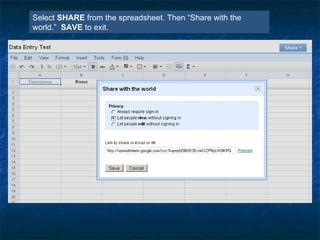
Select  SHARE  from   the spreadsheet. Then “Share with the world.”  SAVE  to exit.
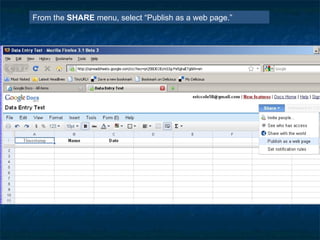
From the  SHARE  menu, select “Publish as a web page.”
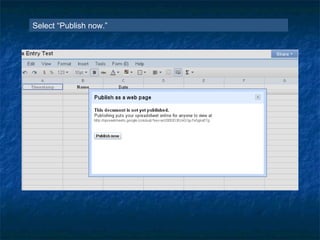
Select “Publish now.”
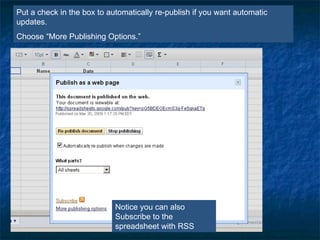
Put a check in the box to automatically re-publish if you want automatic updates.  Choose “More Publishing Options.” Notice you can also Subscribe to the spreadsheet with RSS
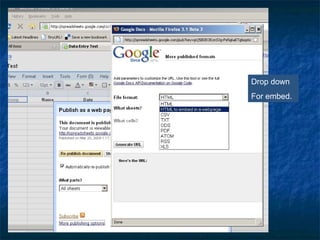
Drop down For embed.
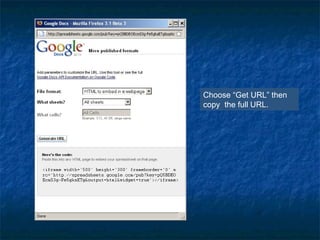
Choose “Get URL” then copy  the full URL.
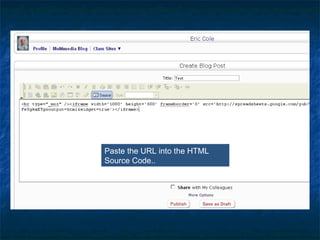
Paste the URL into the HTML Source Code..
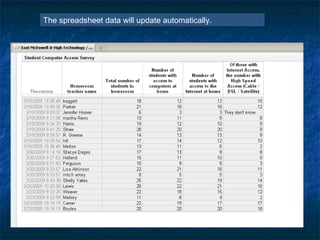
The spreadsheet data will update automatically.

Embed A Google Spreadsheet

  • 1.
    Embed A GoogleSpreadsheet Form data will update dynamically. Eric Cole March, 2009
  • 2.
    Spreadsheet Whenyou create a Google form a spreadsheet is automatically generated. As data is submitted from the form it will automatically fill the spreadsheet. Spreadsheets, like forms, can be embedded in HTML pages. The Spreadsheets can be set to update dynamically.
  • 3.
    Select SHARE from the spreadsheet. Then “Share with the world.” SAVE to exit.
  • 4.
    From the SHARE menu, select “Publish as a web page.”
  • 5.
  • 6.
    Put a checkin the box to automatically re-publish if you want automatic updates. Choose “More Publishing Options.” Notice you can also Subscribe to the spreadsheet with RSS
  • 7.
  • 8.
    Choose “Get URL”then copy the full URL.
  • 9.
    Paste the URLinto the HTML Source Code..
  • 10.
    The spreadsheet datawill update automatically.