Emailing your Community
In Mayet… Student Section… Run the Student  Parent Email Report
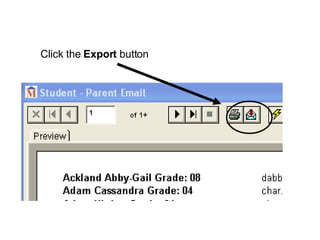
Click the  Export  button
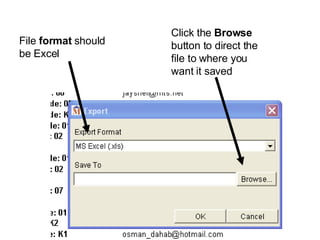
File  format  should be Excel Click the  Browse  button to direct the file to where you want it saved
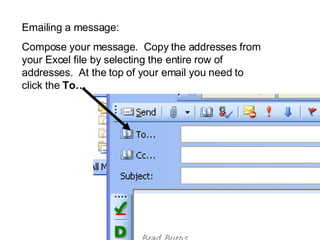
Emailing a message: Compose your message.  Copy the addresses from your Excel file by selecting the entire row of addresses.  At the top of your email you need to click the  To…
Paste  the addresses into the Bcc (blind carbon copy) box.  This makes the addresses invisible to the recipients (very important for privacy). Click  OK.
Click  Send. The first time you may have a message indicating that one of the addresses is not valid.  Note the address.  Fix it in Excel.  Save the Excel file.  Try again.  These errors are caused when addresses are entered into Mayet incorrectly. Once your Excel list is cleaned up, it is good to go for future email as well.

Emailing Your Community

  • 1.
  • 2.
    In Mayet… StudentSection… Run the Student Parent Email Report
  • 3.
    Click the Export button
  • 4.
    File format should be Excel Click the Browse button to direct the file to where you want it saved
  • 5.
    Emailing a message:Compose your message. Copy the addresses from your Excel file by selecting the entire row of addresses. At the top of your email you need to click the To…
  • 6.
    Paste theaddresses into the Bcc (blind carbon copy) box. This makes the addresses invisible to the recipients (very important for privacy). Click OK.
  • 7.
    Click Send.The first time you may have a message indicating that one of the addresses is not valid. Note the address. Fix it in Excel. Save the Excel file. Try again. These errors are caused when addresses are entered into Mayet incorrectly. Once your Excel list is cleaned up, it is good to go for future email as well.