E- LEARNING
GOKUL K S
DEPARTMENT OF COMPUTER SCIENCE
CENTRAL UNIVERSITY OF TAMILNADU
ONLINE TUTORING: SKILLS AND COMPETENCIES OF
ONLINE TUTORS
Traditional Debate
Independence
Vs
Interaction :-
 Real Interaction:- Interaction with faculty
 Simulated interaction:- online tutoring.
ONLINE TUTORING CONT…
Types of interaction:
 Learner-interface/technology
 Learner-content
 Learner-instructor
 Learner-learner
ONLINE TUTORING CONT…
 Learner-interface/ technology:
Example: Moodle platform, the students can participate on debates, they must submit
assignments. Students can return to main page etc.
 Learner-content interaction:
Synchronous
-Teleconference
-Interactive
ONLINE TUTORING CONT…
Asynchronous
-Interactive multimedia
-Web-based interaction
-Facsimile
ONLINE TUTORING CONT…
 Learner-instructor interaction
Synchronous
- F2F counselling
- Telephone
- Chat
- Teleconference
- Interactive radio
ONLINE TUTORING CONT…
Asynchronous
-E-mail
-Discussion boards
-Facsimile
 Learner-learner Interaction:
Synchronous
-chat group
-Teleconference
-interactive radio
ONLINE TUTORING CONT…
Asynchronous
-E-mail
-Mail list
-Discussion board
ONLINE TUTORING CONT…
Levels of Interaction:
 No interaction
 Low interaction
 Moderate interaction
 High interaction
 Outstanding interaction
ONLINE TUTORING CONT…
Functions of Interaction:
 Learner control
 Programme adaptation by learners
 Community of learners
 Knowledge of others’ perspective
ONLINE TUTORING CONT…
Conversation/ discussion:
 Monologue
 Dialogue
 Dialectic
 Construction
ONLINE TUTORING CONT…
Assessment strategy:
 Computer-marked assignment
 Tutor-marked assignment
 Discussion forum
 Online presentations
ONLINE TUTORING CONT…
Supporting e-learners:
 Information and technology support (information centre, help desk, call centre).
 Library resources.
 Online counselling (online resources, interaction-Discussion Forum).
E-MODERATION
Gilly Salmon, professor of E-learning and learning technologies, University of
Leicester, UK.
-Interaction
-Participation
Scaffolding model: supporting through structured development process.
E-MODERATION CONT…
Five Stages:
 Stage 1: Access and motivation – the e-moderators role is to welcome and
encourage participants to interact.
- Provide explicit motivation.
- Facilitate find way around online platform.
E-MODERATION CONT…
 Stage 2: Online Socialisation – familiarising and providing bridges between
cultural, social and learning environments.
- Enable participants to relate to each other and stretch out.
- Practice in working together.
 Stage 3: Information Exchange- facilitating tasks and supporting the use of
learning materials.
- Facilitate how to provide feedback, and explain and clarify for deeper
understanding.
- E-activities on exploring and coordination with each other.
E-MODERATION CONT…
 Stage 4: Knowledge Construction- facilitating process.
- Ability to learn online, manage time, working with each other
- E-activities on defining group objectives, group outcome, and how to
collaborate further.
E-MODERATION CONT…
 Stage 5: Development – supporting and responding.
- Ability to work with content and defend own judgement.
- Meta-cognitive awareness of own pathway.
- E-activities on evaluating and critiquing.
E-MODERATION CONT…
E-Moderator:
 To refocus and promote activity when e-activities are going well.
 To provide fresh starting points for broadening and deepening discussion.
 To remind students of the journey they have travelled.
 To provide a “spark” for a new e-activity.
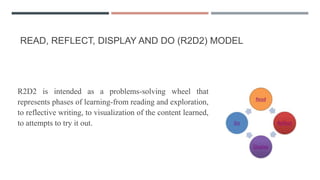
READ, REFLECT, DISPLAY AND DO (R2D2) MODEL
R2D2 is intended as a problems-solving wheel that
represents phases of learning-from reading and exploration,
to reflective writing, to visualization of the content learned,
to attempts to try it out.
R2D2 CONT…
Read:
 Students must download and read scores of free eBooks made available by
Google, the Internet Archive, ManyBooks.net, Bookyards, and others.
 Instead of reading from experts, students also might listen to podcasts that
relate to course content.
R2D2 CONT…
Reflect:
 The next step is for students to blog about the concepts or ideas that they
learned from their reading or listening activities.
 To push beyond the instructor as the sole source of knowledge, they might
watch and reflect upon keynote speeches and the teachings of other
participants from online conferences.
 Your students might also reflect on cases or scenarios that are posted online.
R2D2 CONT…
Display:
 The third phase involves pictures, timelines, flow charts. diagrams, and films.
Such resources can now be found online in nearly any discipline.
 Shared online videos posted to youtube, teachertube, fora.tv, google videos,
nasa tv and other such places.
 The web also allows for knowledge mapping of key concepts using free tools
like Gliffy, Bubbl.us.
R2D2 CONT…
Do:
 Students can collect survey or polling data with dozens of different tools and
collaboratively analyse and share their results using Goolge Docs.
 Beyond simple reports or term papers, they might also compose their own
books in Wikibooks or create class projects such as a glossary in a wiki (e.g.,
Pbworks or Wikispaces).

Elearning week11

  • 1.
    E- LEARNING GOKUL KS DEPARTMENT OF COMPUTER SCIENCE CENTRAL UNIVERSITY OF TAMILNADU
  • 2.
    ONLINE TUTORING: SKILLSAND COMPETENCIES OF ONLINE TUTORS Traditional Debate Independence Vs Interaction :-  Real Interaction:- Interaction with faculty  Simulated interaction:- online tutoring.
  • 3.
    ONLINE TUTORING CONT… Typesof interaction:  Learner-interface/technology  Learner-content  Learner-instructor  Learner-learner
  • 4.
    ONLINE TUTORING CONT… Learner-interface/ technology: Example: Moodle platform, the students can participate on debates, they must submit assignments. Students can return to main page etc.  Learner-content interaction: Synchronous -Teleconference -Interactive
  • 5.
    ONLINE TUTORING CONT… Asynchronous -Interactivemultimedia -Web-based interaction -Facsimile
  • 6.
    ONLINE TUTORING CONT… Learner-instructor interaction Synchronous - F2F counselling - Telephone - Chat - Teleconference - Interactive radio
  • 7.
    ONLINE TUTORING CONT… Asynchronous -E-mail -Discussionboards -Facsimile  Learner-learner Interaction: Synchronous -chat group -Teleconference -interactive radio
  • 8.
  • 9.
    ONLINE TUTORING CONT… Levelsof Interaction:  No interaction  Low interaction  Moderate interaction  High interaction  Outstanding interaction
  • 10.
    ONLINE TUTORING CONT… Functionsof Interaction:  Learner control  Programme adaptation by learners  Community of learners  Knowledge of others’ perspective
  • 11.
    ONLINE TUTORING CONT… Conversation/discussion:  Monologue  Dialogue  Dialectic  Construction
  • 12.
    ONLINE TUTORING CONT… Assessmentstrategy:  Computer-marked assignment  Tutor-marked assignment  Discussion forum  Online presentations
  • 13.
    ONLINE TUTORING CONT… Supportinge-learners:  Information and technology support (information centre, help desk, call centre).  Library resources.  Online counselling (online resources, interaction-Discussion Forum).
  • 14.
    E-MODERATION Gilly Salmon, professorof E-learning and learning technologies, University of Leicester, UK. -Interaction -Participation Scaffolding model: supporting through structured development process.
  • 15.
    E-MODERATION CONT… Five Stages: Stage 1: Access and motivation – the e-moderators role is to welcome and encourage participants to interact. - Provide explicit motivation. - Facilitate find way around online platform.
  • 16.
    E-MODERATION CONT…  Stage2: Online Socialisation – familiarising and providing bridges between cultural, social and learning environments. - Enable participants to relate to each other and stretch out. - Practice in working together.  Stage 3: Information Exchange- facilitating tasks and supporting the use of learning materials. - Facilitate how to provide feedback, and explain and clarify for deeper understanding. - E-activities on exploring and coordination with each other.
  • 17.
    E-MODERATION CONT…  Stage4: Knowledge Construction- facilitating process. - Ability to learn online, manage time, working with each other - E-activities on defining group objectives, group outcome, and how to collaborate further.
  • 18.
    E-MODERATION CONT…  Stage5: Development – supporting and responding. - Ability to work with content and defend own judgement. - Meta-cognitive awareness of own pathway. - E-activities on evaluating and critiquing.
  • 19.
    E-MODERATION CONT… E-Moderator:  Torefocus and promote activity when e-activities are going well.  To provide fresh starting points for broadening and deepening discussion.  To remind students of the journey they have travelled.  To provide a “spark” for a new e-activity.
  • 20.
    READ, REFLECT, DISPLAYAND DO (R2D2) MODEL R2D2 is intended as a problems-solving wheel that represents phases of learning-from reading and exploration, to reflective writing, to visualization of the content learned, to attempts to try it out.
  • 21.
    R2D2 CONT… Read:  Studentsmust download and read scores of free eBooks made available by Google, the Internet Archive, ManyBooks.net, Bookyards, and others.  Instead of reading from experts, students also might listen to podcasts that relate to course content.
  • 22.
    R2D2 CONT… Reflect:  Thenext step is for students to blog about the concepts or ideas that they learned from their reading or listening activities.  To push beyond the instructor as the sole source of knowledge, they might watch and reflect upon keynote speeches and the teachings of other participants from online conferences.  Your students might also reflect on cases or scenarios that are posted online.
  • 23.
    R2D2 CONT… Display:  Thethird phase involves pictures, timelines, flow charts. diagrams, and films. Such resources can now be found online in nearly any discipline.  Shared online videos posted to youtube, teachertube, fora.tv, google videos, nasa tv and other such places.  The web also allows for knowledge mapping of key concepts using free tools like Gliffy, Bubbl.us.
  • 24.
    R2D2 CONT… Do:  Studentscan collect survey or polling data with dozens of different tools and collaboratively analyse and share their results using Goolge Docs.  Beyond simple reports or term papers, they might also compose their own books in Wikibooks or create class projects such as a glossary in a wiki (e.g., Pbworks or Wikispaces).