
Wednesday 1st October 2014 
Middleton Grange School
Students need these skills – the world they are 
preparing for is not the world we prepared for
Students need these skills – the world they are 
preparing for is not the world we prepared for 
They need to be fluent with the technological skills, 
but also the technological resilience, and being 
comfortable operating in online communities 
working toward a common goal
Multiple representations of the same concept 
Caters for different learning styles, allows 
students to make connections between 
representations 
From Kramer & Schmidt, 2001 “Components and tools for on-line 
education” (p195) 
As quoted in Pachler & Daly, 2011 “Key Issues in e-Learning: 
Research and Practice” (p21)
Multiple representations of the same concept 
Related to that: different media synchronised into 
multi-modal presentations 
- Created by students OR teachers 
From Kramer & Schmidt, 2001 “Components and tools for on-line 
education” (p195) 
As quoted in Pachler & Daly, 2011 “Key Issues in e-Learning: 
Research and Practice” (p21)
Multiple representations of the same concept 
Related to that: different media synchronised into 
multi-modal presentations 
Links / hyperlinks within the resources – 
networking the activities 
Teachers can create a learning path / flow 
within the resources themselves 
From Kramer & Schmidt, 2001 “Components and tools for on-line 
education” (p195) 
As quoted in Pachler & Daly, 2011 “Key Issues in e-Learning: 
Research and Practice” (p21)
Multiple representations of the same concept 
Related to that: different media synchronised into 
multi-modal presentations 
Links / hyperlinks within the resources – 
networking the activities 
Interaction / interactivity – allows students to 
construct and collaborate 
Eg web applets / manipulatives 
From Kramer & Schmidt, 2001 “Components and tools for on-line 
education” (p195) 
As quoted in Pachler & Daly, 2011 “Key Issues in e-Learning: 
Research and Practice” (p21)
Multiple representations of the same concept 
Related to that: different media synchronised into 
multi-modal presentations 
Links / hyperlinks within the resources – 
networking the activities 
Interaction / interactivity – allows students to 
construct and collaborate 
Ubiquitous* learning – sickness, sports trips, 
homework 
It allows for ubiquitous learning, but 
boundaries must still be enforced 
From Kramer & Schmidt, 2001 “Components and tools for on-line 
education” (p195) 
As quoted in Pachler & Daly, 2011 “Key Issues in e-Learning: 
Research and Practice” (p21)
Multiple representations of the same concept 
Related to that: different media synchronised into 
multi-modal presentations 
Links / hyperlinks within the resources – 
networking the activities 
Interaction / interactivity – allows students to 
construct and collaborate 
Ubiquitous* learning – sickness, sports trips, 
homework 
Ubiquitous access to learning communities 
From Kramer & Schmidt, 2001 “Components and tools for on-line 
education” (p195) 
As quoted in Pachler & Daly, 2011 “Key Issues in e-Learning: 
Research and Practice” (p21)
Multiple representations of the same concept 
Related to that: different media synchronised into 
multi-modal presentations 
Links / hyperlinks within the resources – 
networking the activities 
Interaction / interactivity – allows students to 
construct and collaborate 
Ubiquitous* learning – sickness, sports trips, 
homework 
Ubiquitous access to learning communities 
Modelling – virtual laboratories / environments 
From Kramer & Schmidt, 2001 “Components and tools for on-line 
education” (p195) 
As quoted in Pachler & Daly, 2011 “Key Issues in e-Learning: 
Research and Practice” (p21)
Student 
Agency.
Student 
Agency. 
Actively involved, reflective, connected learners who take responsibility 
for their own learning
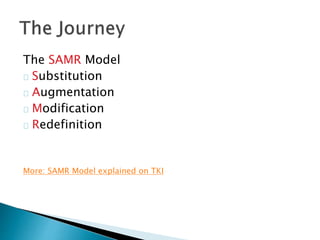
The SAMR Model 
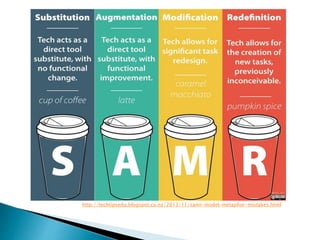
Substitution 
Augmentation 
Modification 
Redefinition 
More: SAMR Model explained on TKI
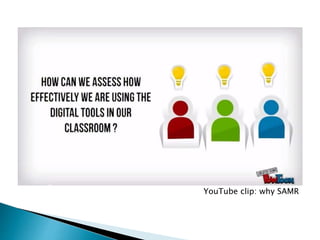
YouTube clip: why SAMR
YouTube clip: SAMR with example
http://techtipsedu.blogspot.co.nz/2013/11/samr-model-metaphor-mistakes.html
There is nothing wrong with Substitution 
Start small, but start somewhere 
Videos? Discussion forums? Quick quiz?
Activities that require students to: 
Create 
Collaborate 
Think critically 
Reflect on their own learning
The “e” has a significant contribution to add to 
assessment, in particular: 
Speed – speed of response to students, 
enabling powerful (relevant and timely) 
feedback. Fast feedback also allows a rapid 
iteration of the students’ work 
From Pachler & Daly, 2011 – Key Issues in e-Learning: 
Research and Practice (p115)
The “e” has a significant contribution to add to 
assessment, in particular: 
Speed 
Storage capacity – the volume of student 
work becomes much more manageable 
From Pachler & Daly, 2011 – Key Issues in e-Learning: 
Research and Practice (p115)
The “e” has a significant contribution to add to 
assessment, in particular: 
Speed 
Storage capacity 
Processing – automation of marking; 
scalability of activities and assessment; 
incorporating “adaptivity” where systems can 
adapt to students 
From Pachler & Daly, 2011 – Key Issues in e-Learning: 
Research and Practice (p115)
The “e” has a significant contribution to add to 
assessment, in particular: 
Speed 
Storage capacity 
Processing 
Communication – rapid communication with a 
range of audiences. The technology allows 
the range of audiences to be controlled 
From Pachler & Daly, 2011 – Key Issues in e-Learning: 
Research and Practice (p115)
The “e” has a significant contribution to add to 
assessment, in particular: 
Speed 
Storage capacity 
Processing 
Communication 
Construction and representation – the ability 
to represent ideas in a variety of ways 
From Pachler & Daly, 2011 – Key Issues in e-Learning: 
Research and Practice (p115)
The “e” has a significant contribution to add to 
assessment, in particular: 
Speed 
Storage capacity 
Processing 
Communication 
Construction and representation 
Mutability – shared objects are not fixed, they 
can be changed easily if desired (or locked if 
not appropriate for the assessment context) 
From Pachler & Daly, 2011 – Key Issues in e-Learning: 
Research and Practice (p115)
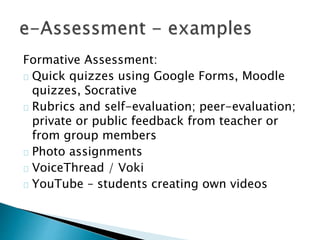
Formative Assessment: 
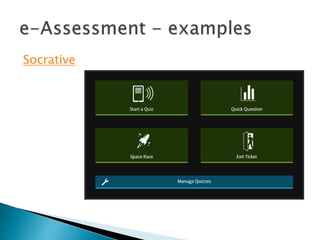
Quick quizzes using Google Forms, Moodle 
quizzes, Socrative 
Rubrics and self-evaluation; peer-evaluation; 
private or public feedback from teacher or 
from group members 
Photo assignments 
VoiceThread / Voki 
YouTube – students creating own videos
Socrative
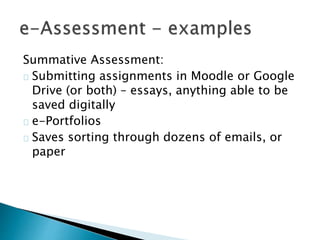
Summative Assessment: 
Submitting assignments in Moodle or Google 
Drive (or both) – essays, anything able to be 
saved digitally 
e-Portfolios 
Saves sorting through dozens of emails, or 
paper
Choose one activity which is common in your 
curriculum area. What could that look like 
with technology? 
Substitution? 
Augmentation? 
Modification? 
Redefinition?

E-Learning: what does the research say?

  • 1.
    Wednesday 1st October2014 Middleton Grange School
  • 2.
    Students need theseskills – the world they are preparing for is not the world we prepared for
  • 3.
    Students need theseskills – the world they are preparing for is not the world we prepared for They need to be fluent with the technological skills, but also the technological resilience, and being comfortable operating in online communities working toward a common goal
  • 4.
    Multiple representations ofthe same concept Caters for different learning styles, allows students to make connections between representations From Kramer & Schmidt, 2001 “Components and tools for on-line education” (p195) As quoted in Pachler & Daly, 2011 “Key Issues in e-Learning: Research and Practice” (p21)
  • 5.
    Multiple representations ofthe same concept Related to that: different media synchronised into multi-modal presentations - Created by students OR teachers From Kramer & Schmidt, 2001 “Components and tools for on-line education” (p195) As quoted in Pachler & Daly, 2011 “Key Issues in e-Learning: Research and Practice” (p21)
  • 6.
    Multiple representations ofthe same concept Related to that: different media synchronised into multi-modal presentations Links / hyperlinks within the resources – networking the activities Teachers can create a learning path / flow within the resources themselves From Kramer & Schmidt, 2001 “Components and tools for on-line education” (p195) As quoted in Pachler & Daly, 2011 “Key Issues in e-Learning: Research and Practice” (p21)
  • 7.
    Multiple representations ofthe same concept Related to that: different media synchronised into multi-modal presentations Links / hyperlinks within the resources – networking the activities Interaction / interactivity – allows students to construct and collaborate Eg web applets / manipulatives From Kramer & Schmidt, 2001 “Components and tools for on-line education” (p195) As quoted in Pachler & Daly, 2011 “Key Issues in e-Learning: Research and Practice” (p21)
  • 8.
    Multiple representations ofthe same concept Related to that: different media synchronised into multi-modal presentations Links / hyperlinks within the resources – networking the activities Interaction / interactivity – allows students to construct and collaborate Ubiquitous* learning – sickness, sports trips, homework It allows for ubiquitous learning, but boundaries must still be enforced From Kramer & Schmidt, 2001 “Components and tools for on-line education” (p195) As quoted in Pachler & Daly, 2011 “Key Issues in e-Learning: Research and Practice” (p21)
  • 9.
    Multiple representations ofthe same concept Related to that: different media synchronised into multi-modal presentations Links / hyperlinks within the resources – networking the activities Interaction / interactivity – allows students to construct and collaborate Ubiquitous* learning – sickness, sports trips, homework Ubiquitous access to learning communities From Kramer & Schmidt, 2001 “Components and tools for on-line education” (p195) As quoted in Pachler & Daly, 2011 “Key Issues in e-Learning: Research and Practice” (p21)
  • 10.
    Multiple representations ofthe same concept Related to that: different media synchronised into multi-modal presentations Links / hyperlinks within the resources – networking the activities Interaction / interactivity – allows students to construct and collaborate Ubiquitous* learning – sickness, sports trips, homework Ubiquitous access to learning communities Modelling – virtual laboratories / environments From Kramer & Schmidt, 2001 “Components and tools for on-line education” (p195) As quoted in Pachler & Daly, 2011 “Key Issues in e-Learning: Research and Practice” (p21)
  • 11.
  • 12.
    Student Agency. Activelyinvolved, reflective, connected learners who take responsibility for their own learning
  • 13.
    The SAMR Model Substitution Augmentation Modification Redefinition More: SAMR Model explained on TKI
  • 14.
  • 15.
    YouTube clip: SAMRwith example
  • 16.
  • 17.
    There is nothingwrong with Substitution Start small, but start somewhere Videos? Discussion forums? Quick quiz?
  • 18.
    Activities that requirestudents to: Create Collaborate Think critically Reflect on their own learning
  • 19.
    The “e” hasa significant contribution to add to assessment, in particular: Speed – speed of response to students, enabling powerful (relevant and timely) feedback. Fast feedback also allows a rapid iteration of the students’ work From Pachler & Daly, 2011 – Key Issues in e-Learning: Research and Practice (p115)
  • 20.
    The “e” hasa significant contribution to add to assessment, in particular: Speed Storage capacity – the volume of student work becomes much more manageable From Pachler & Daly, 2011 – Key Issues in e-Learning: Research and Practice (p115)
  • 21.
    The “e” hasa significant contribution to add to assessment, in particular: Speed Storage capacity Processing – automation of marking; scalability of activities and assessment; incorporating “adaptivity” where systems can adapt to students From Pachler & Daly, 2011 – Key Issues in e-Learning: Research and Practice (p115)
  • 22.
    The “e” hasa significant contribution to add to assessment, in particular: Speed Storage capacity Processing Communication – rapid communication with a range of audiences. The technology allows the range of audiences to be controlled From Pachler & Daly, 2011 – Key Issues in e-Learning: Research and Practice (p115)
  • 23.
    The “e” hasa significant contribution to add to assessment, in particular: Speed Storage capacity Processing Communication Construction and representation – the ability to represent ideas in a variety of ways From Pachler & Daly, 2011 – Key Issues in e-Learning: Research and Practice (p115)
  • 24.
    The “e” hasa significant contribution to add to assessment, in particular: Speed Storage capacity Processing Communication Construction and representation Mutability – shared objects are not fixed, they can be changed easily if desired (or locked if not appropriate for the assessment context) From Pachler & Daly, 2011 – Key Issues in e-Learning: Research and Practice (p115)
  • 25.
    Formative Assessment: Quickquizzes using Google Forms, Moodle quizzes, Socrative Rubrics and self-evaluation; peer-evaluation; private or public feedback from teacher or from group members Photo assignments VoiceThread / Voki YouTube – students creating own videos
  • 26.
  • 27.
    Summative Assessment: Submittingassignments in Moodle or Google Drive (or both) – essays, anything able to be saved digitally e-Portfolios Saves sorting through dozens of emails, or paper
  • 28.
    Choose one activitywhich is common in your curriculum area. What could that look like with technology? Substitution? Augmentation? Modification? Redefinition?

Editor's Notes

  • #15 Click on the image to open the YouTube video in a browser
  • #16 Click on the image to open the YouTube video in a browser
  • #18 Both students and teachers working through SAMR model – need to teach students how to use tech as well as become familiar with it ourselves Slows the ACTUAL learning down; but it’s an investment. Sharpening the axe
  • #20 1. Speed of response – enabling feedback; rapid iteration 2. Volume of student work 3. Automation of marking; scalability; adaptivity where systems can adapt to students 4. Rapid communication, range of audiences; tech allows this range to be controlled 5. The ability to represent ideas in a variety of ways; tech can support learners in the representation of THEIR OWN ideas 6. Shared objects are not fixed, they can change / be changed easily. BUT this too can be controlled if it is not desirable for the assessment context.
  • #21 1. Speed of response – enabling feedback; rapid iteration 2. Volume of student work 3. Automation of marking; scalability; adaptivity where systems can adapt to students 4. Rapid communication, range of audiences; tech allows this range to be controlled 5. The ability to represent ideas in a variety of ways; tech can support learners in the representation of THEIR OWN ideas 6. Shared objects are not fixed, they can change / be changed easily. BUT this too can be controlled if it is not desirable for the assessment context.
  • #22 1. Speed of response – enabling feedback; rapid iteration 2. Volume of student work 3. Automation of marking; scalability; adaptivity where systems can adapt to students 4. Rapid communication, range of audiences; tech allows this range to be controlled 5. The ability to represent ideas in a variety of ways; tech can support learners in the representation of THEIR OWN ideas 6. Shared objects are not fixed, they can change / be changed easily. BUT this too can be controlled if it is not desirable for the assessment context.
  • #23 1. Speed of response – enabling feedback; rapid iteration 2. Volume of student work 3. Automation of marking; scalability; adaptivity where systems can adapt to students 4. Rapid communication, range of audiences; tech allows this range to be controlled 5. The ability to represent ideas in a variety of ways; tech can support learners in the representation of THEIR OWN ideas 6. Shared objects are not fixed, they can change / be changed easily. BUT this too can be controlled if it is not desirable for the assessment context.
  • #24 1. Speed of response – enabling feedback; rapid iteration 2. Volume of student work 3. Automation of marking; scalability; adaptivity where systems can adapt to students 4. Rapid communication, range of audiences; tech allows this range to be controlled 5. The ability to represent ideas in a variety of ways; tech can support learners in the representation of THEIR OWN ideas 6. Shared objects are not fixed, they can change / be changed easily. BUT this too can be controlled if it is not desirable for the assessment context.
  • #25 1. Speed of response – enabling feedback; rapid iteration 2. Volume of student work 3. Automation of marking; scalability; adaptivity where systems can adapt to students 4. Rapid communication, range of audiences; tech allows this range to be controlled 5. The ability to represent ideas in a variety of ways; tech can support learners in the representation of THEIR OWN ideas 6. Shared objects are not fixed, they can change / be changed easily. BUT this too can be controlled if it is not desirable for the assessment context.