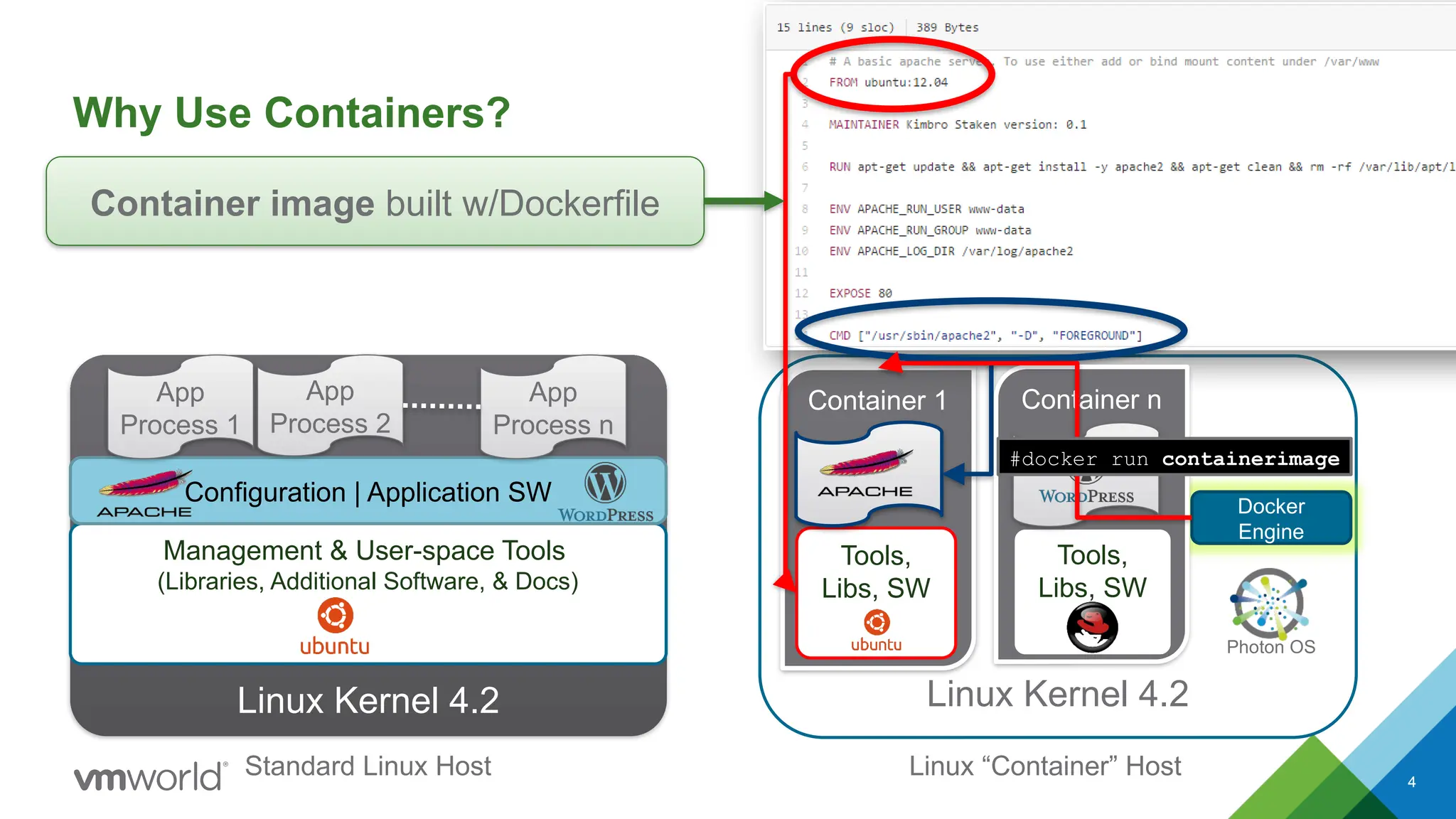
4
Linux Kernel 4.2
Linux“Container” Host
Linux Kernel 4.2
Management & User-space Tools
(Libraries, Additional Software, & Docs)
Configuration | Application SW
App
Process 1
App
Process 2
App
Process n
Container 1
Standard Linux Host
Docker
Engine
Photon OS
Tools,
Libs, SW
Container image built w/Dockerfile
Container n
Tools,
Libs, SW
#docker run containerimage
Why Use Containers?
5.
5
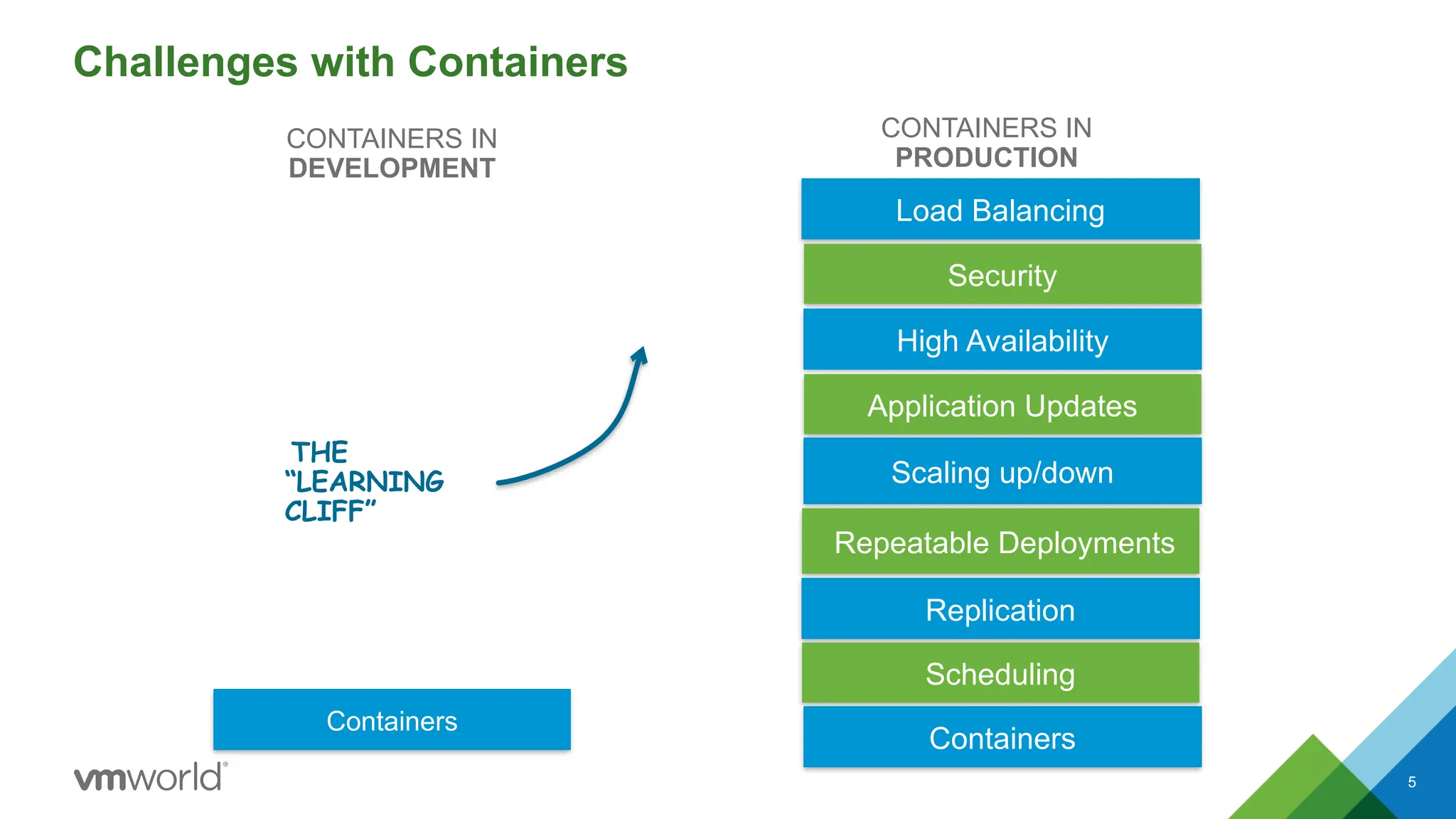
Challenges with Containers
CONTAINERSIN
DEVELOPMENT
CONTAINERS IN
PRODUCTION
THE
“LEARNING
CLIFF”
Load Balancing
Security
High Availability
Application Updates
Scaling up/down
Repeatable Deployments
Replication
Scheduling
Containers
Containers
6.
6
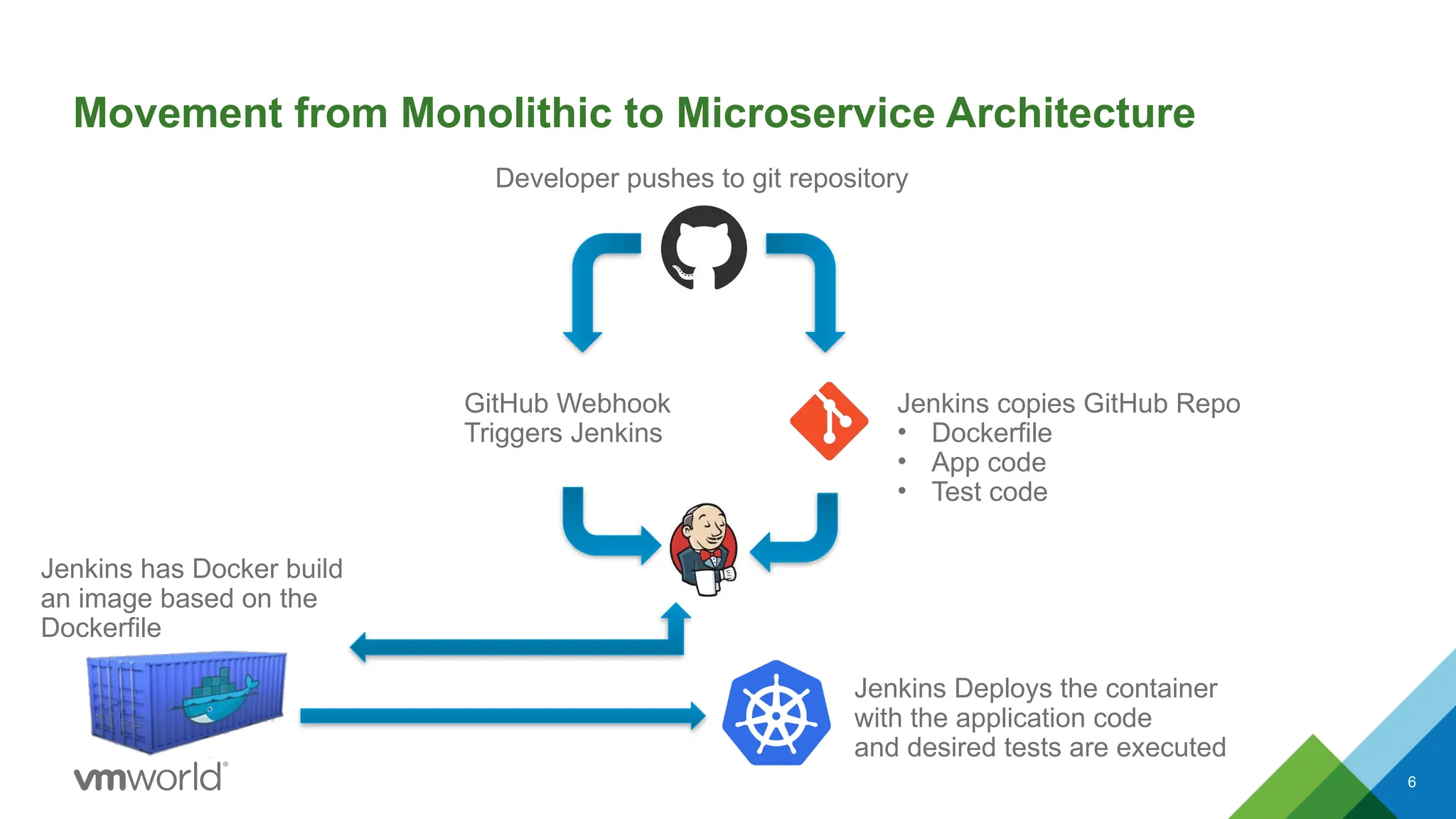
Movement from Monolithicto Microservice Architecture
Developer pushes to git repository
GitHub Webhook
Triggers Jenkins
Jenkins copies GitHub Repo
• Dockerfile
• App code
• Test code
Jenkins has Docker build
an image based on the
Dockerfile
Jenkins Deploys the container
with the application code
and desired tests are executed
9
What is Kubernetes(K8s)
• Kubernetes, is an open-source platform for managing, automating deployment, scaling, and
operating containerized applications across a cluster of worker nodes.
Capabilities:
• Deploy your applications quickly and
predictably
• Scale your applications on the fly
• Seamlessly roll out new features
• Optimize use of your hardware by using only
the resources you need
Role:
• K8s sits in the Container as a Service (CaaS)
or Container orchestration layer
10.
10
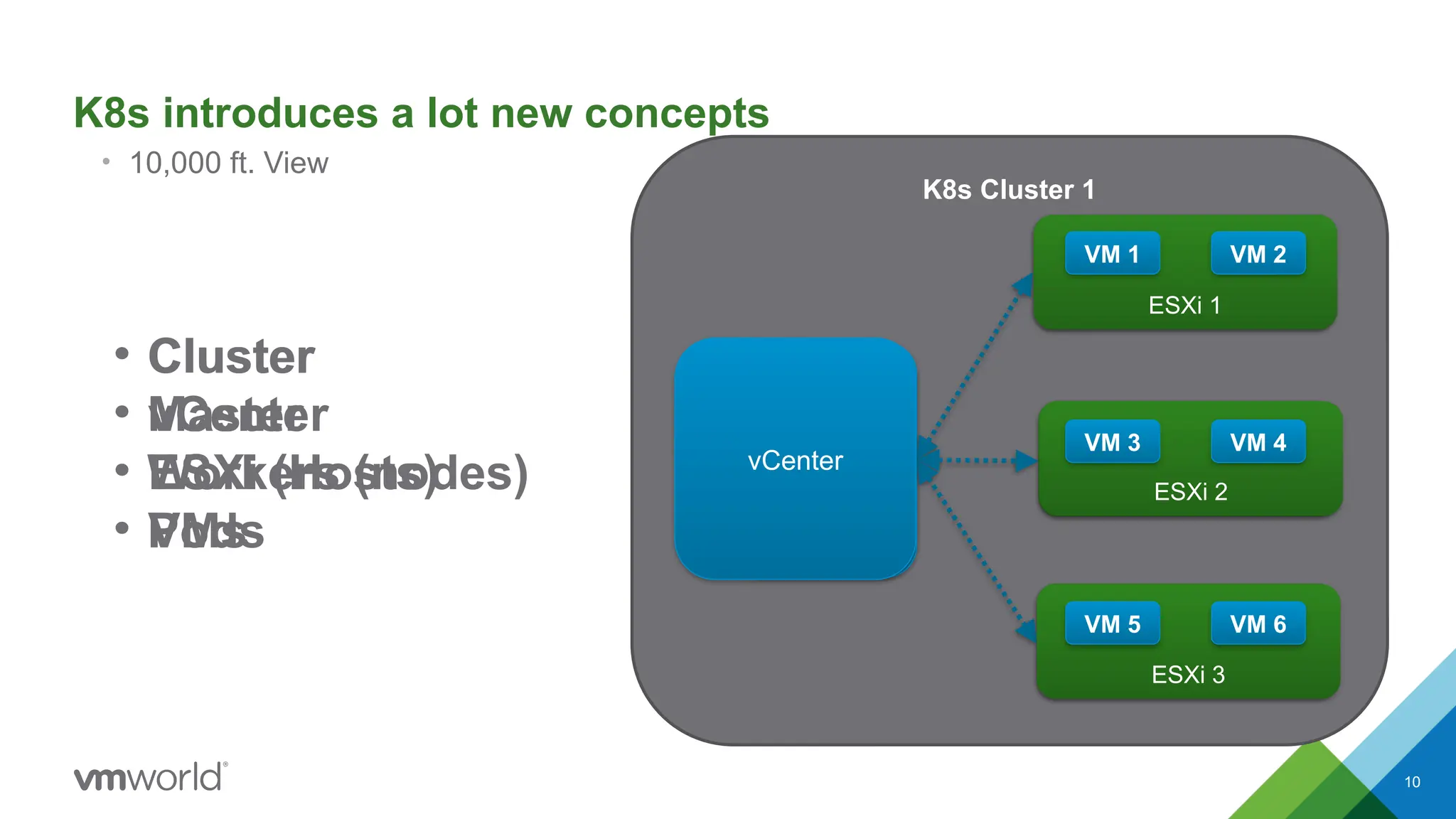
K8s introduces alot new concepts
• 10,000 ft. View
K8s Cluster 1
Worker node 1
Worker node 2
Worker node 3
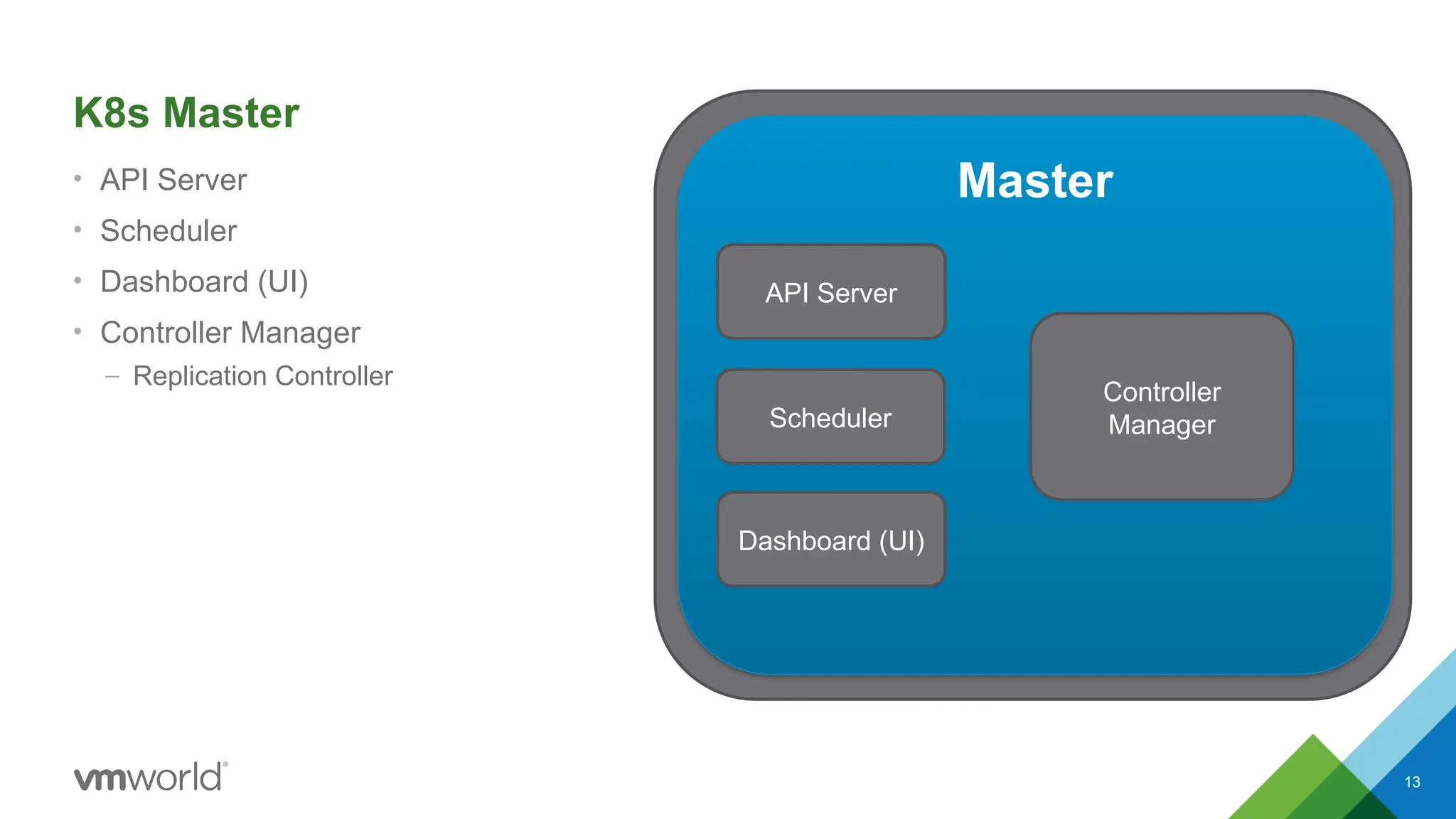
Master
vCenter
Pod 1 Pod 2
Pod 3 Pod 4
Pod 5 Pod 6
ESXi 1
ESXi 2
ESXi 3
VM 1 VM 2
VM 3 VM 4
VM 5 VM 6
• Cluster
• Master
• Workers (nodes)
• Pods
• Cluster
• vCenter
• ESXi (Hosts)
• VMs
12
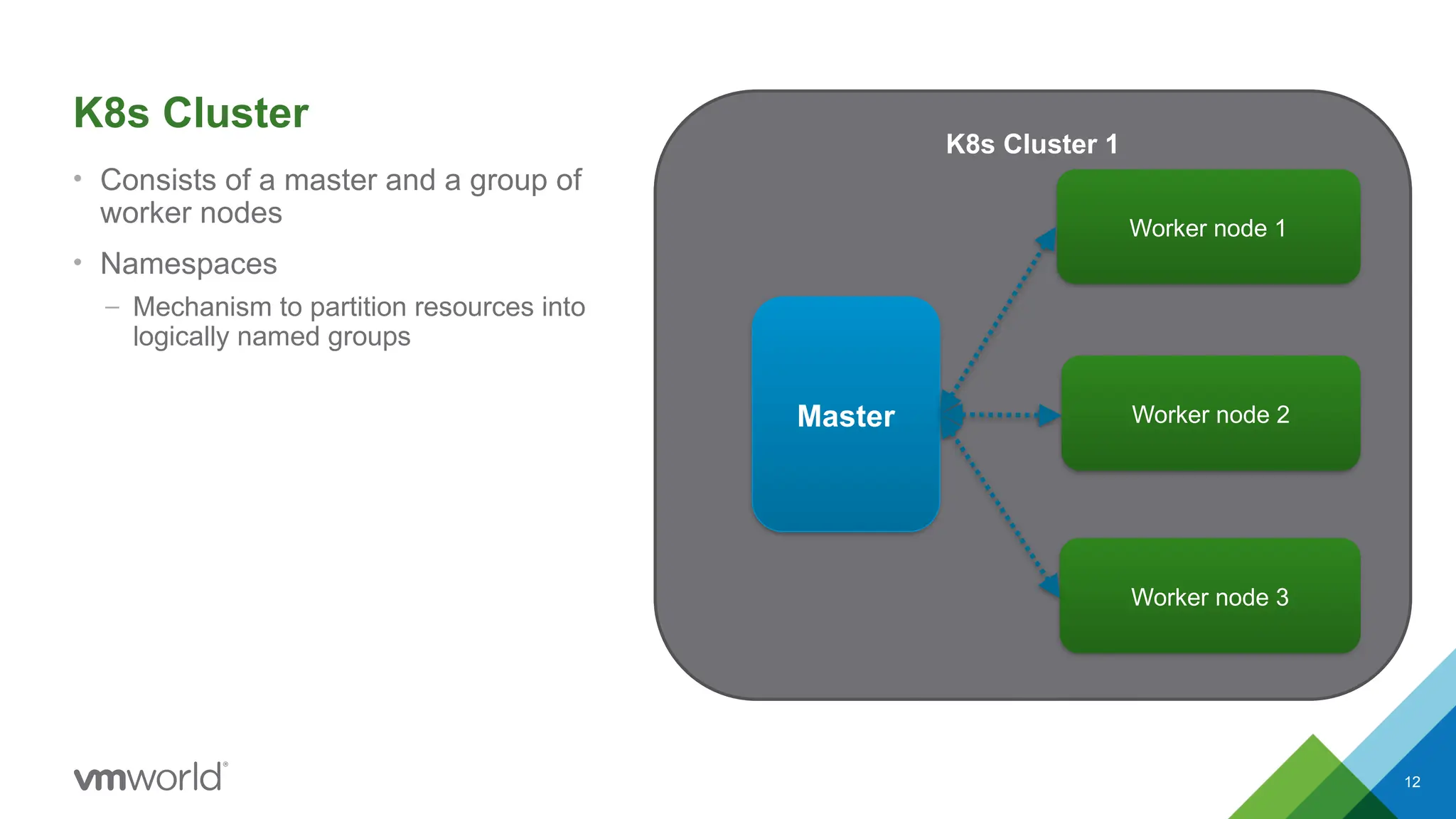
K8s Cluster
• Consistsof a master and a group of
worker nodes
• Namespaces
– Mechanism to partition resources into
logically named groups
K8s Cluster 1
Worker node 1
Worker node 2
Worker node 3
Master
14
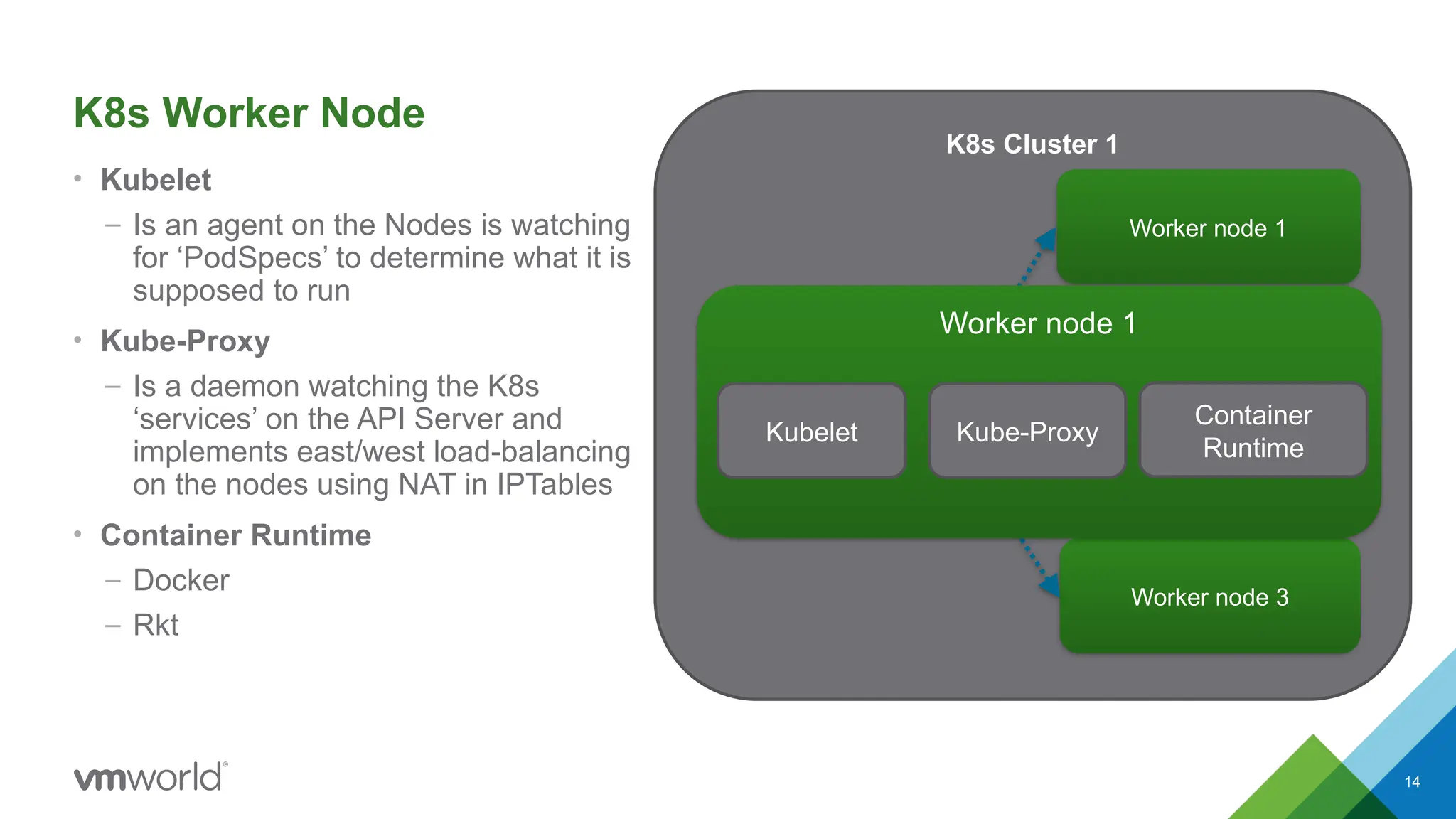
K8s Worker Node
•Kubelet
– Is an agent on the Nodes is watching
for ‘PodSpecs’ to determine what it is
supposed to run
• Kube-Proxy
– Is a daemon watching the K8s
‘services’ on the API Server and
implements east/west load-balancing
on the nodes using NAT in IPTables
• Container Runtime
– Docker
– Rkt
K8s Cluster 1
Worker node 1
Worker node 2
Worker node 3
Master
Worker node 1
Kubelet Kube-Proxy
Container
Runtime
17
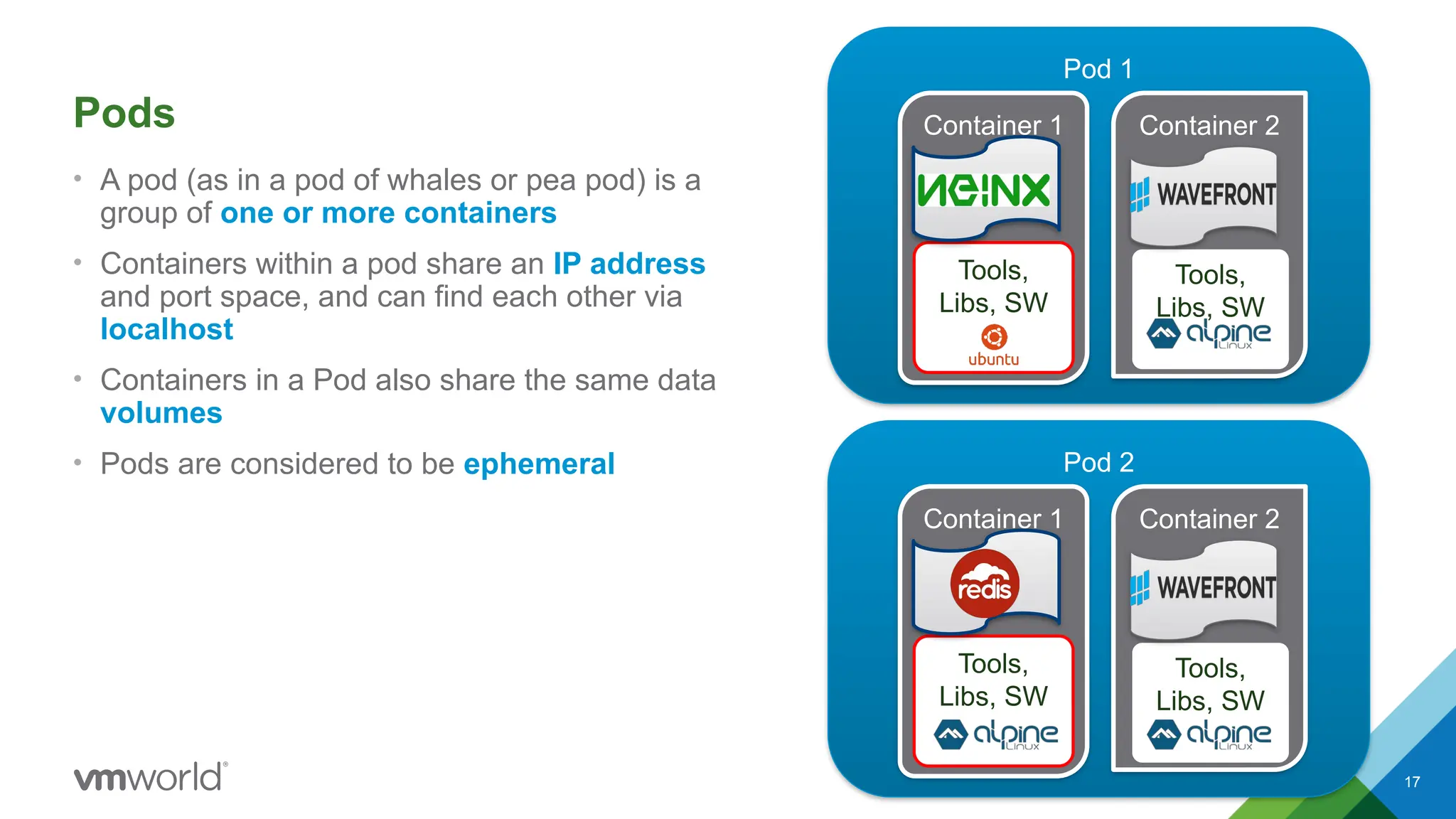
Pods
• A pod(as in a pod of whales or pea pod) is a
group of one or more containers
• Containers within a pod share an IP address
and port space, and can find each other via
localhost
• Containers in a Pod also share the same data
volumes
• Pods are considered to be ephemeral
Pod 1
Container 1
Tools,
Libs, SW
Container 2
Tools,
Libs, SW
Pod 2
Container 1
Tools,
Libs, SW
Container 2
Tools,
Libs, SW
17.
18
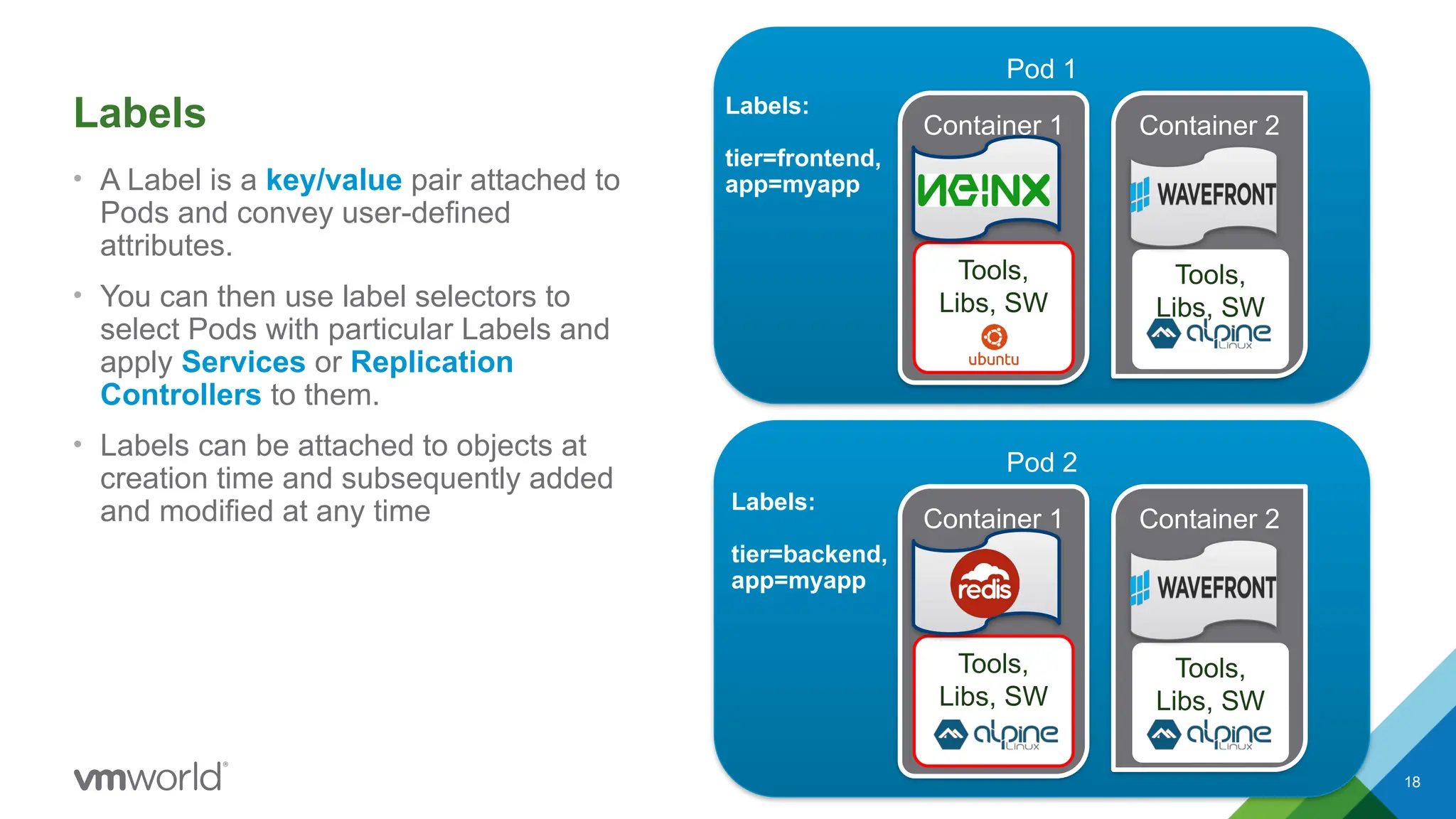
Labels
• A Labelis a key/value pair attached to
Pods and convey user-defined
attributes.
• You can then use label selectors to
select Pods with particular Labels and
apply Services or Replication
Controllers to them.
• Labels can be attached to objects at
creation time and subsequently added
and modified at any time
Pod 1
Container 1
Tools,
Libs, SW
Container 2
Tools,
Libs, SW
Pod 2
Container 1
Tools,
Libs, SW
Container 2
Tools,
Libs, SW
Labels:
tier=frontend,
app=myapp
Labels:
tier=backend,
app=myapp
18.
19
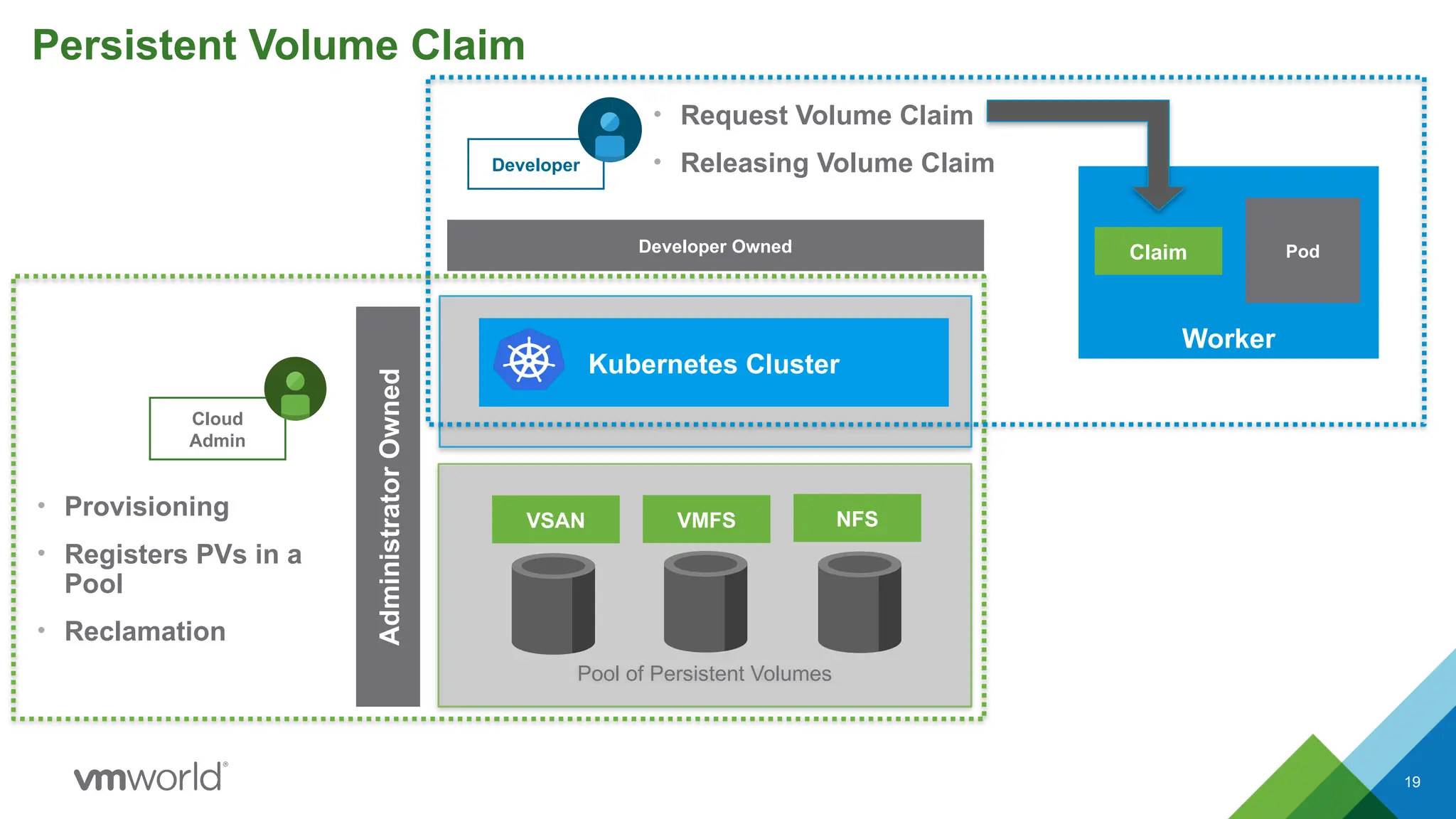
Persistent Volume Claim
Poolof Persistent Volumes
VSAN VMFS NFS
Cloud
Admin
Developer
• Provisioning
• Registers PVs in a
Pool
• Reclamation
• Request Volume Claim
• Releasing Volume Claim
Developer Owned
Kubernetes Cluster
Administrator
Owned
Worker
Claim Pod
19.
20
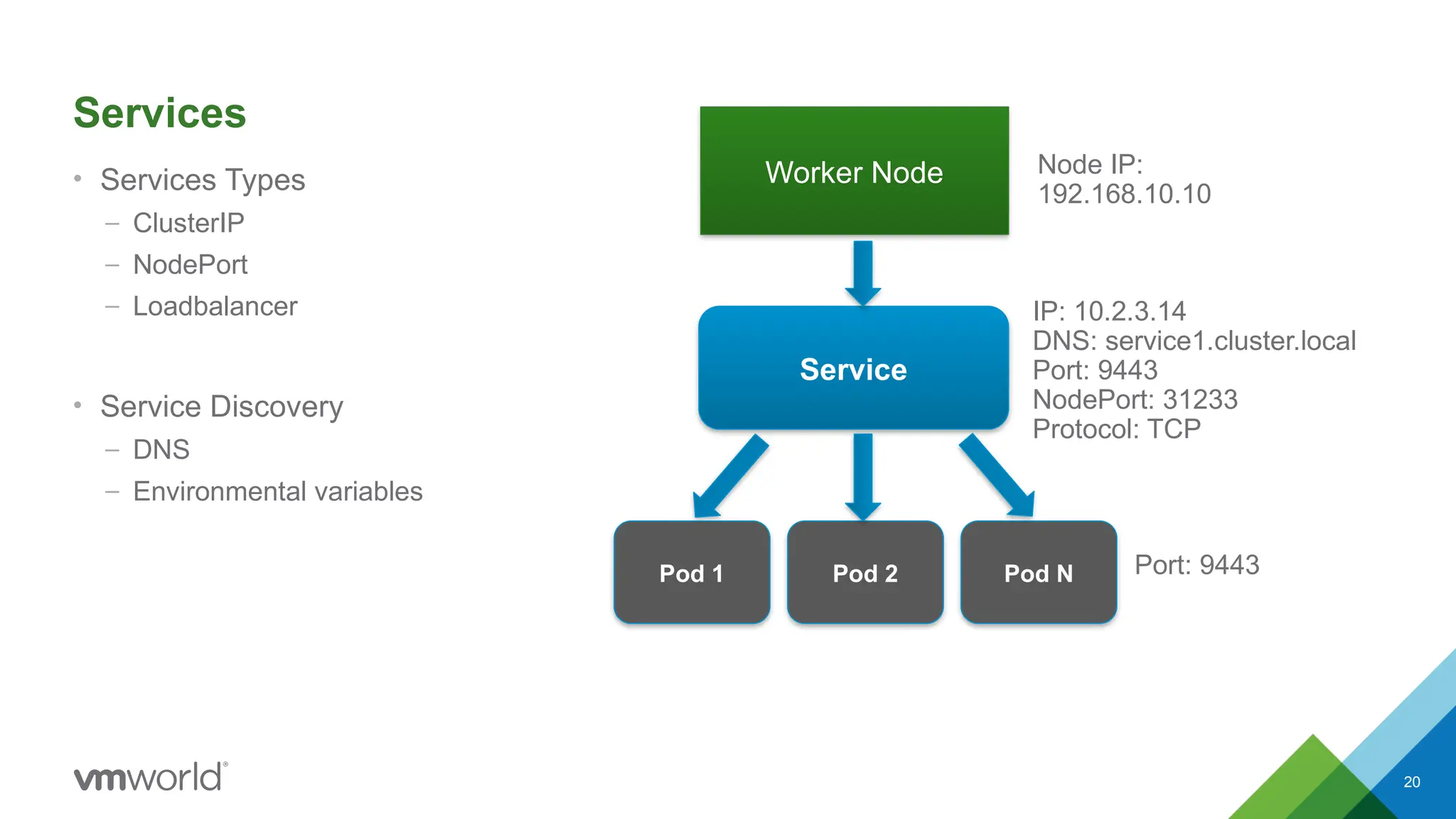
Services
• Services Types
–ClusterIP
– NodePort
– Loadbalancer
• Service Discovery
– DNS
– Environmental variables
Worker Node
Service
Pod 1 Pod 2 Pod N
Node IP:
192.168.10.10
IP: 10.2.3.14
DNS: service1.cluster.local
Port: 9443
NodePort: 31233
Protocol: TCP
Port: 9443
20.
21
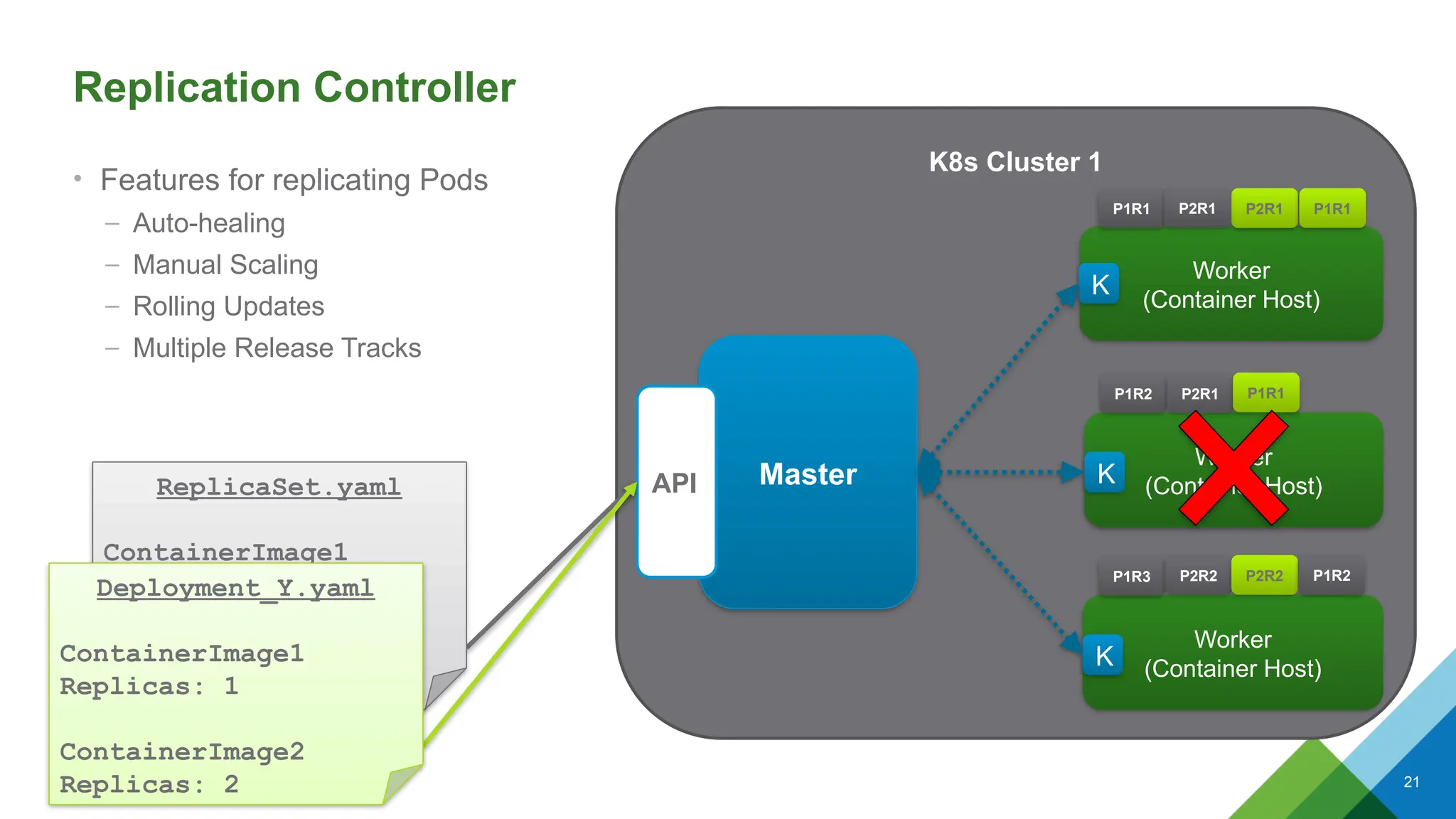
K8s Cluster 1
ReplicaSet.yaml
ContainerImage1
Replicas:3
ContainerImage2
Replicas: 2
Replication Controller
• Features for replicating Pods
– Auto-healing
– Manual Scaling
– Rolling Updates
– Multiple Release Tracks
Worker
(Container Host)
P1R1
Worker
(Container Host)
P1R2 P2R1 P1R1
P2R1
Worker
(Container Host)
P1R3 P2R2 P2R2
Master
API
K
K
K
Deployment_Y.yaml
ContainerImage1
Replicas: 1
ContainerImage2
Replicas: 2
P1R1
P1R2
P2R1
21.
22
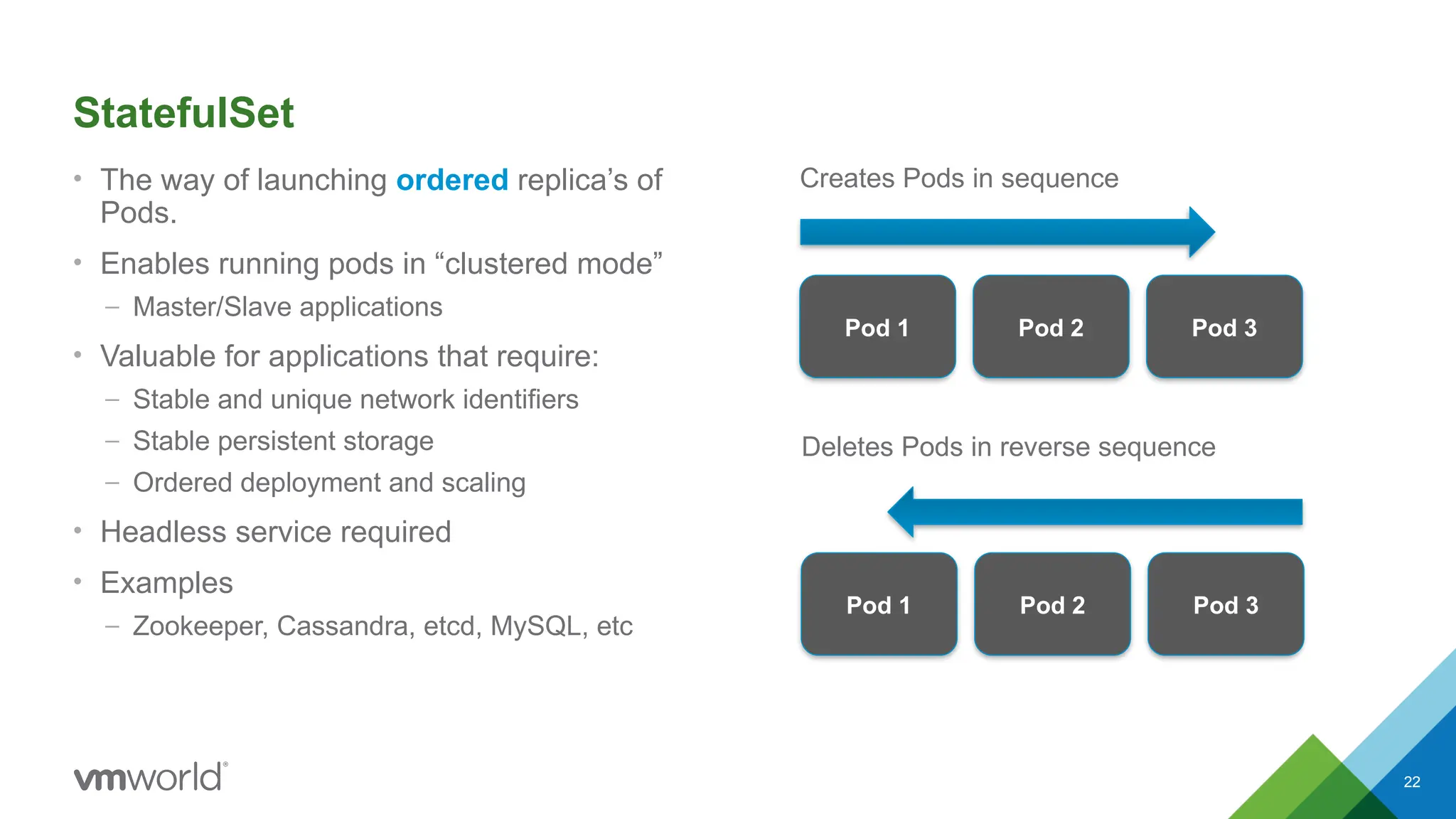
StatefulSet
• The wayof launching ordered replica’s of
Pods.
• Enables running pods in “clustered mode”
– Master/Slave applications
• Valuable for applications that require:
– Stable and unique network identifiers
– Stable persistent storage
– Ordered deployment and scaling
• Headless service required
• Examples
– Zookeeper, Cassandra, etcd, MySQL, etc
Pod 1 Pod 2 Pod 3
Pod 1 Pod 2 Pod 3
Creates Pods in sequence
Deletes Pods in reverse sequence
22.
23
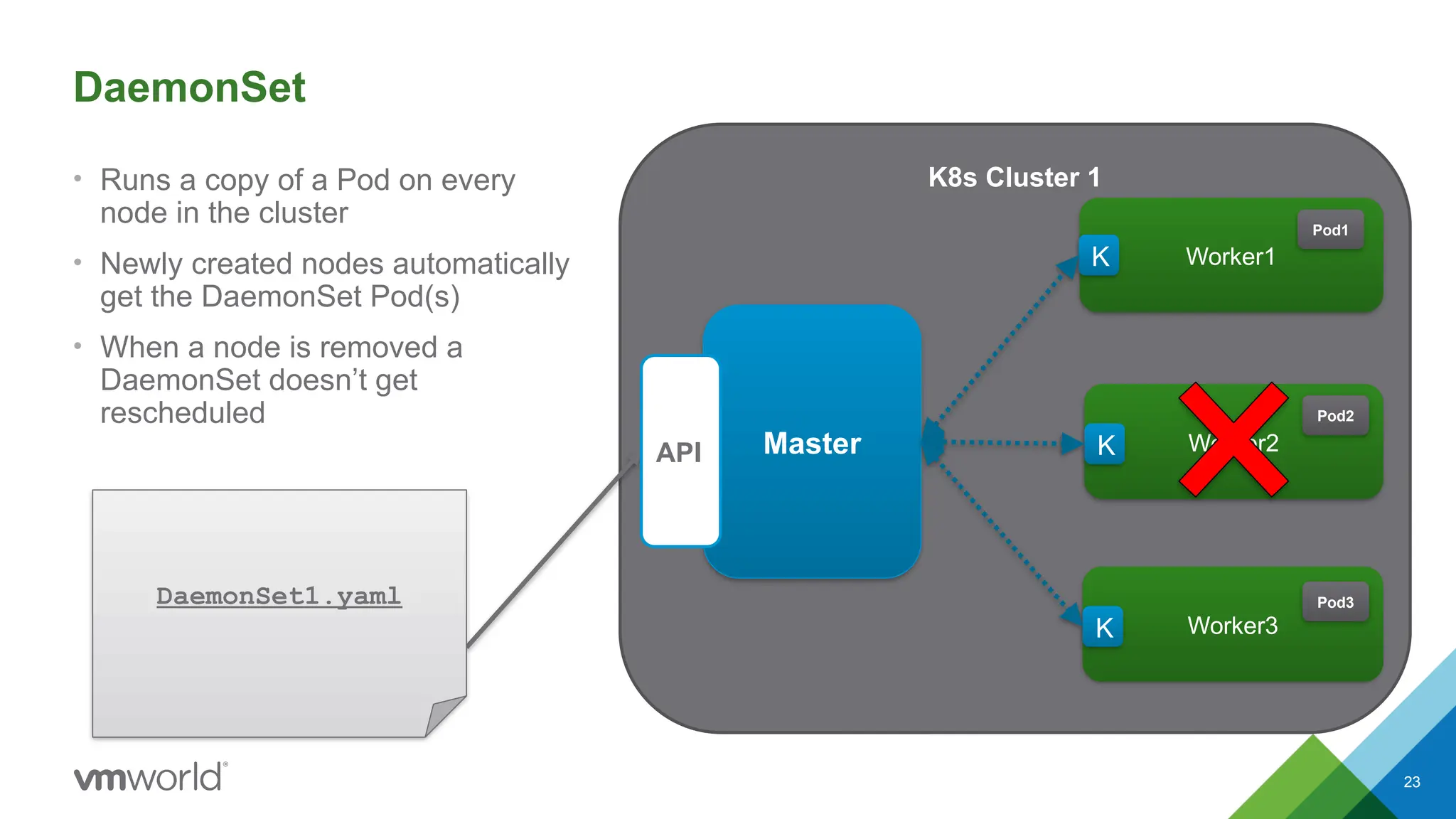
K8s Cluster 1
DaemonSet1.yaml
DaemonSet
•Runs a copy of a Pod on every
node in the cluster
• Newly created nodes automatically
get the DaemonSet Pod(s)
• When a node is removed a
DaemonSet doesn’t get
rescheduled
Worker1
Pod1
Worker2
Pod2
Worker3
Pod3
Master
API
K
K
K
#4 Application-centric management
Raises the lvel of abstraction from running an OS
Continuous development, integration, and deployment
Loosely coupled, distributed, elastic, micro-services
Cloud and OS portability
Efficient resource utilization
#5 No patching
No Upgrades
Immutable infrastructure
#9 The first being everything in IT has an abbreviation or acronym k8s
#10 The first being everything in IT has an abbreviation or acronym k8s
#20 If Pods are ephemeral and their IP address might change if they get restarted how can I reliability reference my backend container from a frontend container?
Pods are ephemeral and will be removed/rescheduled continuously.
Abstraction layer above sets of objects so that you don’t have to trace specific objects as they restart
Provides single endpoint for the underlying set of objects (Pod Replicas)
A logical, internal load balancer for a set of related pods (an application)
A single IP address and DNS name to refer to the set of pods


![Coded Agents – with UiPath SDK + LangGraph [Virtual Hands-on Workshop]](https://cdn.slidesharecdn.com/ss_thumbnails/codedagentsdeck-251215155422-5497c599-thumbnail.jpg?width=640&height=640&fit=bounds)


