
Presented By: Shubhrank Rastogi & Azmat Hasan
Service Discovery
in Kubernetes
Agenda
01
● A little about K8
● Service Overview
○ Why do we need them?
○ What is a service?
○ Types of services
● Communication is important - Service Discovery
○ The Scenario
○ Ways to discover services
● Demo
Quick Overview - About K8
● Kubernetes (commonly stylized as k8) is an open-source container-
orchestration engine for automating application deployment, scaling,
and management
● It provides features like deployment, scaling, load balancing, logging,
and monitoring
● Designed by Google, and is now maintained by the Cloud Native
Computing Foundation (CNCF)
● Master-Slave Architecture
● Kubernetes Objects
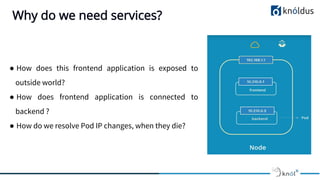
Why do we need services?
● How does this frontend application is exposed to
outside world?
● How does frontend application is connected to
backend ?
● How do we resolve Pod IP changes, when they die?
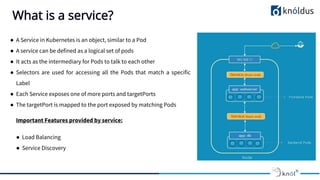
What is a service?
● A Service in Kubernetes is an object, similar to a Pod
● A service can be defined as a logical set of pods
● It acts as the intermediary for Pods to talk to each other
● Selectors are used for accessing all the Pods that match a specific
Label
● Each Service exposes one of more ports and targetPorts
● The targetPort is mapped to the port exposed by matching Pods
Important Features provided by service:
● Load Balancing
● Service Discovery
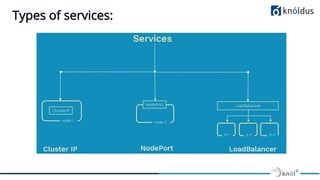
Types of services:
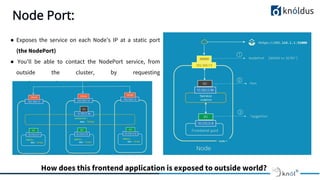
Node Port:
● Exposes the service on each Node’s IP at a static port
(the NodePort)
● You’ll be able to contact the NodePort service, from
outside the cluster, by requesting
<NodeIP>:<NodePort>
How does this frontend application is exposed to outside world?
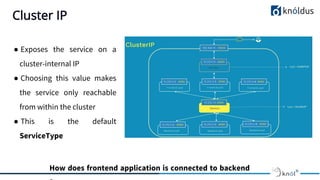
Cluster IP
● Exposes the service on a
cluster-internal IP
● Choosing this value makes
the service only reachable
from within the cluster
● This is the default
ServiceType
How does frontend application is connected to backend
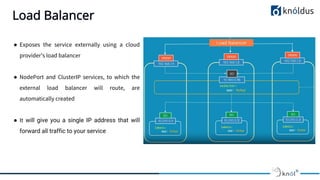
Load Balancer
● Exposes the service externally using a cloud
provider’s load balancer
● NodePort and ClusterIP services, to which the
external load balancer will route, are
automatically created
● It will give you a single IP address that will
forward all traffic to your service
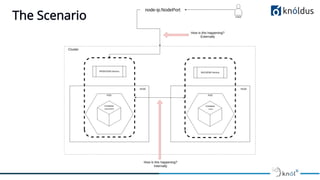
The Scenario
Components of Service Discovery
● Kube-DNS
○ It is also a DNS server which was default cluster DNS, prior to K8s version 1.11
○ Several containers are used within a single pod: kubedns, dnsmasq, and sidecar.
■kubedns container watches the Kubernetes API and serves DNS records
■dnsmasq provides caching and stub domain support
■sidecar provides metrics and health checks
● CoreDNS
○ It is a flexible, extensible DNS server that can serve as the Kubernetes cluster DNS
○ Maintained by CNCF
○ Written in GOLang
○ Introduce in K8s version 1.11 as a replacement for KubeDNS
Service Discovery
● For internal service discovery, Kubernetes provides two options:
○ Environment variable: When a new Pod is created, environment variables from older services can be imported.
This allows services to talk to each other.
○ DNS: Every service registers to the DNS server, using this, new services can find and talk to other services.
Kubernetes provides the kube-DNS and CoreDNS server for this as an add-on resource.
● For external service discovery, Kubernetes provides two options:
○ NodePort: Kubernetes exposes the service through special ports (30000-32767) of the node IP address.
○ Loadbalancer: Kubernetes interacts with the cloud provider to create a load balancer that redirects the traffic to
the Pods.
Service Discovery - DNS
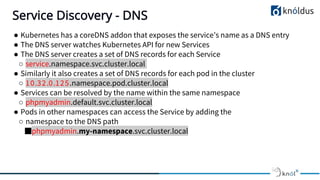
● Kubernetes has a coreDNS addon that exposes the service’s name as a DNS entry
● The DNS server watches Kubernetes API for new Services
● The DNS server creates a set of DNS records for each Service
○ service.namespace.svc.cluster.local
● Similarly it also creates a set of DNS records for each pod in the cluster
○ 10.32.0.125.namespace.pod.cluster.local
● Services can be resolved by the name within the same namespace
○ phpmyadmin.default.svc.cluster.local
● Pods in other namespaces can access the Service by adding the
○ namespace to the DNS path
■phpmyadmin.my-namespace.svc.cluster.local
Service Discovery - Environment Variables
● Kubernetes injects environment variables for each service and each port exposed by the service
● Major limitation of this approach is that the service should always be created before then any pods
● Containers can use the environment variable to talk to the service endpoint
● For example, if we are exposing a nginx-service, we can locate it using the
NGINX_SERVICE_SERVICE_HOST and NGINX_SERVICE_SERVICE_PORT variables
● The easiest way to find out what environment variables are exposed are to exec the env command within
a pod:
REFERENCES:
● https://kubernetes.io/docs/concepts/
● https://www.youtube.com/user/srinathrchalla1/
● https://www.digitalocean.com/community/tutorials/an-introduction-to-the-kubernetes-dns-service
● https://kubernetes.io/docs/tasks/administer-cluster/dns-custom-nameservers/
● http://kubernetesbyexample.com/sd/
● https://fredjean.net/kubernetes-discovery/
Thank You :)
ANY Questions?

Service Discovery In Kubernetes

  • 1.
    Presented By: ShubhrankRastogi & Azmat Hasan Service Discovery in Kubernetes
  • 2.
    Agenda 01 ● A littleabout K8 ● Service Overview ○ Why do we need them? ○ What is a service? ○ Types of services ● Communication is important - Service Discovery ○ The Scenario ○ Ways to discover services ● Demo
  • 3.
    Quick Overview -About K8 ● Kubernetes (commonly stylized as k8) is an open-source container- orchestration engine for automating application deployment, scaling, and management ● It provides features like deployment, scaling, load balancing, logging, and monitoring ● Designed by Google, and is now maintained by the Cloud Native Computing Foundation (CNCF) ● Master-Slave Architecture ● Kubernetes Objects
  • 4.
    Why do weneed services? ● How does this frontend application is exposed to outside world? ● How does frontend application is connected to backend ? ● How do we resolve Pod IP changes, when they die?
  • 5.
    What is aservice? ● A Service in Kubernetes is an object, similar to a Pod ● A service can be defined as a logical set of pods ● It acts as the intermediary for Pods to talk to each other ● Selectors are used for accessing all the Pods that match a specific Label ● Each Service exposes one of more ports and targetPorts ● The targetPort is mapped to the port exposed by matching Pods Important Features provided by service: ● Load Balancing ● Service Discovery
  • 6.
  • 7.
    Node Port: ● Exposesthe service on each Node’s IP at a static port (the NodePort) ● You’ll be able to contact the NodePort service, from outside the cluster, by requesting <NodeIP>:<NodePort> How does this frontend application is exposed to outside world?
  • 8.
    Cluster IP ● Exposesthe service on a cluster-internal IP ● Choosing this value makes the service only reachable from within the cluster ● This is the default ServiceType How does frontend application is connected to backend
  • 9.
    Load Balancer ● Exposesthe service externally using a cloud provider’s load balancer ● NodePort and ClusterIP services, to which the external load balancer will route, are automatically created ● It will give you a single IP address that will forward all traffic to your service
  • 10.
  • 11.
    Components of ServiceDiscovery ● Kube-DNS ○ It is also a DNS server which was default cluster DNS, prior to K8s version 1.11 ○ Several containers are used within a single pod: kubedns, dnsmasq, and sidecar. ■kubedns container watches the Kubernetes API and serves DNS records ■dnsmasq provides caching and stub domain support ■sidecar provides metrics and health checks ● CoreDNS ○ It is a flexible, extensible DNS server that can serve as the Kubernetes cluster DNS ○ Maintained by CNCF ○ Written in GOLang ○ Introduce in K8s version 1.11 as a replacement for KubeDNS
  • 12.
    Service Discovery ● Forinternal service discovery, Kubernetes provides two options: ○ Environment variable: When a new Pod is created, environment variables from older services can be imported. This allows services to talk to each other. ○ DNS: Every service registers to the DNS server, using this, new services can find and talk to other services. Kubernetes provides the kube-DNS and CoreDNS server for this as an add-on resource. ● For external service discovery, Kubernetes provides two options: ○ NodePort: Kubernetes exposes the service through special ports (30000-32767) of the node IP address. ○ Loadbalancer: Kubernetes interacts with the cloud provider to create a load balancer that redirects the traffic to the Pods.
  • 13.
    Service Discovery -DNS ● Kubernetes has a coreDNS addon that exposes the service’s name as a DNS entry ● The DNS server watches Kubernetes API for new Services ● The DNS server creates a set of DNS records for each Service ○ service.namespace.svc.cluster.local ● Similarly it also creates a set of DNS records for each pod in the cluster ○ 10.32.0.125.namespace.pod.cluster.local ● Services can be resolved by the name within the same namespace ○ phpmyadmin.default.svc.cluster.local ● Pods in other namespaces can access the Service by adding the ○ namespace to the DNS path ■phpmyadmin.my-namespace.svc.cluster.local
  • 14.
    Service Discovery -Environment Variables ● Kubernetes injects environment variables for each service and each port exposed by the service ● Major limitation of this approach is that the service should always be created before then any pods ● Containers can use the environment variable to talk to the service endpoint ● For example, if we are exposing a nginx-service, we can locate it using the NGINX_SERVICE_SERVICE_HOST and NGINX_SERVICE_SERVICE_PORT variables ● The easiest way to find out what environment variables are exposed are to exec the env command within a pod:
  • 15.
    REFERENCES: ● https://kubernetes.io/docs/concepts/ ● https://www.youtube.com/user/srinathrchalla1/ ●https://www.digitalocean.com/community/tutorials/an-introduction-to-the-kubernetes-dns-service ● https://kubernetes.io/docs/tasks/administer-cluster/dns-custom-nameservers/ ● http://kubernetesbyexample.com/sd/ ● https://fredjean.net/kubernetes-discovery/
  • 16.
    Thank You :) ANYQuestions?