Presentation about

“Google”
Tara singh danu
Peisanna
Praveen
Nitu
About Search Engine


A web search engine is a software system that is
designed to search for information on the
World Wide Web. The search results are generally
presented in a line of results often referred to as
search engine results pages (SERPs). The information
may be a specialist in web pages, images, information
and other types of files. Some search engines also
mine data available in databases or open directories.
Unlike web directories, which are maintained only by
human editors, search engines also maintain real-time
information by running an algorithm on a
web crawler.
List of search engine

















General
NameLanguageWebsite
1Baidu-------------Chinese, Japanesebaidu.com
2Bing---------------Multilingualbing.com
3Blekko------------Englishblekko.com
4DuckDuckGo-----Englishduckduckgo.com
5Exalead-----------Multilingualexalead.com/search
6Gigablast---------Englishgigablast.com
7Google-----------Multilingualgoogle.com
8Qrobe (and Privatelee.com)-------Englishgrobe.it
9Sogou----------Chinesesogou.com
10Soso.com--------Chinesesoso.com
11Volunia--------Multilingualvolunia.com
12Yahoo!---------Multilingualsearch.yahoo.com
13Yandex--------Multilingualyandex.com
14Youdao--------Chineseyoudao.com





P2P search engines
1FAROOEnglishfaroo.com
2Seeks (Open Source)English[2]
3YaCy (Free and fully
decentralized)Multilingualyacy.net




















Metasearch engines
See also: Metasearch engine
1 BlingoEnglishblingo.com
2 Yippy (formerly Clusty)Englishyippy.com
3 DeeperWebEnglishDeeperWeb.com
4 DogpileEnglishdogpile.com
5 ExciteEnglish[3]
6 Harvester42
7 HotBotEnglishhotbot.com
8 Info.comEnglishinfo.com
9 Ixquick (and startpage.com)Multilingualstartpage.com
10 Kayak and SideStepMultilingualkayak.com
11 Mammamamma.com
12 MetacrawlerEnglishmetacrawler.com
13 MobissimoMultilingualmobissimo.com
14 OtaloEnglishotato.com
15 PCH Search and Winsearch.pah.com
16 ThivEnglishthiv.net
17 WebCrawlerEnglishwebcrawler.com


























Geographically limited scope
No.NameLanguageCoutntryWebsite
1 Accoona - Chinese, EnglishChina, United States
2 Alleba - EnglishPhilippinesalleba.com
3 Ansearch- EnglishAustralia, United States, United Kingdom, New Zealand
4 BiglobeJapaneseJapanbiglobe.co.jp
5 DaumKoreaduam.net
6 GooJapaneseJapangoo.ne.jp
7 Guruji.comIndiaguruji.com
8 Leit.isIceland
9 MaktoobArab World
10 Miner.huHungary
11 Najdi.siSlovenia
12 NaverKoreanKoreanaver.com
13 OnkoshArab World
14 RamblerRussia
15 RediffIndia
16 SAPOPortugal, Angola, Cabo Verde, Mozambique
17 Search.chSwitzerland
18 SesamNorway, Sweden
19 SeznamCzech Republic
20 Walla!Israel
21 Yandex.ruRussia, Turkey, Ukraine, Belarus, Kazakhstan
22Yehey!Philippines
23 ZipLocalCanada/United States
Google


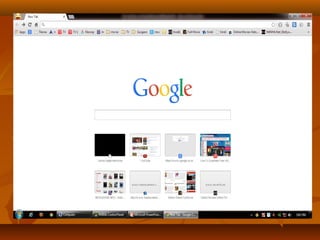
Google is one of the best and top Search
Engine and if you use Google only to search
for words and phrases, you’re doing it wrong.
There are so many things you can do with
Google Search. The service is loaded with
many advanced tricks that you can enable
from that unassuming search box.
About Google :











Web address www.Google.com
Commercial?YesType of site
Web search engine
Registration Optional
Available language(s)Multilingual (123)
Written inJavaScript, PHP C, C++[1]
OwnerGoogle
LaunchedSeptember 15, 1997 (1997-09-15)[2]
RevenueFrom AdWords
Alexa rank 1 (October 2013)[3]
Current statusActive


Different techniques of
Searching on Google



Find the current time elsewhere: Don’t bother trying to
convert the time from your local setting to a distant city. Just
type time city , as in time Delhi, to see the current time in that
location.



Search for a file type: You can look up results that match a
specific file type. This trick is great for special searches, such
as tracking down a product manual or video file. Try search
term filetype: three-letter type.



For example, I entered Zoom H2 manual filetype: pdf to find
the manual for that Zoom recording device.


Weather as reported by Google Search Get the weather:



To see the weather for many U.S. and worldwide cities, type
“weather” followed by the city and state, U.S. zip code, or city
and country.
For example: weather Delhi





Calculate and convert: To use Google’s built-in calculator
function, simply enter the calculation you’d like done into the
search box. Try typing math problems, such as 89*22/(16), or
conversions, like 100 yards = ? Meters. Google will do the
rest.



Track stocks: To see current market data for a given company
or fund, type the ticker symbol into the search box. On the
results page, you can click the link to see more data from
Google Finance. You can enter a stock’s trading abbreviation,
such as GOOG, and the first result will show the stock’s latest
price, a graph of the day, and other financial details.


Get movie times: On the Web you have a myriad of choices
to look up show times, but Google’s simplicity is tough to beat
.To find reviews and show times for the movies playing near
you, type "movies" or the name of a current film into the
Google search box. If you've already saved your location on a
previous search, the top search result will display show times
for nearby theaters for the movie you've chosen. Click the
More movies link to get more-specific listings.



Track packages: Have a FedEx, UPS, or USPS tracking
number? Just enter it in the Google search box for the latest
package status.



Sports Scores: To see scores and schedules for sports teams
type the team name or league name into the search box. This is
enabled for many leagues including the National Basketball
Association, National Football League, National Hockey
League, and Major League Baseball.












Music: want the details of a song? use music: song name for
Music specific search on Google
Area Code Lookup: type in the US area code into Google to
find out where the area code is.
Format specific search: sometimes finding what you want in
Google can be difficult, but Google offers a range of format
specific search sites. Google News, Blog Search, even Video
are a few Google sites you can use to find what you’re looking
for.
Phrase Search: I use this trick regularly. If you’re looking for
the exact phrase, not the words entered, do your search like
this “I did but see her passing by”
Wildcard: old DOS users will remember doing directory
searches using an asterisk (*) as a wildcard, and Google
supports wildcard entries as well. Example: blogging *.com.au
Not: adding a minus (-) allows you to narrow your search, for
example if you wanted to search for New York but not City
you’d enter New York -City


Either/or. Google looks for the combination of terms you type
in, but you can tell it to look for multiple words, for example
Olympic or Gold. The short cut is | so Olympic | Gold works
as well



Book Search: If you’re looking for results from Google Book
Search, you can enter the name of the author or book title into
the search box and we’ll return any book content we have as
part of your normal web results. You can click through on the
record to view more detailed info about that author or title.



Earthquakes: To see information about recent earthquakes in
a specific area type “earthquake” followed by the city and
state or U.S. zip code. For recent earthquake activity around
the world simply type “earthquake” in the search box.


Synonym Search: If you want to search not only for your search
term but also for its synonyms, place the tilde sign (~) immediately
in front of your search term.



Dictionary Definitions: To see a definition for a word or phrase,
simply type the word “define” then a space, then the word(s) you
want defined. To see a list of different definitions from various
online sources, you can type “define:” followed by a word or
phrase. Note that the results will define the entire phrase.



Spell Checker: Google’s spell checking software automatically
checks whether your query uses the most common spelling of a
given word. If it thinks you’re likely to generate better results with
an alternative spelling, it will ask “Did you mean: (more common
spelling)?”. Click the suggested spelling to launch a Google search
for that term.


Unit Conversion: You can use Google to convert between
many different units of measurement of height, weight, and
volume among many others. Just enter your desired
conversion into the search box and we’ll do the rest.



Airline Travel Info: To see flight status for arriving and
departing U.S. flights, type in the name of the airline and the
flight number into the search box. You can also see delays at a
specific airport by typing in the name of the city or three-letter
airport code followed by the word “airport”.
For Example: - American airlines 18, Houston airport







Currency Conversion: To use built-in currency converter,
simply enter the conversion you’d like done into the Google
search box and we’ll provide your answer directly on the
results page.
For Example: 150 GBP in USD













Phone Listing: Let’s say someone calls you on your mobile number and
you don’t know who it is. If all you have is a phone number, you can look
it up on Google using the phonebook feature.
For Example phonebook:
617-555-1212
(note: the provided
number does not work – you’ll have to use a real number to get any
results).
Email This
BlogThis!
Share to Twitter
Share to Face book
Share to Google Buzz
Labels: Internet
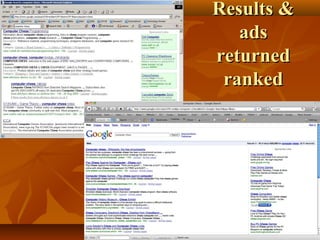
Working of a Search Engine
Most Web search engines are commercial ventures supported by
advertising revenue and, as a result, some employ the practice of allowing
advertisers to pay money to have their listings ranked higher in search
results. Those search engines which do not accept money for their search
engine results make money by running search related ads alongside the
regular search engine results. The search engines make money every time
someone clicks on one of these ads.
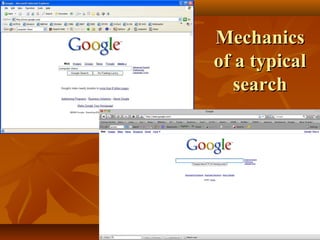
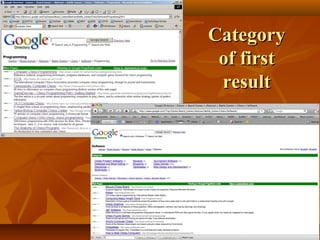
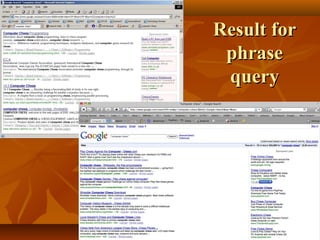
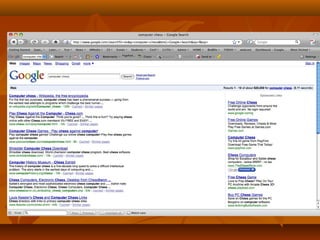
Mechanics
of a typical
search
Results &
ads
returned
ranked
Category
of first
result
Result for
phrase
query


Verb “google” has become synonymous
with searching for information on the web.



Has raised the bar on search quality



Has been the most popular search engine in the
last few years.



Had a very successful IPO in August 2004.



Is innovative and dynamic.



Has restored glamour in CS lost in dot-combust Google
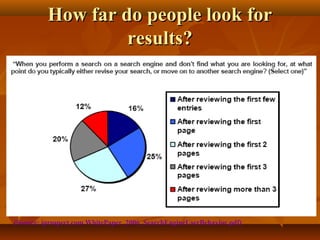
How far do people look for
results?

(Source: iprospect.com WhitePaper_2006_SearchEngineUserBehavior.pdf)
Architecture of a Search Engine
Sponsored Links
CG Appliance Express
Discount Appliances (650) 756-3931
Same Day Certified Installation
www.cgappliance.com
San Francisco-Oakland-San Jose,
CA

User

Miele Vacuum Cleaners
Miele Vacuums- Complete Selection
Free Shipping!
www.vacuums.com
Miele Vacuum Cleaners
Miele-Free Air shipping!
All models. Helpful advice.
www.best-vacuum.com

Web

Results 1 - 10 of about 7,310,000 for miele. (0.12 seconds)

Miele, Inc -- Anything else is a compromise

Web spider

At the heart of your home, Appliances by Miele. ... USA. to miele.com. Residential Appliances.
Vacuum Cleaners. Dishwashers. Cooking Appliances. Steam Oven. Coffee System ...
www.miele.com/ - 20k - Cached - Similar pages

Miele
Welcome to Miele, the home of the very best appliances and kitchens in the world.
www.miele.co.uk/ - 3k - Cached - Similar pages

Miele - Deutscher Hersteller von Einbaugeräten, Hausgeräten ... - [ Translate this
page ]
Das Portal zum Thema Essen & Geniessen online unter www.zu-tisch.de. Miele weltweit
...ein Leben lang. ... Wählen Sie die Miele Vertretung Ihres Landes.
www.miele.de/ - 10k - Cached - Similar pages

Herzlich willkommen bei Miele Österreich - [ Translate this page ]
Herzlich willkommen bei Miele Österreich Wenn Sie nicht automatisch
weitergeleitet werden, klicken Sie bitte hier! HAUSHALTSGERÄTE ...
www.miele.at/ - 3k - Cached - Similar pages

Search

Indexer

The Web
Indexes

Ad indexes
Presentation on google

Presentation on google

  • 1.
  • 2.
    About Search Engine  Aweb search engine is a software system that is designed to search for information on the World Wide Web. The search results are generally presented in a line of results often referred to as search engine results pages (SERPs). The information may be a specialist in web pages, images, information and other types of files. Some search engines also mine data available in databases or open directories. Unlike web directories, which are maintained only by human editors, search engines also maintain real-time information by running an algorithm on a web crawler.
  • 3.
    List of searchengine                 General NameLanguageWebsite 1Baidu-------------Chinese, Japanesebaidu.com 2Bing---------------Multilingualbing.com 3Blekko------------Englishblekko.com 4DuckDuckGo-----Englishduckduckgo.com 5Exalead-----------Multilingualexalead.com/search 6Gigablast---------Englishgigablast.com 7Google-----------Multilingualgoogle.com 8Qrobe (and Privatelee.com)-------Englishgrobe.it 9Sogou----------Chinesesogou.com 10Soso.com--------Chinesesoso.com 11Volunia--------Multilingualvolunia.com 12Yahoo!---------Multilingualsearch.yahoo.com 13Yandex--------Multilingualyandex.com 14Youdao--------Chineseyoudao.com
  • 4.
        P2P search engines 1FAROOEnglishfaroo.com 2Seeks(Open Source)English[2] 3YaCy (Free and fully decentralized)Multilingualyacy.net
  • 5.
                       Metasearch engines See also:Metasearch engine 1 BlingoEnglishblingo.com 2 Yippy (formerly Clusty)Englishyippy.com 3 DeeperWebEnglishDeeperWeb.com 4 DogpileEnglishdogpile.com 5 ExciteEnglish[3] 6 Harvester42 7 HotBotEnglishhotbot.com 8 Info.comEnglishinfo.com 9 Ixquick (and startpage.com)Multilingualstartpage.com 10 Kayak and SideStepMultilingualkayak.com 11 Mammamamma.com 12 MetacrawlerEnglishmetacrawler.com 13 MobissimoMultilingualmobissimo.com 14 OtaloEnglishotato.com 15 PCH Search and Winsearch.pah.com 16 ThivEnglishthiv.net 17 WebCrawlerEnglishwebcrawler.com
  • 6.
                             Geographically limited scope No.NameLanguageCoutntryWebsite 1Accoona - Chinese, EnglishChina, United States 2 Alleba - EnglishPhilippinesalleba.com 3 Ansearch- EnglishAustralia, United States, United Kingdom, New Zealand 4 BiglobeJapaneseJapanbiglobe.co.jp 5 DaumKoreaduam.net 6 GooJapaneseJapangoo.ne.jp 7 Guruji.comIndiaguruji.com 8 Leit.isIceland 9 MaktoobArab World 10 Miner.huHungary 11 Najdi.siSlovenia 12 NaverKoreanKoreanaver.com 13 OnkoshArab World 14 RamblerRussia 15 RediffIndia 16 SAPOPortugal, Angola, Cabo Verde, Mozambique 17 Search.chSwitzerland 18 SesamNorway, Sweden 19 SeznamCzech Republic 20 Walla!Israel 21 Yandex.ruRussia, Turkey, Ukraine, Belarus, Kazakhstan 22Yehey!Philippines 23 ZipLocalCanada/United States
  • 7.
    Google  Google is oneof the best and top Search Engine and if you use Google only to search for words and phrases, you’re doing it wrong. There are so many things you can do with Google Search. The service is loaded with many advanced tricks that you can enable from that unassuming search box.
  • 9.
    About Google :           Webaddress www.Google.com Commercial?YesType of site Web search engine Registration Optional Available language(s)Multilingual (123) Written inJavaScript, PHP C, C++[1] OwnerGoogle LaunchedSeptember 15, 1997 (1997-09-15)[2] RevenueFrom AdWords Alexa rank 1 (October 2013)[3] Current statusActive
  • 10.
     Different techniques of Searchingon Google  Find the current time elsewhere: Don’t bother trying to convert the time from your local setting to a distant city. Just type time city , as in time Delhi, to see the current time in that location.  Search for a file type: You can look up results that match a specific file type. This trick is great for special searches, such as tracking down a product manual or video file. Try search term filetype: three-letter type.  For example, I entered Zoom H2 manual filetype: pdf to find the manual for that Zoom recording device.
  • 11.
     Weather as reportedby Google Search Get the weather:  To see the weather for many U.S. and worldwide cities, type “weather” followed by the city and state, U.S. zip code, or city and country. For example: weather Delhi   Calculate and convert: To use Google’s built-in calculator function, simply enter the calculation you’d like done into the search box. Try typing math problems, such as 89*22/(16), or conversions, like 100 yards = ? Meters. Google will do the rest.  Track stocks: To see current market data for a given company or fund, type the ticker symbol into the search box. On the results page, you can click the link to see more data from Google Finance. You can enter a stock’s trading abbreviation, such as GOOG, and the first result will show the stock’s latest price, a graph of the day, and other financial details.
  • 12.
     Get movie times:On the Web you have a myriad of choices to look up show times, but Google’s simplicity is tough to beat .To find reviews and show times for the movies playing near you, type "movies" or the name of a current film into the Google search box. If you've already saved your location on a previous search, the top search result will display show times for nearby theaters for the movie you've chosen. Click the More movies link to get more-specific listings.  Track packages: Have a FedEx, UPS, or USPS tracking number? Just enter it in the Google search box for the latest package status.  Sports Scores: To see scores and schedules for sports teams type the team name or league name into the search box. This is enabled for many leagues including the National Basketball Association, National Football League, National Hockey League, and Major League Baseball.
  • 13.
          Music: want thedetails of a song? use music: song name for Music specific search on Google Area Code Lookup: type in the US area code into Google to find out where the area code is. Format specific search: sometimes finding what you want in Google can be difficult, but Google offers a range of format specific search sites. Google News, Blog Search, even Video are a few Google sites you can use to find what you’re looking for. Phrase Search: I use this trick regularly. If you’re looking for the exact phrase, not the words entered, do your search like this “I did but see her passing by” Wildcard: old DOS users will remember doing directory searches using an asterisk (*) as a wildcard, and Google supports wildcard entries as well. Example: blogging *.com.au Not: adding a minus (-) allows you to narrow your search, for example if you wanted to search for New York but not City you’d enter New York -City
  • 14.
     Either/or. Google looksfor the combination of terms you type in, but you can tell it to look for multiple words, for example Olympic or Gold. The short cut is | so Olympic | Gold works as well  Book Search: If you’re looking for results from Google Book Search, you can enter the name of the author or book title into the search box and we’ll return any book content we have as part of your normal web results. You can click through on the record to view more detailed info about that author or title.  Earthquakes: To see information about recent earthquakes in a specific area type “earthquake” followed by the city and state or U.S. zip code. For recent earthquake activity around the world simply type “earthquake” in the search box.
  • 15.
     Synonym Search: Ifyou want to search not only for your search term but also for its synonyms, place the tilde sign (~) immediately in front of your search term.  Dictionary Definitions: To see a definition for a word or phrase, simply type the word “define” then a space, then the word(s) you want defined. To see a list of different definitions from various online sources, you can type “define:” followed by a word or phrase. Note that the results will define the entire phrase.  Spell Checker: Google’s spell checking software automatically checks whether your query uses the most common spelling of a given word. If it thinks you’re likely to generate better results with an alternative spelling, it will ask “Did you mean: (more common spelling)?”. Click the suggested spelling to launch a Google search for that term.
  • 16.
     Unit Conversion: Youcan use Google to convert between many different units of measurement of height, weight, and volume among many others. Just enter your desired conversion into the search box and we’ll do the rest.  Airline Travel Info: To see flight status for arriving and departing U.S. flights, type in the name of the airline and the flight number into the search box. You can also see delays at a specific airport by typing in the name of the city or three-letter airport code followed by the word “airport”. For Example: - American airlines 18, Houston airport    Currency Conversion: To use built-in currency converter, simply enter the conversion you’d like done into the Google search box and we’ll provide your answer directly on the results page. For Example: 150 GBP in USD
  • 17.
              Phone Listing: Let’ssay someone calls you on your mobile number and you don’t know who it is. If all you have is a phone number, you can look it up on Google using the phonebook feature. For Example phonebook: 617-555-1212 (note: the provided number does not work – you’ll have to use a real number to get any results). Email This BlogThis! Share to Twitter Share to Face book Share to Google Buzz Labels: Internet Working of a Search Engine Most Web search engines are commercial ventures supported by advertising revenue and, as a result, some employ the practice of allowing advertisers to pay money to have their listings ranked higher in search results. Those search engines which do not accept money for their search engine results make money by running search related ads alongside the regular search engine results. The search engines make money every time someone clicks on one of these ads.
  • 18.
  • 19.
  • 20.
  • 21.
  • 23.
     Verb “google” hasbecome synonymous with searching for information on the web.  Has raised the bar on search quality  Has been the most popular search engine in the last few years.  Had a very successful IPO in August 2004.  Is innovative and dynamic.  Has restored glamour in CS lost in dot-combust Google
  • 24.
    How far dopeople look for results? (Source: iprospect.com WhitePaper_2006_SearchEngineUserBehavior.pdf)
  • 25.
    Architecture of aSearch Engine Sponsored Links CG Appliance Express Discount Appliances (650) 756-3931 Same Day Certified Installation www.cgappliance.com San Francisco-Oakland-San Jose, CA User Miele Vacuum Cleaners Miele Vacuums- Complete Selection Free Shipping! www.vacuums.com Miele Vacuum Cleaners Miele-Free Air shipping! All models. Helpful advice. www.best-vacuum.com Web Results 1 - 10 of about 7,310,000 for miele. (0.12 seconds) Miele, Inc -- Anything else is a compromise Web spider At the heart of your home, Appliances by Miele. ... USA. to miele.com. Residential Appliances. Vacuum Cleaners. Dishwashers. Cooking Appliances. Steam Oven. Coffee System ... www.miele.com/ - 20k - Cached - Similar pages Miele Welcome to Miele, the home of the very best appliances and kitchens in the world. www.miele.co.uk/ - 3k - Cached - Similar pages Miele - Deutscher Hersteller von Einbaugeräten, Hausgeräten ... - [ Translate this page ] Das Portal zum Thema Essen & Geniessen online unter www.zu-tisch.de. Miele weltweit ...ein Leben lang. ... Wählen Sie die Miele Vertretung Ihres Landes. www.miele.de/ - 10k - Cached - Similar pages Herzlich willkommen bei Miele Österreich - [ Translate this page ] Herzlich willkommen bei Miele Österreich Wenn Sie nicht automatisch weitergeleitet werden, klicken Sie bitte hier! HAUSHALTSGERÄTE ... www.miele.at/ - 3k - Cached - Similar pages Search Indexer The Web Indexes Ad indexes