EDUCATION
   USING
TECHNOLOGY


   Part 1
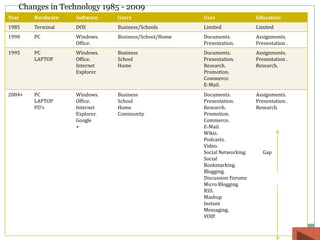
Changes in Technology 1985 - 2009
Year    Hardware   Software    Users                  Uses                 Education
1985    Terminal   DOS         Business/Schools       Limited              Limited
1990    PC         Windows.    Business/School/Home   Documents.           Assignments.
                   Office.                            Presentation.        Presentation .
1995    PC         Windows.    Business               Documents.           Assignments.
        LAPTOP     Office.     School                 Presentation.        Presentation .
                   Internet    Home                   Research.            Research.
                   Explorer.                          Promotion.
                                                      Commerce.
                                                      E-Mail.
2004+   PC         Windows.    Business               Documents.           Assignments.
        LAPTOP     Office.     School                 Presentation.        Presentation .
        PD’s       Internet    Home                   Research.            Research.
                   Explorer.   Community              Promotion.
                   Google                             Commerce.
                   +                                  E-Mail.
                                                      Wikis.
                                                      Podcasts.
                                                      Video.
                                                      Social Networking.      Gap
                                                      Social
                                                      Bookmarking.
                                                      Blogging.
                                                      Discussion Forums
                                                      Micro Blogging.
                                                      RSS.
                                                      Mashup
                                                      Instant
                                                      Messaging.
                                                      VOIP.
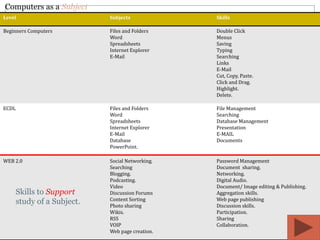
Computers as a Subject
Level                        Subjects             Skills

Beginners Computers          Files and Folders    Double Click
                             Word                 Menus
                             Spreadsheets         Saving
                             Internet Explorer    Typing
                             E-Mail               Searching
                                                  Links
                                                  E-Mail
                                                  Cut, Copy, Paste.
                                                  Click and Drag.
                                                  Highlight.
                                                  Delete.

ECDL                         Files and Folders    File Management
                             Word                 Searching
                             Spreadsheets         Database Management
                             Internet Explorer    Presentation
                             E-Mail               E-MAIL
                             Database             Documents
                             PowerPoint.

WEB 2.0                      Social Networking.   Password Management
                             Searching            Document sharing.
                             Blogging.            Networking.
                             Podcasting.          Digital Audio.
                             Video                Document/ Image editing & Publishing.
       Skills to Support     Discussion Forums    Aggregation skills.
                             Content Sorting      Web page publishing
       study of a Subject.   Photo sharing        Discussion skills.
                             Wikis.               Participation.
                             RSS                  Sharing
                             VOIP                 Collaboration.
                             Web page creation.
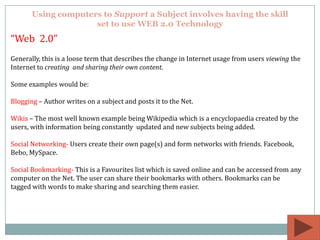
Using computers to Support a Subject involves having the skill
                     set to use WEB 2.0 Technology
“Web 2.0”
Generally, this is a loose term that describes the change in Internet usage from users viewing the
Internet to creating and sharing their own content.

Some examples would be:

Blogging – Author writes on a subject and posts it to the Net.

Wikis – The most well known example being Wikipedia which is a encyclopaedia created by the
users, with information being constantly updated and new subjects being added.

Social Networking- Users create their own page(s) and form networks with friends. Facebook,
Bebo, MySpace.

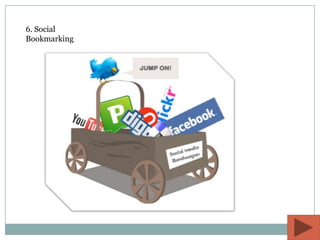
Social Bookmarking- This is a Favourites list which is saved online and can be accessed from any
computer on the Net. The user can share their bookmarks with others. Bookmarks can be
tagged with words to make sharing and searching them easier.
WEB 2.0

1. Blogging
2. RSS Readers
3. Social Networks
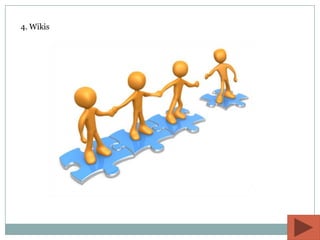
4. Wikis
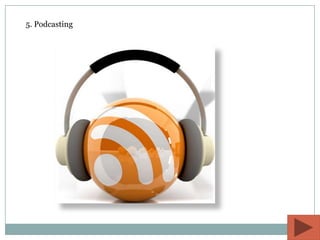
5. Podcasting
6. Social
Bookmarking
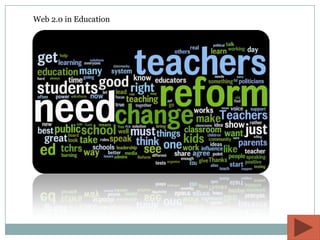
Web 2.0 in Education
The Future of
Learning
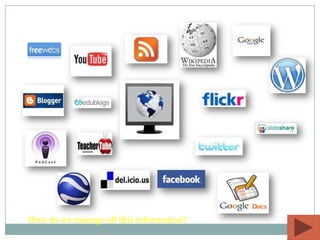
How do we manage all this information?
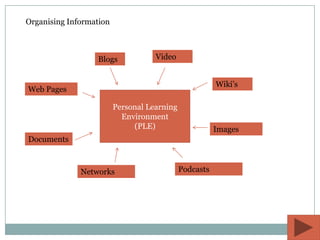
Organising Information


                  Blogs             Video


                                                        Wiki’s
Web Pages

                         Personal Learning
                           Environment
                              (PLE)                     Images
Documents


              Networks                       Podcasts
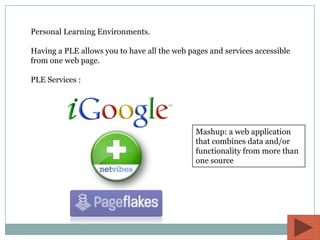
Personal Learning Environments.

Having a PLE allows you to have all the web pages and services accessible
from one web page.

PLE Services :


                                              Mashup: a web application
                                              that combines data and/or
                                              functionality from more than
                                              one source
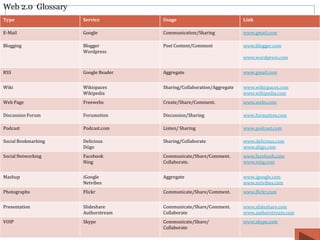
Web 2.0 Glossary
Type                 Service         Usage                             Link

E-Mail               Google          Communication/Sharing             www.gmail.com

Blogging             Blogger         Post Content/Comment              www.blogger.com
                     Wordpress
                                                                       www.wordpress.com


RSS                  Google Reader   Aggregate                         www.gmail.com


Wiki                 Wikispaces      Sharing/Collaboration/Aggregate   www.wikispaces.com
                     Wikipedia                                         www.wikipedia.com
Web Page             Freewebs        Create/Share/Comment.             www.webs.com

Discussion Forum     Forumotion      Discussion/Sharing                www.formution.com

Podcast              Podcast.com     Listen/ Sharing                   www.podcast.com

Social Bookmarking   Delicious       Sharing/Collaborate               www.delicious.com
                     Diigo                                             www.diigo.com
Social Networking    Facebook        Communicate/Share/Comment.        www.facebook.com
                     Ning            Collaborate.                      www.ning.com


Mashup               iGoogle         Aggregate                         www.igoogle.com
                     Netvibes                                          www.netvibes.com
Photographs          Flickr          Communicate/Share/Comment.        www.flickr.com


Presentation         Slideshare      Communicate/Share/Comment.        www.slideshare.com
                     Authorstream    Collaborate                       www.authorstream.com
VOIP                 Skype           Communicate/Share/                www.skype.com
                                     Collaborate
Charlie Pankeko.

Charlie.pankeko@gmail.com


http://educationusingtechnologyi.blogspot.com/ Web

Education Using Technology

  • 1.
    EDUCATION USING TECHNOLOGY Part 1
  • 2.
    Changes in Technology1985 - 2009 Year Hardware Software Users Uses Education 1985 Terminal DOS Business/Schools Limited Limited 1990 PC Windows. Business/School/Home Documents. Assignments. Office. Presentation. Presentation . 1995 PC Windows. Business Documents. Assignments. LAPTOP Office. School Presentation. Presentation . Internet Home Research. Research. Explorer. Promotion. Commerce. E-Mail. 2004+ PC Windows. Business Documents. Assignments. LAPTOP Office. School Presentation. Presentation . PD’s Internet Home Research. Research. Explorer. Community Promotion. Google Commerce. + E-Mail. Wikis. Podcasts. Video. Social Networking. Gap Social Bookmarking. Blogging. Discussion Forums Micro Blogging. RSS. Mashup Instant Messaging. VOIP.
  • 3.
    Computers as aSubject Level Subjects Skills Beginners Computers Files and Folders Double Click Word Menus Spreadsheets Saving Internet Explorer Typing E-Mail Searching Links E-Mail Cut, Copy, Paste. Click and Drag. Highlight. Delete. ECDL Files and Folders File Management Word Searching Spreadsheets Database Management Internet Explorer Presentation E-Mail E-MAIL Database Documents PowerPoint. WEB 2.0 Social Networking. Password Management Searching Document sharing. Blogging. Networking. Podcasting. Digital Audio. Video Document/ Image editing & Publishing. Skills to Support Discussion Forums Aggregation skills. Content Sorting Web page publishing study of a Subject. Photo sharing Discussion skills. Wikis. Participation. RSS Sharing VOIP Collaboration. Web page creation.
  • 4.
    Using computers toSupport a Subject involves having the skill set to use WEB 2.0 Technology “Web 2.0” Generally, this is a loose term that describes the change in Internet usage from users viewing the Internet to creating and sharing their own content. Some examples would be: Blogging – Author writes on a subject and posts it to the Net. Wikis – The most well known example being Wikipedia which is a encyclopaedia created by the users, with information being constantly updated and new subjects being added. Social Networking- Users create their own page(s) and form networks with friends. Facebook, Bebo, MySpace. Social Bookmarking- This is a Favourites list which is saved online and can be accessed from any computer on the Net. The user can share their bookmarks with others. Bookmarks can be tagged with words to make sharing and searching them easier.
  • 5.
  • 6.
  • 7.
  • 8.
  • 9.
  • 10.
  • 11.
    Web 2.0 inEducation
  • 12.
  • 13.
    How do wemanage all this information?
  • 14.
    Organising Information Blogs Video Wiki’s Web Pages Personal Learning Environment (PLE) Images Documents Networks Podcasts
  • 15.
    Personal Learning Environments. Havinga PLE allows you to have all the web pages and services accessible from one web page. PLE Services : Mashup: a web application that combines data and/or functionality from more than one source
  • 16.
    Web 2.0 Glossary Type Service Usage Link E-Mail Google Communication/Sharing www.gmail.com Blogging Blogger Post Content/Comment www.blogger.com Wordpress www.wordpress.com RSS Google Reader Aggregate www.gmail.com Wiki Wikispaces Sharing/Collaboration/Aggregate www.wikispaces.com Wikipedia www.wikipedia.com Web Page Freewebs Create/Share/Comment. www.webs.com Discussion Forum Forumotion Discussion/Sharing www.formution.com Podcast Podcast.com Listen/ Sharing www.podcast.com Social Bookmarking Delicious Sharing/Collaborate www.delicious.com Diigo www.diigo.com Social Networking Facebook Communicate/Share/Comment. www.facebook.com Ning Collaborate. www.ning.com Mashup iGoogle Aggregate www.igoogle.com Netvibes www.netvibes.com Photographs Flickr Communicate/Share/Comment. www.flickr.com Presentation Slideshare Communicate/Share/Comment. www.slideshare.com Authorstream Collaborate www.authorstream.com VOIP Skype Communicate/Share/ www.skype.com Collaborate
  • 17.