Reviewing Learning Management
 Systems (LMS) for Blended and
        Online Learning
        Jaclyn Karabinas- ECOMP 6203
What is Edmodo?
Free social learning network for
teachers, students, schools and
districts
Provides an engaging platform for
blended learning and safe,
productive social networking
 Safe and easy way to:
− Connect & Communicate in a learning
  environment
− Exchangeideas
− Link with other educational web based
  programs
Communication Tools
• Talk in “Facebook Style” post/reply format

• Create and join teacher-created groups

• Participate in polls

• Alerts available by text
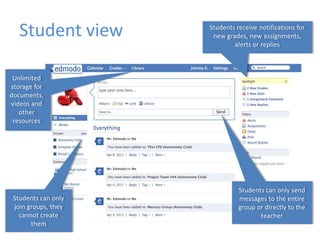
Student view      Students receive notifications for
                      new grades, new assignments,
                             alerts or replies


 Unlimited
storage for
documents,
videos and
   other
 resources


                               Students can only send
 Students can only             messages to the entire
 join groups, they             group or directly to the
   cannot create                      teacher
       them
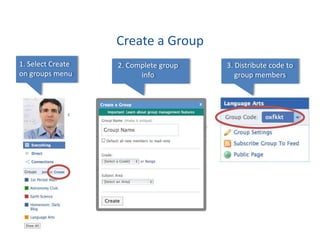
Create a Group
1. Select Create   2. Complete group   3. Distribute code to
on groups menu           info             group members
Group Ideas for the
       Blended Learning Classroom
• Subject specific groups

• Literature Circles or other style of book
  discussion groups

• Math problem solving groups

• Project Based Learning groups
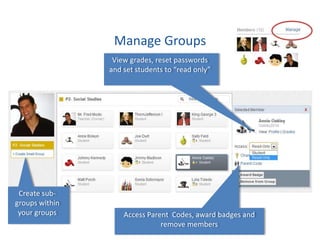
Manage Groups
                 View grades, reset passwords
                and set students to “read only”


 Create sub-
groups within
 your groups        Access Parent Codes, award badges and
                               remove members
Collaborative Discussions
• Post questions for class discussion spanning a
  period of time

• Check for understanding by asking students to
  post learning from a concept taught

• Instruct students on how to extend each
  other’s conversations with questions
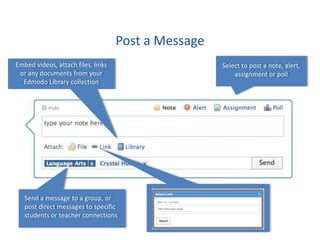
Post a Message
Embed videos, attach files, links                    Select to post a note, alert,
 or any documents from your                              assignment or poll
  Edmodo Library collection


   Send a message to a group, or
   post direct messages to specific
   students or teacher connections
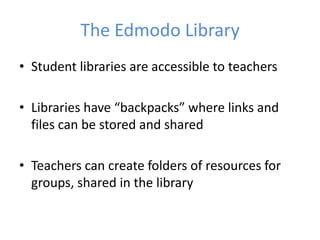
The Edmodo Library
• Student libraries are accessible to teachers

• Libraries have “backpacks” where links and
  files can be stored and shared

• Teachers can create folders of resources for
  groups, shared in the library
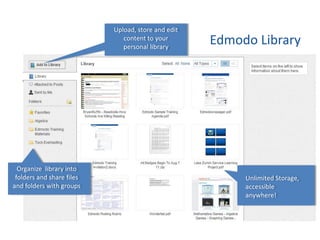
Upload, store and edit
                              content to your
                              personal library
                                                    Edmodo Library


  Organize library into
 folders and share files                                 Unlimited Storage,
and folders with groups                                  accessible
                                                         anywhere!
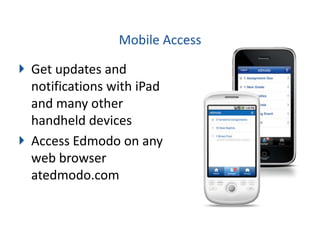
Mobile Access

Get updates and
notifications with iPad
and many other
handheld devices
Access Edmodo on any
web browser
atedmodo.com
Collaboration
• Edmodo syncs with many familiar web based
  applications
• Edmodo syncs with Google Docs!
• Discussion within topic/subject groups at
  students’ own paces
• Join Edmodo communities to find new ways
  for online learning
• Create folders of shared resources
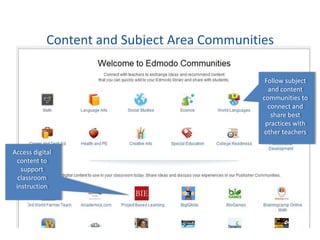
Content and Subject Area Communities

                                               Follow subject
                                                and content
                                              communities to
                                                connect and
                                                 share best
                                               practices with
                                              other teachers

Access digital
 content to
   support
  classroom
 instruction
Classroom Integration and Support
    Weekly Edmodo Webinars:
1   http://help.edmodo.com/webinars/

    Explore resources in the Help Center:
    help.edmodo.com
2
    Ask the Edmodo Support Community:
    http://www.edmodo.com/community/support

3   Follow http://blog.edmodo.com/ for more ways to use
    Edmodo in the classroom.
Visual Appeal
• Edmodo is a platform with a familiar layout and
  language- a teacher could dive in right away!

• Familiarity is important to get teachers on board
  with trying to integrate a learning platform.

• Simply put- It looks like Facebook. Students are
  attracted to that layout.

Edmodo pp

  • 1.
    Reviewing Learning Management Systems (LMS) for Blended and Online Learning Jaclyn Karabinas- ECOMP 6203
  • 2.
    What is Edmodo? Freesocial learning network for teachers, students, schools and districts Provides an engaging platform for blended learning and safe, productive social networking Safe and easy way to: − Connect & Communicate in a learning environment − Exchangeideas − Link with other educational web based programs
  • 3.
    Communication Tools • Talkin “Facebook Style” post/reply format • Create and join teacher-created groups • Participate in polls • Alerts available by text
  • 4.
    Student view Students receive notifications for new grades, new assignments, alerts or replies Unlimited storage for documents, videos and other resources Students can only send Students can only messages to the entire join groups, they group or directly to the cannot create teacher them
  • 5.
    Create a Group 1.Select Create 2. Complete group 3. Distribute code to on groups menu info group members
  • 6.
    Group Ideas forthe Blended Learning Classroom • Subject specific groups • Literature Circles or other style of book discussion groups • Math problem solving groups • Project Based Learning groups
  • 7.
    Manage Groups View grades, reset passwords and set students to “read only” Create sub- groups within your groups Access Parent Codes, award badges and remove members
  • 8.
    Collaborative Discussions • Postquestions for class discussion spanning a period of time • Check for understanding by asking students to post learning from a concept taught • Instruct students on how to extend each other’s conversations with questions
  • 9.
    Post a Message Embedvideos, attach files, links Select to post a note, alert, or any documents from your assignment or poll Edmodo Library collection Send a message to a group, or post direct messages to specific students or teacher connections
  • 10.
    The Edmodo Library •Student libraries are accessible to teachers • Libraries have “backpacks” where links and files can be stored and shared • Teachers can create folders of resources for groups, shared in the library
  • 11.
    Upload, store andedit content to your personal library Edmodo Library Organize library into folders and share files Unlimited Storage, and folders with groups accessible anywhere!
  • 12.
    Mobile Access Get updatesand notifications with iPad and many other handheld devices Access Edmodo on any web browser atedmodo.com
  • 13.
    Collaboration • Edmodo syncswith many familiar web based applications • Edmodo syncs with Google Docs! • Discussion within topic/subject groups at students’ own paces • Join Edmodo communities to find new ways for online learning • Create folders of shared resources
  • 14.
    Content and SubjectArea Communities Follow subject and content communities to connect and share best practices with other teachers Access digital content to support classroom instruction
  • 15.
    Classroom Integration andSupport Weekly Edmodo Webinars: 1 http://help.edmodo.com/webinars/ Explore resources in the Help Center: help.edmodo.com 2 Ask the Edmodo Support Community: http://www.edmodo.com/community/support 3 Follow http://blog.edmodo.com/ for more ways to use Edmodo in the classroom.
  • 16.
    Visual Appeal • Edmodois a platform with a familiar layout and language- a teacher could dive in right away! • Familiarity is important to get teachers on board with trying to integrate a learning platform. • Simply put- It looks like Facebook. Students are attracted to that layout.