Introductions What is edmodo? Edmodo example Uses, benefits & challenges  Q&A Try it out
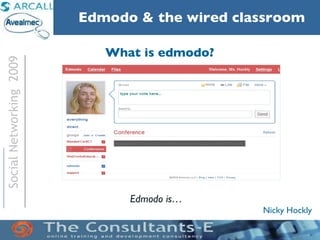
What is edmodo? Edmodo is…
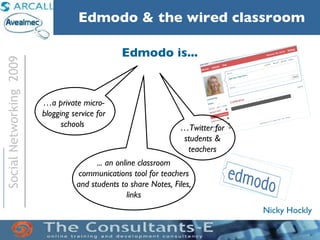
Edmodo is... ... an online classroom communications tool for teachers and students to share Notes, Files, links … Twitter for students & teachers … a private micro-blogging service for schools
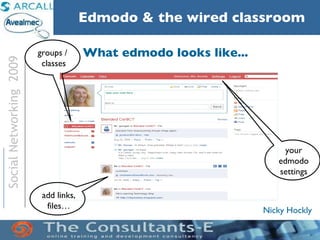
What edmodo looks like... groups /  classes your edmodo settings add links, files…
Try it out: 1) Go to www.edmodo.com 2) Click ‘student’ 3) Group code:  rcv618 4) Fill in username etc. 5) Click ‘Sign up’
Try it out: 6) Click on ‘Conference’ 7) Read msg from Nicky 8) Type a response!  NB : In ‘Send to’, type ‘Conference’, then click ‘Send’.
What edmodo looks like... groups /  classes group messages the cool stuff filter messages by type
The cool stuff... embed  video; add  multimedia  files set, receive & grade assignments add a  poll
Blended ICT TT course: edmodo f2f Learners :  shared project urls (e.g.blogs, dvolver), and usernames (e.g. delicious)  provided one-line feedback on projects shared work (e.g. Paint jpegs) shared links and videos brainstormed (e.g one adv & disadv of x) gave quick feedback (e.g. on an activity; round up – one thing learned) Teacher : provided class worksheets provided class audio + tasks provided class video (embedded) gave instructions + links
Benefits :    Challenges :
closed, secure network enrolment key immediacy share multimedia use for f2f and/or  online classes paperless classes … . connections & hardware learner expectations (paper) retrieving info teacher fear – lack of ICT training  ……  Benefits :    Challenges :
Q & A
Thanks! More resources at  http://www.theconsultants-e.com

Edmodo Nov2009

  • 1.
  • 2.
  • 3.
    Introductions What isedmodo? Edmodo example Uses, benefits & challenges Q&A Try it out
  • 4.
    What is edmodo?Edmodo is…
  • 5.
    Edmodo is... ...an online classroom communications tool for teachers and students to share Notes, Files, links … Twitter for students & teachers … a private micro-blogging service for schools
  • 6.
    What edmodo lookslike... groups / classes your edmodo settings add links, files…
  • 7.
    Try it out:1) Go to www.edmodo.com 2) Click ‘student’ 3) Group code: rcv618 4) Fill in username etc. 5) Click ‘Sign up’
  • 8.
    Try it out:6) Click on ‘Conference’ 7) Read msg from Nicky 8) Type a response! NB : In ‘Send to’, type ‘Conference’, then click ‘Send’.
  • 9.
    What edmodo lookslike... groups / classes group messages the cool stuff filter messages by type
  • 10.
    The cool stuff...embed video; add multimedia files set, receive & grade assignments add a poll
  • 11.
    Blended ICT TTcourse: edmodo f2f Learners : shared project urls (e.g.blogs, dvolver), and usernames (e.g. delicious) provided one-line feedback on projects shared work (e.g. Paint jpegs) shared links and videos brainstormed (e.g one adv & disadv of x) gave quick feedback (e.g. on an activity; round up – one thing learned) Teacher : provided class worksheets provided class audio + tasks provided class video (embedded) gave instructions + links
  • 12.
    Benefits : Challenges :
  • 13.
    closed, secure networkenrolment key immediacy share multimedia use for f2f and/or online classes paperless classes … . connections & hardware learner expectations (paper) retrieving info teacher fear – lack of ICT training …… Benefits : Challenges :
  • 14.
  • 15.
    Thanks! More resourcesat http://www.theconsultants-e.com