Edius 7 Techniques
Colour Balance
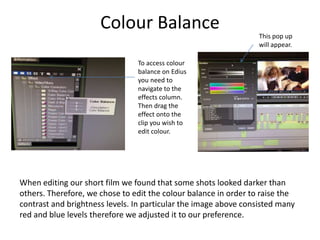
When editing our short film we found that some shots looked darker than
others. Therefore, we chose to edit the colour balance in order to raise the
contrast and brightness levels. In particular the image above consisted many
red and blue levels therefore we adjusted it to our preference.
To access colour
balance on Edius
you need to
navigate to the
effects column.
Then drag the
effect onto the
clip you wish to
edit colour.
This pop up
will appear.
Colour Correction
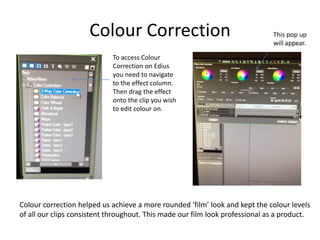
To access Colour
Correction on Edius
you need to navigate
to the effect column.
Then drag the effect
onto the clip you wish
to edit colour on.
Colour correction helped us achieve a more rounded ‘film’ look and kept the colour levels
of all our clips consistent throughout. This made our film look professional as a product.
Image Cropping
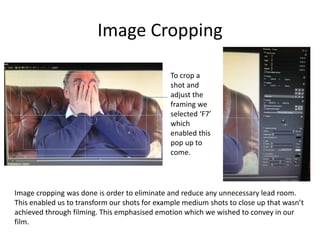
Image cropping was done is order to eliminate and reduce any unnecessary lead room.
This enabled us to transform our shots for example medium shots to close up that wasn’t
achieved through filming. This emphasised emotion which we wished to convey in our
film.
To crop a
shot and
adjust the
framing we
selected ‘F7’
which
enabled this
pop up to
come.
Editing Sound Levels
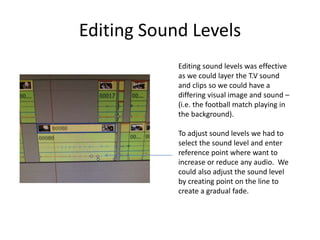
Editing sound levels was effective
as we could layer the T.V sound
and clips so we could have a
differing visual image and sound –
(i.e. the football match playing in
the background).
To adjust sound levels we had to
select the sound level and enter
reference point where want to
increase or reduce any audio. We
could also adjust the sound level
by creating point on the line to
create a gradual fade.
Strobe Effect
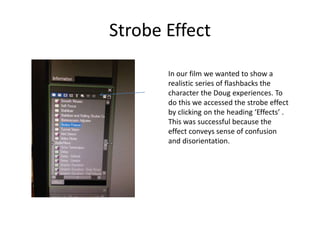
In our film we wanted to show a
realistic series of flashbacks the
character the Doug experiences. To
do this we accessed the strobe effect
by clicking on the heading ‘Effects’ .
This was successful because the
effect conveys sense of confusion
and disorientation.
Dissolve Effect
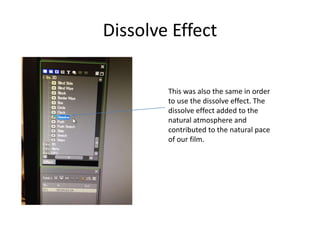
This was also the same in order
to use the dissolve effect. The
dissolve effect added to the
natural atmosphere and
contributed to the natural pace
of our film.

Edius 7 techniques

  • 1.
  • 2.
    Colour Balance When editingour short film we found that some shots looked darker than others. Therefore, we chose to edit the colour balance in order to raise the contrast and brightness levels. In particular the image above consisted many red and blue levels therefore we adjusted it to our preference. To access colour balance on Edius you need to navigate to the effects column. Then drag the effect onto the clip you wish to edit colour. This pop up will appear.
  • 3.
    Colour Correction To accessColour Correction on Edius you need to navigate to the effect column. Then drag the effect onto the clip you wish to edit colour on. Colour correction helped us achieve a more rounded ‘film’ look and kept the colour levels of all our clips consistent throughout. This made our film look professional as a product.
  • 4.
    Image Cropping Image croppingwas done is order to eliminate and reduce any unnecessary lead room. This enabled us to transform our shots for example medium shots to close up that wasn’t achieved through filming. This emphasised emotion which we wished to convey in our film. To crop a shot and adjust the framing we selected ‘F7’ which enabled this pop up to come.
  • 5.
    Editing Sound Levels Editingsound levels was effective as we could layer the T.V sound and clips so we could have a differing visual image and sound – (i.e. the football match playing in the background). To adjust sound levels we had to select the sound level and enter reference point where want to increase or reduce any audio. We could also adjust the sound level by creating point on the line to create a gradual fade.
  • 6.
    Strobe Effect In ourfilm we wanted to show a realistic series of flashbacks the character the Doug experiences. To do this we accessed the strobe effect by clicking on the heading ‘Effects’ . This was successful because the effect conveys sense of confusion and disorientation.
  • 7.
    Dissolve Effect This wasalso the same in order to use the dissolve effect. The dissolve effect added to the natural atmosphere and contributed to the natural pace of our film.