EditShare Brands Collaborative Storage Servers, with Workflow software Ingest and Media Asset Management Tools Archive and data backup solutions  –  nearline and LTO  Ingest and playout solutions Workgroup non-linear editing solutions
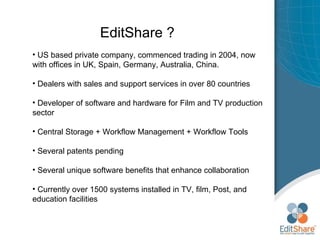
EditShare ? US based private company, commenced trading in 2004, now with offices in UK, Spain, Germany, Australia, China. Dealers with sales and support services in over 80 countries Developer of software and hardware for Film and TV production sector Central Storage + Workflow Management + Workflow Tools Several patents pending Several unique software benefits that enhance collaboration Currently over 1500 systems installed in TV, film, Post, and education facilities
Typical simple EditShare workflow Multiple NLE brands Simple networking Mac, Windows, and Linux Realtime (edit in place) editing
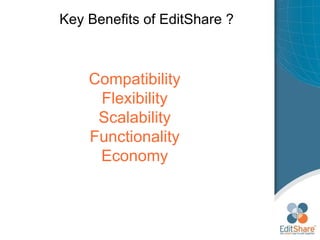
Key Benefits of EditShare ? Compatibility Flexibility Scalability Functionality Economy
Key Benefits of EditShare ? Simple Ethernet networking but with full realtime bandwidths for all film editorial and Broadcast TV workflows No storage license per seat required – so all suites in facility  can be collaborate  Full management software to control user access to files especially designed for F&TV workflow (6 th  generation) Simultaneous Mac, Windows, and Linux support  without additional licenses or emulators Full collaboration for ENTIRE facility without the need for expensive Fibre Channel hardware, software, and licenses Unique Project Sharing features for Avid or Final Cut Pro; Also offers additional workflow benefits for Premiere Pro, Edius, and other NLE or content creation software packages. A range of new products to complete the workflow including Ingest, backup, archive, nearline, MAM, etc
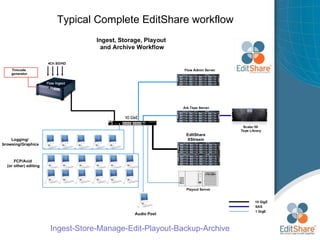
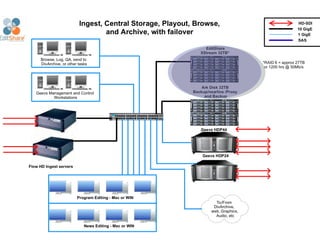
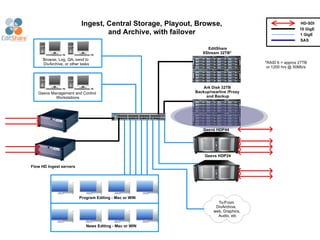
Typical Complete EditShare workflow Ingest-Store-Manage-Edit-Playout-Backup-Archive
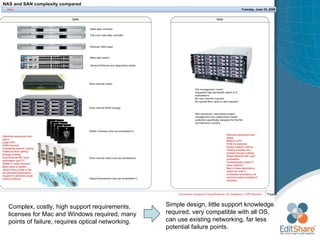
Complex, costly, high support requirements, licenses for Mac and Windows required, many points of failure, requires optical networking.  Simple design, little support knowledge required, very compatible with all OS, can use existing networking, far less potential failure points.
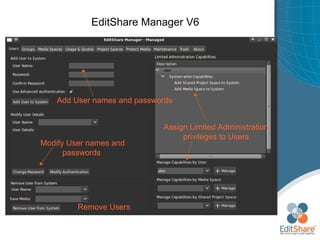
EditShare Manager V6 Add User names and passwords  Assign Limited Administration privileges to Users Modify User names and passwords  Remove Users
EditShare Manager V6 Add Media Spaces names  Change properties at any time Add Users or Groups to assign access to spaces Remove Users or Groups  access to spaces
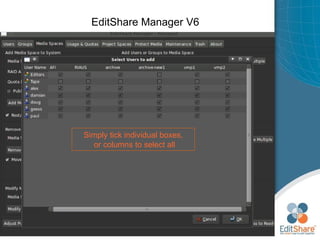
EditShare Manager V6 Simply tick individual boxes, or columns to select all
Avid Project Sharing Avid Project Sharing is only possible on Avid or EditShare storage systems
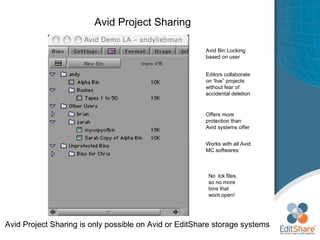
Avid Project Sharing Avid Project Sharing is only possible on Avid or EditShare storage systems Avid Bin Locking based on user Editors collaborate on ‘live” projects without fear of accidental deletion Offers more protection than Avid systems offer Works with all Avid MC softwares No .lck files, so no more bins that wont open!
Avid Style Sharing The first editor to open a Bin gets the write access green lock
Avid Style Sharing Other editors who open the same Bin gets a red lock meaning Read-only access
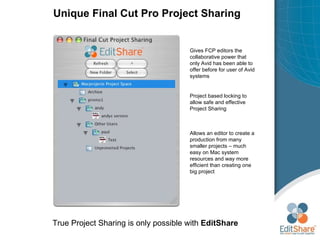
Unique  Final Cut Pro Project Sharing FCP Project Sharing is only possible with  EditShare EditShare Project Browser
Unique  Final Cut Pro Project Sharing True Project Sharing is only possible with  EditShare Gives FCP editors the collaborative power that only Avid has been able to offer before for user of Avid systems Project based locking to allow safe and effective Project Sharing Allows an editor to create a production from many smaller projects – much easy on Mac system resources and way more efficient than creating one big project
EditShare Current Product Line April 2011
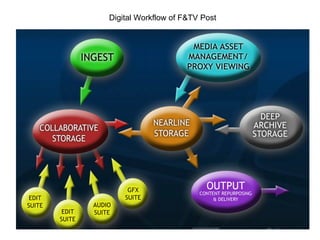
Digital Workflow of F&TV Post
 
EditShare Storage Series 3U 16 drive RAIDS: 1or 2  8 port or 16 port 5U 24 drive RAIDS: 1 or 2  12 port  8U 40 drive RAIDS: 1 or 2  12 port + 16 port Dual Core CPU, Intel system boards RAID5 (or RAID5+1, RAID6, etc) Redundant Power Supplies 2 GigE standard Up to 8 internal GigE Up to 2 10GigE
 
EditShare XStream Series Rack mount server with storage plus expansion storage Utilizes  PCI-e technology – fastest available Expand in 16 drive RAID units RAID50/60) across all drives Higher stream counts Higher read/write data rates Suitable for : -High number of editors requiring access to the same files More streams due to less latency - data is spread over more RAIDs 150 + streams of 50Mbps on 64 drive system DI workflows: Up to  3 streams of 2K DPX realtime playback per 16 drive RAID
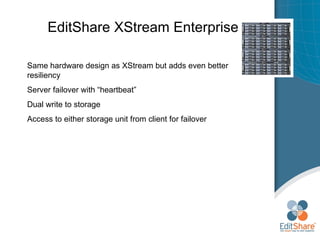
EditShare XStream Enterprise Same hardware design as XStream but adds even better resiliency Server failover with “heartbeat” Dual write to storage Access to either storage unit from client for failover
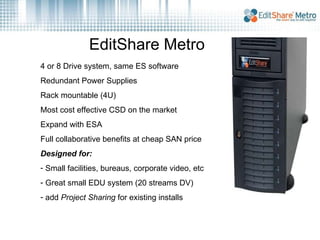
EditShare Metro 4 or 8 Drive system, same ES software Redundant Power Supplies Rack mountable (4U) Most cost effective CSD on the market Expand with ESA Full collaborative benefits at cheap SAN price Designed for: Small facilities, bureaus, corporate video, etc Great small EDU system (20 streams DV)  add  Project Sharing  for existing installs
 
 
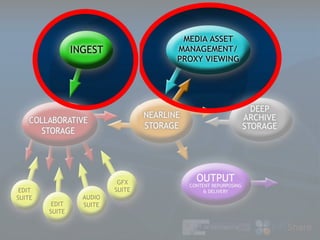
Ingest Server Multi-channel Ingest server  supporting Avid and Final Cut Pro formats Up to 3 codecs  per  channel (Proxy + 2) 4CH SD or SD/HD per server All Avid JFIF and MXF resolutions FCP DV25, 50, 100HD File Ingest for XDCam HD, P2, and AVCIntra Transcode or re-wrap on ingest from file Chunking and “edit-while-capture”, scheduled ingest External Timecode 8ch AES per input channel
Ingest Server Media Browser and Media Manager Simple media browser for rapid and multiple search  Allows drag’n’drop to bins directly Proxy viewing for fast indexing Universal File Format allows integration of Avid & FCP Full set of technical metadata Mark points, create subclips, drag these directly to NLE New integrated fast logger including custom metadata Basic yet effective editing features within the browser We will also have very tight integration for archive
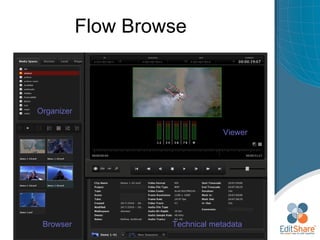
Flow Browse Browser Organizer Technical metadata Viewer
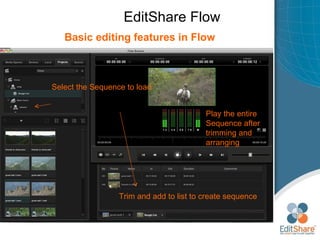
EditShare Flow Basic editing features in Flow Create a Project and Sequence in the Flow browser Make clip selections, trim, and play back Drag the clip thumbnails direct to Avid and FCP bins Protection: other users can play or duplicate but cannot edit each others sequences
EditShare Flow Designed  Basic editing features in Flow Select the Sequence to load  Trim and add to list to create sequence Play the entire Sequence after trimming and arranging
Flow Logger Multiple customizable templates allow one click logging with complex descriptive metadata Source Viewer Logging with picture references ( for sports, archiving, or reality shows ) Input selection
Creating Custom Metadata Templates
EditShare Flow Designed  Enhanced Admin GUI for configuration and monitoring
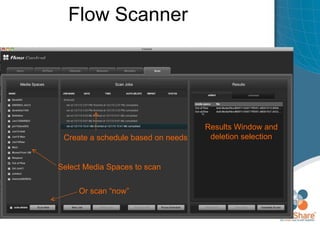
Flow Scanner Ability to scan for new media and generate proxy files Will detect video ingested by the NLE system for all current Flow resolutions including  DVCProHD, DnXHD resolutions Flow Ingest cards not required to do this: Database/proxy server with Flow is all you need to manage storage Scan “now” or set schedule by media space in Admin tool Allows removal of proxy files no longer required with some automation if selected Faster than realtime proxy creation – very efficient media management tool
Flow Scanner Designed  Select Media Spaces to scan Create a schedule based on needs  Results Window and deletion selection Or scan “now”
Unique features: Flow Generates Universal Media Files from ingested files Can generate Universal Media Files from Avid ingested material for use in FCP Ingest in Avid, scan, and create .mov and .mxf Universal Media and proxies – one media file, two metadata clips in Browser DV25, DV50, IMX30, IMX40, IMX50, and DVCProHD support  (more to come) A strong differentiator when selling against Final Cut Server Automatic Duck now completely integrated for UMF to allow movement of sequences and media between Avid and FCP  simply and without file duplication or transcoding.
Latest features: Flow Full EditShare integration with Automatic Duck Pro Import and Pro Export
 
 
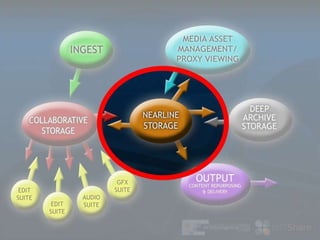
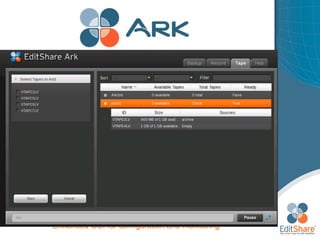
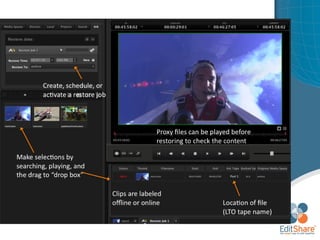
Media Browser New Products 2010 Archive and backup product fully integrated into the ES lineup  Initially to automate the backup/archive of folders and mediaspaces File back up and restore Flow integration Strong file-based acquisition solution Completely in tune with EditShare storage and workflow products Support for major autoloader/tape library systems Products : Server with  4TB storage Server with 8, 16, 32TB onboard as “nearline” disk Expansion storage in 8/16/32TB chassis) Add your choice of Tape Library- supported via SAS or FC connectivity
Media Browser Updated features and functions Activation for Ark Disk system to be accessible by Editors in the event of an emergency when the main storage server is out of action Can take the place of multiple storage servers in emergency situation Performance determined by size/number of drives available in Ark storage. Activation and deactivation wizard
Media Browser Enhanced GUI for configuration and monitoring
Media Browser
Media Browser Enhanced GUI for configuration and monitoring
Media Browser
Media Browser Updated features and functions Can be added to a large ES server group to replace a server that is down
Media Browser To design a system: How many connected clients? How many are editing/realtime How many are  push-pull  users? What  is the content creation software being used? What OS? Multiple? What are the video resolutions expected to be used? What is the expectation of performance on a daily basis as far as number of streams per client? How much storage is required (hours @ what rez)
Media Browser Typical System EditShare Storage server  -Storage Series, XStream, Field, or Metro Networking options:  Switch, copper or optical connectivity, cables Spares Kit:  drives, or entire parts kit System Support Contract : phone, email, remote support with software updates as released UPS  for  safety of data Additional Goodies: System Extended Hardware Warranty Flow Database Server and client software Flow Ingest server(s) Ark Disk automated nearline storage system Ark Tape automated archive/backup to LTO system plus LTO Library EditShare engineer to install and train
 

EditShare overview Jan2011

  • 1.
  • 2.
    EditShare Brands CollaborativeStorage Servers, with Workflow software Ingest and Media Asset Management Tools Archive and data backup solutions – nearline and LTO Ingest and playout solutions Workgroup non-linear editing solutions
  • 3.
    EditShare ? USbased private company, commenced trading in 2004, now with offices in UK, Spain, Germany, Australia, China. Dealers with sales and support services in over 80 countries Developer of software and hardware for Film and TV production sector Central Storage + Workflow Management + Workflow Tools Several patents pending Several unique software benefits that enhance collaboration Currently over 1500 systems installed in TV, film, Post, and education facilities
  • 4.
    Typical simple EditShareworkflow Multiple NLE brands Simple networking Mac, Windows, and Linux Realtime (edit in place) editing
  • 5.
    Key Benefits ofEditShare ? Compatibility Flexibility Scalability Functionality Economy
  • 6.
    Key Benefits ofEditShare ? Simple Ethernet networking but with full realtime bandwidths for all film editorial and Broadcast TV workflows No storage license per seat required – so all suites in facility can be collaborate Full management software to control user access to files especially designed for F&TV workflow (6 th generation) Simultaneous Mac, Windows, and Linux support without additional licenses or emulators Full collaboration for ENTIRE facility without the need for expensive Fibre Channel hardware, software, and licenses Unique Project Sharing features for Avid or Final Cut Pro; Also offers additional workflow benefits for Premiere Pro, Edius, and other NLE or content creation software packages. A range of new products to complete the workflow including Ingest, backup, archive, nearline, MAM, etc
  • 7.
    Typical Complete EditShareworkflow Ingest-Store-Manage-Edit-Playout-Backup-Archive
  • 8.
    Complex, costly, highsupport requirements, licenses for Mac and Windows required, many points of failure, requires optical networking. Simple design, little support knowledge required, very compatible with all OS, can use existing networking, far less potential failure points.
  • 9.
    EditShare Manager V6Add User names and passwords Assign Limited Administration privileges to Users Modify User names and passwords Remove Users
  • 10.
    EditShare Manager V6Add Media Spaces names Change properties at any time Add Users or Groups to assign access to spaces Remove Users or Groups access to spaces
  • 11.
    EditShare Manager V6Simply tick individual boxes, or columns to select all
  • 12.
    Avid Project SharingAvid Project Sharing is only possible on Avid or EditShare storage systems
  • 13.
    Avid Project SharingAvid Project Sharing is only possible on Avid or EditShare storage systems Avid Bin Locking based on user Editors collaborate on ‘live” projects without fear of accidental deletion Offers more protection than Avid systems offer Works with all Avid MC softwares No .lck files, so no more bins that wont open!
  • 14.
    Avid Style SharingThe first editor to open a Bin gets the write access green lock
  • 15.
    Avid Style SharingOther editors who open the same Bin gets a red lock meaning Read-only access
  • 16.
    Unique FinalCut Pro Project Sharing FCP Project Sharing is only possible with EditShare EditShare Project Browser
  • 17.
    Unique FinalCut Pro Project Sharing True Project Sharing is only possible with EditShare Gives FCP editors the collaborative power that only Avid has been able to offer before for user of Avid systems Project based locking to allow safe and effective Project Sharing Allows an editor to create a production from many smaller projects – much easy on Mac system resources and way more efficient than creating one big project
  • 18.
  • 19.
  • 20.
  • 21.
    EditShare Storage Series3U 16 drive RAIDS: 1or 2 8 port or 16 port 5U 24 drive RAIDS: 1 or 2 12 port 8U 40 drive RAIDS: 1 or 2 12 port + 16 port Dual Core CPU, Intel system boards RAID5 (or RAID5+1, RAID6, etc) Redundant Power Supplies 2 GigE standard Up to 8 internal GigE Up to 2 10GigE
  • 22.
  • 23.
    EditShare XStream SeriesRack mount server with storage plus expansion storage Utilizes PCI-e technology – fastest available Expand in 16 drive RAID units RAID50/60) across all drives Higher stream counts Higher read/write data rates Suitable for : -High number of editors requiring access to the same files More streams due to less latency - data is spread over more RAIDs 150 + streams of 50Mbps on 64 drive system DI workflows: Up to 3 streams of 2K DPX realtime playback per 16 drive RAID
  • 24.
    EditShare XStream EnterpriseSame hardware design as XStream but adds even better resiliency Server failover with “heartbeat” Dual write to storage Access to either storage unit from client for failover
  • 25.
    EditShare Metro 4or 8 Drive system, same ES software Redundant Power Supplies Rack mountable (4U) Most cost effective CSD on the market Expand with ESA Full collaborative benefits at cheap SAN price Designed for: Small facilities, bureaus, corporate video, etc Great small EDU system (20 streams DV) add Project Sharing for existing installs
  • 26.
  • 27.
  • 28.
    Ingest Server Multi-channelIngest server supporting Avid and Final Cut Pro formats Up to 3 codecs per channel (Proxy + 2) 4CH SD or SD/HD per server All Avid JFIF and MXF resolutions FCP DV25, 50, 100HD File Ingest for XDCam HD, P2, and AVCIntra Transcode or re-wrap on ingest from file Chunking and “edit-while-capture”, scheduled ingest External Timecode 8ch AES per input channel
  • 29.
    Ingest Server MediaBrowser and Media Manager Simple media browser for rapid and multiple search Allows drag’n’drop to bins directly Proxy viewing for fast indexing Universal File Format allows integration of Avid & FCP Full set of technical metadata Mark points, create subclips, drag these directly to NLE New integrated fast logger including custom metadata Basic yet effective editing features within the browser We will also have very tight integration for archive
  • 30.
    Flow Browse BrowserOrganizer Technical metadata Viewer
  • 31.
    EditShare Flow Basicediting features in Flow Create a Project and Sequence in the Flow browser Make clip selections, trim, and play back Drag the clip thumbnails direct to Avid and FCP bins Protection: other users can play or duplicate but cannot edit each others sequences
  • 32.
    EditShare Flow Designed Basic editing features in Flow Select the Sequence to load Trim and add to list to create sequence Play the entire Sequence after trimming and arranging
  • 33.
    Flow Logger Multiplecustomizable templates allow one click logging with complex descriptive metadata Source Viewer Logging with picture references ( for sports, archiving, or reality shows ) Input selection
  • 34.
  • 35.
    EditShare Flow Designed Enhanced Admin GUI for configuration and monitoring
  • 36.
    Flow Scanner Abilityto scan for new media and generate proxy files Will detect video ingested by the NLE system for all current Flow resolutions including DVCProHD, DnXHD resolutions Flow Ingest cards not required to do this: Database/proxy server with Flow is all you need to manage storage Scan “now” or set schedule by media space in Admin tool Allows removal of proxy files no longer required with some automation if selected Faster than realtime proxy creation – very efficient media management tool
  • 37.
    Flow Scanner Designed Select Media Spaces to scan Create a schedule based on needs Results Window and deletion selection Or scan “now”
  • 38.
    Unique features: FlowGenerates Universal Media Files from ingested files Can generate Universal Media Files from Avid ingested material for use in FCP Ingest in Avid, scan, and create .mov and .mxf Universal Media and proxies – one media file, two metadata clips in Browser DV25, DV50, IMX30, IMX40, IMX50, and DVCProHD support (more to come) A strong differentiator when selling against Final Cut Server Automatic Duck now completely integrated for UMF to allow movement of sequences and media between Avid and FCP simply and without file duplication or transcoding.
  • 39.
    Latest features: FlowFull EditShare integration with Automatic Duck Pro Import and Pro Export
  • 40.
  • 41.
  • 42.
    Media Browser NewProducts 2010 Archive and backup product fully integrated into the ES lineup Initially to automate the backup/archive of folders and mediaspaces File back up and restore Flow integration Strong file-based acquisition solution Completely in tune with EditShare storage and workflow products Support for major autoloader/tape library systems Products : Server with 4TB storage Server with 8, 16, 32TB onboard as “nearline” disk Expansion storage in 8/16/32TB chassis) Add your choice of Tape Library- supported via SAS or FC connectivity
  • 43.
    Media Browser Updatedfeatures and functions Activation for Ark Disk system to be accessible by Editors in the event of an emergency when the main storage server is out of action Can take the place of multiple storage servers in emergency situation Performance determined by size/number of drives available in Ark storage. Activation and deactivation wizard
  • 44.
    Media Browser EnhancedGUI for configuration and monitoring
  • 45.
    Media Browser EnhancedGUI for configuration and monitoring
  • 46.
  • 47.
    Media Browser EnhancedGUI for configuration and monitoring
  • 48.
  • 49.
    Media Browser Updatedfeatures and functions Can be added to a large ES server group to replace a server that is down
  • 50.
    Media Browser Todesign a system: How many connected clients? How many are editing/realtime How many are push-pull users? What is the content creation software being used? What OS? Multiple? What are the video resolutions expected to be used? What is the expectation of performance on a daily basis as far as number of streams per client? How much storage is required (hours @ what rez)
  • 51.
    Media Browser TypicalSystem EditShare Storage server -Storage Series, XStream, Field, or Metro Networking options: Switch, copper or optical connectivity, cables Spares Kit: drives, or entire parts kit System Support Contract : phone, email, remote support with software updates as released UPS for safety of data Additional Goodies: System Extended Hardware Warranty Flow Database Server and client software Flow Ingest server(s) Ark Disk automated nearline storage system Ark Tape automated archive/backup to LTO system plus LTO Library EditShare engineer to install and train
  • 52.

Editor's Notes

  • #34 This is the completely user customizable logging system to allow very complex and fast logging. Perfect for live events such as Reality TV, drama, or sports. Clips are immediately available for search within the browser by the entire workgroup.