Teacher as Researcher

Library Instruction for ED 690, Spring
                 2012


                            Photo by Steven De Polo
Objectives
Develop an awareness of the different
 library resources available for education
 research
Generate search terms and organize your
 search strategy
Become familiar with basic and advanced
 search features in databases in order to
 search the journal literature
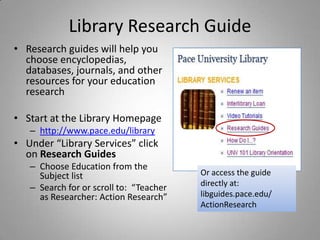
Library Research Guide
• Research guides will help you
  choose encyclopedias,
  databases, journals, and other
  resources for your education
  research

• Start at the Library Homepage
   – http://www.pace.edu/library
• Under “Library Services” click
  on Research Guides
   – Choose Education from the
     Subject list                        Or access the guide
                                         directly at:
   – Search for or scroll to: “Teacher
     as Researcher: Action Research”     libguides.pace.edu/
                                         ActionResearch
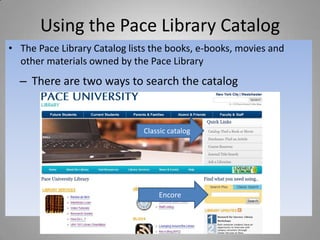
Using the Pace Library Catalog
• The Pace Library Catalog lists the books, e-books, movies and
  other materials owned by the Pace Library
  – There are two ways to search the catalog


                              Classic catalog


                                  Encore
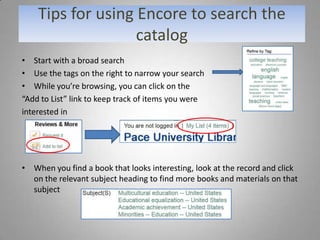
Tips for using Encore to search the
                   catalog
• Start with a broad search
• Use the tags on the right to narrow your search
• While you’re browsing, you can click on the
“Add to List” link to keep track of items you were
interested in


• When you find a book that looks interesting, look at the record and click
  on the relevant subject heading to find more books and materials on that
  subject
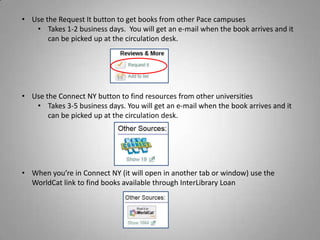
• Use the Request It button to get books from other Pace campuses
   • Takes 1-2 business days. You will get an e-mail when the book arrives and it
       can be picked up at the circulation desk.


• Use the Connect NY button to find resources from other universities
   • Takes 3-5 business days. You will get an e-mail when the book arrives and it
       can be picked up at the circulation desk.


• When you’re in Connect NY (it will open in another tab or window) use the
  WorldCat link to find books available through InterLibrary Loan
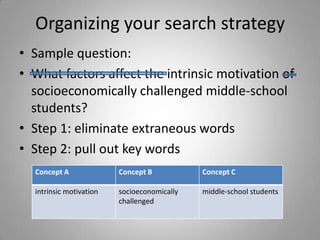
Organizing your search strategy
• Sample question:
• What factors affect the intrinsic motivation of
  socioeconomically challenged middle-school
  students?
• Step 1: eliminate extraneous words
• Step 2: pull out key words
  Concept A              Concept B           Concept C

  intrinsic motivation   socioeconomically   middle-school students
                         challenged
Organizing your search strategy, cont.
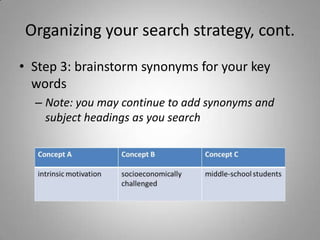
• Step 3: brainstorm synonyms for your key
  words
  – Note: you may continue to add synonyms and
    subject headings as you search
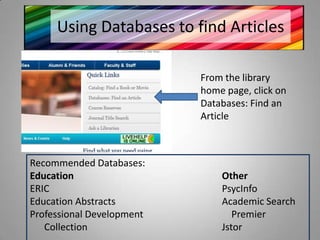
Using Databases to find Articles

                           From the library
                           home page, click on
                           Databases: Find an
                           Article


Recommended Databases:
Education                      Other
ERIC                           PsycInfo
Education Abstracts            Academic Search
Professional Development          Premier
   Collection                  Jstor
Boolean Operators
Boolean Operators & Search Tips
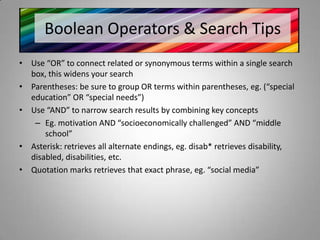
• Use “OR” to connect related or synonymous terms within a single search
  box, this widens your search
• Parentheses: be sure to group OR terms within parentheses, eg. (“special
  education” OR “special needs”)
• Use “AND” to narrow search results by combining key concepts
   – Eg. motivation AND “socioeconomically challenged” AND “middle
      school”
• Asterisk: retrieves all alternate endings, eg. disab* retrieves disability,
  disabled, disabilities, etc.
• Quotation marks retrieves that exact phrase, eg. “social media”
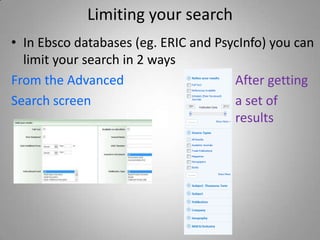
Limiting your search
• In Ebsco databases (eg. ERIC and PsycInfo) you can
  limit your search in 2 ways
From the Advanced                     After getting
Search screen                         a set of
                                      results
Finding Subject headings in PsycInfo
• To review How and Why to use the Thesaurus
  in PsycInfo, view this video:
  – http://tinyurl.com/axvbybr
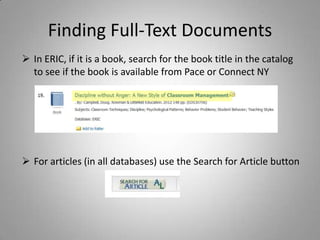
Finding Full-Text Documents
 In ERIC, if it is a book, search for the book title in the catalog
  to see if the book is available from Pace or Connect NY


 For articles (in all databases) use the Search for Article button
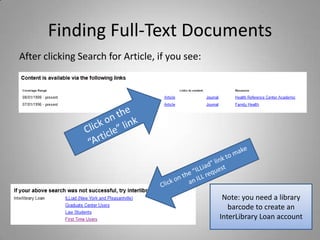
Finding Full-Text Documents
After clicking Search for Article, if you see:


                                                  Note: you need a library
                                                    barcode to create an
                                                 InterLibrary Loan account
To get more help
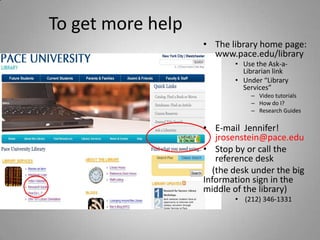
                   • The library home page:
                     www.pace.edu/library
                          • Use the Ask-a-
                            Librarian link
                          • Under “Library
                            Services”
                              – Video tutorials
                              – How do I?
                              – Research Guides

                   • E-mail Jennifer!
                      jrosenstein@pace.edu
                   • Stop by or call the
                      reference desk
                     (the desk under the big
                   Information sign in the
                   middle of the library)
                          • (212) 346-1331
Quiz Time!


tinyurl.com/ed690mcdermott


       Photo by Alberto G.

ED 690

  • 1.
    Teacher as Researcher LibraryInstruction for ED 690, Spring 2012 Photo by Steven De Polo
  • 2.
    Objectives Develop an awarenessof the different library resources available for education research Generate search terms and organize your search strategy Become familiar with basic and advanced search features in databases in order to search the journal literature
  • 3.
    Library Research Guide •Research guides will help you choose encyclopedias, databases, journals, and other resources for your education research • Start at the Library Homepage – http://www.pace.edu/library • Under “Library Services” click on Research Guides – Choose Education from the Subject list Or access the guide directly at: – Search for or scroll to: “Teacher as Researcher: Action Research” libguides.pace.edu/ ActionResearch
  • 4.
    Using the PaceLibrary Catalog • The Pace Library Catalog lists the books, e-books, movies and other materials owned by the Pace Library – There are two ways to search the catalog Classic catalog Encore
  • 5.
    Tips for usingEncore to search the catalog • Start with a broad search • Use the tags on the right to narrow your search • While you’re browsing, you can click on the “Add to List” link to keep track of items you were interested in • When you find a book that looks interesting, look at the record and click on the relevant subject heading to find more books and materials on that subject
  • 6.
    • Use theRequest It button to get books from other Pace campuses • Takes 1-2 business days. You will get an e-mail when the book arrives and it can be picked up at the circulation desk. • Use the Connect NY button to find resources from other universities • Takes 3-5 business days. You will get an e-mail when the book arrives and it can be picked up at the circulation desk. • When you’re in Connect NY (it will open in another tab or window) use the WorldCat link to find books available through InterLibrary Loan
  • 7.
    Organizing your searchstrategy • Sample question: • What factors affect the intrinsic motivation of socioeconomically challenged middle-school students? • Step 1: eliminate extraneous words • Step 2: pull out key words Concept A Concept B Concept C intrinsic motivation socioeconomically middle-school students challenged
  • 8.
    Organizing your searchstrategy, cont. • Step 3: brainstorm synonyms for your key words – Note: you may continue to add synonyms and subject headings as you search
  • 9.
    Using Databases tofind Articles From the library home page, click on Databases: Find an Article Recommended Databases: Education Other ERIC PsycInfo Education Abstracts Academic Search Professional Development Premier Collection Jstor
  • 10.
  • 11.
    Boolean Operators &Search Tips • Use “OR” to connect related or synonymous terms within a single search box, this widens your search • Parentheses: be sure to group OR terms within parentheses, eg. (“special education” OR “special needs”) • Use “AND” to narrow search results by combining key concepts – Eg. motivation AND “socioeconomically challenged” AND “middle school” • Asterisk: retrieves all alternate endings, eg. disab* retrieves disability, disabled, disabilities, etc. • Quotation marks retrieves that exact phrase, eg. “social media”
  • 12.
    Limiting your search •In Ebsco databases (eg. ERIC and PsycInfo) you can limit your search in 2 ways From the Advanced After getting Search screen a set of results
  • 13.
    Finding Subject headingsin PsycInfo • To review How and Why to use the Thesaurus in PsycInfo, view this video: – http://tinyurl.com/axvbybr
  • 14.
    Finding Full-Text Documents In ERIC, if it is a book, search for the book title in the catalog to see if the book is available from Pace or Connect NY  For articles (in all databases) use the Search for Article button
  • 15.
    Finding Full-Text Documents Afterclicking Search for Article, if you see: Note: you need a library barcode to create an InterLibrary Loan account
  • 16.
    To get morehelp • The library home page: www.pace.edu/library • Use the Ask-a- Librarian link • Under “Library Services” – Video tutorials – How do I? – Research Guides • E-mail Jennifer! jrosenstein@pace.edu • Stop by or call the reference desk (the desk under the big Information sign in the middle of the library) • (212) 346-1331
  • 17.