

EchoSign Winter 2012
     New Features. New Functionality. New Fun.


© 2011 Adobe Systems Incorporated. All Rights Reserved. Adobe Confidential.
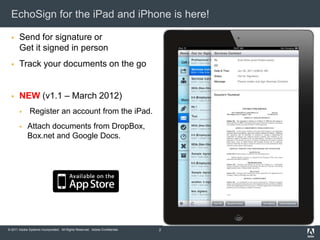
EchoSign for the iPad and iPhone is here!

      Send for signature or
       Get it signed in person
      Track your documents on the go


      NEW (v1.1 – March 2012)
             Register an account from the iPad.
            Attach documents from DropBox,
             Box.net and Google Docs.


© 2011 Adobe Systems Incorporated. All Rights Reserved. Adobe Confidential.   2
Advanced Signer Authentication Policies

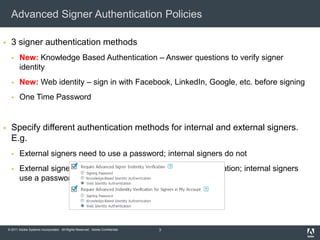
     3 signer authentication methods
          New: Knowledge Based Authentication – Answer questions to verify signer
           identity
          New: Web identity – sign in with Facebook, LinkedIn, Google, etc. before signing
          One Time Password


     Specify different authentication methods for internal and external signers.
      E.g.
          External signers need to use a password; internal signers do not
          External signers need to use Knowledge Based Authentication; internal signers
           use a password


    © 2011 Adobe Systems Incorporated. All Rights Reserved. Adobe Confidential.   3
Knowledge Based Authentication (KBA)

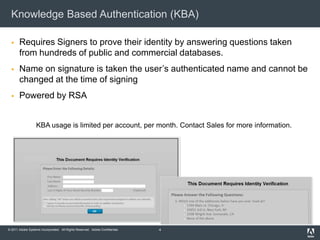
      Requires Signers to prove their identity by answering questions taken
       from hundreds of public and commercial databases.
      Name on signature is taken the user’s authenticated name and cannot be
       changed at the time of signing
      Powered by RSA


                   KBA usage is limited per account, per month. Contact Sales for more information.


© 2011 Adobe Systems Incorporated. All Rights Reserved. Adobe Confidential.   4
Web Identity Authentication

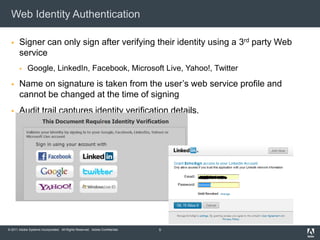
      Signer can only sign after verifying their identity using a 3rd party Web
       service
            Google, LinkedIn, Facebook, Microsoft Live, Yahoo!, Twitter
      Name on signature is taken from the user’s web service profile and
       cannot be changed at the time of signing
      Audit trail captures identity verification details.


© 2011 Adobe Systems Incorporated. All Rights Reserved. Adobe Confidential.   5
Promote your brand to your signers

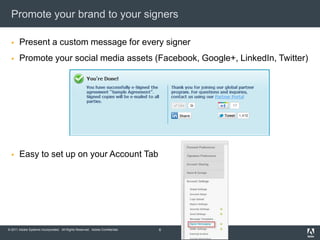
      Present a custom message for every signer
      Promote your social media assets (Facebook, Google+, LinkedIn, Twitter)


      Easy to set up on your Account Tab


© 2011 Adobe Systems Incorporated. All Rights Reserved. Adobe Confidential.   6
Masked Fields

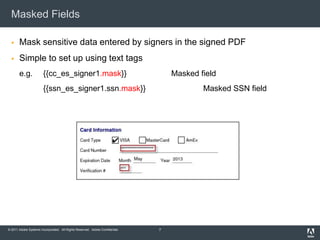
      Mask sensitive data entered by signers in the signed PDF
      Simple to set up using text tags
       e.g.            {{cc_es_signer1.mask}}                                     Masked field
                       {{ssn_es_signer1.ssn.mask}}                                        Masked SSN field


© 2011 Adobe Systems Incorporated. All Rights Reserved. Adobe Confidential.   7
EchoSign Reports Performance Enhancements

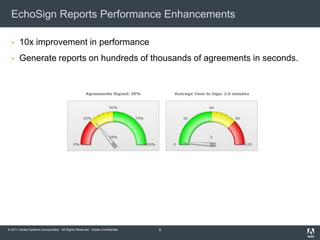
      10x improvement in performance
      Generate reports on hundreds of thousands of agreements in seconds.


© 2011 Adobe Systems Incorporated. All Rights Reserved. Adobe Confidential.   8
And, coming soon ….


© 2011 Adobe Systems Incorporated. All Rights Reserved. Adobe Confidential.
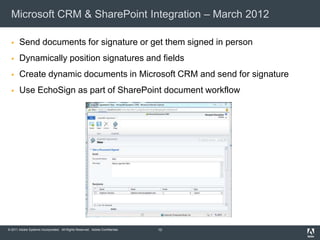
Microsoft CRM & SharePoint Integration – March 2012

      Send documents for signature or get them signed in person
      Dynamically position signatures and fields
      Create dynamic documents in Microsoft CRM and send for signature
      Use EchoSign as part of SharePoint document workflow


© 2011 Adobe Systems Incorporated. All Rights Reserved. Adobe Confidential.   10
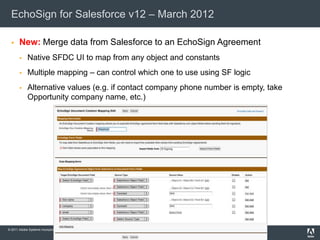
EchoSign for Salesforce v12 – March 2012

      New: Merge data from Salesforce to an EchoSign Agreement
            Native SFDC UI to map from any object and constants
            Multiple mapping – can control which one to use using SF logic
            Alternative values (e.g. if contact company phone number is empty, take
             Opportunity company name, etc.)


© 2011 Adobe Systems Incorporated. All Rights Reserved. Adobe Confidential.   11
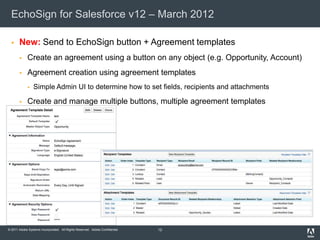
EchoSign for Salesforce v12 – March 2012

      New: Send to EchoSign button + Agreement templates
            Create an agreement using a button on any object (e.g. Opportunity, Account)
            Agreement creation using agreement templates
                Simple Admin UI to determine how to set fields, recipients and attachments

            Create and manage multiple buttons, multiple agreement templates


© 2011 Adobe Systems Incorporated. All Rights Reserved. Adobe Confidential.   12
EchoSign for Salesforce v12 – March 2012

      Improved data mapping from EchoSign to Salesforce
            Map EchoSign agreement fields into any field in Salesforce
            New: Push EchoSign attachments (signed document, audit trail) to any object
            New: Skip a mapping if an EchoSign field value is empty


      New: Automation
            Mark agreements to perform an action (Send, Update, Cancel, Send Reminder)
             using Salesforce automation logic and have that action executed without
             manual intervention
      New: Advanced customization
            More control over the UI – hide/show fields and actions based on profiles


© 2011 Adobe Systems Incorporated. All Rights Reserved. Adobe Confidential.   13
© 2011 Adobe Systems Incorporated. All Rights Reserved. Adobe Confidential.

EchoSign Winter 2012 Release - Feb '12

  • 1.
    EchoSign Winter 2012 New Features. New Functionality. New Fun. © 2011 Adobe Systems Incorporated. All Rights Reserved. Adobe Confidential.
  • 2.
    EchoSign for theiPad and iPhone is here!  Send for signature or Get it signed in person  Track your documents on the go  NEW (v1.1 – March 2012)  Register an account from the iPad.  Attach documents from DropBox, Box.net and Google Docs. © 2011 Adobe Systems Incorporated. All Rights Reserved. Adobe Confidential. 2
  • 3.
    Advanced Signer AuthenticationPolicies  3 signer authentication methods  New: Knowledge Based Authentication – Answer questions to verify signer identity  New: Web identity – sign in with Facebook, LinkedIn, Google, etc. before signing  One Time Password  Specify different authentication methods for internal and external signers. E.g.  External signers need to use a password; internal signers do not  External signers need to use Knowledge Based Authentication; internal signers use a password © 2011 Adobe Systems Incorporated. All Rights Reserved. Adobe Confidential. 3
  • 4.
    Knowledge Based Authentication(KBA)  Requires Signers to prove their identity by answering questions taken from hundreds of public and commercial databases.  Name on signature is taken the user’s authenticated name and cannot be changed at the time of signing  Powered by RSA KBA usage is limited per account, per month. Contact Sales for more information. © 2011 Adobe Systems Incorporated. All Rights Reserved. Adobe Confidential. 4
  • 5.
    Web Identity Authentication  Signer can only sign after verifying their identity using a 3rd party Web service  Google, LinkedIn, Facebook, Microsoft Live, Yahoo!, Twitter  Name on signature is taken from the user’s web service profile and cannot be changed at the time of signing  Audit trail captures identity verification details. © 2011 Adobe Systems Incorporated. All Rights Reserved. Adobe Confidential. 5
  • 6.
    Promote your brandto your signers  Present a custom message for every signer  Promote your social media assets (Facebook, Google+, LinkedIn, Twitter)  Easy to set up on your Account Tab © 2011 Adobe Systems Incorporated. All Rights Reserved. Adobe Confidential. 6
  • 7.
    Masked Fields  Mask sensitive data entered by signers in the signed PDF  Simple to set up using text tags e.g. {{cc_es_signer1.mask}} Masked field {{ssn_es_signer1.ssn.mask}} Masked SSN field © 2011 Adobe Systems Incorporated. All Rights Reserved. Adobe Confidential. 7
  • 8.
    EchoSign Reports PerformanceEnhancements  10x improvement in performance  Generate reports on hundreds of thousands of agreements in seconds. © 2011 Adobe Systems Incorporated. All Rights Reserved. Adobe Confidential. 8
  • 9.
    And, coming soon…. © 2011 Adobe Systems Incorporated. All Rights Reserved. Adobe Confidential.
  • 10.
    Microsoft CRM &SharePoint Integration – March 2012  Send documents for signature or get them signed in person  Dynamically position signatures and fields  Create dynamic documents in Microsoft CRM and send for signature  Use EchoSign as part of SharePoint document workflow © 2011 Adobe Systems Incorporated. All Rights Reserved. Adobe Confidential. 10
  • 11.
    EchoSign for Salesforcev12 – March 2012  New: Merge data from Salesforce to an EchoSign Agreement  Native SFDC UI to map from any object and constants  Multiple mapping – can control which one to use using SF logic  Alternative values (e.g. if contact company phone number is empty, take Opportunity company name, etc.) © 2011 Adobe Systems Incorporated. All Rights Reserved. Adobe Confidential. 11
  • 12.
    EchoSign for Salesforcev12 – March 2012  New: Send to EchoSign button + Agreement templates  Create an agreement using a button on any object (e.g. Opportunity, Account)  Agreement creation using agreement templates  Simple Admin UI to determine how to set fields, recipients and attachments  Create and manage multiple buttons, multiple agreement templates © 2011 Adobe Systems Incorporated. All Rights Reserved. Adobe Confidential. 12
  • 13.
    EchoSign for Salesforcev12 – March 2012  Improved data mapping from EchoSign to Salesforce  Map EchoSign agreement fields into any field in Salesforce  New: Push EchoSign attachments (signed document, audit trail) to any object  New: Skip a mapping if an EchoSign field value is empty  New: Automation  Mark agreements to perform an action (Send, Update, Cancel, Send Reminder) using Salesforce automation logic and have that action executed without manual intervention  New: Advanced customization  More control over the UI – hide/show fields and actions based on profiles © 2011 Adobe Systems Incorporated. All Rights Reserved. Adobe Confidential. 13
  • 14.
    © 2011 AdobeSystems Incorporated. All Rights Reserved. Adobe Confidential.