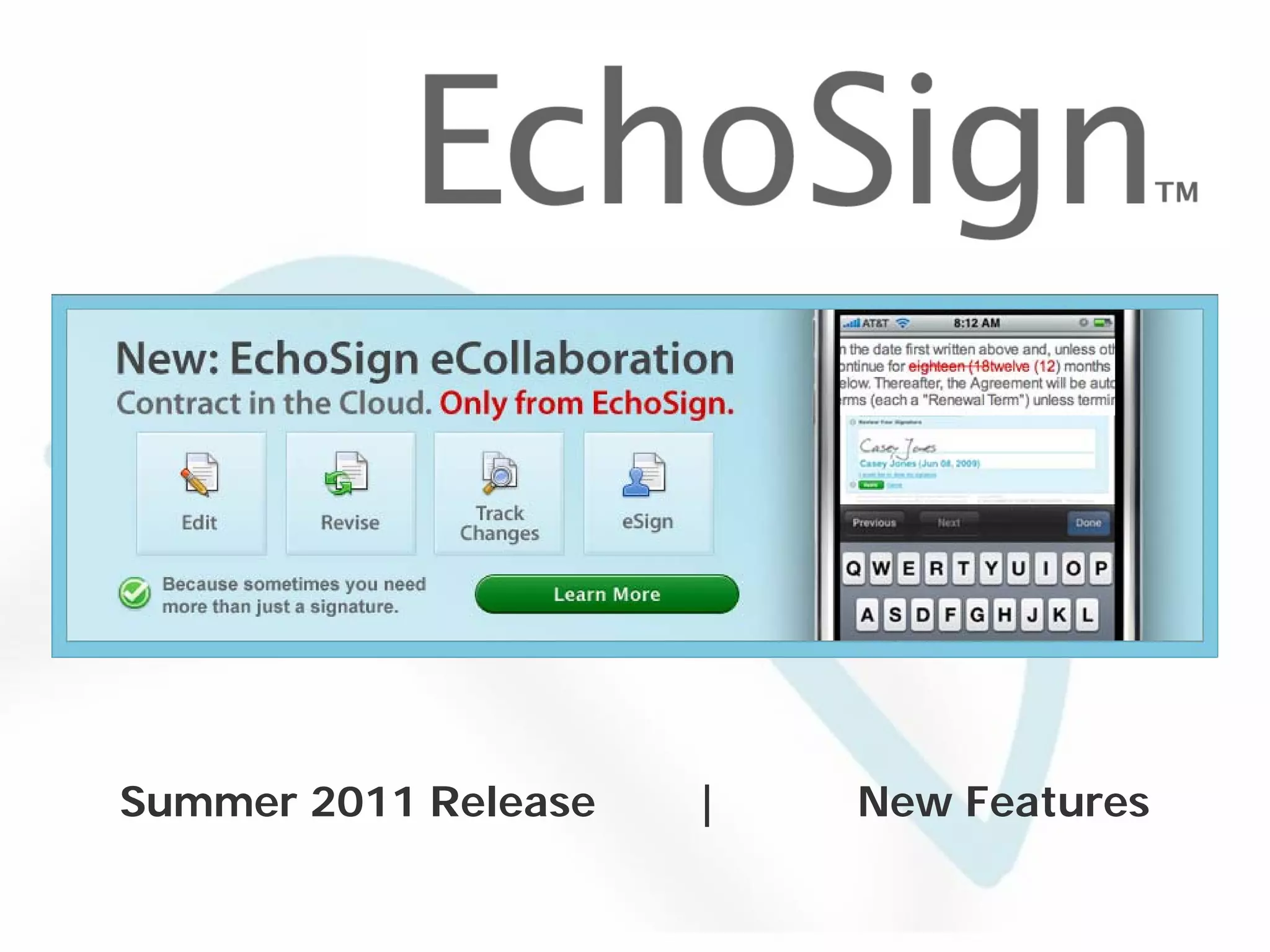
Summer 2011 Release                           |                New Features

              © 2005-2011 EchoSign, Inc. All Rights Reserved
EchoSign Web – Summer 2011


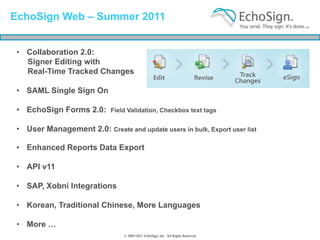
 • Collaboration 2.0:
   Signer Editing with
   Real-Time Tracked Changes

 • SAML Single Sign On

 • EchoSign Forms 2.0:       Field Validation, Checkbox text tags


 • User Management 2.0: Create and update users in bulk, Export user list

 • Enhanced Reports Data Export

 • API v11

 • SAP, Xobni Integrations

 • Korean, Traditional Chinese, More Languages

 • More …
                                 © 2005-2011 EchoSign, Inc. All Rights Reserved
EchoSign Web – Summer 2011


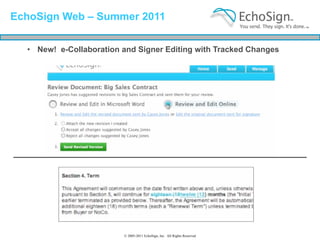
  • New! e-Collaboration and Signer Editing with Tracked Changes


                         © 2005-2011 EchoSign, Inc. All Rights Reserved
Signer Editing: How it Works


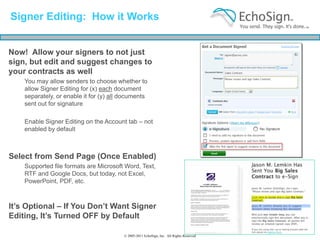
Now! Allow your signers to not just
sign, but edit and suggest changes to
your contracts as well
    You may allow senders to choose whether to
    allow Signer Editing for (x) each document
    separately, or enable it for (y) all documents
    sent out for signature

    Enable Signer Editing on the Account tab – not
    enabled by default


Select from Send Page (Once Enabled)
    Supported file formats are Microsoft Word, Text,
    RTF and Google Docs, but today, not Excel,
    PowerPoint, PDF, etc.


It’s Optional – If You Don’t Want Signer
Editing, It’s Turned OFF by Default

                                         © 2005-2011 EchoSign, Inc. All Rights Reserved
Signer Editing: Signers Can Suggest
Changes in Real-Time, on the Web …

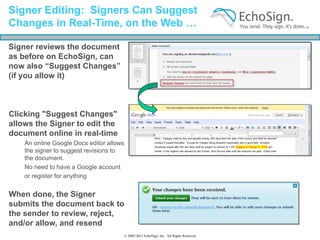
Signer reviews the document
as before on EchoSign, can
now also “Suggest Changes”
(if you allow it)


Clicking "Suggest Changes"
allows the Signer to edit the
document online in real-time
    An online Google Docs editor allows
    the signer to suggest revisions to
    the document.
    No need to have a Google account
    or register for anything


When done, the Signer
submits the document back to
the sender to review, reject,
and/or allow, and resend
                                      © 2005-2011 EchoSign, Inc. All Rights Reserved
Sender Can Then Review Changes
 On-Line in Real-Time – or Off-Line in Word


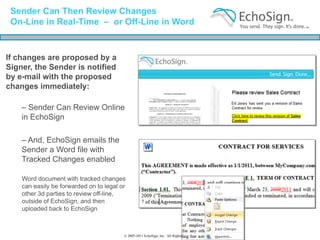
If changes are proposed by a
Signer, the Sender is notified
by e-mail with the proposed
changes immediately:

    – Sender Can Review Online
    in EchoSign

    – And, EchoSign emails the
    Sender a Word file with
    Tracked Changes enabled

    Word document with tracked changes
    can easily be forwarded on to legal or
    other 3d parties to review off-line,
    outside of EchoSign, and then
    uploaded back to EchoSign


                                         © 2005-2011 EchoSign, Inc. All Rights Reserved
Signer Editing: You Can Accept,
Reject, Mark-Up Online or Offline


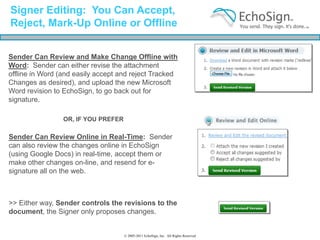
Sender Can Review and Make Change Offline with
Word: Sender can either revise the attachment
offline in Word (and easily accept and reject Tracked
Changes as desired), and upload the new Microsoft
Word revision to EchoSign, to go back out for
signature.

                 OR, IF YOU PREFER

Sender Can Review Online in Real-Time: Sender
can also review the changes online in EchoSign
(using Google Docs) in real-time, accept them or
make other changes on-line, and resend for e-
signature all on the web.


>> Either way, Sender controls the revisions to the
document, the Signer only proposes changes.


                                     © 2005-2011 EchoSign, Inc. All Rights Reserved
EchoSign Web – Summer 2011


  • Collaboration 2.0: Signer Editing with Tracked Changes

  • SAML Single Sign On

  • EchoSign Forms 2.0:       Field Validation, Checkbox text tags


  • User Management 2.0: Create and update users in bulk, Export user list

  • Enhanced Reports Data Export

  • API v11

  • SAP, Xobni Integrations

  • Korean, Traditional Chinese, More Languages

  • More …


                               © 2005-2011 EchoSign, Inc. All Rights Reserved
SAML Single Sign On


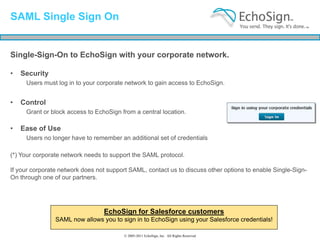
Single-Sign-On to EchoSign with your corporate network.

•   Security
     Users must log in to your corporate network to gain access to EchoSign.


•   Control
     Grant or block access to EchoSign from a central location.

•   Ease of Use
     Users no longer have to remember an additional set of credentials

(*) Your corporate network needs to support the SAML protocol.

If your corporate network does not support SAML, contact us to discuss other options to enable Single-Sign-
On through one of our partners.


                                 EchoSign for Salesforce customers
                SAML now allows you to sign in to EchoSign using your Salesforce credentials!

                                         © 2005-2011 EchoSign, Inc. All Rights Reserved
EchoSign Forms 2.0: New Features

  Form Field Validation
  Ensure signers enter legal values before they sign.


  Defining validations rules
  • PDF forms validation rules are automatically imported.


  •   Set validation rules in EchoSign Text Tags
        For example:                                                                  {{*cell_es_sender.phone}}
                                                                                      {{startdate_es_signer2.date}}
                                                                                      {{days_es_signer.num(>0,<60)}

  •   Can also create validations using EchoSign’s Drag-and-Drop
      Authoring page using standard ‘Create Form’ or Widget
      on EchoSign homepage


  Now: Position Check boxes using EchoSign Text Tags
   For example:                                                                       {{[]}}, {{[x]_es_signer}}, etc.
                                     © 2005-2011 EchoSign, Inc. All Rights Reserved
Advanced User Management

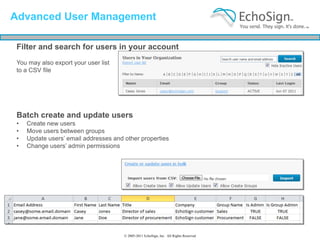
 Filter and search for users in your account
 You may also export your user list
 to a CSV file


 Batch create and update users
 •   Create new users
 •   Move users between groups
 •   Update users’ email addresses and other properties
 •   Change users’ admin permissions


                                       © 2005-2011 EchoSign, Inc. All Rights Reserved
Enhanced Reports Data Export


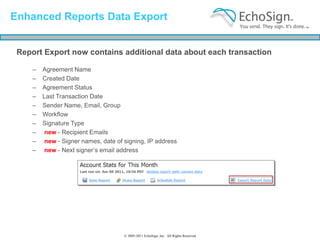
 Report Export now contains additional data about each transaction

     –   Agreement Name
     –   Created Date
     –   Agreement Status
     –   Last Transaction Date
     –   Sender Name, Email, Group
     –   Workflow
     –   Signature Type
     –   new - Recipient Emails
     –   new - Signer names, date of signing, IP address
     –   new - Next signer’s email address


                                     © 2005-2011 EchoSign, Inc. All Rights Reserved
Faster Confirmation; Force Reason
for Rejection

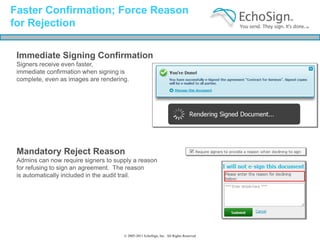
 Immediate Signing Confirmation
 Signers receive even faster,
 immediate confirmation when signing is
 complete, even as images are rendering.


 Mandatory Reject Reason
 Admins can now require signers to supply a reason
 for refusing to sign an agreement. The reason
 is automatically included in the audit trail.


                                      © 2005-2011 EchoSign, Inc. All Rights Reserved
Customize Terms of Use;
In-App New Feature Notifications

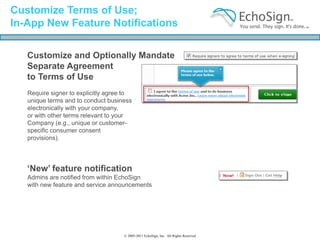
   Customize and Optionally Mandate
   Separate Agreement
   to Terms of Use
   Require signer to explicitly agree to
   unique terms and to conduct business
   electronically with your company,
   or with other terms relevant to your
   Company (e.g., unique or customer-
   specific consumer consent
   provisions).


   ‘New’ feature notification
   Admins are notified from within EchoSign
   with new feature and service announcements


                                     © 2005-2011 EchoSign, Inc. All Rights Reserved
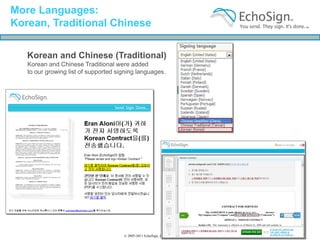
More Languages:
Korean, Traditional Chinese

   Korean and Chinese (Traditional)
   Korean and Chinese Traditional were added
   to our growing list of supported signing languages.


                                      © 2005-2011 EchoSign, Inc. All Rights Reserved
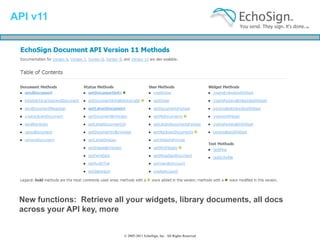
API v11


   • Asdasd

 New functions: Retrieve all your widgets, library documents, all docs
 across your API key, more


                            © 2005-2011 EchoSign, Inc. All Rights Reserved
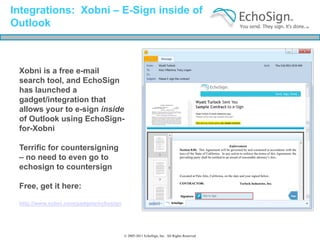
Integrations: Xobni – E-Sign inside of
Outlook


 Xobni is a free e-mail
 search tool, and EchoSign
 has launched a
 gadget/integration that
 allows your to e-sign inside
 of Outlook using EchoSign-
 for-Xobni

 Terrific for countersigning
 – no need to even go to
 echosign to countersign

 Free, get it here:

 http://www.xobni.com/gadgets/echosign


                                         © 2005-2011 EchoSign, Inc. All Rights Reserved
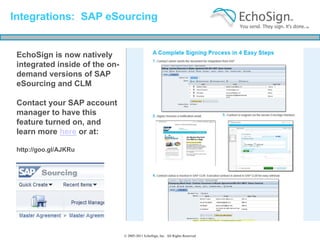
Integrations: SAP eSourcing


 EchoSign is now natively
 integrated inside of the on-
 demand versions of SAP
 eSourcing and CLM

 Contact your SAP account
 manager to have this
 feature turned on, and
 learn more here or at:

 http://goo.gl/AJKRu


                                © 2005-2011 EchoSign, Inc. All Rights Reserved
Coming Soon …


  • A New Way to
    Think About Mobile
    Contracts

  • EchoSign Global
    Edition 2.0


                      © 2005-2011 EchoSign, Inc. All Rights Reserved
Summer 2011 Release                           |                New Features

              © 2005-2011 EchoSign, Inc. All Rights Reserved
Thank You!


  © 2005-2011 EchoSign, Inc. All Rights Reserved

EchoSign Summer 2011 Release: eCollaboration and More

  • 1.
    Summer 2011 Release | New Features © 2005-2011 EchoSign, Inc. All Rights Reserved
  • 2.
    EchoSign Web –Summer 2011 • Collaboration 2.0: Signer Editing with Real-Time Tracked Changes • SAML Single Sign On • EchoSign Forms 2.0: Field Validation, Checkbox text tags • User Management 2.0: Create and update users in bulk, Export user list • Enhanced Reports Data Export • API v11 • SAP, Xobni Integrations • Korean, Traditional Chinese, More Languages • More … © 2005-2011 EchoSign, Inc. All Rights Reserved
  • 3.
    EchoSign Web –Summer 2011 • New! e-Collaboration and Signer Editing with Tracked Changes © 2005-2011 EchoSign, Inc. All Rights Reserved
  • 4.
    Signer Editing: Howit Works Now! Allow your signers to not just sign, but edit and suggest changes to your contracts as well You may allow senders to choose whether to allow Signer Editing for (x) each document separately, or enable it for (y) all documents sent out for signature Enable Signer Editing on the Account tab – not enabled by default Select from Send Page (Once Enabled) Supported file formats are Microsoft Word, Text, RTF and Google Docs, but today, not Excel, PowerPoint, PDF, etc. It’s Optional – If You Don’t Want Signer Editing, It’s Turned OFF by Default © 2005-2011 EchoSign, Inc. All Rights Reserved
  • 5.
    Signer Editing: SignersCan Suggest Changes in Real-Time, on the Web … Signer reviews the document as before on EchoSign, can now also “Suggest Changes” (if you allow it) Clicking "Suggest Changes" allows the Signer to edit the document online in real-time An online Google Docs editor allows the signer to suggest revisions to the document. No need to have a Google account or register for anything When done, the Signer submits the document back to the sender to review, reject, and/or allow, and resend © 2005-2011 EchoSign, Inc. All Rights Reserved
  • 6.
    Sender Can ThenReview Changes On-Line in Real-Time – or Off-Line in Word If changes are proposed by a Signer, the Sender is notified by e-mail with the proposed changes immediately: – Sender Can Review Online in EchoSign – And, EchoSign emails the Sender a Word file with Tracked Changes enabled Word document with tracked changes can easily be forwarded on to legal or other 3d parties to review off-line, outside of EchoSign, and then uploaded back to EchoSign © 2005-2011 EchoSign, Inc. All Rights Reserved
  • 7.
    Signer Editing: YouCan Accept, Reject, Mark-Up Online or Offline Sender Can Review and Make Change Offline with Word: Sender can either revise the attachment offline in Word (and easily accept and reject Tracked Changes as desired), and upload the new Microsoft Word revision to EchoSign, to go back out for signature. OR, IF YOU PREFER Sender Can Review Online in Real-Time: Sender can also review the changes online in EchoSign (using Google Docs) in real-time, accept them or make other changes on-line, and resend for e- signature all on the web. >> Either way, Sender controls the revisions to the document, the Signer only proposes changes. © 2005-2011 EchoSign, Inc. All Rights Reserved
  • 8.
    EchoSign Web –Summer 2011 • Collaboration 2.0: Signer Editing with Tracked Changes • SAML Single Sign On • EchoSign Forms 2.0: Field Validation, Checkbox text tags • User Management 2.0: Create and update users in bulk, Export user list • Enhanced Reports Data Export • API v11 • SAP, Xobni Integrations • Korean, Traditional Chinese, More Languages • More … © 2005-2011 EchoSign, Inc. All Rights Reserved
  • 9.
    SAML Single SignOn Single-Sign-On to EchoSign with your corporate network. • Security Users must log in to your corporate network to gain access to EchoSign. • Control Grant or block access to EchoSign from a central location. • Ease of Use Users no longer have to remember an additional set of credentials (*) Your corporate network needs to support the SAML protocol. If your corporate network does not support SAML, contact us to discuss other options to enable Single-Sign- On through one of our partners. EchoSign for Salesforce customers SAML now allows you to sign in to EchoSign using your Salesforce credentials! © 2005-2011 EchoSign, Inc. All Rights Reserved
  • 10.
    EchoSign Forms 2.0:New Features Form Field Validation Ensure signers enter legal values before they sign. Defining validations rules • PDF forms validation rules are automatically imported. • Set validation rules in EchoSign Text Tags For example: {{*cell_es_sender.phone}} {{startdate_es_signer2.date}} {{days_es_signer.num(>0,<60)} • Can also create validations using EchoSign’s Drag-and-Drop Authoring page using standard ‘Create Form’ or Widget on EchoSign homepage Now: Position Check boxes using EchoSign Text Tags For example: {{[]}}, {{[x]_es_signer}}, etc. © 2005-2011 EchoSign, Inc. All Rights Reserved
  • 11.
    Advanced User Management Filter and search for users in your account You may also export your user list to a CSV file Batch create and update users • Create new users • Move users between groups • Update users’ email addresses and other properties • Change users’ admin permissions © 2005-2011 EchoSign, Inc. All Rights Reserved
  • 12.
    Enhanced Reports DataExport Report Export now contains additional data about each transaction – Agreement Name – Created Date – Agreement Status – Last Transaction Date – Sender Name, Email, Group – Workflow – Signature Type – new - Recipient Emails – new - Signer names, date of signing, IP address – new - Next signer’s email address © 2005-2011 EchoSign, Inc. All Rights Reserved
  • 13.
    Faster Confirmation; ForceReason for Rejection Immediate Signing Confirmation Signers receive even faster, immediate confirmation when signing is complete, even as images are rendering. Mandatory Reject Reason Admins can now require signers to supply a reason for refusing to sign an agreement. The reason is automatically included in the audit trail. © 2005-2011 EchoSign, Inc. All Rights Reserved
  • 14.
    Customize Terms ofUse; In-App New Feature Notifications Customize and Optionally Mandate Separate Agreement to Terms of Use Require signer to explicitly agree to unique terms and to conduct business electronically with your company, or with other terms relevant to your Company (e.g., unique or customer- specific consumer consent provisions). ‘New’ feature notification Admins are notified from within EchoSign with new feature and service announcements © 2005-2011 EchoSign, Inc. All Rights Reserved
  • 15.
    More Languages: Korean, TraditionalChinese Korean and Chinese (Traditional) Korean and Chinese Traditional were added to our growing list of supported signing languages. © 2005-2011 EchoSign, Inc. All Rights Reserved
  • 16.
    API v11 • Asdasd New functions: Retrieve all your widgets, library documents, all docs across your API key, more © 2005-2011 EchoSign, Inc. All Rights Reserved
  • 17.
    Integrations: Xobni –E-Sign inside of Outlook Xobni is a free e-mail search tool, and EchoSign has launched a gadget/integration that allows your to e-sign inside of Outlook using EchoSign- for-Xobni Terrific for countersigning – no need to even go to echosign to countersign Free, get it here: http://www.xobni.com/gadgets/echosign © 2005-2011 EchoSign, Inc. All Rights Reserved
  • 18.
    Integrations: SAP eSourcing EchoSign is now natively integrated inside of the on- demand versions of SAP eSourcing and CLM Contact your SAP account manager to have this feature turned on, and learn more here or at: http://goo.gl/AJKRu © 2005-2011 EchoSign, Inc. All Rights Reserved
  • 19.
    Coming Soon … • A New Way to Think About Mobile Contracts • EchoSign Global Edition 2.0 © 2005-2011 EchoSign, Inc. All Rights Reserved
  • 20.
    Summer 2011 Release | New Features © 2005-2011 EchoSign, Inc. All Rights Reserved
  • 21.
    Thank You! © 2005-2011 EchoSign, Inc. All Rights Reserved