SIGNificant Server 4


SIGNificant e–Signature Enterprise Platform (Server based)
xyzmo’s SIGNificant Server Platform allows you to electronically sign documents such as contracts or agreements
with your handwritten signature captured by a signature pad, a mobile tablet, a smartphone such as an iPad or
Android device or even a payment terminal. It safely stores and binds the unique biometric data of the captured
handwritten signature to the document and supports forensic analysis by a signature expert in case of a dispute.
Sealing the document with a digital signature also protects it from unrecognized modifications. Its server–based
architecture does not just enhance document security by locking the original document on the server, but also
simplifies integration into server–side document workflows and centralized document management.


                  Customer Benefits                                         Unique Advantages

        As simple as signing on paper.                           End-to-end security of the biometrical data
        Documents cannot get lost during delivery.                recorded from a handwritten signature.
        No forgotten signatures or attachments.                  Supports Signature Pads, Payment Terminals,
        Socially accepted – handwritten e-signatures              the iPad and Android Devices
         require no changes in customers’ habits.                 Hardware independence – exchange of
        Complete electronic contract execution                    devices possible without changing the
         resulting in a secured electronic original                software layer.
         document.                                                Powerful workflow engine that enables you to
        Reduces fraud through document integrity                  efficiently control the document completion
         and optional real-time signature verification.            process.
        Seamless and fast integration in existing                Proven biometrical signature verification in
         application and document flows.                           real-time with self-learning profiles.
        Accelerates POS processes freeing up time for            Robust server platform that provides high
         up- selling & cross-selling activities.                   security, scalability & straightforward server-
        Helps to save the planet & provides a modern              side integration.
         image.                                                   xyzmo and its predecessors have a combined
        ROI in less than 12 months through                        history of more than 10 years of digital
         significantly less labor, paper, equipment,               signature expertise. To date, our solutions
         mail and archive                                          have processed millions of electronic
                                                                   signatures around the globe.


                                                                        www.xyzmo.com                          Page I 1
Key Features of the Enterprise Platform

           Handwritten Signature Capturing (Forensically identifiable) – A handwritten signature
           captured with SIGNificant is much more than just an electronic image of a digitized signature
           embedded in a PDF. We record – forensically identifiably – the handwritten signature of a
           person using all available parameters, such as acceleration, speed and rhythm. These
           parameters are unique to every individual and cannot be reproduced by a forger. When a
           signature, including all these biometric parameters, is captured locally on the device, it is
           safely embedded using an asynchronous public key encryption into and uniquely bound to the
           target PDF document.


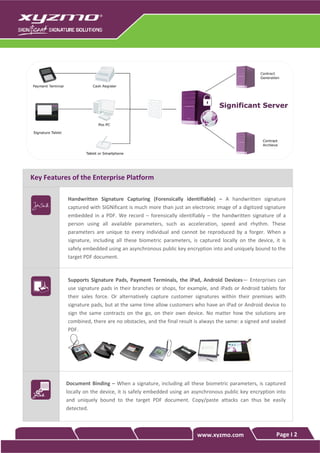
           Supports Signature Pads, Payment Terminals, the iPad, Android Devices— Enterprises can
           use signature pads in their branches or shops, for example, and iPads or Android tablets for
           their sales force. Or alternatively capture customer signatures within their premises with
           signature pads, but at the same time allow customers who have an iPad or Android device to
           sign the same contracts on the go, on their own device. No matter how the solutions are
           combined, there are no obstacles, and the final result is always the same: a signed and sealed
           PDF.


           Document Binding – When a signature, including all these biometric parameters, is captured
           locally on the device, it is safely embedded using an asynchronous public key encryption into
           and uniquely bound to the target PDF document. Copy/paste attacks can thus be easily
           detected.


                                                                  www.xyzmo.com                     Page I 2
Signature verification — SIGNificant records the signature of a person using all available
parameters, such as acceleration, speed, and rhythm. If there is a dispute about a captured
signature, an expert tool is available to forensically analyze the biometric characteristics of the
captured signature.

This capability can be taken one step further, with real–time verification of a captured
signature against a signature profile stored in a database to ensure that only authorized people
can actually sign a document.


Content Protection – Protect the integrity of PDF documents by sealing them with a digital
signature. Supports any x509v3 certificate provided through the Windows certificate store of
SIGNificant Server or through the web service interface of a client (e.g. a certificate stored in a
HSM or on a local desktop PC).


Timestamping – The digital signature can include a timestamp from any RFC 3161 conformant
timestamp server (TSA).


Watermarking – Add watermarks like "Confidential" or "Draft" to your documents.


Flatten PDFs – With that option you remove any layers (annotations, digital signatures ...) that
aren’t visible by some PDF viewers (e.g. on the iPad or iPhone) and consolidate it into one
layer, which is support by all PDF viewers. Further it locks content in form fields and comments
so you can be assured that information may no longer be changed.


Powerful Parsing for Signature Fields based on Text in the Document or other Markers – The
parsing method has the capability of searching for (and optionally removing) strings from a
PDF document. This is used to obtain the signature field positions from a document.


Full PDF and PDF/A Conformance – The document is Adobe Acrobat compatible, so it can be
viewed by any standard PDF viewer. PDF documents are sealed with a digital signature
compliant to the ISO–Standards for PDF. Thus the validity of the digital signature can be
validated with Adobe Reader and many other PDF viewers.


                                                          www.xyzmo.com                       Page I 3
PDF and PDF/A Conversion – Convert documents into PDF or PDF/A for e–signing through
                   third–party components.


                   Optimized for Server–Based Processing – After uploading a document to the server, the client
                   application can work with a unique ‘document id’ to reference the uploaded file. Consecutive
                   operations (e.g. sign, attach file, etc.) on this file work solely with this ‘document id’, avoiding
                   unnecessary upload/download operations.


                   Optimized for Low Bandwidth – Files can be uploaded/downloaded in ‘chunks’, avoiding
                   timeouts when transferring files over slow network connections.


                   Web Service Interface – The SIGNificant Server offers a platform–independent web service
                   interface (SOAP and RST/JSON) which makes it easy to integrate the functionality into any
                   application.


    Workstep Controller (WSC) - Automates the Last Mile in the Sales Process
   SIGNificant offers much more than e–signing. With the Workstep Controller enterprises can control and govern
    all steps in the completion and signing process of documents. This enables a predefined and transparent
    workflow to guide the signers through the document and avoid missing signatures, attachments or form fields.


                   Define all steps in the signing process — This includes the ability to position signature fields,
                   define the necessary attachments and group form fields into areas, which makes it easier to
                   guide the signer through the document in the right order.


                   Implementing Policies for each step —Specify if a signature field is compulsory or optional,
                   define the order of the signature fields, enable or forbid annotations, enforce the scanning of
                   certain attachments, define the order in which forms have to be filled out, and much more.
                   Additionally, it’s possible to enable or disable certain functionalities for a particular document,
                   such as to save, email and print the document or to reject the workstep, to undo the last step
                   or to add additional signatures on-the-fly.


                                                                              www.xyzmo.com                       Page I 4
Reject a signature or any other workstep – If the policy does allow for that any predefined
                signature field or other workstep can be rejected by stating a reason for the rejection.


                Visually Design the Worksteps – Use the ‘Workstep Designer’ in your web browser to design
                all steps in the signing process and assign policies to each step, using only point and click.


                Easy Navigation through the Document – The Workstep Controller is supported by Web–
                Signing Interface (WSI) and the iPad / Android SIGNificant Apps. The interface shows all
                defined worksteps as a task list and allows for easy navigation through the document.


                Process Integration – Smoothly integrate with any process: start the signing process via a URL
                and call a custom HTTP page when a user finishes (or rejects) a workstep.


Web–Signing Interface (WSI) - Web-based E-Signing
The SIGNificant Web Signing Interface makes signing electronic documents via a web browser as easy as signing
a piece of paper without the need of local installations or downloads.

               Signature Capture - Documents can be displayed in the predefined web interface, and signed
               using signature–capturing devices from Wacom and StepOver, interactive pen displays, tablet
               PCs, slate PCs and payment terminals, with digital certificates or via ‘click-to-sign’.


                No Installations or Downloads Required – Internet or intranet access is all that is needed. No
                installation or download is required to commence the work process. Inviting signers by
                distributing the URL of the web application is all it takes.


               Add attachments — Add scans of driving license, passport or any other photo from your
               webcam or scanner. If your computer has a webcam you are able to attach any current photo.


               Fill out and sign PDF forms — Complete your PDF forms and allow automated forms data
               extraction of signed documents.


                                                                        www.xyzmo.com                      Page I 5
Typewriter — Lets you enter text anywhere on a PDF document. It is useful for typing on a
               non–fillable form or outside the fillable areas of a form.


                Supports all features of the Workstep Controller – Please see the section Workstep Controler
                for the functionalities.


                Full customization of the UI by editing the source code of the underlying ASPX page


                Print–to–Sign using the SIGNificant Server Printer to start the signing process from any
                application that can print. Uploads the document to the SIGNificant Server for processing and
                signing in the Web–Signing Interface


iPad / Android SIGNificant Apps
Native apps to sign PDF documents either with the finger or a pen/stylus – even when no Internet connection is
available. No need for additional signing pads.

               Natural signing experience like pen on paper — While signing on the screen the signature is
               displayed without delay and accurately like signing with a pen on paper. The app fully supports
               Android–powered tablets which are equipped with an active stylus pen and external pens for
               the iPad. The signing area can optionally be moved to the bottom of the screen to provide the
               best possible palm protection and hand rest.


               Browse Through Multipage Documents – Browse and review multipage documents before you
               sign them. Especially useful for field agents to get documents signed in person, in real time, by
               presenting a document to a client on a tablet.


               Add attachments — Add scans of driving license, passport or any other photo out of your
               photo gallery. If your tablet has a camera you are able to attach any current photo.


                                                                        www.xyzmo.com                      Page I 6
Fill out and sign PDF forms — Complete your PDF forms on the go and allow automated forms
data extraction of signed documents.


Typewriter — Lets you enter text anywhere on a PDF document. It is useful for typing on a
non–fillable form or outside the fillable areas of a form.


Supports all features of the Workstep Controller – Please see the section Workstep Controler
for the functionalities.


No need to transfer a PDF to the tablet — The user receives a link to access the PDF on the
server, and only image previews are transferred to the app. Thus, the signed original document
is for security reasons only available on the server and not automatically copied and thus
duplicated to the mobile device. All manipulations off the PDF are always performed in the
save data center environment.


Offline mode — To support working conditions that don’t allow online connectivity on a
regular basis the SIGNificant app features also an offline mode which securely caches the
document and signature data on the mobile device itself. Necessary synchronization
automatically occurs in the background without an interaction of the user.


Email support - After e-signing, you email your document right back from the App.


Support for cloud storage - SIGNificant utilizes the “Open” functionality to allow you to open a
document from most other applications that have documents and contracts in them –
including your inbox, Dropbox, Evernote, Box(.net) and others – and sign them via SIGNificant
on the go. When you are finished you can store and share documents via your cloud storage.
You can store and share documents via Dropbox, Evernote, Google Docs (Drive) and Box.net

Customization / SDK — Enterprises can utilize the xyzmo infrastructure and launch their own
e–signature application, as well as integrate the functionality of SIGNificant into their own apps
(The apps are also available as SDK).


                                                          www.xyzmo.com                      Page I 7
On–premises or Cloud–based — Available as an on–premises installation or provided as a
                  cloud–based solution.


   Other Signing Clients

                  Custom Application / SDK – Seamless integration into a custom client applications through the
                  SIGNificant Device SDK.


                  Windows Mobile 6.x – Sign receipts directly using the pen on a Windows mobile phone.


                  Cash Register – Sign credit card/debit slips directly with a signature pad connected to your cash
                  machine. Special integration for cash machines available to cover the different needs for retailers.


About xyzmo SIGNificant
xyzmo’s enterprise e–signature platform allows contracts, agreements, NDAs, forms, or any document that requires a
signature, to be signed electronically on signature pads, payment terminals, the iPad, Android devices, with digital
certificates or online via ‘click–to–sign’. It could not be easier or more secure.

xyzmo is a private company based in Ansfelden, Austria with international offices in the United States and Romania.
xyzmo and its predecessors have a combined history of more than 10 years of digital signature expertise. Our
solutions have processed millions of electronic signatures to–date around the globe.

To learn more about xyzmo–SIGNificant’s solutions, please visit: www.xyzmo.com


                                                                              www.xyzmo.com                         Page I 8
www.xyzmo.com   Page I 9

SIGNificant Enterprise Platform (Server based)

  • 1.
    SIGNificant Server 4 SIGNificante–Signature Enterprise Platform (Server based) xyzmo’s SIGNificant Server Platform allows you to electronically sign documents such as contracts or agreements with your handwritten signature captured by a signature pad, a mobile tablet, a smartphone such as an iPad or Android device or even a payment terminal. It safely stores and binds the unique biometric data of the captured handwritten signature to the document and supports forensic analysis by a signature expert in case of a dispute. Sealing the document with a digital signature also protects it from unrecognized modifications. Its server–based architecture does not just enhance document security by locking the original document on the server, but also simplifies integration into server–side document workflows and centralized document management. Customer Benefits Unique Advantages  As simple as signing on paper.  End-to-end security of the biometrical data  Documents cannot get lost during delivery. recorded from a handwritten signature.  No forgotten signatures or attachments.  Supports Signature Pads, Payment Terminals,  Socially accepted – handwritten e-signatures the iPad and Android Devices require no changes in customers’ habits.  Hardware independence – exchange of  Complete electronic contract execution devices possible without changing the resulting in a secured electronic original software layer. document.  Powerful workflow engine that enables you to  Reduces fraud through document integrity efficiently control the document completion and optional real-time signature verification. process.  Seamless and fast integration in existing  Proven biometrical signature verification in application and document flows. real-time with self-learning profiles.  Accelerates POS processes freeing up time for  Robust server platform that provides high up- selling & cross-selling activities. security, scalability & straightforward server-  Helps to save the planet & provides a modern side integration. image.  xyzmo and its predecessors have a combined  ROI in less than 12 months through history of more than 10 years of digital significantly less labor, paper, equipment, signature expertise. To date, our solutions mail and archive have processed millions of electronic signatures around the globe. www.xyzmo.com Page I 1
  • 2.
    Key Features ofthe Enterprise Platform Handwritten Signature Capturing (Forensically identifiable) – A handwritten signature captured with SIGNificant is much more than just an electronic image of a digitized signature embedded in a PDF. We record – forensically identifiably – the handwritten signature of a person using all available parameters, such as acceleration, speed and rhythm. These parameters are unique to every individual and cannot be reproduced by a forger. When a signature, including all these biometric parameters, is captured locally on the device, it is safely embedded using an asynchronous public key encryption into and uniquely bound to the target PDF document. Supports Signature Pads, Payment Terminals, the iPad, Android Devices— Enterprises can use signature pads in their branches or shops, for example, and iPads or Android tablets for their sales force. Or alternatively capture customer signatures within their premises with signature pads, but at the same time allow customers who have an iPad or Android device to sign the same contracts on the go, on their own device. No matter how the solutions are combined, there are no obstacles, and the final result is always the same: a signed and sealed PDF. Document Binding – When a signature, including all these biometric parameters, is captured locally on the device, it is safely embedded using an asynchronous public key encryption into and uniquely bound to the target PDF document. Copy/paste attacks can thus be easily detected. www.xyzmo.com Page I 2
  • 3.
    Signature verification —SIGNificant records the signature of a person using all available parameters, such as acceleration, speed, and rhythm. If there is a dispute about a captured signature, an expert tool is available to forensically analyze the biometric characteristics of the captured signature. This capability can be taken one step further, with real–time verification of a captured signature against a signature profile stored in a database to ensure that only authorized people can actually sign a document. Content Protection – Protect the integrity of PDF documents by sealing them with a digital signature. Supports any x509v3 certificate provided through the Windows certificate store of SIGNificant Server or through the web service interface of a client (e.g. a certificate stored in a HSM or on a local desktop PC). Timestamping – The digital signature can include a timestamp from any RFC 3161 conformant timestamp server (TSA). Watermarking – Add watermarks like "Confidential" or "Draft" to your documents. Flatten PDFs – With that option you remove any layers (annotations, digital signatures ...) that aren’t visible by some PDF viewers (e.g. on the iPad or iPhone) and consolidate it into one layer, which is support by all PDF viewers. Further it locks content in form fields and comments so you can be assured that information may no longer be changed. Powerful Parsing for Signature Fields based on Text in the Document or other Markers – The parsing method has the capability of searching for (and optionally removing) strings from a PDF document. This is used to obtain the signature field positions from a document. Full PDF and PDF/A Conformance – The document is Adobe Acrobat compatible, so it can be viewed by any standard PDF viewer. PDF documents are sealed with a digital signature compliant to the ISO–Standards for PDF. Thus the validity of the digital signature can be validated with Adobe Reader and many other PDF viewers. www.xyzmo.com Page I 3
  • 4.
    PDF and PDF/AConversion – Convert documents into PDF or PDF/A for e–signing through third–party components. Optimized for Server–Based Processing – After uploading a document to the server, the client application can work with a unique ‘document id’ to reference the uploaded file. Consecutive operations (e.g. sign, attach file, etc.) on this file work solely with this ‘document id’, avoiding unnecessary upload/download operations. Optimized for Low Bandwidth – Files can be uploaded/downloaded in ‘chunks’, avoiding timeouts when transferring files over slow network connections. Web Service Interface – The SIGNificant Server offers a platform–independent web service interface (SOAP and RST/JSON) which makes it easy to integrate the functionality into any application. Workstep Controller (WSC) - Automates the Last Mile in the Sales Process  SIGNificant offers much more than e–signing. With the Workstep Controller enterprises can control and govern all steps in the completion and signing process of documents. This enables a predefined and transparent workflow to guide the signers through the document and avoid missing signatures, attachments or form fields. Define all steps in the signing process — This includes the ability to position signature fields, define the necessary attachments and group form fields into areas, which makes it easier to guide the signer through the document in the right order. Implementing Policies for each step —Specify if a signature field is compulsory or optional, define the order of the signature fields, enable or forbid annotations, enforce the scanning of certain attachments, define the order in which forms have to be filled out, and much more. Additionally, it’s possible to enable or disable certain functionalities for a particular document, such as to save, email and print the document or to reject the workstep, to undo the last step or to add additional signatures on-the-fly. www.xyzmo.com Page I 4
  • 5.
    Reject a signatureor any other workstep – If the policy does allow for that any predefined signature field or other workstep can be rejected by stating a reason for the rejection. Visually Design the Worksteps – Use the ‘Workstep Designer’ in your web browser to design all steps in the signing process and assign policies to each step, using only point and click. Easy Navigation through the Document – The Workstep Controller is supported by Web– Signing Interface (WSI) and the iPad / Android SIGNificant Apps. The interface shows all defined worksteps as a task list and allows for easy navigation through the document. Process Integration – Smoothly integrate with any process: start the signing process via a URL and call a custom HTTP page when a user finishes (or rejects) a workstep. Web–Signing Interface (WSI) - Web-based E-Signing The SIGNificant Web Signing Interface makes signing electronic documents via a web browser as easy as signing a piece of paper without the need of local installations or downloads. Signature Capture - Documents can be displayed in the predefined web interface, and signed using signature–capturing devices from Wacom and StepOver, interactive pen displays, tablet PCs, slate PCs and payment terminals, with digital certificates or via ‘click-to-sign’. No Installations or Downloads Required – Internet or intranet access is all that is needed. No installation or download is required to commence the work process. Inviting signers by distributing the URL of the web application is all it takes. Add attachments — Add scans of driving license, passport or any other photo from your webcam or scanner. If your computer has a webcam you are able to attach any current photo. Fill out and sign PDF forms — Complete your PDF forms and allow automated forms data extraction of signed documents. www.xyzmo.com Page I 5
  • 6.
    Typewriter — Letsyou enter text anywhere on a PDF document. It is useful for typing on a non–fillable form or outside the fillable areas of a form. Supports all features of the Workstep Controller – Please see the section Workstep Controler for the functionalities. Full customization of the UI by editing the source code of the underlying ASPX page Print–to–Sign using the SIGNificant Server Printer to start the signing process from any application that can print. Uploads the document to the SIGNificant Server for processing and signing in the Web–Signing Interface iPad / Android SIGNificant Apps Native apps to sign PDF documents either with the finger or a pen/stylus – even when no Internet connection is available. No need for additional signing pads. Natural signing experience like pen on paper — While signing on the screen the signature is displayed without delay and accurately like signing with a pen on paper. The app fully supports Android–powered tablets which are equipped with an active stylus pen and external pens for the iPad. The signing area can optionally be moved to the bottom of the screen to provide the best possible palm protection and hand rest. Browse Through Multipage Documents – Browse and review multipage documents before you sign them. Especially useful for field agents to get documents signed in person, in real time, by presenting a document to a client on a tablet. Add attachments — Add scans of driving license, passport or any other photo out of your photo gallery. If your tablet has a camera you are able to attach any current photo. www.xyzmo.com Page I 6
  • 7.
    Fill out andsign PDF forms — Complete your PDF forms on the go and allow automated forms data extraction of signed documents. Typewriter — Lets you enter text anywhere on a PDF document. It is useful for typing on a non–fillable form or outside the fillable areas of a form. Supports all features of the Workstep Controller – Please see the section Workstep Controler for the functionalities. No need to transfer a PDF to the tablet — The user receives a link to access the PDF on the server, and only image previews are transferred to the app. Thus, the signed original document is for security reasons only available on the server and not automatically copied and thus duplicated to the mobile device. All manipulations off the PDF are always performed in the save data center environment. Offline mode — To support working conditions that don’t allow online connectivity on a regular basis the SIGNificant app features also an offline mode which securely caches the document and signature data on the mobile device itself. Necessary synchronization automatically occurs in the background without an interaction of the user. Email support - After e-signing, you email your document right back from the App. Support for cloud storage - SIGNificant utilizes the “Open” functionality to allow you to open a document from most other applications that have documents and contracts in them – including your inbox, Dropbox, Evernote, Box(.net) and others – and sign them via SIGNificant on the go. When you are finished you can store and share documents via your cloud storage. You can store and share documents via Dropbox, Evernote, Google Docs (Drive) and Box.net Customization / SDK — Enterprises can utilize the xyzmo infrastructure and launch their own e–signature application, as well as integrate the functionality of SIGNificant into their own apps (The apps are also available as SDK). www.xyzmo.com Page I 7
  • 8.
    On–premises or Cloud–based— Available as an on–premises installation or provided as a cloud–based solution. Other Signing Clients Custom Application / SDK – Seamless integration into a custom client applications through the SIGNificant Device SDK. Windows Mobile 6.x – Sign receipts directly using the pen on a Windows mobile phone. Cash Register – Sign credit card/debit slips directly with a signature pad connected to your cash machine. Special integration for cash machines available to cover the different needs for retailers. About xyzmo SIGNificant xyzmo’s enterprise e–signature platform allows contracts, agreements, NDAs, forms, or any document that requires a signature, to be signed electronically on signature pads, payment terminals, the iPad, Android devices, with digital certificates or online via ‘click–to–sign’. It could not be easier or more secure. xyzmo is a private company based in Ansfelden, Austria with international offices in the United States and Romania. xyzmo and its predecessors have a combined history of more than 10 years of digital signature expertise. Our solutions have processed millions of electronic signatures to–date around the globe. To learn more about xyzmo–SIGNificant’s solutions, please visit: www.xyzmo.com www.xyzmo.com Page I 8
  • 9.