ECDL From MKFC Helsinki College Europe
Learn during face-to-face days What is ICDL and ECDL? Confirm your skills in basic IT-skills  Learn how to learn effectively – easier, deeper, permanently What is eLearning? How to eLearn in ICDL-course?
What is ECDL / ICDL International Computer Driving Licence The ECDL / ICDL Syllabus consists of modules which define the skills and competencies necessary to be a proficient user of a computer and common computer applications.  ECDL is ICDL outside Europe
For your advantage Benefits of ECDL / ICDL Certification:  http://www.youtube.com/watch?v=aUVmhwr5_Pg&feature=related
Benefits of ECDL The ability to access  news, information , and entertainment keeps you up to date with what is going on in the world around you You learn to create  documents and presentations  useful in studies and working life Communicate  with friends and family.   Connect with  virtual communities  of like-minded people through, for example, web browsing, email, or blogs  Interact  using online technologies, for example, Instant Messaging, webcams, Internet telephony, or online education and entertainment.  E-shopping  enables you make purchases online and shop around for the best value Online government services  are convenient for sending forms, dealing with officials, and finding out information
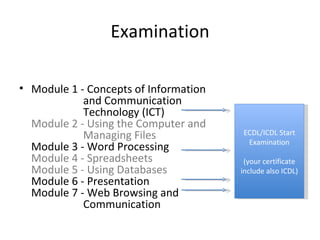
Examination Module 1 - Concepts of Information  and Communication  Technology (ICT) Module 2 - Using the Computer and  Managing Files Module 3 - Word Processing Module 4 - Spreadsheets Module 5 - Using Databases Module 6 - Presentation Module 7 - Web Browsing and  Communication ECDL/ICDL Start Examination (your certificate include also ICDL)
Confirm your basic IT-skills Start your computer Open Word-program.  Start new empty document.  Write your name and wishes for the course and your own goals for studies to document. Save document to computer or USB(memory)stick (flash).  Close Word-program.
Confirm your basic IT-skills Open My Computer –folders. Open the Word-document you made. Save it as a new name:  YourFirstNameLastName.doc Remove safely USBs Open Internet-browser.
How to learn teorethical material Option 1: Repeating ” This is a computer. Inside there is useful software.” By repeating many times we ONLY remember this  sentence. Then what? We can’t use the information.
You need to process information for learning  it deeply (and easily!)
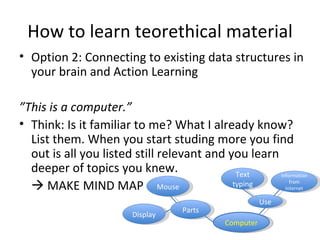
How to learn teorethical material Option 2: Connecting to existing data structures in your brain and Action Learning ” This is a computer.”  Think: Is it familiar to me? What I already know? List them. When you start studing more you find out is all you listed still relevant and you learn deeper of topics you knew.    MAKE MIND MAP Computer Parts Mouse Display Use Text typing Information from Internet
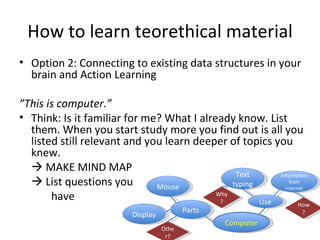
How to learn teorethical material Option 2: Connecting to existing data structures in your brain and Action Learning ” This is computer.”  Think: Is it familiar for me? What I already know. List them. When you start study more you find out is all you listed still relevant and you learn deeper of topics you knew.    MAKE MIND MAP    List questions you have Computer Parts Mouse Display Use Text typing Information from Internet How? Other? Why?
Action Learning What does a computer looks like? Let’s touch and observe deeper.    List the questions this action raise to your Mind Map and let’s discuss about them first. Why I need a computer? What could I use with it? Discuss with your partner. Find examples.    List together the questions this action raise to your Mind Map and let’s discuss about them first.
How to learn teorethical material ” Inside there is useful software.” Continue drawing mindmap, add prorgrams (software) you know there is inside computer. It’s ok if you don’t know any/many. That is just important us to know that we can start learning together what they are.  List the questions you have to other paper and we collect the papers and let’s discuss about them first.
How to learn teorethical material Mind Map is your starting point for your studies    Always when you read and learn new things draw them to Mind Map and compare the new things you learn the things you have drawn before. Always think and write questions: What else I have learnt about this before, in this course and other places? How these information is connected to each other    Draw these realizations to your mind map. (sometimes there is no connections but if there are you can write and draw) Why this information is useful for me? Where I can use it? How? What more I would like to learn about this?    YOU CREATE BIG PERMANENT PICTURE TO YOUR BRAIN
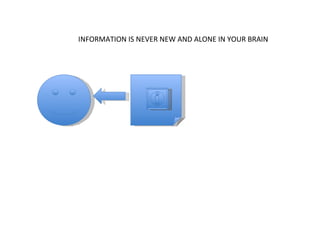
INFORMATION IS NEVER NEW AND ALONE IN YOUR BRAIN
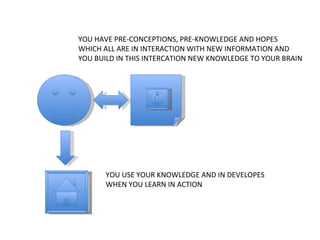
YOU HAVE PRE-CONCEPTIONS, PRE-KNOWLEDGE AND HOPES WHICH ALL ARE IN INTERACTION WITH NEW INFORMATION AND  YOU BUILD IN THIS INTERCATION NEW KNOWLEDGE TO YOUR BRAIN YOU USE YOUR KNOWLEDGE AND IN DEVELOPES WHEN YOU LEARN IN ACTION
What is eLearning? It’s  not  learning  about  ICT BUT Learning with ICT Learning through ICT
Contact persons IT-specialist Åke Jonsson (Sweden) [email_address]   Pedagogist Päivi Nuora (Finland, living in Kenya) [email_address]  0714844497 Local contact person Anne Kagiri (Kenya) [email_address]  0721356200
Confirm your basic IT-skills Close the computer
Sources www.ecdl.com

Ecdl Mkfc Tips For Learning

  • 1.
    ECDL From MKFCHelsinki College Europe
  • 2.
    Learn during face-to-facedays What is ICDL and ECDL? Confirm your skills in basic IT-skills Learn how to learn effectively – easier, deeper, permanently What is eLearning? How to eLearn in ICDL-course?
  • 3.
    What is ECDL/ ICDL International Computer Driving Licence The ECDL / ICDL Syllabus consists of modules which define the skills and competencies necessary to be a proficient user of a computer and common computer applications. ECDL is ICDL outside Europe
  • 4.
    For your advantageBenefits of ECDL / ICDL Certification: http://www.youtube.com/watch?v=aUVmhwr5_Pg&feature=related
  • 5.
    Benefits of ECDLThe ability to access news, information , and entertainment keeps you up to date with what is going on in the world around you You learn to create documents and presentations useful in studies and working life Communicate with friends and family.  Connect with virtual communities of like-minded people through, for example, web browsing, email, or blogs Interact using online technologies, for example, Instant Messaging, webcams, Internet telephony, or online education and entertainment. E-shopping enables you make purchases online and shop around for the best value Online government services are convenient for sending forms, dealing with officials, and finding out information
  • 6.
    Examination Module 1- Concepts of Information and Communication Technology (ICT) Module 2 - Using the Computer and Managing Files Module 3 - Word Processing Module 4 - Spreadsheets Module 5 - Using Databases Module 6 - Presentation Module 7 - Web Browsing and Communication ECDL/ICDL Start Examination (your certificate include also ICDL)
  • 7.
    Confirm your basicIT-skills Start your computer Open Word-program. Start new empty document. Write your name and wishes for the course and your own goals for studies to document. Save document to computer or USB(memory)stick (flash). Close Word-program.
  • 8.
    Confirm your basicIT-skills Open My Computer –folders. Open the Word-document you made. Save it as a new name: YourFirstNameLastName.doc Remove safely USBs Open Internet-browser.
  • 9.
    How to learnteorethical material Option 1: Repeating ” This is a computer. Inside there is useful software.” By repeating many times we ONLY remember this sentence. Then what? We can’t use the information.
  • 10.
    You need toprocess information for learning it deeply (and easily!)
  • 11.
    How to learnteorethical material Option 2: Connecting to existing data structures in your brain and Action Learning ” This is a computer.” Think: Is it familiar to me? What I already know? List them. When you start studing more you find out is all you listed still relevant and you learn deeper of topics you knew.  MAKE MIND MAP Computer Parts Mouse Display Use Text typing Information from Internet
  • 12.
    How to learnteorethical material Option 2: Connecting to existing data structures in your brain and Action Learning ” This is computer.” Think: Is it familiar for me? What I already know. List them. When you start study more you find out is all you listed still relevant and you learn deeper of topics you knew.  MAKE MIND MAP  List questions you have Computer Parts Mouse Display Use Text typing Information from Internet How? Other? Why?
  • 13.
    Action Learning Whatdoes a computer looks like? Let’s touch and observe deeper.  List the questions this action raise to your Mind Map and let’s discuss about them first. Why I need a computer? What could I use with it? Discuss with your partner. Find examples.  List together the questions this action raise to your Mind Map and let’s discuss about them first.
  • 14.
    How to learnteorethical material ” Inside there is useful software.” Continue drawing mindmap, add prorgrams (software) you know there is inside computer. It’s ok if you don’t know any/many. That is just important us to know that we can start learning together what they are. List the questions you have to other paper and we collect the papers and let’s discuss about them first.
  • 15.
    How to learnteorethical material Mind Map is your starting point for your studies  Always when you read and learn new things draw them to Mind Map and compare the new things you learn the things you have drawn before. Always think and write questions: What else I have learnt about this before, in this course and other places? How these information is connected to each other  Draw these realizations to your mind map. (sometimes there is no connections but if there are you can write and draw) Why this information is useful for me? Where I can use it? How? What more I would like to learn about this?  YOU CREATE BIG PERMANENT PICTURE TO YOUR BRAIN
  • 16.
    INFORMATION IS NEVERNEW AND ALONE IN YOUR BRAIN
  • 17.
    YOU HAVE PRE-CONCEPTIONS,PRE-KNOWLEDGE AND HOPES WHICH ALL ARE IN INTERACTION WITH NEW INFORMATION AND YOU BUILD IN THIS INTERCATION NEW KNOWLEDGE TO YOUR BRAIN YOU USE YOUR KNOWLEDGE AND IN DEVELOPES WHEN YOU LEARN IN ACTION
  • 18.
    What is eLearning?It’s not learning about ICT BUT Learning with ICT Learning through ICT
  • 19.
    Contact persons IT-specialistÅke Jonsson (Sweden) [email_address] Pedagogist Päivi Nuora (Finland, living in Kenya) [email_address] 0714844497 Local contact person Anne Kagiri (Kenya) [email_address] 0721356200
  • 20.
    Confirm your basicIT-skills Close the computer
  • 21.