
Using Technology in  21 th  Century Chinese Classroom Tsun-Ju Lin  林純如 Red Bank Middle School NJ (since 2007) 4 th -8 th  graders meet every other day Over 200 students  Level:  Chinese I, II and III
GOAL Share resource materials and website . Attendees will be able to use: www.voki.com  (record voice) www.toondoo.com  (write a comic book) www.animoto.com  (make a small movie)
Lessons can be more  interesting and hands on students have a tendency to lose interest if a teacher is at the front of the room just lecturing. From my own personal experiences,  - I learn best when I am actively learning.  - I learn best from actually doing than just observing.
www.voki.com Must record first, otherwise students  will spend hours on playing avatar.
Allow students to record their voice for conversation or storytelling and create customizable speaking avatar
www.jingproject.com
Three types of input methods:
Starts to record
Yellow bar is running
Can be saved as file, email teacher to do the assessment and give out grades
Can type in phone or cellular phone number
Can type English or Chinese
Can change the colors of character’s mouth, eyes, skin or hair
Can adjust the sizes of character’s mouth, nose, body, height, and width
www.toondoo.com Super easy and user friendly
Comic-creating tool Creating a new way of expression for those who do not have the talent to draw
Toondoo.com Homepage
Select your layout
Drag down the characters & customize through tool bar on the top and bottom
Type in Chinese characters
Change background
Make a comic book
www.animoto.com
Produces videos using images and music that a user selects to produce short movies  Can be used in language presentations Can be looked at the web or embedded in blogs to share with classmates
Upload pictures
Complete upload pictures
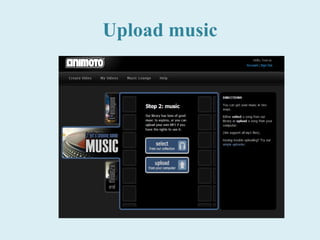
Upload music
Uploading pictures
 
Type in name of video
Producing
About 5 minutes
Finished and ready to view Show the video clip
Click on toolbox, few ways to send
Few ways to share
Send by email
Sent
Share the link
 
Embed to blog
Students are found to be challenged, engaged, and more independent when using technology .

E2 Applying Technology in Classroom (Lin)

Editor's Notes

  • #17 Super easy to use and user friendly.
  • #20 Explain upper and lower tool bars. Drag down the characters and customize your own comic.
  • #34 Open the China Trip video clip