DYNAMICS 365 UNIFIED
INTERFACE
Presented by Brian Begley – www.encloud9.com
ABOUT
ENCLOUD9
 Dynamics 365 Cloud Customer Relationship
Management – Silver 2014 - present
 12 years experience working with small to mid sized
businesses to modernize sales, marketing customer
service
 Work with companies throughout the US and
Canada
 Primary focus is on Cloud-based Dynamics 365
Customer Engagement Platform
DYNAMICS 365
OCTOBER 2018
RELEASE
 Updates to both
Dynamics 365 Online and
On Premise –V9
 Dynamics 365 is part of
the PowerPlatform
 PowerBi
 PowerApps
 Microsoft Flow
 Common Data Service
for Apps
 Dynamics 365 is now on
a constant release cycle
UNIFIED
INTERFACE
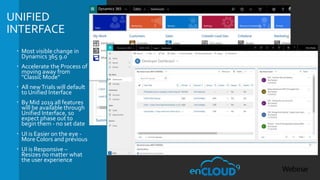
 Most visible change in
Dynamics 365 9.0
 Accelerate the Process of
moving away from
"Classic Mode"
 All newTrials will default
to Unified Interface
 By Mid 2019 all features
will be available through
Unified Interface, so
expect phase out to
begin them - no set date
 UI is Easier on the eye -
More Colors and previous
 UI is Responsive –
Resizes no matter what
the user experience
NAVIGATION
ANDVIEWS
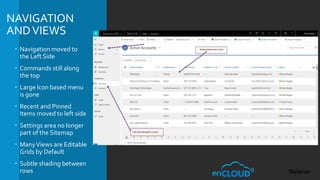
 Navigation moved to
the Left Side
 Commands still along
the top
 Large Icon based menu
is gone
 Recent and Pinned
Items moved to left side
 Settings area no longer
part of the Sitemap
 ManyViews are Editable
Grids by Default
 Subtle shading between
rows
FORMS
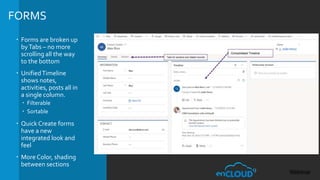
 Forms are broken up
byTabs – no more
scrolling all the way
to the bottom
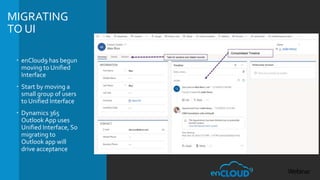
 UnifiedTimeline
shows notes,
activities, posts all in
a single column.
 Filterable
 Sortable
 Quick Create forms
have a new
integrated look and
feel
 More Color, shading
between sections
OUTLOOKAND
MOBILE
EXPERIENCE
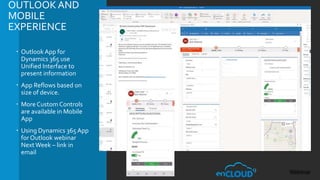
 Outlook App for
Dynamics 365 use
Unified Interface to
present information
 App Reflows based on
size of device.
 More Custom Controls
are available in Mobile
App
 Using Dynamics 365App
for Outlook webinar
NextWeek – link in
email
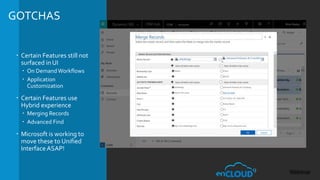
GOTCHAS
 Certain Features still not
surfaced in UI
 On DemandWorkflows
 Application
Customization
 Certain Features use
Hybrid experience
 Merging Records
 Advanced Find
 Microsoft is working to
move these to Unified
Interface ASAP!
MIGRATING
TO UI
 enCloud9 has begun
moving to Unified
Interface
 Start by moving a
small group of users
to Unified Interface
 Dynamics 365
Outlook App uses
Unified Interface, So
migrating to
Outlook app will
drive acceptance
RESOURCES
 enCloud9 events - encloud9.com/about-encloud9/events/
 12/12/18 – Dynamics 365 for OutlookApp
 12/19/18 – Building PowerApps and Hubs for Dynamics 365
 October 2018 Release Notes - docs.microsoft.com/en-
us/business-applications-release-
notes/october18/powerapps/
 MicrosoftCommunity Site - https://community.dynamics.com/
 Brian Begley – bbegley @ encloud9.com
 LinkedIn linkedin.com/in/brianbegleydynamicscrm

Dynamics 365 Unified Interface presentation by enCloud9

  • 1.
    DYNAMICS 365 UNIFIED INTERFACE Presentedby Brian Begley – www.encloud9.com
  • 2.
    ABOUT ENCLOUD9  Dynamics 365Cloud Customer Relationship Management – Silver 2014 - present  12 years experience working with small to mid sized businesses to modernize sales, marketing customer service  Work with companies throughout the US and Canada  Primary focus is on Cloud-based Dynamics 365 Customer Engagement Platform
  • 3.
    DYNAMICS 365 OCTOBER 2018 RELEASE Updates to both Dynamics 365 Online and On Premise –V9  Dynamics 365 is part of the PowerPlatform  PowerBi  PowerApps  Microsoft Flow  Common Data Service for Apps  Dynamics 365 is now on a constant release cycle
  • 4.
    UNIFIED INTERFACE  Most visiblechange in Dynamics 365 9.0  Accelerate the Process of moving away from "Classic Mode"  All newTrials will default to Unified Interface  By Mid 2019 all features will be available through Unified Interface, so expect phase out to begin them - no set date  UI is Easier on the eye - More Colors and previous  UI is Responsive – Resizes no matter what the user experience
  • 5.
    NAVIGATION ANDVIEWS  Navigation movedto the Left Side  Commands still along the top  Large Icon based menu is gone  Recent and Pinned Items moved to left side  Settings area no longer part of the Sitemap  ManyViews are Editable Grids by Default  Subtle shading between rows
  • 6.
    FORMS  Forms arebroken up byTabs – no more scrolling all the way to the bottom  UnifiedTimeline shows notes, activities, posts all in a single column.  Filterable  Sortable  Quick Create forms have a new integrated look and feel  More Color, shading between sections
  • 7.
    OUTLOOKAND MOBILE EXPERIENCE  Outlook Appfor Dynamics 365 use Unified Interface to present information  App Reflows based on size of device.  More Custom Controls are available in Mobile App  Using Dynamics 365App for Outlook webinar NextWeek – link in email
  • 8.
    GOTCHAS  Certain Featuresstill not surfaced in UI  On DemandWorkflows  Application Customization  Certain Features use Hybrid experience  Merging Records  Advanced Find  Microsoft is working to move these to Unified Interface ASAP!
  • 9.
    MIGRATING TO UI  enCloud9has begun moving to Unified Interface  Start by moving a small group of users to Unified Interface  Dynamics 365 Outlook App uses Unified Interface, So migrating to Outlook app will drive acceptance
  • 10.
    RESOURCES  enCloud9 events- encloud9.com/about-encloud9/events/  12/12/18 – Dynamics 365 for OutlookApp  12/19/18 – Building PowerApps and Hubs for Dynamics 365  October 2018 Release Notes - docs.microsoft.com/en- us/business-applications-release- notes/october18/powerapps/  MicrosoftCommunity Site - https://community.dynamics.com/  Brian Begley – bbegley @ encloud9.com  LinkedIn linkedin.com/in/brianbegleydynamicscrm