Teams y Virtual
Agents para
soporte
Lorem
• Trujillo Investment SA
• Líder de comunidad CEC (antes PASS)
• Dynamics 365 F&O, CE and Commerce
• Azure – Infrastructure
• Power Platform
• MCT desde 2011 en plataforma Microsoft
Juan Rafael
Arquitecto de Soluciones Dynamics 365
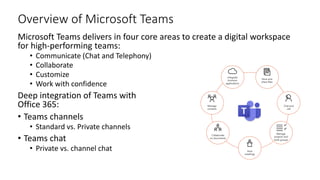
Overview of Microsoft Teams
Microsoft Teams delivers in four core areas to create a digital workspace
for high-performing teams:
• Communicate (Chat and Telephony)
• Collaborate
• Customize
• Work with confidence
Deep integration of Teams with
Office 365:
• Teams channels
• Standard vs. Private channels
• Teams chat
• Private vs. channel chat
Microsoft Teams integration with Microsoft
365
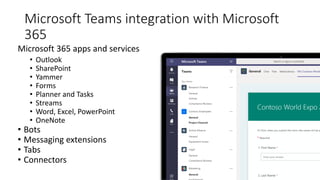
Microsoft 365 apps and services
• Outlook
• SharePoint
• Yammer
• Forms
• Planner and Tasks
• Streams
• Word, Excel, PowerPoint
• OneNote
• Bots
• Messaging extensions
• Tabs
• Connectors
Microsoft Teams integration with Microsoft
365 (cont.)
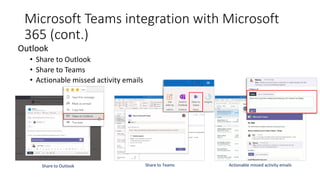
Outlook
• Share to Outlook
• Share to Teams
• Actionable missed activity emails
Share to Outlook Share to Teams Actionable missed activity emails
Microsoft Teams integration with Microsoft
365 (cont.)
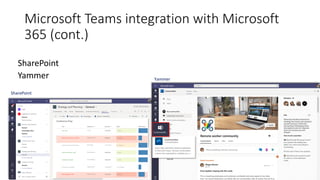
SharePoint
Yammer
SharePoint
Yammer
Microsoft Teams integration with Microsoft
365 (cont.)
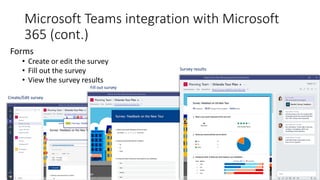
Forms
• Create or edit the survey
• Fill out the survey
• View the survey results
Create/Edit survey
Fill out survey
Survey results
Microsoft Teams integration with Power
Platform
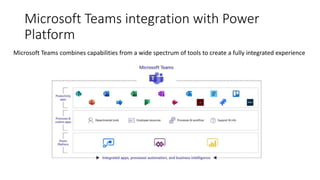
Microsoft Teams combines capabilities from a wide spectrum of tools to create a fully integrated experience
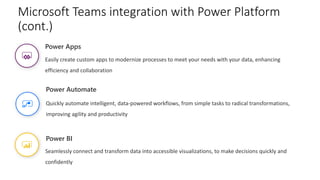
Power BI
Seamlessly connect and transform data into accessible visualizations, to make decisions quickly and
confidently
Power Apps
Easily create custom apps to modernize processes to meet your needs with your data, enhancing
efficiency and collaboration
Power Automate
Quickly automate intelligent, data-powered workflows, from simple tasks to radical transformations,
improving agility and productivity
Microsoft Teams integration with Power Platform
(cont.)
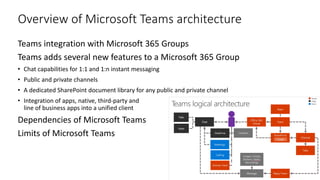
Overview of Microsoft Teams architecture
Teams integration with Microsoft 365 Groups
Teams adds several new features to a Microsoft 365 Group
• Chat capabilities for 1:1 and 1:n instant messaging
• Public and private channels
• A dedicated SharePoint document library for any public and private channel
• Integration of apps, native, third-party and
line of business apps into a unified client
Dependencies of Microsoft Teams
Limits of Microsoft Teams
What is Power
Virtual Agent
Overview
?
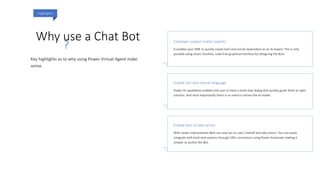
Why use a Chat Bot
Highlights
Empower subject matter experts
Enable rich and natural language
Enable bots to take action
?
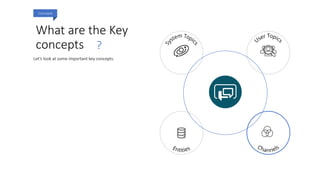
What are the Key
concepts
Concepts
?
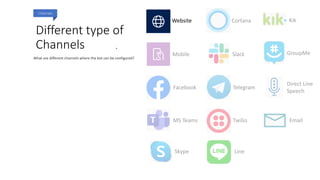
Different type of
Channels
Channels
.
Mobile
Facebook
MS Teams
Skype
Cortana
Slack
Telegram
Twilio
Line
Kik
GroupMe
Direct Line
Speech
Email
Website
PARA LA GESTIÓN DE LOS PROCESOS
DE SOPORTE – ERP D365
ASISTENTE
VIRTUAL
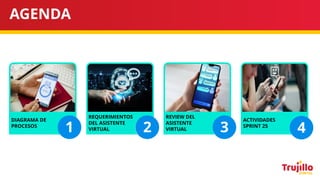
AGENDA
DIAGRAMA DE
PROCESOS
REQUERIMIENTOS
DEL ASISTENTE
VIRTUAL
REVIEW DEL
ASISTENTE
VIRTUAL
ACTIVIDADES
SPRINT 25
1 2 3 4
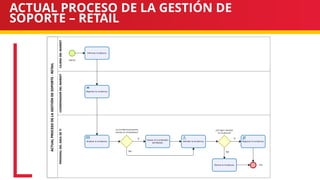
ACTUAL PROCESO DE LA GESTIÓN DE
SOPORTE – RETAIL
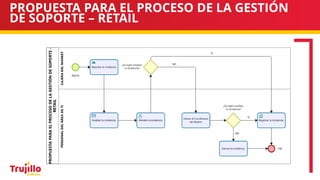
PROPUESTA PARA EL PROCESO DE LA GESTIÓN
DE SOPORTE – RETAIL
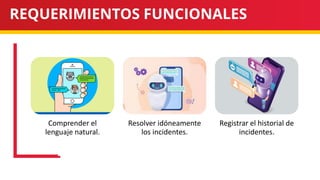
REQUERIMIENTOS FUNCIONALES
Comprender el
lenguaje natural.
Resolver idóneamente
los incidentes.
Registrar el historial de
incidentes.
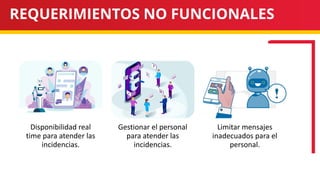
REQUERIMIENTOS NO FUNCIONALES
Disponibilidad real
time para atender las
incidencias.
Gestionar el personal
para atender las
incidencias.
Limitar mensajes
inadecuados para el
personal.
Gracias

MS Teams y Virtual Agents para soporte

  • 1.
  • 2.
    Lorem • Trujillo InvestmentSA • Líder de comunidad CEC (antes PASS) • Dynamics 365 F&O, CE and Commerce • Azure – Infrastructure • Power Platform • MCT desde 2011 en plataforma Microsoft Juan Rafael Arquitecto de Soluciones Dynamics 365
  • 3.
    Overview of MicrosoftTeams Microsoft Teams delivers in four core areas to create a digital workspace for high-performing teams: • Communicate (Chat and Telephony) • Collaborate • Customize • Work with confidence Deep integration of Teams with Office 365: • Teams channels • Standard vs. Private channels • Teams chat • Private vs. channel chat
  • 4.
    Microsoft Teams integrationwith Microsoft 365 Microsoft 365 apps and services • Outlook • SharePoint • Yammer • Forms • Planner and Tasks • Streams • Word, Excel, PowerPoint • OneNote • Bots • Messaging extensions • Tabs • Connectors
  • 5.
    Microsoft Teams integrationwith Microsoft 365 (cont.) Outlook • Share to Outlook • Share to Teams • Actionable missed activity emails Share to Outlook Share to Teams Actionable missed activity emails
  • 6.
    Microsoft Teams integrationwith Microsoft 365 (cont.) SharePoint Yammer SharePoint Yammer
  • 7.
    Microsoft Teams integrationwith Microsoft 365 (cont.) Forms • Create or edit the survey • Fill out the survey • View the survey results Create/Edit survey Fill out survey Survey results
  • 8.
    Microsoft Teams integrationwith Power Platform Microsoft Teams combines capabilities from a wide spectrum of tools to create a fully integrated experience
  • 9.
    Power BI Seamlessly connectand transform data into accessible visualizations, to make decisions quickly and confidently Power Apps Easily create custom apps to modernize processes to meet your needs with your data, enhancing efficiency and collaboration Power Automate Quickly automate intelligent, data-powered workflows, from simple tasks to radical transformations, improving agility and productivity Microsoft Teams integration with Power Platform (cont.)
  • 10.
    Overview of MicrosoftTeams architecture Teams integration with Microsoft 365 Groups Teams adds several new features to a Microsoft 365 Group • Chat capabilities for 1:1 and 1:n instant messaging • Public and private channels • A dedicated SharePoint document library for any public and private channel • Integration of apps, native, third-party and line of business apps into a unified client Dependencies of Microsoft Teams Limits of Microsoft Teams
  • 11.
    What is Power VirtualAgent Overview ?
  • 12.
    Why use aChat Bot Highlights Empower subject matter experts Enable rich and natural language Enable bots to take action ?
  • 13.
    What are theKey concepts Concepts ?
  • 14.
    Different type of Channels Channels . Mobile Facebook MSTeams Skype Cortana Slack Telegram Twilio Line Kik GroupMe Direct Line Speech Email Website
  • 15.
    PARA LA GESTIÓNDE LOS PROCESOS DE SOPORTE – ERP D365 ASISTENTE VIRTUAL
  • 16.
    AGENDA DIAGRAMA DE PROCESOS REQUERIMIENTOS DEL ASISTENTE VIRTUAL REVIEWDEL ASISTENTE VIRTUAL ACTIVIDADES SPRINT 25 1 2 3 4
  • 17.
    ACTUAL PROCESO DELA GESTIÓN DE SOPORTE – RETAIL
  • 18.
    PROPUESTA PARA ELPROCESO DE LA GESTIÓN DE SOPORTE – RETAIL
  • 19.
    REQUERIMIENTOS FUNCIONALES Comprender el lenguajenatural. Resolver idóneamente los incidentes. Registrar el historial de incidentes.
  • 20.
    REQUERIMIENTOS NO FUNCIONALES Disponibilidadreal time para atender las incidencias. Gestionar el personal para atender las incidencias. Limitar mensajes inadecuados para el personal.
  • 21.