Office 365 for Enterprises: Pricing & Licensing Overview
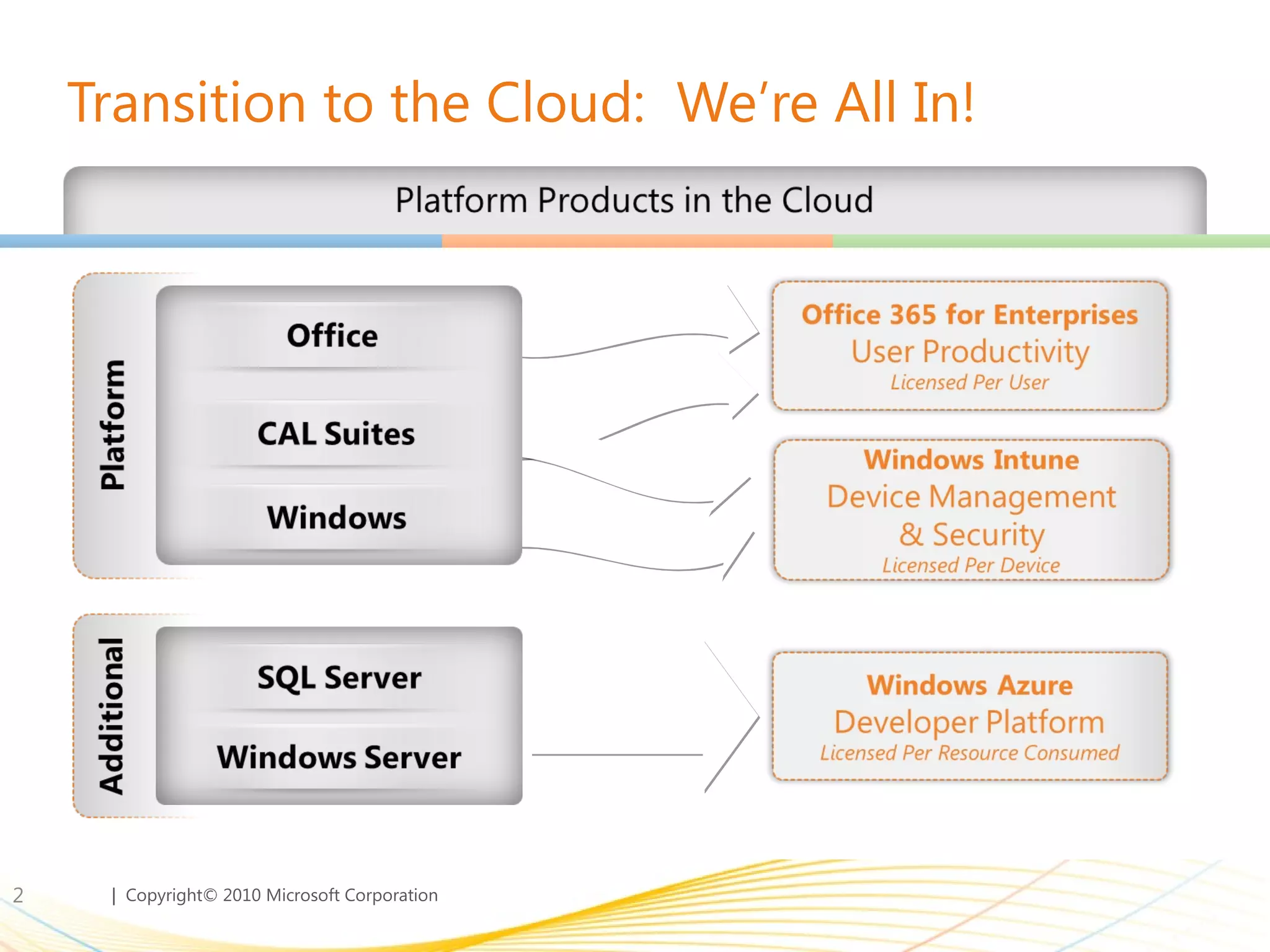
Transition to the Cloud:  We’re All In!
Announcing Microsoft Office 365 BRINGING TOGETHER CLOUD VERSIONS OF OUR MOST TRUSTED COMMUNICATIONS AND COLLABORATION PRODUCTS WITH THE LATEST VERSION OF OUR DESKTOP SUITE FOR BUSINESSES OF ALL SIZES. 
Productivity Offers for All Customer Segments
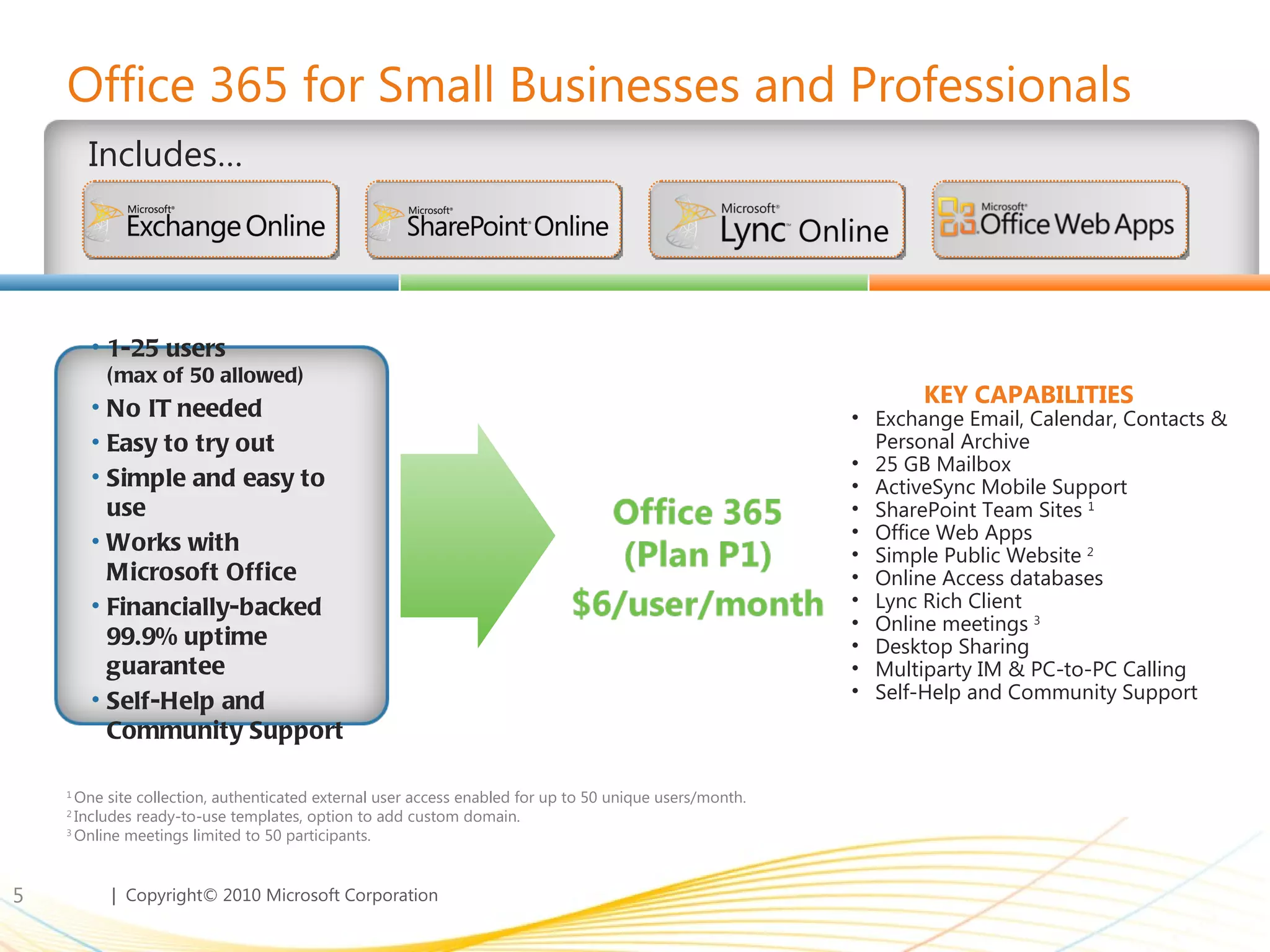
Office 365 for Small Businesses and Professionals Includes… 1  One site collection, authenticated external user access enabled for up to 50 unique users/month.  2  Includes ready-to-use templates, option to add custom domain. 3  Online meetings limited to 50 participants. Exchange Email, Calendar, Contacts & Personal Archive 25 GB Mailbox ActiveSync Mobile Support SharePoint Team Sites  1 Office Web Apps Simple Public Website  2 Online Access databases Lync Rich Client Online meetings  3 Desktop Sharing Multiparty IM & PC-to-PC Calling Self-Help and Community Support KEY CAPABILITIES  1-25 users  (max of 50 allowed) No IT needed Easy to try out Simple and easy to use Works with  Microsoft Office Financially-backed 99.9% uptime guarantee Self-Help and Community Support
When Is Office 365 for Small Businesses Not Enough? There are several scenarios where Office 365 for enterprises better meets the needs of small organizations Need Active Directory Sync Ability to sync/manage  user groups Need Archiving Email archiving for legal compliance 2 Need BES Blackberry Enterprise Server 3 Growing to >50 users  More than 50 PC org today or tomorrow 4 24x7 Phone support Higher touch vs. community support  5
Office 365 for Enterprises User Segments:  Right features for the right users User Segment Offers: Plan K Family 500 MB mailbox No SharePoint storage allocation Outlook Web Access (full OWA, not Lite) POP Support Messaging, calendar, contacts Anti-Virus / Anti-Spam Site search capabilities Office Web Apps Rich feature offering that meets a users full messaging and collaboration needs Low cost offering to users that do not have messaging and collaboration capabilities today User Segment Offers: Plan E Family 25GB mailbox 500MB SharePoint storage Full Client Connectivity (MAPI/IMAP) Mobility Lync (real time communications) Advanced Exchange & SharePoint capabilities Office Professional Plus On-premises access rights Key  Differentiators
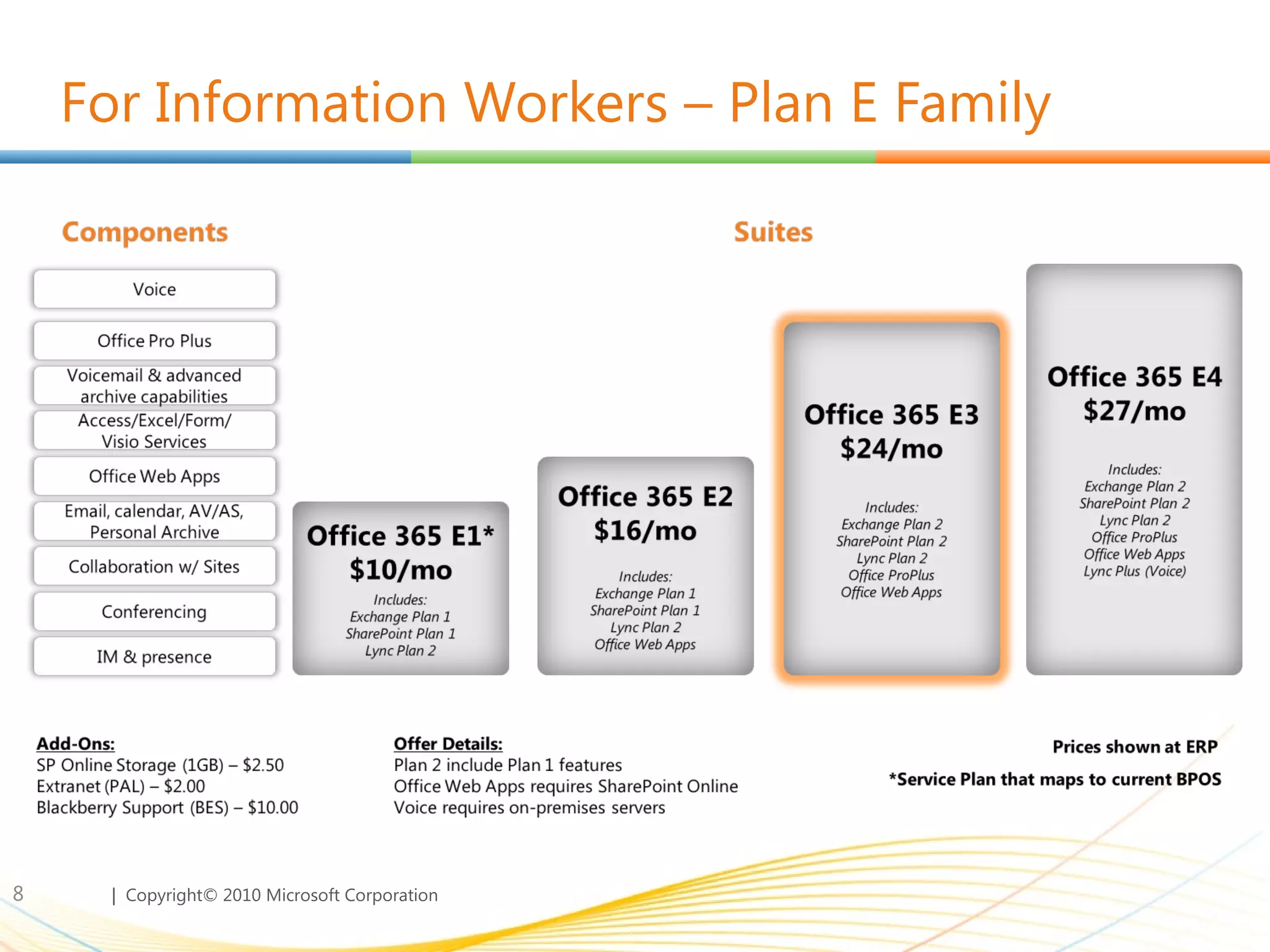
For Information Workers – Plan E Family
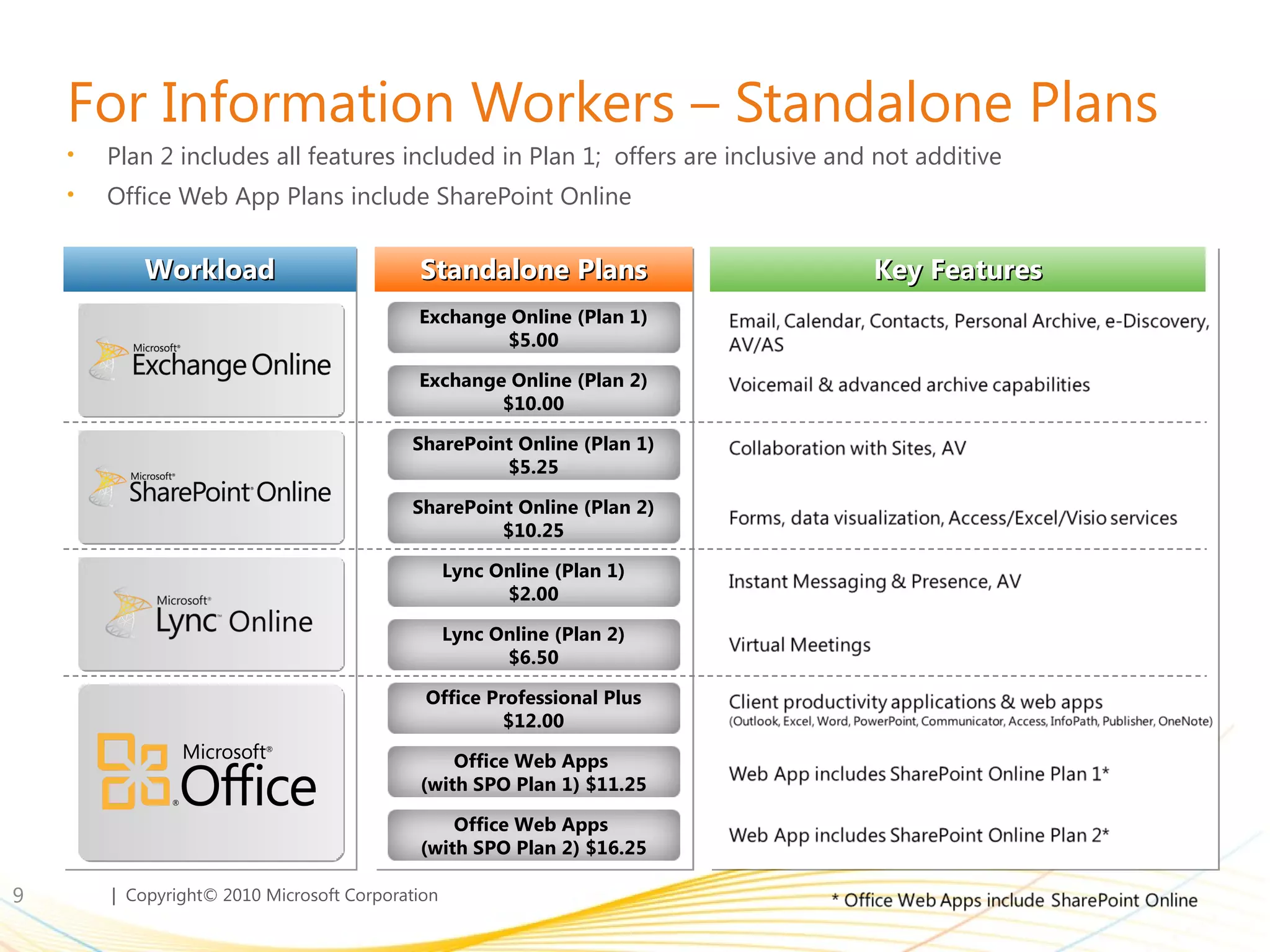
For Information Workers – Standalone Plans Plan 2 includes all features included in Plan 1;  offers are inclusive and not additive Office Web App Plans include SharePoint Online Workload Standalone Plans Key Features Exchange Online (Plan 1) $5.00 Exchange Online (Plan 2) $10.00 SharePoint Online (Plan 1) $5.25 SharePoint Online (Plan 2) $10.25 Lync Online (Plan 1) $2.00 Lync Online (Plan 2) $6.50 Office Professional Plus $12.00 Office Web Apps  (with SPO Plan 1) $11.25 Office Web Apps  (with SPO Plan 2) $16.25
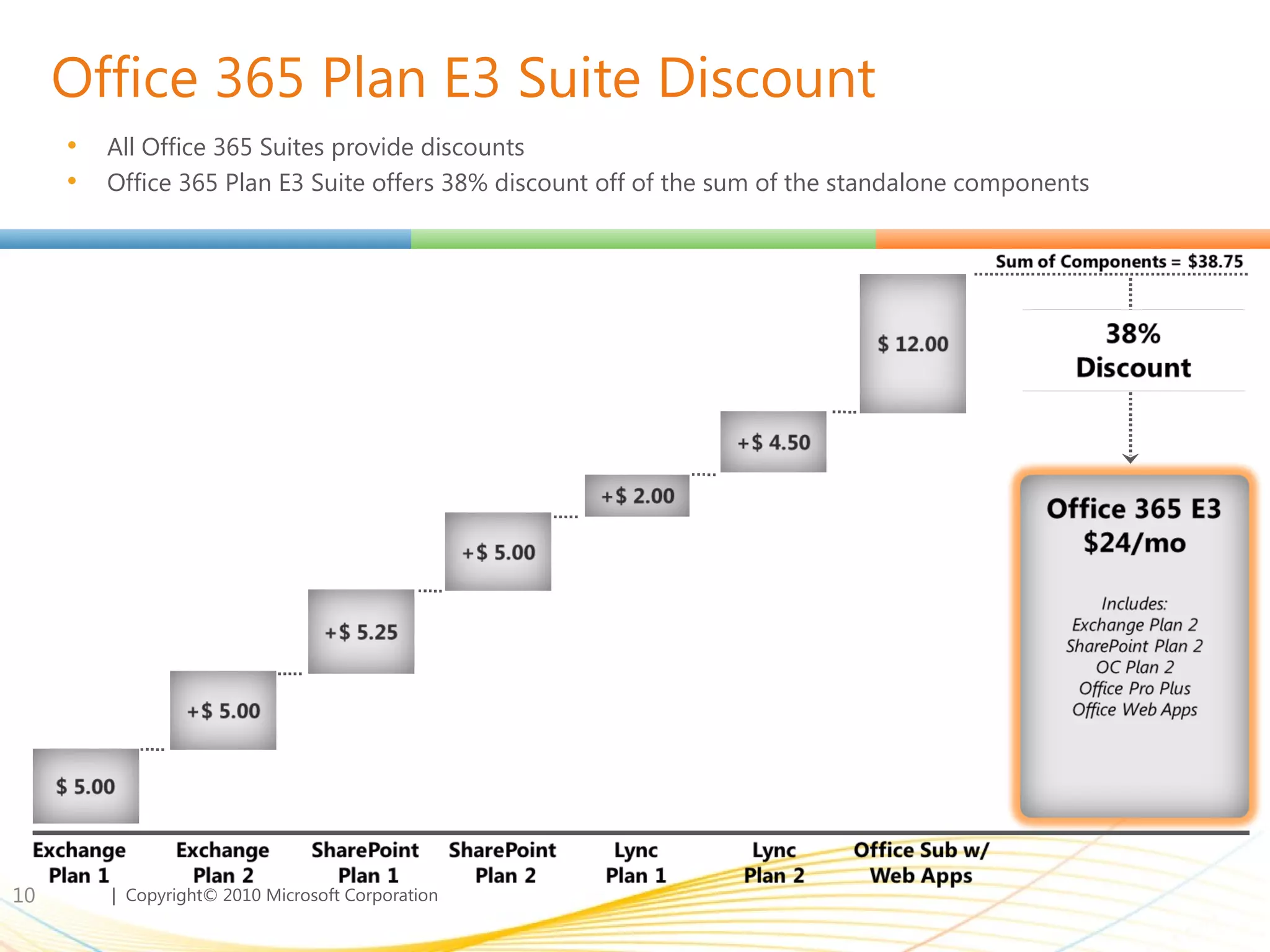
Office 365 Plan E3 Suite Discount All Office 365 Suites provide discounts Office 365 Plan E3 Suite offers 38% discount off of the sum of the standalone components
For Kiosk Workers – Plan K Family Profile of a typical Kiosk Worker: Spends 5-10% or less of their time on a PC Shares a terminal with other kiosk workers Hasn’t had access to a corporate mailbox in the past Examples:  manufacturing line worker, retail clerk, mail couriers  Plan K Suites built to address different Kiosk worker needs: Office 365 K1 : Addresses most kiosk worker scenarios, where customers want to provide light email and access to a company portal Provides capability to view Office documents Office 365 K2 :  Addresses kiosk workers that require information access & simple data input Includes Office Web Apps editing capabilities for an additional cost
Office 365 Licensing Programs
Enterprise Agreement Evolution The updated EA provides new  flexibility  to transition users  online in a  single agreement Transition to Online Services at your own pace No service cost in the year a user transitions from on premises software Move users back and forth between on-premise and Online Services Match and adjust service plans to meet user needs Respond to changes in your workforce size Single Agreement for on Premise & Online Services

Office365

  • 1.
    Office 365 forEnterprises: Pricing & Licensing Overview
  • 2.
    Transition to theCloud: We’re All In!
  • 3.
    Announcing Microsoft Office365 BRINGING TOGETHER CLOUD VERSIONS OF OUR MOST TRUSTED COMMUNICATIONS AND COLLABORATION PRODUCTS WITH THE LATEST VERSION OF OUR DESKTOP SUITE FOR BUSINESSES OF ALL SIZES. 
  • 4.
    Productivity Offers forAll Customer Segments
  • 5.
    Office 365 forSmall Businesses and Professionals Includes… 1 One site collection, authenticated external user access enabled for up to 50 unique users/month. 2 Includes ready-to-use templates, option to add custom domain. 3 Online meetings limited to 50 participants. Exchange Email, Calendar, Contacts & Personal Archive 25 GB Mailbox ActiveSync Mobile Support SharePoint Team Sites 1 Office Web Apps Simple Public Website 2 Online Access databases Lync Rich Client Online meetings 3 Desktop Sharing Multiparty IM & PC-to-PC Calling Self-Help and Community Support KEY CAPABILITIES 1-25 users (max of 50 allowed) No IT needed Easy to try out Simple and easy to use Works with Microsoft Office Financially-backed 99.9% uptime guarantee Self-Help and Community Support
  • 6.
    When Is Office365 for Small Businesses Not Enough? There are several scenarios where Office 365 for enterprises better meets the needs of small organizations Need Active Directory Sync Ability to sync/manage user groups Need Archiving Email archiving for legal compliance 2 Need BES Blackberry Enterprise Server 3 Growing to >50 users More than 50 PC org today or tomorrow 4 24x7 Phone support Higher touch vs. community support 5
  • 7.
    Office 365 forEnterprises User Segments: Right features for the right users User Segment Offers: Plan K Family 500 MB mailbox No SharePoint storage allocation Outlook Web Access (full OWA, not Lite) POP Support Messaging, calendar, contacts Anti-Virus / Anti-Spam Site search capabilities Office Web Apps Rich feature offering that meets a users full messaging and collaboration needs Low cost offering to users that do not have messaging and collaboration capabilities today User Segment Offers: Plan E Family 25GB mailbox 500MB SharePoint storage Full Client Connectivity (MAPI/IMAP) Mobility Lync (real time communications) Advanced Exchange & SharePoint capabilities Office Professional Plus On-premises access rights Key Differentiators
  • 8.
    For Information Workers– Plan E Family
  • 9.
    For Information Workers– Standalone Plans Plan 2 includes all features included in Plan 1; offers are inclusive and not additive Office Web App Plans include SharePoint Online Workload Standalone Plans Key Features Exchange Online (Plan 1) $5.00 Exchange Online (Plan 2) $10.00 SharePoint Online (Plan 1) $5.25 SharePoint Online (Plan 2) $10.25 Lync Online (Plan 1) $2.00 Lync Online (Plan 2) $6.50 Office Professional Plus $12.00 Office Web Apps (with SPO Plan 1) $11.25 Office Web Apps (with SPO Plan 2) $16.25
  • 10.
    Office 365 PlanE3 Suite Discount All Office 365 Suites provide discounts Office 365 Plan E3 Suite offers 38% discount off of the sum of the standalone components
  • 11.
    For Kiosk Workers– Plan K Family Profile of a typical Kiosk Worker: Spends 5-10% or less of their time on a PC Shares a terminal with other kiosk workers Hasn’t had access to a corporate mailbox in the past Examples: manufacturing line worker, retail clerk, mail couriers Plan K Suites built to address different Kiosk worker needs: Office 365 K1 : Addresses most kiosk worker scenarios, where customers want to provide light email and access to a company portal Provides capability to view Office documents Office 365 K2 : Addresses kiosk workers that require information access & simple data input Includes Office Web Apps editing capabilities for an additional cost
  • 12.
  • 13.
    Enterprise Agreement EvolutionThe updated EA provides new flexibility to transition users online in a single agreement Transition to Online Services at your own pace No service cost in the year a user transitions from on premises software Move users back and forth between on-premise and Online Services Match and adjust service plans to meet user needs Respond to changes in your workforce size Single Agreement for on Premise & Online Services