© Imagination Technologies p1
www.imgtec.comApril 2013
It’s all about triangles!
Understanding the GPU in your pocket to
write better code
© Imagination Technologies p2
Introductions
 Who?
 Guillem Vinals Gangolells (guillem.vinalsgangolells@imgtec.com)
 Developer Technology Engineer, PowerVR Graphics
 What?
 It’s all about triangles! Understanding the GPU in your pocket to write better code
© Imagination Technologies p3
Company overview
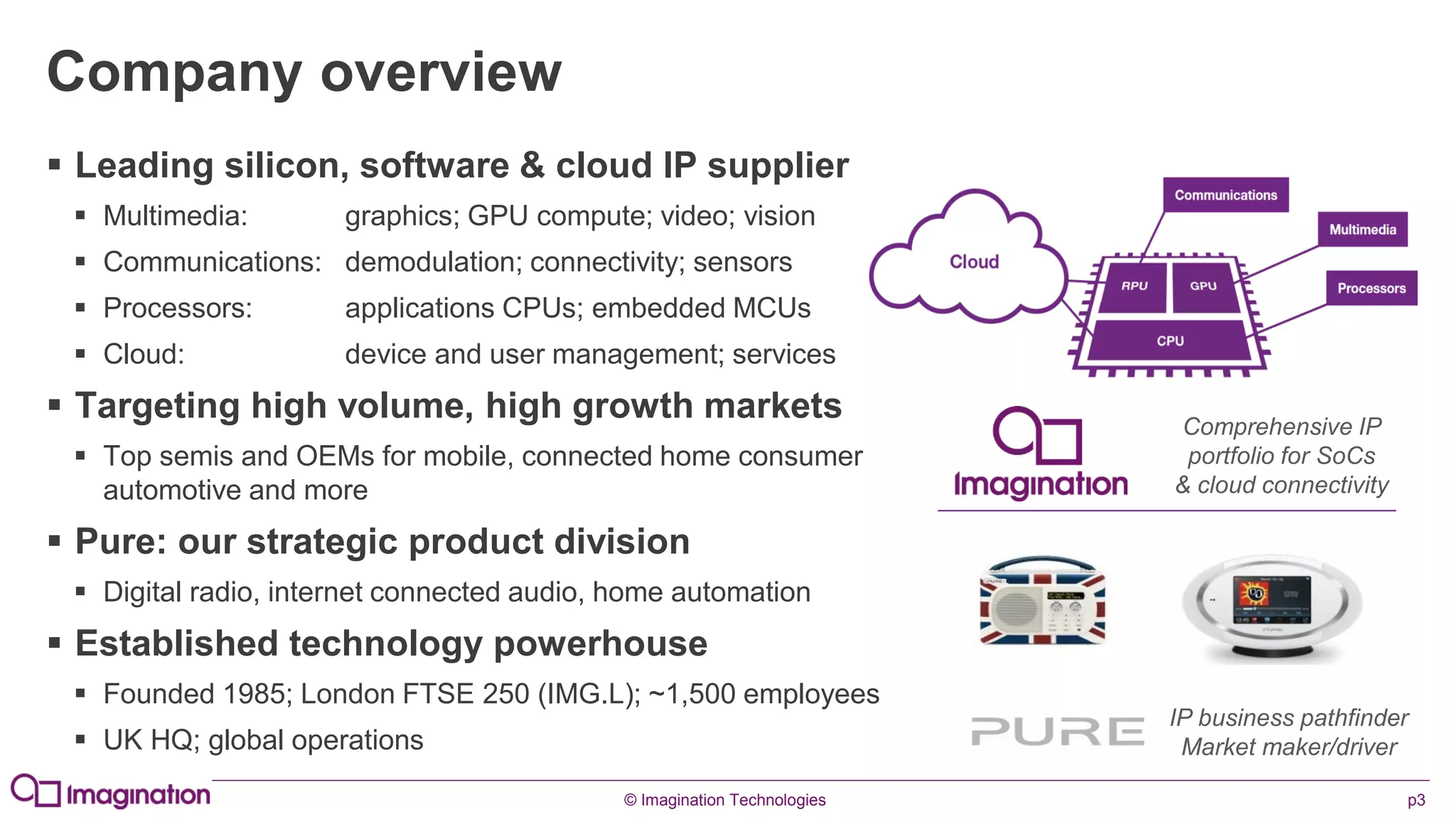
 Leading silicon, software & cloud IP supplier
 Multimedia: graphics; GPU compute; video; vision
 Communications: demodulation; connectivity; sensors
 Processors: applications CPUs; embedded MCUs
 Cloud: device and user management; services
 Targeting high volume, high growth markets
 Top semis and OEMs for mobile, connected home consumer
automotive and more
 Pure: our strategic product division
 Digital radio, internet connected audio, home automation
 Established technology powerhouse
 Founded 1985; London FTSE 250 (IMG.L); ~1,500 employees
 UK HQ; global operations
Comprehensive IP
portfolio for SoCs
& cloud connectivity
IP business pathfinder
Market maker/driver
© Imagination Technologies p4
www.imgtec.com
A Crash Course in Graphics Architectures
© Imagination Technologies p5
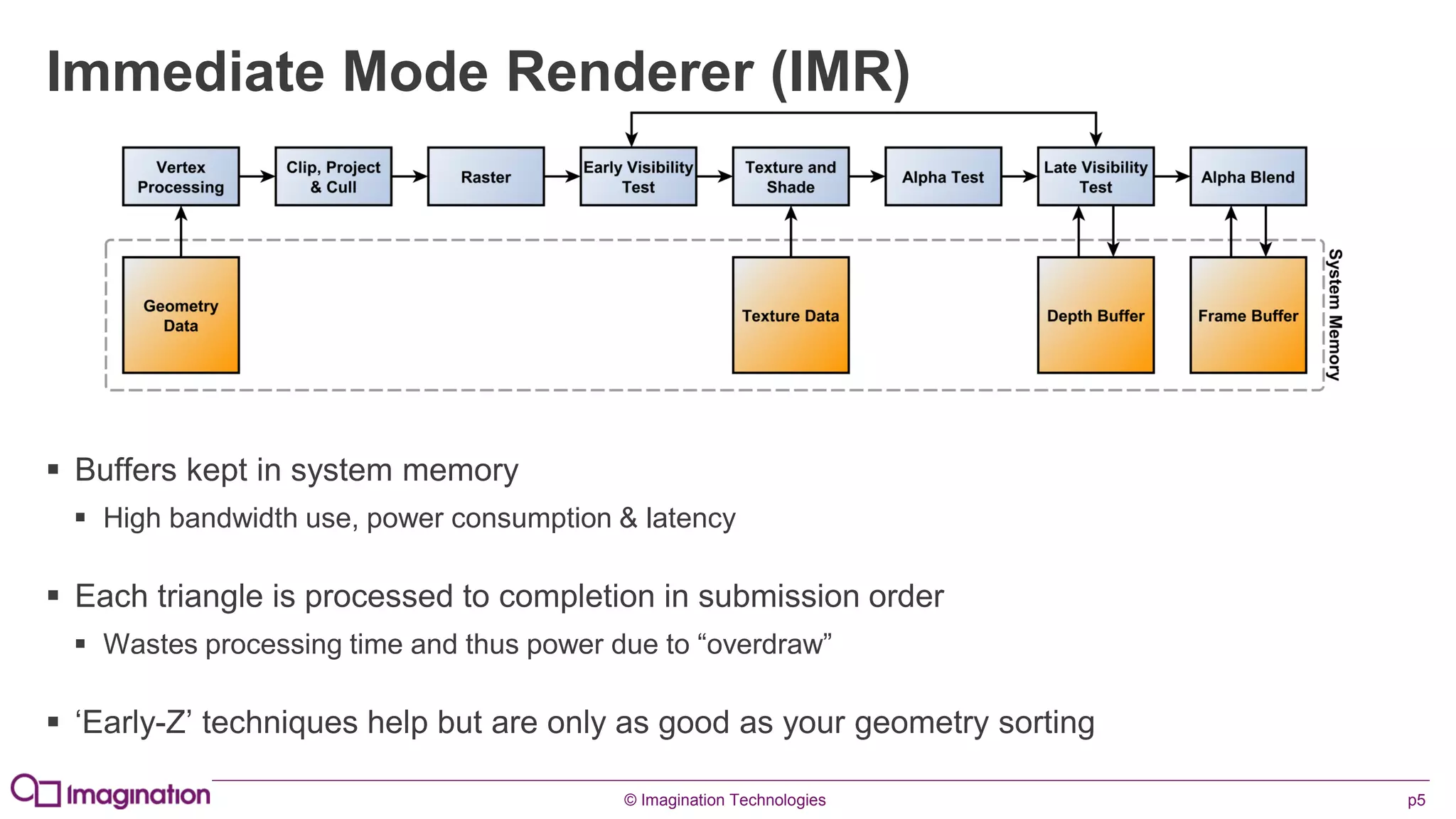
Immediate Mode Renderer (IMR)
 Buffers kept in system memory
 High bandwidth use, power consumption & latency
 Each triangle is processed to completion in submission order
 Wastes processing time and thus power due to “overdraw”
 ‘Early-Z’ techniques help but are only as good as your geometry sorting
© Imagination Technologies p6
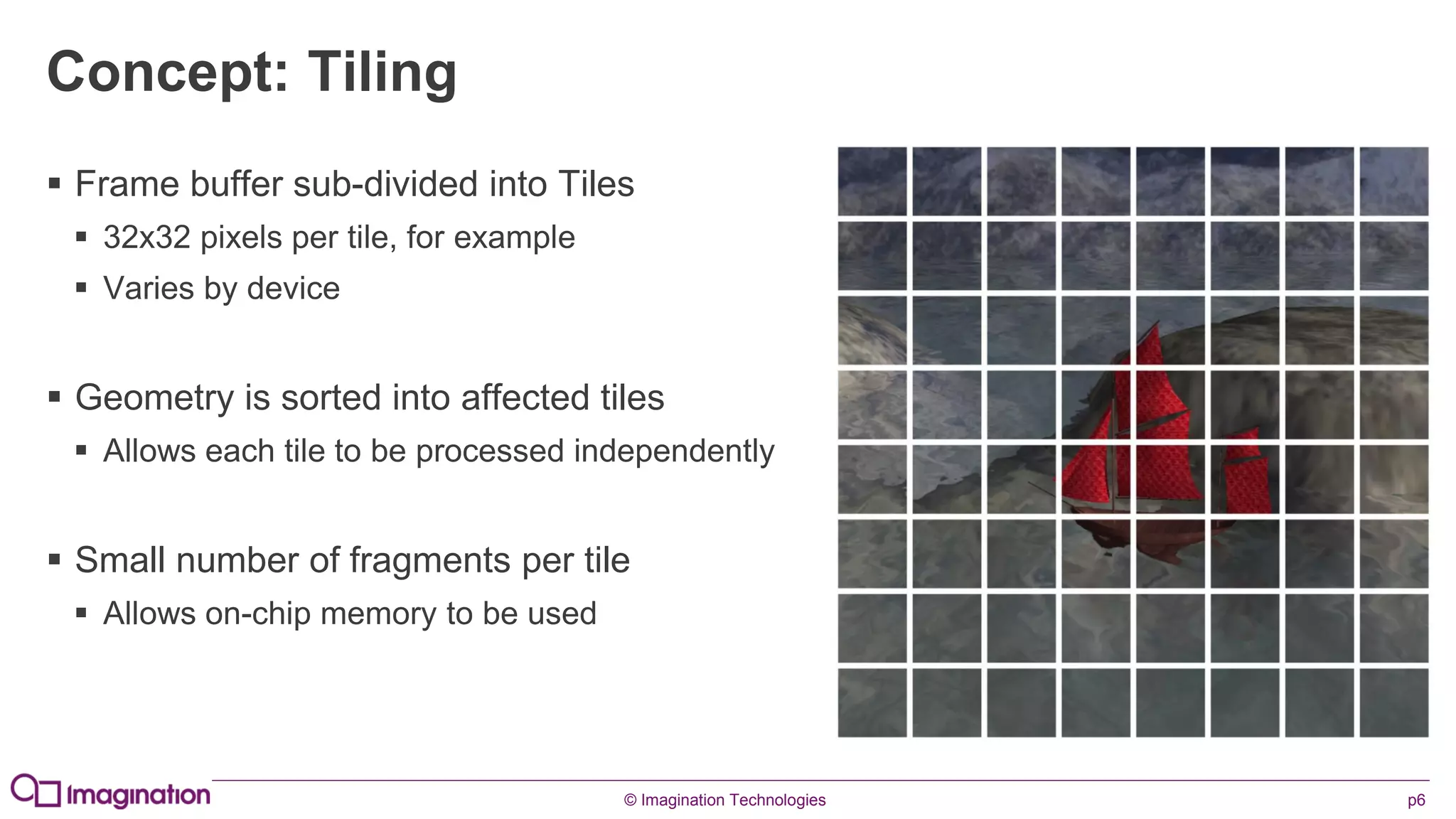
Concept: Tiling
 Frame buffer sub-divided into Tiles
 32x32 pixels per tile, for example
 Varies by device
 Geometry is sorted into affected tiles
 Allows each tile to be processed independently
 Small number of fragments per tile
 Allows on-chip memory to be used
© Imagination Technologies p7
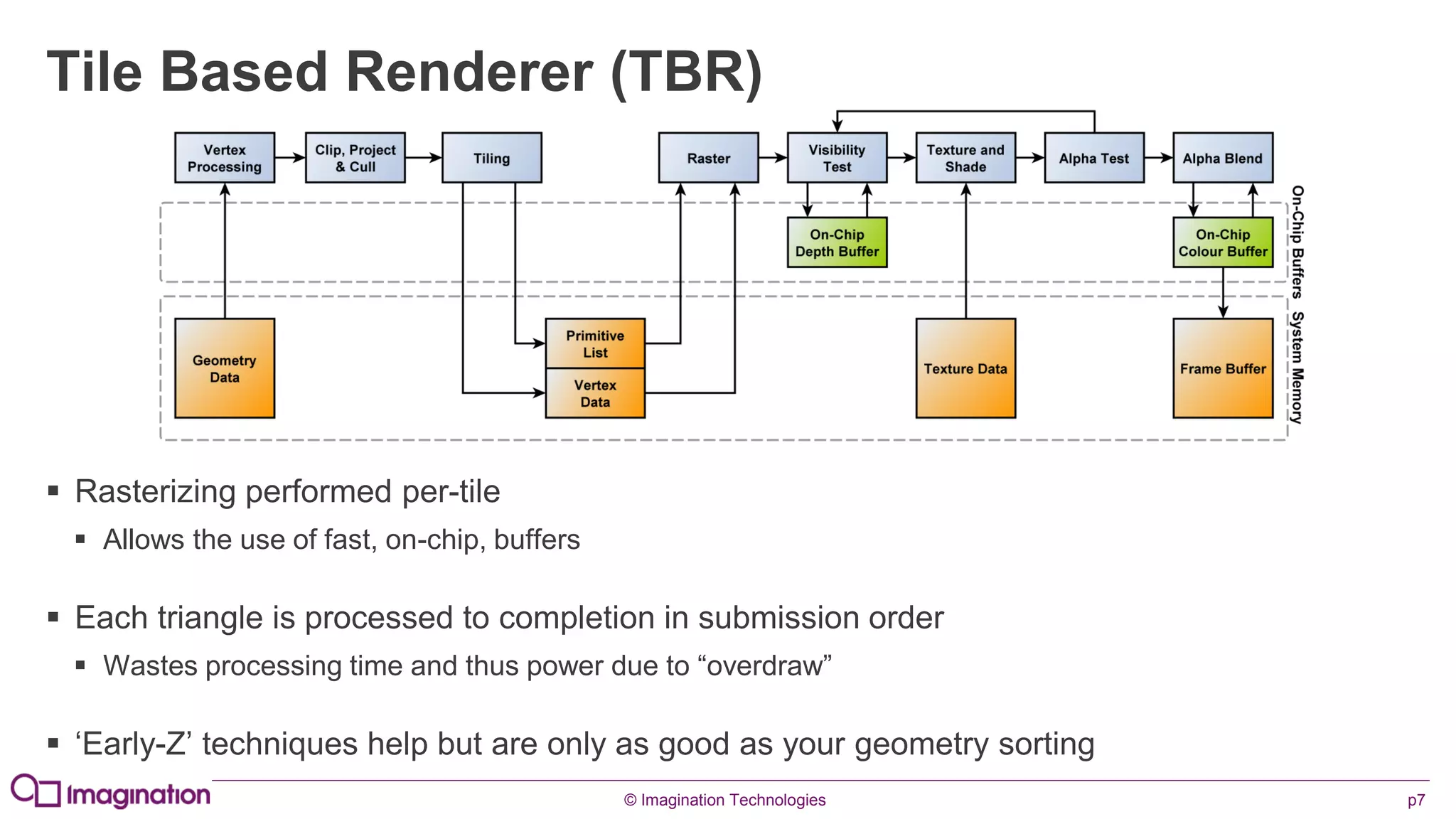
Tile Based Renderer (TBR)
 Rasterizing performed per-tile
 Allows the use of fast, on-chip, buffers
 Each triangle is processed to completion in submission order
 Wastes processing time and thus power due to “overdraw”
 ‘Early-Z’ techniques help but are only as good as your geometry sorting
© Imagination Technologies p8
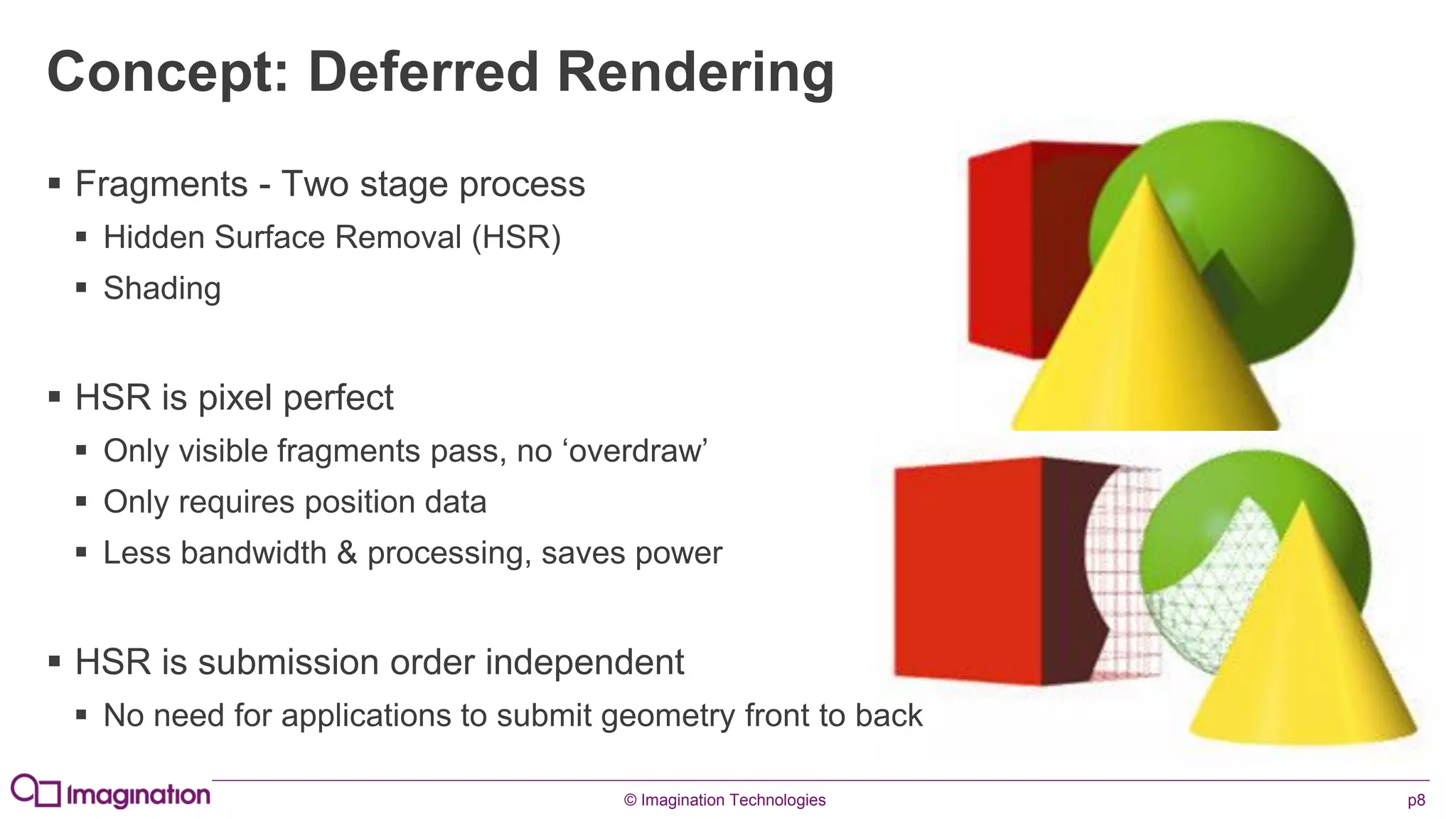
Concept: Deferred Rendering
 Fragments - Two stage process
 Hidden Surface Removal (HSR)
 Shading
 HSR is pixel perfect
 Only visible fragments pass, no ‘overdraw’
 Only requires position data
 Less bandwidth & processing, saves power
 HSR is submission order independent
 No need for applications to submit geometry front to back
© Imagination Technologies p9
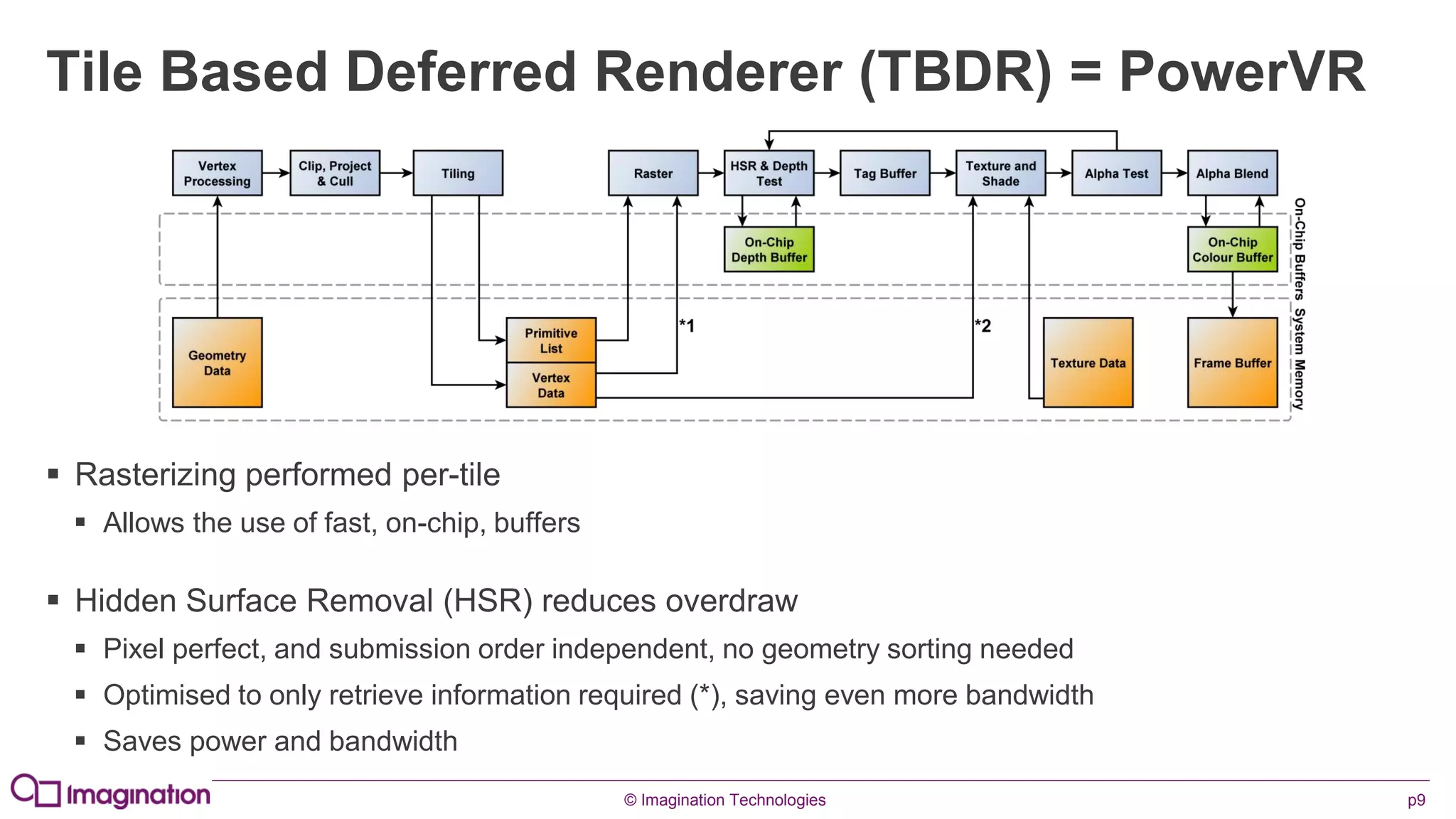
Tile Based Deferred Renderer (TBDR) = PowerVR
 Rasterizing performed per-tile
 Allows the use of fast, on-chip, buffers
 Hidden Surface Removal (HSR) reduces overdraw
 Pixel perfect, and submission order independent, no geometry sorting needed
 Optimised to only retrieve information required (*), saving even more bandwidth
 Saves power and bandwidth
© Imagination Technologies p10
www.imgtec.com
PowerVR Hardware Overview
© Imagination Technologies p11
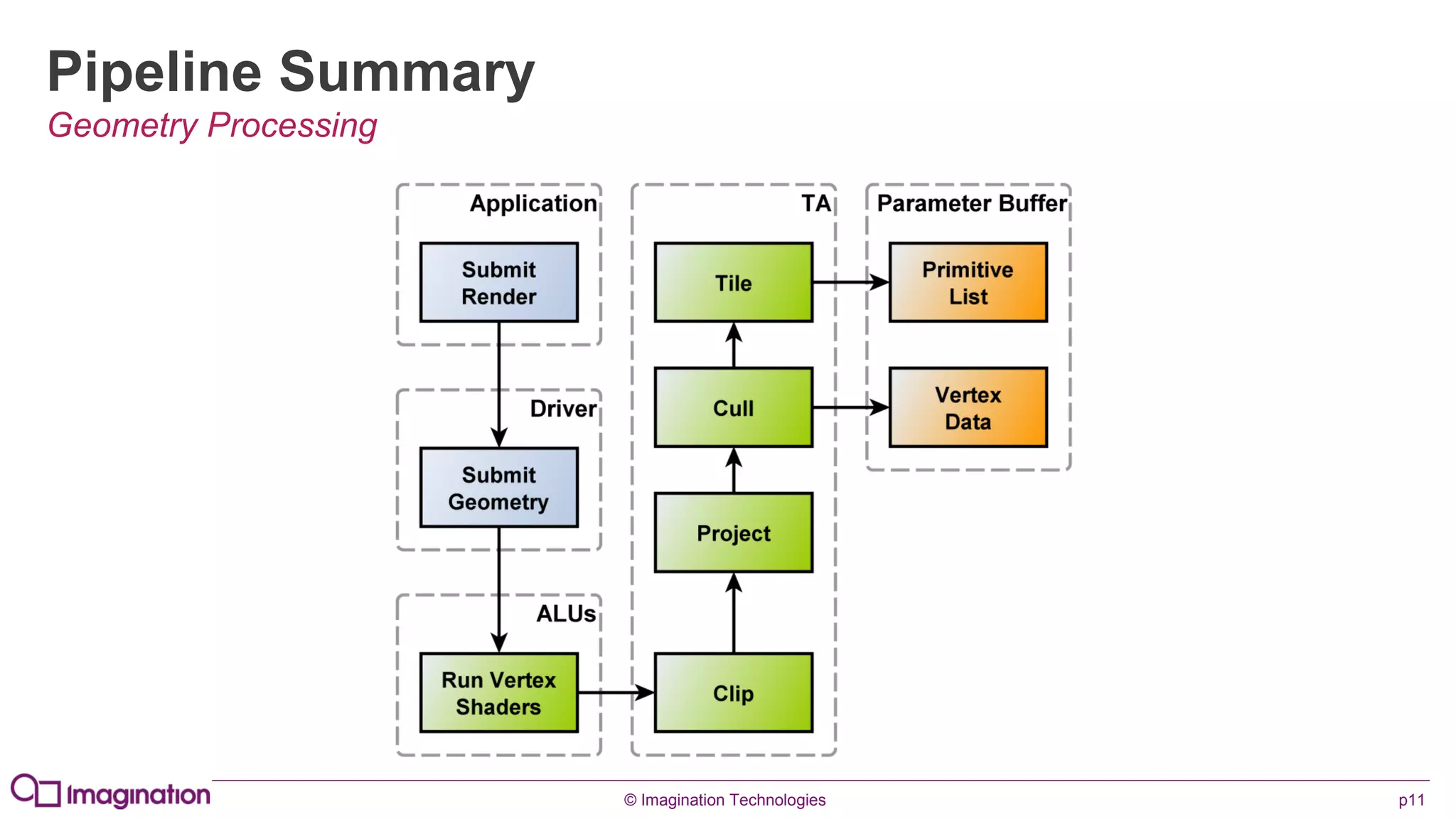
Pipeline Summary
Geometry Processing
© Imagination Technologies p12
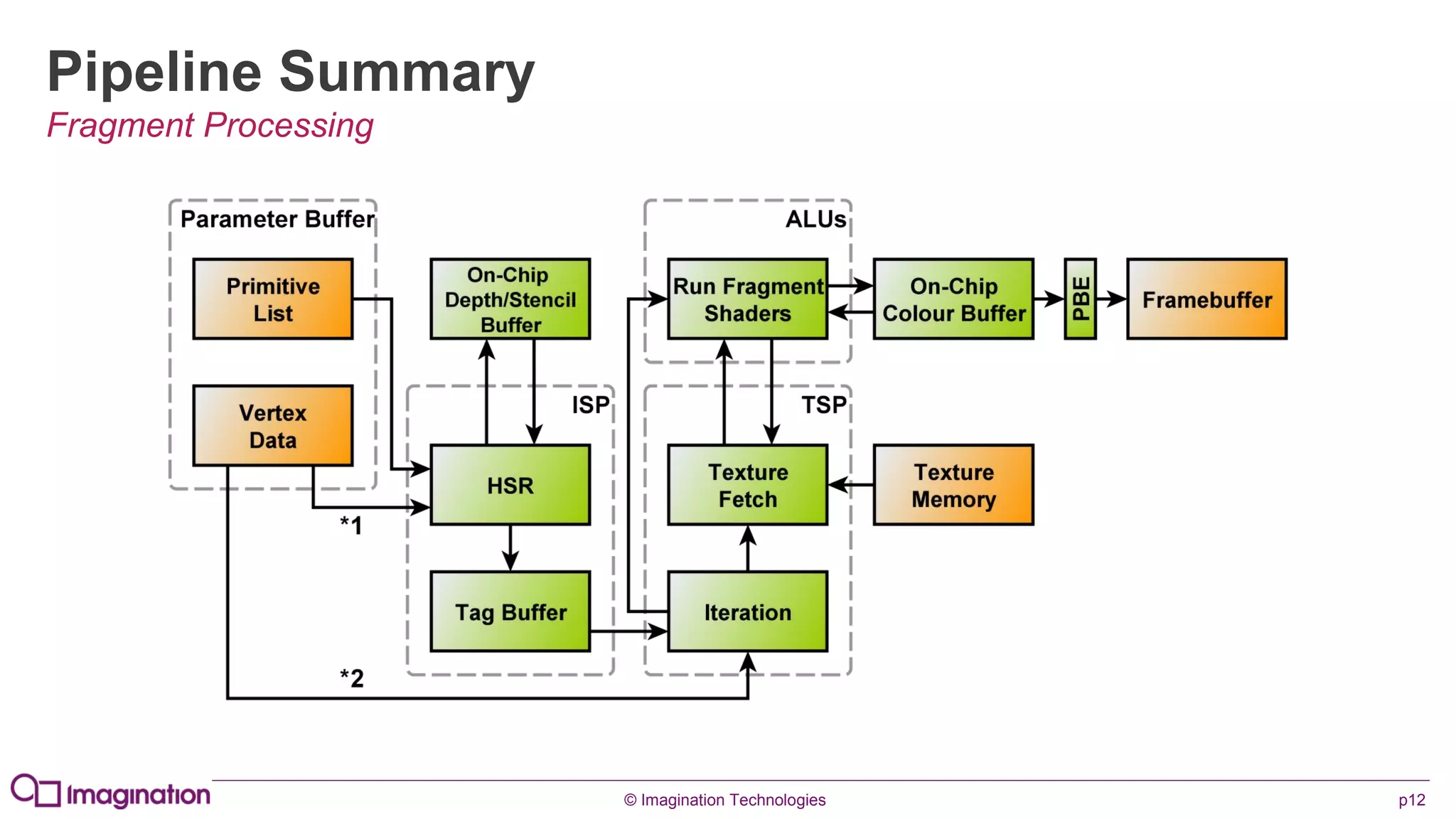
Pipeline Summary
Fragment Processing
© Imagination Technologies p13
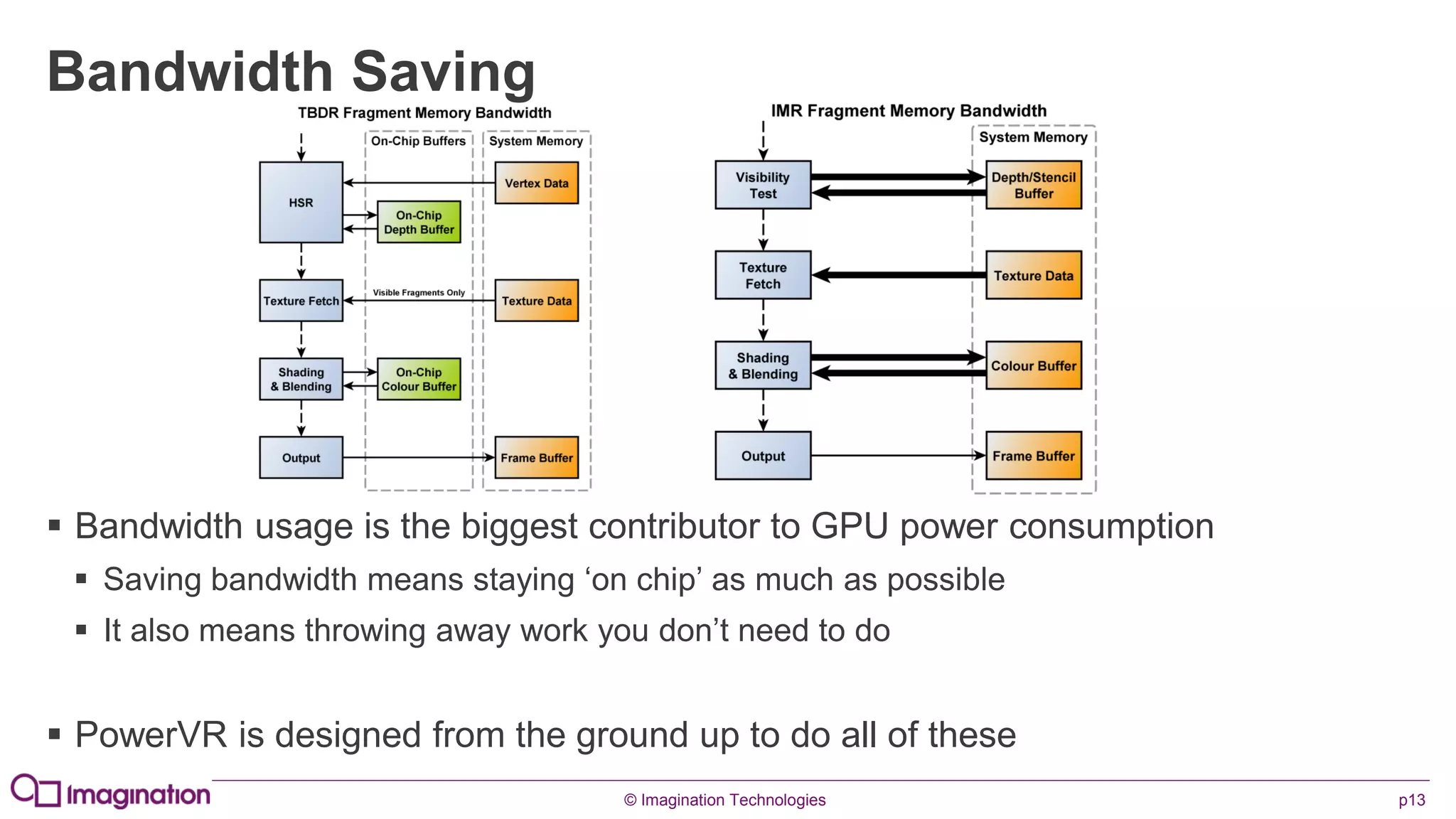
Bandwidth Saving
 Bandwidth usage is the biggest contributor to GPU power consumption
 Saving bandwidth means staying ‘on chip’ as much as possible
 It also means throwing away work you don’t need to do
 PowerVR is designed from the ground up to do all of these
© Imagination Technologies p14
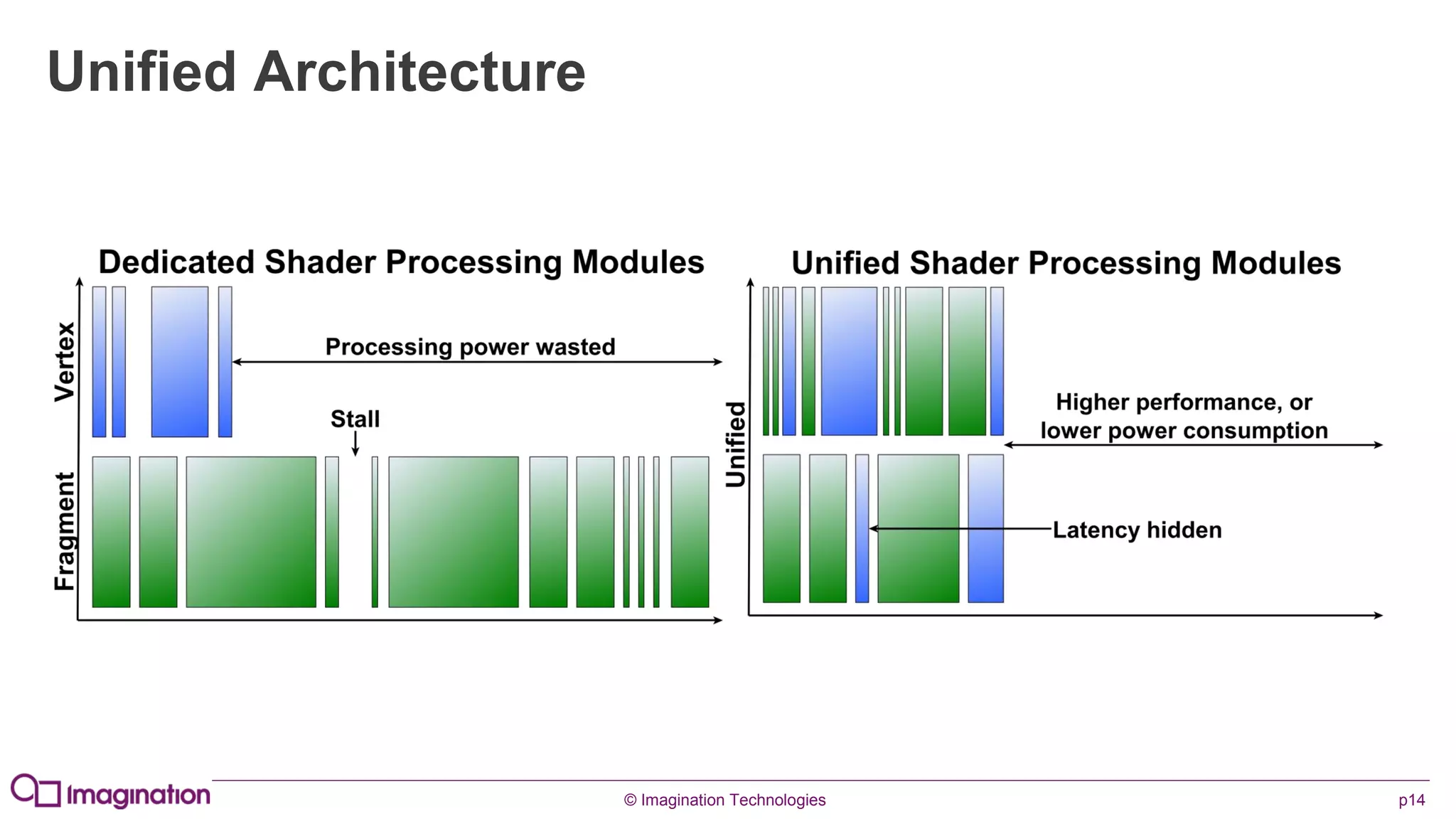
Unified Architecture
© Imagination Technologies p15
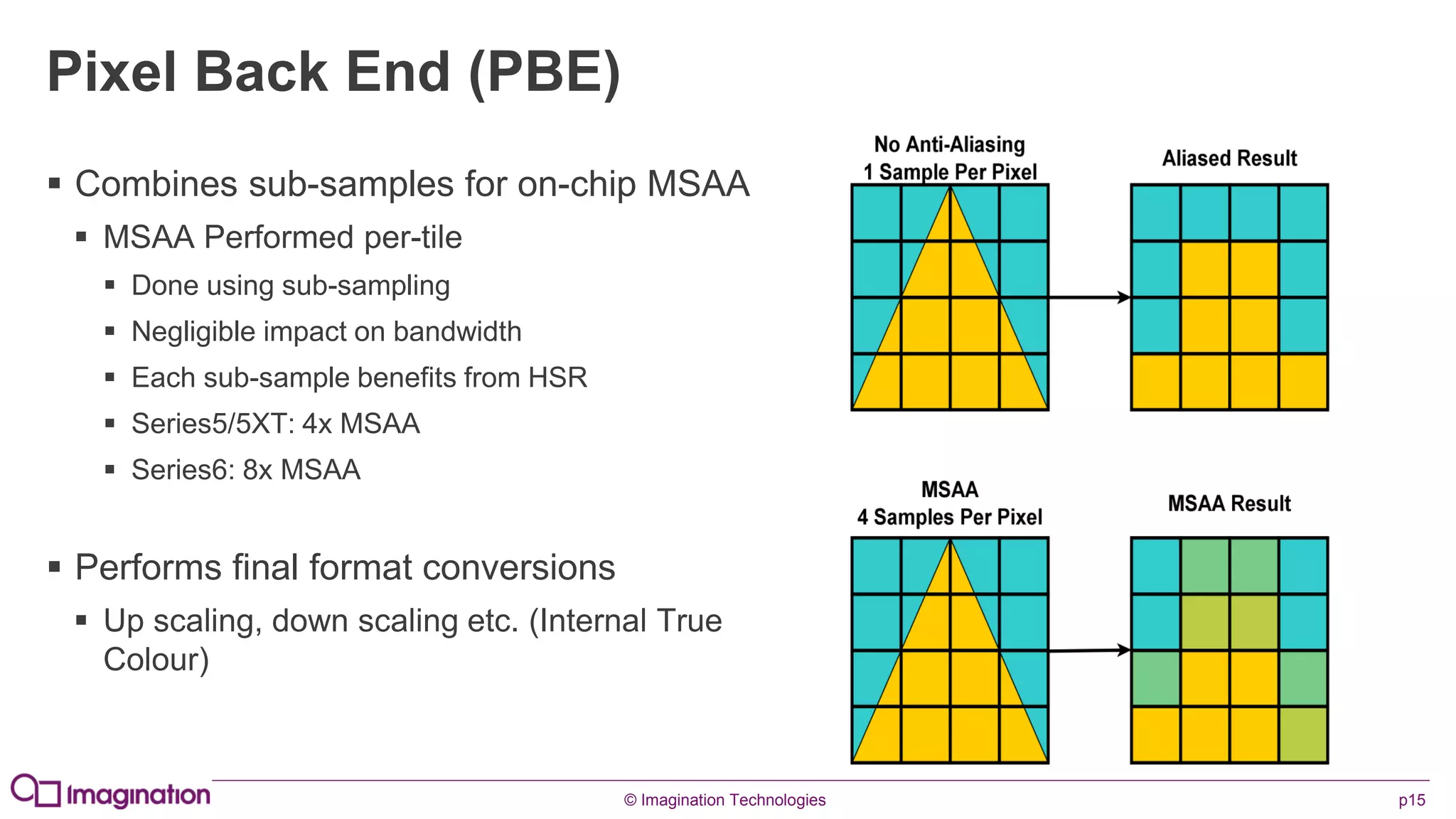
Pixel Back End (PBE)
 Combines sub-samples for on-chip MSAA
 MSAA Performed per-tile
 Done using sub-sampling
 Negligible impact on bandwidth
 Each sub-sample benefits from HSR
 Series5/5XT: 4x MSAA
 Series6: 8x MSAA
 Performs final format conversions
 Up scaling, down scaling etc. (Internal True
Colour)
© Imagination Technologies p16
www.imgtec.com
Further Considerations
© Imagination Technologies p17
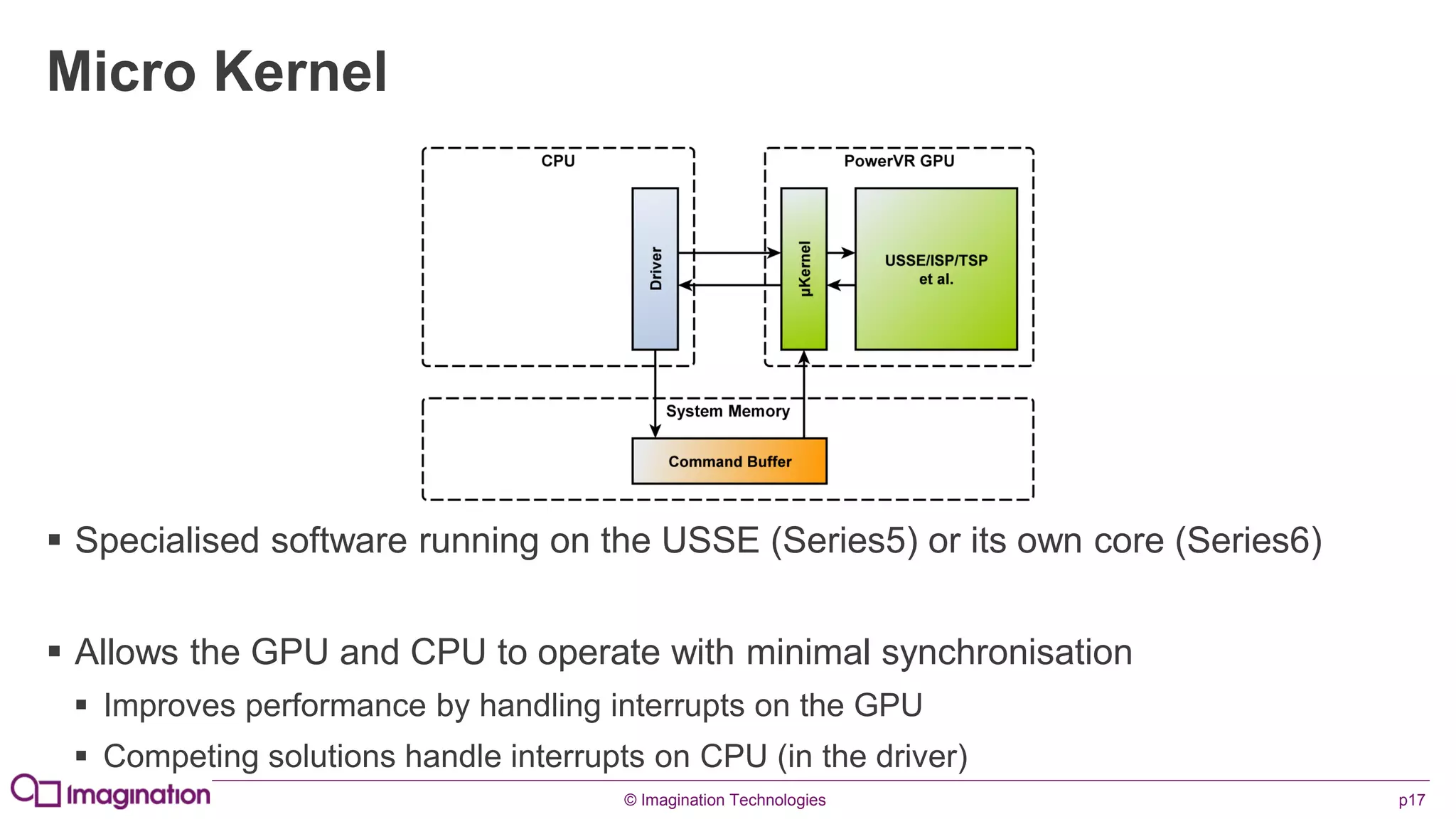
Micro Kernel
 Specialised software running on the USSE (Series5) or its own core (Series6)
 Allows the GPU and CPU to operate with minimal synchronisation
 Improves performance by handling interrupts on the GPU
 Competing solutions handle interrupts on CPU (in the driver)
© Imagination Technologies p18
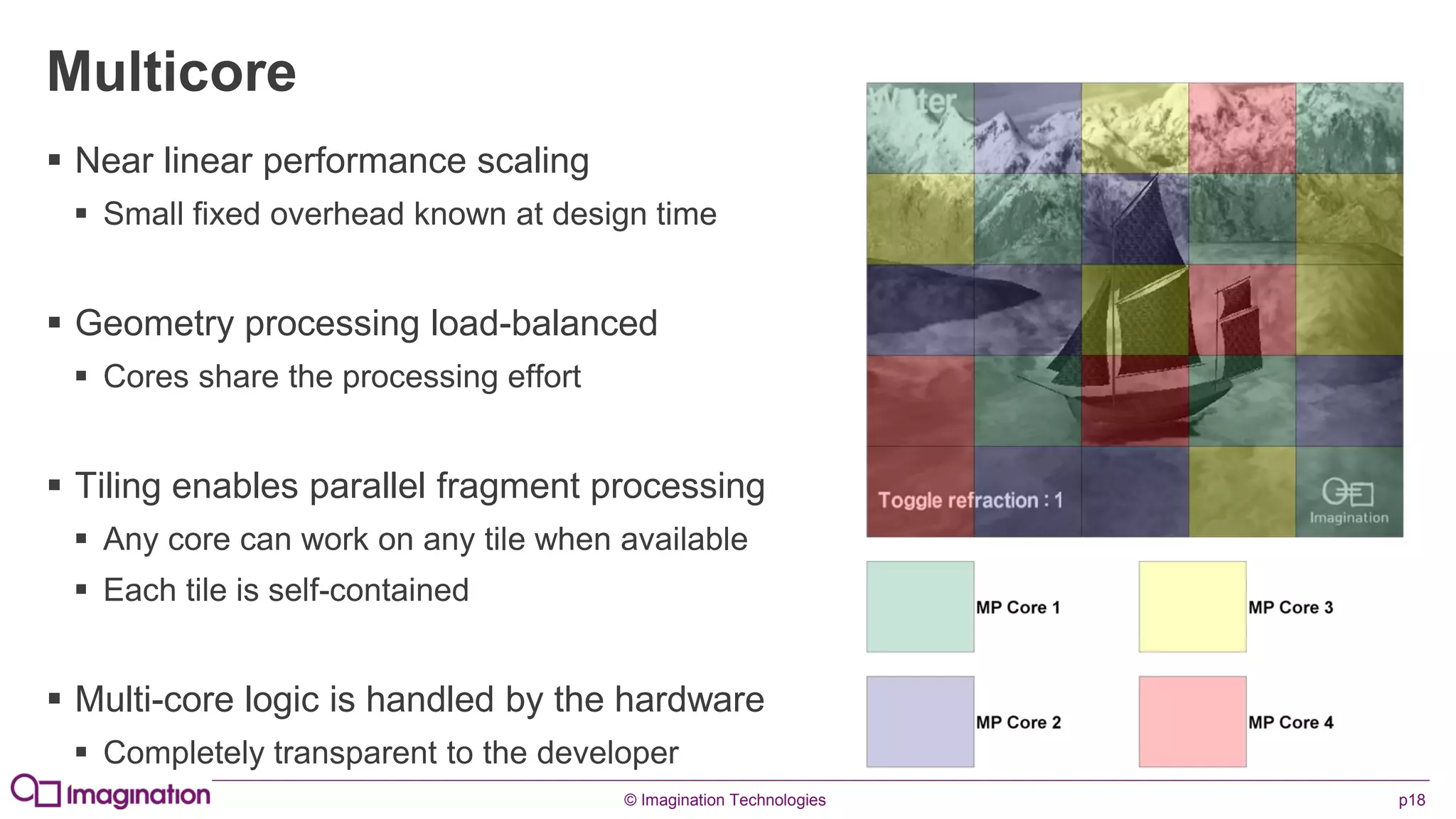
Multicore
 Near linear performance scaling
 Small fixed overhead known at design time
 Geometry processing load-balanced
 Cores share the processing effort
 Tiling enables parallel fragment processing
 Any core can work on any tile when available
 Each tile is self-contained
 Multi-core logic is handled by the hardware
 Completely transparent to the developer
© Imagination Technologies p19
Alpha Blending
 Tiling GPUs don’t need to reach in to system memory to perform an alpha blend
 The colour buffer is on-chip
 This means that alpha blending doesn’t cost you any additional bandwidth
 It also means that alpha blending is fast…very fast
 HSR will also save you some work by throwing away occluded blending work
 Remember: Opaque, Alpha Test, Alpha Blend
© Imagination Technologies p20
www.imgtec.com
Golden Rules
© Imagination Technologies p21
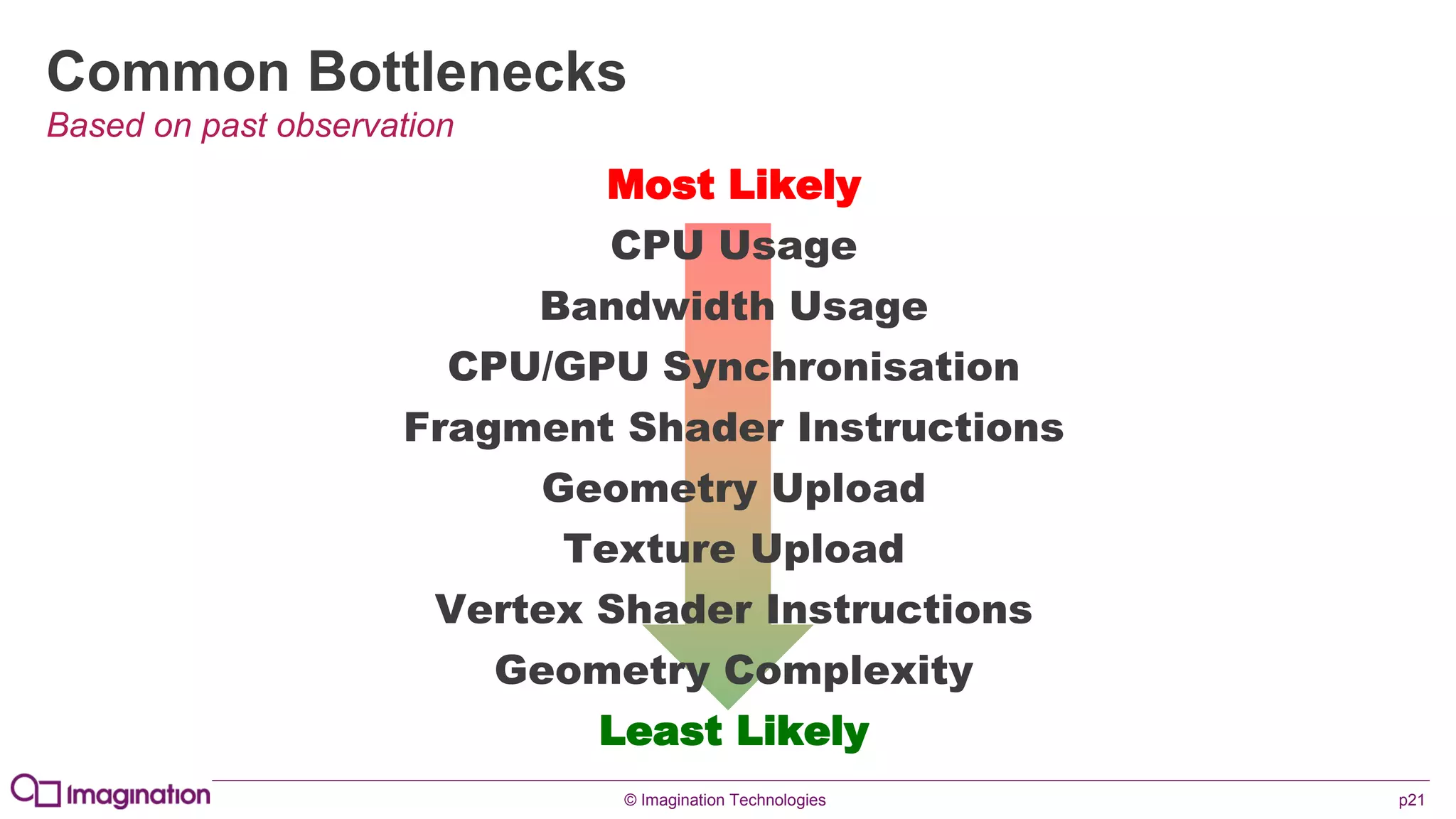
Common Bottlenecks
Based on past observation
Most Likely
CPU Usage
Bandwidth Usage
CPU/GPU Synchronisation
Fragment Shader Instructions
Geometry Upload
Texture Upload
Vertex Shader Instructions
Geometry Complexity
Least Likely
© Imagination Technologies p22
Warning!
Some of these rules may seem obvious to you…
…we still see them broken everyday…
…if you know them, please bear with us
© Imagination Technologies p23
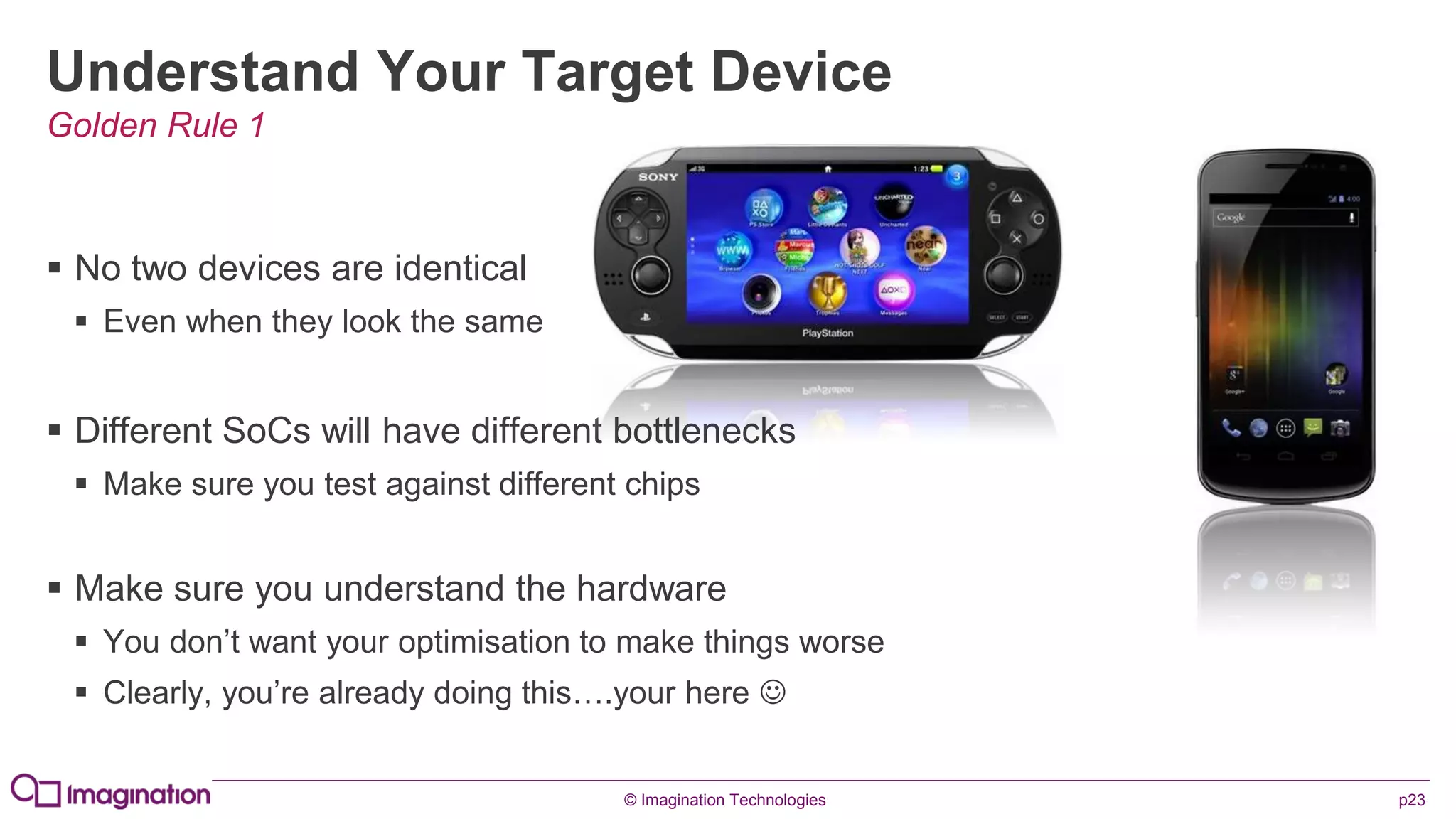
Understand Your Target Device
 No two devices are identical
 Even when they look the same
 Different SoCs will have different bottlenecks
 Make sure you test against different chips
 Make sure you understand the hardware
 You don’t want your optimisation to make things worse
 Clearly, you’re already doing this….your here 
Golden Rule 1
© Imagination Technologies p24
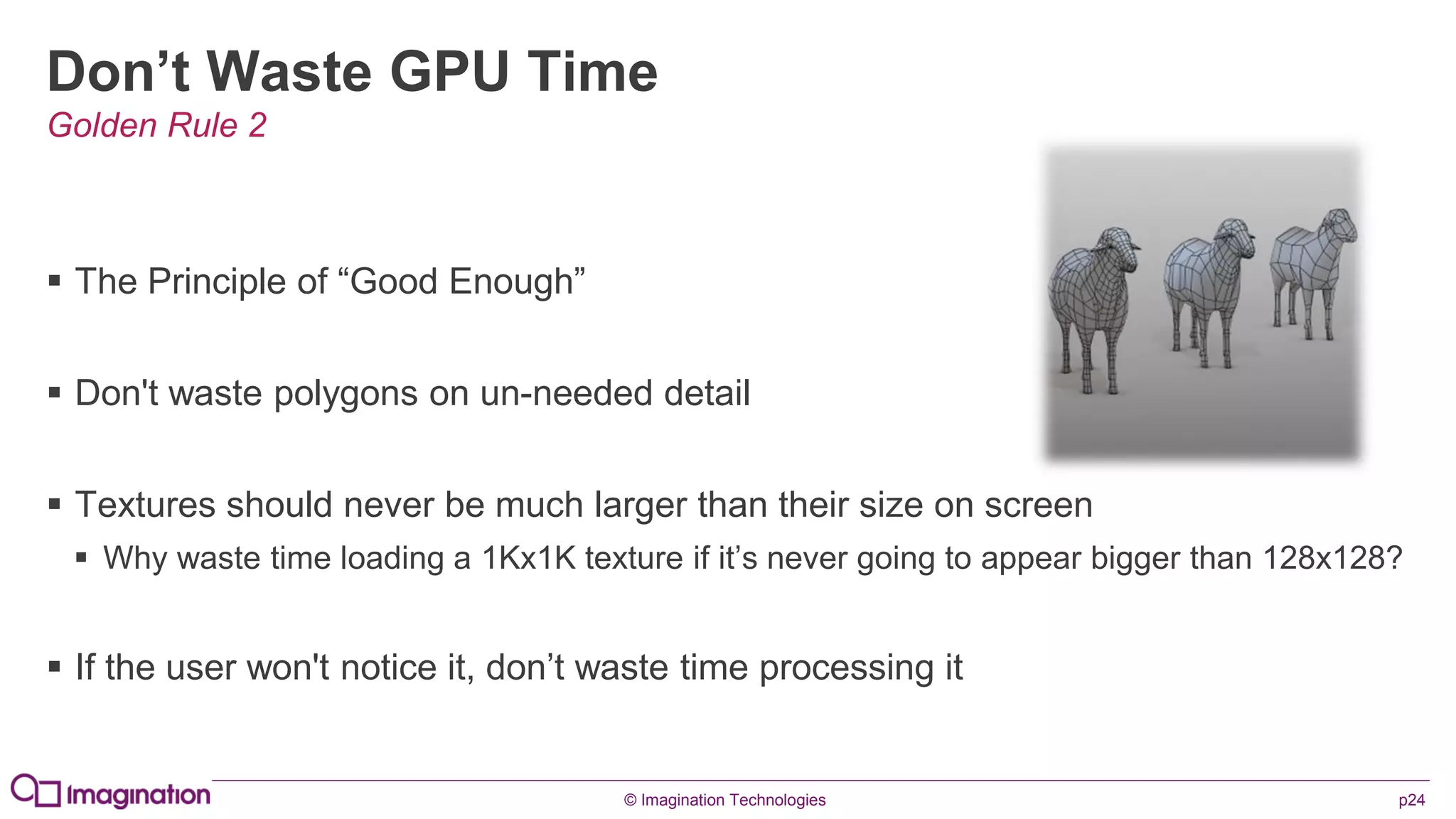
Don’t Waste GPU Time
 The Principle of “Good Enough”
 Don't waste polygons on un-needed detail
 Textures should never be much larger than their size on screen
 Why waste time loading a 1Kx1K texture if it’s never going to appear bigger than 128x128?
 If the user won't notice it, don’t waste time processing it
Golden Rule 2
© Imagination Technologies p25
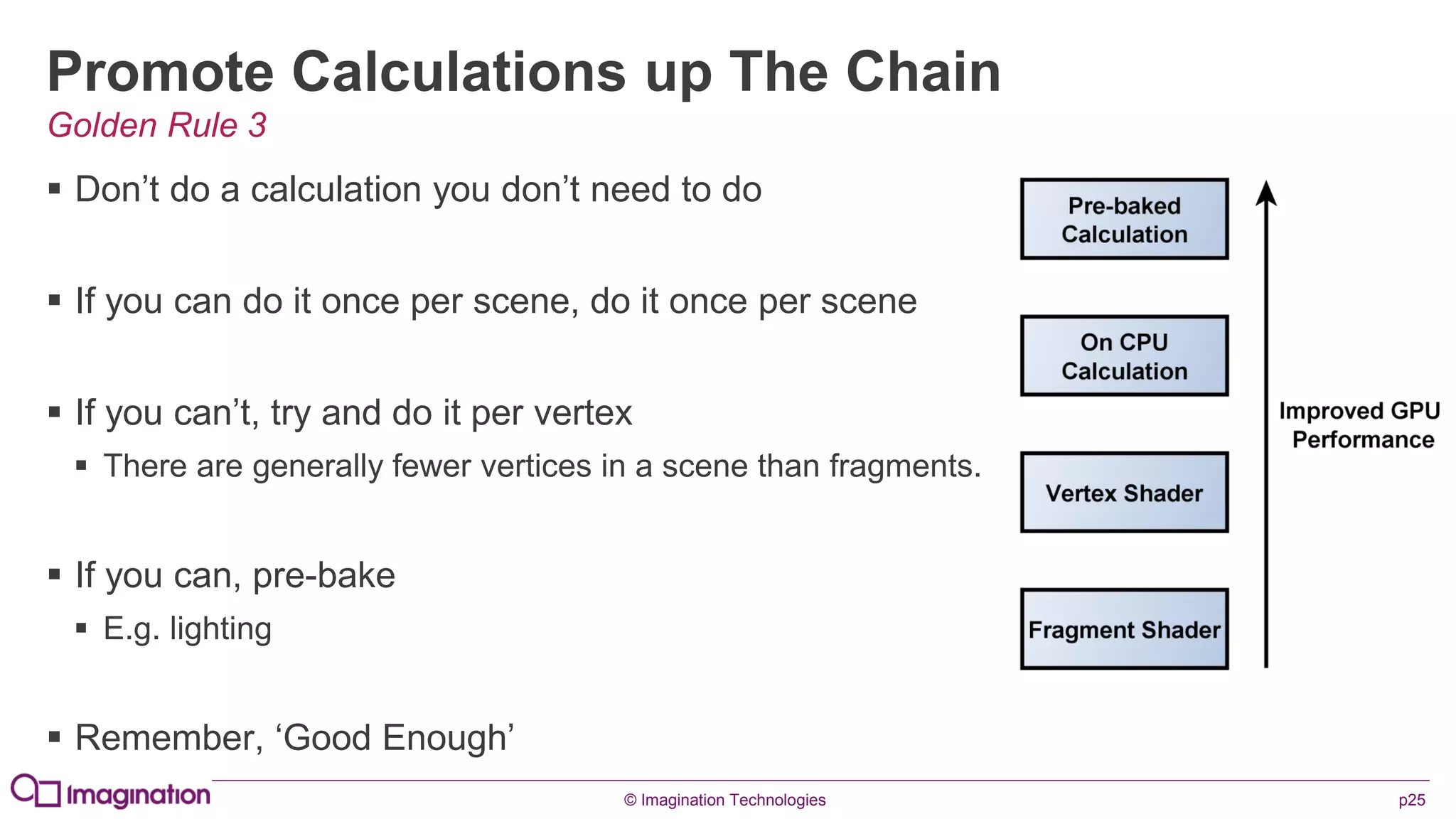
Promote Calculations up The Chain
 Don’t do a calculation you don’t need to do
 If you can do it once per scene, do it once per scene
 If you can’t, try and do it per vertex
 There are generally fewer vertices in a scene than fragments.
 If you can, pre-bake
 E.g. lighting
 Remember, ‘Good Enough’
Golden Rule 3
© Imagination Technologies p26
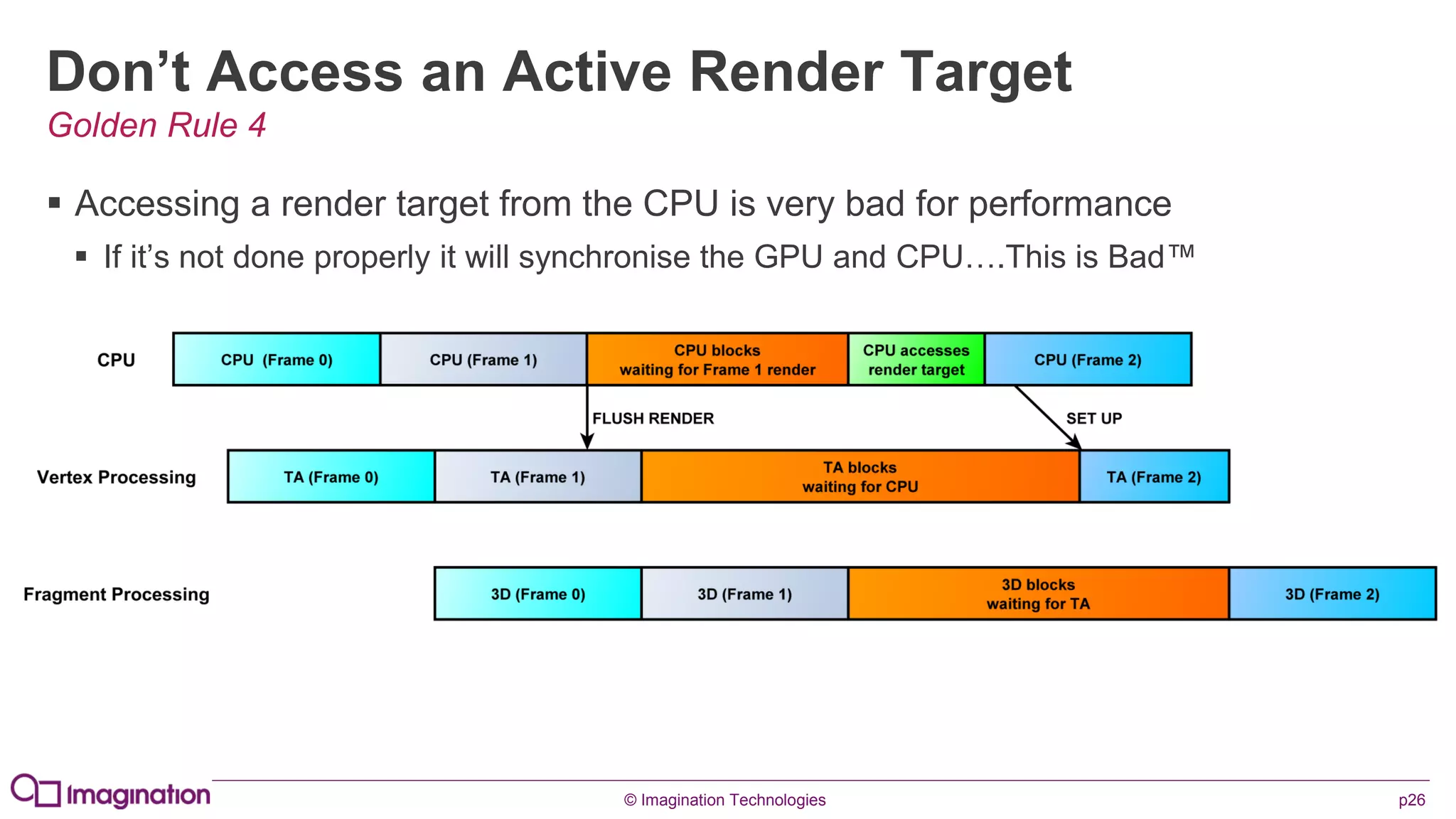
Don’t Access an Active Render Target
 Accessing a render target from the CPU is very bad for performance
 If it’s not done properly it will synchronise the GPU and CPU….This is Bad™
Golden Rule 4
© Imagination Technologies p27
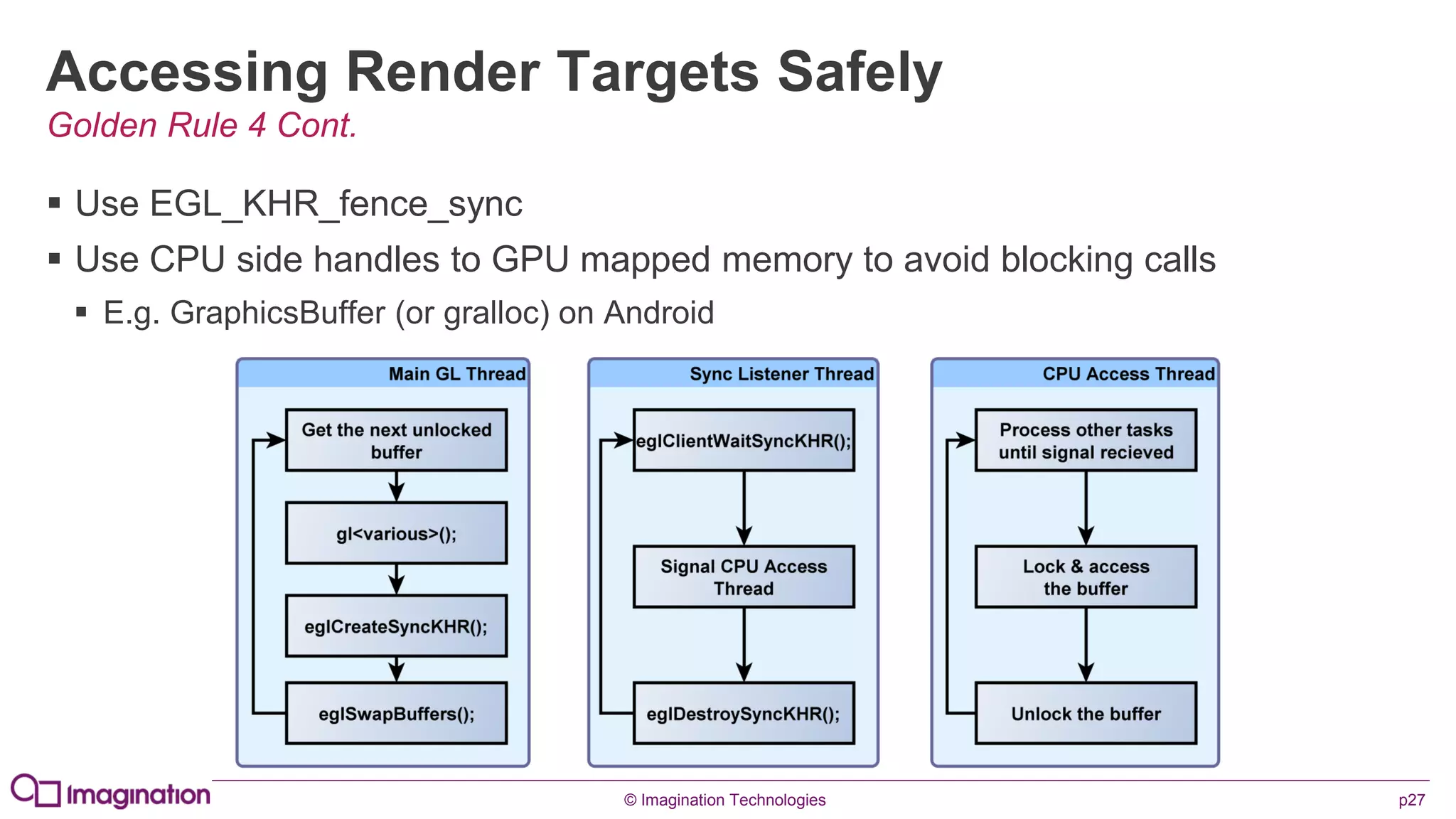
Accessing Render Targets Safely
 Use EGL_KHR_fence_sync
 Use CPU side handles to GPU mapped memory to avoid blocking calls
 E.g. GraphicsBuffer (or gralloc) on Android
Golden Rule 4 Cont.
© Imagination Technologies p28
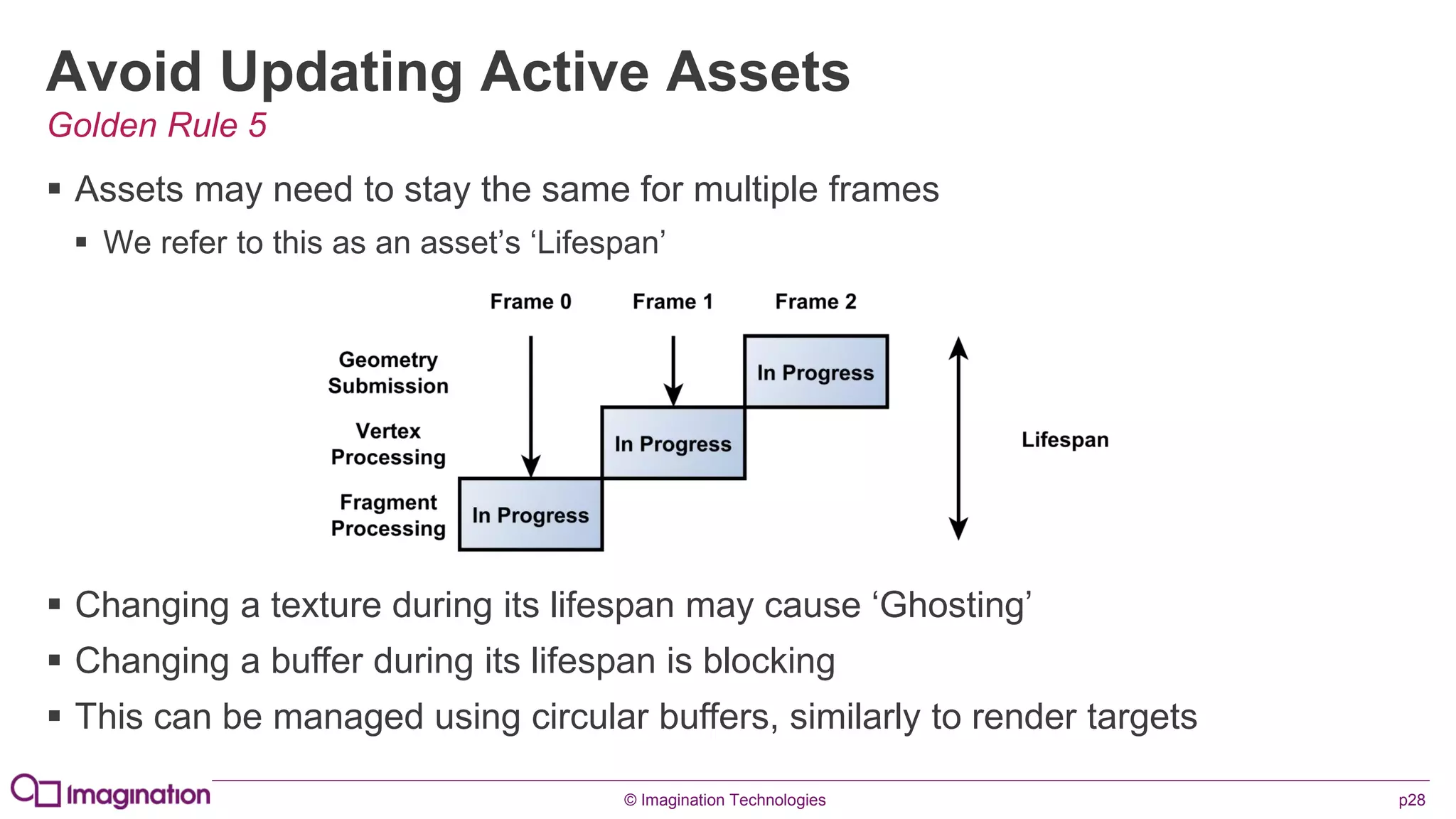
Avoid Updating Active Assets
 Assets may need to stay the same for multiple frames
 We refer to this as an asset’s ‘Lifespan’
Golden Rule 5
 Changing a texture during its lifespan may cause ‘Ghosting’
 Changing a buffer during its lifespan is blocking
 This can be managed using circular buffers, similarly to render targets
© Imagination Technologies p29
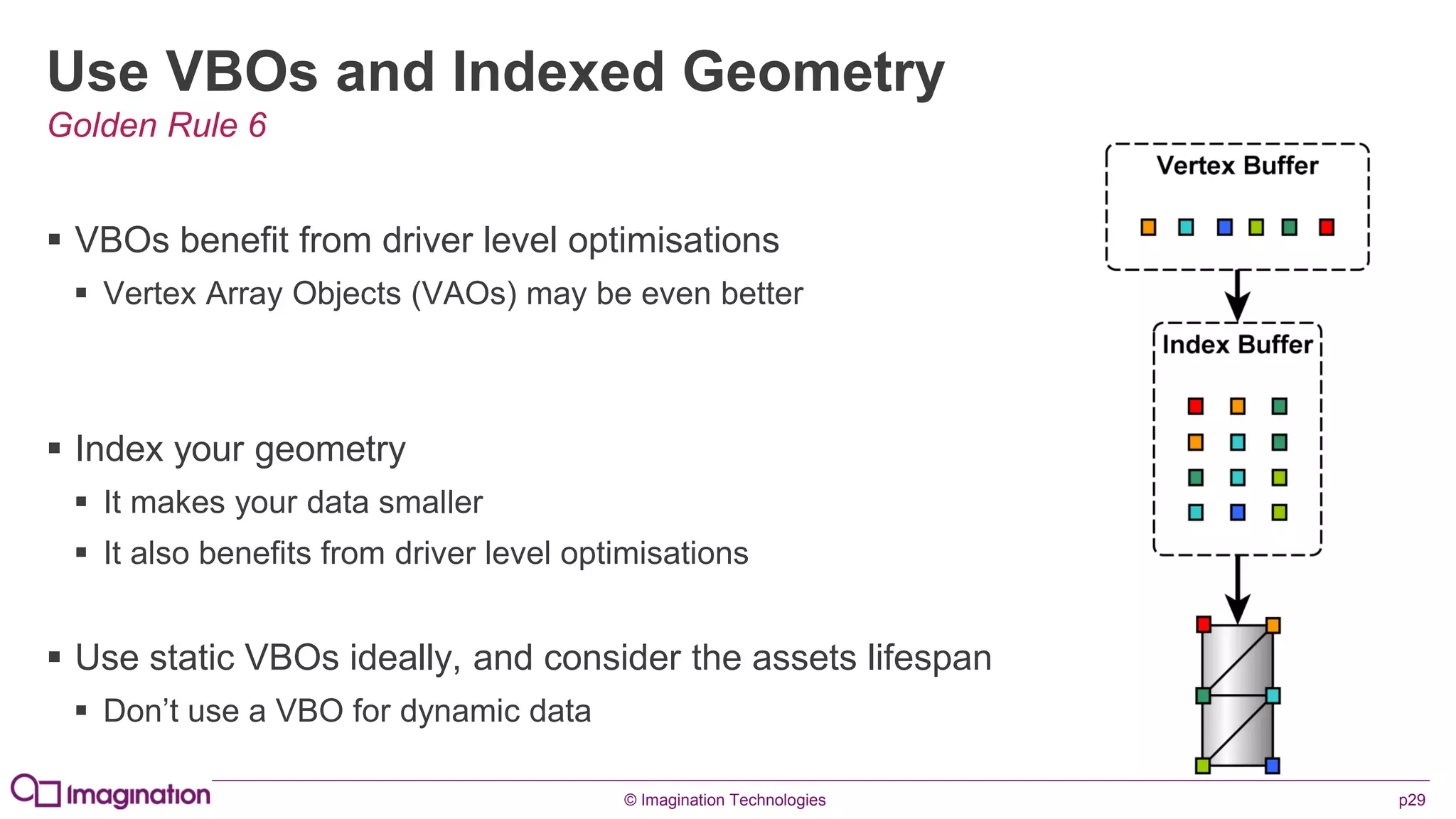
Use VBOs and Indexed Geometry
 VBOs benefit from driver level optimisations
 Vertex Array Objects (VAOs) may be even better
 Index your geometry
 It makes your data smaller
 It also benefits from driver level optimisations
 Use static VBOs ideally, and consider the assets lifespan
 Don’t use a VBO for dynamic data
Golden Rule 6
© Imagination Technologies p30
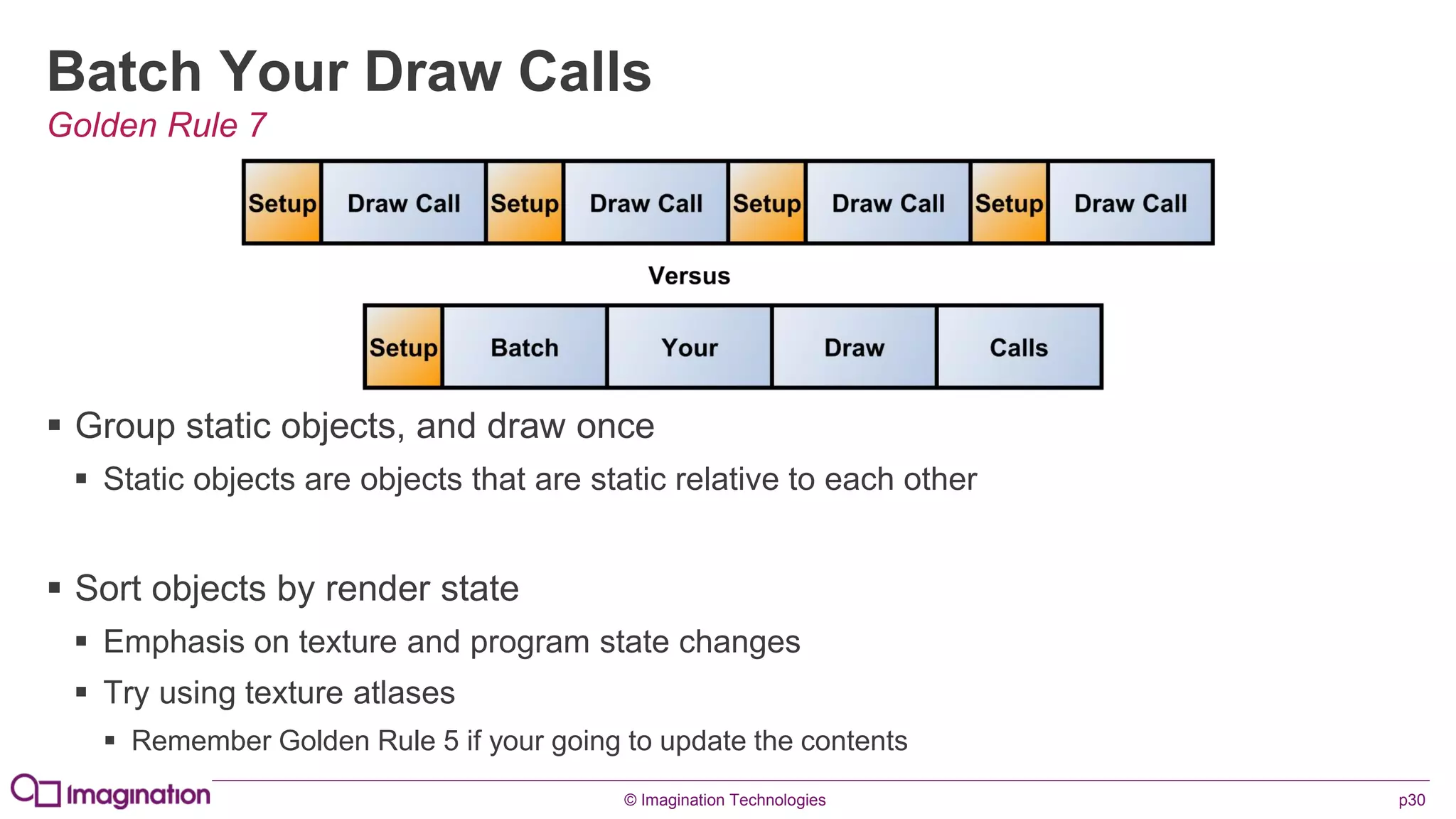
Batch Your Draw Calls
 Group static objects, and draw once
 Static objects are objects that are static relative to each other
 Sort objects by render state
 Emphasis on texture and program state changes
 Try using texture atlases
 Remember Golden Rule 5 if your going to update the contents
Golden Rule 7
© Imagination Technologies p31
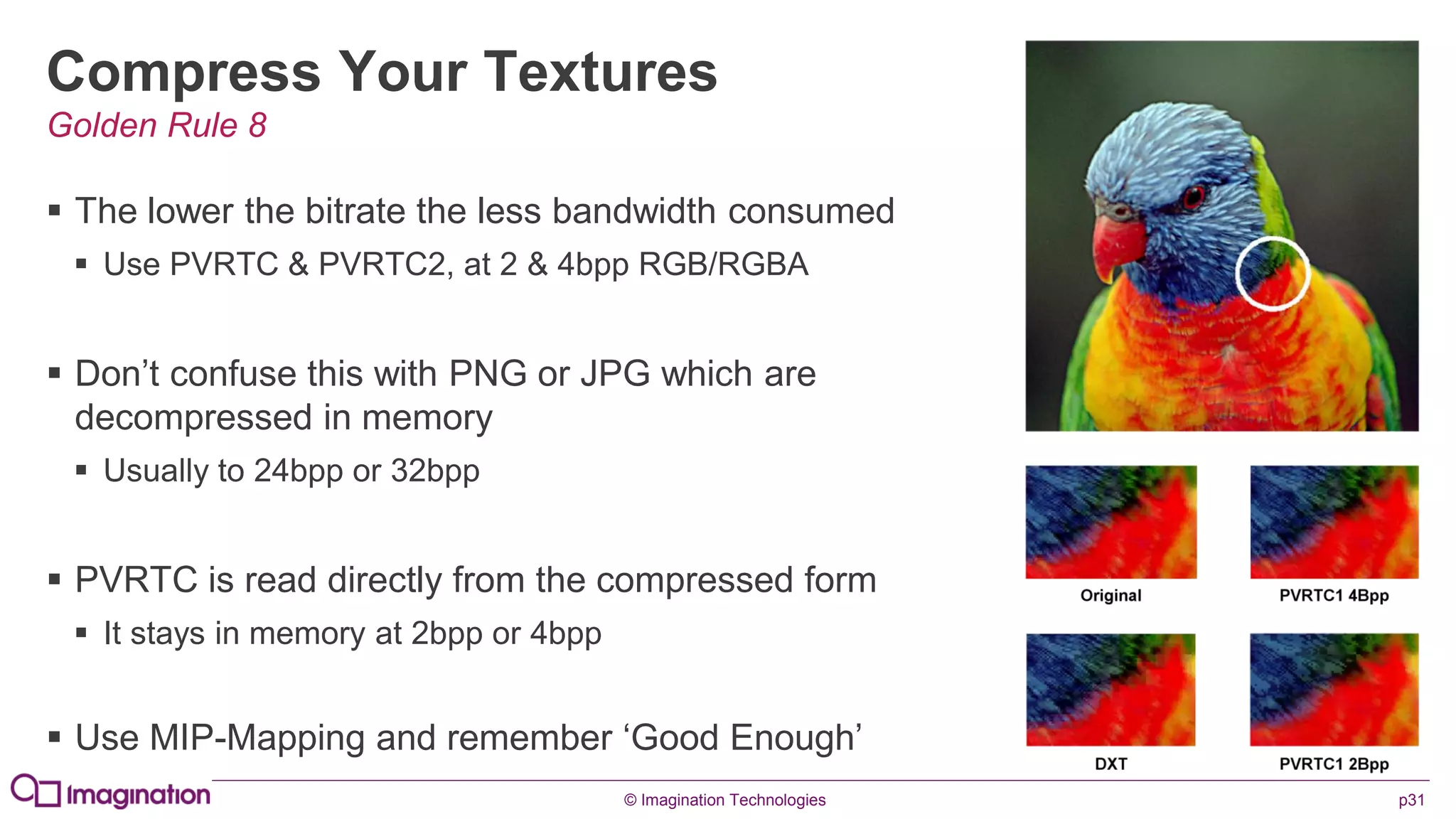
Compress Your Textures
 The lower the bitrate the less bandwidth consumed
 Use PVRTC & PVRTC2, at 2 & 4bpp RGB/RGBA
 Don’t confuse this with PNG or JPG which are
decompressed in memory
 Usually to 24bpp or 32bpp
 PVRTC is read directly from the compressed form
 It stays in memory at 2bpp or 4bpp
 Use MIP-Mapping and remember ‘Good Enough’
Golden Rule 8
© Imagination Technologies p32
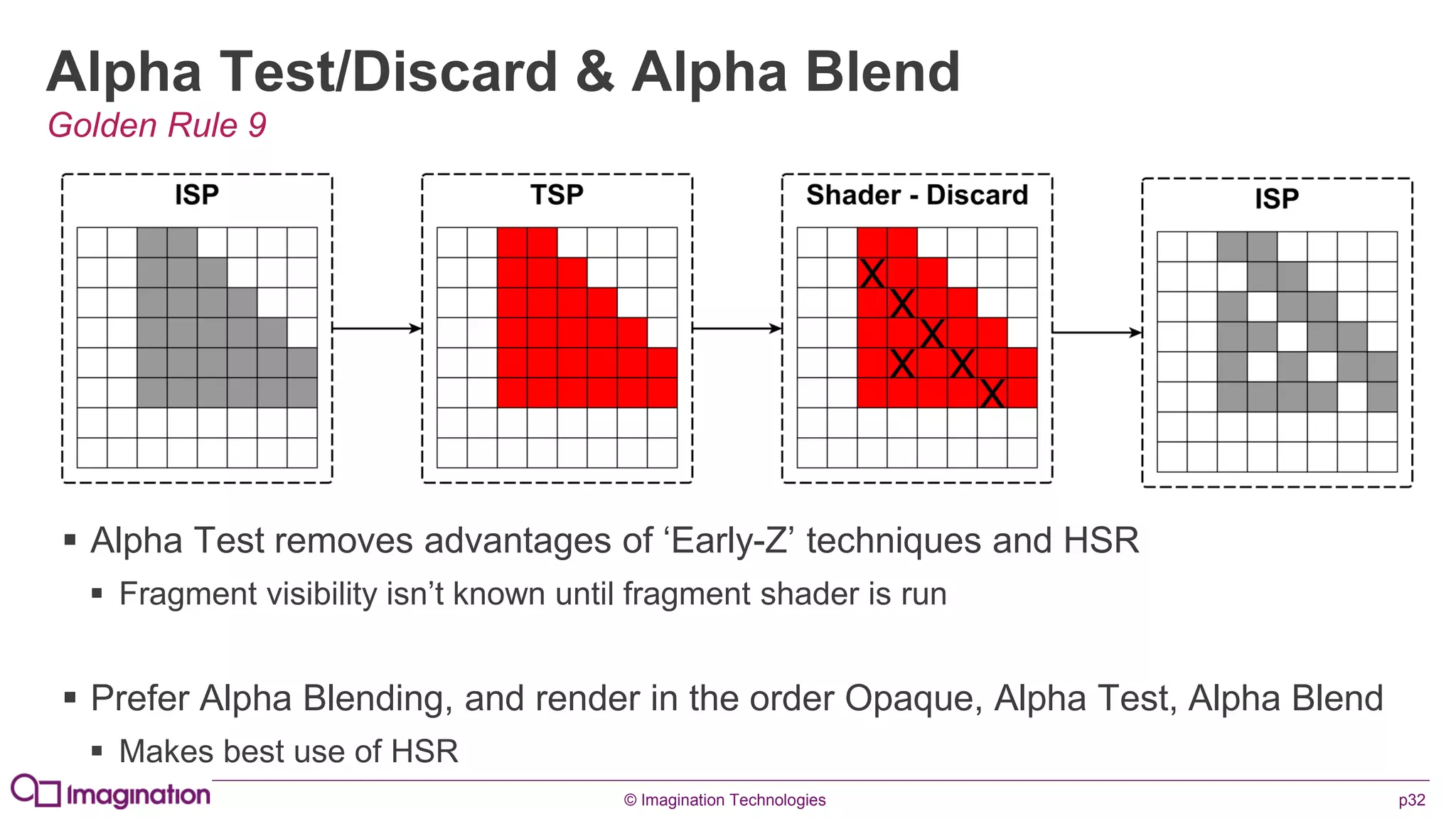
Alpha Test/Discard & Alpha Blend
 Alpha Test removes advantages of ‘Early-Z’ techniques and HSR
 Fragment visibility isn’t known until fragment shader is run
 Prefer Alpha Blending, and render in the order Opaque, Alpha Test, Alpha Blend
 Makes best use of HSR
Golden Rule 9
© Imagination Technologies p33
Use ‘Clear’ and ‘DiscardFrameBuffer’
 Calling ‘Clear’ ensures the previous render isn’t uploaded to the GPU
 By default, the depth/stencil buffers are written to memory at the end of a render
 Calling DiscardFrameBufferExt(…) ensures these buffers aren’t written to system memory
 Look for the ‘GL_EXT_discard_framebuffer’ extension
Do both if you can!
Golden Rule 10
© Imagination Technologies p34
Questions ?
Or drop us an email: devtech@imgtec.com
Download our PowerVR SDK: bit.ly/PVR_SDK
Also, you can download examples, tools and
shell as an Android SDK add-on:
http://install.powervrinsider.com/androidsdk.xml
© Imagination Technologies p35
www.imgtec.com
April 2013

Droidcon2013 triangles gangolells_imagination

  • 1.
    © Imagination Technologiesp1 www.imgtec.comApril 2013 It’s all about triangles! Understanding the GPU in your pocket to write better code
  • 2.
    © Imagination Technologiesp2 Introductions  Who?  Guillem Vinals Gangolells (guillem.vinalsgangolells@imgtec.com)  Developer Technology Engineer, PowerVR Graphics  What?  It’s all about triangles! Understanding the GPU in your pocket to write better code
  • 3.
    © Imagination Technologiesp3 Company overview  Leading silicon, software & cloud IP supplier  Multimedia: graphics; GPU compute; video; vision  Communications: demodulation; connectivity; sensors  Processors: applications CPUs; embedded MCUs  Cloud: device and user management; services  Targeting high volume, high growth markets  Top semis and OEMs for mobile, connected home consumer automotive and more  Pure: our strategic product division  Digital radio, internet connected audio, home automation  Established technology powerhouse  Founded 1985; London FTSE 250 (IMG.L); ~1,500 employees  UK HQ; global operations Comprehensive IP portfolio for SoCs & cloud connectivity IP business pathfinder Market maker/driver
  • 4.
    © Imagination Technologiesp4 www.imgtec.com A Crash Course in Graphics Architectures
  • 5.
    © Imagination Technologiesp5 Immediate Mode Renderer (IMR)  Buffers kept in system memory  High bandwidth use, power consumption & latency  Each triangle is processed to completion in submission order  Wastes processing time and thus power due to “overdraw”  ‘Early-Z’ techniques help but are only as good as your geometry sorting
  • 6.
    © Imagination Technologiesp6 Concept: Tiling  Frame buffer sub-divided into Tiles  32x32 pixels per tile, for example  Varies by device  Geometry is sorted into affected tiles  Allows each tile to be processed independently  Small number of fragments per tile  Allows on-chip memory to be used
  • 7.
    © Imagination Technologiesp7 Tile Based Renderer (TBR)  Rasterizing performed per-tile  Allows the use of fast, on-chip, buffers  Each triangle is processed to completion in submission order  Wastes processing time and thus power due to “overdraw”  ‘Early-Z’ techniques help but are only as good as your geometry sorting
  • 8.
    © Imagination Technologiesp8 Concept: Deferred Rendering  Fragments - Two stage process  Hidden Surface Removal (HSR)  Shading  HSR is pixel perfect  Only visible fragments pass, no ‘overdraw’  Only requires position data  Less bandwidth & processing, saves power  HSR is submission order independent  No need for applications to submit geometry front to back
  • 9.
    © Imagination Technologiesp9 Tile Based Deferred Renderer (TBDR) = PowerVR  Rasterizing performed per-tile  Allows the use of fast, on-chip, buffers  Hidden Surface Removal (HSR) reduces overdraw  Pixel perfect, and submission order independent, no geometry sorting needed  Optimised to only retrieve information required (*), saving even more bandwidth  Saves power and bandwidth
  • 10.
    © Imagination Technologiesp10 www.imgtec.com PowerVR Hardware Overview
  • 11.
    © Imagination Technologiesp11 Pipeline Summary Geometry Processing
  • 12.
    © Imagination Technologiesp12 Pipeline Summary Fragment Processing
  • 13.
    © Imagination Technologiesp13 Bandwidth Saving  Bandwidth usage is the biggest contributor to GPU power consumption  Saving bandwidth means staying ‘on chip’ as much as possible  It also means throwing away work you don’t need to do  PowerVR is designed from the ground up to do all of these
  • 14.
    © Imagination Technologiesp14 Unified Architecture
  • 15.
    © Imagination Technologiesp15 Pixel Back End (PBE)  Combines sub-samples for on-chip MSAA  MSAA Performed per-tile  Done using sub-sampling  Negligible impact on bandwidth  Each sub-sample benefits from HSR  Series5/5XT: 4x MSAA  Series6: 8x MSAA  Performs final format conversions  Up scaling, down scaling etc. (Internal True Colour)
  • 16.
    © Imagination Technologiesp16 www.imgtec.com Further Considerations
  • 17.
    © Imagination Technologiesp17 Micro Kernel  Specialised software running on the USSE (Series5) or its own core (Series6)  Allows the GPU and CPU to operate with minimal synchronisation  Improves performance by handling interrupts on the GPU  Competing solutions handle interrupts on CPU (in the driver)
  • 18.
    © Imagination Technologiesp18 Multicore  Near linear performance scaling  Small fixed overhead known at design time  Geometry processing load-balanced  Cores share the processing effort  Tiling enables parallel fragment processing  Any core can work on any tile when available  Each tile is self-contained  Multi-core logic is handled by the hardware  Completely transparent to the developer
  • 19.
    © Imagination Technologiesp19 Alpha Blending  Tiling GPUs don’t need to reach in to system memory to perform an alpha blend  The colour buffer is on-chip  This means that alpha blending doesn’t cost you any additional bandwidth  It also means that alpha blending is fast…very fast  HSR will also save you some work by throwing away occluded blending work  Remember: Opaque, Alpha Test, Alpha Blend
  • 20.
    © Imagination Technologiesp20 www.imgtec.com Golden Rules
  • 21.
    © Imagination Technologiesp21 Common Bottlenecks Based on past observation Most Likely CPU Usage Bandwidth Usage CPU/GPU Synchronisation Fragment Shader Instructions Geometry Upload Texture Upload Vertex Shader Instructions Geometry Complexity Least Likely
  • 22.
    © Imagination Technologiesp22 Warning! Some of these rules may seem obvious to you… …we still see them broken everyday… …if you know them, please bear with us
  • 23.
    © Imagination Technologiesp23 Understand Your Target Device  No two devices are identical  Even when they look the same  Different SoCs will have different bottlenecks  Make sure you test against different chips  Make sure you understand the hardware  You don’t want your optimisation to make things worse  Clearly, you’re already doing this….your here  Golden Rule 1
  • 24.
    © Imagination Technologiesp24 Don’t Waste GPU Time  The Principle of “Good Enough”  Don't waste polygons on un-needed detail  Textures should never be much larger than their size on screen  Why waste time loading a 1Kx1K texture if it’s never going to appear bigger than 128x128?  If the user won't notice it, don’t waste time processing it Golden Rule 2
  • 25.
    © Imagination Technologiesp25 Promote Calculations up The Chain  Don’t do a calculation you don’t need to do  If you can do it once per scene, do it once per scene  If you can’t, try and do it per vertex  There are generally fewer vertices in a scene than fragments.  If you can, pre-bake  E.g. lighting  Remember, ‘Good Enough’ Golden Rule 3
  • 26.
    © Imagination Technologiesp26 Don’t Access an Active Render Target  Accessing a render target from the CPU is very bad for performance  If it’s not done properly it will synchronise the GPU and CPU….This is Bad™ Golden Rule 4
  • 27.
    © Imagination Technologiesp27 Accessing Render Targets Safely  Use EGL_KHR_fence_sync  Use CPU side handles to GPU mapped memory to avoid blocking calls  E.g. GraphicsBuffer (or gralloc) on Android Golden Rule 4 Cont.
  • 28.
    © Imagination Technologiesp28 Avoid Updating Active Assets  Assets may need to stay the same for multiple frames  We refer to this as an asset’s ‘Lifespan’ Golden Rule 5  Changing a texture during its lifespan may cause ‘Ghosting’  Changing a buffer during its lifespan is blocking  This can be managed using circular buffers, similarly to render targets
  • 29.
    © Imagination Technologiesp29 Use VBOs and Indexed Geometry  VBOs benefit from driver level optimisations  Vertex Array Objects (VAOs) may be even better  Index your geometry  It makes your data smaller  It also benefits from driver level optimisations  Use static VBOs ideally, and consider the assets lifespan  Don’t use a VBO for dynamic data Golden Rule 6
  • 30.
    © Imagination Technologiesp30 Batch Your Draw Calls  Group static objects, and draw once  Static objects are objects that are static relative to each other  Sort objects by render state  Emphasis on texture and program state changes  Try using texture atlases  Remember Golden Rule 5 if your going to update the contents Golden Rule 7
  • 31.
    © Imagination Technologiesp31 Compress Your Textures  The lower the bitrate the less bandwidth consumed  Use PVRTC & PVRTC2, at 2 & 4bpp RGB/RGBA  Don’t confuse this with PNG or JPG which are decompressed in memory  Usually to 24bpp or 32bpp  PVRTC is read directly from the compressed form  It stays in memory at 2bpp or 4bpp  Use MIP-Mapping and remember ‘Good Enough’ Golden Rule 8
  • 32.
    © Imagination Technologiesp32 Alpha Test/Discard & Alpha Blend  Alpha Test removes advantages of ‘Early-Z’ techniques and HSR  Fragment visibility isn’t known until fragment shader is run  Prefer Alpha Blending, and render in the order Opaque, Alpha Test, Alpha Blend  Makes best use of HSR Golden Rule 9
  • 33.
    © Imagination Technologiesp33 Use ‘Clear’ and ‘DiscardFrameBuffer’  Calling ‘Clear’ ensures the previous render isn’t uploaded to the GPU  By default, the depth/stencil buffers are written to memory at the end of a render  Calling DiscardFrameBufferExt(…) ensures these buffers aren’t written to system memory  Look for the ‘GL_EXT_discard_framebuffer’ extension Do both if you can! Golden Rule 10
  • 34.
    © Imagination Technologiesp34 Questions ? Or drop us an email: devtech@imgtec.com Download our PowerVR SDK: bit.ly/PVR_SDK Also, you can download examples, tools and shell as an Android SDK add-on: http://install.powervrinsider.com/androidsdk.xml
  • 35.
    © Imagination Technologiesp35 www.imgtec.com April 2013