Driving Results Through LinkedIn
About Tony Guarnaccia
About Big Fish
• Great Companies of all sizes
• Market Exclusivity
• Leverage Big Brand Experience
• Greatest Digital Marketing System in the World!
Our Mission is to Grow Market Leaders
And Drive Positive Change
Agenda:
 Why you need to pay attention to LinkedIn
 How to get found and grow your business on LinkedIn
 The Important Headshot not MugShot!
 How to engage though LinkedIn groups
 Expanding your presence for even greater results
 The First In-Person Impression
 Key Takeaways and audience questions
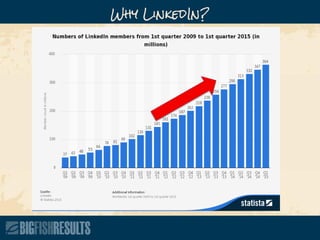
Why LinkedIn?
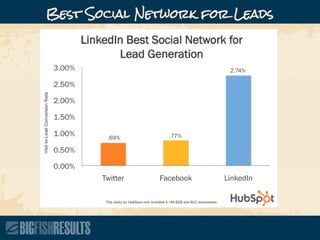
Best Social Network for Leads
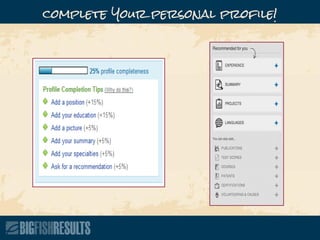
complete Your personal profile!
Strong headline
Professional picture
Publish content of your own
Use keywords you want to identify with
Connect with as many people as possible
Optimize Your Profile
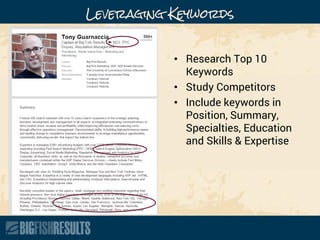
Leveraging Keywords
• Research Top 10
Keywords
• Study Competitors
• Include keywords in
Position, Summary,
Specialties, Education
and Skills & Expertise
Enhance Your Profile with Media
• Welcome Videos
• Commercials
• Explainer Videos
• Presentations
• Research Studies
• Books
• Magazine Articles
Adding Media to Your Profile
Profile Checklist
• BENEFITS / RESULTS Headline
• Relevant past positions listed
• Recommendations
• Clear Call-To-Action
• Use Unicode symbols
• SlideShare and YouTube
• Add Websites
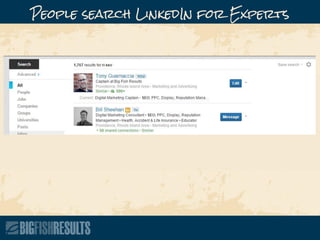
People search LinkedIn for Experts
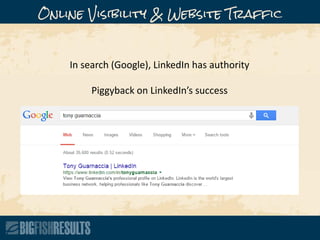
Online Visibility & Website Traffic
In search (Google), LinkedIn has authority
Piggyback on LinkedIn’s success
Who’s Viewed Your Profile?
• Consistently check
• Already interested
• Explore opportunities
and start conversations
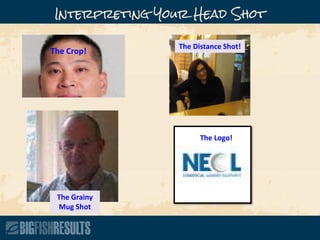
Interpreting Your Head Shot
The Crop!
The Grainy
Mug Shot
The Distance Shot!
The Logo!
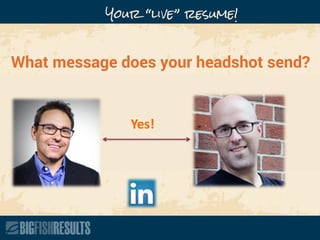
Your “live” resume!
What message does your headshot send?
Yes!
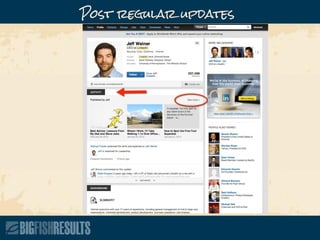
Post regular updates
Appear in LinkedIn Network Updates
Stay top of mind
Position as a source of good info
Others take notice and connect
Benefits of posting regularly
Articles you’ve written
Company news
Industry news
Events, meetings, webinars, etc.
What kind of content to share?
Add the LinkedIn share button to browser
Publish on your website, then share
Include a catchy image
Include keywords
Tips for updating
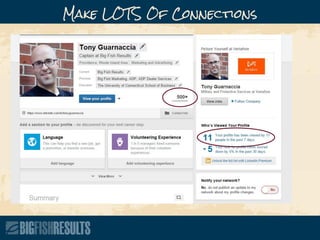
Make LOTS Of Connections
Adding Contacts
Add your friends and colleagues to your 1st
degree connections if you haven’t already.
– To do this, go to “Contacts” and then go to
“Add Connections.”
– From there you should be able to sync
LinkedIn with your email account to invite
your personal contacts.
It’s a SOCIAL Network!
Make it a daily routine
Collect business cards from everyone
Connect with everyone you’ve worked with
Have all employees build LinkedIn profiles
and connect
Accept all connection invites
Tips for adding connections
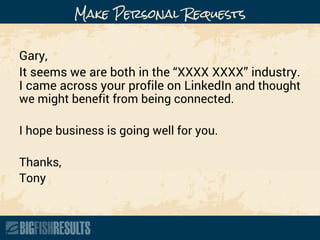
Make Personal Requests
Gary,
It seems we are both in the “XXXX XXXX” industry.
I came across your profile on LinkedIn and thought
we might benefit from being connected.
I hope business is going well for you.
Thanks,
Tony
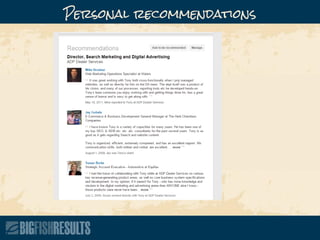
Personal recommendations
Do great work!
Don’t force it
Recommend others
Build great products!
Tips for getting recommendations
Identifying Your Target
• Think through exactly who it is you want
to target. Who is your ideal customer or
client?
• These answers are not good enough:
– Everybody
– Any type of business owner
– Anybody in marketing
Questions You Need to Answer:
1. What are your target industries?
2. What geographical area are you targeting?
3. Are your prospects most likely to be hanging out in certain LinkedIn
groups?
4. What company size is the right fit for you? 1 man shop? Only
companies with more than 50 employees? It’s important that you
determine the right range.
5. What types of position titles does your buyer usually hold? Come up
with the top 10-15 positions that you target. Some examples:
a. President
b. Marketing Manager
c. Purchasing Coordinator
d. CTO
6. What level of annual revenue do your best clients have?
Collections of people by interest, industry, etc.
Great place to make connections
Great place to find your target audience
Demonstrate your expertise
Why groups?
Which Groups do you want to join?
• Join 50 groups
• Group directory
• Top 3 targets
• Hold your
PROSPECTS
• Active communities
and growing
Connect with the people in the group
Answer questions
Start thoughtful discussions
Don’t spam!
Group tips
Be consistent
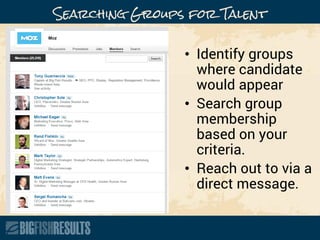
Searching Groups for Talent
• Identify groups
where candidate
would appear
• Search group
membership
based on your
criteria.
• Reach out to via a
direct message.
Prospecting in Groups
Step 1 – Reach out to the shared connection and ask permission to use their
name.
Subject: Matthew Durgin
Jill,
I noticed that you’re connected to Matthew Durgin. I was going to reach out to him, do you
mind if I mention your name?
Thanks, and hope business is going well!
Tony
Step 2 – Once you have permission, time to message the prospect!
Subject: Reaching Out
Hi Matthew,
I saw that we’re both connected to Jill and wanted to reach out. Jill and I have known each
other for some time and I’ve really valued the networking we’ve done over the years. I told
her I’d be reaching out to you, and he thought it would be a good connection.
It would be great to chat some time and learn more about your business. Do you have any
time next Wednesday or Thursday?
Thanks!
Tony
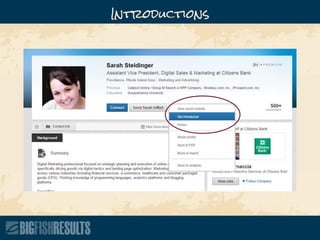
InMail To Reach Out To People
Introductions
Advertising
Simple and fast
Great targeting
Huge exposure to otherwise hard to reach people
Affordable
Advertising Benefits
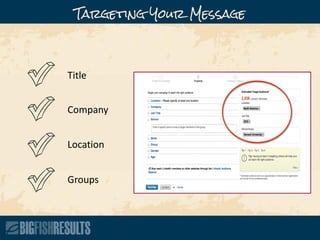
Title
Company
Location
Groups
Targeting Your Message
Always split-test your ads
Get really targeted
Test totally different images
Test different ad formats (video!)
Advertising Strategies
*FREE BONUS*
FREE LinkedIn
CHECKLIST
Give us Your Business Card
And receive:

Driving Results Through LinkedIn

  • 1.
  • 2.
  • 3.
    About Big Fish •Great Companies of all sizes • Market Exclusivity • Leverage Big Brand Experience • Greatest Digital Marketing System in the World! Our Mission is to Grow Market Leaders And Drive Positive Change
  • 4.
    Agenda:  Why youneed to pay attention to LinkedIn  How to get found and grow your business on LinkedIn  The Important Headshot not MugShot!  How to engage though LinkedIn groups  Expanding your presence for even greater results  The First In-Person Impression  Key Takeaways and audience questions
  • 5.
  • 6.
  • 7.
  • 8.
    Strong headline Professional picture Publishcontent of your own Use keywords you want to identify with Connect with as many people as possible Optimize Your Profile
  • 9.
    Leveraging Keywords • ResearchTop 10 Keywords • Study Competitors • Include keywords in Position, Summary, Specialties, Education and Skills & Expertise
  • 10.
    Enhance Your Profilewith Media • Welcome Videos • Commercials • Explainer Videos • Presentations • Research Studies • Books • Magazine Articles
  • 11.
    Adding Media toYour Profile
  • 12.
    Profile Checklist • BENEFITS/ RESULTS Headline • Relevant past positions listed • Recommendations • Clear Call-To-Action • Use Unicode symbols • SlideShare and YouTube • Add Websites
  • 13.
  • 14.
    Online Visibility &Website Traffic In search (Google), LinkedIn has authority Piggyback on LinkedIn’s success
  • 15.
    Who’s Viewed YourProfile? • Consistently check • Already interested • Explore opportunities and start conversations
  • 16.
    Interpreting Your HeadShot The Crop! The Grainy Mug Shot The Distance Shot! The Logo!
  • 17.
    Your “live” resume! Whatmessage does your headshot send? Yes!
  • 18.
  • 19.
    Appear in LinkedInNetwork Updates Stay top of mind Position as a source of good info Others take notice and connect Benefits of posting regularly
  • 20.
    Articles you’ve written Companynews Industry news Events, meetings, webinars, etc. What kind of content to share?
  • 21.
    Add the LinkedInshare button to browser Publish on your website, then share Include a catchy image Include keywords Tips for updating
  • 22.
    Make LOTS OfConnections
  • 23.
    Adding Contacts Add yourfriends and colleagues to your 1st degree connections if you haven’t already. – To do this, go to “Contacts” and then go to “Add Connections.” – From there you should be able to sync LinkedIn with your email account to invite your personal contacts.
  • 24.
  • 25.
    Make it adaily routine Collect business cards from everyone Connect with everyone you’ve worked with Have all employees build LinkedIn profiles and connect Accept all connection invites Tips for adding connections
  • 26.
    Make Personal Requests Gary, Itseems we are both in the “XXXX XXXX” industry. I came across your profile on LinkedIn and thought we might benefit from being connected. I hope business is going well for you. Thanks, Tony
  • 27.
  • 28.
    Do great work! Don’tforce it Recommend others Build great products! Tips for getting recommendations
  • 29.
    Identifying Your Target •Think through exactly who it is you want to target. Who is your ideal customer or client? • These answers are not good enough: – Everybody – Any type of business owner – Anybody in marketing
  • 30.
    Questions You Needto Answer: 1. What are your target industries? 2. What geographical area are you targeting? 3. Are your prospects most likely to be hanging out in certain LinkedIn groups? 4. What company size is the right fit for you? 1 man shop? Only companies with more than 50 employees? It’s important that you determine the right range. 5. What types of position titles does your buyer usually hold? Come up with the top 10-15 positions that you target. Some examples: a. President b. Marketing Manager c. Purchasing Coordinator d. CTO 6. What level of annual revenue do your best clients have?
  • 31.
    Collections of peopleby interest, industry, etc. Great place to make connections Great place to find your target audience Demonstrate your expertise Why groups?
  • 32.
    Which Groups doyou want to join? • Join 50 groups • Group directory • Top 3 targets • Hold your PROSPECTS • Active communities and growing
  • 33.
    Connect with thepeople in the group Answer questions Start thoughtful discussions Don’t spam! Group tips Be consistent
  • 34.
    Searching Groups forTalent • Identify groups where candidate would appear • Search group membership based on your criteria. • Reach out to via a direct message.
  • 35.
    Prospecting in Groups Step1 – Reach out to the shared connection and ask permission to use their name. Subject: Matthew Durgin Jill, I noticed that you’re connected to Matthew Durgin. I was going to reach out to him, do you mind if I mention your name? Thanks, and hope business is going well! Tony Step 2 – Once you have permission, time to message the prospect! Subject: Reaching Out Hi Matthew, I saw that we’re both connected to Jill and wanted to reach out. Jill and I have known each other for some time and I’ve really valued the networking we’ve done over the years. I told her I’d be reaching out to you, and he thought it would be a good connection. It would be great to chat some time and learn more about your business. Do you have any time next Wednesday or Thursday? Thanks! Tony
  • 36.
    InMail To ReachOut To People
  • 37.
  • 38.
  • 39.
    Simple and fast Greattargeting Huge exposure to otherwise hard to reach people Affordable Advertising Benefits
  • 40.
  • 41.
    Always split-test yourads Get really targeted Test totally different images Test different ad formats (video!) Advertising Strategies
  • 42.
    *FREE BONUS* FREE LinkedIn CHECKLIST Giveus Your Business Card And receive: