Mastering KVM Virtualization
A complete book about KVM
kvm.virtualization@gmail.com
Who this book for ?
This book is intended for system administrators, DevOps
practitioners and Developers who have a good hands-on
knowledge of Linux and would like to sharpen their skills
of open source virtualization.
Authors
●
Humble Devassy Chirammal
●
Prasad Mukhedkar
●
Anil Vettathu
●
What this book covers?
●
Chapter 1, Understanding Linux Virtualization, talks
about the prevailing technologies used in Linux
virtualization and their advantages over others. It starts
with basic concepts of Linux virtualization and
advantages of Linux-based virtualization platforms and
then moves on to hypervisor/VMM. This chapter ends
with how Linux is being used in private and public cloud
infrastructures.
●
What this book covers?
●
Chapter 2, KVM Internals, covers the important
data structures and functions which define the internal
implementation of libvirt, qemu, and KVM. You will also
go through the life cycle of vCPU execution and how
qemu and KVM perform together to run a guest operating
system in the host CPU
●
What this book covers?
●
Chapter 3, Setting up a KVM Virtualization
Environment Using libvirt, tells you how to set up your
Linux server to use KVM (Kernel-based Virtual Machine)
and libvirt. KVM is for virtualization and libvirt is for
managing the virtualization environment.You will also
learn how to determine the right system requirements
(CPU, memory,storage, and networking) to create your
own virtual environment
●
What this book covers?
●
Chapter 4, Getting Started with libvirt and Creating
Virtual Machines, will tell you more about libvirt and its
supported tools, such as virt-manager and virsh. You will
dig more into the default configurations available in libvirt.
You will install a new virtual machine using virt-manager
as well virt-install and also learn about advanced virtual
machine deployment tools, such as virt-builder and oz.
●
What this book covers?
●
Chapter 5, Virtual Storage and Network, is one of the most
important chapters that teaches you about virtual networking and
storage, which determine the QoS of your virtual machine
deployments. In virtual networking, you will learn in detail about
bridging, different bridging concepts, and the methods you can
adopt for a fault tolerant network layer for virtual machines. You will
understand how to segregate the network with the use of tagged
vLan bridges. In storage, you will learn how to create storage pools
for our virtual machines from storage backends such as fiber
channel (FC), ISCSI, NFS, local storage, and so on. You will also
learn how to determine the right storage backend for your virtual
machines.
What this book covers?
Chapter 6, Virtual Machine Lifecycle Management
and Migration, discusses the tasks of managing virtual
machines. You will learn about the different statuses of
virtual machines and methods to access a virtual
machine that includes spice and VNC. You will
understand the use of guest agents. You will also learn
how to perform offline and live migration of virtual
machines.
What this book covers?
●
Chapter 7, Virtual Machine Templates and
Snapshots, tells us how to create templates of Windows
and Linux for rapid VMs provisioning. The chapter will
also teach us how to create external and internal
snapshots and when to use which snapshot. Snapshot
management, including merge and deletion is also
covered with snapshot best practice.
●
What this book covers?
●
Chapter 8, Kimchi, An HTML5-Based Management
Tool for KVM/libvirt, explains how to manage KVM
virtualization infrastructure remotely, using libvirt-based
web management tools. You will learn how to create new
virtual machines, remotely adjust an existing VM's
resource allocation, implement user access controls, and
so on over the Internet using Kimchi WebUI. It also
introduces VM-King, an Android application that lets you
manage KVM virtual machines remotely from your
Android mobile or tablet
●
What this book covers?
●
Chapter 9, Implementing Software-Defined
Networking for a KVM Virtual Environment, covers
the use of SDN approach in KVM virtualization using
Open vSwitch and supporting tools that include
OpenDayLight SDN controller. You will learn about Open
vSwitch installation and setup, creating vLans for KVM
virtual machines, applying granular traffic and policy
control to KVM VMs, creating overlay networks, and port
mirroring and SPAN. You will also learn how to manage
Open vSwitch using OpenDayLight SDN controller.
What this book covers?
●
Chapter 10, Installing and Configuring Virtual
Datacenter Using oVirt, oVirt is a virtual datacenter
manager and is considered as the open source
replacement of Vmware vCenter. It manages virtual
machines, hosts, storage, and virtualized networks. It
provides a powerful web management interface. In this
chapter, we will cover oVirt architecture, oVirt engine
installation, and oVirt node installation
What this book covers?
●
Chapter 11, Managing oVirt virtual datacenter, tells
us how to initiate an oVirt datacenter in order to start your
first virtual machine. This initialization process will walk
you through creating a datacenter, adding a host to
datacenter, adding storage domains, and its backend.
You will learn about configuring networking
What this book covers?
●
Chapter 12, Introduction to Openstack, covers the
most popular open source software platform to create
and manage public and private IaaS cloud. We will
explain the different components of OpenStack. You will
set up an OpenStack environment and will start your first
instance on it.
What this book covers?
●
Chapter 13, Performance Tuning and Best Practices
in KVM, tells us how performance tuning can be done on
a KVM setup. It will also discuss the best practices that
can be applied in a KVM setup to improve the
performance.
What this book covers?
●
Chapter 14, Migrating from Physical to Virtualization
and Cloud, will tell you how to migrate your existing
virtual machines that are running on proprietary
hypervisors to a truly open source KVM hypervisor using
virt-v2v tool. You will also learn how to migrate physical
machines to virtual machines and run them on the cloud.
Available @
●
http://amzn.to/2aXrnJw
●
http://bit.ly/2bgHEaC
●
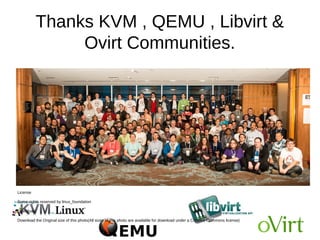
Thanks KVM , QEMU , Libvirt &
Ovirt Communities.
License
Some rights reserved by linux_foundation
Download
Download the Original size of this photo(All sizes of this photo are available for download under a Creative Commons license)

Mastering KVM Virtualization - Overview

  • 1.
    Mastering KVM Virtualization Acomplete book about KVM kvm.virtualization@gmail.com
  • 2.
    Who this bookfor ? This book is intended for system administrators, DevOps practitioners and Developers who have a good hands-on knowledge of Linux and would like to sharpen their skills of open source virtualization.
  • 3.
    Authors ● Humble Devassy Chirammal ● PrasadMukhedkar ● Anil Vettathu ●
  • 4.
    What this bookcovers? ● Chapter 1, Understanding Linux Virtualization, talks about the prevailing technologies used in Linux virtualization and their advantages over others. It starts with basic concepts of Linux virtualization and advantages of Linux-based virtualization platforms and then moves on to hypervisor/VMM. This chapter ends with how Linux is being used in private and public cloud infrastructures. ●
  • 5.
    What this bookcovers? ● Chapter 2, KVM Internals, covers the important data structures and functions which define the internal implementation of libvirt, qemu, and KVM. You will also go through the life cycle of vCPU execution and how qemu and KVM perform together to run a guest operating system in the host CPU ●
  • 6.
    What this bookcovers? ● Chapter 3, Setting up a KVM Virtualization Environment Using libvirt, tells you how to set up your Linux server to use KVM (Kernel-based Virtual Machine) and libvirt. KVM is for virtualization and libvirt is for managing the virtualization environment.You will also learn how to determine the right system requirements (CPU, memory,storage, and networking) to create your own virtual environment ●
  • 7.
    What this bookcovers? ● Chapter 4, Getting Started with libvirt and Creating Virtual Machines, will tell you more about libvirt and its supported tools, such as virt-manager and virsh. You will dig more into the default configurations available in libvirt. You will install a new virtual machine using virt-manager as well virt-install and also learn about advanced virtual machine deployment tools, such as virt-builder and oz. ●
  • 8.
    What this bookcovers? ● Chapter 5, Virtual Storage and Network, is one of the most important chapters that teaches you about virtual networking and storage, which determine the QoS of your virtual machine deployments. In virtual networking, you will learn in detail about bridging, different bridging concepts, and the methods you can adopt for a fault tolerant network layer for virtual machines. You will understand how to segregate the network with the use of tagged vLan bridges. In storage, you will learn how to create storage pools for our virtual machines from storage backends such as fiber channel (FC), ISCSI, NFS, local storage, and so on. You will also learn how to determine the right storage backend for your virtual machines.
  • 9.
    What this bookcovers? Chapter 6, Virtual Machine Lifecycle Management and Migration, discusses the tasks of managing virtual machines. You will learn about the different statuses of virtual machines and methods to access a virtual machine that includes spice and VNC. You will understand the use of guest agents. You will also learn how to perform offline and live migration of virtual machines.
  • 10.
    What this bookcovers? ● Chapter 7, Virtual Machine Templates and Snapshots, tells us how to create templates of Windows and Linux for rapid VMs provisioning. The chapter will also teach us how to create external and internal snapshots and when to use which snapshot. Snapshot management, including merge and deletion is also covered with snapshot best practice. ●
  • 11.
    What this bookcovers? ● Chapter 8, Kimchi, An HTML5-Based Management Tool for KVM/libvirt, explains how to manage KVM virtualization infrastructure remotely, using libvirt-based web management tools. You will learn how to create new virtual machines, remotely adjust an existing VM's resource allocation, implement user access controls, and so on over the Internet using Kimchi WebUI. It also introduces VM-King, an Android application that lets you manage KVM virtual machines remotely from your Android mobile or tablet ●
  • 12.
    What this bookcovers? ● Chapter 9, Implementing Software-Defined Networking for a KVM Virtual Environment, covers the use of SDN approach in KVM virtualization using Open vSwitch and supporting tools that include OpenDayLight SDN controller. You will learn about Open vSwitch installation and setup, creating vLans for KVM virtual machines, applying granular traffic and policy control to KVM VMs, creating overlay networks, and port mirroring and SPAN. You will also learn how to manage Open vSwitch using OpenDayLight SDN controller.
  • 13.
    What this bookcovers? ● Chapter 10, Installing and Configuring Virtual Datacenter Using oVirt, oVirt is a virtual datacenter manager and is considered as the open source replacement of Vmware vCenter. It manages virtual machines, hosts, storage, and virtualized networks. It provides a powerful web management interface. In this chapter, we will cover oVirt architecture, oVirt engine installation, and oVirt node installation
  • 14.
    What this bookcovers? ● Chapter 11, Managing oVirt virtual datacenter, tells us how to initiate an oVirt datacenter in order to start your first virtual machine. This initialization process will walk you through creating a datacenter, adding a host to datacenter, adding storage domains, and its backend. You will learn about configuring networking
  • 15.
    What this bookcovers? ● Chapter 12, Introduction to Openstack, covers the most popular open source software platform to create and manage public and private IaaS cloud. We will explain the different components of OpenStack. You will set up an OpenStack environment and will start your first instance on it.
  • 16.
    What this bookcovers? ● Chapter 13, Performance Tuning and Best Practices in KVM, tells us how performance tuning can be done on a KVM setup. It will also discuss the best practices that can be applied in a KVM setup to improve the performance.
  • 17.
    What this bookcovers? ● Chapter 14, Migrating from Physical to Virtualization and Cloud, will tell you how to migrate your existing virtual machines that are running on proprietary hypervisors to a truly open source KVM hypervisor using virt-v2v tool. You will also learn how to migrate physical machines to virtual machines and run them on the cloud.
  • 18.
  • 19.
    Thanks KVM ,QEMU , Libvirt & Ovirt Communities. License Some rights reserved by linux_foundation Download Download the Original size of this photo(All sizes of this photo are available for download under a Creative Commons license)