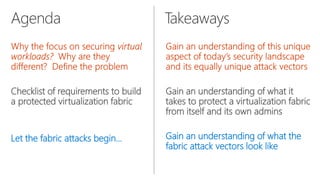
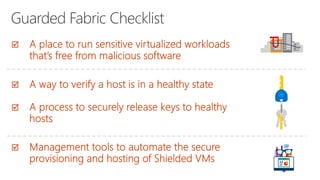
Checklist of requirements to build
a protected virtualization fabric
Let the fabric attacks begin…
Gain an understanding of what it
takes to protect a virtualization fabric
from itself and its own admins
Gain an understanding of what the
fabric attack vectors look like
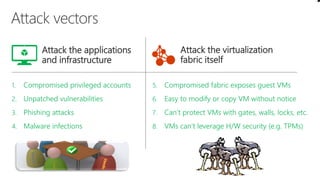
1. Compromised privileged accounts
2. Unpatched vulnerabilities
3. Phishing attacks
4. Malware infections
5. Compromised fabric exposes guest VMs
6. Easy to modify or copy VM without notice
7. Can’t protect VMs with gates, walls, locks, etc.
8. VMs can’t leverage H/W security (e.g. TPMs)
Attack the applications
and infrastructure
Attack the virtualization
fabric itself
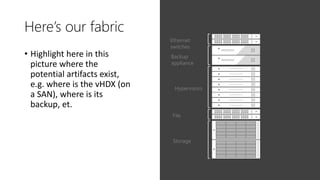
Here’s our fabric
• Highlight here in this
picture where the
potential artifacts exist,
e.g. where is the vHDX (on
a SAN), where is its
backup, et.
Hypervisors
Storage
File
Ethernet
switches
Backup
appliance
So who’s trusted, who’s not and who’s a
threat
• Fabric admin trusted to administer fabric
• This does not imply they’re trusted to administer the VMs
• <list out attack possible vectors for each cited admin?
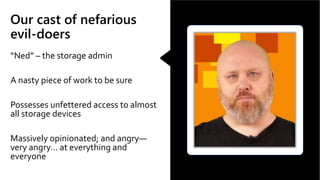
Our cast of nefarious
evil-doers
“Ned” – the storage admin
A nasty piece of work to be sure
Possesses unfettered access to almost
all storage devices
Massively opinionated; and angry—
very angry… at everything and
everyone
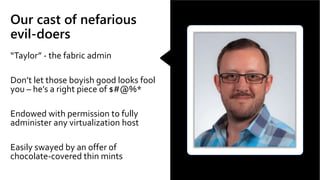
Our cast of nefarious
evil-doers
“Taylor” - the fabric admin
Don’t let those boyish good looks fool
you – he’s a right piece of $#@%*
Endowed with permission to fully
administer any virtualization host
Easily swayed by an offer of
chocolate-covered thin mints
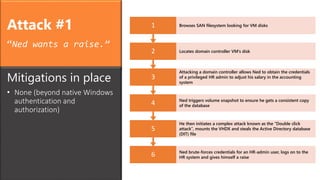
Attack #1
“Ned wants a raise.”
6 Ned brute-forces credentials for an HR-admin user, logs on to the
HR system and gives himself a raise
5
He then initiates a complex attack known as the “Double click
attack”, mounts the VHDX and steals the Active Directory database
(DIT) file
4 Ned triggers volume snapshot to ensure he gets a consistent copy
of the database
3
Attacking a domain controller allows Ned to obtain the credentials
of a privileged HR admin to adjust his salary in the accounting
system
2 Locates domain controller VM’s disk
1 Browses SAN filesystem looking for VM disks
Mitigations in place
• None (beyond native Windows
authentication and
authorization)
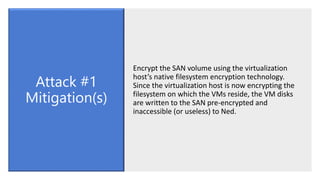
Encrypt the SAN volume using the virtualization
host’s native filesystem encryption technology.
Since the virtualization host is now encrypting the
filesystem on which the VMs reside, the VM disks
are written to the SAN pre-encrypted and
inaccessible (or useless) to Ned.
Attack #1
Mitigation(s)
Attack #2
“Ned decides to collude
with Taylor and brings a
box of Thin Mints as a
peace offering.”
6 They succeed in obtaining credentials for the HR-admin user and
give themselves well-deserved raises
5 Ned and Taylor conduct a brute-force attack against the offline
Active Directory database
4 Once again, Ned initiates the complex “Double click attack”,
mounts the VHDX and steals the Active Directory database (DIT) file
3 Taylor copies off the VHDX containing the Active Directory domain
controller database to a USB stick and takes it home
2 Ned persuades Taylor that he, too, justifiably deserves a raise
1
Because, Taylor can logon to the virtualization host, he exists within
its filesystem encryption bubble, i.e. the SAN volume is
transparently decrypted from Taylor’s perspective
Mitigations in place
• Virtual disk files stored on
encrypted volumes
Fire both Ned and Taylor—this should be
considered ‘generally sound advice’.
Move the filesystem encryption inside the guest
operating system of the VM using a boot
passphrase in order to help protect the VM’s
logical disk from fabric attacks.
Attack #2
Mitigation(s)
Attack #3
“Ned gives up but Taylor
likes his new car and
continues the attack.”
6 Taylor succeeds in obtaining credentials for the HR-admin and
gives himself a raise
5
TayLoader writes the passphrase to its own virtual disk and resumes
the natural boot process of the real OS automating entry of the
boot passphrase
4
As is usual, Taylor contacts the VM-owner who then connects to the
VM console and, unbeknownst to him, enters the passphrase into
TayLoader
3
During a regular maintenance window, the VM is rebooted into
TayLoader which bears a striking resemblance to the boot process
of the real disk
2 Taylor then takes a copy of the VM’s real virtual disk file
1
Taylor abuses his fabric admin permission and adds a new virtual
disk to the domain controller VM that contains a malicious boot
loader: TayLoader
Mitigations in place
• Virtual disk files are stored on
encrypted volumes
• VM’s are encrypting their own
volumes using unique keys that
are released using a boot
passphrase
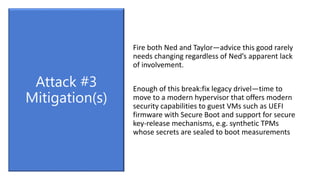
Fire both Ned and Taylor—advice this good rarely
needs changing regardless of Ned’s apparent lack
of involvement.
Enough of this break:fix legacy drivel—time to
move to a modern hypervisor that offers modern
security capabilities to guest VMs such as UEFI
firmware with Secure Boot and support for secure
key-release mechanisms, e.g. synthetic TPMs
whose secrets are sealed to boot measurements
Attack #3
Mitigation(s)
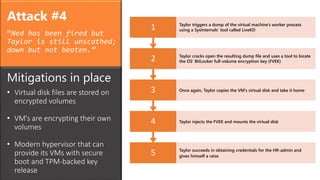
Attack #4
“Ned has been fired but
Taylor is still unscathed;
down but not beaten.”
5 Taylor succeeds in obtaining credentials for the HR-admin and
gives himself a raise
4 Taylor injects the FVEK and mounts the virtual disk
3 Once again, Taylor copies the VM’s virtual disk and take it home
2 Taylor cracks open the resulting dump file and uses a tool to locate
the OS’ BitLocker full-volume encryption key (FVEK)
1 Taylor triggers a dump of the virtual machine’s worker process
using a SysInternals’ tool called LiveKD
Mitigations in place
• Virtual disk files are stored on
encrypted volumes
• VM’s are encrypting their own
volumes
• Modern hypervisor that can
provide its VMs with secure
boot and TPM-backed key
release
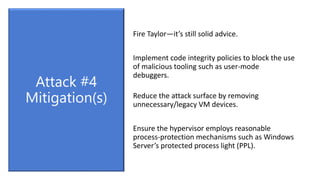
Fire Taylor—it’s still solid advice.
Implement code integrity policies to block the use
of malicious tooling such as user-mode
debuggers.
Reduce the attack surface by removing
unnecessary/legacy VM devices.
Ensure the hypervisor employs reasonable
process-protection mechanisms such as Windows
Server’s protected process light (PPL).
Attack #4
Mitigation(s)
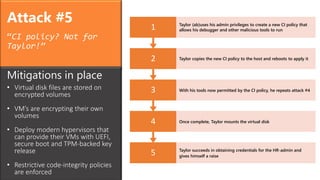
Attack #5
“CI policy? Not for
Taylor!”
5 Taylor succeeds in obtaining credentials for the HR-admin and
gives himself a raise
4 Once complete, Taylor mounts the virtual disk
3 With his tools now permitted by the CI policy, he repeats attack #4
2 Taylor copies the new CI policy to the host and reboots to apply it
1 Taylor (ab)uses his admin privileges to create a new CI policy that
allows his debugger and other malicious tools to run
Mitigations in place
• Virtual disk files are stored on
encrypted volumes
• VM’s are encrypting their own
volumes
• Deploy modern hypervisors that
can provide their VMs with UEFI,
secure boot and TPM-backed key
release
• Restrictive code-integrity policies
are enforced
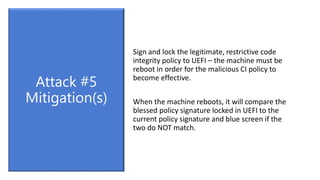
Sign and lock the legitimate, restrictive code
integrity policy to UEFI – the machine must be
reboot in order for the malicious CI policy to
become effective.
When the machine reboots, it will compare the
blessed policy signature locked in UEFI to the
current policy signature and blue screen if the
two do NOT match.
Attack #5
Mitigation(s)
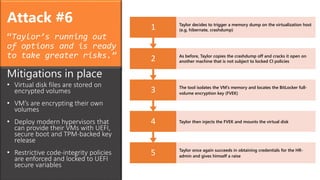
Attack #6
“Taylor’s running out
of options and is ready
to take greater risks.”
5 Taylor once again succeeds in obtaining credentials for the HR-
admin and gives himself a raise
4 Taylor then injects the FVEK and mounts the virtual disk
3 The tool isolates the VM’s memory and locates the BitLocker full-
volume encryption key (FVEK)
2 As before, Taylor copies the crashdump off and cracks it open on
another machine that is not subject to locked CI policies
1 Taylor decides to trigger a memory dump on the virtualization host
(e.g. hibernate, crashdump)
Mitigations in place
• Virtual disk files are stored on
encrypted volumes
• VM’s are encrypting their own
volumes
• Deploy modern hypervisors that
can provide their VMs with UEFI,
secure boot and TPM-backed key
release
• Restrictive code-integrity policies
are enforced and locked to UEFI
secure variables
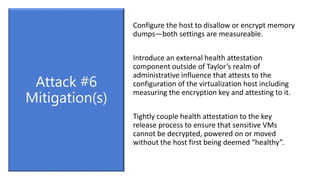
Configure the host to disallow or encrypt memory
dumps—both settings are measureable.
Introduce an external health attestation
component outside of Taylor’s realm of
administrative influence that attests to the
configuration of the virtualization host including
measuring the encryption key and attesting to it.
Tightly couple health attestation to the key
release process to ensure that sensitive VMs
cannot be decrypted, powered on or moved
without the host first being deemed “healthy”.
Attack #6
Mitigation(s)
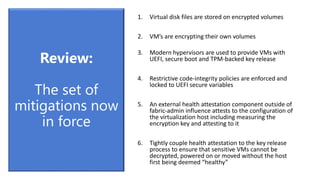
1. Virtual disk files are stored on encrypted volumes
2. VM’s are encrypting their own volumes
3. Modern hypervisors are used to provide VMs with
UEFI, secure boot and TPM-backed key release
4. Restrictive code-integrity policies are enforced and
locked to UEFI secure variables
5. An external health attestation component outside of
fabric-admin influence attests to the configuration of
the virtualization host including measuring the
encryption key and attesting to it
6. Tightly couple health attestation to the key release
process to ensure that sensitive VMs cannot be
decrypted, powered on or moved without the host
first being deemed “healthy”
Review:
The set of
mitigations now
in force
A Hyper-V powered virtualization fabric capable of protecting
tenant workloads from inspection, theft and tampering from
malware and system administrators both at rest as well as in-
flight. These protected workloads are called “Shielded VMs”.
BlueHat v17 || Don't Let Your Virtualization Fabric Become the Attack Vector

BlueHat v17 || Don't Let Your Virtualization Fabric Become the Attack Vector

  • 2.
    Checklist of requirementsto build a protected virtualization fabric Let the fabric attacks begin… Gain an understanding of what it takes to protect a virtualization fabric from itself and its own admins Gain an understanding of what the fabric attack vectors look like
  • 3.
    1. Compromised privilegedaccounts 2. Unpatched vulnerabilities 3. Phishing attacks 4. Malware infections 5. Compromised fabric exposes guest VMs 6. Easy to modify or copy VM without notice 7. Can’t protect VMs with gates, walls, locks, etc. 8. VMs can’t leverage H/W security (e.g. TPMs) Attack the applications and infrastructure Attack the virtualization fabric itself
  • 5.
    Here’s our fabric •Highlight here in this picture where the potential artifacts exist, e.g. where is the vHDX (on a SAN), where is its backup, et. Hypervisors Storage File Ethernet switches Backup appliance
  • 6.
    So who’s trusted,who’s not and who’s a threat • Fabric admin trusted to administer fabric • This does not imply they’re trusted to administer the VMs • <list out attack possible vectors for each cited admin?
  • 7.
    Our cast ofnefarious evil-doers “Ned” – the storage admin A nasty piece of work to be sure Possesses unfettered access to almost all storage devices Massively opinionated; and angry— very angry… at everything and everyone
  • 8.
    Our cast ofnefarious evil-doers “Taylor” - the fabric admin Don’t let those boyish good looks fool you – he’s a right piece of $#@%* Endowed with permission to fully administer any virtualization host Easily swayed by an offer of chocolate-covered thin mints
  • 9.
    Attack #1 “Ned wantsa raise.” 6 Ned brute-forces credentials for an HR-admin user, logs on to the HR system and gives himself a raise 5 He then initiates a complex attack known as the “Double click attack”, mounts the VHDX and steals the Active Directory database (DIT) file 4 Ned triggers volume snapshot to ensure he gets a consistent copy of the database 3 Attacking a domain controller allows Ned to obtain the credentials of a privileged HR admin to adjust his salary in the accounting system 2 Locates domain controller VM’s disk 1 Browses SAN filesystem looking for VM disks Mitigations in place • None (beyond native Windows authentication and authorization)
  • 10.
    Encrypt the SANvolume using the virtualization host’s native filesystem encryption technology. Since the virtualization host is now encrypting the filesystem on which the VMs reside, the VM disks are written to the SAN pre-encrypted and inaccessible (or useless) to Ned. Attack #1 Mitigation(s)
  • 12.
    Attack #2 “Ned decidesto collude with Taylor and brings a box of Thin Mints as a peace offering.” 6 They succeed in obtaining credentials for the HR-admin user and give themselves well-deserved raises 5 Ned and Taylor conduct a brute-force attack against the offline Active Directory database 4 Once again, Ned initiates the complex “Double click attack”, mounts the VHDX and steals the Active Directory database (DIT) file 3 Taylor copies off the VHDX containing the Active Directory domain controller database to a USB stick and takes it home 2 Ned persuades Taylor that he, too, justifiably deserves a raise 1 Because, Taylor can logon to the virtualization host, he exists within its filesystem encryption bubble, i.e. the SAN volume is transparently decrypted from Taylor’s perspective Mitigations in place • Virtual disk files stored on encrypted volumes
  • 13.
    Fire both Nedand Taylor—this should be considered ‘generally sound advice’. Move the filesystem encryption inside the guest operating system of the VM using a boot passphrase in order to help protect the VM’s logical disk from fabric attacks. Attack #2 Mitigation(s)
  • 15.
    Attack #3 “Ned givesup but Taylor likes his new car and continues the attack.” 6 Taylor succeeds in obtaining credentials for the HR-admin and gives himself a raise 5 TayLoader writes the passphrase to its own virtual disk and resumes the natural boot process of the real OS automating entry of the boot passphrase 4 As is usual, Taylor contacts the VM-owner who then connects to the VM console and, unbeknownst to him, enters the passphrase into TayLoader 3 During a regular maintenance window, the VM is rebooted into TayLoader which bears a striking resemblance to the boot process of the real disk 2 Taylor then takes a copy of the VM’s real virtual disk file 1 Taylor abuses his fabric admin permission and adds a new virtual disk to the domain controller VM that contains a malicious boot loader: TayLoader Mitigations in place • Virtual disk files are stored on encrypted volumes • VM’s are encrypting their own volumes using unique keys that are released using a boot passphrase
  • 16.
    Fire both Nedand Taylor—advice this good rarely needs changing regardless of Ned’s apparent lack of involvement. Enough of this break:fix legacy drivel—time to move to a modern hypervisor that offers modern security capabilities to guest VMs such as UEFI firmware with Secure Boot and support for secure key-release mechanisms, e.g. synthetic TPMs whose secrets are sealed to boot measurements Attack #3 Mitigation(s)
  • 18.
    Attack #4 “Ned hasbeen fired but Taylor is still unscathed; down but not beaten.” 5 Taylor succeeds in obtaining credentials for the HR-admin and gives himself a raise 4 Taylor injects the FVEK and mounts the virtual disk 3 Once again, Taylor copies the VM’s virtual disk and take it home 2 Taylor cracks open the resulting dump file and uses a tool to locate the OS’ BitLocker full-volume encryption key (FVEK) 1 Taylor triggers a dump of the virtual machine’s worker process using a SysInternals’ tool called LiveKD Mitigations in place • Virtual disk files are stored on encrypted volumes • VM’s are encrypting their own volumes • Modern hypervisor that can provide its VMs with secure boot and TPM-backed key release
  • 19.
    Fire Taylor—it’s stillsolid advice. Implement code integrity policies to block the use of malicious tooling such as user-mode debuggers. Reduce the attack surface by removing unnecessary/legacy VM devices. Ensure the hypervisor employs reasonable process-protection mechanisms such as Windows Server’s protected process light (PPL). Attack #4 Mitigation(s)
  • 21.
    Attack #5 “CI policy?Not for Taylor!” 5 Taylor succeeds in obtaining credentials for the HR-admin and gives himself a raise 4 Once complete, Taylor mounts the virtual disk 3 With his tools now permitted by the CI policy, he repeats attack #4 2 Taylor copies the new CI policy to the host and reboots to apply it 1 Taylor (ab)uses his admin privileges to create a new CI policy that allows his debugger and other malicious tools to run Mitigations in place • Virtual disk files are stored on encrypted volumes • VM’s are encrypting their own volumes • Deploy modern hypervisors that can provide their VMs with UEFI, secure boot and TPM-backed key release • Restrictive code-integrity policies are enforced
  • 22.
    Sign and lockthe legitimate, restrictive code integrity policy to UEFI – the machine must be reboot in order for the malicious CI policy to become effective. When the machine reboots, it will compare the blessed policy signature locked in UEFI to the current policy signature and blue screen if the two do NOT match. Attack #5 Mitigation(s)
  • 24.
    Attack #6 “Taylor’s runningout of options and is ready to take greater risks.” 5 Taylor once again succeeds in obtaining credentials for the HR- admin and gives himself a raise 4 Taylor then injects the FVEK and mounts the virtual disk 3 The tool isolates the VM’s memory and locates the BitLocker full- volume encryption key (FVEK) 2 As before, Taylor copies the crashdump off and cracks it open on another machine that is not subject to locked CI policies 1 Taylor decides to trigger a memory dump on the virtualization host (e.g. hibernate, crashdump) Mitigations in place • Virtual disk files are stored on encrypted volumes • VM’s are encrypting their own volumes • Deploy modern hypervisors that can provide their VMs with UEFI, secure boot and TPM-backed key release • Restrictive code-integrity policies are enforced and locked to UEFI secure variables
  • 25.
    Configure the hostto disallow or encrypt memory dumps—both settings are measureable. Introduce an external health attestation component outside of Taylor’s realm of administrative influence that attests to the configuration of the virtualization host including measuring the encryption key and attesting to it. Tightly couple health attestation to the key release process to ensure that sensitive VMs cannot be decrypted, powered on or moved without the host first being deemed “healthy”. Attack #6 Mitigation(s)
  • 26.
    1. Virtual diskfiles are stored on encrypted volumes 2. VM’s are encrypting their own volumes 3. Modern hypervisors are used to provide VMs with UEFI, secure boot and TPM-backed key release 4. Restrictive code-integrity policies are enforced and locked to UEFI secure variables 5. An external health attestation component outside of fabric-admin influence attests to the configuration of the virtualization host including measuring the encryption key and attesting to it 6. Tightly couple health attestation to the key release process to ensure that sensitive VMs cannot be decrypted, powered on or moved without the host first being deemed “healthy” Review: The set of mitigations now in force
  • 28.
    A Hyper-V poweredvirtualization fabric capable of protecting tenant workloads from inspection, theft and tampering from malware and system administrators both at rest as well as in- flight. These protected workloads are called “Shielded VMs”.

Editor's Notes