Participant Handbook
Sector
IT-ITES
Sub-Sector
Business Process Management
Occupation
Customer Relationship Management
Reference ID: SSC/Q2212, Version 1.0
NSQF Level 4
Domestic Data
Entry Operator
Participant Handbook
ii
Housekeeping Attendant (Manual Cleaning)
Domestic Data Entry Operator
iii
Copyright © 2016
IT – ITES Sector Skill Council NASSCOM
Plot No – 7,8.9 & 10,
Sector – 126 , Noida,UP-201303
T: 0120 4990111
E:ssc@nasscom.in
www.sscnasscom.com/www.nasscom.in
Disclaimer
The information contained herein has been obtained from sources reliable to NASSCOM. NASSCOM
disclaims all warranties to the accuracy, completeness or adequacy of such information. NASSCOM shall
have no liability for errors, omissions, or inadequacies, in the information contained herein, or for
interpretations thereof. Every effort has been made to trace the owners of the copyright material included
in the book. The publishers would be grateful for any omissions brought to their notice for
acknowledgements in future editions of the book.
No entry in NASSCOM shall be responsible for any loss whatsoever, sustained by any person who relies on
this material. The material in this publication is copyrighted. No parts of this report can be reproduced either
on paper or electronic media, unless authorized by NASSCOM.
Participant Handbook
iv
Housekeeping Attendant (Manual Cleaning)
Domestic Data Entry Operator
v
Shri Narendra Modi
Prime Minister of India
Skilling is building a better India.
If we have to move India towards
development then Skill Development
should be our mission.
Participant Handbook
vi
Acknowledgements
The Indian IT-BPM industry has built its reputation in the global arena on several
differentiators, chief among them being the availability of quality manpower. Organizations
across the world recognize the value India brings to every engagement with its vast and
readily available pool of IT professionals. Global entities have found it extremely effective to
leverage this critical resource as a way to realize competitive edge.
In order to capitalize on the same, it is crucial to develop and be prepared with a pool of
skilled talent that surpasses global standards. It is to this end that the IT-ITeS Sector Skills
Council NASSCOM (SSC NASSCOM) has been mandated with the objective of facilitating the
creation of such a workforce, by building employment related standards for the IT-BPM
industry as well as to keep track of changing scenario of talent demand and supply in the
industry.
Courseware development is one of several efforts by which SSC NASSCOM aims to develop
ready-to-deploy talent for the IT-BPM Industry. This Student Handbook is designed to
support students undertaking training for the Data Entry Operator job role. It is aimed at
equipping learners with the required competencies at the entry level within the larger
occupation of Customer Relationship Management in the BPM sub-sector of the industry.
In addition to the core knowledge and skills pertinent to the job role, the handbook acts as
a guide for professional and employability skills.
We extend our thanks to Wipro Limited, and Tata Communications for producing this
course publication.
vii
Participant Handbook
viii
About This Book
The Book will be based on a Qualification Pack which contains National Occupational Standards
(NOSs). Each NOS will be taken up as a ‘UNIT’ which will cover all the Performance Criteria and
relevant knowledge and skills with respect to the performance criteria covered.
The UNITs will further be divided into ‘TOPICS’ which will further be divided into SUB TOPICS as
follows:
The Trainer’s guide contains a facilitator’s guide, overview of the various Topics and Sub-topics, the
lesson plan, suggested delivery, suggested time and resources required for delivering a competency
based training as per the requirements laid out in the Qualification Pack and the National
Occupational Standards mentioned at the start of each Unit.
Symbols Used
Key Learning
Outcomes
Steps Time Tips Notes Unit
Objectives
Housekeeping Attendant (Manual Cleaning)
Domestic Data Entry Operator
Table of Contents
1 Introduction 1
Unit 1.1 - Introduction to IT/ITeS Industry 3
Unit 1.2 –Understanding of Computers 13
Unit 1.3 – M.S Office & Data Confidentiality 34
Unit 1.4 –Enhance Typing Skills 51
2 Undertake Data Entry Services (SSC/N3022) 57
Unit 2.1 - Job Responsibilities of a Data Entry Operator 59
Unit 2.2: Customer Orientation in Data Entry Roles 66
Unit 2.3: Performance Measures 71
3 Manage Your Work to Meet Requirements (SSC/N9001) 75
Unit 3.1 -Time Management 77
Unit 3.2 -Work Management and Prioritization 81
Unit 3.3 -Quality and Standard Adherence 84
4 Maintain a Healthy, Safe and Secure Working Environment (SSC/N9003) 87
Unit 4.1 -Workplace Safety 89
Unit 4.2 -Report Accidents and Emergencies 92
Unit 4.3 -Protect Health and Safety at Work 99
5 Employability and Entrepreneurship Skills 109
Unit 5.1 – Personal Strengths & Value System 113
Unit 5.2 –Digital Literacy – A Recap 132
Unit 5.3 – Money Matters 137
Unit 5.4 – Preparing for Employment & Self Employment 148
Unit 5.5 –Understanding Entrepreneurship 157
Unit 5.6 – Preparing to be an Entrepreneur 184
S. No Units and Topics Page No
ix
Participant Handbook
x
1
1. Introduction
Unit 1.1 Understand the IT/ITeS Industry
Unit 1.2 –Understanding of Computers
Unit 1.3 – M.S. Office & Data Confidentiality
Unit 1.4 – Enhance Typing Skills
Participant Handbook
2
Key Learning Outcomes
At the end of the Introduction you will be able to:
1. Know about information technology enabled services ( ITeS).
2. Explain growth of IT/ITeS industry in India.
3. Identify government initiatives in India.
4. Learn about the fundamentals of computer systems.
5. Demonstrate MS-office and data confidentiality.
6. Examine your typing skills.
Housekeeping Attendant (Manual Cleaning)
Domestic Data Entry Operator
3
1.1 IT-ITeS Industry an introduction
Unit Objectives
At the end of this unit, you will be able to:
1. Explain the evolution of the BPM Industry
2. Understand the structure of the IT-BPM industry
3. Resonate with the key trends in the BPM sector 4
1.1.1 Evolution and history of outsourcing
Pen down thoughts on:
 Their understanding of the concept of outsourcing
 What enabled the organizations to outsource
The concept of outsourcing started with the automobile industry, which outsourced component
manufacturing to a number of suppliers and concentrated on in-house manufacturing for only a few
high-value products and components. Since then, a number of other industries have started
depending on vendors for various products.
Another trend that emerged in the late 1980s was that of corporate outsourcing. A number of
noncore business processes, such as accounts, Human Resources (HR), and finance, were
outsourced to vendors. This resulted in the emergence of the BPO or the IT-Enabled Services (ITeS)
industry.
BPM Industry in India - The IT BPM industry has been fueling India’s growth story. In addition to
contributing to the country’s Gross Domestic Product (GDP) and exports, the growth of the IT BPM
industry has provided India with a wide range of economic and social benefits which includes
creating employment, raising income levels, promoting exports. It has placed India on the world
map with an image of a technological advanced and knowledge based economy. This sector attracts
amongst the largest investments by venture capitalist and has been credited with enabling the
entrepreneurial ventures of many in the country. The IT-BPM industry has almost doubled in terms
of revenue and contribution to India’s GDP over the last six years (2008-2013).
Participant Handbook
4
1.1.2 : Structure of the IT BPM Industry
The organizations within the IT-BPM Industry are categorized along the following parameters
 Sector the organization is serving
 Type as well as range of offering the organization provides
 Geographic spread of operations and
 Revenues and size of operations
1. Multi-national Companies (MNCs): MNCs organizations have their headquarters outside
India but operate in multiple locations worldwide including those in India. They cater to
external clients (both domestic and/or global).
2. Indian Service Providers (ISP): ISPs are organizations that have started with their operations
in India. Most of these organizations would have their headquarters in India while having
offices at many international locations
3. While most have a client base, which is global as well as domestic, there are some that have
focused on serving only the Indian clients.
4. Global In-house Centers (GIC): GIC organizations cater to the needs of their parent
company only and do not serve external clients. This model allows the organization the
option to keep IT Operations in - house and at the same time take advantage of expanding
their global footprint and offering opportunities for innovation in a cost effectivemanner.
Sub-sectors within the IT-BPM Industry
The IT-BPM industry has four sub-sectors. The subsequent sections provide information and insights
for a career in the Business Process Management sub-sector.
Housekeeping Attendant (Manual Cleaning)
Domestic Data Entry Operator
5
Fig: 1.1.1: Structure of the IT BPM Industry
Offshore Product Development
Onshore Product Development
Embedded Services
Engineering Services
Software Products (SPD)
IT-BPM Industry
Engineering and R&D (ER&D)
Customer Interaction and Support (CIS)
Finance and Accounting (F&A)
Human Resource Management (HRM)
Knowledge Services
Procurement and Logistics
Custom Application Development (CAD)
Hardware Deployment and Support
Software Deployment and Support
IT Consulting
System Integration
Information Systems(IS) Outsourcing
Software Testing
Network Consultation and Integration
Education and Training
Business Process Management (BPM)
IT Services (ITS)
1.1.3: What is the BPM sub-sector
Indian Business Process Management (BPM) sub-sector of Indian IT-BPM industry has crossed
significant growth milestones in FY2013 i.e. revenue generation of USD19 Billion and providing
direct employment to nearly 1 million people. The Indian BPM sub-sector has not only fuelled
Indian economic growth but also helped transform the image of India from a rural agrarian
economy to a dynamic knowledge-based economy.
This faith in the Indian BPM sub-sector was reaffirmed through testing times at the end of the last
decade, where despite global uncertainties and economic gridlock, the demand for global
outsourcing for BPM in India remained strong. The positioning of BPM established as different from
business process outsourcing has created a broad client impact. There is a transition from merely
being a cost saving option to being a service delivery leader that enhances competitiveness, drives
business productivity and impacts outcomes.
Thus the industry is moving away from positioning itself only as cost and labor arbitrage for its
customers to providing transformational services and strategic value creation. As a result, it is
creating on-demand future-ready solutions by deep-diving to create vertical specific offerings and
capabilities and also focusing on standardizing customer delivery excellence.
Participant Handbook
6
NASSCOM estimates that the BPM sub-sector, which is potentially pegged as a USD65 billion
industry by 2020, will contribute up to 9 per cent of India’s GDP and 30 million employment
opportunities (direct and indirect).
Fig: 1.1.2: What is the BPM sub-sector
Source: The IT –BPM Sector in India – Strategic Review 2013, NASSCOM
Housekeeping Attendant (Manual Cleaning)
Domestic Data Entry Operator
7
1.1.4 Key Trends in the BPM sub-sector
The key trends observed in the BPM sub sector are summarized in the figure below and then
explained in detail within the section.
Fig 1.1.3: BPO Strategy Summit, 2012; Delhi
Verticulization: With the maturity of the BPM sub-sector, the focus of organizations has now
shifted to verticalized offerings with end to end solutions across standardized platforms in major
industries. As a result of this, there is a lot of Mergers and Acquisition (M&A) activity in the
industry, where organizations are aiming to acquire these verticalized skills and integrate them into
their own offerings.
Emergence of Big Data: The emergence of big data is characterized by technological
advancements, large number of mergers and acquisitions and firms venturing into integrated
solutions including IT and analytics. Therefore, value creating business driven offerings, is seen as a
major emerging trend in the BPM sub-sector. Armed with long term client relationships and
transactional data warehouses coupled with talent expertise, these service providers are embarking
on creating sustainable value addition for their clients. Big data/analytics presents a USD 25 billion
opportunity by 2015, a CAGR of 45 per cent (2011-2015).
Continued locational advantage: India leads the way as the most lucrative location for the global IT
industry performing well on various parameters like financial attractiveness, skill availability and
business environment. While traditionally, 70% of the industry is located in Tier I cities, focus on
controlling costs has created a gradual move to have centers in Tier II cities as well, thus widening
the talent pool and spread.
Participant Handbook
8
Emergence of Knowledge Services specialization: Knowledge Services Outsourcing is seen as the
next big thing and the fastest growing domain in the BPM sub-sector based on its revenue
contribution. It accounts for about 18% share of BPM exports, close to USD3.2 Billion in FY2013. As
worldwide markets become more knowledge intensive, India becomes a preferred destination to
outsource these core elements based on its abundance of talent pool. Legal Process Outsourcing
(LPO), Data Analytics, and Risk Management are some of the fastest growing KPO segments. There
is also a growing recognition of Indian Service Providers (ISPs) being able to provide such value-add
services.
Increasing use of Social Media and Internet for Customer Relationship Management (CRM): With
the emergence of new technology platforms, unified communications systems, collaboration and
social networking, multiple channels of integrated communications are now changing the rules of
communicating with the customers, especially with the emergence of channels like email, web
chats and social media sites. Social media interactions are gaining importance as many
organizations look to engage with their customers through platforms like Facebook, Twitter and
Ingrown social media sites.
1.1.5 Exercise
1. What are the four main sub sectors in the IT BPM industry?
2. Which one of the following is NOT a key trend in the BPMindustry?
a. Verticulization
b. Knowledge service specialization
c. Emergence of big data
d. Saturation
Housekeeping Attendant (Manual Cleaning)
Domestic Data Entry Operator
9
1.1.6 : Summary
 The IT BPM industry has not only contributed to India’s GDP and exports but has also provided
a wide range of socio-economic benefits such as creating employment, raising income
levels,and promoting exports, etc.
 Business Process Management (BPM) sub-sector of Indian IT-BPM industry has generated
revenues of USD19 Billion in FY2013 and providing direct employment to nearly 1 million
people.
 NASSCOM estimates that the BPM sub-sector, which is potentially pegged as a USD65 billion
industry by 2020, will contribute up to 9 per cent of India’s GDP and 30 million employment
opportunities.
 The organizations within the IT-BPM Industry are categorized along the following parameters
o Sector the organization is serving
o Type as well as range of offering the organization provides
o Geographic spread of operations and
o Revenues and size of operations
 The four main sub-sectors within the IT BPM industry are:
1. IT Services (ITS)
2. Business Process Management (BPM)
3. Engineering and R&D (ER&D)
4. Software Products (SPD)
 The key trends in the BPM subsector are as below:
o Verticalization
o Emergence of big data
o Continued locational advantage
o Emergence of knowledge services specialization
o Increasing use of social media and internet for CRM
Participant Handbook
10
1.1.7 : Glossary of terms
Definitions
Keywords /Terms Description
Scope Scope is the set of statements specifying the range of variables that an
individual may have to deal with in carrying out the function which have a
critical impact on the quality of performance required.
Knowledge and
Understanding
Knowledge and Understanding are statements which together specify the
technical, generic, professional and organizational specific knowledge that
an individual needs in order to perform to the required standard.
Organizational Context Organizational Context includes the way the organization is structured and
how it operates, including the extent of operative knowledge managers
have of their relevant areas of responsibility.
Technical Knowledge Technical Knowledge is thespecificknowledgeneededto accomplish specific
designated responsibilities.
Core Skills/Generic
Skills
Core Skills or Generic Skills are a group of skills that are key to learning and
working in today's world. These skills are typically needed in any work
environment. In the context of the OS, these include communication related
skills that are applicable to most job roles.
Helpdesk Helpdesk is an entity to which the customers will report their IT problems.
IT Service Helpdesk Attendant is responsible for managing the helpdesk.
IT-ITeS Information Technology - Information Technology enabled Services
BPM Business Process Management
BPO Business Process Outsourcing
KPO Knowledge Process Outsourcing
LPO Legal Process Outsourcing
IPO Information Process Outsourcing
BCA Bachelor of Computer Applications
B.Sc. Bachelor of Science
OS Occupational Standard(s)
NOS National Occupational Standard(s)
QP Qualifications Pack
UGC University Grants Commission
MHRD Ministry of Human Resource Development
MOLE Ministry of Labor and Employment
NVEQF National Vocational Education Qualifications Framework
NVQF National Vocational Qualifications Framework
NSQF National Skill Qualification Framework
Housekeeping Attendant (Manual Cleaning)
Domestic Data Entry Operator
11
Nomenclature for QP & NOS
Qualifications Pack
9 characters
SSC/Q0101
SSC denoting Software &Services
Companies (IT-ITeSindustry)
Q denoting Qualifications Pack
QP number (2 numbers)
National Occupational Standard
9 characters
SSC/N0101
SSC denoting Software &Services
Companies (IT-ITeSindustry)
N denoting National Occupational
Standard
NOS number (2 numbers)
Occupational Standard
9 characters
SSC/N0101
SSC denoting Software &Services
Companies (IT-ITeSindustry)
O denoting Occupational
Standard
OS number (2 numbers)
Nomenclature for QP & NOS UNITS
It is important to note that an OS unit can be denoted with either an ‘O’ or an ‘N’.
 If an OS unit denotes ‘O’, it is an OS unit that is an international standard. An example of OS
unit denoting ‘O’ is SSC/O0101.
 If an OS unit denotes ‘N’, it is an OS unit that is a national standard and is applicable onlyfor
the Indian IT-ITeS industry. An example of OS unit denoting ‘N’ is SSC/N0101
Participant Handbook
12
The following acronyms/codes have been used in the nomenclature above:
Sub-Sector Range of Occupation numbers
IT Service(ITS) 01-20
Business Process Management (BPM) 21-40
Engg. and R&D(ERD) 41-60
Software Products(SPD) 61-80
Sequence Description Example
Three letters
Industry name
(Software&Service Companies )
SSC
Slash / /
Next letter Whether QP or NOS N
Next two numbers Occupation Code 01
Next two numbers OS number 01
Housekeeping Attendant (Manual Cleaning)
Domestic Data Entry Operator
13
1.2 Understanding of Computers
1.2.1 History of Computers
The word ‘computer’ is an old word that has changed its meaning several times in the last few
centuries. Originating from the Latin, by the mid-17th century it meant ‘someone who computes’.
The American Heritage Dictionary (1980) gives its first computer definition as “a person who
computes.” The computer remained associated with human activity until about the middle of the
20th century when it became applied to “a programmable electronic device that can store, retrieve,
and process data.
Functions of Computer
A computer has four functions:
a. Accepts data - Input
b. Processes data - Processing
c. Produces output - Output
d. Stores results - Storage
Input (Data):
Input is the raw information entered into a computer from the input devices. It is the collection of
letters, numbers, images etc.
Process:
Process is the operation of data as per given instruction. It is totally internal process of the computer
system.
Unit Objectives
At the end of this unit, you will be able to:
1.Expain the history and Generation of Computer
2.Know about the basic terminologies of Computer
3.Explain the Architecture of computer
4. Types of Computer
5.Advantages & Disadvantages of Computer
Participant Handbook
14
Output:
Output is the processed data given by computer after data processing. Output is also called as
Result. We can save these results in the storage devices for the future use.
Computer System
All of the components of a computer system can be summarized with the simple equations.
COMPUTER SYSTEM = HARDWARE + SOFTWARE+ USER
• Hardware = Internal Devices + Peripheral Devices
All physical parts of the computer (or everything that we can touch) are known as Hardware.
• Software = Programs
Software gives "intelligence" to the computer.
• USER = Person, who operates computer.
1.2.2Generations of Computers
First Generation (1940-56):
The first generation computers used vacuum tubes & machine language was used for giving the
instructions. These computers were large in size & their programming was difficult task. The
electricity consumption was very high. Some computers of this generation are ENIAC, EDVAC,
EDSAC & UNIVAC-1.
Second Generation (1956-63):
In 2nd
generation computers, vacuum tubes were replaced by transistors. They required only
1/10 of power required by tubes. This generation computer generated less heat & were reliable.
The first operating system developed in this generation.
The Third Generation (1964-71):
The 3rd
generation computers replaced transistors with Integrated circuit known as chip.From
Small scale integrated circuits which had 10 transistors per chip, technology developed to MSI
circuits with 100 transistors per chip. These computers were smaller, faster & morereliable.
High level languages invented in this generation.
Housekeeping Attendant (Manual Cleaning)
Domestic Data Entry Operator
15
The fourth Generation (1972- present):
LSI & VLSI were used in this generation. As a result, microprocessors came into existence. The
computers using this technology known to be Micro Computers. High capacity hard disk were
invented. There is great development in data communication.
The Fifth Generation (Present & Beyond):
Fifth generation computing devices, based on artificial intelligence, are still in development,
though there are some applications, such as voice recognition, that are being used today. The use
of parallel processing and superconductors is helping to make artificial intelligence a reality.
Quantum computation and molecular and nanotechnology will radically change the face of
computers in years to come.
1.2.3Architecture of Computers
Participant Handbook
16
Input Devices: Those devices which help to enter data into computer system. Eg. Keyboard,
Mouse, Touch screen, Barcode Reader, Scanner, MICR, OMR etc.
Fig 1.2.1 Bar code Reader Fig 1.2.2 MICR used in Bank Fig 1.2.3 OMR(Used for answer sheet evaluation)
Output Devices: Those devices which help to display the processed information. Eg. Monitor,
Printer, Plotter, Projector
Fig 1.2.4 Printer Fig 1.2.5 Plotter Fig 1.2.6 Projector
CENTRAL PROCESSING UNIT (CPU)
The main component to make a computer operate is the computer chip or microprocessor. This
is referred to as the Central Processing Unit (CPU) and is housed in the computer case. Together,
they are also called the CPU. It performs arithmetic and logic operations. The CPU (Central
Processing Unit) is the device that interprets and executes instructions.
Fig 1.2.7 Processor
Housekeeping Attendant (Manual Cleaning)
Domestic Data Entry Operator
17
1.2.4 Windows and its components
The main components of Windows when you start your computer are the Desktop, My
Computer, Recycle Bin, Start Button, Taskbar, and shortcuts to applications.
After opening an application, you will also have a window with an active application which will
appear in your desktop and taskbar.
Desktop
Fig 1.2.8
The Desktop is the very first screen you see after Windows starts. There you find the folders: My
Documents, My Computer, the Recycle Bin and any Shortcuts for applications and files that you
have created.
My Computer
When you double-click on the My Computer icon on the desktop, it will open a window similar to
the one shown below, where you can navigate between the computer's drives and Control Panel
tools.
Participant Handbook
18
Fig 1.2.9
Recycle Bin
When you delete a file from your computer's hard drive, it is removed to the folder called
Recycle Bin. Files deleted from your hard drive are still available for restoring if needed, unless
you empty your Recycle Bin.
To restore the files, open the Recycle Bin folder by double-clicking the icon on your desktop,
select the file and then select Restore.
Fig 1.2.10
 To clear the Recycle Bin, select Empty Recycle Bin and the files will be permanently
removed from your computer.
Housekeeping Attendant (Manual Cleaning)
Domestic Data Entry Operator
19
Fig 1.2.11
Note that the recycle bin does not apply to the contents of a floppy disk. If you delete a file from
a floppy disk, it is permanently deleted, and you cannot restore it.
Minimize/Maximize/Close Buttons
In the top-right corner of your document are the Minimize/Maximize/Close buttons.
The first one when clicked minimize your screen, sending it to the taskbar. The second one
maximize your screen, filling all desktop with the document you are working with.The last button
is used to close your document.
It is best practice to work with your document window maximized.
Start Menu
By clicking the Start button, in the very bottom-left corner of the screen, a vertical window will
come up with the Start Menu.
The list of submenus in the pop-up window let you navigate and select the application you want
to run.
Participant Handbook
20
Fig 1.2.12
Taskbar
The Taskbar is the row at the bottom of the Windows screen where all currently open
applications or files are listed.
The taskbar is used to select a file or application that is already opened or to put an application in
the foreground.
To put an application in the foreground, just click on the icon of the application in the taskbar.
Another way to put an application in the foreground when more than one is in use is to hold the
ALT button and then click TAB on your keyboard to see all the open applications; you will need to
hold the ALT button and continue pressing TAB to go through each application until you come to
the one you want to use.
Shortcut
A shortcut creates a button or icon which typically stays on the desktop and when clicked, quickly
allows you to start a program or open a file without having to go to its permanent location on
your computer.
Housekeeping Attendant (Manual Cleaning)
Domestic Data Entry Operator
21
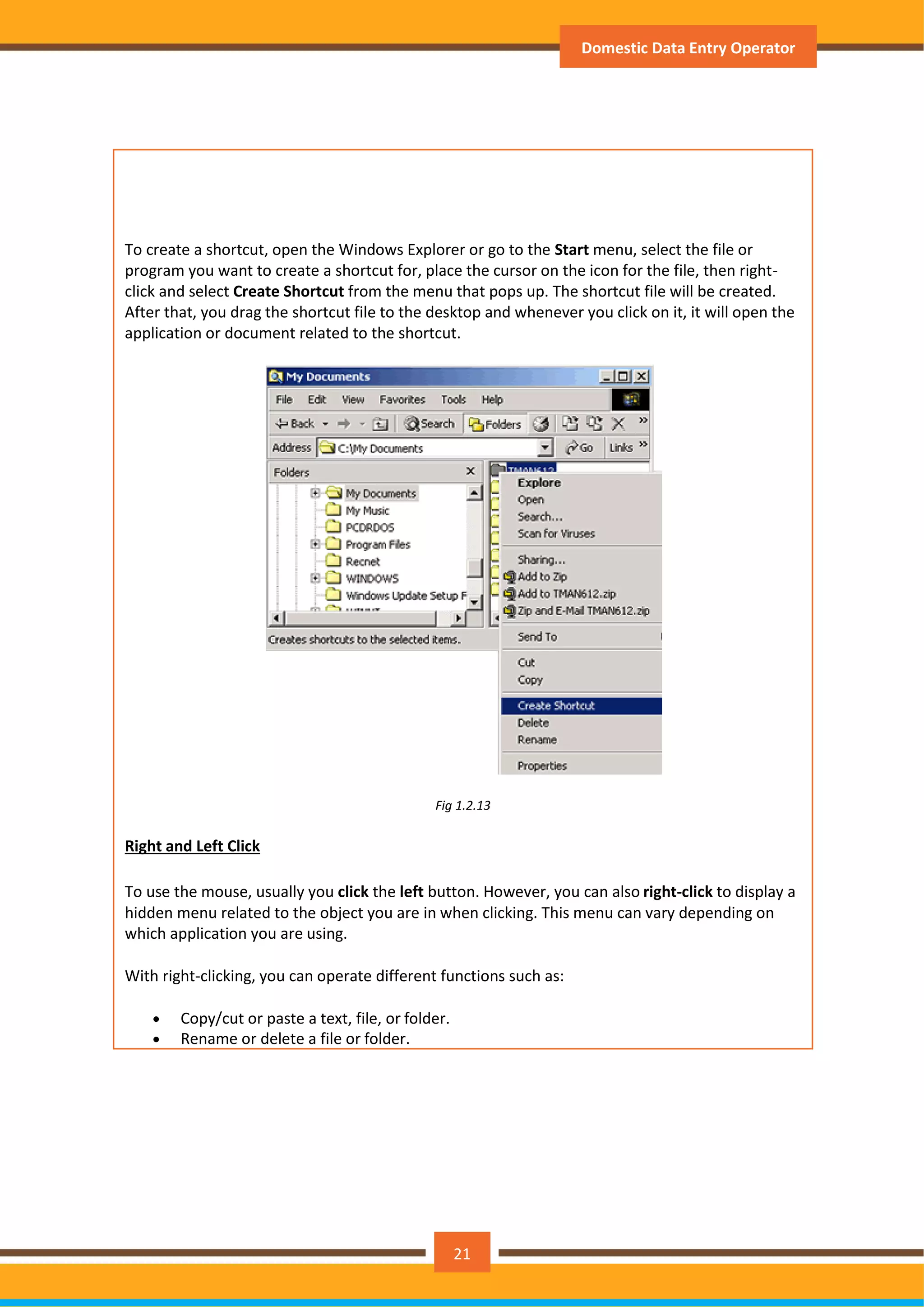
To create a shortcut, open the Windows Explorer or go to the Start menu, select the file or
program you want to create a shortcut for, place the cursor on the icon for the file, then right-
click and select Create Shortcut from the menu that pops up. The shortcut file will be created.
After that, you drag the shortcut file to the desktop and whenever you click on it, it will open the
application or document related to the shortcut.
Fig 1.2.13
Right and Left Click
To use the mouse, usually you click the left button. However, you can also right-click to display a
hidden menu related to the object you are in when clicking. This menu can vary depending on
which application you are using.
With right-clicking, you can operate different functions such as:
Copy/cut or paste a text, file, or folder.
Rename or delete a file or folder.
Participant Handbook
22
Fig 1.2.14
Multitasking
The term multitasking means to be running or working in two or more applications at the same
time. You can be more productive by multitasking. For instance, you can download files from the
Internet while managing your files or word processing.
In order to switch between the applications you can use the Taskbar, clicking on the icon of the
application you want to have in the foreground.
Fig 1.2.15
Housekeeping Attendant (Manual Cleaning)
Domestic Data Entry Operator
23
Highlight
Put your cursor at the beginning of a word or sentence you want to highlight, then click and drag
your mouse to the end of the selection.
Fig 1.2.16
Copy/Cut and Paste Text
Copy is used when you want to have an area of text from a document twice at the same
document or in another document. You first select the area of the text by highlighting it
and then press CTRL+C, or go to Edit menu and select Copy.
Fig 1.2.17
Participant Handbook
24
Cut is used to delete an area of text from a document. You first select the area of the text
by highlighting it and then press CTRL+X, or go to Edit menu and select Cut.
Fig 1.2.18
Standard and Formatting Toolbars
Toolbars are rows of buttons and boxes. When you click on a button or box, an application opens
or a task is performed. Toolbars normally appear at the top of an application's window. The
Standard Toolbar shown in the image below is from Windows Explorer; the standard toolbars in
other applications may have buttons that allow you to open a new document, save, print, and
spell check.
The Formatting Toolbar is used to format a text using alignments, font type, font size, bold, italic,
and lists. It is provided in most applications. The image below shows the Formatting Toolbar from
Netscape Composer.
Save and/or Save As
Save is used when:
 It is the first time you are saving a file.
 You want to keep saving an existing file in different moments that you are working onit.
 It is the end of a working period.
Housekeeping Attendant (Manual Cleaning)
Domestic Data Entry Operator
25
Fig 1.2.19
Note that clicking Save will replace whatever file you were working on.
Go to File menu and select Save or use the combination keys CTRL+S.
Fig 1.2.20
Save As is used when you want to save a file with a different name to create backups of a file in
the creation process. In that way, you can have different versions of the same document and can
return to a previous stage.
Go to File menu and select Save As or use the combination keys CTRL+SHIFT+S.
Rename/Delete a Folder or File
Using Windows Explorer, you can rename or delete a file or folder.
To Rename a file or folder:
Participant Handbook
26
1. Navigate and select the file or folder you want to rename from the proper drive (c:,a:).
2. Go to the File menu and select Rename.
3. The file name will be highlighted and blinking in the right corner waiting for you to type
the new file name.
Fig 1.2.21
To Delete a file or folder:
1. Navigate and select the file or folder you want to delete.
2. Go to the File menu and select Delete.
Fig 1.2.22
Another way of renaming or deleting a file or folder is using the right-click button of your mouse.
After highlighting the file or folder, you right-click and a menu will appear where you can select
Rename or Delete
Housekeeping Attendant (Manual Cleaning)
Domestic Data Entry Operator
27
1.2.5 Types of Computers
1. PC
Fig 1.2.22
The personal computer (PC) defines a computer designed for general use by a single person.
While a Mac is a PC, most people relate the term with systems that run the Windows operating
system. PCs were first known as microcomputers because they were a complete computer but
built on a smaller scale than the huge systems in use by most businesses.
2. Desktop
Fig 1.2.23
A PC that is not designed for portability is a desktop computer. The expectation with desktop
systems are that you will set the computer up in a permanent location. Most desktops offer more
power, storage and versatility for less cost than their portable brethren.
3. Laptop
Also called notebooks, laptops are portable computers that integrate the display, keyboard, a
pointing device or trackball, processor, memory and hard drive all in a battery-operated package
slightly larger than an average hardcover book.
4. Netbook
Participant Handbook
28
Fig 1.2.24
Netbooks are ultra-portable computers that are even smaller than traditional laptops. The extreme
cost-effectiveness of netbooks (roughly $300 to $500) means they're cheaper than almost any
brand-new laptop you'll find at retail outlets. However, netbooks' internal components are less
powerful than those in regular laptops.
PDA
Personal Digital Assistants (PDAs) are tightly integrated computers that often use flash memory
instead of a hard drive for storage. These computers usually do not have keyboards but rely on
touch screen technology for user input. PDAs are typically smaller than a paperback novel, very
lightweight with a reasonable battery life. A slightly larger and heavier version of the PDA is the
handheld computer.
Workstation
Fig 1.2.25
Another type of computer is a workstation. A workstation is simply a desktop computer that has a
more powerful processor, additional memory and enhanced capabilities for performing a special
group of task, such as 3D Graphics or game development.
Server
Housekeeping Attendant (Manual Cleaning)
Domestic Data Entry Operator
29
Fig 1.2.26
A computer that has been optimized to provide services to other computers over a network.
Servers usually have powerful processors, lots of memory and large hard drives. The next type of
computer can fill an entire room.
8. Mainframe
In the early days of computing, mainframes were huge computers that could fill an entire room or
even a whole floor! As the size of computers has diminished while the power has increased, the
term mainframe has fallen out of use in favor of enterprise server. You'll still hear the term used,
particularly in large companies to describe the huge machines processing millions of transactions
every day.
9. SuperComputer
Fig 1.2.27
This type of computer usually costs hundreds of thousands or even millions of dollars. Although
some supercomputers are single computer systems, most are composed of multiple high
performance computers working in parallel as a single system. The best known supercomputers
are built by Cray Supercomputers.
Participant Handbook
30
10. Wearable Computer
Fig 1.2.28
The latest trend in computing is wearable computers. Essentially, common computer applications
(e-mail, database, multimedia, calendar/scheduler) are integrated into watches, cell phones,
visors and even clothing. For more information see these articles on computer clothing, smart
watches and fabric PCs.
1.2.6 Computer Hardware and Software
Computer hardware includes all the electrical, mechanical, and the electronic parts of a
computer. Any part that we can see or touch is the hard ware.
Fig 1.2.29
Computer hardware includes
1. System Unit
2. Peripheral devices
3. Input devices i.e. keyboard, mouse etc.
4. Output devices i.e. Display Unit, printer etc.
5. Storage devices like hard disk, floppy disksetc.
Housekeeping Attendant (Manual Cleaning)
Domestic Data Entry Operator
31
Software:
The functioning of the computer is not dependent on hardware alone. So, what else is required?
It requires a set of instructions that tells the computer what is to be done with the input data. In
computer terminology, this set of instructions is called a program and one or more programs is
termed as software.
Let us understand hardware and software with an example. An audio cassette when played gives
you some sound. Here, the tape recorder and the audio cassette can be compared to hardware.
The sound which comes from the tape recorder can be compared to software.
Software used for computers may be of different types. Some of which are:
Application Software
System Software
Application Software
Software specially suited for specific applications for example, railway and airline reservation,
billing, accounting or software which enables creation and storage of documents are termed as
application software.
System software
In the above airline reservation ex System software ample, the clerk types your name and other
details through the keyboard. But how does this go to the system unit? This activity is done by a
set of instructions called the Operating Systems.
The Operating System manages the various 1/0 devices of the computer and enables the user to
interact with the machine.
The computer understands only machine language i.e. O’s and 1’s. In the above example how do
you think it understands the reservation clerk’s query in English? There has to be a software
which translates the user language into machine language.
The software which does this translation is known as the support software. Examples of support
software are compilers and interpreters
Participant Handbook
32
1.2.7Advantages and disadvantages of computers
Fig 1.2.30
1.2.8Applications of Computers
Fig 1.2.31
1.Business: Businesses use computers for communications across a number of types of
people, such as between employees, between the business and its customers, and
between a business and its suppliers. One major advantage of computer communication
is that it is often asynchronous, which means that communication can happen even if
one person is not available by telephone
Housekeeping Attendant (Manual Cleaning)
Domestic Data Entry Operator
33
2.E-Commerce: E-commerce (electronic commerce) describes the
buying, selling, and exchanging of products, services, and
information via computer network. The term e-commerce as
describe transactions, conducted between business partners.
There are many applications of e-commerce, such as home
banking, shopping in electronic malls, buying stocks, finding ajob,
conducting an auction, collaborating electronically with business
partners around the globe, marketing and providing customer
service.
3.Education: The computer technology has a deep impact
on education. Computer education forms a part of the
school and college curriculum, as it is important for every
individual today, to have the basic knowledge of computers.
The advantages of computers in education include an
efficient storage and performance of information, quick
information processing and very importantly the saving of
paper. Know more about the importance of computer
education. Computer teaching plays a key role in the
modern systems of education.
Fig 1.2.32
Fig 1.2.32
4.Medical: Computers play an indispensable role in the medical field, and without them,
proficiency and productivity would decline markedly. Computers assist with
organizational, administrative duties, patient records, and a number of medical technologies
that are an absolute necessity in today’s world. Every hospital now incorporates computers into
the framework of its everyday responsibilities and duties, and this technology has become an
invaluable asset in virtually every medical facility. Generally speaking, many medical screening
methods hinge largely on computer technology, including x-rays. Furthermore, various surgical
procedures require computers as well, including heart surgeries. Computers can streamline the
efficiency of many medically related duties.
5.Science: As much as computers have become a part of our daily lives, they have also become
an integral part of modern science. They are essential in helping scientists to understand the
world around us. Computers have changed the face of science so that scientists are no longer
constrained to doing just experiment-based or theoretical research. Now scientists can enter
results and data into a computer and the computer, utilizing mathematics and abiding by the
physical laws, can recreate a virtual physical world right on the computerscreen
6.Communication: Computers are critical for communication and are the center piece of
Participant Handbook
34
1.3 M.S. Office& Data Confidentiality
information technology. The early 1990s saw the emergence of household Internet use, which
eventually spurred common use of email, websites, blogs, social networking, video chat and
Voice-Over-Internet Protocol. Today, many traditional communication modes including postal
mail and landline phones seem obsolete.
Unit Objectives
At the end of this unit, you will be able to:
1. Know about MS office and its components
2. Be able to explore and use the basic features of the above mentioned components
3. Learn how to add header, footer, and page number in MSWord.
4. Have an understanding about Data Confidentiality
1.3.1 Introduction to M.S.Office
Fig 1.3.1
It was first announced by Bill Gates on 1 August 1988. Office is produced in several versions
targeted towards different end-users and computing environments. The original, and most widely
used version, is the desktop version. The first version of Office contained Microsoft
Word, Microsoft Excel, and Microsoft PowerPoint. Finally, with the rise of cloud computing,
Microsoft also produces and runs Office Online, a web-based version of core Office apps, which is
included as part of a Microsoft account. Let us now one by one take every component that makes
MS office.
Housekeeping Attendant (Manual Cleaning)
Domestic Data Entry Operator
35
1.3.2Microsoft Word and its working
In basic terms, MS word can be explained as a word processor. Microsoft Word is a full-featured
word processing program for writing and editing text documents. Word includes tools that let
multiple users share information and collaboratively edit documents. Word is included in every
edition of Microsoft Office2007.
The aim of the MS-Word is to permit the users to type as well as save documents. Comparable to
other word processors, Word has useful tools to prepare documents.
Word 1.0 could be purchased with a bundled mouse, though none was required. Following the
precedents of Lisa Write and MacWrite, Word for Macintosh attempted to add
closer WYSIWYG features into its package. Word for Mac was released in 1985. Word for Mac was
the first graphical version of Microsoft Word.
The basic window to understand various essential parts which we get when we start word
application is given below:
Fig 1.3.2
File Tab -The File tab substitutes the Office button from Word. By clicking it to check the Backstage
view, which is the place to come when we need to save or open files, print a document, create new
documents, and do other file-related operations.
Quick Access Toolbar -You will find it just above the File tab and its objective is to give a suitable
resting place for the utmost repeatedly used commands of Words. We can modify this toolbar as per
our comfort.
Ribbon holds commands organized in the following three components:
Participant Handbook
36
Fig 1.3.3
1. Tabs: They appear through the top of the Ribbon and comprise a group of related commands like
Insert, Home, Page Layout and so on.
2. Groups: They organize related commands and each group name appears below the group on the
Ribbon, such as group of commands related to group of commands or fonts, and commands
related to alignment, and so on.
3. Commands: They appear within each group such as group of commands or fonts as mentioned
above.
Title bar: Title bar lies in the middle and at the top of the window. It shows the document and
program titles.
Rulers: Ms-Word has two rulers as follows:
1. The horizontal ruler: It appears just beneath the Ribbon and is used to tab stops and set margins.
2. The vertical ruler: It appears on the left edge of the Word window and is used to gauge the
vertical position of elements on the page.
Help: The Help Icon can be used to get word related any help anytime we like.
Zoom Control: It let us zoom in for a closer look at the text. It consists of a slider that we can slide
right or left to zoom out or in and we can click - and + buttons to decrease or increase the zoom
factor.
View Buttons: View buttons are the group of five buttons located near the bottom of the screen and
left of the Zoom control, with the help of view buttons we can switch among many document views
of Words. These five view buttons are as follows:
1. Print Layout View: This view displays pages exactly as they will appear when printed.
2. Full Screen Reading View: This view gives a full screen look of the document.
3. Web Layout View: This view displays how a document appears when viewed by an Internet
browser, such as Google Chrome.
4. Outline View: This view used to work with outlines established using Word’s standard heading
Housekeeping Attendant (Manual Cleaning)
Domestic Data Entry Operator
37
styles.
5. Draft View: This view formats text as it appears on the printed page with little exceptions. For
instance, headers and footers are not shown. Most of the individuals prefer this draft View
mode.
Document Area: It is the space where you type something. In the document area there is a flashing
vertical bar that is known as the insertion point. Insertion point signifies the location where text will
appear when we type.
Status Bar: Status bar shows the insertion point location and document information. From left to
right, this bar comprises the words in the document, total number of pages, language, and so on. We
can manage the status bar by right-clicking anywhere on the document and by selecting or
deselecting options from the given list.
Dialog Box Launcher: Dialog Box Launcher appears like a small arrow in the lower-right corner of
several groups on the Ribbon. By clicking Dialog Box Launcher opens a task pane or dialog box that
gives much more options about the group.
1.3.3Microsoft Excel and its working
Microsoft Excel2007 is a spreadsheet program used for tasks such as creating budgets, tracking
data, and creating charts and graphs. With Excel, you create what Microsoft calls a Workbook,
which can contain any number of individual worksheets. Users can copy or export the graphs and
charts created in Excel to Word, PowerPoint, or Publisher or OneNote. Excel is included in every
edition of Microsoft Office2007.
MS excel originally competed with the dominant Lotus 1-2-3, and eventually outsold it. It is
available for the Windows and OS X platforms. Microsoft released the first version of Excel for the
Mac OS in 1985, and the first Windows version (numbered 2.05 to line up with the Mac and
bundled with a standalone Windows run-time environment) in November 1987.
Now let us see how easy it is to enter text in an excel sheet. when you start a sheet, it displays a
new sheet by default as shown below:
Participant Handbook
38
Fig 1.3.4
Sheet area is the area where you can type your text. The flashing vertical bar is known as the
insertion point and it indicates the location where text will appear when you type.
When we click on a box then box becomes highlighted. When we double click the box flashing
vertical bar will appear and we can start entering data then.
The three points to remember which would help you while typing are as follows:
1. Press Tab to go to next column
2. Press Enter to go to next row
3. Press Alt + Enter to enter a new line in the same column
Movement Using Keyboard
Excel can be excellently used using a keyboard,here are some of the basics followed by important
shortcuts.
Housekeeping Attendant (Manual Cleaning)
Domestic Data Entry Operator
39
Shortcuts
Participant Handbook
40
Housekeeping Attendant (Manual Cleaning)
Domestic Data Entry Operator
41
Participant Handbook
42
Movement using Scroll Bars: moving vertically within the sheet.
Using the vertical scroll bar, we can:
1.Move downward by one line by clicking the downward-pointing scroll arrow.
2.Move upward by one line by clicking the upward-pointing scroll arrow.
3.Move one previous page, using previous page button.
4.Move one next page, using next page button.
5.Use Browse Object button to move through the sheet and going from one object to the next.
NOW let us finally finish by understanding a few tricks, these are sure to save a lot of time and
even more energy.
First one is locating single cell, although seems like not a very useful thing to know, but is
INCREDIBLY time saving when working on a big project
In Microsoft Excel, to locate a particular cell, you can use the Go to dialog box. This dialog box
identifies cell names by applying the identical conventions used by Microsoft Excel. Under Edit from
the main menu, you can get the Go to dialog box. Ctrl + G or F5 is the shortcuts to access the Go to
dialog box.
The Replace dialog box permits you to identify a word or group of words and to change it with a
new word or group of words. Both ‘Find and Replace’ dialog boxes are available from the main
menu under Edit. Ctrl + H is the shortcut for the Replace dialog box ‘
Next, also the last step, spell checking.
The check spelling is done with the help of a spelling dialog box that will take us step by step to every
word that is debateable. Moreover, the computer will point out certain suggested words that we can
use in place of the one at fault. We can check out worksheet’s spelling after or during editing, though
the latter is better. To Check Spelling in the document:
On the Ribbon, click Review;
go to the Proofing section, and then click the Spelling button
NOTE: Shortcut key for spelling check is F7
1.3.4Microsoft Access
Microsoft Access has the look and feel of other Microsoft Office products, including its layout and
navigational aspects. That is where the similarity ends. Microsoft® Access is a database and, more
specifically, a relational database.
Housekeeping Attendant (Manual Cleaning)
Domestic Data Entry Operator
43
The Microsoft Access Database is made up of 7 major components:
1. Table-The tables are the backbone and the storage container of the data entered into the
database. If the tables are not set up correctly, with the correct relationships, then the
database may be slow, give you the wrong results or not react the way youexpect.
2. Relationships-Relationships are the bonds you build between the tables. They join tables
that have associated elements. To do this there is a field in each table, which is linked to
each other, and have the same values.
3. Queries-Are the means of manipulating the data to display in a form or a report. Queries
can sort, calculate, group, filter, join tables, update data, delete data, etc. Their power is
immense.
4. Forms-Forms are the primary interface through which the users of the database enter data.
The person who enters the data will interact with forms regularly. The programmer can set
the forms to show only the data required.
5. Reports-Reports are the results of the manipulation of the data you have entered into the
database. Unlike forms, they cannot be edited. Reports are intended to be used to output
data to another device or application, i.e. printer, fax, Microsoft® Word or Microsoft®Excel.
6. Macros-Macros are an automatic way for Access to carry out a series of actions for the
database. Access gives you a selection of actions that are carried out in the order youenter.
7. Modules-Modules are the basis of the programming language that supports Microsoft®
Access, The module window is where you can write and store Visual Basic for Applications
(VBA).
1.3.5Microsoft Outlook and One Note
Microsoft Outlook is a personal information manager from Microsoft, available as a part of
the Microsoft Office suite. Although often used mainly as an email application, it also includes a
calendar, task manager, contact manager, note taking, journal, and web browsing. Outlook is an E-
mail software program by Microsoft that enables users to send and receive e-mail on their
computer.
Microsoft Outlook may be used as a standalone application, but is also part of the Microsoft Office
suite. Outlook’s current version is Microsoft Outlook 2010. Outlook is also available for the Apple
Mac; its current version is Outlook 2011.
Microsoft OneNote
Microsoft OneNote is a computer program for free-form information gathering and multi-user
collaboration. It gathers users' notes (handwritten or typed), drawings, screen clippings and audio
Participant Handbook
44
1.3.6 Microsoft PowerPoint
PowerPoint is a complete presentation graphics package. It gives you everything you need to
produce a professional-looking presentation. PowerPoint offers word processing, outlining, drawing,
graphing, and presentation management tools- all designed to be easy to use and learn.
The following gives you a quick overview of what you can do in PowerPoint:
 When you create a presentation using PowerPoint, the presentation is made up of a series
of slides. The slides that you create using PowerPoint can also be presented as overhead
transparencies or 35mm slides.
 In addition to slides, you can print audience handouts, outlines, and speaker's notes.
 You can format all the slides in a presentation using the powerful Slide Master which will be
covered in the tutorial.
 You can keep your entire presentation in a single file- all your slides, speaker's notes, and
audience handouts.
 You can import what you have created in other Microsoft products, such as Word and Excel
into any of your slides
Fig 1.3.5
Taking about movement, three movements provided by Microsoft PowerPoint are as follows:
1. Entrance, emphasis, and exit of elements on a slide itself are controlled by whatPowerPoint
commentaries. Notes can be shared with otherOneNote users over the Internet or a network.
In simpler words,organize all your class notes and ace that exam. OneNote is a digital notebook.
Whether you’re at home, in school, or in the office, use OneNote to take notes wherever you go.
And OneNote automatically saves and synchronizes your notes so you can focus on your thoughts
and ideas.
Housekeeping Attendant (Manual Cleaning)
Domestic Data Entry Operator
45
defines Custom animations.
2.On the other hand, transitions are movements between slides. These can be animated in many
ways.
3.Custom animation can be used to create small story boards by animating pictures to enter, exit or
move.
Now let’s finish by learning a few small but extremely useful things:
First, how to create a power slide.
1. Choose a theme
When you open PowerPoint, you’ll see some built-in themes and templates. A theme is a slide
design that contains matching colors, fonts, and special effects like shadows, reflections, and more.
Choose a theme.
Click Create, or pick a color variation and then click Create.
Fig 1.3.6
2. Insert a new slide
On the Home tab, click New Slide, and pick a slide layout.
.
Fig 1.3.6
Participant Handbook
46
3. Save your presentation
On the File tab, choose Save.
Pick or browse to a folder.
In the File name box, type a name for your presentation, and then choose Save.
NOTE: If you frequently save files to a certain folder, you can ‘pin’ the path so that it is always
available (as shown below).
TIP: Save your work as you go. Hit Ctrl+S often.
Select a text placeholder, and begin typing.
4. Format your text
Select the text.
Under Drawing Tools, choose Format.
Fig 1.3.7
Do one of the following:
To change the color of your text, choose Text Fill, and then choose a color.
To change the outline color of your text, choose Text Outline, and then choose a color.
To apply a shadow, reflection, glow, bevel, 3-D rotation, a transform, choose Text Effects, and then
choose the effect you want.
5. Add pictures
On the Insert tab, do one of the following:
To insert a picture that is saved on your local drive or an internal server, choose Pictures, browse for
Housekeeping Attendant (Manual Cleaning)
Domestic Data Entry Operator
47
the picture, and then choose Insert.
To insert a picture from the Web, choose Online Pictures, and use the search box to find a picture.
Choose a picture, and then click Insert.
6. Add speaker notes
Slides are best when you don’t cram in too much information. You can put helpful facts and notes in
the speaker notes, and refer to them as you present.
To open the notes pane, at the bottom of the window,click Notes .
Click inside the Notes pane below the slide, and begin typing your notes!
Add speaker notes to your slides
Print slides with or without speaker notes
7. Give your presentation
On the Slide Show tab, do one of the following:
To start the presentation at the first slide, in the Start Slide Show group, click from Beginning.
If you’re not at the first slide and want to start from where you are, click from Current Slide.
If you need to present to people who are not where you are, click Present Online to set up a
presentation on the web, and then choose one of the following options:
Present online using the Office Presentation Service
Start an online presentation in PowerPoint using Skype for Business
TIP: For information about viewing your notes as you give your presentation without the audience
seeing them, see View your speaker notes as you deliver your slide show.
Secondly, steps for copying and pasting an existing slide:
Step 1: Open both the presentation — the presentation having the slide master that one wants to
copy and the presentation that one will paste the slide master to.
Step 2: On the View tab, in the Master Views group, click Slide Master, in the presentation having
the slide master that one wants to copy.
Participant Handbook
48
1.3.7 Data Confidentiality
Data Confidentiality is whether the information stored on a system is protected against unintended
or unauthorized access. Since systems are sometimes used to manage sensitive information, Data
Confidentiality is often a measure of the ability of the system to protect its data.
Fig 1.3.8
Confidentiality is roughly equivalent to privacy. Measures undertaken to ensure confidentiality are
designed to prevent sensitive information from reaching the wrong people, while making sure that
the right people can in fact get it: Access must be restricted to those authorized to view the data in
question. It is common, as well, for data to be categorized according to the amount and type of
damage that could be done should it fall into unintended hands. More or less stringent measures
can then be implemented according to those categories.
Sometimes safeguarding data confidentiality may involve special training for that privy to such
documents. Such training would typically include security risks that could threaten this information.
Training can help familiarize authorized people with risk factors and how to guard against them.
Further aspects of training can include strong passwords and password-related best practices and
information about social engineering methods, to prevent them from bending data-handling rules
with good intentions and potentially disastrous results.
A good example of methods used to ensure confidentiality is an account number or routing number
when banking online. Data encryption is a common method of ensuring confidentiality. User IDs
and passwords constitute a standard procedure; two-factorauthentication is becoming thenorm.
Other options include biometric verification andsecurity tokens, key fobs or soft tokens. In addition,
Step 3: Right-click the slide master that one wants to copy, and then click Copy in the slide
thumbnail pane
Step 4: On the View tab, in the Window group, click Switch Windows, and then select the
presentation that we want to paste the slide master to.
Step 5: In the presentation that we want to paste the slide master to, on the view tab, in the master
views group, click slide master.
Step 6: In the slide thumbnail pane, to click the location where we want the slide master to reside,
perform a right-click on the blank slide master, and then click paste.
Housekeeping Attendant (Manual Cleaning)
Domestic Data Entry Operator
49
users can take precautions to minimize the number of places where the information appears and
the number of times it is actually transmitted to complete a required transaction. Extra measures
might be taken in the case of extremely sensitive documents, precautions such as storing only on air
gappedcomputers, disconnected storage devices or, for highly sensitive information, in hard
copyform only.
Fig 1.3.9
Steps to protect Confidential Data
 Identify The Confidential Information. Before a business can protect its confidential
information, or expect someone else not to disclose it, the business must be able to
specifically identify what the information is that it considers to be confidential. The more
specific a business is in identifying the confidential information, the better chance it has of
protecting it.
 Be Realistic inIdentifying the Confidential Information. Obviously not all information can be
classified as confidential. Generally, confidential information is information that is known
only within the business and is not publically available. Narrowly and specifically identifying
the confidential information allows a business to support its determination that the
information is confidential.
 Make Sure All Employees Understand What Information Is Confidential. Once a business
has identified what information it believes to be confidential, it is essential that its
employees understand what information the business considers to be confidential. The
precise nature of the confidential information does not need to be revealed to the
employees, but they must be told enough so that they know that the particular information
is confidential and not to disclose it to others. For example, employees may be told that the
pricing formula for Product X is confidential, without telling them the pricing formula.
 Include A Confidentiality Statement in Your Employee Handbook. An Employee Handbook
sets forth, among other things, an employer's expectation of its employees. The Employee
Handbook should also identify what a business considers to be confidential andinform
Participant Handbook
50
employees of his/her obligation not to disclose that information. It is hard for an employee
to claim that he/she was unaware that certain information was confidential if language to
that effect is in the Employee Handbook and the employee has acknowledged receipt of
that handbook.
 Use Confidentiality/Non-Disclosure Agreements with People Who Have Knowledge ofand
Access to The Specifics ofthe Confidential Information. Certain people within a business,
and consultants or others outside of a business will have access to confidential information.
In such cases, a business should have those individuals and/or entities sign
Confidentiality/Non-Disclosure Agreements to put them on specific notice that the business
considers certain information to be confidential and to give the business certain remedies
against them should they disclose the confidential information.
 Protect Confidential Information. It almost goes without saying that a business should not
leave confidential information in the open. There are different steps a business can take to
prevent others from gaining access to the information. For a smaller company, these steps
might involve keeping the information under lock and key, while for a larger company, it
might mean keeping the information in a password protected database.
 Limit Access to The Confidential Information to Those with A Need to Know. Depending on
the size of a business and the nature of your confidential information, not everyone should
be given access to the confidential information. Access to this confidential information
should be on a need-to-know basis. For example, a nationwide sales company may want to
allow only its sales people to access its customer lists for that sales person's territory, as
opposed to allowing access to customer lists for all territories.
 Protect Computerized Confidential Information with Advances in Technology. More and
more confidential information is being stored on computers. At a minimum, access to
confidential information on these computers should be password protected with the
password being changed at regular intervals, i.e. every 3-6 months. In addition, you might
consider a confidentiality "reminder" pop-up on the computer screen before the
confidential information can be accessed reminding employees that the information is
confidential.
 Label The Information as Confidential. Consider placing labels on confidential information
that clearly states that the information is "confidential." This label can appear on the
information itself and or on the container in which it is kept. It is yet another reminder to
employees and others that information is considered to be confidential.
 Conduct Employee and Consultant Exit Interviews. Exit interviews are generally important
to remind departing employees and consultants of their obligations to the company, and to
make sure that the employee's departure or termination of a business relationship is
smooth. An exit interview also presents an opportunity to reiterate to the employee and/or
consultant his/her obligation to keep information confidential.
The steps outlined above are all fairly easy to implement. The more of these steps that a business
undertakes, the more likely its employees will understand that certain information is confidential,
and the more likely a court will help a business protect the confidential information.
Protecting confidential information assets throughout an enterprise is a journey rather than a one-
time event. It fundamentally requires a systematic way to identify sensitive data; understand
Housekeeping Attendant (Manual Cleaning)
Domestic Data Entry Operator
51
1.4 Enhance Typing Skills
1.4.1 Secrets to fast typing
The ability to type quickly, accurately and without seeing at the keyboard is a huge advantage
beside the nature of your work at computer system.Having good typing skills is essential in today’s
society where almost everything is computer based and hence requires typing on a keyboard to
input texts and messages frequently. This is even more critical for Data Entry Operator role.
Fig 1.4.1
Below are a few perks of being able to type faster:
1. Fast touch typing can save a lot of time at school and colleges when taking notes, writing
assignments and chatting with friends online.
2. In the workplace, people who type quickly have a natural edge to get more things done and win
the acceptance.
3. If you like chatting and communicating in forums, typing fast will save you a lot of time and allow
current business processes; craft appropriate access, usage and distribution policies; and monitor
outgoing and internal communications. Ultimately, what is most important to understand are the
potential costs and ramifications of not establishing a system to secure non-public information from
the inside out.
Unit Objectives
At the end of this unit, you will be able to:
1. Demonstrate and know the correct way and advantages of typing
2. Know the concept of touch typing.
3. Identify the shortcuts to increase your typing speed.
4. Consider errors as opportunities for improvement.
5. Know the correct posture to sit and practice!
Participant Handbook
52
you to say more.
4. For journalists, blogger and writers, skilled typing abilities will help you in your day to dayjob.
5.For secretaries and administrators, typing is a fundamental job requirement. This is also true for a
range of other typing related jobs such as for data entry operators and LDC.
Touch Typing
Basically, Touch typing is typing without looking at the keyboard. The idea is to teach your fingers the
location of each key. Typing Speed is measured in Words Per Minute (WPM), commonly used in typing
test examination and recruitment. For the purposes of WPM measurement a word is standardized to
five characters or keystrokes. Therefore, “write” counts as one word, but “understand” counts as two
words and blank space also count as one character
1.4.2Tips to increase typing speed
To make things simpler will break down each tip as a subpart of the above topic. Lets dive Right Into
It.
1.4.2.1 Correct Body Posture
Fig 1.4.2
All the above mentioned points make the basic of learning the typing skills. You have to sit straight
with a comfortable height of the chair from where you can see to your monitor. Your end of the palm
must be grounded to the end of the keyboard or surface where your keyboard is placed. Place your
fingers correctly on the keyboard. Never try to type with your fingertips or nails.
Housekeeping Attendant (Manual Cleaning)
Domestic Data Entry Operator
53
1.4.2.2 Placement of fingers on Keyboard :
The F and J keys have a raised bar or a dot allowing your finger to identify them. Once you have placed
your two indexes on those keys, the other fingers are placed on the keys next to them. 'A' 'S' 'D' 'F'
and 'J' 'K' 'L' ';' are the base positions for your fingers. Your fingers go from the base position to the
key that you want to press and after pressing the key it backs at baseposition.
In order to type fast you have to be careful about which finger to use to press a key. Take a look at
the drawing below.
Fig 1.4.3
Each color matches a finger. For example the right index is pink and has to type only the pink keys.
Always try to type with both hands. Divide groups in the keyboard for both hands. Always use
thumb of any hand for press the space bar.
1.4.2.3 :Memorize the position of Keys :
To become a good typist you have to memorize the keyboard and create a mental map of the
associated fingers. You have to be able to press any key without even thinking. For example if I say
'E' you have to think move the middle finger up and press 'E' instantly. You can only achieve this
through practice. You have to build up the muscle memory of each finger.
Fig 1.4.4
Participant Handbook
54
You can type with much more speed without seeing to the keyboard. It is very easy if you practice
daily for it. In initial few days let there be mistakes in typing but don't look towards keyboard,
instead try to remember the keys.
1.4.2.4 Use of Shortcut Keys :
Fig 1.4.5
Shortcut keys are very handy for computer users. Shortcuts keys help provide an easier and usually
quicker method of navigating and using computer applications. While writing content you can easily
format the text if you make use of shortcut keys, which will save your further time of formatting the
document. Maximize use of keyboard shortcut's instead of using mouse because when you move
your hand form keyboard to mouse and again set's to the right key position consumes much time
1.4.2.5 Practice makes man perfect : Without practice no one can be a good typist. Try to give an
hour daily as practice session for Typing. You can use online websites IndiaTyping, typingtest.com
for practice. They will show you real time accuracy, speed statics and it never allows you go further
without type correct character for your typing speed improvement.
The best way to enhance your typing speed is through good old practice. While practice is not
certainly a shortcut and requires faithful effort, it really is the best way to see the results. Even if
you practice your typing skills for 30 minutes every day at least for a month, you will see an
improvement that can help you in getting your dream job.
1.4.2.6 Key Tips
1) Place your indexes on 'F' and 'J'.
2) Use same finger all time to type each key.
3) Don't look at the keyboard, your eyes should always look at the screen
4) Practice more!
Housekeeping Attendant (Manual Cleaning)
Domestic Data Entry Operator
55
Notes
Participant Handbook
56
Housekeeping Attendant (Manual Cleaning)
Domestic Data Entry Operator
57
2. Undertake Data
Entry Services
Unit 2.1 - Job Responsibilities of a Data Entry Operator
Unit 2.2 - Customer Orientation in Data Entry Roles
Unit 2.3 – Performance Measures
Participant Handbook
58
The Key Learning Outcomes
At the end of this module, you will be able to:
1. Explain various types of data entry services and job responsibilities of a data entryoperator.
2. Obtain sufficient information from customer and check customer’s account details for
accuracy.
3. Assist customer in providing right information and provide the customer with a reasonable
estimated time.
4. Prioritize service requests according to organizational guidelines.
5. Analyse queries/complaints of customers in CRM, Register or MS Excel.
6. Identify first level complaints at front end and customer query resolution.
7. Know about escalation matrix to resolve customer issues.
8. Seek advice and guidance from line manager.
Housekeeping Attendant (Manual Cleaning)
Domestic Data Entry Operator
59
2.1 Job Responsibilities of a Data Entry Operator
2.1.1. Who is a Data Entry Operator?
Data entry operators take written information from forms, applications, or company files and enter
the information into computer system databases, or applications for business use. Some positions
deal mostly with typing, such as word processing or computerized customer files. People in these
jobs handle letters, documents, and mailing lists. Other positions feature heavy emphasis on
numerical data entry, such as accounting, banking, and mortgage, or loan information. Data entry
operators work in marketing, accounting, human resources, or healthcare, and many work hours
are spent seated at a computer.
Data entry operators need only a high school diploma or equivalent. Excellent keyboarding skills are
beneficial and learned in a variety of contexts. Related work experience gives applicants an edge
when applying for jobs.
Brief Job Description Individuals are responsible to provide daily work reports and work
on daily hour bases. The individual is responsible for electronic entry of data from the
client side to the office site or vice‐versa. Individual tasks vary depending on the size and
structure of the organization.
Personal Attributes: This job requires the individual to have thorough knowledge of
various technology trends and processes as well as have updated knowledge about
database management systems and IT initiatives. The individual should have fast and
accurate typing / data encoding. This job involves working in a personal computer, and
appropriate software to enter accurate data regarding different issues like retrieving
data from a computer or to a computer
Unit Objectives
At the end of this unit, you will be able to:
1. Understand the role of a Data Entry Operator
2. Success factors in the job role of Data EntryOperator
3. Identify the skills required for Data Entry Operator jobrole
Participant Handbook
60
Responsibilities of Data Entry Operator
The data entry operator is responsible for performing data entry work using a personal computer
and appropriate software; entering, updating, researching, verifying and/or retrieving data
into/from various systems; and ensuring the accuracy and confidentiality of information recorded.
Essential Functions
Enters, updates and verifies data into various systems for use by all personnel.
1. Reviews and verifies data entered into database to ensure accuracy.
2. Tracks documents received and completion dates.
3. Assists and trains employees and new data entry operators on software programs.
4. Provides assistance to technical staff to resolve computer and software problems.
5. Runs and distributes reports.
6. Creates back up files for all data.
Fig 2.1.1
Responsibilities
 Insert customer and account data by inputting text based and numerical information from
source documents within time limits
 Compile, verify accuracy and sort information according to priorities to prepare source data
for computer entry
 Review data for deficiencies or errors, correct any incompatibilities if possible and check
output
 Apply data program techniques and procedures
 Generate reports, store completed work in designated locations and perform backup
operations
 Keep information confidential
Housekeeping Attendant (Manual Cleaning)
Domestic Data Entry Operator
61
Ensuring the Accuracy of the Data
As a data entry operator, you are responsible to make sure that the data entered in a system or
software must be accurate and up to date. As a data entry operator, you have to enter various types
of information in the system, and keeping the quality of the work is extremely important. Whether
you are working as a freelance operator, or you are associated with an organization, it is your primary
objective to enter the accurate information for the users. In this regard, you have to double check
the information to avoid any kind of typing errors, and achieving the higher standards of the work.
Confidentiality of the Data
Another key responsibility is to keep the confidentiality of the data. In some cases the nature of the
work assigned to you is extremely sensitive. Just like data entry operators working in a bank or
working as a freelance for a bank. In that case, your duty is to keep the confidentiality of the data.
Keeping the quality of the data may be the basic responsibility of a data entry operator, but often it
is equally important to keep the data confidential.
Communicating with the Other Staff
As a data entry operator, you have to communicate with other colleagues, and high ups on a daily
basis to verify or update the information. As a punctual and accurate data entry operator, you have
to know the art of communication so that you can easily ensure the quality of the work.
Concentration and Focus
Often you have to spend long hours on the computer in order to complete your tasks, and in this
situation it becomes extremely hard to keep the same concentration level. As a professional, you
have to make sure that your concentration level does not affect because of the late sitting. You have
to work on tight time deadlines for long working hours with same concentration in order to become
a professional data entry operator.
Ready to Make Corrections
As human beings we all make mistakes, and as a data entry operator, making errors is a normal thing.
You have to be ready for the necessary corrections all the time. Whether it is a typo, or change in the
information, you should never say “No” to any change.
Above are just a few roles and responsibilities of a data entry operator. There are various duties that
you need to perform as a data entry operator on the daily basis.
Challenges Faced by Data Entry Operators
Owing to the low skill requirement for the job and the easily replaceable workforce, data entry
experts are hired on a temporary basis. Very few companies take the pain of hiring full time data
entry operators. This makes it all the more important for people to adhere to strict quality
Participant Handbook
62
parameters. Once you have the right connections and leads, you can easily get round the year work
and easily finish it by working from your home. The versatility and freedom associated with this job
makes it quite attractive for home based workers and people who hate the office work culture. By
constantly improving your knowledge and upgrading your skills, you can evolve as a specialized
professional, thereby increasing you chances of getting hired for high paying jobs.
Data entry operators are going to be in high demand over the next decade or so because of the need
to updates regularly and the cheap labour that is very much required in research projects. With most
aspects of health care going into the electronic format, data entry operators can easily find jobs in
such fields.
Competencies
1. Communication Proficiency.
2. Ethical Conduct.
3. Organizational Skills.
4. Technical Capacity.
5. Time Management.
6. Thoroughness.
Steps to Become a Data Entry Operator
Step 1: Gain Data Entry Skills
Employers train data entry operators, but good typing and numeric key entry skills are a common
prerequisite. Knowledge of database software, spreadsheets, and word processing is helpful. Good
spelling, grammar, and punctuation skills are also necessary, as well as strong reading
comprehension. Data entry operators must be familiar with basic office equipment like computers,
scanners, copiers, and calculators. Training is available at the high school level, and there are online
tutorials as well. Employment agencies, temporary agencies, public libraries, and community
colleges also offer courses in keyboarding skills and data entry.
Success Tips
Obtain a data entry certificate. Many community colleges offer one to two semester certificate
programs in basic office skills or clerical data entry preparing applicants for entry-level data entry
positions. This certificate makes a high school graduate more competitive in this career field.
Practice data entry skills. Data entry operators must be fast and accurate. You should practice their
new data entry skills to increase your speed and reduce errors. Some employers require applicants
to pass a keyboard speed and accuracy test before hiring.
Step 2: Gain Experience
Related entry-level positions, such as a word processor or typist, can help you to gain the
experience required by most employers. In these positions, you'll learn how to check for spelling
and punctuation, organize page reports, and sort data.
Housekeeping Attendant (Manual Cleaning)
Domestic Data Entry Operator
63
Step 3: Gain Employment for Advancement
High schools and colleges, as well as online job boards, have local job listings. Careful attention
should be paid to the requirements of each job listing. Some jobs require typing skills of a certain
amount of words per minute, and some positions require aptitude with specific software.
To become a data entry operator, you'll need to gain experience to improve your typing and office
skills. You may consider some formal training to help you develop these skills
Participant Handbook
64
2.1.2 Activity
At the end of this module, you will be able to:
1What is the role of a Data Entry Operator?
……………………………………………………………………………………….……………………………………………………………………
………………….……………………………………………………………………………………….………………………………………………
……………………………………….……………………………………………………………………………………….…………………………
…………………………………………………………….……………………………………………………………………………………….……
………………………………………………………………………………….…………………………………………………………………………
…………….……………………………………………………………………………………….……………………
2. What are skills required for a Data Entry Operator?
……………………………………………………………………………………….……………………………………………………………………
………………….……………………………………………………………………………………….………………………………………………
……………………………………….……………………………………………………………………………………….…………………………
…………………………………………………………….…………………………………………………………………………
3. What are three critical responsibilities of a Data EntryOperator
……………………………………………………………………………………….……………………………………………………………………
………………….……………………………………………………………………………………….………………………………………………
……………………………………….……………………………………………………………………………………….…………………………
…………………………………………………………….…………………………………………………………………………
……………………………………….……………………………………………………………………………………….…………………………
…………………………………………………………….…………………………………………………………………………………..
3. Open word document and type the following text:
The Indian BPM industry has grown leaps and bounds in the last decade. The value proposition of
the industry has moved to value beyond cost and today the Industry is providing end to end,
Business transformation and platform based solutions. The industry has adopted a truly global
delivery model and has grown in strength to strength not only in Voice processes but also in
Analytics based solution, Supply chain management and proving business transformation services.
The BPM Industry has set a vision of delivering USD 50 Bn of revenue by 2020. Interestingly, the total
IT exports from India in 2009 was USD 50 Bn and within a span of one decade, the BPM Industry has
matured to assume a prominent role in the total growth of IT Industry in thecountry.
As per the NASSCOM–Mckinsey Perspectives 2020 report, the Indian BPM market is expected to
reach USD 50 billion by 2020, driven by an increase in global consumer spends. India has been a
frontrunner in the outsourcing industry. What started out as the BPO industry - delivering simple,
mostly voice-based processes to global businesses is today a far more mature and sophisticated
industry that delivers high-end solutions for managing key aspects of businesses. Transformation in
the kind of services and value delivered to global clients today are powered by a number of factors
Housekeeping Attendant (Manual Cleaning)
Domestic Data Entry Operator
65
such as higher emphasis on developing domain expertise, availability of highly skilled talent and
enhanced use of cloud and mobility technologies. According to the present landscape, the total BPM
Export from India is ~USD 18 billion. BPM growth has been driven by several factors - the primary
ones being accelerated deployment of the Platform- based delivery models and building capabilities
to deliver business transformation services.
4. Open Excel Spreadsheet and enter the following data
Order Date Region Rep Item Units Unit Cost Total
06-01-15 East Jones Pencil 95
1.99 189.05
23-01-15 Central Kivell Binder 50
19.99 999.50
09-02-15 Central Jardine Pencil 36
4.99 179.64
26-02-15 Central Gill Pen 27
19.99 539.73
15-03-15 West Sorvino Pencil 56
2.99 167.44
01-04-15 East Jones Binder 60
4.99 299.40
18-04-15 Central Andrews Pencil 75
1.99 149.25
05-05-15 Central Jardine Pencil 90
4.99 449.10
22-05-15 West Thompson Pencil 32
1.99 63.68
08-06-15 East Jones Binder 60
8.99 539.40
25-06-15 Central Morgan Pencil 90
4.99 449.10
12-07-15 East Howard Binder 29
1.99 57.71
29-07-15 East Parent Binder 81
19.99 1,619.19
15-08-15 East Jones Pencil 35
4.99 174.65
01-09-15 Central Smith Desk 2
125.00 250.00
18-09-15 East Jones Pen Set 16
15.99 255.84
05-10-15 Central Morgan Binder 28
8.99 251.72
22-10-15 East Jones Pen 64
8.99 575.36
08-11-15 East Parent Pen 15
19.99 299.85
25-11-15 Central Kivell Pen Set 96
4.99 479.04
Participant Handbook
66
2.2Customer Orientation in Data Entry Jobs
2.2.1. Data Entry is important for businesses
Data entry is the most powerful tool for managing information in any business. It is considered to
be an important task for the growth of business. It requires feeding data into the computer. There
are various forms of data such as handwritten documents, sequence of numbers, information off
spreadsheets etc. No matter what type of business you are running, there is always a need of
entering data in forms, documents, databases and records.
Handling data entry requires a skilled professional who has the ability to enter the data quickly.
Another important requirement is the knowledge of computer. Data entry services are important to
businesses because of the following reasons:
 It helps in organizing the information which plays an important role in the growth of
business. There are many factors that are responsible for affecting data such as time,
availability, duplication etc. With the help of entry service you can organize orderly and
update the information as and when it is required.
 The employee efficiency is another factor which is necessary for handling business. The non
availability of data affects the performance of the employee. As executives do not have
enough time to spend on data entry, there is an increase in the efficiency of theemployees.
 It can help to reduce the infrastructure cost as less space is required to manage thefiles.
 It makes sure that the information entered in the computer is well secured.
 As the information is in the digital format, there is no need to waste money on taking print
outs.
 The data can be stored accurately.
 It can help to enhance the productivity of the business.
Unit Objectives
At the end of this unit, you will be able to:
1.
2.
3.
Understand the need to have customer focus in Data Entry jobs
Criticality of accuracy and comprehensiveness of responses
Accurate time estimation for responses
Housekeeping Attendant (Manual Cleaning)
Domestic Data Entry Operator
67
Offline data entry helps to organize the information. It is used to convert a paper document into a
digital format. The digital format requires less space and is easy to manage. Offline data entry
requires high typing speed and accuracy. It also requires the necessary computer tool to convert
image files into MS Word. Nowadays almost every business has offline data entry projects. They
hire skilled persons for administrative and clerical jobs. One of the advantages of this job is that you
can do the work right from your home but you have to stick to the deadlines and payments for
these jobs are done after the completion of project through Paypal or money order. You generally
get paid for the number of pages that you have completed accurately and often the payment will be
delayed if your work contains errors.
Offshore data entry is becoming a preferred option for business today. It requires computer
professionals who provide accurate information. The employees of this type of data entry usually
have the task of data conversion, data processing and keyboarding. These services are offered by
many countries. The job requires high information content which can be transmitted by the
telephone and the internet. Advantages of using offshore data entry services include low cost,
accurate services, data security, excellent training facility and focus on core activities.
Thus data entry services are important for the growth of any business organization.
To accomplish this as a data entry operator, you need to know the following:
1. How to work efficiently in a client confronting environment;
2. The rule-based transactions in line with customer-specific guidelines/procedures/rules
and service level agreements;
3. To make sure that your work and that of your associates fulfil the client requirements;
4. To deliver steady and dependable service to the clients and to focus on building and
maintaining a healthy and positive relation with them.
Competencies for good customer Service
 Communication
 Customer Sensitivity
 Decisiveness
 Energy
 Flexibility
 Job Knowledge
 Motivation to serve
 Persuasiveness/Sales
 Planning
 Situation Analysis
 Work Standards
Participant Handbook
68
 Follow – up
 Impact
 Initiative
 Integrity
 Communication
 Customer Sensitivity
 Decisiveness
 Energy
 Flexibility
2.2.3. Workflow management
In today’s environment most of the jobs are done through a workflow. All the requests for data
entry will flow in through the documents workflow.
As there are many users who may be working on similar requirements it is important that a very
good understand of the workflow allocation is done by the associate. It is critical to monitor all the
documents allocated to the associate so that no documents are missed from the deliverables
standpoint.
2.2.4. Database of issues
It is critical that Data entry operator understand the importance of managing the various
service requests that are received from businesses. It is even more important to know the
types of issues that are typically faced and their appropriate line of resolution. This
database of typical problems faced by the clients and their resolutions, time to resolve and
appropriate workarounds will help deliver good customer service to the clients.
An example would be for a data entry operator for processing of housing loan application for a
bank. Typical problems include
Illegible handwriting
Fields incomplete in forms
Missing address proof
Housekeeping Attendant (Manual Cleaning)
Domestic Data Entry Operator
69
2.2.5. Exercises
1. Refer to the guidelines for handling service requests.
Guidelines:
1. If there are three or more pending requests, the operator should first complete all the
pending requests.
2. The operator should complete all the 'ADD' service requests, if there are not more than
two pending requests.
3. The 'VERIFY' service requests should be completed only after the 'ADD' service requests.
4. The 'ADD' service requests should be completed after 'MODIFY' service requests.
5. If there are no pending service requests, UPDATE the database and then completeall
'ADD' service requests.
When should the database be updated?
a. When there are two 'ADD' service requests
b. When there are five pending requests
c. When there are no 'VERIFY' service requests
d. When there are no pending requests
2. The table shows a status report showing the deliveries made in the month of May. Who was the
first client to whom the delivery was made?
Fig 2.2.1
a. A
b. B
c. C
d. D
e. E
Participant Handbook
70
3. If the operator has any confusion while entering the customer's personal details, what should be
the first step to be taken by the operator?
a. Inform the supervisor
b. Ask help from colleagues
c. Interrogate the customer
d. Do what he thinks is right
4. You work in department A of a company. You receive a service request from a customer which
has to be handled by department B as per the company guidelines. What should you do in this
case?
a. You should ask the customer not to send such requests to departmentA
b. You should forward the service request to your manager
c. You should handle the request and meet the customer's requirement
d. You should inform the head of department B and ask him as to why your department is getting
such requests
5. What does "F" mean on the F1, F2, F3, F4, etc. keyboard keys?
a. Find
b. File
c. Format
d. Function
6. You have completed the worksheet and want to make certain that you have not made spelling or
grammar errors. Which button will you select?
a. A
b. B
c. C
d. D
Housekeeping Attendant (Manual Cleaning)
Domestic Data Entry Operator
71
2.3Performance Measures
2.3.1 Service Level Agreements
Data Entry Operator needs to be aware of the service level agreements basis which not only the
operator’s performance but the performance of the organization is measured. Delays, errors and
hold up in volumes can have a significant impact on business performance. Here lets evaluate what
the critical service level expectations from data entry roles. This can vary from business to business
but are generic guideliness to understand expectations better.
Turnaround time (TAT):This is the time it takes to deliver on a request onces it reaches the business
for processing. For example there is a new application of credit card that has reached your desk.
There is an expections from the business that each such application is processed within 24 hours or
48 hours of their receipt. This is called the turn around time metrics in the Data Entry Operator
role.
Further, some businesses also have different turn around times basis business criticality. For
instance an urgent requirement may have a expected turnaround time of 4 hours or 8 hours.
Which means for request marked as urgent the business cannot wait for 24 hours or 48 hours to
process. They expect such requests to turnaround within 4 hours or 8 hours.
Accuracy:One important metrics business measure the performance of the data entry operator is
the accuracy levels. This is how many data entry requests have been processed accurately.
Meaning without any errors or incorrect entry. Typical expectation is no error or 100% accuracy but
to account for some human error the expectation is that 99% or 99.5% accuracy levels are
maintaitned. This is calculated as
Number of data entry requests processed accurately / Total data entry requests
Unit Objectives
At the end of this unit, you will be able to:
1. Understand the Performance Measures in Data Entry Jobs
2. Relate to impacts of missing performance measures
Participant Handbook
72
2.3.2 Impact of SLA misses
It is critical to understand the impact of SLA misses on the business. As you would expect the Data
entry operator is processing critical business documents. This updated data is required for taking
further business decisions or executing on various business requirement. Examples would be
1. A credit card application is being entered to make a decision on approving a credit card to a
customer who has made the application
2. Data entry is done for a Bank account opening form to ensure that required details are there for
opening a savings or current bank account for a customer
3. A New business order data entry is done to ensure the order is processed and delivered to the
customer who has made an order with you.
If the data entry is not done in a timely manner or is done inaccurately it will have an adverse effect
on the business. In above example the impacts could be
1. A dissatisfied customer who was expecting a credit card
2. Delay in opening a bank account or application declined due to incorrect data entered
3. Lost customer order due to delay or a dissatisfied customer who received a wrong order
delivered (ordered a I phone 6S while was delivered Iphone6 for example.
It is critical that all the performance measure are delivered strong to meet the business
requirements effectively.
Timeliness:This is an extention of turnaroudnd time. Timeliness measures the overall performance
on turnaround time on all the requests processed by the data entry operator. Timeliness is
depicted as a percentage showing of the total data entry requests processed how many requests
met the turn around time expected.
Timeliness = Number of data entry request met expected TAT / Total number of Data entry
requests
Housekeeping Attendant (Manual Cleaning)
Domestic Data Entry Operator
73
Notes
Participant Handbook
74
Housekeeping Attendant (Manual Cleaning)
Domestic Data Entry Operator
75
3. Manage Your Work
to Meet Requirement
Unit 3.1 - Time Management
Unit 3.2 - Work Management and Prioritization
Unit 3.3 - Quality and Standard Adherence
SSC/N9001
Participant Handbook
76
The Key Learning Outcomes
At the end of this module, you will be able to:
1. Establish and agree your work requirements with appropriate people
2. Keep your immediate work area clean and tidy
3. Utilize your time effectively
4. Use resources correctly and efficiently
5. Treat confidential information correctly
6. Work in line with your organization’s policies and procedures
7. Work within the limits of your job role
8. Obtain guidance from appropriate people, where necessary
9. Ensure your work meets the agreed requirements
Housekeeping Attendant (Manual Cleaning)
Domestic Data Entry Operator
77
3.1 Time Management
Unit Objectives
At the end of this unit, you will be able to:
3. Discuss the significance of time management
4. Create awareness on basic time management techniques
5. Summarize the appropriate discussion points from the breakout sessions
3.1.1. Importance of Time Management
The first part of this session discusses the following:


“Plan better avoid wastage”
Understanding the timelines of the deliverables. Receiving the hand off from upstream teams at
right time is critical to start self contribution and ensure passing the deliverables to
downstream team.


It is important to value others’ time as well to ensure overall organizational timelines are met
Share the perspective of how important is time specifically in a global time zone mapping
scenario
Fig 3.1.1.
Participant Handbook
78
3.1.2. Why Time Management?
Discuss your responses with the larger group to explain the significance of time management.
Discuss the Shared Services Outsourcing model and how working along several time zones is
important for the Shared Services Center.
Prompt participants to come up with some aspects and relate them back to here.
 Planning and goal setting
 Managing yourself
 Dealing with other people
 Your time
 Getting results
The first 4 Interconnect and Interact to give the 5th
one – Results
Differentiate between Urgent and Important task
Urgent task
 Assume importance as they demand immediate attention
Important Task
 May become urgent if left undone
 Usually have a long term effect
To judge importance vs. urgency, gauge tasks in terms of
 Impact of doing them
 Effect of not doing them
Main aim of prioritization is to avoid a crisis
We must Schedule our Priorities
as opposed to
Prioritizing our Schedule
Time Management quadrants
1. Urgent and Important – Do Now
2. Not Urgent and Important – Schedule on your calendar
3. Urgent and Not Important – Delegate, Automate or Decline
4. Not Urgent Not Important – Delegate, Automate or Decline
Housekeeping Attendant (Manual Cleaning)
Domestic Data Entry Operator
79
Urgent Not Urgent
Urgent Not Urgent
Fig: 3.1.2. Why Time Management?
These activities usually get done
 Crises
 Pressing problems
 Deadline – driven projects
These activities are high impact.
Make them a priority
 Preparation Activities
 Relationship Building
 Recognizing new activities
 Planning, Recreation
These activities are deceptive –
don’t confuse urgent and
important. Minimize these
 Interruptions
 Adhocs
 Proximate, pressing matter
 Popular activities
Wastages
 Trivia
 Time asters
 Pleasant activities
3.1.3: Check Your Understanding
1. True or False? Time can be stored.
a. True
b. False
2. True or False? Time is perishable
a. True
b. False
3. True or False? Time management is required both at individual level and organizationallevel.
a. True
b. False
4. True or False? Activities should be judged basis Urgency and Importance
c. True
d. False
Not
Important
Important
Participant Handbook
80
Team Exercise
Categorize the below items in the Time Management Quadrant
1. Wildly important goal
2. Last minute assignments from boss
3. Busy work
4. Personal health
5. Pressing problems
6. Crises
7. Planning
8. Time wasters
9. Professional development
10. Win-win performance agreement
11. Too many objectives
12. Vital customer call
13. Major Deadlines
14. Unimportant pre scheduled meetings
15. Meaningless management reports
16. Coaching and mentoring team
17. Low priority email
18. Other people’s minor issues
19. Workplace gossip
20. Exercise
21. Needless interruptions
22. Defining contribution
23. Aimless Internet surfing
24. Irrelevant phone calls
3.1.4 Summary
 It is important to manage time.
 To manage time one must:
-
-
-
Prioritize
Define Urgency
Define Importance
Housekeeping Attendant (Manual Cleaning)
Domestic Data Entry Operator
81
3.2. Work Management and Prioritizing
3.2.1: Work Management
Six steps for expectation setting with the stakeholders
1. Describe the jobs in terms of major outcomes and link to the organization’s need
The first step in expectation setting is to describe the job to the employees. Employees need to
feel there is a greater values to what they do. We need to feel out individual performance has
an impact on the organization’s mission.
Answer this question: My work is key to ensuring the organization’s success because…
While completing the answer link it to
- Job Description
- Team and Organization’s need
- Performance Criteria
2. Share expectations in terms of work style
While setting expectation, it’s not only important to talk about the “what we do” but also on
“how we expect to do it”. What are the ground rules for communication at the organization?
Sample ground rules
- Always let your tam know where are the problems. Even if you have a solution, no one likes
surprises.
- Share concerns openly and look for solutions
- If you see your colleagues doing something well, tell them. If you see them doing something
poorly, tell them.
Sample work style questions
- Do you like to think about issues by discussing them in a meeting or having quite time
alone?
- How do you prefer to plan your day?
Unit Objectives
At the end of this unit, you will be able to:
1. Discuss importance prioritization and planning
2. Operationalize the plan
3. Create awareness on how to monitor performance
Participant Handbook
82
3. Maximize Performance - Identify what is required to complete the work: Supervisor needs /
Employee needs. Set input as well as output expectations
In order to ensure employees are performing at their best, the supervisor needs to provide not
only the resource (time, infrastructure, desk, recognition etc.) but also the right levels of
direction (telling how to do the task) and support (engaging with employees about the task).
4. Establish priorities. Establish thresh holds and crisis plan
Use the time quadrant to establish priorities. Refer to earlier session.
5. Revalidate understanding. Create documentation and communication plan to establish all
discussion
When you are having a conversation about expectations with stakeholders, you’re covering lot
of details so you’ll need to review to make sure you both have a common understanding of the
commitments you have made.
6. Establish progress check
No matter how careful you have been in setting expectations, you’ll want to follow up since
there will be questions as work progresses.
Schedule an early progress check to get things started the right way, and agreed on
scheduled/unscheduled further checks. Acknowledge good performance and point your ways
to improve
3.2.2: Check Your Understanding
1. True or False? Setting expectations is best done after the employee has worked for 6months.
a. True
b. False
2. True or False? Do not provide too many details when settingexpectations.
a. True
b. False
3. True or False? Always check to make sure there is a common understanding ofexpectations.
a. True
b. False
4. True or False? Try not to ask too many questions while settingexpectations.
a. True
b. False
5. True or False? Employees need to know what tasks to do and how to communicate, appreciating
work styles.
Housekeeping Attendant (Manual Cleaning)
Domestic Data Entry Operator
83
a. True
b. False
6. True or False? Employees do not need to know how their work contributes to organizational
results.
a. True
b. False
7. True or False? Employees need to know what their team members performance problemsare.
a. True
b. False
8. True or False? Employees how have work style different from the Boss/Peers need tochange.
a. True
b. False
3.2.3: Summary
 Define work and activities:
- What
- How
 Define Stakeholders and participants:
- Whom to serve
- Who all are serving
 Plan, Execute and Monitor
Participant Handbook
84
3.3.1: Goals and Objectives
Measurable
The output
metrics and
yardsticks should
be defined.
Fig: 3.3.1: Goals and Objectives compliant to SMART
Time bound
Time period
for
achievement is
clearly stated
Realistic
Should be
challenging
yet
attainable.
Have a
motivational
Specific
Work activities
should be
specific. Why
and How to be
defined
3.3 Quality and Standards Adherence
A
Achievable
Should be
assigned to
those
responsible for
achieving it.
Unit Objectives
At the end of this unit, you will be able to:
1. Discuss importance of expectation setting
2. Develop understanding on defining activities to be performed, deliverables and yardsticksof
measuring output
3. Create awareness on the common Service Level Agreements
Housekeeping Attendant (Manual Cleaning)
Domestic Data Entry Operator
85
t
h
i
g
R
e
t
h
g
n
i
o
/
s l
a
o
G
3.3.3: Summary
Service Level Agreement (SLA) is a contract between a service provider and its internal or external
customers that documents what services the provider will furnish
SLA measures the service provider’s performance and quality in a number of ways.
Some sample metrics SLAs may specify or include
 Availability and uptime – the percentage of the time services will be available
The no of users being served, the bandwidth or volume being addressed or the quantum f work
being performed in work units
Specify performance benchmarks to which actual performance will be periodically compared
Turnaround time
In addition to establishing performance metrics, an SLA may include a plan for addressing downtime
and documentation for how the service provider will compensate customers in the event of a
contract breach. SLAs, once established, should be periodically reviewed and updated to reflect
changes in technology and the impact of any new regulatory directive
3.3.2: Effectiveness Vs. Efficiency
In efficient Efficient
Use of Resources / Doing Things Right
Fig: 3.3.2: Effectiveness Vs. Efficiency
Pursuing right goals and efficient
Pursuing right goals but in
efficient
Pursuing Wrong goals but is Efficient
Pursuing wrong goals and
inefficient.
Pursuit
of
Appropriate
D
In
Effective
Effective
Participant Handbook
86
3.3.4: Service Level Agreements
 Every activity must have defined goals and objectives. These goals and objectives should be
SMART complaint (Specific, Measurable, Achievable, Realistic and Time-bound).
 One must balance the efficiency and effectiveness while performing the tasks to achieve the
desired objectives.
 The Service Level Agreements should be clearly laid out to measure the quality and
performance.
Notes
Housekeeping Attendant (Manual Cleaning)
Domestic Data Entry Operator
87
4. Maintain a Healthy,
Safe and Secure
Working Environment
Unit 4.1 - Workplace Safety
Unit 4.2 - Report Accidents and Emergencies
Unit 4.3 - Protect Health and Safety at Work
SSC/N9003
Participant Handbook
88
Key Learning Outcomes
At the end of the Introduction, the trainer will be able to:
PC1. Comply with your organization’s current health, safety and security policies and procedures
PC2. Report any identified breaches in health, safety, and security policies and procedures to the
designated person
PC3. Identify and correct any hazards that you can deal with safely, competently and within the
limits of your authority
PC4. Report any hazards that you are not competent to deal with to the relevant person in line with
organizational procedures and warn other people who may be affected
PC5. Follow your organization’s emergency procedures promptly, calmly, and efficiently
PC6. Identify and recommend opportunities for improving health, safety, and security to the
designated person
PC7. Complete any health and safety records legibly and accurately
Housekeeping Attendant (Manual Cleaning)
Domestic Data Entry Operator
89
4.1 Workplace Safety
4.1.1 Prevention of disasters/risk events
What are some of the basic safety rules that you follow at your workplace.
Fire Safety
Employees should be aware of all emergency exits, including fire escape routes, of the office
building and also the locations of fire extinguishers and alarms.
Falls and Slips
To avoid falls and slips, all things must be arranged properly. Any spilt liquid, food or other
items such as paints must be immediately cleaned to avoid any accidents. Make sure there is
proper lighting and all damaged equipment, stairways and light fixtures are repaired
immediately.
First Aid
Employees should know about the location of first-aid kits in the office. First-aid kits should be
kept in places that can be reached quickly. These kits should contain all the important items for
first aid, for example, all the things required to deal with common problems such as cuts, burns,
headaches, muscle cramps, etc.
Security
Employees should make sure that they keep their personal things in a safe place.
Electrical Safety
Employees must be provided basic knowledge of using electrical equipment and common problems.
Employees must also be provided instructions about electrical safety such as keeping water and
food items away from electrical equipment. Electrical staff and engineers should carry out routine
inspections of all wiring to make sure there are no damaged or broken wires.
Unit Objectives
At the end of this unit, you will be able to:
1. Discuss the significance of work placesafety
2. Create awareness on basic safetyguidelines
Participant Handbook
90
4.1.2 Check your understanding
1. True or False? The employer and employees are responsible for workplace safety.
a. True
b. False
2. True or False? Any injury at work should be reported to the supervisorimmediately.
a. True
b. False
3. True or False? No matter how big or small the injury; the injured person should receive medical
attention.
a. True
b. False
4. True or False? While working with machines and equipment, employees must follow the safety
guidelines set by the company.
c. True
d. False
5. True or False? At any office, the first-aid kit should always be available for use in anemergency.
a. True
b. False
6. True or False? It is optional to participate in the random fire drills conducted by the Offices from
time-to-time.
a. True
b. False
7. True or False? The "Wet Floor" sign is not needed and causes problems for people. Wet floor can
be identified easily, without the signs.
a. True
b. False
8. True or False? It is okay to place heavy and light items on the sameshelf.
a. True
b. False
Housekeeping Attendant (Manual Cleaning)
Domestic Data Entry Operator
91
9. True or False? There is no need to train employees on how to use the fire extinguisher. They can
operate extinguishers following the instruction written on the extinguisher case, whenneeded.
a. True
b. False
10. True or False? The cleaning supplies, especially chemical products, can be left in the bathrooms
or in any of the cupboards in the office.
a. True
b. False
4.1.4: Case Studies of hazardous
Case 1: On Friday, June 13, 1997 a fire broke out at Uphaar Cinema, Green Park, Delhi, while the
film Border was being shown. The fire happened because of a blast in a transformer in an
underground parking lot in the five-organization building which housed the cinema hall and several
offices.59 people died and 103 were seriously hurt when people rushed to move out of the exit
doors. Many people were trapped on the balcony and died because the exit doors were locked.
Case 2: 43 people died when fire broke out on the fifth and sixth floors of the Stephen Court
building in Kolkata.
Case 3: 9 people were killed and 68 hurt when a fire accident took place in a commercial complex in
Bangalore.
Case 4: In Kolkata, more than 90 people were killed when a fire broke out at the Advanced
Medicare and Research Institute (AMRI) Hospitals at Dhakuria.
4.1.3: Summary
 It is important to follow safety rules to prevent accidents and protect workers.
 Employees must follow safety guidelines for the following:
- Fire safety
- Falls and slips
- Electrical safety
- Use of first aid
Participant Handbook
92
4.2 Prevent Accidents and Emergencies
4.2.1 Accidents and emergencies
An accident is an unplanned, uncontrolled, or unforeseen event resulting in injury or harm to
people and damages to goods. For example, a person falling down and getting injured or a
glassware item that broke upon being knocked over. Emergency is a serious or crisis situation that
needs immediate attention and action. For example, a customer having a heart attack or sudden
outbreak of fire in your organization needs immediate attention.
Each organization or chain of organizations has procedures and practices to handle and report
accidents and take care of emergencies. Although you will find most of these procedures and
practices common across the industry, some procedures might be modified to fit a particular type
of business within the industry. For example, procedure to handle accidents caused by slipping or
falling will be similar across the industry. You need to be aware of the general procedures and
practices as well as the ones specific to your organization.
The following are some of the guidelines for identifying and reporting an accident or emergency:
Notice and correctly identify accidents and emergencies: You need to be aware of what constitutes
an emergency and what constitutes an accident in an organization. The organization’s policies and
guidelines will be the best guide in this matter. You should be able to accurately identify such
incidents in your organization. You should also be aware of the procedures to tackle each form of
accident and emergency.
Get help promptly and in the most suitable way: Follow the procedure for handling a particular
type of accident and emergency. Promptly act as per the guidelines. Ensure that you provide the
required help and support as laid down in the policies. Do not act outside the guidelines and
policies laid down for your role even if your actions are motivated by the best intention. Remember
that only properly trained and certified professionals may be authorized to take decisions beyond
the organization’s policies and guidelines, if the situation requires.
Follow company policies and procedures for preventing further injury while waiting for help to
arrive: If someone is injured, do not act as per your impulse or gut feeling. Go as per the procedures
laid down by your organization’s policy for tackling injuries. You need to stay calm and follow the
Unit Objectives
At the end of this unit, you will be able to:
1. Define the terms accident and emergency
2. Explain how to find identify and report accidents and emergencies
3. Explain how to address security threats and risks
4. Describe how to handle accidents
5. Describe types of emergencies
6. Explain how to handle general emergencies
Housekeeping Attendant (Manual Cleaning)
Domestic Data Entry Operator
93
4.2.2 Types of Accidents
The following are some of commonly occurring accidents in organizations:
Trip and fall: Customers or employees can trip on
carelessly left loose material and fall down, such as
tripping on loose wires, goods left on aisles, elevated
threshold. This type of accident may result in simple
bruises to serious fractures.
Slip and fall: People may lose foothold on the floor and
stairs resulting in injuries. Slips are mainly due to wet
floors. Other causes: spilling of liquids or throwing of
other slip-causing material on floors, such fruit peels.
Tripping and slipping is generally caused by negligence,
which can be either from the side of organization employees Fig 4.2.2
or from the side of customers. It can also be due to broken or uneven walking surface, such as
broken or loose floor tile. However, you should prevent any such negligence. In addition, people
should be properly cautioned against tripping and slipping. For example, a “wet floor” sign will warn
people to walk carefully on freshly mopped floors. Similarly, “watch your steps” signs can prevent
accidents on a staircase with a sharp bent or warn against a loose floor tile.
Injuries caused due to escalators or elevators (or lifts): Although such injuries are uncommon, they
mainly happen to children, ladies, and elderly. Injuries can be caused by falling on escalators and
getting hurt. People may be injured in elevators by falling down due to sudden, jerking movement of
elevators or by tripping on elevators’ threshold. They may also get stuck in elevators resulting in
panic and trauma. Escalators and elevators should be checked regularly for proper and safe
functioning by the right person or department. If you notice any sign of malfunctioning of escalators
or elevators, immediately inform the right people. If organization’s procedures are not being
followed properly for checking and maintaining these, escalate to appropriate authorities in the
organization.
prescribed procedures. If you panic or act outside the prescribed guidelines, you may end up
further aggravating the emergency situation or putting the injured person into further danger. You
may even end up injuring yourself.
Act within the limits of your responsibility and authority when accidents and emergencies arise:
Provide help and support within your authorized limit. Provide medical help to the injured only if
you are certified to provide the necessary aid. Otherwise, wait for the professionals to arrive and
give necessary help. In case of emergencies also, act within your authorized limits and let the
professionals do the task allocated to them. Do not attempt to handle any emergency situation for
which you do not have formal training or authority. You may end up harming yourself and the
people around you.
Promptly follow instructions given by senior staff and the emergency services: Provide necessary
services as described by the organization’s policy for your role. Also, follow the instructions of
senior staff who are trained to handle particular situations. Work under their supervision when
handling accidents and emergencies.
Participant Handbook
94
Accidents due to falling of goods: Goods can fall on people from shelves or wall hangings and injure
them. This typically happens if pieces of goods have been piled improperly or kept in an
inappropriate manner. Always check that pieces of goods are placed properly and securely.
Accidents due to moving objects: Moving objects, such as trolleys, can also injure people in the
organization. In addition, improperly kept props and lighting fixtures can result in accidents. For
example, nails coming out dangerously from props can cause cuts. Loosely plugged in lighting
fixtures can result in electric shocks.
Workplace Safety Rules
# Workplace Safety Rules
1 Keep the floor dry all the time.
2 Regularly check safety equipment such
as fire extinguishers to make sure they
are in working condition.
3 Mark fire exit doors clearly.
4 Know where fire extinguishers and fire
alarms are kept.
5 Conduct mock drills regularly.
6 Find out the fire escape routes in a
building.
7 Keep first-aid kits where they can be
easily found.
8 Make sure that first-aid kits are stocked
with all necessary things.
9 Check and service all electrical
equipment regularly.
10 Repair faulty machinery immediately.
11 Make sure there is proper lighting in all
areas.
12 Make sure that the office layout and
furniture are designed and arranged so
that they do not cause injury to
workers.
Housekeeping Attendant (Manual Cleaning)
Domestic Data Entry Operator
95
Mock Drill/Fire Drill
Practice how to respond/react in case of an emergency, such as a fire
Fire Extinguisher
A small container usually filled with special chemicals for putting out a fire.
Exit
The way to go out of a building or room
First Aid Kit
A container, which has medicines and ointments
Fire Escape Route
The way out in case of a fire
Emergency
A sudden, urgent and unexpected event
Spilt Liquid
Soft drink/water/coffee/tea etc. that has fallen on the floor
Routine inspections –
Regular checking
Damaged equipment
Torn wires or broken plugs
Stairways
Staircase/ stairs to go to the next floor
Light fixtures
Bulbs, tube lights etc.
Injury
Getting hurt/bleeding
Kitchen equipment
Vessels used in the kitchen, such as wok, knives, cutting board etc.
Cleaning Supplies
Liquid soap, dish washing liquid etc.
Vocabulary Words
Participant Handbook
96
4.2.4 Types of Emergencies
It is important to have policies and procedures to tackle the given categories of emergencies. You
should be aware of at least the basic procedures to handle emergencies. The basic procedures that
you should be aware of depend on the business of your organization. Typically, you should seek
answers to the following questions to understand what basic emergency procedures that you
should be aware of:
What is the evacuation plan and procedure to follow in case of an emergency?
Who all should you notify within the organization?
Which external agencies, such as police or ambulance, you should notify in which emergency?
Fig 4.2.4
What all services and equipment should you shut down during which emergency?
Here are some general emergency handling procedures that you can follow:
Keep a list of numbers to call during emergency, such as those of police, fire brigade, security,
4.2.3 Handling Accidents
Try to avoid accidents in your organization by finding out all potential hazards and eliminating them.
If a colleague or customer in the organization is not following safety practices and precautions,
inform your supervisor or any other authorized personnel. Always remember that one person’s
careless action can harm the safety of many others in the organization. In case of an injury to a
colleague or a customer due to an accident in your organization, you should do the following:
Attend to the injured person immediately. Depending on the level and seriousness of the injury,
see that the injured person receives first aid or medical help at the earliest. You can give medical
treatment or first aid to the injured person only if you are qualified to give such treatments. Let
trained authorized people give first aid or medical treatment.
Inform your supervisor about the accident giving details about the probable cause of accident and
a description of the injury.
Assist your supervisor in investigating and finding out the actual cause of the accident. After
identifying the cause of the accident, help your supervisor to take appropriate actions to prevent
occurrences of similar accidents in future.
Housekeeping Attendant (Manual Cleaning)
Domestic Data Entry Operator
97
4.2.5 Check Your Understanding
1. True or False? An accident is a serious or crisis situation that needs immediate attentionand
action.
a. True
b. False
2. Which of the following are appropriate actions for handling accidents and emergencies? Select
the two correct actions.
a) You should give medical treatment or first aid to the injured even if you are not properly
trained in such procedures because such treatments should be given promptly.
b) Take decisions beyond the organization’s policies and guidelines, if the situationrequires.
c) Get help promptly and in the most suitable way.
d) Follow instructions given by senior staff and the emergency services.
3. Match each type of emergency with its corresponding example.
Type of Emergency Example
A. Medical I. Earthquake
B. Substance ii. Power failure
C. Structural iii. Armed robbery
D. Security iv. An expectant mother in labor
E. Natural Disaster v. Chemical spills
ambulance etc. Ensure that these numbers are fed into the organizations telephone program
and hard copies of the numbers are placed at strategic locations in the organization.
 Regularly check that all emergency handling equipments are in working condition, such as the
fire extinguisher and fire alarm system.
Ensure that emergency exits are not obstructed and keys to such exists are easily accessible. Never
place any objects near the emergency doors or windows
Participant Handbook
98
4.2.7: Summary
Identify and report accidents and emergencies:
- Notice and correctly identify accidents and emergencies.
- Get help promptly and in the most suitable way.
- Follow company policy and procedures for preventing further injury while waiting for help
to arrive.
- Act within the limits of your responsibility and authority when accidents and emergencies
arise.
- Promptly follow the instructions given by senior staff and the emergency services
personnel.
Handling accidents:
- Attend the injured person immediately.
- Inform your supervisor about the accident giving details.
- Assist your supervisor in investigating and finding out the actual cause of the accident.
General emergency handling procedures:
- Keep a list of numbers to call during emergencies.
- Regularly check that all emergency handling equipment is in working condition.
- Ensure that emergency exits are not obstructed.
Housekeeping Attendant (Manual Cleaning)
Domestic Data Entry Operator
99
4.3 Protect Health & Safety at your work
4.3.1 Hazards and sources of Hazards
What are hazards?
In relation to workplace safety and health, hazard can be defined as any source of potential harm or
danger to someone or any adverse health effect produced under certain condition.
A hazard can harm an individual or an organization. For example, hazard to an organization include
loss of property or equipment while hazard to an individual involve harm to health or body.
A variety of sources can be potential source of hazard at workplace. These hazards include practices
or substances that may cause harm. Here are a few examples of potential hazards:
Material: Knife or sharp edged nails can cause cuts.
Substance: Chemicals such as Benzene can cause fume suffocation. Inflammable substances like petrol
can cause fire.
Electrical energy: Naked wires or electrodes can result in electric shocks.
Condition: Wet floor can cause slippage. Working conditions in mines can cause health hazards.
Gravitational energy: Objects falling on you can cause injury.
Rotating or moving objects: Clothes entangled into ratting objects can cause serious harm. Similarly,
moving objects can hit you and injure you if you are not careful.
Fig 4.3.1
Potential Sources of Hazards in an Organization
Unit Objectives
At the end of this unit, you will be able to:
1. Understand what is meant by hazards
2. Identify different types of potential health and safety hazards that can be found in the
workplace
3. Create a workplace safety checklist
4. Understand the common safety signs used
5. Identify the problems related to safety in the given situations
Participant Handbook
100
4.3.2: General Evacuation Procedures
Each organization will has its own evacuation procedures as listed in its policies. An alert employee,
who is well-informed about evacuation procedures, can not only save him or herself, but also helps
others in case of emergencies. Therefore, you should be aware of these procedures and follow
them properly during an emergency evacuation. Read your organization’s policies to know about
the procedures endorsed by it. In addition, here are a few general evacuation steps that will always
be useful in such situations:
Leave the premises immediately and start moving towards the nearest emergency exit.
Guide your customers to the emergency exits.
If possible, assist any person with disability to move towards the emergency exit. However, do not try to
carry anyone unless you are trained to do so.
Keep yourself light when evacuating the premises. You may carry your hand-held belongings, such as bags
or briefcase as you move towards the emergency exit. However, do not come back into the building to
pick up your belongings unless the area is declared safe.
Do not use the escalators or elevators (lifts) to avoid overcrowding and getting trapped, in case there is a
power failure. Use the stairs instead.
Go to the emergency assembly area. Check if any of your colleagues are missing and immediately inform
the personnel in charge of emergency evacuation or your supervisor.
Do not go back to the building you have evacuated till you are informed by authorized personnel that it
is safe to go inside.
After discussing the course content, ask candidates to prompt the key points on their understanding
of the evacuation procedures at their current organization.
Using computers: Hazards include poor sitting postures or excessive duration of sitting in one
position. These hazards may result in pain and strain. Making same movement repetitively can also
cause muscle fatigue In addition, glare from the computer screen can be harmful to eyes. Stretching
up at regular intervals or doing some simple yoga in your seat only can mitigate such hazards.
Handling office equipment: Improper handling of office equipment can result in injuries. For
example, sharp-edged equipment if not handled properly can cause cuts. Staff members should be
trained to handle equipment properly. Relevant manual should be made available by administration
on handling equipment.
Handling objects: Lifting or moving heavy items without proper procedure or techniques can be a
source of potential hazard. Always follow approved procedure and proper posture for lifting or
moving objects.
Stress at work: In today’s organization, you may encounter various stress causing hazards. Long
working hours can be stressful and so can be aggressive conflicts or arguments with colleagues.
Always look for ways for conflict resolution with colleagues. Have some relaxing hobbies for stress
against long working hours.
Working environment: Potential hazards may include poor ventilation, inappropriate height chairs
and tables, stiffness of furniture, poor lighting, staff unaware of emergency procedures, or poor
housekeeping. Hazards may also include physical or emotional intimidation, such as bullying or
ganging up against someone. Staff should be made aware of organization’s policies to fight against
all the given hazards related to working environment.
Housekeeping Attendant (Manual Cleaning)
Domestic Data Entry Operator
101
4.3.3 Safety Signs
Fig
4.3.3. Some of the common safety signs are given below. Note down the labels for each sign.
Review: Safety Guidelines Checklist
1. Store all cleaning chemicals in tightly closed containers in separate cupboards.
2. Keep the kitchen clean and dry all the time.
3. Throw away rubbish daily.
4. Make sure all areas have proper lighting.
5. In case of any injury or fracture, do not move the person until he or she has received medical
attention.
6. Do not wear loose clothing or jewelry when working with machines. It may catch onmoving
equipment and cause a serious injury.
7. Never distract the attention of people who are working near fire or with some machinery,
tools or equipment.
Participant Handbook
102
8. Where required, wear protective items, such as goggles, safety glasses, masks, gloves, hair
nets, etc.
9. Shut down all machines before leaving for the day.
10. Do not play with electrical controls or switches.
11. Do not operate machines or equipment until you have been properly trained and allowed to
do so by your supervisor.
12. Do not adjust, clean or oil moving machinery.
13. Stack all shelves in an orderly way.
14. Stack all boxes and crates properly.
15. Never leave dishrags, aprons and other clothing near any hot surface.
16. Repair torn wires or broken plugs before using any electrical equipment.
17. Do not use equipment if it smokes, sparks or looksunsafe.
18. Cover all food with a lid, plastic wrap or aluminum foil.
19. Do not smoke in “No Smoking” areas.
20. Report any unsafe condition or acts to your supervisor. These could include:
 Slippery floors
 Missing entrance and exit signs
 Poorly lighted stairs
 Loose handrails or guard rails
 Loose, open or broken windows
 Dangerously piled supplies or equipment
 Unlocked doors and gates
 Electrical equipment left operating
 Open doors on electrical panels
 Leaks of steam, water, oil or other liquids
 Blocked aisles
 Blocked fire extinguishers.
 Blocked fire doors
 Smoke in non-smoking areas
 Roof leaks
 Safety devices not operating properly
Housekeeping Attendant (Manual Cleaning)
Domestic Data Entry Operator
103
4.3.4 : Find the Hazard Risk in pictures
In this activity, you will be shown some pictures. Observe the displayed pictures carefully and
identify the problems in each of the pictures that could cause accidents.
Participant Handbook
104
Housekeeping Attendant (Manual Cleaning)
Domestic Data Entry Operator
105
Participant Handbook
106
4.3.5 : Healthy Living
Healthy Living
What constitutes healthy living?
Fig 4.3.5
Eating a balanced diet: A balanced diet is a meal that provides you the right amount of
carbohydrate, fat, protein, vitamins, and minerals. A balanced diet helps to keep you physically fit
and provides stamina to work.
Having proper sleep: Good sleep reduces stress, reduces risk for developing diseases, and keeps you
alert. You need to get 6 or 7 hours of sleep each night. Lack of sleep increases the chances of high
blood pressure and cholesterol, and stroke.
Exercising regularly: Exercise is a physical activity that keeps your body fit. Exercising helps prevent
development of disease conditions and makes you energetic.
Avoiding bad habits, such as smoking and drinking: It's not too late to identify and change bad
habits such as smoking, drinking, over-eating, and more. Understanding the harmful routines is the
first step to reversing these. The next step is realizing ways correct them and embracing new ones,
which help adopt healthier behaviors and start living a happier, healthier life.
Ergonomics: Ergonomics is the science concerned with designing and arranging things so that
people can use them easily and safely. Applying ergonomics can reduce the potential for accidents,
potential for injury and ill health, and improve performance and productivity.
Housekeeping Attendant (Manual Cleaning)
Domestic Data Entry Operator
107
4.3.6: Summary
 Hazards can be defined as any source of potential harm or danger to someone or any adverse
health effect produced under certain condition.
 Some potential sources of hazards in an organization are as follows:
- Using computers
- Handling office equipment
- Handling objects
- Stress at work
- Working environment
 Every employee should be aware of evacuation procedures and follow them properly duringan
emergency evacuation.


Follow all safety rules and warning to keep your workplace free from accidents.
Recognize all safety signs in offices.
Report any incidence of non-compliance to safety rules and anything that is a safety hazard.
Participant Handbook
108
Notes
Housekeeping Attendant (Manual Cleaning)
Domestic Data Entry Operator
109
5. Employability and
Entrepreneurship Skills
Unit 5.1 – Personal Strengths &Value Systems
Unit 5.2 – Digital Literacy: A Recap
Unit 5.3 – Money Matters
Unit 5.4 – Preparing for Employment &Self Employment
Unit 5.5 – Understanding Entrepreneurship
Unit 5.6 – Preparing to be an Entrepreneur
Participant Handbook
110
Key Learning Outcomes
At the end of this unit, you will be able to:
1. Explain the meaning of health
2. List common health issues
3. Discuss tips to prevent common health issues
4. Explain the meaning of hygiene
5. Discuss the purpose of Swacch Bharat Abhiyan
6. Explain the meaning of habit
7. Discuss ways to set up a safe work environment
8. Discuss critical safety habits to be followed by employees
9. Explain the importance of self-analysis
10. Discuss motivation with the help of Maslow’s Hierarchy ofNeeds
11. Discuss the meaning of achievement motivation
12. List the characteristics of entrepreneurs with achievement motivation
13. List the different factors that motivateyou
14. Discuss the role of attitudein self-analysis
15. Discuss how to maintain a positive attitude
16. List your strengths and weaknesses
17. Discuss the qualities of honest people
18. Describe the importance of honesty in entrepreneurs
19. Discuss the elements of a strong work ethic
20. Discuss how to foster a good work ethic
21. List the characteristics of highly creative people
22. List the characteristics of highly innovative people
23. Discuss the benefits of timemanagement
24. List the traits of effective timemanagers
25. Describe effective time managementtechnique
26. Discuss the importance of anger management
27. Describe anger management strategies
28. Discuss tips for anger management
29. Discuss the causes of stress
30. Discuss the symptoms of stress
31. Discuss tips for stress management
32. Identify the basic parts of a computer
33. Identify the basic parts of a keyboard
34. Recall basic computer terminology
Housekeeping Attendant (Manual Cleaning)
Domestic Data Entry Operator
111
Recall the functions of basic computer keys
36. Discuss the main applications of MS Office
37. Discuss the benefits of MicrosoftOutlook
38. Discuss the different types of e-commerce
39. List the benefits of e-commerce for retailers and customers
40. Discuss how the Digital India campaign will help boost e-commerce in India
41. Describe how you will sell a product or service on an e-commerce platform
42. Discuss the importance of saving money
43. Discuss the benefits of saving money
44. Discuss the main types of bank accounts
45. Describe the process of opening a bank account
46. Differentiate between fixed and variablecosts
47. Describe the main types of investment options
48. Describe the different types of insurance products
49. Describe the different types of taxes
50. Discuss the uses of online banking
51. Discuss the main types of electronic funds transfers
52. Discuss the steps to prepare for an interview
53. Discuss the steps to create an effective Resume
54. Discuss the most frequently asked interview questions
55. Discuss how to answer the most frequently asked interview questions
56. Discuss basic workplace terminology
57. Discuss the concept of entrepreneurship
58. Discuss the importance of entrepreneurship
59. Describe the characteristics of an entrepreneur
60. Describe the different types ofenterprises
61. List the qualities of an effectiveleader
62. Discuss the benefits of effectiveleadership
63. List the traits of an effectiveteam
64. Discuss the importance of listening effectively
65. Discuss how to listen effectively
66. Discuss the importance of speaking effectively
67. Discuss how to speak effectively
68. Discuss how to solve problems
69. List important problem solving traits
70. Discuss ways to assess problem solving skills
Participant Handbook
112
71. Discuss the importance of negotiation
72. Discuss how to negotiate
73. Discuss how to identify new business opportunities
74. Discuss how to identify business opportunities within your business
75. Explain the meaning of entrepreneur
76. Describe the different types ofentrepreneurs
77. List the characteristics of entrepreneurs
78. Recall entrepreneur success stories
79. Discuss the entrepreneurial process
80. Describe the entrepreneurship ecosystem
81. Discuss the purpose of the Make in India campaign
82. Discuss key schemes to promote entrepreneurs
83. Discuss the relationship between entrepreneurship and riskappetite
84. Discuss the relationship between entrepreneurship and resilience
85. Describe the characteristics of a resilient entrepreneur
86. Discuss how to deal with failure
87. Discuss how market research is carried out
88. Describe the 4 Ps of marketing
89. Discuss the importance of idea generation
90. Recall basic business terminology
91. Discuss the need for CRM
92. Discuss the benefits of CRM
93. Discuss the need for networking
94. Discuss the benefits of networking
95. Discuss the importance of settinggoals
96. Differentiate between short-term, medium-term and long-term goals
97. Discuss how to write a business plan
98. Explain the financial planning process
99. Discuss ways to manage your risk
100. Describe the procedure and formalities for applying for bank finance
101. Discuss how to manage your own enterprise
102. List important questions that every entrepreneur should ask before starting anenterprise
Housekeeping Attendant (Manual Cleaning)
Domestic Data Entry Operator
113
5.1 Personal Strengths & Value System
Unit Objectives
At the end of this unit, you will be able to:
1. Explain the meaning of health
2. List common health issues
3. Discuss tips to prevent common health issues
4. Explain the meaning of hygiene
5. Discuss the purpose of Swacch Bharat Abhiyan
6. Explain the meaning of habit
7. Discuss ways to set up a safe work environment
8. Discuss critical safety habits to be followed by employees
9. Explain the importance of self-analysis
10. Discuss motivation with the help of Maslow’s Hierarchy ofNeeds
11. Discuss the meaning of achievement motivation
12. List the characteristics of entrepreneurs with achievementmotivation
13. List the different factors that motivate you
14. Discuss the role of attitude inself-analysis
15. Discuss how to maintain a positive attitude
16. List your strengths and weaknesses
17. Discuss the qualities of honest people
18. Describe the importance of honesty in entrepreneurs
19. Discuss the elements of a strong work ethic
20. Discuss how to foster a good work ethic
21. List the characteristics of highly creative people
22. List the characteristics of highly innovative people
23. Discuss the benefits of timemanagement
24. List the traits of effective timemanagers
25. Describe effective time managementtechnique
26. Discuss the importance of anger management
27. Describe anger management strategies
28. Discuss tips for anger management
29. Discuss the causes of stress
30. Discuss the symptoms of stress
31. Discuss tips for stress management
Participant Handbook
114
Common Health Issues
5.1.1 Health, Habits, Hygiene: What is Health
As per the World Health Organization (WHO), health is a “State of complete physical, mental,
and social well-being, and not merely the absence of disease or infirmity.” This means being
healthy does not simply mean not being unhealthy – it also means you need to be at peace
emotionally, and feel fit physically. For example, you cannot say you are healthy simply because
you do not have any physical ailments like a cold or cough. You also need to think about
whether you are feeling calm, relaxed and happy.
Common Health Issues
Taking measures to prevent ill health is always better than curing a disease or sickness. You can
stay healthy by:
• Eating healthy foods like fruits, vegetables and nuts
• Cutting back on unhealthy and sugary foods
• Drinking enough water everyday
• Not smoking or drinking alcohol
• Exercising for at least 30 minutes a day, 4-5 times a week
• Taking vaccinations when required
• Practicing yoga exercises and meditation
How many of these health standards do you follow? Tick the ones that apply to you.
1. Get minimum 7-8 hours of sleep every night.
2. Avoid checking email first thing in the morning and right before you go to bed at night t.
3. Don’t skip meals – eat regular meals at correct meal times.
4. Read a little bit every single day.
5. Eat more home cooked food than junk food.
Some common health issues are:
 Allergies
 Asthma
 Skin Disorders
 Depression and Anxiety
 Diabetes
 Cough, Cold, Sore Throat
 Difficulty Sleeping
 Obesity
Housekeeping Attendant (Manual Cleaning)
Domestic Data Entry Operator
115

What is Hygiene
As per the World Health Organization (WHO), “Hygiene refers to conditions and practices that
help to maintain health and prevent the spread of diseases.” In other words, hygiene means
ensuring that you do whatever is required to keep your surroundings clean, so that you reduce
the chances of spreading germs and diseases.
For instance, think about the kitchen in your home. Good hygiene means ensuring that the
kitchen is always spick and span, the food is put away, dishes are washed and dustbins are not
overflowing with garbage. Doing all this will reduce the chances of attracting pests like rats or
cockroaches, and prevent the growth of fungus and other bacteria, which could spread disease.
How many of these health standards do you follow? Tick the ones that apply to you.
1. Have a bath or shower every day with soap – and wash your hair with shampoo 2-3 times a
week.
2. Wear a fresh pair of clean undergarments every day.
3. Brush your teeth in the morning and before going to bed.
4. Cut your fingernails and toenails regularly.
5. Wash your hands with soap after going to the toilet.
6. Use an anti-perspirant deodorant on your underarms if you sweat a lot.
7. Wash your hands with soap before cooking or eating.
8. Stay home when you are sick, so other people don’t catch what youhave.
9. Wash dirty clothes with laundry soap before wearing them again.
10. Cover your nose with a tissue/your hand when coughing or sneezing.
See how healthy and hygienic you are, by giving yourself 1 point for every ticked statement!
Then take a look at what your score means.
Your Score
0-7/20: You need to work a lot harder to stay fit and fine! Make it a point to practice good
habits daily and see how much better you feel!
7-14/20: Not bad, but there is scope for improvement! Try and add a few more good habits to
your daily routine.
14-20/20: Great job! Keep up the good work! Your body and mind thank you!
6. Stand more than you sit.
7. Drink a glass of water first thing in the morning and have at least 8 glasses of water
through the day.
8. Go to the doctor and dentist for regular checkups.
9. Exercise for 30 minutes at least 5 days a week.
10. Avoid consuming lots of aerated beverages
Participant Handbook
116
What are Habits?
A habit is a behavior that is repeated frequently. All of us have good habits and bad habits. Keep in
mind the phrase by John Dryden: “We first make our habits, and then our habits make us.” This is
why it is so important that you make good habits a way of life, and consciously avoid practicing bad
habits.
Some good habits that you should make part of your daily routine are:
Always having a positive attitude
Making exercise a part of your daily routine
Reading motivational and inspirational stories
Smiling! Make it a habit to smile as often as possible
Making time for family and friends
Going to bed early and waking up early
Some bad habits that you should quit immediately are:
Skipping breakfast
Snacking frequently even when you are not hungry
Eating too much fattening and sugary food
Smoking, drinking alcohol and doing drugs
Spending more money than you can afford
Worrying about unimportant issues
Staying up late and waking up late
Swacch Bharat Abhiyan
We have already discussed the importance of following good hygiene and health practices for
ourselves. But, it is not enough for us to be healthy and hygienic. We must also extend this standard
to our homes, our immediate surroundings and to our country as a whole.
The ‘Swachh Bharat Abhiyan’ (Clean India Mission) launched by Prime Minister Shri Narendra Modi
on 2nd October 2014, believes in doing exactly this. The aim of this mission is to clean the streets
and roads of India and raise the overall level of cleanliness. Currently this mission covers
4,041 cities and towns across the country. Millions of our people have taken the pledge for a clean
India. You should take the pledge too, and do everything possible to keep our country clean!
Tips
Following healthy and hygienic practices every day will make you feel good mentally and
physically.
 Hygiene is two-thirds of health – so good hygiene will help you stay strong andhealthy!
Housekeeping Attendant (Manual Cleaning)
Domestic Data Entry Operator
117
5.1.2: Safety: Tips to Design a Safe Workplace
Every employer is obligated to ensure that his workplace follows the highest possible safety
protocol. When setting up a business, owners must make it a point to:
•
•
•
•
•
•
•
•
Use ergonomically designed furniture and equipment to avoid stooping and twisting
Provide mechanical aids to avoid lifting or carrying heavy objects
Have protective equipment on hand for hazardous jobs
Designate emergency exits and ensure they are easily accessible
Set down health codes and ensure they are implemented
Follow the practice of regular safety inspections in and around the workplace
Ensure regular building inspections are conducted
Get expert advice on workplace safety and follow it
Non Negotiable Employee Safety Habits
Every employee is obligated to follow all safety protocols put in place by the employer. All
employees must make it a habit to:
•
•
•
•
•
•
•
Immediately report unsafe conditions to a supervisor
Recognize and report safety hazards that could lead to slips, trips and falls
Report all injuries and accidents to a supervisor
Wear the correct protective equipment when required
Learn how to correctly use equipment provided for safety purposes
Be aware of and avoid actions that could endanger other people
Take rest breaks during the day and some time off from work during the week
Tips
• Be aware of what emergency number to call at the time of a workplace emergency
• Practice evacuation drills regularly to avoid chaotic evacuations
Participant Handbook
118
Famous American psychologist Abraham Maslow wanted to understand what motivates people. He
believed that people have five types of needs, ranging from very basic needs (called physiological
needs) to more important needs that are required for self-growth (called self- actualization needs).
Between the physiological and self-actualization needs are three other needs – safety needs,
belongingness and love needs, and esteem needs. These needs are usually shown as a pyramid with
five levels and are known as Maslow’s Hierarchy of Needs.
Fig 5.1.3
5.1.3: Self Analysis – Attitude, Achievement Motivation: What
What is Motivation
What is Motivation
Very simply put, motivation is your reason for acting or behaving in a certain manner. It is important
to understand that not everyone is motivated by the same desires – people are motivated by many,
many different things. We can understand this better by looking at Maslow’s Hierarchy of Needs.
is Self Analysis
To truly achieve your full potential, you need to take a deep look inside yourself and find out
what kind of person you really are. This attempt to understand your personality is known as
self-analysis. Assessing yourself in this manner will help you grow, and will also help you to
identify areas within yourself that need to be further developed, changed or eliminated. You
can better understand yourself by taking a deep look at what motivates you, what your attitude
is like, and what your strengths and weaknesses are.
Housekeeping Attendant (Manual Cleaning)
Domestic Data Entry Operator
119
What are the things that really motivate you? List down five things that really motivate you.
Remember to answer honestly!
I am motivated by:
What Motivates You?
As you can see from the pyramid, the lowest level depicts the most basic needs. Maslow believed
that our behaviour is motivated by our basic needs, until those needs are met. Once they are
fulfilled, we move to the next level and are motived by the next level of needs. Let’s understand this
better with an example.
Rupa comes from a very poor family. She never has enough food, water, warmth or rest. According
to Maslow, until Rupa is sure that she will get these basic needs, she will not even think about the
next level of needs – her safety needs. But, once Rupa is confident that her basic needs will be met,
she will move to the next level, and her behaviour will then be motivated by her need for security
and safety. Once these new needs are met, Rupa will once again move to the next level, and be
motivated by her need for relationships and friends. Once this need is satisfied, Rupa will then focus
on the fourth level of needs – her esteem needs, after which she will move up to the fifth and last
level of needs – the desire to achieve her full potential.
Understand Achievement Motivation
We now know that people are motivated by basic, psychological and self-fulfillment needs.
However, certain people are also motivated by the achievement of highly challenging
accomplishments. This is known as Achievement Motivation, or ‘need for achievement’.
The level of motivation achievement in a person differs from individual to individual. It is important
that entrepreneurs have a high level of achievement motivation – a deep desire to accomplish
something important and unique. It is equally important that they hire people who are also highly
motivated by challenges and success.
Participant Handbook
120
Motivation
Entrepreneurs with achivement motivation can be described as follows:
Characteristics of Entrepreneurs with Achievement
What is Attitude
Now that we understand why motivation is so important for self-analysis, let’s look at the role our
attitude plays in better understanding ourselves. Attitude can be described as your tendency
(positive or negative), to think and feel about someone or something. Attitude is the foundation for
success in every aspect of life. Our attitude can be our best friend or our worst enemy. In other
words:
“The only disability in life is a bad attitude.”
When you start a business, you are sure to encounter a wide variety of emotions, from difficult
times and failures to good times and successes. Your attitude is what will see you through the tough
times and guide you towards success. Attitude is also infectious. It affects everyone around you,
from your customers to your employees to your investors. A positive attitude helps build
confidence in the workplace while a negative attitude is likely to result in the demotivation of your
people.
How to cultivate a Positive
The good news is attitude is a choice. So it is possible to improve, control and change our attitude,
if we decide we want to! The following tips help foster a positive mindset:
 Remember that you control your attitude, not the other way around
 Devote at least 15 minutes a day towards reading, watching or listening to something
positive
 Avoid negative people who only complain and stop complaining yourself
 Expand your vocabulary with positive words and delete negative phrases from your mind
 Be appreciative and focus on what’s good in yourself, in your life, and in others
 Stop thinking of yourself as a victim and start being proactive
 Imagine yourself succeeding and achieving your goals
Housekeeping Attendant (Manual Cleaning)
Domestic Data Entry Operator
121
What is your strength and weakness?
Another way to analyze yourself is by honestly identifying your strengths and weaknesses. This will
help you use your strengths to your best advantage and reduce your weaknesses.
Note down all your strengths and weaknesses in the two columns below. Remember to be honest
with yourself!
Tips
Achievement motivation can be learned.
• Don’t be afraid to make mistakes.
• Train yourself to finish what youstart.
• Dream big.
Participant Handbook
122
5.1.4 Honesty and work Ethics: What is Honesty
Honesty is the quality of being fair and truthful. It means speaking and acting in a manner that
inspires trust. A person who is described as honest is seen as truthful and sincere, and as someone
who isn’t deceitful or devious and doesn’t steal or cheat. There are two dimensions of honesty –
one is honesty in communication and the other is honesty in conduct.
Honesty is an extremely important trait because it results in peace of mind and builds relationships
that are based on trust. Being dishonest, on the other hand, results in anxiety and leads to
relationships full of distrust and conflict
Qualities of Honest People
Honest individuals have certain distinct characteristics. Some common qualities among honest
people are:
1. They don’t worry about what others think of them. They believe in being themselves–
2. they don’t bother about whether they are liked or disliked for their personalities.
3. They stand up for their beliefs. They won’t think twice about giving their honestopinion,
even if they are aware that their point of view lies with the minority.
4. They are think skinned. This means they are not affected by others judging them harshly for
their honest opinions.
5. They forge trusting, meaningful and healthy friendships. Honest people usually surround
themselves with honest friends. They have faith that their friends will be truthful and
upfront with them at all times.
6. They are trusted by their peers. They are seen as people who can be counted on for truthful
and objective feedback and advice.
Importance of Honesty in Entrepreneurs
One of the most important characteristics of entrepreneurs is honesty. When entrepreneurs are
honest with their customers, employees and investors, it shows that they respect those that they
work with. It is also important that entrepreneurs remain honest with themselves. Let’s look at how
being honest would lead to great benefits for entrepreneurs.
 Honesty and customers: When entrepreneurs are honest with their customers it leads to
stronger relationships, which in turn results in business growth and a stronger customer
network.
 Honesty and employees: When entrepreneurs build honest relationships with their
employees, it leads to more transparency in the workplace, which results in higher work
performance and better results.
 Honesty and investors: For entrepreneurs, being honest with investors means not only
sharing strengths but also candidly disclosing current and potential weaknesses, problem
areas and solution strategies. Keep in mind that investors have a lot of experience with
startups and are aware that all new companies have problems. Claiming that everything is
perfectly fine and running smoothly is a red flag for most investors.
 Honesty with oneself: The consequences of being dishonest with oneself can lead to dire
results, especially in the case of entrepreneurs. For entrepreneurs to succeed, it is critical that
they remain realistic about their situation at all times, and accurately judge every aspect of
their enterprise for what it truly is.
Housekeeping Attendant (Manual Cleaning)
Domestic Data Entry Operator
123
What are work Ethics?
Being ethical in the workplace means displaying values like honesty, integrity and respect in all your
decisions and communications. It means not displaying negative qualities like lying, cheating and
stealing.
Workplace ethics play a big role in the profitability of a company. It is as crucial to an enterprise as
high morale and teamwork. This is why most companies lay down specific workplace ethic
guidelines that must compulsorily be followed by their employees. These guidelines are typically
outlined in a company’s employee handbook.
Elements of Strong Work Ethics
Honest individuals have certain distinct characteristics. Some common qualities among honest
people are:
 Professionalism: This involves everything from how you present yourself
in a corporate setting to the manner in which you treat others in the
workplace.
• Respectfulness: This means remaining poised and diplomatic regardless
of how stressful or volatile a situation is.
• Dependability: This means always keeping your word, whether it’s
arriving on time for a meeting or delivering work on time.
• Dedication: This means refusing to quit until the designated work is done,
and completing the work at the highest possible level ofexcellence.
• Determination: This means embracing obstacles as challenges rather
than letting them stop you, and pushing ahead with purpose and
resilience to get the desired results.
• Accountability: This means taking responsibility for your actions and the
consequences of your actions, and not making excuses for your mistakes.
• Humility: This means acknowledging everyone’s efforts and had work,
and sharing the credit for accomplishments.
How to foster a good work ethic
As an entrepreneur, it is important that you clearly define the kind of behaviour that you expect
from each and every team member in the workplace. You should make it clear that you expect
employees to display positive work ethics like:
 Honesty: All work assigned to a person should be done with complete honesty, without any
deceit or lies.
 Good attitude: All team members should be optimistic, energetic, and positive.
 Reliability: Employees should show up where they are supposed to be, when they are
supposed to be there.
 Good work habits: Employees should always be well groomed, never use inappropriate
language, conduct themselves professionally at all times, etc.
 Initiative: Doing the bare minimum is not enough. Every team member needs to be proactive
and show initiative.
 Trustworthiness: Trust is non-negotiable. If an employee cannot be trusted, it’s time tolet
that employee go.
Participant Handbook
124
 Respect: Employees need to respect the company, the law, their work, their colleagues and
themselves.
 Integrity: Each and every team member should be completely ethical and must display above
board behaviour at all times.
 Efficiency: Efficient employees help a company grow while inefficient employees result in a
waste of time and resources.
Tips
 Don’t get angry when someone tells you the truth and you don’t like what you hear.
 Always be willing to accept responsibility for your mistakes.
Housekeeping Attendant (Manual Cleaning)
Domestic Data Entry Operator
125
There are many different definitions of innovation. In simple terms, innovation means turning an
idea into a solution that adds value. It can also mean adding value by implementing a new product,
service or process, or significantly improving on an existing product, service or process.
Some characteristics of creative people are:
• They are imaginative and playful • They detest rules and routine
• They see issues from different angles • They love to daydream
• They notice small details • They are very curious
• They have very little tolerance for boredom
Characteristics of Highly Creative People
What is Innovation?
5.1.5 Creativity & Innovation: What is creativity?
Creativity means thinking outside the box. It means viewing things in new ways or from different
perspectives, and then converting these ideas into reality. Creativity involves two parts: thinking
and producing. Simply having an idea makes you imaginative, not creative. However, having an
idea and acting on it makes you creative.
Tips
 Takeregularbreaksfromyourcreativeworktorechargeyourselfandgain
freshperspective.
 Build prototypes frequently, test them out, get feedback, and make the requiredchanges
What is Innovation?
Some characteristics of highly innovative people are:
• They embrace doing thingsdifferently
• They don’t believe in takingshortcuts
• They are not afraid to be unconventional
• They are highly proactive and persistent
• They are organized, cautious and risk-averse
Participant Handbook
126
• Inefficient work output
• Poor professional reputation
• Increase in stress andanxiety
• Missing deadlines
• Substandard work quality
• Stalled career
Time management can lead to huge benefits like:
• Greater productivity • Higher efficiency
• Better professional reputation • Reduced stress
• Higher chances for career advancement • Greater opportunities to achievegoals
Not managing time effectively can result in undesirable consequences like:
• They break tasks into steps with specific
Deadlines
• They continually review long termgoals
• They think of alternate solutions if and
when required
• They ask for help when required
• They create backup plans
Some traits of effective time managers are:
• They begin projects early
• They set daily objectives
• They modify plans if required, to achieve
better results
• They are flexible and open-minded
• They inform people in advance if their
help will be required
• They know how to say no
Characteristics of Highly Creative People
What is Innovation?
5.1.6 Time Management: What is Time Management?
Time management is the process organizing your time, and deciding how to allocate your time
between different activities. Good time management is the difference between working smart
(getting more done in less time) and working hard (working for more time to get more done).
Effective time management leads to an efficient work output, even when you are faced with
tight deadlines and high pressure situations. On the other hand, not managing your time
effectively results in inefficient output and increases stress and anxiety.
What is Innovation?
Youcanmanageyourtimebetterby puttinginto practicecertaintime
management techniques. Some helpful tips are:
Plan out your day as well as plan for interruptions. Give yourself at least 30 minutes to
figure out your time plan. In your plan, schedule some time forinterruptions.
 Put up a “Do Not Disturb” sign when you absolutely have to complete a certain amount
of work.
 Close your mind to all distractions. Train yourself to ignore ringing phones, don’t reply to
chat messages and disconnect from social media sites.
Delegate your work. This will not only help your work get done faster, but will also show
you the unique skills and abilities of those around you.
Housekeeping Attendant (Manual Cleaning)
Domestic Data Entry Operator
127
 Stop procrastinating. Remind yourself that procrastination typically arises due to the fear
of failure or the belief that you cannot do things as perfectly as you wish to do them.
 Prioritize. List each task to be completed in order of its urgency or importance level. Then
focus on completing each task, one by one.
 Maintain a log of your work activities. Analyze the log to help you understand how
efficient you are, and how much time is wasted every day.
 Create time management goals to reduce time wastage.
Tips
Always complete the most important tasks first.
 Get at least 7 – 8 hours of sleep every day.
Start your day early.
 Don’t waste too much time on small, unimportant details.
Set a time limit for every task that you will undertake.
Give yourself some time to unwind between tasks.
Participant Handbook
128
Here are some strategies that can help you control your anger:
Strategy 1: Relaxation
Something as simple as breathing deeply and looking at relaxing images works wonders in
calming down angry feelings. Try this simple breathing exercise:
1. Take a deep breath from your diaphragm (don’t breathe from your chest)
2. Visualize your breath coming up from your stomach
3. Keep repeating a calming word like ‘relax’ or ‘take it easy’ (remember to keep
breathing deeply while repeating the word)
4. Picture a relaxing moment (this can be from your memory or yourimagination)
Follow this relaxation technique daily, especially when you realize that you’re starting to feel angry.
Strategy 2: Cognitive Restructuring
Cognitive restructuring means changing the manner in which you think. Anger can make you
curse, swear, exaggerate and act very dramatically. When this happens, force yourself to replace
your angry thoughts with more logical ones. For instance, instead of thinking ‘Everything is
ruined’ change your mindset and tell yourself ‘It’s not the end of the world and getting angry
won’t solve this’.
Anger is a perfectly normal human emotion. In fact, when managed the right way, anger can
be considered a healthy emotion. However, if it is not kept in check, anger can make us act
inappropriately and can lead to us saying or doing things that we will likely later regret.
Extreme anger can:
 Hurt you physically: It leads to heart disease, diabetes, a weakened immune system,
insomnia, and high blood pressure.
 Hurt you mentally: It can cloud your thinking and lead to stress, depression and mental
health issues.
 Hurt your career: It can result in alienating your colleagues, bosses, clients and lead to the
loss of respect.
 Hurt your relationships: It makes it hard for your family and friends to trust you, be
honest with you and feel comfortable around you.
This is why anger management, or managing anger appropriately, is so important.
Anger management is the process of:
 Learning to recognize the signs that you, or someone else, is becoming angry
 Taking the best course of action to calm down the situation in a positive way
Anger management does not mean suppressing anger.
5.1.7 Anger Management: What is Anger Management?
Importance of Anger Management
Anger Management Strategies
Housekeeping Attendant (Manual Cleaning)
Domestic Data Entry Operator
129
Strategy 3: Problem Solving
Getting angry about a problem that you cannot control is a perfectly natural response.
Sometimes, try as you may, there may not be a solution to the difficulty you are faced with. In
such cases, stop focusing on solving the problem, and instead focus on handling and facing the
problem. Remind yourself that you will do your best to deal with the situation, but that you will
not blame yourself if you don’t get the solution you desire.
Strategy 4: Better Communication
When you’re angry, it is very easy to jump to inaccurate conclusions. In this case, you need to
force yourself to stop reacting, and think carefully about what you want to say, before saying it.
Avoid saying the first thing that enters your head. Force yourself to listen carefully to what the
other person is saying. Then think about the conversation before responding.
Strategy 5: Changing Your Environment
If you find that your environment is the cause of your anger, try and give yourself a break from
your surroundings. Make an active decision to schedule some personal time for yourself,
especially on days that are very hectic and stressful. Having even a brief amount of quiet or alone
time is sure to help calm you down.
Tips for Anger Management
The following tips will help you keep your anger in check:
• Take some time to collect your thoughts before you speak out in anger.
• Express the reason for your anger in an assertive, but non-confrontational manner once you
have calmed down.
• Do some form of physical exercise like running or walking briskly when you feel yourself
getting angry.
• Make short breaks part of your daily routine, especially during days that are stressful.
• Focus on how to solve a problem that’s making you angry, rather than focusing on the fact that
the problem is making you angry.
Tips
 Try to forgive those who anger you, rather than hold a grudge against them.
 Avoid using sarcasm and hurling insults. Instead, try and explain the reason for your frustration
in a polite and mature manner.
Participant Handbook
130
External causes of stress
• Major life changes • Difficulties at work or inschool
• Difficulties with relationships • Financial difficulties
• Having too much to do • Worryingaboutone’schildren and/orfamily
• Pessimism
• Negative self-talk
• All in or all out attitude
• Constant worry
• Rigid thinking
• Unrealistic expectations
Stress can be caused by internal and external factors.
Internal causes of stress
We say we are ‘stressed’ when we feel overloaded and unsure of our ability to deal with the
pressures placed on us. Anything that challenges or threatens our well-being can be defined as
a stress. It is important to note that stress can be good and bad. While good stress keeps us going,
negative stress undermines our mental and physical health. This is why it is so important to
manage negative stress effectively.
5.1.8 Stress Management: What is Stress
Causes of Stress
Symptoms of Stress
Stress can manifest itself in numerous ways. Take a look at the cognitive, emotional, physical
and behavioral symptoms of stress.
Housekeeping Attendant (Manual Cleaning)
Domestic Data Entry Operator
131
Tips to Manage Stress
The following tips can help you manage your stress better:
• Note down the different ways in which you can handle the various sources of your stress.
• Remember that you cannot control everything, but you can control how yourespond.
• Discuss your feelings, opinions and beliefs rather than reacting angrily, defensively or
passively.
• Practice relaxation techniques like meditation, yoga or tai chi when you start feeling
stressed.
• Devote a part of your day towards exercise.
• Eat healthy foods like fruits and vegetables. Avoid unhealthy foods especially those
containing large amounts of sugar.
• Plan your day so that you can manage your time better, with lessstress.
• Say no to people and things when required.
• Schedule time to pursue your hobbies and interests.
• Ensure you get at least 7-8 hours of sleep.
• Reduce your caffeine intake.
• Increase the time spent with family and friends.
Tips
 Force yourself to smile even if you feel stressed. Smiling makes us feel relaxed andhappy.
 Stop yourself from feeling and thinking like a victim. Change your attitude and focus on being
proactive.
Participant Handbook
132
5.2 Digital Literacy: A Recap
5.2.1 Computer & Internet Basics: Basics Parts of Computers
Unit Objectives
At the end of this unit, you will be able to:
Identify the basic parts of a computer
Identify the basic parts of a keyboard
Recall basic computer terminology
Recall the functions of basic computer keys
Discuss the main applications of MS Office
Discuss the benefits of MicrosoftOutlook
Discuss the different types of e-commerce
List the benefits of e-commerce for retailers andcustomers
Discuss how the Digital India campaign will help boost e-commerce inIndia
Describe how you will sell a product or service on an e-commerceplatform
Housekeeping Attendant (Manual Cleaning)
Domestic Data Entry Operator
133
Basics of a Keyboard
Basic Internet Terms
Force yourself to smile even if you feel stressed. Smiling makes us feel relaxed and happy.
 The Internet: A vast, international collection of computer networks that transfersinformation.
 The World Wide Web: A system that lets you access information on the Internet.
 Website: A location on the World Wide Web (and Internet) that contains information about a
specific topic.
 Homepage: Provides information about a website and directs you to other pages on that
website.
 Link/Hyperlink: A highlighted or underlined icon, graphic, or text that takes you to another file
or object.
 Web Address/URL: The address for a website.
 Address Box: A box in the browser window where you can type in a webaddress.
Tips
• When visiting a .com address, there no need to type http:// or even www. Just
type the name of the website and then press Ctrl + Enter.(Example: Type‘apple’
and press Ctrl + Enter to go to www.apple.com)
• Press the Ctrl key and press the + or - to increase and decrease the size oftext.
• Press F5 or Ctrl + R to refresh or reload a web page.
Participant Handbook
134
5.2.2 M.S. Office and Email: About M.S.Office
MS Office or Microsoft Office is a suite of computer programs developed by Microsoft. Although
meant for all users, it offers different versions that cater specifically to students, home users
and business users. All the programs are compatiblewith both, Windows and Macintosh.
Most Popular MS Office Products
Some of the most popular and universally used MS Office applications are:
• Microsoft Word: Allows users to type text and add images to a document.
• Microsoft Excel: Allows users to enter data into a spreadsheet and create calculations and
graphs.
• MicrosoftPowerPoint: Allows users to add text, pictures and media and create slideshows
and presentations.
• Microsoft Outlook: Allows users to send and receiveemail.
• MicrosoftOneNote: Allowsuserstomakedrawings andnotes withthefeelofapenonpaper.
• Microsoft Access: Allows users to store data over manytables.
Why Choose Microsoft Outlook
Apopularemailmanagementchoiceespeciallyintheworkplace,MicrosoftOutlookalsoincludes
anaddressbook,notebook,webbrowserandcalendar.Somemajorbenefitsofthisprogramare:
• Integrated search function: You can use keywords to search for data across all Outlook
programs.
• Enhanced security: Your email is safe from hackers, junk mail and phishing website email.
• Email syncing: Sync your mail with your calendar, contact list, notes in OneNote and…your
phone!
• Offline access to email: No Internet? No problem! Write emails offline and send them
when you’re connected again.
Tips
• Press Ctrl+R as a shortcut method to reply to email.
• Set your desktop notifications only for very importantemails.
• Flag messages quickly by selecting messages and hittingthe Insert key.
• Save frequently sent emails as a template to reuse again andagain.
• Conveniently save important emails as files.
Housekeeping Attendant (Manual Cleaning)
Domestic Data Entry Operator
135
5.2.3 E-Commerce: What is E-Commerce?
E-commerce is the buying or selling of goods and services, or the
transmitting of money or data, electronically on the internet. E-Commerce is
the short form for “electronic commerce.”
Examples of E-Commerce
Some examples of e-commerce are:
•
•
•
Online shopping
Online auctions
Online ticketing
• Electronic payments
• Internet banking
Types of E-Commerce
E-commerce can be classified based on the types of participants in the transaction. The main
types of e-commerce are:
• Business to Business (B2B): Both the transacting parties arebusinesses.
• Business to Consumer (B2C): Businesses sell electronically to end-consumers.
• Consumer to Consumer (C2C): Consumers come together to buy, sell or trade items to
other consumers.
• Consumer-to-Business(C2B): Consumersmake products orservices available forpurchase
to companies looking for exactly those services or products.
• Business-to-Administration (B2A): Online transactions conducted between companies
and public administration.
• Consumer-to-Administration (C2A): Online transactions conducted between individuals
and public administration.
Benefits of E-Commerce
The e-commerce business provides some benefits for retailers and customers.
Benefits for retailers:
• Establishes an online presence
• Reduces operational costs by removing overhead costs
• Increases brand awareness through the use of goodkeywords
• Increases sales by removing geographical and time constraints
Benefits for customers:
• Offers a wider range of choice than any physicalstore
• Enables goods and services to be purchased from remote locations
• Enables consumers to perform price comparisons
Participant Handbook
136
Prime Minister Narendra Modi launched the Digital India campaign in 2015, with the objective
of offering every citizen of India access to digital services, knowledge and information. The
campaign aims to improve the country’s online infrastructure and increase internet
connectivity, thus boosting the e-commerce industry.
Currently, the majority of online transactions come from tier 2 and tier 3 cities. Once the Digital
India campaign is in place, the government will deliver services through mobile connectivity,
which will help deliver internet to remote corners of the country.This will help the e- commerce
market to enter India’s tier 4 towns and rural areas.
Digital India Campaign
E-Commerce Activity
Choose a product or service that you want to sell online. Write a brief note explaining how
you will use existing e-commerce platforms, or create a new e-commerce platform, to sell your
product or service.
Tips
• Before launching your e-commerce platform, test everything.
• Pay close and personal attention to your socialmedia.
Housekeeping Attendant (Manual Cleaning)
Domestic Data Entry Operator
137
5.3: Money Matters
Unit Objectives
At the end of this unit, you will be able to:
Discuss the importance of saving money
Discuss the benefits of saving money
Discuss the main types of bank accounts
Describe the process of opening a bank account
Differentiate between fixed and variablecosts
Describe the main types of investment options
Describe the different types of insurance products
Describe the different types of taxes
Discuss the uses of online banking
Discuss the main types of electronic funds transfers
5.3.1 Personal Finance: Why to Save:
Importance of Saving
We all know that the future is unpredictable. You never know what will happen tomorrow,
next week or next year. That’s why saving money steadily through the years is so important.
Saving money will help improve your financial situation over time. But more importantly,
knowing that you have money stashed away for an emergency will give you peace of mind.
Saving money also opens the door to many more options and possibilities.
Benefits of Savings
Inculcating the habit of saving leads to a vast number of benefits. Saving helps you:
• Become financially independent: When you have enough money saved up to feel secure you
can start making your choices, from taking a vacation whenever you want, to switching
careers or starting your own business.
• Invest in yourself through education: Through saving, you can earn enough to pay up for
courses that will add to your professional experience and ultimately result in higher paying
jobs.
• Get out of debt: Once you have saved enough as a reserve fund, you can use your savings to
pay off debts like loans or bills that have accumulated overtime.
• Be prepared for surprise expenses: Having money saved enables you to pay for unforeseen
expenses like sudden car or house repairs, without feeling financiallystressed.
• Pay for emergencies: Saving helps you deal with emergencies like sudden health issues or
emergency trips without feeling financially burdened.
Participant Handbook
138
• Afford large purchases and achieve major goals: Saving diligently makes it possible to place
down payments towards major purchases and goals, like buying a home or a car.
• Retire: The money you have saved over the years will keep you comfortable when you no
longer have the income you would get from your job.
Tips
• Break your spending habit. Try not spending on one expensive item per
week, and put the money that you would have spent into your savings.
• Decide that you will not buy anything on certain days or weeks and stick to yourword.
Housekeeping Attendant (Manual Cleaning)
Domestic Data Entry Operator
139
5.3.2 Types of Bank Accounts, Opening a Bank
Account: Types of Bank Accounts
In India, banks offer four main types of bank accounts. These are:
•Current Accounts
•Savings Accounts
• Recurring Deposit Accounts
•Fixed Deposit Accounts
Current Accounts
Current accounts offer the most liquid deposits and thus, are best suited for businessmen and
companies. As these accounts are not meant for investments and savings, there is no imposed
limit on the number or amount of transactions that can be made on any given day. Current
account holders are not paid any interest on the amounts held in their accounts. They are
charged for certain services offered on such accounts.
Savings Accounts
Savings accounts are meant to promote savings, and are therefore the number one choice for
salaried individuals, pensioners and students. While there is no restriction on the number and
amount of deposits made, there are usually restrictions on the number and amount of
withdrawals. Savings account holders are paid interest on their savings.
Recurring Deposit Accounts
Recurring Deposit accounts, also called RD accounts, are the accounts of choice for those who
want to save an amount every month, but are unable to invest a large sum at one time. Such
account holders deposit a small, fixed amount every month for a pre-determined period
(minimum 6 months). Defaulting on a monthly payment results in the account holder being
charged a penalty amount. The total amount is repaid with interest at the end of the specified
period.
Fixed Deposit Accounts
Fixed Deposit accounts, also called FD accounts, are ideal for those who wish to deposit their
savings for a long term in return for a high rate of interest. The rate of interest offered depends
on the amount deposited and the time period, and also differs from bank to bank. In the case
of an FD, a certain amount of money is deposited by the account holder for a fixed period of
time. The money can be withdrawn when the period expires. If necessary, the depositor can
break the fixed deposit prematurely. However, this usually attracts a penalty amount which also
differs from bank to bank.
Opening a Bank Account
Opening a bank account is quite a simple process. Take a look at the steps to open an account
of your own:
Step 1: Fill in the Account Opening Form
This form requires you to provide the following information:
• Personal details(name, address, phone number,dateof birth, gender,occupation,address)
• Method of receiving your account statement (hard copy/email)
• Details of your initial deposit (cash/cheque)
• Mannerofoperatingyouraccount(online/mobilebanking/traditionalviacheque,slipbooks)
Ensure that you sign wherever required on the form.
Participant Handbook
140
Step 2: Affix your Photograph
Stick a recent photograph of yourself in the allotted space on the form.
Step 3: Provide your Know Your Customer (KYC) Details
KYC is a process that helps banks verify the identity and address of their customers. To open an
account, every individual needs to submit certain approved documents with respect to photo
identity (ID) and address proof. Some Officially Valid Documents (OVDs) are:
• Passport
• Driving License
• Voters’ Identity Card
• PAN Card
• UIDAI (Aadhaar) Card
Step 4: Submit All your Documents
Submit the completed Account Opening Form and KYC documents. Then wait until the forms
are processed and your account has been opened!
Tips
• Select the right type of account.
• Fill in complete nomination details.
• Ask about fees.
• Understand the rules.
• Check for online banking – it’s convenient!
• Keep an eye on your bank balance.
Housekeeping Attendant (Manual Cleaning)
Domestic Data Entry Operator
141
Difference between Fixed and Variable Costs
Let’s take a look at some of the main differences between fixed and variable costs:
5.3.3 Costs: Fixed Vs. Variable: What are Fixed
Criteria Fixed Variable Costs
Meaning A cost that stays the same,
regardless of the output produced.
A cost that changes when
the output changes.
Nature Time related. Volume related.
Incurred Incurred irrespective of units
being produced.
Incurredonlywhenunitsare
produced.
Unit cost Inversely proportionalto the number
of units produced.
Remains the same, per unit.
Examples Depreciation, rent, salary,
insurance, tax etc.
Material consumed, wages,
commission on sales, packing
and Variable Costs
Fixed costs and variable costs together make up a company’s total cost. These are the two
types of costs that companies have to bear when producing goods and services.
A fixed cost does not change with the volume of goods or services a company produces. It
always remains the same.
A variable cost, on the other hand, increases and decreases depending on the volume of goods
and services produced. In other words, it varies with the amount produced.
Tips
• When trying to determine whether a cost is fixed or variable, simply ask
the following question: Will the particular cost change if the company
stopped its production activities? If the answer is no, then it is a fixed cost. If
the answer is yes,thenit is probably a variable cost.
Participant Handbook
142
5.3.4 Investments, Insurance and Taxes: Investments
Investment means that money is spent today with the aim of reaping financial gains at a
future time. The main types of investment options are as follows:
• Bonds: Bonds are instruments used by public and private companies to raise large sums of
money – too large to be borrowed from a bank. These bonds are then issued in the public
market and are bought by lenders.
• Stocks: Stocks or equity are shares that are issued by companies and are bought by the
general public.
• Small Savings Schemes: Small Savings Schemes are tools meant to save money in small
amounts. Some popular schemes are the Employees Provident Fund, Sukanya Samriddhi
Scheme and National Pension Scheme.
• Mutual Funds: Mutual Funds are professionally managed financial instruments that invest
money in different securities on behalf ofinvestors.
• Fixed Deposits: A fixed amount of money is kept aside with a financial institution for a fixed
amount of time in return for interest on themoney.
• Real Estate: Loans are taken from banks to purchase real estate, which is then leased or sold
with the aim of making a profit on the appreciated propertyprice.
• Hedge Funds: Hedge funds invest in both financial derivatives and/or publicly traded
securities.
• Private Equity: Private Equity is trading in the shares of an operating company that is not
publicly listed and whose shares are not available on the stock market.
• Venture Capital: Venture Capital involves investing substantial capital in a budding
company in return for stocks in that company.
Insurance
There are two types of insurance – Life Insurance and Non-Life or General Insurance.
Life Insurance
Life Insurance deals with all insurance covering human life.
Life Insurance Products
The main life insurance products are:
• Term Insurance: This is the simplest and cheapest form of insurance. It offers financial
protection for a specified tenure, say 15 to 20 years. In the case of your death, your family is
paid the sum assured. In the case of your surviving the term, the insurer paysnothing.
• Endowment Policy: This offers the dual benefit of insurance and investment. Part of the
premium is allocated towards the sum assured, while the remaining premium gets invested in
equity and debt. It pays a lump sum amount after the specified duration or on the death of
the policyholder, whichever is earlier.
• Unit-Linked Insurance Plan (ULIP): Here part of the premium is spent on the life cover, while
the remaining amount is invested in equity and debt. It helps develop a regular saving habit.
Housekeeping Attendant (Manual Cleaning)
Domestic Data Entry Operator
143
There are two types of taxes – Direct Taxes and Indirect Taxes.
Direct Tax
Direct taxes are levied directly on an entity or a person and are non-transferrable.
Some examples of Direct Taxes are:
• Income Tax: This tax is levied on your earning in a financial year. It is applicable to both,
individuals and companies.
• Capital Gains Tax: This tax is payable whenever you receive a sizable amount of money. It
is usually of two types – short term capital gains from investments held for less than 36
months and long term capital gains from investments held for longer than 36 months.
• Securities Transaction Tax: This tax is added to the price of a share. It is levied every time
you buy or sell shares.
• Perquisite Tax: This tax is levied is on perks that have been acquired by a company or used
by an employee.
• Corporate Tax: Corporate tax is paid by companies from the revenue they earn.
• Money Back Life Insurance: While the policyholder is alive, periodic
payments of the partial survival benefits are made during the policy tenure.
On the death of the insured, the insurance company pays the full sum
assured along with survival benefits.
• Whole Life Insurance: It offers the dual benefit of insurance and
investment. It offers insurance cover for the whole life of the person or up
to 100 years whichever is earlier.
General Insurance
General Insurance deals with all insurance covering assets like animals,
agricultural crops, goods, factories, cars and so on.
General Insurance Products
The main general insurance products are:
• Motor Insurance: This can be divided into Four Wheeler Insurance and Two Wheeler
Insurance.
• Health Insurance: The main types of health insurance are individual health
insurance, family floater health insurance, comprehensive health insurance
and critical illness insurance.
• Travel Insurance: This can be categorized into Individual TravelPolicy, Family
Travel Policy, Student Travel Insurance and Senior Citizen Health Insurance.
• Home Insurance: This protects the house and its contents from risk.
• Marine Insurance: This insurance covers goods, freight, cargo etc. against
loss or damage during transit by rail, road, sea and/or air.
Taxes
Participant Handbook
144
Indirect Tax
Indirect taxes are levied on goods or services. Some examples of Indirect Taxes are:
• Sales Tax: Sales Tax is levied on the sale of a product.
• Service Tax: Service Tax is added to services provided in India.
• Value Added Tax: Value Added Tax is levied at the discretion of the state government. The
tax is levied on goods sold in the state. The tax amount is decided by the state.
• Customs Duty & Octroi: Customs Duty is a charge that is applied on purchases that are
importedfromanothercountry.OctroiisleviedongoodsthatcrossstateborderswithinIndia.
• Excise Duty: Excise Duty is levied on all goods manufactured or produced inIndia.
Tips
• Think about how quickly you need your money back and pick an investment option
accordingly.
• Ensure that you are buying the right type of insurance policy for yourself.
• Remember, not paying taxes can result in penalties ranging from fines to imprisonment.
Housekeeping Attendant (Manual Cleaning)
Domestic Data Entry Operator
145
5.3.5 Online Banking, NEFT, RTGS, etc.:
What is Online Banking
Internet or online banking allows account holders to access their account from a laptop at any
location. In this way, instructions can be issued. Toaccess an account, account holders simply
need to use their unique customer ID number and password.
Internet banking can be used to:
• Find out an account balance
• Transfer amounts from one account to another
• Arrange for the issuance of cheques
• Instruct payments to be made
• Request for a cheque book
• Request for a statement of accounts
• Make a fixed deposit
Electronic Fund Transfer
Electronic funds transfer is a convenient way of transferring money from the comfort of one’s
own home, using integrated banking tools like internet and mobile banking.
Transferring funds via an electronic gateway is extremely convenient. With the help of online
banking, you can choose to:
• Transfer funds into your own accounts of the same bank.
• Transfer funds into different accounts of the same bank.
• Transfer funds into accounts in different banks, using NEFT.
• Transfer funds into other bank accounts using RTGS.
• Transfer funds into various accounts using IMPS.
NEFT
NEFT stands for National Electronic Funds Transfer. This money transfer system allows you to electronically
transferfundsfromyourrespectivebankaccountstoanyotheraccount,eitherinthesamebankorbelongingto
anyotherbank.NEFTcanbe usedby individuals,firmsandcorporateorganizationsto transferfundsbetween
accounts.
In order to transfer funds via NEFT, two things are required:
• Atransferringbank
• Adestinationbank
BeforeyoucantransferfundsthroughNEFT,youwillneedto registerthebeneficiarywhowillbe receivingthe
funds.Inorderto completethisregistration,youwillrequirethefollowinginformation:
• Recipient’sname
• Recipient’saccountnumber
• Recipient’sbank’sname
• Recipient’sbank’sIFSCcode
Participant Handbook
146
• Beneficiary’s accountnumber
• Beneficiary’s bank’s IFSCcode
• Name of the beneficiary
• Beneficiary’s bankaddress
RTGS stands for Real Time Gross Settlement. This is a real time funds transfer system which
enables you to transfer funds from one bank to another, in real time or on a gross basis. The
transferred amount is immediately deducted from the account of one bank, and instantly
credited to the other bank’s account. The RTGS payment gateway is maintained by the Reserve
Bank of India. The transactions between banks are made electronically.
RTGS can be used by individuals, companies and firms to transfer large sums of money. Before
remitting funds through RTGS, you will need to add the beneficiary and his bank account details
via your online banking account. In order to complete this registration, you will require the
following information:
RTGS
IMPS
IMPS stands for Immediate Payment Service. This is a real-time, inter-bank, electronic funds
transfer system used to transfer money instantly within banks across India. IMPS enables users
to make instant electronic transfer payments using mobile phones through both, Mobile Banking
and SMS. It can also be used through ATMs and online banking. IMPS is available 24 hours a day
and 7 days a week. The system features a secure transfer gateway and immediately confirms
orders that have been fulfilled.
To transfer money through IMPS, the you need to:
• Register for IMPS with your bank
• Receive a Mobile Money Identifier (MMID) from the bank
• Receive a MPIN from the bank
Once you have both these, you can login or make a request through SMS to transfer a particular
amount to a beneficiary.
For the beneficiary to receive the transferred money, he must:
1. Link his mobile number with his respectiveaccount
2. Receive the MMID from the bank
In order to initiate a money transfer through IMPS, you will need to enter the following
information:
1. The beneficiary’smobile number 2. The beneficiary’s MMID
3. The transfer amount 4. Your MPIN
As soon as money has been deducted from your account and credited into the beneficiary’s
account, you will be sent a confirmation SMS with a transaction reference number, for future
reference.
Housekeeping Attendant (Manual Cleaning)
Domestic Data Entry Operator
147
Difference Between NEFT, RTGS & IMPS
Criteria NEFT RTGS IMPS
Settlement Done in batches Real-time Real-time
Full form National Electronic
Fund Transfer
Real Time Gross
Settlement
Immediate Payment
Service
Timings
on
8:00 am – 6:30 pm 9:00 am – 4:30 pm 24x7
Timings on
Saturday
8:00 am – 1:00 pm 9:00 am – 1:30 pm 24x7
Minimum
amount of
money transfer
`1 `2 lacs `1
Maximum
amount of
money transfer
`10 lacs `10 lacs per day `2 lacs
Maximum Upto 10,000 – `2.5 above 2 – 5 lacs – Upto 10,000 – `5
charges as above 10,000 – 1 lac `25 above 10,000 – 1 lac
per RBI – `5
above 1 – 2 lacs –
`15
above 5 – 10 lacs –
`50
– `5
above 1 – 2 lacs –
`15
above 2 – 5 lacs –
`25
above 5 – 10 l acs –
`25
Tips
• Never click on any links in any e-mail message to access your online bankingwebsite.
• You will never be asked for your credit or debit card details while using online banking.
• Change your online banking password regularly.
Participant Handbook
148
Unit 5.4: Preparing for Employment & Self Employment
5.4.1 Interview Preparation: How to Prepare
for an Interview
The success of your getting the job that you want depends largely on how well your interview
for that job goes. Therefore, before you go in for your interview, it is important that you prepare
for it with a fair amount of research and planning. Take a look at the steps to follow in order to
be well prepared for an interview:
1. Research the organization that you are having the interviewwith.
• Studying the company beforehand will help you be more prepared at the time of the
interview. Your knowledge of the organization will help you answer questions at the time of
the interview, and will leave you looking and feeling more confident. This is sure to make you
stand out from other, not as well informed, candidates.
• Look for background information on the company. Ty and find an overview of the
company and its industry profile.
• Visit the company website to get a good idea of what the company does. A company website
offers a wealth of important information. Read and understand the company’s mission
statement. Pay attention to the company’s products/services and client list. Read through
anypress releases togetanideaofthecompany’s projected growth andstability.
• Note down any questions that you have after your research has beencompleted.
2. Think about whether your skills and qualifications match the jobrequirements.
• Carefullyread through and analyze the job description.
• Makea noteof the knowledge, skills and abilities required to fulfillthe jobrequirements.
• Take a look at the organization hierarchy. Figure out where the position you are applying for
fits into thishierarchy.
3. Go through the most typical interview questions asked, and prepare yourresponses.
• Remember, in most interviews a mix of resume-based, behavioral and case study
questions are asked.
• Think about the kind of answers you would like to provide to typical questions asked in
these three areas.
• Practice these answers until you can express them confidently andclearly.
Unit Objectives
At the end of this unit, you will be able to:
Discuss the steps to prepare for an interview
Discuss the steps to create an effectiveResume
Discuss the most frequently asked interview questions
Discuss how to answer the most frequently asked interview questions
Discuss basic workplace terminology
Housekeeping Attendant (Manual Cleaning)
Domestic Data Entry Operator
149
4. Plan your attire for the interview.
• It is always safest to opt for formal business attire, unless expressly informed to dress in
business casual (in which case you should use your best judgment).
• Ensure that your clothes are clean and well-ironed. Pick neutral colors – nothing too bright
or flashy.
• The shoes you wear should match your clothes, and should be clean and suitable for an
interview.
• Remember, your aim is to leave everyone you meet with the impression that you are a
professional and highly efficient person.
5. Ensure that you have packed everything that you may require during theinterview.
• Carry a few copiesof your resume.Use a goodquality paper for your resume print outs.
• Always take along a notepadand a pen.
• Take along any information you may need to refer to, in order to fill out an application
form.
• Carry a few samples of your work, ifrelevant.
6. Remember the importance of non-verbal communication.
• Practice projecting confidence. Remind yourself to smile and make eye contact. Practice
giving a firmhandshake.
• Keep in mind the importance of posture. Practice sitting up straight. Train yourself to stop
nervous gestureslike fidgeting and foot-tapping.
• Practice keeping your reactions in check. Remember, your facial expressions provide a good
insight into your true feelings. Practice projecting a positive image.
7. Make a list of questions to end the interview with.
• Most interviews will end with the interviewer(s) asking if you have any questions. This is your
chance to show that you have done your research and are interested in learning more about
thecompany.
• If the interviewer does not ask you this question, you can inform him/her that you have some
queries that you would like to discuss. This is the time for you to refer to the notes you made
while studying the company.
• Some good questions to ask at this pointare:
o What do you consider the most important criteria for success in this job?
o How will my performance be evaluated?
o What are the opportunities for advancement?
o What are the next steps in the hiringprocess?
• Remember, never ask for information that is easily availableon the companywebsite.
Tips
• Ask insightful and probing questions.
• When communicating, use effective forms of body language like smiling, making eye contact,
and actively listening and nodding. Don’t slouch, play with nearby items, fidget, chew gum,
or mumble.
Participant Handbook
150
5.4.2 Preparing an Effective Resume: How to
Create an Effective Resume
A resume is a formal document that lists a candidate’s work experience, education and skills. A
good resume gives a potential employer enough information to believe the applicant is worth
interviewing. That’s why it is so important to create a resume that is effective. Take a look at the
steps to create an effective resume:
Step 1: Write the Address Section
The Address section occupies the top of your resume. It includes information like your name,
address, phone number and e-mail address. Insert a bold line under the section to separate it
from rest of your resume.
Example:
Step 2: Add the Profile Summary Section
This part of your resume should list your overall experiences, achievements, awards,
certifications and strengths. Youcan make your summary as short as 2-3 bullet points or as
long as 8-10 bullet points.
Example:
Step 3: Include Your Educational Qualifications
When listing your academic records, first list your highest degree. Then add the second highest
qualification under the highest one and so on. Toprovide a clear and accurate picture of your
educational background, it is critical that include information on your position, rank,
percentage or CPI for every degree or certificationthat you have listed.
If you have done any certifications and trainings, you can add a Trainings & Certifications section
under your Educational Qualifications section.
Example:
Educational Qualifications
Khyati Mehta
Breach Candy, Mumbai – India
Contact No: +91 2223678270
Email: khyati.mehta@gmail.com
Profile Summary
• A Floor Supervisor graduated from University of Delhi having 6 years of experience in
managing a retail outlet.
• Core expertise lies in managing retail staff,including cashiers and people working on the
floor.
• <Enter qualification> <enter date of qualification> from <enter name of institute> with
<enter percentage or any other relevant scoring system>.
Housekeeping Attendant (Manual Cleaning)
Domestic Data Entry Operator
151
Step 4: List Your Technical Skills
When listing your technical skills, start with the skills that you are most confident about. Then
add the skills that you do not have as good a command over. It is perfectly acceptable to include
just one skill, if you feel that particular skill adds tremendous value to your résumé. If you do
not have any technical skills, you can omit this step.
Example:
Step 5: Insert Your Academic Project Experience
List down allthe importantprojects that you have workedon. Include the followinginformation
in this section:
Example:
Step 6: List Your Strengths
This is where you list all your major strengths. This section should be in the form of a bulleted list.
Example:
Step 7: List Your Extracurricular Activities
It is very important to show that you have diverse interests and that your life consists of more
than academics. Including your extracurricular activities can give you an added edge over
other candidates who have similar academic scores and project experiences. This section
should be in the form of a bulleted list.
Example:
Technical Skills
• <Enter your technical skill here, if applicable>
• Platform used
• Organization
• Description
• Project title
• Contribution
Academic Projects
Project Title: <Insert project title>
Organization: <Insert the name of the organization for whom you did the project>
Platform used: <Insert the platform used, if any> Contribution: <Insert your contribution
towards this project> Description: <Insert a description of the project in one line>
Strengths
• Excellent oral, written and presentationskills
• Action-oriented and result-focused
• Great time management skills
Extracurricular Activities
• < Insert your extracurricular activity here. E.g.: Memberof
, played (name
of sport) at level, won (name of prize/award) for __ >
Participant Handbook
152
• Gender & marital status
• Languages known
• Date of birth
• Nationality
Example:
Step 8: Write Your Personal Details
The last section of your résumé must include the following personal information:
Languages known: English, Hindi, Tamil, French
Indian
Nationality:
Gender & marital status: Female, Single
25th
May, 1981
Date of birth:
•
•
•
•
Personal Details
Tips
• Keep your resume file name short, simple and informational.
• Make sure the resume is neat and free from typing errors.
• Always create your resume on plain white paper.
Housekeeping Attendant (Manual Cleaning)
Domestic Data Entry Operator
153
5.4.3 Interview FAQs
Take a look at some of the most frequently asked interview questions, and some helpful tips on
how to answer them.
Q1. Can you tell me a little about yourself? Tips to answer:
• Don’t provide your full employment or personal history.
• Offer 2-3 specificexperiences that you feel are most valuable and relevant.
• Conclude with how those experiences have made you perfect for this specific role.
Q2. How did you hear about the position? Tips to answer:
•Tell the interviewer how you heard about the job – whether it was through a friend
(name the friend), event or article (name them) or a job portal (say whichone).
• Explain what excites you about the position and what in particular caught your eye
about this role.
Q3. What do you know about the company? Tips to answer:
• Don’t recite the company’s About Us page.
• Show that you understand and care about the company’s goals.
• Explain why you believe in the company’s mission and values.
Q4. Why do you want this job? Tips to answer:
• Show that you are passionate about the job.
• Identify why the role is a great fit foryou.
• Explain why you love the company.
Q5. Why should we hire you? Tips to answer:
• Prove through your words that you can not only do the work, but can definitely deliver
excellent results.
• Explain why you would be a great fit with the team and workculture.
• Explain why you should be chosen over any othercandidate.
Q6. What are your greatest professional strengths? Tips to answer:
• Be honest – share some of your real strengths, rather than give answers that you think
sound good.
• Offer examplesof specific strengthsthat are relevantto the position you are applyingfor.
• Provide examples of how you’ve demonstrated these strengths.
Q7. What do you consider to be your weaknesses? Tips to answer:
• The purpose of this question is to gauge your self-awareness andhonesty.
• Give an example of a trait that you struggle with, but that you’re working on to improve.
Participant Handbook
154
Q8. What are your salary requirements? Tips to answer:
• Do your research beforehand and find out the typical salary range for the job you are
applying for.
• Figureout whereyoulie onthe pay scalebasedonyourexperience, education, andskills.
• Be flexible. Tell the interviewer that you know your skills are valuable, but that you want the
job and are willing to negotiate.
Q9. What do you like to do outside of work? Tips to answer:
• The purpose of this question is to see if you will fit in with the companyculture.
• Be honest – open up and share activities and hobbies that interest and exciteyou.
Q10. If you were an animal, which one would you want to be? Tips to answer:
• The purpose of this question is to see if you are able to think on your feet.
• There’sno wrong answer –but tomake agreat impression try to bring outyourstrengths or
personality traits through your answer.
Q11: What do you think we could do better or differently? Tips to answer:
• The purpose of this question is to see if you have done your research on the company, and
to test whether you can think critically and come up with newideas.
• Suggest new ideas. Show how your interests and expertise would help you execute
these ideas.
Q12: Do you have any questions for us? Tips to answer:
• Do not ask questions to which the answers can be easily found on the company website or
through a quick online search.
• Ask intelligent questions that show your ability to think critically.
Tips
• Be honest and confident while answering.
• Use examples of your past experiences wherever possible to make your
answers moreimpactful.
Housekeeping Attendant (Manual Cleaning)
Domestic Data Entry Operator
155
5.4.4 Work Readiness – Terms & Terminologies:
Basic Workplace Terminology
Every employee should be well versed in the following terms:
• Annual leave: Paid vacation leave given by employers toemployees.
• Background Check: A method used by employers to verify the accuracy of the information
provided by potential candidates.
• Benefits: A part of an employee’s compensation package.
• Breaks: Short periods of rest taken by employees during working hours.
• Compensation Package: The combinationof salary andbenefitsthat anemployer provides to
his/her employees.
• Compensatory Time (Comp Time): Time off in lieu ofpay.
• Contract Employee: An employee who works for one organization that sells said employee’s
services to another company, either on a project or time basis.
• Contract of Employment: When an employee is offered work in exchange for wages or
salary, and accepts the offer made by the employer, a contract of employmentexists.
• Corporate Culture: The beliefs and values shared by all the members of a company, and
imparted from one generation of employees to another.
• Counter Offer/Counter Proposal: A negotiation technique used by potential candidates to
increase the amount of salary offered by a company.
• Cover Letter: A letter that accompanies a candidate’s resume. It emphasizes the important
points in the candidate’s resume and provides real examples that prove the candidate’s ability
to perform the expected job role.
• Curriculum Vitae (CV)/Resume: A summary of a candidate’s achievements, educational
background, work experience, skills and strengths.
• Declining Letter: A letter sent by an employee to an employer, turning down the job offer
made by the employer to the employee.
• Deductions: Amounts subtracted from an employee’s pay and listed on the employee’s
pay slip.
• Discrimination: The act of treating one person not as favorably as anotherperson.
• Employee: A person who works for another person in exchange for payment.
• Employee Training: A workshop or in-house training that an employee is asked to attend
by his or her superior, for the benefit of the employer.
• Employment Gaps: Periods of unemployed time between jobs.
• Fixed-Term Contract: A contract of employment which gets terminated on an agreed-upon
date.
• Follow-Up: The act of contacting a potential employer after a candidate has submitted his or
her resume.
• Freelancer/Consultant/Independent Contractor: A person who works for him or herself
and pitches for temporary jobs and projects with different employers.
• Holiday: Paid time-off fromwork.
• Hourly Rate: The amount of salary or wages paid for 60 minutes of work.
• Internship: A job opportunity offered by an employer to a potential employee, called an
intern, to work at the employer’s company for a fixed, limited timeperiod.
Participant Handbook
156
• Interview: A conversation between a potential employee and a representative of an
employer, in order to determine if the potential employee should be hired.
• Job Application: A form which asks for a candidate’s information like the candidate’s name,
address, contact details and work experience. The purpose of a candidate submitting a job
application, is to show that candidate’s interest in working for a particularcompany.
• Job Offer: An offer of employment made by an employer to a potential employee.
• Job Search Agent: A program that enables candidates to search for employment
opportunities by selecting criteria listed in the program, for jobvacancies.
• Lay Off: A lay off occurs when an employee is temporarily let go from his or her job, due to
the employer not having any work for that employee.
• Leave: Formal permission given to an employee, by his or her employer, to take a leave of
absence from work.
• Letter of Acceptance: A letter given by an employer to an employee, confirming the offer of
employment made by the employer, as well as the conditions of theoffer.
• Letter of Agreement: A letter that outlines the terms ofemployment.
• Letter of Recommendation: A letter written for the purpose of validating the work skills of a
person.
• Maternity Leave: Leave takenfrom work by women who are pregnant, or who have just given
birth.
• Mentor: A person who is employed at a higher level than you, who offers you advice and
guides you in your career.
• Minimum wage: The minimum wage amount paid on an hourly basis.
• Notice: An announcement made by an employee or an employer, stating that the
employment contract will end on a particular date.
• Offer of Employment: An offer made by an employer to a prospective employee that
contains important information pertaining to the job being offered, like the starting date,
salary, working conditions etc.
• Open-Ended Contract: A contract of employment that continues till the employer or
employee terminates it.
• Overqualified: A person who is not suited for a particular job because he or she has too many
years of work experience, or a level of education that is much higher than required for the
job, or is currently or was previously too highly paid.
• Part-Time Worker: An employee who works for fewer hours than the standard number of
hours normally worked.
• Paternity Leave: Leave granted to a man who has recently become a father.
• Recruiters/Headhunters/Executive Search Firms: Professionals who are paid by employers to
search for people to fill particular positions.
• Resigning/Resignations: When an employee formally informs his or her employer that he or
she is quitting his or herjob.
• Self-Employed: A person who has his or her own business and does not work in the capacity
of an employee.
• Time Sheet: A form that is submitted to an employer, by an employee, that contains the
number of hours worked every day by the employee.
Housekeeping Attendant (Manual Cleaning)
Domestic Data Entry Operator
157
5.5: Understanding Entrepreneurship
Unit Objectives
At the end of this unit, you will be able to:
1. Discuss the concept of entrepreneurship
2. Discuss the importance of entrepreneurship
3. Describe the characteristics of an entrepreneur
4. Describe the different types of enterprises
5. List the qualities of an effectiveleader
6. Discuss the benefits of effectiveleadership
7. List the traits of an effectiveteam
8. Discuss the importance of listening effectively
9. Discuss how to listen effectively
10. Discuss the importance of speaking effectively
11. Discuss how to speak effectively
12. Discuss how to solve problems
13. List important problem solving traits
14. Discuss ways to assess problem solving skills
15. Discuss the importance of negotiation
16. Discuss how to negotiate
17. Discuss how to identify new business opportunities
18. Discuss how to identify business opportunities within your business
19. Explain the meaning of entrepreneur
20. Describe the different types ofentrepreneurs
21. List the characteristics of entrepreneurs
22. Recall entrepreneur success stories
23. Discuss the entrepreneurial process
24. Describe the entrepreneurship ecosystem
25. Discuss the purpose of the Make in India campaign
26. Discuss key schemes to promote entrepreneurs
27. Discuss the relationship between entrepreneurship and riskappetite
28. Discuss the relationship between entrepreneurship and resilience
29. Describe the characteristics of a resilient entrepreneur
30. Discuss how to deal with failure
Participant Handbook
158
All successful entrepreneurs have certain haracteristics in common. They are all:
• Extremely passionate about their work
• Confident in themselves
• Disciplined and dedicated
• Motivated and driven
• Highly creative
• Visionaries
• Open-minded
• Decisive
Entrepreneurs also have a tendency to:
• Have a high risk tolerance
• Thoroughly plan everything
• Manage their money wisely
• Make their customers their priority
• Understand their offering and their market indetail
• Ask for advice from experts when required
• Know when to cut their losses
Entrepreneurship is very important for the following reasons:
1. It results in the creation of new organizations
2. It brings creativity into the marketplace
3. It leads to improved standards of living
4. It helps develop the economy of a country
5.5.1 Concept Introduction, (Characteristic of an
Importance of Entrepreneurship
Characteristics of Entrepreneurs
Entrepreneur, types of firms / types of enterprises):
Entrepreneurs and Entrepreneurship
Anyone who is determined to start a business, no matter what the risk, is an
entrepreneur. Entrepreneurs run their own start-up, take responsibility for the
financial risks and use creativity, innovation and vast reserves of self-
motivation to achieve success. They dream big and are determined to do
whatever it takes to turn their idea into a viable offering. The aim of an
entrepreneur is to create an enterprise. The process of creating this enterprise
is known as entrepreneurship.
Housekeeping Attendant (Manual Cleaning)
Domestic Data Entry Operator
159
Some famous entrepreneurs are:
• Dhirubhai Ambani (Reliance)
• Dr. Karsanbhai Patel (Nirma)
• Azim Premji (Wipro)
• Anil Agarwal (Vedanta Resources)
Examples of Entrepreneurs
Types of Enterprises
As an entrepreneur in India, you can own and run any of the following types of enterprises:
Sole Proprietorship
In a sole proprietorship, a single individual owns, manages and controls the enterprise. This
type of business is the easiest to form with respect to legal formalities. The business and the
owner have no separate legal existence. All profit belongs to the proprietor, as do all the losses
- the liability of the entrepreneur is unlimited.
Partnership
A partnership firm is formed by two or more people. The owners of the enterprise are called
partners. A partnership deed must be signed by all the partners. The firm and its partners have
no separate legal existence. The profits are shared by the partners. With respect to losses, the
liability of the partners is unlimited. A firm has a limited life span and must be dissolved when
any one of the partners dies, retires, claims bankruptcy or goes insane.
Limited Liability Partnership (LLP)
In a Limited Liability Partnership or LLP,the partners of the firm enjoy perpetual existence
as well as the advantage of limited liability. Each partner’s liability is limited to their agreed
contribution to the LLP. The partnership and its partners have a separate legal existence.
Tips
• Learn from others’ failures.
• Be certain that this is what you want.
• Search for a problem to solve, rather than look for a problem to attach to your idea.
Participant Handbook
160
Leadership means setting an example for others to follow. Setting a good example means not
asking someone to do something that you wouldn’t willingly want to do yourself. Leadership is
about figuring out what to do in order to win as a team, and as a company.
Leaders believe in doing the right things. They also believe in helping others to do the right
things. An effective leader is someone who:
• Creates an inspiring vision of the future.
• Motivates and inspires his team to pursue that vision.
5.5.2 Costs: Leadership & Teamwork: Leadership & Leaders
Leadership Qualities That All Entrepreneurs need
Buildingasuccessfulenterpriseisonlypossibleiftheentrepreneurinchargepossessesexcellent
leadership qualities. Some critical leadership skills that every entrepreneur must have are:
Pragmatism: This means having the ability to highlight all obstacles and challenges, in order
to resolve issues and reduce risks.
Humility: This means admitting to mistakes often and early, and being quick to take
responsibility for your actions. Mistakes should be viewed as challenges to overcome, not
opportunities to point blame.
Flexibility: It is critical for a good leader to be very flexible and quickly adapt to change. It is
equally critical to know when to adapt and when not to.
Authenticity: This means showing both, your strengths and your weaknesses. It means being
human and showing others that you are human.
Reinvention: This means refreshing or changing your leadership style when necessary. Todo
this, it’s important to learn where your leadership gaps lie and find out what resources are
required to close them.
Awareness: This means taking the time to recognize how others view you. It means
understanding how your presence affects those aroundyou.
Benefits for Effective Leadership
Effectiveleadershipresultsinnumerousbenefits.Greatleadershipleadstotheleadersuccessfully:
• Gaining the loyalty and commitment of the team members
• Motivating the team to work towards achieving the company’s goals andobjectives
• Building morale and instilling confidence in the teammembers
• Fostering mutual understanding and team-spirit among team members
• Convincingteammembersabout the need tochange when a situationrequiresadaptability
Housekeeping Attendant (Manual Cleaning)
Domestic Data Entry Operator
161
Team Work and Teams
Teamwork occurs when the people in a workplace combine their individual skills to pursue a
common goal. Effective teams are made up of individuals who work together to achieve this
common goal. A great team is one who holds themselves accountable for the end result.
Importance of Teamwork in Entrepreneurial Success
For an entrepreneurial leader, building an effective team is critical to the success of a venture.
An entrepreneur must ensure that the team he builds possesses certain crucial qualities,
traits and characteristics. An effective team is one which has:
Unity of purpose: All the team members should clearly understand and be equally committed
to the purpose, vision and goals of theteam.
Great communication skills: Team members should have the ability to express their
concerns, ask questions and use diagrams, and charts to convey complexinformation.
The ability to collaborate: Every member should feel entitled to provide regular feedback on
new ideas.
Initiative: The team should consist of proactive individuals. The members should have the
enthusiasm to come up with new ideas, improve existing ideas, and conduct their own
research.
Visionary members: The team should have the ability to anticipate problems and act on these
potential problem before they turn into real problems.
Great adaptability skills: The team must believe that change is a positive force. Change
should be seen as the chance to improve and try new things.
Excellent organizational skills: The team should have the ability to develop standard work
processes, balance responsibilities, properly plan projects, and set in place methods to
measure progress and ROI.
Tips
• Don’t get too attached to your original idea. Allow it to evolve and change.
• Be aware of your weaknesses and build a team that will complement yourshortfalls.
• Hiring the right people is not enough. You need to promote or
incentivize your most talented people to keep them motivated.
• Earn your team’s respect.
Participant Handbook
162
To listen effectively you should:
• Stop talking
• Stop interrupting
• Focus completely on what is being said
• Nod and use encouraging words and gestures
• Be open-minded
• Think about the speaker’s perspective
• Be very, very patient
• Pay attention to the tone that is being used
• Pay attention to the speaker’s gestures, facial expressions and eyemovements
• Not try and rush the person
• Not let the speaker’s mannerisms or habits irritate or distractyou
5.5.3 Communication Skills: Listening & Speaking:
How to Listen Effectively
The Importance of Listening Effectively
Listening is the ability to correctly receive and understand messages during the process of
communication. Listening is critical for effective communication. Without effective listening
skills, messages can easily be misunderstood. This results in a communication breakdown and
can lead to the sender and the receiver of the message becoming frustrated or irritated.
It’s very important to note that listening is not the same as hearing. Hearing just refers to sounds
that you hear. Listening is a whole lot more than that. Tolisten, one requires focus. It means not
only paying attention to the story, but also focusing on how the story is relayed, the way
language and voice is used, and even how the speaker uses their body language. The ability to
listen depends on how effectively one can perceive and understand both, verbal and non-verbal
cues.
How to Listen Effectively
How successfully a message gets conveyed depends entirely on how effectively you are able to
get it through. An effective speaker is one who enunciates properly, pronounces words correctly,
chooses the right words and speaks at a pace that is easily understandable. Besides this, the
words spoken out loud need to match the gestures, tone and body languageused.
What you say, and the tone in which you say it, results in numerous perceptions being formed.
A person who speaks hesitantly may be perceived as having low self-esteem or lacking in
knowledge of the discussed topic. Those with a quiet voice may very well be labeled as shy. And
those who speak in commanding tones with high levels of clarity, are usually considered to be
extremely confident. This makes speaking a very critical communicationskill.
Housekeeping Attendant (Manual Cleaning)
Domestic Data Entry Operator
163
How to Speak Effectively
To speak effectively you should:
• Incorporate body language in your speech like eye contact, smiling, nodding, gesturing etc.
• Build a draft of your speech before actually making your speech.
• Ensure that all your emotions and feelings are under control.
• Pronounce your words distinctly with the correct pitch and intensity. Your speech should
be crystal clear at all times.
• Use a pleasant and natural tone when speaking. Your audience should not feel like you are
putting on an accent or being unnatural in anyway.
• Use precise and specific words to drive your message home. Ambiguity should be avoided at
all costs.
• Ensure that your speech has a logical flow.
• Be brief. Don’t add any unnecessary information.
• Make a conscious effort to avoid irritating mannerisms like fidgeting, twitchingetc.
• Choose your words carefully and use simple words that the majority of the audience will
have no difficulty understanding.
• Use visual aids like slides or a whiteboard.
• Speak slowly so that your audience can easily understand what you’re saying. However, be
careful not to speak too slowly because this can come across as stiff, unprepared or even
condescending.
• Remember to pause at the right moments.
Tips
• If you’re finding it difficult to focus on what someone is saying, try repeating their words in
your head.
• Always maintain eye contact with the person that you are communicating with, when
speakingas well as listening. Thisconveysandalsoencourages interest inthe conversation.
Participant Handbook
164
As an entrepreneur, it would be a good idea to assess the level of problem solving skills of
potential candidates before hiring them. Some ways to assess this skill are through:
1. Application forms: Ask for proof of the candidate’s problem solving skills in the application
form.
2. Psychometric tests: Give potential candidates logical reasoning and critical thinking tests
and see how they fare.
3. Interviews: Create hypothetical problematic situations or raise ethical questions and see
how the candidates respond.
4. Technical questions: Give candidates examples of real life problems and evaluate their
thought process.
Solving a problem requires a level of rational thinking. Here are some logical
steps to follow when faced with an issue:
Step 1: Identify the problem Step 2: Study the problem in detail
Step 3: List all possible solutions Step 4: Select the best solution
Step 5: Implement the chosen solution Step 6: Check that the problem has really been solved
5.5.4 Problem Solving & Negotiation Skills:
What is a problem?
As per The Concise Oxford Dictionary (1995), a problem is, “A doubtful or difficult matter
requiring a solution”
All problems contain two elements:
1. Goals 2. Obstacles
The aim of problem solving is to recognize the obstacles and remove them in order to achieve
the goals.
How to Solve Problems
How to Assess for Problem Solving Skills
Important Traits to Problem Solving
Highly developed problem solving skills are critical for both, business owners and their
employees. The following personality traits play a big role in how effectively problems are
solved:
• Being open minded
• Being proactive
• Having a positiveattitude
• Asking the right questions
• Not panicking
• Focusing on the right problem
Housekeeping Attendant (Manual Cleaning)
Domestic Data Entry Operator
165
How to Negotiate
Take a look at some steps to help you negotiate:
Step 1: Pre-Negotiation
Preparation
Agree on where to meet to discuss the problem, decide who all
will be present and set a time limit for the discussion.
Step 2: Discuss the
Problem
This involves asking questions, listening to the other side,
putting your views forward and clarifying doubts.
Step 3: Clarify the
Objective
Ensure that both partieswant to solve the same problem and
reach the same goal.
Step 4: Aim for a
Win-Win Outcome
Try your best to be open minded when negotiating.
Compromise and offer alternate solutions to reach an outcome
where both parties win.
Step 5: Clearly Define
the Agreement
When an agreement has been reached, the details of the
agreement should be crystal clear to both sides, with no scope
for misunderstandings.
Step 6: Implement the
Agreed Upon Solution
Agree on a course of action to set the solution in motion
What is Negotiation
Negotiation is a method used to settle differences. The aim of negotiation is to resolve
differences through a compromise or agreement while avoiding disputes. Without negotiation,
conflicts are likely to lead to resentment between people. Good negotiation skills help satisfy
both parties and go a long way towards developing strong relationships.
Why Negotiate
Starting a business requires many, many negotiations. Some negotiations are small while others
are critical enough to make or break a startup. Negotiation also plays a big role inside the
workplace. As an entrepreneur, you need to know not only know how to negotiate yourself, but
also how to train employees in the art of negotiation.
Tips
• Know exactly what you want before you work towards gettingit
• Give more importance to listening and thinking, than speaking
• Focus on building a relationship rather than winning
• Remember that your people skills will affect theoutcome
• Know when to walk away – sometimes reaching an agreement may not bepossible
Participant Handbook
166
An idea is an opportunity when:
• It creates or adds value to a customer
• It solves a significant problem, removes a pain point or meets ademand
• Has a robust market and profit margin
• Is a good fit with the founder and management team at the right time andplace
The wordopportunity suggests a good chanceor a favorable situationto do something offered
by circumstances.
A business opportunity means a good or favorable change available to run a specific business in
a given environment, at a given point of time.
5.5.5 Business Opportunity Identification:
Entrepreneurs and Opportunities
“The entrepreneur always searchesfor change,responds to it and exploits it as anopportunity.”
Peter Drucker
The ability to identify business opportunities is an essential characteristic of an entrepreneur.
What is an Opportunity
When is an Idea an Opportunity
Common Questions faced by an Entrepreneur
Acriticalquestionthatallentrepreneursfaceishowtogoaboutfindingthebusinessopportunity
that is right for them.
Some common questions that entrepreneurs constantly think about are:
• Should the new enterprise introduce a new product or service based on an unmetneed?
• Should the new enterprise select an existing product or service from one market and offer it
in another where it may not be available?
• Should the enterprise be based on a tried and tested formula that has worked elsewhere? It
is therefore extremely important that entrepreneurs must learn how to identify new and
existing business opportunities and evaluate their chances of success.
Factors to Consider when Looking for an Opportunity
• Market trends
• Changes in politicalsupport
• Shift in target audience
Economic trends
Changes in funding
Changing relationships between vendors,
partners and suppliers
•
•
•
Consider the following when looking for business opportunities:
Housekeeping Attendant (Manual Cleaning)
Domestic Data Entry Operator
167
Ways to Identify New Business Opportunities
Identify Market Inefficiencies
When looking at a market, consider what inefficiencies are present in the market. Think
about ways to correct these inefficiencies.
Remove Key Hassles
Rather than create a new product or service, you can innovatively improve a product,
service or process.
Create Something New
Think about how you can create a new experience for customers, basedonexistingbusiness
models.
Pick a Growing Sector/Industry
Research and find out which sectors or industries are growing and think about what
opportunities you can tap in the same.
Think About Product Differentiation
If you already have a product in mind, think about ways to set it apart from the existing ones.
Ways to Identify Business Opportunities within
Your Business
1. SWOT Analysis
An excellent way to identify opportunities inside your business is by creating a SWOT
analysis. The acronym SWOT stands for strengths, weaknesses, opportunities, and threats.
SWOT analysis framework:
Participant Handbook
168
Consider the following when looking for business opportunities:
By looking at yourself and your competitors using the SWOT framework, you can uncover
opportunities that you can exploit, as well as manage and eliminate threats that could derail
your success.
2. Establishing Your USP
Establish your USP and position yourself as different from your competitors. Identify why
customers should buy from you and promote that reason.
Opportunity Analysis
Once you have identified an opportunity, you need to analyze it. To analyze an opportunity, you
must:
• Focus on the idea
• Focus on the market of the idea
• Talk to industry leaders in the same space as the idea
• Talk to players in the same space as the idea
Tips
• Remember, opportunities are situational.
• Look for a proven track record.
• Avoid the latest craze.
• Love your idea.
Housekeeping Attendant (Manual Cleaning)
Domestic Data Entry Operator
169
There are four main types of entrepreneurs:
1. The Traditional Entrepreneur: This type of entrepreneur usually has some kind of skill – they
can be a carpenter, mechanic, cook etc. They have businesses that have been around for
numerous years like restaurants, shops and carpenters. Typically, they gain plenty of
experience in a particular industry before they begin their own business in a similarfield.
2. The Growth Potential Entrepreneur: The desire of this type of entrepreneur is to start an
enterprise that will grow, win many customers and make lots of money. Their ultimate aim is
to eventually sell their enterprise for a nice profit. Such entrepreneurs usually have a science
or technical background.
3. The Project-Oriented Entrepreneur: This type of entrepreneur generally has a background in
the Arts or psychology. Their enterprises tend to be focus on something that they are very
passionate about.
4. The Lifestyle Entrepreneur: This type of entrepreneur has usually worked as a teacher or a
secretary. They are more interested in selling something that people will enjoy, rather than
making lots of money.
5.5.6 Entrepreneurship Support Eco-System:
What is an Entrepreneur
An entrepreneur is a person who:
• Does not work for an employee
• Runs a small enterprise
• Assumes all the risks and rewards of the enterprise, idea, good or service
Types of Entrepreneurs
Characteristics of an Entrepreneur
Successful entrepreneurs have the following characteristics:
• They are highly motivated
• They are creative and persuasive
• They are mentally prepared to handle each and every task
• They have excellent business skills – they know how to evaluate their cash flow, sales and
revenue
• They are willing to take great risks
• They are very proactive – this means they are willing to do the work themselves, rather
than wait for someone else to do it
• They have a vision – they are able to see the bigpicture
• They are flexible andopen-minded
• They are good at makingdecisions
Participant Handbook
170
Ways to Identify New Business Opportunities
Dhiru Bhai Ambani
Dhirubhai Ambani began his entrepreneurial career by selling “bhajias” to pilgrims in Mount Girnar on
weekends. At 16, he moved to Yemen where he worked as a gas-station attendant, and as a clerk in an oil
company. He returned to India with Rs. 50,000 and started a textile trading company. Reliance went on
to become the first Indian company to raise money in global markets and the first Indian company to
feature in Forbes 500 list.
Dr. Karsanbhai Patel
Karsanbhai Patel made detergent powder in the backyard of his house. He sold his product door-to-door
and offered a money back guarantee with every pack that was sold. He charged Rs. 3 per kg when the
cheapest detergent at that time was Rs.13 per kg. Dr. Patel eventually started Nirma which became a
whole new segment in the Indian domestic detergent market.
Entrepreneur Success Stories
The Entrepreneurial Process
Let’s take a look at the stages of the entrepreneurial process.
Stage 1: Idea Generation. The entrepreneurial process begins with an idea that has been
thought of by the entrepreneur. The idea is a problem that has the potential to be solved.
Stage 2: Germination or Recognition. In this stage a possible solution to the identified problem
is thought of.
Stage 3: Preparation or Rationalization. The problem is studied further and research is done to
find out how others have tried to solve the same problem.
Stage 4: Incubation or Fantasizing. This stage involves creative thinking for the purpose of
coming up with more ideas. Less thought is given to the problem areas.
Stage 5: Feasibility Study: The next step is the creation of a feasibility study to determine if the
idea will make a profit and if it should be seen through.
Stage 6: Illumination or Realization. This is when all uncertain areas suddenly become clear.
The entrepreneur feels confident that his idea has merit.
Stage 7: Verification or Validation. In this final stage, the idea is verified to see if it works and
if it is useful.
Take a look at the diagram below to get a better idea of this process.
Housekeeping Attendant (Manual Cleaning)
Domestic Data Entry Operator
171
Introduction to Entrepreneurship Ecosystem
The entrepreneurship support ecosystem signifies the collective and complete nature of
entrepreneurship. New companies emerge and flourish not only because of the courageous,
visionary entrepreneurs who launch them, but they thrive as they are set in an environment
or ‘ecosystem’ made of private and public participants. These players nurture and sustain the
new ventures, facilitating the entrepreneurs’ efforts.
An entrepreneurship ecosystem comprises of the following six domains:
1. Favorable Culture: This includes elements such as tolerance of risk and errors, valuable
networking and positive social standing of the entrepreneur.
2. Facilitating Policies & Leadership: This includes regulatory framework incentives and
existence of public research institutes.
3. Financing Options: Angel financing, venture capitalists and micro loans would be good
examples of this.
4. Human Capital: This refers to trained and untrained labor, entrepreneurs and
entrepreneurship training programmers, etc.
5. Conducive Markets for Products & Services: This refers to an existence or scope of
existence of a market for the product/service.
6. Institutional & Infrastructural Support: This includes legal and financing advisers,
telecommunications, digital and transportation infrastructure, and entrepreneurship
networking programmers.
These domains indicate whether there is a strong entrepreneurship support ecosystem and
what actions should the government put in place to further encourage this ecosystem. The six
domains and their various elements have been graphically depicted.
Participant Handbook
172
Fig 5.5.6
Housekeeping Attendant (Manual Cleaning)
Domestic Data Entry Operator
173
The government offers many schemes to support entrepreneurs. These schemes are run by
various Ministries/Departments of Government of India to support First Generation
Entrepreneurs. Take a look at a few key schemes to promote entrepreneurship:
Sl. Name of the Scheme
1. PradhanMantriMUDRAYojana- MicroUnitsDevelopmentandRefinanceAgency(MUDRA),
2. STAND UP INDIA
3. Prime Minister Employment Generation Program(PMEGP)
4. International Cooperation
5. Performance and Credit Rating
6. Marketing Assistance Scheme
7. Reimbursement of Registration Fee for Bar Coding
8. Enable Participation of MSMEs in State/District level Trade Fairs and Provide
Funding Support
Every entrepreneur has certain needs. Some of their important needs are:
• Toeasily get loans
• Toeasily find investors
• Toget tax exemptions
• Toeasily access resources and good infrastructure
• Toenjoy a procedure that is free of hassles and is quick
• Tobe able to easily partner with other firms
The Make in India campaign, launched by Prime Minister Modi aims to satisfy all these needs of
young, aspiring entrepreneurs. Its objective is to:
• Make investment easy
• Support new ideas
• Enhance skill development
• Safeguard the ideas of entrepreneurs
• Create state-of-the-art facilities for manufacturing goods
Made in India Campaign
Key Schemes to Promote Entrepreneurship
Every entrepreneurship support ecosystem is unique and all the elements of the ecosystem are
interdependent. Although every region’s entrepreneurship ecosystem can be broadly described
by the above features, each ecosystem is the result of the hundred elements interacting in highly
complex and particular ways.
Entrepreneurship ecosystems eventually become (largely) self-sustaining. When the six domains
are resilient enough, they are mutually beneficial. At this point, government involvement can
and should be significantly minimized. Public leaders do not need to invest a lot to sustain the
ecosystem. It is imperative that the entrepreneurship ecosystem incentives are formulated to be
self-liquidating, hence focusing on sustainability of the environment.
Participant Handbook
174
9. Capital Subsidy Support on Credit for Technology up gradation
10. Credit Guarantee Fund for Micro and Small Enterprise (CGFMSE)
11. Reimbursement of Certification Fees for Acquiring ISO Standards
12. Agricultural Marketing
13. Small Agricultural Marketing
14. Mega Food Park
15. Adivasi Mahila Sashaktikaran Yojana
1. Pradhan Mantri MUDRA Yojana, - Micro Units Development and Refinance Agency
(MUDRA),
Description
Under the aegis support of Pradhan Mantri MUDRA Yojana, MUDRA has already created its
initial products/schemes. The interventions have been named ‘Shishu’, ‘Kishor’ and ‘Tarun’ to
signify the stage of growth/development and funding needs of the beneficiary micro
unit/entrepreneur and also provide a reference point for the next phase of graduation/ growth
to look forward to:
a. Shishu: Covering loans up to Rs.50,000/-
b. Kishor: Covering loans above Rs. 50,000/- and up to Rs.5 lakh
c. Tarun: Covering loans above Rs. 5 lakh to Rs.10 lakh
Who can apply?
Any Indian citizen who has a business plan for a non-farm sector income generating activity such
as manufacturing, processing, trading or service sector and whose credit need is less than Rs.10
lakh can approach either a Bank, MFI, or NBFC for availing of MUDRA loans under Pradhan
Mantri Mudra Yojana (PMMY).
2. Stand UpIndia
Description
The objective of the Standup India scheme is to facilitate bank loans between Rs.10 lakh and
Rs.1 crore to at least one Schedule Caste (SC) or Scheduled Tribe (ST) borrower and at least one
woman borrower per bank branch for setting up a Greenfield enterprise. This enterprise may
be in manufacturing, services or the trading sector. In case of non- Individual enterprises at least
51% of the shareholding and controlling stake should be held be either an SC/ST or Woman
Entrepreneur.
Who can apply?
ST, SC &Women
3. Prime Minister Employment Generation Program (PMEGP) Description
The SchemeisimplementedbyKhadi andVillageIndustriesCommission(KVIC),asthe nodal
agency at the National level. At the State level, the Scheme is implemented through State
KVIC Directorates, State Khadi and Village Industries Boards (KVIBs) and District Industries
Centers (DICs) and banks. The Government subsidy under the Scheme is routed by KVIC
through identified banks for eventual distribution to the beneficiaries/entrepreneurs in
their bank accounts.
Housekeeping Attendant (Manual Cleaning)
Domestic Data Entry Operator
175
Nature of assistance
The maximumcost of the project/unit admissibleunder manufacturing sector is Rs.25 lakh and
underbusiness/service sectoris Rs.10lakh. Levelsof funding underPMEGP
Categories of beneficiaries under PMEGP Beneficiary’s
contribution
(of project
Rate of
Subsidy
(of project
Area (location of project/unit) Urban
Rural
General Category 10% 15%
25%
Special (including SC / ST / OBC / Minorities
/ Women, Ex-servicemen, Physically
handicapped, NER, Hill and Border areas
05% 25%
35%
The balance amount of the total project cost will be provided by Banks as term loan as well as
working capital.
Who can apply?
Any individual, above 18 years of age. At least VIII standard pass for projects costing above
Rs.10 lakh in the manufacturing sector and above Rs.5 lakh in the business/ service sector.
Only new projects are considered for sanction under PMEGP. Self Help Groups (including
those belonging to BPL provided that they have not availed benefits under any other Scheme),
Institutions registered under Societies Registration Act,1860; Production Co-operative
Societies, and Charitable Trusts are also eligible. Existing Units (under PMRY, REGP or any other
scheme of Government of India or State Government) and the units that have already availed
Government Subsidy under any other scheme of Government of India or StateGovernment are
NOTeligible.
4. InternationalCooperation
Description
The Scheme would cover the following activities:
a. Deputation of MSME business delegations to other countries for exploring new areas of
technology infusion/upgradation, facilitating joint ventures, improving market of MSMEs
products, foreign collaborations, etc.
b. Participation by Indian MSMEs in international exhibitions, trade fairs and buyer- seller
meets in foreign countries as well as in India, in which there is internationalparticipation.
c. Holding international conferences and seminars on topics and themes of interest to the
MSME.
Nature of assistance
ICSchemeprovidesfinancialassistancetowardstheairfareandspacerentofentrepreneurs.
Assistance is provided on the basisof sizeandthe typeof theenterprise.
Who can apply?
a. State/Central Government Organizations;
b. Industry/Enterprise Associations; and
c. Registered Societies/Trusts and Organizations associated with the promotion and
development of MSMEs
Participant Handbook
176
5. Performance and Credit Rating for Micro and Small Enterprises
Description
The objective of the Scheme is to create awareness amongst micro & small enterprises
about the strengths and weaknesses of their operations and also their credit worthiness.
Nature of assistance
Turn Over Fee to be reimbursed by Ministry of MSME
Up to Rs.50 lacs 75% of the fee charged by the rating agency subject to a
ceiling
Above Rs.50 lacs to
Rs.200 lacs
75% of the fee charged by the rating agency subject to a
ceiling of Rs.30,0001-
Above Rs.200 lacs 75% of the fee charged by the rating agency subject to a
ceiling of Rs.40,000/-
Who can apply?
Any enterprise registered in India as a micro or small enterprise is eligible to apply.
6. Marketing AssistanceScheme
Description
The assistance is provided for the following activities:
a. Organizing exhibitionsabroad and participation in international exhibitions/tradefairs
b. Co-sponsoring of exhibitions organized by other organizations/industry associations/
agencies
c. Organizing buyer-seller meets, intensive campaigns and marketing promotionevents
Nature of assistance
Financial assistance of up to 95% of the airfare and space rent of entrepreneurs. Assistance is
provided on the basis of size and the type of the enterprise. Financial assistance for co-
sponsoring would be limited to 40% of the net expenditure, subject to maximum amount of
Rs.5 lakh.
Who can apply?
MSMEs, Industry Associations and other organizations related to MSME sector.
7. Reimbursement of Registration Fee for Bar Coding
Description
The financial assistance is provided towards 75% reimbursement of only one-time
registration fee and 75% of annual recurring fee for first three years paid by MSEs to GS1
India for using bar coding.
Nature of assistance
Funding support for reimbursement of 75% of one time and recurring bar code registration fees.
Who can apply?
All MSMEs with EM registration.
8. Enabling Participation of MSMEs in State/District Level Trade Fairs and Provide Funding
Support
Description
Provide marketing platform to manufacturing MSMEs by enabling their participation in state/district
Housekeeping Attendant (Manual Cleaning)
Domestic Data Entry Operator
177
level exhibitions being organized by state/district authorities/associations.
Nature of assistance
1. Free registration for participating in trade fairs
Note: The selection of participants would be done by the MSME-DIs post the submission of
application.
2. Reimbursement of 50% of to and fro actual fare by shortest distance/direct train (limited
to AC II tier class) from the nearest railway station/bus fare to the place of exhibitionand50%
space rentalcharges forMSMEs (General category entrepreneurs).
3. For Women/SC/ST entrepreneurs & entrepreneurs from North Eastern Region Govt. of
India will reimburse 80% of items listed above in Point(2).
Note: The total reimbursement will be max. Rs.30,000/- per unit for the SC/ST/Women/
Physically Handicapped entrepreneurs, while for the other units the max. limit will be
Rs.20,000/- per person per MSME unit.
Note: The participant is required to submit follow-up proofs post attending the event to claim
reimbursement. The proofs can be submitted after logging in online under the section “My
Applications” or directly contacting a DI office.
Who can apply?
All MSMEs with EM registration.
9. Capital Subsidy Support on Credit for Technology Upgradation
Description
MSMEs can get a capital subsidy (~15%) on credit availed for technology upgradation.
Nature of assistance
Financial assistance for availing credit and loan.
Who can apply?
1. Banks and financial institutions can apply to DC-MSME for availingsupport.
2. MSMEs need to directly contact the respective banks for getting credit and capital
subsidy.
How to apply?
If you are a financial institution, click on the “Apply Now” button or else you can also directly
contact the Office of DC-MSME. You can view the contact details of Office of DC- MSME. If you
are an MSME, directly contact the respective banks/financial institutions as listed in the scheme
guidelines.
10. Provision of Collateral Free Credit forMSMEs
Description
Banks and financial institutions are provided funding assistance under this scheme so that they
can in turn lend collateral free credit to MSMEs.
Nature of assistance
Funding support to banks and financial institutions for lending collateral-free credit to MSMEs.
Who can apply?
Banks and financial institutions can apply to office of DC-MSME/MSME-DIs for availing
support. MSMEs need to directly contact the respective banks for getting credit.
11. Reimbursement of certification fees for acquiring ISO standards
ISO 9000/ISO 14001 Certification Reimbursement.
Participant Handbook
178
Description
The GoI assistance will be provided for one-time reimbursement of expenditure to such
MSME manufacturing units which acquire ISO 18000/ISO 22000/ISO 27000 certification.
Nature of assistance
Reimbursement of expenditure incurred on acquiring ISO standards.
Who can apply?
MSMEs with EM registration.
12. AgriculturalMarketing
Description
A capital investment subsidy for construction/renovation of rural godowns. Creation of
scientific storage capacity and prevention of distress sale. Nature of assistance
Subsidy @ 25% to farmers, 15% of project cost to companies.
Who can apply
NGOs, SHGs, companies, co-operatives.
13. Small AgriculturalMarketing
Description
Business development description provides venture capital assistance in the form of
equity, and arranges training and visits of agri-preneurs
Farmers’ Agriculture Business Consortium
Business development description provides venture capital assistance in the form of
equity, and arranges training and visits of agri-preneurs.
Nature of assistance
Financial assistance with a ceiling of Rs.5 lakh.
Who can apply
Individuals, farmers, producer groups, partnership/propriety firms, SGHs, agri-preneurs, etc.
14. Mega Food Park
Description
Mechanism to link agricultural production and market to maximize value addition, enhance
farmers income, create rural employment.
Nature of assistance
One-time capital grant of 50% of project cost with a limit of Rs.50 crore.
Who can apply
Farmers, farmer groups, SHGs.
15. Adivasi Mahila SashaktikaranYojana
Description
Concessional scheme for the economic development of ST women.
Nature of assistance
Term loan at concessional rates up to 90% of cost of scheme.
Who can apply
Scheduled Tribes Women.
Housekeeping Attendant (Manual Cleaning)
Domestic Data Entry Operator
179
Tips
• Research theexistingmarket, network withotherentrepreneurs,venturecapitalists, angel
investors, and thoroughly review the policies in place to enable your entrepreneurship.
• Failure is a stepping stone and not the endof the road. Review yours andyour peers’ errors
and correct them in your future venture.
• Be proactive in your ecosystem. Identify the key features of your ecosystem and enrich
them to ensure self-sustainability of your entrepreneurship supportecosystem.
Participant Handbook
180
Risk Appetite Statement
Risk appetite is defined as the extent to which a company is equipped to take risk, in order to
achieve its objectives. Essentially, it refers to the balance, struck by the company, between
possible profits and the hazards caused by changes in the environment (economic ecosystem,
policies, etc.). Taking on more risk may lead to higher rewards but have a high probability of
losses as well. However, being too conservative may go against the company as it can miss out
on good opportunities to grow and reach theirobjectives.
The levels of risk appetite can be broadly categorized as “low”, “medium” and “high.” The
company’s entrepreneur(s) have to evaluate all potential alternatives and select the option
most likely to succeed. Companies have varying levels of risk appetites for different objectives.
The levels depend on:
• The type of industry
• Market pressures
• Company objectives
For example, a startup with a revolutionary concept will have a very high risk appetite. The
startup can afford short term failures before it achieves longer term success. This type of
appetite will not remain constant and will be adjusted to account for the present circumstances
of the company.
5.5.7 Risk Appetite & Resilience: Entrepreneurship
and Risk
Entrepreneurs are inherently risk takers. They are path-makers not path-takers. Unlike a normal,
cautious person, an entrepreneur would not think twice about quitting his job (his sole income)
and taking a risk on himself and his idea.
An entrepreneur is aware that while pursuing his dreams, assumptions can be proven wrong and
unforeseen events may arise. He knows that after dealing with numerous problems, success is
still not guaranteed. Entrepreneurship is synonymous with the ability to take risks. This ability,
called risk-appetite, is an entrepreneurial trait thatis partly genetic and partly acquired.
What is Risk Appetite
Risk Appetite Statement
Companies have to define and articulate their risk appetite in sync with decisions made about
their objectives and opportunities. The point of having a risk appetite statement is to have a
framework that clearly states the acceptance and management of risk in business. It sets risk
taking limits within the company. The risk appetite statement should convey the following:
• The nature of risks the business faces.
• Which risks the company is comfortable taking on and which risks areunacceptable.
• How much risk to accept in all the risk categories.
• The desired tradeoff between risk andreward.
• Measures of risk and methods of examining and regulating riskexposures.
Housekeeping Attendant (Manual Cleaning)
Domestic Data Entry Operator
181
Ways to Identify New Business Opportunities
Resilience is used to describe individuals who have the ability to overcome setbacks related to
their life and career aspirations. A resilient person is someone who is capable of easily and
quickly recovering from setbacks. For the entrepreneur, resilience is a critical trait.
Entrepreneurial resilience can be enhanced in the following ways:
• By developing a professional network of coaches and mentors
• By accepting that change is a part of life
• By viewing obstacles as something that can be overcome
What is Entrepreneurship Resilience
Entrepreneurship & Resilience
Entrepreneurs are characterized by a set of qualities known as resilience. These qualities play
an especially large role in the early stages of developing an enterprise. Risk resilience is an
extremely valuable characteristic as it is believed to protect entrepreneurs against the threat
of challenges and changes in the business environment.
Characteristics of a Resilience Entrepreneur
The characteristics required to make an entrepreneur resilient enough to go the whole way in
their business enterprise are:
• A strong internal sense of control
• Strong social connections
• Skill to learn from setbacks
• Ability to look at the bigger picture
• Ability to diversify and expand
• Survivor attitude
• Cash-flow conscious habits
• Attention to detail
Tips
• Cultivate a great network of clients, suppliers, peers, friends and family. This will not only help
you promote your business, but will also help you learn, identify new opportunities and stay
tuned to changes in the market.
• Don’t dwell on setbacks. Focus on what the you need to do next to get movingagain.
• While you should try and curtail expenses, ensure that it is not at the cost of your growth.
Participant Handbook
182
5.5.8 Success & Failures: Understanding Successes & Failures
in Entrepreneurship
Shyam is a famous entrepreneur, known for his success story. But what most people don’t
know, is that Shyam failed numerous times before his enterprise became a success. Read his
interview to get an idea of what entrepreneurship is really about, straight from an entrepreneur
who has both, failed and succeeded.
Interviewer: Shyam, I have heard that entrepreneurs are great risk-takers who are never afraid
of failing. Is this true?
Shyam: Ha ha, no of course it’s not true! Most people believe that entrepreneurs need to be
fearlessly enthusiastic. But the truth is, fear is a very normal and valid human reaction, especially
when you are planning to start your own business! In fact, my biggest fear was the fear of failing.
The reality is, entrepreneurs fail as much as they succeed. The trick is to not allow the fear of
failing to stop you from going ahead with your plans. Remember, failures are lessons for future
success!
Interviewer: What, according to you, is the reason that entrepreneurs fail?
Shyam: Well, there is no one single reason why entrepreneurs fail. An entrepreneur can fail due
to numerous reasons. Youcould fail because you have allowed your fear of failure to defeat you.
You could fail because you are unwilling to delegate (distribute) work. As the saying goes, “You
can do anything, but not everything!” Youcould fail because you gave up too easily – maybe you
were not persistent enough. You could fail because you were focusing your energy on small,
insignificant tasks and ignoring the tasks that were most important. Other reasons for failing are
partnering with the wrong people, not being able to sell your product to the right customers at
the right time at the right price… and many morereasons!
Interviewer: As an entrepreneur, how do you feel failure should be looked at?
Shyam: I believe we should all look at failure as an asset, rather than as something negative. The
way I see it, if you have an idea, you should try to make it work, even if there is a chance that
you will fail. That’s because not trying is failure right there, anyway! And failure is not the worst
thing that can happen. I think having regrets because of not trying, and wondering ‘what if’ is far
worse than trying and actually failing.
Interviewer: How did you feel when you failed for the first time?
Shyam: I was completely heartbroken! It was a very painful experience. But the good news is,
you do recover from the failure. And with every subsequent failure, the recovery process gets a
lot easier. That’s because you start to see each failure more as a lesson that will eventually help
you succeed, rather than as an obstacle that you cannot overcome. You will start to realize that
failure has many benefits.
Interviewer: Can you tell us about some of the benefits of failing?
Shyam: One of the benefits that I have experienced personally from failing is that the failure
made me see things in a new light. It gave me answers that I didn’t have before. Failure can make
you a lot stronger. It also helps keep your ego in control.
Interviewer: What advice would you give entrepreneurs who are about to start their own
enterprises?
Shyam: I would tell them to do their research and ensure that their product is something that is
actually wanted by customers. I’dtell them to pick their partners and employees very wisely and
cautiously. I’dtell them that it’s very important to be aggressive – push and market your product
as aggressively as possible. I would warn them that starting an enterprise isvery
expensive and that they should be prepared for a situation where they run out of money.
Housekeeping Attendant (Manual Cleaning)
Domestic Data Entry Operator
183
I would tell them to create long term goals and put a plan in action to achieve that goal. I would
tell them to build a product that is truly unique. Be very careful and ensure that you are not
copying another startup. Lastly, I’d tell them that it’s very important that they find the right
investors.
Interviewer: That’s some really helpful advice, Shyam! I’m sure this will help all entrepreneurs
to be more prepared before they begin their journey! Thank you for all your insight!
Tips
• Remember that nothing is impossible.
• Identify your mission and your purpose before you start.
• Plan your next steps – don’t make decisions hastily.
Participant Handbook
184
5.6: Preparing to be an Entrepreneur
Unit Objectives
At the end of this unit, you will be able to:
1. Discuss how market research is carried out
2. Describe the 4 Ps of marketing
3. Discuss the importance of idea generation
4. Recall basic business terminology
5. Discuss the need for CRM
6. Discuss the benefits of CRM
7. Discuss the need for networking
8. Discuss the benefits of networking
9. Discuss the importance of settinggoals
10. Differentiate between short-term, medium-term and long-term goals
11. Discuss how to write a business plan
12. Explain the financial planning process
13. Discuss ways to manage your risk
14. Describe the procedure and formalities for applying for bank finance
15. Discuss how to manage your own enterprise
16. List important questions that every entrepreneur should ask before starting anenterprise
5.6.1 Market Study / The 4Ps of Marketing / Importance
of an Idea: Understanding Market Research
Market research is the process of gathering, analyzing and interpreting market information on
a product or service that is being sold in that market. It also includes information on:
• Past, present and prospective customers
• Customer characteristics and spending habits
• The location and needs of the target market
• The overall industry
• Relevant competitors
Market research involves two types of data:
• Primary information. This is research collected by yourself or by someone hired byyou.
• Secondary information. This is research that already exists and is out there for you to find
and use.
Housekeeping Attendant (Manual Cleaning)
Domestic Data Entry Operator
185
The 4 Ps of marketing are Product, Price, Promotion and Place. Let’s look at each of these 4 Ps
in detail.
The 4Ps of Marketing
Primary research
Primary research can be of two types:
• Exploratory: This is open-ended and usually involves detailed, unstructuredinterviews.
• Specific: This is precise and involves structured, formal interviews.
Conducting specific research is the more expensive than conducting
exploratory research.
Secondary research
Secondary research uses outside information. Some common secondary sources are:
• Public sources: These are usually free and have a lot of good
information. Examples are government departments, business
departments of public libraries etc.
• Commercial sources: These offervaluable information but usually require a fee to be paid.
Examples are research and trade associations, banks and other financial institutions etc.
• Educational institutions: These offer a wealth of information.
Examples are colleges, universities, technical institutesetc.
Product
Whatever your product is, it is critical that you have a clear understanding of what you are
offering, and what its unique characteristics are, before you begin with the marketing process.
Some questions to ask yourself are:
• What does the customer want from the product/service?
• What needs does it satisfy?
• Are there any more features that can be added?
• Does it have any expensive and unnecessary features?
• How will customers use it?
• What should it be called?
• How is it different from similar products?
• How much will it cost to produce?
• Can it be sold at a profit?
• An intangible service
A product can be:
• A tangible good
Participant Handbook
186
Ideas are the foundation of progress. An idea can be small or ground-breaking, easy to
accomplish or extremely complicated to implement. Whatever the case, the fact that it is an idea
gives it merit. Without ideas, nothing is possible. Most people are afraid to speak out their ideas,
out for fear of being ridiculed. However, if are an entrepreneur and want to remain competitive
and innovative, you need to bring your ideas out into thelight.
Importance of Ideas
Price
Once all the elements of Product have been established, the Price factor needs to be considered.
The Price of a Product will depend on several factors such as profit margins, supply, demand
and the marketing strategy.
Some questions to ask yourself are:
• What is the value of the product/service to customers?
• Do local products/services have established price points?
• Is the customer price sensitive?
• Should discounts be offered?
• How is your price compared to that of your competitors?
Promotion
Once you are certain about your Product and your Price, the next step is to
look at ways to promote it. Some key elements of promotion are
advertising, public relations, social media marketing, email marketing, search
engine marketing, video marketing and more.
Some questions to ask yourself are:
• Where should you promote your product or service?
• What is the best medium to use to reach your target audience?
• When would be the best time to promote your product?
• How are your competitors promoting their products?
Place
According to most marketers, the basis of marketing is about offering the right product, at the
right price, at the right place, at the right time. For this reason, selecting the best possible
location is critical for converting prospective clients into actualclients.
Some questions to ask yourself are:
• Will your product or service be looked for in a physical store, online or both?
• What should you do to access the most appropriate distributionchannels?
• Will you require a sales force?
• Where are your competitors offering their products orservices?
• Should you follow in your competitors’ footsteps?
• Should you do something different from your competitors?
Housekeeping Attendant (Manual Cleaning)
Domestic Data Entry Operator
187
Some ways to do this are by:
• Establishing a culture of brainstorming where you invite all interested parties to contribute
• Discussing ideas out loud so that people can add their ideas, views, opinions tothem
• Being open minded and not limitingyour ideas, even if the idea who have seems ridiculous
• Not discarding ideas that you don’t work on immediately, but instead making a note of
them and shelving them so they can be revisited at a later date
Tips
• Keep in mind that good ideas do not always have to be unique.
• Remember that timing plays a huge role in determining the success of youridea.
• Situations and circumstances will always change, so be flexible and
adapt your idea accordingly.
Participant Handbook
188
5.6.2 Business Entity Concepts: Basic Business Terminology
If your aim is to start and run a business, it is crucial that you have a good understanding of
basic business terms. Every entrepreneur should be well versed in the following terms:
• Accounting: A systematic method of recording and reporting financialtransactions.
• Accounts payable: Money owed by a company to its creditors.
• Accounts Receivable: The amount a company is owed by its clients.
• Assets: The value of everything a company owns and uses to conduct itsbusiness.
• Balance Sheet: A snapshot of a company’s assets, liabilities and owner’s equity at a given
moment.
• Bottom Line: The total amount a business has earned or lost at the end of amonth.
• Business: An organization that operates with the aim of making a profit.
• Business to Business (B2B): A business that sells goods or services to another business.
• Business to Consumer (B2C): A businessthat sells goods or services directly to the end user.
• Capital: The money a business has in its accounts, assets and investments. The two main
types of capital are debt and equity.
• Cash Flow: The overall movement of funds through a business each month, including
income and expenses.
• Cash Flow Statement: A statement showing the money that entered and exited a business
during a specific period of time.
• Contract: A formal agreement to do work for pay.
• Depreciation: The degrading value of an asset overtime.
• Expense: The costs that a business incurs through its operations.
• Finance: The management and allocation of money and otherassets.
• Financial Report: A comprehensive account of a business’ transactions andexpenses.
• Fixed Cost: A one-time expense.
• Income Statement (Profit and Loss Statement): Shows the profitability of a business during a
period of time.
• Liabilities: The value of what a business owes to someone else.
• Marketing: The process of promoting, selling and distributing a product orservice.
• Net Income/Profit: Revenues minus expenses.
• Net Worth: The total value of a business.
• Payback Period: The amount of time it takes to recover the initial investment of a business.
• Profit Margin: The ratio of profit, divided by revenue, displayed as apercentage.
• Return on Investment (ROI): The amount of money a business gets as return from an
investment.
Housekeeping Attendant (Manual Cleaning)
Domestic Data Entry Operator
189
• Revenue: The total amount of income before expenses are subtracted.
• Sales Prospect: A potential customer.
• Supplier: A provider of supplies to a business.
• Target Market: A specific group of customers at which a company’s products and services
are aimed.
• Valuation: An estimate of the overall worth of thebusiness.
• Variable Cost: Expenses that change in proportion to the activity of abusiness.
• Working Capital: Calculated as current assets minus current liabilities.
• Business Transactions: There are three types of business transactions. Theseare:
Simple Transactions – Usually a single transaction between a vendor and a customer.
For example: Buying a cup of coffee.
Complex Transactions – These transactions go through a number of events before they can
be completed. For example: Buying a house.
Ongoing transactions – These transactions usually require a contract. For example:
Contract with a vendor.
Basic Accounting Formulas
Take a look some important accounting formulas that every entrepreneur needs to know.
1. The Accounting Equation: This is value of everything a company owns and uses to conduct
its business.
Formula:
Assets = Liability + Owner’s Equity
2. Net Income: This is the profit of the company.
Formula:
Net Income = Revenues – Expenses
3. Break-Even Point: This is the point at which the company will not make a profit or a loss.
The total cost and total revenues are equal.
Formula:
Break-Even = Fixed Costs/Sales Price – Variable Cost per Unit
4. Cash Ratio: This tells us about the liquidity of a company.
Formula:
Cash Ratio = Cash/Current Liabilities
5. Profit Margin: This is shown as a percentage. It shows what percentage of sales are left
over after all the expenses are paid by the business.
Formula:
Profit Margin = Net Income/Sales
Participant Handbook
190
6. Debt-to-Equity Ratio: This ratio shows how much equity and debt a company is using to
finance its assets, and whether the shareholder equity can fulfill obligations to creditors if
the business starts making a loss.
Formula:
Debt-to-Equity Ratio = Total Liabilities/Total Equity
7. Cost of Goods Sold: This is the total of all costs used to create a product or service,
which has been sold.
Formula:
Cost of Goods Sold = Cost of Materials/Inventory – Cost of Outputs
8. Return on Investment (ROI): This is usually shown as a percentage. It calculates the
profits of an investment as a percentage of the originalcost.
Formula:
ROI = Net Profit/Total Investment * 100
9. Simple Interest: This is money you can earn by initially investing some money (the
principal).
Formula:
A = P(1 + rt); R = r * 100
Where:
A = Total Accrued Amount (principal + interest) P = Principal Amount
I = Interest Amount
r = Rate of Interest per year in decimal; r = R/100 t = Time Period involved in months or years
10. Annual Compound Interest: The calculates the addition of interest to the principal sum
of a loan or deposit.
Formula:
A = P (1 + r/n) ^ nt: Where:
A = the future value of the investment/loan, including interest
P = the principal investment amount (the initial deposit or loan amount)
r = the annual interest rate (decimal)
n = the number of times that interest is compounded per year
t = the number of years the money is invested or borrowed
for
Housekeeping Attendant (Manual Cleaning)
Domestic Data Entry Operator
191
Networking is an essential personal skill for business people, but it is even more important for
entrepreneurs. The process of networking has its roots in relationship building. Networking
results in greater communication and a stronger presence in the entrepreneurial ecosystem.
This helps build strong relationships with other entrepreneurs.
In business, networking means leveraging your business and personal connections in order to
bring in a regular supply of new business. This marketing method is effective as well as low cost.
It is a great way to develop sales opportunities and contacts. Networking can be based on
referrals and introductions, or can take place via phone, email, and social and business
networking websites.
What is Networking
The Need for Networking
5.6.3 CRM & Networking: What is CRM
CRM stands for Customer Relationship Management. Originally the expression Customer
Relationship Management meant managing one’s relationship with customers. However, today
it refers to IT systems and software designed to help companies manage their relationships.
The Need for CRM
The better a company can manage its relationships with its customers, the higher the chances
of the company’s success. For any entrepreneur, the ability to successfully retain existing
customers and expand the enterprise is paramount. This is why IT systems that focus on
addressing the problems of dealing with customers on a daily basis are becoming more and more
in demand.
Customer needs change over time, and technology can make it easier to understand what
customers really want. This insight helps companies to be more responsive to the needs of
their customers. It enables them to modify their business operations when required, so that
their customers are always served in the best manner possible. Simply put, CRM helps
companies recognize the value of their clients and enables them to capitalize on improved
customer relations.
Benefits of CRM
CRM has a number of important benefits:
• It helps improve relations with existing customers which can leadto:
Increased sales
Identification of customer needs
Cross-selling of products
• It results in better marketing of one’s products orservices
• It enhances customer satisfaction and retention
• It improves profitability by identifying and focusing on the most profitablecustomers
Participant Handbook
192
Networking offers numerous benefits for entrepreneurs. Some of the major benefits are:
• Getting high quality leads
• Increased business opportunities
• Good source of relevant connections
• Advice from like-minded entrepreneurs
• Gaining visibility and raising your profile
• Meeting positive and enthusiastic people
• Increased self-confidence
• Satisfaction from helping others
• Building strong and lasting friendships
Benefits of Networking
Business networking events held across the globe play a huge role in connecting like-minded
entrepreneurs who share the same fundamental beliefs in communication, exchanging ideas
and converting ideas into realities. Such networking events also play a crucial role in connecting
entrepreneurs with potential investors. Entrepreneurs may have vastly different experiences and
backgrounds but they all have a common goal in mind – they all seek connection, inspiration,
advice, opportunities and mentors. Networking offers them a platform to do just that.
Tips
• Use social media interactions to identify needs and gather feedback.
• When networking, ask open-ended questions rather than yes/no type questions.
Housekeeping Attendant (Manual Cleaning)
Domestic Data Entry Operator
193
5.6.4 Business Plan: Why Set Goals
Setting goals is important because it gives you long-term vision and short-term motivation.
Goals can be short term, medium term and long term.
Short-Term Goals
• These are specific goals for the immediatefuture.
Example: Repairing a machine that has failed.
Medium-Term Goals
• These goals are built on your short term goals.
• They do not need to be as specific as your short termgoals.
Example: Arranging for a service contract to ensure that your machines don’t fail again.
Long-Term Goals
These goals require time and planning.
They usually take a year or more to achieve.
Example: Planning your expenses so you can buy new machinery
Why Create a Business Plan
A business plan is a tool for understanding how your business is put together. It can be used to
monitor progress, foster accountable and control the fate of the business. It usually offers a 3-5
year projection and outlines the plan that the company intends to follow to grow its revenues.
A business plan is also a very important tool for getting the interest of key employees or future
investors.
A business plan typically comprises of eight elements.
Elements of a Business Plan
Executive Summary
The executive summary follows the title page. The summary should clearly state your desires as
the business owner in a short and businesslike way. It is an overview of your business and your
plans. Ideally this should not be more than 1-2 pages.
Your Executive Summary should include:
• The Mission Statement: Explain what your business is all about.
Example: Nike’s Mission Statement
Nike’s mission statement is “To bring inspiration and innovation to every athlete in the world.”
• Company Information: Provide information like when your business was formed, the names
and roles of the founders, the number of employees, your business location(s) etc.
• Growth Highlights: Mention examples of company growth. Use graphs and charts where
possible.
• Your Products/Services: Describe the products or services provided.
• Financial Information: Provide details on current bank and investors.
• Summarize future plans: Describe where you see your business in the future.
Participant Handbook
194
Business Description
The second section of your business plan needs to provide a detailed review of the different
elements of your business. This will help potential investors to correctly understand your
business goal and the uniqueness of your offering.
Your Business Description should include:
• A description of the nature of your business
• The market needs that you are aiming to satisfy
• The ways in which your products and services meet these needs
• The specific consumers and organizations that you intend to serve
• Your specific competitive advantages
Market Analysis
The market analysis section usually follows the business description. The aim of this section is to
showcase your industry and market knowledge. This is also the section where you should lay
down your research findings and conclusions.
Your Market Analysis should include:
• Your industry description and outlook
• Information on your target market
• The needs and demographics of your target audience
• The size of your target market
• The amount of market share you want to capture
• Your pricing structure
• Your competitive analysis
• Any regulatory requirements
Organization & Management
This section should come immediately after the Market Analysis. Your Organization &
Management section should include:
• Your company’s organizational structure
• Details of your company’s ownership
• Details of your management team
• Qualifications of your board of directors
• Detailed descriptions of each division/department and its function
• The salary and benefits package that you offer your people
• The incentives that you offer
Service or Product Line
The next section is the service or product line section. This is where you describe your service or
product, and stress on their benefits to potential and current customers. Explain in detail why
your product of choice will fulfill the needs of your target audience.
Housekeeping Attendant (Manual Cleaning)
Domestic Data Entry Operator
195
Your Service or Product Line section should include:
• A description of your product/service
• A description of your product or service’s life cycle
• A list of any copyright or patent filings
• A description of any R&D activities that you are involved in orplanning
Marketing & Sales
Once the Service or Product Line section of your plan has been completed, you should start
on the description of the marketing and sales management strategy for your business.
Your Marketing section should include the following strategies:
• Market penetration strategy: This strategy focuses on selling your existing products or
services in existing markets, in order to increase your market share.
• Growth strategy: This strategy focuses on increasing the amount of market share, even if
it reduces earnings in the short-term.
• Channels of distribution strategy: These can be wholesalers, retailers, distributors and
even the internet.
• Communication strategy: These can be written strategies (e-mail, text, chat), oral strategies
(phone calls, video chats, face-to-face conversations), non-verbal strategies (body language,
facial expressions, tone of voice) and visual strategies (signs, webpages, illustrations).
Your Sales section should include the following information:
• A sales force strategy: This strategy focuses on increasing the revenue of theenterprise.
• A breakdown of your sales activities: This means detailing out how you intend to sell your
products or services – will you sell it offline or online, how many units do you intend to sell,
what price do you plan to sell each unit at, etc.
Funding Request
This section is specifically for those who require funding for their venture. The Funding
Request section should include the following information:
• How much funding you currentlyrequire.
• How much funding you will require over the next five years. This will depend on your long-
term goals.
• The type of funding you want and how you plan to use it. Do you want funding that can be
used only for a specific purpose, or funding that can be used for any kind of requirement?
• Strategic plans for the future. This will involve detailing out your long-term plans – what
these plans are and how much money you will require to put these plans inmotions.
• Historical and prospective financial information. This can be done by creating and
maintaining all your financial records, right from the moment your enterprise started, to
the present day. Documents required for this are your balance sheet which contains details
of your company’s assets and liabilities, your income statement which lists your company’s
revenues, expenses and net income for the year, your tax returns (usually for the last three
years) and your cash flow budget which lists the cash that came in, the cash that went out
and states whether you had a cash deficit (negative balance) or surplus (positive balance)
at the end of each month.
Participant Handbook
196
Financial Planning
Before you begin building your enterprise, you need to plan your finances. Take a look at the
steps for financial planning:
Step 1: Create a financial plan. This should include your goals, strategies and timelines for
accomplishing these goals.
Step 2: Organize all your important financial documents. Maintain a file to hold your
investment details, bank statements, tax papers, credit card bills, insurance papers and any
other financial records.
Step 3: Calculate your net worth. This means figure out what you own (assets like your
house, bank accounts, investments etc.), and then subtract what you owe (liabilities like
loans, pending credit card amounts etc.) the amount you are left with is your net worth.
Step 4: Make a spending plan. This means write down in detail where your money will come
from, and where it will go.
Step 5: Build an emergency fund. A good emergency fund contains enough money to cover at
least 6 months’ worth of expenses.
Step 6: Set up your insurance. Insurance provides long term financial security and protects
you against risk.
Risk Management
As an entrepreneur, it is critical that you evaluate the risks involved with the type of
enterprise that you want to start, before you begin setting up your company. Once you have
identified potential risks, you can take steps to reduce them. Some ways to manage risks are:
• Research similar business and find out about their risks and how they were minimized.
• Evaluate current market trends and find out if similar products or services that launched a
while ago are still being well received by the public.
• Think about whether you really have the required expertise to launch your product or
service.
• Examine your finances and see if you have enough income to start your enterprise.
• Be aware of the current state of the economy, consider how the economy may change
over time, and think about how your enterprise will be affected by any of thosechanges.
• Create a detailed business plan.
Tips
• Ensure all the important elements are covered in your plan.
• Scrutinize the numbers thoroughly.
• Be concise and realistic.
• Be conservative in your approach and your projections.
• Use visuals like charts, graphs and images wherever possible.
Housekeeping Attendant (Manual Cleaning)
Domestic Data Entry Operator
197
5.6.5 Procedure and Formalities for Bank Finance:
What Information Entrepreneurs Offer Banks for Funding
When approaching a bank, entrepreneurs must have a clear idea of the different criteria that
banks use to screen, rate and process loan applications. Entrepreneurs must also be aware of
the importance of providing banks with accurate and correct information. It is now easier than
ever for financial institutions to track any default behavior of loan applicants. Entrepreneurs
looking for funding from banks must provide banks with information relating to their general
credentials, financial situation and guarantees or collaterals that can be offered.
General Credentials
This is where you, as an entrepreneur, provide the bank with background information on
yourself. Such information includes:
• Letter(s) of Introduction: This letter should be written by a respected business person who
knows you well enough to introduce you. The aim of this letter is set across your
achievements and vouch for your character and integrity.
• Your Profile: This is basically your resume. You need to give the bank a good idea of your
educational achievements, professional training, qualifications, employment record and
achievements.
• Business Brochure: A business brochure typically provides information on company
products, clients, how long the business has been running for etc.
• Bank and Other References: If you have an account with another bank, providing those bank
references is a good idea.
• Proof of Company Ownership or Registration: In some cases, you may need to provide the
bank with proof of company ownership and registration. A list of assets and liabilities may
also be required.
Financial Situation
Banks will expect current financial information on your enterprise. The standard financial
reports you should be prepared with are:
• Balance Sheet • Profit-and-Loss Account
• Cash-Flow Statement • Projected Sales and Revenues
• Business Plan • Feasibility Study
Guarantees or Collaterals
Usually banks will refuse to grant you a loan without security. Youcan offer assets which the
bank can seize and sell off if you do not repay the loan. Fixed assets like machinery, equipment,
vehicles etc. are also considered to be security for loans
The Need of Bank Finance
For entrepreneurs, one of the most difficult challenges faced involves securing funds for
startups. With numerous funding options available, entrepreneurs need to take a close look at
which funding methodology works best for them. In India, banks are one of the largest funders
of startups, offering funding to thousands of startups everyyear.
Participant Handbook
198
To apply for funding the following procedure will need to be followed.
1. Submit your application form and all other required documents to the bank.
2. The bank will carefully assess your credit worthiness and assign ratings by analyzing your
business information with respect to parameters like management, financial, operational and
industry information as well as past loanperformance.
3. The bank will make a decision as to whether or not you should be given funding.
The Procedure
The Lending Criteria of Banks
Your request for funding will have a higher chance of success if you can satisfy the following
lending criteria:
• Good cash flow
• Adequate shareholders’ funds
• Adequate security
• Experience in business
• Good reputation
Tips
• Get advice on funding options from experienced bankers.
• Be cautious and avoid borrowing more than you need, for longer than
you need, at an interest rate that is higher than you are comfortable with.
Housekeeping Attendant (Manual Cleaning)
Domestic Data Entry Operator
199
5.6.6 Enterprise Management – An Overview of How
to Manage an Enterprise
To manage your enterprise effectively you need to look at many different aspects, right from
managing the day-to-day activities to figuring out how to handle a large scale event. Let’s take a
look at some simple steps to manage your company effectively.
Step 1: Use your leadership skills and ask for advice when required.
Let’s take the example of Ramu, an entrepreneur who has recently started his own enterprise.
Ramu has good leadership skills – he is honest, communicates well, knows how to delegate work
etc. These leadership skills definitely help Ramu in the management of his enterprise. However,
sometimes Ramu comes across situations that he is unsure how to handle. What should Ramu
do in this case? One solution is for him to find a more experienced manager who is willing to
mentor him. Another solution is for Ramu to use his networking skills so that he can connect
with managers from other organizations, who can give him advice on how to handle such
situations.
Step 2: Divide your work amongst others – realize that you cannot handle everything yourself.
Even the most skilled manager in the world will not be able to manage every single task that an
enterprise will demand of him. A smart manager needs to realize that the key to managing his
enterprise lies in his dividing all his work between those around him. This is known as delegation.
However, delegating is not enough. A manager must delegate effectively if he wants to see
results. This is important because delegating, when done incorrectly, can result in you creating
even more work for yourself. To delegate effectively, you can start by making two lists. One list
should contain the things that you know you need to handle yourself. The second list should
contain the things that you are confident can be given to others to manage and handle. Besides
incorrect delegation, another issue that may arise is over-delegation. This means giving away too
many of your tasks to others. The problem with this is, the more tasks you delegate, the more
time you will spend tracking and monitoring the work progress of those you have handed the
tasks to. This will leave you with very little time to finish your own work.
Step 3: Hire the right people for the job.
Hiring the right people goes a long way towards effectively managing your enterprise. Tohire the
best people suited for the job, you need to be very careful with your interview process. You
should ask potential candidates the right questions and evaluate their answers carefully.Carrying
out background checks is always a good practice. Running a credit check is also a good idea,
especially if the people you are planning to hire will be handling your money. Create a detailed
job description for each role that you want filled and ensure that all candidates have a clear and
correct understanding of the job description. Youshould also have an employee manual in place,
where you
put down every expectation that you have from your employees. All these actions will help
ensure that the right people are approached for running your enterprise.
Step 4: Motivate your employees and train them well.
Your enterprise can only be managed effectively if your employees are motivated to work hard
for your enterprise. Part of being motivated involves your employees believing in the vision and
mission of your enterprise and genuinely wanting to make efforts towards pursuing the same.
You can motivate your employees with recognition, bonuses and rewards for achievements. You
can also motivate them by telling them about how their efforts have led to the company’s
success. This will help them feel pride and give them a sense of responsibility that will increase
their motivation.
Participant Handbook
200
5.6.7: 20 Questions to Ask Yourself Before Considering
Besides motivating your people, your employees should be constantly trained in new practices
and technologies. Remember, training is not a one-time effort. It is a consistent effort that needs
to be carried out regularly.
Step 5: Train your people to handle your customers well.
Your employees need to be well-versed in the art of customer management. This means they
should be able to understand what their customers want, and also know how to satisfy their
needs. For them to truly understand this, they need to see how you deal effectively with
customers. This is called leading by example. Show them how you sincerely listen to your clients
and the efforts that you put into understand their requirements. Let them listen to the type of
questions that you ask your clients so they understand which questions are appropriate.
Step 6: Market your enterprise effectively.
Use all your skills and the skills of your employees to market your enterprise in an effective
manner. You can also hire a marketing agency if you feel you need help in this area.
Now that you know what is required to run your enterprise effectively, put these steps into play,
and see how much easier managing your enterprise becomes!
Tips
• Get advice on funding options from experienced bankers.
• Be cautious and avoid borrowing more than you need, for longer than you need, at an
interest rate that is higher than you are comfortable with.
Entrepreneurship
1. Why am I starting a business?
2. What problem am I solving?
3. Have others attempted to solve this problem before? Did they succeed orfail?
4. Do I have a mentor1
or industry expert that I can callon?
5. Who is my ideal customer2
?
6. Who are my competitors3
?
7. What makes my business idea different from other business ideas?
8. What are the key features of my product or service?
9. Have I done a SWOT4
analysis?
10. What is the size of the market that will buy my product orservice?
11. What would it take to build a minimum viable product5
to test the market?
12. How much money do I need to get started?
13. Will I need to get a loan?
14. How soon will my products or services be available?
15. When will I break even6
or make a profit?
Housekeeping Attendant (Manual Cleaning)
Domestic Data Entry Operator
201
Tips
• It is very important to validate your business ideas before you invest
significant time, money and resources intoit.
• The more questions you ask yourself, the more prepared you will be to
handle to highs and lows of starting anenterprise.
Footnotes:
1. A mentor is a trusted and experienced person who is willing to coach and guide you.
2. A customer is someone who buys goods and/or services.
3. A competitor is a person or company that sells products and/or services
similar to your products and/or services.
4. SWOT stands for Strengths, Weaknesses, Opportunities and Threats. To
conduct a SWOT analysis of your company, you need to list down all the
strengths and weaknesses of your company, the opportunities that are present
for your company and the threats faced by your company.
5. A minimum viable product is a product that has the fewest possible
features, that can be sold to customers, for the purpose of getting feedback
from customers on the product.
6. A company is said to break even when the profits of the company are equal to thecosts.
7. The legal structure could be a sole proprietorship, partnership or
limited liabilitypartnership.
8. There are two types of taxes – direct taxes payable by a person or a
company, or indirect taxes charged on goods and/or services.
9. There are two types of insurance – life insurance and general insurance. Life insurance
covers human life while general insurance covers assets like animals, goods, carsetc
16. How will those who invest in my idea make a profit?
17. How should I set up the legal structure7
of my business?
18. What taxes8
will I need to pay?
19. What kind of insurance9
will I need?
20. Have I reached out to potential customers for feedback?
Participant Handbook
202
Notes
Housekeeping Attendant (Manual Cleaning)
Domestic Data Entry Operator
203
Participant Handbook
204
Address: Plot 7,8,9, & 10, Sector 126
Noida, UP 201303
Email: ssc@nasscom.in
Web: www.sscnasscom.com / www.nasscom.in
Phone: 0120 4990111
CIN No.: 00000000
978-1-111-22222-45-7
Price:

Domestic Data Entry Operator.pdf

  • 1.
    Participant Handbook Sector IT-ITES Sub-Sector Business ProcessManagement Occupation Customer Relationship Management Reference ID: SSC/Q2212, Version 1.0 NSQF Level 4 Domestic Data Entry Operator
  • 2.
  • 3.
    Housekeeping Attendant (ManualCleaning) Domestic Data Entry Operator iii Copyright © 2016 IT – ITES Sector Skill Council NASSCOM Plot No – 7,8.9 & 10, Sector – 126 , Noida,UP-201303 T: 0120 4990111 E:ssc@nasscom.in www.sscnasscom.com/www.nasscom.in Disclaimer The information contained herein has been obtained from sources reliable to NASSCOM. NASSCOM disclaims all warranties to the accuracy, completeness or adequacy of such information. NASSCOM shall have no liability for errors, omissions, or inadequacies, in the information contained herein, or for interpretations thereof. Every effort has been made to trace the owners of the copyright material included in the book. The publishers would be grateful for any omissions brought to their notice for acknowledgements in future editions of the book. No entry in NASSCOM shall be responsible for any loss whatsoever, sustained by any person who relies on this material. The material in this publication is copyrighted. No parts of this report can be reproduced either on paper or electronic media, unless authorized by NASSCOM.
  • 4.
  • 5.
    Housekeeping Attendant (ManualCleaning) Domestic Data Entry Operator v Shri Narendra Modi Prime Minister of India Skilling is building a better India. If we have to move India towards development then Skill Development should be our mission.
  • 6.
  • 7.
    Acknowledgements The Indian IT-BPMindustry has built its reputation in the global arena on several differentiators, chief among them being the availability of quality manpower. Organizations across the world recognize the value India brings to every engagement with its vast and readily available pool of IT professionals. Global entities have found it extremely effective to leverage this critical resource as a way to realize competitive edge. In order to capitalize on the same, it is crucial to develop and be prepared with a pool of skilled talent that surpasses global standards. It is to this end that the IT-ITeS Sector Skills Council NASSCOM (SSC NASSCOM) has been mandated with the objective of facilitating the creation of such a workforce, by building employment related standards for the IT-BPM industry as well as to keep track of changing scenario of talent demand and supply in the industry. Courseware development is one of several efforts by which SSC NASSCOM aims to develop ready-to-deploy talent for the IT-BPM Industry. This Student Handbook is designed to support students undertaking training for the Data Entry Operator job role. It is aimed at equipping learners with the required competencies at the entry level within the larger occupation of Customer Relationship Management in the BPM sub-sector of the industry. In addition to the core knowledge and skills pertinent to the job role, the handbook acts as a guide for professional and employability skills. We extend our thanks to Wipro Limited, and Tata Communications for producing this course publication. vii
  • 8.
    Participant Handbook viii About ThisBook The Book will be based on a Qualification Pack which contains National Occupational Standards (NOSs). Each NOS will be taken up as a ‘UNIT’ which will cover all the Performance Criteria and relevant knowledge and skills with respect to the performance criteria covered. The UNITs will further be divided into ‘TOPICS’ which will further be divided into SUB TOPICS as follows: The Trainer’s guide contains a facilitator’s guide, overview of the various Topics and Sub-topics, the lesson plan, suggested delivery, suggested time and resources required for delivering a competency based training as per the requirements laid out in the Qualification Pack and the National Occupational Standards mentioned at the start of each Unit. Symbols Used Key Learning Outcomes Steps Time Tips Notes Unit Objectives
  • 9.
    Housekeeping Attendant (ManualCleaning) Domestic Data Entry Operator Table of Contents 1 Introduction 1 Unit 1.1 - Introduction to IT/ITeS Industry 3 Unit 1.2 –Understanding of Computers 13 Unit 1.3 – M.S Office & Data Confidentiality 34 Unit 1.4 –Enhance Typing Skills 51 2 Undertake Data Entry Services (SSC/N3022) 57 Unit 2.1 - Job Responsibilities of a Data Entry Operator 59 Unit 2.2: Customer Orientation in Data Entry Roles 66 Unit 2.3: Performance Measures 71 3 Manage Your Work to Meet Requirements (SSC/N9001) 75 Unit 3.1 -Time Management 77 Unit 3.2 -Work Management and Prioritization 81 Unit 3.3 -Quality and Standard Adherence 84 4 Maintain a Healthy, Safe and Secure Working Environment (SSC/N9003) 87 Unit 4.1 -Workplace Safety 89 Unit 4.2 -Report Accidents and Emergencies 92 Unit 4.3 -Protect Health and Safety at Work 99 5 Employability and Entrepreneurship Skills 109 Unit 5.1 – Personal Strengths & Value System 113 Unit 5.2 –Digital Literacy – A Recap 132 Unit 5.3 – Money Matters 137 Unit 5.4 – Preparing for Employment & Self Employment 148 Unit 5.5 –Understanding Entrepreneurship 157 Unit 5.6 – Preparing to be an Entrepreneur 184 S. No Units and Topics Page No ix
  • 10.
  • 11.
    1 1. Introduction Unit 1.1Understand the IT/ITeS Industry Unit 1.2 –Understanding of Computers Unit 1.3 – M.S. Office & Data Confidentiality Unit 1.4 – Enhance Typing Skills
  • 12.
    Participant Handbook 2 Key LearningOutcomes At the end of the Introduction you will be able to: 1. Know about information technology enabled services ( ITeS). 2. Explain growth of IT/ITeS industry in India. 3. Identify government initiatives in India. 4. Learn about the fundamentals of computer systems. 5. Demonstrate MS-office and data confidentiality. 6. Examine your typing skills.
  • 13.
    Housekeeping Attendant (ManualCleaning) Domestic Data Entry Operator 3 1.1 IT-ITeS Industry an introduction Unit Objectives At the end of this unit, you will be able to: 1. Explain the evolution of the BPM Industry 2. Understand the structure of the IT-BPM industry 3. Resonate with the key trends in the BPM sector 4 1.1.1 Evolution and history of outsourcing Pen down thoughts on:  Their understanding of the concept of outsourcing  What enabled the organizations to outsource The concept of outsourcing started with the automobile industry, which outsourced component manufacturing to a number of suppliers and concentrated on in-house manufacturing for only a few high-value products and components. Since then, a number of other industries have started depending on vendors for various products. Another trend that emerged in the late 1980s was that of corporate outsourcing. A number of noncore business processes, such as accounts, Human Resources (HR), and finance, were outsourced to vendors. This resulted in the emergence of the BPO or the IT-Enabled Services (ITeS) industry. BPM Industry in India - The IT BPM industry has been fueling India’s growth story. In addition to contributing to the country’s Gross Domestic Product (GDP) and exports, the growth of the IT BPM industry has provided India with a wide range of economic and social benefits which includes creating employment, raising income levels, promoting exports. It has placed India on the world map with an image of a technological advanced and knowledge based economy. This sector attracts amongst the largest investments by venture capitalist and has been credited with enabling the entrepreneurial ventures of many in the country. The IT-BPM industry has almost doubled in terms of revenue and contribution to India’s GDP over the last six years (2008-2013).
  • 14.
    Participant Handbook 4 1.1.2 :Structure of the IT BPM Industry The organizations within the IT-BPM Industry are categorized along the following parameters  Sector the organization is serving  Type as well as range of offering the organization provides  Geographic spread of operations and  Revenues and size of operations 1. Multi-national Companies (MNCs): MNCs organizations have their headquarters outside India but operate in multiple locations worldwide including those in India. They cater to external clients (both domestic and/or global). 2. Indian Service Providers (ISP): ISPs are organizations that have started with their operations in India. Most of these organizations would have their headquarters in India while having offices at many international locations 3. While most have a client base, which is global as well as domestic, there are some that have focused on serving only the Indian clients. 4. Global In-house Centers (GIC): GIC organizations cater to the needs of their parent company only and do not serve external clients. This model allows the organization the option to keep IT Operations in - house and at the same time take advantage of expanding their global footprint and offering opportunities for innovation in a cost effectivemanner. Sub-sectors within the IT-BPM Industry The IT-BPM industry has four sub-sectors. The subsequent sections provide information and insights for a career in the Business Process Management sub-sector.
  • 15.
    Housekeeping Attendant (ManualCleaning) Domestic Data Entry Operator 5 Fig: 1.1.1: Structure of the IT BPM Industry Offshore Product Development Onshore Product Development Embedded Services Engineering Services Software Products (SPD) IT-BPM Industry Engineering and R&D (ER&D) Customer Interaction and Support (CIS) Finance and Accounting (F&A) Human Resource Management (HRM) Knowledge Services Procurement and Logistics Custom Application Development (CAD) Hardware Deployment and Support Software Deployment and Support IT Consulting System Integration Information Systems(IS) Outsourcing Software Testing Network Consultation and Integration Education and Training Business Process Management (BPM) IT Services (ITS) 1.1.3: What is the BPM sub-sector Indian Business Process Management (BPM) sub-sector of Indian IT-BPM industry has crossed significant growth milestones in FY2013 i.e. revenue generation of USD19 Billion and providing direct employment to nearly 1 million people. The Indian BPM sub-sector has not only fuelled Indian economic growth but also helped transform the image of India from a rural agrarian economy to a dynamic knowledge-based economy. This faith in the Indian BPM sub-sector was reaffirmed through testing times at the end of the last decade, where despite global uncertainties and economic gridlock, the demand for global outsourcing for BPM in India remained strong. The positioning of BPM established as different from business process outsourcing has created a broad client impact. There is a transition from merely being a cost saving option to being a service delivery leader that enhances competitiveness, drives business productivity and impacts outcomes. Thus the industry is moving away from positioning itself only as cost and labor arbitrage for its customers to providing transformational services and strategic value creation. As a result, it is creating on-demand future-ready solutions by deep-diving to create vertical specific offerings and capabilities and also focusing on standardizing customer delivery excellence.
  • 16.
    Participant Handbook 6 NASSCOM estimatesthat the BPM sub-sector, which is potentially pegged as a USD65 billion industry by 2020, will contribute up to 9 per cent of India’s GDP and 30 million employment opportunities (direct and indirect). Fig: 1.1.2: What is the BPM sub-sector Source: The IT –BPM Sector in India – Strategic Review 2013, NASSCOM
  • 17.
    Housekeeping Attendant (ManualCleaning) Domestic Data Entry Operator 7 1.1.4 Key Trends in the BPM sub-sector The key trends observed in the BPM sub sector are summarized in the figure below and then explained in detail within the section. Fig 1.1.3: BPO Strategy Summit, 2012; Delhi Verticulization: With the maturity of the BPM sub-sector, the focus of organizations has now shifted to verticalized offerings with end to end solutions across standardized platforms in major industries. As a result of this, there is a lot of Mergers and Acquisition (M&A) activity in the industry, where organizations are aiming to acquire these verticalized skills and integrate them into their own offerings. Emergence of Big Data: The emergence of big data is characterized by technological advancements, large number of mergers and acquisitions and firms venturing into integrated solutions including IT and analytics. Therefore, value creating business driven offerings, is seen as a major emerging trend in the BPM sub-sector. Armed with long term client relationships and transactional data warehouses coupled with talent expertise, these service providers are embarking on creating sustainable value addition for their clients. Big data/analytics presents a USD 25 billion opportunity by 2015, a CAGR of 45 per cent (2011-2015). Continued locational advantage: India leads the way as the most lucrative location for the global IT industry performing well on various parameters like financial attractiveness, skill availability and business environment. While traditionally, 70% of the industry is located in Tier I cities, focus on controlling costs has created a gradual move to have centers in Tier II cities as well, thus widening the talent pool and spread.
  • 18.
    Participant Handbook 8 Emergence ofKnowledge Services specialization: Knowledge Services Outsourcing is seen as the next big thing and the fastest growing domain in the BPM sub-sector based on its revenue contribution. It accounts for about 18% share of BPM exports, close to USD3.2 Billion in FY2013. As worldwide markets become more knowledge intensive, India becomes a preferred destination to outsource these core elements based on its abundance of talent pool. Legal Process Outsourcing (LPO), Data Analytics, and Risk Management are some of the fastest growing KPO segments. There is also a growing recognition of Indian Service Providers (ISPs) being able to provide such value-add services. Increasing use of Social Media and Internet for Customer Relationship Management (CRM): With the emergence of new technology platforms, unified communications systems, collaboration and social networking, multiple channels of integrated communications are now changing the rules of communicating with the customers, especially with the emergence of channels like email, web chats and social media sites. Social media interactions are gaining importance as many organizations look to engage with their customers through platforms like Facebook, Twitter and Ingrown social media sites. 1.1.5 Exercise 1. What are the four main sub sectors in the IT BPM industry? 2. Which one of the following is NOT a key trend in the BPMindustry? a. Verticulization b. Knowledge service specialization c. Emergence of big data d. Saturation
  • 19.
    Housekeeping Attendant (ManualCleaning) Domestic Data Entry Operator 9 1.1.6 : Summary  The IT BPM industry has not only contributed to India’s GDP and exports but has also provided a wide range of socio-economic benefits such as creating employment, raising income levels,and promoting exports, etc.  Business Process Management (BPM) sub-sector of Indian IT-BPM industry has generated revenues of USD19 Billion in FY2013 and providing direct employment to nearly 1 million people.  NASSCOM estimates that the BPM sub-sector, which is potentially pegged as a USD65 billion industry by 2020, will contribute up to 9 per cent of India’s GDP and 30 million employment opportunities.  The organizations within the IT-BPM Industry are categorized along the following parameters o Sector the organization is serving o Type as well as range of offering the organization provides o Geographic spread of operations and o Revenues and size of operations  The four main sub-sectors within the IT BPM industry are: 1. IT Services (ITS) 2. Business Process Management (BPM) 3. Engineering and R&D (ER&D) 4. Software Products (SPD)  The key trends in the BPM subsector are as below: o Verticalization o Emergence of big data o Continued locational advantage o Emergence of knowledge services specialization o Increasing use of social media and internet for CRM
  • 20.
    Participant Handbook 10 1.1.7 :Glossary of terms Definitions Keywords /Terms Description Scope Scope is the set of statements specifying the range of variables that an individual may have to deal with in carrying out the function which have a critical impact on the quality of performance required. Knowledge and Understanding Knowledge and Understanding are statements which together specify the technical, generic, professional and organizational specific knowledge that an individual needs in order to perform to the required standard. Organizational Context Organizational Context includes the way the organization is structured and how it operates, including the extent of operative knowledge managers have of their relevant areas of responsibility. Technical Knowledge Technical Knowledge is thespecificknowledgeneededto accomplish specific designated responsibilities. Core Skills/Generic Skills Core Skills or Generic Skills are a group of skills that are key to learning and working in today's world. These skills are typically needed in any work environment. In the context of the OS, these include communication related skills that are applicable to most job roles. Helpdesk Helpdesk is an entity to which the customers will report their IT problems. IT Service Helpdesk Attendant is responsible for managing the helpdesk. IT-ITeS Information Technology - Information Technology enabled Services BPM Business Process Management BPO Business Process Outsourcing KPO Knowledge Process Outsourcing LPO Legal Process Outsourcing IPO Information Process Outsourcing BCA Bachelor of Computer Applications B.Sc. Bachelor of Science OS Occupational Standard(s) NOS National Occupational Standard(s) QP Qualifications Pack UGC University Grants Commission MHRD Ministry of Human Resource Development MOLE Ministry of Labor and Employment NVEQF National Vocational Education Qualifications Framework NVQF National Vocational Qualifications Framework NSQF National Skill Qualification Framework
  • 21.
    Housekeeping Attendant (ManualCleaning) Domestic Data Entry Operator 11 Nomenclature for QP & NOS Qualifications Pack 9 characters SSC/Q0101 SSC denoting Software &Services Companies (IT-ITeSindustry) Q denoting Qualifications Pack QP number (2 numbers) National Occupational Standard 9 characters SSC/N0101 SSC denoting Software &Services Companies (IT-ITeSindustry) N denoting National Occupational Standard NOS number (2 numbers) Occupational Standard 9 characters SSC/N0101 SSC denoting Software &Services Companies (IT-ITeSindustry) O denoting Occupational Standard OS number (2 numbers) Nomenclature for QP & NOS UNITS It is important to note that an OS unit can be denoted with either an ‘O’ or an ‘N’.  If an OS unit denotes ‘O’, it is an OS unit that is an international standard. An example of OS unit denoting ‘O’ is SSC/O0101.  If an OS unit denotes ‘N’, it is an OS unit that is a national standard and is applicable onlyfor the Indian IT-ITeS industry. An example of OS unit denoting ‘N’ is SSC/N0101
  • 22.
    Participant Handbook 12 The followingacronyms/codes have been used in the nomenclature above: Sub-Sector Range of Occupation numbers IT Service(ITS) 01-20 Business Process Management (BPM) 21-40 Engg. and R&D(ERD) 41-60 Software Products(SPD) 61-80 Sequence Description Example Three letters Industry name (Software&Service Companies ) SSC Slash / / Next letter Whether QP or NOS N Next two numbers Occupation Code 01 Next two numbers OS number 01
  • 23.
    Housekeeping Attendant (ManualCleaning) Domestic Data Entry Operator 13 1.2 Understanding of Computers 1.2.1 History of Computers The word ‘computer’ is an old word that has changed its meaning several times in the last few centuries. Originating from the Latin, by the mid-17th century it meant ‘someone who computes’. The American Heritage Dictionary (1980) gives its first computer definition as “a person who computes.” The computer remained associated with human activity until about the middle of the 20th century when it became applied to “a programmable electronic device that can store, retrieve, and process data. Functions of Computer A computer has four functions: a. Accepts data - Input b. Processes data - Processing c. Produces output - Output d. Stores results - Storage Input (Data): Input is the raw information entered into a computer from the input devices. It is the collection of letters, numbers, images etc. Process: Process is the operation of data as per given instruction. It is totally internal process of the computer system. Unit Objectives At the end of this unit, you will be able to: 1.Expain the history and Generation of Computer 2.Know about the basic terminologies of Computer 3.Explain the Architecture of computer 4. Types of Computer 5.Advantages & Disadvantages of Computer
  • 24.
    Participant Handbook 14 Output: Output isthe processed data given by computer after data processing. Output is also called as Result. We can save these results in the storage devices for the future use. Computer System All of the components of a computer system can be summarized with the simple equations. COMPUTER SYSTEM = HARDWARE + SOFTWARE+ USER • Hardware = Internal Devices + Peripheral Devices All physical parts of the computer (or everything that we can touch) are known as Hardware. • Software = Programs Software gives "intelligence" to the computer. • USER = Person, who operates computer. 1.2.2Generations of Computers First Generation (1940-56): The first generation computers used vacuum tubes & machine language was used for giving the instructions. These computers were large in size & their programming was difficult task. The electricity consumption was very high. Some computers of this generation are ENIAC, EDVAC, EDSAC & UNIVAC-1. Second Generation (1956-63): In 2nd generation computers, vacuum tubes were replaced by transistors. They required only 1/10 of power required by tubes. This generation computer generated less heat & were reliable. The first operating system developed in this generation. The Third Generation (1964-71): The 3rd generation computers replaced transistors with Integrated circuit known as chip.From Small scale integrated circuits which had 10 transistors per chip, technology developed to MSI circuits with 100 transistors per chip. These computers were smaller, faster & morereliable. High level languages invented in this generation.
  • 25.
    Housekeeping Attendant (ManualCleaning) Domestic Data Entry Operator 15 The fourth Generation (1972- present): LSI & VLSI were used in this generation. As a result, microprocessors came into existence. The computers using this technology known to be Micro Computers. High capacity hard disk were invented. There is great development in data communication. The Fifth Generation (Present & Beyond): Fifth generation computing devices, based on artificial intelligence, are still in development, though there are some applications, such as voice recognition, that are being used today. The use of parallel processing and superconductors is helping to make artificial intelligence a reality. Quantum computation and molecular and nanotechnology will radically change the face of computers in years to come. 1.2.3Architecture of Computers
  • 26.
    Participant Handbook 16 Input Devices:Those devices which help to enter data into computer system. Eg. Keyboard, Mouse, Touch screen, Barcode Reader, Scanner, MICR, OMR etc. Fig 1.2.1 Bar code Reader Fig 1.2.2 MICR used in Bank Fig 1.2.3 OMR(Used for answer sheet evaluation) Output Devices: Those devices which help to display the processed information. Eg. Monitor, Printer, Plotter, Projector Fig 1.2.4 Printer Fig 1.2.5 Plotter Fig 1.2.6 Projector CENTRAL PROCESSING UNIT (CPU) The main component to make a computer operate is the computer chip or microprocessor. This is referred to as the Central Processing Unit (CPU) and is housed in the computer case. Together, they are also called the CPU. It performs arithmetic and logic operations. The CPU (Central Processing Unit) is the device that interprets and executes instructions. Fig 1.2.7 Processor
  • 27.
    Housekeeping Attendant (ManualCleaning) Domestic Data Entry Operator 17 1.2.4 Windows and its components The main components of Windows when you start your computer are the Desktop, My Computer, Recycle Bin, Start Button, Taskbar, and shortcuts to applications. After opening an application, you will also have a window with an active application which will appear in your desktop and taskbar. Desktop Fig 1.2.8 The Desktop is the very first screen you see after Windows starts. There you find the folders: My Documents, My Computer, the Recycle Bin and any Shortcuts for applications and files that you have created. My Computer When you double-click on the My Computer icon on the desktop, it will open a window similar to the one shown below, where you can navigate between the computer's drives and Control Panel tools.
  • 28.
    Participant Handbook 18 Fig 1.2.9 RecycleBin When you delete a file from your computer's hard drive, it is removed to the folder called Recycle Bin. Files deleted from your hard drive are still available for restoring if needed, unless you empty your Recycle Bin. To restore the files, open the Recycle Bin folder by double-clicking the icon on your desktop, select the file and then select Restore. Fig 1.2.10  To clear the Recycle Bin, select Empty Recycle Bin and the files will be permanently removed from your computer.
  • 29.
    Housekeeping Attendant (ManualCleaning) Domestic Data Entry Operator 19 Fig 1.2.11 Note that the recycle bin does not apply to the contents of a floppy disk. If you delete a file from a floppy disk, it is permanently deleted, and you cannot restore it. Minimize/Maximize/Close Buttons In the top-right corner of your document are the Minimize/Maximize/Close buttons. The first one when clicked minimize your screen, sending it to the taskbar. The second one maximize your screen, filling all desktop with the document you are working with.The last button is used to close your document. It is best practice to work with your document window maximized. Start Menu By clicking the Start button, in the very bottom-left corner of the screen, a vertical window will come up with the Start Menu. The list of submenus in the pop-up window let you navigate and select the application you want to run.
  • 30.
    Participant Handbook 20 Fig 1.2.12 Taskbar TheTaskbar is the row at the bottom of the Windows screen where all currently open applications or files are listed. The taskbar is used to select a file or application that is already opened or to put an application in the foreground. To put an application in the foreground, just click on the icon of the application in the taskbar. Another way to put an application in the foreground when more than one is in use is to hold the ALT button and then click TAB on your keyboard to see all the open applications; you will need to hold the ALT button and continue pressing TAB to go through each application until you come to the one you want to use. Shortcut A shortcut creates a button or icon which typically stays on the desktop and when clicked, quickly allows you to start a program or open a file without having to go to its permanent location on your computer.
  • 31.
    Housekeeping Attendant (ManualCleaning) Domestic Data Entry Operator 21 To create a shortcut, open the Windows Explorer or go to the Start menu, select the file or program you want to create a shortcut for, place the cursor on the icon for the file, then right- click and select Create Shortcut from the menu that pops up. The shortcut file will be created. After that, you drag the shortcut file to the desktop and whenever you click on it, it will open the application or document related to the shortcut. Fig 1.2.13 Right and Left Click To use the mouse, usually you click the left button. However, you can also right-click to display a hidden menu related to the object you are in when clicking. This menu can vary depending on which application you are using. With right-clicking, you can operate different functions such as: Copy/cut or paste a text, file, or folder. Rename or delete a file or folder.
  • 32.
    Participant Handbook 22 Fig 1.2.14 Multitasking Theterm multitasking means to be running or working in two or more applications at the same time. You can be more productive by multitasking. For instance, you can download files from the Internet while managing your files or word processing. In order to switch between the applications you can use the Taskbar, clicking on the icon of the application you want to have in the foreground. Fig 1.2.15
  • 33.
    Housekeeping Attendant (ManualCleaning) Domestic Data Entry Operator 23 Highlight Put your cursor at the beginning of a word or sentence you want to highlight, then click and drag your mouse to the end of the selection. Fig 1.2.16 Copy/Cut and Paste Text Copy is used when you want to have an area of text from a document twice at the same document or in another document. You first select the area of the text by highlighting it and then press CTRL+C, or go to Edit menu and select Copy. Fig 1.2.17
  • 34.
    Participant Handbook 24 Cut isused to delete an area of text from a document. You first select the area of the text by highlighting it and then press CTRL+X, or go to Edit menu and select Cut. Fig 1.2.18 Standard and Formatting Toolbars Toolbars are rows of buttons and boxes. When you click on a button or box, an application opens or a task is performed. Toolbars normally appear at the top of an application's window. The Standard Toolbar shown in the image below is from Windows Explorer; the standard toolbars in other applications may have buttons that allow you to open a new document, save, print, and spell check. The Formatting Toolbar is used to format a text using alignments, font type, font size, bold, italic, and lists. It is provided in most applications. The image below shows the Formatting Toolbar from Netscape Composer. Save and/or Save As Save is used when:  It is the first time you are saving a file.  You want to keep saving an existing file in different moments that you are working onit.  It is the end of a working period.
  • 35.
    Housekeeping Attendant (ManualCleaning) Domestic Data Entry Operator 25 Fig 1.2.19 Note that clicking Save will replace whatever file you were working on. Go to File menu and select Save or use the combination keys CTRL+S. Fig 1.2.20 Save As is used when you want to save a file with a different name to create backups of a file in the creation process. In that way, you can have different versions of the same document and can return to a previous stage. Go to File menu and select Save As or use the combination keys CTRL+SHIFT+S. Rename/Delete a Folder or File Using Windows Explorer, you can rename or delete a file or folder. To Rename a file or folder:
  • 36.
    Participant Handbook 26 1. Navigateand select the file or folder you want to rename from the proper drive (c:,a:). 2. Go to the File menu and select Rename. 3. The file name will be highlighted and blinking in the right corner waiting for you to type the new file name. Fig 1.2.21 To Delete a file or folder: 1. Navigate and select the file or folder you want to delete. 2. Go to the File menu and select Delete. Fig 1.2.22 Another way of renaming or deleting a file or folder is using the right-click button of your mouse. After highlighting the file or folder, you right-click and a menu will appear where you can select Rename or Delete
  • 37.
    Housekeeping Attendant (ManualCleaning) Domestic Data Entry Operator 27 1.2.5 Types of Computers 1. PC Fig 1.2.22 The personal computer (PC) defines a computer designed for general use by a single person. While a Mac is a PC, most people relate the term with systems that run the Windows operating system. PCs were first known as microcomputers because they were a complete computer but built on a smaller scale than the huge systems in use by most businesses. 2. Desktop Fig 1.2.23 A PC that is not designed for portability is a desktop computer. The expectation with desktop systems are that you will set the computer up in a permanent location. Most desktops offer more power, storage and versatility for less cost than their portable brethren. 3. Laptop Also called notebooks, laptops are portable computers that integrate the display, keyboard, a pointing device or trackball, processor, memory and hard drive all in a battery-operated package slightly larger than an average hardcover book. 4. Netbook
  • 38.
    Participant Handbook 28 Fig 1.2.24 Netbooksare ultra-portable computers that are even smaller than traditional laptops. The extreme cost-effectiveness of netbooks (roughly $300 to $500) means they're cheaper than almost any brand-new laptop you'll find at retail outlets. However, netbooks' internal components are less powerful than those in regular laptops. PDA Personal Digital Assistants (PDAs) are tightly integrated computers that often use flash memory instead of a hard drive for storage. These computers usually do not have keyboards but rely on touch screen technology for user input. PDAs are typically smaller than a paperback novel, very lightweight with a reasonable battery life. A slightly larger and heavier version of the PDA is the handheld computer. Workstation Fig 1.2.25 Another type of computer is a workstation. A workstation is simply a desktop computer that has a more powerful processor, additional memory and enhanced capabilities for performing a special group of task, such as 3D Graphics or game development. Server
  • 39.
    Housekeeping Attendant (ManualCleaning) Domestic Data Entry Operator 29 Fig 1.2.26 A computer that has been optimized to provide services to other computers over a network. Servers usually have powerful processors, lots of memory and large hard drives. The next type of computer can fill an entire room. 8. Mainframe In the early days of computing, mainframes were huge computers that could fill an entire room or even a whole floor! As the size of computers has diminished while the power has increased, the term mainframe has fallen out of use in favor of enterprise server. You'll still hear the term used, particularly in large companies to describe the huge machines processing millions of transactions every day. 9. SuperComputer Fig 1.2.27 This type of computer usually costs hundreds of thousands or even millions of dollars. Although some supercomputers are single computer systems, most are composed of multiple high performance computers working in parallel as a single system. The best known supercomputers are built by Cray Supercomputers.
  • 40.
    Participant Handbook 30 10. WearableComputer Fig 1.2.28 The latest trend in computing is wearable computers. Essentially, common computer applications (e-mail, database, multimedia, calendar/scheduler) are integrated into watches, cell phones, visors and even clothing. For more information see these articles on computer clothing, smart watches and fabric PCs. 1.2.6 Computer Hardware and Software Computer hardware includes all the electrical, mechanical, and the electronic parts of a computer. Any part that we can see or touch is the hard ware. Fig 1.2.29 Computer hardware includes 1. System Unit 2. Peripheral devices 3. Input devices i.e. keyboard, mouse etc. 4. Output devices i.e. Display Unit, printer etc. 5. Storage devices like hard disk, floppy disksetc.
  • 41.
    Housekeeping Attendant (ManualCleaning) Domestic Data Entry Operator 31 Software: The functioning of the computer is not dependent on hardware alone. So, what else is required? It requires a set of instructions that tells the computer what is to be done with the input data. In computer terminology, this set of instructions is called a program and one or more programs is termed as software. Let us understand hardware and software with an example. An audio cassette when played gives you some sound. Here, the tape recorder and the audio cassette can be compared to hardware. The sound which comes from the tape recorder can be compared to software. Software used for computers may be of different types. Some of which are: Application Software System Software Application Software Software specially suited for specific applications for example, railway and airline reservation, billing, accounting or software which enables creation and storage of documents are termed as application software. System software In the above airline reservation ex System software ample, the clerk types your name and other details through the keyboard. But how does this go to the system unit? This activity is done by a set of instructions called the Operating Systems. The Operating System manages the various 1/0 devices of the computer and enables the user to interact with the machine. The computer understands only machine language i.e. O’s and 1’s. In the above example how do you think it understands the reservation clerk’s query in English? There has to be a software which translates the user language into machine language. The software which does this translation is known as the support software. Examples of support software are compilers and interpreters
  • 42.
    Participant Handbook 32 1.2.7Advantages anddisadvantages of computers Fig 1.2.30 1.2.8Applications of Computers Fig 1.2.31 1.Business: Businesses use computers for communications across a number of types of people, such as between employees, between the business and its customers, and between a business and its suppliers. One major advantage of computer communication is that it is often asynchronous, which means that communication can happen even if one person is not available by telephone
  • 43.
    Housekeeping Attendant (ManualCleaning) Domestic Data Entry Operator 33 2.E-Commerce: E-commerce (electronic commerce) describes the buying, selling, and exchanging of products, services, and information via computer network. The term e-commerce as describe transactions, conducted between business partners. There are many applications of e-commerce, such as home banking, shopping in electronic malls, buying stocks, finding ajob, conducting an auction, collaborating electronically with business partners around the globe, marketing and providing customer service. 3.Education: The computer technology has a deep impact on education. Computer education forms a part of the school and college curriculum, as it is important for every individual today, to have the basic knowledge of computers. The advantages of computers in education include an efficient storage and performance of information, quick information processing and very importantly the saving of paper. Know more about the importance of computer education. Computer teaching plays a key role in the modern systems of education. Fig 1.2.32 Fig 1.2.32 4.Medical: Computers play an indispensable role in the medical field, and without them, proficiency and productivity would decline markedly. Computers assist with organizational, administrative duties, patient records, and a number of medical technologies that are an absolute necessity in today’s world. Every hospital now incorporates computers into the framework of its everyday responsibilities and duties, and this technology has become an invaluable asset in virtually every medical facility. Generally speaking, many medical screening methods hinge largely on computer technology, including x-rays. Furthermore, various surgical procedures require computers as well, including heart surgeries. Computers can streamline the efficiency of many medically related duties. 5.Science: As much as computers have become a part of our daily lives, they have also become an integral part of modern science. They are essential in helping scientists to understand the world around us. Computers have changed the face of science so that scientists are no longer constrained to doing just experiment-based or theoretical research. Now scientists can enter results and data into a computer and the computer, utilizing mathematics and abiding by the physical laws, can recreate a virtual physical world right on the computerscreen 6.Communication: Computers are critical for communication and are the center piece of
  • 44.
    Participant Handbook 34 1.3 M.S.Office& Data Confidentiality information technology. The early 1990s saw the emergence of household Internet use, which eventually spurred common use of email, websites, blogs, social networking, video chat and Voice-Over-Internet Protocol. Today, many traditional communication modes including postal mail and landline phones seem obsolete. Unit Objectives At the end of this unit, you will be able to: 1. Know about MS office and its components 2. Be able to explore and use the basic features of the above mentioned components 3. Learn how to add header, footer, and page number in MSWord. 4. Have an understanding about Data Confidentiality 1.3.1 Introduction to M.S.Office Fig 1.3.1 It was first announced by Bill Gates on 1 August 1988. Office is produced in several versions targeted towards different end-users and computing environments. The original, and most widely used version, is the desktop version. The first version of Office contained Microsoft Word, Microsoft Excel, and Microsoft PowerPoint. Finally, with the rise of cloud computing, Microsoft also produces and runs Office Online, a web-based version of core Office apps, which is included as part of a Microsoft account. Let us now one by one take every component that makes MS office.
  • 45.
    Housekeeping Attendant (ManualCleaning) Domestic Data Entry Operator 35 1.3.2Microsoft Word and its working In basic terms, MS word can be explained as a word processor. Microsoft Word is a full-featured word processing program for writing and editing text documents. Word includes tools that let multiple users share information and collaboratively edit documents. Word is included in every edition of Microsoft Office2007. The aim of the MS-Word is to permit the users to type as well as save documents. Comparable to other word processors, Word has useful tools to prepare documents. Word 1.0 could be purchased with a bundled mouse, though none was required. Following the precedents of Lisa Write and MacWrite, Word for Macintosh attempted to add closer WYSIWYG features into its package. Word for Mac was released in 1985. Word for Mac was the first graphical version of Microsoft Word. The basic window to understand various essential parts which we get when we start word application is given below: Fig 1.3.2 File Tab -The File tab substitutes the Office button from Word. By clicking it to check the Backstage view, which is the place to come when we need to save or open files, print a document, create new documents, and do other file-related operations. Quick Access Toolbar -You will find it just above the File tab and its objective is to give a suitable resting place for the utmost repeatedly used commands of Words. We can modify this toolbar as per our comfort. Ribbon holds commands organized in the following three components:
  • 46.
    Participant Handbook 36 Fig 1.3.3 1.Tabs: They appear through the top of the Ribbon and comprise a group of related commands like Insert, Home, Page Layout and so on. 2. Groups: They organize related commands and each group name appears below the group on the Ribbon, such as group of commands related to group of commands or fonts, and commands related to alignment, and so on. 3. Commands: They appear within each group such as group of commands or fonts as mentioned above. Title bar: Title bar lies in the middle and at the top of the window. It shows the document and program titles. Rulers: Ms-Word has two rulers as follows: 1. The horizontal ruler: It appears just beneath the Ribbon and is used to tab stops and set margins. 2. The vertical ruler: It appears on the left edge of the Word window and is used to gauge the vertical position of elements on the page. Help: The Help Icon can be used to get word related any help anytime we like. Zoom Control: It let us zoom in for a closer look at the text. It consists of a slider that we can slide right or left to zoom out or in and we can click - and + buttons to decrease or increase the zoom factor. View Buttons: View buttons are the group of five buttons located near the bottom of the screen and left of the Zoom control, with the help of view buttons we can switch among many document views of Words. These five view buttons are as follows: 1. Print Layout View: This view displays pages exactly as they will appear when printed. 2. Full Screen Reading View: This view gives a full screen look of the document. 3. Web Layout View: This view displays how a document appears when viewed by an Internet browser, such as Google Chrome. 4. Outline View: This view used to work with outlines established using Word’s standard heading
  • 47.
    Housekeeping Attendant (ManualCleaning) Domestic Data Entry Operator 37 styles. 5. Draft View: This view formats text as it appears on the printed page with little exceptions. For instance, headers and footers are not shown. Most of the individuals prefer this draft View mode. Document Area: It is the space where you type something. In the document area there is a flashing vertical bar that is known as the insertion point. Insertion point signifies the location where text will appear when we type. Status Bar: Status bar shows the insertion point location and document information. From left to right, this bar comprises the words in the document, total number of pages, language, and so on. We can manage the status bar by right-clicking anywhere on the document and by selecting or deselecting options from the given list. Dialog Box Launcher: Dialog Box Launcher appears like a small arrow in the lower-right corner of several groups on the Ribbon. By clicking Dialog Box Launcher opens a task pane or dialog box that gives much more options about the group. 1.3.3Microsoft Excel and its working Microsoft Excel2007 is a spreadsheet program used for tasks such as creating budgets, tracking data, and creating charts and graphs. With Excel, you create what Microsoft calls a Workbook, which can contain any number of individual worksheets. Users can copy or export the graphs and charts created in Excel to Word, PowerPoint, or Publisher or OneNote. Excel is included in every edition of Microsoft Office2007. MS excel originally competed with the dominant Lotus 1-2-3, and eventually outsold it. It is available for the Windows and OS X platforms. Microsoft released the first version of Excel for the Mac OS in 1985, and the first Windows version (numbered 2.05 to line up with the Mac and bundled with a standalone Windows run-time environment) in November 1987. Now let us see how easy it is to enter text in an excel sheet. when you start a sheet, it displays a new sheet by default as shown below:
  • 48.
    Participant Handbook 38 Fig 1.3.4 Sheetarea is the area where you can type your text. The flashing vertical bar is known as the insertion point and it indicates the location where text will appear when you type. When we click on a box then box becomes highlighted. When we double click the box flashing vertical bar will appear and we can start entering data then. The three points to remember which would help you while typing are as follows: 1. Press Tab to go to next column 2. Press Enter to go to next row 3. Press Alt + Enter to enter a new line in the same column Movement Using Keyboard Excel can be excellently used using a keyboard,here are some of the basics followed by important shortcuts.
  • 49.
    Housekeeping Attendant (ManualCleaning) Domestic Data Entry Operator 39 Shortcuts
  • 50.
  • 51.
    Housekeeping Attendant (ManualCleaning) Domestic Data Entry Operator 41
  • 52.
    Participant Handbook 42 Movement usingScroll Bars: moving vertically within the sheet. Using the vertical scroll bar, we can: 1.Move downward by one line by clicking the downward-pointing scroll arrow. 2.Move upward by one line by clicking the upward-pointing scroll arrow. 3.Move one previous page, using previous page button. 4.Move one next page, using next page button. 5.Use Browse Object button to move through the sheet and going from one object to the next. NOW let us finally finish by understanding a few tricks, these are sure to save a lot of time and even more energy. First one is locating single cell, although seems like not a very useful thing to know, but is INCREDIBLY time saving when working on a big project In Microsoft Excel, to locate a particular cell, you can use the Go to dialog box. This dialog box identifies cell names by applying the identical conventions used by Microsoft Excel. Under Edit from the main menu, you can get the Go to dialog box. Ctrl + G or F5 is the shortcuts to access the Go to dialog box. The Replace dialog box permits you to identify a word or group of words and to change it with a new word or group of words. Both ‘Find and Replace’ dialog boxes are available from the main menu under Edit. Ctrl + H is the shortcut for the Replace dialog box ‘ Next, also the last step, spell checking. The check spelling is done with the help of a spelling dialog box that will take us step by step to every word that is debateable. Moreover, the computer will point out certain suggested words that we can use in place of the one at fault. We can check out worksheet’s spelling after or during editing, though the latter is better. To Check Spelling in the document: On the Ribbon, click Review; go to the Proofing section, and then click the Spelling button NOTE: Shortcut key for spelling check is F7 1.3.4Microsoft Access Microsoft Access has the look and feel of other Microsoft Office products, including its layout and navigational aspects. That is where the similarity ends. Microsoft® Access is a database and, more specifically, a relational database.
  • 53.
    Housekeeping Attendant (ManualCleaning) Domestic Data Entry Operator 43 The Microsoft Access Database is made up of 7 major components: 1. Table-The tables are the backbone and the storage container of the data entered into the database. If the tables are not set up correctly, with the correct relationships, then the database may be slow, give you the wrong results or not react the way youexpect. 2. Relationships-Relationships are the bonds you build between the tables. They join tables that have associated elements. To do this there is a field in each table, which is linked to each other, and have the same values. 3. Queries-Are the means of manipulating the data to display in a form or a report. Queries can sort, calculate, group, filter, join tables, update data, delete data, etc. Their power is immense. 4. Forms-Forms are the primary interface through which the users of the database enter data. The person who enters the data will interact with forms regularly. The programmer can set the forms to show only the data required. 5. Reports-Reports are the results of the manipulation of the data you have entered into the database. Unlike forms, they cannot be edited. Reports are intended to be used to output data to another device or application, i.e. printer, fax, Microsoft® Word or Microsoft®Excel. 6. Macros-Macros are an automatic way for Access to carry out a series of actions for the database. Access gives you a selection of actions that are carried out in the order youenter. 7. Modules-Modules are the basis of the programming language that supports Microsoft® Access, The module window is where you can write and store Visual Basic for Applications (VBA). 1.3.5Microsoft Outlook and One Note Microsoft Outlook is a personal information manager from Microsoft, available as a part of the Microsoft Office suite. Although often used mainly as an email application, it also includes a calendar, task manager, contact manager, note taking, journal, and web browsing. Outlook is an E- mail software program by Microsoft that enables users to send and receive e-mail on their computer. Microsoft Outlook may be used as a standalone application, but is also part of the Microsoft Office suite. Outlook’s current version is Microsoft Outlook 2010. Outlook is also available for the Apple Mac; its current version is Outlook 2011. Microsoft OneNote Microsoft OneNote is a computer program for free-form information gathering and multi-user collaboration. It gathers users' notes (handwritten or typed), drawings, screen clippings and audio
  • 54.
    Participant Handbook 44 1.3.6 MicrosoftPowerPoint PowerPoint is a complete presentation graphics package. It gives you everything you need to produce a professional-looking presentation. PowerPoint offers word processing, outlining, drawing, graphing, and presentation management tools- all designed to be easy to use and learn. The following gives you a quick overview of what you can do in PowerPoint:  When you create a presentation using PowerPoint, the presentation is made up of a series of slides. The slides that you create using PowerPoint can also be presented as overhead transparencies or 35mm slides.  In addition to slides, you can print audience handouts, outlines, and speaker's notes.  You can format all the slides in a presentation using the powerful Slide Master which will be covered in the tutorial.  You can keep your entire presentation in a single file- all your slides, speaker's notes, and audience handouts.  You can import what you have created in other Microsoft products, such as Word and Excel into any of your slides Fig 1.3.5 Taking about movement, three movements provided by Microsoft PowerPoint are as follows: 1. Entrance, emphasis, and exit of elements on a slide itself are controlled by whatPowerPoint commentaries. Notes can be shared with otherOneNote users over the Internet or a network. In simpler words,organize all your class notes and ace that exam. OneNote is a digital notebook. Whether you’re at home, in school, or in the office, use OneNote to take notes wherever you go. And OneNote automatically saves and synchronizes your notes so you can focus on your thoughts and ideas.
  • 55.
    Housekeeping Attendant (ManualCleaning) Domestic Data Entry Operator 45 defines Custom animations. 2.On the other hand, transitions are movements between slides. These can be animated in many ways. 3.Custom animation can be used to create small story boards by animating pictures to enter, exit or move. Now let’s finish by learning a few small but extremely useful things: First, how to create a power slide. 1. Choose a theme When you open PowerPoint, you’ll see some built-in themes and templates. A theme is a slide design that contains matching colors, fonts, and special effects like shadows, reflections, and more. Choose a theme. Click Create, or pick a color variation and then click Create. Fig 1.3.6 2. Insert a new slide On the Home tab, click New Slide, and pick a slide layout. . Fig 1.3.6
  • 56.
    Participant Handbook 46 3. Saveyour presentation On the File tab, choose Save. Pick or browse to a folder. In the File name box, type a name for your presentation, and then choose Save. NOTE: If you frequently save files to a certain folder, you can ‘pin’ the path so that it is always available (as shown below). TIP: Save your work as you go. Hit Ctrl+S often. Select a text placeholder, and begin typing. 4. Format your text Select the text. Under Drawing Tools, choose Format. Fig 1.3.7 Do one of the following: To change the color of your text, choose Text Fill, and then choose a color. To change the outline color of your text, choose Text Outline, and then choose a color. To apply a shadow, reflection, glow, bevel, 3-D rotation, a transform, choose Text Effects, and then choose the effect you want. 5. Add pictures On the Insert tab, do one of the following: To insert a picture that is saved on your local drive or an internal server, choose Pictures, browse for
  • 57.
    Housekeeping Attendant (ManualCleaning) Domestic Data Entry Operator 47 the picture, and then choose Insert. To insert a picture from the Web, choose Online Pictures, and use the search box to find a picture. Choose a picture, and then click Insert. 6. Add speaker notes Slides are best when you don’t cram in too much information. You can put helpful facts and notes in the speaker notes, and refer to them as you present. To open the notes pane, at the bottom of the window,click Notes . Click inside the Notes pane below the slide, and begin typing your notes! Add speaker notes to your slides Print slides with or without speaker notes 7. Give your presentation On the Slide Show tab, do one of the following: To start the presentation at the first slide, in the Start Slide Show group, click from Beginning. If you’re not at the first slide and want to start from where you are, click from Current Slide. If you need to present to people who are not where you are, click Present Online to set up a presentation on the web, and then choose one of the following options: Present online using the Office Presentation Service Start an online presentation in PowerPoint using Skype for Business TIP: For information about viewing your notes as you give your presentation without the audience seeing them, see View your speaker notes as you deliver your slide show. Secondly, steps for copying and pasting an existing slide: Step 1: Open both the presentation — the presentation having the slide master that one wants to copy and the presentation that one will paste the slide master to. Step 2: On the View tab, in the Master Views group, click Slide Master, in the presentation having the slide master that one wants to copy.
  • 58.
    Participant Handbook 48 1.3.7 DataConfidentiality Data Confidentiality is whether the information stored on a system is protected against unintended or unauthorized access. Since systems are sometimes used to manage sensitive information, Data Confidentiality is often a measure of the ability of the system to protect its data. Fig 1.3.8 Confidentiality is roughly equivalent to privacy. Measures undertaken to ensure confidentiality are designed to prevent sensitive information from reaching the wrong people, while making sure that the right people can in fact get it: Access must be restricted to those authorized to view the data in question. It is common, as well, for data to be categorized according to the amount and type of damage that could be done should it fall into unintended hands. More or less stringent measures can then be implemented according to those categories. Sometimes safeguarding data confidentiality may involve special training for that privy to such documents. Such training would typically include security risks that could threaten this information. Training can help familiarize authorized people with risk factors and how to guard against them. Further aspects of training can include strong passwords and password-related best practices and information about social engineering methods, to prevent them from bending data-handling rules with good intentions and potentially disastrous results. A good example of methods used to ensure confidentiality is an account number or routing number when banking online. Data encryption is a common method of ensuring confidentiality. User IDs and passwords constitute a standard procedure; two-factorauthentication is becoming thenorm. Other options include biometric verification andsecurity tokens, key fobs or soft tokens. In addition, Step 3: Right-click the slide master that one wants to copy, and then click Copy in the slide thumbnail pane Step 4: On the View tab, in the Window group, click Switch Windows, and then select the presentation that we want to paste the slide master to. Step 5: In the presentation that we want to paste the slide master to, on the view tab, in the master views group, click slide master. Step 6: In the slide thumbnail pane, to click the location where we want the slide master to reside, perform a right-click on the blank slide master, and then click paste.
  • 59.
    Housekeeping Attendant (ManualCleaning) Domestic Data Entry Operator 49 users can take precautions to minimize the number of places where the information appears and the number of times it is actually transmitted to complete a required transaction. Extra measures might be taken in the case of extremely sensitive documents, precautions such as storing only on air gappedcomputers, disconnected storage devices or, for highly sensitive information, in hard copyform only. Fig 1.3.9 Steps to protect Confidential Data  Identify The Confidential Information. Before a business can protect its confidential information, or expect someone else not to disclose it, the business must be able to specifically identify what the information is that it considers to be confidential. The more specific a business is in identifying the confidential information, the better chance it has of protecting it.  Be Realistic inIdentifying the Confidential Information. Obviously not all information can be classified as confidential. Generally, confidential information is information that is known only within the business and is not publically available. Narrowly and specifically identifying the confidential information allows a business to support its determination that the information is confidential.  Make Sure All Employees Understand What Information Is Confidential. Once a business has identified what information it believes to be confidential, it is essential that its employees understand what information the business considers to be confidential. The precise nature of the confidential information does not need to be revealed to the employees, but they must be told enough so that they know that the particular information is confidential and not to disclose it to others. For example, employees may be told that the pricing formula for Product X is confidential, without telling them the pricing formula.  Include A Confidentiality Statement in Your Employee Handbook. An Employee Handbook sets forth, among other things, an employer's expectation of its employees. The Employee Handbook should also identify what a business considers to be confidential andinform
  • 60.
    Participant Handbook 50 employees ofhis/her obligation not to disclose that information. It is hard for an employee to claim that he/she was unaware that certain information was confidential if language to that effect is in the Employee Handbook and the employee has acknowledged receipt of that handbook.  Use Confidentiality/Non-Disclosure Agreements with People Who Have Knowledge ofand Access to The Specifics ofthe Confidential Information. Certain people within a business, and consultants or others outside of a business will have access to confidential information. In such cases, a business should have those individuals and/or entities sign Confidentiality/Non-Disclosure Agreements to put them on specific notice that the business considers certain information to be confidential and to give the business certain remedies against them should they disclose the confidential information.  Protect Confidential Information. It almost goes without saying that a business should not leave confidential information in the open. There are different steps a business can take to prevent others from gaining access to the information. For a smaller company, these steps might involve keeping the information under lock and key, while for a larger company, it might mean keeping the information in a password protected database.  Limit Access to The Confidential Information to Those with A Need to Know. Depending on the size of a business and the nature of your confidential information, not everyone should be given access to the confidential information. Access to this confidential information should be on a need-to-know basis. For example, a nationwide sales company may want to allow only its sales people to access its customer lists for that sales person's territory, as opposed to allowing access to customer lists for all territories.  Protect Computerized Confidential Information with Advances in Technology. More and more confidential information is being stored on computers. At a minimum, access to confidential information on these computers should be password protected with the password being changed at regular intervals, i.e. every 3-6 months. In addition, you might consider a confidentiality "reminder" pop-up on the computer screen before the confidential information can be accessed reminding employees that the information is confidential.  Label The Information as Confidential. Consider placing labels on confidential information that clearly states that the information is "confidential." This label can appear on the information itself and or on the container in which it is kept. It is yet another reminder to employees and others that information is considered to be confidential.  Conduct Employee and Consultant Exit Interviews. Exit interviews are generally important to remind departing employees and consultants of their obligations to the company, and to make sure that the employee's departure or termination of a business relationship is smooth. An exit interview also presents an opportunity to reiterate to the employee and/or consultant his/her obligation to keep information confidential. The steps outlined above are all fairly easy to implement. The more of these steps that a business undertakes, the more likely its employees will understand that certain information is confidential, and the more likely a court will help a business protect the confidential information. Protecting confidential information assets throughout an enterprise is a journey rather than a one- time event. It fundamentally requires a systematic way to identify sensitive data; understand
  • 61.
    Housekeeping Attendant (ManualCleaning) Domestic Data Entry Operator 51 1.4 Enhance Typing Skills 1.4.1 Secrets to fast typing The ability to type quickly, accurately and without seeing at the keyboard is a huge advantage beside the nature of your work at computer system.Having good typing skills is essential in today’s society where almost everything is computer based and hence requires typing on a keyboard to input texts and messages frequently. This is even more critical for Data Entry Operator role. Fig 1.4.1 Below are a few perks of being able to type faster: 1. Fast touch typing can save a lot of time at school and colleges when taking notes, writing assignments and chatting with friends online. 2. In the workplace, people who type quickly have a natural edge to get more things done and win the acceptance. 3. If you like chatting and communicating in forums, typing fast will save you a lot of time and allow current business processes; craft appropriate access, usage and distribution policies; and monitor outgoing and internal communications. Ultimately, what is most important to understand are the potential costs and ramifications of not establishing a system to secure non-public information from the inside out. Unit Objectives At the end of this unit, you will be able to: 1. Demonstrate and know the correct way and advantages of typing 2. Know the concept of touch typing. 3. Identify the shortcuts to increase your typing speed. 4. Consider errors as opportunities for improvement. 5. Know the correct posture to sit and practice!
  • 62.
    Participant Handbook 52 you tosay more. 4. For journalists, blogger and writers, skilled typing abilities will help you in your day to dayjob. 5.For secretaries and administrators, typing is a fundamental job requirement. This is also true for a range of other typing related jobs such as for data entry operators and LDC. Touch Typing Basically, Touch typing is typing without looking at the keyboard. The idea is to teach your fingers the location of each key. Typing Speed is measured in Words Per Minute (WPM), commonly used in typing test examination and recruitment. For the purposes of WPM measurement a word is standardized to five characters or keystrokes. Therefore, “write” counts as one word, but “understand” counts as two words and blank space also count as one character 1.4.2Tips to increase typing speed To make things simpler will break down each tip as a subpart of the above topic. Lets dive Right Into It. 1.4.2.1 Correct Body Posture Fig 1.4.2 All the above mentioned points make the basic of learning the typing skills. You have to sit straight with a comfortable height of the chair from where you can see to your monitor. Your end of the palm must be grounded to the end of the keyboard or surface where your keyboard is placed. Place your fingers correctly on the keyboard. Never try to type with your fingertips or nails.
  • 63.
    Housekeeping Attendant (ManualCleaning) Domestic Data Entry Operator 53 1.4.2.2 Placement of fingers on Keyboard : The F and J keys have a raised bar or a dot allowing your finger to identify them. Once you have placed your two indexes on those keys, the other fingers are placed on the keys next to them. 'A' 'S' 'D' 'F' and 'J' 'K' 'L' ';' are the base positions for your fingers. Your fingers go from the base position to the key that you want to press and after pressing the key it backs at baseposition. In order to type fast you have to be careful about which finger to use to press a key. Take a look at the drawing below. Fig 1.4.3 Each color matches a finger. For example the right index is pink and has to type only the pink keys. Always try to type with both hands. Divide groups in the keyboard for both hands. Always use thumb of any hand for press the space bar. 1.4.2.3 :Memorize the position of Keys : To become a good typist you have to memorize the keyboard and create a mental map of the associated fingers. You have to be able to press any key without even thinking. For example if I say 'E' you have to think move the middle finger up and press 'E' instantly. You can only achieve this through practice. You have to build up the muscle memory of each finger. Fig 1.4.4
  • 64.
    Participant Handbook 54 You cantype with much more speed without seeing to the keyboard. It is very easy if you practice daily for it. In initial few days let there be mistakes in typing but don't look towards keyboard, instead try to remember the keys. 1.4.2.4 Use of Shortcut Keys : Fig 1.4.5 Shortcut keys are very handy for computer users. Shortcuts keys help provide an easier and usually quicker method of navigating and using computer applications. While writing content you can easily format the text if you make use of shortcut keys, which will save your further time of formatting the document. Maximize use of keyboard shortcut's instead of using mouse because when you move your hand form keyboard to mouse and again set's to the right key position consumes much time 1.4.2.5 Practice makes man perfect : Without practice no one can be a good typist. Try to give an hour daily as practice session for Typing. You can use online websites IndiaTyping, typingtest.com for practice. They will show you real time accuracy, speed statics and it never allows you go further without type correct character for your typing speed improvement. The best way to enhance your typing speed is through good old practice. While practice is not certainly a shortcut and requires faithful effort, it really is the best way to see the results. Even if you practice your typing skills for 30 minutes every day at least for a month, you will see an improvement that can help you in getting your dream job. 1.4.2.6 Key Tips 1) Place your indexes on 'F' and 'J'. 2) Use same finger all time to type each key. 3) Don't look at the keyboard, your eyes should always look at the screen 4) Practice more!
  • 65.
    Housekeeping Attendant (ManualCleaning) Domestic Data Entry Operator 55 Notes
  • 66.
  • 67.
    Housekeeping Attendant (ManualCleaning) Domestic Data Entry Operator 57 2. Undertake Data Entry Services Unit 2.1 - Job Responsibilities of a Data Entry Operator Unit 2.2 - Customer Orientation in Data Entry Roles Unit 2.3 – Performance Measures
  • 68.
    Participant Handbook 58 The KeyLearning Outcomes At the end of this module, you will be able to: 1. Explain various types of data entry services and job responsibilities of a data entryoperator. 2. Obtain sufficient information from customer and check customer’s account details for accuracy. 3. Assist customer in providing right information and provide the customer with a reasonable estimated time. 4. Prioritize service requests according to organizational guidelines. 5. Analyse queries/complaints of customers in CRM, Register or MS Excel. 6. Identify first level complaints at front end and customer query resolution. 7. Know about escalation matrix to resolve customer issues. 8. Seek advice and guidance from line manager.
  • 69.
    Housekeeping Attendant (ManualCleaning) Domestic Data Entry Operator 59 2.1 Job Responsibilities of a Data Entry Operator 2.1.1. Who is a Data Entry Operator? Data entry operators take written information from forms, applications, or company files and enter the information into computer system databases, or applications for business use. Some positions deal mostly with typing, such as word processing or computerized customer files. People in these jobs handle letters, documents, and mailing lists. Other positions feature heavy emphasis on numerical data entry, such as accounting, banking, and mortgage, or loan information. Data entry operators work in marketing, accounting, human resources, or healthcare, and many work hours are spent seated at a computer. Data entry operators need only a high school diploma or equivalent. Excellent keyboarding skills are beneficial and learned in a variety of contexts. Related work experience gives applicants an edge when applying for jobs. Brief Job Description Individuals are responsible to provide daily work reports and work on daily hour bases. The individual is responsible for electronic entry of data from the client side to the office site or vice‐versa. Individual tasks vary depending on the size and structure of the organization. Personal Attributes: This job requires the individual to have thorough knowledge of various technology trends and processes as well as have updated knowledge about database management systems and IT initiatives. The individual should have fast and accurate typing / data encoding. This job involves working in a personal computer, and appropriate software to enter accurate data regarding different issues like retrieving data from a computer or to a computer Unit Objectives At the end of this unit, you will be able to: 1. Understand the role of a Data Entry Operator 2. Success factors in the job role of Data EntryOperator 3. Identify the skills required for Data Entry Operator jobrole
  • 70.
    Participant Handbook 60 Responsibilities ofData Entry Operator The data entry operator is responsible for performing data entry work using a personal computer and appropriate software; entering, updating, researching, verifying and/or retrieving data into/from various systems; and ensuring the accuracy and confidentiality of information recorded. Essential Functions Enters, updates and verifies data into various systems for use by all personnel. 1. Reviews and verifies data entered into database to ensure accuracy. 2. Tracks documents received and completion dates. 3. Assists and trains employees and new data entry operators on software programs. 4. Provides assistance to technical staff to resolve computer and software problems. 5. Runs and distributes reports. 6. Creates back up files for all data. Fig 2.1.1 Responsibilities  Insert customer and account data by inputting text based and numerical information from source documents within time limits  Compile, verify accuracy and sort information according to priorities to prepare source data for computer entry  Review data for deficiencies or errors, correct any incompatibilities if possible and check output  Apply data program techniques and procedures  Generate reports, store completed work in designated locations and perform backup operations  Keep information confidential
  • 71.
    Housekeeping Attendant (ManualCleaning) Domestic Data Entry Operator 61 Ensuring the Accuracy of the Data As a data entry operator, you are responsible to make sure that the data entered in a system or software must be accurate and up to date. As a data entry operator, you have to enter various types of information in the system, and keeping the quality of the work is extremely important. Whether you are working as a freelance operator, or you are associated with an organization, it is your primary objective to enter the accurate information for the users. In this regard, you have to double check the information to avoid any kind of typing errors, and achieving the higher standards of the work. Confidentiality of the Data Another key responsibility is to keep the confidentiality of the data. In some cases the nature of the work assigned to you is extremely sensitive. Just like data entry operators working in a bank or working as a freelance for a bank. In that case, your duty is to keep the confidentiality of the data. Keeping the quality of the data may be the basic responsibility of a data entry operator, but often it is equally important to keep the data confidential. Communicating with the Other Staff As a data entry operator, you have to communicate with other colleagues, and high ups on a daily basis to verify or update the information. As a punctual and accurate data entry operator, you have to know the art of communication so that you can easily ensure the quality of the work. Concentration and Focus Often you have to spend long hours on the computer in order to complete your tasks, and in this situation it becomes extremely hard to keep the same concentration level. As a professional, you have to make sure that your concentration level does not affect because of the late sitting. You have to work on tight time deadlines for long working hours with same concentration in order to become a professional data entry operator. Ready to Make Corrections As human beings we all make mistakes, and as a data entry operator, making errors is a normal thing. You have to be ready for the necessary corrections all the time. Whether it is a typo, or change in the information, you should never say “No” to any change. Above are just a few roles and responsibilities of a data entry operator. There are various duties that you need to perform as a data entry operator on the daily basis. Challenges Faced by Data Entry Operators Owing to the low skill requirement for the job and the easily replaceable workforce, data entry experts are hired on a temporary basis. Very few companies take the pain of hiring full time data entry operators. This makes it all the more important for people to adhere to strict quality
  • 72.
    Participant Handbook 62 parameters. Onceyou have the right connections and leads, you can easily get round the year work and easily finish it by working from your home. The versatility and freedom associated with this job makes it quite attractive for home based workers and people who hate the office work culture. By constantly improving your knowledge and upgrading your skills, you can evolve as a specialized professional, thereby increasing you chances of getting hired for high paying jobs. Data entry operators are going to be in high demand over the next decade or so because of the need to updates regularly and the cheap labour that is very much required in research projects. With most aspects of health care going into the electronic format, data entry operators can easily find jobs in such fields. Competencies 1. Communication Proficiency. 2. Ethical Conduct. 3. Organizational Skills. 4. Technical Capacity. 5. Time Management. 6. Thoroughness. Steps to Become a Data Entry Operator Step 1: Gain Data Entry Skills Employers train data entry operators, but good typing and numeric key entry skills are a common prerequisite. Knowledge of database software, spreadsheets, and word processing is helpful. Good spelling, grammar, and punctuation skills are also necessary, as well as strong reading comprehension. Data entry operators must be familiar with basic office equipment like computers, scanners, copiers, and calculators. Training is available at the high school level, and there are online tutorials as well. Employment agencies, temporary agencies, public libraries, and community colleges also offer courses in keyboarding skills and data entry. Success Tips Obtain a data entry certificate. Many community colleges offer one to two semester certificate programs in basic office skills or clerical data entry preparing applicants for entry-level data entry positions. This certificate makes a high school graduate more competitive in this career field. Practice data entry skills. Data entry operators must be fast and accurate. You should practice their new data entry skills to increase your speed and reduce errors. Some employers require applicants to pass a keyboard speed and accuracy test before hiring. Step 2: Gain Experience Related entry-level positions, such as a word processor or typist, can help you to gain the experience required by most employers. In these positions, you'll learn how to check for spelling and punctuation, organize page reports, and sort data.
  • 73.
    Housekeeping Attendant (ManualCleaning) Domestic Data Entry Operator 63 Step 3: Gain Employment for Advancement High schools and colleges, as well as online job boards, have local job listings. Careful attention should be paid to the requirements of each job listing. Some jobs require typing skills of a certain amount of words per minute, and some positions require aptitude with specific software. To become a data entry operator, you'll need to gain experience to improve your typing and office skills. You may consider some formal training to help you develop these skills
  • 74.
    Participant Handbook 64 2.1.2 Activity Atthe end of this module, you will be able to: 1What is the role of a Data Entry Operator? ……………………………………………………………………………………….…………………………………………………………………… ………………….……………………………………………………………………………………….……………………………………………… ……………………………………….……………………………………………………………………………………….………………………… …………………………………………………………….……………………………………………………………………………………….…… ………………………………………………………………………………….………………………………………………………………………… …………….……………………………………………………………………………………….…………………… 2. What are skills required for a Data Entry Operator? ……………………………………………………………………………………….…………………………………………………………………… ………………….……………………………………………………………………………………….……………………………………………… ……………………………………….……………………………………………………………………………………….………………………… …………………………………………………………….………………………………………………………………………… 3. What are three critical responsibilities of a Data EntryOperator ……………………………………………………………………………………….…………………………………………………………………… ………………….……………………………………………………………………………………….……………………………………………… ……………………………………….……………………………………………………………………………………….………………………… …………………………………………………………….………………………………………………………………………… ……………………………………….……………………………………………………………………………………….………………………… …………………………………………………………….………………………………………………………………………………….. 3. Open word document and type the following text: The Indian BPM industry has grown leaps and bounds in the last decade. The value proposition of the industry has moved to value beyond cost and today the Industry is providing end to end, Business transformation and platform based solutions. The industry has adopted a truly global delivery model and has grown in strength to strength not only in Voice processes but also in Analytics based solution, Supply chain management and proving business transformation services. The BPM Industry has set a vision of delivering USD 50 Bn of revenue by 2020. Interestingly, the total IT exports from India in 2009 was USD 50 Bn and within a span of one decade, the BPM Industry has matured to assume a prominent role in the total growth of IT Industry in thecountry. As per the NASSCOM–Mckinsey Perspectives 2020 report, the Indian BPM market is expected to reach USD 50 billion by 2020, driven by an increase in global consumer spends. India has been a frontrunner in the outsourcing industry. What started out as the BPO industry - delivering simple, mostly voice-based processes to global businesses is today a far more mature and sophisticated industry that delivers high-end solutions for managing key aspects of businesses. Transformation in the kind of services and value delivered to global clients today are powered by a number of factors
  • 75.
    Housekeeping Attendant (ManualCleaning) Domestic Data Entry Operator 65 such as higher emphasis on developing domain expertise, availability of highly skilled talent and enhanced use of cloud and mobility technologies. According to the present landscape, the total BPM Export from India is ~USD 18 billion. BPM growth has been driven by several factors - the primary ones being accelerated deployment of the Platform- based delivery models and building capabilities to deliver business transformation services. 4. Open Excel Spreadsheet and enter the following data Order Date Region Rep Item Units Unit Cost Total 06-01-15 East Jones Pencil 95 1.99 189.05 23-01-15 Central Kivell Binder 50 19.99 999.50 09-02-15 Central Jardine Pencil 36 4.99 179.64 26-02-15 Central Gill Pen 27 19.99 539.73 15-03-15 West Sorvino Pencil 56 2.99 167.44 01-04-15 East Jones Binder 60 4.99 299.40 18-04-15 Central Andrews Pencil 75 1.99 149.25 05-05-15 Central Jardine Pencil 90 4.99 449.10 22-05-15 West Thompson Pencil 32 1.99 63.68 08-06-15 East Jones Binder 60 8.99 539.40 25-06-15 Central Morgan Pencil 90 4.99 449.10 12-07-15 East Howard Binder 29 1.99 57.71 29-07-15 East Parent Binder 81 19.99 1,619.19 15-08-15 East Jones Pencil 35 4.99 174.65 01-09-15 Central Smith Desk 2 125.00 250.00 18-09-15 East Jones Pen Set 16 15.99 255.84 05-10-15 Central Morgan Binder 28 8.99 251.72 22-10-15 East Jones Pen 64 8.99 575.36 08-11-15 East Parent Pen 15 19.99 299.85 25-11-15 Central Kivell Pen Set 96 4.99 479.04
  • 76.
    Participant Handbook 66 2.2Customer Orientationin Data Entry Jobs 2.2.1. Data Entry is important for businesses Data entry is the most powerful tool for managing information in any business. It is considered to be an important task for the growth of business. It requires feeding data into the computer. There are various forms of data such as handwritten documents, sequence of numbers, information off spreadsheets etc. No matter what type of business you are running, there is always a need of entering data in forms, documents, databases and records. Handling data entry requires a skilled professional who has the ability to enter the data quickly. Another important requirement is the knowledge of computer. Data entry services are important to businesses because of the following reasons:  It helps in organizing the information which plays an important role in the growth of business. There are many factors that are responsible for affecting data such as time, availability, duplication etc. With the help of entry service you can organize orderly and update the information as and when it is required.  The employee efficiency is another factor which is necessary for handling business. The non availability of data affects the performance of the employee. As executives do not have enough time to spend on data entry, there is an increase in the efficiency of theemployees.  It can help to reduce the infrastructure cost as less space is required to manage thefiles.  It makes sure that the information entered in the computer is well secured.  As the information is in the digital format, there is no need to waste money on taking print outs.  The data can be stored accurately.  It can help to enhance the productivity of the business. Unit Objectives At the end of this unit, you will be able to: 1. 2. 3. Understand the need to have customer focus in Data Entry jobs Criticality of accuracy and comprehensiveness of responses Accurate time estimation for responses
  • 77.
    Housekeeping Attendant (ManualCleaning) Domestic Data Entry Operator 67 Offline data entry helps to organize the information. It is used to convert a paper document into a digital format. The digital format requires less space and is easy to manage. Offline data entry requires high typing speed and accuracy. It also requires the necessary computer tool to convert image files into MS Word. Nowadays almost every business has offline data entry projects. They hire skilled persons for administrative and clerical jobs. One of the advantages of this job is that you can do the work right from your home but you have to stick to the deadlines and payments for these jobs are done after the completion of project through Paypal or money order. You generally get paid for the number of pages that you have completed accurately and often the payment will be delayed if your work contains errors. Offshore data entry is becoming a preferred option for business today. It requires computer professionals who provide accurate information. The employees of this type of data entry usually have the task of data conversion, data processing and keyboarding. These services are offered by many countries. The job requires high information content which can be transmitted by the telephone and the internet. Advantages of using offshore data entry services include low cost, accurate services, data security, excellent training facility and focus on core activities. Thus data entry services are important for the growth of any business organization. To accomplish this as a data entry operator, you need to know the following: 1. How to work efficiently in a client confronting environment; 2. The rule-based transactions in line with customer-specific guidelines/procedures/rules and service level agreements; 3. To make sure that your work and that of your associates fulfil the client requirements; 4. To deliver steady and dependable service to the clients and to focus on building and maintaining a healthy and positive relation with them. Competencies for good customer Service  Communication  Customer Sensitivity  Decisiveness  Energy  Flexibility  Job Knowledge  Motivation to serve  Persuasiveness/Sales  Planning  Situation Analysis  Work Standards
  • 78.
    Participant Handbook 68  Follow– up  Impact  Initiative  Integrity  Communication  Customer Sensitivity  Decisiveness  Energy  Flexibility 2.2.3. Workflow management In today’s environment most of the jobs are done through a workflow. All the requests for data entry will flow in through the documents workflow. As there are many users who may be working on similar requirements it is important that a very good understand of the workflow allocation is done by the associate. It is critical to monitor all the documents allocated to the associate so that no documents are missed from the deliverables standpoint. 2.2.4. Database of issues It is critical that Data entry operator understand the importance of managing the various service requests that are received from businesses. It is even more important to know the types of issues that are typically faced and their appropriate line of resolution. This database of typical problems faced by the clients and their resolutions, time to resolve and appropriate workarounds will help deliver good customer service to the clients. An example would be for a data entry operator for processing of housing loan application for a bank. Typical problems include Illegible handwriting Fields incomplete in forms Missing address proof
  • 79.
    Housekeeping Attendant (ManualCleaning) Domestic Data Entry Operator 69 2.2.5. Exercises 1. Refer to the guidelines for handling service requests. Guidelines: 1. If there are three or more pending requests, the operator should first complete all the pending requests. 2. The operator should complete all the 'ADD' service requests, if there are not more than two pending requests. 3. The 'VERIFY' service requests should be completed only after the 'ADD' service requests. 4. The 'ADD' service requests should be completed after 'MODIFY' service requests. 5. If there are no pending service requests, UPDATE the database and then completeall 'ADD' service requests. When should the database be updated? a. When there are two 'ADD' service requests b. When there are five pending requests c. When there are no 'VERIFY' service requests d. When there are no pending requests 2. The table shows a status report showing the deliveries made in the month of May. Who was the first client to whom the delivery was made? Fig 2.2.1 a. A b. B c. C d. D e. E
  • 80.
    Participant Handbook 70 3. Ifthe operator has any confusion while entering the customer's personal details, what should be the first step to be taken by the operator? a. Inform the supervisor b. Ask help from colleagues c. Interrogate the customer d. Do what he thinks is right 4. You work in department A of a company. You receive a service request from a customer which has to be handled by department B as per the company guidelines. What should you do in this case? a. You should ask the customer not to send such requests to departmentA b. You should forward the service request to your manager c. You should handle the request and meet the customer's requirement d. You should inform the head of department B and ask him as to why your department is getting such requests 5. What does "F" mean on the F1, F2, F3, F4, etc. keyboard keys? a. Find b. File c. Format d. Function 6. You have completed the worksheet and want to make certain that you have not made spelling or grammar errors. Which button will you select? a. A b. B c. C d. D
  • 81.
    Housekeeping Attendant (ManualCleaning) Domestic Data Entry Operator 71 2.3Performance Measures 2.3.1 Service Level Agreements Data Entry Operator needs to be aware of the service level agreements basis which not only the operator’s performance but the performance of the organization is measured. Delays, errors and hold up in volumes can have a significant impact on business performance. Here lets evaluate what the critical service level expectations from data entry roles. This can vary from business to business but are generic guideliness to understand expectations better. Turnaround time (TAT):This is the time it takes to deliver on a request onces it reaches the business for processing. For example there is a new application of credit card that has reached your desk. There is an expections from the business that each such application is processed within 24 hours or 48 hours of their receipt. This is called the turn around time metrics in the Data Entry Operator role. Further, some businesses also have different turn around times basis business criticality. For instance an urgent requirement may have a expected turnaround time of 4 hours or 8 hours. Which means for request marked as urgent the business cannot wait for 24 hours or 48 hours to process. They expect such requests to turnaround within 4 hours or 8 hours. Accuracy:One important metrics business measure the performance of the data entry operator is the accuracy levels. This is how many data entry requests have been processed accurately. Meaning without any errors or incorrect entry. Typical expectation is no error or 100% accuracy but to account for some human error the expectation is that 99% or 99.5% accuracy levels are maintaitned. This is calculated as Number of data entry requests processed accurately / Total data entry requests Unit Objectives At the end of this unit, you will be able to: 1. Understand the Performance Measures in Data Entry Jobs 2. Relate to impacts of missing performance measures
  • 82.
    Participant Handbook 72 2.3.2 Impactof SLA misses It is critical to understand the impact of SLA misses on the business. As you would expect the Data entry operator is processing critical business documents. This updated data is required for taking further business decisions or executing on various business requirement. Examples would be 1. A credit card application is being entered to make a decision on approving a credit card to a customer who has made the application 2. Data entry is done for a Bank account opening form to ensure that required details are there for opening a savings or current bank account for a customer 3. A New business order data entry is done to ensure the order is processed and delivered to the customer who has made an order with you. If the data entry is not done in a timely manner or is done inaccurately it will have an adverse effect on the business. In above example the impacts could be 1. A dissatisfied customer who was expecting a credit card 2. Delay in opening a bank account or application declined due to incorrect data entered 3. Lost customer order due to delay or a dissatisfied customer who received a wrong order delivered (ordered a I phone 6S while was delivered Iphone6 for example. It is critical that all the performance measure are delivered strong to meet the business requirements effectively. Timeliness:This is an extention of turnaroudnd time. Timeliness measures the overall performance on turnaround time on all the requests processed by the data entry operator. Timeliness is depicted as a percentage showing of the total data entry requests processed how many requests met the turn around time expected. Timeliness = Number of data entry request met expected TAT / Total number of Data entry requests
  • 83.
    Housekeeping Attendant (ManualCleaning) Domestic Data Entry Operator 73 Notes
  • 84.
  • 85.
    Housekeeping Attendant (ManualCleaning) Domestic Data Entry Operator 75 3. Manage Your Work to Meet Requirement Unit 3.1 - Time Management Unit 3.2 - Work Management and Prioritization Unit 3.3 - Quality and Standard Adherence SSC/N9001
  • 86.
    Participant Handbook 76 The KeyLearning Outcomes At the end of this module, you will be able to: 1. Establish and agree your work requirements with appropriate people 2. Keep your immediate work area clean and tidy 3. Utilize your time effectively 4. Use resources correctly and efficiently 5. Treat confidential information correctly 6. Work in line with your organization’s policies and procedures 7. Work within the limits of your job role 8. Obtain guidance from appropriate people, where necessary 9. Ensure your work meets the agreed requirements
  • 87.
    Housekeeping Attendant (ManualCleaning) Domestic Data Entry Operator 77 3.1 Time Management Unit Objectives At the end of this unit, you will be able to: 3. Discuss the significance of time management 4. Create awareness on basic time management techniques 5. Summarize the appropriate discussion points from the breakout sessions 3.1.1. Importance of Time Management The first part of this session discusses the following:   “Plan better avoid wastage” Understanding the timelines of the deliverables. Receiving the hand off from upstream teams at right time is critical to start self contribution and ensure passing the deliverables to downstream team.   It is important to value others’ time as well to ensure overall organizational timelines are met Share the perspective of how important is time specifically in a global time zone mapping scenario Fig 3.1.1.
  • 88.
    Participant Handbook 78 3.1.2. WhyTime Management? Discuss your responses with the larger group to explain the significance of time management. Discuss the Shared Services Outsourcing model and how working along several time zones is important for the Shared Services Center. Prompt participants to come up with some aspects and relate them back to here.  Planning and goal setting  Managing yourself  Dealing with other people  Your time  Getting results The first 4 Interconnect and Interact to give the 5th one – Results Differentiate between Urgent and Important task Urgent task  Assume importance as they demand immediate attention Important Task  May become urgent if left undone  Usually have a long term effect To judge importance vs. urgency, gauge tasks in terms of  Impact of doing them  Effect of not doing them Main aim of prioritization is to avoid a crisis We must Schedule our Priorities as opposed to Prioritizing our Schedule Time Management quadrants 1. Urgent and Important – Do Now 2. Not Urgent and Important – Schedule on your calendar 3. Urgent and Not Important – Delegate, Automate or Decline 4. Not Urgent Not Important – Delegate, Automate or Decline
  • 89.
    Housekeeping Attendant (ManualCleaning) Domestic Data Entry Operator 79 Urgent Not Urgent Urgent Not Urgent Fig: 3.1.2. Why Time Management? These activities usually get done  Crises  Pressing problems  Deadline – driven projects These activities are high impact. Make them a priority  Preparation Activities  Relationship Building  Recognizing new activities  Planning, Recreation These activities are deceptive – don’t confuse urgent and important. Minimize these  Interruptions  Adhocs  Proximate, pressing matter  Popular activities Wastages  Trivia  Time asters  Pleasant activities 3.1.3: Check Your Understanding 1. True or False? Time can be stored. a. True b. False 2. True or False? Time is perishable a. True b. False 3. True or False? Time management is required both at individual level and organizationallevel. a. True b. False 4. True or False? Activities should be judged basis Urgency and Importance c. True d. False Not Important Important
  • 90.
    Participant Handbook 80 Team Exercise Categorizethe below items in the Time Management Quadrant 1. Wildly important goal 2. Last minute assignments from boss 3. Busy work 4. Personal health 5. Pressing problems 6. Crises 7. Planning 8. Time wasters 9. Professional development 10. Win-win performance agreement 11. Too many objectives 12. Vital customer call 13. Major Deadlines 14. Unimportant pre scheduled meetings 15. Meaningless management reports 16. Coaching and mentoring team 17. Low priority email 18. Other people’s minor issues 19. Workplace gossip 20. Exercise 21. Needless interruptions 22. Defining contribution 23. Aimless Internet surfing 24. Irrelevant phone calls 3.1.4 Summary  It is important to manage time.  To manage time one must: - - - Prioritize Define Urgency Define Importance
  • 91.
    Housekeeping Attendant (ManualCleaning) Domestic Data Entry Operator 81 3.2. Work Management and Prioritizing 3.2.1: Work Management Six steps for expectation setting with the stakeholders 1. Describe the jobs in terms of major outcomes and link to the organization’s need The first step in expectation setting is to describe the job to the employees. Employees need to feel there is a greater values to what they do. We need to feel out individual performance has an impact on the organization’s mission. Answer this question: My work is key to ensuring the organization’s success because… While completing the answer link it to - Job Description - Team and Organization’s need - Performance Criteria 2. Share expectations in terms of work style While setting expectation, it’s not only important to talk about the “what we do” but also on “how we expect to do it”. What are the ground rules for communication at the organization? Sample ground rules - Always let your tam know where are the problems. Even if you have a solution, no one likes surprises. - Share concerns openly and look for solutions - If you see your colleagues doing something well, tell them. If you see them doing something poorly, tell them. Sample work style questions - Do you like to think about issues by discussing them in a meeting or having quite time alone? - How do you prefer to plan your day? Unit Objectives At the end of this unit, you will be able to: 1. Discuss importance prioritization and planning 2. Operationalize the plan 3. Create awareness on how to monitor performance
  • 92.
    Participant Handbook 82 3. MaximizePerformance - Identify what is required to complete the work: Supervisor needs / Employee needs. Set input as well as output expectations In order to ensure employees are performing at their best, the supervisor needs to provide not only the resource (time, infrastructure, desk, recognition etc.) but also the right levels of direction (telling how to do the task) and support (engaging with employees about the task). 4. Establish priorities. Establish thresh holds and crisis plan Use the time quadrant to establish priorities. Refer to earlier session. 5. Revalidate understanding. Create documentation and communication plan to establish all discussion When you are having a conversation about expectations with stakeholders, you’re covering lot of details so you’ll need to review to make sure you both have a common understanding of the commitments you have made. 6. Establish progress check No matter how careful you have been in setting expectations, you’ll want to follow up since there will be questions as work progresses. Schedule an early progress check to get things started the right way, and agreed on scheduled/unscheduled further checks. Acknowledge good performance and point your ways to improve 3.2.2: Check Your Understanding 1. True or False? Setting expectations is best done after the employee has worked for 6months. a. True b. False 2. True or False? Do not provide too many details when settingexpectations. a. True b. False 3. True or False? Always check to make sure there is a common understanding ofexpectations. a. True b. False 4. True or False? Try not to ask too many questions while settingexpectations. a. True b. False 5. True or False? Employees need to know what tasks to do and how to communicate, appreciating work styles.
  • 93.
    Housekeeping Attendant (ManualCleaning) Domestic Data Entry Operator 83 a. True b. False 6. True or False? Employees do not need to know how their work contributes to organizational results. a. True b. False 7. True or False? Employees need to know what their team members performance problemsare. a. True b. False 8. True or False? Employees how have work style different from the Boss/Peers need tochange. a. True b. False 3.2.3: Summary  Define work and activities: - What - How  Define Stakeholders and participants: - Whom to serve - Who all are serving  Plan, Execute and Monitor
  • 94.
    Participant Handbook 84 3.3.1: Goalsand Objectives Measurable The output metrics and yardsticks should be defined. Fig: 3.3.1: Goals and Objectives compliant to SMART Time bound Time period for achievement is clearly stated Realistic Should be challenging yet attainable. Have a motivational Specific Work activities should be specific. Why and How to be defined 3.3 Quality and Standards Adherence A Achievable Should be assigned to those responsible for achieving it. Unit Objectives At the end of this unit, you will be able to: 1. Discuss importance of expectation setting 2. Develop understanding on defining activities to be performed, deliverables and yardsticksof measuring output 3. Create awareness on the common Service Level Agreements
  • 95.
    Housekeeping Attendant (ManualCleaning) Domestic Data Entry Operator 85 t h i g R e t h g n i o / s l a o G 3.3.3: Summary Service Level Agreement (SLA) is a contract between a service provider and its internal or external customers that documents what services the provider will furnish SLA measures the service provider’s performance and quality in a number of ways. Some sample metrics SLAs may specify or include  Availability and uptime – the percentage of the time services will be available The no of users being served, the bandwidth or volume being addressed or the quantum f work being performed in work units Specify performance benchmarks to which actual performance will be periodically compared Turnaround time In addition to establishing performance metrics, an SLA may include a plan for addressing downtime and documentation for how the service provider will compensate customers in the event of a contract breach. SLAs, once established, should be periodically reviewed and updated to reflect changes in technology and the impact of any new regulatory directive 3.3.2: Effectiveness Vs. Efficiency In efficient Efficient In efficient Efficient Use of Resources / Doing Things Right Fig: 3.3.2: Effectiveness Vs. Efficiency Pursuing right goals and efficient Pursuing right goals but in efficient Pursuing Wrong goals but is Efficient Pursuing wrong goals and inefficient. Pursuit of Appropriate D In Effective Effective
  • 96.
    Participant Handbook 86 3.3.4: ServiceLevel Agreements  Every activity must have defined goals and objectives. These goals and objectives should be SMART complaint (Specific, Measurable, Achievable, Realistic and Time-bound).  One must balance the efficiency and effectiveness while performing the tasks to achieve the desired objectives.  The Service Level Agreements should be clearly laid out to measure the quality and performance. Notes
  • 97.
    Housekeeping Attendant (ManualCleaning) Domestic Data Entry Operator 87 4. Maintain a Healthy, Safe and Secure Working Environment Unit 4.1 - Workplace Safety Unit 4.2 - Report Accidents and Emergencies Unit 4.3 - Protect Health and Safety at Work SSC/N9003
  • 98.
    Participant Handbook 88 Key LearningOutcomes At the end of the Introduction, the trainer will be able to: PC1. Comply with your organization’s current health, safety and security policies and procedures PC2. Report any identified breaches in health, safety, and security policies and procedures to the designated person PC3. Identify and correct any hazards that you can deal with safely, competently and within the limits of your authority PC4. Report any hazards that you are not competent to deal with to the relevant person in line with organizational procedures and warn other people who may be affected PC5. Follow your organization’s emergency procedures promptly, calmly, and efficiently PC6. Identify and recommend opportunities for improving health, safety, and security to the designated person PC7. Complete any health and safety records legibly and accurately
  • 99.
    Housekeeping Attendant (ManualCleaning) Domestic Data Entry Operator 89 4.1 Workplace Safety 4.1.1 Prevention of disasters/risk events What are some of the basic safety rules that you follow at your workplace. Fire Safety Employees should be aware of all emergency exits, including fire escape routes, of the office building and also the locations of fire extinguishers and alarms. Falls and Slips To avoid falls and slips, all things must be arranged properly. Any spilt liquid, food or other items such as paints must be immediately cleaned to avoid any accidents. Make sure there is proper lighting and all damaged equipment, stairways and light fixtures are repaired immediately. First Aid Employees should know about the location of first-aid kits in the office. First-aid kits should be kept in places that can be reached quickly. These kits should contain all the important items for first aid, for example, all the things required to deal with common problems such as cuts, burns, headaches, muscle cramps, etc. Security Employees should make sure that they keep their personal things in a safe place. Electrical Safety Employees must be provided basic knowledge of using electrical equipment and common problems. Employees must also be provided instructions about electrical safety such as keeping water and food items away from electrical equipment. Electrical staff and engineers should carry out routine inspections of all wiring to make sure there are no damaged or broken wires. Unit Objectives At the end of this unit, you will be able to: 1. Discuss the significance of work placesafety 2. Create awareness on basic safetyguidelines
  • 100.
    Participant Handbook 90 4.1.2 Checkyour understanding 1. True or False? The employer and employees are responsible for workplace safety. a. True b. False 2. True or False? Any injury at work should be reported to the supervisorimmediately. a. True b. False 3. True or False? No matter how big or small the injury; the injured person should receive medical attention. a. True b. False 4. True or False? While working with machines and equipment, employees must follow the safety guidelines set by the company. c. True d. False 5. True or False? At any office, the first-aid kit should always be available for use in anemergency. a. True b. False 6. True or False? It is optional to participate in the random fire drills conducted by the Offices from time-to-time. a. True b. False 7. True or False? The "Wet Floor" sign is not needed and causes problems for people. Wet floor can be identified easily, without the signs. a. True b. False 8. True or False? It is okay to place heavy and light items on the sameshelf. a. True b. False
  • 101.
    Housekeeping Attendant (ManualCleaning) Domestic Data Entry Operator 91 9. True or False? There is no need to train employees on how to use the fire extinguisher. They can operate extinguishers following the instruction written on the extinguisher case, whenneeded. a. True b. False 10. True or False? The cleaning supplies, especially chemical products, can be left in the bathrooms or in any of the cupboards in the office. a. True b. False 4.1.4: Case Studies of hazardous Case 1: On Friday, June 13, 1997 a fire broke out at Uphaar Cinema, Green Park, Delhi, while the film Border was being shown. The fire happened because of a blast in a transformer in an underground parking lot in the five-organization building which housed the cinema hall and several offices.59 people died and 103 were seriously hurt when people rushed to move out of the exit doors. Many people were trapped on the balcony and died because the exit doors were locked. Case 2: 43 people died when fire broke out on the fifth and sixth floors of the Stephen Court building in Kolkata. Case 3: 9 people were killed and 68 hurt when a fire accident took place in a commercial complex in Bangalore. Case 4: In Kolkata, more than 90 people were killed when a fire broke out at the Advanced Medicare and Research Institute (AMRI) Hospitals at Dhakuria. 4.1.3: Summary  It is important to follow safety rules to prevent accidents and protect workers.  Employees must follow safety guidelines for the following: - Fire safety - Falls and slips - Electrical safety - Use of first aid
  • 102.
    Participant Handbook 92 4.2 PreventAccidents and Emergencies 4.2.1 Accidents and emergencies An accident is an unplanned, uncontrolled, or unforeseen event resulting in injury or harm to people and damages to goods. For example, a person falling down and getting injured or a glassware item that broke upon being knocked over. Emergency is a serious or crisis situation that needs immediate attention and action. For example, a customer having a heart attack or sudden outbreak of fire in your organization needs immediate attention. Each organization or chain of organizations has procedures and practices to handle and report accidents and take care of emergencies. Although you will find most of these procedures and practices common across the industry, some procedures might be modified to fit a particular type of business within the industry. For example, procedure to handle accidents caused by slipping or falling will be similar across the industry. You need to be aware of the general procedures and practices as well as the ones specific to your organization. The following are some of the guidelines for identifying and reporting an accident or emergency: Notice and correctly identify accidents and emergencies: You need to be aware of what constitutes an emergency and what constitutes an accident in an organization. The organization’s policies and guidelines will be the best guide in this matter. You should be able to accurately identify such incidents in your organization. You should also be aware of the procedures to tackle each form of accident and emergency. Get help promptly and in the most suitable way: Follow the procedure for handling a particular type of accident and emergency. Promptly act as per the guidelines. Ensure that you provide the required help and support as laid down in the policies. Do not act outside the guidelines and policies laid down for your role even if your actions are motivated by the best intention. Remember that only properly trained and certified professionals may be authorized to take decisions beyond the organization’s policies and guidelines, if the situation requires. Follow company policies and procedures for preventing further injury while waiting for help to arrive: If someone is injured, do not act as per your impulse or gut feeling. Go as per the procedures laid down by your organization’s policy for tackling injuries. You need to stay calm and follow the Unit Objectives At the end of this unit, you will be able to: 1. Define the terms accident and emergency 2. Explain how to find identify and report accidents and emergencies 3. Explain how to address security threats and risks 4. Describe how to handle accidents 5. Describe types of emergencies 6. Explain how to handle general emergencies
  • 103.
    Housekeeping Attendant (ManualCleaning) Domestic Data Entry Operator 93 4.2.2 Types of Accidents The following are some of commonly occurring accidents in organizations: Trip and fall: Customers or employees can trip on carelessly left loose material and fall down, such as tripping on loose wires, goods left on aisles, elevated threshold. This type of accident may result in simple bruises to serious fractures. Slip and fall: People may lose foothold on the floor and stairs resulting in injuries. Slips are mainly due to wet floors. Other causes: spilling of liquids or throwing of other slip-causing material on floors, such fruit peels. Tripping and slipping is generally caused by negligence, which can be either from the side of organization employees Fig 4.2.2 or from the side of customers. It can also be due to broken or uneven walking surface, such as broken or loose floor tile. However, you should prevent any such negligence. In addition, people should be properly cautioned against tripping and slipping. For example, a “wet floor” sign will warn people to walk carefully on freshly mopped floors. Similarly, “watch your steps” signs can prevent accidents on a staircase with a sharp bent or warn against a loose floor tile. Injuries caused due to escalators or elevators (or lifts): Although such injuries are uncommon, they mainly happen to children, ladies, and elderly. Injuries can be caused by falling on escalators and getting hurt. People may be injured in elevators by falling down due to sudden, jerking movement of elevators or by tripping on elevators’ threshold. They may also get stuck in elevators resulting in panic and trauma. Escalators and elevators should be checked regularly for proper and safe functioning by the right person or department. If you notice any sign of malfunctioning of escalators or elevators, immediately inform the right people. If organization’s procedures are not being followed properly for checking and maintaining these, escalate to appropriate authorities in the organization. prescribed procedures. If you panic or act outside the prescribed guidelines, you may end up further aggravating the emergency situation or putting the injured person into further danger. You may even end up injuring yourself. Act within the limits of your responsibility and authority when accidents and emergencies arise: Provide help and support within your authorized limit. Provide medical help to the injured only if you are certified to provide the necessary aid. Otherwise, wait for the professionals to arrive and give necessary help. In case of emergencies also, act within your authorized limits and let the professionals do the task allocated to them. Do not attempt to handle any emergency situation for which you do not have formal training or authority. You may end up harming yourself and the people around you. Promptly follow instructions given by senior staff and the emergency services: Provide necessary services as described by the organization’s policy for your role. Also, follow the instructions of senior staff who are trained to handle particular situations. Work under their supervision when handling accidents and emergencies.
  • 104.
    Participant Handbook 94 Accidents dueto falling of goods: Goods can fall on people from shelves or wall hangings and injure them. This typically happens if pieces of goods have been piled improperly or kept in an inappropriate manner. Always check that pieces of goods are placed properly and securely. Accidents due to moving objects: Moving objects, such as trolleys, can also injure people in the organization. In addition, improperly kept props and lighting fixtures can result in accidents. For example, nails coming out dangerously from props can cause cuts. Loosely plugged in lighting fixtures can result in electric shocks. Workplace Safety Rules # Workplace Safety Rules 1 Keep the floor dry all the time. 2 Regularly check safety equipment such as fire extinguishers to make sure they are in working condition. 3 Mark fire exit doors clearly. 4 Know where fire extinguishers and fire alarms are kept. 5 Conduct mock drills regularly. 6 Find out the fire escape routes in a building. 7 Keep first-aid kits where they can be easily found. 8 Make sure that first-aid kits are stocked with all necessary things. 9 Check and service all electrical equipment regularly. 10 Repair faulty machinery immediately. 11 Make sure there is proper lighting in all areas. 12 Make sure that the office layout and furniture are designed and arranged so that they do not cause injury to workers.
  • 105.
    Housekeeping Attendant (ManualCleaning) Domestic Data Entry Operator 95 Mock Drill/Fire Drill Practice how to respond/react in case of an emergency, such as a fire Fire Extinguisher A small container usually filled with special chemicals for putting out a fire. Exit The way to go out of a building or room First Aid Kit A container, which has medicines and ointments Fire Escape Route The way out in case of a fire Emergency A sudden, urgent and unexpected event Spilt Liquid Soft drink/water/coffee/tea etc. that has fallen on the floor Routine inspections – Regular checking Damaged equipment Torn wires or broken plugs Stairways Staircase/ stairs to go to the next floor Light fixtures Bulbs, tube lights etc. Injury Getting hurt/bleeding Kitchen equipment Vessels used in the kitchen, such as wok, knives, cutting board etc. Cleaning Supplies Liquid soap, dish washing liquid etc. Vocabulary Words
  • 106.
    Participant Handbook 96 4.2.4 Typesof Emergencies It is important to have policies and procedures to tackle the given categories of emergencies. You should be aware of at least the basic procedures to handle emergencies. The basic procedures that you should be aware of depend on the business of your organization. Typically, you should seek answers to the following questions to understand what basic emergency procedures that you should be aware of: What is the evacuation plan and procedure to follow in case of an emergency? Who all should you notify within the organization? Which external agencies, such as police or ambulance, you should notify in which emergency? Fig 4.2.4 What all services and equipment should you shut down during which emergency? Here are some general emergency handling procedures that you can follow: Keep a list of numbers to call during emergency, such as those of police, fire brigade, security, 4.2.3 Handling Accidents Try to avoid accidents in your organization by finding out all potential hazards and eliminating them. If a colleague or customer in the organization is not following safety practices and precautions, inform your supervisor or any other authorized personnel. Always remember that one person’s careless action can harm the safety of many others in the organization. In case of an injury to a colleague or a customer due to an accident in your organization, you should do the following: Attend to the injured person immediately. Depending on the level and seriousness of the injury, see that the injured person receives first aid or medical help at the earliest. You can give medical treatment or first aid to the injured person only if you are qualified to give such treatments. Let trained authorized people give first aid or medical treatment. Inform your supervisor about the accident giving details about the probable cause of accident and a description of the injury. Assist your supervisor in investigating and finding out the actual cause of the accident. After identifying the cause of the accident, help your supervisor to take appropriate actions to prevent occurrences of similar accidents in future.
  • 107.
    Housekeeping Attendant (ManualCleaning) Domestic Data Entry Operator 97 4.2.5 Check Your Understanding 1. True or False? An accident is a serious or crisis situation that needs immediate attentionand action. a. True b. False 2. Which of the following are appropriate actions for handling accidents and emergencies? Select the two correct actions. a) You should give medical treatment or first aid to the injured even if you are not properly trained in such procedures because such treatments should be given promptly. b) Take decisions beyond the organization’s policies and guidelines, if the situationrequires. c) Get help promptly and in the most suitable way. d) Follow instructions given by senior staff and the emergency services. 3. Match each type of emergency with its corresponding example. Type of Emergency Example A. Medical I. Earthquake B. Substance ii. Power failure C. Structural iii. Armed robbery D. Security iv. An expectant mother in labor E. Natural Disaster v. Chemical spills ambulance etc. Ensure that these numbers are fed into the organizations telephone program and hard copies of the numbers are placed at strategic locations in the organization.  Regularly check that all emergency handling equipments are in working condition, such as the fire extinguisher and fire alarm system. Ensure that emergency exits are not obstructed and keys to such exists are easily accessible. Never place any objects near the emergency doors or windows
  • 108.
    Participant Handbook 98 4.2.7: Summary Identifyand report accidents and emergencies: - Notice and correctly identify accidents and emergencies. - Get help promptly and in the most suitable way. - Follow company policy and procedures for preventing further injury while waiting for help to arrive. - Act within the limits of your responsibility and authority when accidents and emergencies arise. - Promptly follow the instructions given by senior staff and the emergency services personnel. Handling accidents: - Attend the injured person immediately. - Inform your supervisor about the accident giving details. - Assist your supervisor in investigating and finding out the actual cause of the accident. General emergency handling procedures: - Keep a list of numbers to call during emergencies. - Regularly check that all emergency handling equipment is in working condition. - Ensure that emergency exits are not obstructed.
  • 109.
    Housekeeping Attendant (ManualCleaning) Domestic Data Entry Operator 99 4.3 Protect Health & Safety at your work 4.3.1 Hazards and sources of Hazards What are hazards? In relation to workplace safety and health, hazard can be defined as any source of potential harm or danger to someone or any adverse health effect produced under certain condition. A hazard can harm an individual or an organization. For example, hazard to an organization include loss of property or equipment while hazard to an individual involve harm to health or body. A variety of sources can be potential source of hazard at workplace. These hazards include practices or substances that may cause harm. Here are a few examples of potential hazards: Material: Knife or sharp edged nails can cause cuts. Substance: Chemicals such as Benzene can cause fume suffocation. Inflammable substances like petrol can cause fire. Electrical energy: Naked wires or electrodes can result in electric shocks. Condition: Wet floor can cause slippage. Working conditions in mines can cause health hazards. Gravitational energy: Objects falling on you can cause injury. Rotating or moving objects: Clothes entangled into ratting objects can cause serious harm. Similarly, moving objects can hit you and injure you if you are not careful. Fig 4.3.1 Potential Sources of Hazards in an Organization Unit Objectives At the end of this unit, you will be able to: 1. Understand what is meant by hazards 2. Identify different types of potential health and safety hazards that can be found in the workplace 3. Create a workplace safety checklist 4. Understand the common safety signs used 5. Identify the problems related to safety in the given situations
  • 110.
    Participant Handbook 100 4.3.2: GeneralEvacuation Procedures Each organization will has its own evacuation procedures as listed in its policies. An alert employee, who is well-informed about evacuation procedures, can not only save him or herself, but also helps others in case of emergencies. Therefore, you should be aware of these procedures and follow them properly during an emergency evacuation. Read your organization’s policies to know about the procedures endorsed by it. In addition, here are a few general evacuation steps that will always be useful in such situations: Leave the premises immediately and start moving towards the nearest emergency exit. Guide your customers to the emergency exits. If possible, assist any person with disability to move towards the emergency exit. However, do not try to carry anyone unless you are trained to do so. Keep yourself light when evacuating the premises. You may carry your hand-held belongings, such as bags or briefcase as you move towards the emergency exit. However, do not come back into the building to pick up your belongings unless the area is declared safe. Do not use the escalators or elevators (lifts) to avoid overcrowding and getting trapped, in case there is a power failure. Use the stairs instead. Go to the emergency assembly area. Check if any of your colleagues are missing and immediately inform the personnel in charge of emergency evacuation or your supervisor. Do not go back to the building you have evacuated till you are informed by authorized personnel that it is safe to go inside. After discussing the course content, ask candidates to prompt the key points on their understanding of the evacuation procedures at their current organization. Using computers: Hazards include poor sitting postures or excessive duration of sitting in one position. These hazards may result in pain and strain. Making same movement repetitively can also cause muscle fatigue In addition, glare from the computer screen can be harmful to eyes. Stretching up at regular intervals or doing some simple yoga in your seat only can mitigate such hazards. Handling office equipment: Improper handling of office equipment can result in injuries. For example, sharp-edged equipment if not handled properly can cause cuts. Staff members should be trained to handle equipment properly. Relevant manual should be made available by administration on handling equipment. Handling objects: Lifting or moving heavy items without proper procedure or techniques can be a source of potential hazard. Always follow approved procedure and proper posture for lifting or moving objects. Stress at work: In today’s organization, you may encounter various stress causing hazards. Long working hours can be stressful and so can be aggressive conflicts or arguments with colleagues. Always look for ways for conflict resolution with colleagues. Have some relaxing hobbies for stress against long working hours. Working environment: Potential hazards may include poor ventilation, inappropriate height chairs and tables, stiffness of furniture, poor lighting, staff unaware of emergency procedures, or poor housekeeping. Hazards may also include physical or emotional intimidation, such as bullying or ganging up against someone. Staff should be made aware of organization’s policies to fight against all the given hazards related to working environment.
  • 111.
    Housekeeping Attendant (ManualCleaning) Domestic Data Entry Operator 101 4.3.3 Safety Signs Fig 4.3.3. Some of the common safety signs are given below. Note down the labels for each sign. Review: Safety Guidelines Checklist 1. Store all cleaning chemicals in tightly closed containers in separate cupboards. 2. Keep the kitchen clean and dry all the time. 3. Throw away rubbish daily. 4. Make sure all areas have proper lighting. 5. In case of any injury or fracture, do not move the person until he or she has received medical attention. 6. Do not wear loose clothing or jewelry when working with machines. It may catch onmoving equipment and cause a serious injury. 7. Never distract the attention of people who are working near fire or with some machinery, tools or equipment.
  • 112.
    Participant Handbook 102 8. Whererequired, wear protective items, such as goggles, safety glasses, masks, gloves, hair nets, etc. 9. Shut down all machines before leaving for the day. 10. Do not play with electrical controls or switches. 11. Do not operate machines or equipment until you have been properly trained and allowed to do so by your supervisor. 12. Do not adjust, clean or oil moving machinery. 13. Stack all shelves in an orderly way. 14. Stack all boxes and crates properly. 15. Never leave dishrags, aprons and other clothing near any hot surface. 16. Repair torn wires or broken plugs before using any electrical equipment. 17. Do not use equipment if it smokes, sparks or looksunsafe. 18. Cover all food with a lid, plastic wrap or aluminum foil. 19. Do not smoke in “No Smoking” areas. 20. Report any unsafe condition or acts to your supervisor. These could include:  Slippery floors  Missing entrance and exit signs  Poorly lighted stairs  Loose handrails or guard rails  Loose, open or broken windows  Dangerously piled supplies or equipment  Unlocked doors and gates  Electrical equipment left operating  Open doors on electrical panels  Leaks of steam, water, oil or other liquids  Blocked aisles  Blocked fire extinguishers.  Blocked fire doors  Smoke in non-smoking areas  Roof leaks  Safety devices not operating properly
  • 113.
    Housekeeping Attendant (ManualCleaning) Domestic Data Entry Operator 103 4.3.4 : Find the Hazard Risk in pictures In this activity, you will be shown some pictures. Observe the displayed pictures carefully and identify the problems in each of the pictures that could cause accidents.
  • 114.
  • 115.
    Housekeeping Attendant (ManualCleaning) Domestic Data Entry Operator 105
  • 116.
    Participant Handbook 106 4.3.5 :Healthy Living Healthy Living What constitutes healthy living? Fig 4.3.5 Eating a balanced diet: A balanced diet is a meal that provides you the right amount of carbohydrate, fat, protein, vitamins, and minerals. A balanced diet helps to keep you physically fit and provides stamina to work. Having proper sleep: Good sleep reduces stress, reduces risk for developing diseases, and keeps you alert. You need to get 6 or 7 hours of sleep each night. Lack of sleep increases the chances of high blood pressure and cholesterol, and stroke. Exercising regularly: Exercise is a physical activity that keeps your body fit. Exercising helps prevent development of disease conditions and makes you energetic. Avoiding bad habits, such as smoking and drinking: It's not too late to identify and change bad habits such as smoking, drinking, over-eating, and more. Understanding the harmful routines is the first step to reversing these. The next step is realizing ways correct them and embracing new ones, which help adopt healthier behaviors and start living a happier, healthier life. Ergonomics: Ergonomics is the science concerned with designing and arranging things so that people can use them easily and safely. Applying ergonomics can reduce the potential for accidents, potential for injury and ill health, and improve performance and productivity.
  • 117.
    Housekeeping Attendant (ManualCleaning) Domestic Data Entry Operator 107 4.3.6: Summary  Hazards can be defined as any source of potential harm or danger to someone or any adverse health effect produced under certain condition.  Some potential sources of hazards in an organization are as follows: - Using computers - Handling office equipment - Handling objects - Stress at work - Working environment  Every employee should be aware of evacuation procedures and follow them properly duringan emergency evacuation.   Follow all safety rules and warning to keep your workplace free from accidents. Recognize all safety signs in offices. Report any incidence of non-compliance to safety rules and anything that is a safety hazard.
  • 118.
  • 119.
    Housekeeping Attendant (ManualCleaning) Domestic Data Entry Operator 109 5. Employability and Entrepreneurship Skills Unit 5.1 – Personal Strengths &Value Systems Unit 5.2 – Digital Literacy: A Recap Unit 5.3 – Money Matters Unit 5.4 – Preparing for Employment &Self Employment Unit 5.5 – Understanding Entrepreneurship Unit 5.6 – Preparing to be an Entrepreneur
  • 120.
    Participant Handbook 110 Key LearningOutcomes At the end of this unit, you will be able to: 1. Explain the meaning of health 2. List common health issues 3. Discuss tips to prevent common health issues 4. Explain the meaning of hygiene 5. Discuss the purpose of Swacch Bharat Abhiyan 6. Explain the meaning of habit 7. Discuss ways to set up a safe work environment 8. Discuss critical safety habits to be followed by employees 9. Explain the importance of self-analysis 10. Discuss motivation with the help of Maslow’s Hierarchy ofNeeds 11. Discuss the meaning of achievement motivation 12. List the characteristics of entrepreneurs with achievement motivation 13. List the different factors that motivateyou 14. Discuss the role of attitudein self-analysis 15. Discuss how to maintain a positive attitude 16. List your strengths and weaknesses 17. Discuss the qualities of honest people 18. Describe the importance of honesty in entrepreneurs 19. Discuss the elements of a strong work ethic 20. Discuss how to foster a good work ethic 21. List the characteristics of highly creative people 22. List the characteristics of highly innovative people 23. Discuss the benefits of timemanagement 24. List the traits of effective timemanagers 25. Describe effective time managementtechnique 26. Discuss the importance of anger management 27. Describe anger management strategies 28. Discuss tips for anger management 29. Discuss the causes of stress 30. Discuss the symptoms of stress 31. Discuss tips for stress management 32. Identify the basic parts of a computer 33. Identify the basic parts of a keyboard 34. Recall basic computer terminology
  • 121.
    Housekeeping Attendant (ManualCleaning) Domestic Data Entry Operator 111 Recall the functions of basic computer keys 36. Discuss the main applications of MS Office 37. Discuss the benefits of MicrosoftOutlook 38. Discuss the different types of e-commerce 39. List the benefits of e-commerce for retailers and customers 40. Discuss how the Digital India campaign will help boost e-commerce in India 41. Describe how you will sell a product or service on an e-commerce platform 42. Discuss the importance of saving money 43. Discuss the benefits of saving money 44. Discuss the main types of bank accounts 45. Describe the process of opening a bank account 46. Differentiate between fixed and variablecosts 47. Describe the main types of investment options 48. Describe the different types of insurance products 49. Describe the different types of taxes 50. Discuss the uses of online banking 51. Discuss the main types of electronic funds transfers 52. Discuss the steps to prepare for an interview 53. Discuss the steps to create an effective Resume 54. Discuss the most frequently asked interview questions 55. Discuss how to answer the most frequently asked interview questions 56. Discuss basic workplace terminology 57. Discuss the concept of entrepreneurship 58. Discuss the importance of entrepreneurship 59. Describe the characteristics of an entrepreneur 60. Describe the different types ofenterprises 61. List the qualities of an effectiveleader 62. Discuss the benefits of effectiveleadership 63. List the traits of an effectiveteam 64. Discuss the importance of listening effectively 65. Discuss how to listen effectively 66. Discuss the importance of speaking effectively 67. Discuss how to speak effectively 68. Discuss how to solve problems 69. List important problem solving traits 70. Discuss ways to assess problem solving skills
  • 122.
    Participant Handbook 112 71. Discussthe importance of negotiation 72. Discuss how to negotiate 73. Discuss how to identify new business opportunities 74. Discuss how to identify business opportunities within your business 75. Explain the meaning of entrepreneur 76. Describe the different types ofentrepreneurs 77. List the characteristics of entrepreneurs 78. Recall entrepreneur success stories 79. Discuss the entrepreneurial process 80. Describe the entrepreneurship ecosystem 81. Discuss the purpose of the Make in India campaign 82. Discuss key schemes to promote entrepreneurs 83. Discuss the relationship between entrepreneurship and riskappetite 84. Discuss the relationship between entrepreneurship and resilience 85. Describe the characteristics of a resilient entrepreneur 86. Discuss how to deal with failure 87. Discuss how market research is carried out 88. Describe the 4 Ps of marketing 89. Discuss the importance of idea generation 90. Recall basic business terminology 91. Discuss the need for CRM 92. Discuss the benefits of CRM 93. Discuss the need for networking 94. Discuss the benefits of networking 95. Discuss the importance of settinggoals 96. Differentiate between short-term, medium-term and long-term goals 97. Discuss how to write a business plan 98. Explain the financial planning process 99. Discuss ways to manage your risk 100. Describe the procedure and formalities for applying for bank finance 101. Discuss how to manage your own enterprise 102. List important questions that every entrepreneur should ask before starting anenterprise
  • 123.
    Housekeeping Attendant (ManualCleaning) Domestic Data Entry Operator 113 5.1 Personal Strengths & Value System Unit Objectives At the end of this unit, you will be able to: 1. Explain the meaning of health 2. List common health issues 3. Discuss tips to prevent common health issues 4. Explain the meaning of hygiene 5. Discuss the purpose of Swacch Bharat Abhiyan 6. Explain the meaning of habit 7. Discuss ways to set up a safe work environment 8. Discuss critical safety habits to be followed by employees 9. Explain the importance of self-analysis 10. Discuss motivation with the help of Maslow’s Hierarchy ofNeeds 11. Discuss the meaning of achievement motivation 12. List the characteristics of entrepreneurs with achievementmotivation 13. List the different factors that motivate you 14. Discuss the role of attitude inself-analysis 15. Discuss how to maintain a positive attitude 16. List your strengths and weaknesses 17. Discuss the qualities of honest people 18. Describe the importance of honesty in entrepreneurs 19. Discuss the elements of a strong work ethic 20. Discuss how to foster a good work ethic 21. List the characteristics of highly creative people 22. List the characteristics of highly innovative people 23. Discuss the benefits of timemanagement 24. List the traits of effective timemanagers 25. Describe effective time managementtechnique 26. Discuss the importance of anger management 27. Describe anger management strategies 28. Discuss tips for anger management 29. Discuss the causes of stress 30. Discuss the symptoms of stress 31. Discuss tips for stress management
  • 124.
    Participant Handbook 114 Common HealthIssues 5.1.1 Health, Habits, Hygiene: What is Health As per the World Health Organization (WHO), health is a “State of complete physical, mental, and social well-being, and not merely the absence of disease or infirmity.” This means being healthy does not simply mean not being unhealthy – it also means you need to be at peace emotionally, and feel fit physically. For example, you cannot say you are healthy simply because you do not have any physical ailments like a cold or cough. You also need to think about whether you are feeling calm, relaxed and happy. Common Health Issues Taking measures to prevent ill health is always better than curing a disease or sickness. You can stay healthy by: • Eating healthy foods like fruits, vegetables and nuts • Cutting back on unhealthy and sugary foods • Drinking enough water everyday • Not smoking or drinking alcohol • Exercising for at least 30 minutes a day, 4-5 times a week • Taking vaccinations when required • Practicing yoga exercises and meditation How many of these health standards do you follow? Tick the ones that apply to you. 1. Get minimum 7-8 hours of sleep every night. 2. Avoid checking email first thing in the morning and right before you go to bed at night t. 3. Don’t skip meals – eat regular meals at correct meal times. 4. Read a little bit every single day. 5. Eat more home cooked food than junk food. Some common health issues are:  Allergies  Asthma  Skin Disorders  Depression and Anxiety  Diabetes  Cough, Cold, Sore Throat  Difficulty Sleeping  Obesity
  • 125.
    Housekeeping Attendant (ManualCleaning) Domestic Data Entry Operator 115  What is Hygiene As per the World Health Organization (WHO), “Hygiene refers to conditions and practices that help to maintain health and prevent the spread of diseases.” In other words, hygiene means ensuring that you do whatever is required to keep your surroundings clean, so that you reduce the chances of spreading germs and diseases. For instance, think about the kitchen in your home. Good hygiene means ensuring that the kitchen is always spick and span, the food is put away, dishes are washed and dustbins are not overflowing with garbage. Doing all this will reduce the chances of attracting pests like rats or cockroaches, and prevent the growth of fungus and other bacteria, which could spread disease. How many of these health standards do you follow? Tick the ones that apply to you. 1. Have a bath or shower every day with soap – and wash your hair with shampoo 2-3 times a week. 2. Wear a fresh pair of clean undergarments every day. 3. Brush your teeth in the morning and before going to bed. 4. Cut your fingernails and toenails regularly. 5. Wash your hands with soap after going to the toilet. 6. Use an anti-perspirant deodorant on your underarms if you sweat a lot. 7. Wash your hands with soap before cooking or eating. 8. Stay home when you are sick, so other people don’t catch what youhave. 9. Wash dirty clothes with laundry soap before wearing them again. 10. Cover your nose with a tissue/your hand when coughing or sneezing. See how healthy and hygienic you are, by giving yourself 1 point for every ticked statement! Then take a look at what your score means. Your Score 0-7/20: You need to work a lot harder to stay fit and fine! Make it a point to practice good habits daily and see how much better you feel! 7-14/20: Not bad, but there is scope for improvement! Try and add a few more good habits to your daily routine. 14-20/20: Great job! Keep up the good work! Your body and mind thank you! 6. Stand more than you sit. 7. Drink a glass of water first thing in the morning and have at least 8 glasses of water through the day. 8. Go to the doctor and dentist for regular checkups. 9. Exercise for 30 minutes at least 5 days a week. 10. Avoid consuming lots of aerated beverages
  • 126.
    Participant Handbook 116 What areHabits? A habit is a behavior that is repeated frequently. All of us have good habits and bad habits. Keep in mind the phrase by John Dryden: “We first make our habits, and then our habits make us.” This is why it is so important that you make good habits a way of life, and consciously avoid practicing bad habits. Some good habits that you should make part of your daily routine are: Always having a positive attitude Making exercise a part of your daily routine Reading motivational and inspirational stories Smiling! Make it a habit to smile as often as possible Making time for family and friends Going to bed early and waking up early Some bad habits that you should quit immediately are: Skipping breakfast Snacking frequently even when you are not hungry Eating too much fattening and sugary food Smoking, drinking alcohol and doing drugs Spending more money than you can afford Worrying about unimportant issues Staying up late and waking up late Swacch Bharat Abhiyan We have already discussed the importance of following good hygiene and health practices for ourselves. But, it is not enough for us to be healthy and hygienic. We must also extend this standard to our homes, our immediate surroundings and to our country as a whole. The ‘Swachh Bharat Abhiyan’ (Clean India Mission) launched by Prime Minister Shri Narendra Modi on 2nd October 2014, believes in doing exactly this. The aim of this mission is to clean the streets and roads of India and raise the overall level of cleanliness. Currently this mission covers 4,041 cities and towns across the country. Millions of our people have taken the pledge for a clean India. You should take the pledge too, and do everything possible to keep our country clean! Tips Following healthy and hygienic practices every day will make you feel good mentally and physically.  Hygiene is two-thirds of health – so good hygiene will help you stay strong andhealthy!
  • 127.
    Housekeeping Attendant (ManualCleaning) Domestic Data Entry Operator 117 5.1.2: Safety: Tips to Design a Safe Workplace Every employer is obligated to ensure that his workplace follows the highest possible safety protocol. When setting up a business, owners must make it a point to: • • • • • • • • Use ergonomically designed furniture and equipment to avoid stooping and twisting Provide mechanical aids to avoid lifting or carrying heavy objects Have protective equipment on hand for hazardous jobs Designate emergency exits and ensure they are easily accessible Set down health codes and ensure they are implemented Follow the practice of regular safety inspections in and around the workplace Ensure regular building inspections are conducted Get expert advice on workplace safety and follow it Non Negotiable Employee Safety Habits Every employee is obligated to follow all safety protocols put in place by the employer. All employees must make it a habit to: • • • • • • • Immediately report unsafe conditions to a supervisor Recognize and report safety hazards that could lead to slips, trips and falls Report all injuries and accidents to a supervisor Wear the correct protective equipment when required Learn how to correctly use equipment provided for safety purposes Be aware of and avoid actions that could endanger other people Take rest breaks during the day and some time off from work during the week Tips • Be aware of what emergency number to call at the time of a workplace emergency • Practice evacuation drills regularly to avoid chaotic evacuations
  • 128.
    Participant Handbook 118 Famous Americanpsychologist Abraham Maslow wanted to understand what motivates people. He believed that people have five types of needs, ranging from very basic needs (called physiological needs) to more important needs that are required for self-growth (called self- actualization needs). Between the physiological and self-actualization needs are three other needs – safety needs, belongingness and love needs, and esteem needs. These needs are usually shown as a pyramid with five levels and are known as Maslow’s Hierarchy of Needs. Fig 5.1.3 5.1.3: Self Analysis – Attitude, Achievement Motivation: What What is Motivation What is Motivation Very simply put, motivation is your reason for acting or behaving in a certain manner. It is important to understand that not everyone is motivated by the same desires – people are motivated by many, many different things. We can understand this better by looking at Maslow’s Hierarchy of Needs. is Self Analysis To truly achieve your full potential, you need to take a deep look inside yourself and find out what kind of person you really are. This attempt to understand your personality is known as self-analysis. Assessing yourself in this manner will help you grow, and will also help you to identify areas within yourself that need to be further developed, changed or eliminated. You can better understand yourself by taking a deep look at what motivates you, what your attitude is like, and what your strengths and weaknesses are.
  • 129.
    Housekeeping Attendant (ManualCleaning) Domestic Data Entry Operator 119 What are the things that really motivate you? List down five things that really motivate you. Remember to answer honestly! I am motivated by: What Motivates You? As you can see from the pyramid, the lowest level depicts the most basic needs. Maslow believed that our behaviour is motivated by our basic needs, until those needs are met. Once they are fulfilled, we move to the next level and are motived by the next level of needs. Let’s understand this better with an example. Rupa comes from a very poor family. She never has enough food, water, warmth or rest. According to Maslow, until Rupa is sure that she will get these basic needs, she will not even think about the next level of needs – her safety needs. But, once Rupa is confident that her basic needs will be met, she will move to the next level, and her behaviour will then be motivated by her need for security and safety. Once these new needs are met, Rupa will once again move to the next level, and be motivated by her need for relationships and friends. Once this need is satisfied, Rupa will then focus on the fourth level of needs – her esteem needs, after which she will move up to the fifth and last level of needs – the desire to achieve her full potential. Understand Achievement Motivation We now know that people are motivated by basic, psychological and self-fulfillment needs. However, certain people are also motivated by the achievement of highly challenging accomplishments. This is known as Achievement Motivation, or ‘need for achievement’. The level of motivation achievement in a person differs from individual to individual. It is important that entrepreneurs have a high level of achievement motivation – a deep desire to accomplish something important and unique. It is equally important that they hire people who are also highly motivated by challenges and success.
  • 130.
    Participant Handbook 120 Motivation Entrepreneurs withachivement motivation can be described as follows: Characteristics of Entrepreneurs with Achievement What is Attitude Now that we understand why motivation is so important for self-analysis, let’s look at the role our attitude plays in better understanding ourselves. Attitude can be described as your tendency (positive or negative), to think and feel about someone or something. Attitude is the foundation for success in every aspect of life. Our attitude can be our best friend or our worst enemy. In other words: “The only disability in life is a bad attitude.” When you start a business, you are sure to encounter a wide variety of emotions, from difficult times and failures to good times and successes. Your attitude is what will see you through the tough times and guide you towards success. Attitude is also infectious. It affects everyone around you, from your customers to your employees to your investors. A positive attitude helps build confidence in the workplace while a negative attitude is likely to result in the demotivation of your people. How to cultivate a Positive The good news is attitude is a choice. So it is possible to improve, control and change our attitude, if we decide we want to! The following tips help foster a positive mindset:  Remember that you control your attitude, not the other way around  Devote at least 15 minutes a day towards reading, watching or listening to something positive  Avoid negative people who only complain and stop complaining yourself  Expand your vocabulary with positive words and delete negative phrases from your mind  Be appreciative and focus on what’s good in yourself, in your life, and in others  Stop thinking of yourself as a victim and start being proactive  Imagine yourself succeeding and achieving your goals
  • 131.
    Housekeeping Attendant (ManualCleaning) Domestic Data Entry Operator 121 What is your strength and weakness? Another way to analyze yourself is by honestly identifying your strengths and weaknesses. This will help you use your strengths to your best advantage and reduce your weaknesses. Note down all your strengths and weaknesses in the two columns below. Remember to be honest with yourself! Tips Achievement motivation can be learned. • Don’t be afraid to make mistakes. • Train yourself to finish what youstart. • Dream big.
  • 132.
    Participant Handbook 122 5.1.4 Honestyand work Ethics: What is Honesty Honesty is the quality of being fair and truthful. It means speaking and acting in a manner that inspires trust. A person who is described as honest is seen as truthful and sincere, and as someone who isn’t deceitful or devious and doesn’t steal or cheat. There are two dimensions of honesty – one is honesty in communication and the other is honesty in conduct. Honesty is an extremely important trait because it results in peace of mind and builds relationships that are based on trust. Being dishonest, on the other hand, results in anxiety and leads to relationships full of distrust and conflict Qualities of Honest People Honest individuals have certain distinct characteristics. Some common qualities among honest people are: 1. They don’t worry about what others think of them. They believe in being themselves– 2. they don’t bother about whether they are liked or disliked for their personalities. 3. They stand up for their beliefs. They won’t think twice about giving their honestopinion, even if they are aware that their point of view lies with the minority. 4. They are think skinned. This means they are not affected by others judging them harshly for their honest opinions. 5. They forge trusting, meaningful and healthy friendships. Honest people usually surround themselves with honest friends. They have faith that their friends will be truthful and upfront with them at all times. 6. They are trusted by their peers. They are seen as people who can be counted on for truthful and objective feedback and advice. Importance of Honesty in Entrepreneurs One of the most important characteristics of entrepreneurs is honesty. When entrepreneurs are honest with their customers, employees and investors, it shows that they respect those that they work with. It is also important that entrepreneurs remain honest with themselves. Let’s look at how being honest would lead to great benefits for entrepreneurs.  Honesty and customers: When entrepreneurs are honest with their customers it leads to stronger relationships, which in turn results in business growth and a stronger customer network.  Honesty and employees: When entrepreneurs build honest relationships with their employees, it leads to more transparency in the workplace, which results in higher work performance and better results.  Honesty and investors: For entrepreneurs, being honest with investors means not only sharing strengths but also candidly disclosing current and potential weaknesses, problem areas and solution strategies. Keep in mind that investors have a lot of experience with startups and are aware that all new companies have problems. Claiming that everything is perfectly fine and running smoothly is a red flag for most investors.  Honesty with oneself: The consequences of being dishonest with oneself can lead to dire results, especially in the case of entrepreneurs. For entrepreneurs to succeed, it is critical that they remain realistic about their situation at all times, and accurately judge every aspect of their enterprise for what it truly is.
  • 133.
    Housekeeping Attendant (ManualCleaning) Domestic Data Entry Operator 123 What are work Ethics? Being ethical in the workplace means displaying values like honesty, integrity and respect in all your decisions and communications. It means not displaying negative qualities like lying, cheating and stealing. Workplace ethics play a big role in the profitability of a company. It is as crucial to an enterprise as high morale and teamwork. This is why most companies lay down specific workplace ethic guidelines that must compulsorily be followed by their employees. These guidelines are typically outlined in a company’s employee handbook. Elements of Strong Work Ethics Honest individuals have certain distinct characteristics. Some common qualities among honest people are:  Professionalism: This involves everything from how you present yourself in a corporate setting to the manner in which you treat others in the workplace. • Respectfulness: This means remaining poised and diplomatic regardless of how stressful or volatile a situation is. • Dependability: This means always keeping your word, whether it’s arriving on time for a meeting or delivering work on time. • Dedication: This means refusing to quit until the designated work is done, and completing the work at the highest possible level ofexcellence. • Determination: This means embracing obstacles as challenges rather than letting them stop you, and pushing ahead with purpose and resilience to get the desired results. • Accountability: This means taking responsibility for your actions and the consequences of your actions, and not making excuses for your mistakes. • Humility: This means acknowledging everyone’s efforts and had work, and sharing the credit for accomplishments. How to foster a good work ethic As an entrepreneur, it is important that you clearly define the kind of behaviour that you expect from each and every team member in the workplace. You should make it clear that you expect employees to display positive work ethics like:  Honesty: All work assigned to a person should be done with complete honesty, without any deceit or lies.  Good attitude: All team members should be optimistic, energetic, and positive.  Reliability: Employees should show up where they are supposed to be, when they are supposed to be there.  Good work habits: Employees should always be well groomed, never use inappropriate language, conduct themselves professionally at all times, etc.  Initiative: Doing the bare minimum is not enough. Every team member needs to be proactive and show initiative.  Trustworthiness: Trust is non-negotiable. If an employee cannot be trusted, it’s time tolet that employee go.
  • 134.
    Participant Handbook 124  Respect:Employees need to respect the company, the law, their work, their colleagues and themselves.  Integrity: Each and every team member should be completely ethical and must display above board behaviour at all times.  Efficiency: Efficient employees help a company grow while inefficient employees result in a waste of time and resources. Tips  Don’t get angry when someone tells you the truth and you don’t like what you hear.  Always be willing to accept responsibility for your mistakes.
  • 135.
    Housekeeping Attendant (ManualCleaning) Domestic Data Entry Operator 125 There are many different definitions of innovation. In simple terms, innovation means turning an idea into a solution that adds value. It can also mean adding value by implementing a new product, service or process, or significantly improving on an existing product, service or process. Some characteristics of creative people are: • They are imaginative and playful • They detest rules and routine • They see issues from different angles • They love to daydream • They notice small details • They are very curious • They have very little tolerance for boredom Characteristics of Highly Creative People What is Innovation? 5.1.5 Creativity & Innovation: What is creativity? Creativity means thinking outside the box. It means viewing things in new ways or from different perspectives, and then converting these ideas into reality. Creativity involves two parts: thinking and producing. Simply having an idea makes you imaginative, not creative. However, having an idea and acting on it makes you creative. Tips  Takeregularbreaksfromyourcreativeworktorechargeyourselfandgain freshperspective.  Build prototypes frequently, test them out, get feedback, and make the requiredchanges What is Innovation? Some characteristics of highly innovative people are: • They embrace doing thingsdifferently • They don’t believe in takingshortcuts • They are not afraid to be unconventional • They are highly proactive and persistent • They are organized, cautious and risk-averse
  • 136.
    Participant Handbook 126 • Inefficientwork output • Poor professional reputation • Increase in stress andanxiety • Missing deadlines • Substandard work quality • Stalled career Time management can lead to huge benefits like: • Greater productivity • Higher efficiency • Better professional reputation • Reduced stress • Higher chances for career advancement • Greater opportunities to achievegoals Not managing time effectively can result in undesirable consequences like: • They break tasks into steps with specific Deadlines • They continually review long termgoals • They think of alternate solutions if and when required • They ask for help when required • They create backup plans Some traits of effective time managers are: • They begin projects early • They set daily objectives • They modify plans if required, to achieve better results • They are flexible and open-minded • They inform people in advance if their help will be required • They know how to say no Characteristics of Highly Creative People What is Innovation? 5.1.6 Time Management: What is Time Management? Time management is the process organizing your time, and deciding how to allocate your time between different activities. Good time management is the difference between working smart (getting more done in less time) and working hard (working for more time to get more done). Effective time management leads to an efficient work output, even when you are faced with tight deadlines and high pressure situations. On the other hand, not managing your time effectively results in inefficient output and increases stress and anxiety. What is Innovation? Youcanmanageyourtimebetterby puttinginto practicecertaintime management techniques. Some helpful tips are: Plan out your day as well as plan for interruptions. Give yourself at least 30 minutes to figure out your time plan. In your plan, schedule some time forinterruptions.  Put up a “Do Not Disturb” sign when you absolutely have to complete a certain amount of work.  Close your mind to all distractions. Train yourself to ignore ringing phones, don’t reply to chat messages and disconnect from social media sites. Delegate your work. This will not only help your work get done faster, but will also show you the unique skills and abilities of those around you.
  • 137.
    Housekeeping Attendant (ManualCleaning) Domestic Data Entry Operator 127  Stop procrastinating. Remind yourself that procrastination typically arises due to the fear of failure or the belief that you cannot do things as perfectly as you wish to do them.  Prioritize. List each task to be completed in order of its urgency or importance level. Then focus on completing each task, one by one.  Maintain a log of your work activities. Analyze the log to help you understand how efficient you are, and how much time is wasted every day.  Create time management goals to reduce time wastage. Tips Always complete the most important tasks first.  Get at least 7 – 8 hours of sleep every day. Start your day early.  Don’t waste too much time on small, unimportant details. Set a time limit for every task that you will undertake. Give yourself some time to unwind between tasks.
  • 138.
    Participant Handbook 128 Here aresome strategies that can help you control your anger: Strategy 1: Relaxation Something as simple as breathing deeply and looking at relaxing images works wonders in calming down angry feelings. Try this simple breathing exercise: 1. Take a deep breath from your diaphragm (don’t breathe from your chest) 2. Visualize your breath coming up from your stomach 3. Keep repeating a calming word like ‘relax’ or ‘take it easy’ (remember to keep breathing deeply while repeating the word) 4. Picture a relaxing moment (this can be from your memory or yourimagination) Follow this relaxation technique daily, especially when you realize that you’re starting to feel angry. Strategy 2: Cognitive Restructuring Cognitive restructuring means changing the manner in which you think. Anger can make you curse, swear, exaggerate and act very dramatically. When this happens, force yourself to replace your angry thoughts with more logical ones. For instance, instead of thinking ‘Everything is ruined’ change your mindset and tell yourself ‘It’s not the end of the world and getting angry won’t solve this’. Anger is a perfectly normal human emotion. In fact, when managed the right way, anger can be considered a healthy emotion. However, if it is not kept in check, anger can make us act inappropriately and can lead to us saying or doing things that we will likely later regret. Extreme anger can:  Hurt you physically: It leads to heart disease, diabetes, a weakened immune system, insomnia, and high blood pressure.  Hurt you mentally: It can cloud your thinking and lead to stress, depression and mental health issues.  Hurt your career: It can result in alienating your colleagues, bosses, clients and lead to the loss of respect.  Hurt your relationships: It makes it hard for your family and friends to trust you, be honest with you and feel comfortable around you. This is why anger management, or managing anger appropriately, is so important. Anger management is the process of:  Learning to recognize the signs that you, or someone else, is becoming angry  Taking the best course of action to calm down the situation in a positive way Anger management does not mean suppressing anger. 5.1.7 Anger Management: What is Anger Management? Importance of Anger Management Anger Management Strategies
  • 139.
    Housekeeping Attendant (ManualCleaning) Domestic Data Entry Operator 129 Strategy 3: Problem Solving Getting angry about a problem that you cannot control is a perfectly natural response. Sometimes, try as you may, there may not be a solution to the difficulty you are faced with. In such cases, stop focusing on solving the problem, and instead focus on handling and facing the problem. Remind yourself that you will do your best to deal with the situation, but that you will not blame yourself if you don’t get the solution you desire. Strategy 4: Better Communication When you’re angry, it is very easy to jump to inaccurate conclusions. In this case, you need to force yourself to stop reacting, and think carefully about what you want to say, before saying it. Avoid saying the first thing that enters your head. Force yourself to listen carefully to what the other person is saying. Then think about the conversation before responding. Strategy 5: Changing Your Environment If you find that your environment is the cause of your anger, try and give yourself a break from your surroundings. Make an active decision to schedule some personal time for yourself, especially on days that are very hectic and stressful. Having even a brief amount of quiet or alone time is sure to help calm you down. Tips for Anger Management The following tips will help you keep your anger in check: • Take some time to collect your thoughts before you speak out in anger. • Express the reason for your anger in an assertive, but non-confrontational manner once you have calmed down. • Do some form of physical exercise like running or walking briskly when you feel yourself getting angry. • Make short breaks part of your daily routine, especially during days that are stressful. • Focus on how to solve a problem that’s making you angry, rather than focusing on the fact that the problem is making you angry. Tips  Try to forgive those who anger you, rather than hold a grudge against them.  Avoid using sarcasm and hurling insults. Instead, try and explain the reason for your frustration in a polite and mature manner.
  • 140.
    Participant Handbook 130 External causesof stress • Major life changes • Difficulties at work or inschool • Difficulties with relationships • Financial difficulties • Having too much to do • Worryingaboutone’schildren and/orfamily • Pessimism • Negative self-talk • All in or all out attitude • Constant worry • Rigid thinking • Unrealistic expectations Stress can be caused by internal and external factors. Internal causes of stress We say we are ‘stressed’ when we feel overloaded and unsure of our ability to deal with the pressures placed on us. Anything that challenges or threatens our well-being can be defined as a stress. It is important to note that stress can be good and bad. While good stress keeps us going, negative stress undermines our mental and physical health. This is why it is so important to manage negative stress effectively. 5.1.8 Stress Management: What is Stress Causes of Stress Symptoms of Stress Stress can manifest itself in numerous ways. Take a look at the cognitive, emotional, physical and behavioral symptoms of stress.
  • 141.
    Housekeeping Attendant (ManualCleaning) Domestic Data Entry Operator 131 Tips to Manage Stress The following tips can help you manage your stress better: • Note down the different ways in which you can handle the various sources of your stress. • Remember that you cannot control everything, but you can control how yourespond. • Discuss your feelings, opinions and beliefs rather than reacting angrily, defensively or passively. • Practice relaxation techniques like meditation, yoga or tai chi when you start feeling stressed. • Devote a part of your day towards exercise. • Eat healthy foods like fruits and vegetables. Avoid unhealthy foods especially those containing large amounts of sugar. • Plan your day so that you can manage your time better, with lessstress. • Say no to people and things when required. • Schedule time to pursue your hobbies and interests. • Ensure you get at least 7-8 hours of sleep. • Reduce your caffeine intake. • Increase the time spent with family and friends. Tips  Force yourself to smile even if you feel stressed. Smiling makes us feel relaxed andhappy.  Stop yourself from feeling and thinking like a victim. Change your attitude and focus on being proactive.
  • 142.
    Participant Handbook 132 5.2 DigitalLiteracy: A Recap 5.2.1 Computer & Internet Basics: Basics Parts of Computers Unit Objectives At the end of this unit, you will be able to: Identify the basic parts of a computer Identify the basic parts of a keyboard Recall basic computer terminology Recall the functions of basic computer keys Discuss the main applications of MS Office Discuss the benefits of MicrosoftOutlook Discuss the different types of e-commerce List the benefits of e-commerce for retailers andcustomers Discuss how the Digital India campaign will help boost e-commerce inIndia Describe how you will sell a product or service on an e-commerceplatform
  • 143.
    Housekeeping Attendant (ManualCleaning) Domestic Data Entry Operator 133 Basics of a Keyboard Basic Internet Terms Force yourself to smile even if you feel stressed. Smiling makes us feel relaxed and happy.  The Internet: A vast, international collection of computer networks that transfersinformation.  The World Wide Web: A system that lets you access information on the Internet.  Website: A location on the World Wide Web (and Internet) that contains information about a specific topic.  Homepage: Provides information about a website and directs you to other pages on that website.  Link/Hyperlink: A highlighted or underlined icon, graphic, or text that takes you to another file or object.  Web Address/URL: The address for a website.  Address Box: A box in the browser window where you can type in a webaddress. Tips • When visiting a .com address, there no need to type http:// or even www. Just type the name of the website and then press Ctrl + Enter.(Example: Type‘apple’ and press Ctrl + Enter to go to www.apple.com) • Press the Ctrl key and press the + or - to increase and decrease the size oftext. • Press F5 or Ctrl + R to refresh or reload a web page.
  • 144.
    Participant Handbook 134 5.2.2 M.S.Office and Email: About M.S.Office MS Office or Microsoft Office is a suite of computer programs developed by Microsoft. Although meant for all users, it offers different versions that cater specifically to students, home users and business users. All the programs are compatiblewith both, Windows and Macintosh. Most Popular MS Office Products Some of the most popular and universally used MS Office applications are: • Microsoft Word: Allows users to type text and add images to a document. • Microsoft Excel: Allows users to enter data into a spreadsheet and create calculations and graphs. • MicrosoftPowerPoint: Allows users to add text, pictures and media and create slideshows and presentations. • Microsoft Outlook: Allows users to send and receiveemail. • MicrosoftOneNote: Allowsuserstomakedrawings andnotes withthefeelofapenonpaper. • Microsoft Access: Allows users to store data over manytables. Why Choose Microsoft Outlook Apopularemailmanagementchoiceespeciallyintheworkplace,MicrosoftOutlookalsoincludes anaddressbook,notebook,webbrowserandcalendar.Somemajorbenefitsofthisprogramare: • Integrated search function: You can use keywords to search for data across all Outlook programs. • Enhanced security: Your email is safe from hackers, junk mail and phishing website email. • Email syncing: Sync your mail with your calendar, contact list, notes in OneNote and…your phone! • Offline access to email: No Internet? No problem! Write emails offline and send them when you’re connected again. Tips • Press Ctrl+R as a shortcut method to reply to email. • Set your desktop notifications only for very importantemails. • Flag messages quickly by selecting messages and hittingthe Insert key. • Save frequently sent emails as a template to reuse again andagain. • Conveniently save important emails as files.
  • 145.
    Housekeeping Attendant (ManualCleaning) Domestic Data Entry Operator 135 5.2.3 E-Commerce: What is E-Commerce? E-commerce is the buying or selling of goods and services, or the transmitting of money or data, electronically on the internet. E-Commerce is the short form for “electronic commerce.” Examples of E-Commerce Some examples of e-commerce are: • • • Online shopping Online auctions Online ticketing • Electronic payments • Internet banking Types of E-Commerce E-commerce can be classified based on the types of participants in the transaction. The main types of e-commerce are: • Business to Business (B2B): Both the transacting parties arebusinesses. • Business to Consumer (B2C): Businesses sell electronically to end-consumers. • Consumer to Consumer (C2C): Consumers come together to buy, sell or trade items to other consumers. • Consumer-to-Business(C2B): Consumersmake products orservices available forpurchase to companies looking for exactly those services or products. • Business-to-Administration (B2A): Online transactions conducted between companies and public administration. • Consumer-to-Administration (C2A): Online transactions conducted between individuals and public administration. Benefits of E-Commerce The e-commerce business provides some benefits for retailers and customers. Benefits for retailers: • Establishes an online presence • Reduces operational costs by removing overhead costs • Increases brand awareness through the use of goodkeywords • Increases sales by removing geographical and time constraints Benefits for customers: • Offers a wider range of choice than any physicalstore • Enables goods and services to be purchased from remote locations • Enables consumers to perform price comparisons
  • 146.
    Participant Handbook 136 Prime MinisterNarendra Modi launched the Digital India campaign in 2015, with the objective of offering every citizen of India access to digital services, knowledge and information. The campaign aims to improve the country’s online infrastructure and increase internet connectivity, thus boosting the e-commerce industry. Currently, the majority of online transactions come from tier 2 and tier 3 cities. Once the Digital India campaign is in place, the government will deliver services through mobile connectivity, which will help deliver internet to remote corners of the country.This will help the e- commerce market to enter India’s tier 4 towns and rural areas. Digital India Campaign E-Commerce Activity Choose a product or service that you want to sell online. Write a brief note explaining how you will use existing e-commerce platforms, or create a new e-commerce platform, to sell your product or service. Tips • Before launching your e-commerce platform, test everything. • Pay close and personal attention to your socialmedia.
  • 147.
    Housekeeping Attendant (ManualCleaning) Domestic Data Entry Operator 137 5.3: Money Matters Unit Objectives At the end of this unit, you will be able to: Discuss the importance of saving money Discuss the benefits of saving money Discuss the main types of bank accounts Describe the process of opening a bank account Differentiate between fixed and variablecosts Describe the main types of investment options Describe the different types of insurance products Describe the different types of taxes Discuss the uses of online banking Discuss the main types of electronic funds transfers 5.3.1 Personal Finance: Why to Save: Importance of Saving We all know that the future is unpredictable. You never know what will happen tomorrow, next week or next year. That’s why saving money steadily through the years is so important. Saving money will help improve your financial situation over time. But more importantly, knowing that you have money stashed away for an emergency will give you peace of mind. Saving money also opens the door to many more options and possibilities. Benefits of Savings Inculcating the habit of saving leads to a vast number of benefits. Saving helps you: • Become financially independent: When you have enough money saved up to feel secure you can start making your choices, from taking a vacation whenever you want, to switching careers or starting your own business. • Invest in yourself through education: Through saving, you can earn enough to pay up for courses that will add to your professional experience and ultimately result in higher paying jobs. • Get out of debt: Once you have saved enough as a reserve fund, you can use your savings to pay off debts like loans or bills that have accumulated overtime. • Be prepared for surprise expenses: Having money saved enables you to pay for unforeseen expenses like sudden car or house repairs, without feeling financiallystressed. • Pay for emergencies: Saving helps you deal with emergencies like sudden health issues or emergency trips without feeling financially burdened.
  • 148.
    Participant Handbook 138 • Affordlarge purchases and achieve major goals: Saving diligently makes it possible to place down payments towards major purchases and goals, like buying a home or a car. • Retire: The money you have saved over the years will keep you comfortable when you no longer have the income you would get from your job. Tips • Break your spending habit. Try not spending on one expensive item per week, and put the money that you would have spent into your savings. • Decide that you will not buy anything on certain days or weeks and stick to yourword.
  • 149.
    Housekeeping Attendant (ManualCleaning) Domestic Data Entry Operator 139 5.3.2 Types of Bank Accounts, Opening a Bank Account: Types of Bank Accounts In India, banks offer four main types of bank accounts. These are: •Current Accounts •Savings Accounts • Recurring Deposit Accounts •Fixed Deposit Accounts Current Accounts Current accounts offer the most liquid deposits and thus, are best suited for businessmen and companies. As these accounts are not meant for investments and savings, there is no imposed limit on the number or amount of transactions that can be made on any given day. Current account holders are not paid any interest on the amounts held in their accounts. They are charged for certain services offered on such accounts. Savings Accounts Savings accounts are meant to promote savings, and are therefore the number one choice for salaried individuals, pensioners and students. While there is no restriction on the number and amount of deposits made, there are usually restrictions on the number and amount of withdrawals. Savings account holders are paid interest on their savings. Recurring Deposit Accounts Recurring Deposit accounts, also called RD accounts, are the accounts of choice for those who want to save an amount every month, but are unable to invest a large sum at one time. Such account holders deposit a small, fixed amount every month for a pre-determined period (minimum 6 months). Defaulting on a monthly payment results in the account holder being charged a penalty amount. The total amount is repaid with interest at the end of the specified period. Fixed Deposit Accounts Fixed Deposit accounts, also called FD accounts, are ideal for those who wish to deposit their savings for a long term in return for a high rate of interest. The rate of interest offered depends on the amount deposited and the time period, and also differs from bank to bank. In the case of an FD, a certain amount of money is deposited by the account holder for a fixed period of time. The money can be withdrawn when the period expires. If necessary, the depositor can break the fixed deposit prematurely. However, this usually attracts a penalty amount which also differs from bank to bank. Opening a Bank Account Opening a bank account is quite a simple process. Take a look at the steps to open an account of your own: Step 1: Fill in the Account Opening Form This form requires you to provide the following information: • Personal details(name, address, phone number,dateof birth, gender,occupation,address) • Method of receiving your account statement (hard copy/email) • Details of your initial deposit (cash/cheque) • Mannerofoperatingyouraccount(online/mobilebanking/traditionalviacheque,slipbooks) Ensure that you sign wherever required on the form.
  • 150.
    Participant Handbook 140 Step 2:Affix your Photograph Stick a recent photograph of yourself in the allotted space on the form. Step 3: Provide your Know Your Customer (KYC) Details KYC is a process that helps banks verify the identity and address of their customers. To open an account, every individual needs to submit certain approved documents with respect to photo identity (ID) and address proof. Some Officially Valid Documents (OVDs) are: • Passport • Driving License • Voters’ Identity Card • PAN Card • UIDAI (Aadhaar) Card Step 4: Submit All your Documents Submit the completed Account Opening Form and KYC documents. Then wait until the forms are processed and your account has been opened! Tips • Select the right type of account. • Fill in complete nomination details. • Ask about fees. • Understand the rules. • Check for online banking – it’s convenient! • Keep an eye on your bank balance.
  • 151.
    Housekeeping Attendant (ManualCleaning) Domestic Data Entry Operator 141 Difference between Fixed and Variable Costs Let’s take a look at some of the main differences between fixed and variable costs: 5.3.3 Costs: Fixed Vs. Variable: What are Fixed Criteria Fixed Variable Costs Meaning A cost that stays the same, regardless of the output produced. A cost that changes when the output changes. Nature Time related. Volume related. Incurred Incurred irrespective of units being produced. Incurredonlywhenunitsare produced. Unit cost Inversely proportionalto the number of units produced. Remains the same, per unit. Examples Depreciation, rent, salary, insurance, tax etc. Material consumed, wages, commission on sales, packing and Variable Costs Fixed costs and variable costs together make up a company’s total cost. These are the two types of costs that companies have to bear when producing goods and services. A fixed cost does not change with the volume of goods or services a company produces. It always remains the same. A variable cost, on the other hand, increases and decreases depending on the volume of goods and services produced. In other words, it varies with the amount produced. Tips • When trying to determine whether a cost is fixed or variable, simply ask the following question: Will the particular cost change if the company stopped its production activities? If the answer is no, then it is a fixed cost. If the answer is yes,thenit is probably a variable cost.
  • 152.
    Participant Handbook 142 5.3.4 Investments,Insurance and Taxes: Investments Investment means that money is spent today with the aim of reaping financial gains at a future time. The main types of investment options are as follows: • Bonds: Bonds are instruments used by public and private companies to raise large sums of money – too large to be borrowed from a bank. These bonds are then issued in the public market and are bought by lenders. • Stocks: Stocks or equity are shares that are issued by companies and are bought by the general public. • Small Savings Schemes: Small Savings Schemes are tools meant to save money in small amounts. Some popular schemes are the Employees Provident Fund, Sukanya Samriddhi Scheme and National Pension Scheme. • Mutual Funds: Mutual Funds are professionally managed financial instruments that invest money in different securities on behalf ofinvestors. • Fixed Deposits: A fixed amount of money is kept aside with a financial institution for a fixed amount of time in return for interest on themoney. • Real Estate: Loans are taken from banks to purchase real estate, which is then leased or sold with the aim of making a profit on the appreciated propertyprice. • Hedge Funds: Hedge funds invest in both financial derivatives and/or publicly traded securities. • Private Equity: Private Equity is trading in the shares of an operating company that is not publicly listed and whose shares are not available on the stock market. • Venture Capital: Venture Capital involves investing substantial capital in a budding company in return for stocks in that company. Insurance There are two types of insurance – Life Insurance and Non-Life or General Insurance. Life Insurance Life Insurance deals with all insurance covering human life. Life Insurance Products The main life insurance products are: • Term Insurance: This is the simplest and cheapest form of insurance. It offers financial protection for a specified tenure, say 15 to 20 years. In the case of your death, your family is paid the sum assured. In the case of your surviving the term, the insurer paysnothing. • Endowment Policy: This offers the dual benefit of insurance and investment. Part of the premium is allocated towards the sum assured, while the remaining premium gets invested in equity and debt. It pays a lump sum amount after the specified duration or on the death of the policyholder, whichever is earlier. • Unit-Linked Insurance Plan (ULIP): Here part of the premium is spent on the life cover, while the remaining amount is invested in equity and debt. It helps develop a regular saving habit.
  • 153.
    Housekeeping Attendant (ManualCleaning) Domestic Data Entry Operator 143 There are two types of taxes – Direct Taxes and Indirect Taxes. Direct Tax Direct taxes are levied directly on an entity or a person and are non-transferrable. Some examples of Direct Taxes are: • Income Tax: This tax is levied on your earning in a financial year. It is applicable to both, individuals and companies. • Capital Gains Tax: This tax is payable whenever you receive a sizable amount of money. It is usually of two types – short term capital gains from investments held for less than 36 months and long term capital gains from investments held for longer than 36 months. • Securities Transaction Tax: This tax is added to the price of a share. It is levied every time you buy or sell shares. • Perquisite Tax: This tax is levied is on perks that have been acquired by a company or used by an employee. • Corporate Tax: Corporate tax is paid by companies from the revenue they earn. • Money Back Life Insurance: While the policyholder is alive, periodic payments of the partial survival benefits are made during the policy tenure. On the death of the insured, the insurance company pays the full sum assured along with survival benefits. • Whole Life Insurance: It offers the dual benefit of insurance and investment. It offers insurance cover for the whole life of the person or up to 100 years whichever is earlier. General Insurance General Insurance deals with all insurance covering assets like animals, agricultural crops, goods, factories, cars and so on. General Insurance Products The main general insurance products are: • Motor Insurance: This can be divided into Four Wheeler Insurance and Two Wheeler Insurance. • Health Insurance: The main types of health insurance are individual health insurance, family floater health insurance, comprehensive health insurance and critical illness insurance. • Travel Insurance: This can be categorized into Individual TravelPolicy, Family Travel Policy, Student Travel Insurance and Senior Citizen Health Insurance. • Home Insurance: This protects the house and its contents from risk. • Marine Insurance: This insurance covers goods, freight, cargo etc. against loss or damage during transit by rail, road, sea and/or air. Taxes
  • 154.
    Participant Handbook 144 Indirect Tax Indirecttaxes are levied on goods or services. Some examples of Indirect Taxes are: • Sales Tax: Sales Tax is levied on the sale of a product. • Service Tax: Service Tax is added to services provided in India. • Value Added Tax: Value Added Tax is levied at the discretion of the state government. The tax is levied on goods sold in the state. The tax amount is decided by the state. • Customs Duty & Octroi: Customs Duty is a charge that is applied on purchases that are importedfromanothercountry.OctroiisleviedongoodsthatcrossstateborderswithinIndia. • Excise Duty: Excise Duty is levied on all goods manufactured or produced inIndia. Tips • Think about how quickly you need your money back and pick an investment option accordingly. • Ensure that you are buying the right type of insurance policy for yourself. • Remember, not paying taxes can result in penalties ranging from fines to imprisonment.
  • 155.
    Housekeeping Attendant (ManualCleaning) Domestic Data Entry Operator 145 5.3.5 Online Banking, NEFT, RTGS, etc.: What is Online Banking Internet or online banking allows account holders to access their account from a laptop at any location. In this way, instructions can be issued. Toaccess an account, account holders simply need to use their unique customer ID number and password. Internet banking can be used to: • Find out an account balance • Transfer amounts from one account to another • Arrange for the issuance of cheques • Instruct payments to be made • Request for a cheque book • Request for a statement of accounts • Make a fixed deposit Electronic Fund Transfer Electronic funds transfer is a convenient way of transferring money from the comfort of one’s own home, using integrated banking tools like internet and mobile banking. Transferring funds via an electronic gateway is extremely convenient. With the help of online banking, you can choose to: • Transfer funds into your own accounts of the same bank. • Transfer funds into different accounts of the same bank. • Transfer funds into accounts in different banks, using NEFT. • Transfer funds into other bank accounts using RTGS. • Transfer funds into various accounts using IMPS. NEFT NEFT stands for National Electronic Funds Transfer. This money transfer system allows you to electronically transferfundsfromyourrespectivebankaccountstoanyotheraccount,eitherinthesamebankorbelongingto anyotherbank.NEFTcanbe usedby individuals,firmsandcorporateorganizationsto transferfundsbetween accounts. In order to transfer funds via NEFT, two things are required: • Atransferringbank • Adestinationbank BeforeyoucantransferfundsthroughNEFT,youwillneedto registerthebeneficiarywhowillbe receivingthe funds.Inorderto completethisregistration,youwillrequirethefollowinginformation: • Recipient’sname • Recipient’saccountnumber • Recipient’sbank’sname • Recipient’sbank’sIFSCcode
  • 156.
    Participant Handbook 146 • Beneficiary’saccountnumber • Beneficiary’s bank’s IFSCcode • Name of the beneficiary • Beneficiary’s bankaddress RTGS stands for Real Time Gross Settlement. This is a real time funds transfer system which enables you to transfer funds from one bank to another, in real time or on a gross basis. The transferred amount is immediately deducted from the account of one bank, and instantly credited to the other bank’s account. The RTGS payment gateway is maintained by the Reserve Bank of India. The transactions between banks are made electronically. RTGS can be used by individuals, companies and firms to transfer large sums of money. Before remitting funds through RTGS, you will need to add the beneficiary and his bank account details via your online banking account. In order to complete this registration, you will require the following information: RTGS IMPS IMPS stands for Immediate Payment Service. This is a real-time, inter-bank, electronic funds transfer system used to transfer money instantly within banks across India. IMPS enables users to make instant electronic transfer payments using mobile phones through both, Mobile Banking and SMS. It can also be used through ATMs and online banking. IMPS is available 24 hours a day and 7 days a week. The system features a secure transfer gateway and immediately confirms orders that have been fulfilled. To transfer money through IMPS, the you need to: • Register for IMPS with your bank • Receive a Mobile Money Identifier (MMID) from the bank • Receive a MPIN from the bank Once you have both these, you can login or make a request through SMS to transfer a particular amount to a beneficiary. For the beneficiary to receive the transferred money, he must: 1. Link his mobile number with his respectiveaccount 2. Receive the MMID from the bank In order to initiate a money transfer through IMPS, you will need to enter the following information: 1. The beneficiary’smobile number 2. The beneficiary’s MMID 3. The transfer amount 4. Your MPIN As soon as money has been deducted from your account and credited into the beneficiary’s account, you will be sent a confirmation SMS with a transaction reference number, for future reference.
  • 157.
    Housekeeping Attendant (ManualCleaning) Domestic Data Entry Operator 147 Difference Between NEFT, RTGS & IMPS Criteria NEFT RTGS IMPS Settlement Done in batches Real-time Real-time Full form National Electronic Fund Transfer Real Time Gross Settlement Immediate Payment Service Timings on 8:00 am – 6:30 pm 9:00 am – 4:30 pm 24x7 Timings on Saturday 8:00 am – 1:00 pm 9:00 am – 1:30 pm 24x7 Minimum amount of money transfer `1 `2 lacs `1 Maximum amount of money transfer `10 lacs `10 lacs per day `2 lacs Maximum Upto 10,000 – `2.5 above 2 – 5 lacs – Upto 10,000 – `5 charges as above 10,000 – 1 lac `25 above 10,000 – 1 lac per RBI – `5 above 1 – 2 lacs – `15 above 5 – 10 lacs – `50 – `5 above 1 – 2 lacs – `15 above 2 – 5 lacs – `25 above 5 – 10 l acs – `25 Tips • Never click on any links in any e-mail message to access your online bankingwebsite. • You will never be asked for your credit or debit card details while using online banking. • Change your online banking password regularly.
  • 158.
    Participant Handbook 148 Unit 5.4:Preparing for Employment & Self Employment 5.4.1 Interview Preparation: How to Prepare for an Interview The success of your getting the job that you want depends largely on how well your interview for that job goes. Therefore, before you go in for your interview, it is important that you prepare for it with a fair amount of research and planning. Take a look at the steps to follow in order to be well prepared for an interview: 1. Research the organization that you are having the interviewwith. • Studying the company beforehand will help you be more prepared at the time of the interview. Your knowledge of the organization will help you answer questions at the time of the interview, and will leave you looking and feeling more confident. This is sure to make you stand out from other, not as well informed, candidates. • Look for background information on the company. Ty and find an overview of the company and its industry profile. • Visit the company website to get a good idea of what the company does. A company website offers a wealth of important information. Read and understand the company’s mission statement. Pay attention to the company’s products/services and client list. Read through anypress releases togetanideaofthecompany’s projected growth andstability. • Note down any questions that you have after your research has beencompleted. 2. Think about whether your skills and qualifications match the jobrequirements. • Carefullyread through and analyze the job description. • Makea noteof the knowledge, skills and abilities required to fulfillthe jobrequirements. • Take a look at the organization hierarchy. Figure out where the position you are applying for fits into thishierarchy. 3. Go through the most typical interview questions asked, and prepare yourresponses. • Remember, in most interviews a mix of resume-based, behavioral and case study questions are asked. • Think about the kind of answers you would like to provide to typical questions asked in these three areas. • Practice these answers until you can express them confidently andclearly. Unit Objectives At the end of this unit, you will be able to: At the end of this unit, you will be able to: Discuss the steps to prepare for an interview Discuss the steps to create an effectiveResume Discuss the most frequently asked interview questions Discuss how to answer the most frequently asked interview questions Discuss basic workplace terminology
  • 159.
    Housekeeping Attendant (ManualCleaning) Domestic Data Entry Operator 149 4. Plan your attire for the interview. • It is always safest to opt for formal business attire, unless expressly informed to dress in business casual (in which case you should use your best judgment). • Ensure that your clothes are clean and well-ironed. Pick neutral colors – nothing too bright or flashy. • The shoes you wear should match your clothes, and should be clean and suitable for an interview. • Remember, your aim is to leave everyone you meet with the impression that you are a professional and highly efficient person. 5. Ensure that you have packed everything that you may require during theinterview. • Carry a few copiesof your resume.Use a goodquality paper for your resume print outs. • Always take along a notepadand a pen. • Take along any information you may need to refer to, in order to fill out an application form. • Carry a few samples of your work, ifrelevant. 6. Remember the importance of non-verbal communication. • Practice projecting confidence. Remind yourself to smile and make eye contact. Practice giving a firmhandshake. • Keep in mind the importance of posture. Practice sitting up straight. Train yourself to stop nervous gestureslike fidgeting and foot-tapping. • Practice keeping your reactions in check. Remember, your facial expressions provide a good insight into your true feelings. Practice projecting a positive image. 7. Make a list of questions to end the interview with. • Most interviews will end with the interviewer(s) asking if you have any questions. This is your chance to show that you have done your research and are interested in learning more about thecompany. • If the interviewer does not ask you this question, you can inform him/her that you have some queries that you would like to discuss. This is the time for you to refer to the notes you made while studying the company. • Some good questions to ask at this pointare: o What do you consider the most important criteria for success in this job? o How will my performance be evaluated? o What are the opportunities for advancement? o What are the next steps in the hiringprocess? • Remember, never ask for information that is easily availableon the companywebsite. Tips • Ask insightful and probing questions. • When communicating, use effective forms of body language like smiling, making eye contact, and actively listening and nodding. Don’t slouch, play with nearby items, fidget, chew gum, or mumble.
  • 160.
    Participant Handbook 150 5.4.2 Preparingan Effective Resume: How to Create an Effective Resume A resume is a formal document that lists a candidate’s work experience, education and skills. A good resume gives a potential employer enough information to believe the applicant is worth interviewing. That’s why it is so important to create a resume that is effective. Take a look at the steps to create an effective resume: Step 1: Write the Address Section The Address section occupies the top of your resume. It includes information like your name, address, phone number and e-mail address. Insert a bold line under the section to separate it from rest of your resume. Example: Step 2: Add the Profile Summary Section This part of your resume should list your overall experiences, achievements, awards, certifications and strengths. Youcan make your summary as short as 2-3 bullet points or as long as 8-10 bullet points. Example: Step 3: Include Your Educational Qualifications When listing your academic records, first list your highest degree. Then add the second highest qualification under the highest one and so on. Toprovide a clear and accurate picture of your educational background, it is critical that include information on your position, rank, percentage or CPI for every degree or certificationthat you have listed. If you have done any certifications and trainings, you can add a Trainings & Certifications section under your Educational Qualifications section. Example: Educational Qualifications Khyati Mehta Breach Candy, Mumbai – India Contact No: +91 2223678270 Email: khyati.mehta@gmail.com Profile Summary • A Floor Supervisor graduated from University of Delhi having 6 years of experience in managing a retail outlet. • Core expertise lies in managing retail staff,including cashiers and people working on the floor. • <Enter qualification> <enter date of qualification> from <enter name of institute> with <enter percentage or any other relevant scoring system>.
  • 161.
    Housekeeping Attendant (ManualCleaning) Domestic Data Entry Operator 151 Step 4: List Your Technical Skills When listing your technical skills, start with the skills that you are most confident about. Then add the skills that you do not have as good a command over. It is perfectly acceptable to include just one skill, if you feel that particular skill adds tremendous value to your résumé. If you do not have any technical skills, you can omit this step. Example: Step 5: Insert Your Academic Project Experience List down allthe importantprojects that you have workedon. Include the followinginformation in this section: Example: Step 6: List Your Strengths This is where you list all your major strengths. This section should be in the form of a bulleted list. Example: Step 7: List Your Extracurricular Activities It is very important to show that you have diverse interests and that your life consists of more than academics. Including your extracurricular activities can give you an added edge over other candidates who have similar academic scores and project experiences. This section should be in the form of a bulleted list. Example: Technical Skills • <Enter your technical skill here, if applicable> • Platform used • Organization • Description • Project title • Contribution Academic Projects Project Title: <Insert project title> Organization: <Insert the name of the organization for whom you did the project> Platform used: <Insert the platform used, if any> Contribution: <Insert your contribution towards this project> Description: <Insert a description of the project in one line> Strengths • Excellent oral, written and presentationskills • Action-oriented and result-focused • Great time management skills Extracurricular Activities • < Insert your extracurricular activity here. E.g.: Memberof , played (name of sport) at level, won (name of prize/award) for __ >
  • 162.
    Participant Handbook 152 • Gender& marital status • Languages known • Date of birth • Nationality Example: Step 8: Write Your Personal Details The last section of your résumé must include the following personal information: Languages known: English, Hindi, Tamil, French Indian Nationality: Gender & marital status: Female, Single 25th May, 1981 Date of birth: • • • • Personal Details Tips • Keep your resume file name short, simple and informational. • Make sure the resume is neat and free from typing errors. • Always create your resume on plain white paper.
  • 163.
    Housekeeping Attendant (ManualCleaning) Domestic Data Entry Operator 153 5.4.3 Interview FAQs Take a look at some of the most frequently asked interview questions, and some helpful tips on how to answer them. Q1. Can you tell me a little about yourself? Tips to answer: • Don’t provide your full employment or personal history. • Offer 2-3 specificexperiences that you feel are most valuable and relevant. • Conclude with how those experiences have made you perfect for this specific role. Q2. How did you hear about the position? Tips to answer: •Tell the interviewer how you heard about the job – whether it was through a friend (name the friend), event or article (name them) or a job portal (say whichone). • Explain what excites you about the position and what in particular caught your eye about this role. Q3. What do you know about the company? Tips to answer: • Don’t recite the company’s About Us page. • Show that you understand and care about the company’s goals. • Explain why you believe in the company’s mission and values. Q4. Why do you want this job? Tips to answer: • Show that you are passionate about the job. • Identify why the role is a great fit foryou. • Explain why you love the company. Q5. Why should we hire you? Tips to answer: • Prove through your words that you can not only do the work, but can definitely deliver excellent results. • Explain why you would be a great fit with the team and workculture. • Explain why you should be chosen over any othercandidate. Q6. What are your greatest professional strengths? Tips to answer: • Be honest – share some of your real strengths, rather than give answers that you think sound good. • Offer examplesof specific strengthsthat are relevantto the position you are applyingfor. • Provide examples of how you’ve demonstrated these strengths. Q7. What do you consider to be your weaknesses? Tips to answer: • The purpose of this question is to gauge your self-awareness andhonesty. • Give an example of a trait that you struggle with, but that you’re working on to improve.
  • 164.
    Participant Handbook 154 Q8. Whatare your salary requirements? Tips to answer: • Do your research beforehand and find out the typical salary range for the job you are applying for. • Figureout whereyoulie onthe pay scalebasedonyourexperience, education, andskills. • Be flexible. Tell the interviewer that you know your skills are valuable, but that you want the job and are willing to negotiate. Q9. What do you like to do outside of work? Tips to answer: • The purpose of this question is to see if you will fit in with the companyculture. • Be honest – open up and share activities and hobbies that interest and exciteyou. Q10. If you were an animal, which one would you want to be? Tips to answer: • The purpose of this question is to see if you are able to think on your feet. • There’sno wrong answer –but tomake agreat impression try to bring outyourstrengths or personality traits through your answer. Q11: What do you think we could do better or differently? Tips to answer: • The purpose of this question is to see if you have done your research on the company, and to test whether you can think critically and come up with newideas. • Suggest new ideas. Show how your interests and expertise would help you execute these ideas. Q12: Do you have any questions for us? Tips to answer: • Do not ask questions to which the answers can be easily found on the company website or through a quick online search. • Ask intelligent questions that show your ability to think critically. Tips • Be honest and confident while answering. • Use examples of your past experiences wherever possible to make your answers moreimpactful.
  • 165.
    Housekeeping Attendant (ManualCleaning) Domestic Data Entry Operator 155 5.4.4 Work Readiness – Terms & Terminologies: Basic Workplace Terminology Every employee should be well versed in the following terms: • Annual leave: Paid vacation leave given by employers toemployees. • Background Check: A method used by employers to verify the accuracy of the information provided by potential candidates. • Benefits: A part of an employee’s compensation package. • Breaks: Short periods of rest taken by employees during working hours. • Compensation Package: The combinationof salary andbenefitsthat anemployer provides to his/her employees. • Compensatory Time (Comp Time): Time off in lieu ofpay. • Contract Employee: An employee who works for one organization that sells said employee’s services to another company, either on a project or time basis. • Contract of Employment: When an employee is offered work in exchange for wages or salary, and accepts the offer made by the employer, a contract of employmentexists. • Corporate Culture: The beliefs and values shared by all the members of a company, and imparted from one generation of employees to another. • Counter Offer/Counter Proposal: A negotiation technique used by potential candidates to increase the amount of salary offered by a company. • Cover Letter: A letter that accompanies a candidate’s resume. It emphasizes the important points in the candidate’s resume and provides real examples that prove the candidate’s ability to perform the expected job role. • Curriculum Vitae (CV)/Resume: A summary of a candidate’s achievements, educational background, work experience, skills and strengths. • Declining Letter: A letter sent by an employee to an employer, turning down the job offer made by the employer to the employee. • Deductions: Amounts subtracted from an employee’s pay and listed on the employee’s pay slip. • Discrimination: The act of treating one person not as favorably as anotherperson. • Employee: A person who works for another person in exchange for payment. • Employee Training: A workshop or in-house training that an employee is asked to attend by his or her superior, for the benefit of the employer. • Employment Gaps: Periods of unemployed time between jobs. • Fixed-Term Contract: A contract of employment which gets terminated on an agreed-upon date. • Follow-Up: The act of contacting a potential employer after a candidate has submitted his or her resume. • Freelancer/Consultant/Independent Contractor: A person who works for him or herself and pitches for temporary jobs and projects with different employers. • Holiday: Paid time-off fromwork. • Hourly Rate: The amount of salary or wages paid for 60 minutes of work. • Internship: A job opportunity offered by an employer to a potential employee, called an intern, to work at the employer’s company for a fixed, limited timeperiod.
  • 166.
    Participant Handbook 156 • Interview:A conversation between a potential employee and a representative of an employer, in order to determine if the potential employee should be hired. • Job Application: A form which asks for a candidate’s information like the candidate’s name, address, contact details and work experience. The purpose of a candidate submitting a job application, is to show that candidate’s interest in working for a particularcompany. • Job Offer: An offer of employment made by an employer to a potential employee. • Job Search Agent: A program that enables candidates to search for employment opportunities by selecting criteria listed in the program, for jobvacancies. • Lay Off: A lay off occurs when an employee is temporarily let go from his or her job, due to the employer not having any work for that employee. • Leave: Formal permission given to an employee, by his or her employer, to take a leave of absence from work. • Letter of Acceptance: A letter given by an employer to an employee, confirming the offer of employment made by the employer, as well as the conditions of theoffer. • Letter of Agreement: A letter that outlines the terms ofemployment. • Letter of Recommendation: A letter written for the purpose of validating the work skills of a person. • Maternity Leave: Leave takenfrom work by women who are pregnant, or who have just given birth. • Mentor: A person who is employed at a higher level than you, who offers you advice and guides you in your career. • Minimum wage: The minimum wage amount paid on an hourly basis. • Notice: An announcement made by an employee or an employer, stating that the employment contract will end on a particular date. • Offer of Employment: An offer made by an employer to a prospective employee that contains important information pertaining to the job being offered, like the starting date, salary, working conditions etc. • Open-Ended Contract: A contract of employment that continues till the employer or employee terminates it. • Overqualified: A person who is not suited for a particular job because he or she has too many years of work experience, or a level of education that is much higher than required for the job, or is currently or was previously too highly paid. • Part-Time Worker: An employee who works for fewer hours than the standard number of hours normally worked. • Paternity Leave: Leave granted to a man who has recently become a father. • Recruiters/Headhunters/Executive Search Firms: Professionals who are paid by employers to search for people to fill particular positions. • Resigning/Resignations: When an employee formally informs his or her employer that he or she is quitting his or herjob. • Self-Employed: A person who has his or her own business and does not work in the capacity of an employee. • Time Sheet: A form that is submitted to an employer, by an employee, that contains the number of hours worked every day by the employee.
  • 167.
    Housekeeping Attendant (ManualCleaning) Domestic Data Entry Operator 157 5.5: Understanding Entrepreneurship Unit Objectives At the end of this unit, you will be able to: 1. Discuss the concept of entrepreneurship 2. Discuss the importance of entrepreneurship 3. Describe the characteristics of an entrepreneur 4. Describe the different types of enterprises 5. List the qualities of an effectiveleader 6. Discuss the benefits of effectiveleadership 7. List the traits of an effectiveteam 8. Discuss the importance of listening effectively 9. Discuss how to listen effectively 10. Discuss the importance of speaking effectively 11. Discuss how to speak effectively 12. Discuss how to solve problems 13. List important problem solving traits 14. Discuss ways to assess problem solving skills 15. Discuss the importance of negotiation 16. Discuss how to negotiate 17. Discuss how to identify new business opportunities 18. Discuss how to identify business opportunities within your business 19. Explain the meaning of entrepreneur 20. Describe the different types ofentrepreneurs 21. List the characteristics of entrepreneurs 22. Recall entrepreneur success stories 23. Discuss the entrepreneurial process 24. Describe the entrepreneurship ecosystem 25. Discuss the purpose of the Make in India campaign 26. Discuss key schemes to promote entrepreneurs 27. Discuss the relationship between entrepreneurship and riskappetite 28. Discuss the relationship between entrepreneurship and resilience 29. Describe the characteristics of a resilient entrepreneur 30. Discuss how to deal with failure
  • 168.
    Participant Handbook 158 All successfulentrepreneurs have certain haracteristics in common. They are all: • Extremely passionate about their work • Confident in themselves • Disciplined and dedicated • Motivated and driven • Highly creative • Visionaries • Open-minded • Decisive Entrepreneurs also have a tendency to: • Have a high risk tolerance • Thoroughly plan everything • Manage their money wisely • Make their customers their priority • Understand their offering and their market indetail • Ask for advice from experts when required • Know when to cut their losses Entrepreneurship is very important for the following reasons: 1. It results in the creation of new organizations 2. It brings creativity into the marketplace 3. It leads to improved standards of living 4. It helps develop the economy of a country 5.5.1 Concept Introduction, (Characteristic of an Importance of Entrepreneurship Characteristics of Entrepreneurs Entrepreneur, types of firms / types of enterprises): Entrepreneurs and Entrepreneurship Anyone who is determined to start a business, no matter what the risk, is an entrepreneur. Entrepreneurs run their own start-up, take responsibility for the financial risks and use creativity, innovation and vast reserves of self- motivation to achieve success. They dream big and are determined to do whatever it takes to turn their idea into a viable offering. The aim of an entrepreneur is to create an enterprise. The process of creating this enterprise is known as entrepreneurship.
  • 169.
    Housekeeping Attendant (ManualCleaning) Domestic Data Entry Operator 159 Some famous entrepreneurs are: • Dhirubhai Ambani (Reliance) • Dr. Karsanbhai Patel (Nirma) • Azim Premji (Wipro) • Anil Agarwal (Vedanta Resources) Examples of Entrepreneurs Types of Enterprises As an entrepreneur in India, you can own and run any of the following types of enterprises: Sole Proprietorship In a sole proprietorship, a single individual owns, manages and controls the enterprise. This type of business is the easiest to form with respect to legal formalities. The business and the owner have no separate legal existence. All profit belongs to the proprietor, as do all the losses - the liability of the entrepreneur is unlimited. Partnership A partnership firm is formed by two or more people. The owners of the enterprise are called partners. A partnership deed must be signed by all the partners. The firm and its partners have no separate legal existence. The profits are shared by the partners. With respect to losses, the liability of the partners is unlimited. A firm has a limited life span and must be dissolved when any one of the partners dies, retires, claims bankruptcy or goes insane. Limited Liability Partnership (LLP) In a Limited Liability Partnership or LLP,the partners of the firm enjoy perpetual existence as well as the advantage of limited liability. Each partner’s liability is limited to their agreed contribution to the LLP. The partnership and its partners have a separate legal existence. Tips • Learn from others’ failures. • Be certain that this is what you want. • Search for a problem to solve, rather than look for a problem to attach to your idea.
  • 170.
    Participant Handbook 160 Leadership meanssetting an example for others to follow. Setting a good example means not asking someone to do something that you wouldn’t willingly want to do yourself. Leadership is about figuring out what to do in order to win as a team, and as a company. Leaders believe in doing the right things. They also believe in helping others to do the right things. An effective leader is someone who: • Creates an inspiring vision of the future. • Motivates and inspires his team to pursue that vision. 5.5.2 Costs: Leadership & Teamwork: Leadership & Leaders Leadership Qualities That All Entrepreneurs need Buildingasuccessfulenterpriseisonlypossibleiftheentrepreneurinchargepossessesexcellent leadership qualities. Some critical leadership skills that every entrepreneur must have are: Pragmatism: This means having the ability to highlight all obstacles and challenges, in order to resolve issues and reduce risks. Humility: This means admitting to mistakes often and early, and being quick to take responsibility for your actions. Mistakes should be viewed as challenges to overcome, not opportunities to point blame. Flexibility: It is critical for a good leader to be very flexible and quickly adapt to change. It is equally critical to know when to adapt and when not to. Authenticity: This means showing both, your strengths and your weaknesses. It means being human and showing others that you are human. Reinvention: This means refreshing or changing your leadership style when necessary. Todo this, it’s important to learn where your leadership gaps lie and find out what resources are required to close them. Awareness: This means taking the time to recognize how others view you. It means understanding how your presence affects those aroundyou. Benefits for Effective Leadership Effectiveleadershipresultsinnumerousbenefits.Greatleadershipleadstotheleadersuccessfully: • Gaining the loyalty and commitment of the team members • Motivating the team to work towards achieving the company’s goals andobjectives • Building morale and instilling confidence in the teammembers • Fostering mutual understanding and team-spirit among team members • Convincingteammembersabout the need tochange when a situationrequiresadaptability
  • 171.
    Housekeeping Attendant (ManualCleaning) Domestic Data Entry Operator 161 Team Work and Teams Teamwork occurs when the people in a workplace combine their individual skills to pursue a common goal. Effective teams are made up of individuals who work together to achieve this common goal. A great team is one who holds themselves accountable for the end result. Importance of Teamwork in Entrepreneurial Success For an entrepreneurial leader, building an effective team is critical to the success of a venture. An entrepreneur must ensure that the team he builds possesses certain crucial qualities, traits and characteristics. An effective team is one which has: Unity of purpose: All the team members should clearly understand and be equally committed to the purpose, vision and goals of theteam. Great communication skills: Team members should have the ability to express their concerns, ask questions and use diagrams, and charts to convey complexinformation. The ability to collaborate: Every member should feel entitled to provide regular feedback on new ideas. Initiative: The team should consist of proactive individuals. The members should have the enthusiasm to come up with new ideas, improve existing ideas, and conduct their own research. Visionary members: The team should have the ability to anticipate problems and act on these potential problem before they turn into real problems. Great adaptability skills: The team must believe that change is a positive force. Change should be seen as the chance to improve and try new things. Excellent organizational skills: The team should have the ability to develop standard work processes, balance responsibilities, properly plan projects, and set in place methods to measure progress and ROI. Tips • Don’t get too attached to your original idea. Allow it to evolve and change. • Be aware of your weaknesses and build a team that will complement yourshortfalls. • Hiring the right people is not enough. You need to promote or incentivize your most talented people to keep them motivated. • Earn your team’s respect.
  • 172.
    Participant Handbook 162 To listeneffectively you should: • Stop talking • Stop interrupting • Focus completely on what is being said • Nod and use encouraging words and gestures • Be open-minded • Think about the speaker’s perspective • Be very, very patient • Pay attention to the tone that is being used • Pay attention to the speaker’s gestures, facial expressions and eyemovements • Not try and rush the person • Not let the speaker’s mannerisms or habits irritate or distractyou 5.5.3 Communication Skills: Listening & Speaking: How to Listen Effectively The Importance of Listening Effectively Listening is the ability to correctly receive and understand messages during the process of communication. Listening is critical for effective communication. Without effective listening skills, messages can easily be misunderstood. This results in a communication breakdown and can lead to the sender and the receiver of the message becoming frustrated or irritated. It’s very important to note that listening is not the same as hearing. Hearing just refers to sounds that you hear. Listening is a whole lot more than that. Tolisten, one requires focus. It means not only paying attention to the story, but also focusing on how the story is relayed, the way language and voice is used, and even how the speaker uses their body language. The ability to listen depends on how effectively one can perceive and understand both, verbal and non-verbal cues. How to Listen Effectively How successfully a message gets conveyed depends entirely on how effectively you are able to get it through. An effective speaker is one who enunciates properly, pronounces words correctly, chooses the right words and speaks at a pace that is easily understandable. Besides this, the words spoken out loud need to match the gestures, tone and body languageused. What you say, and the tone in which you say it, results in numerous perceptions being formed. A person who speaks hesitantly may be perceived as having low self-esteem or lacking in knowledge of the discussed topic. Those with a quiet voice may very well be labeled as shy. And those who speak in commanding tones with high levels of clarity, are usually considered to be extremely confident. This makes speaking a very critical communicationskill.
  • 173.
    Housekeeping Attendant (ManualCleaning) Domestic Data Entry Operator 163 How to Speak Effectively To speak effectively you should: • Incorporate body language in your speech like eye contact, smiling, nodding, gesturing etc. • Build a draft of your speech before actually making your speech. • Ensure that all your emotions and feelings are under control. • Pronounce your words distinctly with the correct pitch and intensity. Your speech should be crystal clear at all times. • Use a pleasant and natural tone when speaking. Your audience should not feel like you are putting on an accent or being unnatural in anyway. • Use precise and specific words to drive your message home. Ambiguity should be avoided at all costs. • Ensure that your speech has a logical flow. • Be brief. Don’t add any unnecessary information. • Make a conscious effort to avoid irritating mannerisms like fidgeting, twitchingetc. • Choose your words carefully and use simple words that the majority of the audience will have no difficulty understanding. • Use visual aids like slides or a whiteboard. • Speak slowly so that your audience can easily understand what you’re saying. However, be careful not to speak too slowly because this can come across as stiff, unprepared or even condescending. • Remember to pause at the right moments. Tips • If you’re finding it difficult to focus on what someone is saying, try repeating their words in your head. • Always maintain eye contact with the person that you are communicating with, when speakingas well as listening. Thisconveysandalsoencourages interest inthe conversation.
  • 174.
    Participant Handbook 164 As anentrepreneur, it would be a good idea to assess the level of problem solving skills of potential candidates before hiring them. Some ways to assess this skill are through: 1. Application forms: Ask for proof of the candidate’s problem solving skills in the application form. 2. Psychometric tests: Give potential candidates logical reasoning and critical thinking tests and see how they fare. 3. Interviews: Create hypothetical problematic situations or raise ethical questions and see how the candidates respond. 4. Technical questions: Give candidates examples of real life problems and evaluate their thought process. Solving a problem requires a level of rational thinking. Here are some logical steps to follow when faced with an issue: Step 1: Identify the problem Step 2: Study the problem in detail Step 3: List all possible solutions Step 4: Select the best solution Step 5: Implement the chosen solution Step 6: Check that the problem has really been solved 5.5.4 Problem Solving & Negotiation Skills: What is a problem? As per The Concise Oxford Dictionary (1995), a problem is, “A doubtful or difficult matter requiring a solution” All problems contain two elements: 1. Goals 2. Obstacles The aim of problem solving is to recognize the obstacles and remove them in order to achieve the goals. How to Solve Problems How to Assess for Problem Solving Skills Important Traits to Problem Solving Highly developed problem solving skills are critical for both, business owners and their employees. The following personality traits play a big role in how effectively problems are solved: • Being open minded • Being proactive • Having a positiveattitude • Asking the right questions • Not panicking • Focusing on the right problem
  • 175.
    Housekeeping Attendant (ManualCleaning) Domestic Data Entry Operator 165 How to Negotiate Take a look at some steps to help you negotiate: Step 1: Pre-Negotiation Preparation Agree on where to meet to discuss the problem, decide who all will be present and set a time limit for the discussion. Step 2: Discuss the Problem This involves asking questions, listening to the other side, putting your views forward and clarifying doubts. Step 3: Clarify the Objective Ensure that both partieswant to solve the same problem and reach the same goal. Step 4: Aim for a Win-Win Outcome Try your best to be open minded when negotiating. Compromise and offer alternate solutions to reach an outcome where both parties win. Step 5: Clearly Define the Agreement When an agreement has been reached, the details of the agreement should be crystal clear to both sides, with no scope for misunderstandings. Step 6: Implement the Agreed Upon Solution Agree on a course of action to set the solution in motion What is Negotiation Negotiation is a method used to settle differences. The aim of negotiation is to resolve differences through a compromise or agreement while avoiding disputes. Without negotiation, conflicts are likely to lead to resentment between people. Good negotiation skills help satisfy both parties and go a long way towards developing strong relationships. Why Negotiate Starting a business requires many, many negotiations. Some negotiations are small while others are critical enough to make or break a startup. Negotiation also plays a big role inside the workplace. As an entrepreneur, you need to know not only know how to negotiate yourself, but also how to train employees in the art of negotiation. Tips • Know exactly what you want before you work towards gettingit • Give more importance to listening and thinking, than speaking • Focus on building a relationship rather than winning • Remember that your people skills will affect theoutcome • Know when to walk away – sometimes reaching an agreement may not bepossible
  • 176.
    Participant Handbook 166 An ideais an opportunity when: • It creates or adds value to a customer • It solves a significant problem, removes a pain point or meets ademand • Has a robust market and profit margin • Is a good fit with the founder and management team at the right time andplace The wordopportunity suggests a good chanceor a favorable situationto do something offered by circumstances. A business opportunity means a good or favorable change available to run a specific business in a given environment, at a given point of time. 5.5.5 Business Opportunity Identification: Entrepreneurs and Opportunities “The entrepreneur always searchesfor change,responds to it and exploits it as anopportunity.” Peter Drucker The ability to identify business opportunities is an essential characteristic of an entrepreneur. What is an Opportunity When is an Idea an Opportunity Common Questions faced by an Entrepreneur Acriticalquestionthatallentrepreneursfaceishowtogoaboutfindingthebusinessopportunity that is right for them. Some common questions that entrepreneurs constantly think about are: • Should the new enterprise introduce a new product or service based on an unmetneed? • Should the new enterprise select an existing product or service from one market and offer it in another where it may not be available? • Should the enterprise be based on a tried and tested formula that has worked elsewhere? It is therefore extremely important that entrepreneurs must learn how to identify new and existing business opportunities and evaluate their chances of success. Factors to Consider when Looking for an Opportunity • Market trends • Changes in politicalsupport • Shift in target audience Economic trends Changes in funding Changing relationships between vendors, partners and suppliers • • • Consider the following when looking for business opportunities:
  • 177.
    Housekeeping Attendant (ManualCleaning) Domestic Data Entry Operator 167 Ways to Identify New Business Opportunities Identify Market Inefficiencies When looking at a market, consider what inefficiencies are present in the market. Think about ways to correct these inefficiencies. Remove Key Hassles Rather than create a new product or service, you can innovatively improve a product, service or process. Create Something New Think about how you can create a new experience for customers, basedonexistingbusiness models. Pick a Growing Sector/Industry Research and find out which sectors or industries are growing and think about what opportunities you can tap in the same. Think About Product Differentiation If you already have a product in mind, think about ways to set it apart from the existing ones. Ways to Identify Business Opportunities within Your Business 1. SWOT Analysis An excellent way to identify opportunities inside your business is by creating a SWOT analysis. The acronym SWOT stands for strengths, weaknesses, opportunities, and threats. SWOT analysis framework:
  • 178.
    Participant Handbook 168 Consider thefollowing when looking for business opportunities: By looking at yourself and your competitors using the SWOT framework, you can uncover opportunities that you can exploit, as well as manage and eliminate threats that could derail your success. 2. Establishing Your USP Establish your USP and position yourself as different from your competitors. Identify why customers should buy from you and promote that reason. Opportunity Analysis Once you have identified an opportunity, you need to analyze it. To analyze an opportunity, you must: • Focus on the idea • Focus on the market of the idea • Talk to industry leaders in the same space as the idea • Talk to players in the same space as the idea Tips • Remember, opportunities are situational. • Look for a proven track record. • Avoid the latest craze. • Love your idea.
  • 179.
    Housekeeping Attendant (ManualCleaning) Domestic Data Entry Operator 169 There are four main types of entrepreneurs: 1. The Traditional Entrepreneur: This type of entrepreneur usually has some kind of skill – they can be a carpenter, mechanic, cook etc. They have businesses that have been around for numerous years like restaurants, shops and carpenters. Typically, they gain plenty of experience in a particular industry before they begin their own business in a similarfield. 2. The Growth Potential Entrepreneur: The desire of this type of entrepreneur is to start an enterprise that will grow, win many customers and make lots of money. Their ultimate aim is to eventually sell their enterprise for a nice profit. Such entrepreneurs usually have a science or technical background. 3. The Project-Oriented Entrepreneur: This type of entrepreneur generally has a background in the Arts or psychology. Their enterprises tend to be focus on something that they are very passionate about. 4. The Lifestyle Entrepreneur: This type of entrepreneur has usually worked as a teacher or a secretary. They are more interested in selling something that people will enjoy, rather than making lots of money. 5.5.6 Entrepreneurship Support Eco-System: What is an Entrepreneur An entrepreneur is a person who: • Does not work for an employee • Runs a small enterprise • Assumes all the risks and rewards of the enterprise, idea, good or service Types of Entrepreneurs Characteristics of an Entrepreneur Successful entrepreneurs have the following characteristics: • They are highly motivated • They are creative and persuasive • They are mentally prepared to handle each and every task • They have excellent business skills – they know how to evaluate their cash flow, sales and revenue • They are willing to take great risks • They are very proactive – this means they are willing to do the work themselves, rather than wait for someone else to do it • They have a vision – they are able to see the bigpicture • They are flexible andopen-minded • They are good at makingdecisions
  • 180.
    Participant Handbook 170 Ways toIdentify New Business Opportunities Dhiru Bhai Ambani Dhirubhai Ambani began his entrepreneurial career by selling “bhajias” to pilgrims in Mount Girnar on weekends. At 16, he moved to Yemen where he worked as a gas-station attendant, and as a clerk in an oil company. He returned to India with Rs. 50,000 and started a textile trading company. Reliance went on to become the first Indian company to raise money in global markets and the first Indian company to feature in Forbes 500 list. Dr. Karsanbhai Patel Karsanbhai Patel made detergent powder in the backyard of his house. He sold his product door-to-door and offered a money back guarantee with every pack that was sold. He charged Rs. 3 per kg when the cheapest detergent at that time was Rs.13 per kg. Dr. Patel eventually started Nirma which became a whole new segment in the Indian domestic detergent market. Entrepreneur Success Stories The Entrepreneurial Process Let’s take a look at the stages of the entrepreneurial process. Stage 1: Idea Generation. The entrepreneurial process begins with an idea that has been thought of by the entrepreneur. The idea is a problem that has the potential to be solved. Stage 2: Germination or Recognition. In this stage a possible solution to the identified problem is thought of. Stage 3: Preparation or Rationalization. The problem is studied further and research is done to find out how others have tried to solve the same problem. Stage 4: Incubation or Fantasizing. This stage involves creative thinking for the purpose of coming up with more ideas. Less thought is given to the problem areas. Stage 5: Feasibility Study: The next step is the creation of a feasibility study to determine if the idea will make a profit and if it should be seen through. Stage 6: Illumination or Realization. This is when all uncertain areas suddenly become clear. The entrepreneur feels confident that his idea has merit. Stage 7: Verification or Validation. In this final stage, the idea is verified to see if it works and if it is useful. Take a look at the diagram below to get a better idea of this process.
  • 181.
    Housekeeping Attendant (ManualCleaning) Domestic Data Entry Operator 171 Introduction to Entrepreneurship Ecosystem The entrepreneurship support ecosystem signifies the collective and complete nature of entrepreneurship. New companies emerge and flourish not only because of the courageous, visionary entrepreneurs who launch them, but they thrive as they are set in an environment or ‘ecosystem’ made of private and public participants. These players nurture and sustain the new ventures, facilitating the entrepreneurs’ efforts. An entrepreneurship ecosystem comprises of the following six domains: 1. Favorable Culture: This includes elements such as tolerance of risk and errors, valuable networking and positive social standing of the entrepreneur. 2. Facilitating Policies & Leadership: This includes regulatory framework incentives and existence of public research institutes. 3. Financing Options: Angel financing, venture capitalists and micro loans would be good examples of this. 4. Human Capital: This refers to trained and untrained labor, entrepreneurs and entrepreneurship training programmers, etc. 5. Conducive Markets for Products & Services: This refers to an existence or scope of existence of a market for the product/service. 6. Institutional & Infrastructural Support: This includes legal and financing advisers, telecommunications, digital and transportation infrastructure, and entrepreneurship networking programmers. These domains indicate whether there is a strong entrepreneurship support ecosystem and what actions should the government put in place to further encourage this ecosystem. The six domains and their various elements have been graphically depicted.
  • 182.
  • 183.
    Housekeeping Attendant (ManualCleaning) Domestic Data Entry Operator 173 The government offers many schemes to support entrepreneurs. These schemes are run by various Ministries/Departments of Government of India to support First Generation Entrepreneurs. Take a look at a few key schemes to promote entrepreneurship: Sl. Name of the Scheme 1. PradhanMantriMUDRAYojana- MicroUnitsDevelopmentandRefinanceAgency(MUDRA), 2. STAND UP INDIA 3. Prime Minister Employment Generation Program(PMEGP) 4. International Cooperation 5. Performance and Credit Rating 6. Marketing Assistance Scheme 7. Reimbursement of Registration Fee for Bar Coding 8. Enable Participation of MSMEs in State/District level Trade Fairs and Provide Funding Support Every entrepreneur has certain needs. Some of their important needs are: • Toeasily get loans • Toeasily find investors • Toget tax exemptions • Toeasily access resources and good infrastructure • Toenjoy a procedure that is free of hassles and is quick • Tobe able to easily partner with other firms The Make in India campaign, launched by Prime Minister Modi aims to satisfy all these needs of young, aspiring entrepreneurs. Its objective is to: • Make investment easy • Support new ideas • Enhance skill development • Safeguard the ideas of entrepreneurs • Create state-of-the-art facilities for manufacturing goods Made in India Campaign Key Schemes to Promote Entrepreneurship Every entrepreneurship support ecosystem is unique and all the elements of the ecosystem are interdependent. Although every region’s entrepreneurship ecosystem can be broadly described by the above features, each ecosystem is the result of the hundred elements interacting in highly complex and particular ways. Entrepreneurship ecosystems eventually become (largely) self-sustaining. When the six domains are resilient enough, they are mutually beneficial. At this point, government involvement can and should be significantly minimized. Public leaders do not need to invest a lot to sustain the ecosystem. It is imperative that the entrepreneurship ecosystem incentives are formulated to be self-liquidating, hence focusing on sustainability of the environment.
  • 184.
    Participant Handbook 174 9. CapitalSubsidy Support on Credit for Technology up gradation 10. Credit Guarantee Fund for Micro and Small Enterprise (CGFMSE) 11. Reimbursement of Certification Fees for Acquiring ISO Standards 12. Agricultural Marketing 13. Small Agricultural Marketing 14. Mega Food Park 15. Adivasi Mahila Sashaktikaran Yojana 1. Pradhan Mantri MUDRA Yojana, - Micro Units Development and Refinance Agency (MUDRA), Description Under the aegis support of Pradhan Mantri MUDRA Yojana, MUDRA has already created its initial products/schemes. The interventions have been named ‘Shishu’, ‘Kishor’ and ‘Tarun’ to signify the stage of growth/development and funding needs of the beneficiary micro unit/entrepreneur and also provide a reference point for the next phase of graduation/ growth to look forward to: a. Shishu: Covering loans up to Rs.50,000/- b. Kishor: Covering loans above Rs. 50,000/- and up to Rs.5 lakh c. Tarun: Covering loans above Rs. 5 lakh to Rs.10 lakh Who can apply? Any Indian citizen who has a business plan for a non-farm sector income generating activity such as manufacturing, processing, trading or service sector and whose credit need is less than Rs.10 lakh can approach either a Bank, MFI, or NBFC for availing of MUDRA loans under Pradhan Mantri Mudra Yojana (PMMY). 2. Stand UpIndia Description The objective of the Standup India scheme is to facilitate bank loans between Rs.10 lakh and Rs.1 crore to at least one Schedule Caste (SC) or Scheduled Tribe (ST) borrower and at least one woman borrower per bank branch for setting up a Greenfield enterprise. This enterprise may be in manufacturing, services or the trading sector. In case of non- Individual enterprises at least 51% of the shareholding and controlling stake should be held be either an SC/ST or Woman Entrepreneur. Who can apply? ST, SC &Women 3. Prime Minister Employment Generation Program (PMEGP) Description The SchemeisimplementedbyKhadi andVillageIndustriesCommission(KVIC),asthe nodal agency at the National level. At the State level, the Scheme is implemented through State KVIC Directorates, State Khadi and Village Industries Boards (KVIBs) and District Industries Centers (DICs) and banks. The Government subsidy under the Scheme is routed by KVIC through identified banks for eventual distribution to the beneficiaries/entrepreneurs in their bank accounts.
  • 185.
    Housekeeping Attendant (ManualCleaning) Domestic Data Entry Operator 175 Nature of assistance The maximumcost of the project/unit admissibleunder manufacturing sector is Rs.25 lakh and underbusiness/service sectoris Rs.10lakh. Levelsof funding underPMEGP Categories of beneficiaries under PMEGP Beneficiary’s contribution (of project Rate of Subsidy (of project Area (location of project/unit) Urban Rural General Category 10% 15% 25% Special (including SC / ST / OBC / Minorities / Women, Ex-servicemen, Physically handicapped, NER, Hill and Border areas 05% 25% 35% The balance amount of the total project cost will be provided by Banks as term loan as well as working capital. Who can apply? Any individual, above 18 years of age. At least VIII standard pass for projects costing above Rs.10 lakh in the manufacturing sector and above Rs.5 lakh in the business/ service sector. Only new projects are considered for sanction under PMEGP. Self Help Groups (including those belonging to BPL provided that they have not availed benefits under any other Scheme), Institutions registered under Societies Registration Act,1860; Production Co-operative Societies, and Charitable Trusts are also eligible. Existing Units (under PMRY, REGP or any other scheme of Government of India or State Government) and the units that have already availed Government Subsidy under any other scheme of Government of India or StateGovernment are NOTeligible. 4. InternationalCooperation Description The Scheme would cover the following activities: a. Deputation of MSME business delegations to other countries for exploring new areas of technology infusion/upgradation, facilitating joint ventures, improving market of MSMEs products, foreign collaborations, etc. b. Participation by Indian MSMEs in international exhibitions, trade fairs and buyer- seller meets in foreign countries as well as in India, in which there is internationalparticipation. c. Holding international conferences and seminars on topics and themes of interest to the MSME. Nature of assistance ICSchemeprovidesfinancialassistancetowardstheairfareandspacerentofentrepreneurs. Assistance is provided on the basisof sizeandthe typeof theenterprise. Who can apply? a. State/Central Government Organizations; b. Industry/Enterprise Associations; and c. Registered Societies/Trusts and Organizations associated with the promotion and development of MSMEs
  • 186.
    Participant Handbook 176 5. Performanceand Credit Rating for Micro and Small Enterprises Description The objective of the Scheme is to create awareness amongst micro & small enterprises about the strengths and weaknesses of their operations and also their credit worthiness. Nature of assistance Turn Over Fee to be reimbursed by Ministry of MSME Up to Rs.50 lacs 75% of the fee charged by the rating agency subject to a ceiling Above Rs.50 lacs to Rs.200 lacs 75% of the fee charged by the rating agency subject to a ceiling of Rs.30,0001- Above Rs.200 lacs 75% of the fee charged by the rating agency subject to a ceiling of Rs.40,000/- Who can apply? Any enterprise registered in India as a micro or small enterprise is eligible to apply. 6. Marketing AssistanceScheme Description The assistance is provided for the following activities: a. Organizing exhibitionsabroad and participation in international exhibitions/tradefairs b. Co-sponsoring of exhibitions organized by other organizations/industry associations/ agencies c. Organizing buyer-seller meets, intensive campaigns and marketing promotionevents Nature of assistance Financial assistance of up to 95% of the airfare and space rent of entrepreneurs. Assistance is provided on the basis of size and the type of the enterprise. Financial assistance for co- sponsoring would be limited to 40% of the net expenditure, subject to maximum amount of Rs.5 lakh. Who can apply? MSMEs, Industry Associations and other organizations related to MSME sector. 7. Reimbursement of Registration Fee for Bar Coding Description The financial assistance is provided towards 75% reimbursement of only one-time registration fee and 75% of annual recurring fee for first three years paid by MSEs to GS1 India for using bar coding. Nature of assistance Funding support for reimbursement of 75% of one time and recurring bar code registration fees. Who can apply? All MSMEs with EM registration. 8. Enabling Participation of MSMEs in State/District Level Trade Fairs and Provide Funding Support Description Provide marketing platform to manufacturing MSMEs by enabling their participation in state/district
  • 187.
    Housekeeping Attendant (ManualCleaning) Domestic Data Entry Operator 177 level exhibitions being organized by state/district authorities/associations. Nature of assistance 1. Free registration for participating in trade fairs Note: The selection of participants would be done by the MSME-DIs post the submission of application. 2. Reimbursement of 50% of to and fro actual fare by shortest distance/direct train (limited to AC II tier class) from the nearest railway station/bus fare to the place of exhibitionand50% space rentalcharges forMSMEs (General category entrepreneurs). 3. For Women/SC/ST entrepreneurs & entrepreneurs from North Eastern Region Govt. of India will reimburse 80% of items listed above in Point(2). Note: The total reimbursement will be max. Rs.30,000/- per unit for the SC/ST/Women/ Physically Handicapped entrepreneurs, while for the other units the max. limit will be Rs.20,000/- per person per MSME unit. Note: The participant is required to submit follow-up proofs post attending the event to claim reimbursement. The proofs can be submitted after logging in online under the section “My Applications” or directly contacting a DI office. Who can apply? All MSMEs with EM registration. 9. Capital Subsidy Support on Credit for Technology Upgradation Description MSMEs can get a capital subsidy (~15%) on credit availed for technology upgradation. Nature of assistance Financial assistance for availing credit and loan. Who can apply? 1. Banks and financial institutions can apply to DC-MSME for availingsupport. 2. MSMEs need to directly contact the respective banks for getting credit and capital subsidy. How to apply? If you are a financial institution, click on the “Apply Now” button or else you can also directly contact the Office of DC-MSME. You can view the contact details of Office of DC- MSME. If you are an MSME, directly contact the respective banks/financial institutions as listed in the scheme guidelines. 10. Provision of Collateral Free Credit forMSMEs Description Banks and financial institutions are provided funding assistance under this scheme so that they can in turn lend collateral free credit to MSMEs. Nature of assistance Funding support to banks and financial institutions for lending collateral-free credit to MSMEs. Who can apply? Banks and financial institutions can apply to office of DC-MSME/MSME-DIs for availing support. MSMEs need to directly contact the respective banks for getting credit. 11. Reimbursement of certification fees for acquiring ISO standards ISO 9000/ISO 14001 Certification Reimbursement.
  • 188.
    Participant Handbook 178 Description The GoIassistance will be provided for one-time reimbursement of expenditure to such MSME manufacturing units which acquire ISO 18000/ISO 22000/ISO 27000 certification. Nature of assistance Reimbursement of expenditure incurred on acquiring ISO standards. Who can apply? MSMEs with EM registration. 12. AgriculturalMarketing Description A capital investment subsidy for construction/renovation of rural godowns. Creation of scientific storage capacity and prevention of distress sale. Nature of assistance Subsidy @ 25% to farmers, 15% of project cost to companies. Who can apply NGOs, SHGs, companies, co-operatives. 13. Small AgriculturalMarketing Description Business development description provides venture capital assistance in the form of equity, and arranges training and visits of agri-preneurs Farmers’ Agriculture Business Consortium Business development description provides venture capital assistance in the form of equity, and arranges training and visits of agri-preneurs. Nature of assistance Financial assistance with a ceiling of Rs.5 lakh. Who can apply Individuals, farmers, producer groups, partnership/propriety firms, SGHs, agri-preneurs, etc. 14. Mega Food Park Description Mechanism to link agricultural production and market to maximize value addition, enhance farmers income, create rural employment. Nature of assistance One-time capital grant of 50% of project cost with a limit of Rs.50 crore. Who can apply Farmers, farmer groups, SHGs. 15. Adivasi Mahila SashaktikaranYojana Description Concessional scheme for the economic development of ST women. Nature of assistance Term loan at concessional rates up to 90% of cost of scheme. Who can apply Scheduled Tribes Women.
  • 189.
    Housekeeping Attendant (ManualCleaning) Domestic Data Entry Operator 179 Tips • Research theexistingmarket, network withotherentrepreneurs,venturecapitalists, angel investors, and thoroughly review the policies in place to enable your entrepreneurship. • Failure is a stepping stone and not the endof the road. Review yours andyour peers’ errors and correct them in your future venture. • Be proactive in your ecosystem. Identify the key features of your ecosystem and enrich them to ensure self-sustainability of your entrepreneurship supportecosystem.
  • 190.
    Participant Handbook 180 Risk AppetiteStatement Risk appetite is defined as the extent to which a company is equipped to take risk, in order to achieve its objectives. Essentially, it refers to the balance, struck by the company, between possible profits and the hazards caused by changes in the environment (economic ecosystem, policies, etc.). Taking on more risk may lead to higher rewards but have a high probability of losses as well. However, being too conservative may go against the company as it can miss out on good opportunities to grow and reach theirobjectives. The levels of risk appetite can be broadly categorized as “low”, “medium” and “high.” The company’s entrepreneur(s) have to evaluate all potential alternatives and select the option most likely to succeed. Companies have varying levels of risk appetites for different objectives. The levels depend on: • The type of industry • Market pressures • Company objectives For example, a startup with a revolutionary concept will have a very high risk appetite. The startup can afford short term failures before it achieves longer term success. This type of appetite will not remain constant and will be adjusted to account for the present circumstances of the company. 5.5.7 Risk Appetite & Resilience: Entrepreneurship and Risk Entrepreneurs are inherently risk takers. They are path-makers not path-takers. Unlike a normal, cautious person, an entrepreneur would not think twice about quitting his job (his sole income) and taking a risk on himself and his idea. An entrepreneur is aware that while pursuing his dreams, assumptions can be proven wrong and unforeseen events may arise. He knows that after dealing with numerous problems, success is still not guaranteed. Entrepreneurship is synonymous with the ability to take risks. This ability, called risk-appetite, is an entrepreneurial trait thatis partly genetic and partly acquired. What is Risk Appetite Risk Appetite Statement Companies have to define and articulate their risk appetite in sync with decisions made about their objectives and opportunities. The point of having a risk appetite statement is to have a framework that clearly states the acceptance and management of risk in business. It sets risk taking limits within the company. The risk appetite statement should convey the following: • The nature of risks the business faces. • Which risks the company is comfortable taking on and which risks areunacceptable. • How much risk to accept in all the risk categories. • The desired tradeoff between risk andreward. • Measures of risk and methods of examining and regulating riskexposures.
  • 191.
    Housekeeping Attendant (ManualCleaning) Domestic Data Entry Operator 181 Ways to Identify New Business Opportunities Ways to Identify New Business Opportunities Resilience is used to describe individuals who have the ability to overcome setbacks related to their life and career aspirations. A resilient person is someone who is capable of easily and quickly recovering from setbacks. For the entrepreneur, resilience is a critical trait. Entrepreneurial resilience can be enhanced in the following ways: • By developing a professional network of coaches and mentors • By accepting that change is a part of life • By viewing obstacles as something that can be overcome What is Entrepreneurship Resilience Entrepreneurship & Resilience Entrepreneurs are characterized by a set of qualities known as resilience. These qualities play an especially large role in the early stages of developing an enterprise. Risk resilience is an extremely valuable characteristic as it is believed to protect entrepreneurs against the threat of challenges and changes in the business environment. Characteristics of a Resilience Entrepreneur The characteristics required to make an entrepreneur resilient enough to go the whole way in their business enterprise are: • A strong internal sense of control • Strong social connections • Skill to learn from setbacks • Ability to look at the bigger picture • Ability to diversify and expand • Survivor attitude • Cash-flow conscious habits • Attention to detail Tips • Cultivate a great network of clients, suppliers, peers, friends and family. This will not only help you promote your business, but will also help you learn, identify new opportunities and stay tuned to changes in the market. • Don’t dwell on setbacks. Focus on what the you need to do next to get movingagain. • While you should try and curtail expenses, ensure that it is not at the cost of your growth.
  • 192.
    Participant Handbook 182 5.5.8 Success& Failures: Understanding Successes & Failures in Entrepreneurship Shyam is a famous entrepreneur, known for his success story. But what most people don’t know, is that Shyam failed numerous times before his enterprise became a success. Read his interview to get an idea of what entrepreneurship is really about, straight from an entrepreneur who has both, failed and succeeded. Interviewer: Shyam, I have heard that entrepreneurs are great risk-takers who are never afraid of failing. Is this true? Shyam: Ha ha, no of course it’s not true! Most people believe that entrepreneurs need to be fearlessly enthusiastic. But the truth is, fear is a very normal and valid human reaction, especially when you are planning to start your own business! In fact, my biggest fear was the fear of failing. The reality is, entrepreneurs fail as much as they succeed. The trick is to not allow the fear of failing to stop you from going ahead with your plans. Remember, failures are lessons for future success! Interviewer: What, according to you, is the reason that entrepreneurs fail? Shyam: Well, there is no one single reason why entrepreneurs fail. An entrepreneur can fail due to numerous reasons. Youcould fail because you have allowed your fear of failure to defeat you. You could fail because you are unwilling to delegate (distribute) work. As the saying goes, “You can do anything, but not everything!” Youcould fail because you gave up too easily – maybe you were not persistent enough. You could fail because you were focusing your energy on small, insignificant tasks and ignoring the tasks that were most important. Other reasons for failing are partnering with the wrong people, not being able to sell your product to the right customers at the right time at the right price… and many morereasons! Interviewer: As an entrepreneur, how do you feel failure should be looked at? Shyam: I believe we should all look at failure as an asset, rather than as something negative. The way I see it, if you have an idea, you should try to make it work, even if there is a chance that you will fail. That’s because not trying is failure right there, anyway! And failure is not the worst thing that can happen. I think having regrets because of not trying, and wondering ‘what if’ is far worse than trying and actually failing. Interviewer: How did you feel when you failed for the first time? Shyam: I was completely heartbroken! It was a very painful experience. But the good news is, you do recover from the failure. And with every subsequent failure, the recovery process gets a lot easier. That’s because you start to see each failure more as a lesson that will eventually help you succeed, rather than as an obstacle that you cannot overcome. You will start to realize that failure has many benefits. Interviewer: Can you tell us about some of the benefits of failing? Shyam: One of the benefits that I have experienced personally from failing is that the failure made me see things in a new light. It gave me answers that I didn’t have before. Failure can make you a lot stronger. It also helps keep your ego in control. Interviewer: What advice would you give entrepreneurs who are about to start their own enterprises? Shyam: I would tell them to do their research and ensure that their product is something that is actually wanted by customers. I’dtell them to pick their partners and employees very wisely and cautiously. I’dtell them that it’s very important to be aggressive – push and market your product as aggressively as possible. I would warn them that starting an enterprise isvery expensive and that they should be prepared for a situation where they run out of money.
  • 193.
    Housekeeping Attendant (ManualCleaning) Domestic Data Entry Operator 183 I would tell them to create long term goals and put a plan in action to achieve that goal. I would tell them to build a product that is truly unique. Be very careful and ensure that you are not copying another startup. Lastly, I’d tell them that it’s very important that they find the right investors. Interviewer: That’s some really helpful advice, Shyam! I’m sure this will help all entrepreneurs to be more prepared before they begin their journey! Thank you for all your insight! Tips • Remember that nothing is impossible. • Identify your mission and your purpose before you start. • Plan your next steps – don’t make decisions hastily.
  • 194.
    Participant Handbook 184 5.6: Preparingto be an Entrepreneur Unit Objectives At the end of this unit, you will be able to: 1. Discuss how market research is carried out 2. Describe the 4 Ps of marketing 3. Discuss the importance of idea generation 4. Recall basic business terminology 5. Discuss the need for CRM 6. Discuss the benefits of CRM 7. Discuss the need for networking 8. Discuss the benefits of networking 9. Discuss the importance of settinggoals 10. Differentiate between short-term, medium-term and long-term goals 11. Discuss how to write a business plan 12. Explain the financial planning process 13. Discuss ways to manage your risk 14. Describe the procedure and formalities for applying for bank finance 15. Discuss how to manage your own enterprise 16. List important questions that every entrepreneur should ask before starting anenterprise 5.6.1 Market Study / The 4Ps of Marketing / Importance of an Idea: Understanding Market Research Market research is the process of gathering, analyzing and interpreting market information on a product or service that is being sold in that market. It also includes information on: • Past, present and prospective customers • Customer characteristics and spending habits • The location and needs of the target market • The overall industry • Relevant competitors Market research involves two types of data: • Primary information. This is research collected by yourself or by someone hired byyou. • Secondary information. This is research that already exists and is out there for you to find and use.
  • 195.
    Housekeeping Attendant (ManualCleaning) Domestic Data Entry Operator 185 The 4 Ps of marketing are Product, Price, Promotion and Place. Let’s look at each of these 4 Ps in detail. The 4Ps of Marketing Primary research Primary research can be of two types: • Exploratory: This is open-ended and usually involves detailed, unstructuredinterviews. • Specific: This is precise and involves structured, formal interviews. Conducting specific research is the more expensive than conducting exploratory research. Secondary research Secondary research uses outside information. Some common secondary sources are: • Public sources: These are usually free and have a lot of good information. Examples are government departments, business departments of public libraries etc. • Commercial sources: These offervaluable information but usually require a fee to be paid. Examples are research and trade associations, banks and other financial institutions etc. • Educational institutions: These offer a wealth of information. Examples are colleges, universities, technical institutesetc. Product Whatever your product is, it is critical that you have a clear understanding of what you are offering, and what its unique characteristics are, before you begin with the marketing process. Some questions to ask yourself are: • What does the customer want from the product/service? • What needs does it satisfy? • Are there any more features that can be added? • Does it have any expensive and unnecessary features? • How will customers use it? • What should it be called? • How is it different from similar products? • How much will it cost to produce? • Can it be sold at a profit? • An intangible service A product can be: • A tangible good
  • 196.
    Participant Handbook 186 Ideas arethe foundation of progress. An idea can be small or ground-breaking, easy to accomplish or extremely complicated to implement. Whatever the case, the fact that it is an idea gives it merit. Without ideas, nothing is possible. Most people are afraid to speak out their ideas, out for fear of being ridiculed. However, if are an entrepreneur and want to remain competitive and innovative, you need to bring your ideas out into thelight. Importance of Ideas Price Once all the elements of Product have been established, the Price factor needs to be considered. The Price of a Product will depend on several factors such as profit margins, supply, demand and the marketing strategy. Some questions to ask yourself are: • What is the value of the product/service to customers? • Do local products/services have established price points? • Is the customer price sensitive? • Should discounts be offered? • How is your price compared to that of your competitors? Promotion Once you are certain about your Product and your Price, the next step is to look at ways to promote it. Some key elements of promotion are advertising, public relations, social media marketing, email marketing, search engine marketing, video marketing and more. Some questions to ask yourself are: • Where should you promote your product or service? • What is the best medium to use to reach your target audience? • When would be the best time to promote your product? • How are your competitors promoting their products? Place According to most marketers, the basis of marketing is about offering the right product, at the right price, at the right place, at the right time. For this reason, selecting the best possible location is critical for converting prospective clients into actualclients. Some questions to ask yourself are: • Will your product or service be looked for in a physical store, online or both? • What should you do to access the most appropriate distributionchannels? • Will you require a sales force? • Where are your competitors offering their products orservices? • Should you follow in your competitors’ footsteps? • Should you do something different from your competitors?
  • 197.
    Housekeeping Attendant (ManualCleaning) Domestic Data Entry Operator 187 Some ways to do this are by: • Establishing a culture of brainstorming where you invite all interested parties to contribute • Discussing ideas out loud so that people can add their ideas, views, opinions tothem • Being open minded and not limitingyour ideas, even if the idea who have seems ridiculous • Not discarding ideas that you don’t work on immediately, but instead making a note of them and shelving them so they can be revisited at a later date Tips • Keep in mind that good ideas do not always have to be unique. • Remember that timing plays a huge role in determining the success of youridea. • Situations and circumstances will always change, so be flexible and adapt your idea accordingly.
  • 198.
    Participant Handbook 188 5.6.2 BusinessEntity Concepts: Basic Business Terminology If your aim is to start and run a business, it is crucial that you have a good understanding of basic business terms. Every entrepreneur should be well versed in the following terms: • Accounting: A systematic method of recording and reporting financialtransactions. • Accounts payable: Money owed by a company to its creditors. • Accounts Receivable: The amount a company is owed by its clients. • Assets: The value of everything a company owns and uses to conduct itsbusiness. • Balance Sheet: A snapshot of a company’s assets, liabilities and owner’s equity at a given moment. • Bottom Line: The total amount a business has earned or lost at the end of amonth. • Business: An organization that operates with the aim of making a profit. • Business to Business (B2B): A business that sells goods or services to another business. • Business to Consumer (B2C): A businessthat sells goods or services directly to the end user. • Capital: The money a business has in its accounts, assets and investments. The two main types of capital are debt and equity. • Cash Flow: The overall movement of funds through a business each month, including income and expenses. • Cash Flow Statement: A statement showing the money that entered and exited a business during a specific period of time. • Contract: A formal agreement to do work for pay. • Depreciation: The degrading value of an asset overtime. • Expense: The costs that a business incurs through its operations. • Finance: The management and allocation of money and otherassets. • Financial Report: A comprehensive account of a business’ transactions andexpenses. • Fixed Cost: A one-time expense. • Income Statement (Profit and Loss Statement): Shows the profitability of a business during a period of time. • Liabilities: The value of what a business owes to someone else. • Marketing: The process of promoting, selling and distributing a product orservice. • Net Income/Profit: Revenues minus expenses. • Net Worth: The total value of a business. • Payback Period: The amount of time it takes to recover the initial investment of a business. • Profit Margin: The ratio of profit, divided by revenue, displayed as apercentage. • Return on Investment (ROI): The amount of money a business gets as return from an investment.
  • 199.
    Housekeeping Attendant (ManualCleaning) Domestic Data Entry Operator 189 • Revenue: The total amount of income before expenses are subtracted. • Sales Prospect: A potential customer. • Supplier: A provider of supplies to a business. • Target Market: A specific group of customers at which a company’s products and services are aimed. • Valuation: An estimate of the overall worth of thebusiness. • Variable Cost: Expenses that change in proportion to the activity of abusiness. • Working Capital: Calculated as current assets minus current liabilities. • Business Transactions: There are three types of business transactions. Theseare: Simple Transactions – Usually a single transaction between a vendor and a customer. For example: Buying a cup of coffee. Complex Transactions – These transactions go through a number of events before they can be completed. For example: Buying a house. Ongoing transactions – These transactions usually require a contract. For example: Contract with a vendor. Basic Accounting Formulas Take a look some important accounting formulas that every entrepreneur needs to know. 1. The Accounting Equation: This is value of everything a company owns and uses to conduct its business. Formula: Assets = Liability + Owner’s Equity 2. Net Income: This is the profit of the company. Formula: Net Income = Revenues – Expenses 3. Break-Even Point: This is the point at which the company will not make a profit or a loss. The total cost and total revenues are equal. Formula: Break-Even = Fixed Costs/Sales Price – Variable Cost per Unit 4. Cash Ratio: This tells us about the liquidity of a company. Formula: Cash Ratio = Cash/Current Liabilities 5. Profit Margin: This is shown as a percentage. It shows what percentage of sales are left over after all the expenses are paid by the business. Formula: Profit Margin = Net Income/Sales
  • 200.
    Participant Handbook 190 6. Debt-to-EquityRatio: This ratio shows how much equity and debt a company is using to finance its assets, and whether the shareholder equity can fulfill obligations to creditors if the business starts making a loss. Formula: Debt-to-Equity Ratio = Total Liabilities/Total Equity 7. Cost of Goods Sold: This is the total of all costs used to create a product or service, which has been sold. Formula: Cost of Goods Sold = Cost of Materials/Inventory – Cost of Outputs 8. Return on Investment (ROI): This is usually shown as a percentage. It calculates the profits of an investment as a percentage of the originalcost. Formula: ROI = Net Profit/Total Investment * 100 9. Simple Interest: This is money you can earn by initially investing some money (the principal). Formula: A = P(1 + rt); R = r * 100 Where: A = Total Accrued Amount (principal + interest) P = Principal Amount I = Interest Amount r = Rate of Interest per year in decimal; r = R/100 t = Time Period involved in months or years 10. Annual Compound Interest: The calculates the addition of interest to the principal sum of a loan or deposit. Formula: A = P (1 + r/n) ^ nt: Where: A = the future value of the investment/loan, including interest P = the principal investment amount (the initial deposit or loan amount) r = the annual interest rate (decimal) n = the number of times that interest is compounded per year t = the number of years the money is invested or borrowed for
  • 201.
    Housekeeping Attendant (ManualCleaning) Domestic Data Entry Operator 191 Networking is an essential personal skill for business people, but it is even more important for entrepreneurs. The process of networking has its roots in relationship building. Networking results in greater communication and a stronger presence in the entrepreneurial ecosystem. This helps build strong relationships with other entrepreneurs. In business, networking means leveraging your business and personal connections in order to bring in a regular supply of new business. This marketing method is effective as well as low cost. It is a great way to develop sales opportunities and contacts. Networking can be based on referrals and introductions, or can take place via phone, email, and social and business networking websites. What is Networking The Need for Networking 5.6.3 CRM & Networking: What is CRM CRM stands for Customer Relationship Management. Originally the expression Customer Relationship Management meant managing one’s relationship with customers. However, today it refers to IT systems and software designed to help companies manage their relationships. The Need for CRM The better a company can manage its relationships with its customers, the higher the chances of the company’s success. For any entrepreneur, the ability to successfully retain existing customers and expand the enterprise is paramount. This is why IT systems that focus on addressing the problems of dealing with customers on a daily basis are becoming more and more in demand. Customer needs change over time, and technology can make it easier to understand what customers really want. This insight helps companies to be more responsive to the needs of their customers. It enables them to modify their business operations when required, so that their customers are always served in the best manner possible. Simply put, CRM helps companies recognize the value of their clients and enables them to capitalize on improved customer relations. Benefits of CRM CRM has a number of important benefits: • It helps improve relations with existing customers which can leadto: Increased sales Identification of customer needs Cross-selling of products • It results in better marketing of one’s products orservices • It enhances customer satisfaction and retention • It improves profitability by identifying and focusing on the most profitablecustomers
  • 202.
    Participant Handbook 192 Networking offersnumerous benefits for entrepreneurs. Some of the major benefits are: • Getting high quality leads • Increased business opportunities • Good source of relevant connections • Advice from like-minded entrepreneurs • Gaining visibility and raising your profile • Meeting positive and enthusiastic people • Increased self-confidence • Satisfaction from helping others • Building strong and lasting friendships Benefits of Networking Business networking events held across the globe play a huge role in connecting like-minded entrepreneurs who share the same fundamental beliefs in communication, exchanging ideas and converting ideas into realities. Such networking events also play a crucial role in connecting entrepreneurs with potential investors. Entrepreneurs may have vastly different experiences and backgrounds but they all have a common goal in mind – they all seek connection, inspiration, advice, opportunities and mentors. Networking offers them a platform to do just that. Tips • Use social media interactions to identify needs and gather feedback. • When networking, ask open-ended questions rather than yes/no type questions.
  • 203.
    Housekeeping Attendant (ManualCleaning) Domestic Data Entry Operator 193 5.6.4 Business Plan: Why Set Goals Setting goals is important because it gives you long-term vision and short-term motivation. Goals can be short term, medium term and long term. Short-Term Goals • These are specific goals for the immediatefuture. Example: Repairing a machine that has failed. Medium-Term Goals • These goals are built on your short term goals. • They do not need to be as specific as your short termgoals. Example: Arranging for a service contract to ensure that your machines don’t fail again. Long-Term Goals These goals require time and planning. They usually take a year or more to achieve. Example: Planning your expenses so you can buy new machinery Why Create a Business Plan A business plan is a tool for understanding how your business is put together. It can be used to monitor progress, foster accountable and control the fate of the business. It usually offers a 3-5 year projection and outlines the plan that the company intends to follow to grow its revenues. A business plan is also a very important tool for getting the interest of key employees or future investors. A business plan typically comprises of eight elements. Elements of a Business Plan Executive Summary The executive summary follows the title page. The summary should clearly state your desires as the business owner in a short and businesslike way. It is an overview of your business and your plans. Ideally this should not be more than 1-2 pages. Your Executive Summary should include: • The Mission Statement: Explain what your business is all about. Example: Nike’s Mission Statement Nike’s mission statement is “To bring inspiration and innovation to every athlete in the world.” • Company Information: Provide information like when your business was formed, the names and roles of the founders, the number of employees, your business location(s) etc. • Growth Highlights: Mention examples of company growth. Use graphs and charts where possible. • Your Products/Services: Describe the products or services provided. • Financial Information: Provide details on current bank and investors. • Summarize future plans: Describe where you see your business in the future.
  • 204.
    Participant Handbook 194 Business Description Thesecond section of your business plan needs to provide a detailed review of the different elements of your business. This will help potential investors to correctly understand your business goal and the uniqueness of your offering. Your Business Description should include: • A description of the nature of your business • The market needs that you are aiming to satisfy • The ways in which your products and services meet these needs • The specific consumers and organizations that you intend to serve • Your specific competitive advantages Market Analysis The market analysis section usually follows the business description. The aim of this section is to showcase your industry and market knowledge. This is also the section where you should lay down your research findings and conclusions. Your Market Analysis should include: • Your industry description and outlook • Information on your target market • The needs and demographics of your target audience • The size of your target market • The amount of market share you want to capture • Your pricing structure • Your competitive analysis • Any regulatory requirements Organization & Management This section should come immediately after the Market Analysis. Your Organization & Management section should include: • Your company’s organizational structure • Details of your company’s ownership • Details of your management team • Qualifications of your board of directors • Detailed descriptions of each division/department and its function • The salary and benefits package that you offer your people • The incentives that you offer Service or Product Line The next section is the service or product line section. This is where you describe your service or product, and stress on their benefits to potential and current customers. Explain in detail why your product of choice will fulfill the needs of your target audience.
  • 205.
    Housekeeping Attendant (ManualCleaning) Domestic Data Entry Operator 195 Your Service or Product Line section should include: • A description of your product/service • A description of your product or service’s life cycle • A list of any copyright or patent filings • A description of any R&D activities that you are involved in orplanning Marketing & Sales Once the Service or Product Line section of your plan has been completed, you should start on the description of the marketing and sales management strategy for your business. Your Marketing section should include the following strategies: • Market penetration strategy: This strategy focuses on selling your existing products or services in existing markets, in order to increase your market share. • Growth strategy: This strategy focuses on increasing the amount of market share, even if it reduces earnings in the short-term. • Channels of distribution strategy: These can be wholesalers, retailers, distributors and even the internet. • Communication strategy: These can be written strategies (e-mail, text, chat), oral strategies (phone calls, video chats, face-to-face conversations), non-verbal strategies (body language, facial expressions, tone of voice) and visual strategies (signs, webpages, illustrations). Your Sales section should include the following information: • A sales force strategy: This strategy focuses on increasing the revenue of theenterprise. • A breakdown of your sales activities: This means detailing out how you intend to sell your products or services – will you sell it offline or online, how many units do you intend to sell, what price do you plan to sell each unit at, etc. Funding Request This section is specifically for those who require funding for their venture. The Funding Request section should include the following information: • How much funding you currentlyrequire. • How much funding you will require over the next five years. This will depend on your long- term goals. • The type of funding you want and how you plan to use it. Do you want funding that can be used only for a specific purpose, or funding that can be used for any kind of requirement? • Strategic plans for the future. This will involve detailing out your long-term plans – what these plans are and how much money you will require to put these plans inmotions. • Historical and prospective financial information. This can be done by creating and maintaining all your financial records, right from the moment your enterprise started, to the present day. Documents required for this are your balance sheet which contains details of your company’s assets and liabilities, your income statement which lists your company’s revenues, expenses and net income for the year, your tax returns (usually for the last three years) and your cash flow budget which lists the cash that came in, the cash that went out and states whether you had a cash deficit (negative balance) or surplus (positive balance) at the end of each month.
  • 206.
    Participant Handbook 196 Financial Planning Beforeyou begin building your enterprise, you need to plan your finances. Take a look at the steps for financial planning: Step 1: Create a financial plan. This should include your goals, strategies and timelines for accomplishing these goals. Step 2: Organize all your important financial documents. Maintain a file to hold your investment details, bank statements, tax papers, credit card bills, insurance papers and any other financial records. Step 3: Calculate your net worth. This means figure out what you own (assets like your house, bank accounts, investments etc.), and then subtract what you owe (liabilities like loans, pending credit card amounts etc.) the amount you are left with is your net worth. Step 4: Make a spending plan. This means write down in detail where your money will come from, and where it will go. Step 5: Build an emergency fund. A good emergency fund contains enough money to cover at least 6 months’ worth of expenses. Step 6: Set up your insurance. Insurance provides long term financial security and protects you against risk. Risk Management As an entrepreneur, it is critical that you evaluate the risks involved with the type of enterprise that you want to start, before you begin setting up your company. Once you have identified potential risks, you can take steps to reduce them. Some ways to manage risks are: • Research similar business and find out about their risks and how they were minimized. • Evaluate current market trends and find out if similar products or services that launched a while ago are still being well received by the public. • Think about whether you really have the required expertise to launch your product or service. • Examine your finances and see if you have enough income to start your enterprise. • Be aware of the current state of the economy, consider how the economy may change over time, and think about how your enterprise will be affected by any of thosechanges. • Create a detailed business plan. Tips • Ensure all the important elements are covered in your plan. • Scrutinize the numbers thoroughly. • Be concise and realistic. • Be conservative in your approach and your projections. • Use visuals like charts, graphs and images wherever possible.
  • 207.
    Housekeeping Attendant (ManualCleaning) Domestic Data Entry Operator 197 5.6.5 Procedure and Formalities for Bank Finance: What Information Entrepreneurs Offer Banks for Funding When approaching a bank, entrepreneurs must have a clear idea of the different criteria that banks use to screen, rate and process loan applications. Entrepreneurs must also be aware of the importance of providing banks with accurate and correct information. It is now easier than ever for financial institutions to track any default behavior of loan applicants. Entrepreneurs looking for funding from banks must provide banks with information relating to their general credentials, financial situation and guarantees or collaterals that can be offered. General Credentials This is where you, as an entrepreneur, provide the bank with background information on yourself. Such information includes: • Letter(s) of Introduction: This letter should be written by a respected business person who knows you well enough to introduce you. The aim of this letter is set across your achievements and vouch for your character and integrity. • Your Profile: This is basically your resume. You need to give the bank a good idea of your educational achievements, professional training, qualifications, employment record and achievements. • Business Brochure: A business brochure typically provides information on company products, clients, how long the business has been running for etc. • Bank and Other References: If you have an account with another bank, providing those bank references is a good idea. • Proof of Company Ownership or Registration: In some cases, you may need to provide the bank with proof of company ownership and registration. A list of assets and liabilities may also be required. Financial Situation Banks will expect current financial information on your enterprise. The standard financial reports you should be prepared with are: • Balance Sheet • Profit-and-Loss Account • Cash-Flow Statement • Projected Sales and Revenues • Business Plan • Feasibility Study Guarantees or Collaterals Usually banks will refuse to grant you a loan without security. Youcan offer assets which the bank can seize and sell off if you do not repay the loan. Fixed assets like machinery, equipment, vehicles etc. are also considered to be security for loans The Need of Bank Finance For entrepreneurs, one of the most difficult challenges faced involves securing funds for startups. With numerous funding options available, entrepreneurs need to take a close look at which funding methodology works best for them. In India, banks are one of the largest funders of startups, offering funding to thousands of startups everyyear.
  • 208.
    Participant Handbook 198 To applyfor funding the following procedure will need to be followed. 1. Submit your application form and all other required documents to the bank. 2. The bank will carefully assess your credit worthiness and assign ratings by analyzing your business information with respect to parameters like management, financial, operational and industry information as well as past loanperformance. 3. The bank will make a decision as to whether or not you should be given funding. The Procedure The Lending Criteria of Banks Your request for funding will have a higher chance of success if you can satisfy the following lending criteria: • Good cash flow • Adequate shareholders’ funds • Adequate security • Experience in business • Good reputation Tips • Get advice on funding options from experienced bankers. • Be cautious and avoid borrowing more than you need, for longer than you need, at an interest rate that is higher than you are comfortable with.
  • 209.
    Housekeeping Attendant (ManualCleaning) Domestic Data Entry Operator 199 5.6.6 Enterprise Management – An Overview of How to Manage an Enterprise To manage your enterprise effectively you need to look at many different aspects, right from managing the day-to-day activities to figuring out how to handle a large scale event. Let’s take a look at some simple steps to manage your company effectively. Step 1: Use your leadership skills and ask for advice when required. Let’s take the example of Ramu, an entrepreneur who has recently started his own enterprise. Ramu has good leadership skills – he is honest, communicates well, knows how to delegate work etc. These leadership skills definitely help Ramu in the management of his enterprise. However, sometimes Ramu comes across situations that he is unsure how to handle. What should Ramu do in this case? One solution is for him to find a more experienced manager who is willing to mentor him. Another solution is for Ramu to use his networking skills so that he can connect with managers from other organizations, who can give him advice on how to handle such situations. Step 2: Divide your work amongst others – realize that you cannot handle everything yourself. Even the most skilled manager in the world will not be able to manage every single task that an enterprise will demand of him. A smart manager needs to realize that the key to managing his enterprise lies in his dividing all his work between those around him. This is known as delegation. However, delegating is not enough. A manager must delegate effectively if he wants to see results. This is important because delegating, when done incorrectly, can result in you creating even more work for yourself. To delegate effectively, you can start by making two lists. One list should contain the things that you know you need to handle yourself. The second list should contain the things that you are confident can be given to others to manage and handle. Besides incorrect delegation, another issue that may arise is over-delegation. This means giving away too many of your tasks to others. The problem with this is, the more tasks you delegate, the more time you will spend tracking and monitoring the work progress of those you have handed the tasks to. This will leave you with very little time to finish your own work. Step 3: Hire the right people for the job. Hiring the right people goes a long way towards effectively managing your enterprise. Tohire the best people suited for the job, you need to be very careful with your interview process. You should ask potential candidates the right questions and evaluate their answers carefully.Carrying out background checks is always a good practice. Running a credit check is also a good idea, especially if the people you are planning to hire will be handling your money. Create a detailed job description for each role that you want filled and ensure that all candidates have a clear and correct understanding of the job description. Youshould also have an employee manual in place, where you put down every expectation that you have from your employees. All these actions will help ensure that the right people are approached for running your enterprise. Step 4: Motivate your employees and train them well. Your enterprise can only be managed effectively if your employees are motivated to work hard for your enterprise. Part of being motivated involves your employees believing in the vision and mission of your enterprise and genuinely wanting to make efforts towards pursuing the same. You can motivate your employees with recognition, bonuses and rewards for achievements. You can also motivate them by telling them about how their efforts have led to the company’s success. This will help them feel pride and give them a sense of responsibility that will increase their motivation.
  • 210.
    Participant Handbook 200 5.6.7: 20Questions to Ask Yourself Before Considering Besides motivating your people, your employees should be constantly trained in new practices and technologies. Remember, training is not a one-time effort. It is a consistent effort that needs to be carried out regularly. Step 5: Train your people to handle your customers well. Your employees need to be well-versed in the art of customer management. This means they should be able to understand what their customers want, and also know how to satisfy their needs. For them to truly understand this, they need to see how you deal effectively with customers. This is called leading by example. Show them how you sincerely listen to your clients and the efforts that you put into understand their requirements. Let them listen to the type of questions that you ask your clients so they understand which questions are appropriate. Step 6: Market your enterprise effectively. Use all your skills and the skills of your employees to market your enterprise in an effective manner. You can also hire a marketing agency if you feel you need help in this area. Now that you know what is required to run your enterprise effectively, put these steps into play, and see how much easier managing your enterprise becomes! Tips • Get advice on funding options from experienced bankers. • Be cautious and avoid borrowing more than you need, for longer than you need, at an interest rate that is higher than you are comfortable with. Entrepreneurship 1. Why am I starting a business? 2. What problem am I solving? 3. Have others attempted to solve this problem before? Did they succeed orfail? 4. Do I have a mentor1 or industry expert that I can callon? 5. Who is my ideal customer2 ? 6. Who are my competitors3 ? 7. What makes my business idea different from other business ideas? 8. What are the key features of my product or service? 9. Have I done a SWOT4 analysis? 10. What is the size of the market that will buy my product orservice? 11. What would it take to build a minimum viable product5 to test the market? 12. How much money do I need to get started? 13. Will I need to get a loan? 14. How soon will my products or services be available? 15. When will I break even6 or make a profit?
  • 211.
    Housekeeping Attendant (ManualCleaning) Domestic Data Entry Operator 201 Tips • It is very important to validate your business ideas before you invest significant time, money and resources intoit. • The more questions you ask yourself, the more prepared you will be to handle to highs and lows of starting anenterprise. Footnotes: 1. A mentor is a trusted and experienced person who is willing to coach and guide you. 2. A customer is someone who buys goods and/or services. 3. A competitor is a person or company that sells products and/or services similar to your products and/or services. 4. SWOT stands for Strengths, Weaknesses, Opportunities and Threats. To conduct a SWOT analysis of your company, you need to list down all the strengths and weaknesses of your company, the opportunities that are present for your company and the threats faced by your company. 5. A minimum viable product is a product that has the fewest possible features, that can be sold to customers, for the purpose of getting feedback from customers on the product. 6. A company is said to break even when the profits of the company are equal to thecosts. 7. The legal structure could be a sole proprietorship, partnership or limited liabilitypartnership. 8. There are two types of taxes – direct taxes payable by a person or a company, or indirect taxes charged on goods and/or services. 9. There are two types of insurance – life insurance and general insurance. Life insurance covers human life while general insurance covers assets like animals, goods, carsetc 16. How will those who invest in my idea make a profit? 17. How should I set up the legal structure7 of my business? 18. What taxes8 will I need to pay? 19. What kind of insurance9 will I need? 20. Have I reached out to potential customers for feedback?
  • 212.
  • 213.
    Housekeeping Attendant (ManualCleaning) Domestic Data Entry Operator 203
  • 214.
    Participant Handbook 204 Address: Plot7,8,9, & 10, Sector 126 Noida, UP 201303 Email: ssc@nasscom.in Web: www.sscnasscom.com / www.nasscom.in Phone: 0120 4990111 CIN No.: 00000000 978-1-111-22222-45-7 Price: