© 2004 Prentice Hall, Inc. All rights reserved.
Chapter 15 - Dynamic HTML:
Filters and Transitions
Outline
15.1 Introduction
15.2 Flip Filters: flipv and fliph
15.3 Transparency with the chroma Filter
15.4 Creating Image masks
15.5 Miscellaneous Image Filters: invert, gray and xray
15.6 Adding shadows to Text
15.7 Creating Gradients with alpha
15.8 Making Text glow
15.9 Creating Motion with blur
15.10 Using the wave Filter
15.11 Advanced Filters: dropShadow and light
15.12 blendTrans Transition
15.13 revealTrans Transition
© 2004 Prentice Hall, Inc. All rights reserved.
Objectives
• In this lesson, you will learn:
– To use filters to achieve special effects.
– To combine filters to achieve an even greater variety of
special effects.
– To be able to create animated visual transitions between
Web pages.
– To be able to modify filters dynamically, using DHTML.
© 2004 Prentice Hall, Inc. All rights reserved.
15.1  Introduction 
• Filters
– Cause changes that are persistent
• Transitions
– Temporary
– Allow transfer from one page to another with pleasant visual
effect
• For example, random dissolve
© 2004 Prentice Hall, Inc. All rights reserved.
15.2  Flip Filters: flipv and fliph 
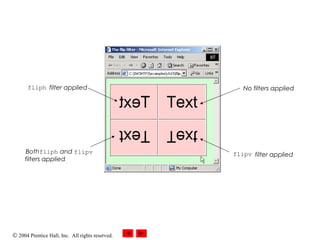
• flipv and fliph filters mirror text or images
vertically and horizontally, respectively
© 2004 Prentice Hall, Inc.
All rights reserved.
OutlineOutline
flip.html
(1 of 2)
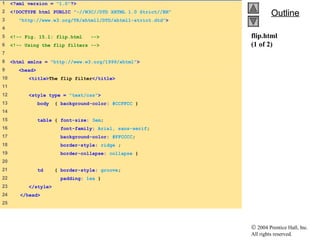
1 <?xml version = "1.0"?>
2 <!DOCTYPE html PUBLIC "-//W3C//DTD XHTML 1.0 Strict//EN"
3 "http://www.w3.org/TR/xhtml1/DTD/xhtml1-strict.dtd">
4
5 <!-- Fig. 15.1: flip.html -->
6 <!-- Using the flip filters -->
7
8 <html xmlns = "http://www.w3.org/1999/xhtml">
9 <head>
10 <title>The flip filter</title>
11
12 <style type = "text/css">
13 body { background-color: #CCFFCC }
14
15 table { font-size: 3em;
16 font-family: Arial, sans-serif;
17 background-color: #FFCCCC;
18 border-style: ridge ;
19 border-collapse: collapse }
20
21 td { border-style: groove;
22 padding: 1ex }
23 </style>
24 </head>
25
© 2004 Prentice Hall, Inc.
All rights reserved.
OutlineOutline
flip.html
(2 of 2)
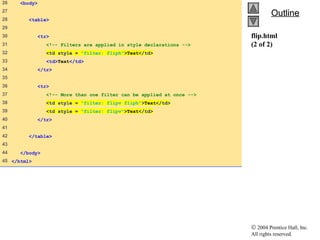
26 <body>
27
28 <table>
29
30 <tr>
31 <!-- Filters are applied in style declarations -->
32 <td style = "filter: fliph">Text</td>
33 <td>Text</td>
34 </tr>
35
36 <tr>
37 <!-- More than one filter can be applied at once -->
38 <td style = "filter: flipv fliph">Text</td>
39 <td style = "filter: flipv">Text</td>
40 </tr>
41
42 </table>
43
44 </body>
45 </html>
© 2004 Prentice Hall, Inc. All rights reserved.
No filters applied
flipv filter applied
fliph filter applied
Bothfliph and flipv
filters applied

Dhtml

  • 1.
    © 2004 PrenticeHall, Inc. All rights reserved. Chapter 15 - Dynamic HTML: Filters and Transitions Outline 15.1 Introduction 15.2 Flip Filters: flipv and fliph 15.3 Transparency with the chroma Filter 15.4 Creating Image masks 15.5 Miscellaneous Image Filters: invert, gray and xray 15.6 Adding shadows to Text 15.7 Creating Gradients with alpha 15.8 Making Text glow 15.9 Creating Motion with blur 15.10 Using the wave Filter 15.11 Advanced Filters: dropShadow and light 15.12 blendTrans Transition 15.13 revealTrans Transition
  • 2.
    © 2004 PrenticeHall, Inc. All rights reserved. Objectives • In this lesson, you will learn: – To use filters to achieve special effects. – To combine filters to achieve an even greater variety of special effects. – To be able to create animated visual transitions between Web pages. – To be able to modify filters dynamically, using DHTML.
  • 3.
    © 2004 PrenticeHall, Inc. All rights reserved. 15.1  Introduction  • Filters – Cause changes that are persistent • Transitions – Temporary – Allow transfer from one page to another with pleasant visual effect • For example, random dissolve
  • 4.
    © 2004 PrenticeHall, Inc. All rights reserved. 15.2  Flip Filters: flipv and fliph  • flipv and fliph filters mirror text or images vertically and horizontally, respectively
  • 5.
    © 2004 PrenticeHall, Inc. All rights reserved. OutlineOutline flip.html (1 of 2) 1 <?xml version = "1.0"?> 2 <!DOCTYPE html PUBLIC "-//W3C//DTD XHTML 1.0 Strict//EN" 3 "http://www.w3.org/TR/xhtml1/DTD/xhtml1-strict.dtd"> 4 5 <!-- Fig. 15.1: flip.html --> 6 <!-- Using the flip filters --> 7 8 <html xmlns = "http://www.w3.org/1999/xhtml"> 9 <head> 10 <title>The flip filter</title> 11 12 <style type = "text/css"> 13 body { background-color: #CCFFCC } 14 15 table { font-size: 3em; 16 font-family: Arial, sans-serif; 17 background-color: #FFCCCC; 18 border-style: ridge ; 19 border-collapse: collapse } 20 21 td { border-style: groove; 22 padding: 1ex } 23 </style> 24 </head> 25
  • 6.
    © 2004 PrenticeHall, Inc. All rights reserved. OutlineOutline flip.html (2 of 2) 26 <body> 27 28 <table> 29 30 <tr> 31 <!-- Filters are applied in style declarations --> 32 <td style = "filter: fliph">Text</td> 33 <td>Text</td> 34 </tr> 35 36 <tr> 37 <!-- More than one filter can be applied at once --> 38 <td style = "filter: flipv fliph">Text</td> 39 <td style = "filter: flipv">Text</td> 40 </tr> 41 42 </table> 43 44 </body> 45 </html>
  • 7.
    © 2004 PrenticeHall, Inc. All rights reserved. No filters applied flipv filter applied fliph filter applied Bothfliph and flipv filters applied