Branch Operations Consolidation & Simplification David Peart – Business Development Manager Stefan Schwall – Senior Solutions Architect
Who are NSi? What is AutoStore? Where AutoStore sits Features Products: AutoCapture QuickCapture SmarTicket Web Index OpenForms 360 Branch Operations – Today and the future Summary Q & A Empowering the functionality of the device Overview
NSi   Formed: 1995 HQ: Rockville, Maryland Offices:  Various in the USA   EMEA: Braunfels, 80km in the north of Frankfurt/Main Core business: Development of distributed capture solutions Sales:  Partners only! Who Are NSi?
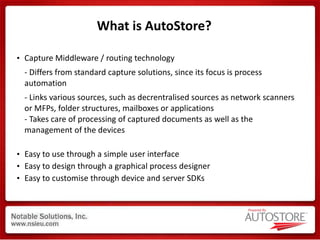
What is AutoStore? Capture Middleware / routing technology - Differs from standard capture solutions, since its focus is process automation - Links various sources, such as decrentralised sources as network scanners or MFPs, folder structures, mailboxes or applications - Takes care of processing of captured documents as well as the management of the devices Easy to use through a simple user interface Easy to design through a graphical process designer Easy to customise through device and server SDKs
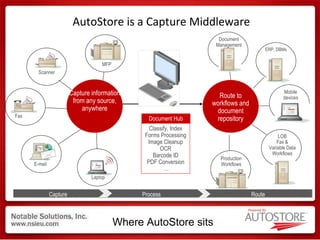
AutoStore is a Capture Middleware Process Route Capture Where AutoStore sits Capture information from any source, anywhere MFP Scanner E-mail Laptop Fax Capture Route to workflows and document repository ERP, DBMs Mobile devices LOB Fax & Variable Data Workflows Production Workflows Document Management Route Document Hub Classify, Index Forms Processing Image Cleanup OCR Barcode ID PDF Conversion … Process
AutoStore features Scan, index, and send documents to: AX5, Fortis, SharePoint, Lotus Notes Folder, FTP, Database, Printer Scan documents directly to email or fax. Automatically populates sender’s Outlook Sent folder  Transforms paper documents into editable, text searchable formats. PDF, MS Office, and more Generates automatic email notification to the required people upon completion  Database File Folder
In a planning department contracts should be  captured Beside the  meta-data  which is entered at the MFD a  barcode  should be read The document should be  OCR‘ed  to allow full text searching The document should be saved as a  searchable   PDF The document should be routed to the  right place  in the  repository , without the need of touching it again Also another department should be automatically  notified  of this new document Sample Process
ABCABC AutoStore takes care of the automatic processing using the OCR Engine  User at ScanStation = User in Domain  ennol ennol Contract Number = 123 Vendor = NSi Date= 03.01.2006 Contract Number Vendor Date \\server\legal\contracts\ NSi 123456 03-01-2006 \ \ .pdf AutoStore automaticaly creates the right folder structure and renames the file Legal Department Sales Department Automatic notification of a clerk in the legal department about the new document including a link to it The administrator creates the capture workflow in the graphical process designer Domain Controller Sample Process…
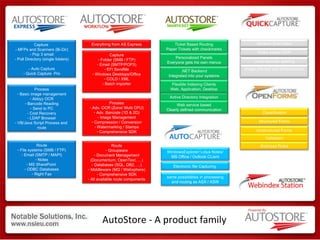
AutoStore - A product family Capture  - MFPs and Scanners (Bi-Dir) - Pop 3 email - Poll Directory (single folders) - Auto Capture - Quick Capture  Pro Process Basic image management Abbyy OCR Barcode Reading Send to PC - Cost Recovery LDAP Browser VB/Java Script Process and  route Everything from AS Express Capture Folder (SMB / FTP) Email (SMTP/POP3) EFI SendMe Windows Desktops/Office COLD / XML Batch importer Ticket Based Routing Paper Tickets with checkmarks Personalized Panels Everyone gets his own menus Active Directory Integration .NET Backend Integrated into your systems Flexible Indexing Clients Web, Application, Desktop Web service based Clearly defined communication Network ScanClient Rules based OCR Local barcode splitting Image preview and enhancement Route File systems (SMB / FTP) Email (SMTP / MAPI) Notes MS SharePoint  ODBC Databases Right Fax Process Adv. OCR (Zone/ Multi CPU) Adv. Barcode (1D & 2D) Image Management Compression / Conversion Watermarking / Stamps Comprehensive SDK Route Groupware Document Management (Documentum, OpenText, …) Databases (SQL, DB2, …) Middleware (MQ / Websphere) Comprehensive SDK All available route components Classification Structured Forms Unstructured Forms Validation Business Rules WindowsExplorer/ Lotus Notes/ MS Office / Outlook CLient Electronic file Capturing  same possibilities in processing and routing as ASX / ASW
One Click Flow  for electronic Capturing & Distribution Seamless Integration in Microsoft /Lotus Environment Bringing electronic information into workflow  Ease to use Use Case: Archiving proposal direct from Microsoft Word Email Archiving
AutoCapture Capture Digital Information Email capture in Outlook and Notes File capture from Word, Excel, Powerpoint, Windows Explorer Combinable with PDF Conversion Manual indexing and automatic data extraction Why Start to evolve beyond the box. Every user of an MFD receives email, why do not deliver the same interface they know from the MFD to capture electronic files?
Point & Click Indexing  with non-java enabled devices Using your mouse as a textmarker Preview of documents also available as Touch- Screen Application Use Case: Simplify manual Indexing & Validation  Bringing unstructered documents into the workflow
QuickCapture Desktop Easy to use Scan Client Optimized for simplified Scanning  Centralized Management Works with scanners or MFD’s Preview  Easy to use Centralized Management Why? Address “I want preview question” Address “I don’T like to index on this touchscreen”
Index single or multi page documents using  point-and-click indexing Each time you scan a document: SnapIt recognizes the index fields Highlights each filed Displays the index data in a window Populates the index fields with a simple  mouse click Easy Data Entry using SnapIt
One View Screening & Indexing for central Approval Workflow remote access via Webbrowser Central Validation, Indexing & Verification Detailed overview of  document approval processing Use Case: Accounts Payable / Approval Scenarios Contract Management
Queue
One-Paper Flow for paperbased workflow User generated SmartTicket Workflow process streamlined by user ease to use
Created by the user at their PC Contains all routing and indexing information Can be printed or sent electronically Allows  everyone  to scan  documents and participate   in the business process Device Agnostic Same process regardless of what device the client uses to scan with Do multiple tasks in ONE scan (Dramatically reduce the amount of time to scan a document) Eliminate entering indexing and metadata on the panel of the device Use the OMR checkboxes to select the desired tasks dynamically SMARTickets Advantage (Enhance efficiency)
What’s a SMARTicket? Customizable Logo Metadata Coding Information Freehand  Notes Complete Routing & Workflow  Information  Checkmark  Routing & Metadata Selection Summarise your complex business process in one, easy to use SMARTicket
Automated Form Processing with One Action Flow Freeform Recognition Business Automation Recognition, Verification & Valdidation could run as a black box Use Case: Invoice Reading Documents Shipment
ERP EDM Recognition Verification Correction
Captures header and footer fields, including line item details Extracts an unlimited number of additional data fields Automatically matches POs with invoices Applies business rules for advanced validation Integrates with host systems to enable active validations and lookups Fully automated delivery into ERP and host systems ensures that captured data is available immediately.
High Cost & Inefficiencies Training Maintenance & Support Office Space Phone/Fax Lines Security & Compliance Issues Total Cost of Ownership Are you leveraging your existing MFP investment? Substantial Cost Savings Reduced Training Reduced Maintenance & Support Reduced Office Space Eliminate Phone/Fax Lines Adhere to Corporate Security & Compliance Policies Lower Total Cost of Ownership AutoStore enables you to fully leverage your MFP Branch Branch Fax Email Printer Desktop Copier Scanner Mail Consolidated Branch Operations
Typical Branch Operations Headquarters LOB Server ECM Server Branch Average Transaction Time = 4 - 7 Days!! Did you receive my fax? Client
ECM Server User Authenticated Hosted Solution LOB Server Email Average Transaction Time = 4 - 5 Seconds!! Branch Firewall jsmith Client XYZ documents were received and are being processed Branch Operations with AutoStore Client Your documents were  received and are being  processed
Summary of Benefits IT friendly Centralised management Control over the processes Integrates into existing batch capture process Secure and authenticated transactions Leverage existing hardware investment Single system for MFP, desktop, fax & email capture Simplify the knowledge worker’s experience Increase the “Velocity of Business”

NSi Auto Store capture process & route

  • 1.
    Branch Operations Consolidation& Simplification David Peart – Business Development Manager Stefan Schwall – Senior Solutions Architect
  • 2.
    Who are NSi?What is AutoStore? Where AutoStore sits Features Products: AutoCapture QuickCapture SmarTicket Web Index OpenForms 360 Branch Operations – Today and the future Summary Q & A Empowering the functionality of the device Overview
  • 3.
    NSi Formed: 1995 HQ: Rockville, Maryland Offices: Various in the USA EMEA: Braunfels, 80km in the north of Frankfurt/Main Core business: Development of distributed capture solutions Sales: Partners only! Who Are NSi?
  • 4.
    What is AutoStore?Capture Middleware / routing technology - Differs from standard capture solutions, since its focus is process automation - Links various sources, such as decrentralised sources as network scanners or MFPs, folder structures, mailboxes or applications - Takes care of processing of captured documents as well as the management of the devices Easy to use through a simple user interface Easy to design through a graphical process designer Easy to customise through device and server SDKs
  • 5.
    AutoStore is aCapture Middleware Process Route Capture Where AutoStore sits Capture information from any source, anywhere MFP Scanner E-mail Laptop Fax Capture Route to workflows and document repository ERP, DBMs Mobile devices LOB Fax & Variable Data Workflows Production Workflows Document Management Route Document Hub Classify, Index Forms Processing Image Cleanup OCR Barcode ID PDF Conversion … Process
  • 6.
    AutoStore features Scan,index, and send documents to: AX5, Fortis, SharePoint, Lotus Notes Folder, FTP, Database, Printer Scan documents directly to email or fax. Automatically populates sender’s Outlook Sent folder Transforms paper documents into editable, text searchable formats. PDF, MS Office, and more Generates automatic email notification to the required people upon completion Database File Folder
  • 7.
    In a planningdepartment contracts should be captured Beside the meta-data which is entered at the MFD a barcode should be read The document should be OCR‘ed to allow full text searching The document should be saved as a searchable PDF The document should be routed to the right place in the repository , without the need of touching it again Also another department should be automatically notified of this new document Sample Process
  • 8.
    ABCABC AutoStore takescare of the automatic processing using the OCR Engine  User at ScanStation = User in Domain  ennol ennol Contract Number = 123 Vendor = NSi Date= 03.01.2006 Contract Number Vendor Date \\server\legal\contracts\ NSi 123456 03-01-2006 \ \ .pdf AutoStore automaticaly creates the right folder structure and renames the file Legal Department Sales Department Automatic notification of a clerk in the legal department about the new document including a link to it The administrator creates the capture workflow in the graphical process designer Domain Controller Sample Process…
  • 9.
    AutoStore - Aproduct family Capture - MFPs and Scanners (Bi-Dir) - Pop 3 email - Poll Directory (single folders) - Auto Capture - Quick Capture Pro Process Basic image management Abbyy OCR Barcode Reading Send to PC - Cost Recovery LDAP Browser VB/Java Script Process and route Everything from AS Express Capture Folder (SMB / FTP) Email (SMTP/POP3) EFI SendMe Windows Desktops/Office COLD / XML Batch importer Ticket Based Routing Paper Tickets with checkmarks Personalized Panels Everyone gets his own menus Active Directory Integration .NET Backend Integrated into your systems Flexible Indexing Clients Web, Application, Desktop Web service based Clearly defined communication Network ScanClient Rules based OCR Local barcode splitting Image preview and enhancement Route File systems (SMB / FTP) Email (SMTP / MAPI) Notes MS SharePoint ODBC Databases Right Fax Process Adv. OCR (Zone/ Multi CPU) Adv. Barcode (1D & 2D) Image Management Compression / Conversion Watermarking / Stamps Comprehensive SDK Route Groupware Document Management (Documentum, OpenText, …) Databases (SQL, DB2, …) Middleware (MQ / Websphere) Comprehensive SDK All available route components Classification Structured Forms Unstructured Forms Validation Business Rules WindowsExplorer/ Lotus Notes/ MS Office / Outlook CLient Electronic file Capturing same possibilities in processing and routing as ASX / ASW
  • 10.
    One Click Flow for electronic Capturing & Distribution Seamless Integration in Microsoft /Lotus Environment Bringing electronic information into workflow Ease to use Use Case: Archiving proposal direct from Microsoft Word Email Archiving
  • 11.
    AutoCapture Capture DigitalInformation Email capture in Outlook and Notes File capture from Word, Excel, Powerpoint, Windows Explorer Combinable with PDF Conversion Manual indexing and automatic data extraction Why Start to evolve beyond the box. Every user of an MFD receives email, why do not deliver the same interface they know from the MFD to capture electronic files?
  • 12.
    Point & ClickIndexing with non-java enabled devices Using your mouse as a textmarker Preview of documents also available as Touch- Screen Application Use Case: Simplify manual Indexing & Validation Bringing unstructered documents into the workflow
  • 13.
    QuickCapture Desktop Easyto use Scan Client Optimized for simplified Scanning Centralized Management Works with scanners or MFD’s Preview Easy to use Centralized Management Why? Address “I want preview question” Address “I don’T like to index on this touchscreen”
  • 14.
    Index single ormulti page documents using point-and-click indexing Each time you scan a document: SnapIt recognizes the index fields Highlights each filed Displays the index data in a window Populates the index fields with a simple mouse click Easy Data Entry using SnapIt
  • 15.
    One View Screening& Indexing for central Approval Workflow remote access via Webbrowser Central Validation, Indexing & Verification Detailed overview of document approval processing Use Case: Accounts Payable / Approval Scenarios Contract Management
  • 16.
  • 17.
    One-Paper Flow forpaperbased workflow User generated SmartTicket Workflow process streamlined by user ease to use
  • 18.
    Created by theuser at their PC Contains all routing and indexing information Can be printed or sent electronically Allows everyone to scan documents and participate in the business process Device Agnostic Same process regardless of what device the client uses to scan with Do multiple tasks in ONE scan (Dramatically reduce the amount of time to scan a document) Eliminate entering indexing and metadata on the panel of the device Use the OMR checkboxes to select the desired tasks dynamically SMARTickets Advantage (Enhance efficiency)
  • 19.
    What’s a SMARTicket?Customizable Logo Metadata Coding Information Freehand Notes Complete Routing & Workflow Information Checkmark Routing & Metadata Selection Summarise your complex business process in one, easy to use SMARTicket
  • 20.
    Automated Form Processingwith One Action Flow Freeform Recognition Business Automation Recognition, Verification & Valdidation could run as a black box Use Case: Invoice Reading Documents Shipment
  • 21.
    ERP EDM RecognitionVerification Correction
  • 22.
    Captures header andfooter fields, including line item details Extracts an unlimited number of additional data fields Automatically matches POs with invoices Applies business rules for advanced validation Integrates with host systems to enable active validations and lookups Fully automated delivery into ERP and host systems ensures that captured data is available immediately.
  • 23.
    High Cost &Inefficiencies Training Maintenance & Support Office Space Phone/Fax Lines Security & Compliance Issues Total Cost of Ownership Are you leveraging your existing MFP investment? Substantial Cost Savings Reduced Training Reduced Maintenance & Support Reduced Office Space Eliminate Phone/Fax Lines Adhere to Corporate Security & Compliance Policies Lower Total Cost of Ownership AutoStore enables you to fully leverage your MFP Branch Branch Fax Email Printer Desktop Copier Scanner Mail Consolidated Branch Operations
  • 24.
    Typical Branch OperationsHeadquarters LOB Server ECM Server Branch Average Transaction Time = 4 - 7 Days!! Did you receive my fax? Client
  • 25.
    ECM Server UserAuthenticated Hosted Solution LOB Server Email Average Transaction Time = 4 - 5 Seconds!! Branch Firewall jsmith Client XYZ documents were received and are being processed Branch Operations with AutoStore Client Your documents were received and are being processed
  • 26.
    Summary of BenefitsIT friendly Centralised management Control over the processes Integrates into existing batch capture process Secure and authenticated transactions Leverage existing hardware investment Single system for MFP, desktop, fax & email capture Simplify the knowledge worker’s experience Increase the “Velocity of Business”

Editor's Notes

  • #2 Today we’re going to talk about how companies with many branches currently handle their document processes, and we’re going to talk about how those processes can be greatly streamlined by simply utilizing the investments that an organization has already made to capture content at the point where it hits an organization, the branch office.
  • #8 NSi Europe GmbH - Sales Training ver. 03-2008
  • #24 The proliferation of these devices in a branch leads high operating cost and process inefficiencies: Knowledge workers need to be trained on multiple devices. Excessive manual processes limit customer face time. Maintaining and supporting numerous devices is very costly. Internally, - IT, toner, consumables, etc. Externally - Multiple vendors, contracts and support agreements. Multiple machines take up valuable office space. Fax machines require a dedicated phone line. The combination of these all contribute to an extremely high total cost of ownership. The consolidation of all these various devices into a single Multi-Function Device will reduce: The training required. Drastically reduced both the internal and external maintenance and support. Eliminate phone lines. Reduce the total cost of ownership. In the next slide, we’ll look at the inefficiencies in the processes associated with multiple manual processes.
  • #25 Let’s now look at a typical branch operations process…Whether you’re branch of a bank or financial services organization with a client opening a new account or a chain restaurant hiring a new waitress or bus boy, documents enter the branch and ultimately need to get to the HQ location. At the remote location the knowledge worker receives the documents and may need to enter some information into a line of business or HR application. They make a copy for their records as the originals need to be sent to HQ for filing. If the documents are time sensitive or critical, they are faxed to HQ to be processed immediately into an ECM and/or workflow system. Once faxed the branch worker calls HQ to confirm receipt of the document. Once the Branch worker completes their tasks the documents are sent overnight or by courier to HQ. At HQ mailroom, the documents are opened, sorted and sent to the appropriate department, person or a central scan facility. Once in the central scan facility, the documents are prepped (sort, remove staples & paper clips, etc.), scanned, indexed and committed to an ECM and or workflow system. As can been seen in this diagram, there are numerous touch points, copies and manual paths that need to take place in order to properly process the documents. This leads to excess document proliferation, delays, and high document costs to process these business-critical transactions. Let’s see how DocAccel Branch Operations can simplify the life of a Branch Office worker.
  • #26 The next process is nearly identical to the last example. As a matter of fact, from the branch worker’s point-of-view, the process is identical. The only change is that part of this business process involves an externally hosted solution, for instance, an external EMC platform. The challenge historically has been how to validate that data has been stored in the hosted solution, and how to notify critical stakeholders when their data is available. A Branch Operations Solution can seamlessly handle not only the upload of critical data to the hosted repository, but also notify any stakeholders once the data is stored and readily available.
  • #27 There’s a lot more to a Branch Operations Solution than I’ve been able to cover today. We understand how to build solutions that are used across the entire organization. As such, we have some unique benefits. Regardless of whether we are managing one device or a thousand, we have to give the internal IT personnel the tools the easily manage the entire solution. Both the management of devices, and the processes are easily managed centrally from a central machine. This greatly reduces the internal effort on a Branch Operations Solution. One of the most common solutions we run into today is simply extending an existing centralized capture solution out to the panel of remote devices. In these cases, immediate returns are seen due to the lack of any back-office changes that need to happen before the solution can move forward. All transactions are secure, utilizing industry standard and recognized protocols and methods. Your data is secure from the point of capture to the point of storage. Being able to use existing hardware, and support for over 400 devices, gives the Branch Operations Solution more flexibility than any other. There is no need to replace existing equipment. If it can send an email, or send to a folder, it can be integrated into a Branch Operations Solution. Often times systems are proposed with “dedicated” equipment, the cost of which removes any and all return on investment that automation might gain. Our Branch Operations Solution goes beyond paper. We can integrate with existing systems to capture fax data, emails, and other electronic data. This gives the organization a single, unified capture platform for all documents and data, regardless of format or origin. Technology is supposed to make our lives easier. Our Branch Operations Solution makes “document capture” as easy as making a copy. This simplifies the branch office worker’s daily tasks, giving them more time to spend on critical tasks. Look all around, everywhere the velocity of business has increased. With online notifications comes instant confirmation of actions. Most business processes are not moving at the same speed. A Branch Operations Solution greatly increases your organization’s speed in doing business.