User Experience Engineering Services
Milind Kumthekar
Solution Architect and Techno commercial consultant
22
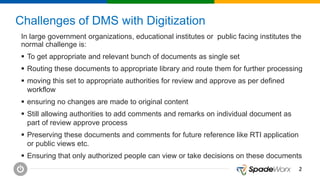
Challenges of DMS with Digitization
In large government organizations, educational institutes or public facing institutes the
normal challenge is:
 To get appropriate and relevant bunch of documents as single set
 Routing these documents to appropriate library and route them for further processing
 moving this set to appropriate authorities for review and approve as per defined
workflow
 ensuring no changes are made to original content
 Still allowing authorities to add comments and remarks on individual document as
part of review approve process
 Preserving these documents and comments for future reference like RTI application
or public views etc.
 Ensuring that only authorized people can view or take decisions on these documents
33
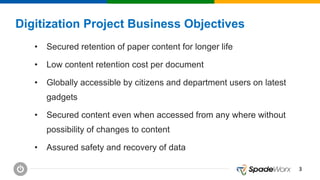
Digitization Project Business Objectives
• Secured retention of paper content for longer life
• Low content retention cost per document
• Globally accessible by citizens and department users on latest
gadgets
• Secured content even when accessed from any where without
possibility of changes to content
• Assured safety and recovery of data
44
Solution Objectives:
System Objectives considered to satisfy business needs are:
• Web based solution
• Role based controlled access to the system
• Well-structured document repository with digital rights management
• Quality controlled digitization of documents
• Efficient search and view of digitized documents on the basis of captured
metadata
• Long term data availability with anti-theft, backup and disaster recovery
55
DMS with Digitization Solution Features
Scanning and capture Requirements:
• System should support single scan and batch mode
• System should scan multipage document as single file
• System should support color and black and white scanning
• Documents to be scanned of size A4 to A2
• System should capture existing scanned images in pdf or tiff formats from share drive
• For barcoded documents, capturing system should read barcode and fill appropriate
metadata other information from location based on barcode
• System should capture metadata for scanned and captured documents
66
DMS with Digitization Solution Features
Quality Control and Document Routing:
• Quality control of scanned documents should include
• de-skew (to make images straight)
• Contrast ratio setting
• Cropping
• cleaning of images for removing black noise around the text
• de-speckle (remove noise) (Removing small dots between the text)
• Documents should be made available for viewing only after required quality control
• Routing of documents respective document library on the basis of content type. For Example:
Invoice documents, proposal documents, Student Admission documents tec.
77
DMS with Digitization Solution Features
Document Management and Document Rights Management (DRM):
• Documents storage in web accessible repository with versioning
• Digitized Documents must be available in defined folder structure
• All documents must support full text search and search based on metadata indexing
• Documents should display selected metadata when opened for viewing
• System should highlight area on captured image while user navigates using metadata fields
• Digitized copy must be available in read only form
• Document viewing should support mobile, desktop and laptop client
• Digital rights of view only, view and download, view and print should be available on the basis of user groups
• Documents repository must implement customer guidelines for data backup and disaster recovery
• System should raise alert on document theft, document upload to read only library
• Dashboard should be available showing published documents, publish pending documents, documents
published with metadata corrections, documents not published with reason
• System should maintain system logs for document library
88
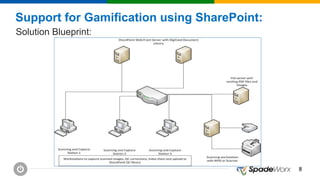
Support for Gamification using SharePoint:
Solution Blueprint:
99
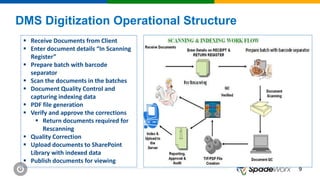
DMS Digitization Operational Structure
 Receive Documents from Client
 Enter document details “In Scanning
Register”
 Prepare batch with barcode
separator
 Scan the documents in the batches
 Document Quality Control and
capturing indexing data
 PDF file generation
 Verify and approve the corrections
 Return documents required for
Rescanning
 Quality Correction
 Upload documents to SharePoint
Library with indexed data
 Publish documents for viewing
1010
Digitization Project Benefits
 Globally accessible solution
 Documents/ Set viewing on mobile, desktops and laptops
 Preserving document content as replica of original
 Secured and long lasting preservation of document content
 Easily to explore, view and search content
 Annotate, redact the content without changing original content
1111
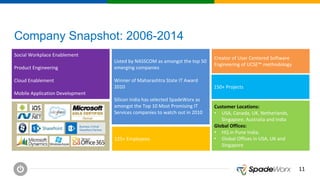
Company Snapshot: 2006-2014
Social Workplace Enablement
Product Engineering
Cloud Enablement
Mobile Application Development
Listed by NASSCOM as amongst the top 50
emerging companies
Winner of Maharashtra State IT Award
2010
Silicon India has selected SpadeWorx as
amongst the Top 10 Most Promising IT
Services companies to watch out in 2010
Creator of User Centered Software
Engineering of UCSE™ methodology
Customer Locations:
• USA, Canada, UK, Netherlands,
Singapore, Australia and India
Global Offices:
• HQ in Pune India,
• Global Offices in USA, UK and
Singapore
150+ Projects
125+ Employees
1212
About author:
Milind Kumthekar is in IT for last 23 years. He is solution architect
and Techno Commercial consultant with SpadeWorx Software
Services. For any further details mail him at
Milind.kumthekar@spadeworx.com

Document management system (dms ) with digitization using share point2013_ spadeworx

  • 1.
    User Experience EngineeringServices Milind Kumthekar Solution Architect and Techno commercial consultant
  • 2.
    22 Challenges of DMSwith Digitization In large government organizations, educational institutes or public facing institutes the normal challenge is:  To get appropriate and relevant bunch of documents as single set  Routing these documents to appropriate library and route them for further processing  moving this set to appropriate authorities for review and approve as per defined workflow  ensuring no changes are made to original content  Still allowing authorities to add comments and remarks on individual document as part of review approve process  Preserving these documents and comments for future reference like RTI application or public views etc.  Ensuring that only authorized people can view or take decisions on these documents
  • 3.
    33 Digitization Project BusinessObjectives • Secured retention of paper content for longer life • Low content retention cost per document • Globally accessible by citizens and department users on latest gadgets • Secured content even when accessed from any where without possibility of changes to content • Assured safety and recovery of data
  • 4.
    44 Solution Objectives: System Objectivesconsidered to satisfy business needs are: • Web based solution • Role based controlled access to the system • Well-structured document repository with digital rights management • Quality controlled digitization of documents • Efficient search and view of digitized documents on the basis of captured metadata • Long term data availability with anti-theft, backup and disaster recovery
  • 5.
    55 DMS with DigitizationSolution Features Scanning and capture Requirements: • System should support single scan and batch mode • System should scan multipage document as single file • System should support color and black and white scanning • Documents to be scanned of size A4 to A2 • System should capture existing scanned images in pdf or tiff formats from share drive • For barcoded documents, capturing system should read barcode and fill appropriate metadata other information from location based on barcode • System should capture metadata for scanned and captured documents
  • 6.
    66 DMS with DigitizationSolution Features Quality Control and Document Routing: • Quality control of scanned documents should include • de-skew (to make images straight) • Contrast ratio setting • Cropping • cleaning of images for removing black noise around the text • de-speckle (remove noise) (Removing small dots between the text) • Documents should be made available for viewing only after required quality control • Routing of documents respective document library on the basis of content type. For Example: Invoice documents, proposal documents, Student Admission documents tec.
  • 7.
    77 DMS with DigitizationSolution Features Document Management and Document Rights Management (DRM): • Documents storage in web accessible repository with versioning • Digitized Documents must be available in defined folder structure • All documents must support full text search and search based on metadata indexing • Documents should display selected metadata when opened for viewing • System should highlight area on captured image while user navigates using metadata fields • Digitized copy must be available in read only form • Document viewing should support mobile, desktop and laptop client • Digital rights of view only, view and download, view and print should be available on the basis of user groups • Documents repository must implement customer guidelines for data backup and disaster recovery • System should raise alert on document theft, document upload to read only library • Dashboard should be available showing published documents, publish pending documents, documents published with metadata corrections, documents not published with reason • System should maintain system logs for document library
  • 8.
    88 Support for Gamificationusing SharePoint: Solution Blueprint:
  • 9.
    99 DMS Digitization OperationalStructure  Receive Documents from Client  Enter document details “In Scanning Register”  Prepare batch with barcode separator  Scan the documents in the batches  Document Quality Control and capturing indexing data  PDF file generation  Verify and approve the corrections  Return documents required for Rescanning  Quality Correction  Upload documents to SharePoint Library with indexed data  Publish documents for viewing
  • 10.
    1010 Digitization Project Benefits Globally accessible solution  Documents/ Set viewing on mobile, desktops and laptops  Preserving document content as replica of original  Secured and long lasting preservation of document content  Easily to explore, view and search content  Annotate, redact the content without changing original content
  • 11.
    1111 Company Snapshot: 2006-2014 SocialWorkplace Enablement Product Engineering Cloud Enablement Mobile Application Development Listed by NASSCOM as amongst the top 50 emerging companies Winner of Maharashtra State IT Award 2010 Silicon India has selected SpadeWorx as amongst the Top 10 Most Promising IT Services companies to watch out in 2010 Creator of User Centered Software Engineering of UCSE™ methodology Customer Locations: • USA, Canada, UK, Netherlands, Singapore, Australia and India Global Offices: • HQ in Pune India, • Global Offices in USA, UK and Singapore 150+ Projects 125+ Employees
  • 12.
    1212 About author: Milind Kumthekaris in IT for last 23 years. He is solution architect and Techno Commercial consultant with SpadeWorx Software Services. For any further details mail him at Milind.kumthekar@spadeworx.com