Taylor Brown
Principal Program Manager
@taylorb_msft
Dinesh Govindasamy
Principal Engineering Lead
@dingovcloud
Beyond “”
the Path to Windows and Linux Parity in Docker
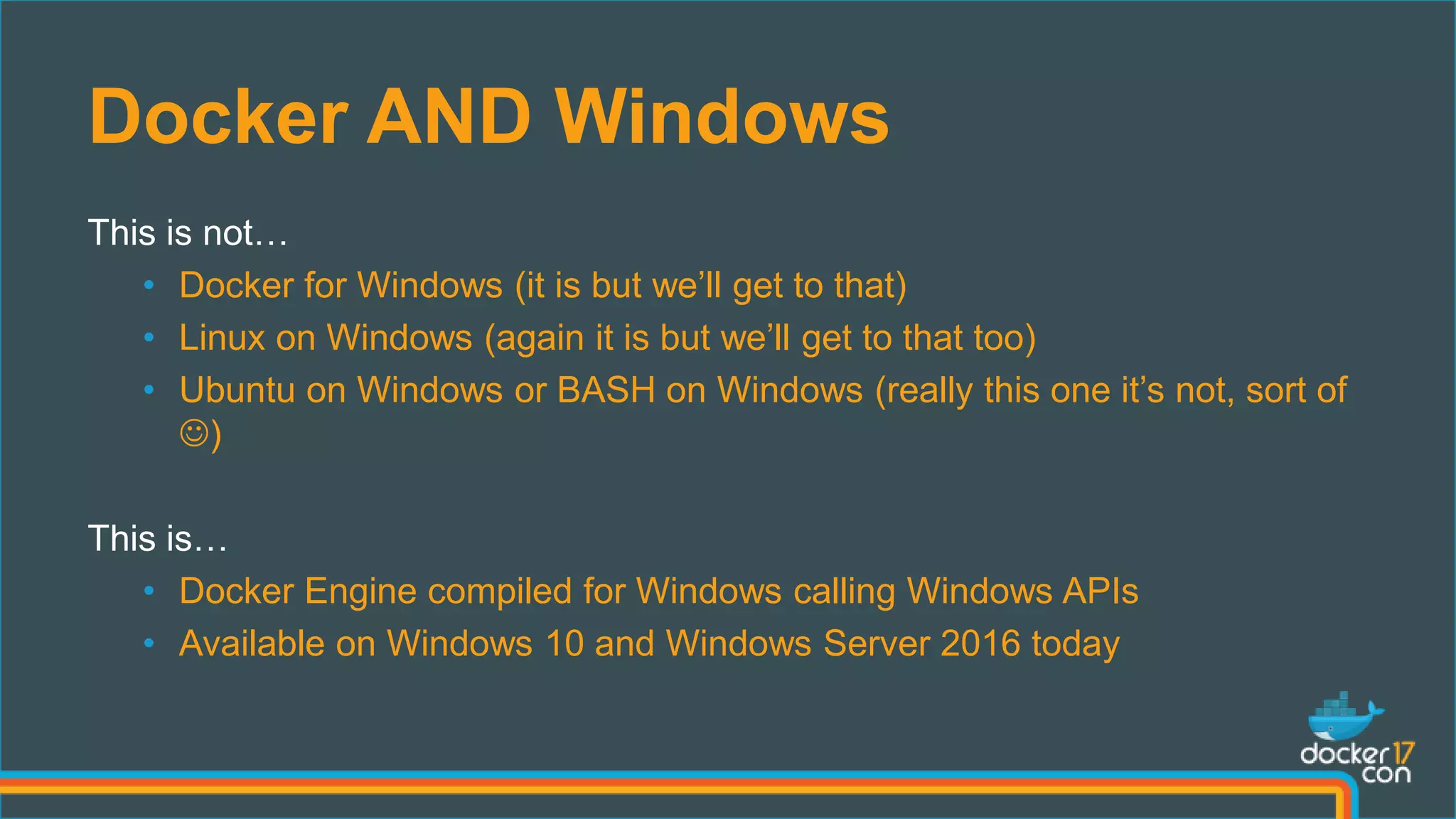
Docker AND Windows
This is not…
• Docker for Windows (it is but we’ll get to that)
• Linux on Windows (again it is but we’ll get to that too)
• Ubuntu on Windows or BASH on Windows (really this one it’s not, sort of
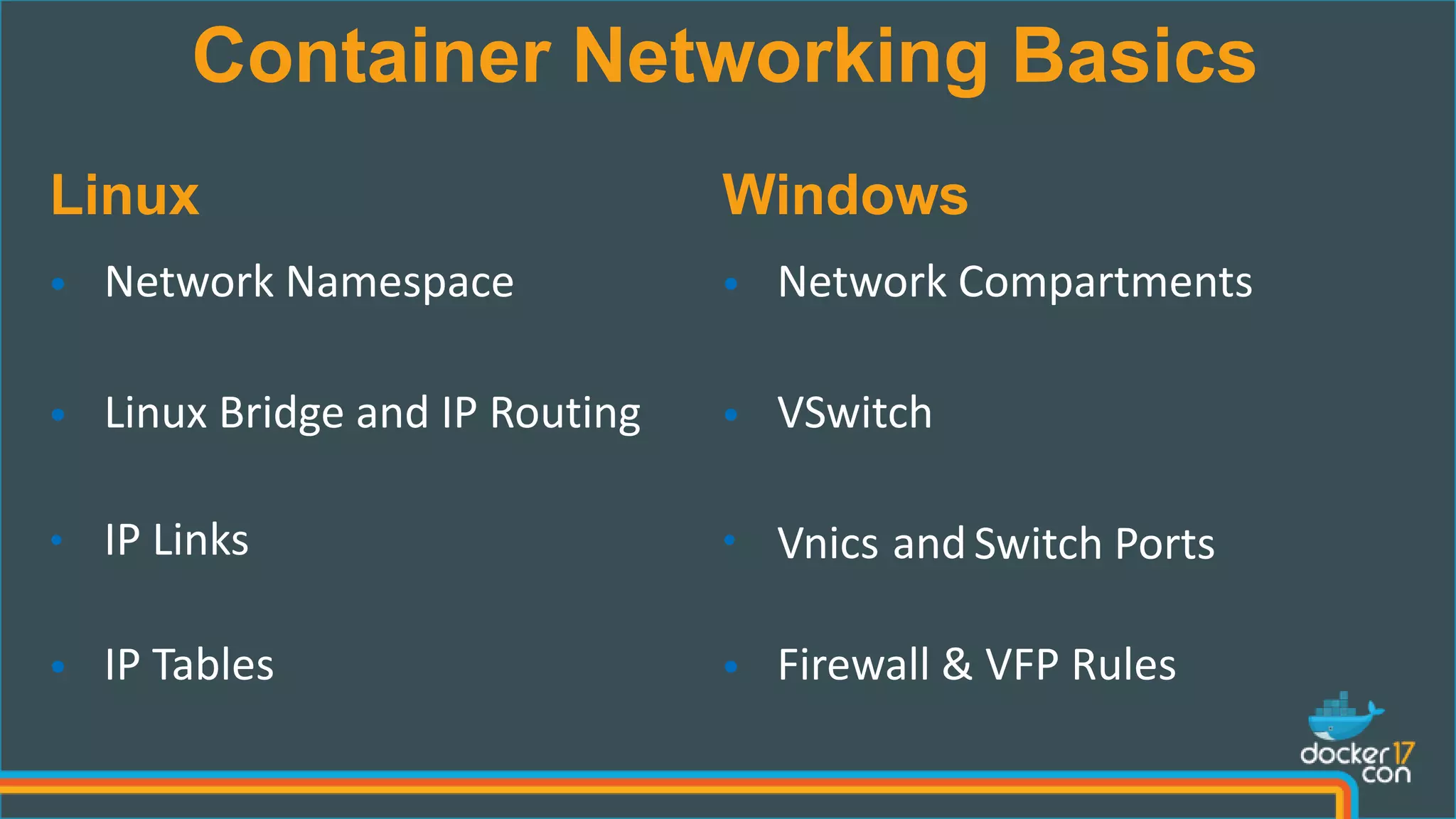
)
This is…
• Docker Engine compiled for Windows calling Windows APIs
• Available on Windows 10 and Windows Server 2016 today
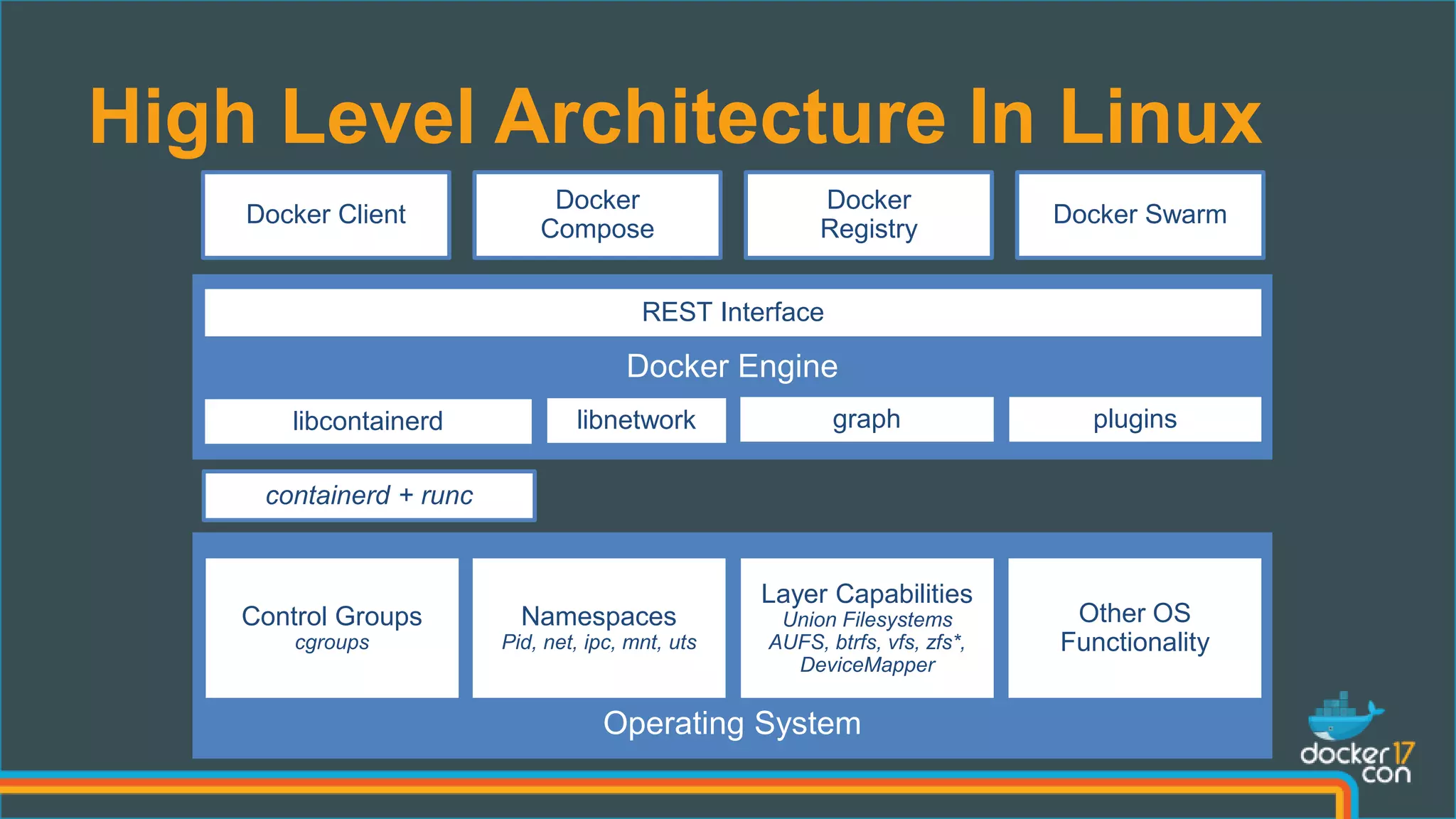
High Level Architecture In Linux
containerd + runc
REST Interface
libcontainerd graphlibnetwork plugins
Control Groups
cgroups
Namespaces
Pid, net, ipc, mnt, uts
Layer Capabilities
Union Filesystems
AUFS, btrfs, vfs, zfs*,
DeviceMapper
Other OS
Functionality
Docker Client
Docker
Registry
Docker
Compose
Docker Swarm
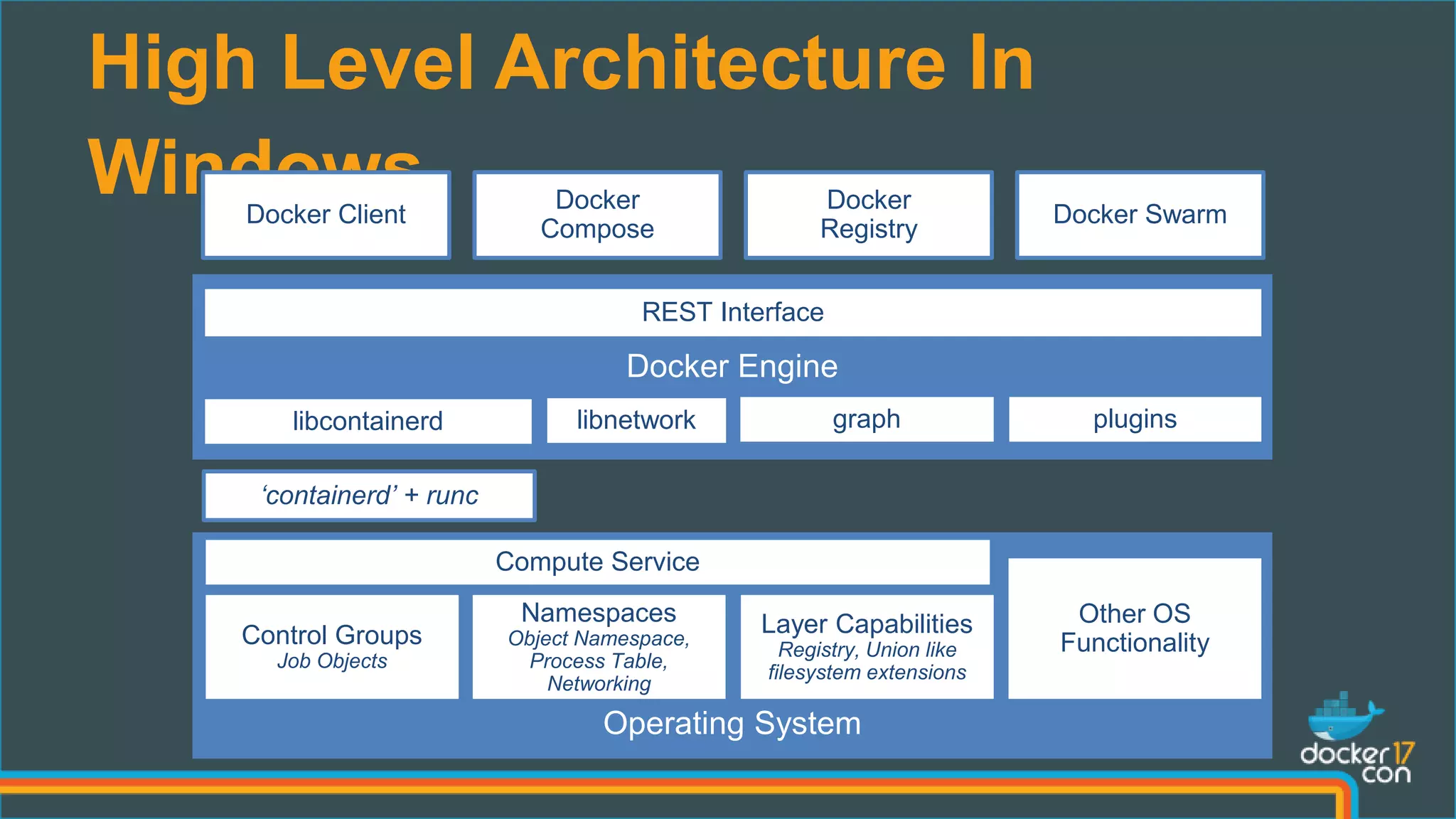
High Level Architecture In
Windows
‘containerd’ + runc
REST Interface
libcontainerd graphlibnetwork plugins
Control Groups
Job Objects
Namespaces
Object Namespace,
Process Table,
Networking
Layer Capabilities
Registry, Union like
filesystem extensions
Other OS
Functionality
Docker Client
Docker
Registry
Docker
Compose
Docker Swarm
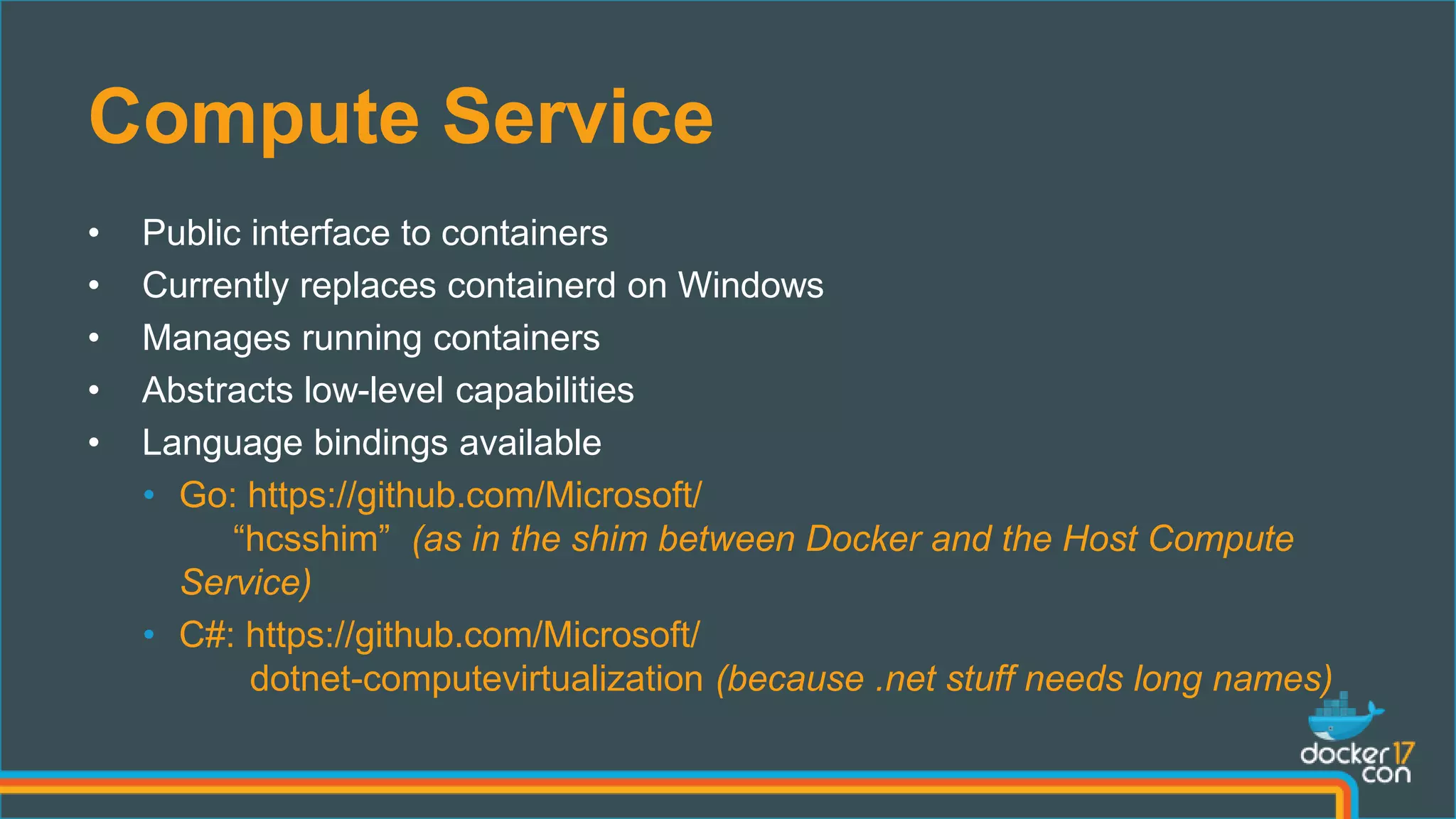
Compute Service
Compute Service
• Public interface to containers
• Currently replaces containerd on Windows
• Manages running containers
• Abstracts low-level capabilities
• Language bindings available
• Go: https://github.com/Microsoft/
“hcsshim” (as in the shim between Docker and the Host Compute
Service)
• C#: https://github.com/Microsoft/
dotnet-computevirtualization (because .net stuff needs long names)
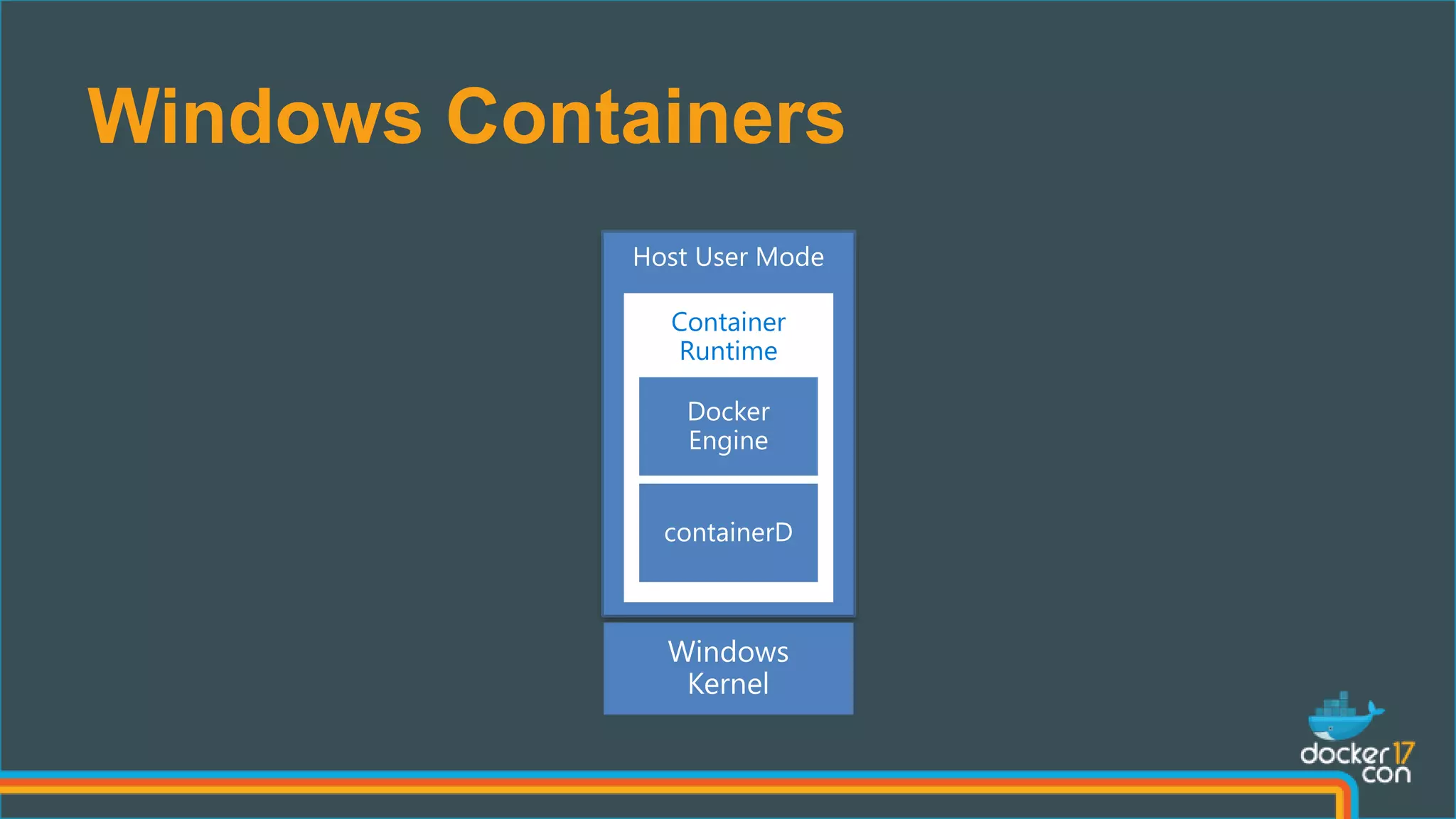
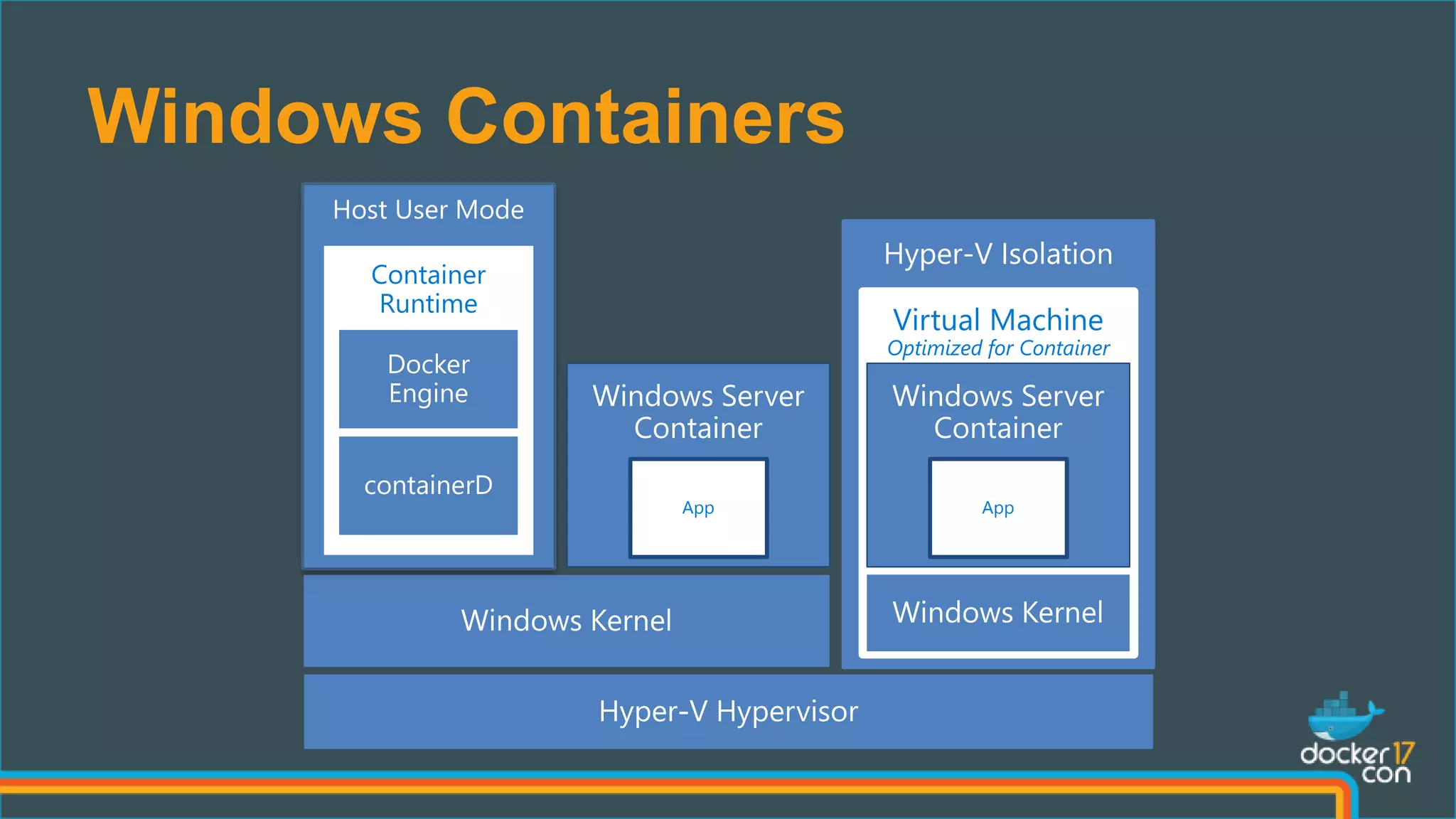
Windows Containers
Host User Mode
Container
Runtime
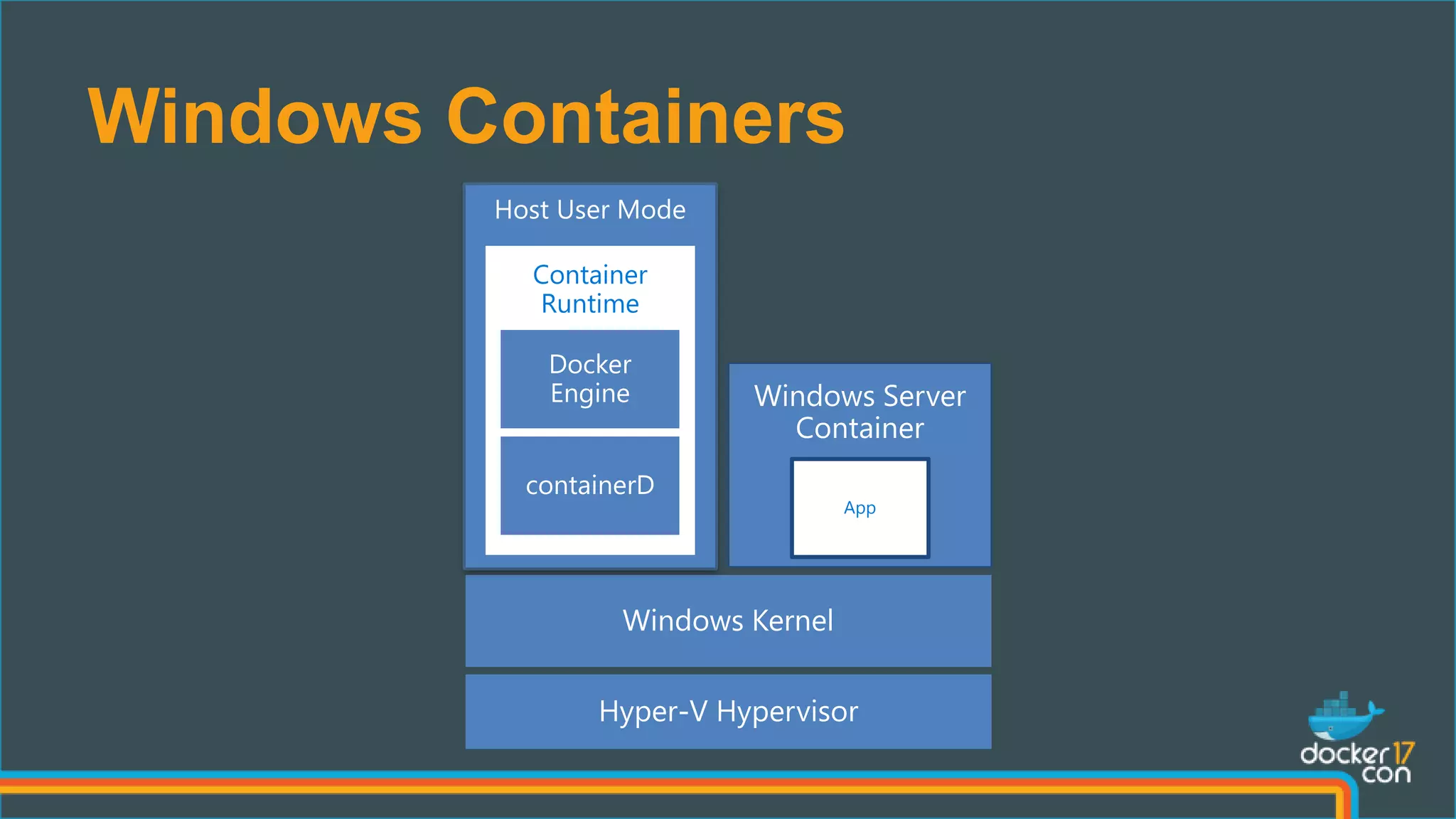
Windows Containers
App
Host User Mode
Container
Runtime
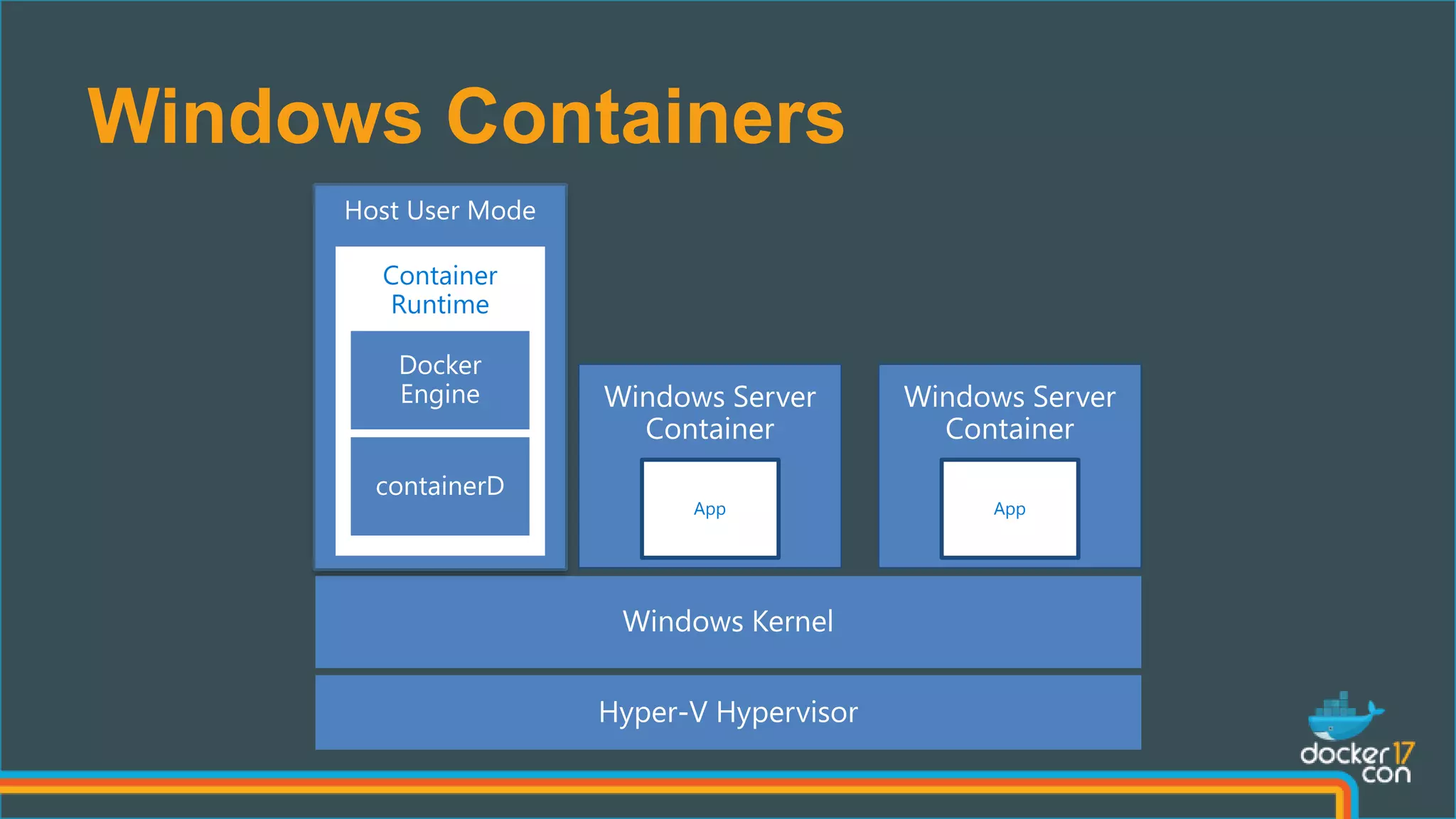
Windows Containers
App
Host User Mode
Container
Runtime
App
Windows Containers
App
Host User Mode
Container
Runtime
Hyper-V Isolation
Virtual Machine
Optimized for Container
App
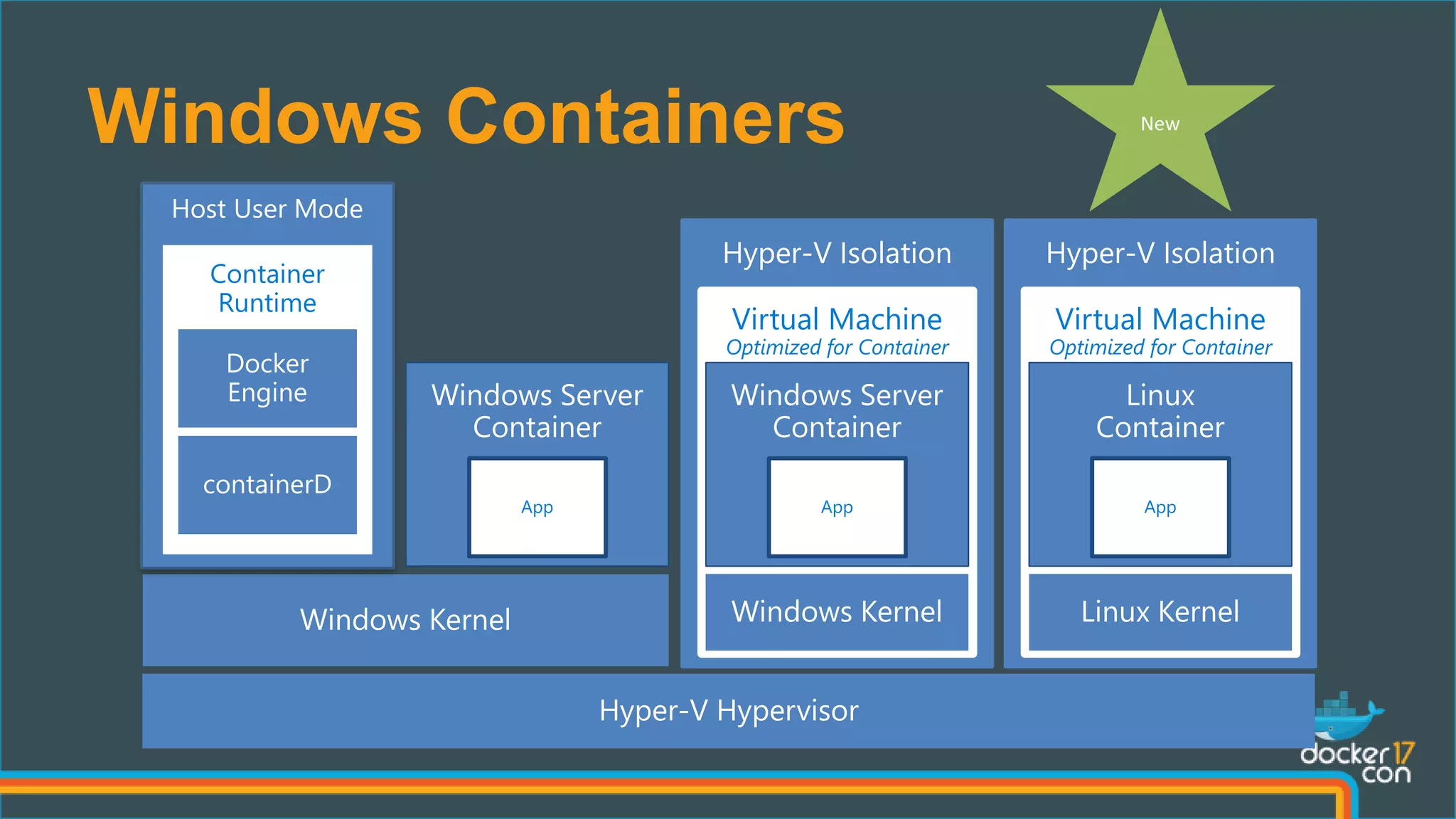
Windows Containers
App
Host User Mode
Container
Runtime
Hyper-V Isolation
Virtual Machine
Optimized for Container
App
Hyper-V Isolation
Virtual Machine
Optimized for Container
App
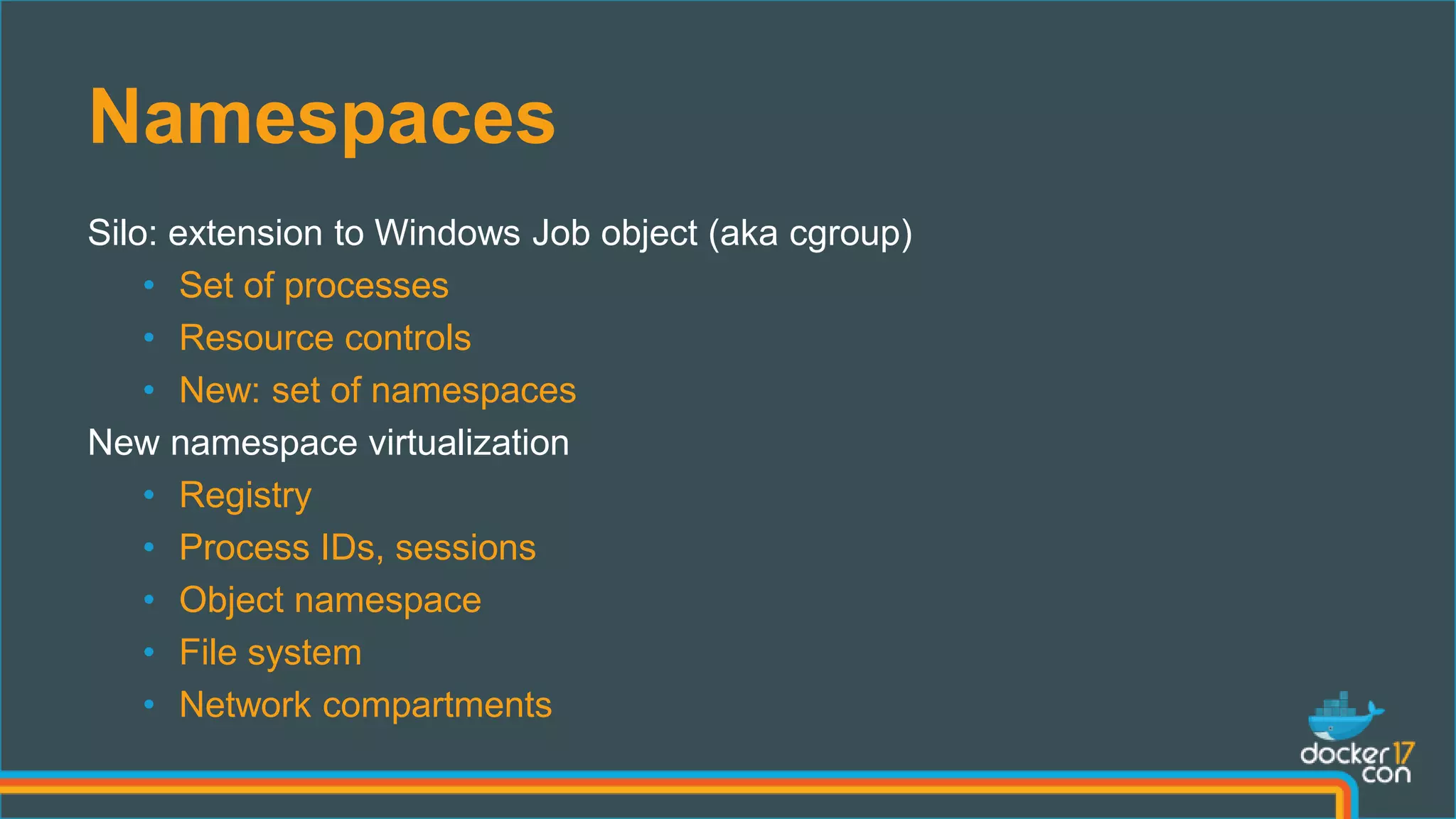
Namespaces
Silo: extension to Windows Job object (aka cgroup)
• Set of processes
• Resource controls
• New: set of namespaces
New namespace virtualization
• Registry
• Process IDs, sessions
• Object namespace
• File system
• Network compartments
Windows and Linux
Docker Networking
Container Networking Basics
Linux Windows
• Network Namespace • Network Compartments
• Linux Bridge and IP Routing • VSwitch
• IP Links • Vnics and Switch Ports
• IP Tables • Firewall & VFP Rules
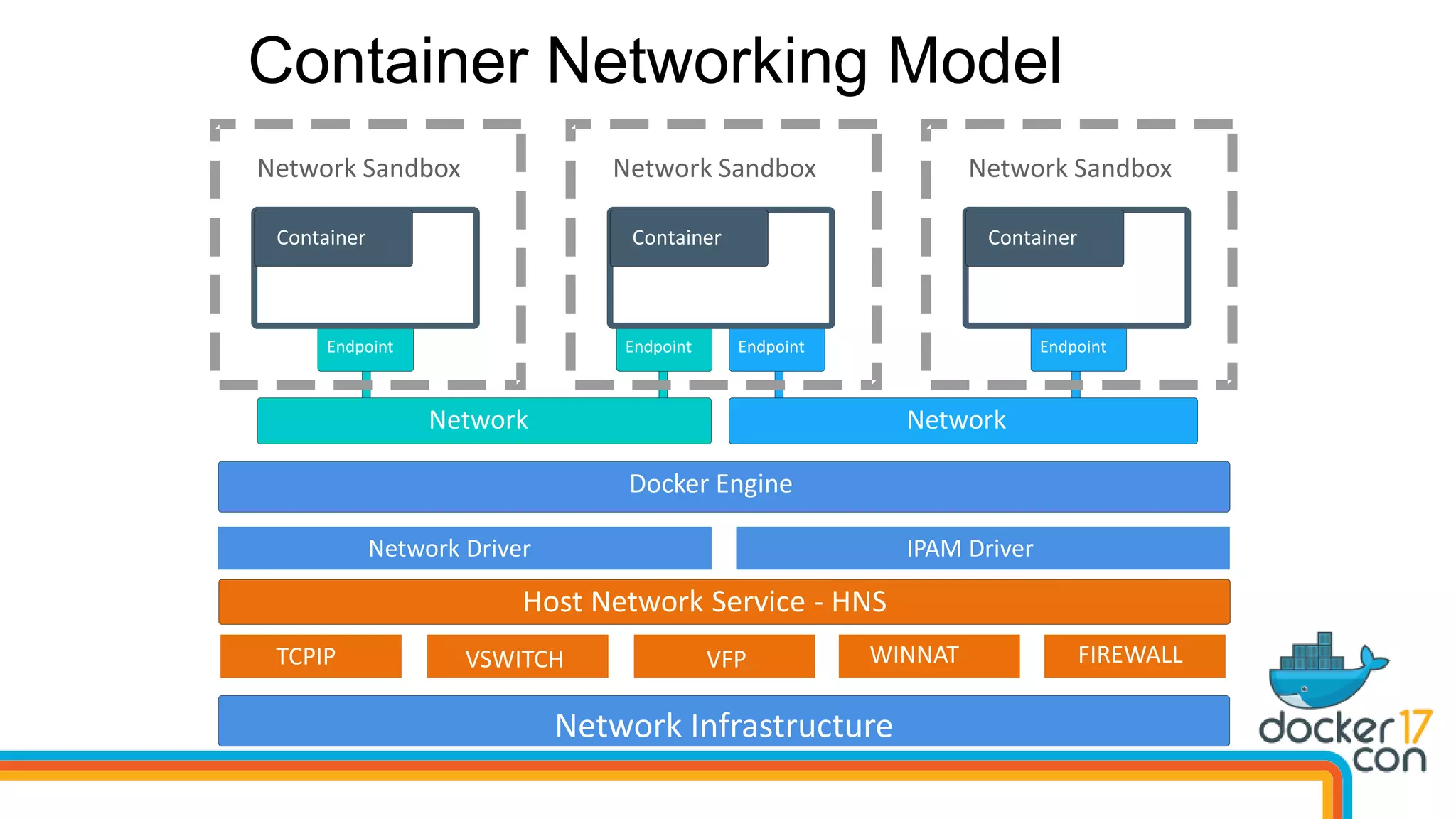
Container Networking Model
Network Network
Endpoint Endpoint
Network Sandbox
Container
Endpoint
Network Sandbox
Container
Endpoint
Network Sandbox
Container
Network Infrastructure
- HNS
Docker Engine
Network Infrastructure
Network Driver IPAM Driver
Host Network Service - HNS
TCPIP VSWITCH VFP WINNAT FIREWALL
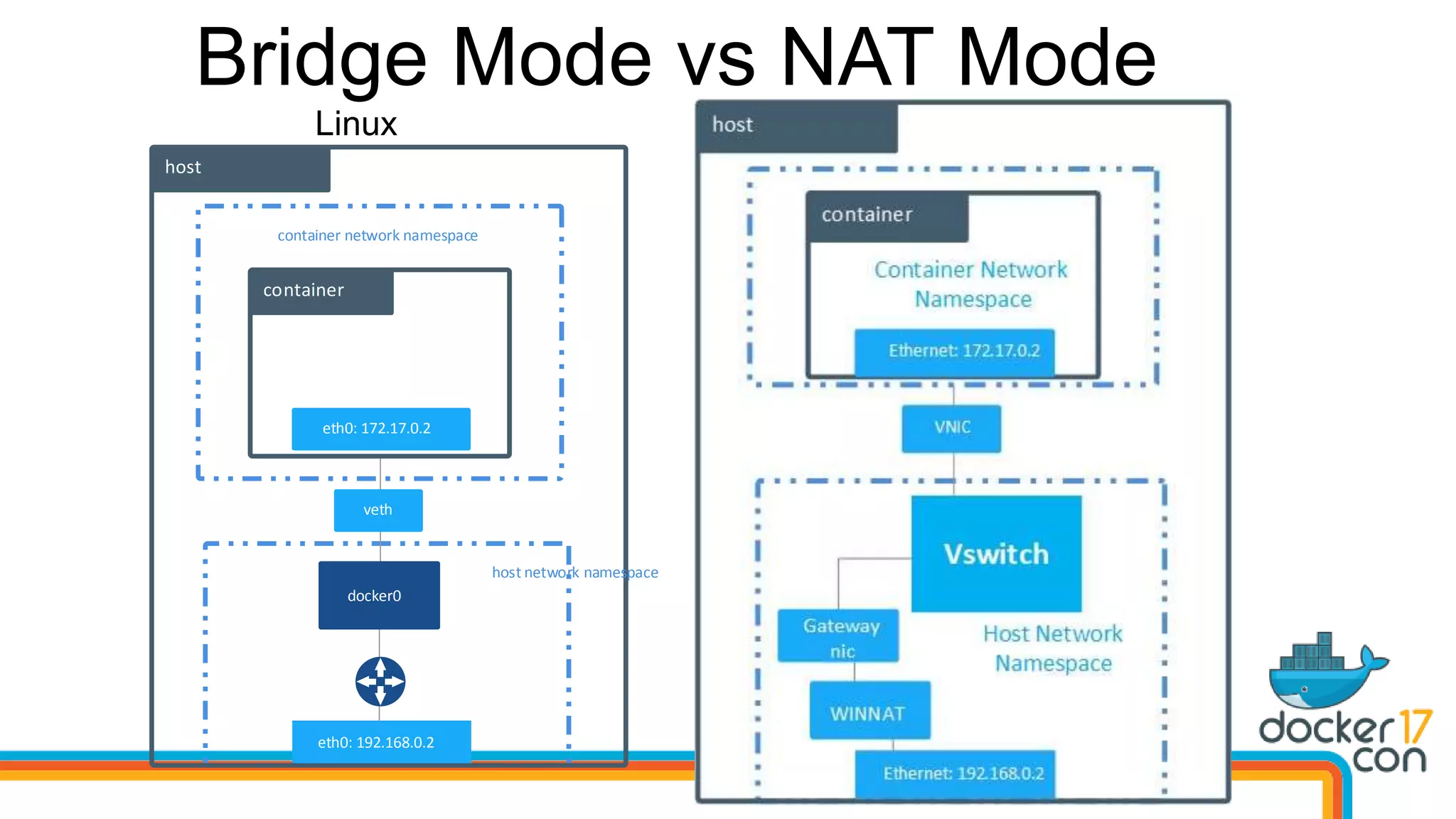
Bridge Mode vs NAT Mode
host
veth
docker0
host network namespace
container network namespace
eth0: 192.168.0.2
eth0: 172.17.0.2
container
Linux Windows
host
VNIC
Ethernet: 192.168.0.2
Ethernet: 172.17.0.2
container
WINNAT
Gateway
nic
Vswitch
Container Network Namespace
Host Network
Namespace
Demo – NAT Networking Mode
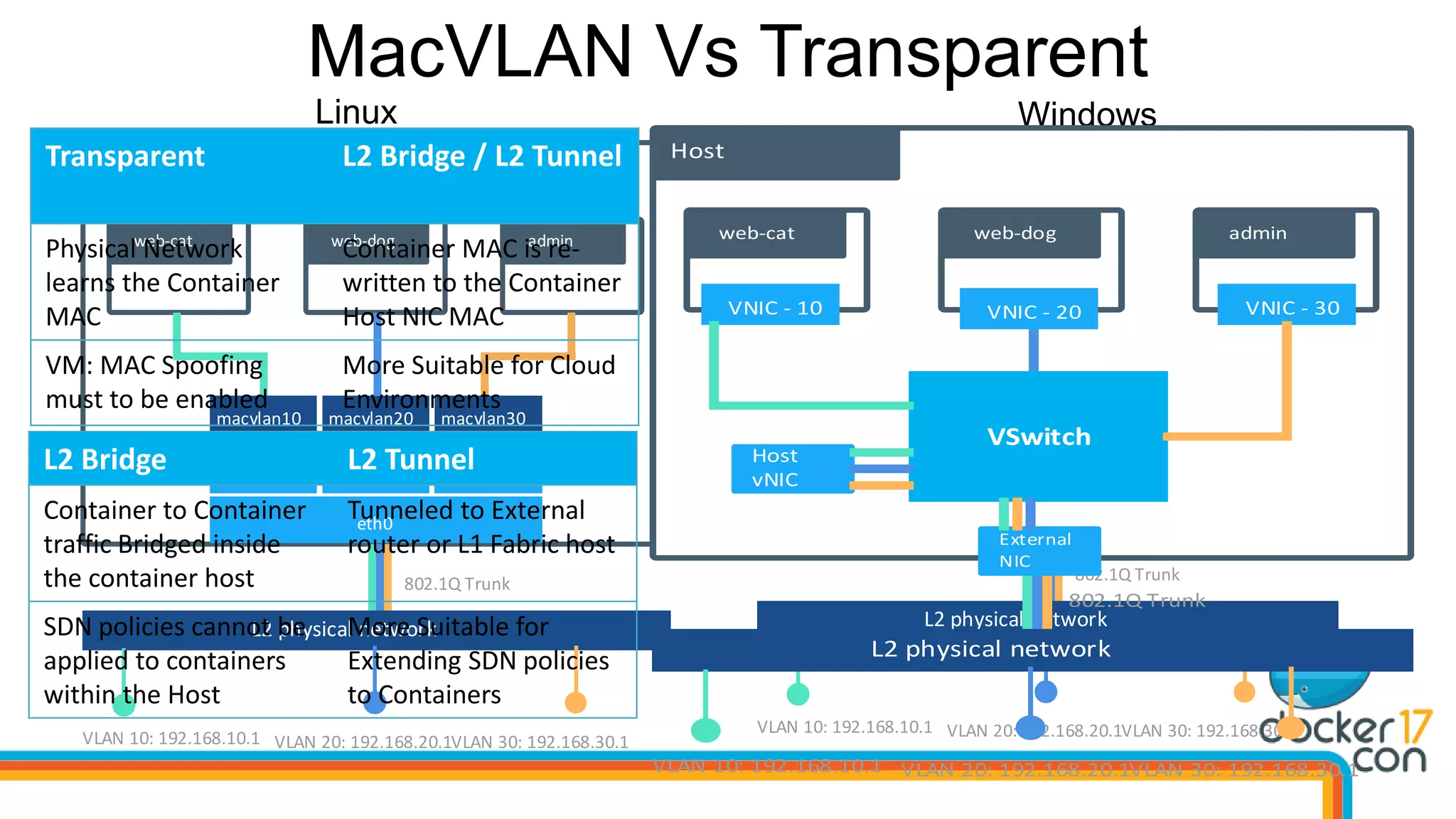
MacVLAN Vs Transparent
Host
veth
adminweb-dogweb-cat
eth0
eth0.10 eth0.20 eth0.30
macvlan10 macvlan20 macvlan30
L2 physical network
VLAN 20: 192.168.20.1VLAN 30: 192.168.30.1
802.1Q Trunk
VLAN 10: 192.168.10.1
Linux Windows
Host
veth
adminweb-dogweb-cat
eth0.20
L2 physical network
VLAN 20: 192.168.20.1VLAN 30: 192.168.30.1
802.1Q Trunk
VLAN 10: 192.168.10.1
Host
vNIC
VSwitch
External
NIC
VNIC - 10 VNIC - 20 VNIC - 30
Host
veth
adminweb-dogweb-cat
eth0.20
L2 physical network
VLAN 20: 192.168.20.1VLAN 30: 192.168.30.1
802.1Q Trunk
VLAN 10: 192.168.10.1
Host
vNIC
VSwitch
External
NIC
VNIC - 10 VNIC - 20 VNIC - 30
Transparent L2 Bridge / L2 Tunnel
Physical Network
learns the Container
MAC
Container MAC is re-
written to the Container
Host NIC MAC
VM: MAC Spoofing
must to be enabled
More Suitable for Cloud
Environments
L2 Bridge L2 Tunnel
Container to Container
traffic Bridged inside
the container host
Tunneled to External
router or L1 Fabric host
SDN policies cannot be
applied to containers
within the Host
More Suitable for
Extending SDN policies
to Containers
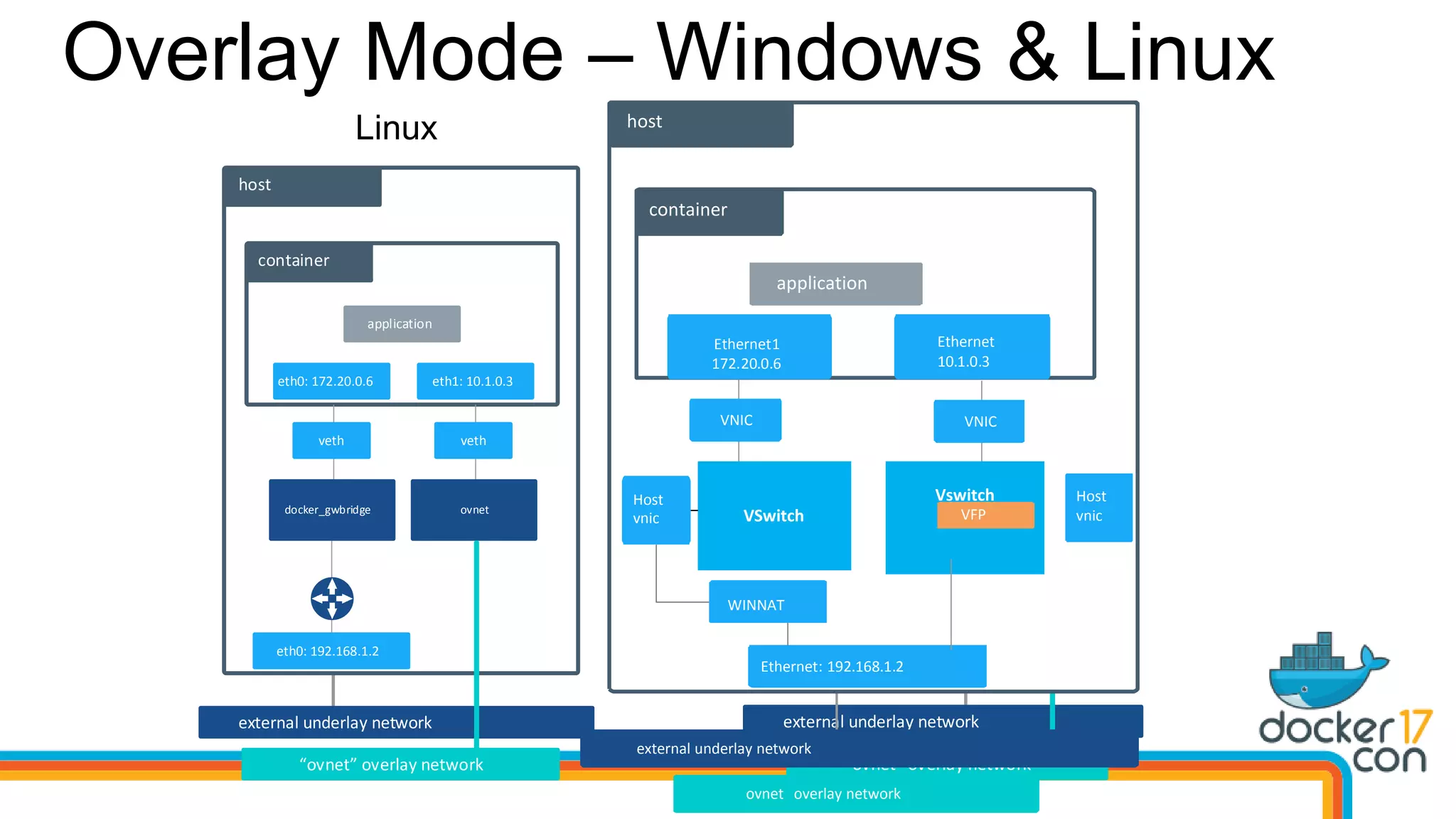
Overlay Mode – Windows & Linux
external underlay network
host
eth0: 192.168.1.2
container
eth0: 172.20.0.6 eth1: 10.1.0.3
application
veth
docker_gwbridge
veth
ovnet
ovnet overlay network
Linux Windows
external underlay network
host
Ethernet: 192.168.1.2
container
Ethernet1
172.20.0.6
Ethernet
10.1.0.3
application
VNIC VNIC
ovnet
WINNAT
Host
vnic VSwitch
Vswitch
ovnet overlay network
VFP
Host
vnic
external underlay network
host
Ethernet: 192.168.1.2
container
Ethernet1
172.20.0.6
Ethernet
10.1.0.3
application
VNIC VNIC
WINNAT
Host
vnic VSwitch
Vswitch
ovnet overlay network
VFP
Host
vnic
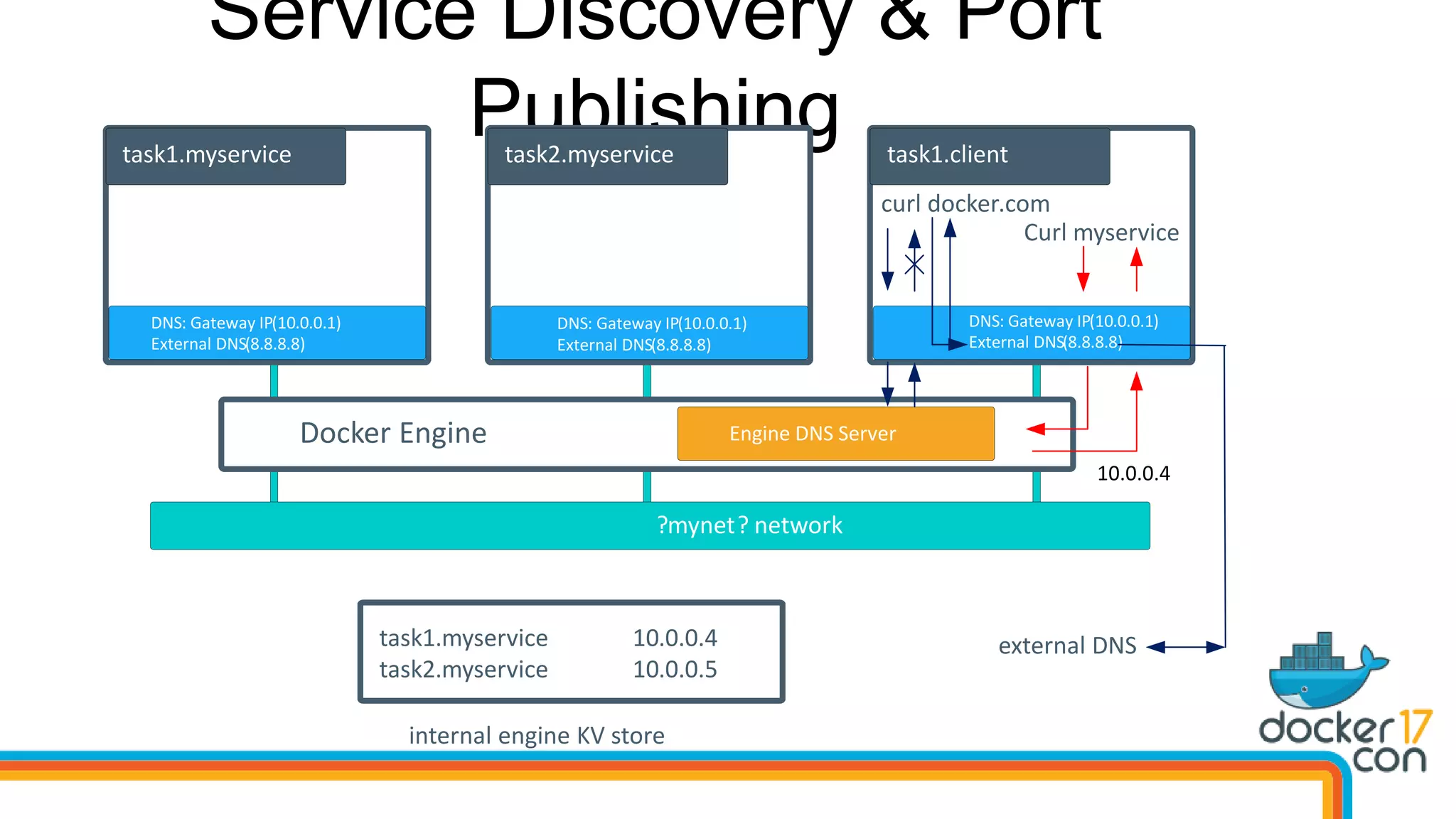
Service Discovery & Port
Publishing
?mynet? network
task1.myservice
DNS: Gateway IP(10.0.0.1)
External DNS(8.8.8.8)
task1.myservice 10.0.0.4
10.0.0.5task2.myservice
internal engine KV store
task2.myservice task1.client
curl docker.com
external DNS
Curl myservice
Engine DNS ServerDocker Engine
DNS: Gateway IP(10.0.0.1)
External DNS(8.8.8.8)
DNS: Gateway IP(10.0.0.1)
External DNS(8.8.8.8)
10.0.0.4
Demo – Swarm
NAT Overlay Transparent
L2 Bridge /
L2 Tunnel
Multi Host
Connectivity
No Native Support Yes No native Support No native Support
Service
Discovery
Only on
local host network
Across Cluster
Bring your Own or
Host DNS
Bring your Own or
Host DNS
Load
Balancing
Internal Local DNS-
Based
Internal global DNS
Based
Publish Host mode
No Native Support No Native Support
IP Addressing
Internal addressing per
container
(scoped per NAT)
Internal addressing per
container
(scoped per overlay)
External addressing per
container
(physical network)
External addressing
per container
(physical network)
Requirements Engine 1.7+
Engine 1.13+, Cluster
Swarm mode,
KB4015217
Engine 1.7+
Windows Server
Enable MAC Spoofing for
VM – Host Interface
Engine 1.7+
Windows Server
Network Deployment Modes
Thank You!
aka.ms/containers
@docker
#dockercon

DockerCon17 - Beyond the backslash

  • 1.
    Taylor Brown Principal ProgramManager @taylorb_msft Dinesh Govindasamy Principal Engineering Lead @dingovcloud Beyond “” the Path to Windows and Linux Parity in Docker
  • 2.
    Docker AND Windows Thisis not… • Docker for Windows (it is but we’ll get to that) • Linux on Windows (again it is but we’ll get to that too) • Ubuntu on Windows or BASH on Windows (really this one it’s not, sort of ) This is… • Docker Engine compiled for Windows calling Windows APIs • Available on Windows 10 and Windows Server 2016 today
  • 3.
    High Level ArchitectureIn Linux containerd + runc REST Interface libcontainerd graphlibnetwork plugins Control Groups cgroups Namespaces Pid, net, ipc, mnt, uts Layer Capabilities Union Filesystems AUFS, btrfs, vfs, zfs*, DeviceMapper Other OS Functionality Docker Client Docker Registry Docker Compose Docker Swarm
  • 4.
    High Level ArchitectureIn Windows ‘containerd’ + runc REST Interface libcontainerd graphlibnetwork plugins Control Groups Job Objects Namespaces Object Namespace, Process Table, Networking Layer Capabilities Registry, Union like filesystem extensions Other OS Functionality Docker Client Docker Registry Docker Compose Docker Swarm Compute Service
  • 5.
    Compute Service • Publicinterface to containers • Currently replaces containerd on Windows • Manages running containers • Abstracts low-level capabilities • Language bindings available • Go: https://github.com/Microsoft/ “hcsshim” (as in the shim between Docker and the Host Compute Service) • C#: https://github.com/Microsoft/ dotnet-computevirtualization (because .net stuff needs long names)
  • 6.
    Windows Containers Host UserMode Container Runtime
  • 7.
    Windows Containers App Host UserMode Container Runtime
  • 8.
    Windows Containers App Host UserMode Container Runtime App
  • 9.
    Windows Containers App Host UserMode Container Runtime Hyper-V Isolation Virtual Machine Optimized for Container App
  • 10.
    Windows Containers App Host UserMode Container Runtime Hyper-V Isolation Virtual Machine Optimized for Container App Hyper-V Isolation Virtual Machine Optimized for Container App
  • 11.
    Namespaces Silo: extension toWindows Job object (aka cgroup) • Set of processes • Resource controls • New: set of namespaces New namespace virtualization • Registry • Process IDs, sessions • Object namespace • File system • Network compartments
  • 12.
  • 13.
    Container Networking Basics LinuxWindows • Network Namespace • Network Compartments • Linux Bridge and IP Routing • VSwitch • IP Links • Vnics and Switch Ports • IP Tables • Firewall & VFP Rules
  • 14.
    Container Networking Model NetworkNetwork Endpoint Endpoint Network Sandbox Container Endpoint Network Sandbox Container Endpoint Network Sandbox Container Network Infrastructure - HNS Docker Engine Network Infrastructure Network Driver IPAM Driver Host Network Service - HNS TCPIP VSWITCH VFP WINNAT FIREWALL
  • 15.
    Bridge Mode vsNAT Mode host veth docker0 host network namespace container network namespace eth0: 192.168.0.2 eth0: 172.17.0.2 container Linux Windows host VNIC Ethernet: 192.168.0.2 Ethernet: 172.17.0.2 container WINNAT Gateway nic Vswitch Container Network Namespace Host Network Namespace
  • 16.
    Demo – NATNetworking Mode
  • 17.
    MacVLAN Vs Transparent Host veth adminweb-dogweb-cat eth0 eth0.10eth0.20 eth0.30 macvlan10 macvlan20 macvlan30 L2 physical network VLAN 20: 192.168.20.1VLAN 30: 192.168.30.1 802.1Q Trunk VLAN 10: 192.168.10.1 Linux Windows Host veth adminweb-dogweb-cat eth0.20 L2 physical network VLAN 20: 192.168.20.1VLAN 30: 192.168.30.1 802.1Q Trunk VLAN 10: 192.168.10.1 Host vNIC VSwitch External NIC VNIC - 10 VNIC - 20 VNIC - 30 Host veth adminweb-dogweb-cat eth0.20 L2 physical network VLAN 20: 192.168.20.1VLAN 30: 192.168.30.1 802.1Q Trunk VLAN 10: 192.168.10.1 Host vNIC VSwitch External NIC VNIC - 10 VNIC - 20 VNIC - 30 Transparent L2 Bridge / L2 Tunnel Physical Network learns the Container MAC Container MAC is re- written to the Container Host NIC MAC VM: MAC Spoofing must to be enabled More Suitable for Cloud Environments L2 Bridge L2 Tunnel Container to Container traffic Bridged inside the container host Tunneled to External router or L1 Fabric host SDN policies cannot be applied to containers within the Host More Suitable for Extending SDN policies to Containers
  • 18.
    Overlay Mode –Windows & Linux external underlay network host eth0: 192.168.1.2 container eth0: 172.20.0.6 eth1: 10.1.0.3 application veth docker_gwbridge veth ovnet ovnet overlay network Linux Windows external underlay network host Ethernet: 192.168.1.2 container Ethernet1 172.20.0.6 Ethernet 10.1.0.3 application VNIC VNIC ovnet WINNAT Host vnic VSwitch Vswitch ovnet overlay network VFP Host vnic external underlay network host Ethernet: 192.168.1.2 container Ethernet1 172.20.0.6 Ethernet 10.1.0.3 application VNIC VNIC WINNAT Host vnic VSwitch Vswitch ovnet overlay network VFP Host vnic
  • 19.
    Service Discovery &Port Publishing ?mynet? network task1.myservice DNS: Gateway IP(10.0.0.1) External DNS(8.8.8.8) task1.myservice 10.0.0.4 10.0.0.5task2.myservice internal engine KV store task2.myservice task1.client curl docker.com external DNS Curl myservice Engine DNS ServerDocker Engine DNS: Gateway IP(10.0.0.1) External DNS(8.8.8.8) DNS: Gateway IP(10.0.0.1) External DNS(8.8.8.8) 10.0.0.4
  • 20.
  • 21.
    NAT Overlay Transparent L2Bridge / L2 Tunnel Multi Host Connectivity No Native Support Yes No native Support No native Support Service Discovery Only on local host network Across Cluster Bring your Own or Host DNS Bring your Own or Host DNS Load Balancing Internal Local DNS- Based Internal global DNS Based Publish Host mode No Native Support No Native Support IP Addressing Internal addressing per container (scoped per NAT) Internal addressing per container (scoped per overlay) External addressing per container (physical network) External addressing per container (physical network) Requirements Engine 1.7+ Engine 1.13+, Cluster Swarm mode, KB4015217 Engine 1.7+ Windows Server Enable MAC Spoofing for VM – Host Interface Engine 1.7+ Windows Server Network Deployment Modes
  • 22.

Editor's Notes

  • #13 For the past year we have been working extensively on windows platform for supporting docker networking specifically enabling docker swarm on windows. This would not have been possible without the support of Madhu's team in docker. We are happy to announce that overlay network mode is available in windows server 2016 as of last Tuesday windows update. There should be an announcement coming soon. This is a great testament to the amazing partnership, we have with docker.   In this session, we are going to cover some basics, deep dive of different networking modes in windows and how they compare with Linux and a cool demo of docker swarm in windows and Linux.
  • #14 Let's look at the Linux networking building blocks that docker networking architecture is built upon and how they compare with Linux and how we have developed windows networking drivers.   Linux network namespace. In windows namespace is equal to the network compartments. Conceptually compartments are logical container in TCP/IP stack. Network layer in TCP/IP ensure that each compartment is isolated and packet forwarding between compartments is prevented. All ip objects such as interfaces ip addresses routes prefixes live inside one and only compartment.    Layer 2 switching functionality is provided by Linux bridge. In windows VSwitch provides layer 2 functionality and layer 3 routing services. You can have multiple instances of VSwitch. Switch Ports can be dynamically added and deleted to each VSwitch. Each instance of VSwitch has its own forwarding table and forwards packets based on MAC address and vlan tagging of the packets.   Veth. In windows, container network interfaces (host vNIC or VMNIC) are added to each compartment and then bound to the corresponding switch port in the VSwitch.   Ip tables in Linux provide rich packet filtering. In windows, we use VFP virtual filtering platform. VFP is a programmable match action based filtering engine. VFP offers a rich data plane primitives that you can apply actions on packets such as encap decap state full NAT acl metering etc.
  • #15 As you all know docker networking architecture is built upon the set of interfaces called as container networking model. For windows, too all the constructs and docker CLI options for networking remain the same as Linux.   Windows network driver call a new abstraction layer called as host network service which is responsible for setting up the container networking in windows. 
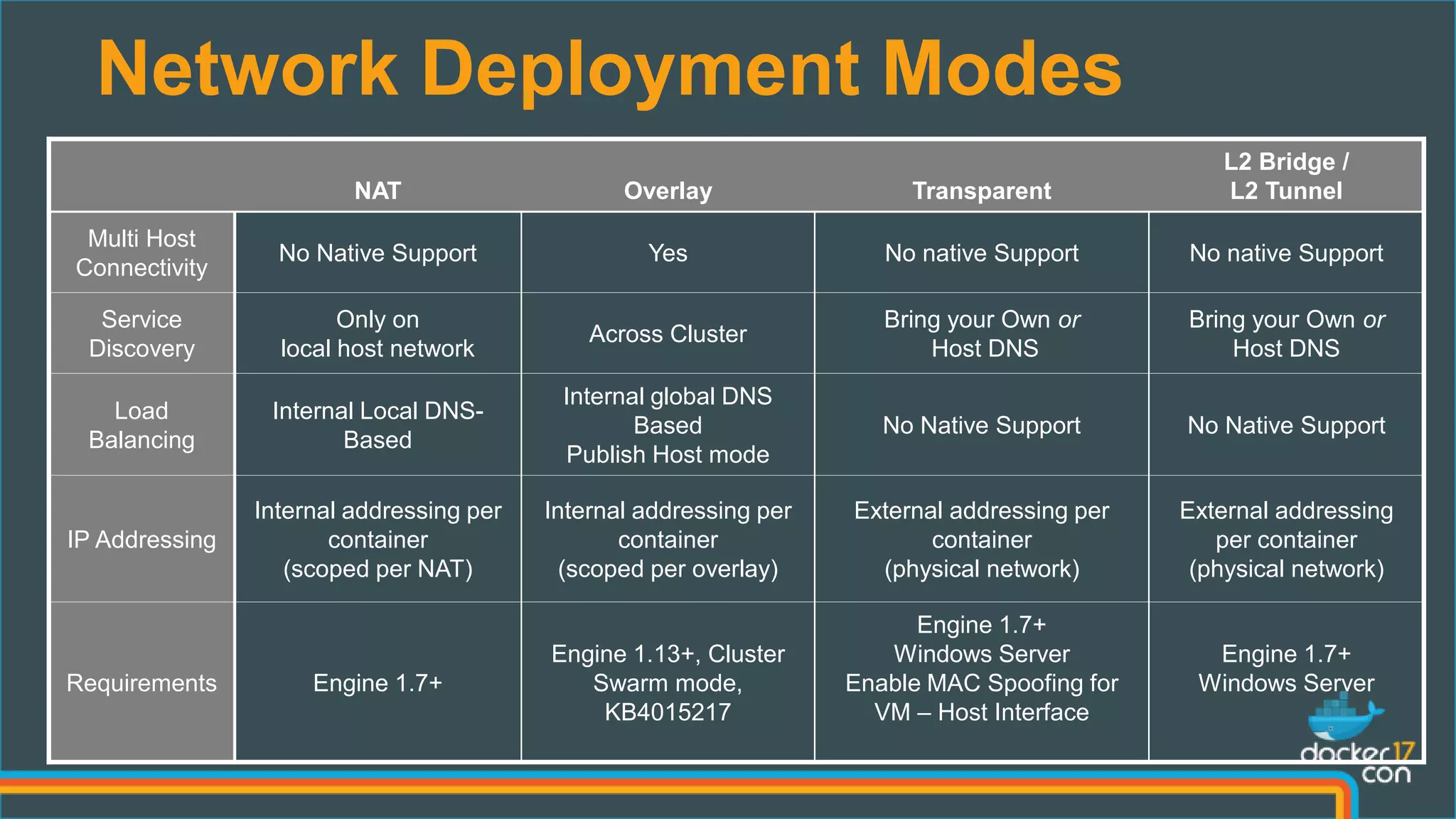
  • #16 Now let's look at the different network modes we have in windows and how they compare against windows   The default network mode in Linux is bridge mode and the corresponding default mode in windows is NAT mode.   For NAT mode, we create an internal VSwitch which is a private VSwitch with an addition of gateway Nic that enables connectivity to the host partition. We also create a NAT between the gateway Nic and the external nic. So, containers within the NAT network gets switched in the VSwitch and the traffic to internet gets NATed to the container host ip.
  • #18 If you want to configure your container to use underlay network, then you would be using MacVLAN driver mode in Linux. In windows, we have 3 different network modes that enables you to use underlay network. For all these network modes, we create an external VSwitch. An external VSwitch enables your containers to connect to both host partition and physical network.   In transparent network mode, we let container MAC address pass though the VSwitch and let physical network learn the container macs. You need to enable Mac spoofing on the network interface if you are running transparent network mode on a virtual machine.   In case of L2 bridge mode we rewrite the container Mac with the container host Mac. This helps in not flooding the physical network with all those containers. Both l2 bridge and l2 tunnel modes are more suited for cloud environments.    In l2 bridge mode the container to container traffic is bridged within the container host whereas in l2 tunnel mode the traffic is tunneled to the external router in azure case in the l1 fabric host and then hair pinned back to the destination container. This mode enables you to apply SDN policies on the host for containers. 
  • #19 Let's look at the internal architecture of overlay network in windows. In Linux two bridges are created one for ovnet and the other for the traffic outside of the cluster. In windows, too we create two vSwitches. One is external switch bound to the external Nic with vfp enabled which does the encap and decap. And the other is a NAT network. In both Linux and windows 2 interfaces are added to the container one connected to the overlay and the other connected to the NAT.
  • #20 Docker Engine has an internal DNS server that provides name resolution to all the containers on the host in NAT and Overlay network modes. Its little differently implemented that Linux. In Windows, we use the Gateway IP as the DNS server in each container and Docker engine on the host runs DNS server on the gateway NIC. When a DNS query comes up, Docker Engine then checks if the DNS query belongs to a container or service on network(s) that the requesting container belongs to. If it does, then Docker Engine looks up the IP address that matches a container, task, or service's name in its key-value store and returns that IP back to the requester.   Service discovery is network-scoped, Containers not on the same network cannot resolve each other's addresses. Publishing Ports   Docker Supports two ways of publishing service ports outside of the swarm. One is using routing mesh and the other is using publish mode host where we can publish the service port directly from the host. We don’t yet support routing mesh in windows, but we do support publishing port using the host mode. You can use external load balancer and load balance across your tasks in ur service, which is what we will demo here too…  
  • #22 Deployment Modes   In this slide, we are going to look at different network modes we have in windows and how they differ at each other with respect physical network design, configuration and how they interoperate with application.   Multi Host Connectivity, NAT doesn’t provide any native support. Overlay supports multi host connectivity. For Transparent and L2 modes we expect the underlay to provide routing for multi host connectivity.   Service Discovery, we use Docker Embedded DNS server for NAT and Overlay modes. For other modes, we expect DNS to be hosted externally.   Load Balancing, DNSRR is currently the only supported mode of load balancing in Windows for NAT and overlay mode. For other modes, we done have any native support   IP Addressing Both NAT and Overlay has internal addressing scoped to the network. For transparent and L2 modes we support external public facing IP assignment to the containers.   Requirements. You need the listed KB for Overlay network mode. For transparent network mode, if you are using a VM then you need to make sure MAC spoofing is enabled on the network interface of the VM.