Docker Networking Tutorial
– Multihost and IPv6
Srini Seetharaman
srini@sdnhub.org
November, 2014
Key Takeaways
1. Docker networking is in early stage and diverse
2. Applications must choose what networking is right for
their needs. It is possible to use same principles as VMs
3. Open vSwitch brings powerful networking capabilities
4. LorisPack is an easy way to add pod-level isolation for
Docker containers
5. User space vs Kernel space packet processing is an
important design choice
Container communication across hosts
… similar to what is done for VMs
3
Copyright Reserved
Two primary mechanisms
• Option 1: Flat IP space (at container level) with
routing (and possibly NAT) done by host
‒ Step 1: Assign /24 subnet CIDR to each host for its containers
‒ Step 2: Setup ip route to ensure traffic to external subnets leave
from host interface (e.g., eth0)
• Option 2: Create overlay network
‒ Step 1: Create a parallel network for cross-host communication
‒ Step 2: Connect hosts in cluster using encapsulation tunnels
‒ Step 3: Plug containers to appropriate virtual networks
Copyright Reserved
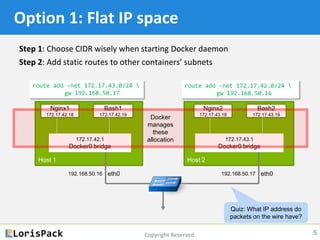
Option 1: Flat IP space
Step 1: Choose CIDR wisely when starting Docker daemon
Step 2: Add static routes to other containers’ subnets
5
Host 1
Nginx1
172.17.42.18
Bash1
172.17.42.19
172.17.42.1
Docker0 bridge
eth0192.168.50.16
Host 2
Nginx2
172.17.43.18
Bash2
172.17.43.19
172.17.43.1
Docker0 bridge
eth0192.168.50.17
Docker
manages
these
allocation
route add -net 172.17.43.0/24 
gw 192.168.50.17
route add -net 172.17.42.0/24 
gw 192.168.50.16
Quiz: What IP address do
packets on the wire have?
NAT rules already in
place to masquerade
internal IP addresses
Copyright Reserved
192.168.50.16 192.168.50.17
nginx1 ContainerX
Host 1
bash1 ContainerY
docker0
Open vSwitch
Host 2
Internet
Open vSwitch
docker0
vxlan vxlanvxlan vxlan
Other
cluster
hosts
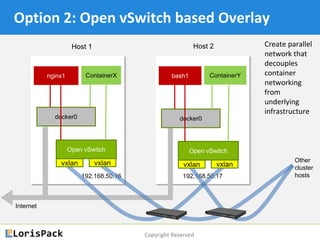
Option 2: Open vSwitch based Overlay
Create parallel
network that
decouples
container
networking
from
underlying
infrastructure
Copyright Reserved
Recommend using Open vSwitch
• Why OpenvSwitch? It has many useful features
‒ VxLAN, GRE, VLAN based encapsulation and L2 forwarding
‒ Encapsulation allows containers to pick any MAC/IP they want
‒ Also possible to do L3 routing, ARP proxy etc, load-balancing
‒ Access control, traffic rate limiting and prioritization
‒ 10G/s or more packet processing through possible
‒ 1) kernel, or 2) userspace, with optionally DPDK acceleration
Copyright Reserved
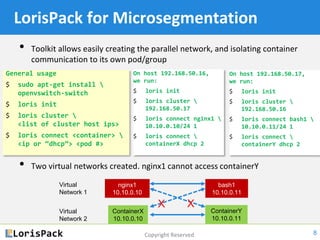
LorisPack for Microsegmentation
• Toolkit allows easily creating the parallel network, and isolating container
communication to its own pod/group
• Two virtual networks created. nginx1 cannot access containerY
8
On host 192.168.50.16,
we run:
$ loris init
$ loris cluster 
192.168.50.17
$ loris connect nginx1 
10.10.0.10/24 1
$ loris connect 
containerX dhcp 2
General usage
$ sudo apt-get install 
openvswitch-switch
$ loris init
$ loris cluster 
<list of cluster host ips>
$ loris connect <container> 
<ip or “dhcp”> <pod #>
nginx1
10.10.0.10
ContainerX
10.10.0.10
bash1
10.10.0.11
ContainerY
10.10.0.11
Virtual
Network 1
Virtual
Network 2
On host 192.168.50.17,
we run:
$ loris init
$ loris cluster 
192.168.50.16
$ loris connect bash1 
10.10.0.11/24 1
$ loris connect 
containerY dhcp 2
X X
Copyright Reserved
Get LorisPack here:
https://github.com/sdnhub/lorispack
9
Copyright Reserved
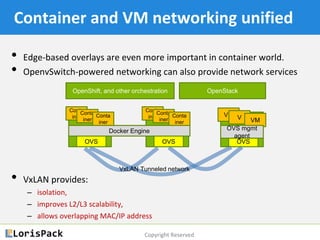
Container and VM networking unified
• Edge-based overlays are even more important in container world.
• OpenvSwitch-powered networking can also provide network services
• VxLAN provides:
‒ isolation,
‒ improves L2/L3 scalability,
‒ allows overlapping MAC/IP address
Docker Engine
OVS OVS OVS
Conta
iner
Conta
iner
Conta
iner
Conta
iner
Conta
iner
Conta
iner
VM V VM
OpenShift, and other orchestration OpenStack
VxLAN Tunneled network
OVS mgmt
agent
IPv6 Addressing for Docker
11
Copyright Reserved
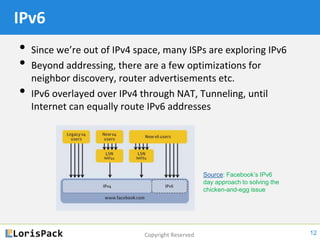
IPv6
• Since we’re out of IPv4 space, many ISPs are exploring IPv6
• Beyond addressing, there are a few optimizations for
neighbor discovery, router advertisements etc.
• IPv6 overlayed over IPv4 through NAT, Tunneling, until
Internet can equally route IPv6 addresses
12
Source: Facebook’s IPv6
day approach to solving the
chicken-and-egg issue
Copyright Reserved
From Docker 1.5, IPv6 supported
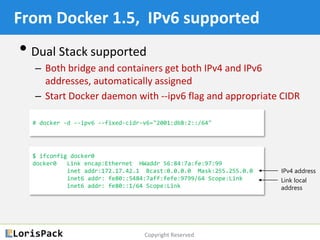
• Dual Stack supported
‒ Both bridge and containers get both IPv4 and IPv6
addresses, automatically assigned
‒ Start Docker daemon with --ipv6 flag and appropriate CIDR
# docker -d --ipv6 --fixed-cidr-v6="2001:db8:2::/64"
$ ifconfig docker0
docker0 Link encap:Ethernet HWaddr 56:84:7a:fe:97:99
inet addr:172.17.42.1 Bcast:0.0.0.0 Mask:255.255.0.0
inet6 addr: fe80::5484:7aff:fefe:9799/64 Scope:Link
inet6 addr: fe80::1/64 Scope:Link
IPv4 address
Link local
IPv6 address
Copyright Reserved
From Docker 1.5, IPv6 supported
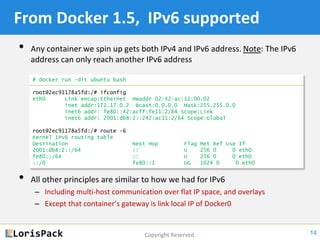
• Any container we spin up gets both IPv4 and IPv6 address. Note: The IPv6
address can only reach another IPv6 address
• All other principles are similar to how we had for IPv4
‒ Including multi-host communication over flat IP space, and overlays
‒ Except that container’s gateway is link local IP of Docker0
14
# docker run -dit ubuntu bash
root@2ec91178a5fd:/# ifconfig
eth0 Link encap:Ethernet HWaddr 02:42:ac:11:00:02
inet addr:172.17.0.2 Bcast:0.0.0.0 Mask:255.255.0.0
inet6 addr: fe80::42:acff:fe11:2/64 Scope:Link
inet6 addr: 2001:db8:2::242:ac11:2/64 Scope:Global
root@2ec91178a5fd:/# route -6
Kernel IPv6 routing table
Destination Next Hop Flag Met Ref Use If
2001:db8:2::/64 :: U 256 0 0 eth0
fe80::/64 :: U 256 0 0 eth0
::/0 fe80::1 UG 1024 0 0 eth0
Copyright Reserved
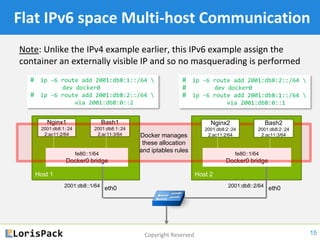
Flat IPv6 space Multi-host Communication
Note: Unlike the IPv4 example earlier, this IPv6 example assign the
container an externally visible IP and so no masquerading is performed
15
Host 1
Nginx1
2001:db8:1::24
2:ac11:2/64
Bash1
2001:db8:1::24
2:ac11:3/64
fe80::1/64
Docker0 bridge
eth02001:db8::1/64
Host 2
fe80::1/64
Docker0 bridge
eth02001:db8::2/64
Docker manages
these allocation
and iptables rules
# ip -6 route add 2001:db8:1::/64 
dev docker0
# ip -6 route add 2001:db8:2::/64 
via 2001:db8::2
# ip -6 route add 2001:db8:2::/64 
dev docker0
# ip -6 route add 2001:db8:1::/64 
via 2001:db8::1
Nginx2
2001:db8:2::24
2:ac11:2/64
Bash2
2001:db8:2::24
2:ac11:3/64
Thank you.
https://github.com/sdnhub/lorispack
© 2015 Copyright Reserved

Docker networking tutorial 102

  • 1.
    Docker Networking Tutorial –Multihost and IPv6 Srini Seetharaman srini@sdnhub.org November, 2014
  • 2.
    Key Takeaways 1. Dockernetworking is in early stage and diverse 2. Applications must choose what networking is right for their needs. It is possible to use same principles as VMs 3. Open vSwitch brings powerful networking capabilities 4. LorisPack is an easy way to add pod-level isolation for Docker containers 5. User space vs Kernel space packet processing is an important design choice
  • 3.
    Container communication acrosshosts … similar to what is done for VMs 3
  • 4.
    Copyright Reserved Two primarymechanisms • Option 1: Flat IP space (at container level) with routing (and possibly NAT) done by host ‒ Step 1: Assign /24 subnet CIDR to each host for its containers ‒ Step 2: Setup ip route to ensure traffic to external subnets leave from host interface (e.g., eth0) • Option 2: Create overlay network ‒ Step 1: Create a parallel network for cross-host communication ‒ Step 2: Connect hosts in cluster using encapsulation tunnels ‒ Step 3: Plug containers to appropriate virtual networks
  • 5.
    Copyright Reserved Option 1:Flat IP space Step 1: Choose CIDR wisely when starting Docker daemon Step 2: Add static routes to other containers’ subnets 5 Host 1 Nginx1 172.17.42.18 Bash1 172.17.42.19 172.17.42.1 Docker0 bridge eth0192.168.50.16 Host 2 Nginx2 172.17.43.18 Bash2 172.17.43.19 172.17.43.1 Docker0 bridge eth0192.168.50.17 Docker manages these allocation route add -net 172.17.43.0/24 gw 192.168.50.17 route add -net 172.17.42.0/24 gw 192.168.50.16 Quiz: What IP address do packets on the wire have? NAT rules already in place to masquerade internal IP addresses
  • 6.
    Copyright Reserved 192.168.50.16 192.168.50.17 nginx1ContainerX Host 1 bash1 ContainerY docker0 Open vSwitch Host 2 Internet Open vSwitch docker0 vxlan vxlanvxlan vxlan Other cluster hosts Option 2: Open vSwitch based Overlay Create parallel network that decouples container networking from underlying infrastructure
  • 7.
    Copyright Reserved Recommend usingOpen vSwitch • Why OpenvSwitch? It has many useful features ‒ VxLAN, GRE, VLAN based encapsulation and L2 forwarding ‒ Encapsulation allows containers to pick any MAC/IP they want ‒ Also possible to do L3 routing, ARP proxy etc, load-balancing ‒ Access control, traffic rate limiting and prioritization ‒ 10G/s or more packet processing through possible ‒ 1) kernel, or 2) userspace, with optionally DPDK acceleration
  • 8.
    Copyright Reserved LorisPack forMicrosegmentation • Toolkit allows easily creating the parallel network, and isolating container communication to its own pod/group • Two virtual networks created. nginx1 cannot access containerY 8 On host 192.168.50.16, we run: $ loris init $ loris cluster 192.168.50.17 $ loris connect nginx1 10.10.0.10/24 1 $ loris connect containerX dhcp 2 General usage $ sudo apt-get install openvswitch-switch $ loris init $ loris cluster <list of cluster host ips> $ loris connect <container> <ip or “dhcp”> <pod #> nginx1 10.10.0.10 ContainerX 10.10.0.10 bash1 10.10.0.11 ContainerY 10.10.0.11 Virtual Network 1 Virtual Network 2 On host 192.168.50.17, we run: $ loris init $ loris cluster 192.168.50.16 $ loris connect bash1 10.10.0.11/24 1 $ loris connect containerY dhcp 2 X X
  • 9.
    Copyright Reserved Get LorisPackhere: https://github.com/sdnhub/lorispack 9
  • 10.
    Copyright Reserved Container andVM networking unified • Edge-based overlays are even more important in container world. • OpenvSwitch-powered networking can also provide network services • VxLAN provides: ‒ isolation, ‒ improves L2/L3 scalability, ‒ allows overlapping MAC/IP address Docker Engine OVS OVS OVS Conta iner Conta iner Conta iner Conta iner Conta iner Conta iner VM V VM OpenShift, and other orchestration OpenStack VxLAN Tunneled network OVS mgmt agent
  • 11.
  • 12.
    Copyright Reserved IPv6 • Sincewe’re out of IPv4 space, many ISPs are exploring IPv6 • Beyond addressing, there are a few optimizations for neighbor discovery, router advertisements etc. • IPv6 overlayed over IPv4 through NAT, Tunneling, until Internet can equally route IPv6 addresses 12 Source: Facebook’s IPv6 day approach to solving the chicken-and-egg issue
  • 13.
    Copyright Reserved From Docker1.5, IPv6 supported • Dual Stack supported ‒ Both bridge and containers get both IPv4 and IPv6 addresses, automatically assigned ‒ Start Docker daemon with --ipv6 flag and appropriate CIDR # docker -d --ipv6 --fixed-cidr-v6="2001:db8:2::/64" $ ifconfig docker0 docker0 Link encap:Ethernet HWaddr 56:84:7a:fe:97:99 inet addr:172.17.42.1 Bcast:0.0.0.0 Mask:255.255.0.0 inet6 addr: fe80::5484:7aff:fefe:9799/64 Scope:Link inet6 addr: fe80::1/64 Scope:Link IPv4 address Link local IPv6 address
  • 14.
    Copyright Reserved From Docker1.5, IPv6 supported • Any container we spin up gets both IPv4 and IPv6 address. Note: The IPv6 address can only reach another IPv6 address • All other principles are similar to how we had for IPv4 ‒ Including multi-host communication over flat IP space, and overlays ‒ Except that container’s gateway is link local IP of Docker0 14 # docker run -dit ubuntu bash root@2ec91178a5fd:/# ifconfig eth0 Link encap:Ethernet HWaddr 02:42:ac:11:00:02 inet addr:172.17.0.2 Bcast:0.0.0.0 Mask:255.255.0.0 inet6 addr: fe80::42:acff:fe11:2/64 Scope:Link inet6 addr: 2001:db8:2::242:ac11:2/64 Scope:Global root@2ec91178a5fd:/# route -6 Kernel IPv6 routing table Destination Next Hop Flag Met Ref Use If 2001:db8:2::/64 :: U 256 0 0 eth0 fe80::/64 :: U 256 0 0 eth0 ::/0 fe80::1 UG 1024 0 0 eth0
  • 15.
    Copyright Reserved Flat IPv6space Multi-host Communication Note: Unlike the IPv4 example earlier, this IPv6 example assign the container an externally visible IP and so no masquerading is performed 15 Host 1 Nginx1 2001:db8:1::24 2:ac11:2/64 Bash1 2001:db8:1::24 2:ac11:3/64 fe80::1/64 Docker0 bridge eth02001:db8::1/64 Host 2 fe80::1/64 Docker0 bridge eth02001:db8::2/64 Docker manages these allocation and iptables rules # ip -6 route add 2001:db8:1::/64 dev docker0 # ip -6 route add 2001:db8:2::/64 via 2001:db8::2 # ip -6 route add 2001:db8:2::/64 dev docker0 # ip -6 route add 2001:db8:1::/64 via 2001:db8::1 Nginx2 2001:db8:2::24 2:ac11:2/64 Bash2 2001:db8:2::24 2:ac11:3/64
  • 16.

Editor's Notes