Docker Networking 
Intro Meetup 
Sriram Natarajan 
Dhananjay Sampath
Agenda 
Introduction to Container Networking 
Docker + OpenvSwitch demo 
Hands on Tutorial instructions
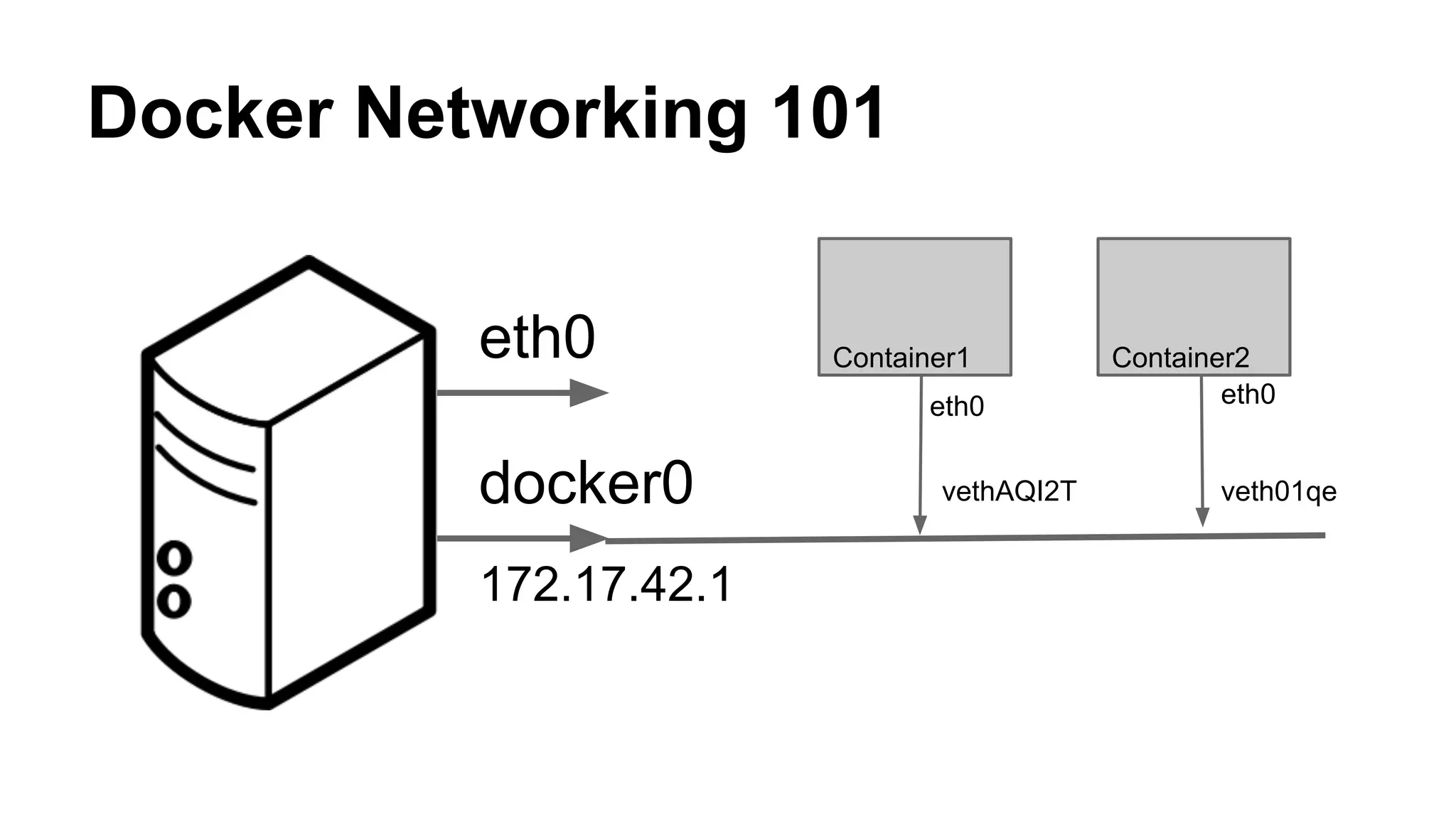
Docker Networking 101 
eth0 
docker0 
172.17.42.1 
Container1 Container2 
eth0 eth0 
vethAQI2T veth01qe
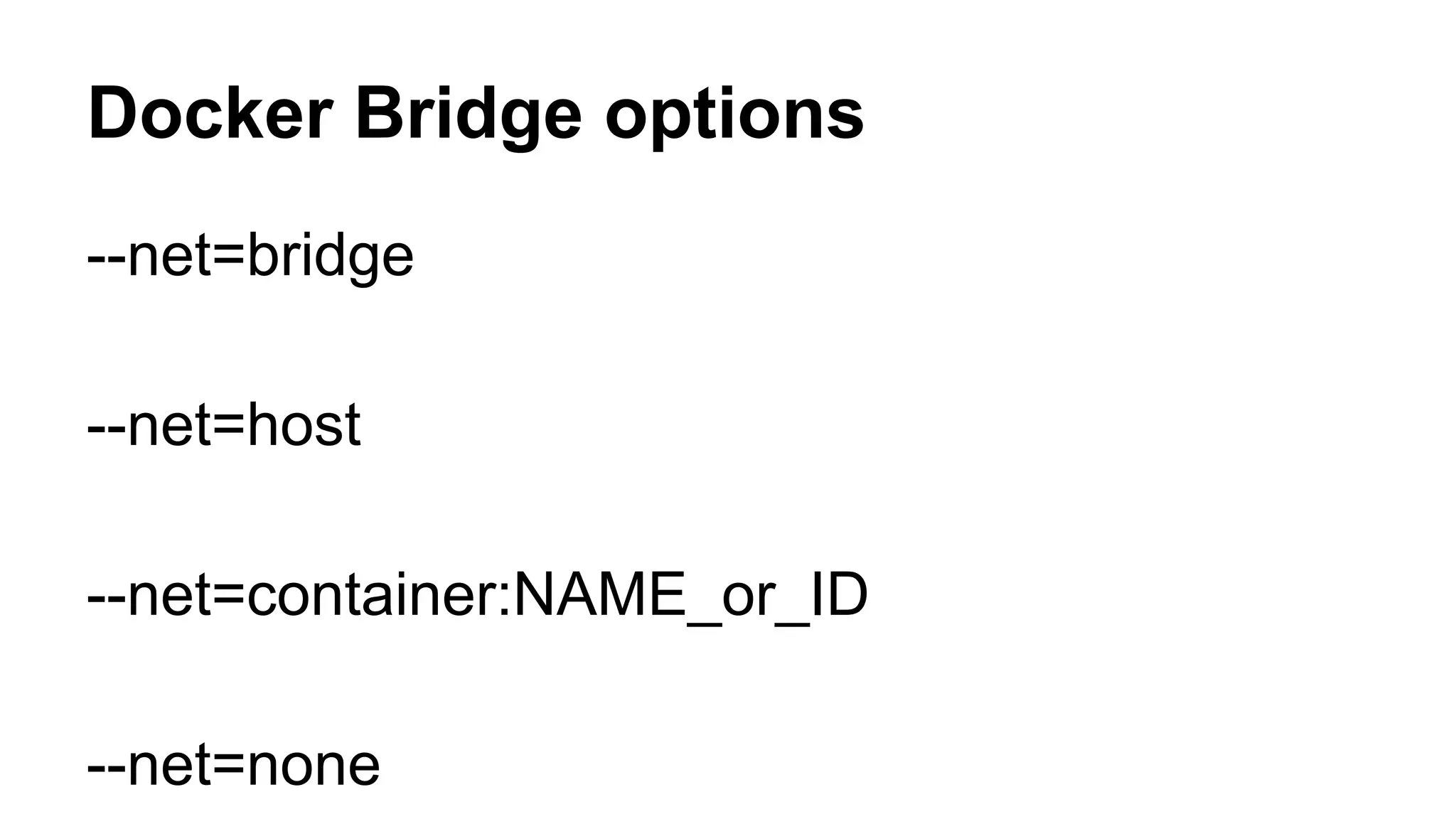
Docker Bridge options 
--net=bridge 
--net=host 
--net=container:NAME_or_ID 
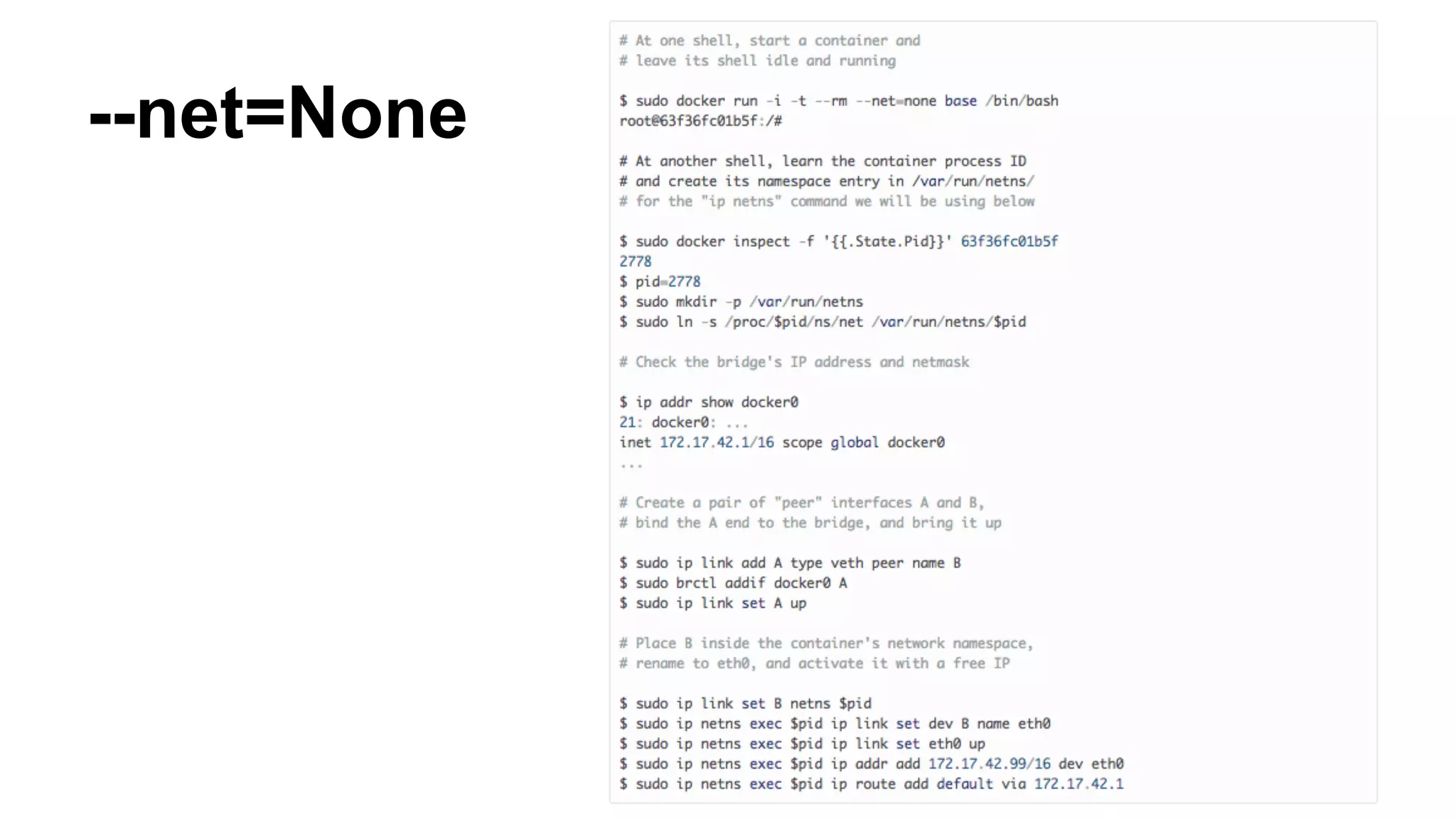
--net=none
--net=None
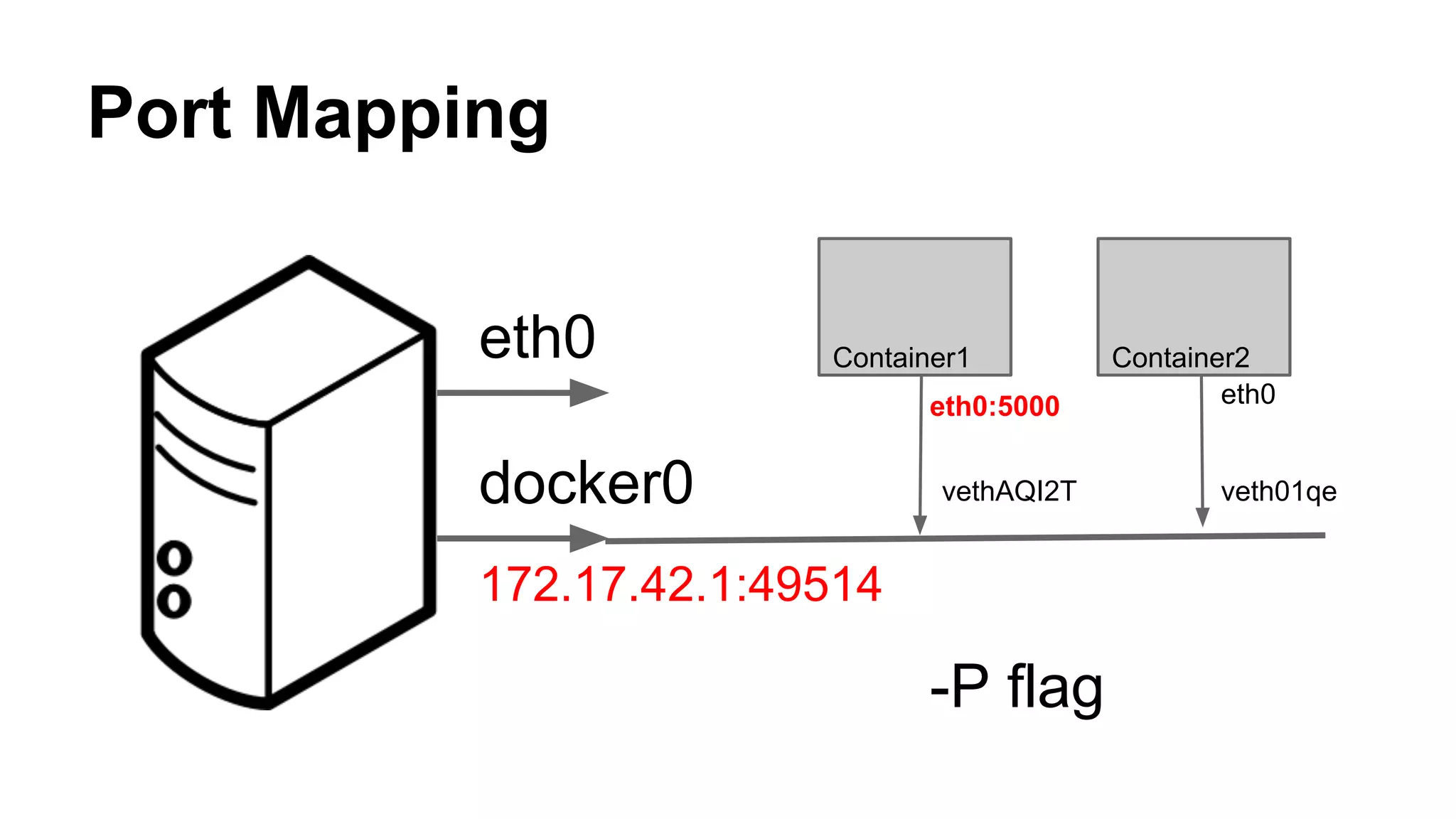
Port Mapping 
eth0 
docker0 
172.17.42.1:49514 
Container1 Container2 
eth0:5000 eth0 
vethAQI2T veth01qe 
-P flag
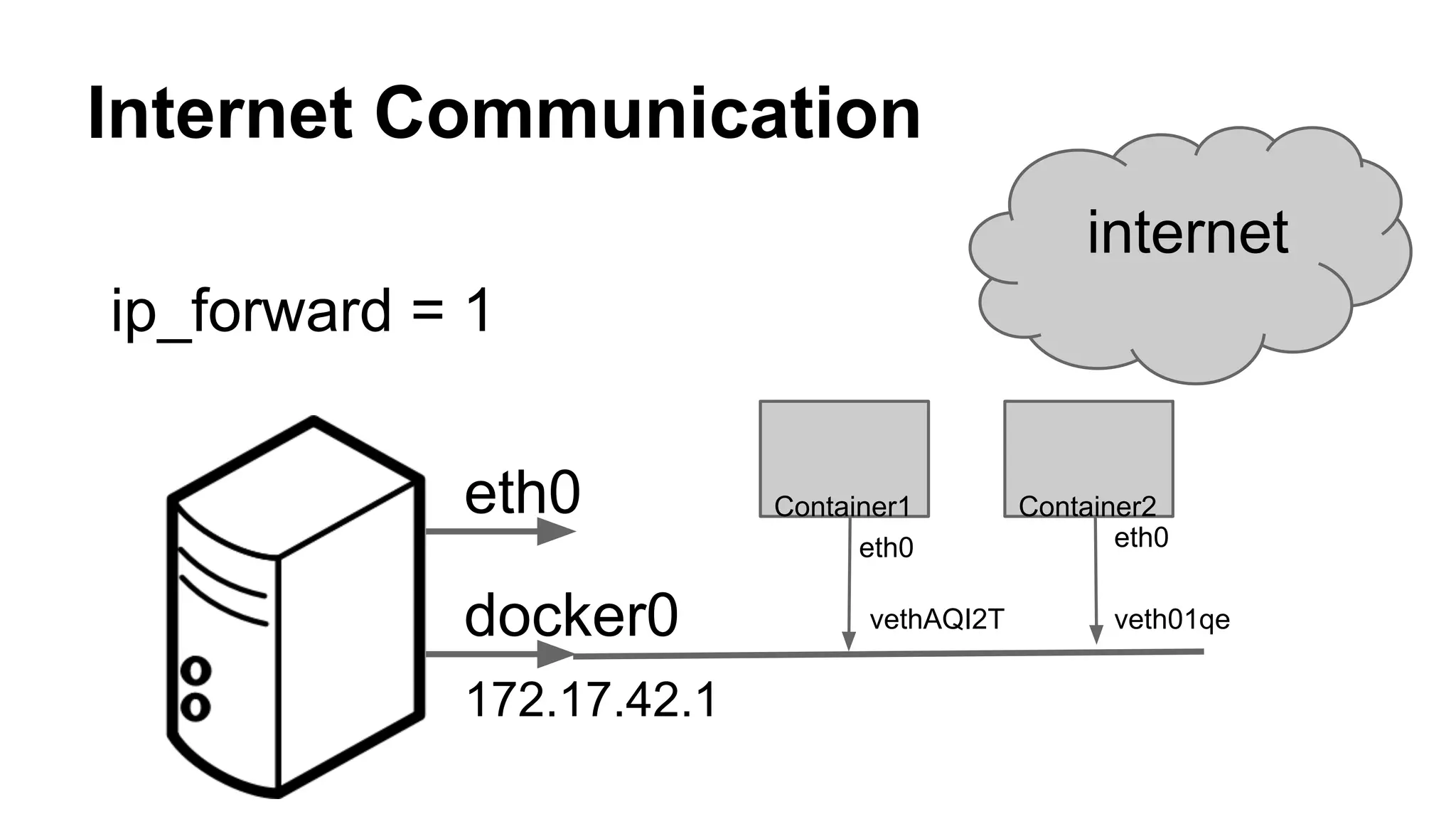
Internet Communication 
eth0 
docker0 
172.17.42.1 
internet 
Container1 Container2 
eth0 eth0 
vethAQI2T veth01qe 
ip_forward = 1
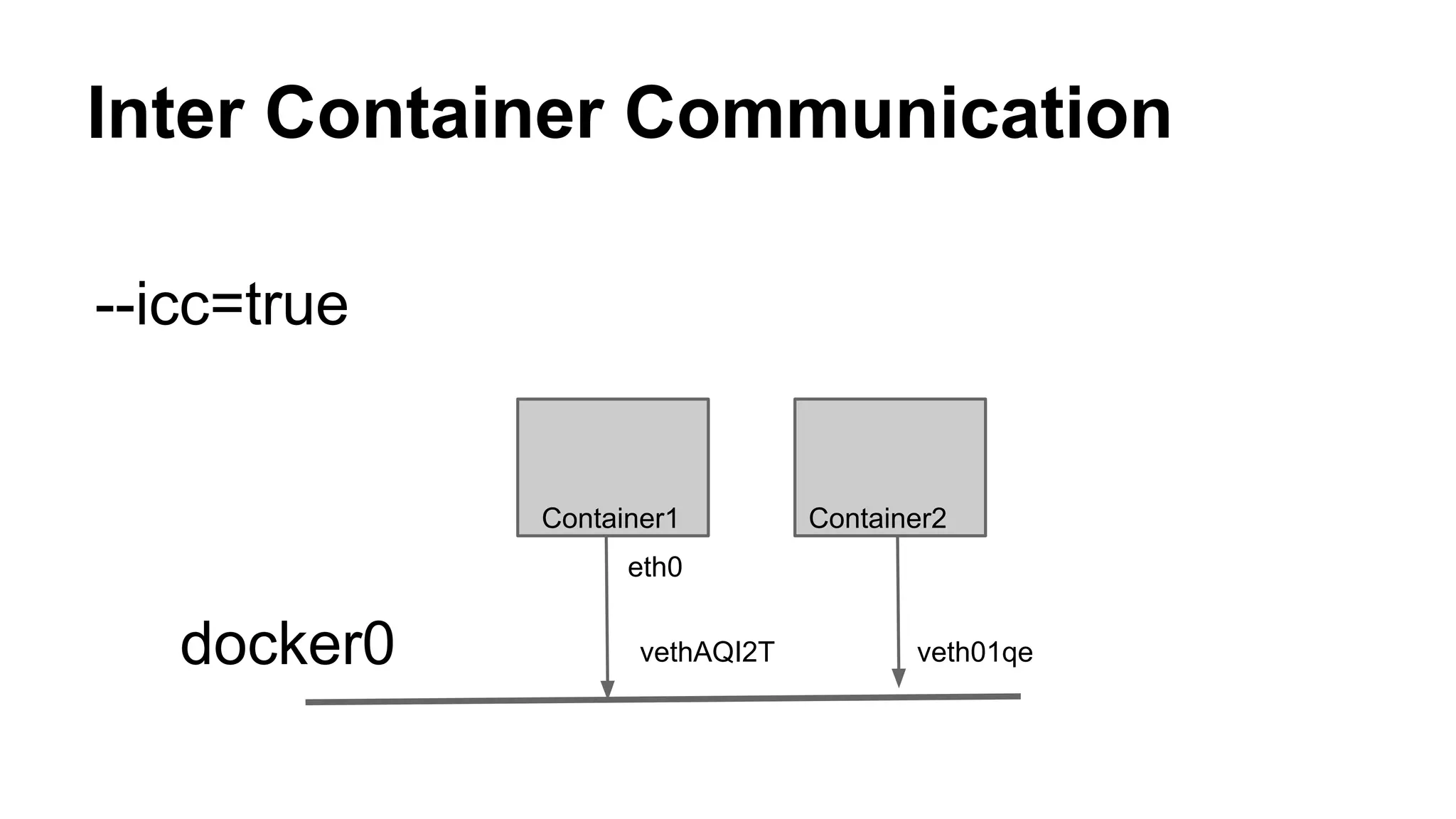
Inter Container Communication 
Container2 
eth0 
vethAQI2T veth01qe 
docker0 
Container1 
--icc=true
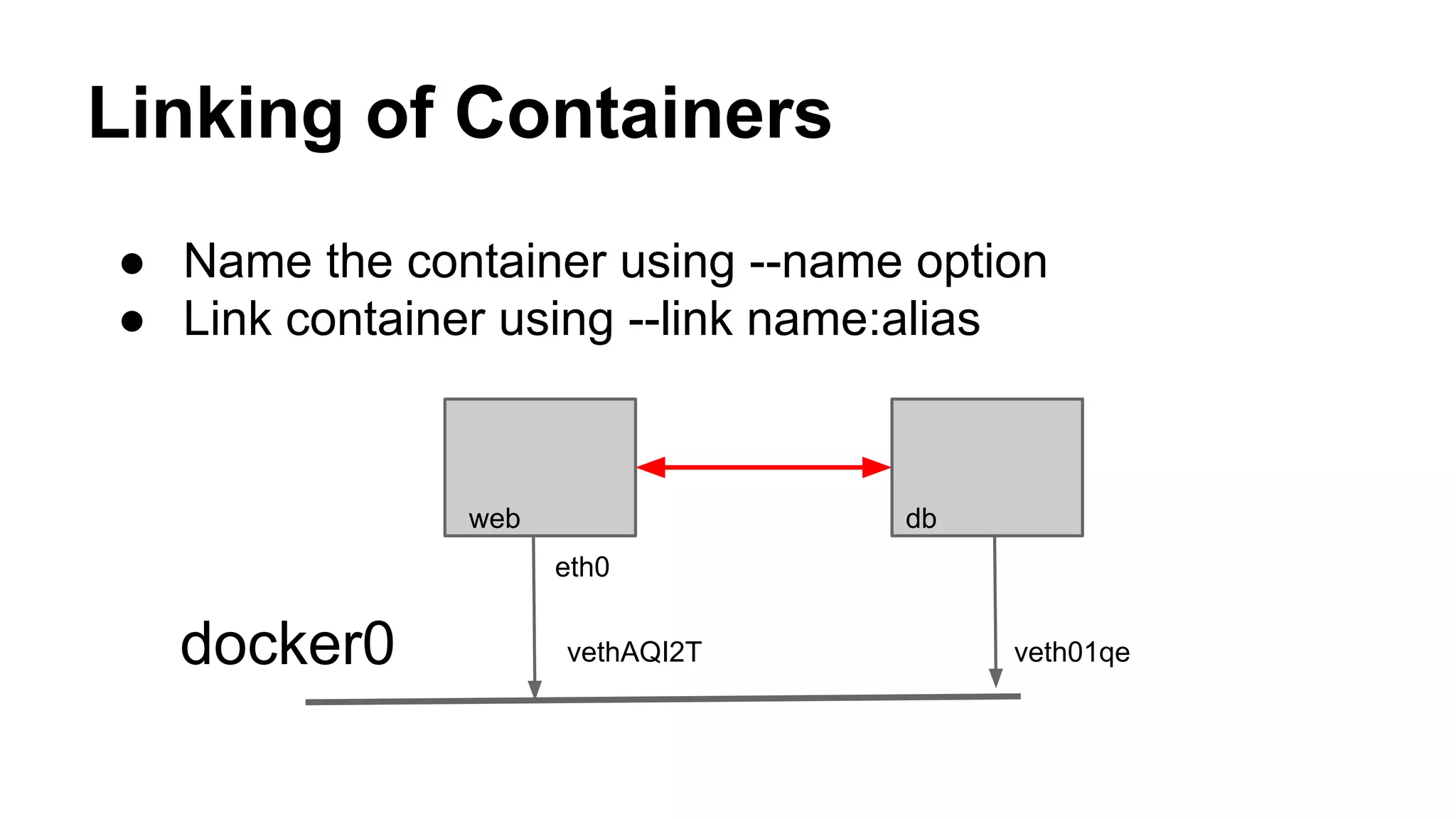
Linking of Containers 
● Name the container using --name option 
● Link container using --link name:alias 
db 
eth0 
vethAQI2T veth01qe 
docker0 
web
Hands on setup instructions 
Containet Source Code: https://bitbucket.org/snrism/containet 
Instructions: README part of the source code.
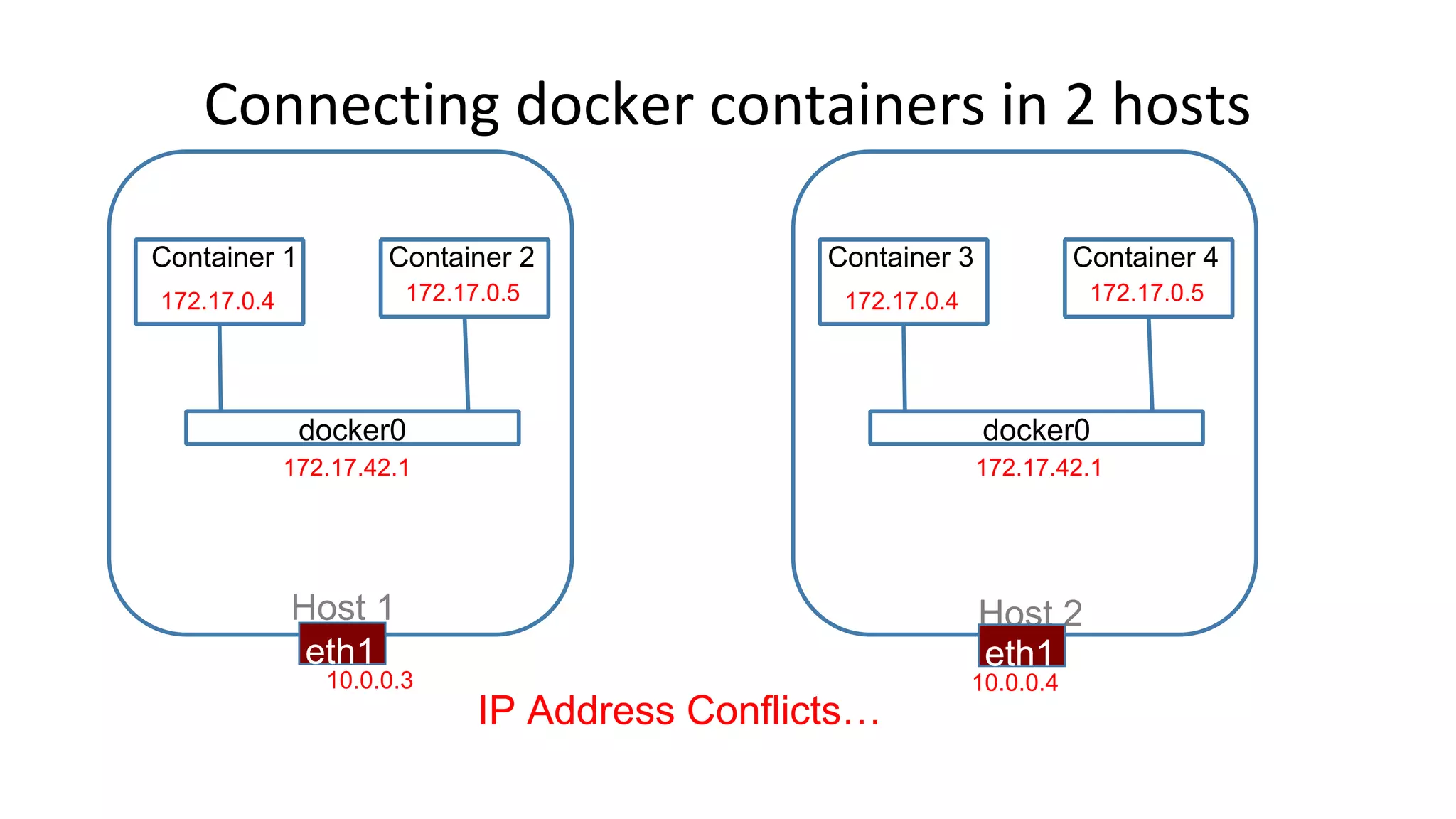
Connecting docker containers in 2 hosts 
Container 1 Container 2 
172.17.0.4 172.17.0.5 
docker0 
Container 3 Container 4 
172.17.0.4 172.17.0.5 
docker0 
172.17.42.1 172.17.42.1 
Host 1 Host 2 
eth1 eth1 
10.0.0.3 10.0.0.4 
IP Address Conflicts…
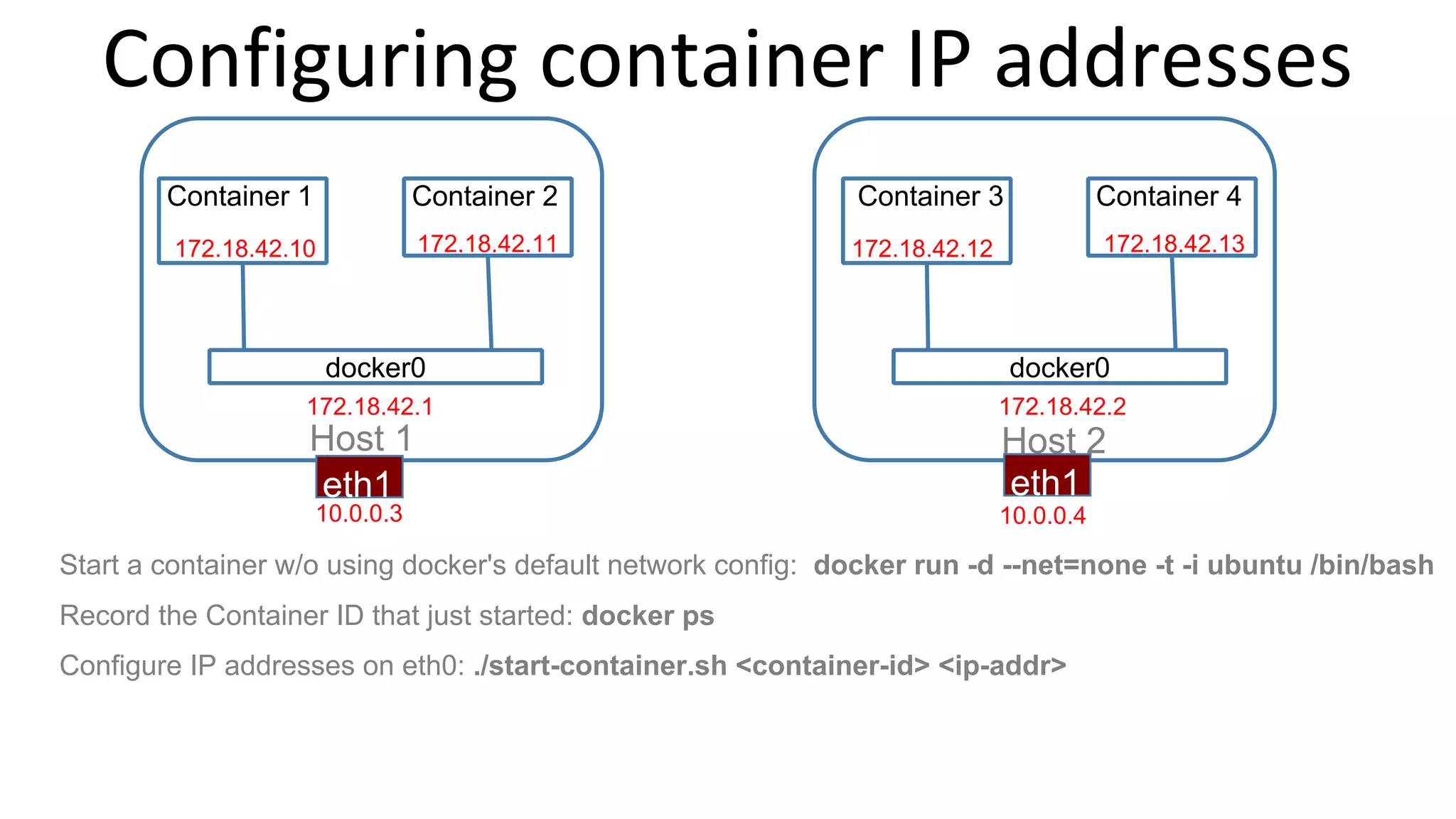
Configuring container IP addresses 
Container 1 Container 2 
172.18.42.10 172.18.42.11 
docker0 
Container 3 Container 4 
172.18.42.12 172.18.42.13 
docker0 
172.18.42.1 172.18.42.2 
Host 1 Host 2 
eth1 eth1 
10.0.0.3 10.0.0.4 
Start a container w/o using docker's default network config: docker run -d --net=none -t -i ubuntu /bin/bash 
Record the Container ID that just started: docker ps 
Configure IP addresses on eth0: ./start-container.sh <container-id> <ip-addr>
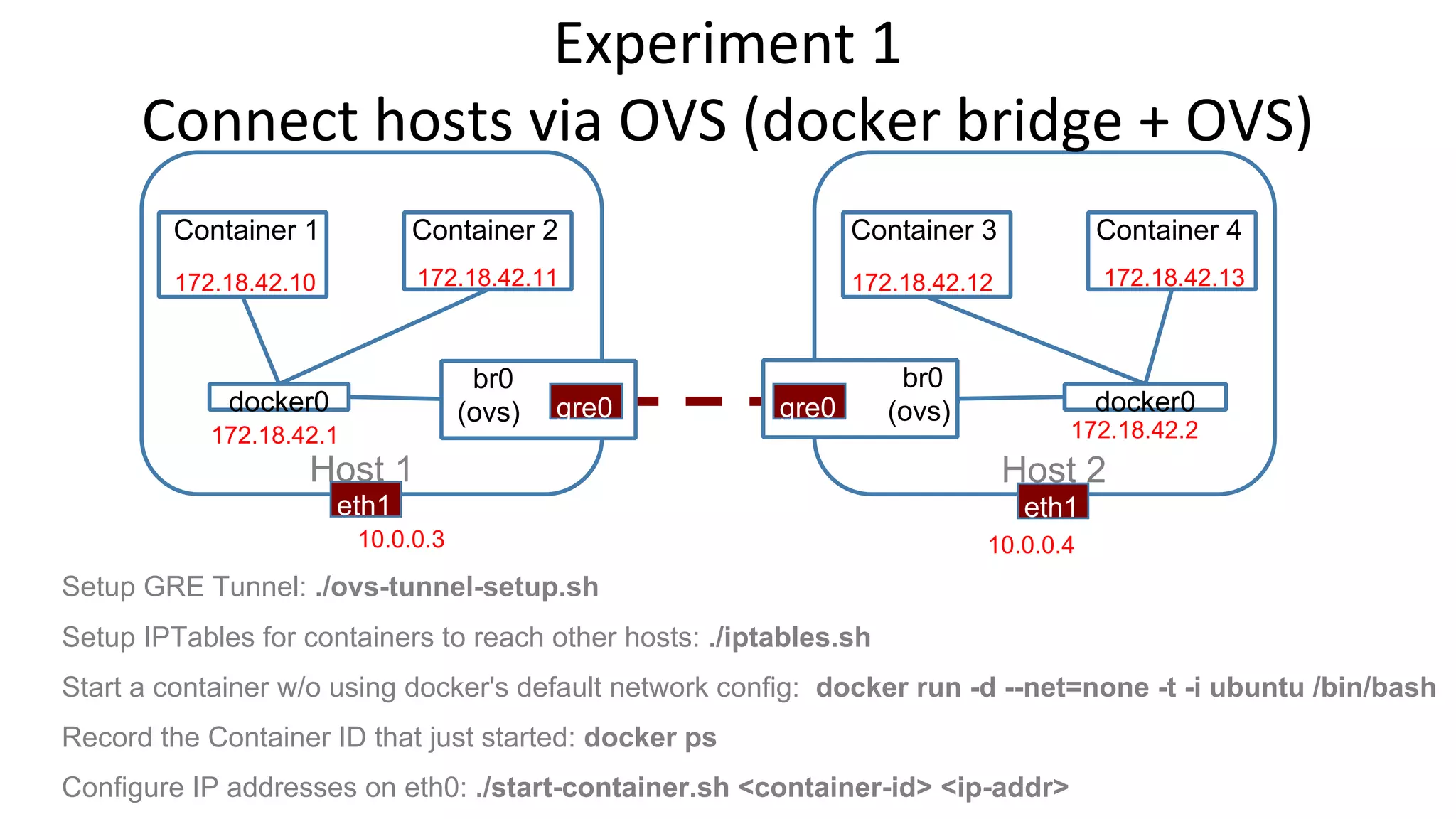
Experiment 1 
Connect hosts via OVS (docker bridge + OVS) 
Container 1 Container 2 
172.18.42.10 172.18.42.11 
docker0 
Container 3 Container 4 
172.18.42.12 172.18.42.13 
docker0 
br0 
(ovs) gre0 
br0 
g r e 0 (ovs) 
172.18.42.1 172.18.42.2 
Host 1 Host 2 
eth1 eth1 
10.0.0.3 10.0.0.4 
Setup GRE Tunnel: ./ovs-tunnel-setup.sh 
Setup IPTables for containers to reach other hosts: ./iptables.sh 
Start a container w/o using docker's default network config: docker run -d --net=none -t -i ubuntu /bin/bash 
Record the Container ID that just started: docker ps 
Configure IP addresses on eth0: ./start-container.sh <container-id> <ip-addr>
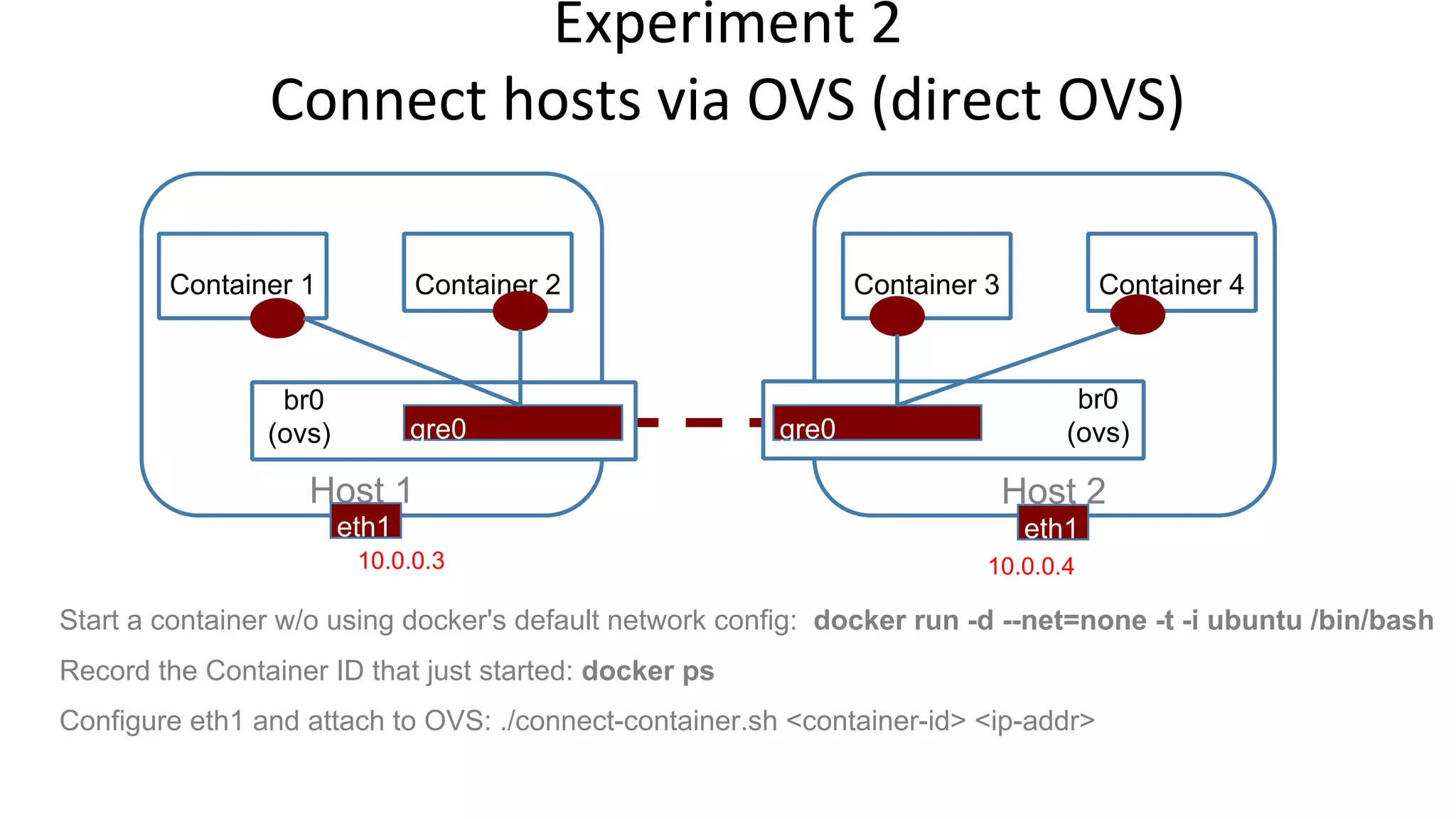
Experiment 2 
Connect hosts via OVS (direct OVS) 
Container 1 Container 2 Container 3 Container 4 
br0 
(ovs) gre0 
br0 
g r e 0 (ovs) 
Host 1 Host 2 
eth1 eth1 
10.0.0.3 10.0.0.4 
Start a container w/o using docker's default network config: docker run -d --net=none -t -i ubuntu /bin/bash 
Record the Container ID that just started: docker ps 
Configure eth1 and attach to OVS: ./connect-container.sh <container-id> <ip-addr>
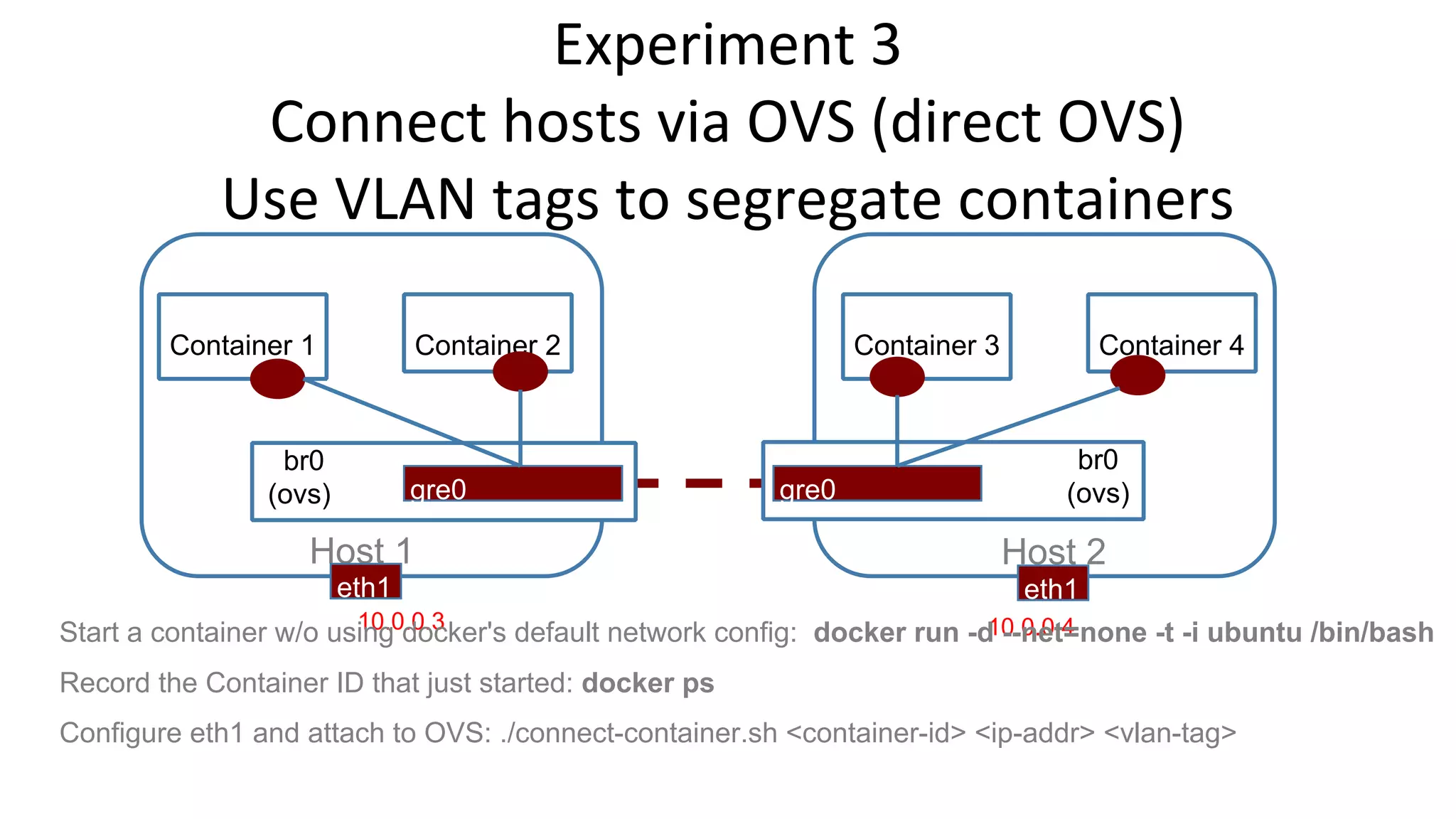
Experiment 3 
Connect hosts via OVS (direct OVS) 
Use VLAN tags to segregate containers 
Container 1 Container 2 Container 3 Container 4 
br0 
(ovs) gre0 
br0 
g r e 0 (ovs) 
Host 1 Host 2 
eth1 eth1 
Start a container w/o usi1n0g.0 d.0o.3cker's default network config: docker run -d1 0--.n0.e0t.4=none -t -i ubuntu /bin/bash 
Record the Container ID that just started: docker ps 
Configure eth1 and attach to OVS: ./connect-container.sh <container-id> <ip-addr> <vlan-tag>
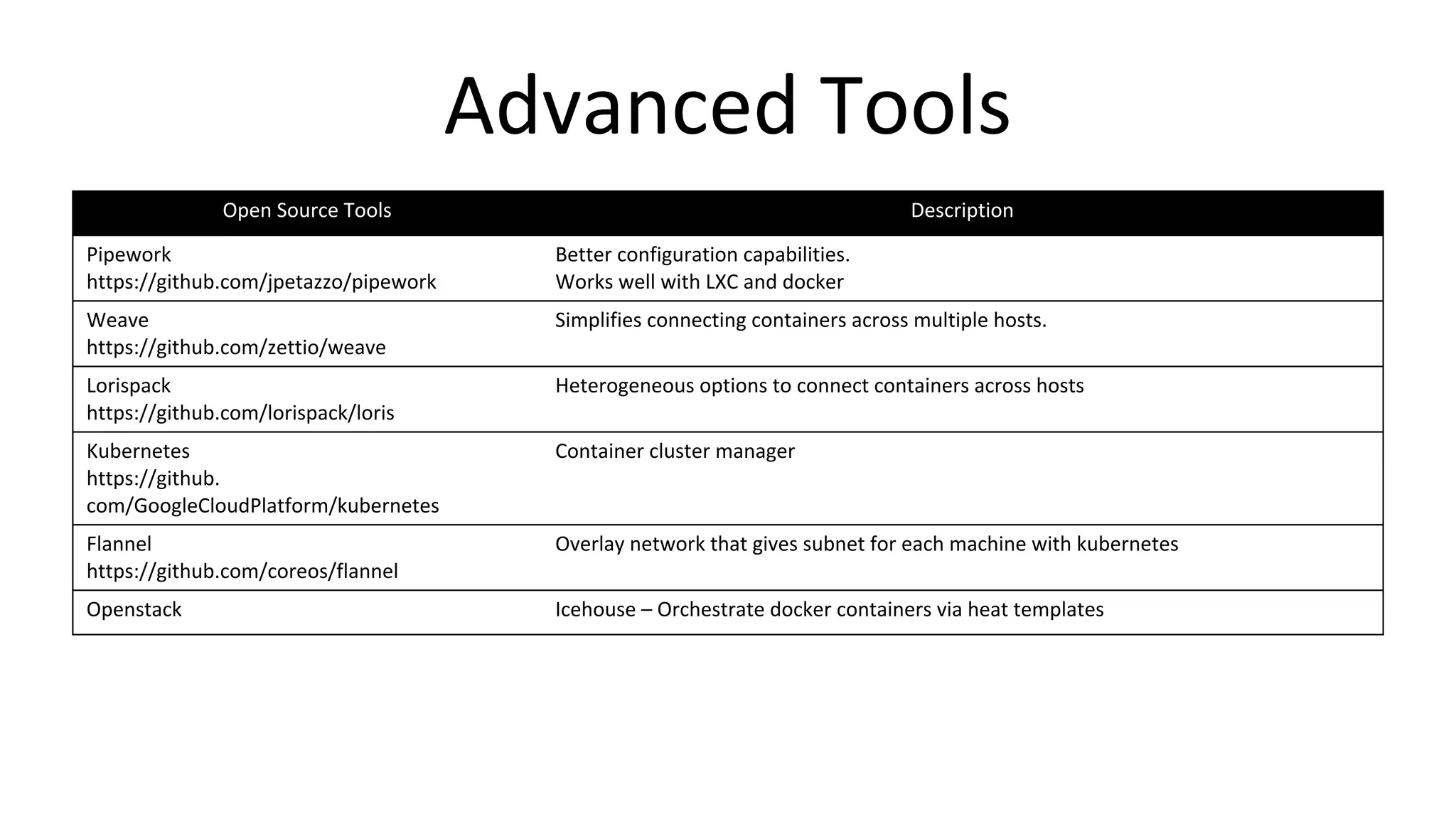
Advanced Tools 
Open Source Tools Description 
Pipework 
https://github.com/jpetazzo/pipework 
Better configuration capabilities. 
Works well with LXC and docker 
Weave 
https://github.com/zettio/weave 
Simplifies connecting containers across multiple hosts. 
Lorispack 
https://github.com/lorispack/loris 
Heterogeneous options to connect containers across hosts 
Kubernetes 
https://github. 
com/GoogleCloudPlatform/kubernetes 
Container cluster manager 
Flannel 
https://github.com/coreos/flannel 
Overlay network that gives subnet for each machine with kubernetes 
Openstack Icehouse – Orchestrate docker containers via heat templates

Docker-OVS

  • 1.
    Docker Networking IntroMeetup Sriram Natarajan Dhananjay Sampath
  • 2.
    Agenda Introduction toContainer Networking Docker + OpenvSwitch demo Hands on Tutorial instructions
  • 3.
    Docker Networking 101 eth0 docker0 172.17.42.1 Container1 Container2 eth0 eth0 vethAQI2T veth01qe
  • 4.
    Docker Bridge options --net=bridge --net=host --net=container:NAME_or_ID --net=none
  • 5.
  • 6.
    Port Mapping eth0 docker0 172.17.42.1:49514 Container1 Container2 eth0:5000 eth0 vethAQI2T veth01qe -P flag
  • 7.
    Internet Communication eth0 docker0 172.17.42.1 internet Container1 Container2 eth0 eth0 vethAQI2T veth01qe ip_forward = 1
  • 8.
    Inter Container Communication Container2 eth0 vethAQI2T veth01qe docker0 Container1 --icc=true
  • 9.
    Linking of Containers ● Name the container using --name option ● Link container using --link name:alias db eth0 vethAQI2T veth01qe docker0 web
  • 10.
    Hands on setupinstructions Containet Source Code: https://bitbucket.org/snrism/containet Instructions: README part of the source code.
  • 11.
    Connecting docker containersin 2 hosts Container 1 Container 2 172.17.0.4 172.17.0.5 docker0 Container 3 Container 4 172.17.0.4 172.17.0.5 docker0 172.17.42.1 172.17.42.1 Host 1 Host 2 eth1 eth1 10.0.0.3 10.0.0.4 IP Address Conflicts…
  • 12.
    Configuring container IPaddresses Container 1 Container 2 172.18.42.10 172.18.42.11 docker0 Container 3 Container 4 172.18.42.12 172.18.42.13 docker0 172.18.42.1 172.18.42.2 Host 1 Host 2 eth1 eth1 10.0.0.3 10.0.0.4 Start a container w/o using docker's default network config: docker run -d --net=none -t -i ubuntu /bin/bash Record the Container ID that just started: docker ps Configure IP addresses on eth0: ./start-container.sh <container-id> <ip-addr>
  • 13.
    Experiment 1 Connecthosts via OVS (docker bridge + OVS) Container 1 Container 2 172.18.42.10 172.18.42.11 docker0 Container 3 Container 4 172.18.42.12 172.18.42.13 docker0 br0 (ovs) gre0 br0 g r e 0 (ovs) 172.18.42.1 172.18.42.2 Host 1 Host 2 eth1 eth1 10.0.0.3 10.0.0.4 Setup GRE Tunnel: ./ovs-tunnel-setup.sh Setup IPTables for containers to reach other hosts: ./iptables.sh Start a container w/o using docker's default network config: docker run -d --net=none -t -i ubuntu /bin/bash Record the Container ID that just started: docker ps Configure IP addresses on eth0: ./start-container.sh <container-id> <ip-addr>
  • 14.
    Experiment 2 Connecthosts via OVS (direct OVS) Container 1 Container 2 Container 3 Container 4 br0 (ovs) gre0 br0 g r e 0 (ovs) Host 1 Host 2 eth1 eth1 10.0.0.3 10.0.0.4 Start a container w/o using docker's default network config: docker run -d --net=none -t -i ubuntu /bin/bash Record the Container ID that just started: docker ps Configure eth1 and attach to OVS: ./connect-container.sh <container-id> <ip-addr>
  • 15.
    Experiment 3 Connecthosts via OVS (direct OVS) Use VLAN tags to segregate containers Container 1 Container 2 Container 3 Container 4 br0 (ovs) gre0 br0 g r e 0 (ovs) Host 1 Host 2 eth1 eth1 Start a container w/o usi1n0g.0 d.0o.3cker's default network config: docker run -d1 0--.n0.e0t.4=none -t -i ubuntu /bin/bash Record the Container ID that just started: docker ps Configure eth1 and attach to OVS: ./connect-container.sh <container-id> <ip-addr> <vlan-tag>
  • 16.
    Advanced Tools OpenSource Tools Description Pipework https://github.com/jpetazzo/pipework Better configuration capabilities. Works well with LXC and docker Weave https://github.com/zettio/weave Simplifies connecting containers across multiple hosts. Lorispack https://github.com/lorispack/loris Heterogeneous options to connect containers across hosts Kubernetes https://github. com/GoogleCloudPlatform/kubernetes Container cluster manager Flannel https://github.com/coreos/flannel Overlay network that gives subnet for each machine with kubernetes Openstack Icehouse – Orchestrate docker containers via heat templates