

Talk Title Here
Author Name, Company
Deep dive in Docker Overlay Networks
Laurent Bernaille
@lbernail
Agenda
• The Docker Overlay Network
– Getting started
– Under the hood
• Building our Overlay
– Starting from scratch
– Making it dynamic
The Docker Overlay
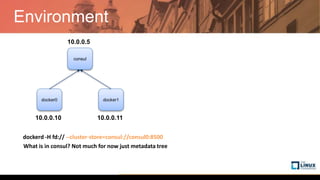
Environment
docker0 docker1
consul
10.0.0.10 10.0.0.11
10.0.0.5
dockerd -H fd:// --cluster-store=consul://consul0:8500 --cluster-advertise=eth0:2376
What is in consul? Not much for now just metadata tree
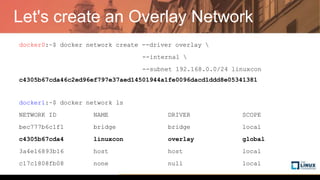
Let's create an Overlay Network
docker0:~$ docker network create --driver overlay 
--internal 
--subnet 192.168.0.0/24 linuxcon
c4305b67cda46c2ed96ef797e37aed14501944a1fe0096dacd1ddd8e05341381
docker1:~$ docker network ls
NETWORK ID NAME DRIVER SCOPE
bec777b6c1f1 bridge bridge local
c4305b67cda4 linuxcon overlay global
3a4e16893b16 host host local
c17c1808fb08 none null local
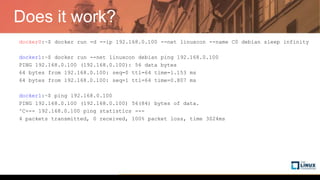
Does it work?
docker0:~$ docker run -d --ip 192.168.0.100 --net linuxcon --name C0 debian sleep infinity
docker1:~$ docker run --net linuxcon debian ping 192.168.0.100
PING 192.168.0.100 (192.168.0.100): 56 data bytes
64 bytes from 192.168.0.100: seq=0 ttl=64 time=1.153 ms
64 bytes from 192.168.0.100: seq=1 ttl=64 time=0.807 ms
docker1:~$ ping 192.168.0.100
PING 192.168.0.100 (192.168.0.100) 56(84) bytes of data.
^C--- 192.168.0.100 ping statistics ---
4 packets transmitted, 0 received, 100% packet loss, time 3024ms
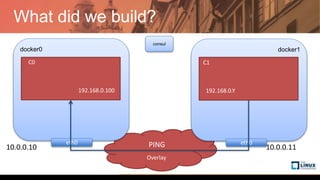
What did we build?
Overlay
consul
docker0
C0
eth0
docker1
C1
eth0PING
192.168.0.100 192.168.0.Y
10.0.0.10 10.0.0.11
The Docker Overlay
Under the hood
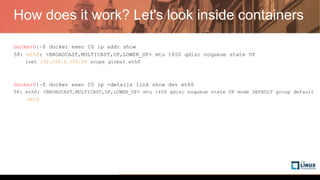
How does it work? Let's look inside containers
docker0:~$ docker exec C0 ip addr show
58: eth0: <BROADCAST,MULTICAST,UP,LOWER_UP> mtu 1450 qdisc noqueue state UP
inet 192.168.0.100/24 scope global eth0
docker0:~$ docker exec C0 ip -details link show dev eth0
58: eth0: <BROADCAST,MULTICAST,UP,LOWER_UP> mtu 1450 qdisc noqueue state UP mode DEFAULT group default
veth
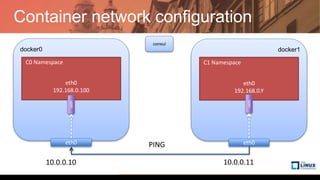
Container network configuration
consul
docker0
eth0
192.168.0.100
C0 Namespace
veth
eth0
docker1
C1 Namespace
veth
eth0
192.168.0.Y
eth0PING
10.0.0.10 10.0.0.11
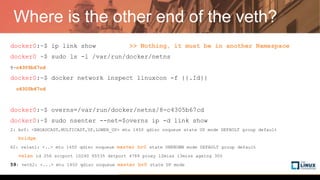
Where is the other end of the veth?
docker0:~$ ip link show >> Nothing, it must be in another Namespace
docker0:~$ sudo ls -l /var/run/docker/netns
8-c4305b67cd
docker0:~$ docker network inspect linuxcon -f {{.Id}}
c4305b67cda46c2ed96ef797e37aed14501944a1fe0096dacd1ddd8e05341381
docker0:~$ overns=/var/run/docker/netns/8-c4305b67cd
docker0:~$ sudo nsenter --net=$overns ip -d link show
2: br0: <BROADCAST,MULTICAST,UP,LOWER_UP> mtu 1450 qdisc noqueue state UP mode DEFAULT group default
bridge
62: vxlan1: <..> mtu 1450 qdisc noqueue master br0 state UNKNOWN mode DEFAULT group default
vxlan id 256 srcport 10240 65535 dstport 4789 proxy l2miss l3miss ageing 300
59: veth2: <...> mtu 1450 qdisc noqueue master br0 state UP mode DEFAULT group default
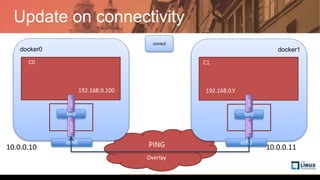
Update on connectivity
Overlay
consul
docker0
C0
eth0
docker1
C1
eth0PING
192.168.0.100 192.168.0.Y
10.0.0.10 10.0.0.11
br0
vxlanveth
br0
vxlanveth
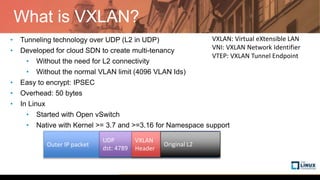
What is VXLAN?
• Tunneling technology over UDP (L2 in UDP)
• Developed for cloud SDN to create multi-tenancy
• Without the need for L2 connectivity
• Without the normal VLAN limit (4096 VLAN Ids)
• Easy to encrypt: IPSEC
• Overhead: 50 bytes
• In Linux
• Started with Open vSwitch
• Native with Kernel >= 3.7 and >=3.16 for Namespace support
VXLAN: Virtual eXtensible LAN
VNI: VXLAN Network Identifier
VTEP: VXLAN Tunnel Endpoint
Outer IP packet
UDP
dst: 4789
VXLAN
Header
Original L2
Let's have a look
docker0:~$ sudo tcpdump -nn -i eth0 "port 4789"
docker1:~$ docker run -it --rm --net linuxcon debian ping 192.168.0.100
PING 192.168.0.100 (192.168.0.100): 56 data bytes
64 bytes from 192.168.0.100: seq=0 ttl=64 time=1.153 ms
64 bytes from 192.168.0.100: seq=1 ttl=64 time=0.807 ms
docker0:~$
13:35:12.796941 IP 10.0.0.11.60916 > 10.0.0.10.4789: VXLAN, flags [I] (0x08), vni 256
IP 192.168.0.2 > 192.168.0.100: ICMP echo request, id 1, seq 0, length 64
13:35:12.797035 IP 10.0.0.10.54953 > 10.0.0.11.4789: VXLAN, flags [I] (0x08), vni 256
IP 192.168.0.100 > 192.168.0.2: ICMP echo reply, id 1, seq 0, length 64
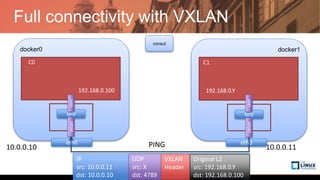
Full connectivity with VXLAN
consul
docker0
C0
eth0
docker1
C1
eth0PING
192.168.0.100 192.168.0.Y
10.0.0.10 10.0.0.11
br0
vxlanveth
br0
vxlanveth
IP
src: 10.0.0.11
dst: 10.0.0.10
UDP
src: X
dst: 4789
VXLAN
Header
Original L2
src: 192.168.0.Y
dst: 192.168.0.100
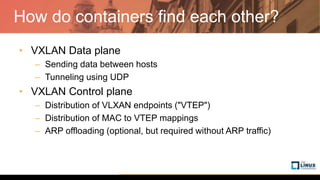
How do containers find each other?
• VXLAN Data plane
– Sending data between hosts
– Tunneling using UDP
• VXLAN Control plane
– Distribution of VLXAN endpoints ("VTEP")
– Distribution of MAC to VTEP mappings
– ARP offloading (optional, but required without ARP traffic)
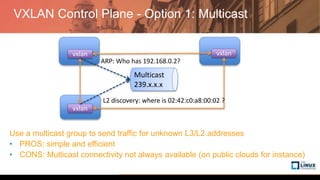
VXLAN Control Plane - Option 1: Multicast
vxlan vxlan
vxlan
Multicast
239.x.x.x
ARP: Who has 192.168.0.2?
L2 discovery: where is 02:42:c0:a8:00:02 ?
Use a multicast group to send traffic for unknown L3/L2 addresses
• PROS: simple and efficient
• CONS: Multicast connectivity not always available (on public clouds for instance)
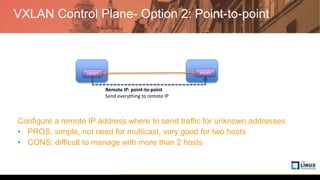
VXLAN Control Plane- Option 2: Point-to-point
vxlan vxlan
Remote IP: point-to-point
Send everything to remote IP
Configure a remote IP address where to send traffic for unknown addresses
• PROS: simple, not need for multicast, very good for two hosts
• CONS: difficult to manage with more than 2 hosts
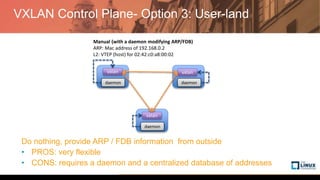
VXLAN Control Plane- Option 3: User-land
vxlan vxlan
daemon daemon
Manual (with a daemon modifying ARP/FDB)
ARP: Mac address of 192.168.0.2
L2: VTEP (host) for 02:42:c0:a8:00:02
vxlan
daemon
Do nothing, provide ARP / FDB information from outside
• PROS: very flexible
• CONS: requires a daemon and a centralized database of addresses
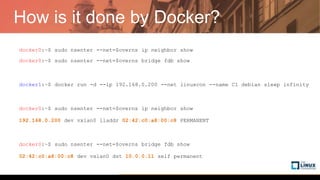
How is it done by Docker?
docker0:~$ sudo nsenter --net=$overns ip neighbor show
docker0:~$ sudo nsenter --net=$overns bridge fdb show
docker1:~$ docker run -d --ip 192.168.0.200 --net linuxcon --name C1 debian sleep infinity
docker0:~$ sudo nsenter --net=$overns ip neighbor show
192.168.0.200 dev vxlan0 lladdr 02:42:c0:a8:00:c8 PERMANENT
docker0:~$ sudo nsenter --net=$overns bridge fdb show
02:42:c0:a8:00:c8 dev vxlan0 dst 10.0.0.11 self permanent
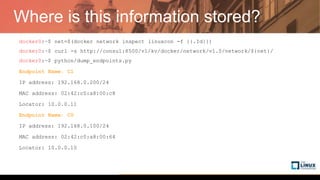
Where is this information stored?
docker0:~$ net=$(docker network inspect linuxcon -f {{.Id}})
docker0:~$ curl -s http://consul:8500/v1/kv/docker/network/v1.0/network/${net}/
docker0:~$ python/dump_endpoints.py
Endpoint Name: C1
IP address: 192.168.0.200/24
MAC address: 02:42:c0:a8:00:c8
Locator: 10.0.0.11
Endpoint Name: C0
IP address: 192.168.0.100/24
MAC address: 02:42:c0:a8:00:64
Locator: 10.0.0.10
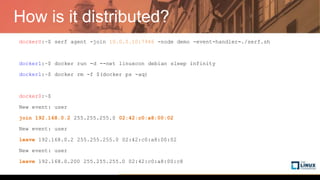
How is it distributed?
docker0:~$ serf agent -join 10.0.0.10:7946 -node demo -event-handler=./serf.sh
docker1:~$ docker run -d --net linuxcon debian sleep infinity
docker1:~$ docker rm -f $(docker ps -aq)
docker0:~$
New event: user
join 192.168.0.2 255.255.255.0 02:42:c0:a8:00:02
New event: user
leave 192.168.0.2 255.255.255.0 02:42:c0:a8:00:02
New event: user
leave 192.168.0.200 255.255.255.0 02:42:c0:a8:00:c8
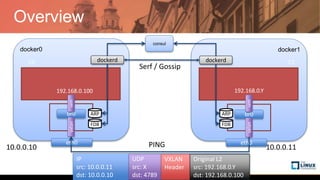
Overview
consul
docker0
C0
eth0
docker1
C1
eth0PING
192.168.0.100 192.168.0.Y
10.0.0.10 10.0.0.11
br0
vxlanveth
br0
vxlanveth
IP
src: 10.0.0.11
dst: 10.0.0.10
UDP
src: X
dst: 4789
VXLAN
Header
Original L2
src: 192.168.0.Y
dst: 192.168.0.100
dockerd dockerd
ARP
FDB
ARP
FDB
Serf / Gossip
Building our Overlay
From scratch
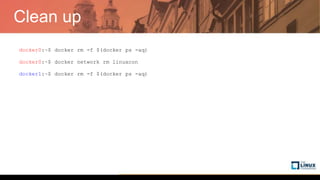
Clean up
docker0:~$ docker rm -f $(docker ps -aq)
docker0:~$ docker network rm linuxcon
docker1:~$ docker rm -f $(docker ps -aq)
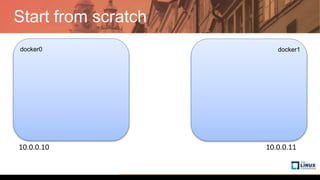
Start from scratch
docker0 docker1
10.0.0.10 10.0.0.11
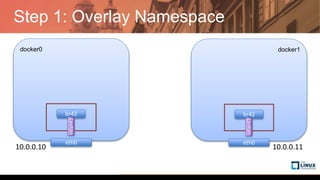
Step 1: Overlay Namespace
docker0 docker1
10.0.0.10 10.0.0.11
br42
vxlan42
eth0
br42
eth0
vxlan42
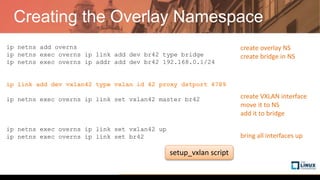
Creating the Overlay Namespace
ip netns add overns
ip netns exec overns ip link add dev br42 type bridge
ip netns exec overns ip addr add dev br42 192.168.0.1/24
ip link add dev vxlan42 type vxlan id 42 proxy dstport 4789
ip link set vxlan1 netns overns
ip netns exec overns ip link set vxlan42 master br42
ip netns exec overns ip link set vxlan42 up
ip netns exec overns ip link set br42 up
create overlay NS
create bridge in NS
create VXLAN interface
move it to NS
add it to bridge
bring all interfaces up
setup_vxlan script
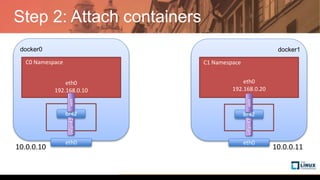
Step 2: Attach containers
docker0 docker1
10.0.0.10 10.0.0.11
br42
vxlan42
eth0
br42
eth0
vxlan42
veth
veth
eth0
192.168.0.20
C0 Namespace C1 Namespace
eth0
192.168.0.10
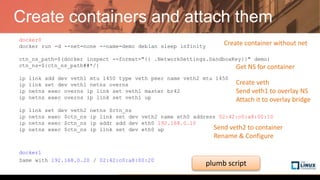
Create containers and attach them
docker0
docker run -d --net=none --name=demo debian sleep infinity
ctn_ns_path=$(docker inspect --format="{{ .NetworkSettings.SandboxKey}}" demo)
ctn_ns=${ctn_ns_path##*/}
ip link add dev veth1 mtu 1450 type veth peer name veth2 mtu 1450
ip link set dev veth1 netns overns
ip netns exec overns ip link set veth1 master br42
ip netns exec overns ip link set veth1 up
ip link set dev veth2 netns $ctn_ns
ip netns exec $ctn_ns ip link set dev veth2 name eth0 address 02:42:c0:a8:00:10
ip netns exec $ctn_ns ip addr add dev eth0 192.168.0.10
ip netns exec $ctn_ns ip link set dev eth0 up
docker1
Same with 192.168.0.20 / 02:42:c0:a8:00:20
Create container without net
Create veth
Send veth1 to overlay NS
Attach it to overlay bridge
Send veth2 to container
Rename & Configure
Get NS for container
plumb script
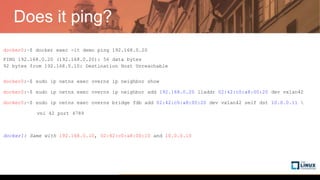
Does it ping?
docker0:~$ docker exec -it demo ping 192.168.0.20
PING 192.168.0.20 (192.168.0.20): 56 data bytes
92 bytes from 192.168.0.10: Destination Host Unreachable
docker0:~$ sudo ip netns exec overns ip neighbor show
docker0:~$ sudo ip netns exec overns ip neighbor add 192.168.0.20 lladdr 02:42:c0:a8:00:20 dev vxlan42
docker0:~$ sudo ip netns exec overns bridge fdb add 02:42:c0:a8:00:20 dev vxlan42 self dst 10.0.0.11 
vni 42 port 4789
docker1: Same with 192.168.0.10, 02:42:c0:a8:00:10 and 10.0.0.10
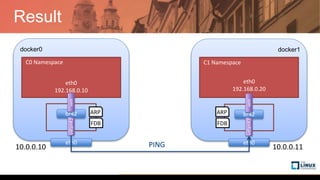
Result
docker0 docker1
10.0.0.10 10.0.0.11
br42
vxlan42
eth0
br42
eth0
vxlan42
veth
veth
eth0
192.168.0.20
C0 Namespace C1 Namespace
eth0
192.168.0.10
PING
FDB
ARP
FDB
ARP
Building our Overlay
Making it dynamic
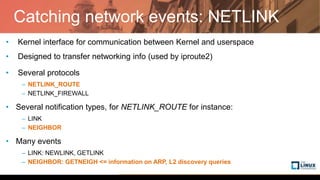
Catching network events: NETLINK
• Kernel interface for communication between Kernel and userspace
• Designed to transfer networking info (used by iproute2)
• Several protocols
– NETLINK_ROUTE
– NETLINK_FIREWALL
• Several notification types, for NETLINK_ROUTE for instance:
– LINK
– NEIGHBOR
• Many events
– LINK: NEWLINK, GETLINK
– NEIGHBOR: GETNEIGH <= information on ARP, L2 discovery queries
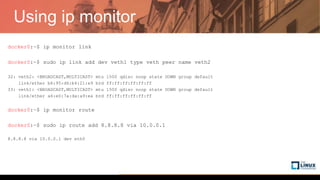
Using ip monitor
docker0:~$ ip monitor link
docker0:~$ sudo ip link add dev veth1 type veth peer name veth2
32: veth2: <BROADCAST,MULTICAST> mtu 1500 qdisc noop state DOWN group default
link/ether b6:95:d6:b4:21:e9 brd ff:ff:ff:ff:ff:ff
33: veth1: <BROADCAST,MULTICAST> mtu 1500 qdisc noop state DOWN group default
link/ether a6:e0:7a:da:a9:ea brd ff:ff:ff:ff:ff:ff
docker0:~$ ip monitor route
docker0:~$ sudo ip route add 8.8.8.8 via 10.0.0.1
8.8.8.8 via 10.0.0.1 dev eth0
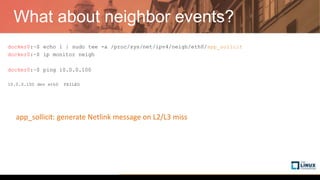
What about neighbor events?
docker0:~$ echo 1 | sudo tee -a /proc/sys/net/ipv4/neigh/eth0/app_solicit
docker0:~$ ip monitor neigh
docker0:~$ ping 10.0.0.100
10.0.0.100 dev eth0 FAILED
app_sollicit: generate Netlink message on L2/L3 miss
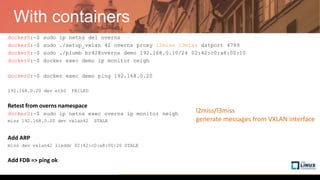
With containers
docker0:~$ sudo ip netns del overns
docker0:~$ sudo ./setup_vxlan 42 overns proxy l2miss l3miss dstport 4789
docker0:~$ sudo ./plumb br42@overns demo 192.168.0.10/24 02:42:c0:a8:00:10
docker0:~$ docker exec demo ip monitor neigh
docker0:~$ docker exec demo ping 192.168.0.20
192.168.0.20 dev eth0 FAILED
Retest from overns namespace
docker0:~$ sudo ip netns exec overns ip monitor neigh
miss 192.168.0.20 dev vxlan42 STALE
Add ARP
miss dev vxlan42 lladdr 02:42:c0:a8:00:20 STALE
Add FDB => ping ok
l2miss/l3miss
generate messages from VXLAN interface
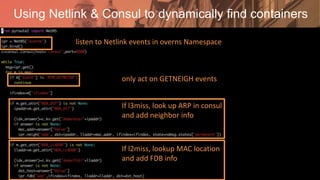
Using Netlink & Consul to dynamically find containers
listen to Netlink events in overns Namespace
only act on GETNEIGH events
If l3miss, look up ARP in consul
and add neighbor info
If l2miss, lookup MAC location
and add FDB info
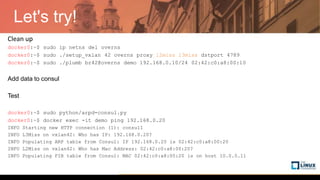
Let's try!
Clean up
docker0:~$ sudo ip netns del overns
docker0:~$ sudo ./setup_vxlan 42 overns proxy l2miss l3miss dstport 4789
docker0:~$ sudo ./plumb br42@overns demo 192.168.0.10/24 02:42:c0:a8:00:10
Add data to consul
Test
docker0:~$ sudo python/arpd-consul.py
docker0:~$ docker exec -it demo ping 192.168.0.20
INFO Starting new HTTP connection (1): consul1
INFO L3Miss on vxlan42: Who has IP: 192.168.0.20?
INFO Populating ARP table from Consul: IP 192.168.0.20 is 02:42:c0:a8:00:20
INFO L2Miss on vxlan42: Who has Mac Address: 02:42:c0:a8:00:20?
INFO Populating FIB table from Consul: MAC 02:42:c0:a8:00:20 is on host 10.0.0.11
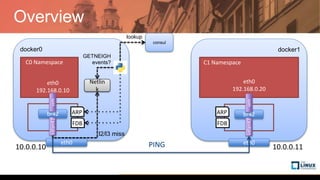
Overview
docker0 docker1
10.0.0.10 10.0.0.11
br42
vxlan42
eth0
br42
eth0
vxlan42
veth
veth
eth0
192.168.0.20
C0 Namespace C1 Namespace
eth0
192.168.0.10
PING
FDB
ARP
FDB
ARP
consul
Netlin
k
l2/l3 miss
GETNEIGH
events?
lookup
Thank you! Questions?
• Commands / code on github
https://github.com/lbernail/dockercon2017
• Recorded at Dockercon Austin (a few improvements today)
• Detailled blog post
http://techblog.d2-si.eu/2017/04/25/deep-dive-into-docker-overlay-networks-part-1.html
• Do not hesitate to ping me on twitter
@lbernail
Deep Dive in Docker Overlay Networks

Deep Dive in Docker Overlay Networks

  • 1.
    Talk Title Here AuthorName, Company Deep dive in Docker Overlay Networks Laurent Bernaille @lbernail
  • 2.
    Agenda • The DockerOverlay Network – Getting started – Under the hood • Building our Overlay – Starting from scratch – Making it dynamic
  • 3.
  • 4.
    Environment docker0 docker1 consul 10.0.0.10 10.0.0.11 10.0.0.5 dockerd-H fd:// --cluster-store=consul://consul0:8500 --cluster-advertise=eth0:2376 What is in consul? Not much for now just metadata tree
  • 5.
    Let's create anOverlay Network docker0:~$ docker network create --driver overlay --internal --subnet 192.168.0.0/24 linuxcon c4305b67cda46c2ed96ef797e37aed14501944a1fe0096dacd1ddd8e05341381 docker1:~$ docker network ls NETWORK ID NAME DRIVER SCOPE bec777b6c1f1 bridge bridge local c4305b67cda4 linuxcon overlay global 3a4e16893b16 host host local c17c1808fb08 none null local
  • 6.
    Does it work? docker0:~$docker run -d --ip 192.168.0.100 --net linuxcon --name C0 debian sleep infinity docker1:~$ docker run --net linuxcon debian ping 192.168.0.100 PING 192.168.0.100 (192.168.0.100): 56 data bytes 64 bytes from 192.168.0.100: seq=0 ttl=64 time=1.153 ms 64 bytes from 192.168.0.100: seq=1 ttl=64 time=0.807 ms docker1:~$ ping 192.168.0.100 PING 192.168.0.100 (192.168.0.100) 56(84) bytes of data. ^C--- 192.168.0.100 ping statistics --- 4 packets transmitted, 0 received, 100% packet loss, time 3024ms
  • 7.
    What did webuild? Overlay consul docker0 C0 eth0 docker1 C1 eth0PING 192.168.0.100 192.168.0.Y 10.0.0.10 10.0.0.11
  • 8.
  • 9.
    How does itwork? Let's look inside containers docker0:~$ docker exec C0 ip addr show 58: eth0: <BROADCAST,MULTICAST,UP,LOWER_UP> mtu 1450 qdisc noqueue state UP inet 192.168.0.100/24 scope global eth0 docker0:~$ docker exec C0 ip -details link show dev eth0 58: eth0: <BROADCAST,MULTICAST,UP,LOWER_UP> mtu 1450 qdisc noqueue state UP mode DEFAULT group default veth
  • 10.
    Container network configuration consul docker0 eth0 192.168.0.100 C0Namespace veth eth0 docker1 C1 Namespace veth eth0 192.168.0.Y eth0PING 10.0.0.10 10.0.0.11
  • 11.
    Where is theother end of the veth? docker0:~$ ip link show >> Nothing, it must be in another Namespace docker0:~$ sudo ls -l /var/run/docker/netns 8-c4305b67cd docker0:~$ docker network inspect linuxcon -f {{.Id}} c4305b67cda46c2ed96ef797e37aed14501944a1fe0096dacd1ddd8e05341381 docker0:~$ overns=/var/run/docker/netns/8-c4305b67cd docker0:~$ sudo nsenter --net=$overns ip -d link show 2: br0: <BROADCAST,MULTICAST,UP,LOWER_UP> mtu 1450 qdisc noqueue state UP mode DEFAULT group default bridge 62: vxlan1: <..> mtu 1450 qdisc noqueue master br0 state UNKNOWN mode DEFAULT group default vxlan id 256 srcport 10240 65535 dstport 4789 proxy l2miss l3miss ageing 300 59: veth2: <...> mtu 1450 qdisc noqueue master br0 state UP mode DEFAULT group default
  • 12.
    Update on connectivity Overlay consul docker0 C0 eth0 docker1 C1 eth0PING 192.168.0.100192.168.0.Y 10.0.0.10 10.0.0.11 br0 vxlanveth br0 vxlanveth
  • 13.
    What is VXLAN? •Tunneling technology over UDP (L2 in UDP) • Developed for cloud SDN to create multi-tenancy • Without the need for L2 connectivity • Without the normal VLAN limit (4096 VLAN Ids) • Easy to encrypt: IPSEC • Overhead: 50 bytes • In Linux • Started with Open vSwitch • Native with Kernel >= 3.7 and >=3.16 for Namespace support VXLAN: Virtual eXtensible LAN VNI: VXLAN Network Identifier VTEP: VXLAN Tunnel Endpoint Outer IP packet UDP dst: 4789 VXLAN Header Original L2
  • 14.
    Let's have alook docker0:~$ sudo tcpdump -nn -i eth0 "port 4789" docker1:~$ docker run -it --rm --net linuxcon debian ping 192.168.0.100 PING 192.168.0.100 (192.168.0.100): 56 data bytes 64 bytes from 192.168.0.100: seq=0 ttl=64 time=1.153 ms 64 bytes from 192.168.0.100: seq=1 ttl=64 time=0.807 ms docker0:~$ 13:35:12.796941 IP 10.0.0.11.60916 > 10.0.0.10.4789: VXLAN, flags [I] (0x08), vni 256 IP 192.168.0.2 > 192.168.0.100: ICMP echo request, id 1, seq 0, length 64 13:35:12.797035 IP 10.0.0.10.54953 > 10.0.0.11.4789: VXLAN, flags [I] (0x08), vni 256 IP 192.168.0.100 > 192.168.0.2: ICMP echo reply, id 1, seq 0, length 64
  • 15.
    Full connectivity withVXLAN consul docker0 C0 eth0 docker1 C1 eth0PING 192.168.0.100 192.168.0.Y 10.0.0.10 10.0.0.11 br0 vxlanveth br0 vxlanveth IP src: 10.0.0.11 dst: 10.0.0.10 UDP src: X dst: 4789 VXLAN Header Original L2 src: 192.168.0.Y dst: 192.168.0.100
  • 16.
    How do containersfind each other? • VXLAN Data plane – Sending data between hosts – Tunneling using UDP • VXLAN Control plane – Distribution of VLXAN endpoints ("VTEP") – Distribution of MAC to VTEP mappings – ARP offloading (optional, but required without ARP traffic)
  • 17.
    VXLAN Control Plane- Option 1: Multicast vxlan vxlan vxlan Multicast 239.x.x.x ARP: Who has 192.168.0.2? L2 discovery: where is 02:42:c0:a8:00:02 ? Use a multicast group to send traffic for unknown L3/L2 addresses • PROS: simple and efficient • CONS: Multicast connectivity not always available (on public clouds for instance)
  • 18.
    VXLAN Control Plane-Option 2: Point-to-point vxlan vxlan Remote IP: point-to-point Send everything to remote IP Configure a remote IP address where to send traffic for unknown addresses • PROS: simple, not need for multicast, very good for two hosts • CONS: difficult to manage with more than 2 hosts
  • 19.
    VXLAN Control Plane-Option 3: User-land vxlan vxlan daemon daemon Manual (with a daemon modifying ARP/FDB) ARP: Mac address of 192.168.0.2 L2: VTEP (host) for 02:42:c0:a8:00:02 vxlan daemon Do nothing, provide ARP / FDB information from outside • PROS: very flexible • CONS: requires a daemon and a centralized database of addresses
  • 20.
    How is itdone by Docker? docker0:~$ sudo nsenter --net=$overns ip neighbor show docker0:~$ sudo nsenter --net=$overns bridge fdb show docker1:~$ docker run -d --ip 192.168.0.200 --net linuxcon --name C1 debian sleep infinity docker0:~$ sudo nsenter --net=$overns ip neighbor show 192.168.0.200 dev vxlan0 lladdr 02:42:c0:a8:00:c8 PERMANENT docker0:~$ sudo nsenter --net=$overns bridge fdb show 02:42:c0:a8:00:c8 dev vxlan0 dst 10.0.0.11 self permanent
  • 21.
    Where is thisinformation stored? docker0:~$ net=$(docker network inspect linuxcon -f {{.Id}}) docker0:~$ curl -s http://consul:8500/v1/kv/docker/network/v1.0/network/${net}/ docker0:~$ python/dump_endpoints.py Endpoint Name: C1 IP address: 192.168.0.200/24 MAC address: 02:42:c0:a8:00:c8 Locator: 10.0.0.11 Endpoint Name: C0 IP address: 192.168.0.100/24 MAC address: 02:42:c0:a8:00:64 Locator: 10.0.0.10
  • 22.
    How is itdistributed? docker0:~$ serf agent -join 10.0.0.10:7946 -node demo -event-handler=./serf.sh docker1:~$ docker run -d --net linuxcon debian sleep infinity docker1:~$ docker rm -f $(docker ps -aq) docker0:~$ New event: user join 192.168.0.2 255.255.255.0 02:42:c0:a8:00:02 New event: user leave 192.168.0.2 255.255.255.0 02:42:c0:a8:00:02 New event: user leave 192.168.0.200 255.255.255.0 02:42:c0:a8:00:c8
  • 23.
    Overview consul docker0 C0 eth0 docker1 C1 eth0PING 192.168.0.100 192.168.0.Y 10.0.0.10 10.0.0.11 br0 vxlanveth br0 vxlanveth IP src:10.0.0.11 dst: 10.0.0.10 UDP src: X dst: 4789 VXLAN Header Original L2 src: 192.168.0.Y dst: 192.168.0.100 dockerd dockerd ARP FDB ARP FDB Serf / Gossip
  • 24.
  • 25.
    Clean up docker0:~$ dockerrm -f $(docker ps -aq) docker0:~$ docker network rm linuxcon docker1:~$ docker rm -f $(docker ps -aq)
  • 26.
    Start from scratch docker0docker1 10.0.0.10 10.0.0.11
  • 27.
    Step 1: OverlayNamespace docker0 docker1 10.0.0.10 10.0.0.11 br42 vxlan42 eth0 br42 eth0 vxlan42
  • 28.
    Creating the OverlayNamespace ip netns add overns ip netns exec overns ip link add dev br42 type bridge ip netns exec overns ip addr add dev br42 192.168.0.1/24 ip link add dev vxlan42 type vxlan id 42 proxy dstport 4789 ip link set vxlan1 netns overns ip netns exec overns ip link set vxlan42 master br42 ip netns exec overns ip link set vxlan42 up ip netns exec overns ip link set br42 up create overlay NS create bridge in NS create VXLAN interface move it to NS add it to bridge bring all interfaces up setup_vxlan script
  • 29.
    Step 2: Attachcontainers docker0 docker1 10.0.0.10 10.0.0.11 br42 vxlan42 eth0 br42 eth0 vxlan42 veth veth eth0 192.168.0.20 C0 Namespace C1 Namespace eth0 192.168.0.10
  • 30.
    Create containers andattach them docker0 docker run -d --net=none --name=demo debian sleep infinity ctn_ns_path=$(docker inspect --format="{{ .NetworkSettings.SandboxKey}}" demo) ctn_ns=${ctn_ns_path##*/} ip link add dev veth1 mtu 1450 type veth peer name veth2 mtu 1450 ip link set dev veth1 netns overns ip netns exec overns ip link set veth1 master br42 ip netns exec overns ip link set veth1 up ip link set dev veth2 netns $ctn_ns ip netns exec $ctn_ns ip link set dev veth2 name eth0 address 02:42:c0:a8:00:10 ip netns exec $ctn_ns ip addr add dev eth0 192.168.0.10 ip netns exec $ctn_ns ip link set dev eth0 up docker1 Same with 192.168.0.20 / 02:42:c0:a8:00:20 Create container without net Create veth Send veth1 to overlay NS Attach it to overlay bridge Send veth2 to container Rename & Configure Get NS for container plumb script
  • 31.
    Does it ping? docker0:~$docker exec -it demo ping 192.168.0.20 PING 192.168.0.20 (192.168.0.20): 56 data bytes 92 bytes from 192.168.0.10: Destination Host Unreachable docker0:~$ sudo ip netns exec overns ip neighbor show docker0:~$ sudo ip netns exec overns ip neighbor add 192.168.0.20 lladdr 02:42:c0:a8:00:20 dev vxlan42 docker0:~$ sudo ip netns exec overns bridge fdb add 02:42:c0:a8:00:20 dev vxlan42 self dst 10.0.0.11 vni 42 port 4789 docker1: Same with 192.168.0.10, 02:42:c0:a8:00:10 and 10.0.0.10
  • 32.
  • 33.
  • 34.
    Catching network events:NETLINK • Kernel interface for communication between Kernel and userspace • Designed to transfer networking info (used by iproute2) • Several protocols – NETLINK_ROUTE – NETLINK_FIREWALL • Several notification types, for NETLINK_ROUTE for instance: – LINK – NEIGHBOR • Many events – LINK: NEWLINK, GETLINK – NEIGHBOR: GETNEIGH <= information on ARP, L2 discovery queries
  • 35.
    Using ip monitor docker0:~$ip monitor link docker0:~$ sudo ip link add dev veth1 type veth peer name veth2 32: veth2: <BROADCAST,MULTICAST> mtu 1500 qdisc noop state DOWN group default link/ether b6:95:d6:b4:21:e9 brd ff:ff:ff:ff:ff:ff 33: veth1: <BROADCAST,MULTICAST> mtu 1500 qdisc noop state DOWN group default link/ether a6:e0:7a:da:a9:ea brd ff:ff:ff:ff:ff:ff docker0:~$ ip monitor route docker0:~$ sudo ip route add 8.8.8.8 via 10.0.0.1 8.8.8.8 via 10.0.0.1 dev eth0
  • 36.
    What about neighborevents? docker0:~$ echo 1 | sudo tee -a /proc/sys/net/ipv4/neigh/eth0/app_solicit docker0:~$ ip monitor neigh docker0:~$ ping 10.0.0.100 10.0.0.100 dev eth0 FAILED app_sollicit: generate Netlink message on L2/L3 miss
  • 37.
    With containers docker0:~$ sudoip netns del overns docker0:~$ sudo ./setup_vxlan 42 overns proxy l2miss l3miss dstport 4789 docker0:~$ sudo ./plumb br42@overns demo 192.168.0.10/24 02:42:c0:a8:00:10 docker0:~$ docker exec demo ip monitor neigh docker0:~$ docker exec demo ping 192.168.0.20 192.168.0.20 dev eth0 FAILED Retest from overns namespace docker0:~$ sudo ip netns exec overns ip monitor neigh miss 192.168.0.20 dev vxlan42 STALE Add ARP miss dev vxlan42 lladdr 02:42:c0:a8:00:20 STALE Add FDB => ping ok l2miss/l3miss generate messages from VXLAN interface
  • 38.
    Using Netlink &Consul to dynamically find containers listen to Netlink events in overns Namespace only act on GETNEIGH events If l3miss, look up ARP in consul and add neighbor info If l2miss, lookup MAC location and add FDB info
  • 39.
    Let's try! Clean up docker0:~$sudo ip netns del overns docker0:~$ sudo ./setup_vxlan 42 overns proxy l2miss l3miss dstport 4789 docker0:~$ sudo ./plumb br42@overns demo 192.168.0.10/24 02:42:c0:a8:00:10 Add data to consul Test docker0:~$ sudo python/arpd-consul.py docker0:~$ docker exec -it demo ping 192.168.0.20 INFO Starting new HTTP connection (1): consul1 INFO L3Miss on vxlan42: Who has IP: 192.168.0.20? INFO Populating ARP table from Consul: IP 192.168.0.20 is 02:42:c0:a8:00:20 INFO L2Miss on vxlan42: Who has Mac Address: 02:42:c0:a8:00:20? INFO Populating FIB table from Consul: MAC 02:42:c0:a8:00:20 is on host 10.0.0.11
  • 40.
    Overview docker0 docker1 10.0.0.10 10.0.0.11 br42 vxlan42 eth0 br42 eth0 vxlan42 veth veth eth0 192.168.0.20 C0Namespace C1 Namespace eth0 192.168.0.10 PING FDB ARP FDB ARP consul Netlin k l2/l3 miss GETNEIGH events? lookup
  • 41.
    Thank you! Questions? •Commands / code on github https://github.com/lbernail/dockercon2017 • Recorded at Dockercon Austin (a few improvements today) • Detailled blog post http://techblog.d2-si.eu/2017/04/25/deep-dive-into-docker-overlay-networks-part-1.html • Do not hesitate to ping me on twitter @lbernail