DOCKER
INTRODUCTION
DATA SCIENCE FOCUSED
Agenda
 Containers Basics
 Example
 Definitions
 History of containers
 Why Docker?
 How Docker containers work
 Namespaces
 cGroups
 Union file system
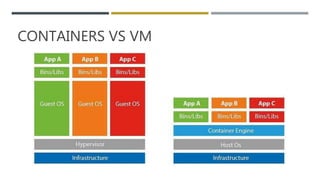
 Containers vs. VMs
 Docker tooling/Architecture
 Dockerfile
 Image / Registry
 Containers
 Workflow
 simple ML model behind a flask API with python
 write effective docker files
 distribute containers
 Data-science tooling
 Running a Jupyter Notebook
 Load and Run a Database
 Advanced Docker concepts
 Docker compose
 DevOps workflow
 Continuous Delivery
 Kubernetes
Training Setup
 3 VM on AWS cloud - Ubuntu 18:04
 For exercises:
 https://docs.docker.com/docker-for-windows/
 Repository
 https://github.com/kirancodify/docker-for-data-science
Container Basics
 Example Demo
Container Basics - Definitions
 Docker defines containers as "A standardized unit of software"
 Amazon defines containers as "Containers provide a standard way to package your application's code, configurations, and
dependencies into a single object."
 Google defines containers as "Containers offer a logical packaging mechanism in which applications can be abstracted
from the environment in which they actually run."
 Developers.com defines containers as "Container technology is a way to create a virtual environment by using an isolated
process on a host computer. The isolated process, the container, has its own set of file system resources and subordinate
processes."
Container Basics - Intent
 Resource Utilization - CPU, Memory were expensive resources
 Multi user operating system - People on same hardware had to have file process isolation
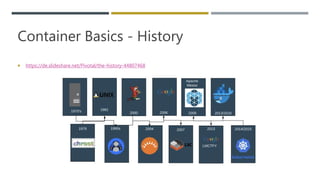
Container Basics - History
 https://de.slideshare.net/Pivotal/the-history-44807468
Container
Basics – Why
Docker
 Docker is the most popular brand
in the Container space!!
 Consistent Runtime Environment
Container
Basics – Why
Docker
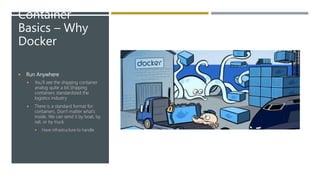
 Run Anywhere
 You’ll see the shipping container
analog quite a bit.Shipping
containers standardized the
logistics industry
 There is a standard format for
containers. Don’t matter what’s
inside. We can send it by boat, by
rail, or by truck.
 Have infrastructure to handle
Container
Basics – Why
Docker
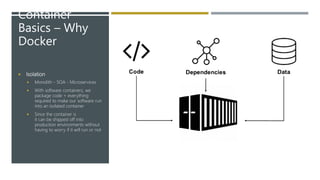
 Isolation
 Monolith - SOA - Microservices
 With software containers, we
package code + everything
required to make our software run
into an isolated container
 Since the container is
it can be shipped off into
production environments without
having to worry if it will run or not
Container Basics – Why Docker
 Efficient Resource Utilization
 In this paradigm, each container is given a fixed resource configuration (CPU, RAM, # of threads, etc) and scaling the application requires
scaling just the number of containers instead of the individual resource primitives. This provides a much easier abstraction for engineers
when applications need to be scaled up or down.
 Microservice Architecture
 Containers also serve as a great tool to implement micro service architecture, where each microservice is just a set of co-operating
containers. Makes scalable application. Flexible for use.
 Virtualization
 Containers provide the system with a virtualized environment that can hide or limit the visibility of the physical devices or system's
configuration underneath it.
Container Basics – How Docker Works
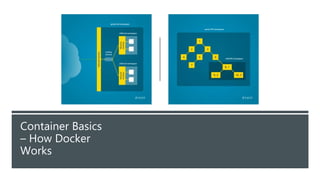
 Namespaces
 Namespaces are commonly structured as hierarchies to allow reuse of names in different contexts
 https://www.toptal.com/linux/separation-anxiety-isolating-your-system-with-linux-namespaces
 The pid namespace: Process isolation (PID: Process ID).
 The net namespace: Managing network interfaces (NET: Networking).
 The ipc namespace: Managing access to IPC resources (IPC: InterProcess Communication).
 The mnt namespace: Managing filesystem mount points (MNT: Mount).
 The uts namespace: Isolating kernel and version identifiers. (UTS: Unix Timesharing System).
 The user namespace: Root access for isolated process
Container Basics
– How Docker
Works
Container Basics – How Docker Works
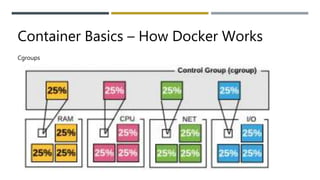
Cgroups
Container Basics – How Docker Works
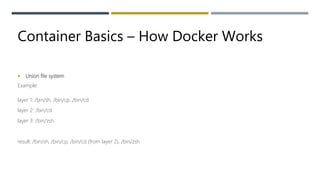
 Union file system
Example:
layer 1: /bin/sh, /bin/cp, /bin/cd
layer 2: /bin/cd
layer 3: /bin/zsh
result: /bin/sh, /bin/cp, /bin/cd (from layer 2), /bin/zsh
CONTAINERS VS VM
DOCKER TOOLING/ARCHITECTURE
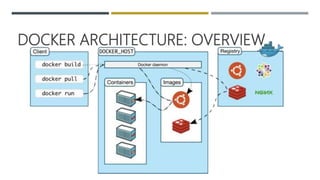
DOCKER ARCHITECTURE: OVERVIEW
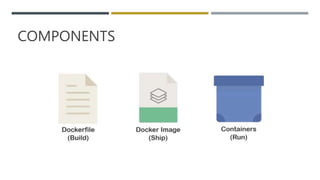
COMPONENTS
DOCKER FILE
 Sequential set of instruction intended to be processed by Docker
daemon/engine
 Primary way of interacting with docker
 Order of sequence is important
 Each instruction creates a layer
 Layers are cached and reused by Docker
 Name the file Dockerfile with no extensions
Show Dockerfile demo
DOCKER IMAGE
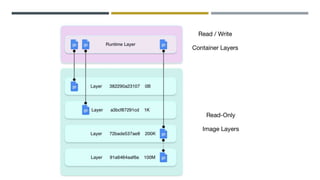
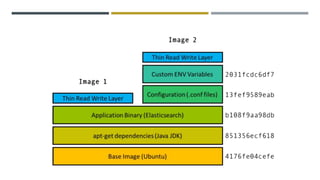
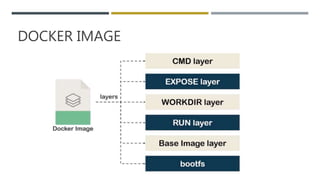
 A Docker image is made up of multiple layers.
 A user composes each Docker image to include system libraries,
tools, and other files and dependencies for the executable code.
 Image developers can reuse static image layers for different
projects. Reuse saves time, because a user does not have to create
everything in an image.
 Most Docker images start with a base image, although a user can
build one entirely from scratch, if desired.
 Each image has one readable/writable top layer over static layers.
DOCKER IMAGE
DOCKER IMAGE
DOCKER
CONTAINERS
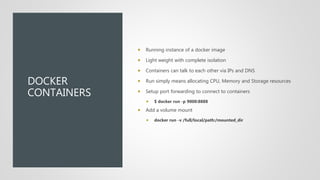
 Running instance of a docker image
 Light weight with complete isolation
 Containers can talk to each other via IPs and DNS
 Run simply means allocating CPU, Memory and Storage resources
 Setup port forwarding to connect to containers
 $ docker run -p 9000:8888
 Add a volume mount
 docker run -v /full/local/path:/mounted_dir
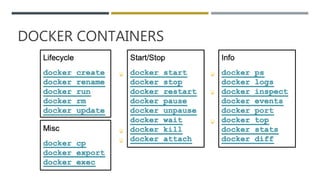
DOCKER CONTAINERS
EXERCISE DOCKER BASICS AND DOCKER
FILE
WORKFLOW
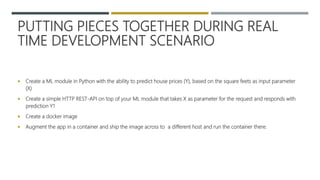
PUTTING PIECES TOGETHER DURING REAL
TIME DEVELOPMENT SCENARIO
 Create a ML module in Python with the ability to predict house prices (Y), based on the square feets as input parameter
(X)
 Create a simple HTTP REST-API on top of your ML module that takes X as parameter for the request and responds with
prediction Y1
 Create a docker image
 Augment the app in a container and ship the image across to a different host and run the container there.
BEST PRACTICES
 Why do I care how many layers I have?
 More layers mean a larger image. The larger the image, the longer that it takes to both build, and push and pull from a registry.
 Smaller images mean faster builds and deploys. This also means a smaller attack surface.
 Sharing is caring.
 Use shared base images where possible
 Limit the data written to the container layer
 Chain RUN statements
 Prevent cache misses at build for as long as possible
BEST
PRACTICES
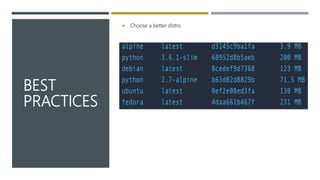
 Choose a better distro
EXERCISE : FORM SMALL GROUPS AND
BRAINSTORM HOW DOCKER WILL FIT INTO
YOUR DAY TO DAY WORKFLOW.
DATA SCIENCE TOOLING
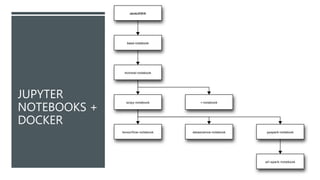
JUPYTER NOTEBOOKS + DOCKER
 Ready-to-run Docker images containing Jupyter applications https://jupyter-docker-
stacks.readthedocs.io/en/latest/using/selecting.html
 https://github.com/jupyter/docker-stacks
JUPYTER
NOTEBOOKS +
DOCKER
DATA ACCESS USING DATA SCIENCE-
NOTEBOOK
 Demo Multiple containers.
 Write read data to redis db container
 Read data from Postgres container
ADVANCED DOCKER CONCEPTS
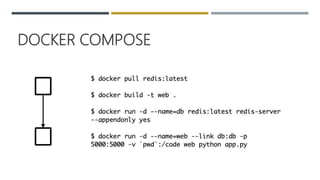
DOCKER COMPOSE
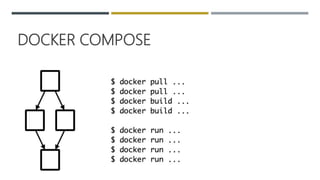
DOCKER COMPOSE
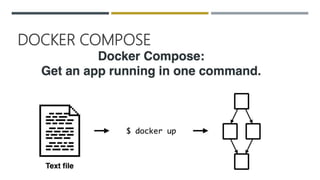
DOCKER COMPOSE
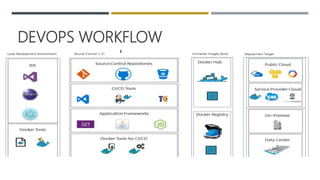
DEVOPS WORKFLOW
 At its essence, DevOps is a culture, a movement, a philosophy.
 Tearing down barriers
 Between teams
 Mid-process
 Enable the smart people to make smart decisions
 Assigning ownership, accountability, responsibility to the people doing the work, aka “you build it, you run it”
 Reducing responsibility to the most directly involved individuals
 Increase visibility to the big picture and the results of work being done
DEVOPS WORKFLOW
 Practices
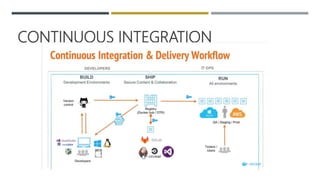
 Continuous Integration
 Application testing/QA work applied throughout the development
 Continuous Delivery
 Automated deployment capabilities of code across environments
 Infrastructure as Code
 No hand carved infrastructure
 Self-service environments
 Remove procurement blockers for basic needs
 Microservices
 Break down complicated monolithic applications in to smaller ones
DEVOPS WORKFLOW
CONTINUOUS INTEGRATION
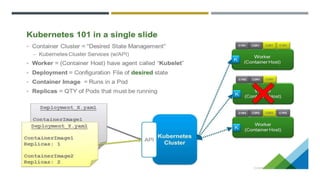
KUBERNETES
QUESTIONS
AND FEEDBACK

Docker training

  • 1.
  • 2.
    Agenda  Containers Basics Example  Definitions  History of containers  Why Docker?  How Docker containers work  Namespaces  cGroups  Union file system  Containers vs. VMs  Docker tooling/Architecture  Dockerfile  Image / Registry  Containers  Workflow  simple ML model behind a flask API with python  write effective docker files  distribute containers  Data-science tooling  Running a Jupyter Notebook  Load and Run a Database  Advanced Docker concepts  Docker compose  DevOps workflow  Continuous Delivery  Kubernetes
  • 3.
    Training Setup  3VM on AWS cloud - Ubuntu 18:04  For exercises:  https://docs.docker.com/docker-for-windows/  Repository  https://github.com/kirancodify/docker-for-data-science
  • 4.
  • 5.
    Container Basics -Definitions  Docker defines containers as "A standardized unit of software"  Amazon defines containers as "Containers provide a standard way to package your application's code, configurations, and dependencies into a single object."  Google defines containers as "Containers offer a logical packaging mechanism in which applications can be abstracted from the environment in which they actually run."  Developers.com defines containers as "Container technology is a way to create a virtual environment by using an isolated process on a host computer. The isolated process, the container, has its own set of file system resources and subordinate processes."
  • 6.
    Container Basics -Intent  Resource Utilization - CPU, Memory were expensive resources  Multi user operating system - People on same hardware had to have file process isolation
  • 7.
    Container Basics -History  https://de.slideshare.net/Pivotal/the-history-44807468
  • 8.
    Container Basics – Why Docker Docker is the most popular brand in the Container space!!  Consistent Runtime Environment
  • 9.
    Container Basics – Why Docker Run Anywhere  You’ll see the shipping container analog quite a bit.Shipping containers standardized the logistics industry  There is a standard format for containers. Don’t matter what’s inside. We can send it by boat, by rail, or by truck.  Have infrastructure to handle
  • 10.
    Container Basics – Why Docker Isolation  Monolith - SOA - Microservices  With software containers, we package code + everything required to make our software run into an isolated container  Since the container is it can be shipped off into production environments without having to worry if it will run or not
  • 11.
    Container Basics –Why Docker  Efficient Resource Utilization  In this paradigm, each container is given a fixed resource configuration (CPU, RAM, # of threads, etc) and scaling the application requires scaling just the number of containers instead of the individual resource primitives. This provides a much easier abstraction for engineers when applications need to be scaled up or down.  Microservice Architecture  Containers also serve as a great tool to implement micro service architecture, where each microservice is just a set of co-operating containers. Makes scalable application. Flexible for use.  Virtualization  Containers provide the system with a virtualized environment that can hide or limit the visibility of the physical devices or system's configuration underneath it.
  • 12.
    Container Basics –How Docker Works  Namespaces  Namespaces are commonly structured as hierarchies to allow reuse of names in different contexts  https://www.toptal.com/linux/separation-anxiety-isolating-your-system-with-linux-namespaces  The pid namespace: Process isolation (PID: Process ID).  The net namespace: Managing network interfaces (NET: Networking).  The ipc namespace: Managing access to IPC resources (IPC: InterProcess Communication).  The mnt namespace: Managing filesystem mount points (MNT: Mount).  The uts namespace: Isolating kernel and version identifiers. (UTS: Unix Timesharing System).  The user namespace: Root access for isolated process
  • 13.
  • 14.
    Container Basics –How Docker Works Cgroups
  • 15.
    Container Basics –How Docker Works  Union file system Example: layer 1: /bin/sh, /bin/cp, /bin/cd layer 2: /bin/cd layer 3: /bin/zsh result: /bin/sh, /bin/cp, /bin/cd (from layer 2), /bin/zsh
  • 18.
  • 19.
  • 20.
  • 21.
  • 22.
    DOCKER FILE  Sequentialset of instruction intended to be processed by Docker daemon/engine  Primary way of interacting with docker  Order of sequence is important  Each instruction creates a layer  Layers are cached and reused by Docker  Name the file Dockerfile with no extensions Show Dockerfile demo
  • 23.
    DOCKER IMAGE  ADocker image is made up of multiple layers.  A user composes each Docker image to include system libraries, tools, and other files and dependencies for the executable code.  Image developers can reuse static image layers for different projects. Reuse saves time, because a user does not have to create everything in an image.  Most Docker images start with a base image, although a user can build one entirely from scratch, if desired.  Each image has one readable/writable top layer over static layers.
  • 24.
  • 25.
  • 26.
    DOCKER CONTAINERS  Running instanceof a docker image  Light weight with complete isolation  Containers can talk to each other via IPs and DNS  Run simply means allocating CPU, Memory and Storage resources  Setup port forwarding to connect to containers  $ docker run -p 9000:8888  Add a volume mount  docker run -v /full/local/path:/mounted_dir
  • 27.
  • 28.
    EXERCISE DOCKER BASICSAND DOCKER FILE
  • 29.
  • 30.
    PUTTING PIECES TOGETHERDURING REAL TIME DEVELOPMENT SCENARIO  Create a ML module in Python with the ability to predict house prices (Y), based on the square feets as input parameter (X)  Create a simple HTTP REST-API on top of your ML module that takes X as parameter for the request and responds with prediction Y1  Create a docker image  Augment the app in a container and ship the image across to a different host and run the container there.
  • 31.
    BEST PRACTICES  Whydo I care how many layers I have?  More layers mean a larger image. The larger the image, the longer that it takes to both build, and push and pull from a registry.  Smaller images mean faster builds and deploys. This also means a smaller attack surface.  Sharing is caring.  Use shared base images where possible  Limit the data written to the container layer  Chain RUN statements  Prevent cache misses at build for as long as possible
  • 32.
  • 33.
    EXERCISE : FORMSMALL GROUPS AND BRAINSTORM HOW DOCKER WILL FIT INTO YOUR DAY TO DAY WORKFLOW.
  • 34.
  • 35.
    JUPYTER NOTEBOOKS +DOCKER  Ready-to-run Docker images containing Jupyter applications https://jupyter-docker- stacks.readthedocs.io/en/latest/using/selecting.html  https://github.com/jupyter/docker-stacks
  • 36.
  • 37.
    DATA ACCESS USINGDATA SCIENCE- NOTEBOOK  Demo Multiple containers.  Write read data to redis db container  Read data from Postgres container
  • 38.
  • 39.
  • 40.
  • 41.
  • 42.
    DEVOPS WORKFLOW  Atits essence, DevOps is a culture, a movement, a philosophy.  Tearing down barriers  Between teams  Mid-process  Enable the smart people to make smart decisions  Assigning ownership, accountability, responsibility to the people doing the work, aka “you build it, you run it”  Reducing responsibility to the most directly involved individuals  Increase visibility to the big picture and the results of work being done
  • 43.
    DEVOPS WORKFLOW  Practices Continuous Integration  Application testing/QA work applied throughout the development  Continuous Delivery  Automated deployment capabilities of code across environments  Infrastructure as Code  No hand carved infrastructure  Self-service environments  Remove procurement blockers for basic needs  Microservices  Break down complicated monolithic applications in to smaller ones
  • 44.
  • 45.
  • 46.
  • 47.

Editor's Notes

  • #4 Docker for Windows still uses a Linux VM to run Linux containers. But instead of using Virtual Box (which is what is used with Docker Toolbox), the Linux VM is run using Hyper-V - a Windows-native hypervisor. This means that Docker for Windows ships fewer components and has less moving parts.
  • #5 Show demo of docker installation Run Jupyter notebook Get versions of python packages Show python version
  • #6 Isolated process on the OS
  • #8 the chroot system call was introduced, changing the root directory of a process and its children to a new location in the filesystem.
  • #9 Docker started as a project to build single-application LXC containers, introducing several changes to LXC that make containers more portable and flexible to use. It later morphed into its own container runtime environment. At a high level, Docker is a Linux utility that can efficiently create, ship, and run containers.
  • #15 Part of the magic that allows multiple containers to run on the same operating system is called Linux Control Groups (cgroups). Cgroups limit the amount of resources a process can consume (CPU, memory, network bandwidth, etc.) and as far as the container knows, it’s running on an independent machine. More importantly, this container can’t hog all the resources reserved for other containers. https://docs.docker.com/v17.09/engine/admin/resource_constraints/
  • #16 It allows files and directories of separate file systems overlaid one by one, forming a final single coherent file system. The benefit of using layered file system is that multiple images can share the same layer and thus it reduces the size of disk needed. Note that when a container is created, a writable layer is also created on top of the image layers.
  • #18 The cool part is if there are two containers with the image layers a, b, c and a, b, d, then you only need to store one copy of each image layer a, b, c, d both locally and in the repository. This is Docker’s union file system. Docker Storage Drivers - Overlay2 Drivers - Docker Images and Dockerfile - Copy on Write operation
  • #19 Light weight: less memory and storage Easier to ship Works anywhere Cost efficient and easy to scale
  • #21 Docker client is where we enter commands to interact with Docker Commands go to Docker Host (which can be either local or remote) which is running the Docker daemon Daemon: listens to requests from the Docker client manages Docker objects like containers and images can communicate with other Docker daemon Also a registry, where we store images Docker Hub is a public registry think Github It’s where we can find official Docker images for linux distributions, databases, and python (!).
  • #26 Show Image pull, push to a Registry
  • #42 https://github.com/docker/compose
  • #43 https://github.com/docker/compose
  • #44 https://github.com/docker/compose
  • #45 https://github.com/docker/compose
  • #46 https://github.com/docker/compose
  • #47 https://github.com/docker/compose