© Copyright 2015 Hewlett-Packard Development Company, L.P. The information contained herein is subject to change without notice. HP Confidential. For Training
Purposes Only.
Benchmarking Using OpenStack Rally
Presenters:
Rama Krishna
ramakris@hpe.com
Benchmarking Using OpenStack Rally
Presenters:
Rama Krishna
Agenda
• An Introduction to OpenStack Rally
• Rally Installation
• Rally UseCases and Demos
• Rally UseCases for Benchmarking HP Helion and
Demos
What is OpenStack Rally?
• Rally is community based open source project, used to
gather benchmarking data on how the OpenStack cloud
operates at scale.
• Rally automates and unifies multi-node OpenStack
deployment, cloud verification, benchmarking & profiling.
• https://wiki.openstack.org/wiki/Rally
OpenStack Rally
• Rally started as an incubator project in Aug 2013
• Became part of OpenStack just before the OpenStack
Kilo release.
• Rally is targeted towards Developers, DevOps, QA
Engineers and Cloud Administrators.
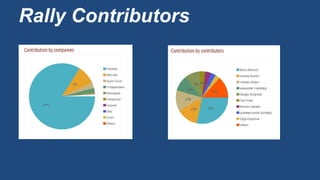
• Key Contributions from Mirantis ,RedHat and IBM
Rally Contributors
More on Rally
• Rally can be configured to test any number of OpenStack
deployments.
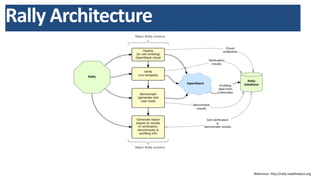
• Rally has four key services with a central database repository
– OpenStack deployment engine--which can assist in simplifying OpenStack
deployments. Leverages existing deployment tools like devstack ,Fuel etc.
– Benchmarking and profiling engine--allows you to create parameterized
load on the cloud , based on large repository of benchmarks.
– Verification engine--uses tempest as the verifier.
– Reporting services for viewing and formatting results
© Copyright 2015 Hewlett-Packard Development Company, L.P. The information contained herein is subject to change without notice. HP Confidential. For Training
Purposes Only.
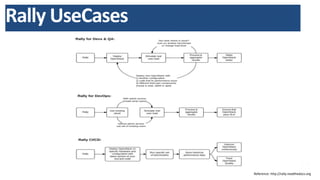
Rally UseCases
Reference: http://rally.readthedocs.org
© Copyright 2015 Hewlett-Packard Development Company, L.P. The information contained herein is subject to change without notice. HP Confidential. For Training
Purposes Only.
Rally Architecture
Reference: http://rally.readthedocs.org
Useful information on Rally
Rally documentation:
http://rally.readthedocs.org/en/latest/
Rally step-by-step tutorial:
http://rally.readthedocs.org/en/latest/tutorial.html
Launchpad page:
https://launchpad.net/rally
Code is hosted on git.openstack.org:
http://git.openstack.org/cgit/openstack/rally
Code is mirrored on github:
https://github.com/openstack/rally
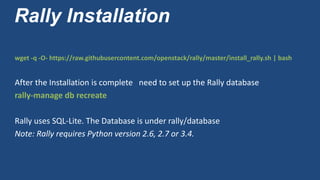
Rally Installation
wget -q -O- https://raw.githubusercontent.com/openstack/rally/master/install_rally.sh | bash
After the Installation is complete need to set up the Rally database
rally-manage db recreate
Rally uses SQL-Lite. The Database is under rally/database
Note: Rally requires Python version 2.6, 2.7 or 3.4.
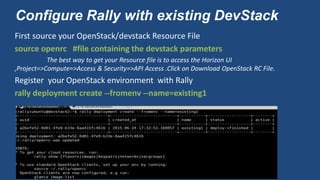
Configure Rally with existing DevStack
First source your OpenStack/devstack Resource File
source openrc #file containing the devstack parameters
The best way to get your Resource file is to access the Horizon UI
,Project=>Compute=>Access & Security=>API Access .Click on Download OpenStack RC File.
Register your OpenStack environment with Rally
rally deployment create --fromenv --name=existing1
Configure Rally with existing DevStack
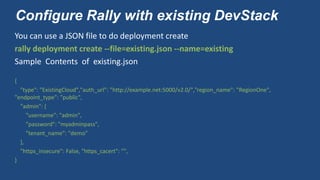
You can use a JSON file to do deployment create
rally deployment create --file=existing.json --name=existing
Sample Contents of existing.json
{
"type": "ExistingCloud","auth_url": "http://example.net:5000/v2.0/","region_name": "RegionOne",
"endpoint_type": "public",
"admin": {
"username": "admin",
"password": "myadminpass",
"tenant_name": "demo"
},
"https_insecure": False, "https_cacert": "",
}
Validate your Rally deployment
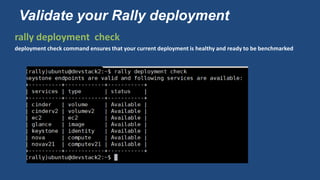
rally deployment check
deployment check command ensures that your current deployment is healthy and ready to be benchmarked
Benchmarking using Rally
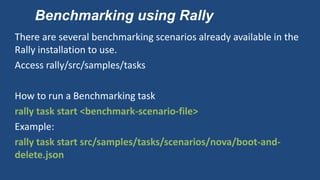
There are several benchmarking scenarios already available in the
Rally installation to use.
Access rally/src/samples/tasks
How to run a Benchmarking task
rally task start <benchmark-scenario-file>
Example:
rally task start src/samples/tasks/scenarios/nova/boot-and-
delete.json
Benchmarking using Rally
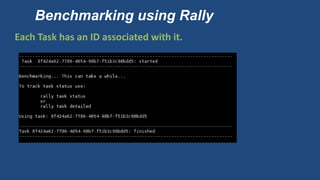
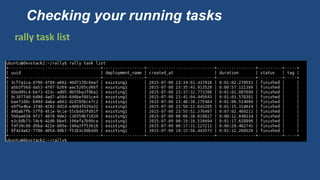
Each Task has an ID associated with it.
Checking your running tasks
rally task list
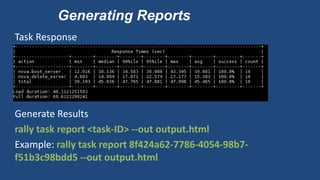
Generating Reports
Task Response
Generate Results
rally task report <task-ID> --out output.html
Example: rally task report 8f424a62-7786-4054-98b7-
f51b3c98bdd5 --out output.html
Multiple Scenarios in the same Task
You can run multiple scenarios in the same task. These scenarios
are executed one after the other.
{
"<ScenarioName1>": [<benchmark_config>,<benchmark_config2>, ...]
"<ScenarioName2>": [<benchmark_config>, ...]
}
Generate Results as before
Benchmarking Using existing Users
In the previous scenarios we saw before , Rally creates random
users and tenants to use during the test and delete them after the
tests are done.
In the production world you may want to run the tests as existing
users (either because you cannot create new users or you want to
run tests from an isolated group of users)
Rally facilitates running tests as existing users/tenants
Benchmarking Using existing Users
Create a new deployment with existing users/tenants as shown:
{
"type": "ExistingCloud",
"auth_url": "http://example.net:5000/v2.0/",
"region_name": "RegionOne",
"endpoint_type": "public",
"admin": { "username": "admin", "password": "pa55word", "tenant_name": "demo"
},
"users": [
{ "username": "b1", "password": "1234", "tenant_name": "testing"},
{ "username": "b2", "password": "1234", "tenant_name": "testing"
}]}
Benchmarking Using existing Users
Make the new deployment Active
rally deployment use <deployment-ID>
Change your scenario specific configuration (ex: NovaServers.boot
and delete_server) to remove “users context”
{ "NovaServers.boot_and_delete_server": [ { "args": { "flavor": { "name": "m1.nano" },
"image": { "name": "^cirros.*uec$" }, "force_delete": false }, "runner": { "type":
"constant", "times": 10, "concurrency": 2 }, "context": {} } ] }
Run your Rally tasks as before
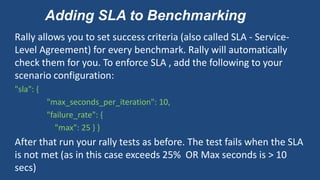
Adding SLA to Benchmarking
Rally allows you to set success criteria (also called SLA - Service-
Level Agreement) for every benchmark. Rally will automatically
check them for you. To enforce SLA , add the following to your
scenario configuration:
"sla": {
"max_seconds_per_iteration": 10,
"failure_rate": {
"max": 25 } }
After that run your rally tests as before. The test fails when the SLA
is not met (as in this case exceeds 25% OR Max seconds is > 10
secs)
Adding SLA to BenchMarking…Cont
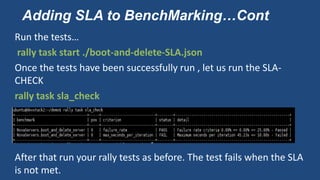
Run the tests…
rally task start ./boot-and-delete-SLA.json
Once the tests have been successfully run , let us run the SLA-
CHECK
rally task sla_check
After that run your rally tests as before. The test fails when the SLA
is not met.
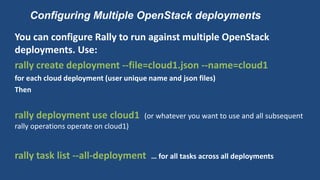
Configuring Multiple OpenStack deployments
You can configure Rally to run against multiple OpenStack
deployments. Use:
rally create deployment --file=cloud1.json --name=cloud1
for each cloud deployment (user unique name and json files)
Then
rally deployment use cloud1 (or whatever you want to use and all subsequent
rally operations operate on cloud1)
rally task list --all-deployment … for all tasks across all deployments
Rally Search and Help
Rally provides a command line search engine to search for
scenarios, help information etc.
rally info BenchmarkScenarios
rally info find <ScenarioGroupName>
Rally deployment with OpenStack
Rally provides mechanism to deploy DevStack. To do that
rally deployment create --
file=src/samples/deployments/for_deploying_openstack_with_rally
/devstack-in-existing-servers.json --name=new-devstack
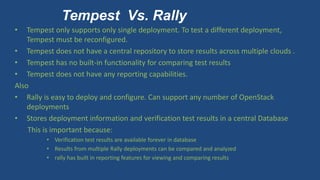
Tempest Vs. Rally
• Tempest only supports only single deployment. To test a different deployment,
Tempest must be reconfigured.
• Tempest does not have a central repository to store results across multiple clouds .
• Tempest has no built-in functionality for comparing test results
• Tempest does not have any reporting capabilities.
Also
• Rally is easy to deploy and configure. Can support any number of OpenStack
deployments
• Stores deployment information and verification test results in a central Database
This is important because:
• Verification test results are available forever in database
• Results from multiple Rally deployments can be compared and analyzed
• rally has built in reporting features for viewing and comparing results
Q/A

OpenStack Rally presentation by RamaK

  • 1.
    © Copyright 2015Hewlett-Packard Development Company, L.P. The information contained herein is subject to change without notice. HP Confidential. For Training Purposes Only. Benchmarking Using OpenStack Rally Presenters: Rama Krishna ramakris@hpe.com
  • 2.
    Benchmarking Using OpenStackRally Presenters: Rama Krishna
  • 3.
    Agenda • An Introductionto OpenStack Rally • Rally Installation • Rally UseCases and Demos • Rally UseCases for Benchmarking HP Helion and Demos
  • 4.
    What is OpenStackRally? • Rally is community based open source project, used to gather benchmarking data on how the OpenStack cloud operates at scale. • Rally automates and unifies multi-node OpenStack deployment, cloud verification, benchmarking & profiling. • https://wiki.openstack.org/wiki/Rally
  • 5.
    OpenStack Rally • Rallystarted as an incubator project in Aug 2013 • Became part of OpenStack just before the OpenStack Kilo release. • Rally is targeted towards Developers, DevOps, QA Engineers and Cloud Administrators. • Key Contributions from Mirantis ,RedHat and IBM
  • 6.
  • 7.
    More on Rally •Rally can be configured to test any number of OpenStack deployments. • Rally has four key services with a central database repository – OpenStack deployment engine--which can assist in simplifying OpenStack deployments. Leverages existing deployment tools like devstack ,Fuel etc. – Benchmarking and profiling engine--allows you to create parameterized load on the cloud , based on large repository of benchmarks. – Verification engine--uses tempest as the verifier. – Reporting services for viewing and formatting results
  • 8.
    © Copyright 2015Hewlett-Packard Development Company, L.P. The information contained herein is subject to change without notice. HP Confidential. For Training Purposes Only. Rally UseCases Reference: http://rally.readthedocs.org
  • 9.
    © Copyright 2015Hewlett-Packard Development Company, L.P. The information contained herein is subject to change without notice. HP Confidential. For Training Purposes Only. Rally Architecture Reference: http://rally.readthedocs.org
  • 10.
    Useful information onRally Rally documentation: http://rally.readthedocs.org/en/latest/ Rally step-by-step tutorial: http://rally.readthedocs.org/en/latest/tutorial.html Launchpad page: https://launchpad.net/rally Code is hosted on git.openstack.org: http://git.openstack.org/cgit/openstack/rally Code is mirrored on github: https://github.com/openstack/rally
  • 11.
    Rally Installation wget -q-O- https://raw.githubusercontent.com/openstack/rally/master/install_rally.sh | bash After the Installation is complete need to set up the Rally database rally-manage db recreate Rally uses SQL-Lite. The Database is under rally/database Note: Rally requires Python version 2.6, 2.7 or 3.4.
  • 12.
    Configure Rally withexisting DevStack First source your OpenStack/devstack Resource File source openrc #file containing the devstack parameters The best way to get your Resource file is to access the Horizon UI ,Project=>Compute=>Access & Security=>API Access .Click on Download OpenStack RC File. Register your OpenStack environment with Rally rally deployment create --fromenv --name=existing1
  • 13.
    Configure Rally withexisting DevStack You can use a JSON file to do deployment create rally deployment create --file=existing.json --name=existing Sample Contents of existing.json { "type": "ExistingCloud","auth_url": "http://example.net:5000/v2.0/","region_name": "RegionOne", "endpoint_type": "public", "admin": { "username": "admin", "password": "myadminpass", "tenant_name": "demo" }, "https_insecure": False, "https_cacert": "", }
  • 14.
    Validate your Rallydeployment rally deployment check deployment check command ensures that your current deployment is healthy and ready to be benchmarked
  • 15.
    Benchmarking using Rally Thereare several benchmarking scenarios already available in the Rally installation to use. Access rally/src/samples/tasks How to run a Benchmarking task rally task start <benchmark-scenario-file> Example: rally task start src/samples/tasks/scenarios/nova/boot-and- delete.json
  • 16.
    Benchmarking using Rally EachTask has an ID associated with it.
  • 17.
    Checking your runningtasks rally task list
  • 18.
    Generating Reports Task Response GenerateResults rally task report <task-ID> --out output.html Example: rally task report 8f424a62-7786-4054-98b7- f51b3c98bdd5 --out output.html
  • 19.
    Multiple Scenarios inthe same Task You can run multiple scenarios in the same task. These scenarios are executed one after the other. { "<ScenarioName1>": [<benchmark_config>,<benchmark_config2>, ...] "<ScenarioName2>": [<benchmark_config>, ...] } Generate Results as before
  • 20.
    Benchmarking Using existingUsers In the previous scenarios we saw before , Rally creates random users and tenants to use during the test and delete them after the tests are done. In the production world you may want to run the tests as existing users (either because you cannot create new users or you want to run tests from an isolated group of users) Rally facilitates running tests as existing users/tenants
  • 21.
    Benchmarking Using existingUsers Create a new deployment with existing users/tenants as shown: { "type": "ExistingCloud", "auth_url": "http://example.net:5000/v2.0/", "region_name": "RegionOne", "endpoint_type": "public", "admin": { "username": "admin", "password": "pa55word", "tenant_name": "demo" }, "users": [ { "username": "b1", "password": "1234", "tenant_name": "testing"}, { "username": "b2", "password": "1234", "tenant_name": "testing" }]}
  • 22.
    Benchmarking Using existingUsers Make the new deployment Active rally deployment use <deployment-ID> Change your scenario specific configuration (ex: NovaServers.boot and delete_server) to remove “users context” { "NovaServers.boot_and_delete_server": [ { "args": { "flavor": { "name": "m1.nano" }, "image": { "name": "^cirros.*uec$" }, "force_delete": false }, "runner": { "type": "constant", "times": 10, "concurrency": 2 }, "context": {} } ] } Run your Rally tasks as before
  • 23.
    Adding SLA toBenchmarking Rally allows you to set success criteria (also called SLA - Service- Level Agreement) for every benchmark. Rally will automatically check them for you. To enforce SLA , add the following to your scenario configuration: "sla": { "max_seconds_per_iteration": 10, "failure_rate": { "max": 25 } } After that run your rally tests as before. The test fails when the SLA is not met (as in this case exceeds 25% OR Max seconds is > 10 secs)
  • 24.
    Adding SLA toBenchMarking…Cont Run the tests… rally task start ./boot-and-delete-SLA.json Once the tests have been successfully run , let us run the SLA- CHECK rally task sla_check After that run your rally tests as before. The test fails when the SLA is not met.
  • 25.
    Configuring Multiple OpenStackdeployments You can configure Rally to run against multiple OpenStack deployments. Use: rally create deployment --file=cloud1.json --name=cloud1 for each cloud deployment (user unique name and json files) Then rally deployment use cloud1 (or whatever you want to use and all subsequent rally operations operate on cloud1) rally task list --all-deployment … for all tasks across all deployments
  • 26.
    Rally Search andHelp Rally provides a command line search engine to search for scenarios, help information etc. rally info BenchmarkScenarios rally info find <ScenarioGroupName>
  • 27.
    Rally deployment withOpenStack Rally provides mechanism to deploy DevStack. To do that rally deployment create -- file=src/samples/deployments/for_deploying_openstack_with_rally /devstack-in-existing-servers.json --name=new-devstack
  • 28.
    Tempest Vs. Rally •Tempest only supports only single deployment. To test a different deployment, Tempest must be reconfigured. • Tempest does not have a central repository to store results across multiple clouds . • Tempest has no built-in functionality for comparing test results • Tempest does not have any reporting capabilities. Also • Rally is easy to deploy and configure. Can support any number of OpenStack deployments • Stores deployment information and verification test results in a central Database This is important because: • Verification test results are available forever in database • Results from multiple Rally deployments can be compared and analyzed • rally has built in reporting features for viewing and comparing results
  • 29.