Docker Orchestration
An Overview
Dr. Halil-Cem Gürsoy
@hgutwit
adesso AG - Dortmund, Germany
About myself…
► Principal Architect @ adesso AG, DE
► since more than 15 years in commercial

software development
> before that, wrote science software

► Large distributed enterprise systems
► Persistence, build’n deployment
2
“It is not the
strongest or the
most intelligent who
will survive but
those who can best
manage change.”
C. Darwin
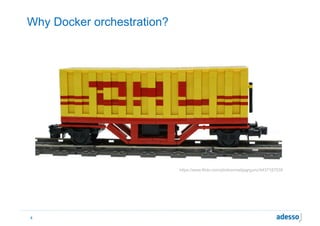
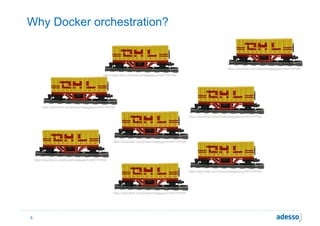
Why Docker orchestration?
4
https://www.flickr.com/photos/matijagrguric/4437187539
Why Docker orchestration?
5
https://www.flickr.com/photos/matijagrguric/4437187539
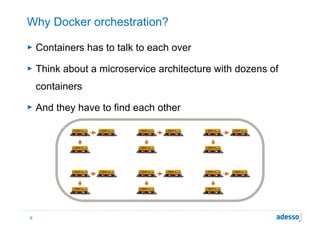
Why Docker orchestration?
► Containers has to talk to each over
► Think about a microservice architecture with dozens of
containers
► And they have to find each other
6
www.flickr.com/photos/matijagrguric/4437187539/
www.flickr.com/photos/matijagrguric/4437187539/ www.flickr.com/photos/matijagrguric/4437187539/
www.flickr.com/photos/matijagrguric/4437187539/
www.flickr.com/photos/matijagrguric/4437187539/ www.flickr.com/photos/matijagrguric/4437187539/
www.flickr.com/photos/matijagrguric/4437187539/
www.flickr.com/photos/matijagrguric/4437187539/ www.flickr.com/photos/matijagrguric/4437187539/
www.flickr.com/photos/matijagrguric/4437187539/
www.flickr.com/photos/matijagrguric/4437187539/ www.flickr.com/photos/matijagrguric/4437187539/
www.flickr.com/photos/matijagrguric/4437187539/
www.flickr.com/photos/matijagrguric/4437187539/ www.flickr.com/photos/matijagrguric/4437187539/
www.flickr.com/photos/matijagrguric/4437187539/
www.flickr.com/photos/matijagrguric/4437187539/ www.flickr.com/photos/matijagrguric/4437187539/
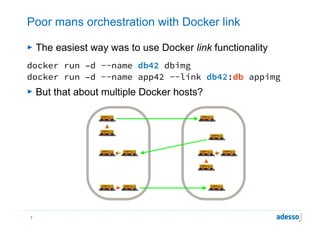
Poor mans orchestration with Docker link
► The easiest way was to use Docker link functionality
docker run –d --name db42 dbimg
docker run –d --name app42 --link db42:db appimg
► But that about multiple Docker hosts?
7
www.flickr.com/photos/matijagrguric/4437187539/
www.flickr.com/photos/matijagrguric/4437187539/ www.flickr.com/photos/matijagrguric/4437187539/
www.flickr.com/photos/matijagrguric/4437187539/
www.flickr.com/photos/matijagrguric/4437187539/ www.flickr.com/photos/matijagrguric/4437187539/
www.flickr.com/photos/matijagrguric/4437187539/
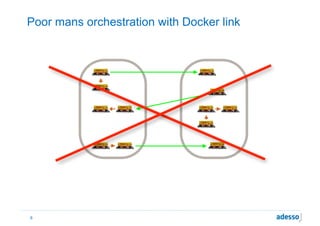
Poor mans orchestration with Docker link
8
www.flickr.com/photos/matijagrguric/4437187539/
www.flickr.com/photos/matijagrguric/4437187539/ www.flickr.com/photos/matijagrguric/4437187539/
www.flickr.com/photos/matijagrguric/4437187539/
www.flickr.com/photos/matijagrguric/4437187539/ www.flickr.com/photos/matijagrguric/4437187539/
www.flickr.com/photos/matijagrguric/4437187539/
https://www.flickr.com/photos/zunami/3780220955/
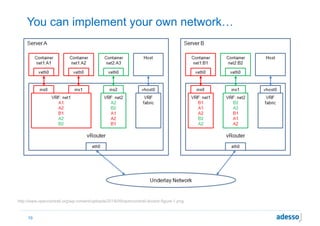
You can implement your own network…
10
http://www.opencontrail.org/wp-content/uploads/2014/09/opencontrail-docker-figure-1.png
https://www.flickr.com/photos/r_rose/102766969/
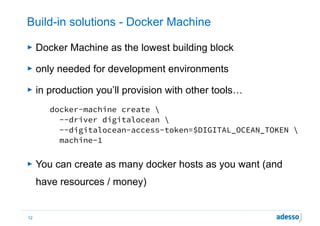
Build-in solutions - Docker Machine
► Docker Machine as the lowest building block
► only needed for development environments
► in production you’ll provision with other tools…
docker-machine create 

  --driver digitalocean 

  --digitalocean-access-token=$DIGITAL_OCEAN_TOKEN 

  machine-1

► You can create as many docker hosts as you want (and
have resources / money)
12
Docker Swarm
► Docker Swarm is the ‚built-in’ clustering solution
► Supports new overlay network (based on VXLAN)
► Easy to set up with Docker Machine
docker-machine create --driver digitalocean 

  --digitalocean-access-token=$DIGITAL_OCEAN_TOKEN 

  --swarm --swarm-master 

  --swarm-discovery token://$SWARM_ID 

swarm-master

docker-machine create --driver digitalocean 

  --digitalocean-access-token=$DIGITAL_OCEAN_TOKEN 

  --swarm --swarm-discovery token://$SWARM_ID 

  swarm-node-01
14
Docker Swarm - Manager
► Manager needs a Discovery Service to handle nodes
> Consul, etcd, Zookeeper, static files, IP ranges etc.
► Acts like a proxy, implementing the Docker Remote API
► Manages distribution of starting containers to nodes
> Depending on CPU and / or memory constraints
> … labels on Docker hosts
> … affinity to ressources and other containers
15
Docker Swarm - Scheduler strategies
► Scheduler ranks nodes while starting containers
► Different strategies
> binpack
> spread (default)
> random
► binpack and spread depend on current node utilization
16
Docker Swarm - Filters
► The scheduler has various filters to choose a node
> Constraint - a label on a Docker host
> Affinity - be together with a specific resource
> Port - is a specific port free?
> Dependency - together with another container
> Health
$ docker daemon --label storage=ssd
$ docker run -d -P -e constraint:storage==ssd ...
17
Docker Swarm - Missing stuff
► Swarm is simply the low level clustering for Docker nodes
► Self healing / resilience
> restarting containers on other nodes on node failure
> comes with 1.1.0 (already included in RC, experimental)
► Moving containers during runtime
> only with 3rd party tools
► Auto-Scaling, may come with Docker Compose
► Monitoring
18
Taking a little trip: Overlay Network
► Allows communication between containers in the cluster
► Using libnetwork, based on vxlan
> uses plugin system: overlay, weave
► For overlay driver you need min Kernel 3.16
> have to be careful on Ubuntu
► Needs a K/V store like etcd, Zookeeper or Consul
► All containers attached to that network get an entry in

/etc/hosts on all containers
19
Another trip: Discovery Services
► You may need a Discovery Service in a Microservice
architecture regardless of Docker
► ‚Did I need a Discovery Service even then I’ve a overlay
network?‘
> YES, you do!
> beyond ‚Hello World’ examples the challenge is the same
to find services in a large scale distributed system
20
Service Discovery
► Consider using registrator
> registers starting containers in Consul, etcd or SkyDNS
> but doesn’t work currently with overlay network
► Inject needed data into your container using something like
consul-template / envconsul, confd, Spring Cloud, …
21
http://github.com/hcguersoy/swarm-elastic-demo
https://www.flickr.com/photos/schwaber/3238977103
Docker Compose
► Former ‚Fig‘ project, now part of Docker’s core ecosystem
► implemented in Python
► „Compose is a tool for defining and running multi-container
applications with Docker.“
► Can be used to set up complex environments
► Using Docker Swarm as the low level clustering of the
Docker Hosts, Compose is for the orchestration of the
containers
23
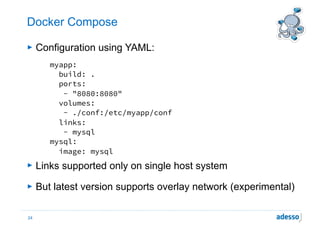
Docker Compose
► Configuration using YAML:
myapp:
build: .
ports:
- "8080:8080"
volumes:
- ./conf:/etc/myapp/conf
links:
- mysql
mysql:
image: mysql
► Links supported only on single host system
► But latest version supports overlay network (experimental)
24
Docker Compose
► a more complex example: Kubernetes on top of Swarm
etcd:
image: gcr.io/google_containers/etcd:2.0.13
container_name: etcd
command: ['/usr/local/bin/etcd', '--bind-addr=0.0.0.0:4001', '--data-dir=/var/etcd/
data']
apiserver:
image: gcr.io/google_containers/hyperkube:v1.0.7
container_name: apiserver
ports:
- "8080"
command: ["/hyperkube", "apiserver", "--service-cluster-ip-range=172.17.17.1/24", "--
address=0.0.0.0", "--etcd_servers=http://etcd:4001", "--cluster_name=kubernetes", "--
v=2"]
controller:
image: gcr.io/google_containers/hyperkube:v1.0.7
command: ["/hyperkube", "controller-manager", "--address=0.0.0.0", "--master=http://
apiserver:8080", "--v=2"]
environment:
- "affinity:container==*apiserver*"
...
Source 'Swarm Frontend’ (https://github.com/docker/swarm-frontends)
25
https://www.flickr.com/photos/tomwahlin/with/3167491292/
Kubernetes
► Created by Google
► build to manage ‚oceans of user containers‘
► Cloud agnostics, supports different cloud and virtualization
platform
> but results in different installation directives
> easy playground setup using Docker Compose (s. above)
on top of Swarm
27
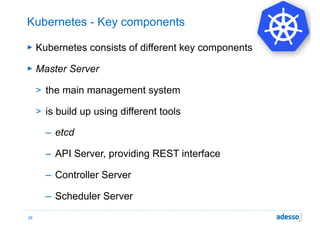
Kubernetes - Key components
► Kubernetes consists of different key components
► Master Server
> the main management system
> is build up using different tools
– etcd
– API Server, providing REST interface
– Controller Server
– Scheduler Server
28
Kubernetes - Key components
► Minion
> the work units in Kubernetes, executing the commands
coming from the master server
> runs a Docker daemon
> Kubelete service
> Proxy Service
> cAdvisior
29
Kubernetes - Key components
► Pod
> the smallest logical unit in Kubernetes
> containers belonging together are defined in a Pod - a
logical collection
> All containers of a Pod run on one Minion ( = one Host)
30
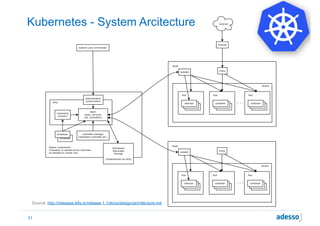
Kubernetes - System Arcitecture
31
Source: http://releases.k8s.io/release-1.1/docs/design/architecture.md
Kubernetes
► Build in resource monitoring, fail over 

and rescheduling
► Uses different API then Docker
► Uses different configuration files as Compose
► Complex architecture
► IMHO not very usable for ‚small‘ setups due to the overhead
> but may be very useful then you get really large
32
Spotify Helios
► Builds a cluster spanning multiple Docker hosts
► deploys and manages containers in this cluster
► Developed before rise of Swarm but does similar stuff
> …and still actively developed
> used by Spotify in production
► But missing something like Compose above this low layer
33
Apache Mesos / Marathon
► Apache Mesos is a ‚kernel‘ to set up large scale distributed
systems
> e.g. large Hadoop Clusters
► Comes with an 0.20.0 with Docker Containerizer
> still some limitations
► May be used together with Marathon
> e.g. supplies rescheduler
34
…and much more
► There is a whole bunch of more orchestration solutions
> Crane
> CoresOS / Fleetd
> RancherOS
> …
► …and much more hosted solutions
> Giantswarm (still alpha), Amazon ECS, Google CE
35
Summing up
► Docker Swarm together with Compose is a lightweight way
to orchestrate containers
> but need some maturity and additional features / services
► Kubernetes is the opposite, heavy weight solution
> good for large scenarios, but oversized for small setups
> breaks with Docker CLI
► Mesos / Marathon
> useful for some scenarios, breaks with Docker CLI
36
http://www.flickr.com/photos/an_untrained_eye/6630719431
http://www.flickr.com/photos/tcmorgan/7372944070
halil-cem.guersoy@adesso.de
https://twitter.com/hgutwit

Docker orchestration voxxed days berlin 2016

  • 1.
    Docker Orchestration An Overview Dr.Halil-Cem Gürsoy @hgutwit adesso AG - Dortmund, Germany
  • 2.
    About myself… ► PrincipalArchitect @ adesso AG, DE ► since more than 15 years in commercial
 software development > before that, wrote science software
 ► Large distributed enterprise systems ► Persistence, build’n deployment 2
  • 3.
    “It is notthe strongest or the most intelligent who will survive but those who can best manage change.” C. Darwin
  • 4.
  • 5.
  • 6.
    Why Docker orchestration? ►Containers has to talk to each over ► Think about a microservice architecture with dozens of containers ► And they have to find each other 6 www.flickr.com/photos/matijagrguric/4437187539/ www.flickr.com/photos/matijagrguric/4437187539/ www.flickr.com/photos/matijagrguric/4437187539/ www.flickr.com/photos/matijagrguric/4437187539/ www.flickr.com/photos/matijagrguric/4437187539/ www.flickr.com/photos/matijagrguric/4437187539/ www.flickr.com/photos/matijagrguric/4437187539/ www.flickr.com/photos/matijagrguric/4437187539/ www.flickr.com/photos/matijagrguric/4437187539/ www.flickr.com/photos/matijagrguric/4437187539/ www.flickr.com/photos/matijagrguric/4437187539/ www.flickr.com/photos/matijagrguric/4437187539/ www.flickr.com/photos/matijagrguric/4437187539/ www.flickr.com/photos/matijagrguric/4437187539/ www.flickr.com/photos/matijagrguric/4437187539/ www.flickr.com/photos/matijagrguric/4437187539/ www.flickr.com/photos/matijagrguric/4437187539/ www.flickr.com/photos/matijagrguric/4437187539/
  • 7.
    Poor mans orchestrationwith Docker link ► The easiest way was to use Docker link functionality docker run –d --name db42 dbimg docker run –d --name app42 --link db42:db appimg ► But that about multiple Docker hosts? 7 www.flickr.com/photos/matijagrguric/4437187539/ www.flickr.com/photos/matijagrguric/4437187539/ www.flickr.com/photos/matijagrguric/4437187539/ www.flickr.com/photos/matijagrguric/4437187539/ www.flickr.com/photos/matijagrguric/4437187539/ www.flickr.com/photos/matijagrguric/4437187539/ www.flickr.com/photos/matijagrguric/4437187539/ www.flickr.com/photos/matijagrguric/4437187539/ www.flickr.com/photos/matijagrguric/4437187539/ www.flickr.com/photos/matijagrguric/4437187539/ www.flickr.com/photos/matijagrguric/4437187539/ www.flickr.com/photos/matijagrguric/4437187539/
  • 8.
    Poor mans orchestrationwith Docker link 8 www.flickr.com/photos/matijagrguric/4437187539/ www.flickr.com/photos/matijagrguric/4437187539/ www.flickr.com/photos/matijagrguric/4437187539/ www.flickr.com/photos/matijagrguric/4437187539/ www.flickr.com/photos/matijagrguric/4437187539/ www.flickr.com/photos/matijagrguric/4437187539/ www.flickr.com/photos/matijagrguric/4437187539/ www.flickr.com/photos/matijagrguric/4437187539/ www.flickr.com/photos/matijagrguric/4437187539/ www.flickr.com/photos/matijagrguric/4437187539/ www.flickr.com/photos/matijagrguric/4437187539/ www.flickr.com/photos/matijagrguric/4437187539/
  • 9.
  • 10.
    You can implementyour own network… 10 http://www.opencontrail.org/wp-content/uploads/2014/09/opencontrail-docker-figure-1.png
  • 11.
  • 12.
    Build-in solutions -Docker Machine ► Docker Machine as the lowest building block ► only needed for development environments ► in production you’ll provision with other tools… docker-machine create 
   --driver digitalocean 
   --digitalocean-access-token=$DIGITAL_OCEAN_TOKEN 
   machine-1
 ► You can create as many docker hosts as you want (and have resources / money) 12
  • 14.
    Docker Swarm ► DockerSwarm is the ‚built-in’ clustering solution ► Supports new overlay network (based on VXLAN) ► Easy to set up with Docker Machine docker-machine create --driver digitalocean 
   --digitalocean-access-token=$DIGITAL_OCEAN_TOKEN 
   --swarm --swarm-master 
   --swarm-discovery token://$SWARM_ID 
 swarm-master
 docker-machine create --driver digitalocean 
   --digitalocean-access-token=$DIGITAL_OCEAN_TOKEN 
   --swarm --swarm-discovery token://$SWARM_ID 
   swarm-node-01 14
  • 15.
    Docker Swarm -Manager ► Manager needs a Discovery Service to handle nodes > Consul, etcd, Zookeeper, static files, IP ranges etc. ► Acts like a proxy, implementing the Docker Remote API ► Manages distribution of starting containers to nodes > Depending on CPU and / or memory constraints > … labels on Docker hosts > … affinity to ressources and other containers 15
  • 16.
    Docker Swarm -Scheduler strategies ► Scheduler ranks nodes while starting containers ► Different strategies > binpack > spread (default) > random ► binpack and spread depend on current node utilization 16
  • 17.
    Docker Swarm -Filters ► The scheduler has various filters to choose a node > Constraint - a label on a Docker host > Affinity - be together with a specific resource > Port - is a specific port free? > Dependency - together with another container > Health $ docker daemon --label storage=ssd $ docker run -d -P -e constraint:storage==ssd ... 17
  • 18.
    Docker Swarm -Missing stuff ► Swarm is simply the low level clustering for Docker nodes ► Self healing / resilience > restarting containers on other nodes on node failure > comes with 1.1.0 (already included in RC, experimental) ► Moving containers during runtime > only with 3rd party tools ► Auto-Scaling, may come with Docker Compose ► Monitoring 18
  • 19.
    Taking a littletrip: Overlay Network ► Allows communication between containers in the cluster ► Using libnetwork, based on vxlan > uses plugin system: overlay, weave ► For overlay driver you need min Kernel 3.16 > have to be careful on Ubuntu ► Needs a K/V store like etcd, Zookeeper or Consul ► All containers attached to that network get an entry in
 /etc/hosts on all containers 19
  • 20.
    Another trip: DiscoveryServices ► You may need a Discovery Service in a Microservice architecture regardless of Docker ► ‚Did I need a Discovery Service even then I’ve a overlay network?‘ > YES, you do! > beyond ‚Hello World’ examples the challenge is the same to find services in a large scale distributed system 20
  • 21.
    Service Discovery ► Considerusing registrator > registers starting containers in Consul, etcd or SkyDNS > but doesn’t work currently with overlay network ► Inject needed data into your container using something like consul-template / envconsul, confd, Spring Cloud, … 21
  • 22.
  • 23.
    Docker Compose ► Former‚Fig‘ project, now part of Docker’s core ecosystem ► implemented in Python ► „Compose is a tool for defining and running multi-container applications with Docker.“ ► Can be used to set up complex environments ► Using Docker Swarm as the low level clustering of the Docker Hosts, Compose is for the orchestration of the containers 23
  • 24.
    Docker Compose ► Configurationusing YAML: myapp: build: . ports: - "8080:8080" volumes: - ./conf:/etc/myapp/conf links: - mysql mysql: image: mysql ► Links supported only on single host system ► But latest version supports overlay network (experimental) 24
  • 25.
    Docker Compose ► amore complex example: Kubernetes on top of Swarm etcd: image: gcr.io/google_containers/etcd:2.0.13 container_name: etcd command: ['/usr/local/bin/etcd', '--bind-addr=0.0.0.0:4001', '--data-dir=/var/etcd/ data'] apiserver: image: gcr.io/google_containers/hyperkube:v1.0.7 container_name: apiserver ports: - "8080" command: ["/hyperkube", "apiserver", "--service-cluster-ip-range=172.17.17.1/24", "-- address=0.0.0.0", "--etcd_servers=http://etcd:4001", "--cluster_name=kubernetes", "-- v=2"] controller: image: gcr.io/google_containers/hyperkube:v1.0.7 command: ["/hyperkube", "controller-manager", "--address=0.0.0.0", "--master=http:// apiserver:8080", "--v=2"] environment: - "affinity:container==*apiserver*" ... Source 'Swarm Frontend’ (https://github.com/docker/swarm-frontends) 25
  • 26.
  • 27.
    Kubernetes ► Created byGoogle ► build to manage ‚oceans of user containers‘ ► Cloud agnostics, supports different cloud and virtualization platform > but results in different installation directives > easy playground setup using Docker Compose (s. above) on top of Swarm 27
  • 28.
    Kubernetes - Keycomponents ► Kubernetes consists of different key components ► Master Server > the main management system > is build up using different tools – etcd – API Server, providing REST interface – Controller Server – Scheduler Server 28
  • 29.
    Kubernetes - Keycomponents ► Minion > the work units in Kubernetes, executing the commands coming from the master server > runs a Docker daemon > Kubelete service > Proxy Service > cAdvisior 29
  • 30.
    Kubernetes - Keycomponents ► Pod > the smallest logical unit in Kubernetes > containers belonging together are defined in a Pod - a logical collection > All containers of a Pod run on one Minion ( = one Host) 30
  • 31.
    Kubernetes - SystemArcitecture 31 Source: http://releases.k8s.io/release-1.1/docs/design/architecture.md
  • 32.
    Kubernetes ► Build inresource monitoring, fail over 
 and rescheduling ► Uses different API then Docker ► Uses different configuration files as Compose ► Complex architecture ► IMHO not very usable for ‚small‘ setups due to the overhead > but may be very useful then you get really large 32
  • 33.
    Spotify Helios ► Buildsa cluster spanning multiple Docker hosts ► deploys and manages containers in this cluster ► Developed before rise of Swarm but does similar stuff > …and still actively developed > used by Spotify in production ► But missing something like Compose above this low layer 33
  • 34.
    Apache Mesos /Marathon ► Apache Mesos is a ‚kernel‘ to set up large scale distributed systems > e.g. large Hadoop Clusters ► Comes with an 0.20.0 with Docker Containerizer > still some limitations ► May be used together with Marathon > e.g. supplies rescheduler 34
  • 35.
    …and much more ►There is a whole bunch of more orchestration solutions > Crane > CoresOS / Fleetd > RancherOS > … ► …and much more hosted solutions > Giantswarm (still alpha), Amazon ECS, Google CE 35
  • 36.
    Summing up ► DockerSwarm together with Compose is a lightweight way to orchestrate containers > but need some maturity and additional features / services ► Kubernetes is the opposite, heavy weight solution > good for large scenarios, but oversized for small setups > breaks with Docker CLI ► Mesos / Marathon > useful for some scenarios, breaks with Docker CLI 36
  • 37.
  • 38.