
www.univa.com
April 2016
Docker 101
WATCH WEBINAR ON DEMAND
 What are Docker containers - relative to physical machines, VMs
and other containers?
 Who is responsible for Docker containers?
 Why and when were Docker containers created?
 What is the container ecosystem?
 Where is use of containers appropriate… and not appropriate?
 HPC applications?
 Big Data Analytics? Specifically, Spark-based applications?
 On premise and in the cloud?
 Is running Docker different in HPC versus microservice-based
applications?
 How can I make use of Docker containers?
 How can I containerize my application?
 How can I create, or make use of, a Docker image?
 How can I run Docker containers as I do other types of workloads?
 Getting Started and Next Steps
Agenda
www.univa.com
2
Benefits of CGROUPS support
 Addresses long-standing issues for which classical Unix resource
control means (rlimit) provide no complete solution
 Allows for well controlled concurrent usage of servers by multiple
jobs with no unmanaged conflicts
 Resource isolation
 Allows for dependable and complete termination of jobs
 Avoids that complex jobs consisting of process hierarchies or
parallel tasks grow out of bounds
 Allows for soft limits dynamically responding to resource usage of
other workloads on same servers
 Allows for run-time adjustments of resource limits
 Provides more robust means for suspending workloads
3
Univa Grid Engine 8.2, August 2014
Source: Advanced Administrative Training Course
www.univa.com
4
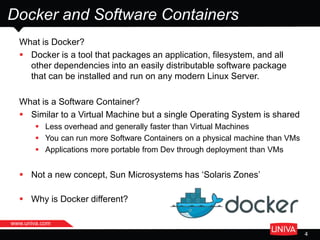
Docker and Software Containers
What is Docker?
 Docker is a tool that packages an application, filesystem, and all
other dependencies into an easily distributable software package
that can be installed and run on any modern Linux Server.
What is a Software Container?
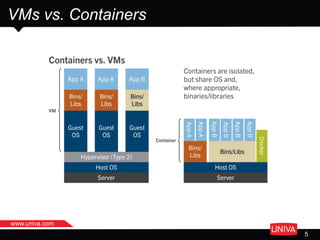
 Similar to a Virtual Machine but a single Operating System is shared
 Less overhead and generally faster than Virtual Machines
 You can run more Software Containers on a physical machine than VMs
 Applications more portable from Dev through deployment than VMs
 Not a new concept, Sun Microsystems has ‘Solaris Zones’
 Why is Docker different?
www.univa.com
VMs vs. Containers
5
www.univa.com
7
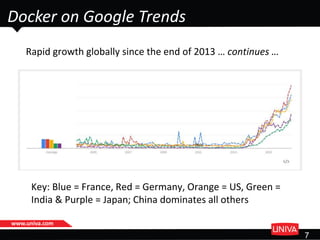
Docker on Google Trends
Rapid growth globally since the end of 2013 … continues …
Key: Blue = France, Red = Germany, Orange = US, Green =
India & Purple = Japan; China dominates all others
www.univa.com
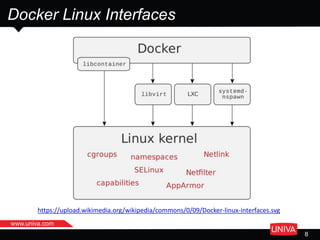
Docker Linux Interfaces
8
https://upload.wikimedia.org/wikipedia/commons/0/09/Docker-linux-interfaces.svg
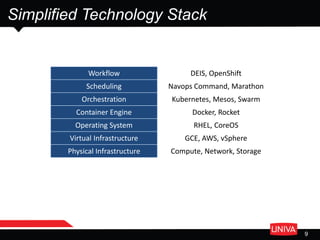
Workflow DEIS, OpenShift
Scheduling Navops Command, Marathon
Orchestration Kubernetes, Mesos, Swarm
Container Engine Docker, Rocket
Operating System RHEL, CoreOS
Virtual Infrastructure GCE, AWS, vSphere
Physical Infrastructure Compute, Network, Storage
Simplified Technology Stack
9
10
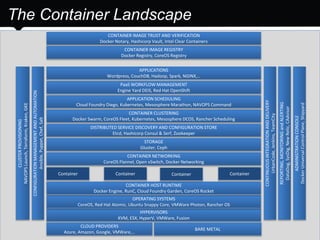
The Container Landscape
Container
HYPERVISORS
KVM, ESX, HyperV, VMWare, Fusion
CLOUD PROVIDERS
Azure, Amazon, Google, VMWare,…
BARE METAL
OPERATING SYSTEMS
CoreOS, Red Hat Atomic, Ubuntu Snappy Core, VMWare Photon, Rancher OS
CONTAINER HOST RUNTIME
Docker Engine, RunC, Cloud Foundry Garden, CoreOS Rocket
PaaS WORKFLOW MANAGEMENT
Engine Yard DEIS, Red Hat OpenShift
CONTAINER NETWORKING
CoreOS Flannel, Open vSwitch, Docker Networking
CONTAINER CLUSTERING
Docker Swarm, CoreOS Fleet, Kubernetes, Mesosphere DCOS, Rancher Scheduling
APPLICATION SCHEDULING
Cloud Foundry Diego, Kubernetes, Mesosphere Marathon, NAVOPS Command
CONTAINER IMAGE REGISTRY
Docker Registry, CoreOS Registry
CONTAINER IMAGE TRUST AND VERIFICATION
Docker Notary, Hashicorp Vault, Intel Clear Containers
CONFIGURATIONMANAGEMENTANDAUTOMATION
Ansible,Puppet,Chef,Salt
CONTINUOUSINTEGRATIONANDDELIVERY
UrbanCode,Jenkins,TeamCity
DISTRIBUTED SERVICE DISCOVERY AND CONFIGURATION STORE
Etcd, Hashicorp Consul & Serf, Zookeeper
Container Container Container
STORAGE
Gluster, Ceph
CLUSTERPROVISIONING
NAVOPSLaunch,Terraform,Kraken,GKE
REPORTING,MONITORINGandALERTING
DataDog,SysDig,NewRelic,CAdvisor
APPLICATIONS
Wordpress, CouchDB, Hadoop, Spark, NGINX,…
ADMINISTRATIONCONSOLE
DockerUniversalControlPlane,Shipyard
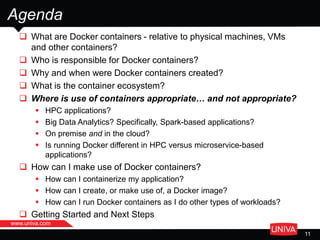
 What are Docker containers - relative to physical machines, VMs
and other containers?
 Who is responsible for Docker containers?
 Why and when were Docker containers created?
 What is the container ecosystem?
 Where is use of containers appropriate… and not appropriate?
 HPC applications?
 Big Data Analytics? Specifically, Spark-based applications?
 On premise and in the cloud?
 Is running Docker different in HPC versus microservice-based
applications?
 How can I make use of Docker containers?
 How can I containerize my application?
 How can I create, or make use of, a Docker image?
 How can I run Docker containers as I do other types of workloads?
 Getting Started and Next Steps
Agenda
www.univa.com
11
Web App
Use Cases
www.univa.com
12
https://docs.docker.com/engine/userguide/containers/usingdocker/
Big Data Analytics
Use Cases
www.univa.com
13
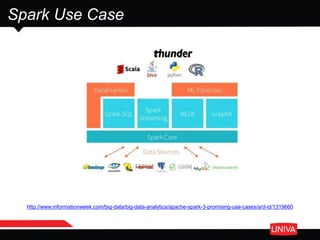
http://www.informationweek.com/big-data/big-data-analytics/apache-spark-3-promising-use-cases/a/d-id/1319660
Spark Use Case
www.univa.com
15
Thunder
 Written in Spark's Python API (Pyspark)
 Makes use of scipy, numpy, and scikit-learn
 Jupyter Notebook serves as interactive GUI
 Runs in a Web browser
o Notebooks can include text and graphics
o Secure, remote access to an in-cluster IPython Notebook server
 Includes modular functions for time-series analysis
 Can interface with C/C++ from Python
http://thunder-project.org/
www.univa.com
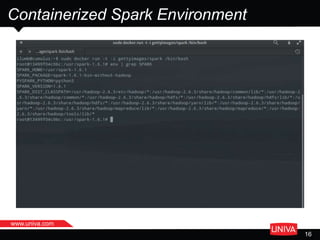
Containerized Spark Environment
16
www.univa.com
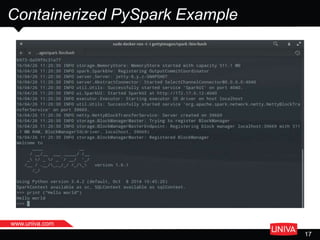
Containerized PySpark Example
17
www.univa.com
18
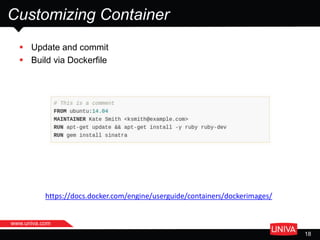
Customizing Container
 Update and commit
 Build via Dockerfile
https://docs.docker.com/engine/userguide/containers/dockerimages/
HPC
Use Cases
www.univa.com
19
www.univa.com
20
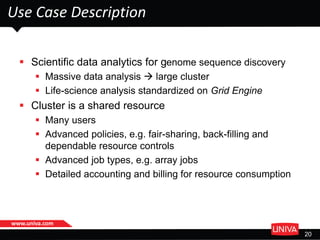
Use Case Description
 Scientific data analytics for genome sequence discovery
 Massive data analysis  large cluster
 Life-science analysis standardized on Grid Engine
 Cluster is a shared resource
 Many users
 Advanced policies, e.g. fair-sharing, back-filling and
dependable resource controls
 Advanced job types, e.g. array jobs
 Detailed accounting and billing for resource consumption
www.univa.com
21
Challenges and Solution
Challenges
 Sandboxing – maintain many production environments for a long
time
 At minimal or no performance impact:
 From running applications in a container
 From network and shared file system access from within a container
 From starting the same containers over and over on nodes
o Avoid to reload images
Solution
 CRG Nextflow workflow management
 Integrated with Univa Grid Engine
 And integrated with Docker
 Make Univa Grid Engine Docker-aware
 Enable Docker jobs
 Container image cache-aware scheduling
www.univa.com
22
Results
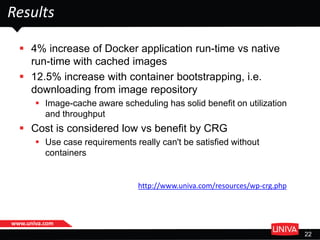
 4% increase of Docker application run-time vs native
run-time with cached images
 12.5% increase with container bootstrapping, i.e.
downloading from image repository
 Image-cache aware scheduling has solid benefit on utilization
and throughput
 Cost is considered low vs benefit by CRG
 Use case requirements really can't be satisfied without
containers
http://www.univa.com/resources/wp-crg.php
23
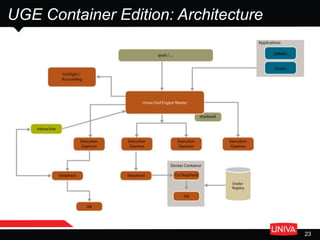
UGE Container Edition: Architecture
www.univa.com
24
Univa Grid Engine – Container Edition (1)
 Launch Docker Container on best machine in cluster
 Reduces time wasted (it can be minutes … or longer)
o Attempting to launch on an improperly serviced execution host.
o Waiting for the Docker image to download from the Docker registry.
 Ensures container runs faster increasing throughput in the cluster.
 Run Docker Containers in a Univa Grid Engine Cluster
 Business Critical containers are prioritized over other containers.
Increases efficiency of the overall organization.
 Containers can be orchestrated alongside other critical workloads such
as batch jobs and frameworks.
$ qsub -o /home/jdoe -j y -xdv "/home:/home"
-l docker,docker_images="*centos:latest*“ my_job.sh
www.univa.com
25
Univa Grid Engine – Container Edition (2)
 Job Control and Limits for Docker Containers
 Provides user and administrator control over containers running on Grid
Engine Hosts.
 Accounting for Docker Containers
 Keeps track of containers. Share policies require accounting.
 Data file Management for Docker Containers
 Transparent access to input, output and error files. Simplifies the
management of input and output files for Docker Containers and
ensures any output or error files are moved to a location where the user
can access them.
 Interactive Docker Containers
 Good for debugging when containers don’t work correctly!
 Parallel jobs in Docker Containers
 Message-passing parallel jobs can each run a set of tasks in a container
on a machine.
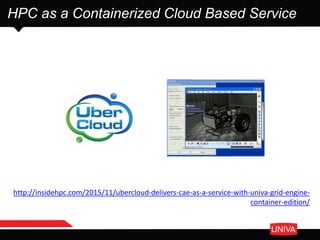
HPC as a Containerized Cloud Based Service
http://insidehpc.com/2015/11/ubercloud-delivers-cae-as-a-service-with-univa-grid-engine-
container-edition/
Cloud Native Computing Foundation (CNCF)
 For current applications and services
 Uptake of cloud computing remains an afterthought from a systems-
architecture perspective
 CNCF aims to introduce a cloud-native paradigm shift that
emphasizes:
 Containerization
 Dynamic scheduling
 Orientation around micro services
 Making use of Kubernetes as a ‘seed technology’
 #1 priority: Integrate the orchestration layer of the container
ecosystem
 Univa is a Founding Member
 Along with Google, IBM, Intel, Red Hat and numerous others ...
 Prototype implementations becoming available
https://cncf.io/
Univa Container Solutions
Easy installation, preconfigured solution including pre-integration
with cloud services.
Build a container cluster on premise or in the cloud.
The fastest way to build a container cluster!!
Respond Quickly: Easy to resize, adapt, dynamic provisioning
Orchestrate and Optimize: Best use of resources and keep track of
containers
The most advanced container orchestration!!
http://navops.io/
www.univa.com
29
Webinar – April 28, 2016 @ 1 pm EDT
 “Going Cloud-Native with Navops Launch and Docker”
 Discussion topics to include:
 The promise of containers in the enterprise
 How to address the complexity of building a Kubernetes-based cluster
 How to install and configure Navops Launch in minutes - a Kubernetes-
based container cluster
 How to build a hybrid container cluster - one that spans and bursts from
your on-premise environment into the cloud (this is cool!)
 A cloud-native use case that makes use of Google Compute Engine via
Navops Launch
Register via http://navops.io/onlinemeetups.html
Summary
 Early adopters report “easier replication, faster deployment and
lower configuration and operating costs” of workflows involving
Docker containers
 Docker containers can be managed in the same way as other types
of workloads and workflows
 Macro services can be supported without a need for refactoring
applications/code/…
 Alongside Kubernetes, Docker containers key to cloud-native
applications
www.univa.com
THANK YOU
Ian Lumb
Solutions Architect
+1 630 303-9068 ilumb@univa.com
WATCH WEBINAR
ON DEMAND
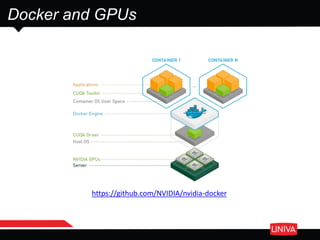
https://github.com/NVIDIA/nvidia-docker
Docker and GPUs
www.univa.com
 An open-source authorization service and user interface for the next
generation Docker Registry
 Developed by SUSE engineers during a hackweek
 Manage users with teams plus images with secure namespaces
 Viewers can only pull images
 Contributors can push and pull images
 Owners can push and pull images plus manage users
 UI with viewing and searching capabilities respective of
authorization levels
 Audit trail that logs events
 Compatible with Univa Grid Engine Container Edition and NAVOPS
Portus
http://suse.github.io/Portus/

Docker 101 - all about Docker containers

  • 1.
  • 2.
     What areDocker containers - relative to physical machines, VMs and other containers?  Who is responsible for Docker containers?  Why and when were Docker containers created?  What is the container ecosystem?  Where is use of containers appropriate… and not appropriate?  HPC applications?  Big Data Analytics? Specifically, Spark-based applications?  On premise and in the cloud?  Is running Docker different in HPC versus microservice-based applications?  How can I make use of Docker containers?  How can I containerize my application?  How can I create, or make use of, a Docker image?  How can I run Docker containers as I do other types of workloads?  Getting Started and Next Steps Agenda www.univa.com 2
  • 3.
    Benefits of CGROUPSsupport  Addresses long-standing issues for which classical Unix resource control means (rlimit) provide no complete solution  Allows for well controlled concurrent usage of servers by multiple jobs with no unmanaged conflicts  Resource isolation  Allows for dependable and complete termination of jobs  Avoids that complex jobs consisting of process hierarchies or parallel tasks grow out of bounds  Allows for soft limits dynamically responding to resource usage of other workloads on same servers  Allows for run-time adjustments of resource limits  Provides more robust means for suspending workloads 3 Univa Grid Engine 8.2, August 2014 Source: Advanced Administrative Training Course
  • 4.
    www.univa.com 4 Docker and SoftwareContainers What is Docker?  Docker is a tool that packages an application, filesystem, and all other dependencies into an easily distributable software package that can be installed and run on any modern Linux Server. What is a Software Container?  Similar to a Virtual Machine but a single Operating System is shared  Less overhead and generally faster than Virtual Machines  You can run more Software Containers on a physical machine than VMs  Applications more portable from Dev through deployment than VMs  Not a new concept, Sun Microsystems has ‘Solaris Zones’  Why is Docker different?
  • 5.
  • 6.
    www.univa.com 7 Docker on GoogleTrends Rapid growth globally since the end of 2013 … continues … Key: Blue = France, Red = Germany, Orange = US, Green = India & Purple = Japan; China dominates all others
  • 7.
  • 8.
    Workflow DEIS, OpenShift SchedulingNavops Command, Marathon Orchestration Kubernetes, Mesos, Swarm Container Engine Docker, Rocket Operating System RHEL, CoreOS Virtual Infrastructure GCE, AWS, vSphere Physical Infrastructure Compute, Network, Storage Simplified Technology Stack 9
  • 9.
    10 The Container Landscape Container HYPERVISORS KVM,ESX, HyperV, VMWare, Fusion CLOUD PROVIDERS Azure, Amazon, Google, VMWare,… BARE METAL OPERATING SYSTEMS CoreOS, Red Hat Atomic, Ubuntu Snappy Core, VMWare Photon, Rancher OS CONTAINER HOST RUNTIME Docker Engine, RunC, Cloud Foundry Garden, CoreOS Rocket PaaS WORKFLOW MANAGEMENT Engine Yard DEIS, Red Hat OpenShift CONTAINER NETWORKING CoreOS Flannel, Open vSwitch, Docker Networking CONTAINER CLUSTERING Docker Swarm, CoreOS Fleet, Kubernetes, Mesosphere DCOS, Rancher Scheduling APPLICATION SCHEDULING Cloud Foundry Diego, Kubernetes, Mesosphere Marathon, NAVOPS Command CONTAINER IMAGE REGISTRY Docker Registry, CoreOS Registry CONTAINER IMAGE TRUST AND VERIFICATION Docker Notary, Hashicorp Vault, Intel Clear Containers CONFIGURATIONMANAGEMENTANDAUTOMATION Ansible,Puppet,Chef,Salt CONTINUOUSINTEGRATIONANDDELIVERY UrbanCode,Jenkins,TeamCity DISTRIBUTED SERVICE DISCOVERY AND CONFIGURATION STORE Etcd, Hashicorp Consul & Serf, Zookeeper Container Container Container STORAGE Gluster, Ceph CLUSTERPROVISIONING NAVOPSLaunch,Terraform,Kraken,GKE REPORTING,MONITORINGandALERTING DataDog,SysDig,NewRelic,CAdvisor APPLICATIONS Wordpress, CouchDB, Hadoop, Spark, NGINX,… ADMINISTRATIONCONSOLE DockerUniversalControlPlane,Shipyard
  • 10.
     What areDocker containers - relative to physical machines, VMs and other containers?  Who is responsible for Docker containers?  Why and when were Docker containers created?  What is the container ecosystem?  Where is use of containers appropriate… and not appropriate?  HPC applications?  Big Data Analytics? Specifically, Spark-based applications?  On premise and in the cloud?  Is running Docker different in HPC versus microservice-based applications?  How can I make use of Docker containers?  How can I containerize my application?  How can I create, or make use of, a Docker image?  How can I run Docker containers as I do other types of workloads?  Getting Started and Next Steps Agenda www.univa.com 11
  • 11.
  • 12.
    Big Data Analytics UseCases www.univa.com 13
  • 13.
  • 14.
    www.univa.com 15 Thunder  Written inSpark's Python API (Pyspark)  Makes use of scipy, numpy, and scikit-learn  Jupyter Notebook serves as interactive GUI  Runs in a Web browser o Notebooks can include text and graphics o Secure, remote access to an in-cluster IPython Notebook server  Includes modular functions for time-series analysis  Can interface with C/C++ from Python http://thunder-project.org/
  • 15.
  • 16.
  • 17.
    www.univa.com 18 Customizing Container  Updateand commit  Build via Dockerfile https://docs.docker.com/engine/userguide/containers/dockerimages/
  • 18.
  • 19.
    www.univa.com 20 Use Case Description Scientific data analytics for genome sequence discovery  Massive data analysis  large cluster  Life-science analysis standardized on Grid Engine  Cluster is a shared resource  Many users  Advanced policies, e.g. fair-sharing, back-filling and dependable resource controls  Advanced job types, e.g. array jobs  Detailed accounting and billing for resource consumption
  • 20.
    www.univa.com 21 Challenges and Solution Challenges Sandboxing – maintain many production environments for a long time  At minimal or no performance impact:  From running applications in a container  From network and shared file system access from within a container  From starting the same containers over and over on nodes o Avoid to reload images Solution  CRG Nextflow workflow management  Integrated with Univa Grid Engine  And integrated with Docker  Make Univa Grid Engine Docker-aware  Enable Docker jobs  Container image cache-aware scheduling
  • 21.
    www.univa.com 22 Results  4% increaseof Docker application run-time vs native run-time with cached images  12.5% increase with container bootstrapping, i.e. downloading from image repository  Image-cache aware scheduling has solid benefit on utilization and throughput  Cost is considered low vs benefit by CRG  Use case requirements really can't be satisfied without containers http://www.univa.com/resources/wp-crg.php
  • 22.
  • 23.
    www.univa.com 24 Univa Grid Engine– Container Edition (1)  Launch Docker Container on best machine in cluster  Reduces time wasted (it can be minutes … or longer) o Attempting to launch on an improperly serviced execution host. o Waiting for the Docker image to download from the Docker registry.  Ensures container runs faster increasing throughput in the cluster.  Run Docker Containers in a Univa Grid Engine Cluster  Business Critical containers are prioritized over other containers. Increases efficiency of the overall organization.  Containers can be orchestrated alongside other critical workloads such as batch jobs and frameworks. $ qsub -o /home/jdoe -j y -xdv "/home:/home" -l docker,docker_images="*centos:latest*“ my_job.sh
  • 24.
    www.univa.com 25 Univa Grid Engine– Container Edition (2)  Job Control and Limits for Docker Containers  Provides user and administrator control over containers running on Grid Engine Hosts.  Accounting for Docker Containers  Keeps track of containers. Share policies require accounting.  Data file Management for Docker Containers  Transparent access to input, output and error files. Simplifies the management of input and output files for Docker Containers and ensures any output or error files are moved to a location where the user can access them.  Interactive Docker Containers  Good for debugging when containers don’t work correctly!  Parallel jobs in Docker Containers  Message-passing parallel jobs can each run a set of tasks in a container on a machine.
  • 25.
    HPC as aContainerized Cloud Based Service http://insidehpc.com/2015/11/ubercloud-delivers-cae-as-a-service-with-univa-grid-engine- container-edition/
  • 26.
    Cloud Native ComputingFoundation (CNCF)  For current applications and services  Uptake of cloud computing remains an afterthought from a systems- architecture perspective  CNCF aims to introduce a cloud-native paradigm shift that emphasizes:  Containerization  Dynamic scheduling  Orientation around micro services  Making use of Kubernetes as a ‘seed technology’  #1 priority: Integrate the orchestration layer of the container ecosystem  Univa is a Founding Member  Along with Google, IBM, Intel, Red Hat and numerous others ...  Prototype implementations becoming available https://cncf.io/
  • 27.
    Univa Container Solutions Easyinstallation, preconfigured solution including pre-integration with cloud services. Build a container cluster on premise or in the cloud. The fastest way to build a container cluster!! Respond Quickly: Easy to resize, adapt, dynamic provisioning Orchestrate and Optimize: Best use of resources and keep track of containers The most advanced container orchestration!! http://navops.io/
  • 28.
    www.univa.com 29 Webinar – April28, 2016 @ 1 pm EDT  “Going Cloud-Native with Navops Launch and Docker”  Discussion topics to include:  The promise of containers in the enterprise  How to address the complexity of building a Kubernetes-based cluster  How to install and configure Navops Launch in minutes - a Kubernetes- based container cluster  How to build a hybrid container cluster - one that spans and bursts from your on-premise environment into the cloud (this is cool!)  A cloud-native use case that makes use of Google Compute Engine via Navops Launch Register via http://navops.io/onlinemeetups.html
  • 29.
    Summary  Early adoptersreport “easier replication, faster deployment and lower configuration and operating costs” of workflows involving Docker containers  Docker containers can be managed in the same way as other types of workloads and workflows  Macro services can be supported without a need for refactoring applications/code/…  Alongside Kubernetes, Docker containers key to cloud-native applications
  • 30.
    www.univa.com THANK YOU Ian Lumb SolutionsArchitect +1 630 303-9068 ilumb@univa.com WATCH WEBINAR ON DEMAND
  • 31.
  • 32.
    www.univa.com  An open-sourceauthorization service and user interface for the next generation Docker Registry  Developed by SUSE engineers during a hackweek  Manage users with teams plus images with secure namespaces  Viewers can only pull images  Contributors can push and pull images  Owners can push and pull images plus manage users  UI with viewing and searching capabilities respective of authorization levels  Audit trail that logs events  Compatible with Univa Grid Engine Container Edition and NAVOPS Portus http://suse.github.io/Portus/