CSI - Intro
Idan Atias
Agenda
● Motivation
● High level overview of spec and architecture
Motivation
Short recap - stateless & stateful apps
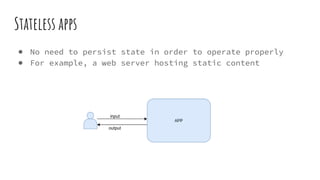
Stateless apps
● No need to persist state in order to operate properly
● For example, a web server hosting static content
input
output
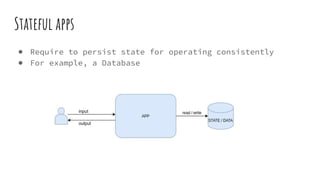
Stateful apps
● Require to persist state for operating consistently
● For example, a Database
input
output
Containers and stateful apps?
● Containers are ephemeral
○ Data is lost when container is restarted
● Containers are isolated
○ Data cannot be shared with other containers
● Therefore, containers alone are not a good fit for
stateful applications
Kubernetes storage solution
Volume plugin
● Kubernetes way for exposing a block device or a mounted
file system to all containers in a pod
● It determines:
○ The backing store of the volume (host / remote storage)
○ The lifecycle of the volume (same as pod’s LC / beyond pod’s LC)
Ephemeral storage in k8s
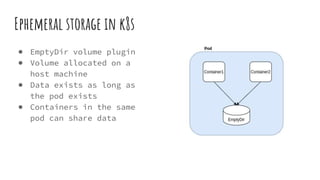
● EmptyDir volume plugin
● Volume allocated on a
host machine
● Data exists as long as
the pod exists
● Containers in the same
pod can share data
Ephemeral storage in k8s
● ConfigMap and Secret are volumes built on top of the
EmptyDir volume plugin
● Kubernetes expose these API objects as files in an
EmptyDir volume
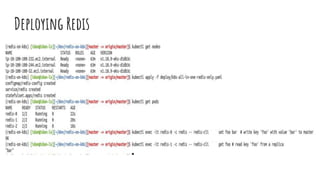
Deploying Redis
● Redis is an in-memory key-
value store that can
persist data on disk
● We deploy a cluster of 3
redis nodes - 1 master and
2 replicas
● At first, we use an
EmptyDir volume for
storage
apiVersion: apps/v1
kind: StatefulSet
metadata:
name: redis
…
containers:
- command: [sh, -c, source /redis-
config/init.sh ]
image: redis:4.0.11-alpine
name: redis
ports:
- containerPort: 6379
name: redis
volumeMounts:
- mountPath: /redis-config
name: config
- mountPath: /redis-data
name: data
…..
volumes:
- configMap:
name: redis-config
name: config
- emptyDir: {}
name: data
Deploying Redis
Deploying Redis - adding data persistency
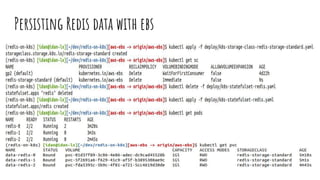
Persisting Redis data with ebs
● EBS - Amazon Elastic Block store
● First we’ll define a StorageClass object
● This object allows K8S to dynamically provision volumes
(PersistentVolume or PV) for our application
● It contains the information on which volume plugin to use
as well as the set of parameters for provisioning the
volume
● So essentially, this is a template for creating a new
volume
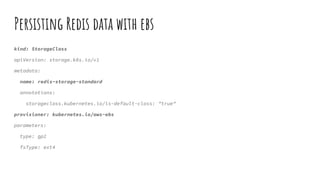
Persisting Redis data with ebs
kind: StorageClass
apiVersion: storage.k8s.io/v1
metadata:
name: redis-storage-standard
annotations:
storageclass.kubernetes.io/is-default-class: "true"
provisioner: kubernetes.io/aws-ebs
parameters:
type: gp2
fsType: ext4
Persisting Redis data with ebs
● Next we’ll need to add a volumeClaimTemplates section in
the stateful set definition
● This allows creating a PersistentVolumeClame (PVC) for
each pod in the stateful set
○ A PVC is a request for storage
○ It lets Kubernetes know:
■ How much storage the pod needs
■ What is the access mode to the volume (e.g., ReadWriteOnce)
■ What type of storage to use (i.e., StorageClass)
Persisting Redis data with ebs
apiVersion: apps/v1
kind: StatefulSet
metadata:
name: redis
...
volumeMounts:
- mountPath: /redis-data
name: data
...
volumeClaimTemplates:
- metadata:
name: data
spec:
accessModes: [ "ReadWriteOnce" ]
storageClassName: "redis-storage-standard"
resources:
requests:
storage: 1Gi
Persisting Redis data with ebs
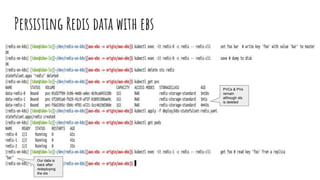
PVCs & PVs
remain
although sts
is deleted
Our data is
back after
redeploying
the sts
In-tree volume plugins
● EmptyDir and EBS are in-tree volume plugins
● In-tree volume plugins are part of the core Kubernetes
and are shipped with its binaries
● Example in-tree volume plugins:
○ EmptyDir
○ AWS EBS
○ Azure Disks
○ GCE pd
○ ScaleIO
○ Vsphere Volume
○ ...
In-tree volume plugins challenges
● Development is tightly coupled with Kubernetes releases.
● Kubernetes community is responsible for testing and
maintaining all volume plugins.
● Bugs in volume plugins can crash critical Kubernetes
components. (E.g., kubelet)
● Volume plugins are granted the same privileges as the
kubernetes component they are part of (E.g., kubelet)
● Forces volume plugin developers to make plugin source
code public.
Out-of-tree volume plugins
● Out-of-tree volume plugins are developed independently of
the Kubernetes code base, and are deployed on Kubernetes
clusters as extensions.
● Kubernetes supports 2 types of out-of-tree volume
plugins:
○ FlexVolume Driver (deprecated)
○ CSI Driver (GAed in Kubernetes 1.13)
CSI Overview
Brief history
● Over time, different COs (Container Orchestrators; e.g.,
Kubernetes, Mesos) developed their own storage interfaces
● It became a nightmare for SPs (storage providers), having
to support all of the different specs out there
● Besides that, there were issues with the interfaces
themselves
○ 1 of them is their “in-tree” structure
● Somewhere in 2017, some folks from different COs and SPs
decided to tackle these issues and formed the Container
Storage Interface - CSI
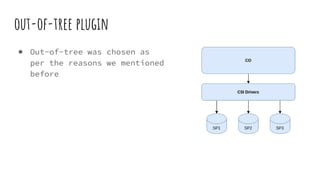
out-of-tree plugin
● Out-of-tree was chosen as
per the reasons we mentioned
before
Volume Operations
● 2 types of volume operations
● Must be executed on the node (volume’s host)
○ E.g., mount/unmount
● Can be executed on any node
○ E.g., create volume
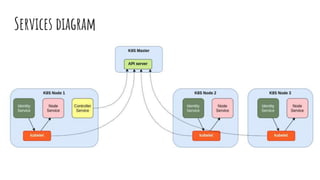
● This led to the definition of 3 services
○ Identity Service - must run on each node (used for registering the driver
with CO node agent)
○ Node Service - must run on each node (used for “on-the-node” operations)
○ Controller Service - single instance the can run on any node (interacts
with the API Server and the Storage Provider)
○ CSI Driver needs to implement these services
● Next, we describe these services deeper (focusing on
Kubernetes)
Service APIs
● APIs should be:
○ Implemented as gRPC endpoints (over unix domain sockets)
○ Sync
○ Idempotent
■ For failure recovery
Identity Service
● GetPluginInfo
○ Driver metadata
■ Name, Vendor
● GetPluginCapabilities
○ For advertising what “features” the driver supports
○ E.g. CreateVolume
● Probe
○ Driver health check EP
Controller Service
● CreateVolume
● DeleteVolume
● ControllerPublishVolume
○ Attaching volume to node
● ControllerUnpublishVolume
○ Detach
● ValidateVolumeCapabilities
○ Validate requested vol caps match the supported caps
○ Stage/unstage
● ListVolumes
● GetCapacity
● ControllerGetCapabilities
Node Service
● NodeStageVolume
○ Mount volume to a staging path on the node
● NodeUnstageVolume
○ Unmounts from staging path
● NodePublishVolume
○ Mount the volume to the target path on the node (bind-mount)
● NodeUnpublishVolume
○ Unmount from target path
● NodeGetId
○ Node identifier - for iSCSI - IQN
● NodeGetCapabilities
Services diagram
Plugin Deployment
● As long as meets the CSI spec - no restrictions
● However, Kubernetes team has a recommended way
● It involves using a some helper side cars developed by
the Kubernetes community
● It also facilitates special CSI objects- CSIDriver,
CSINode
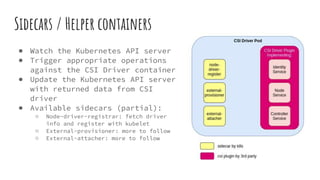
Sidecars / Helper containers
● Watch the Kubernetes API server
● Trigger appropriate operations
against the CSI Driver container
● Update the Kubernetes API server
with returned data from CSI
driver
● Available sidecars (partial):
○ Node-driver-registrar: fetch driver
info and register with kubelet
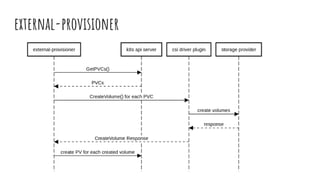
○ External-provisioner: more to follow
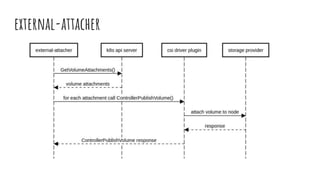
○ External-attacher: more to follow
external-provisioner
external-attacher
CSI - Intro: The End
Idan Atias

Introduction to Container Storage Interface (CSI)

  • 1.
  • 2.
    Agenda ● Motivation ● Highlevel overview of spec and architecture
  • 3.
  • 4.
    Short recap -stateless & stateful apps
  • 5.
    Stateless apps ● Noneed to persist state in order to operate properly ● For example, a web server hosting static content input output
  • 6.
    Stateful apps ● Requireto persist state for operating consistently ● For example, a Database input output
  • 7.
    Containers and statefulapps? ● Containers are ephemeral ○ Data is lost when container is restarted ● Containers are isolated ○ Data cannot be shared with other containers ● Therefore, containers alone are not a good fit for stateful applications
  • 8.
  • 9.
    Volume plugin ● Kubernetesway for exposing a block device or a mounted file system to all containers in a pod ● It determines: ○ The backing store of the volume (host / remote storage) ○ The lifecycle of the volume (same as pod’s LC / beyond pod’s LC)
  • 10.
    Ephemeral storage ink8s ● EmptyDir volume plugin ● Volume allocated on a host machine ● Data exists as long as the pod exists ● Containers in the same pod can share data
  • 11.
    Ephemeral storage ink8s ● ConfigMap and Secret are volumes built on top of the EmptyDir volume plugin ● Kubernetes expose these API objects as files in an EmptyDir volume
  • 12.
    Deploying Redis ● Redisis an in-memory key- value store that can persist data on disk ● We deploy a cluster of 3 redis nodes - 1 master and 2 replicas ● At first, we use an EmptyDir volume for storage apiVersion: apps/v1 kind: StatefulSet metadata: name: redis … containers: - command: [sh, -c, source /redis- config/init.sh ] image: redis:4.0.11-alpine name: redis ports: - containerPort: 6379 name: redis volumeMounts: - mountPath: /redis-config name: config - mountPath: /redis-data name: data ….. volumes: - configMap: name: redis-config name: config - emptyDir: {} name: data
  • 13.
  • 14.
    Deploying Redis -adding data persistency
  • 15.
    Persisting Redis datawith ebs ● EBS - Amazon Elastic Block store ● First we’ll define a StorageClass object ● This object allows K8S to dynamically provision volumes (PersistentVolume or PV) for our application ● It contains the information on which volume plugin to use as well as the set of parameters for provisioning the volume ● So essentially, this is a template for creating a new volume
  • 16.
    Persisting Redis datawith ebs kind: StorageClass apiVersion: storage.k8s.io/v1 metadata: name: redis-storage-standard annotations: storageclass.kubernetes.io/is-default-class: "true" provisioner: kubernetes.io/aws-ebs parameters: type: gp2 fsType: ext4
  • 17.
    Persisting Redis datawith ebs ● Next we’ll need to add a volumeClaimTemplates section in the stateful set definition ● This allows creating a PersistentVolumeClame (PVC) for each pod in the stateful set ○ A PVC is a request for storage ○ It lets Kubernetes know: ■ How much storage the pod needs ■ What is the access mode to the volume (e.g., ReadWriteOnce) ■ What type of storage to use (i.e., StorageClass)
  • 18.
    Persisting Redis datawith ebs apiVersion: apps/v1 kind: StatefulSet metadata: name: redis ... volumeMounts: - mountPath: /redis-data name: data ... volumeClaimTemplates: - metadata: name: data spec: accessModes: [ "ReadWriteOnce" ] storageClassName: "redis-storage-standard" resources: requests: storage: 1Gi
  • 19.
  • 20.
    Persisting Redis datawith ebs PVCs & PVs remain although sts is deleted Our data is back after redeploying the sts
  • 21.
    In-tree volume plugins ●EmptyDir and EBS are in-tree volume plugins ● In-tree volume plugins are part of the core Kubernetes and are shipped with its binaries ● Example in-tree volume plugins: ○ EmptyDir ○ AWS EBS ○ Azure Disks ○ GCE pd ○ ScaleIO ○ Vsphere Volume ○ ...
  • 22.
    In-tree volume pluginschallenges ● Development is tightly coupled with Kubernetes releases. ● Kubernetes community is responsible for testing and maintaining all volume plugins. ● Bugs in volume plugins can crash critical Kubernetes components. (E.g., kubelet) ● Volume plugins are granted the same privileges as the kubernetes component they are part of (E.g., kubelet) ● Forces volume plugin developers to make plugin source code public.
  • 23.
    Out-of-tree volume plugins ●Out-of-tree volume plugins are developed independently of the Kubernetes code base, and are deployed on Kubernetes clusters as extensions. ● Kubernetes supports 2 types of out-of-tree volume plugins: ○ FlexVolume Driver (deprecated) ○ CSI Driver (GAed in Kubernetes 1.13)
  • 24.
  • 25.
    Brief history ● Overtime, different COs (Container Orchestrators; e.g., Kubernetes, Mesos) developed their own storage interfaces ● It became a nightmare for SPs (storage providers), having to support all of the different specs out there ● Besides that, there were issues with the interfaces themselves ○ 1 of them is their “in-tree” structure ● Somewhere in 2017, some folks from different COs and SPs decided to tackle these issues and formed the Container Storage Interface - CSI
  • 26.
    out-of-tree plugin ● Out-of-treewas chosen as per the reasons we mentioned before
  • 27.
    Volume Operations ● 2types of volume operations ● Must be executed on the node (volume’s host) ○ E.g., mount/unmount ● Can be executed on any node ○ E.g., create volume ● This led to the definition of 3 services ○ Identity Service - must run on each node (used for registering the driver with CO node agent) ○ Node Service - must run on each node (used for “on-the-node” operations) ○ Controller Service - single instance the can run on any node (interacts with the API Server and the Storage Provider) ○ CSI Driver needs to implement these services ● Next, we describe these services deeper (focusing on Kubernetes)
  • 28.
    Service APIs ● APIsshould be: ○ Implemented as gRPC endpoints (over unix domain sockets) ○ Sync ○ Idempotent ■ For failure recovery
  • 29.
    Identity Service ● GetPluginInfo ○Driver metadata ■ Name, Vendor ● GetPluginCapabilities ○ For advertising what “features” the driver supports ○ E.g. CreateVolume ● Probe ○ Driver health check EP
  • 30.
    Controller Service ● CreateVolume ●DeleteVolume ● ControllerPublishVolume ○ Attaching volume to node ● ControllerUnpublishVolume ○ Detach ● ValidateVolumeCapabilities ○ Validate requested vol caps match the supported caps ○ Stage/unstage ● ListVolumes ● GetCapacity ● ControllerGetCapabilities
  • 31.
    Node Service ● NodeStageVolume ○Mount volume to a staging path on the node ● NodeUnstageVolume ○ Unmounts from staging path ● NodePublishVolume ○ Mount the volume to the target path on the node (bind-mount) ● NodeUnpublishVolume ○ Unmount from target path ● NodeGetId ○ Node identifier - for iSCSI - IQN ● NodeGetCapabilities
  • 32.
  • 33.
    Plugin Deployment ● Aslong as meets the CSI spec - no restrictions ● However, Kubernetes team has a recommended way ● It involves using a some helper side cars developed by the Kubernetes community ● It also facilitates special CSI objects- CSIDriver, CSINode
  • 34.
    Sidecars / Helpercontainers ● Watch the Kubernetes API server ● Trigger appropriate operations against the CSI Driver container ● Update the Kubernetes API server with returned data from CSI driver ● Available sidecars (partial): ○ Node-driver-registrar: fetch driver info and register with kubelet ○ External-provisioner: more to follow ○ External-attacher: more to follow
  • 35.
  • 36.
  • 37.
    CSI - Intro:The End Idan Atias