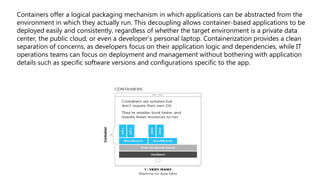
Containers offer a logical packaging mechanism in which applications can be abstracted from the
environment in which they actually run. This decoupling allows container-based applications to be
deployed easily and consistently, regardless of whether the target environment is a private data
center, the public cloud, or even a developer’s personal laptop. Containerization provides a clean
separation of concerns, as developers focus on their application logic and dependencies, while IT
operations teams can focus on deployment and management without bothering with application
details such as specific software versions and configurations specific to the app.
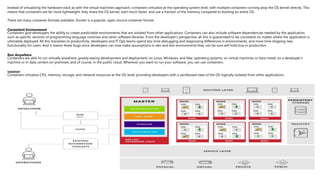
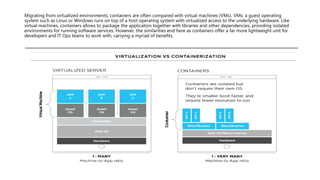
Instead of virtualizing the hardware stack as with the virtual machines approach, containers virtualize at the operating system level, with multiple containers running atop the OS kernel directly. This
means that containers are far more lightweight: they share the OS kernel, start much faster, and use a fraction of the memory compared to booting an entire OS.
There are many container formats available. Docker is a popular, open-source container format.
Consistent Environment
Containers give developers the ability to create predictable environments that are isolated from other applications. Containers can also include software dependencies needed by the application,
such as specific versions of programming language runtimes and other software libraries. From the developer’s perspective, all this is guaranteed to be consistent no matter where the application is
ultimately deployed. All this translates to productivity: developers and IT Ops teams spend less time debugging and diagnosing differences in environments, and more time shipping new
functionality for users. And it means fewer bugs since developers can now make assumptions in dev and test environments they can be sure will hold true in production.
Run Anywhere
Containers are able to run virtually anywhere, greatly easing development and deployment: on Linux, Windows, and Mac operating systems; on virtual machines or bare metal; on a developer’s
machine or in data centers on-premises; and of course, in the public cloud. Wherever you want to run your software, you can use containers.
Isolation
Containers virtualize CPU, memory, storage, and network resources at the OS-level, providing developers with a sandboxed view of the OS logically isolated from other applications.
From Code to Applications
Containers allow you to package your application and its dependencies
together into one succinct manifest that can be version controlled,
allowing for easy replication of your application across developers on
team and machines in your cluster.
Just as how software libraries package bits of code together, allowing
developers to abstract away logic like user authentication and session
management, containers allow your application as a whole to be
abstracting away the operating system, the machine, and even the code
itself. Combined with a service-based architecture, the entire unit that
developers are asked to reason about becomes much smaller, leading to
greater agility and productivity. All this eases development, testing,
deployment, and overall management of your applications.
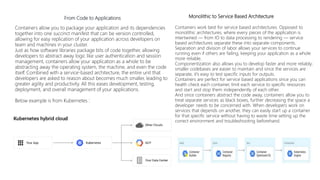
Below example is from Kubernetes :
MonolMonolithic to Service Based Architecture t
Containers work best for service based architectures. Opposed to
monolithic architectures, where every pieces of the application is
intertwined — from IO to data processing to rendering — service
based architectures separate these into separate components.
Separation and division of labor allows your services to continue
running even if others are failing, keeping your application as a whole
more reliable.
Componentization also allows you to develop faster and more reliably;
smaller codebases are easier to maintain and since the services are
separate, it's easy to test specific inputs for outputs.
Containers are perfect for service based applications since you can
health check each container, limit each service to specific resources
and start and stop them independently of each other.
And since containers abstract the code away, containers allow you to
treat separate services as black boxes, further decreasing the space a
developer needs to be concerned with. When developers work on
services that depends on another, they can easily start up a container
for that specific service without having to waste time setting up the
correct environment and troubleshooting beforehand.
Migrating from virtualized environments, containers are often compared with virtual machines (VMs). VMs: a guest operating
system such as Linux or Windows runs on top of a host operating system with virtualized access to the underlying hardware. Like
virtual machines, containers allows to package the application together with libraries and other dependencies, providing isolated
environments for running software services. However, the similarities end here as containers offer a far more lightweight unit for
developers and IT Ops teams to work with, carrying a myriad of benefits.
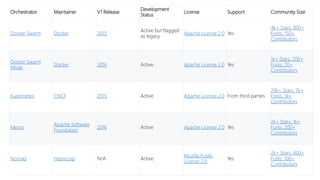
Orchestrator Maintainer V1 Release
Development
Status
License Support Community Size
Docker Swarm Docker 2015
Active but flagged
as legacy
Apache License 2.0 Yes
4k+ Stars, 800+
Forks, 150+
Contributors
Docker Swarm
Mode
Docker 2016 Active Apache License 2.0 Yes
1k+ Stars, 200+
Forks, 70+
Contributors
Kubernetes CNCF 2015 Active Apache License 2.0 From third parties
20k+ Stars, 7k+
Forks, 1k+
Contributors
Mesos
Apache Software
Foundation
2016 Active Apache License 2.0 Yes
2k+ Stars, 1k+
Forks, 200+
Contributors
Nomad Hashicorp N/A Active
Mozilla Public
License 2.0
Yes
2k+ Stars, 400+
Forks, 100+
Contributors
Features Docker Swarm Docker Swarm mode Kubernetes Mesos Nomad
Scheduler Architecture Monolithic Shared State [source required] Shared State Two Level Shared State
Container agnostic No No Yes, Docker and rkt Yes, Docker, rktand other drivers Yes, Docker, rkt and other drivers
Service discovery
No native support, requires third
parties source
Native support source
Native support with an intra-cluster
DNS source
or
Using environment variables source
Native support with Mesos-DNS source
Requires Consul but easy integration
provided source
Secret management No native support [source required]
Native support with Docker Secret
Management source
Native support with secret objects source
No native support, depends on the
framework source
Requires Vault but easy integration
provided source
Configuration management
Through env variables in compose
files source
Through env variables in compose
files source
Native support through ConfigMap source
or
Injecting configuration using environment
variables source
No native support, depends on the
framework source
Through the env stanza in the job
specifications source
Logging
Requires to configure a logging driver and
forward to a third party such as the ELK
stack
Requires to configure a logging driver and
forward to a third party such as the ELK
stack
Requires to forward logs to a third party
such as the ELK stack source
With ContainerLogger or provided by the
frameworks source
With the logs stanza to configure where to
store the logs for the containers source
Monitoring
Requires to use a third party to keep track
all the containers status source
Requires to use a third party to keep track
all the containers status source
With Heapsters providing a base
platform sending data to a storage
backend source
Sends Observability Metrics to a third party
monitoring dashboard source
By outputting resource data to statsite and
statsd source
High-Availability
Native support by creating multiple
manager source
Native support from the distribution of
manager nodes source
Native support by replicating master in a
HA-cluster source
Native support from having multiple
masters with ZooKeeper
Native support from the distribution of
server nodes source
Load balancing No native support [source required]
By exposing ports for services to an
load balancer source
External load balancer automatically
in front of a service configured for
such source
Provided from the selected framework such
as Marathon source
Can use Consul integration to do the load
balancing using third parties source
Networking Uses Docker networking facilities source Uses Docker networking facilities source
Requires the use of third parties to form an
overlay network source
Requires the use of third parties for
networking solutions source
No native support for network overlay but
handles the exposed services through the
network stanza source
Application definition Uses Docker Compose files source
Can use the experimental stack command
read Docker-Compose format source
Using yaml format to define the different
objects e.g.
Depends on the framework source
Using HCL, a proprietary language similar
json source
Deployment
No deployment strategies, only applies the
Docker Compose on a cluster [source
required]
Supports rolling update in service
and applies it on image update source
Supports roll-back source
Native support for deployment with the
Deployment definition source
Depends on the framework source
Natively support multiple deployment
strategies such as rolling upgrades and
canary deployments source
Auto-scaling No [source required]
No, but has easy manual scalling
available source
Native supports to autoscale pods within a
given range source
Depends on the framework source
Only available through HashiCorp private
platform Atlas source
Self-healing No [source required] Yes source Yes source Depends on the framework source Yes source
Stateful support Through the use of data volumes source Through the use of data volumes source
Through StatefulSets source
or
Using persistent volumes source
Through the creation of persistent
volumes source
Using Docker Volumes source
Development environment
Can use the same or similar Docker
Compose files to create the dev
environment
Can use the same or similar Docker
Compose files to create the dev
environment
Can use minikube to quickly create a single
node Kubernetes cluster to create the dev
environment source
Depends on the framework but a Mesos
cluster can be installed locally
By running a single nomad agent that is
both server and client to create the dev
environment
Documentations
Initially confusing due to the change
from Docker Swarm to Docker engine
Swarm mode
Initially confusing due to the change
from Docker Swarm to Docker engine
Swarm mode
Sometimes difficult to search due to the
changes of documentation platforms
(github to kubernetes.io) and then
organisation (from user-guide/ to tasks/,
tutorials/ and concepts/

Containerization

  • 1.
    Containers offer alogical packaging mechanism in which applications can be abstracted from the environment in which they actually run. This decoupling allows container-based applications to be deployed easily and consistently, regardless of whether the target environment is a private data center, the public cloud, or even a developer’s personal laptop. Containerization provides a clean separation of concerns, as developers focus on their application logic and dependencies, while IT operations teams can focus on deployment and management without bothering with application details such as specific software versions and configurations specific to the app.
  • 2.
    Instead of virtualizingthe hardware stack as with the virtual machines approach, containers virtualize at the operating system level, with multiple containers running atop the OS kernel directly. This means that containers are far more lightweight: they share the OS kernel, start much faster, and use a fraction of the memory compared to booting an entire OS. There are many container formats available. Docker is a popular, open-source container format. Consistent Environment Containers give developers the ability to create predictable environments that are isolated from other applications. Containers can also include software dependencies needed by the application, such as specific versions of programming language runtimes and other software libraries. From the developer’s perspective, all this is guaranteed to be consistent no matter where the application is ultimately deployed. All this translates to productivity: developers and IT Ops teams spend less time debugging and diagnosing differences in environments, and more time shipping new functionality for users. And it means fewer bugs since developers can now make assumptions in dev and test environments they can be sure will hold true in production. Run Anywhere Containers are able to run virtually anywhere, greatly easing development and deployment: on Linux, Windows, and Mac operating systems; on virtual machines or bare metal; on a developer’s machine or in data centers on-premises; and of course, in the public cloud. Wherever you want to run your software, you can use containers. Isolation Containers virtualize CPU, memory, storage, and network resources at the OS-level, providing developers with a sandboxed view of the OS logically isolated from other applications.
  • 3.
    From Code toApplications Containers allow you to package your application and its dependencies together into one succinct manifest that can be version controlled, allowing for easy replication of your application across developers on team and machines in your cluster. Just as how software libraries package bits of code together, allowing developers to abstract away logic like user authentication and session management, containers allow your application as a whole to be abstracting away the operating system, the machine, and even the code itself. Combined with a service-based architecture, the entire unit that developers are asked to reason about becomes much smaller, leading to greater agility and productivity. All this eases development, testing, deployment, and overall management of your applications. Below example is from Kubernetes : MonolMonolithic to Service Based Architecture t Containers work best for service based architectures. Opposed to monolithic architectures, where every pieces of the application is intertwined — from IO to data processing to rendering — service based architectures separate these into separate components. Separation and division of labor allows your services to continue running even if others are failing, keeping your application as a whole more reliable. Componentization also allows you to develop faster and more reliably; smaller codebases are easier to maintain and since the services are separate, it's easy to test specific inputs for outputs. Containers are perfect for service based applications since you can health check each container, limit each service to specific resources and start and stop them independently of each other. And since containers abstract the code away, containers allow you to treat separate services as black boxes, further decreasing the space a developer needs to be concerned with. When developers work on services that depends on another, they can easily start up a container for that specific service without having to waste time setting up the correct environment and troubleshooting beforehand.
  • 4.
    Migrating from virtualizedenvironments, containers are often compared with virtual machines (VMs). VMs: a guest operating system such as Linux or Windows runs on top of a host operating system with virtualized access to the underlying hardware. Like virtual machines, containers allows to package the application together with libraries and other dependencies, providing isolated environments for running software services. However, the similarities end here as containers offer a far more lightweight unit for developers and IT Ops teams to work with, carrying a myriad of benefits.
  • 5.
    Orchestrator Maintainer V1Release Development Status License Support Community Size Docker Swarm Docker 2015 Active but flagged as legacy Apache License 2.0 Yes 4k+ Stars, 800+ Forks, 150+ Contributors Docker Swarm Mode Docker 2016 Active Apache License 2.0 Yes 1k+ Stars, 200+ Forks, 70+ Contributors Kubernetes CNCF 2015 Active Apache License 2.0 From third parties 20k+ Stars, 7k+ Forks, 1k+ Contributors Mesos Apache Software Foundation 2016 Active Apache License 2.0 Yes 2k+ Stars, 1k+ Forks, 200+ Contributors Nomad Hashicorp N/A Active Mozilla Public License 2.0 Yes 2k+ Stars, 400+ Forks, 100+ Contributors
  • 6.
    Features Docker SwarmDocker Swarm mode Kubernetes Mesos Nomad Scheduler Architecture Monolithic Shared State [source required] Shared State Two Level Shared State Container agnostic No No Yes, Docker and rkt Yes, Docker, rktand other drivers Yes, Docker, rkt and other drivers Service discovery No native support, requires third parties source Native support source Native support with an intra-cluster DNS source or Using environment variables source Native support with Mesos-DNS source Requires Consul but easy integration provided source Secret management No native support [source required] Native support with Docker Secret Management source Native support with secret objects source No native support, depends on the framework source Requires Vault but easy integration provided source Configuration management Through env variables in compose files source Through env variables in compose files source Native support through ConfigMap source or Injecting configuration using environment variables source No native support, depends on the framework source Through the env stanza in the job specifications source Logging Requires to configure a logging driver and forward to a third party such as the ELK stack Requires to configure a logging driver and forward to a third party such as the ELK stack Requires to forward logs to a third party such as the ELK stack source With ContainerLogger or provided by the frameworks source With the logs stanza to configure where to store the logs for the containers source Monitoring Requires to use a third party to keep track all the containers status source Requires to use a third party to keep track all the containers status source With Heapsters providing a base platform sending data to a storage backend source Sends Observability Metrics to a third party monitoring dashboard source By outputting resource data to statsite and statsd source High-Availability Native support by creating multiple manager source Native support from the distribution of manager nodes source Native support by replicating master in a HA-cluster source Native support from having multiple masters with ZooKeeper Native support from the distribution of server nodes source Load balancing No native support [source required] By exposing ports for services to an load balancer source External load balancer automatically in front of a service configured for such source Provided from the selected framework such as Marathon source Can use Consul integration to do the load balancing using third parties source Networking Uses Docker networking facilities source Uses Docker networking facilities source Requires the use of third parties to form an overlay network source Requires the use of third parties for networking solutions source No native support for network overlay but handles the exposed services through the network stanza source Application definition Uses Docker Compose files source Can use the experimental stack command read Docker-Compose format source Using yaml format to define the different objects e.g. Depends on the framework source Using HCL, a proprietary language similar json source Deployment No deployment strategies, only applies the Docker Compose on a cluster [source required] Supports rolling update in service and applies it on image update source Supports roll-back source Native support for deployment with the Deployment definition source Depends on the framework source Natively support multiple deployment strategies such as rolling upgrades and canary deployments source Auto-scaling No [source required] No, but has easy manual scalling available source Native supports to autoscale pods within a given range source Depends on the framework source Only available through HashiCorp private platform Atlas source Self-healing No [source required] Yes source Yes source Depends on the framework source Yes source Stateful support Through the use of data volumes source Through the use of data volumes source Through StatefulSets source or Using persistent volumes source Through the creation of persistent volumes source Using Docker Volumes source Development environment Can use the same or similar Docker Compose files to create the dev environment Can use the same or similar Docker Compose files to create the dev environment Can use minikube to quickly create a single node Kubernetes cluster to create the dev environment source Depends on the framework but a Mesos cluster can be installed locally By running a single nomad agent that is both server and client to create the dev environment Documentations Initially confusing due to the change from Docker Swarm to Docker engine Swarm mode Initially confusing due to the change from Docker Swarm to Docker engine Swarm mode Sometimes difficult to search due to the changes of documentation platforms (github to kubernetes.io) and then organisation (from user-guide/ to tasks/, tutorials/ and concepts/