ADF WYSIWYG 
Mobile UI Development with ADF and ADF Mobile 
DOAG , Dusseldorf, June 2014
Who Am I 
• Luc Bors 
• Principal Consultant 
• AMIS, Netherlands
3 Types of Applications 
• Native Solution 
– Higher barrier to entry 
– Tight integration to device 
features 
• Browser-based Solution 
– Easiest to provide 
– Limited integration to device 
features 
• Hybrid Solution 
Image from http://wiki.developerforce.com (salesforce) 
– Combines ease of web development with the power of native 
applications 
– Good integration to device features
Mobile Application Types (1) 
• Native Mobile Apps 
– Application installed & runs on device 
– Optimized for specific mobile platform and form factor 
– Direct access to local storage and device services 
– Code reuse can be complex 
– Portability requires work 
– Need platform specific development tools and SDK
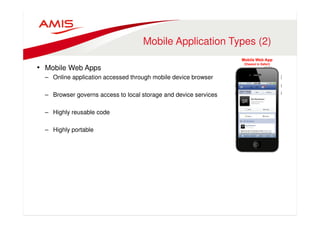
Mobile Application Types (2) 
• Mobile Web Apps 
– Online application accessed through mobile device browser 
– Browser governs access to local storage and device services 
– Highly reusable code 
– Highly portable
ADF Mobile Browser 
• Develop ADF Applications for Mobile Browsers 
– Trinidad Components for UI 
– ADF Model / Databinding 
– ADF Business Components 
• Supported through JavaServer Faces Trinidad Components and Mobile 
Optimized CSS 
• Use the skills you have 
– AJAX functionality 
such as PPR 
– 60 Trinidad JSF Components
ADF Mobile Browser
Device interaction with 
mobile browser 
• Use a goLink / goButton to invoke phone and email: 
<tr:goLink 
styleClass="messageText" 
text="#{sessionScope.empDetails.PhoneNumber}” 
destination="tel:#{sessionScope.empDetails.PhoneNumber}”/> 
<tr:goLink 
styleClass="messageText" 
text="#{sessionScope.empDetails.Email}" 
destination="mailto:#{sessionScope.empDetails.Email}"/>
Use Skinning for Look & Feel 
• For ADF Mobile browser, you implement 
native-ish look and feel by skinning 
• In ADF 11g R2 this is created 
and configured by default 
• In 12.1.2 it looks to be disappeared
ADF Faces for web apps 
accessed on laptops & tablets 
• OS Gesture Support 
– Drag and drop, multi-select, hover, context menu, chart/graph 
interactivity, etc. 
• HTML5 implementation for DVT components 
• Flowing layout support 
– Component flows downward based on fixed width 
• HMTL 5 Supports 
• Optimized components for Mobile
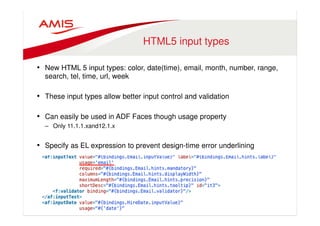
HTML5 input types 
• New HTML 5 input types: color, date(time), email, month, number, range, 
search, tel, time, url, week 
• These input types allow better input control and validation 
• Can easily be used in ADF Faces though usage property 
– Only 11.1.1.xand12.1.x 
• Specify as EL expression to prevent design-time error underlining
HTML5  ‘Native’ Controls 
• Desktop Browser • iOS browser (Safari)
Oracles ‘Simplified UI’ 
• Next-Generation of Enterprise Applications interface 
• Oracle Applications Sales Cloud  HCM Cloud 
• Tablet first approach 
• Modern, intuitive, streamlined 
• Innovates the rich feature set of Oracle’s Fusion Applications
What is ‘Simplified UI’? 
• Key UX Concepts 
• Simplicity 
• Mobility 
• Extensibility 
– Re-brand company logo 
– Change themes 
– Change availability, order and name of functional areas 
– Page level changes like show/hide/move fields 
– Page structure and layout changes 
– Add buttons/links to punch out 
• Visualization
What is ‘Simplified UI’? 
• UX Design Philosophy: Glance, Scan, Commit 
Glance to see if anything 
needs attention 
Scan for more details 
or take a small action 
Commit to working 
on a particular task
ADF Faces Components 
• PanelSpringBoard 
– Mode=“grid” 
– Mode=“strip”
ADF Faces Components 
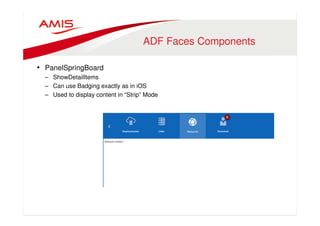
• PanelSpringBoard 
– ShowDetailItems 
– Can use Badging exactly as in iOS 
– Used to display content in “Strip” Mode
ADF Faces Components 
• PanelSpringBoard 
– ShowDetailItem with nested PanelTabbed
ADF Faces Components 
• PanelSpringBoard 
– PanelDrawer (with showDetailItems) to show ‘extra’ content.
ADF Faces Components 
• PanelSpringBoard 
– PanelDrawer (with showDetailItems) to show ‘extra’ content.
Oracles Implementation 
Smooth animated transition with no extra code 
(Film Strip mode)
Mobile Application Types (3) 
• Hybrid Mobile Apps 
– Application installed  runs on device with HTML5 UI 
– Optimized for specific mobile platform  form factor 
– Direct access to local storage and device services 
– Code reuse simplified 
– Portability simplified
Oracle ADF Mobile 
• Build Once, Run on Multiple-Platforms – Phones, Tablets, iOS, Android, 
… 
• Java for business logic 
• HTML5/JavaScript user interface 
• Consistent business logic  data model 
• Disconnected: SQLite with encryption 
• Full access to native device features 
• Modular, reusable application components 
• JDeveloper and soon Eclipse
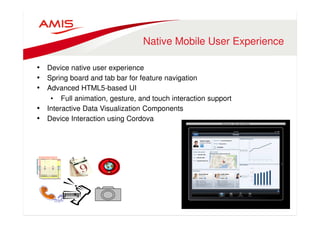
Native Mobile User Experience 
• Device native user experience 
• Spring board and tab bar for feature navigation 
• Advanced HTML5-based UI 
• Full animation, gesture, and touch interaction support 
• Interactive Data Visualization Components 
• Device Interaction using Cordova
ADF mobile – UI content 
• Local AMX File 
– JSF-like file built visually in JDeveloper 
– Generated into HTML/JS on device at RT 
– Based on HTML5 
• Remote URL 
– ADF Trinidad for Smartphones 
– ADF Faces on Tablets 
– Any third-party site 
• Local HTML File 
– Hand-coded HTML5 pages
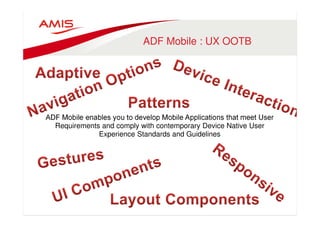
ADF Mobile : UX OOTB 
ADF Mobile enables you to develop Mobile Applications that meet User 
Requirements and comply with contemporary Device Native User 
Experience Standards and Guidelines
OOTB Components 
• Many Components 
• Gallery with Predefined Layouts
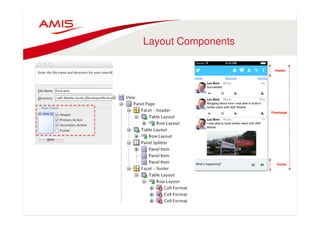
Layout Components
Patterns OOTB 
• List Creation can be done 
based on a large set of 
predefined List Layouts 
• Pick any to create the code 
that helps you to quickly 
build List pages
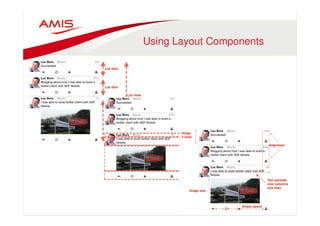
Using Layout Components
•
Work with the device….. 
..…not against it 
• Use Device Properties to enhance User Experience 
– Is it a tablet or not ? 
– Is it iOS or Android ? 
– Does it have a camera or not ?
Work With Form Factors 
• Respond to Form Factors 
• Conditionally Render Different content
Application Navigation 
• Navigation Bar 
• Default Springboard 
– List 
• Custom Springboard 
– Any, such as Grid
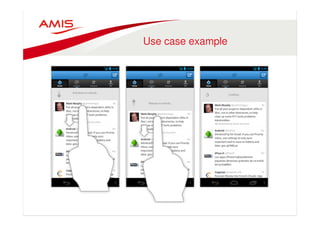
Gesture Support 
• You can configure Button, Link, and List Item components to react to the 
following gestures: 
• Swipe to the right 
• Swipe to the left 
• Swipe up 
• Swipe down 
• Tap-and-hold
Use case example
Combining the Options: 
Remote URLs 
• For embedding existing web pages in your ADF Mobile app. 
• For instance: 
– News Website 
– Existing enterprise app Mobile Browser Pages 
• Note: 
– Best use Optimized Mobile Browser Pages
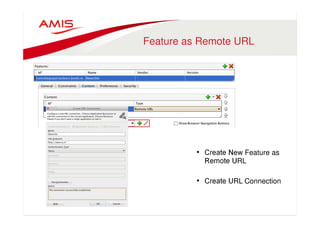
Feature as Remote URL 
• Create New Feature as 
Remote URL 
• Create URL Connection
Browser Navigation 
• You can Enable Browser Navigation Buttons
ADF Mobile Design Wiki 
•
UX Direct 
•
Summary 
Ways to create Mobile UI: 
• With ADF Faces Optimized Components 
• With ADF Mobile UI Components 
• Handcoded HTML5 pages 
• All can be combined in one single ADF Mobile application
Luc Bors, AMIS, The Netherlands 
Luc.Bors@amis.nl 
LucBors@gmail.com 
Follow me on : @lucb_

Doag wysiwyg

  • 1.
    ADF WYSIWYG MobileUI Development with ADF and ADF Mobile DOAG , Dusseldorf, June 2014
  • 2.
    Who Am I • Luc Bors • Principal Consultant • AMIS, Netherlands
  • 3.
    3 Types ofApplications • Native Solution – Higher barrier to entry – Tight integration to device features • Browser-based Solution – Easiest to provide – Limited integration to device features • Hybrid Solution Image from http://wiki.developerforce.com (salesforce) – Combines ease of web development with the power of native applications – Good integration to device features
  • 4.
    Mobile Application Types(1) • Native Mobile Apps – Application installed & runs on device – Optimized for specific mobile platform and form factor – Direct access to local storage and device services – Code reuse can be complex – Portability requires work – Need platform specific development tools and SDK
  • 5.
    Mobile Application Types(2) • Mobile Web Apps – Online application accessed through mobile device browser – Browser governs access to local storage and device services – Highly reusable code – Highly portable
  • 6.
    ADF Mobile Browser • Develop ADF Applications for Mobile Browsers – Trinidad Components for UI – ADF Model / Databinding – ADF Business Components • Supported through JavaServer Faces Trinidad Components and Mobile Optimized CSS • Use the skills you have – AJAX functionality such as PPR – 60 Trinidad JSF Components
  • 7.
  • 8.
    Device interaction with mobile browser • Use a goLink / goButton to invoke phone and email: <tr:goLink styleClass="messageText" text="#{sessionScope.empDetails.PhoneNumber}” destination="tel:#{sessionScope.empDetails.PhoneNumber}”/> <tr:goLink styleClass="messageText" text="#{sessionScope.empDetails.Email}" destination="mailto:#{sessionScope.empDetails.Email}"/>
  • 9.
    Use Skinning forLook & Feel • For ADF Mobile browser, you implement native-ish look and feel by skinning • In ADF 11g R2 this is created and configured by default • In 12.1.2 it looks to be disappeared
  • 10.
    ADF Faces forweb apps accessed on laptops & tablets • OS Gesture Support – Drag and drop, multi-select, hover, context menu, chart/graph interactivity, etc. • HTML5 implementation for DVT components • Flowing layout support – Component flows downward based on fixed width • HMTL 5 Supports • Optimized components for Mobile
  • 11.
    HTML5 input types • New HTML 5 input types: color, date(time), email, month, number, range, search, tel, time, url, week • These input types allow better input control and validation • Can easily be used in ADF Faces though usage property – Only 11.1.1.xand12.1.x • Specify as EL expression to prevent design-time error underlining
  • 12.
    HTML5 ‘Native’Controls • Desktop Browser • iOS browser (Safari)
  • 13.
    Oracles ‘Simplified UI’ • Next-Generation of Enterprise Applications interface • Oracle Applications Sales Cloud HCM Cloud • Tablet first approach • Modern, intuitive, streamlined • Innovates the rich feature set of Oracle’s Fusion Applications
  • 14.
    What is ‘SimplifiedUI’? • Key UX Concepts • Simplicity • Mobility • Extensibility – Re-brand company logo – Change themes – Change availability, order and name of functional areas – Page level changes like show/hide/move fields – Page structure and layout changes – Add buttons/links to punch out • Visualization
  • 15.
    What is ‘SimplifiedUI’? • UX Design Philosophy: Glance, Scan, Commit Glance to see if anything needs attention Scan for more details or take a small action Commit to working on a particular task
  • 16.
    ADF Faces Components • PanelSpringBoard – Mode=“grid” – Mode=“strip”
  • 17.
    ADF Faces Components • PanelSpringBoard – ShowDetailItems – Can use Badging exactly as in iOS – Used to display content in “Strip” Mode
  • 18.
    ADF Faces Components • PanelSpringBoard – ShowDetailItem with nested PanelTabbed
  • 19.
    ADF Faces Components • PanelSpringBoard – PanelDrawer (with showDetailItems) to show ‘extra’ content.
  • 20.
    ADF Faces Components • PanelSpringBoard – PanelDrawer (with showDetailItems) to show ‘extra’ content.
  • 21.
    Oracles Implementation Smoothanimated transition with no extra code (Film Strip mode)
  • 22.
    Mobile Application Types(3) • Hybrid Mobile Apps – Application installed runs on device with HTML5 UI – Optimized for specific mobile platform form factor – Direct access to local storage and device services – Code reuse simplified – Portability simplified
  • 23.
    Oracle ADF Mobile • Build Once, Run on Multiple-Platforms – Phones, Tablets, iOS, Android, … • Java for business logic • HTML5/JavaScript user interface • Consistent business logic data model • Disconnected: SQLite with encryption • Full access to native device features • Modular, reusable application components • JDeveloper and soon Eclipse
  • 24.
    Native Mobile UserExperience • Device native user experience • Spring board and tab bar for feature navigation • Advanced HTML5-based UI • Full animation, gesture, and touch interaction support • Interactive Data Visualization Components • Device Interaction using Cordova
  • 25.
    ADF mobile –UI content • Local AMX File – JSF-like file built visually in JDeveloper – Generated into HTML/JS on device at RT – Based on HTML5 • Remote URL – ADF Trinidad for Smartphones – ADF Faces on Tablets – Any third-party site • Local HTML File – Hand-coded HTML5 pages
  • 26.
    ADF Mobile :UX OOTB ADF Mobile enables you to develop Mobile Applications that meet User Requirements and comply with contemporary Device Native User Experience Standards and Guidelines
  • 27.
    OOTB Components •Many Components • Gallery with Predefined Layouts
  • 28.
  • 29.
    Patterns OOTB •List Creation can be done based on a large set of predefined List Layouts • Pick any to create the code that helps you to quickly build List pages
  • 30.
  • 31.
  • 32.
    Work with thedevice….. ..…not against it • Use Device Properties to enhance User Experience – Is it a tablet or not ? – Is it iOS or Android ? – Does it have a camera or not ?
  • 33.
    Work With FormFactors • Respond to Form Factors • Conditionally Render Different content
  • 34.
    Application Navigation •Navigation Bar • Default Springboard – List • Custom Springboard – Any, such as Grid
  • 35.
    Gesture Support •You can configure Button, Link, and List Item components to react to the following gestures: • Swipe to the right • Swipe to the left • Swipe up • Swipe down • Tap-and-hold
  • 36.
  • 37.
    Combining the Options: Remote URLs • For embedding existing web pages in your ADF Mobile app. • For instance: – News Website – Existing enterprise app Mobile Browser Pages • Note: – Best use Optimized Mobile Browser Pages
  • 38.
    Feature as RemoteURL • Create New Feature as Remote URL • Create URL Connection
  • 39.
    Browser Navigation •You can Enable Browser Navigation Buttons
  • 40.
  • 41.
  • 42.
    Summary Ways tocreate Mobile UI: • With ADF Faces Optimized Components • With ADF Mobile UI Components • Handcoded HTML5 pages • All can be combined in one single ADF Mobile application
  • 43.
    Luc Bors, AMIS,The Netherlands Luc.Bors@amis.nl LucBors@gmail.com Follow me on : @lucb_