
Mobile Development for Domino Giuseppe Grasso
Giuseppe Grasso From my twitter bio: “ Technologist, Italian LUG leader, unable to bio himself... and an  IBM Champion !  ” http://twitter.com/#!/grassog My developerworks profile:  https://www.ibm.com/developerworks/mydeveloperworks/profiles/user/GiuseppeGrasso My email:  [email_address]
agenda Market status Mobile dev strategies Openntf mobile controls Options for traditional domino web developers
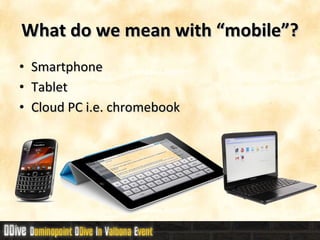
What do we mean with “mobile”? Smartphone Tablet Cloud PC i.e. chromebook
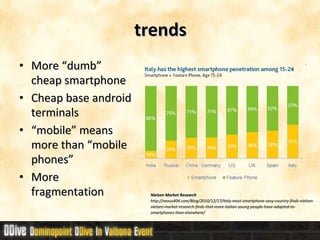
trends More “dumb” cheap smartphone Cheap base android terminals “ mobile” means more than “mobile phones” More fragmentation Nielsen Market Research http://nexus404.com/Blog/2010/12/17/italy-most-smartphone-savy-country-finds-nielsen-nielsen-market-research-finds-that-more-italian-young-people-have-adapted-to-smartphones-than-elsewhere/
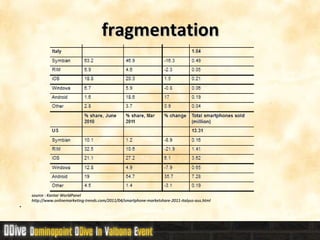
fragmentation source : Kantar WorldPanel     http://www.onlinemarketing-trends.com/2011/04/smartphone-marketshare-2011-italyus-aus.html
Application Develpment Native apps build with native sdk and tools, best for performance and hardware access, hard to multiplatform, steep lerning curve, may have higher cost do develop, deploy and mantain. Web apps leverage existing web dev skills, simpler multiplatform, usually lower cost do develop, deploy and mantain. Hybrid  apps & cross platform toolkits usually easier than native development, limited access to device hardware
Best case for Native App Single device/platform as target High requirements on perfomances Need tight  integration  with hardware resources Good budget / resources
Best case for Web App Multiple devices and platform targets No need of hardware access Need to avoid deploy / distribution
Best case for Hybrid  apps & cross platform toolkits Multiple devices and platform targets Limited need of hardware access No resouces for going native on all targets
Hybrid  apps & cross platform toolkits PhoneGap native wrapper around web apps Titanium web apps “transcompiled” to native apps Blackberry webworks  native wrapper around web apps Teamstudio unplugged xpages domino designer add-on / device runtime Flex mobile
Web apps for mobile Xpages   OpenNTF XPages Mobile Controls Traditional Domino  html5 & dojo mobile or jquery mobile
OpenNTF XPages Mobile Controls MobileControlsDojo16.nsf main controls, sample xpages and Dojo 1.6 Mobile  MobileControlsWinkCubiq.nsf more controls based on open source from cubiq.org ( made in Italy!) and Wink Toolkit MobileControlsOffline.nsf  shows how to take a Dojo based mobile app offline Offline.nsf basic HTML5 samples for how to do offline with XPages. XCamera.nsf a sample how to take a picture with a smartphone and upload it to an NSF (based on PhoneGap and require it to recompile) Login.nsf some code for a login control based on the iNotes login mechanism.
MobileControlsDojo16.nsf: controls mPage     nice page transitions mView     view control mDocumentContainer     UNID handler and loading indicator mConfiguration     handle loading of needed CSS & js Minitialize    dojo.parser mRectangle ,  mRectangleEntry ,  mRectangleHeader    helper controls
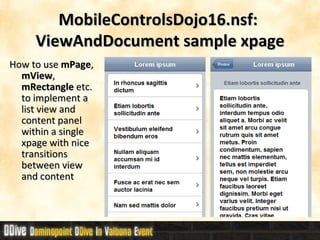
MobileControlsDojo16.nsf:  ViewAndDocument sample xpage How to use  mPage ,  mView ,  mRectangle  etc. to implement a list view and content panel within a single xpage with nice transitions between view and content
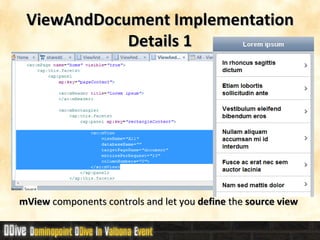
ViewAndDocument Implementation Details 1 mView  components controls and let you  define  the  source view
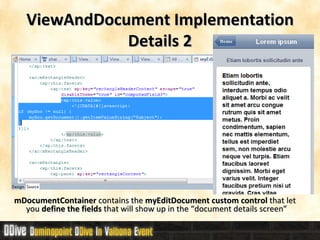
ViewAndDocument Implementation Details 2 mDocumentContainer  contains the  myEditDocument custom control  that let you  define the fields  that will show up in the “document details screen”
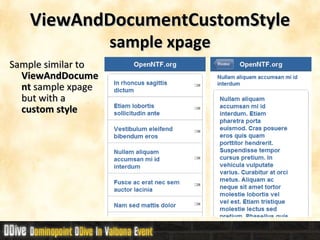
ViewAndDocumentCustomStyle  sample xpage Sample similar to  ViewAndDocument  sample xpage but with a  custom style
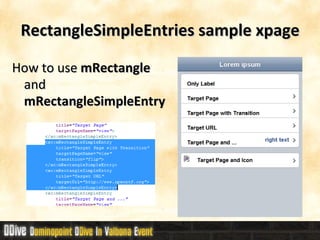
How to use  mRectangle  and  mRectangleSimpleEntry RectangleSimpleEntries sample xpage
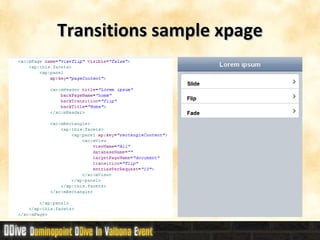
Transitions sample xpage How to implement transition effects between screens
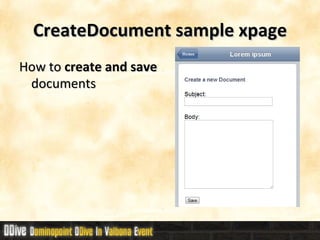
CreateDocument sample xpage How to  create and save  documents
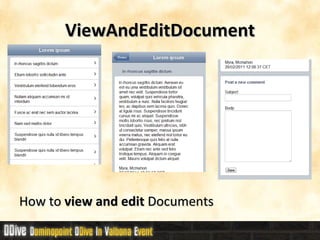
ViewAndEditDocument How to  view and edit  Documents
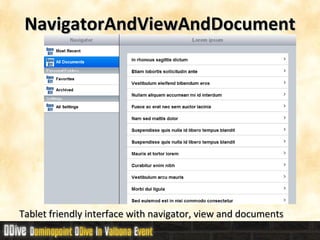
NavigatorAndViewAndDocument Tablet friendly interface with navigator, view and documents
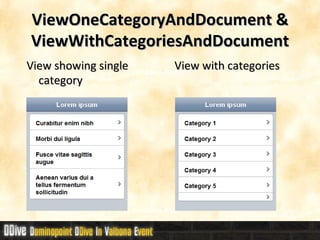
ViewOneCategoryAndDocument & ViewWithCategoriesAndDocument View showing single category  View with categories
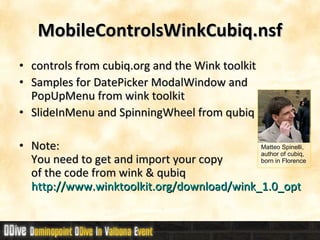
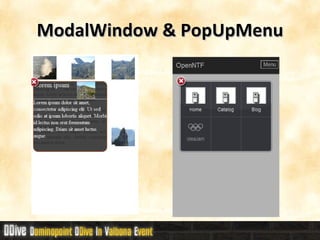
MobileControlsWinkCubiq.nsf controls from cubiq.org and the Wink toolkit Samples for DatePicker ModalWindow and PopUpMenu from wink toolkit SlideInMenu and SpinningWheel from qubiq Note: You need to get and import your copy  of the code from wink & qubiq http://www.winktoolkit.org/download/wink_1.0_optimized.zip Matteo Spinelli,  author of cubiq,  born in Florence
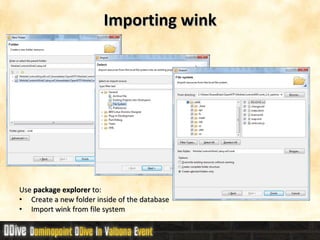
Importing wink Use  package explorer  to: Create a new folder inside of the database Import wink from file system
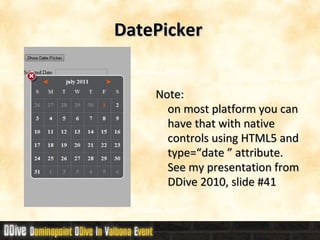
DatePicker  Note:  on most platform you can have that with native controls using HTML5 and type=“date ” attribute.  See my presentation from DDive 2010, slide #41
ModalWindow & PopUpMenu
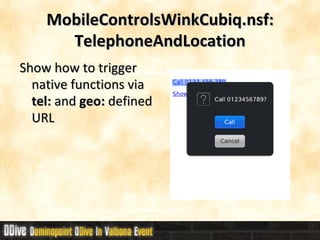
MobileControlsWinkCubiq.nsf: TelephoneAndLocation Show how to trigger native functions via  tel:  and  geo:  defined URL
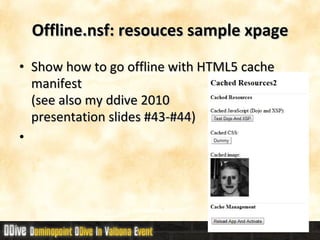
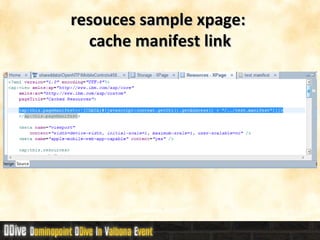
Offline.nsf: resouces sample xpage Show how to go offline with HTML5 cache manifest (see also my ddive 2010  presentation slides #43-#44)
resouces sample xpage:  cache manifest link
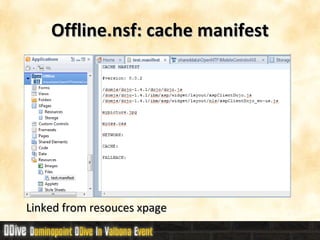
Offline.nsf: cache manifest Linked from resouces xpage
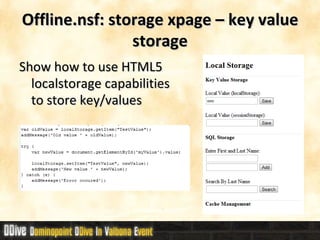
Offline.nsf: storage xpage – key value storage Show how to use HTML5 localstorage capabilities to store key/values
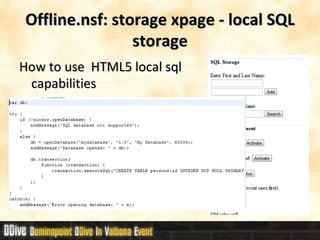
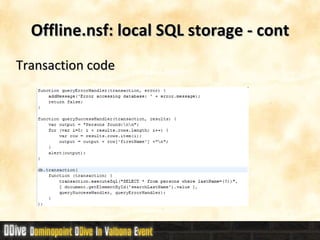
Offline.nsf: storage xpage - local SQL storage How to use  HTML5 local sql capabilities
Offline.nsf: local SQL storage - cont Transaction code
xcamera.nsf Show how to access device hardware inside of the PhoneGap framework. Need PhoneGap
Login.nsf Implements a mobile friendly login form. You need admin credentials to install it on your server.
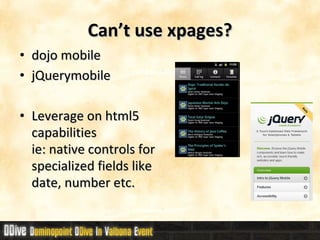
Can’t use xpages? dojo mobile  jQuerymobile Leverage on html5 capabilities  ie: native controls for specialized fields like date, number etc.
references My previous sessions: Lotus on mobile @  DDive 2010 http://www.slideshare.net/dominopoint/ddive-giuseppe-grasso-mobile-su-lotus  and video:  http://www.dominopoint.it/Dominopoint/dominopoint_blog.nsf/dx/ddive-il-video-di-sviluppo-mobile Going mobile @  DominoPoint Day 2009 http://www.slideshare.net/dominopoint/sviluppare-applicazioni-domino-web-per-dispositivi-mobili
Thanks to all the sponsor  that made DDive 2011 possible! Main Sponsor Premium Sponsor Prime Sponsor

DDive11 - Mobile Development For Domino

  • 1.
    Mobile Development forDomino Giuseppe Grasso
  • 2.
    Giuseppe Grasso Frommy twitter bio: “ Technologist, Italian LUG leader, unable to bio himself... and an IBM Champion ! ” http://twitter.com/#!/grassog My developerworks profile: https://www.ibm.com/developerworks/mydeveloperworks/profiles/user/GiuseppeGrasso My email: [email_address]
  • 3.
    agenda Market statusMobile dev strategies Openntf mobile controls Options for traditional domino web developers
  • 4.
    What do wemean with “mobile”? Smartphone Tablet Cloud PC i.e. chromebook
  • 5.
    trends More “dumb”cheap smartphone Cheap base android terminals “ mobile” means more than “mobile phones” More fragmentation Nielsen Market Research http://nexus404.com/Blog/2010/12/17/italy-most-smartphone-savy-country-finds-nielsen-nielsen-market-research-finds-that-more-italian-young-people-have-adapted-to-smartphones-than-elsewhere/
  • 6.
    fragmentation source :Kantar WorldPanel    http://www.onlinemarketing-trends.com/2011/04/smartphone-marketshare-2011-italyus-aus.html
  • 7.
    Application Develpment Nativeapps build with native sdk and tools, best for performance and hardware access, hard to multiplatform, steep lerning curve, may have higher cost do develop, deploy and mantain. Web apps leverage existing web dev skills, simpler multiplatform, usually lower cost do develop, deploy and mantain. Hybrid apps & cross platform toolkits usually easier than native development, limited access to device hardware
  • 8.
    Best case forNative App Single device/platform as target High requirements on perfomances Need tight integration with hardware resources Good budget / resources
  • 9.
    Best case forWeb App Multiple devices and platform targets No need of hardware access Need to avoid deploy / distribution
  • 10.
    Best case forHybrid apps & cross platform toolkits Multiple devices and platform targets Limited need of hardware access No resouces for going native on all targets
  • 11.
    Hybrid apps& cross platform toolkits PhoneGap native wrapper around web apps Titanium web apps “transcompiled” to native apps Blackberry webworks native wrapper around web apps Teamstudio unplugged xpages domino designer add-on / device runtime Flex mobile
  • 12.
    Web apps formobile Xpages OpenNTF XPages Mobile Controls Traditional Domino html5 & dojo mobile or jquery mobile
  • 13.
    OpenNTF XPages MobileControls MobileControlsDojo16.nsf main controls, sample xpages and Dojo 1.6 Mobile MobileControlsWinkCubiq.nsf more controls based on open source from cubiq.org ( made in Italy!) and Wink Toolkit MobileControlsOffline.nsf shows how to take a Dojo based mobile app offline Offline.nsf basic HTML5 samples for how to do offline with XPages. XCamera.nsf a sample how to take a picture with a smartphone and upload it to an NSF (based on PhoneGap and require it to recompile) Login.nsf some code for a login control based on the iNotes login mechanism.
  • 14.
    MobileControlsDojo16.nsf: controls mPage  nice page transitions mView  view control mDocumentContainer  UNID handler and loading indicator mConfiguration  handle loading of needed CSS & js Minitialize  dojo.parser mRectangle , mRectangleEntry , mRectangleHeader  helper controls
  • 15.
    MobileControlsDojo16.nsf: ViewAndDocumentsample xpage How to use mPage , mView , mRectangle etc. to implement a list view and content panel within a single xpage with nice transitions between view and content
  • 16.
    ViewAndDocument Implementation Details1 mView components controls and let you define the source view
  • 17.
    ViewAndDocument Implementation Details2 mDocumentContainer contains the myEditDocument custom control that let you define the fields that will show up in the “document details screen”
  • 18.
    ViewAndDocumentCustomStyle samplexpage Sample similar to ViewAndDocument sample xpage but with a custom style
  • 19.
    How to use mRectangle and mRectangleSimpleEntry RectangleSimpleEntries sample xpage
  • 20.
    Transitions sample xpageHow to implement transition effects between screens
  • 21.
    CreateDocument sample xpageHow to create and save documents
  • 22.
    ViewAndEditDocument How to view and edit Documents
  • 23.
    NavigatorAndViewAndDocument Tablet friendlyinterface with navigator, view and documents
  • 24.
    ViewOneCategoryAndDocument & ViewWithCategoriesAndDocumentView showing single category View with categories
  • 25.
    MobileControlsWinkCubiq.nsf controls fromcubiq.org and the Wink toolkit Samples for DatePicker ModalWindow and PopUpMenu from wink toolkit SlideInMenu and SpinningWheel from qubiq Note: You need to get and import your copy of the code from wink & qubiq http://www.winktoolkit.org/download/wink_1.0_optimized.zip Matteo Spinelli, author of cubiq, born in Florence
  • 26.
    Importing wink Use package explorer to: Create a new folder inside of the database Import wink from file system
  • 27.
    DatePicker Note: on most platform you can have that with native controls using HTML5 and type=“date ” attribute. See my presentation from DDive 2010, slide #41
  • 28.
  • 29.
    MobileControlsWinkCubiq.nsf: TelephoneAndLocation Showhow to trigger native functions via tel: and geo: defined URL
  • 30.
    Offline.nsf: resouces samplexpage Show how to go offline with HTML5 cache manifest (see also my ddive 2010 presentation slides #43-#44)
  • 31.
    resouces sample xpage: cache manifest link
  • 32.
    Offline.nsf: cache manifestLinked from resouces xpage
  • 33.
    Offline.nsf: storage xpage– key value storage Show how to use HTML5 localstorage capabilities to store key/values
  • 34.
    Offline.nsf: storage xpage- local SQL storage How to use HTML5 local sql capabilities
  • 35.
    Offline.nsf: local SQLstorage - cont Transaction code
  • 36.
    xcamera.nsf Show howto access device hardware inside of the PhoneGap framework. Need PhoneGap
  • 37.
    Login.nsf Implements amobile friendly login form. You need admin credentials to install it on your server.
  • 38.
    Can’t use xpages?dojo mobile jQuerymobile Leverage on html5 capabilities ie: native controls for specialized fields like date, number etc.
  • 39.
    references My previoussessions: Lotus on mobile @ DDive 2010 http://www.slideshare.net/dominopoint/ddive-giuseppe-grasso-mobile-su-lotus and video: http://www.dominopoint.it/Dominopoint/dominopoint_blog.nsf/dx/ddive-il-video-di-sviluppo-mobile Going mobile @ DominoPoint Day 2009 http://www.slideshare.net/dominopoint/sviluppare-applicazioni-domino-web-per-dispositivi-mobili
  • 40.
    Thanks to allthe sponsor that made DDive 2011 possible! Main Sponsor Premium Sponsor Prime Sponsor