Real Life 
Oracle Mobile Application Framework 
Things that you don't get from the developer guide 
Oracle Open World, San Francisco, September 28th 2014
Who Am I 
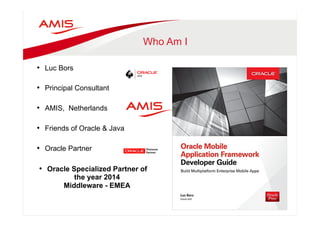
• Luc Bors 
• Principal Consultant 
• AMIS, Netherlands 
• Friends of Oracle & Java 
• Oracle Partner 
• Oracle Specialized Partner of 
the year 2014 
Middleware - EMEA
Before we start 
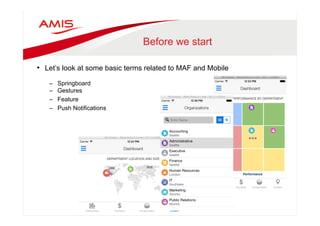
• Let’s look at some basic terms related to MAF and Mobile 
– Springboard 
– Gestures 
– Feature 
– Push Notifications
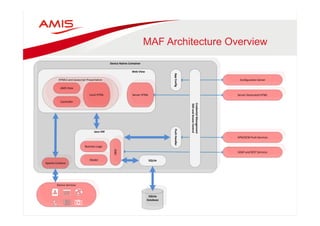
MAF Architecture Overview 
Device 
Native 
Container 
SQLite 
Database 
Java 
VM 
Configuration 
Server 
Business 
Logic 
Model 
JDBC 
Apache 
Cordova 
SQLite 
Web 
View 
Server 
HTML 
HTML5 
and 
Javascript 
Presentation 
AMX 
View 
Local 
HTML 
Controller 
Push 
Handler 
Server 
Generated 
HTML 
APN/GCM 
Push 
Services 
SOAP 
and 
REST 
Services 
Device 
Services 
App 
Config 
Credential 
Management 
SSO 
and 
Access 
Control
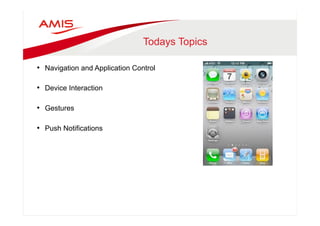
Todays Topics 
• Navigation and Application Control 
• Device Interaction 
• Gestures 
• Push Notifications
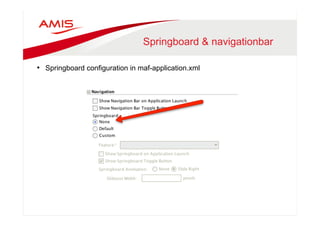
Springboard & navigationbar 
• Springboard configuration in maf-application.xml
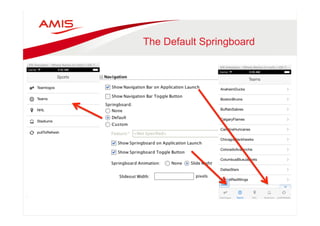
The Default Springboard
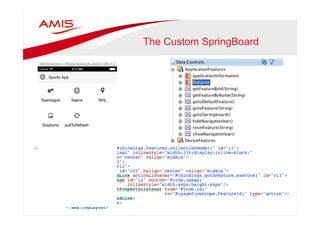
The Custom SpringBoard
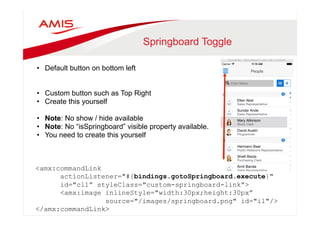
Springboard Toggle 
• Default button on bottom left 
• Custom button such as Top Right 
• Create this yourself 
• Note: No show / hide available 
• Note: No “isSpringboard” visible property available. 
• You need to create this yourself 
<amx:commandLink 
actionListener="#{bindings.gotoSpringboard.execute}" 
id="cl1” styleClass="custom-springboard-link”> 
<amx:image inlineStyle="width:30px;height:30px” 
source="/images/springboard.png" id="i1"/> 
</amx:commandLink>
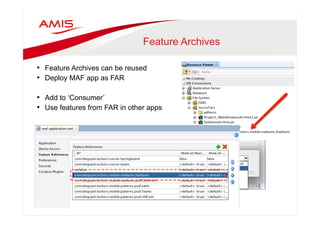
Feature Archives 
• Feature Archives can be reused 
• Deploy MAF app as FAR 
• Add to ‘Consumer’ 
• Use features from FAR in other apps
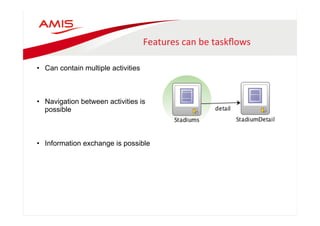
Features 
can 
be 
taskflows 
• Can contain multiple activities 
• Navigation between activities is 
possible 
• Information exchange is possible
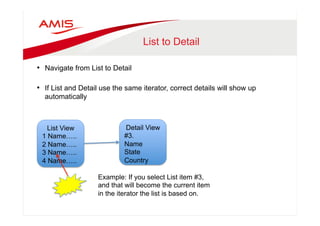
List to Detail 
• Navigate from List to Detail 
• If List and Detail use the same iterator, correct details will show up 
automatically 
List View 
1 Name….. 
2 Name….. 
3 Name….. 
4 Name….. 
Detail View 
#3. 
Name 
State 
Country 
Example: If you select List item #3, 
and that will become the current item 
in the iterator the list is based on.
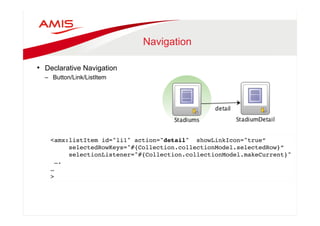
Navigation 
• Declarative Navigation 
– Button/Link/ListItem 
<amx:listItem id="li1" action="detail" showLinkIcon="true” 
selectedRowKeys="#{Collection.collectionModel.selectedRow}”" 
selectionListener="#{Collection.collectionModel.makeCurrent}"" 
…." 
…" 
>"
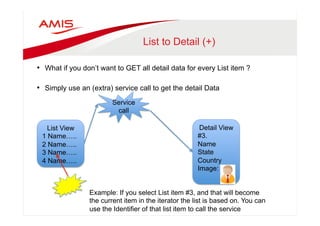
List to Detail (+) 
• What if you don’t want to GET all detail data for every List item ? 
• Simply use an (extra) service call to get the detail Data 
Service 
call 
List View 
1 Name….. 
2 Name….. 
3 Name….. 
4 Name….. 
Detail View 
#3. 
Name 
State 
Country 
Image: 
Example: If you select List item #3, and that will become 
the current item in the iterator the list is based on. You can 
use the Identifier of that list item to call the service
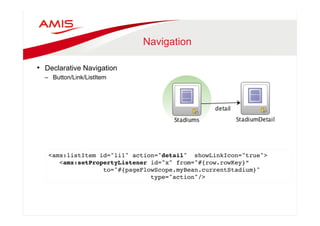
Navigation 
• Declarative Navigation 
– Button/Link/ListItem 
<amx:listItem id="li1" action="detail" showLinkIcon="true">" 
<amx:setPropertyListener id="x" from="#{row.rowKey}” 
to="#{pageFlowScope.myBean.currentStadium}" " 
type="action"/>"
Programmatic Navigation 
• Programmatic Navigation 
– JavaCode 
AdfmfContainerUtilities.invokeContainerJavaScriptFunction(" 
AdfmfJavaUtilities.getFeatureName(), " 
"adf.mf.api.amx.doNavigation", " 
new Object[] { ”detail" }); 
} "
Programmatic Navigation 
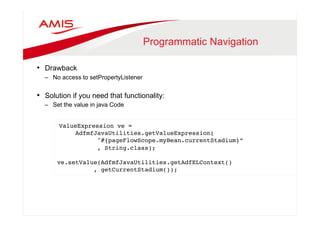
• Drawback 
– No access to setPropertyListener 
• Solution if you need that functionality: 
– Set the value in java Code 
ValueExpression ve =" 
AdfmfJavaUtilities.getValueExpression(" 
"#{pageFlowScope.myBean.currentStadium}”" 
, String.class);" 
" 
ve.setValue(AdfmfJavaUtilities.getAdfELContext()" 
, getCurrentStadium());"
Todays Topics 
• Navigation and Application Control 
• Device Interaction 
• Gestures 
• Push Notifications
All day example 
• Twitter or Whatsapp and images 
• What if you embed an image in a message ? 
• Two options: 
• Use exisiting image from gallery or 
• Create a new one with camera. 
• Where is the catch ?
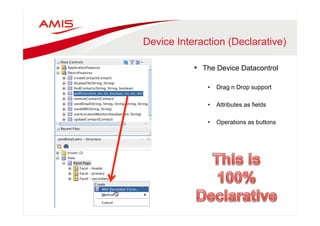
Device Interaction (Declarative) 
• The Device Datacontrol 
• Drag n Drop support 
• Attributes as fields 
• Operations as buttons
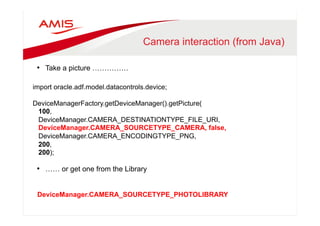
Camera interaction (from Java) 
• Take a picture …………… 
import oracle.adf.model.datacontrols.device; 
DeviceManagerFactory.getDeviceManager().getPicture( 
100, 
DeviceManager.CAMERA_DESTINATIONTYPE_FILE_URI, 
DeviceManager.CAMERA_SOURCETYPE_CAMERA, false, 
DeviceManager.CAMERA_ENCODINGTYPE_PNG, 
200, 
200); 
• …… or get one from the Library 
DeviceManager.CAMERA_SOURCETYPE_PHOTOLIBRARY
Smart Camera Interaction 
• Or how to prevent your app from crashing … 
• DESTINATIONTYPE_DATA_URL you will get the image as base64 encoded 
string 
• Camera’s are very good and picture quality is amazing. 
– Encoding such images as base64 causes memory issues 
• Don’t blow up your app. 
– iOS you should set quality parameter to a value less then 50 to avoid memory 
issues 
– On Android out-of-memory can be caused with default image settings. Make 
image smaller by setting targetWidth and targetHeight 
• Small sized images can be uploaded using web services.
Even smarter… 
• Determine network connection 
#{hardware.networkStatus} 
Combined with 
#{device.os} 
To tweak size and quality parameters based on connectivity 
• Always be aware of the other side….. 
– Does the recipient have the same Connectivity….
Todays Topics 
• Navigation and Application Control 
• Device Interaction 
• Gestures 
• Push Notifications
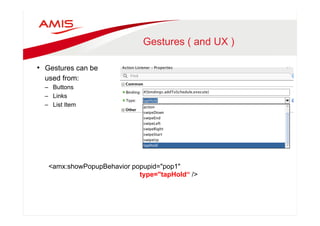
Gestures ( and UX ) 
• Gestures can be 
used from: 
– Buttons 
– Links 
– List Item 
<amx:showPopupBehavior popupid="pop1" 
type="tapHold“ />
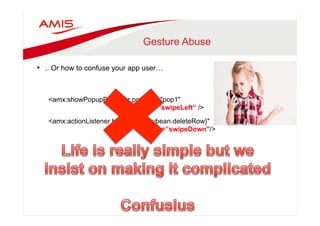
Gesture Abuse 
• .. Or how to confuse your app user… 
<amx:showPopupBehavior popupid="pop1" 
type=”swipeLeft“ /> 
<amx:actionListener binding="#{mybean.deleteRow}" 
type=”swipeDown"/>
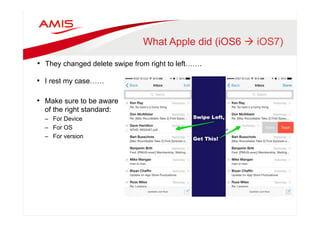
What Apple did (iOS6 à iOS7) 
• They changed delete swipe from right to left……. 
• I rest my case…… 
• Make sure to be aware 
of the right standard: 
– For Device 
– For OS 
– For version
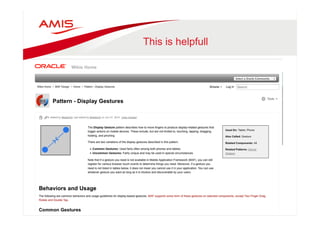
This is helpfull
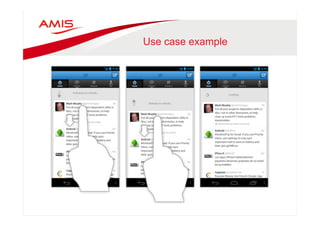
Use case example
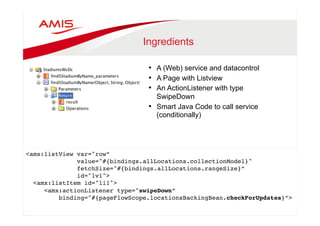
Ingredients 
• A (Web) service and datacontrol 
• A Page with Listview 
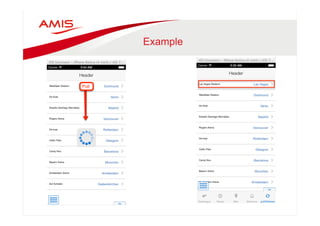
• An ActionListener with type 
SwipeDown 
• Smart Java Code to call service 
(conditionally) 
<amx:listView var="row”" 
value="#{bindings.allLocations.collectionModel}" " 
fetchSize="#{bindings.allLocations.rangeSize}”" 
id="lv1"> " 
<amx:listItem id="li1"> " 
<amx:actionListener type="swipeDown” " 
binding="#{pageFlowScope.locationsBackingBean.checkForUpdates}”>" 
"
Example
Todays Topics 
• Navigation and Application Control 
• Device Interaction 
• Gestures 
• Push Notifications
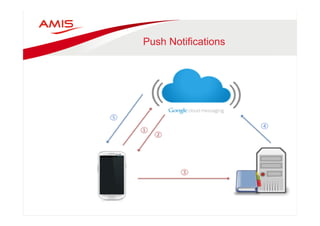
Push Notifications 
• Subscribe to GCM 
• Receive token 
• Register with Enterprise app 
• Enterprise app Pushes message to 
GCM 
• GCM delegates message to 
device(s)
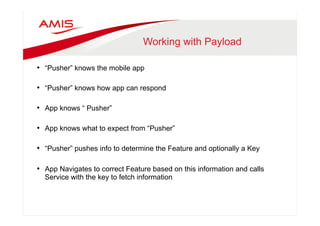
Working with Payload 
• “Pusher” knows the mobile app 
• “Pusher” knows how app can respond 
• App knows “ Pusher” 
• App knows what to expect from “Pusher” 
• “Pusher” pushes info to determine the Feature and optionally a Key 
• App Navigates to correct Feature based on this information and calls 
Service with the key to fetch information
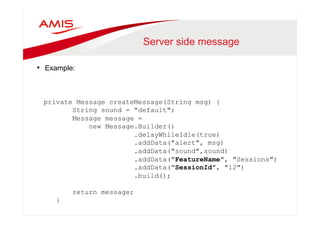
Server side message 
• Example: 
private Message createMessage(String msg) { 
String sound = "default"; 
Message message = 
new Message.Builder() 
.delayWhileIdle(true) 
.addData("alert", msg) 
.addData("sound",sound) 
.addData("FeatureName", "Sessions") 
.addData("SessionId", "12") 
.build(); 
return message; 
}
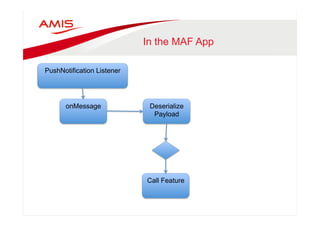
In the MAF App 
onMessage Deserialize 
Payload 
PushNotification Listener 
Call Feature
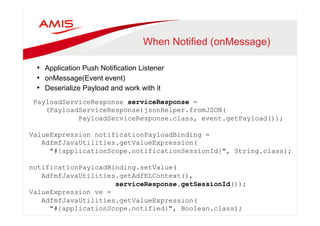
When Notified (onMessage) 
• Application Push Notification Listener 
• onMessage(Event event) 
• Deserialize Payload and work with it 
PayloadServiceResponse serviceResponse = 
(PayloadServiceResponse)jsonHelper.fromJSON( 
PayloadServiceResponse.class, event.getPayload()); 
ValueExpression notificationPayloadBinding = 
AdfmfJavaUtilities.getValueExpression( 
"#{applicationScope.notificationSessionId}", String.class); 
notificationPayloadBinding.setValue( 
AdfmfJavaUtilities.getAdfELContext(), 
serviceResponse.getSessionId()); 
ValueExpression ve = 
AdfmfJavaUtilities.getValueExpression( 
"#{applicationScope.notified}", Boolean.class); 
ve.setValue(AdfmfJavaUtilities.getAdfELContext(), Boolean.TRUE);
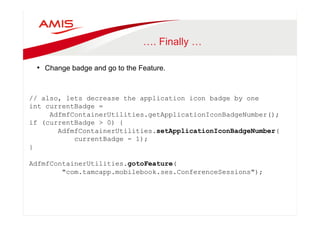
…. Finally … 
• Change badge and go to the Feature. 
// also, lets decrease the application icon badge by one 
int currentBadge = 
AdfmfContainerUtilities.getApplicationIconBadgeNumber(); 
if (currentBadge > 0) { 
AdfmfContainerUtilities.setApplicationIconBadgeNumber( 
currentBadge - 1); 
} 
AdfmfContainerUtilities.gotoFeature( 
"com.tamcapp.mobilebook.ses.ConferenceSessions");
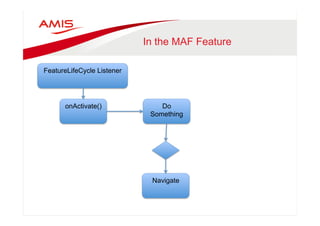
In the MAF Feature 
FeatureLifeCycle Listener 
onActivate() 
Do 
Something 
Navigate
In the Feature 
• Feature LifeCycle Listener 
– In the onActivate() method respond to notification 
if(notified.booleanValue()){ 
AdfmfContainerUtilities.invokeContainerJavaScriptFunction( 
AdfmfJavaUtilities.getFeatureName() 
,"adf.mf.api.amx.doNavigation” 
,new Object[] { "featureActivated" }); 
}
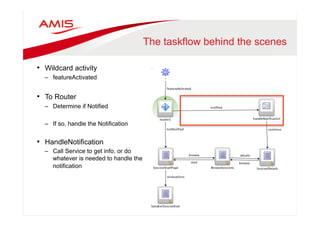
The taskflow behind the scenes 
• Wildcard activity 
– featureActivated 
• To Router 
– Determine if Notified 
– If so, handle the Notification 
• HandleNotification 
– Call Service to get info, or do 
whatever is needed to handle the 
notification
Summary 
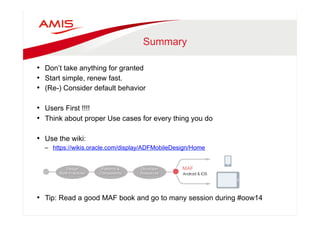
• Don’t take anything for granted 
• Start simple, renew fast. 
• (Re-) Consider default behavior 
• Users First !!!! 
• Think about proper Use cases for every thing you do 
• Use the wiki: 
– https://wikis.oracle.com/display/ADFMobileDesign/Home 
• Tip: Read a good MAF book and go to many session during #oow14
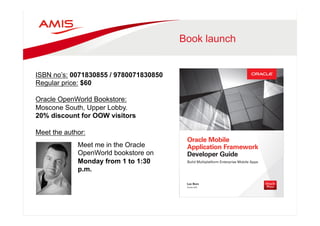
Book launch 
ISBN no’s: 0071830855 / 9780071830850 
Regular price: $60 
Oracle OpenWorld Bookstore: 
Moscone South, Upper Lobby. 
20% discount for OOW visitors 
Meet the author: 
Meet me in the Oracle 
OpenWorld bookstore on 
Monday from 1 to 1:30 
p.m.
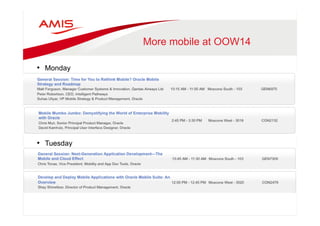
More mobile at OOW14 
• Monday 
• Tuesday
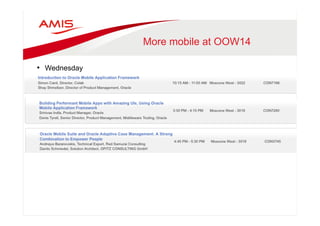
More mobile at OOW14 
• Wednesday
More mobile at OOW14 
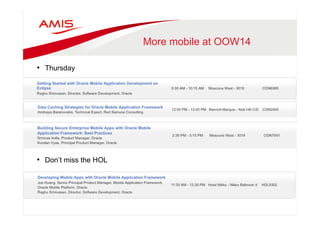
• Thursday 
• Don’t miss the HOL
Luc Bors, AMIS, The Netherlands 
Luc.Bors@amis.nl 
LucBors@gmail.com 
Follow me on : @lucb_

Oracle MAF real life OOW.pptx

  • 1.
    Real Life OracleMobile Application Framework Things that you don't get from the developer guide Oracle Open World, San Francisco, September 28th 2014
  • 2.
    Who Am I • Luc Bors • Principal Consultant • AMIS, Netherlands • Friends of Oracle & Java • Oracle Partner • Oracle Specialized Partner of the year 2014 Middleware - EMEA
  • 3.
    Before we start • Let’s look at some basic terms related to MAF and Mobile – Springboard – Gestures – Feature – Push Notifications
  • 4.
    MAF Architecture Overview Device Native Container SQLite Database Java VM Configuration Server Business Logic Model JDBC Apache Cordova SQLite Web View Server HTML HTML5 and Javascript Presentation AMX View Local HTML Controller Push Handler Server Generated HTML APN/GCM Push Services SOAP and REST Services Device Services App Config Credential Management SSO and Access Control
  • 5.
    Todays Topics •Navigation and Application Control • Device Interaction • Gestures • Push Notifications
  • 6.
    Springboard & navigationbar • Springboard configuration in maf-application.xml
  • 7.
  • 8.
  • 9.
    Springboard Toggle •Default button on bottom left • Custom button such as Top Right • Create this yourself • Note: No show / hide available • Note: No “isSpringboard” visible property available. • You need to create this yourself <amx:commandLink actionListener="#{bindings.gotoSpringboard.execute}" id="cl1” styleClass="custom-springboard-link”> <amx:image inlineStyle="width:30px;height:30px” source="/images/springboard.png" id="i1"/> </amx:commandLink>
  • 10.
    Feature Archives •Feature Archives can be reused • Deploy MAF app as FAR • Add to ‘Consumer’ • Use features from FAR in other apps
  • 11.
    Features can be taskflows • Can contain multiple activities • Navigation between activities is possible • Information exchange is possible
  • 12.
    List to Detail • Navigate from List to Detail • If List and Detail use the same iterator, correct details will show up automatically List View 1 Name….. 2 Name….. 3 Name….. 4 Name….. Detail View #3. Name State Country Example: If you select List item #3, and that will become the current item in the iterator the list is based on.
  • 13.
    Navigation • DeclarativeNavigation – Button/Link/ListItem <amx:listItem id="li1" action="detail" showLinkIcon="true” selectedRowKeys="#{Collection.collectionModel.selectedRow}”" selectionListener="#{Collection.collectionModel.makeCurrent}"" …." …" >"
  • 14.
    List to Detail(+) • What if you don’t want to GET all detail data for every List item ? • Simply use an (extra) service call to get the detail Data Service call List View 1 Name….. 2 Name….. 3 Name….. 4 Name….. Detail View #3. Name State Country Image: Example: If you select List item #3, and that will become the current item in the iterator the list is based on. You can use the Identifier of that list item to call the service
  • 15.
    Navigation • DeclarativeNavigation – Button/Link/ListItem <amx:listItem id="li1" action="detail" showLinkIcon="true">" <amx:setPropertyListener id="x" from="#{row.rowKey}” to="#{pageFlowScope.myBean.currentStadium}" " type="action"/>"
  • 16.
    Programmatic Navigation •Programmatic Navigation – JavaCode AdfmfContainerUtilities.invokeContainerJavaScriptFunction(" AdfmfJavaUtilities.getFeatureName(), " "adf.mf.api.amx.doNavigation", " new Object[] { ”detail" }); } "
  • 17.
    Programmatic Navigation •Drawback – No access to setPropertyListener • Solution if you need that functionality: – Set the value in java Code ValueExpression ve =" AdfmfJavaUtilities.getValueExpression(" "#{pageFlowScope.myBean.currentStadium}”" , String.class);" " ve.setValue(AdfmfJavaUtilities.getAdfELContext()" , getCurrentStadium());"
  • 18.
    Todays Topics •Navigation and Application Control • Device Interaction • Gestures • Push Notifications
  • 19.
    All day example • Twitter or Whatsapp and images • What if you embed an image in a message ? • Two options: • Use exisiting image from gallery or • Create a new one with camera. • Where is the catch ?
  • 20.
    Device Interaction (Declarative) • The Device Datacontrol • Drag n Drop support • Attributes as fields • Operations as buttons
  • 21.
    Camera interaction (fromJava) • Take a picture …………… import oracle.adf.model.datacontrols.device; DeviceManagerFactory.getDeviceManager().getPicture( 100, DeviceManager.CAMERA_DESTINATIONTYPE_FILE_URI, DeviceManager.CAMERA_SOURCETYPE_CAMERA, false, DeviceManager.CAMERA_ENCODINGTYPE_PNG, 200, 200); • …… or get one from the Library DeviceManager.CAMERA_SOURCETYPE_PHOTOLIBRARY
  • 22.
    Smart Camera Interaction • Or how to prevent your app from crashing … • DESTINATIONTYPE_DATA_URL you will get the image as base64 encoded string • Camera’s are very good and picture quality is amazing. – Encoding such images as base64 causes memory issues • Don’t blow up your app. – iOS you should set quality parameter to a value less then 50 to avoid memory issues – On Android out-of-memory can be caused with default image settings. Make image smaller by setting targetWidth and targetHeight • Small sized images can be uploaded using web services.
  • 23.
    Even smarter… •Determine network connection #{hardware.networkStatus} Combined with #{device.os} To tweak size and quality parameters based on connectivity • Always be aware of the other side….. – Does the recipient have the same Connectivity….
  • 24.
    Todays Topics •Navigation and Application Control • Device Interaction • Gestures • Push Notifications
  • 25.
    Gestures ( andUX ) • Gestures can be used from: – Buttons – Links – List Item <amx:showPopupBehavior popupid="pop1" type="tapHold“ />
  • 26.
    Gesture Abuse •.. Or how to confuse your app user… <amx:showPopupBehavior popupid="pop1" type=”swipeLeft“ /> <amx:actionListener binding="#{mybean.deleteRow}" type=”swipeDown"/>
  • 27.
    What Apple did(iOS6 à iOS7) • They changed delete swipe from right to left……. • I rest my case…… • Make sure to be aware of the right standard: – For Device – For OS – For version
  • 28.
  • 29.
  • 30.
    Ingredients • A(Web) service and datacontrol • A Page with Listview • An ActionListener with type SwipeDown • Smart Java Code to call service (conditionally) <amx:listView var="row”" value="#{bindings.allLocations.collectionModel}" " fetchSize="#{bindings.allLocations.rangeSize}”" id="lv1"> " <amx:listItem id="li1"> " <amx:actionListener type="swipeDown” " binding="#{pageFlowScope.locationsBackingBean.checkForUpdates}”>" "
  • 31.
  • 32.
    Todays Topics •Navigation and Application Control • Device Interaction • Gestures • Push Notifications
  • 33.
    Push Notifications •Subscribe to GCM • Receive token • Register with Enterprise app • Enterprise app Pushes message to GCM • GCM delegates message to device(s)
  • 34.
    Working with Payload • “Pusher” knows the mobile app • “Pusher” knows how app can respond • App knows “ Pusher” • App knows what to expect from “Pusher” • “Pusher” pushes info to determine the Feature and optionally a Key • App Navigates to correct Feature based on this information and calls Service with the key to fetch information
  • 35.
    Server side message • Example: private Message createMessage(String msg) { String sound = "default"; Message message = new Message.Builder() .delayWhileIdle(true) .addData("alert", msg) .addData("sound",sound) .addData("FeatureName", "Sessions") .addData("SessionId", "12") .build(); return message; }
  • 36.
    In the MAFApp onMessage Deserialize Payload PushNotification Listener Call Feature
  • 37.
    When Notified (onMessage) • Application Push Notification Listener • onMessage(Event event) • Deserialize Payload and work with it PayloadServiceResponse serviceResponse = (PayloadServiceResponse)jsonHelper.fromJSON( PayloadServiceResponse.class, event.getPayload()); ValueExpression notificationPayloadBinding = AdfmfJavaUtilities.getValueExpression( "#{applicationScope.notificationSessionId}", String.class); notificationPayloadBinding.setValue( AdfmfJavaUtilities.getAdfELContext(), serviceResponse.getSessionId()); ValueExpression ve = AdfmfJavaUtilities.getValueExpression( "#{applicationScope.notified}", Boolean.class); ve.setValue(AdfmfJavaUtilities.getAdfELContext(), Boolean.TRUE);
  • 38.
    …. Finally … • Change badge and go to the Feature. // also, lets decrease the application icon badge by one int currentBadge = AdfmfContainerUtilities.getApplicationIconBadgeNumber(); if (currentBadge > 0) { AdfmfContainerUtilities.setApplicationIconBadgeNumber( currentBadge - 1); } AdfmfContainerUtilities.gotoFeature( "com.tamcapp.mobilebook.ses.ConferenceSessions");
  • 39.
    In the MAFFeature FeatureLifeCycle Listener onActivate() Do Something Navigate
  • 40.
    In the Feature • Feature LifeCycle Listener – In the onActivate() method respond to notification if(notified.booleanValue()){ AdfmfContainerUtilities.invokeContainerJavaScriptFunction( AdfmfJavaUtilities.getFeatureName() ,"adf.mf.api.amx.doNavigation” ,new Object[] { "featureActivated" }); }
  • 41.
    The taskflow behindthe scenes • Wildcard activity – featureActivated • To Router – Determine if Notified – If so, handle the Notification • HandleNotification – Call Service to get info, or do whatever is needed to handle the notification
  • 42.
    Summary • Don’ttake anything for granted • Start simple, renew fast. • (Re-) Consider default behavior • Users First !!!! • Think about proper Use cases for every thing you do • Use the wiki: – https://wikis.oracle.com/display/ADFMobileDesign/Home • Tip: Read a good MAF book and go to many session during #oow14
  • 43.
    Book launch ISBNno’s: 0071830855 / 9780071830850 Regular price: $60 Oracle OpenWorld Bookstore: Moscone South, Upper Lobby. 20% discount for OOW visitors Meet the author: Meet me in the Oracle OpenWorld bookstore on Monday from 1 to 1:30 p.m.
  • 44.
    More mobile atOOW14 • Monday • Tuesday
  • 45.
    More mobile atOOW14 • Wednesday
  • 46.
    More mobile atOOW14 • Thursday • Don’t miss the HOL
  • 47.
    Luc Bors, AMIS,The Netherlands Luc.Bors@amis.nl LucBors@gmail.com Follow me on : @lucb_